engine MERCEDES-BENZ GLA 2019 User Guide
[x] Cancel search | Manufacturer: MERCEDES-BENZ, Model Year: 2019, Model line: GLA, Model: MERCEDES-BENZ GLA 2019Pages: 346, PDF Size: 16.66 MB
Page 22 of 346
Connecting a mobile phone (gen-
eral information) ............................ 246
Display message ............................ 228
Introduction ...................................195
Menu (on-board computer) ............ 195
Number from the phone book ........196
Redialing ........................................ 196
Rejecting/ending a call ................. 196
see also Digital Operator's Man-
ual ..................................................242
Temperature
Coolant .......................................... 189
Coolant (on-board computer,
Mercedes-AMG vehicles) ...............200
Engine oil (on-board computer,
Mercedes-AMG vehicles) ...............200
Outside temperature ......................188
Setting (climate control) ................ 119
Transmission oil (on-board com-
puter, Mercedes-AMG vehicles) ..... 200
Through-loading feature................... 253
Timing (RACETIMER)......................... 201
Tire pressure
Calling up (on-board computer) ..... 311
Checking manually ........................ 310
Display message ............................ 223
Maximum ....................................... 310
Not reached (TIREFIT) .................... 291
Notes ............................................. 309
Reached (TIREFIT) .......................... 291
Recommended ............................... 307
Tire pressure loss warning sys-
tem
General notes ................................ 310
Important safety notes .................. 311
Restarting ...................................... 311
Tire pressure monitor
Checking the tire pressure elec-
tronically ........................................ 313
Function/notes .............................311
General notes ................................ 311
Important safety notes .................. 312
Radio type approval for the tire
pressure monitor ........................... 315
Restarting ...................................... 314
Warning lamp ................................. 241
Warning message .......................... 313
TIREFIT kit.......................................... 289
Important safety notes .................. 289
Storage location ............................ 287
Tire pressure not reached .............. 291
Tire pressure reached .................... 291
Tires
Aspect ratio (definition) ................. 324
Average weight of the vehicle
occupants (definition) .................... 323
Bar (definition) ............................... 323
Changing a wheel .......................... 325
Characteristics .............................. 323
Checking ........................................ 304
Curb weight (definition) ................. 324
Definition of terms ......................... 323
Direction of rotation...................... 326
Display message ............................ 223
Distribution of the vehicle occu-
pants (definition) ............................ 325
DOT (Department of Transporta-
tion) (definition) ............................. 323
DOT, Tire Identification Number
(TIN) ............................................... 322
GAWR (Gross Axle Weight Rat-
ing) (definition) .............................. 324
General notes ................................ 329
GVW (Gross Vehicle Weight) (def-
inition) ........................................... 324
GVWR (Gross Vehicle Weight
Rating) (definition) ......................... 324
Important safety notes .................. 304
Increased vehicle weight due to
optional equipment (definition) ...... 324
Information on driving .................... 304
Kilopascal (kPa) (definition) ........... 324
Labeling (overview) ........................ 320
Load bearing index (definition) ...... 325
Load index ..................................... 322
Load index (definition) ................... 324
M+S tires....................................... 306
Maximum load on a tire (defini-
tion) ............................................... 324
Maximum loaded vehicle weight
(definition) ..................................... 324
Maximum permissible tire pres-
sure (definition) ............................. 324
Maximum tire load ......................... 322
Maximum tire load (definition) ....... 324
20Index
Page 23 of 346
MOExtended tires .......................... 306
Optional equipment weight (defi-
nition) ............................................ 325
PSI (pounds per square inch)
(definition) .....................................324
Replacing ....................................... 325
Service life ..................................... 305
Sidewall (definition) ....................... 325
Speed rating (definition) ................ 324
Storing ...........................................326
Structure and characteristics
(definition) ..................................... 323
Summer tires ................................. 306
Temperature .................................. 319
TIN (Tire Identification Number)
(definition) ..................................... 325
Tire bead (definition) ......................325
Tire pressure (definition) ................ 324
Tire pressures (recommended) ...... 324
Tire size (data) ............................... 329
Tire size designation, load-bear-
ing capacity, speed rating .............. 320
Tire tread ....................................... 305
Tire tread (definition) ..................... 325
Total load limit (definition) ............. 325
Traction ......................................... 319
Traction (definition) ....................... 325
Tread wear..................................... 319
Uniform Tire Quality Grading
Standards ...................................... 319
Uniform Tire Quality Grading
Standards (definition) .................... 323
Wear indicator (definition) ............. 325
Wheel rim (definition) .................... 324
see Flat tire
Tool
see Vehicle tool kit
Top Tether............................................ 56
Tow-starting
Emergency engine starting ............ 301
Important safety notes .................. 298
Installing the towing eye ................ 299
Removing the towing eye ............... 299
Towing
Permitted towing methods ............ 300
Towing a trailer
ESP®(Electronic Stability Pro-
gram) ............................................... 66
Towing away
Important safety guidelines ........... 298
Installing the towing eye ................ 299
Notes for 4MATIC vehicles ............ 301
Removing the towing eye ............... 299
Transporting the vehicle ................ 300
With both axles on the ground ....... 300
With the front axle raised ............... 299
Towing eye......................................... 287
Traction system
see ETS/4ETS (Electronic Trac-
tion System)
Traffic reports
see also Digital Operator's Man-
ual .................................................. 242
Transmission
see Automatic transmission
Transmission position display
(DIRECT SELECT lever)...................... 134
Transporting the vehicle.................. 300
Traveling uphill
Brow of hill ..................................... 156
Driving downhill ............................. 156
Maximum gradient-climbing
capability ....................................... 156
Trim pieces (cleaning instruc-
tions).................................................. 284
Trip computer (on-board com-
puter).................................................. 192
Trip odometer
Calling up ....................................... 192
Resetting (on-board computer) ...... 193
Trunk
Emergency release button ............... 83
Opening (from outside the vehi-
cle, HANDS-FREE ACCESS) .............. 80
Trunk lid
see Tailgate
Turn signals
Display message ............................ 214
Replacing bulbs (front) ................... 108
Switching on/off........................... 104
Two-way radio
Frequencies ................................... 332
Installation ..................................... 332
Transmission output (maximum) .... 332
Index21
Page 24 of 346
Type identification plate
see Vehicle identification plate
U
Unlocking
Emergency unlocking ....................... 76
From inside the vehicle (central
unlocking button) ............................. 75
Upshift indicator (on-board com-
puter, Mercedes-AMG vehicles)....... 200
USB devices
Connecting to the Media Inter-
face ...............................................249
V
Vanity mirror (in the sun visor)........259
Vehicle
Correct use ...................................... 27
Data acquisition ............................... 28
Display message ............................ 225
Equipment ....................................... 26
Individual settings .......................... 198
Limited Warranty .............................28
Loading .......................................... 316
Locking (in an emergency) ............... 77
Locking (SmartKey) .......................... 69
Lowering ........................................ 329
Maintenance .................................... 26
Parking for a long period ................ 148
Pulling away................................... 128
Raising ........................................... 327
REACH Regulation ........................... 28
Reporting problems ......................... 28
Securing from rolling away ............ 326
Transporting .................................. 300
Unlocking (in an emergency) ........... 76
Unlocking (SmartKey)...................... 69
Vehicle data ................................... 339
Vehicle battery
see Battery (vehicle)
Vehicle data
Roof load (maximum) ..................... 339
Vehicle data (off-road driving)
Approach/departure angle ............ 340
Maximum gradient climbing abil-
ity .................................................. 340
Vehicle dimensions........................... 339
Vehicle emergency locking................ 77
Vehicle identification number
see VIN
Vehicle identification plate.............. 333
Vehicle tool kit.................................. 287
Ventilation
Setting the vents ........................... 123
Video
Operating the DVD ......................... 195
see also Digital Operator's Man-
ual .................................................. 242
VIN
Seat ............................................... 334
Type plate ...................................... 333
W
Warning and indicator lamps
ABS ................................................ 233
Active Brake Assist ........................ 240
Brakes ........................................... 232
Check Engine ................................. 238
Coolant .......................................... 238
Distance warning ........................... 240
ESP®.............................................. 235
ESP®OFF ....................................... 236
Fuel tank ........................................ 238
Overview .......................................... 32
Reserve fuel................................... 238
Restraint system ............................ 237
Seat belt ........................................ 230
SPORT handling mode................... 236
Tire pressure monitor .................... 241
Washer fluid
Display message ............................ 228
Weather display (COMAND)
see also Digital Operator's Man-
ual.................................................. 242
Wheel and tire combinations
Tires ............................................... 329
Wheel bolt tightening torque........... 329
Wheel chock...................................... 326
Wheels
Changing a wheel.......................... 325
Checking ........................................ 304
Cleaning ......................................... 281
Emergency spare wheel ................. 330
22Index
Page 27 of 346
Protecting the environment
General notes
HEnvironmental note
Daimler's declared policy is one of compre-
hensive environmental protection.
The objectives are for the natural resources
that form the basis of our existence on this
planet to be used sparingly and in a manner
that takes the requirements of both nature
and humanity into account.
You too can help to protect the environment
by operating your vehicle in an environmen-
tally responsible manner.
Fuel consumption and the rate of engine,
transmission, brake and tire wear are affec-
ted by these factors:
Roperating conditions of your vehicle
Ryour personal driving style
You can influence both factors. You should
bear the following in mind:
Operating conditions:
Ravoid short trips as these increase fuel
consumption.
Ralways make sure that the tire pressures
are correct.
Rdo not carry any unnecessary weight.
Rremove roof racks once you no longer
need them.
Ra regularly serviced vehicle will contribute
to environmental protection. You should
therefore adhere to the service intervals.
Ralways have service work carried out at a
qualified specialist workshop.
Personal driving style:
Rdo not depress the accelerator pedal
when starting the engine.
Rdo not warm up the engine when the vehi-
cle is stationary.
Rdrive carefully and maintain a safe dis-
tance from the vehicle in front.
Ravoid frequent, sudden acceleration and
braking.
Rchange gear in good time and use each
gear only up to
Page 29 of 346
Operating safety
Declarations of conformity
USA:"The wireless devices of this vehiclecomply with Part 15 of the FCC Rules. Opera-tion is subject to the two following two condi-tions: 1) These devices may not cause harmfulinterference, and 2) These devices mustaccept any interference received, includinginterference that may cause undesired opera-tion. Changes or modifications not expresslyapproved by the party responsible for compli-ance could void the user’s authority to operatethe equipment."
Canada:"The wireless devices of this vehiclecomply with Industry Canada license-exemptRSS standard(s). Operation is subject to thefollowing two conditions: (1) These devicesmay not cause interference, and (2) Thesedevices must accept any interference, includ-ing interference that may cause undesiredoperation of the device."
Diagnostic connector
The diagnostics connection is only intendedfor the connection of diagnostic equipment ata qualified specialist workshop.
GWARNING
If you connect equipment to a diagnostics
connection in the vehicle, it may affect the
operation of vehicle systems. As a result,
the operating safety of the vehicle could be
affected. There is a risk of an accident.
Only connect equipment to a diagnostics
connection in the vehicle, which is approved
for your vehicle by Mercedes-Benz.
GWARNING
Objects in the driver's footwell can restrict
the pedal travel or obstruct a depressed
pedal. The operating and road safety of the
vehicle is jeopardized. There is a risk of an
accident.
Make sure that all objects in the vehicle are
stowed correctly, and that they cannot enter
the driver's footwell. Install the floormats
securely and as specified in order to ensure
sufficient clearance for the pedals. Do not
use loose floormats and do not place floor-
mats on top of one another.
!If the engine is switched off and equip-ment on the diagnostics connection is used,the starter battery may discharge.
Connecting equipment to the diagnostics con-nection can lead to emissions monitoringinformation being reset, for example. This maylead to the vehicle failing to meet the require-ments of the next emissions test during themain inspection.
Qualified specialist workshop
An authorized Mercedes-Benz Center is aqualified specialist workshop. It has the neces-sary specialist knowledge, tools and qualifica-tions to correctly carry out the work requiredon your vehicle. This is especially the case forwork relevant to safety.
Observe the notes in the Maintenance Book-let.
Always have the following work carried out atan authorized Mercedes-Benz Center:
Rwork relevant to safety
Rservice and maintenance work
Rrepair work
Ralterations, installation work and modifica-tions
Rwork on electronic components
Correct use
If you remove any warning stickers, you or oth-ers could fail to recognize certain dangers.Leave warning stickers in position.
Observe the following information when driv-ing your vehicle:
Rthe safety notes in this manual
Rtechnical data for the vehicle
Rtraffic rules and regulations
Rlaws and safety standards pertaining tomotor vehicles
Operating safety27
Introduction
Z
Page 42 of 346
If it is necessary to modify components of therestraint system to accommodate a personwith disabilities, contact an authorizedMercedes-Benz Center for details. USA only:for further information contact our CustomerAssistance Center at 1-800 FOR-MERCEDES(1‑800‑367‑6372).
Mercedes-Benz recommends that you only usedriving aids which have been approved specifi-cally for your vehicle by Mercedes-Benz.
Restraint system warning lamp
The functions of the restraint system arechecked after the ignition is switched on andat regular intervals while the engine is running.Therefore, malfunctions can be detected ingood time.
Theurestraint system warning lamp onthe instrument cluster lights up when the igni-tion is switched on. It goes out no later than afew seconds after the vehicle is started. Thecomponents of the restraint system are inoperational readiness.
A malfunction has occurred if theurestraint system warning lamp:
Rdoes not light up after the ignition isswitched on
Rdoes not go out after a few seconds with theengine running
Rlights up again while the engine is running
GWARNING
If the restraint system is malfunctioning,
restraint system components may be trig-
gered unintentionally or may not deploy as
intended during an accident. This can affect
for example the Emergency Tensioning
Device or the air bag. This poses an
increased risk of injury or even fatal injury.
Have the restraint system checked and
repaired in a qualified specialist workshop
as soon as possible.
PASSENGER AIR BAG indicator lamp
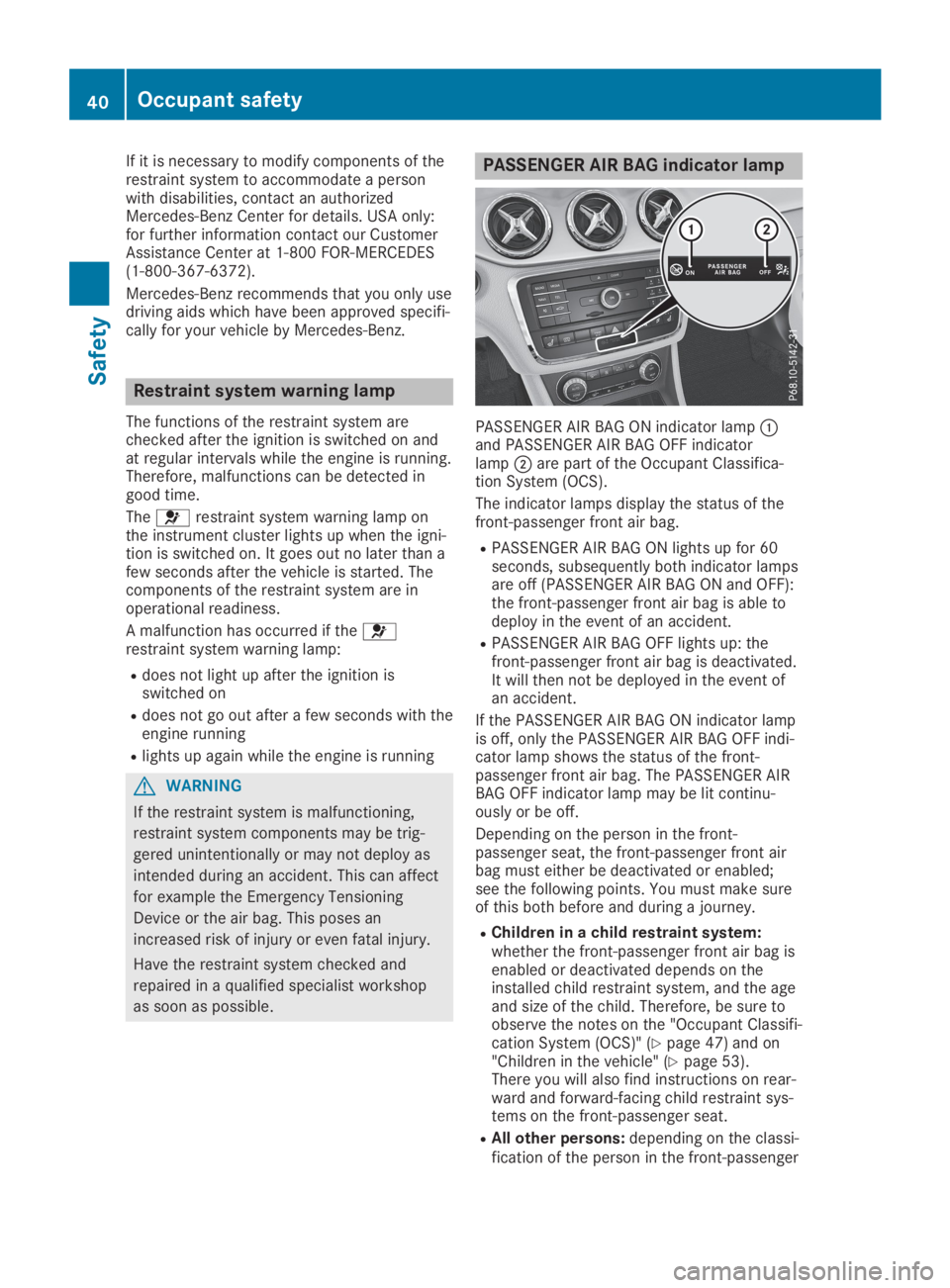
PASSENGER AIR BAG ON indicator lampCand PASSENGER AIR BAG OFF indicatorlampDare part of the Occupant Classifica-tion System (OCS).
The indicator lamps display the status of thefront-passenger front air bag.
RPASSENGER AIR BAG ON lights up for 60seconds, subsequently both indicator lampsare off (PASSENGER AIR BAG ON and OFF):the front-passenger front air bag is able todeploy in the event of an accident.
RPASSENGER AIR BAG OFF lights up: thefront-passenger front air bag is deactivated.It will then not be deployed in the event ofan accident.
If the PASSENGER AIR BAG ON indicator lampis off, only the PASSENGER AIR BAG OFF indi-cator lamp shows the status of the front-passenger front air bag. The PASSENGER AIRBAG OFF indicator lamp may be lit continu-ously or be off.
Depending on the person in the front-passenger seat, the front-passenger front airbag must either be deactivated or enabled;see the following points. You must make sureof this both before and during a journey.
RChildren in a child restraint system:whether the front-passenger front air bag isenabled or deactivated depends on theinstalled child restraint system, and the ageand size of the child. Therefore, be sure toobserve the notes on the "Occupant Classifi-cation System (OCS)" (Ypage 47) and on"Children in the vehicle" (Ypage 53).There you will also find instructions on rear-ward and forward-facing child restraint sys-tems on the front-passenger seat.
RAll other persons:depending on the classi-fication of the person in the front-passenger
40Occupant safety
Safety
Page 46 of 346
XPress the release button in the belt buckle,hold the belt tongue firmly and guide thebelt back.
Belt warning for the driver and front
passenger
Thevseat belt warning lamp in the instru-ment cluster is a reminder that all vehicleoccupants must wear their seat belts. It maylight up continuously or flash. In addition,there may be a warning tone.
Regardless of whether the driver's seat belthas already been fastened, thevseat beltwarning lamp lights up for six seconds eachtime the engine is started. If the front doorsare closed and the driver's or front-passengerseat belt has not been fastened, thevseatbelt warning lamp lights up again after the sixseconds. As soon as the driver's and front-passenger seat belts are fastened or a frontdoor is opened again, thevseat belt warn-ing lamp goes out.
If the driver's seat belt is not fastened afterthe engine is started, an additional warningtone will sound. The warning tone switches offafter six seconds or once the driver's seat beltis fastened.
If the vehicle's speed exceeds 15 mph(25 km/h) once and the driver's and front-passenger seat belts are not fastened, a warn-ing tone sounds. A warning tone also soundswith increasing intensity for 60 seconds oruntil the driver or front passenger have fas-tened their seat belts.
If the driver or front passenger unfasten theirseat belts during the journey, the seat beltwarning is activated again.
Air bags
Introduction
The installation point of an airbag can be rec-ognized by the AIRBAG marking.
An airbag complements the correctly fastenedseat belt. It is no substitute for the seat belt.When deployed, an airbag can increase theprotection provided for the respective vehicleoccupant.
Not all airbags are deployed in an accident.The various airbags work independently ofeach other (Ypage 51).
However, no system available today can com-pletely eliminate injuries and fatalities.
It is also not possible to rule out a risk of injurycaused by an airbag due to the high speed atwhich the airbag must be deployed.
Important safety notes
GWARNING
If you do not sit in the correct seat position,
the air bag cannot protect as intended and
could even cause additional injury when
deployed. This poses an increased risk of
injury or even fatal injury.
To avoid hazardous situations, always make
sure that all of the vehicle's occupants:
Rhave fastened their seat belts correctly,
including pregnant women
Rare sitting correctly and maintain the
greatest possible distance to the air bags
Rfollow the following instructions
Always make sure that there are no objects
between the air bag and the vehicle's occu-
pants.
All vehicle occupants must observe the follow-ing notes to avoid risks posed by the airbagwhen it deploys.
RAdjust the seats properly before beginningyour journey. Always make sure that theseat is in an almost upright position. Thecenter of the head restraint must supportthe head at about eye level.
RMove the driver's and front-passenger seatsas far back as possible. The driver's seatposition must allow the vehicle to be drivensafely.
ROnly hold the steering wheel on the outside.This allows the airbag to be fully deployed.
RAlways lean against the backrest while driv-ing. Do not lean forward or lean against thedoor or side window. You may otherwise bein the deployment area of the airbags.
RAlways keep your feet in the footwell infront of the seat. Do not put your feet on thedashboard, for example. Your feet may oth-erwise be in the deployment area of the air-bag.
RFor this reason, always secure persons lessthan 5 ft (1.50 m) tall in suitable restraint
44Occupant safety
Safety
Page 55 of 346
The rate of vehicle deceleration or accelera-tion and the direction of the force are essen-tially determined by:
Rthe distribution of forces during the collision
Rthe collision angle
Rthe deformation characteristics of the vehi-cle
Rthe characteristics of the object with whichthe vehicle has collided
Factors which can only be seen and measuredafter a collision has occurred do not play adecisive role in the deployment of an air bag.Nor do they provide an indication of air bagdeployment.
The vehicle can be deformed considerably,without an air bag being deployed. This is thecase if only parts which are relatively easilydeformed are affected and the rate of deceler-ation is not high. Conversely, air bags may bedeployed even though the vehicle suffers onlyminor deformation. This is the case if, forexample, very rigid vehicle parts such as longi-tudinal body members are hit, and sufficientdeceleration occurs as a result.
If the restraint system control unit detects aside impact or if the vehicle rolls over, theapplicable components of the restraint systemare deployed independently of each otherdepending on the apparent type of accident.
RSide impact air bags on the side where theimpact takes place, independently of theEmergency Tensioning Device and the useof the seat belt on the driver's seat andouter seats in the second row
The side impact air bag on the frontpassenger side deploys under the followingconditions:
-the OCS system detects that the frontpassenger seat is occupied or
-the seat belt buckle tongue is engaged inthe belt buckle of the front passengerseat
RWindow curtain air bag on the side ofimpact, independently of the use of the seatbelt and independently of whether the front-passenger seat is occupied
REmergency Tensioning Devices, if the sys-tem determines that deployment can offeradditional protection in this situation
RWindow curtain air bags on the driver's andfront-passenger side in certain situationswhen the vehicle rolls over, if the system
determines that deployment can offer addi-tional protection to that provided by theseat belt
iNot all air bags are deployed in an acci-dent. The different air bag systems workindependently of each other.
How the air bag system works is determinedby the severity of the accident detected,especially the vehicle deceleration or accel-eration and the apparent type of accident:
RHead-on collision
RSide impact
RRollover
Automatic measures after an acci-
dent
Immediately after an accident, the followingmeasures are implemented, depending on thetype and severity of the impact:
Rthe hazard warning lamps are switched on
Rthe emergency lighting is activated
Rthe vehicle doors are unlocked
Rthe front side windows are lowered
Rthe engine is switched off and the fuel sup-ply is cut off
Rvehicles with Mercedes me connect: auto-matic emergency call
Children in the vehicle
Important safety notes
Accident statistics show that children securedin the rear seats are safer than childrensecured in the front-passenger seat. For thisreason, Mercedes-Benz strongly advises thatyou install a child restraint system on a rearseat. Children are generally better protectedthere.
If a child younger than twelve years old andunder 5 ft (1.50 m) in height is traveling in thevehicle:
Ralways secure the child in a child restraintsystem suitable for Mercedes-Benz vehicles.The child restraint system must be appropri-ate to the age, weight and size of the child.
Rbe sure to observe the instructions andsafety notes in this section in addition to the
Children in the vehicle53
Safety
Z
Page 56 of 346
child restraint system manufacturer's instal-lation instructions.
Ralways observe the instructions and safetynotes on the "Occupant classification sys-tem (OCS)". (Ypage 47)
GWARNING
If you leave children unsupervised in the
vehicle, they could set it in motion by, for
example:
Rrelease the parking brake.
Rshift the automatic transmission out of
the parking positionP.
Rstart the engine.
In addition, they may operate vehicle equip-
ment and become trapped. There is a risk of
an accident and injury.
When leaving the vehicle, always take the
SmartKey with you and lock the vehicle.
Never leave children unsupervised in the
vehicle.
GWARNING
If persons, particularly children are subjec-
ted to prolonged exposure to extreme heat
or cold, there is a risk of injury, possibly
even fatal. Never leave children unattended
in the vehicle.
GWARNING
If the child restraint system is subjected to
direct sunlight, parts may get very hot. Chil-
dren may burn themselves on these parts,
particularly on the metal parts of the child
restraint system. There is a risk of injury.
If you leave the vehicle, taking the child with
you, always ensure that the child restraint
system is not exposed to direct sunlight.
Protect it with a blanket, for example. If the
child restraint system has been exposed to
direct sunlight, let it cool down before secur-
ing the child in it. Never leave children unat-
tended in the vehicle.
Always ensure that all vehicle occupants havetheir seat belts fastened correctly and are sit-ting properly. Particular attention must be paidto children.
Observe the safety notes on the seat belt(Ypage 41) and the notes on correct use ofseat belts (Ypage 42).
A booster seat may be necessary to achieveproper seat belt positioning for children over40 lbs (18 kg) until they reach a height wherea three-point seat belt can be properly fas-tened without a booster seat.
Special seatbelt retractor
GWARNING
If the seat belt is released while driving, the
child restraint system will no longer be
secured properly. The special seat belt
retractor is disabled and the inertia real
draws in a portion of the seat belt. The seat
belt cannot be immediately refastened.
There is an increased risk of injury, possibly
even fatal.
Stop the vehicle immediately, paying atten-
tion to road and traffic conditions. Reacti-
vate the special seat belt retractor and
secure the child restraint system properly.
All seat belts in the vehicle, except the driver'sseat belt, are equipped with a special seat beltretractor. When activated, the special seat beltretractor ensures that the seat belt cannotslacken once the child seat is secured.
Installing a child restraint system:
XMake sure you observe the child restraintsystem manufacturer's installation instruc-tions.
XPull the seat belt smoothly from the beltoutlet.
XEngage seat belt tongue in belt buckle.
Activating the special seat belt retractor:
XPull the seat belt out fully and let the inertiareel retract it again.While the seat belt is retracting, you shouldhear a ratcheting sound. The special seatbelt retractor is enabled.
XPush the child restraint system down so thatthe seat belt is tight and does not loosen.
54Children in the vehicle
Safety
Page 60 of 346
you install the child restraint system on a rearseat.
If it is absolutely necessary to install a childrestraint system on the front-passenger seat,always observe the instructions and safetynotes on the "Occupant Classification System(OCS)" (Ypage 47).
You can thus avoid the risks that could ariseas a result of:
Ran incorrectly categorized person in thefront-passenger seat
Rdeactivating the front passenger front airbag unintentionally
Rthe unsuitable positioning of the childrestraint system, e.g. too close to the dash-board
Rearward-facing child restraint system
If circumstances require you to secure a childin a rearward-facing child restraint system onthe front-passenger seat, always make surethat the front passenger front air bag is deacti-vated. Only if the PASSENGER AIR BAG OFFindicator lamp is lit continuously (Ypage 40),is the front passenger front air bag deactiva-ted.
Always observe the child restraint systemmanufacturer's installation and operatinginstructions.
Forward-facing child restraint system
If it is absolutely necessary to install aforward-facing child restraint system on thefront-passenger seat, always move the front-passenger seat as far back as possible. Fullyretract the seat cushion length. The entirebase of the child restraint system must alwaysrest on the seat cushion of the front-passenger seat. The backrest of the childrestraint system must lie as flat as possibleagainst the backrest of the front-passengerseat. The child restraint system must nottouch the roof or be subjected to a load by thehead restraint. Adjust the angle of the seatbackrest and the head restraint positionaccordingly. Always make sure that the shoul-der belt strap is correctly routed from the vehi-cle belt outlet to the shoulder belt guide onthe child restraint system. The shoulder beltstrap must be routed forward and down fromthe vehicle belt outlet. If necessary, adjust the
vehicle belt outlet and the front-passengerseat accordingly.
Always observe the child restraint systemmanufacturer's installation and operatinginstructions.
Child-proof locks
Important safety notes
GWARNING
If children are traveling in the vehicle, they
could:
Ropen doors, thus endangering other peo-
ple or road users
Rexit the vehicle and be caught by oncom-
ing traffic
Roperate vehicle equipment and become
trapped
There is a risk of an accident and injury.
Always activate the child-proof locks and
override feature if children are traveling in
the vehicle. When leaving the vehicle,
always take the key with you and lock the
vehicle. Never leave children unattended in
the vehicle.
Override feature for:
Rthe rear doors (Ypage 59)
Rthe rear side windows (Ypage 59)
GWARNING
If you leave children unsupervised in the
vehicle, they could set it in motion by, for
example:
Rrelease the parking brake.
Rshift the automatic transmission out of
the parking positionP.
Rstart the engine.
In addition, they may operate vehicle equip-
ment and become trapped. There is a risk of
an accident and injury.
When leaving the vehicle, always take the
SmartKey with you and lock the vehicle.
Never leave children unsupervised in the
vehicle.
58Children in the vehicle
Safety