check engine MERCEDES-BENZ GLA 2019 Owner's Manual
[x] Cancel search | Manufacturer: MERCEDES-BENZ, Model Year: 2019, Model line: GLA, Model: MERCEDES-BENZ GLA 2019Pages: 346, PDF Size: 16.66 MB
Page 153 of 346
take advantage of engine braking. For thisyou must first activate manual gearshifting.This helps you to avoid overheating thebrakes and wearing them out excessively.
When you take advantage of engine braking,it is possible that a drive wheel will notrotate for some time, e.g. on a slippery roadsurface. This could cause damage to thedrive train. This type of damage is not cov-ered by the Mercedes-Benz warranty.
Briefly depressing the accelerator pedal ondownhill gradients while the manual drive pro-gramMis temporarily activated: the automatictransmission may switch to the last activeautomatic drive programEorS. The automatictransmission may shift to a higher gear. Thiscan reduce the engine's braking effect.
Heavy and light loads
GWARNING
If you rest your foot on the brake pedal
while driving, the braking system can over-
heat. This increases the stopping distance
and can even cause the braking system to
fail. There is a risk of an accident.
Never use the brake pedal as a footrest.
Never depress the brake pedal and the
accelerator pedal at the same time.
!Depressing the brake pedal constantlyresults in excessive and premature wear tothe brake pads.
If the brakes have been subjected to a heavyload, do not stop the vehicle immediately.Drive on for a short while. This allows the air-flow to cool the brakes more quickly.
Wet roads
If you have driven for a long time in heavy rainwithout braking, there may be a delayed reac-tion from the brakes when braking for the firsttime. This may also occur after the vehicle hasbeen washed or driven through deep water.
You have to depress the brake pedal morefirmly. Maintain a greater distance from thevehicle in front.
After driving on a wet road or having the vehi-cle washed, brake firmly while paying attentionto the traffic conditions. This will warm up the
brake discs, thereby drying them more quicklyand protecting them against corrosion.
Limited braking performance on salt-
treated roads
If you drive on salted roads, a layer of salt resi-due may form on the brake discs and brakepads. This can result in a significantly longerbraking distance.
RIn order to prevent any salt build-up, applythe brakes occasionally while paying atten-tion to the traffic conditions.
RCarefully depress the brake pedal and thebeginning and end of a journey.
RMaintain a greater distance to the vehicleahead.
Servicing the brakes
!The brake fluid level may be too low, if:
Rif the red brake warning lamp lights up inthe instrument cluster and
Ryou hear a warning tone while the engineis running
Observe additional warning messages in themultifunction display.
The brake fluid level may be too low due tobrake pad wear or leaking brake lines.
Have the brake system checked immedi-ately. Consult a qualified specialist work-shop to arrange this.
!A function or performance test should onlybe carried out on a 2-axle dynamometer. Ifyou wish to operate the vehicle on such adynamometer, please consult a qualifiedspecialist workshop in advance. You couldotherwise damage the drive train or thebrake system.
!As the ESP®system operates automati-cally, the engine and the ignition must beswitched off (the SmartKey must be in posi-tion
Page 156 of 346
GWARNING
Flammable material such as leaves, grass or
twigs may ignite if they come into contact
with hot parts of the exhaust system. There
is a risk of fire.
When driving on an unpaved road or off-
road, check the vehicle underside regularly.
In particular, remove trapped plant parts or
other flammable material. Contact a quali-
fied specialist workshop immediately if dam-
age is detected.
!There is a risk of damage to the vehicle if:
Rthe vehicle becomes stuck, e.g. on a highcurb or an unpaved road
Ryou drive too fast over an obstacle, e.g. acurb, a speed bump or a pothole in theroad
Ra heavy object strikes the underbody orparts of the chassis
In situations like this, the body, the under-body, chassis parts, wheels or tires could bedamaged without the damage being visible.Components damaged in this way can unex-pectedly fail or, in the case of an accident,no longer withstand the loads they aredesigned to.
If the underbody paneling is damaged, com-bustible materials such as leaves, grass ortwigs can gather between the underbodyand the underbody paneling. If these materi-als come in contact with hot parts of theexhaust system, they can catch fire.
In such situations, have the vehicle checkedand repaired immediately at a qualified spe-cialist workshop. If on continuing your jour-ney you notice that driving safety isimpaired, pull over and stop the vehicleimmediately, paying attention to road andtraffic conditions. In such cases, consult aqualified specialist workshop.
The vehicle is only designed for easily negotia-ble off-road terrain and poor road surfaces.
When driving off-road, substances such assand, mud and water or water mixed with oilmay get into the brakes. This could result in areduced braking effect or in total brake failureand also in increased wear and tear. The brak-ing characteristics change depending on thematerial entering the brakes. Clean the brakesafter driving off-road. If you detect a reduced
braking effect or grinding noises, have thebrake system checked in a qualified specialistworkshop as soon as possible. Adapt yourdriving style to the different braking character-istics.
Driving off-road increases the likelihood ofdamage to the vehicle, which, in turn, can leadto failure of the mechanical assembly or sys-tems. Adapt your driving style to suit the ter-rain conditions. Drive carefully. Have damageto the vehicle rectified immediately at a quali-fied specialist workshop.
Do not shift into transmission position\\when driving off-road. You could lose controlof the vehicle if you attempt to brake the vehi-cle using the service brake. If the gradient istoo steep for your vehicle, drive back down inreverse gear.
General notes
HEnvironmental note
Protection of the environment is of primary
importance. Treat nature with respect.
Observe all prohibiting signs.
Read this section carefully before driving yourvehicle off-road.
Off-road driving is only possible with theON&OFFROAD package.
The following driving systems are speciallyadapted for driving over easily negotiable off-road terrain:
ROff-road program (Ypage 170)
ROff-road ABS (Ypage 60)
ROff-road 4ETS (Ypage 64)
ROff-road ESP®(Ypage 66)
RDSR (Downhill Speed Regulation)(Ypage 169)
Observe the following notes:
RStop the vehicle before starting to drivealong an off-road route. If necessary, acti-vate the off-road program (Ypage 132).
RTo avoid damaging the vehicle, make surethere is always sufficient ground clearance.
RCheck that items of luggage and loads arestowed safely and are well secured(Ypage 255).
RAlways keep the engine running and in gearwhen driving on a downhill gradient. Acti-vate DSR (Ypage 169).
154Driving tips
Driving and parking
Page 157 of 346
RDrive slowly and evenly, if necessary at awalking pace.
REnsure that the wheels are in contact withthe ground at all times.
RDrive with extreme care on unfamiliar off-road routes where visibility is poor. Forsafety reasons, get out of the vehicle firstand survey the off-road route.
RCheck the depth of water before fording riv-ers and streams.
RWatch out for obstacles.
RTake care when turning on an uphill ordownhill slope or when driving across aslope. The vehicle could otherwise tip over.
RAlways keep the side windows and the pan-orama roof with power tilt/sliding panelclosed during the journey.
RDo not deviate from marked routes.
RDo not use the HOLD function when drivingoff-road, on steep uphill or downhill gradi-ents or on slippery or loose surfaces. TheHOLD function cannot hold the vehicle onsuch surfaces.
Checklist before driving off-road
XEngine oil level:check the engine oil leveland add oil if necessary.
When driving on steep gradients, the engineoil level must be sufficiently high to ensure acorrect oil supply in the vehicle.
XWheels and tires:check the tire treaddepth and tire pressure.
XCheck for damage and remove any foreignobjects, e.g. small stones, from the wheels/tires.
XReplace any missing valve caps.
XReplace dented or damaged wheels.
XRims:dented or bent rims can result in aloss of tire pressure and damage the tirebead. Before driving off-road, check thewheels and replace them if necessary.
Checklist after driving off-road
!If you detect damage to the vehicle afterdriving off-road, have the vehicle checkedimmediately at a qualified specialist work-shop.
XDeactivate off-road program (Ypage 132).
XDeactivate DSR (Ypage 169).
XClean the headlamps and rear lights andcheck for damage.
XClean the front and rear license plates.
XClean the wheels and tires with a water jetand remove any foreign objects.
XClean the wheels, wheel housings and thevehicle underside with a water jet; check forany foreign objects and damage.
XCheck whether twigs or other parts of plantshave become trapped. These increase therisk of fire and can damage fuel pipes, brakehoses or the air bellows of the axle jointsand propeller shafts.
XAfter the trip, examine without fail the entireundercarriage, wheels, tires, brakes, body-work structure, steering, chassis andexhaust system for damage.
XAfter driving in sand, mud, gravel, water orsimilar dirty conditions, have the followingchecked and cleaned:
Rbrake discs
Rwheels
Rbrake pads
Raxle joints
XIf you detect strong vibrations after off-roadtravel, check for foreign objects in thewheels and drive train and remove them ifnecessary. Foreign objects can disturb thebalance and cause vibrations.
Driving over poor road surfaces places greaterdemands on your vehicle than driving on nor-mal roads. After driving off-road, check thevehicle. This allows you to detect damagepromptly and reduce the risk of an accident toyourself and other road users.
Driving on sand
Observe the following rules when driving onsand:
RActivate the off-road program (Ypage 132).
RAvoid high engine speeds.
RUse the left-hand steering wheel paddleshifter to shift to a lower gear appropriate tothe terrain.
Drivingtips155
Driving an d parking
Z
Page 158 of 346
RDrive quickly to overcome the rolling resist-ance. Otherwise the vehicle's wheels couldbecome stuck in loose ground.
RDrive in the tracks of other vehicles if possi-ble. Make sure that:
-the tire ruts are not too deep.
-the sand is sufficiently firm.
-the ground clearance of the vehicle is suf-ficient.
Tire ruts and gravel roads
!Check that the ruts are not too deep andthat your vehicle has sufficient clearance.Otherwise, your vehicle could be damagedor bottom out and get stuck.
Observe the following rules when driving alongruts in off-road terrain or on roads with loosegravel:
RActivate the off-road program (Ypage 132).
RAvoid high engine speeds.
RShift to a lower gear using the left-handsteering wheel paddle shifter.
RDrive slowly.
RWhere ruts are too deep, drive with thewheels of one side on the center grassyarea, if possible.
Traveling uphill
Approach/departure angle
GWARNING
If you drive on a steep incline at an angle or
turn when driving on an incline, the vehicle
could slip sideways, tip and rollover. There is
a risk of an accident.
Always drive on a steep incline in the line of
fall (straight up or down) and do not turn the
vehicle.
RObserve the warnings for off-road driving(Ypage 153).
RFollow the line of fall when driving on slopesand steep inclines.
RBefore driving on extreme uphill and down-hill gradients, select the off-road program(Ypage 132).
RDrive slowly.
RAccelerate gently and make sure that thewheels are gripping.
RAvoid high engine speeds, except when driv-ing on sandy and muddy routes with highdriving resistance.
RUse the left-hand steering wheel paddleshifter to shift to a lower gear appropriate tothe gradient.
RUse the left-hand steering wheel paddleshifter to shift into a lower gear in good timeon long and steep downhill gradients.
Hill start assist will aid you when pulling awayon a hill. For further information about hillstart assist, see (Ypage 128).
Do not shift into transmission position\\when driving off-road. You could lose controlof the vehicle if you attempt to brake the vehi-cle using the service brake. If the gradient istoo steep for your vehicle, drive back down inreverse gear.
Always observe the approach/departure anglevalues (Ypage 340).
Maximum gradient-climbing capability
Always observe the maximum gradient climb-ing ability values (Ypage 340).
Hilltops
When driving up an uphill gradient, slightlyreduce pressure on the accelerator immedi-ately before reaching the brow of the hill.Make use of the vehicle's own impetus totravel over the brow.
This style of driving prevents:
Rthe vehicle from lifting off the ground on thebrow of a hill
Rthe vehicle from traveling too quickly downthe other side
Driving downhill
RDrive slowly.
RDo not drive at an angle down steepinclines. Steer into the line of fall and drivewith the front wheels aligned straight. Oth-erwise, the vehicle could slip sideways, tipand rollover.
RShift to a lower gear using the left-handsteering wheel paddle shifter before tacklingsteep downhill gradients.
156Drivingtips
Driving an d parking
Page 159 of 346
RActivate DSR. If this is not sufficient, brakegently. When doing so, make sure that thevehicle is facing in the direction of the lineof fall.
RCheck that the brakes are working normallyafter a long downhill stretch.
Off-road ABS is activated when the off-roadprogram is selected.
At speeds below 18 mph (30 km/h), the frontwheels lock cyclically during braking. The dig-ging-in effect achieved in the process reducesthe stopping distance on off-road terrain. Thesteerability of the vehicle is considerablyreduced if the wheels lock.
Driving systems
Cruise control
General notes
Cruise control maintains a constant roadspeed for you. It brakes automatically in orderto avoid exceeding the set speed. On long andsteep downhill gradients, especially if the vehi-cle is laden, you must select a low gear ingood time. You need to shift manually usingthe steering wheel paddle shifters beforehand.By doing so, you will make use of the brakingeffect of the engine. This relieves the load onthe brake system and prevents the brakesfrom overheating and wearing too quickly.
When the engine is running, you can use thecruise control lever to limit the speed to anyspeed between 20 mph (30 km/h) and thetechnically permitted maximum speed of thevehicle.
Use cruise control if road and traffic condi-tions make it appropriate to maintain a steadyspeed for a prolonged period.
The speed indicated in the speedometer maydiffer slightly from the speed stored.
Important safety notes
If you fail to adapt your driving style, cruisecontrol can neither reduce the risk of an acci-dent nor override the laws of physics. Cruisecontrol cannot take into account the road,traffic and weather conditions. Cruise controlis only an aid. You are responsible for the dis-tance to the vehicle in front, for vehicle speed,
for braking in good time and for staying in yourlane.
Do not use cruise control:
Rin road and traffic conditions which do notallow you to maintain a constant speed, e.g.in heavy traffic or on winding roads
Ron slippery road surfaces. Braking or accel-erating could cause the drive wheels to losetraction and the vehicle could then skid
Rin poor visibility, e.g. due to fog, heavy rainor snow
If there is a change of drivers, advise the newdriver of the speed stored.
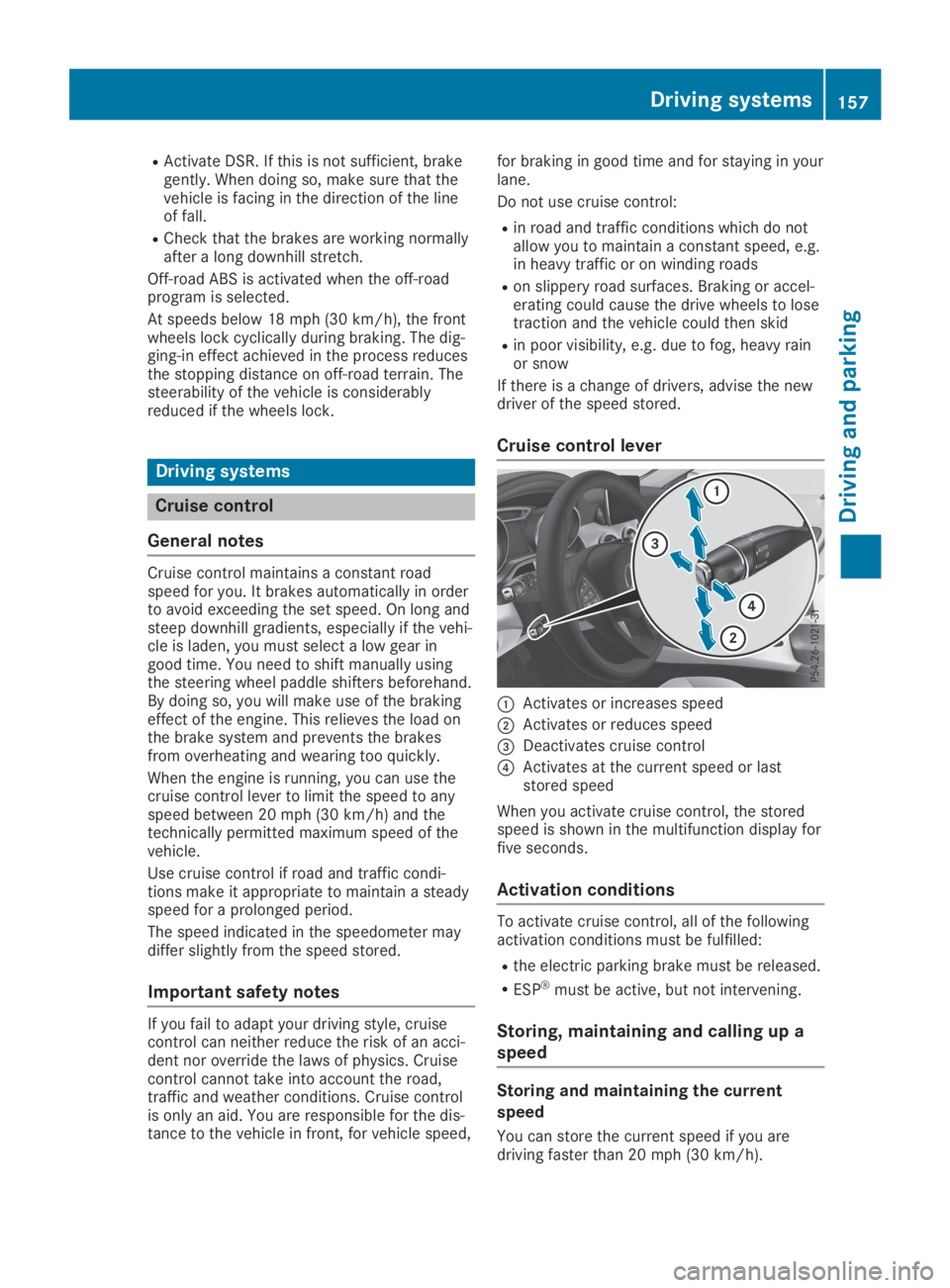
Cruise control lever
CActivates or increases speed
DActivates or reduces speed
Page 190 of 346
Important safety notes
GWARNING
If you operate information systems and com-
munication equipment integrated in the
vehicle when driving, you may be distracted
from the traffic situation. You could also
lose control of the vehicle. There is a risk of
an accident.
Only operate this equipment when the traffic
situation permits. If you are not sure that
this is possible, park the vehicle paying
attention to traffic conditions and operate
the equipment when the vehicle is station-
ary.
You must observe the legal requirements forthe country in which you are currently drivingwhen operating the on-board computer.
GWARNING
If the instrument cluster has failed or mal-
functioned, you may not recognize function
restrictions in systems relevant to safety.
The operating safety of your vehicle may be
impaired. There is a risk of an accident.
Drive on carefully. Have the vehicle checked
at a qualified specialist workshop immedi-
ately.
The on-board computer only shows messagesor warnings from certain systems in the multi-function display. You should therefore makesure your vehicle is operating safely at alltimes.
If the operating safety of your vehicle isimpaired, pull over as soon as it is safe to doso. Contact a qualified specialist workshop.
For an overview, see the instrument panelillustration (Ypage 32).
Displays and operation
Instrument cluster lighting
The light sensor in the instrument cluster auto-matically controls the brightness of the multi-function display. In daylight, the displays in theinstrument cluster are not illuminated.
The lighting in the instrument cluster, in thedisplays and the controls in the vehicle interiorcan be adjusted using the brightness controlknob.
The brightness control knob is located on thebottom left of the instrument cluster(Ypage 32).
XTurn the brightness control knob clockwiseor counter-clockwise.If the light switch is set to theX,`orXposition, the brightness is dependentupon the brightness of the ambient light.
Speedometer with segments
The speedometer is only divided into seg-ments in vehicles with Active Distance AssistDISTRONIC.
The segments in the speedometer indicatewhich speed range is available.
RActive Distance Assist DISTRONIC activated(Ypage 158):
One or two segments in the set speed rangelight up.
RActive Distance Assist DISTRONIC detects avehicle in front moving more slowly than thestored speed:
The segments between the speed of thevehicle in front and the stored speed lightup.
Tachometer
!Do not drive in the overrevving range, asthis could damage the engine.
The red band in the tachometer indicates theengine's overrevving range.
The engine is limited within a range to protectthe engine when the red band is reached.
Outside temperature display
You should pay special attention to road con-ditions when temperatures are around freezingpoint.
Bear in mind that the outside temperature dis-play indicates the temperature measured anddoes not record the road temperature.
188Displays and operation
On-board computer and displays
Page 278 of 346
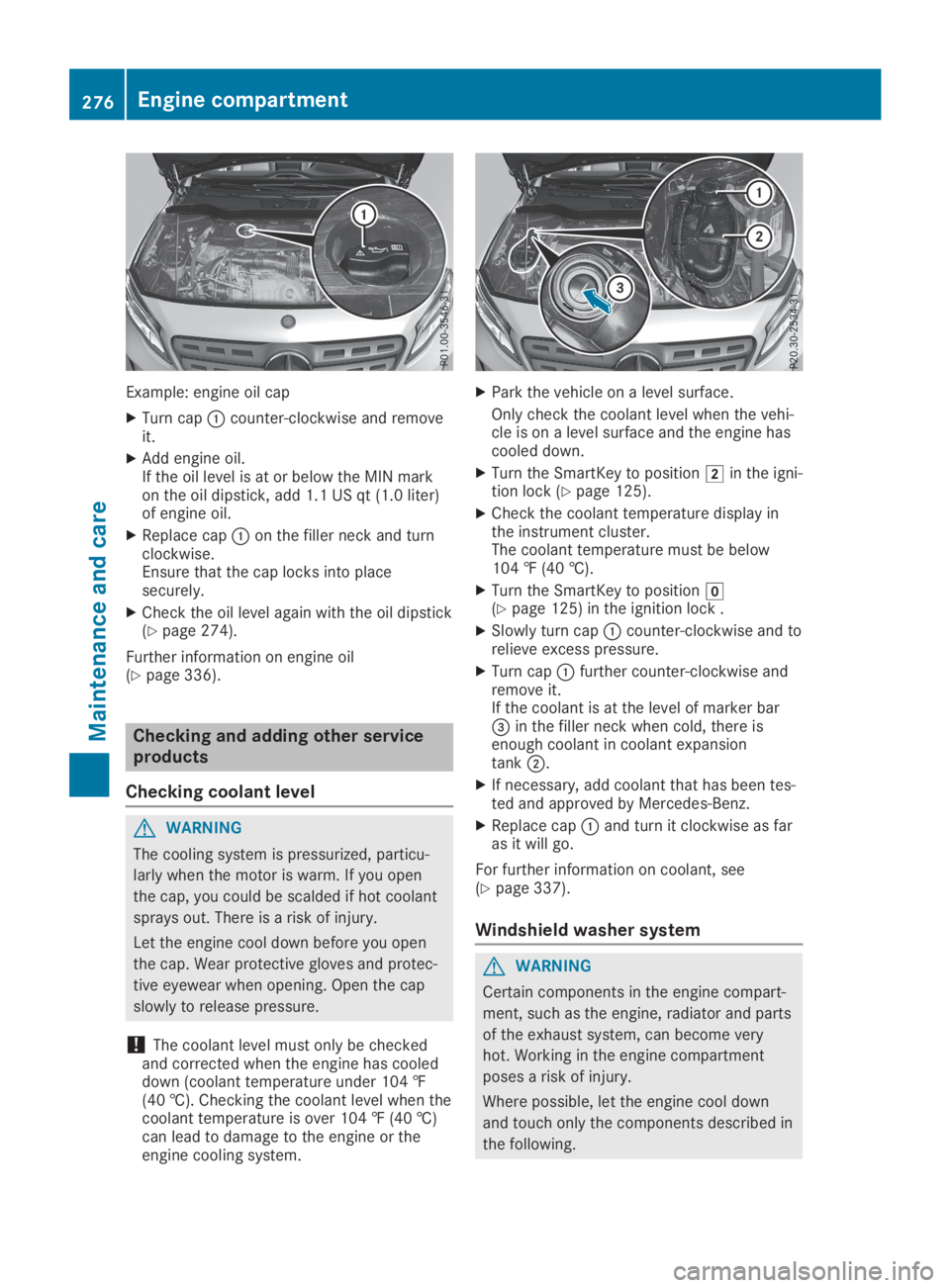
Example: engine oil cap
XTurn capCcounter-clockwise and removeit.
XAdd engine oil.If the oil level is at or below the MIN markon the oil dipstick, add 1.1 US qt (1.0 liter)of engine oil.
XReplace capCon the filler neck and turnclockwise.Ensure that the cap locks into placesecurely.
XCheck the oil level again with the oil dipstick(Ypage 274).
Further information on engine oil(Ypage 336).
Checking and adding other service
products
Checking coolant level
GWARNING
The cooling system is pressurized, particu-
larly when the motor is warm. If you open
the cap, you could be scalded if hot coolant
sprays out. There is a risk of injury.
Let the engine cool down before you open
the cap. Wear protective gloves and protec-
tive eyewear when opening. Open the cap
slowly to release pressure.
!The coolant level must only be checkedand corrected when the engine has cooleddown (coolant temperature under 104 ‡(40 †). Checking the coolant level when thecoolant temperature is over 104 ‡ (40 †)can lead to damage to the engine or theengine cooling system.
XPark the vehicle on a level surface.
Only check the coolant level when the vehi-cle is on a level surface and the engine hascooled down.
XTurn the SmartKey to positionHin the igni-tion lock (Ypage 125).
XCheck the coolant temperature display inthe instrument cluster.The coolant temperature must be below104 ‡ (40 †).
XTurn the SmartKey to positionZ(Ypage 125) in the ignition lock .
XSlowly turn capCcounter-clockwise and torelieve excess pressure.
XTurn capCfurther counter-clockwise andremove it.If the coolant is at the level of marker bar
Page 280 of 346
Displaying service messages
XSwitch on the ignition.
XPress theYorebutton to select theServ.Serv.menu.
XPress thecordbutton to select theASSYST PLUSASSYST PLUSsubmenu and confirm bypressing thevbutton.The service due date appears in the multi-function display.
Information about Service
Resetting the ASSYST PLUS service
interval display
!If the ASSYST PLUS service interval dis-play has been inadvertently reset, this set-ting can be corrected at a qualified special-ist workshop.
Have service work carried out as describedin the Maintenance Booklet. This may other-wise lead to increased wear and damage tothe major assemblies or the vehicle.
A qualified specialist workshop, e.g. an author-ized Mercedes-Benz Center, will reset theASSYST PLUS service interval display after theservice work has been carried out. You canalso obtain further information on mainte-nance work, for example.
Special service requirements
The specified maintenance interval takes onlythe normal operation of the vehicle intoaccount. Under arduous operating conditionsor increased load on the vehicle, maintenancework must be carried out more frequently, forexample:
Rregular city driving with frequent intermedi-ate stops
Rif the vehicle is primarily used to travel shortdistances
Ruse in mountainous terrain or on poor roadsurfaces
Rif the engine is often left idling for long peri-ods
Rin particularly dusty conditions, or if air-recirculation mode is frequently used
In these or similar operating conditions, havethe interior filter, engine air cleaner, engine oil
and oil filter, for example, changed more fre-quently. Under arduous operating conditions,the tires must be checked more often. Furtherinformation can be obtained at a qualified spe-cialist workshop, e.g. an authorized Mercedes-Benz Center.
Driving abroad
An extensive Mercedes-Benz Service networkis also available in other countries. You canobtain further information from any authorizedMercedes-Benz Center.
Care
General notes
HEnvironmental note
Dispose of empty packaging and cleaning
cloths in an environmentally responsible
manner.
!When cleaning your car, do not use:
Rdry, coarse or hard cloths
Rabrasive cleaning agents
Rsolvents
Rcleaning agents containing solvents
Do not scrub.
Do not touch the surfaces and films withhard objects, e.g. rings or ice scrapers. Oth-erwise, you may scratch or damage the sur-faces and films.
!Do not park your vehicle for a long periodof time directly after cleaning, particularlyafter cleaning the wheel rim with wheelcleaner. Wheel cleaner can lead to theincreased corrosion of the brake discs andpads. Therefore, drive for a few minutesafter cleaning. By heating up the brakes, thebrake discs and pads dry. The vehicle canthen be parked for a long period of time.
Regular care of your vehicle is a condition forretaining the quality in the long term.
Use care products and cleaning agents recom-mended and approved by Mercedes-Benz.
278Care
Maintenance and care
Page 290 of 346
XSwitch off the engine.
XVehicles without KEYLESS-GO:removethe SmartKey from the ignition lock.
XVehicles with KEYLESS-GO start-func-tion or KEYLESS-GO:open the driver'sdoor.The vehicle electronics are now in positionZ. This is the same as the SmartKey havingbeen removed.
XVehicles with KEYLESS-GO start-func-tion or KEYLESS-GO:remove the Start/Stop button from the ignition lock(Ypage 125).
XMake sure that the engine cannot be startedvia your smartphone (Ypage 126).
XMake sure that the passengers are notendangered as they do so. Make sure thatno one is near the danger area while awheel is being changed. Anyone who is notdirectly assisting in the wheel changeshould, for example, stand behind the bar-rier.
XGet out of the vehicle. Pay attention to traf-fic conditions when doing so.
XClose the driver's door.
MOExtended tires (tires with run-flat
properties)
General notes
With MOExtended tires (tires with run flatcharacteristics), you can continue to drive yourvehicle even if there is a total loss of pressurein one or more tires. The affected tire must notshow any clearly visible damage.
You can recognize an MOExtended tire by theMOExtended marking which appears on thesidewall of the tire. You will find this markingnext to the tire size designation, the load-bear-ing capacity and the speed index(Ypage 320).
MOExtended tires may be used only in con-junction with an activated tire pressure losswarning system (Canada only) or tire pressuremonitor (USA only).
If a pressure loss warning messageappears in the multifunction display:
Robserve the instructions in the display mes-sages (Ypage 223).
Rcheck the tire for damage
Rif driving on, observe the following notes
The driving distance possible in run-flat modeis approximately 50 miles (80 km) when thevehicle is partially laden. When the vehicle isfully laden it is approximately 19 miles(30 km).
In addition to the vehicle load, the driving dis-tance possible depends upon:
RVehicle speed
RRoad condition
ROutside temperature
The driving distance possible in run-flat modemay be reduced by extreme driving conditionsor maneuvers, or it can be increased through amoderate style of driving.
The driving distance possible in run-flat modeis counted from the moment the tire pressureloss warning appears in the multifunction dis-play.
You must not exceed the maximum permissi-ble speed for limp-home mode of 50 mph(80 km/h).
When replacing one or all tires, please observethe following specifications for your vehicle'stires:
RSize
RType and
RThe "MOExtended" marking
If a tire has gone flat and cannot be replacedwith an MOExtended tire, a standard tire maybe used as a temporary measure. Make surethat you use the proper size and type (summeror winter tire).
Vehicles equipped with MOExtended tires arenot equipped with a TIREFIT kit at the factory.It is therefore recommended that you addition-ally equip your vehicle with a TIREFIT kit if youmount tires that do not feature run-flat charac-teristics, e.g. winter tires. A TIREFIT kit may beobtained from a qualified specialist workshop.
288Flat tire
Roadside Assistance
Page 295 of 346
or sparks are created, the hydrogen gas can
ignite. There is a risk of an explosion.
RMake sure that the positive terminal of a
connected battery does not come into
contact with vehicle parts.
RNever place metal objects or tools on a
battery.
RIt is important that you observe the
described order of the battery terminals
when connecting and disconnecting a bat-
tery.
RWhen jump-starting, make sure that the
battery poles with identical polarity are
connected.
RIt is particularly important to observe the
described order when connecting and dis-
connecting the jumper cables.
RNever connect or disconnect the battery
terminals while the engine is running.
GWARNING
Battery acid is caustic. There is a risk of
injury.
Avoid contact with skin, eyes or clothing. Do
not inhale any battery gases. Do not lean
over the battery. Keep children away from
batteries. Wash away battery acid immedi-
ately with plenty of clean water and seek
medical attention.
HEnvironmental note
Batteries contain pollutants.
It is illegal to dispose of
them with the household
rubbish. They must be col-
lected separately and dis-
posed of in an environmen-
tally responsible recycling
system.
Dispose of batteries in an
environmentally responsible
manner. Take discharged
batteries to a qualified spe-
cialist workshop or to a col-
lection point for used bat-
teries.
!Have the battery regularly checked at aqualified specialist workshop.
Comply with the service intervals in theMaintenance Booklet, or contact a qualifiedspecialist workshop for more information.
!You should have all work involving the bat-tery carried out at a qualified specialistworkshop. In the exceptional case that it isnecessary for you to disconnect the batteryyourself, make sure that:
Rswitch off the engine and remove theSmartKey. On vehicles with KEYLESS-GO,make sure that the ignition is switchedoff. Check that all the indicator lamps inthe instrument cluster are off. Otherwise,electronic components, such as the alter-nator, may be damaged.
Ryou first remove the negative terminalclamp and then the positive terminalclamp. Never swap the terminal clamps.Otherwise, the vehicle's electronic systemmay be damaged.
Rin vehicles with automatic transmission,the transmission is locked in position]after the battery is disconnected. Thevehicle is secured against rolling away.You can then no longer move the vehicle.
The battery and the cover of the positive ter-minal clamp must be installed securely dur-ing operation.
Comply with safety precautions and take pro-tective measures when handling batteries.
Risk of explosion.
Fire, open flames and smoking areprohibited when handling the bat-tery. Avoid creating sparks.
Battery acid is caustic. Avoid con-tact with skin, eyes or clothing.
Wear suitable protective clothing,especially gloves, apron and face-guard.
Rinse any acid spills immediatelywith clear water. Contact a physi-cian if necessary.
Battery (vehicle)293
Roadside Assistance
Z