lock MERCEDES-BENZ GLA 2019 Owner's Manual
[x] Cancel search | Manufacturer: MERCEDES-BENZ, Model Year: 2019, Model line: GLA, Model: MERCEDES-BENZ GLA 2019Pages: 346, PDF Size: 16.66 MB
Page 60 of 346
you install the child restraint system on a rearseat.
If it is absolutely necessary to install a childrestraint system on the front-passenger seat,always observe the instructions and safetynotes on the "Occupant Classification System(OCS)" (Ypage 47).
You can thus avoid the risks that could ariseas a result of:
Ran incorrectly categorized person in thefront-passenger seat
Rdeactivating the front passenger front airbag unintentionally
Rthe unsuitable positioning of the childrestraint system, e.g. too close to the dash-board
Rearward-facing child restraint system
If circumstances require you to secure a childin a rearward-facing child restraint system onthe front-passenger seat, always make surethat the front passenger front air bag is deacti-vated. Only if the PASSENGER AIR BAG OFFindicator lamp is lit continuously (Ypage 40),is the front passenger front air bag deactiva-ted.
Always observe the child restraint systemmanufacturer's installation and operatinginstructions.
Forward-facing child restraint system
If it is absolutely necessary to install aforward-facing child restraint system on thefront-passenger seat, always move the front-passenger seat as far back as possible. Fullyretract the seat cushion length. The entirebase of the child restraint system must alwaysrest on the seat cushion of the front-passenger seat. The backrest of the childrestraint system must lie as flat as possibleagainst the backrest of the front-passengerseat. The child restraint system must nottouch the roof or be subjected to a load by thehead restraint. Adjust the angle of the seatbackrest and the head restraint positionaccordingly. Always make sure that the shoul-der belt strap is correctly routed from the vehi-cle belt outlet to the shoulder belt guide onthe child restraint system. The shoulder beltstrap must be routed forward and down fromthe vehicle belt outlet. If necessary, adjust the
vehicle belt outlet and the front-passengerseat accordingly.
Always observe the child restraint systemmanufacturer's installation and operatinginstructions.
Child-proof locks
Important safety notes
GWARNING
If children are traveling in the vehicle, they
could:
Ropen doors, thus endangering other peo-
ple or road users
Rexit the vehicle and be caught by oncom-
ing traffic
Roperate vehicle equipment and become
trapped
There is a risk of an accident and injury.
Always activate the child-proof locks and
override feature if children are traveling in
the vehicle. When leaving the vehicle,
always take the key with you and lock the
vehicle. Never leave children unattended in
the vehicle.
Override feature for:
Rthe rear doors (Ypage 59)
Rthe rear side windows (Ypage 59)
GWARNING
If you leave children unsupervised in the
vehicle, they could set it in motion by, for
example:
Rrelease the parking brake.
Rshift the automatic transmission out of
the parking positionP.
Rstart the engine.
In addition, they may operate vehicle equip-
ment and become trapped. There is a risk of
an accident and injury.
When leaving the vehicle, always take the
SmartKey with you and lock the vehicle.
Never leave children unsupervised in the
vehicle.
58Children in the vehicle
Safety
Page 61 of 346
GWARNING
If persons, particularly children are subjec-
ted to prolonged exposure to extreme heat
or cold, there is a risk of injury, possibly
even fatal. Never leave children unattended
in the vehicle.
GWARNING
If the child restraint system is subjected to
direct sunlight, parts may get very hot. Chil-
dren may burn themselves on these parts,
particularly on the metal parts of the child
restraint system. There is a risk of injury.
If you leave the vehicle, taking the child with
you, always ensure that the child restraint
system is not exposed to direct sunlight.
Protect it with a blanket, for example. If the
child restraint system has been exposed to
direct sunlight, let it cool down before secur-
ing the child in it. Never leave children unat-
tended in the vehicle.
Child-proof locks for the rear doors
You secure each door individually with thechild-proof locks on the rear doors. A doorsecured with a child-proof lock cannot beopened from inside the vehicle. When the vehi-cle is unlocked, the door can be opened fromthe outside.
XTo activate:press the child-proof lock leverup in the direction of arrowC.
XMake sure that the child-proof locks areworking properly.
XTo deactivate:press the child-proof locklever down in the direction of arrowD.
Override feature for the rear side win-
dows
XTo activate/deactivate:press buttonC.If indicator lampDis lit, operation of therear side windows is disabled. Operation isonly possible using the switches in the driv-er's door. If indicator lampDis off, opera-tion is possible using the switches in therear compartment.
Pets in the vehicle
GWARNING
If you leave animals unsupervised or unse-
cured in the vehicle, they may press buttons
or switches, for instance.
In this way, animals may:
Ractivate vehicle equipment and become
trapped, for example
Rswitch systems on or off and thereby
endanger other road users
Furthermore, unsecured animals may be
flung around inside the vehicle in the event
of an accident or abrupt steering or braking
maneuver, and thereby injure vehicle occu-
pants. There is a risk of accident and injury.
Never leave animals unattended in the vehi-
cle.
Always secure animals properly when driv-
ing, for instance with a suitable pet carrier.
Pets in the vehicle59
Safety
Z
Page 62 of 346
Driving safety systems
Overview of driving safety systems
In this section, you will find information aboutthe following driving safety systems:
RABS (Anti-lockBrakingSystem)(Ypage 60)
RBAS (BrakeAssistSystem) (Ypage 61)
RActive Brake Assist (Ypage 61)
RESP®(ElectronicStabilityProgram)(Ypage 63)
REBD (ElectronicBrake forceDistribution)(Ypage 67)
RADAPTIVE BRAKE (Ypage 67)
RSTEER CONTROL (Ypage 67)
Important safety notes
If you fail to adapt your driving style or if youare inattentive, the driving safety systems canneither reduce the risk of an accident noroverride the laws of physics. Driving safetysystems are merely aids designed to assistdriving.
You are responsible for maintaining the dis-tance to the vehicle in front, for vehicle speed,for braking in good time, and for staying inlane. Always adapt your driving style to suitthe prevailing road and weather conditions andmaintain a safe distance from the vehicle infront. Drive carefully.
The driving safety systems described onlywork as effectively as possible when there isadequate contact between the tires and theroad surface. Please pay special attention tothe notes on tires, recommended minimumtire tread depths, etc. (Ypage 305).
In wintry driving conditions, always use wintertires (M+S tires) and if necessary, snowchains. Only in this way will the driving safetysystems described in this section work aseffectively as possible.
ABS (Anti-lock Braking System)
General information
ABS regulates brake pressure in such a waythat the wheels do not lock when you brake.
This allows you to continue steering the vehi-cle when braking.
The%ABS warning lamp in the instrumentcluster lights up when the ignition is switchedon. It goes out when the engine is running.
ABS works from a speed of about 5 mph(8 km/h), regardless of road-surface condi-tions. ABS works on slippery surfaces, evenwhen you only brake gently.
Important safety notes
iObserve the "Important safety notes" sec-tion (Ypage 60).
GWARNING
If ABS is malfunctioning, the wheels could
lock when braking. The steerability and
braking characteristics would be severely
affected. There is an increased danger of
skidding and accidents.
Drive on carefully. Have ABS checked imme-
diately at a qualified specialist workshop.
When ABS is malfunctioning, other systems,including driving safety systems, will alsobecome inoperative. Observe the informationon the ABS warning lamp (Ypage 233) anddisplay messages which may be shown in theinstrument cluster (Ypage 204).
Braking
XIf ABS intervenes:continue to depress thebrake pedal vigorously until the braking sit-uation is over.
XTo make a full brake application:depressthe brake pedal with full force.
If ABS intervenes when braking, you will feel apulsing in the brake pedal.
The pulsating brake pedal can be an indicationof hazardous road conditions, and functions asa reminder to take extra care while driving.
Off-road ABS
An ABS system specifically suited to off-roadterrain is activated automatically once the off-road program is activated (Ypage 170).
At speeds below 20 mph (30 km/h), the frontwheels lock cyclically during braking. The dig-ging-in effect achieved in the process reduces
60Driving safety systems
Saf ety
Page 63 of 346
the stopping distance on off-road terrain. Thislimits steering capability.
BAS (Brake Assist System)
General information
BAS operates in emergency braking situations.If you depress the brake pedal quickly, BASautomatically boosts the braking force, thusshortening the stopping distance.
Important safety notes
iObserve the "Important safety notes" sec-tion (Ypage 60).
GWARNING
If BAS is malfunctioning, the braking dis-
tance in an emergency braking situation is
increased. There is a risk of an accident.
In an emergency braking situation, depress
the brake pedal with full force. ABS prevents
the wheels from locking.
Braking
XKeep the brake pedal firmly depressed untilthe emergency braking situation is over.ABS prevents the wheels from locking.
The brakes will function as usual once yourelease the brake pedal. BAS is deactivated.
Active Brake Assist
General information
iObserve the "Important safety notes" sec-tion (Ypage 60).
Active Brake Assist consists of a distancewarning function with an autonomous brakingfunction and a situation-dependent brakeboosting effect.
Active Brake Assist can help you to minimizethe risk of a collision with the vehicle travelingin front or reduce the effects of such a colli-sion.
If Active Brake Assist detects that there is arisk of collision, you will be warned visuallyand acoustically. If you do not react to the vis-
ual collision warning or the warning tone,autonomous braking can be initiated in criticalsituations. If you apply the brake yourself in acritical situation, Active Brake Assist supportsyou with a situation-dependent brake boostingeffect.
Important safety notes
Detection of hazardous situations can be par-ticularly impaired if:
RThere is dirt on the sensors or anything elsecovering the sensors
RThere is snow or heavy rain
RThere is interference by other radar sources
RThere are strong radar reflections, for exam-ple in parking garages
RA narrow vehicle is traveling in front, e.g. amotorbike
RA vehicle is traveling in front on a differentline
RYou are driving a new vehicle or servicing onthe Active Brake Assist system has justbeen carried out
Observe the important safety notes in the"Breaking-in notes" section (Ypage 124).
Following damage to the front end of the vehi-cle, have the configuration and operation ofthe radar sensor checked at a qualified spe-cialist workshop. This also applies to collisionsat low speeds where no visible damage to thefront of the vehicle is apparent.
Activating/deactivating
Active Brake Assist is active after every igni-tion cycle.
You can activate or deactivate Active BrakeAssist (Ypage 197) in the on-board com-puter. When deactivated, the distance warningfunction and the autonomous braking functionare also deactivated.
If Active Brake Assist is deactivated, the
Page 65 of 346
Situation-dependent braking assis-
tance
General information
iObserve the "Important safety notes" sec-tion (Ypage 60).
With the help of the radar sensor system,Active Brake Assist can detect obstacles thatare in the path of your vehicle for an extendedperiod of time.
If Active Brake Assist detects a risk of collisionwith the vehicle in front, it calculates the brakepressure necessary to avoid a collision. If youapply the brakes forcefully, situation-depend-ent braking assistance adapts to the situationand automatically increases the brake pres-sure to a degree appropriate to the traffic sit-uation.
Situation-dependent braking assistance pro-vides braking assistance in hazardous situa-tions at speeds above 4 mph (7 km/h). It usesradar sensor technology to assess the trafficsituation.
Situation-dependent braking assistance iscapable of reacting to moving objects thathave already been detected as such at leastonce over the period of observation, up tovehicle speeds of around 155 mph(250 km/h).
Situation-dependent braking assistance canalso detect stationary objects, up to vehiclespeeds of around 44 mph (70 km/h).
XKeep the brake pedal depressed until theemergency braking situation is over.ABS prevents the wheels from locking.
The brakes will work normally again if:
Ryou release the brake pedal
Rthere is no longer any danger of a collision
Rno obstacle is detected in front of your vehi-cle
Situation-dependent braking assistance is thendeactivated.
Important safety notes
iObserve the "Important safety notes" sec-tion for driving safety systems (Ypage 60).
GWARNING
Active Brake Assist does not react:
Rto persons, bicycles, motorcycles or ani-
mals
Rto approaching vehicles
Rto cross traffic
Ron bends
As a result, Active Brake Assist cannot inter-
vene in all critical situations. There is a risk
of an accident.
Always pay careful attention to the traffic
situation and be prepared to brake.
GWARNING
Adaptive Brake Assist cannot always clearly
identify objects and complex traffic situa-
tions.
In such cases, Adaptive Brake Assist might:
Rintervene unnecessarily
Rnot intervene
There is a risk of an accident.
Always pay careful attention to the traffic
situation and be ready to brake. Terminate
the intervention in a non-critical driving sit-
uation.
Due to the nature of the system, complex butnon-critical driving conditions may also causeActive Brake Assist to intervene.
Even if Active Brake Assist is not available dueto a malfunction in the radar sensor system,the brake system is still available with fullbrake boosting effect and BAS.
ESP®(Electronic Stability Program)
General notes
iObserve the "Important safety notes" sec-tion (Ypage 60).
ESP®monitors driving stability and traction,i.e. power transmission between the tires andthe road surface.
If ESP®detects that the vehicle is deviatingfrom the direction desired by the driver, one ormore wheels are braked to stabilize the vehi-
Driving safety systems63
Safety
Z
Page 69 of 346
swerving. Trailers with a high center of grav-
ity can tip over before ESP®can detect this.
There is a risk of an accident.
Always adapt your driving style to the pre-
vailing road and weather conditions.
If your vehicle with trailer (vehicle/trailer com-bination) begins to lurch, you can only stabilizethe vehicle/trailer combination by depressingthe brake firmly.
ESP®trailer stabilization is active abovespeeds of about 65 km/h.
ESP®trailer stabilization does not work if
ESP®is deactivated or disabled because of amalfunction.
EBD (electronic brake force distribu-
tion)
General information
EBD monitors and controls the brake pressureon the rear wheels to improve driving stabilitywhile braking.
Important safety notes
iObserve the "Important safety notes" sec-tion (Ypage 60).
GWARNING
If EBD is malfunctioning, the rear wheels can
lock, e.g. under full braking. This increases
the risk of skidding and an accident.
You should therefore adapt your driving
style to the different handling characteris-
tics. Have the brake system checked at a
qualified specialist workshop.
Please observe the information on warningand indicator lamps (Ypage 233)
(Ypage 233) as well as on display messages(Ypage 206).
ADAPTIVE BRAKE
ADAPTIVE BRAKE enhances braking safety andoffers increased braking comfort. In additionto the braking function, ADAPTIVE BRAKE also
has the HOLD function (Ypage 165) and hillstart assist (Ypage 128).
STEER CONTROL
General information
STEER CONTROL helps you by transmitting anoticeable steering force to the steering wheelin the direction required for vehicle stabiliza-tion.
This steering assistance is provided in particu-lar if:
Rboth right wheels or both left wheels are ona wet or slippery road surface when youbrake
Rthe vehicle begins to skid
Important safety notes
iObserve the "Important safety notes" sec-tion (Ypage 60).
No steering assistance is provided from STEERCONTROL, if:
RESP®is malfunctioning
Rthe steering is malfunctioning
If ESP®is malfunctioning, you will be assistedfurther by the electrical power steering.
Protection against theft
Immobilizer
The immobilizer prevents your vehicle frombeing started without the correct SmartKey.
XTo activate with the SmartKey:removethe SmartKey from the ignition lock.
XTo activate with KEYLESS-GO start-func-tion or KEYLESS-GO:switch the ignition offand open the driver's door.
XTo deactivate:switch on the ignition.
When leaving the vehicle, always take theSmartKey with you and lock the vehicle. Any-one can start the engine if a valid SmartKeyhas been left inside the vehicle.
iThe immobilizer is always deactivatedwhen you start the engine.
In the event that the engine cannot be star-ted (yet the vehicle's battery is charged),
Protection against theft67
Safety
Z
Page 70 of 346
the system is not operational. Contact anauthorized Mercedes-Benz Center or call1-800-FOR-MERCedes (in the USA) or1-800-387-0100 (in Canada).
ATA (anti-theft alarm system)
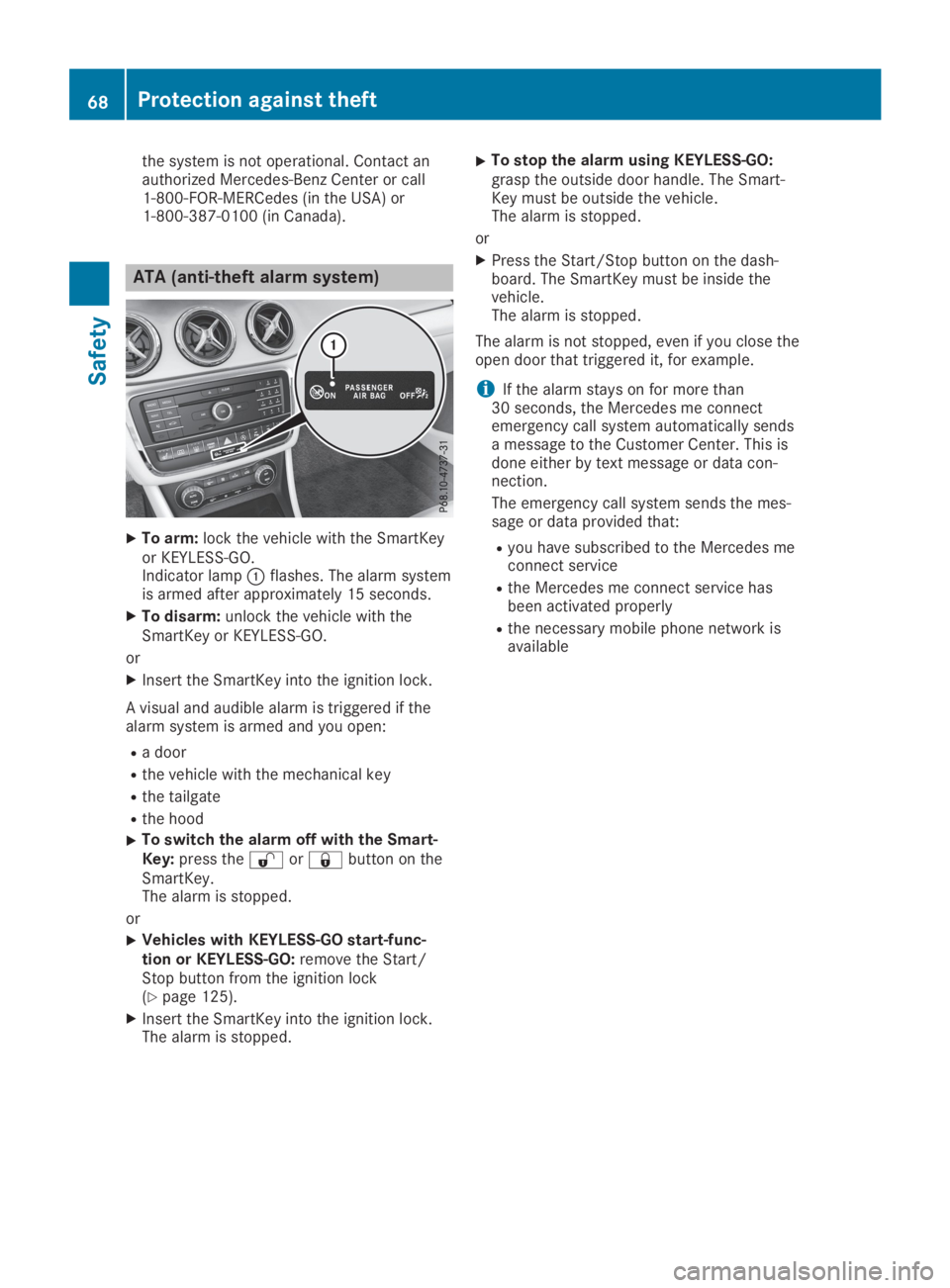
XTo arm:lock the vehicle with the SmartKeyor KEYLESS-GO.Indicator lampCflashes. The alarm systemis armed after approximately 15 seconds.
XTo disarm:unlock the vehicle with theSmartKey or KEYLESS-GO.
or
XInsert the SmartKey into the ignition lock.
A visual and audible alarm is triggered if thealarm system is armed and you open:
Ra door
Rthe vehicle with the mechanical key
Rthe tailgate
Rthe hood
XTo switch the alarm off with the Smart-Key:press the6or7button on theSmartKey.The alarm is stopped.
or
XVehicles with KEYLESS-GO start-func-tion or KEYLESS-GO:remove the Start/Stop button from the ignition lock(Ypage 125).
XInsert the SmartKey into the ignition lock.The alarm is stopped.
XTo stop the alarm using KEYLESS-GO:grasp the outside door handle. The Smart-Key must be outside the vehicle.The alarm is stopped.
or
XPress the Start/Stop button on the dash-board. The SmartKey must be inside thevehicle.The alarm is stopped.
The alarm is not stopped, even if you close theopen door that triggered it, for example.
iIf the alarm stays on for more than30 seconds, the Mercedes me connectemergency call system automatically sendsa message to the Customer Center. This isdone either by text message or data con-nection.
The emergency call system sends the mes-sage or data provided that:
Ryou have subscribed to the Mercedes meconnect service
Rthe Mercedes me connect service hasbeen activated properly
Rthe necessary mobile phone network isavailable
68Protection against theft
Safety
Page 71 of 346
SmartKey
Important safety notes
GWARNING
If children are left unsupervised in the vehi-
cle, they could:
Roperate the vehicle's equipment
Additionally, children could set the vehicle in
motion if, for example, they:
Rrelease the parking brake
Rshift the automatic transmission out of
park position]
Rstart the engine
There is a risk of an accident and injury.
Never leave children or animals unattended
in the vehicle.
When leaving the vehicle, always take the
SmartKey with you and lock the vehicle. This
also applies for the Digital Vehicle Key if the
"Digital Vehicle Key" function is activated via
Mercedes me connect.
GWARNING
If you attach heavy or large objects to the
SmartKey, the SmartKey could be uninten-
tionally turned in the ignition lock. This
could cause the engine to be switched off.
There is a risk of an accident.
Do not attach any heavy or large objects to
the SmartKey. Remove any bulky key rings
before inserting the SmartKey into the igni-
tion lock.
!Keep the SmartKey away from strong mag-netic fields. Otherwise, the remote controlfunction could be affected.
Strong magnetic fields can occur in thevicinity of powerful electrical installations.
Do not keep the SmartKey:
Rwith electronic devices, e.g. a mobile phoneor another SmartKey
Rwith metallic objects, e.g. coins or metal foil
Rinside metallic objects, e.g. a metal case
Vehicles with KEYLESS-GO start function:do not keep the SmartKey in the cargo com-
partment. Otherwise, the SmartKey may notbe detected, e.g. when starting the engineusing the Start/Stop button.
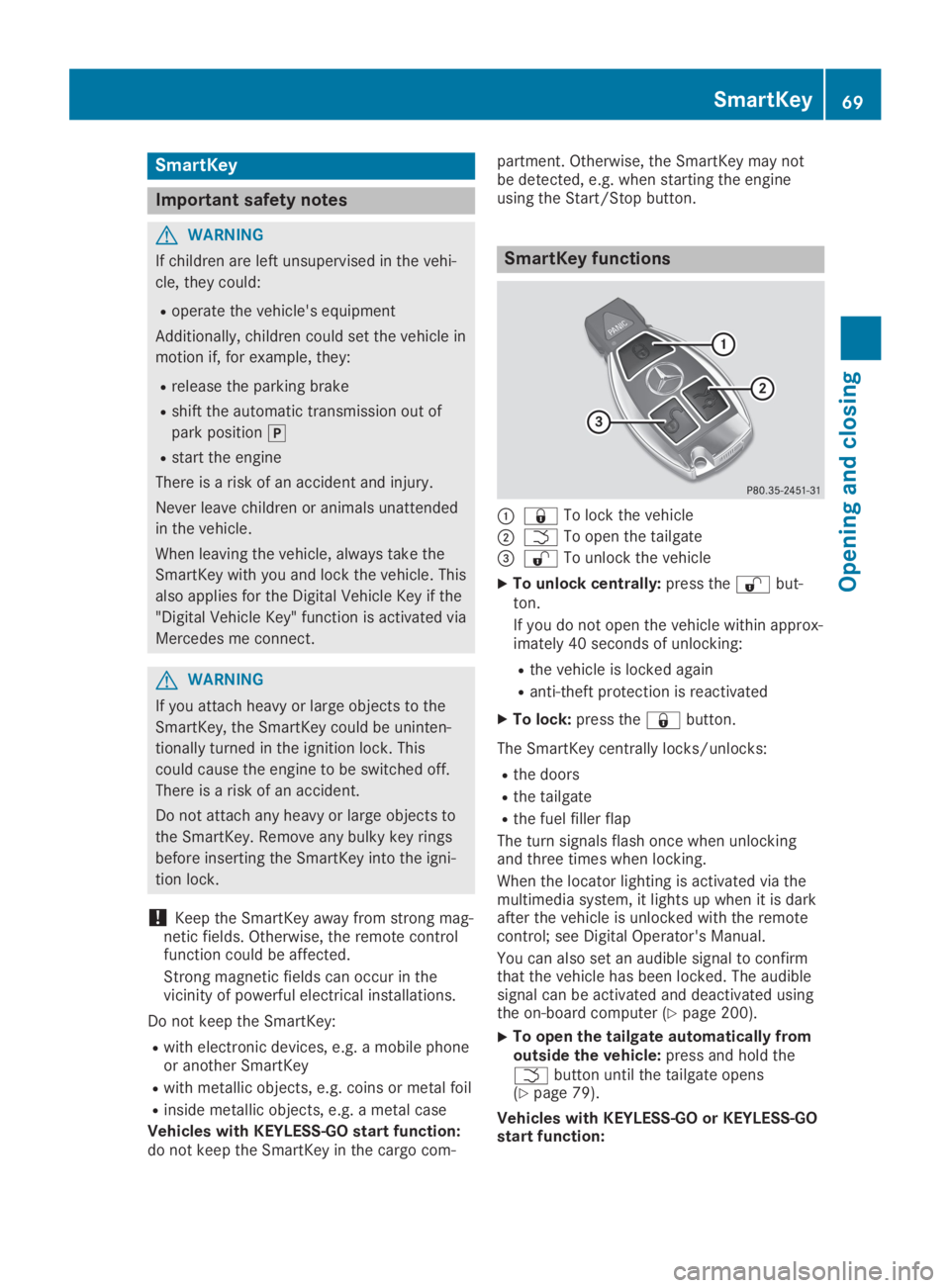
SmartKey functions
C7To lock the vehicle
DTTo open the tailgate
Page 72 of 346
XTo close the tailgate automatically fromoutside the vehicle:if the SmartKey islocated in the immediate vicinity of the vehi-cle, press theTbutton on the SmartKey(Ypage 79).When the tailgate closes you can thenrelease the button.
KEYLESS-GO
General notes
Bear in mind that the engine can be started byany of the vehicle occupants if there is aSmartKey in the vehicle.
Locking and unlocking
You can start, lock or unlock the vehicle usingKEYLESS-GO. To do this, you only need carrythe SmartKey with you. You can combine thefunctions of KEYLESS-GO with those of a con-ventional SmartKey. Unlock the vehicle byusing KEYLESS-GO, for instance, and lock itusing the7button on the SmartKey.
The driver's door and the door at which thehandle is used, must both be closed. TheSmartKey must be outside the vehicle. Whenlocking or unlocking with KEYLESS-GO, thedistance between the SmartKey and the corre-sponding door handle must not be greaterthan three feet (one meter).
A check which periodically establishes a radioconnection between the vehicle and theSmartKey determines whether a valid Smart-Key is in the vehicle. This occurs, for example:
Rwhen starting the engine
Rwhile driving
Rwhen the external door handles are touched
Rduring convenience closing
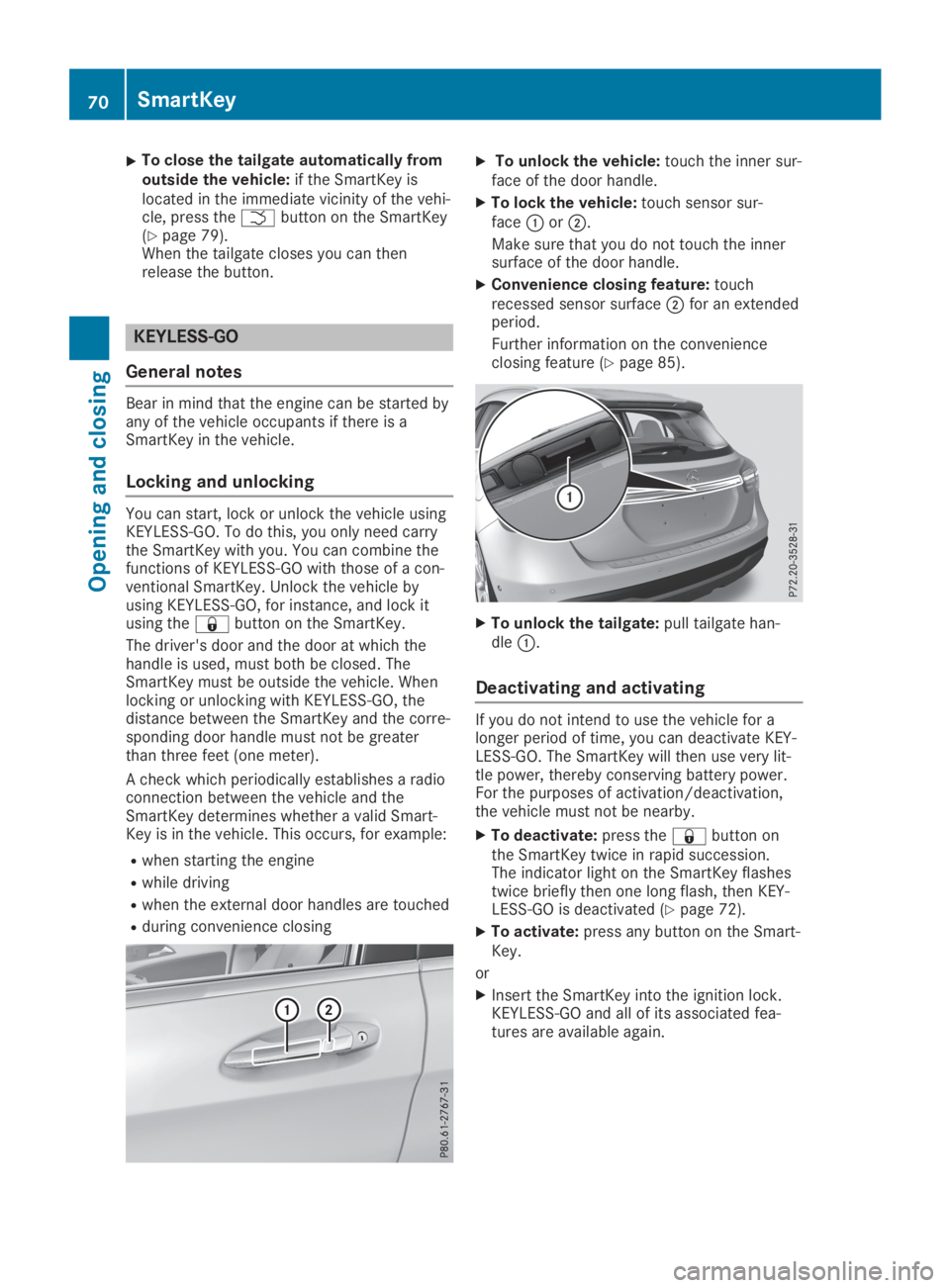
XTo unlock the vehicle:touch the inner sur-face of the door handle.
XTo lock the vehicle:touch sensor sur-faceCorD.
Make sure that you do not touch the innersurface of the door handle.
XConvenience closing feature:touchrecessed sensor surfaceDfor an extendedperiod.
Further information on the convenienceclosing feature (Ypage 85).
XTo unlock the tailgate:pull tailgate han-dleC.
Deactivating and activating
If you do not intend to use the vehicle for alonger period of time, you can deactivate KEY-LESS-GO. The SmartKey will then use very lit-tle power, thereby conserving battery power.For the purposes of activation/deactivation,the vehicle must not be nearby.
XTo deactivate:press the7button onthe SmartKey twice in rapid succession.The indicator light on the SmartKey flashestwice briefly then one long flash, then KEY-LESS-GO is deactivated (Ypage 72).
XTo activate:press any button on the Smart-Key.
or
XInsert the SmartKey into the ignition lock.KEYLESS-GO and all of its associated fea-tures are available again.
70SmartKey
Opening and closing
Page 73 of 346
KEYLESS-GO start function
General notes
Bear in mind that the engine can be started byany of the vehicle occupants if there is aSmartKey in the vehicle.
Changing the settings of the locking
system
You can change the settings of the lockingsystem. This means that only the driver's doorand the fuel filler flap are unlocked when thevehicle is unlocked. This is useful if you fre-quently travel on your own.
XTo change the setting:press and hold the6and7buttons simultaneously forapproximately six seconds until the batteryindicator lamp flashes twice (Ypage 72).
If the setting of the locking system is changedwithin the signal range of the vehicle, pressingthe7or6button:
Rlocks or
Runlocks the vehicle
The SmartKey now functions as follows:
XTo unlock:press the6button once.
XTo unlock centrally:press the6buttontwice.
XTo lock centrally:press the7button.
The KEYLESS-GO function is changed as fol-lows:
XTo unlock the driver's door:touch theinner surface of the door handle on the driv-er's door.
XTo unlock centrally:touch the inner sur-face of the door handle on the front-passenger door or the rear door.
XTo lock centrally:touch the outer sensorsurface on one of the door handles.
XTo restore the factory settings:press andhold the6and7buttons simultane-ously for approximately six seconds until thebattery check lamp flashes twice(Ypage 72).
Mechanical key
General notes
If the vehicle can no longer be locked orunlocked with the SmartKey or KEYLESS-GO,use the mechanical key.
If you use the mechanical key to unlock andopen the driver's door or the trunk lid, theanti-theft alarm system will be triggered(Ypage 68).
There are several ways to turn off the alarm:
XTo deactivate the alarm with the key:press the6or7button on the key.
or
XInsert the SmartKey into the ignition lock.
or
XTo deactivate the alarm with KEYLESS-GO:press the Start/Stop button in the igni-tion lock. The SmartKey must be in the vehi-cle.
or
XLock or unlock the vehicle using KEYLESS-GO. The SmartKey must be outside the vehi-cle.
If you unlock the vehicle using the mechanicalkey, the fuel filler flap will not be unlockedautomatically.
XTo unlock the fuel filler flap:insert theSmartKey into the ignition lock.
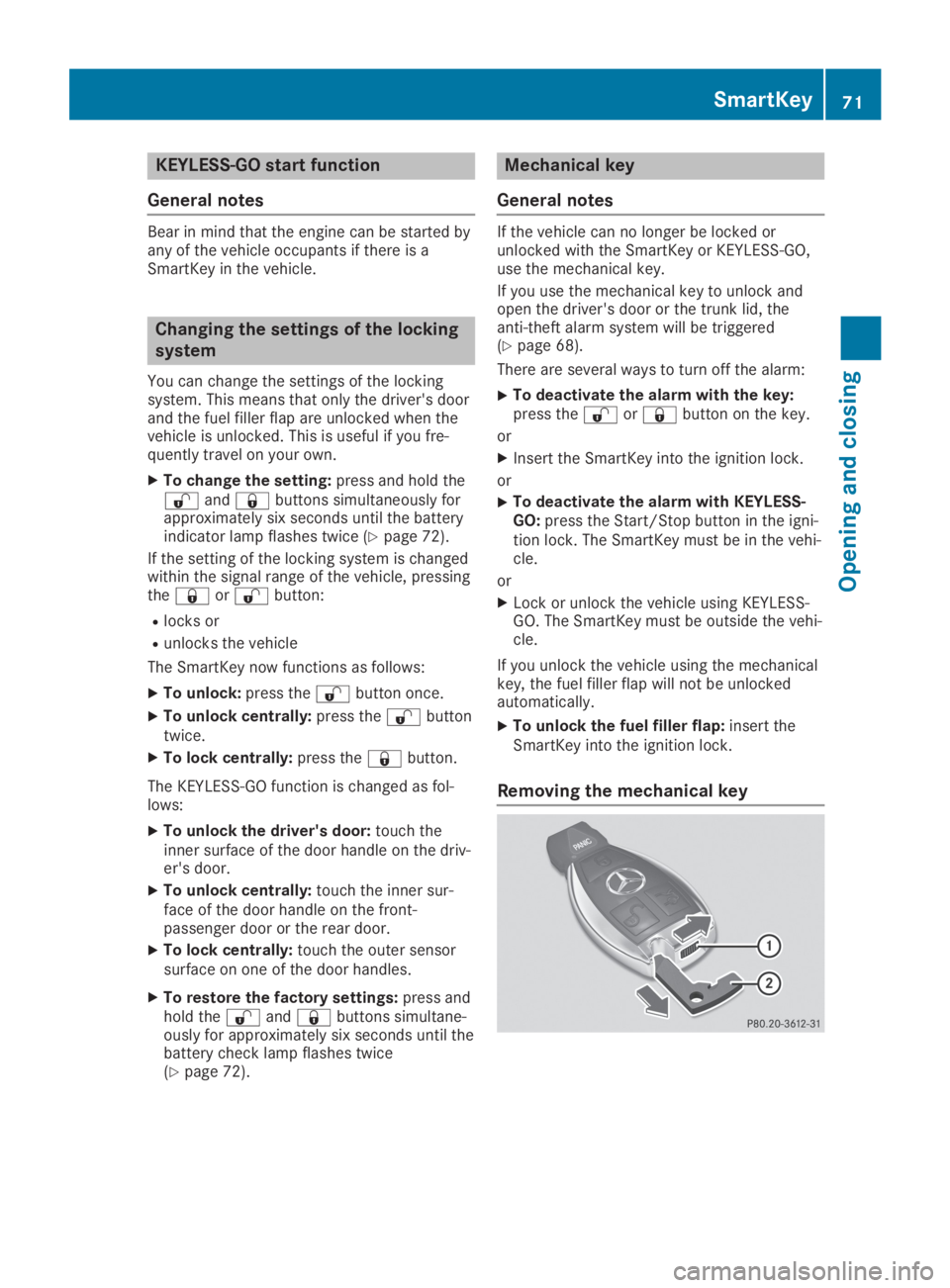
Removing the mechanical key
SmartKey71
Opening and closing
Z