belt MERCEDES-BENZ GLA 2019 Owner's Guide
[x] Cancel search | Manufacturer: MERCEDES-BENZ, Model Year: 2019, Model line: GLA, Model: MERCEDES-BENZ GLA 2019Pages: 346, PDF Size: 16.66 MB
Page 150 of 346
The electric parking brake is not automaticallyapplied if the engine is switched off by theECO start/stop function.
Releasing automatically
Your vehicle's electric parking brake is auto-matically released if all of the following condi-tions are met:
RThe engine is running
RThe transmission is in position[or^andyou depress the accelerator pedal or shiftfrom position]to[or^
RThe seat belt is fastened
If the transmission is in position^, the tail-gate must be closed.
If your seat belt is not fastened, the followingconditions must be fulfilled to automaticallyrelease the electric parking brake:
RThe driver's door is closed.
RYou are shifting from transmission position]or have previously driven at speedsgreater than 2 mph (3 km/h)
Ensure that you do not depress the accelera-tor pedal unintentionally. Otherwise, the park-ing brake will be released and the vehicle willstart to move.
Emergency braking
The vehicle can also be braked during anemergency by using the electric parking brake.
XWhile driving, push handleCof the electricparking brake (Ypage 147).The vehicle is braked as long as you keephandleCof the electric parking brakepressed. The longer the electric parkingbrake handleCis depressed, the greaterthe braking force.
During braking:
Ra warning tone sounds
RtheRelease Parking BrakeRelease Parking Brakemessageappears
Rthe redI(USA only) or$(Canadaonly) indicator lamp in the instrument clus-ter flashes
When the vehicle has been braked to a stand-still, the electric parking brake is applied.
Parking the vehicle for a long period
If you leave the vehicle parked for longer thanfour weeks, the battery may be damaged byexhaustive discharging.
If you leave the vehicle parked for longer thansix weeks, the vehicle may suffer damage as aresult of lack of use.
XVisit a qualified specialist workshop andseek advice.
iYou can obtain information about tricklechargers from a qualified specialist work-shop.
Driving tips
General notes
Important safety notes
GWARNING
If you switch off the ignition while driving,
safety-relevant functions are only available
with limitations, or not at all. This could
affect, for example, the power steering and
the brake boosting effect. You will require
considerably more effort to steer and brake.
There is a risk of an accident.
Do not switch off the ignition while driving.
GWARNING
If you operate mobile communication equip-
ment when driving, you may be distracted
from the traffic situation. You could also
lose control of the vehicle. There is a risk of
an accident.
Only operate this equipment when the vehi-
cle is stationary.
Observe the legal requirements for the countryin which you are driving. Some jurisdictionsprohibit the driver from using a mobile phonewhile driving a vehicle.
If you make a call while driving, always usehands-free mode. Only operate the telephonewhen the traffic situation permits. If you areunsure, pull over to a safe location and stopbefore operating the telephone.
148Driving tips
Driving and parking
Page 163 of 346
To activate Active Distance Assist DISTRONIC,all the following conditions must be fulfilled:
Rthe engine must be started. It may take upto two minutes of driving before Active Dis-tance Assist DISTRONIC is ready for use.
Rthe electric parking brake must be released.
RESP®must be active, but not intervening.
RActive Parking Assist must not be activated.
Rthe transmission must be in position[.
Rthe driver's door must be closed when youshift from]to[or your seat belt mustbe fastened.
Rthe front-passenger door must be closed.
RDSR must be deactivated.
Rthe vehicle must not skid.
Activating
XBriefly pull the cruise control lever towardsyou
Page 164 of 346
Selecting the drive program
Active Distance Assist DISTRONIC supports asporty driving style when you select theS+drive program (Ypage 138) or the manualdrive program (Ypage 140). Accelerationbehind the vehicle in front or to the set speedis then noticeably more dynamic. If you haveselected theE(Mercedes-AMG vehicles:C)drive program, the vehicle accelerates moregently. This setting is recommended in stop-and-start traffic.
Changing lanes
If you want to change to the overtaking laneon multi-lane roads, Active Distance AssistDISTRONIC supports you if:
Ryou are driving faster than 45 mph(70 km/h)
RActive Distance Assist DISTRONIC is main-taining the distance to a vehicle in front
Ryou switch on the appropriate turn signal
RActive Distance Assist DISTRONIC does notcurrently detect a danger of collision
If these conditions are fulfilled, your vehicle isaccelerated. Acceleration will be interrupted ifchanging lanes takes too long or if the dis-tance between your vehicle and the vehicle infront becomes too small.
Stopping
If Active Distance Assist DISTRONIC detectsthat the vehicle in front is stopping, it brakesyour vehicle until it is stationary.
Once your vehicle is stationary, it remains sta-tionary and you do not need to depress thebrake.
iAfter a time, the electric parking brakesecures the vehicle and relieves the servicebrake.
iDepending on the specified minimum dis-tance, your vehicle will come to a standstillat a sufficient distance behind the vehicle infront. The specified minimum distance is setusing the control on the cruise control lever.
When Active Distance Assist DISTRONIC isactivated, the transmission is shifted automati-cally to position]if:
Rthe driver's seat belt is not fastened and thedriver's door is open.
Rthe engine is switched off, unless it is auto-matically switched off by the ECO start/stop function.
The electric parking brake is applied automati-cally if Active Distance Assist DISTRONIC isactive when the vehicle is stationary and:
Ra system malfunction occurs.
Rthe power supply is insufficient.
If a malfunction occurs, the transmission mayalso shift to position]automatically.
Setting a speed
Keep in mind that it may take a brief momentuntil the vehicle has accelerated or braked tothe speed set.
XPress the cruise control lever upCfor ahigher speed or downDfor a lower speed.
XTo adjust the set speed in 1 mph incre-ments (1 km/h increments):briefly pushthe cruise control lever upCor downDtothe pressure point.The last stored speed increases or decrea-ses in 1 mph (1 km/h) increments.
XTo adjust the set speed in 5 mph incre-ments (10 km/h increments):briefly pushthe cruise control lever upCor downDbeyond the pressure point.The last stored speed increases or decrea-ses in 5 mph (10 km/h) increments.
iActive Distance Assist DISTRONIC is notdeactivated if you depress the acceleratorpedal. If you accelerate to overtake, ActiveDistance Assist DISTRONIC adjusts the vehi-cle's speed to the last speed stored, afteryou have finished overtaking.
Setting a specified minimum distance
You can set the specified minimum distancefor Active Distance Assist DISTRONIC by vary-ing the time span between one and two sec-onds. This determines the distance that ActiveDistance Assist DISTRONIC is to maintain fromthe vehicle in front, depending on the roadspeed. You can see this distance in the multi-function display (Ypage 164).
162Driving systems
Driving and parking
Page 167 of 346
in front on the edge of the road because ofits narrow width. The distance to the vehiclein front will be too short.
RObstacles and stationary vehicles: ActiveDistance Assist DISTRONIC does not brakefor obstacles or stationary vehicles. If, forexample, the detected vehicle turns a cor-ner and an obstacle or stationary vehicle isrevealed, Active Distance Assist DISTRONICwill not brake for them.
RActive Distance Assist DISTRONIC may mis-takenly detect vehicles that are crossingyour lane. If you activate Active DistanceAssist DISTRONIC under the following condi-tions, the vehicle could pull away uninten-tionally:
-at traffic lights with crossing traffic, forexample
-if there is a vehicle in front, after a cross-ing, with the HOLD function activated
In such situations, brake if necessary. ActiveDistance Assist DISTRONIC will then be deacti-vated.
HOLD function
General notes
The HOLD function can assist the driver in thefollowing situations:
RWhen pulling away, especially on steepslopes
RWhen maneuvering on steep slopes
RWhen waiting in traffic
The vehicle is kept stationary without thedriver having to depress the brake pedal.
The braking effect is canceled and the HOLDfunction deactivated when you depress theaccelerator pedal to pull away.
Important safety notes
GWARNING
If the vehicle is only braked using the HOLD
function, the vehicle may roll away in the fol-
lowing situations when you leave the vehi-
cle:
Rif there is a malfunction in the system or
in the voltage supply
Rif the HOLD function is deactivated by
depressing the accelerator pedal or brake
pedal, e.g. by a vehicle occupant
There is a risk of an accident.
Always deactivate the HOLD function and
secure the vehicle against rolling away
before you leave it.
!When Active Distance Assist DISTRONICor the HOLD function is activated, the vehi-cle brakes automatically in certain situa-tions.
To avoid damage to the vehicle, deactivateActive Distance Assist DISTRONIC and theHOLD function in the following or similar sit-uations:
Rwhen towing the vehicle
Rin the car wash
Deactivate the HOLD function (Ypage 166).
Activation conditions
You can activate the HOLD function if:
Rthe vehicle is stationary
Rthe engine is running or if it has been auto-matically switched off by the ECO start/stop function
Rthe driver's door is closed or your seat beltis fastened
Rthe electric parking brake is released
RActive Distance Assist DISTRONIC is deacti-vated
Rthe transmission is in position[,^or\\on vehicles with automatic transmission
Driving systems165
Driving and parking
Z
Page 168 of 346
Activating the HOLD function
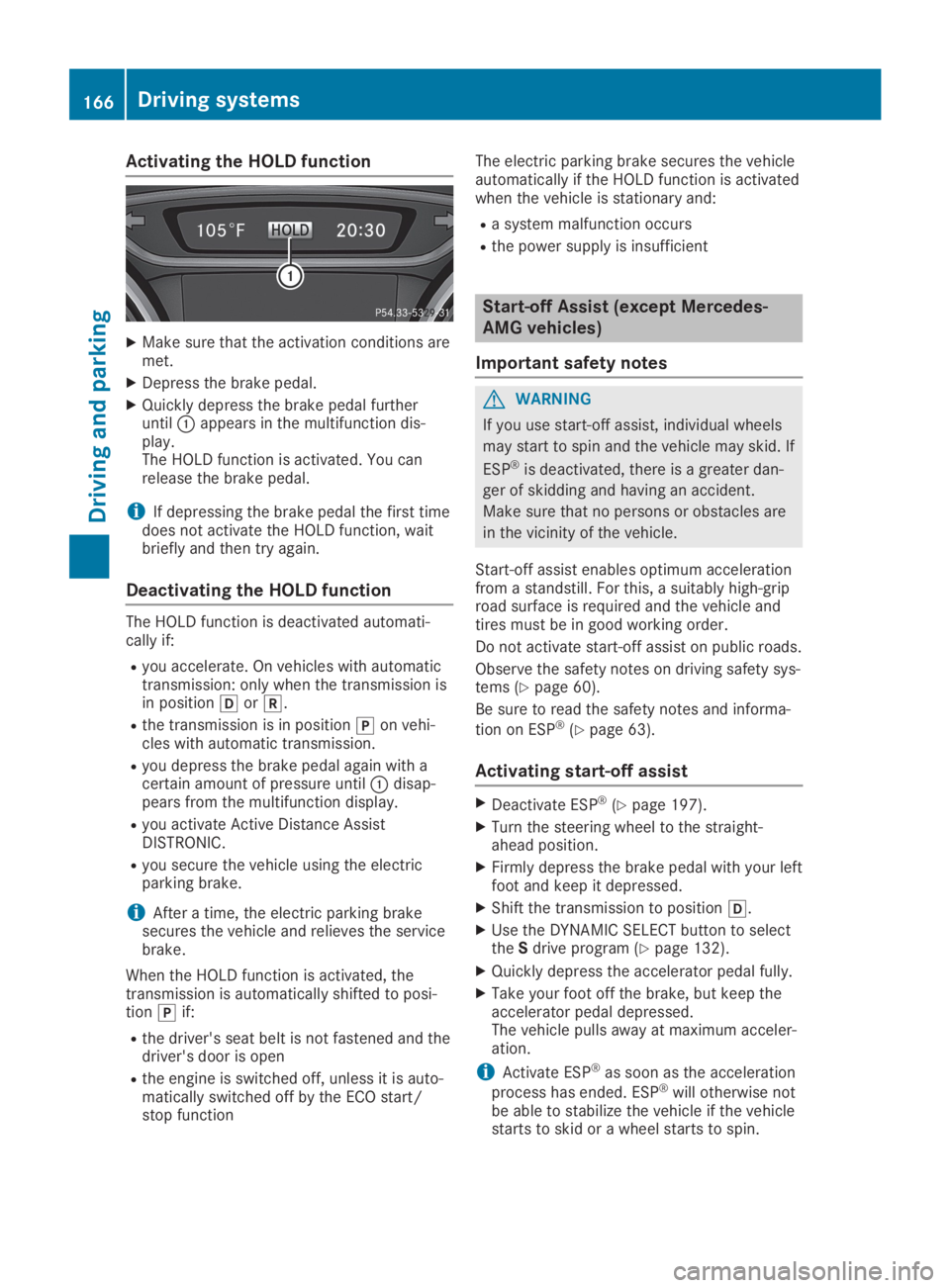
XMake sure that the activation conditions aremet.
XDepress the brake pedal.
XQuickly depress the brake pedal furtheruntilCappears in the multifunction dis-play.The HOLD function is activated. You canrelease the brake pedal.
iIf depressing the brake pedal the first timedoes not activate the HOLD function, waitbriefly and then try again.
Deactivating the HOLD function
The HOLD function is deactivated automati-cally if:
Ryou accelerate. On vehicles with automatictransmission: only when the transmission isin position[or^.
Rthe transmission is in position]on vehi-cles with automatic transmission.
Ryou depress the brake pedal again with acertain amount of pressure untilCdisap-pears from the multifunction display.
Ryou activate Active Distance AssistDISTRONIC.
Ryou secure the vehicle using the electricparking brake.
iAfter a time, the electric parking brakesecures the vehicle and relieves the servicebrake.
When the HOLD function is activated, thetransmission is automatically shifted to posi-tion]if:
Rthe driver's seat belt is not fastened and thedriver's door is open
Rthe engine is switched off, unless it is auto-matically switched off by the ECO start/stop function
The electric parking brake secures the vehicleautomatically if the HOLD function is activatedwhen the vehicle is stationary and:
Ra system malfunction occurs
Rthe power supply is insufficient
Start-off Assist (except Mercedes-
AMG vehicles)
Important safety notes
GWARNING
If you use start-off assist, individual wheels
may start to spin and the vehicle may skid. If
ESP®is deactivated, there is a greater dan-
ger of skidding and having an accident.
Make sure that no persons or obstacles are
in the vicinity of the vehicle.
Start-off assist enables optimum accelerationfrom a standstill. For this, a suitably high-griproad surface is required and the vehicle andtires must be in good working order.
Do not activate start-off assist on public roads.
Observe the safety notes on driving safety sys-tems (Ypage 60).
Be sure to read the safety notes and informa-
tion on ESP®(Ypage 63).
Activating start-off assist
XDeactivate ESP®(Ypage 197).
XTurn the steering wheel to the straight-ahead position.
XFirmly depress the brake pedal with your leftfoot and keep it depressed.
XShift the transmission to position[.
XUse the DYNAMIC SELECT button to selecttheSdrive program (Ypage 132).
XQuickly depress the accelerator pedal fully.
XTake your foot off the brake, but keep theaccelerator pedal depressed.The vehicle pulls away at maximum acceler-ation.
iActivate ESP®as soon as the acceleration
process has ended. ESP®will otherwise notbe able to stabilize the vehicle if the vehiclestarts to skid or a wheel starts to spin.
166Driving systems
Driving and pa rking
Page 186 of 346
Important safety notes
ATTENTION ASSIST is only an aid to the driver.It might not always recognize fatigue orincreasing inattentiveness in time or fail torecognize them at all. The system is not a sub-stitute for a well-rested and attentive driver.
The functionality of ATTENTION ASSIST isrestricted and warnings may be delayed or notoccur at all:
Rif the length of the journey is less thanapproximately 30 minutes
Rif the road condition is poor, e.g. if the sur-face is uneven or if there are potholes
Rif there is a strong side wind
Rif you have adopted a sporty driving stylewith high cornering speeds or high rates ofacceleration
Rif you are predominantly driving slower than37 mph (60 km/h) or faster than 125 mph(200 km/h)
Rif the time has been set incorrectly
Rin active driving situations, such as whenyou change lanes or change your speed
ATTENTION ASSIST is reset when you continueyour journey and starts assessing your tired-ness again if:
Ryou switch off the engine
Ryou take off your seat belt and open thedriver's door, e.g. for a change of drivers orto take a break
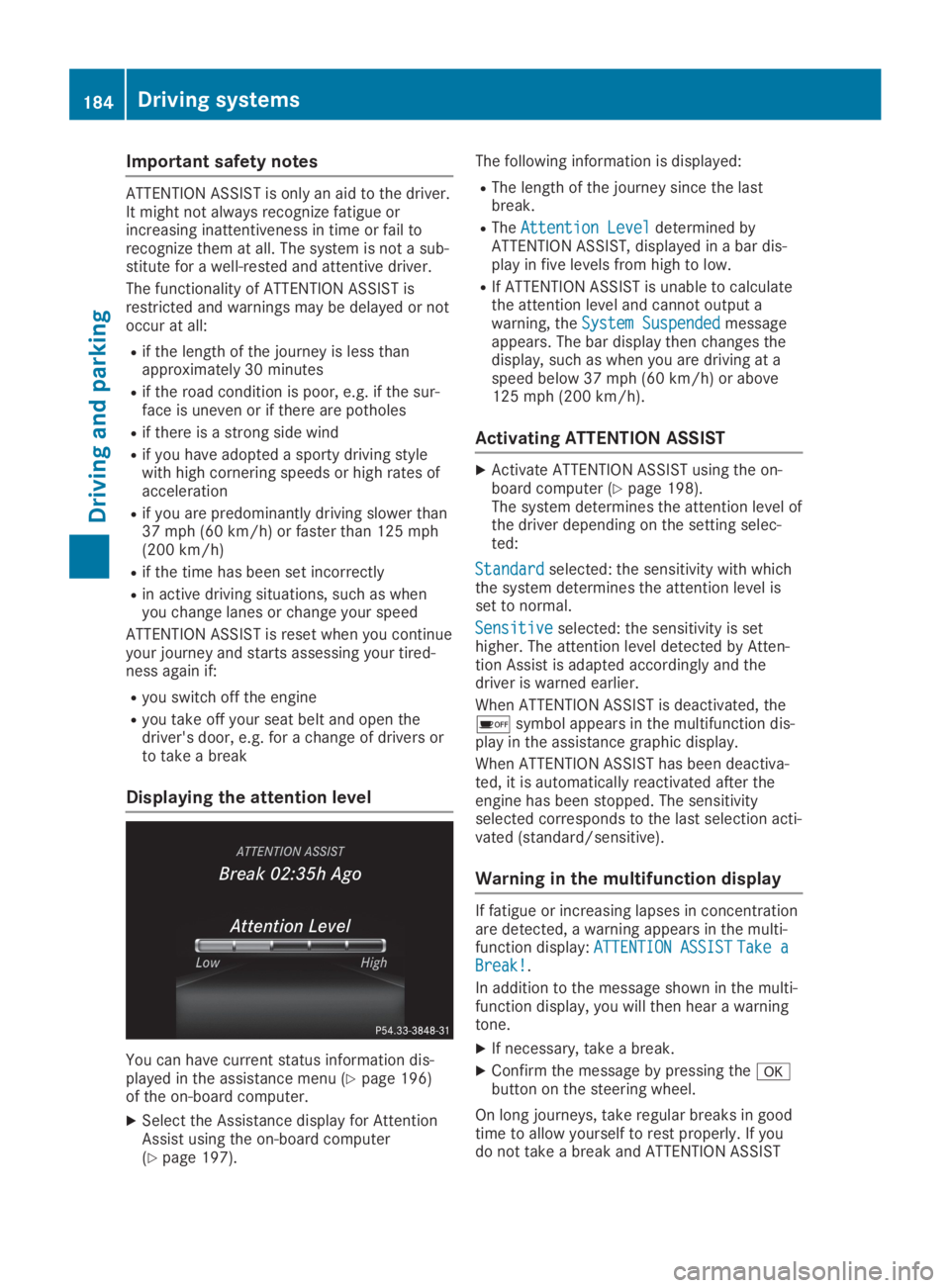
Displaying the attention level
You can have current status information dis-played in the assistance menu (Ypage 196)of the on-board computer.
XSelect the Assistance display for AttentionAssist using the on-board computer(Ypage 197).
The following information is displayed:
RThe length of the journey since the lastbreak.
RTheAttention LevelAttention Leveldetermined byATTENTION ASSIST, displayed in a bar dis-play in five levels from high to low.
RIf ATTENTION ASSIST is unable to calculatethe attention level and cannot output awarning, theSystem SuspendedSystem Suspendedmessageappears. The bar display then changes thedisplay, such as when you are driving at aspeed below 37 mph (60 km/h) or above125 mph (200 km/h).
Activating ATTENTION ASSIST
XActivate ATTENTION ASSIST using the on-board computer (Ypage 198).The system determines the attention level ofthe driver depending on the setting selec-ted:
StandardStandardselected: the sensitivity with whichthe system determines the attention level isset to normal.
SensitiveSensitiveselected: the sensitivity is sethigher. The attention level detected by Atten-tion Assist is adapted accordingly and thedriver is warned earlier.
When ATTENTION ASSIST is deactivated, the
Page 220 of 346
Display messagesPossible causes/consequences andPPSolutions
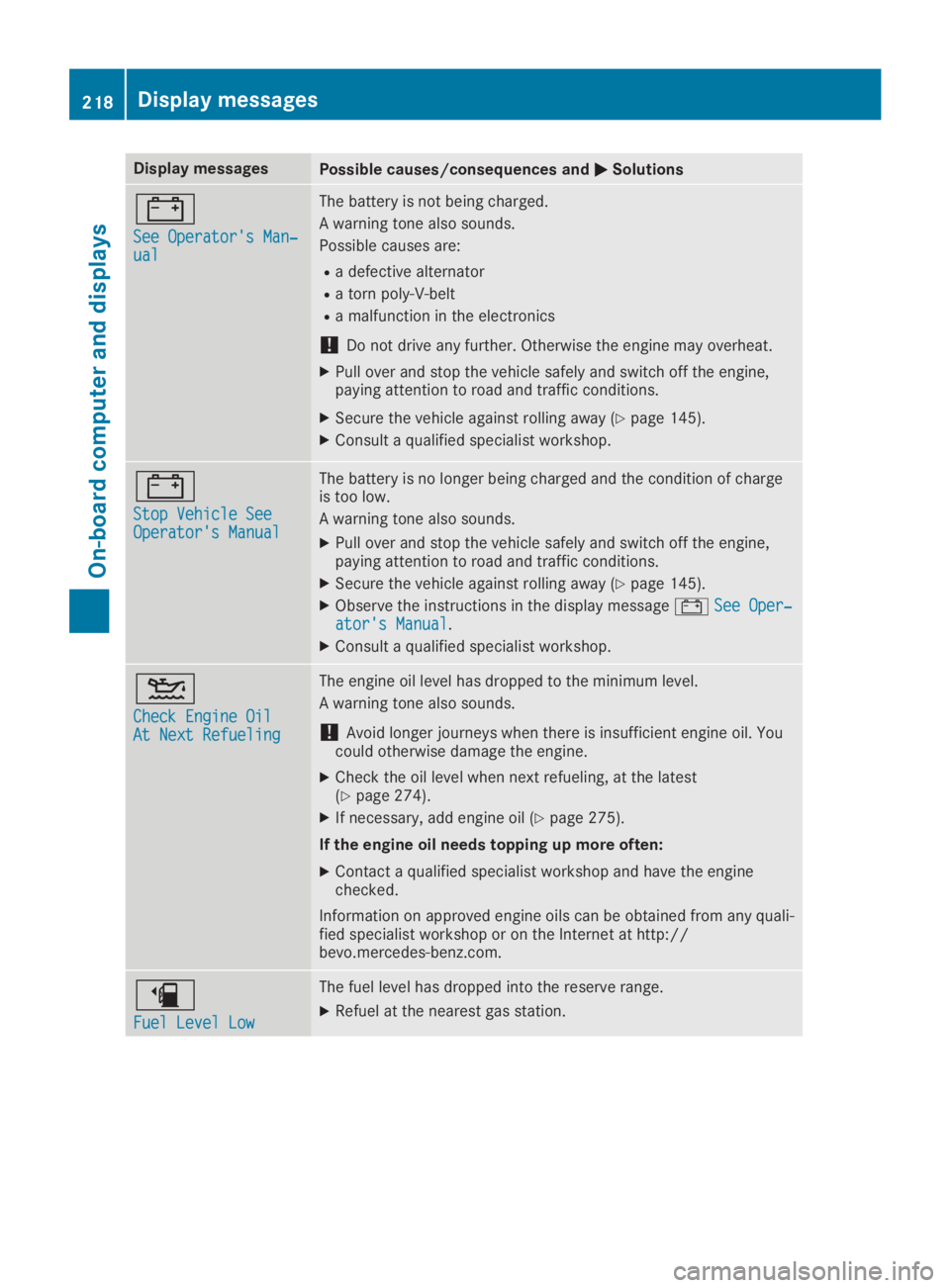
=
See Operator's Man‐See Operator's Man‐ualual
The battery is not being charged.
A warning tone also sounds.
Possible causes are:
Ra defective alternator
Ra torn poly-V-belt
Ra malfunction in the electronics
!Do not drive any further. Otherwise the engine may overheat.
XPull over and stop the vehicle safely and switch off the engine,paying attention to road and traffic conditions.
XSecure the vehicle against rolling away (Ypage 145).
XConsult a qualified specialist workshop.
=
Stop Vehicle SeeStop Vehicle SeeOperator's ManualOperator's Manual
The battery is no longer being charged and the condition of chargeis too low.
A warning tone also sounds.
XPull over and stop the vehicle safely and switch off the engine,paying attention to road and traffic conditions.
XSecure the vehicle against rolling away (Ypage 145).
XObserve the instructions in the display message=See Oper‐See Oper‐ator's Manualator's Manual.
XConsult a qualified specialist workshop.
Page 222 of 346
Display messagesPossible causes/consequences andPPSolutions
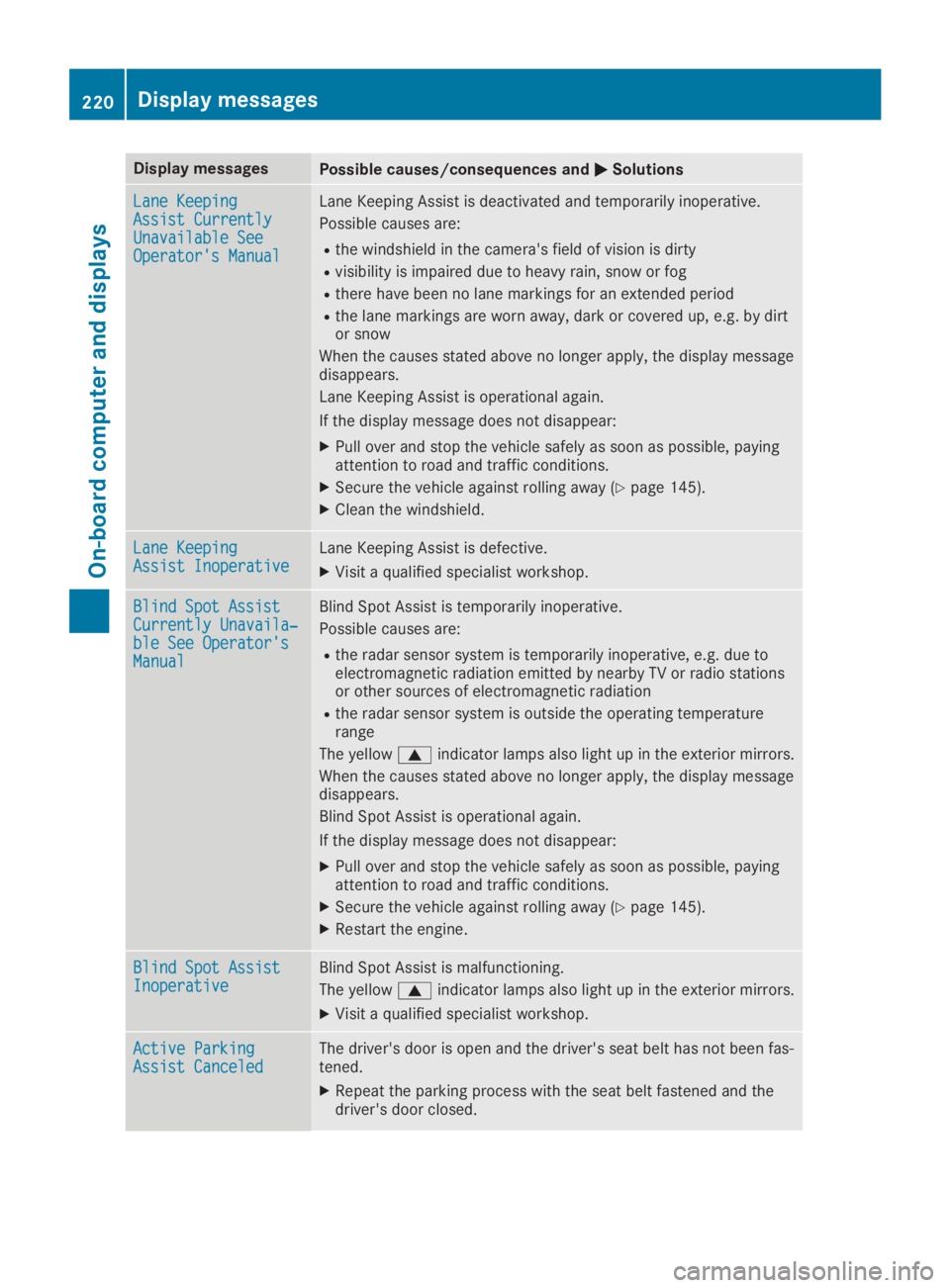
Lane KeepingLane KeepingAssist CurrentlyAssist CurrentlyUnavailable SeeUnavailable SeeOperator's ManualOperator's Manual
Lane Keeping Assist is deactivated and temporarily inoperative.
Possible causes are:
Rthe windshield in the camera's field of vision is dirty
Rvisibility is impaired due to heavy rain, snow or fog
Rthere have been no lane markings for an extended period
Rthe lane markings are worn away, dark or covered up, e.g. by dirtor snow
When the causes stated above no longer apply, the display messagedisappears.
Lane Keeping Assist is operational again.
If the display message does not disappear:
XPull over and stop the vehicle safely as soon as possible, payingattention to road and traffic conditions.
XSecure the vehicle against rolling away (Ypage 145).
XClean the windshield.
Lane KeepingLane KeepingAssist InoperativeAssist InoperativeLane Keeping Assist is defective.
XVisit a qualified specialist workshop.
Blind Spot AssistBlind Spot AssistCurrently Unavaila‐Currently Unavaila‐ble See Operator'sble See Operator'sManualManual
Blind Spot Assist is temporarily inoperative.
Possible causes are:
Rthe radar sensor system is temporarily inoperative, e.g. due toelectromagnetic radiation emitted by nearby TV or radio stationsor other sources of electromagnetic radiation
Rthe radar sensor system is outside the operating temperaturerange
The yellowcindicator lamps also light up in the exterior mirrors.
When the causes stated above no longer apply, the display messagedisappears.
Blind Spot Assist is operational again.
If the display message does not disappear:
XPull over and stop the vehicle safely as soon as possible, payingattention to road and traffic conditions.
XSecure the vehicle against rolling away (Ypage 145).
XRestart the engine.
Blind Spot AssistBlind Spot AssistInoperativeInoperativeBlind Spot Assist is malfunctioning.
The yellowcindicator lamps also light up in the exterior mirrors.
XVisit a qualified specialist workshop.
Active ParkingActive ParkingAssist CanceledAssist CanceledThe driver's door is open and the driver's seat belt has not been fas-tened.
XRepeat the parking process with the seat belt fastened and thedriver's door closed.
220Displaymessages
On-b oard computer and displays
Page 256 of 346
Notes on using the cargo compart-
ment
Making the best use of your cargo compart-ment:
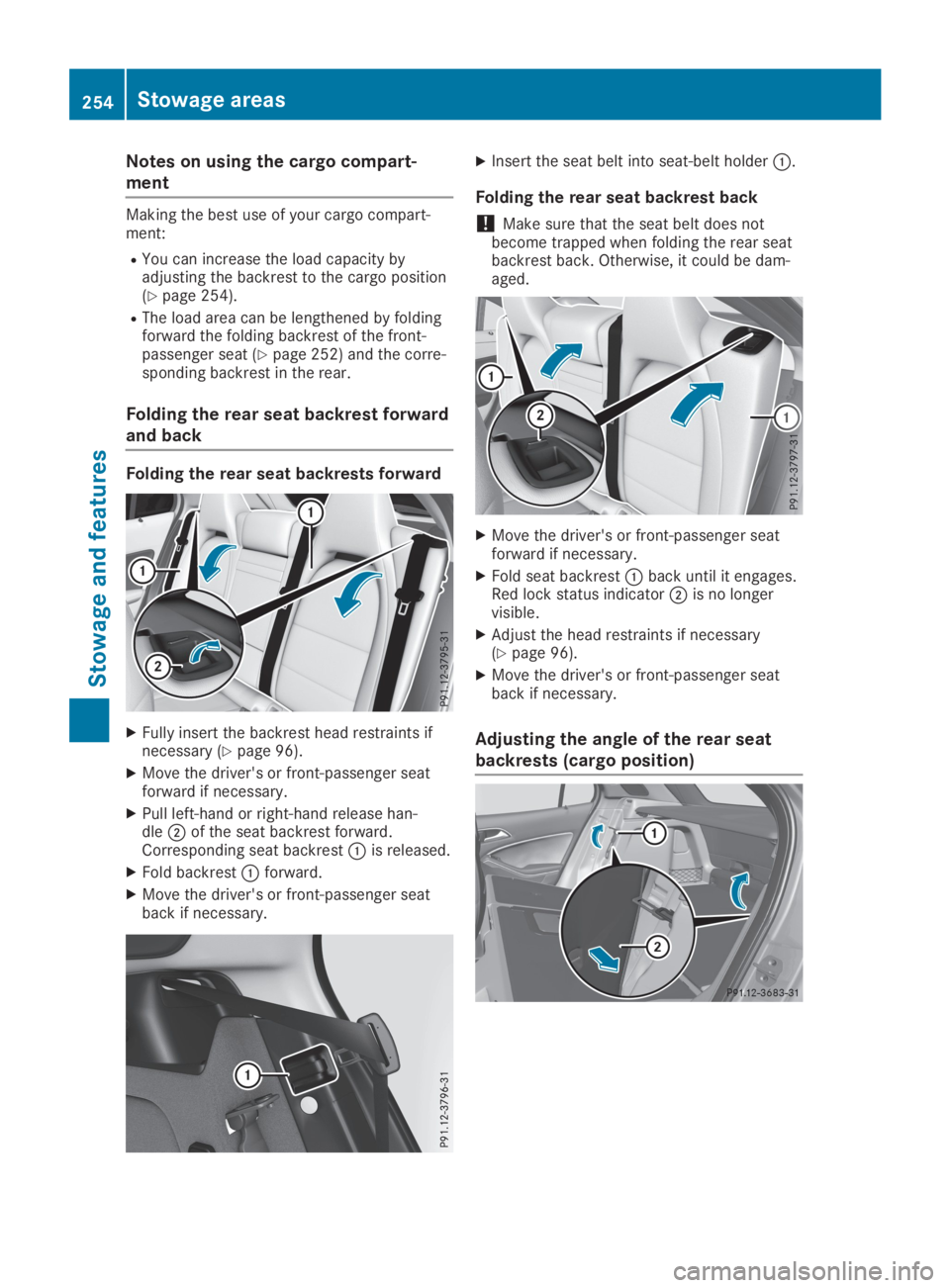
RYou can increase the load capacity byadjusting the backrest to the cargo position(Ypage 254).
RThe load area can be lengthened by foldingforward the folding backrest of the front-passenger seat (Ypage 252) and the corre-sponding backrest in the rear.
Folding the rear seat backrest forward
and back
Folding the rear seat backrests forward
XFully insert the backrest head restraints ifnecessary (Ypage 96).
XMove the driver's or front-passenger seatforward if necessary.
XPull left-hand or right-hand release han-dleDof the seat backrest forward.Corresponding seat backrestCis released.
XFold backrestCforward.
XMove the driver's or front-passenger seatback if necessary.
XInsert the seat belt into seat-belt holderC.
Folding the rear seat backrest back
!Make sure that the seat belt does notbecome trapped when folding the rear seatbackrest back. Otherwise, it could be dam-aged.
XMove the driver's or front-passenger seatforward if necessary.
XFold seat backrestCback until it engages.Red lock status indicatorDis no longervisible.
XAdjust the head restraints if necessary(Ypage 96).
XMove the driver's or front-passenger seatback if necessary.
Adjusting the angle of the rear seat
backrests (cargo position)
254Stowage areas
Stowage an d features
Page 287 of 346
It exhibits natural surface characteristics, forexample:
Rdifferences in the texture
Rmarks caused by growth and injury
Rslight nuances of color
These are characteristics of leather and notmaterial defects.
Seat covers of other materials
!Observe the following when cleaning:
Rclean artificial leather covers with a clothmoistened with a solution containing 1%detergent (e.g. dish washing liquid).
Rclean cloth covers with a microfiber clothmoistened with a solution containing 1%detergent (e.g. dish washing liquid). Rubcarefully and always wipe entire seat sec-tions to avoid leaving visible lines. Leavethe seat to dry afterwards. Cleaningresults depend on the type of dirt andhow long it has been there.
Rclean DINAMICA covers with a dampcloth. Make sure that you wipe entire seatsections to avoid leaving visible lines.
Cleaning the seat belts
GWARNING
Seat belts can become severely weakened if
bleached or dyed. This could cause the seat
belts to tear or fail, for instance, in the event
of an accident. This poses an increased risk
of injury or fatal injury.
Never bleach or dye the seat belts.
!Do not clean the seat belts using chemicalcleaning agents. Do not dry the seat beltsby heating at temperatures above 176 ‡(80 †) or in direct sunlight.
XUse clean, lukewarm water and soap solu-tion.
Cleaning the headliner and carpets
XHeadliner:if it is very dirty, use a soft brushor dry shampoo.
XCarpets:use the carpet and textile cleaningagents recommended and approved byMercedes-Benz.
Care285
Maintenance and care
Z