lock MERCEDES-BENZ GLA 2019 Manual PDF
[x] Cancel search | Manufacturer: MERCEDES-BENZ, Model Year: 2019, Model line: GLA, Model: MERCEDES-BENZ GLA 2019Pages: 346, PDF Size: 16.66 MB
Page 155 of 346
For this reason, in the event of heavy rain or inconditions in which hydroplaning may occur,you must drive in the following manner:
Rlower your speed
Ravoid ruts
Ravoid sudden steering movements
Rbrake carefully
Driving on flooded roads
!Bear in mind that vehicles traveling in frontor in the opposite direction create waves.This may cause the maximum permissiblewater depth to be exceeded.
Failure to observe these notes may result indamage to the engine, electrical systemsand transmission.
If you have to drive on stretches of road onwhich water has collected, please bear in mindthat:
Rin the case of standing water, the waterlevel may be no higher than the lower edgeof the vehicle body
Ryou should drive no faster than walking pace
Winter driving
GWARNING
If you shift down on a slippery road surface
in an attempt to increase the engine's brak-
ing effect, the drive wheels could lose their
grip. There is an increased danger of skid-
ding and accidents.
Do not shift down for additional engine brak-
ing on a slippery road surface.
GDANGER
If the exhaust pipe is blocked or adequate
ventilation is not possible, poisonous gases
such as carbon monoxide (CO) may enter
the vehicle. This is the case, e.g. if the vehi-
cle becomes trapped in snow. There is a risk
of fatal injury.
If you leave the engine or the auxiliary heat-
ing running, make sure the exhaust pipe and
area around the vehicle are clear of snow.
To ensure an adequate supply of fresh air,
open a window on the side of the vehicle
that is not facing into the wind.
Have your vehicle winter-proofed at a qualifiedspecialist workshop at the onset of winter.
Drive particularly carefully on slippery roadsurfaces. Avoid sudden acceleration, steeringand braking maneuvers. Do not use cruisecontrol or Active Distance Assist DISTRONIC.
If the vehicle threatens to skid or cannot bestopped when moving at low speed:
XShift the transmission to position\\.
XTry to bring the vehicle under control usingcorrective steering.
The outside temperature indicator is notdesigned to serve as an ice-warning deviceand is therefore unsuitable for that purpose.Changes in the outside temperature are dis-played after a short delay.
Indicated temperatures just above the freezingpoint do not guarantee that the road surface isfree of ice. The road may still be icy, especiallyin wooded areas or on bridges.
You should pay special attention to road con-ditions when temperatures are around freezingpoint.
For more information on driving with snowchains, see (Ypage 307).
For more information on driving with summertires, see (Ypage 306).
Observe the notes in the "Winter operation"section (Ypage 306).
Off-road driving
Important safety notes
GWARNING
If you drive on a steep incline at an angle or
turn when driving on an incline, the vehicle
could slip sideways, tip and rollover. There is
a risk of an accident.
Always drive on a steep incline in the line of
fall (straight up or down) and do not turn the
vehicle.
Driving tips153
Driving and parking
Z
Page 159 of 346
RActivate DSR. If this is not sufficient, brakegently. When doing so, make sure that thevehicle is facing in the direction of the lineof fall.
RCheck that the brakes are working normallyafter a long downhill stretch.
Off-road ABS is activated when the off-roadprogram is selected.
At speeds below 18 mph (30 km/h), the frontwheels lock cyclically during braking. The dig-ging-in effect achieved in the process reducesthe stopping distance on off-road terrain. Thesteerability of the vehicle is considerablyreduced if the wheels lock.
Driving systems
Cruise control
General notes
Cruise control maintains a constant roadspeed for you. It brakes automatically in orderto avoid exceeding the set speed. On long andsteep downhill gradients, especially if the vehi-cle is laden, you must select a low gear ingood time. You need to shift manually usingthe steering wheel paddle shifters beforehand.By doing so, you will make use of the brakingeffect of the engine. This relieves the load onthe brake system and prevents the brakesfrom overheating and wearing too quickly.
When the engine is running, you can use thecruise control lever to limit the speed to anyspeed between 20 mph (30 km/h) and thetechnically permitted maximum speed of thevehicle.
Use cruise control if road and traffic condi-tions make it appropriate to maintain a steadyspeed for a prolonged period.
The speed indicated in the speedometer maydiffer slightly from the speed stored.
Important safety notes
If you fail to adapt your driving style, cruisecontrol can neither reduce the risk of an acci-dent nor override the laws of physics. Cruisecontrol cannot take into account the road,traffic and weather conditions. Cruise controlis only an aid. You are responsible for the dis-tance to the vehicle in front, for vehicle speed,
for braking in good time and for staying in yourlane.
Do not use cruise control:
Rin road and traffic conditions which do notallow you to maintain a constant speed, e.g.in heavy traffic or on winding roads
Ron slippery road surfaces. Braking or accel-erating could cause the drive wheels to losetraction and the vehicle could then skid
Rin poor visibility, e.g. due to fog, heavy rainor snow
If there is a change of drivers, advise the newdriver of the speed stored.
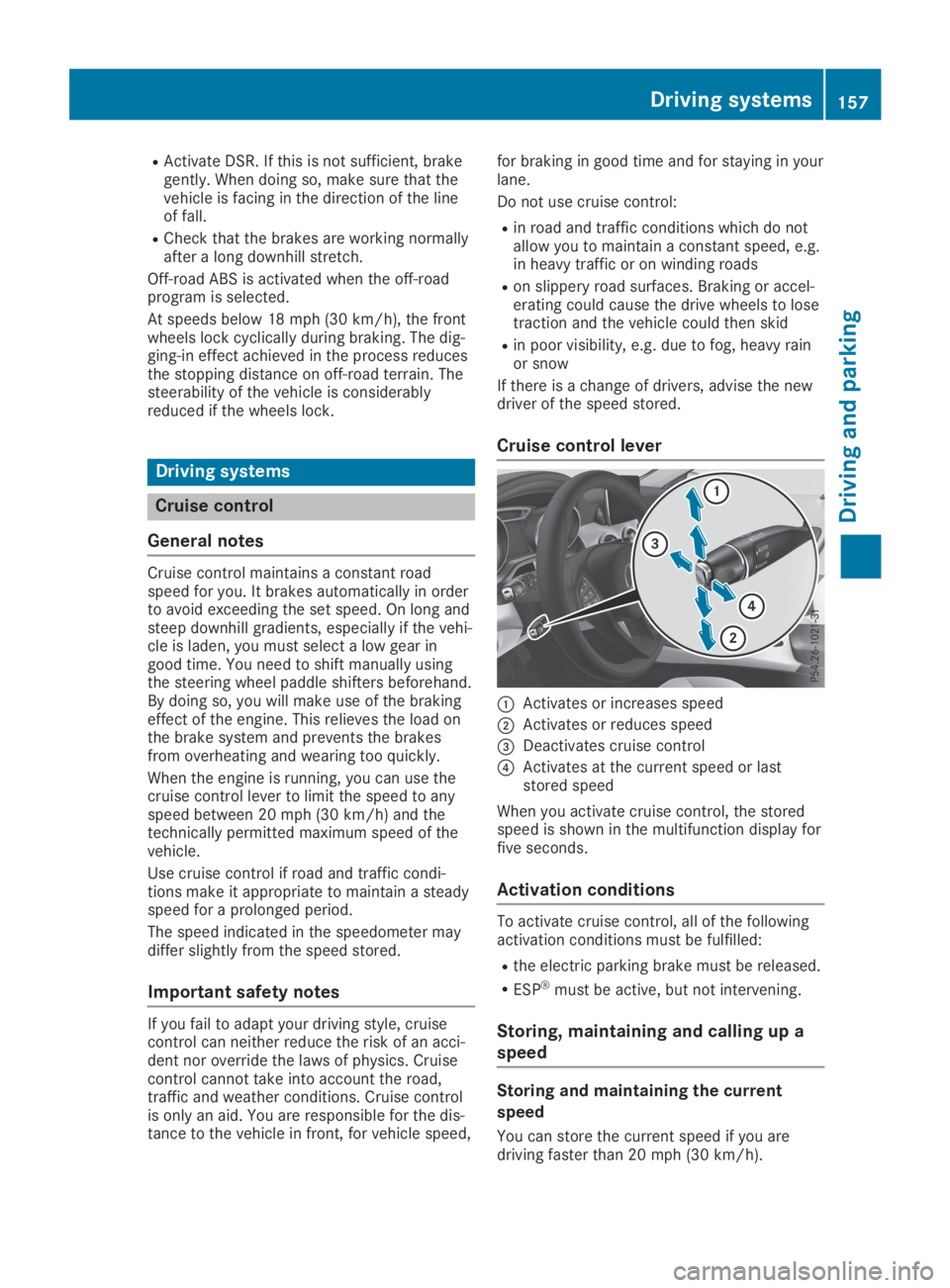
Cruise control lever
CActivates or increases speed
DActivates or reduces speed
Page 177 of 346
Parking tips:
ROn narrow roads, drive as close to the park-ing space as possible
RParking spaces that are littered or over-grown might be identified or measuredincorrectly
RParking spaces that are partially occupiedby trailer drawbars might not be identifiedas such or be measured incorrectly
RSnowfall or heavy rain may lead to a parkingspace being measured inaccurately
RPay attention to the warning messages ofParking Assist PARKTRONIC during theparking procedure (Ypage 173).
RYou can intervene in the steering procedureto correct it at any time. Active ParkingAssist will then be canceled
RWhen transporting a load which protrudesfrom your vehicle, you should not use ActiveParking Assist
RNever use Active Parking Assist when snowchains are installed
RMake sure that the tire pressures are alwayscorrect. This has a direct influence on theparking characteristics of the vehicle.
Use Active Parking Assist for parking spaces:
Rthat are parallel or at right-angles to thedirection of travel
Ron straight roads, not bends
Ron the same level as the road, e.g. not onthe pavement
Detecting parking spaces
Objects located above the detection range ofActive Parking Assist will not be detectedwhen the parking space is measured. Theseare not taken into account when the parkingprocedure is calculated, e.g. overhangingloads, truck overhangs or loading ramps.Active Parking Assist may therefore guide youinto the parking space too early.
Active Parking Assist does not support youparking in spaces at right angles to the direc-tion of travel if:
Rtwo parking spaces are located directly nextto one another
Rthe parking space is directly next to a lowobstacle such as a low curb
Ryou park forwards
Active Parking Assist does not support youparking in spaces that are parallel or at rightangles to the direction of travel if:
Rthe parking space is on a curb
Rthe system reads the parking space as beingblocked, for example by foliage or grasspaving blocks
Rthe area is too small for the vehicle tomaneuver into
Rthe parking space is bordered by an obsta-cle, e.g. a tree, a post or a trailer
Further information about the detection range(Ypage 172).
GWARNING
If there are objects above the detection
range:
Rthe Parking Package with rear view cam-
era may steer too early
Rthe vehicle may not stop in front of these
objects
This could cause a collision. There is a risk
of an accident.
If objects are located above the detection
range, stop and deactivate the Parking Pack-
age with rear view camera.
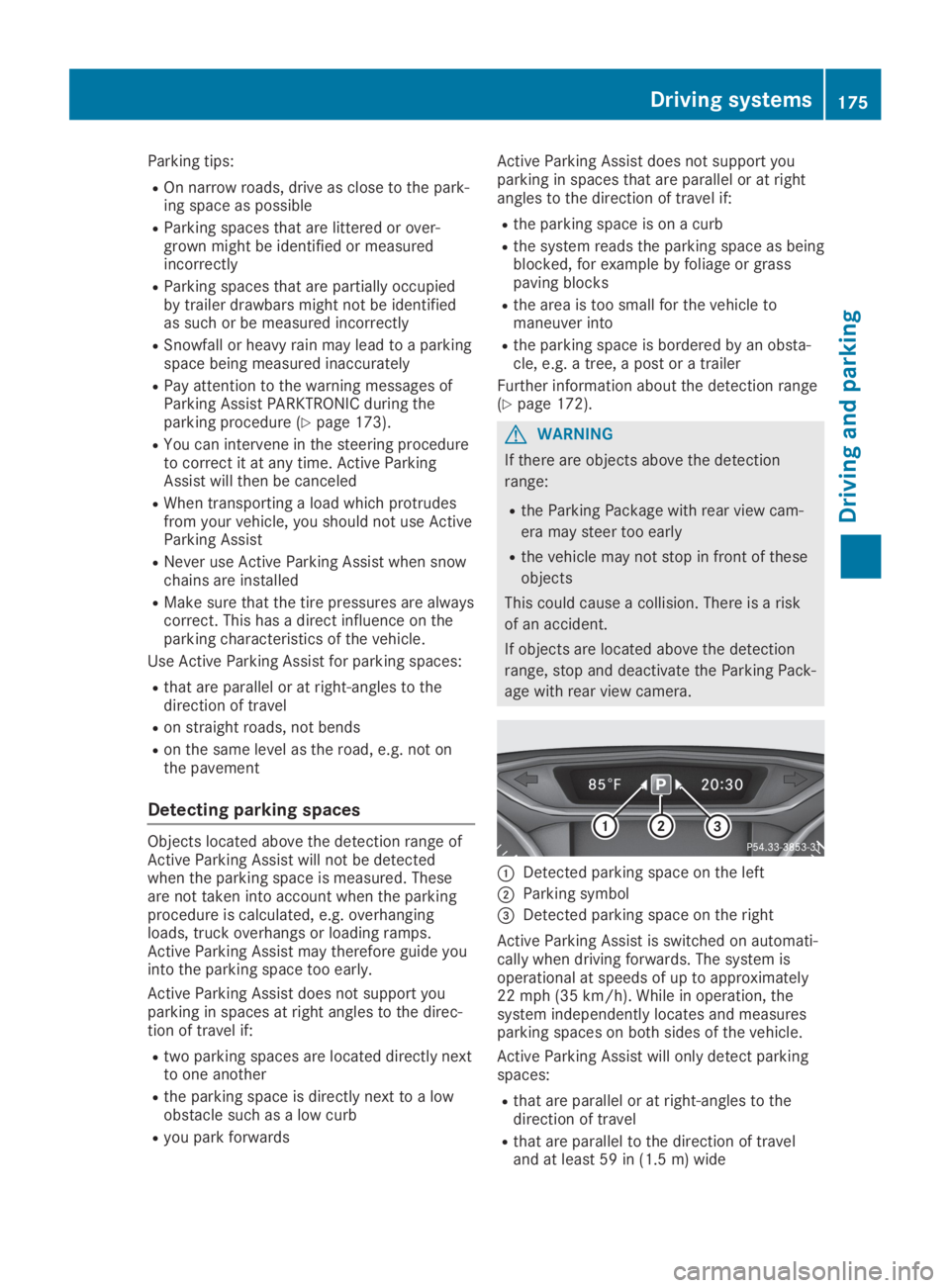
CDetected parking space on the left
DParking symbol
Page 181 of 346
Rif the camera lens is dirty or obstructed.Observe the notes on cleaning(Ypage 283)
Rif the rear of your vehicle is damaged. In thiscase, have the camera position and settingchecked at a qualified specialist workshop.
The field of vision and other functions of therear view camera may be restricted due toadditional accessories on the rear of the vehi-cle (e.g. license plate holder, rear bicyclerack).
iThe contrast of the display may be affec-ted by the sudden presence of sunlight orother light sources, e.g. when exiting agarage. Pay particular attention in this situa-tion.
iIf usability is severely restricted, e.g. dueto pixel errors, have the display repaired orreplaced.
Activating/deactivating the rear view
camera
XTo activate:make sure that the SmartKeyis in positionHin the ignition lock.
XMake sure that theActivation by R gearActivation by R gearfunction is selected in the multimedia sys-tem; see the Digital Operator's Manual.
XEngage reverse gear.The area behind the vehicle is shown withguide lines in the multimedia system dis-play.
The image from the rear view camera isavailable throughout the maneuvering proc-ess.
To deactivate:the rear view camera deacti-vates if you shift the transmission to]orafter driving forwards a short distance.
The inner segments of the warning indicatorare displayed in red if there is a complete sys-tem failure. The indicator lamp in thePARKTRONIC button lights up.
If the system fails at the rear of the vehicle:
Rthe rear segments are shown in red whenbacking up.
Rthe rear segments are hidden when drivingforwards.
Messages in the multimedia system
display
The rear view camera may show a distortedview of obstacles, show them incorrectly ornot at all. The rear view camera does not showobjects in the following positions:
Rvery close to the rear bumper
Runder the rear bumper
Rin the area immediately above the tailgatehandle
!Objects not at ground level may appear tobe further away than they actually are, e.g.:
Rthe bumper of a parked vehicle
Rthe drawbar of a trailer
Rthe ball coupling of a trailer tow hitch
Rthe rear section of an HGV
Ra slanted post
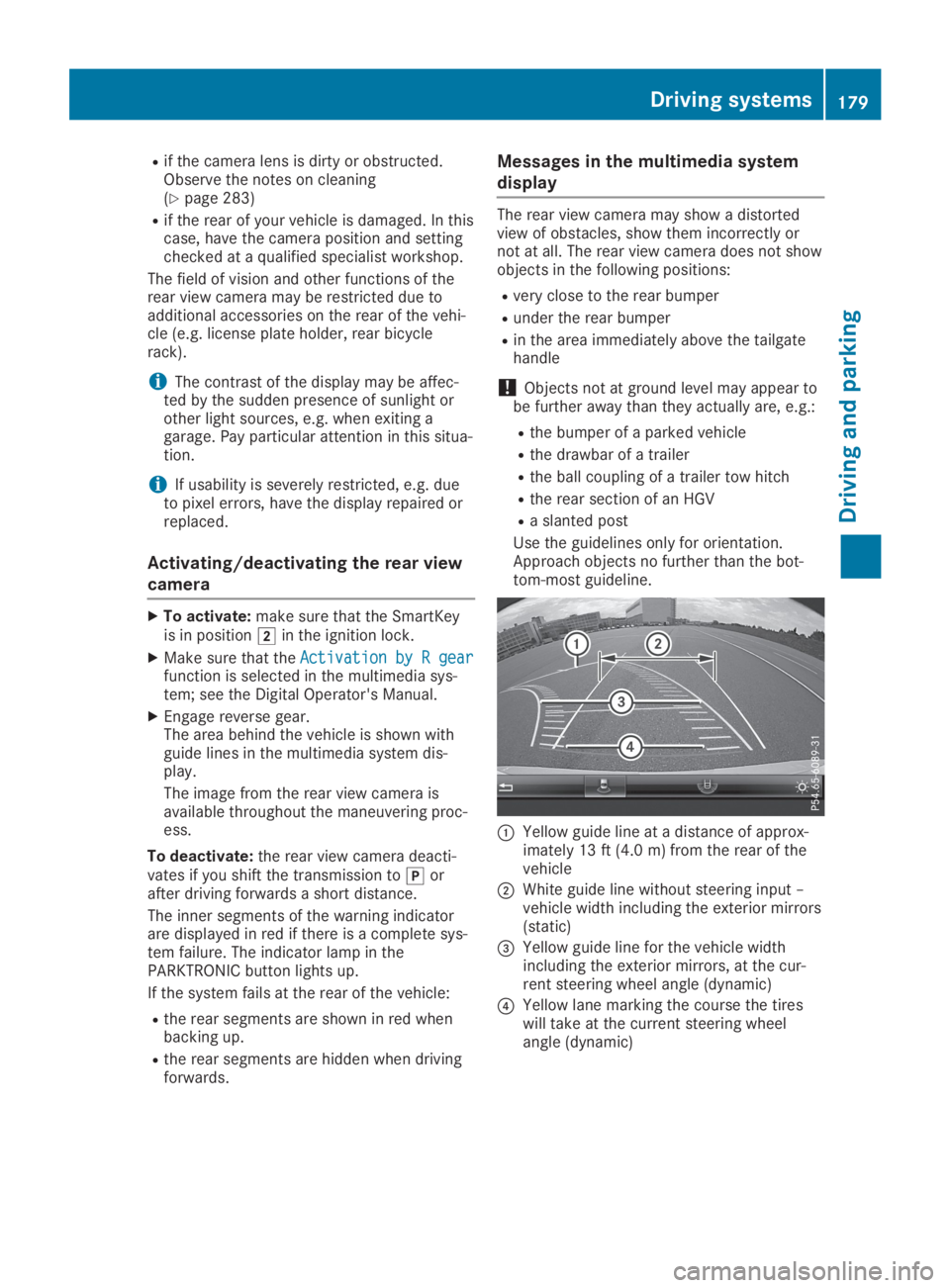
Use the guidelines only for orientation.Approach objects no further than the bot-tom-most guideline.
CYellow guide line at a distance of approx-imately 13 ft (4.0 m) from the rear of thevehicle
DWhite guide line without steering input –vehicle width including the exterior mirrors(static)
Page 188 of 346
If the lanes are narrow, vehicles driving in thelane beyond the lane next to your vehicle maybe indicated, especially if the vehicles are notdriving in the middle of their lane. This may bethe case if the vehicles are driving on the innerside of their lane.
Due to the nature of the system:
Rwarnings may be issued in error when driv-ing close to crash barriers or similar solidlane borders.
Rwarnings may be interrupted when you aredriving alongside particularly long vehicles,such as trucks, for a prolonged time.
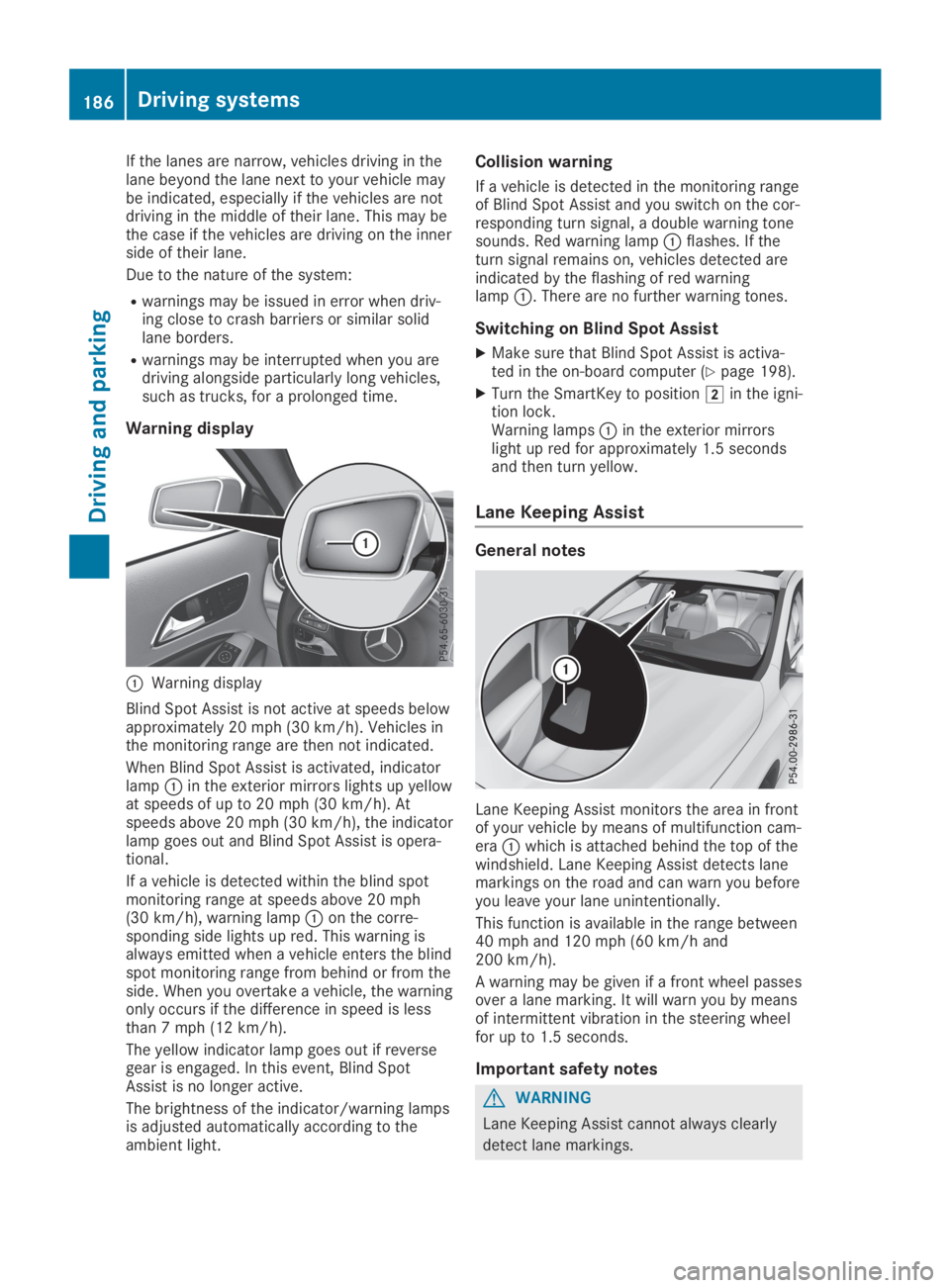
Warning display
CWarning display
Blind Spot Assist is not active at speeds belowapproximately 20 mph (30 km/h). Vehicles inthe monitoring range are then not indicated.
When Blind Spot Assist is activated, indicatorlampCin the exterior mirrors lights up yellowat speeds of up to 20 mph (30 km/h). Atspeeds above 20 mph (30 km/h), the indicatorlamp goes out and Blind Spot Assist is opera-tional.
If a vehicle is detected within the blind spotmonitoring range at speeds above 20 mph(30 km/h), warning lampCon the corre-sponding side lights up red. This warning isalways emitted when a vehicle enters the blindspot monitoring range from behind or from theside. When you overtake a vehicle, the warningonly occurs if the difference in speed is lessthan 7 mph (12 km/h).
The yellow indicator lamp goes out if reversegear is engaged. In this event, Blind SpotAssist is no longer active.
The brightness of the indicator/warning lampsis adjusted automatically according to theambient light.
Collision warning
If a vehicle is detected in the monitoring rangeof Blind Spot Assist and you switch on the cor-responding turn signal, a double warning tonesounds. Red warning lampCflashes. If theturn signal remains on, vehicles detected areindicated by the flashing of red warninglampC. There are no further warning tones.
Switching on Blind Spot Assist
XMake sure that Blind Spot Assist is activa-ted in the on-board computer (Ypage 198).
XTurn the SmartKey to positionHin the igni-tion lock.Warning lampsCin the exterior mirrorslight up red for approximately 1.5 secondsand then turn yellow.
Lane Keeping Assist
General notes
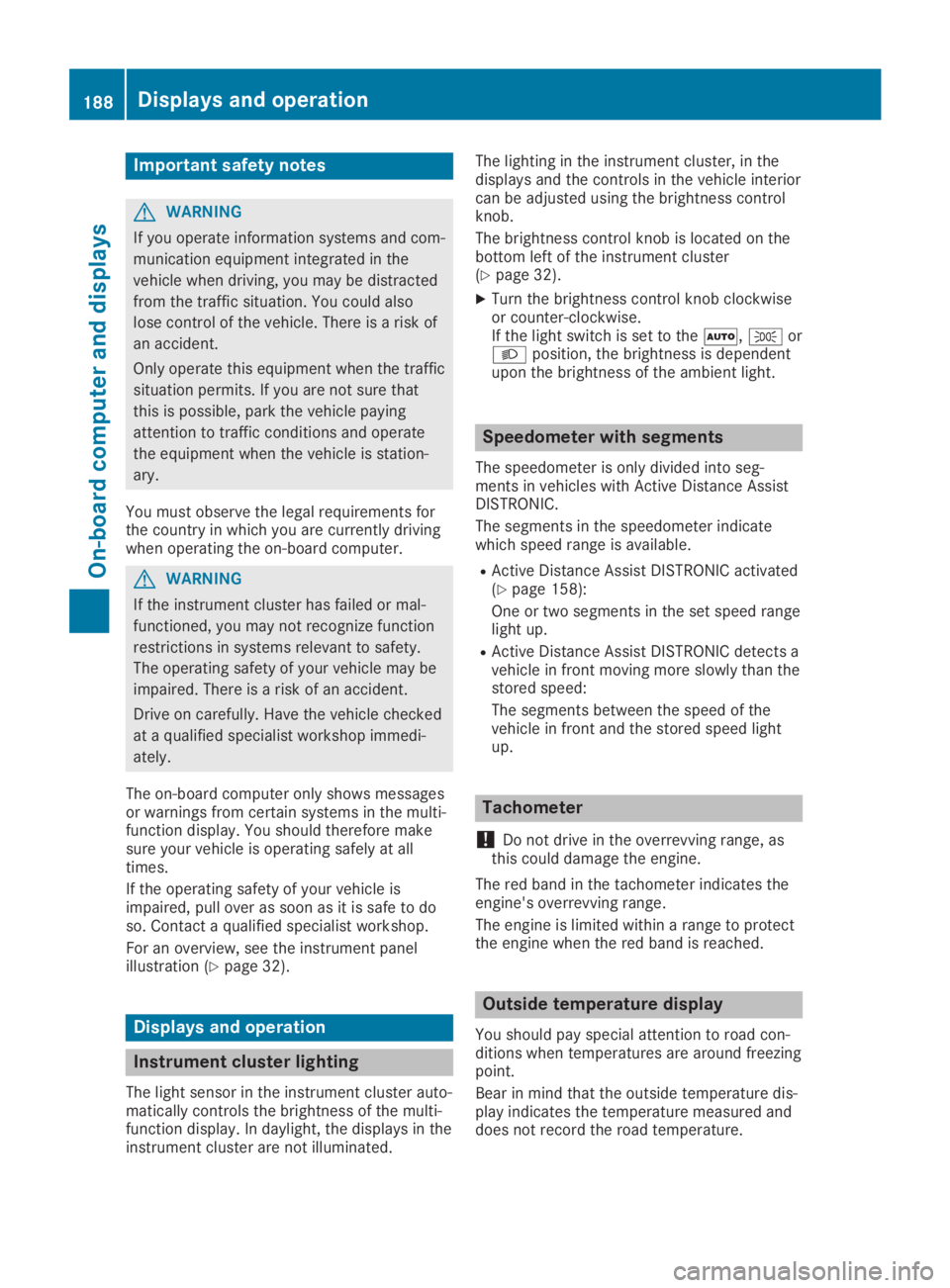
Lane Keeping Assist monitors the area in frontof your vehicle by means of multifunction cam-eraCwhich is attached behind the top of thewindshield. Lane Keeping Assist detects lanemarkings on the road and can warn you beforeyou leave your lane unintentionally.
This function is available in the range between40 mph and 120 mph (60 km/h and200 km/h).
A warning may be given if a front wheel passesover a lane marking. It will warn you by meansof intermittent vibration in the steering wheelfor up to 1.5 seconds.
Important safety notes
GWARNING
Lane Keeping Assist cannot always clearly
detect lane markings.
186Driving systems
Driving and parking
Page 190 of 346
Important safety notes
GWARNING
If you operate information systems and com-
munication equipment integrated in the
vehicle when driving, you may be distracted
from the traffic situation. You could also
lose control of the vehicle. There is a risk of
an accident.
Only operate this equipment when the traffic
situation permits. If you are not sure that
this is possible, park the vehicle paying
attention to traffic conditions and operate
the equipment when the vehicle is station-
ary.
You must observe the legal requirements forthe country in which you are currently drivingwhen operating the on-board computer.
GWARNING
If the instrument cluster has failed or mal-
functioned, you may not recognize function
restrictions in systems relevant to safety.
The operating safety of your vehicle may be
impaired. There is a risk of an accident.
Drive on carefully. Have the vehicle checked
at a qualified specialist workshop immedi-
ately.
The on-board computer only shows messagesor warnings from certain systems in the multi-function display. You should therefore makesure your vehicle is operating safely at alltimes.
If the operating safety of your vehicle isimpaired, pull over as soon as it is safe to doso. Contact a qualified specialist workshop.
For an overview, see the instrument panelillustration (Ypage 32).
Displays and operation
Instrument cluster lighting
The light sensor in the instrument cluster auto-matically controls the brightness of the multi-function display. In daylight, the displays in theinstrument cluster are not illuminated.
The lighting in the instrument cluster, in thedisplays and the controls in the vehicle interiorcan be adjusted using the brightness controlknob.
The brightness control knob is located on thebottom left of the instrument cluster(Ypage 32).
XTurn the brightness control knob clockwiseor counter-clockwise.If the light switch is set to theX,`orXposition, the brightness is dependentupon the brightness of the ambient light.
Speedometer with segments
The speedometer is only divided into seg-ments in vehicles with Active Distance AssistDISTRONIC.
The segments in the speedometer indicatewhich speed range is available.
RActive Distance Assist DISTRONIC activated(Ypage 158):
One or two segments in the set speed rangelight up.
RActive Distance Assist DISTRONIC detects avehicle in front moving more slowly than thestored speed:
The segments between the speed of thevehicle in front and the stored speed lightup.
Tachometer
!Do not drive in the overrevving range, asthis could damage the engine.
The red band in the tachometer indicates theengine's overrevving range.
The engine is limited within a range to protectthe engine when the red band is reached.
Outside temperature display
You should pay special attention to road con-ditions when temperatures are around freezingpoint.
Bear in mind that the outside temperature dis-play indicates the temperature measured anddoes not record the road temperature.
188Displays and operation
On-board computer and displays
Page 202 of 346
XPressvto confirm.
XPress thedorcbutton to select theAutomatic Door LockAutomatic Door Lockfunction.If theAutomatic Door LockAutomatic Door Lockfunction isswitched on, the multifunction displayshows the doors in orange.
XPress thevbutton to save the setting.
If you activate theAutomatic Door LockAutomatic Door Lockfunction, the vehicle is centrally locked abovea speed of around 9 mph (15 km/h).
For further information on the automatic lock-ing feature, see (Ypage 76).
Activating/deactivating the acoustic
locking verification signal
If you switch on theAcoustic LockAcoustic Lockfunction,an acoustic signal sounds when you lock thevehicle.
XPress theYorebutton on the steer-ing wheel to select theSett.Sett.menu.
XPress thedorcbutton to select theVehicleVehiclesubmenu.
XPressvto confirm.
XPress thedorcbutton to select theAcoustic LockAcoustic Lockfunction.If theAcoustic LockAcoustic Lockfunction is activated,the multifunction display shows the7symbol in orange.
XPress thevbutton to save the setting.
Comfort
Switching the fold-in mirrors when lock-
ing feature on/off
This function is only available in Canada.
This function is only available when the vehicleis equipped with the electrical fold-in function.
When you activate theAuto. Mirror Fold‐Auto. Mirror Fold‐ingingfunction, the exterior mirrors are folded inwhen the vehicle is locked. If you unlock thevehicle and then open the driver's or front-passenger door, the exterior mirrors fold outagain.
If you have switched on theAuto. MirrorAuto. MirrorFoldingFoldingfunction and you fold in the exteriormirrors using the button on the door(Ypage 99), they will not fold out automati-cally. The exterior mirrors can then only be fol-ded out using the button on the door.
XPress theYorebutton on the steer-ing wheel to select theSett.Sett.menu.
XPress thedorcbutton to select theConvenienceConveniencesubmenu.
XPressvto confirm.
XPress thedorcbutton to select theAuto. Mirror FoldingAuto. Mirror Foldingfunction.If theAuto. Mirror FoldingAuto. Mirror Foldingfunction isswitched on, the multifunction displayshows the exterior mirror in orange.
XPress thevbutton to save the setting.
Restoring the factory settings
XPress theYorebutton on the steer-ing wheel to select theSett.Sett.menu.
XPress thedorcbutton to select theFactory SettingFactory Settingsubmenu.
XPressvto confirm.TheReset All Settings?Reset All Settings?functionappears.
XPress thedorcbutton to selectNoNoorYesYes.
XPress thevbutton to confirm the selec-tion.If you have selectedYesYes, the multifunctiondisplay shows a confirmation message.
For safety reasons, theDaytime RunningDaytime RunningLightsLightsfunction in theLightLightsubmenu is onlyreset if the vehicle is stationary.
AMG menu (Mercedes-AMG vehicles)
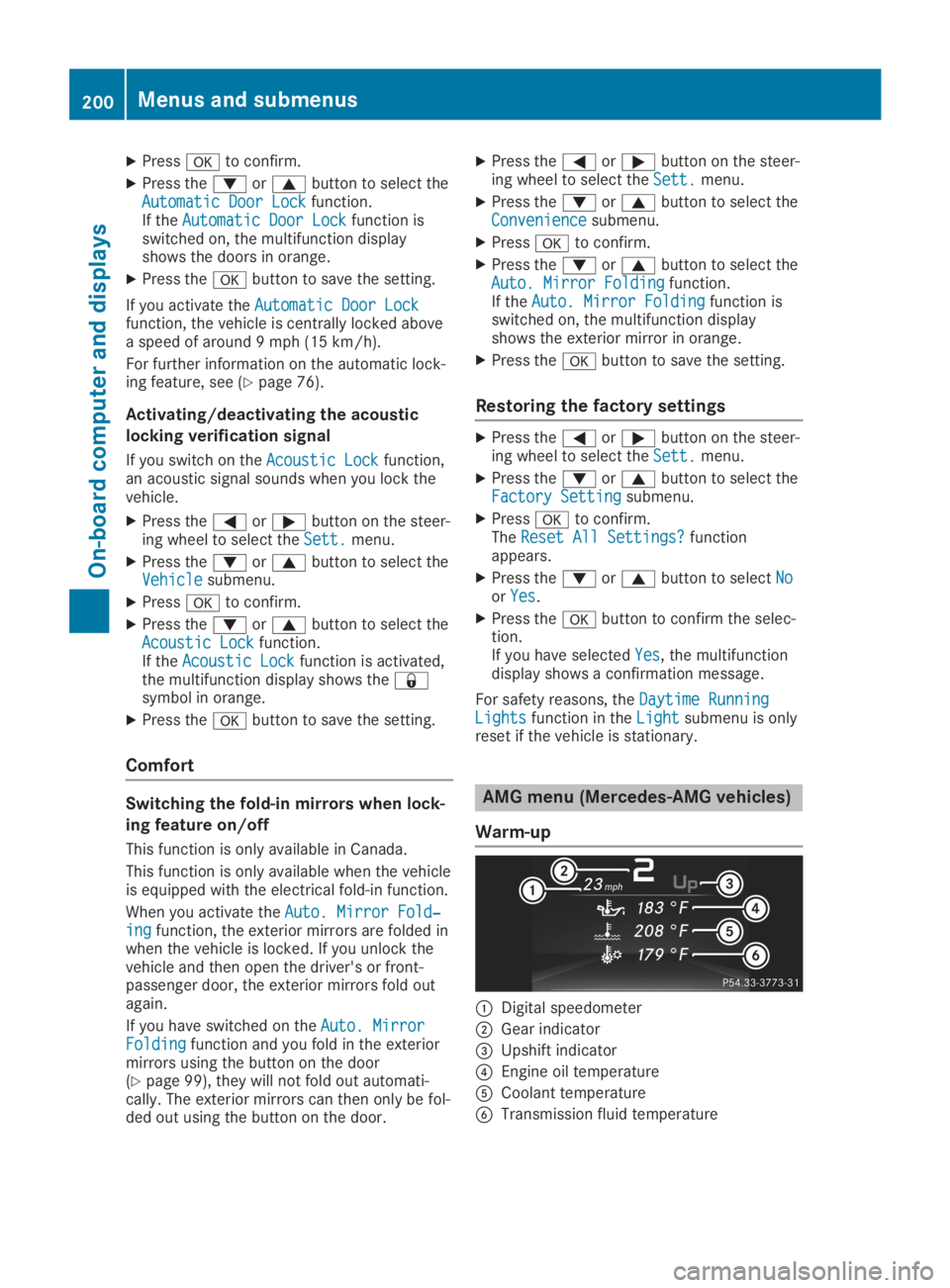
Warm-up
CDigital speedometer
DGear indicator
Page 227 of 346
Display messagesPossible causes/consequences andPPSolutions
TirePress. Sen‐TirePress. Sen‐sor(s) Missingsor(s) MissingUSA only:
There is no signal from the tire pressure sensor of one or severaltires. The pressure of the affected tire does not appear in the multi-function display.
XHave the faulty tire pressure sensor replaced at a qualified spe-cialist workshop.
Tire Pressure Moni‐Tire Pressure Moni‐tor Inoperative Notor Inoperative NoWheel SensorsWheel Sensors
USA only:
The wheels mounted do not have a suitable tire pressure sensor.The tire pressure monitor is deactivated.
XMount wheels with suitable tire pressure sensors.The tire pressure monitor is activated automatically after drivingfor a few minutes.
Tire Press. Moni‐Tire Press. Moni‐tor Inoperativetor InoperativeUSA only:
The tire pressure monitor is faulty.
XVisit a qualified specialist workshop.
Vehicle
Display messagesPossible causes/consequences andPPSolutions
Depress Brake toDepress Brake toStart EngineStart EngineYou have attempted to start the engine with the transmission inposition\\without depressing the brake pedal.
XDepress the brake pedal.
To Deselect P orTo Deselect P orN, Depress BrakeN, Depress Brakeand Start Engineand Start Engine
You attempted to shift the transmission to position^or[with-out starting the engine.
XStart the engine.
XDepress the brake pedal.
iIt is possible to shift the transmission from position]to thedesired position only if you depress the brake pedal. Only thencan the parking lock be deactivated. If you do not depress thebrake pedal, the DIRECT SELECT lever can still be moved but theparking lock remains engaged.
iAt transmission fluid temperatures below
Page 230 of 346
Display messagesPossible causes/consequences andPPSolutions
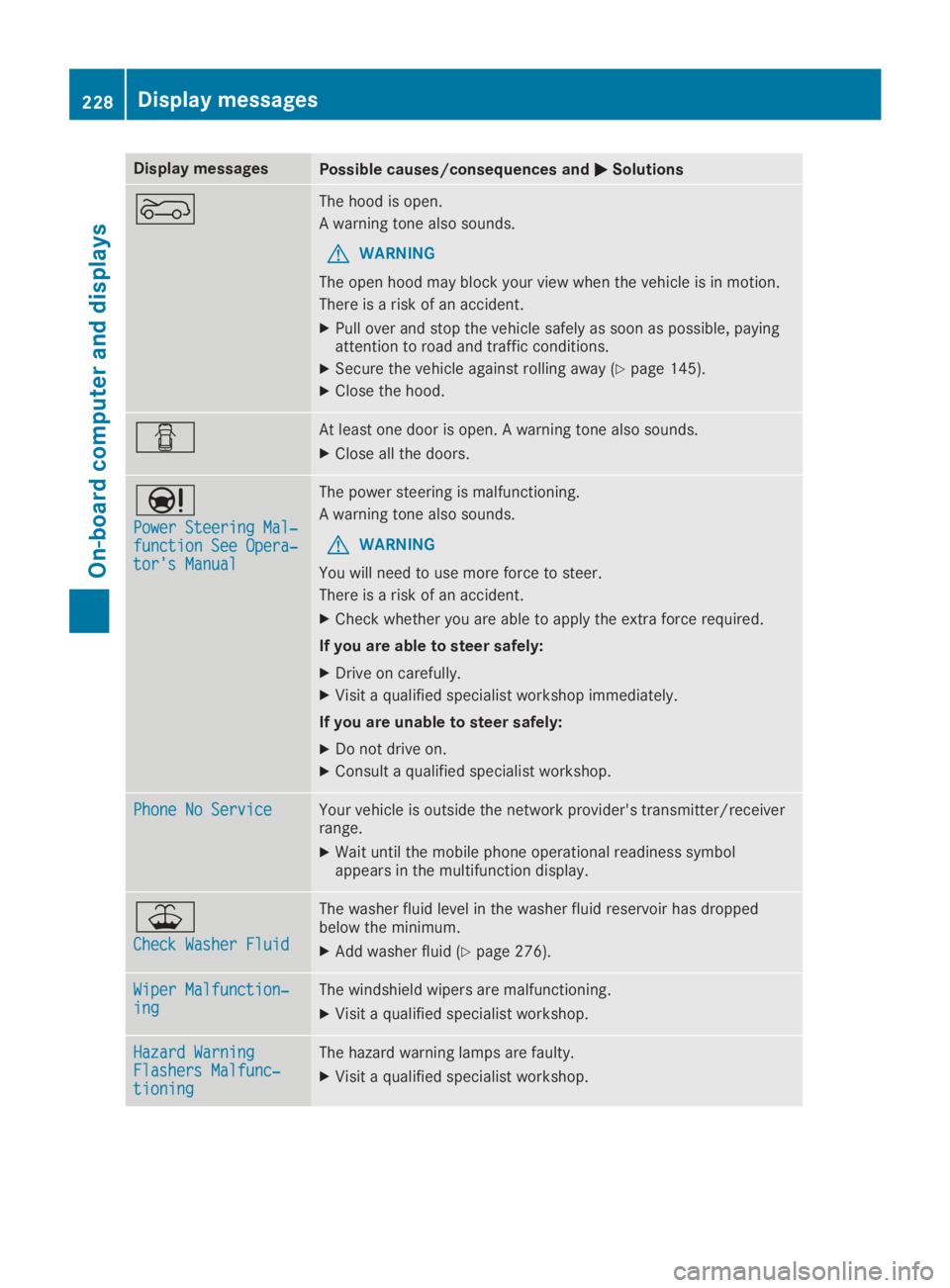
fThe hood is open.
A warning tone also sounds.
GWARNING
The open hood may block your view when the vehicle is in motion.
There is a risk of an accident.
XPull over and stop the vehicle safely as soon as possible, payingattention to road and traffic conditions.
XSecure the vehicle against rolling away (Ypage 145).
XClose the hood.
QAt least one door is open. A warning tone also sounds.
XClose all the doors.
Page 235 of 346
Warning/indicatorlamp
QQSignal type
Possible causes/consequences andPPSolutions
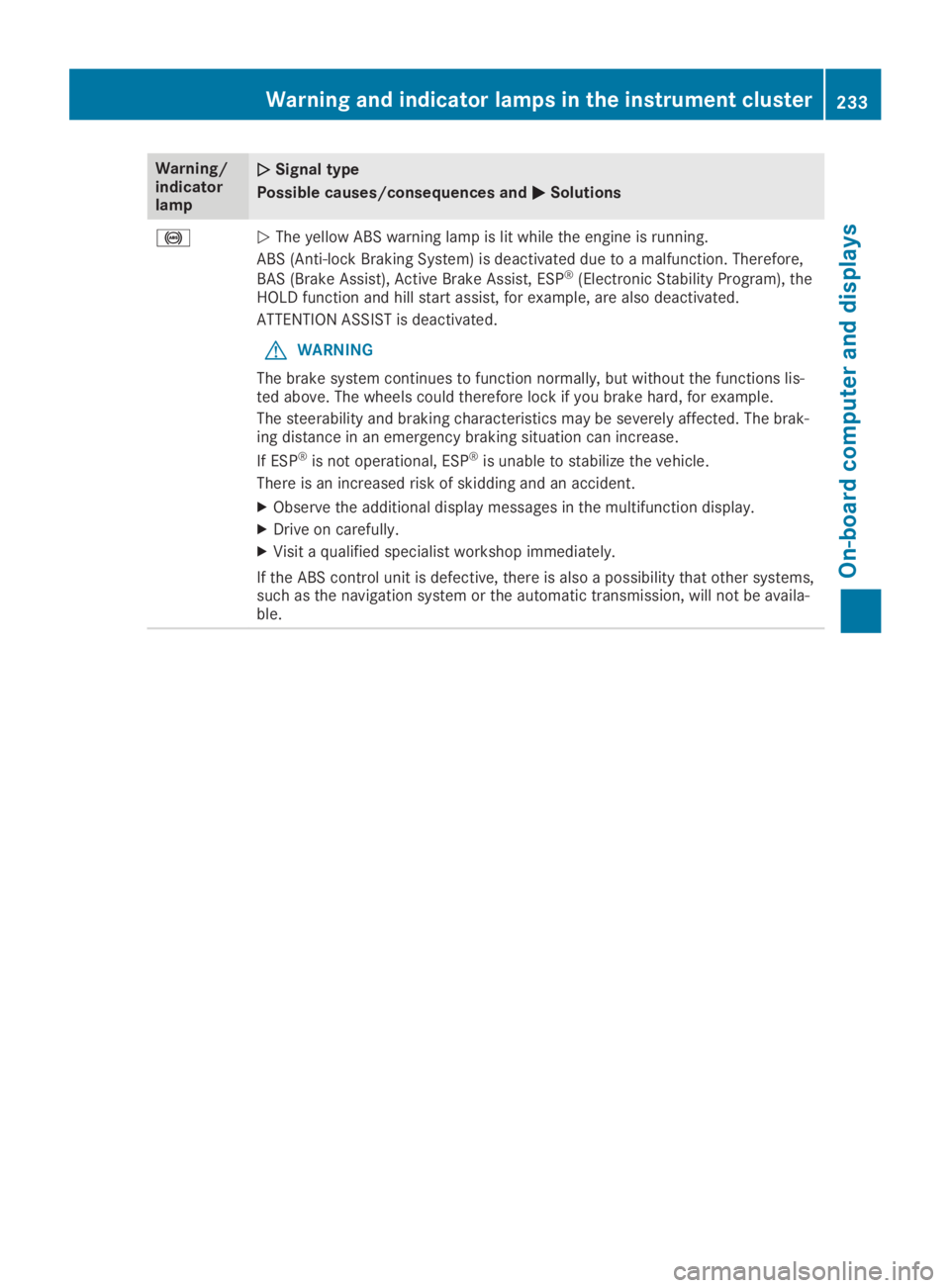
%QThe yellow ABS warning lamp is lit while the engine is running.
ABS (Anti-lock Braking System) is deactivated due to a malfunction. Therefore,
BAS (Brake Assist), Active Brake Assist, ESP®(Electronic Stability Program), theHOLD function and hill start assist, for example, are also deactivated.
ATTENTION ASSIST is deactivated.
GWARNING
The brake system continues to function normally, but without the functions lis-ted above. The wheels could therefore lock if you brake hard, for example.
The steerability and braking characteristics may be severely affected. The brak-ing distance in an emergency braking situation can increase.
If ESP®is not operational, ESP®is unable to stabilize the vehicle.
There is an increased risk of skidding and an accident.
XObserve the additional display messages in the multifunction display.
XDrive on carefully.
XVisit a qualified specialist workshop immediately.
If the ABS control unit is defective, there is also a possibility that other systems,such as the navigation system or the automatic transmission, will not be availa-ble.
Warning and indicator lamps in the instrument cluster233
On-board computer and displays
Z