coolant temperature MERCEDES-BENZ GLA 2019 Owners Manual
[x] Cancel search | Manufacturer: MERCEDES-BENZ, Model Year: 2019, Model line: GLA, Model: MERCEDES-BENZ GLA 2019Pages: 346, PDF Size: 16.66 MB
Page 10 of 346
COMAND
Driving dynamics display ...............171
COMAND display
Cleaning ......................................... 283
Combination switch.......................... 104
Compass
Calibrating ..................................... 271
Calling up ....................................... 271
Magnetic field zone maps .............. 272
Setting ...........................................271
Connecting a USB device
see also Digital Operator's Man-
ual ..................................................242
Consumption statistics (on-board
computer).......................................... 192
Controller...........................................243
Convenience closing feature.............. 85
Convenience opening feature............ 84
Coolant (engine)
Checking the level ......................... 276
Display message ............................ 217
Filling capacity ............................... 338
Important safety notes .................. 337
Temperature (on-board com-
puter, Mercedes-AMG vehicles) ..... 200
Temperature gauge ........................ 189
Warning lamp ................................. 238
Cooling
see Climate control
Copyright............................................. 30
Cornering light function
Display message ............................ 214
Function/notes .............................104
Cover
see Roller sunblind
Cruise control
Activation conditions ..................... 157
Cruise control lever ....................... 157
Deactivating ................................... 158
Display message ............................ 222
Driving system ............................... 157
Function/notes .............................157
Important safety notes .................. 157
Setting a speed .............................. 158
Storing and maintaining current
speed ............................................. 157
Cup holder
Center console .............................. 257
Important safety notes .................. 257
Rear compartment ......................... 258
Customer Assistance Center
(CAC)..................................................... 28
Customer Relations Department....... 28
D
Dashboard
see Cockpit
Dashboard lighting
see Instrument cluster lighting
Data
see Technical data
Daytime running lamps
Display message ............................ 216
Function/notes .............................102
Switching on/off (on-board com-
puter) ............................................. 199
Declarations of conformity................. 27
Decorative film
Cleaning instructions ..................... 281
Diagnostics connection......................27
Digital Operator's Manual
Help .................................................24
Introduction .....................................24
Digital speedometer.........................193
DIRECT SELECT lever
Automatic transmission ................. 134
Display messages
ASSYST PLUS ................................ 277
Calling up (on-board computer) ..... 203
Driving systems .............................219
Engine ............................................ 217
General notes ................................ 203
Hiding (on-board computer) ........... 203
Lights ............................................. 214
Safety systems .............................. 204
SmartKey ....................................... 229
Tires ............................................... 223
Vehicle ...........................................225
Distance control
see Active Distance Assist DISTRONIC
Distance recorder.............................192
Distance warning (warning lamp).... 240
8Index
Page 22 of 346
Connecting a mobile phone (gen-
eral information) ............................ 246
Display message ............................ 228
Introduction ...................................195
Menu (on-board computer) ............ 195
Number from the phone book ........196
Redialing ........................................ 196
Rejecting/ending a call ................. 196
see also Digital Operator's Man-
ual ..................................................242
Temperature
Coolant .......................................... 189
Coolant (on-board computer,
Mercedes-AMG vehicles) ...............200
Engine oil (on-board computer,
Mercedes-AMG vehicles) ...............200
Outside temperature ......................188
Setting (climate control) ................ 119
Transmission oil (on-board com-
puter, Mercedes-AMG vehicles) ..... 200
Through-loading feature................... 253
Timing (RACETIMER)......................... 201
Tire pressure
Calling up (on-board computer) ..... 311
Checking manually ........................ 310
Display message ............................ 223
Maximum ....................................... 310
Not reached (TIREFIT) .................... 291
Notes ............................................. 309
Reached (TIREFIT) .......................... 291
Recommended ............................... 307
Tire pressure loss warning sys-
tem
General notes ................................ 310
Important safety notes .................. 311
Restarting ...................................... 311
Tire pressure monitor
Checking the tire pressure elec-
tronically ........................................ 313
Function/notes .............................311
General notes ................................ 311
Important safety notes .................. 312
Radio type approval for the tire
pressure monitor ........................... 315
Restarting ...................................... 314
Warning lamp ................................. 241
Warning message .......................... 313
TIREFIT kit.......................................... 289
Important safety notes .................. 289
Storage location ............................ 287
Tire pressure not reached .............. 291
Tire pressure reached .................... 291
Tires
Aspect ratio (definition) ................. 324
Average weight of the vehicle
occupants (definition) .................... 323
Bar (definition) ............................... 323
Changing a wheel .......................... 325
Characteristics .............................. 323
Checking ........................................ 304
Curb weight (definition) ................. 324
Definition of terms ......................... 323
Direction of rotation...................... 326
Display message ............................ 223
Distribution of the vehicle occu-
pants (definition) ............................ 325
DOT (Department of Transporta-
tion) (definition) ............................. 323
DOT, Tire Identification Number
(TIN) ............................................... 322
GAWR (Gross Axle Weight Rat-
ing) (definition) .............................. 324
General notes ................................ 329
GVW (Gross Vehicle Weight) (def-
inition) ........................................... 324
GVWR (Gross Vehicle Weight
Rating) (definition) ......................... 324
Important safety notes .................. 304
Increased vehicle weight due to
optional equipment (definition) ...... 324
Information on driving .................... 304
Kilopascal (kPa) (definition) ........... 324
Labeling (overview) ........................ 320
Load bearing index (definition) ...... 325
Load index ..................................... 322
Load index (definition) ................... 324
M+S tires....................................... 306
Maximum load on a tire (defini-
tion) ............................................... 324
Maximum loaded vehicle weight
(definition) ..................................... 324
Maximum permissible tire pres-
sure (definition) ............................. 324
Maximum tire load ......................... 322
Maximum tire load (definition) ....... 324
20Index
Page 191 of 346
The outside temperature display is in the mul-tifunction display (Ypage 191).
There is a short delay before a change in out-side temperature appears in the multifunctiondisplay.
Coolant temperature gauge
GWARNING
Opening the hood when the engine is over-
heated or when there is a fire in the engine
compartment could expose you to hot gases
or other service products. There is a risk of
injury.
Let an overheated engine cool down before
opening the hood. If there is a fire in the
engine compartment, keep the hood closed
and contact the fire department.
!A display message is shown if the coolanttemperature is too high.
If the coolant temperature is over 248 ‡(120 †), do not continue driving. Theengine will otherwise be damaged.
The coolant temperature gage is in the instru-ment cluster on the right-hand side(Ypage 32).
TheHmarking in the coolant temperaturegauge corresponds to a coolant temperatureof approximately 248 ‡ (120 †).
Under normal operating conditions and at thecorrect coolant level, the coolant temperaturegauge may rise to theHmarking.
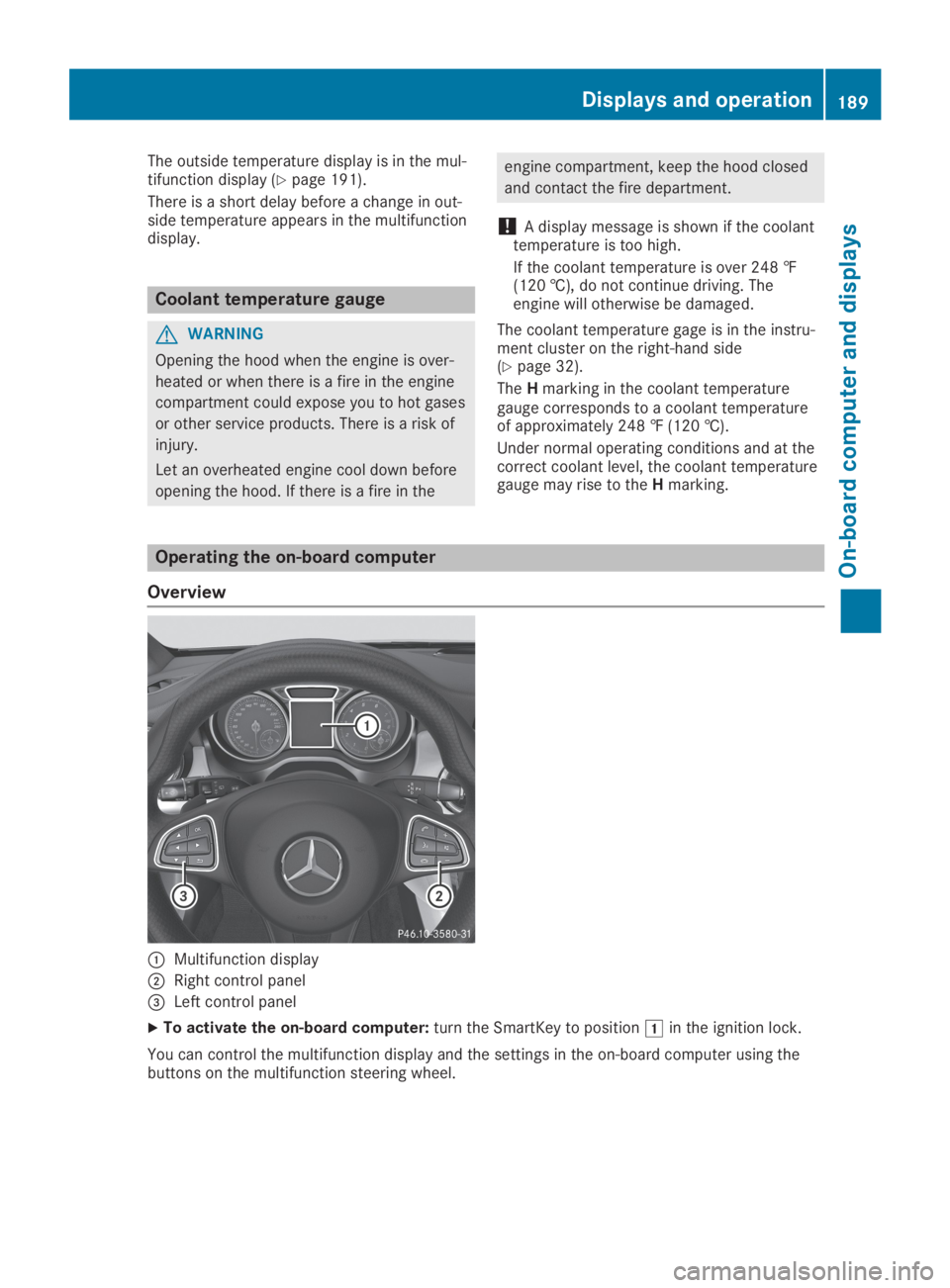
Operating the on-board computer
Overview
CMultifunction display
DRight control panel
Page 242 of 346
Warning/indicatorlamp
QQSignal type
Possible causes/consequences andPPSolutions
XMake sure that the air supply to the engine radiator is not blocked, e.g. bysnow, slush or ice.
XAt coolant temperatures below 248 ‡ (120 †), drive to the nearest qualifiedspecialist workshop.
XAvoid heavy loads on the engine as you do so, e.g. driving in mountainous ter-rain and stop-and-go traffic.
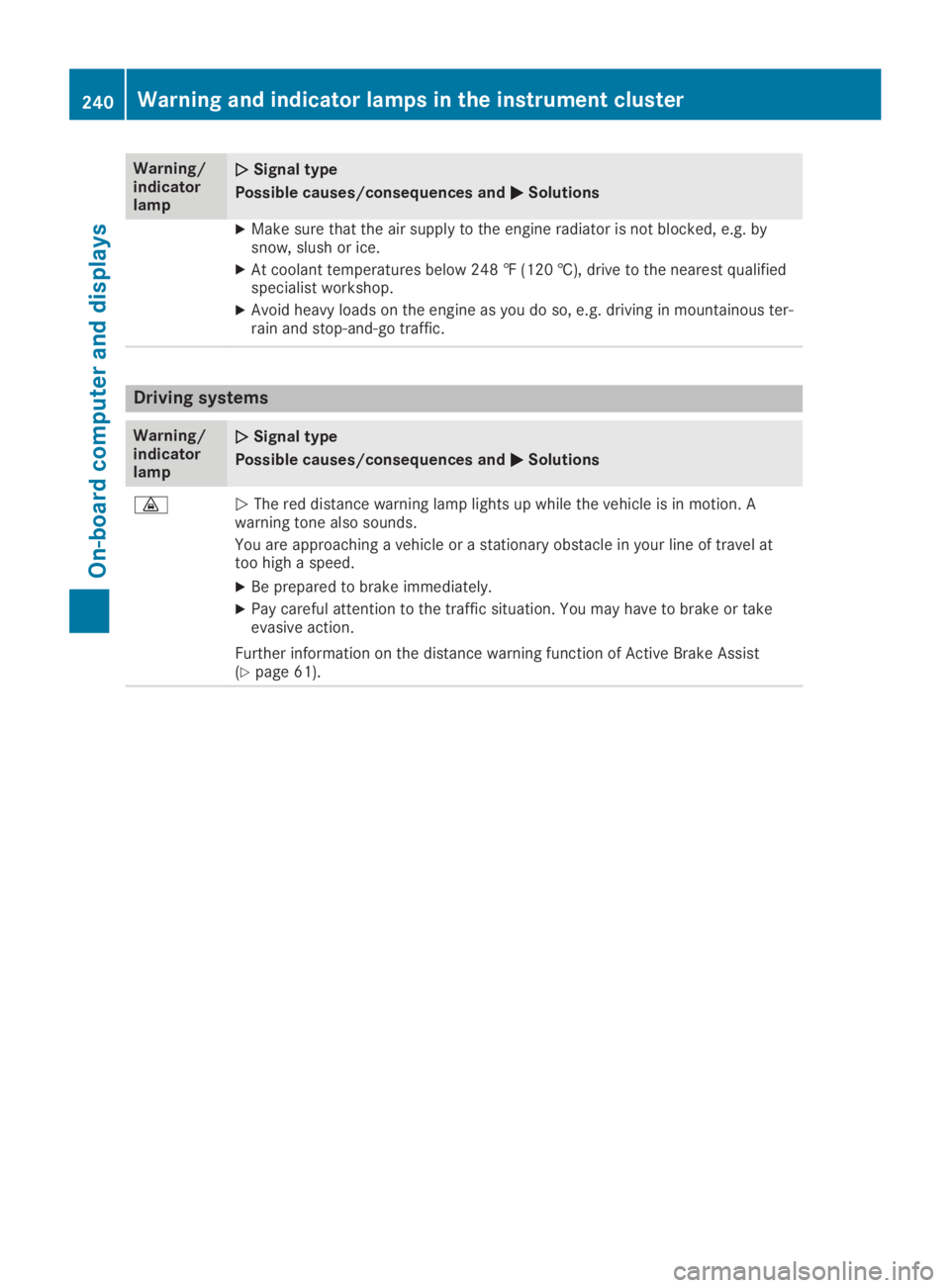
Driving systems
Warning/indicatorlamp
QQSignal type
Possible causes/consequences andPPSolutions
Page 278 of 346
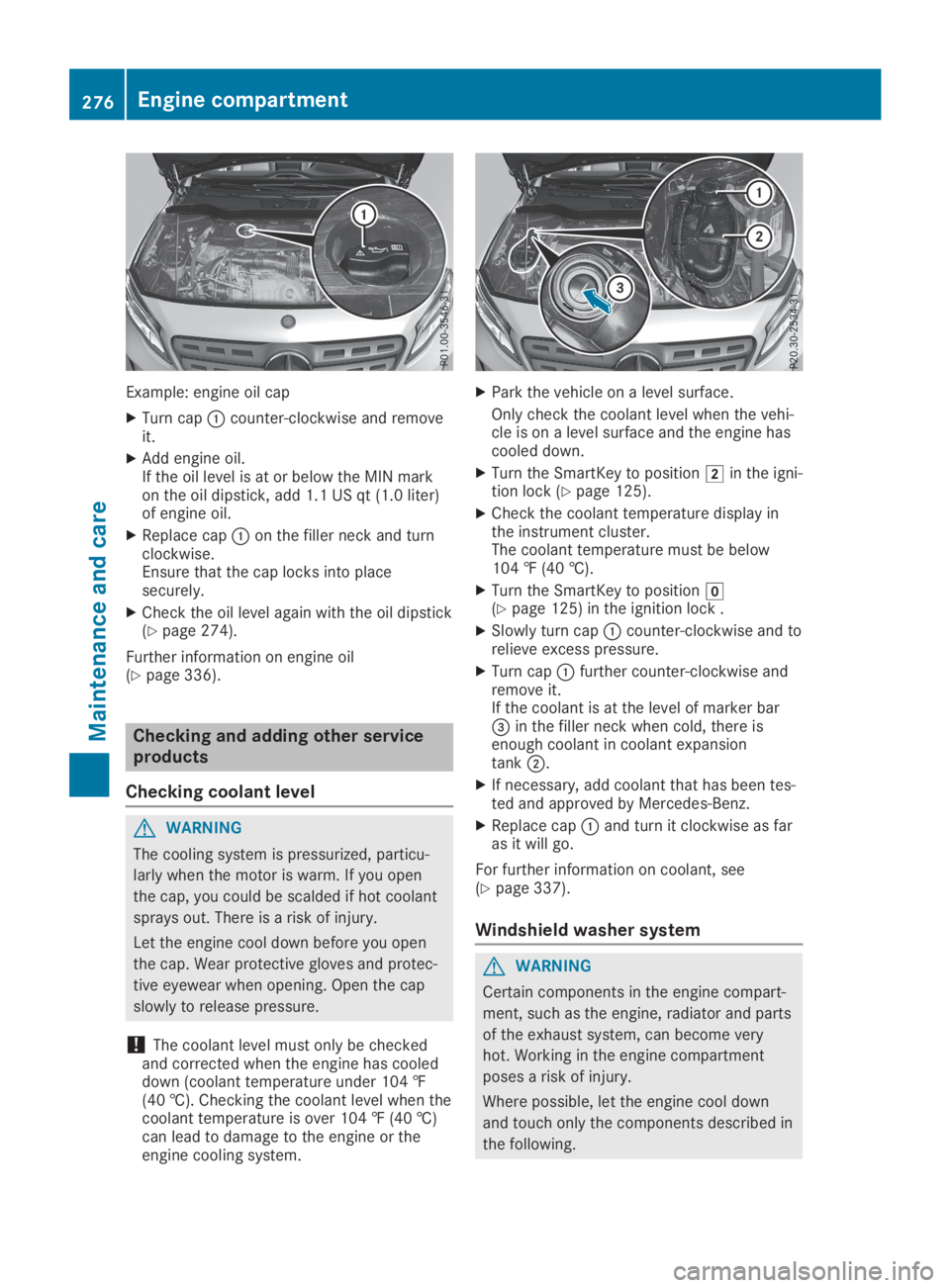
Example: engine oil cap
XTurn capCcounter-clockwise and removeit.
XAdd engine oil.If the oil level is at or below the MIN markon the oil dipstick, add 1.1 US qt (1.0 liter)of engine oil.
XReplace capCon the filler neck and turnclockwise.Ensure that the cap locks into placesecurely.
XCheck the oil level again with the oil dipstick(Ypage 274).
Further information on engine oil(Ypage 336).
Checking and adding other service
products
Checking coolant level
GWARNING
The cooling system is pressurized, particu-
larly when the motor is warm. If you open
the cap, you could be scalded if hot coolant
sprays out. There is a risk of injury.
Let the engine cool down before you open
the cap. Wear protective gloves and protec-
tive eyewear when opening. Open the cap
slowly to release pressure.
!The coolant level must only be checkedand corrected when the engine has cooleddown (coolant temperature under 104 ‡(40 †). Checking the coolant level when thecoolant temperature is over 104 ‡ (40 †)can lead to damage to the engine or theengine cooling system.
XPark the vehicle on a level surface.
Only check the coolant level when the vehi-cle is on a level surface and the engine hascooled down.
XTurn the SmartKey to positionHin the igni-tion lock (Ypage 125).
XCheck the coolant temperature display inthe instrument cluster.The coolant temperature must be below104 ‡ (40 †).
XTurn the SmartKey to positionZ(Ypage 125) in the ignition lock .
XSlowly turn capCcounter-clockwise and torelieve excess pressure.
XTurn capCfurther counter-clockwise andremove it.If the coolant is at the level of marker bar
Page 282 of 346
the vehicle and the nozzle of the powerwasher.
Information about the correct distance isavailable from the equipment manufacturer.
Move the power washer nozzle around whencleaning your vehicle.
The water temperature of the power washermust not exceed 140 ‡ (60 †).
!Always maintain a distance of at least12 in (30 cm) between the vehicle and thepower washer nozzle. Information about thecorrect distance is available from the equip-ment manufacturer.
Move the power washer nozzle around whencleaning your vehicle.
Do not aim directly at any of the following:
RTires
RDoor gaps, roof gaps, joints, etc.
RElectrical components
RBattery
RPlug-type couplings
RLight bulbs
RSeals
RTrim elements
RVentilation slots
Damaged seals or electrical componentscan lead to leaks or failures.
Cleaning the paintwork
!Do not affix:
Rstickers
Rfilms
Rmagnetic plates or similar items
to painted surfaces. You could otherwisedamage the paintwork.
Scratches, corrosive deposits, areas affectedby corrosion and damage caused by inade-quate care cannot always be completelyrepaired. In such cases, visit a qualified spe-cialist workshop.
XRemove dirt immediately, where possible,while avoiding rubbing too hard.
XSoak insect remains with insect removerand rinse off the treated areas afterwards.
XSoak bird droppings with water and rinse offthe treated areas afterwards.
XRemove tree resin, oils, fuels and greases byrubbing gently with a cloth soaked in petro-leum ether or lighter fluid
XRemove coolant and brake fluid with a moistcloth and clear water.
XUse tar remover to remove tar stains.
XUse silicone remover to remove wax.
If water no longer forms "beads" on the paintsurface, use the paint care products recom-mended and approved by Mercedes-Benz. Thisis the case approximately every three to fivemonths, depending on the climate conditionsand the care product used.
If dirt has penetrated the paint surface or ifthe paint has become dull, the paint cleanerrecommended and approved by Mercedes-Benz should be used.
Do not use these care products in the sun oron the hood while the hood is hot.
XUse a suitable touch-up stick, e.g. MBTouch-Up Stick, to repair slight damage tothe paintwork quickly and provisionally.
Matte finish care
!Never polish the vehicle or the light alloywheels. Polishing causes the finish to shine.
!The following can give the paint a glossyappearance and thus reduce the matteffect:
RRubbing hard with unsuitable agents
RWashing the vehicle in direct sunlight
!Never use paint cleaner, buffing or polish-ing products, or gloss preserver, e.g. wax,for the purpose of paintwork care. Theseproducts are only suitable for high-gloss sur-faces. Their use on vehicles with mattepaintwork leads to considerable surfacedamage or, more specifically, to shiny, spot-ted areas.
Always have paintwork repairs carried out ata qualified specialist workshop.
!Only use automatic car washes which cor-respond to the latest technological stand-ards. Never use wash programs which finishby treating the vehicle with hot wax.
Observe these notes if your vehicle has a clearmatte finish. This will help you to avoid dam-age to the paintwork due to incorrect treat-ment.
280Care
Maintenance and care
Page 339 of 346
For a list of approved engine oils and oil filters,consult an authorized Mercedes-Benz Center.Or visit the websitehttp://bevo.mercedes-benz.com.
The table shows which engine oils have beenapproved for your vehicle.
ModelMB-Freigabe orMB-Approval
All models229.5
Use only SAE 0W-40 or SAE 5W-40 engine oilsfor Mercedes-AMG vehicles.
iMB approval is indicated on the oil con-tainers.
Filling capacities
The following values refer to an engine oilchange, including the oil filter.
ModelCapacity
Mercedes‑AMG vehicles5.8 USqt (5.5 l)
All other models5.9 USqt (5.6 l)
Additives
!Do not use any additives in the engine oil.This could damage the engine.
Brake fluid
GWARNING
The brake fluid constantly absorbs moisture
from the air. This lowers the boiling point of
the brake fluid. If the boiling point of the
brake fluid is too low, vapor pockets may
form in the brake system when the brakes
are applied hard. This would impair braking
efficiency. There is a risk of an accident.
You should have the brake fluid renewed at
the specified intervals.
When handling brake fluid, observe the impor-tant safety notes on service products(Ypage 334).
The brake fluid change intervals can be foundin the Maintenance Booklet.
Only use brake fluid approved by Mercedes-Benz in accordance with MB-Freigabe or MB-Approval 331.0.
Information about approved brake fluid can beobtained at any qualified specialist workshopor on the Internet athttp://bevo.mercedes-benz.com.
iHave the brake fluid regularly replaced at aqualified specialist workshop and thereplacement confirmed in the MaintenanceBooklet.
Coolant
Important safety notes
GWARNING
If antifreeze comes into contact with hot
components in the engine compartment, it
may ignite. There is a risk of fire and injury.
Let the engine cool down before you add
antifreeze. Make sure that antifreeze is not
spilled next to the filler neck. Thoroughly
clean the antifreeze from components
before starting the engine.
!Only add coolant that has been premixedwith the desired antifreeze protection. Youcould otherwise damage the engine.
You can find additional notes on the coolantin the following places:
Rin the Mercedes-Benz Specifications forService Products, MB BeVo 310.1
-on the Internet athttp://bevo.mercedes-benz.com
-on the Mercedes-Benz BeVo app
Ra qualified specialized workshop
!Always use a suitable coolant mixture,even in countries where high temperaturesprevail.
Otherwise, the engine cooling system is notsufficiently protected from corrosion andoverheating.
iHave the coolant regularly replaced at aqualified specialist workshop and thereplacement confirmed in the MaintenanceBooklet.
Service products and filling capacities337
Technical data
Z
Page 340 of 346
Comply with the important safety notes forservice products when handling coolant(Ypage 334).
The coolant is a mixture of water and corro-sion inhibitor/antifreeze concentrate. It per-forms the following tasks:
Ranti-corrosion protection
Rantifreeze protection
Rraising the boiling point
If the coolant has antifreeze protection downto -35 ‡ (-37 †), the boiling point of the cool-ant during operation is approximately 266 ‡(130 †).
Theantifreeze concentrate/corrosion inhibitorconcentration in the engine cooling systemshould:
Rbe at least 50%. This will protect the enginecooling system against freezing down toapproximately -35 ‡(-37 †)
Rnot exceed 55% (antifreeze protection downto -49 ‡ [-45 †]). Otherwise, heat will notbe dissipated as effectively
Mercedes-Benz recommends a coolant or cor-rosion inhibitor/antifreeze concentrate inaccordance withMB Specifications for Service Products 310.1.
iWhen the vehicle is first delivered, it is fil-led with a coolant mixture that ensures ade-quate antifreeze and anti-corrosion protec-tion.
iThe coolant is checked with every mainte-nance interval at a qualified specialist work-shop.
Filling capacities
ModelCapacity
Mercedes‑AMGvehiclesApprox. 12.6 US qt(11.9l)
All other modelsApprox. 8.2 US qt(7.8 l)
Windshield washer system
Important safety notes
GWARNING
Windshield washer concentrate is highly
flammable. If windshield washer concentrate
gets onto hot components of the engine or
the exhaust system, it can ignite. There is a
risk of fire and injury.
Make sure that windshield washer concen-
trate is not spilled in the vicinity of the filler
neck.
!Only MB SummerFit and MB WinterFitwasher fluid should be mixed together. Thespray nozzles may otherwise becomeblocked.
Do not use distilled or de-ionized water. Other-wise, the level sensor may give a false reading.
When handling washer fluid, observe theimportant safety notes on service products(Ypage 334).
At temperatures above freezing:
XFill the washer fluid reservoir with a mixtureof water and windshield washer fluid, e.g.MB SummerFit.
Add 1 part MB SummerFit to 100 parts water.
At temperatures below freezing:
XFill the washer fluid reservoir with a mixtureof water and washer fluid, e.g. MB WinterFit.
For the correct mixing ratio refer to theinformation on the antifreeze reservoir.
iAdd windshield washer fluid, e.g. MB Sum-merFit or MB WinterFit, to the washer fluidall year round.
Climate control system refrigerant
Important safety notes
The climate control system of your vehicle isfilled with refrigerant R‑134a.
The instruction label regarding the refrigeranttype used can be found on the left, on theunderside of the hood.
!Only the refrigerant R‑134a and the PAGoil approved by Mercedes-Benz may be
338Service products and filling capacities
Technical data