fog light MERCEDES-BENZ GLA 2020 User Guide
[x] Cancel search | Manufacturer: MERCEDES-BENZ, Model Year: 2020, Model line: GLA, Model: MERCEDES-BENZ GLA 2020Pages: 346, PDF Size: 17.58 MB
Page 122 of 346
Setting
theairdistr ibution
Air-conditioning systemAir
distr ibution settings
0061 Directsair through thedefroster vents
009C Directsair through thecent erand side
air vent s
009B Directsair through thefootwell air
vent s
i You
canalso activate severalairdistribu-
tion settin gssimultaneously. Todo this,
press multiple airdistribution buttons.The
air isthen directed throughvariousvents.
i Regardle
ssofthe airdistribution setting,
airflow isalwa ysdirected throughtheside
air vent s.The side airvent scan only be
closed ifthe adjusters areturned clockwise
until theyengage.
Setting theairdistr ibution
X Turn theSmartK eytoposition 0048inthe igni-
tion lock (Ypage 125).
X Press oneormore ofthe 009C, 009B,0061
buttons.
The correspondin gindicator lamplights up
briefly.
Dual-zone automaticclimate control Air
distr ibution settings
0061 Directsair through thedefroster vents
009C Directsair through thecent erand side
air vent s
009B Directsair through thefootwell air
vent s
009F Directsair through thecent er,side and
footwell vents
0087 Directsair through thedefroster, center
and side airvent s
0086 Directsair through thedefroster and
footwell vents
008F Directsair through thedefroster, cen-
ter, side andfootwell vents
i Regardle
ssofthe airdistribution setting,
airflow isalwa ysdirected throughtheside
air vent s.The side airvent scan only be
closed ifthe adjusters areturned clockwise
until theyengage. Setting
theairdistr ibution
X Turn theSmartK eytoposition 0048inthe igni-
tion lock (Ypage 125).
X Press the004F or004A button repeatedly
until thedesired symbolappears inthe dis-
play . Setting
theairflow
Air-conditioning system X
Turn theSmartK eytoposition 0048inthe igni-
tion lock (Ypage 125).
X To increase orreduce: turncontrol0083
counter -clockwiseorclockwise
(Y page 114).
Dual-zone automaticclimate control X
Turn theSmartK eytoposition 0048inthe igni-
tion lock (Ypage 125).
X To increase orreduce: pressthe0097 or
0095 button. Switching
theZONE function on/off
This funct ionisonly availa blewith dual-zone
automatic climatecontrol.
X To activate: pressthe00D6 button.
The indicator lampinthe 00D6 button lights
up.
The temperature settingfor the driver's side
is not adopted forthe front -passenger side.
X To deactivat e:press the00D6 button.
The indicator lampinthe 00D6 button goes
out.
The temperature settingfor the driver's side
is adopted forthe front -passenger side. Defrosting
thewindshield
General notes You
canusethis funct iontodefrost thewind-
shield ortoclear afogged upwindshield and
side windows. 120
Operat
ingthe climate controlsystemsClimat econ trol
Page 123 of 346
i
You
should onlyselect the"Windsh ield
defro sting"func tion untilthe windsh ieldis
clear again.
Switching the"Wind shield defrosting"
funct iononoroff X
Turn theSmar tKey toposit ion0048inthe igni-
tion lock (Ypage 125).
X To activ ate: press the0064 button.
The indic atorlamp inthe 0064 buttonlight s
up.
The climat econ trol syste mswitc hestothe
followin gfunc tions:
R high airflow
R high temperat ure
R air distr ibution tothe windsh ieldand front
side windows
R air-r ecirculatio nmode off
i The
"Windsh ielddefro sting"func tion auto-
matic allysetsthe blower leveltothe opti-
mum defrostingeffe ct.As aresult ,the air-
flow may increase ordecr ease automat ically
afte rthe 0064 buttonispress ed.
i You
canadjust theblower levelmanually
while the"Windsh ielddefro sting"func tion is
in operat ion:
R Air -condit ioningsyste m:turn airflow con-
tr ol 0083 coun ter-clock wise orcloc kwise
(Y page 114).
R Dual- zoneautomat icclimat econ trol:
press the00F2 or00F3 button.
X To deact ivate:press the0064 button.
The indic atorlamp inthe 0064 buttongoes
out. Theprevio uslyselect edsettings are
rest ored. Air-recir culatio nmode remain s
deact ivated.
or X Dual- zoneclimat econ trol: press the0058
butt on.
The indic atorlamp inthe 0064 buttongoes
out. Airflow andairdistr ibution aresetto
automat icmode.
or X Air -condit ioningsyste m:turn temperat ure
con trol 0043 coun ter-clock wise orcloc kwise
(Y page 114).
Dual- zoneautomat icclimat econ trol: turn
tem perat urecontrol 0043 or006D coun ter-clock -
wise orcloc kwise (Ypage 116). MAX
COOL maximu mcooling
The MAX COOL function isonly available in
vehic lesforthe USA .
MAX COOL isonly operat ionalwhen the
engin eis runn ing.
X To activ ate: press the00C9 button.
The indic atorlamp inthe butt onlight sup.
X To deact ivate:press the00C9 button.
The indic atorlamp goesout.Theprevio usly
selec tedsettings are rest ored.
When youactivate MAXCOOL, climatecon trol
switc hestothe followin gfunc tions:
R maxim umcoolin g
R maxim umairflow
R air-r ecirculatio nmode on Rem
oving condensa tionfrom the
windows
Wind owsfogged upontheinside Air-
condit ioning system
X Ac tivate the 005A "Cooling withairdehu-
midific ation"func tion.
X Ifthe windows continue tofog up,activate
the 0064 "Windsh ielddefro sting"func tion.
i You
should onlyselec tthis settingunt ilthe
windsh ieldisclear again.
Dual- zone automa ticclima tecontr ol
X Ac tivate the 005A "Cooling withairdehu-
midific ation"func tion.
X Ac tivate automat icmode 0058.
X Ifthe windows continue tofog up,activate
the 0064 "Windsh ielddefro sting"func tion.
i You
should onlyselec tthis settingunt ilthe
windsh ieldisclear again.
Wind owsfogged upontheout side X
Ac tivate the windsh ieldwipers.
X Set theairdistr ibution to009C or009B.
i You
should onlyselec tthis settingunt ilthe
windsh ieldisclear again. Oper
ating theclimat econtr olsyst ems
121Climat econtr ol
Page 124 of 346
Rear
windo wdefro ster
Gen eral notes The
rearwi ndow defroste rha sa hig hcurr ent
dra w.Yousho uld there foreswitch itoff as
soo nas the rearwi ndow iscle ar. Othe rwise,
the rearwi ndow defroste rswi tches offauto-
mati callyafte rsev eralminu tes.
If the battery voltag eis too low, the rearwi n-
dow defroste rmay switch off. Ac
tivati ng/de acti vatin g X
Tu rn the Smar tKeytopos ition 0048 inthe igni-
tion lock (Ypage 125 ).
X Pre ssthe 006C button.
The indicator lamp inthe 006C button lights
up orgoe sou t.
Prob lems with the rear windo wdefro ster Prob
lem Po
ssi blecau ses/ conse quen cesand 0050 0050
So luti ons The
rearwi ndow
def roste rha sdea ctiva -
ted prematu relyor can-
not beacti vate d. The
battery hasnot beensu ffici ently charged.
X Swi tch offany consu mersthatarenot required ,e.g. reading
la mps ,inter iorlighti ngorthe seathea ting.
Whe nthe battery issu ffici ently charged,the rearwi ndow
def roste rcan beacti vate dag ain. Sw
itchin gair-re circul ationmode
on /o ff
Gen eral notes Yo
ucan deactiva tethe flowof fres hairif
unp leas ant odorsare enter ingthe vehiclefrom
ou tsid e.The airal rea dyinsi dethe vehiclewi ll
then bereci rcul ated.
If yo uswi tch onair-reci rculation mod e,the
wi ndow scan fogupmore quickl y,in pa rticu lar
at low temp erature s.Only useair-reci rculation
mod ebri eflyto pre vent thewindow sfrom fog-
gi ng up.
The operationofair-reci rculation mod eis the
sa me forallcontrol panel s.
Ac tivati ng/de acti vatin g X
Tu rn the Smar tKeytopos ition 0048 inthe igni-
tion lock (Ypage 125).
X To acti vate :pre ssthe 008A button.
The indicator lamp inthe 008A button lights
up .
Dua l-zoneautomati ccl imate control :ai r-
reci rcul ation mod eis acti vate dau toma tically:
R at hig hou tsid etemp erature s
R at hig hlevel sof pol lution Whe
nair-reci rculation mod eis acti vate dau to-
mati cally,the indicator lamp inthe 008A but-
ton isnot lit. Ou tsid eairis ad ded afterab ou t
30 minu tes.
X To deac tivate:pressthe 008A button.
The indicator lamp inthe 008A button goes
ou t.
i Air-re circulation modedea ctiva tesauto-
mati cally:
R afte rap pro xima telyfiveminu tesatout-
sid etemp erature sbel ow appro xima tely
45 ‡(7 †)
R afte rap pro xima telyfiveminu tesifthe
"C ool ing with airdeh umidifica tion" func-
tion isdea ctiva ted
R afte rap pro xima tely30minu tesatoutsid e
temp erature sab ove appro xima tely45‡
(7 †) ifthe "Cool ing with deh umidifica -
tion" functi onisacti vate d Sw
itchin gthe residual heatonoroff
Gen eral notes The
residua lhea tfuncti onisonly availab lein
veh icles for Canad awi th dual-zone automa tic
cli mate control . 12
2 Ope
rating theclimate control systemsClimate control
Page 180 of 346
Once
youhave exited theparking spacecom-
pletely, thesteering wheelismoved tothe
straight-ahead position.Youhear atone and
the Active Parking AssistFinished Active
Parking AssistFinished mes-
sage appea rson the multifunction display.You
will then have tosteer andmerge intotraffic
on your own. Active Parking Assistisstill avail -
able. Youcantake overthesteering beforethe
vehicle hasexited theparking spacecom-
pletely. Thisisuseful ,for example whenyou
recognize thatitis alrea dypossible topull out
of the parking space.
Cance lingActive Parking Assist X
Stop themovement ofthe multifunction
steering wheelorsteer yoursel f.
Act ive Parking Assistwillbecanceled at
once. TheActive Parking AssistCan‐ Active
Parking AssistCan‐
celed celed
message appearsinthe multifunction
displa y.
or X Press thePARKTRONIC button
(Y page 173).
Act ive Parking Assistisswitched offand
Act ive Parking Assistisimmediately can-
celed. TheActive Parking AssistCan‐ Active
Parking AssistCan‐
celed celed
message appearsinthe multifunction
displa y.
Act ive Parking Assistiscanceled automaticall y
if:
R the electric parking brakeisengaged
R transmission position005Disselected
R parking usingActive Parking Assistisno
longer possible
R you aredriving fasterthan6mph (10km/h )
R awheel spins,ESP®
intervenes orfails. In
such cases the00E5 warning lamplights up
in the instrument cluster
A warning tonesounds. Theparking symbol
disapp earsandthemultifunction display
shows theActive Parking AssistCan‐ Active
Parking AssistCan‐
celed celed
message.
When Active Parking Assistiscanceled, you
must steer andbrake againyoursel f.
If asystem malfunction occurs,thevehicle is
braked toastandstill. Todrive on,depress the
accelerator again. Rear
view camera
General notes Rear
viewcamera 0043isan optical parking and
maneuvering aid.Itshows thearea behind
your vehicle withguide linesinthe multimedia
system display.
The area behind thevehicle isdispla yedasa
mirror image, asinthe rear view mirror.
Observe thenotes oncleaning (Ypage 284).
i The
text shown inthe multimedia system
displa ydepends onthe langua gesetting.
The followi ngare examples ofrear view
camera messages inthe multimedia system
displa y.
Importa ntsafety notes The
rear view camera isonly anaid. Itis not a
replacement foryour attent iontoyour immedi-
ate surroundings. Youarealwa ysresponsible
for safe maneuvering andparking. Makesure
that there arenopersons, animalsorobjects
in the maneuvering areawhen youaremaneu-
vering orparking.
Under thefollowi ngcircumstances, therear
view camera willnotfunction, orwill function
in alimited manner:
R ifthe tailgate isopen
R in heavy rain,snow orfog
R at night orinvery dark places
R ifthe camera isexposed tovery bright light
R ifthe area islit by fluorescent bulbsorLED
lighting (thedispla ymay flicker)
R ifthere isasudden changeintemperature,
e.g. when driving intoaheated garagein
winter 178
Driving
systemsDriving andparking
Page 218 of 346
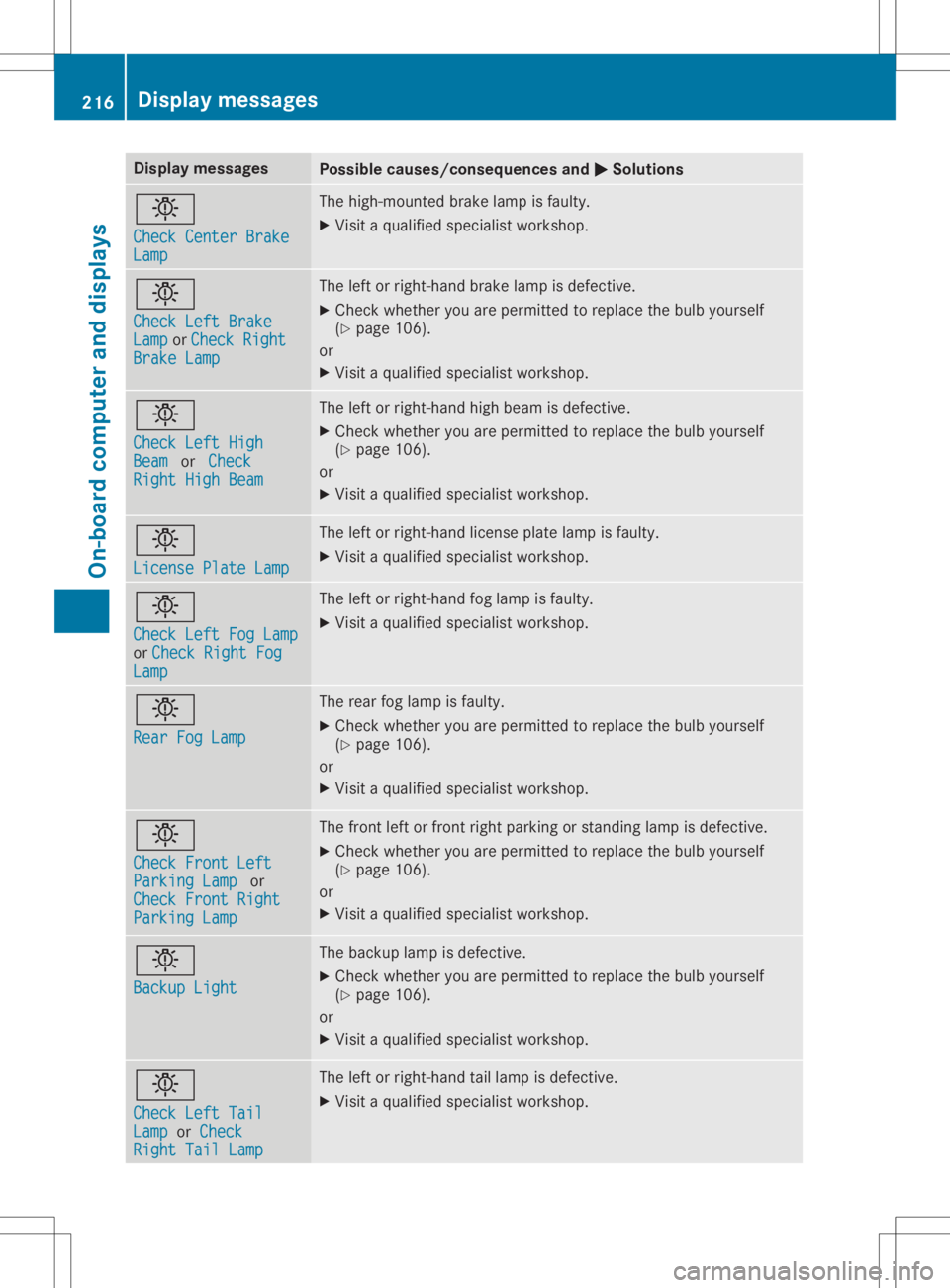
Disp
laymes sages Poss
iblecauses/co nsequences and 0050 0050
Solu tions 0049
Che ckCenter Brake Che
ckCenter Brake
Lam p Lam
p The
high -moun tedbrak elamp isfault y.
X Vis itaqualif iedspecialistwor kshop . 0049
Che ckLeftBra ke Che
ckLeftBra ke
Lam p Lam
por Che ckRight Che
ckRight
Bra keLamp Bra
keLamp The
leftor right-hand brak elamp isdef ective.
X Chec kwhet heryou arepermittedto rep lace thebulb yours elf
(Y page 106).
or
X Vis itaqualif iedspecialistwor kshop . 0049
Che ckLeftHig h Che
ckLeftHig h
Bea m Bea
mor Check Che
ck
Rig htHighBea m Rig
htHighBea m The
leftor right-hand high beam isdef ective.
X Chec kwhet heryou arepermittedto rep lace thebulb yours elf
(Y page 106).
or
X Vis itaqualif iedspecialistwor kshop . 0049
Lic ensePla teLam p Lic
ensePla teLam p The
leftor right-hand licen se plat elamp isfault y.
X Vis itaqualif iedspecialistwor kshop . 0049
Che ckLeftFog Lamp Che
ckLeftFog Lamp
or Che ckRightFog Che
ckRightFog
Lam p Lam
p The
leftor right-hand foglamp isfault y.
X Vis itaqualif iedspecialistwor kshop . 0049
Rea rFog Lamp Rea
rFog Lamp The
rear foglamp isfault y.
X Chec kwhet heryou arepermittedto rep lace thebulb yours elf
(Y page 106).
or
X Vis itaqualif iedspecialistwor kshop . 0049
Che ckFrontLeft Che
ckFrontLeft
Par kingLam p Par
kingLam por
Che ckFrontRight Che
ckFrontRight
Par kingLam p Par
kingLam p The
fron tlef tor fron trig ht park ingorstand inglamp isdef ective.
X Chec kwhet heryou arepermittedto rep lace thebulb yours elf
(Y page 106).
or
X Vis itaqualif iedspecialistwor kshop . 0049
Bac kup Light Bac
kup Light The
backup lamp isdef ective.
X Chec kwhet heryou arepermittedto rep lace thebulb yours elf
(Y page 106).
or
X Vis itaqualif iedspecialistwor kshop . 0049
Che ckLeftTai l Che
ckLeftTai l
Lam p Lam
por Che ck Che
ck
Rig htTailLam p Rig
htTailLam p The
leftor right-hand taillamp isdef ective.
X Vis itaqualif iedspecialistwor kshop . 216
Disp
laymes sage sOn -boar dcomp uter anddi sp lay s
Page 223 of 346
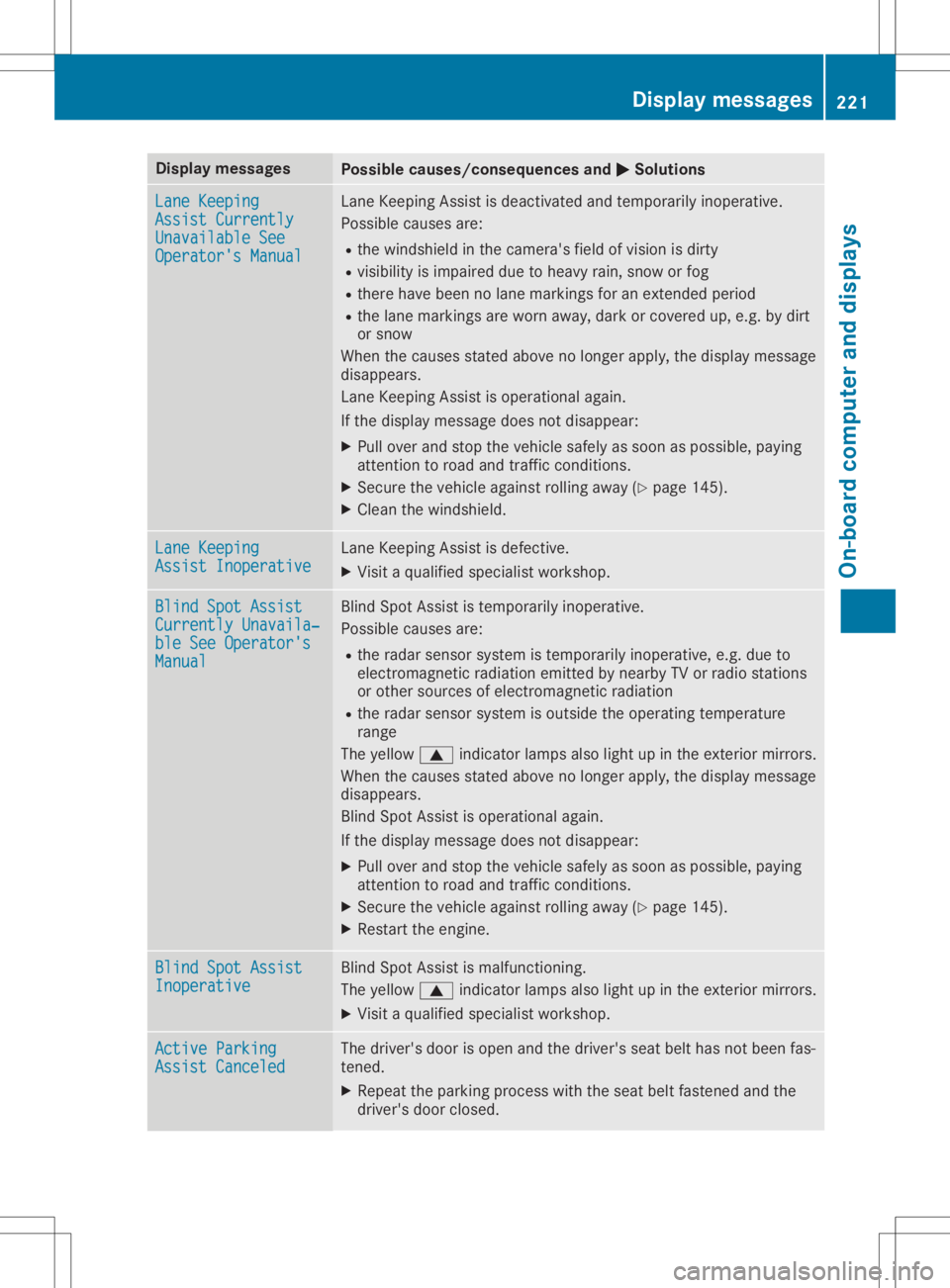
Disp
laymes sages Poss
iblecauses/co nsequences and 0050 0050
Solu tions Lan
eKee ping Lan
eKee ping
Ass ist Currently Ass
ist Currently
Una vailableSee Una
vailableSee
Ope rator'sMan ual Ope
rator'sMan ual Lan
eKee pingAs sis tis deac tivat ed and tempo rarily ino per ative.
Pos siblecaus esare:
R thewin dsh ield inthecam era'sfie ldof vis ion isdir ty
R vis ibilit yis imp aire ddue toheav yrain ,sn ow orfog
R there havebeen nolanemar king sfor anextend ed per iod
R thelan emar king sare wornaway, darkorcover edup, e.g. by dirt
or snow
Whe nth ecaus esstate dabov eno longer apply, thedisp laymes sage
disap pears.
Lan eKee pingAs sis tis oper ationalagain .
If th edisp laymes sage does notdisap pear:
X Pull overand stop theveh iclesaf ely assoo nas pos sible,payin g
att ention toroa dand traff icco nd ition s.
X Se cur eth eveh icleagain strol lingaway (Ypage 145).
X Clean thewin dsh ield. Lan
eKee ping Lan
eKee ping
Ass ist Inoperati ve Ass
ist Inoperati ve Lan
eKee pingAs sis tis def ective.
X Vis itaqualif iedspecialistwor kshop . Bli
ndSpotAss ist Bli
ndSpotAss ist
Cur rently Unavai la‐ Cur
rently Unavai la‐
ble SeeOperat or's ble
SeeOperat or's
Man ual Man
ual Bli
nd Spot Assis tis tempo rarily ino per ative.
Pos siblecaus esare:
R theradar sensor syst emistempo rarily ino per ative, e.g. due to
elec tromag netic radi ation emi tted bynearby TVorradi ostati ons
or other sour cesof elec tromag netic radi ation
R theradar sensor syst emisout side theoper ating tempe rature
ran ge
The yellow 0063indicat orlamp salso lightup intheex terio rmir rors.
Whe nth ecaus esstate dabov eno longer apply, thedisp laymes sage
disap pears.
Bli nd Spot Assis tis oper ationalagain .
If th edisp laymes sage does notdisap pear:
X Pull overand stop theveh iclesaf ely assoo nas pos sible,payin g
att ention toroa dand traff icco nd ition s.
X Se cur eth eveh icleagain strol lingaway (Ypage 145).
X Rest arttheen gin e. Bli
ndSpotAss ist Bli
ndSpotAss ist
Ino perative Ino
perative Bli
nd Spot Assis tis malf unction ing .
The yellow 0063indicat orlamp salso lightup intheex terio rmir rors.
X Vis itaqualif iedspecialistwor kshop . Act
ive Parking Act
ive Parking
Ass ist Canceled Ass
ist Canceled The
driver 'sdoor isopen andthedri ver 'sseat belthasnotbeen fas-
te ne d.
X Repeat thepark ingprocess wit hth eseat beltfastene dand the
dri ver 'sdoor closed . Disp
laymes sage s
221On -boar dcomp uter anddi sp lay s Z