change time MERCEDES-BENZ GLA 2020 Owner's Manual
[x] Cancel search | Manufacturer: MERCEDES-BENZ, Model Year: 2020, Model line: GLA, Model: MERCEDES-BENZ GLA 2020Pages: 346, PDF Size: 17.58 MB
Page 266 of 346
Break
downass istanc ecal lbutto n X
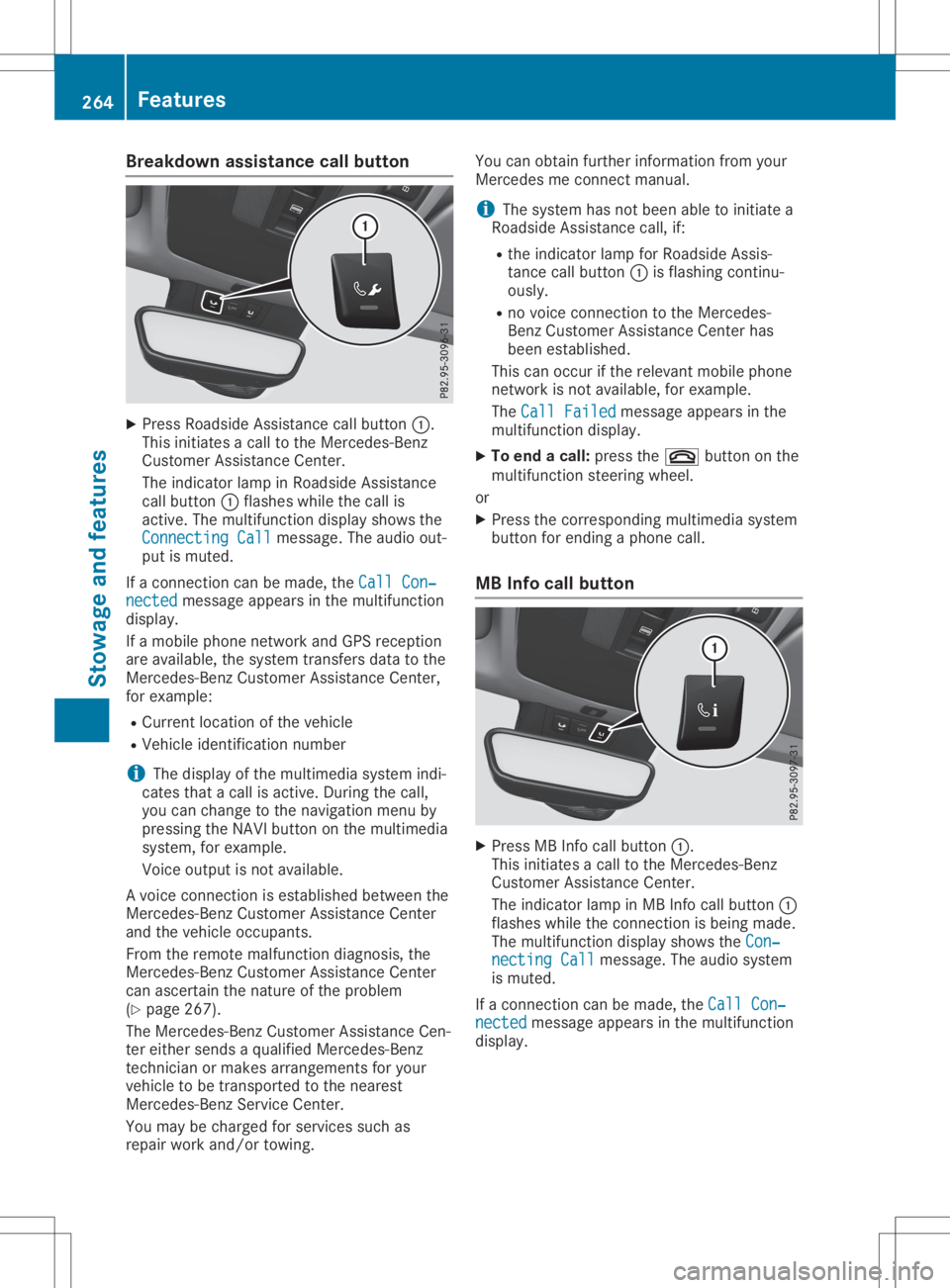
Pre ssRoadside Assi stance callbu tton 0043.
Thi sini tia tes acal lto the Mer cedes-B enz
Cu stom erAssi stance Center.
The indicator lamp inRo adside Assi stance
cal lbu tton 0043flashe swh ile the callis
acti ve.The multifunc tiondispl aysho wsthe
Con nectingCal l Con
nectingCal lmes sage. The audio ou t-
pu tis mu ted .
If aconne ctioncan bemade,the CallCon ‐ Cal
lCon ‐
nec ted nec
ted message appe ars inthe multifunc tion
di spl ay.
If amob ile pho nenetw orkand GPSrece ption
are availab le,the system transfersdata to the
Mer cedes-B enzCustom erAssi stance Center,
for exa mpl e:
R Cu rre ntlocati onofthe vehicle
R Veh icleidenti ficationnum ber
i The
displ ayofthe multimed iasystem indi-
cate stha ta cal lis acti ve.Duri ngthe call,
yo ucan change tothe navi gatio nmenu by
pre ssing the NAVI button onthe multimed ia
sy stem ,for exa mpl e.
Voi ceoutpu tis not availab le.
A voi ce conne ctionis esta blished betwe enthe
Mer cedes-B enzCustom erAssi stance Center
and thevehicleoccu pants.
From therem otemalfunctio ndiag nosi s,the
Mer cedes-B enzCustom erAssi stance Center
can ascerta inthe natu reofthe problem
(Y page 267 ).
The Mercedes-B enzCustom erAssi stance Cen-
ter either send sa qu alifi ed Mer cedes-B enz
techni cianor ma kes arrang eme ntsforyour
veh icleto be trans ported tothe nearest
Mer cedes-B enzServ iceCenter.
Yo uma ybe cha rgedfor service ssu ch as
rep airwo rkand /or towing. Yo
ucan obtainfur ther informa tionfrom your
Mer cedesme conne ctma nua l.
i The system hasnot been ableto initia te a
Ro adside Assi stance call,if:
R the indicator lamp forRoadside Assi s-
tance callbu tton 0043isfla shi ng conti nu-
ou sly.
R no voice conne ctionto the Mer cedes-
Benz Custom erAssi stance Center has
be en esta blished .
Thi scan occu rif the releva ntmob ile pho ne
netw orkisnot availab le,for exa mpl e.
The CallFai led Cal
lFai led message appe ars inthe
mu ltifunc tiondispl ay.
X To endacal l:pre ssthe 0076 button onthe
mu ltifunc tionstee ring wheel.
or X Pre ssthe corr espond ingmultimed iasystem
bu tton forend ingapho necall.
MB Info cal lbutto n X
Pre ssMB Info callbu tton 0043.
Thi sini tia tes acal lto the Mer cedes-B enz
Cu stom erAssi stance Center.
The indicator lamp inMB Info callbu tton 0043
fla she swh ile the conne ctionis be ing made.
The multifunc tiondispl aysho wsthe Con‐ Con
‐
nec tingCal l nec
tingCal lmes sage. The audio sy stem
is mu ted .
If aconne ctioncan bemade,the CallCon ‐ Cal
lCon ‐
nec ted nec
ted message appe ars inthe multifunc tion
di spl ay. 26
4 Fe
aturesSto wag ean dfe ature s
Page 267 of 346
If
amobil ephone network andGPS reception
are avai lable,the system transfers datatothe
Mercedes-Benz Customer Assistance Center,
for example :
R Curre ntlocation ofthe vehicle
R Vehicle identifica tionnumber
i The
displ ayofthe multimed iasystem indi-
cates thatacall isactive. During thecall,
you can change tothe naviga tionmenu by
pressing theNAVI button onthe multimed ia
system, forexample .
Voice outputis not avai lable.
A voice connection isestabl ishedbetween the
Mercedes-Benz Customer Assistance Center
and thevehicle occupants.
You receive information aboutopera tingyour
vehicle ,abou tthe nearest Mercedes-Benz Ser-
vice Center andabou tother productsand
services fromMercedes-Benz.
USA only: youcan find further information on
the Mercedes meconnect systemunder"Own-
ers Online" athttp://www.mbusa .com.
i The system hasnotbeen ableto initiate an
MB Info call, if:
R the indicator lampinMB Info callbut-
ton 0043isflashi ngcontinuously .
R no voice connection tothe Mercedes-
Benz Customer Assistance Centerhas
been establ ished.
This canoccur ifthe releva ntmobil ephone
network isnot avai lable,for example .
The Call Failed Call
Failed message appearsinthe
multifu nctiondisplay.
X To end acall: press the0076 button onthe
multifu nctionsteering wheel.
or X Press thecorresponding multimediasystem
button forending aphone call.
Call priority When
service callsareactive, e.g.Roadside
Assistance orMB Info calls ,an emergency call
can stillbeinitiated .In this case, anemer-
gency callwilltake priori tyand override all
other active calls.
The indicator lampofthe respective button
flashe suntil thecall isended. An
emergency callcan only beterminated by
the Mercedes-Benz Customer Assistance Cen-
ter.
All other callscanbeended bypressing:
R the 0076 button onthe multifu nctionsteer-
ing wheel
R the corresponding buttoninthe multime dia
system toend thevoice call
i When
acall isinitiated ,the audiosystem
is muted. Themobil ephone isno longer
connected tothe multime diasystem. How-
ever, ifyou want touse yourmobil ephone,
do soonly when thevehicle isstationary
and inasafe location.
Do wnl oading destination sin COMA ND Dow
nloadin gdestination s
Download ingdestinations givesyouaccess to
a datab asewith over 15mill ion points ofinter-
est (POIs). Thesecanbedownlo adedonthe
naviga tionsystem inyou rvehicle .If you know
the destination, theaddre sscan bedownlo a-
ded. Alternatively ,you can obtain thelocation
of Points ofInterest (POIs)/important destina-
tions inthe vicinity.
Furthermore, youcan downlo adroutes withup
to 20 way points.
You areprompted toconfirm routeguidance
to the addre ssentered.
The system calculatestheroute andsubse -
quently startstheroute guidance withthe
addre ssentered.
i If
you select No No,
the addre sscan besaved
in the addre ssbook.
i The
Destination Downloadfunctionis
avai lableifthe releva ntmobil ephone net-
work isavai lableand data transfer ispossi-
ble.
i The
Destination Downloadfunctioncan
only beused ifthe vehicle isequi pped with
a naviga tionsystem.
Route Assistance
This service ispart ofthe Mercedes mecon-
nect PLUS Package andcannot beobtained
sepa rately .
i You
canalso usetheRou teAssistance
function ifyou rvehicle isnot equi pped with
a naviga tionsystem. Fe
atur es
265Stowag eand features Z
Page 314 of 346
rotation
ofawhee lchanges asaresul tof a
loss ofpressu re,acorrespo ndingwarning
messa gewillapp ear inthe multi function dis-
pla y.
You canrecognize thetire pressu reloss warn-
ing bythe Run Flat Indicato rActive Run
Flat Indicato rActive
Press 'OK'toRestart Press
'OK'toRestart messageinthe mul-
tifunction displayinthe Serv. Serv.
menu. Informa-
tion onthe messa gedisp laycan befound in
the "Restarting thetire pressu reloss warni ng"
section (Ypag e312) .
Important safetynotes The
tirepressu rewarni ngsystem doesnot
warn youofan incorrectly settire pressu re.
Observe thenotes onthe recommended tire
pressu re(Y pag e308) .
The tirepressu reloss warni ngdoes not
repla cethe need toregu larlycheck thetire
pressu re.Aneven lossofpressu reon severa l
tires atthe same timecannot bedetected by
the tire pressu reloss warni ngsystem.
The tirepressu remonitor isnot ableto warn
you ofasudd enloss ofpressu re,e.g. ifthe
tire ispenetrated byaforeig nobject. Inthe
event ofasudd enloss ofpressu re,bring the
vehicl eto ahal tby braking carefully.Avoid
abru ptsteering movements.
The function ofthe tire pressu reloss warni ng
system islimi ted ordela yedif:
R snow chains aremounted onyou rvehicl e's
tires.
R road conditions arewintry.
R you aredrivi ngon sand orgravel .
R you adoptavery sporty drivingstyle (corner-
ing athigh speedsordrivi ngwith high rates
of accele ration).
R you aredrivi ngwith aheavy load(in the
vehicl eor on the roof)
Restarting thetire pressure losswarn-
ing system Resta
rtthe tire pressu reloss warni ngsystem
if you have:
R changed thetire pressu re
R changed thewhee lsor tires
R mounted newwhee lsor tires
X Before restarting, makesurethatthetire
pressu resare setprope rlyon allfour tires
for the respe ctiveopera tingconditions. The
recommended tirepressu recan be
found onthe Tire andLoad ingInformation
pla card onthe B-pill ar.Additio nally,atire
pressu retable isattached tothe fuel filler
flap .The tirepressu reloss warni ngsystem
can only givereliablewarni ngsifyou have
set the correct tirepressu re.Ifan incorrect
tire pressu reisset, these incorrect values
wil lbe monitored.
X Also observe thenotes inthe section ontire
pressu res(Ypag e308) .
X Make surethattheSmartKey isin posi tion
0048 inthe ignitio nlock (Ypag e125).
X Press 0059or0065 onthe steering wheel
to sele ctthe Serv. Serv.
menu.
X Press the0063 or0064 button tosele ct
Tire Pressure Tire
Pressure .
X Press the0076 button.
The Run Flat Indicato rActive Press Run
Flat Indicato rActive Press
'OK' toRestart 'OK'
toRestart messageapp ears inthe
multi function display.
If you wishto con firm therestart:
X Press the0076 button.
The Tire Pressure NowOK? Tire
Pressure NowOK?messa ge
app ears inthe multi function display.
X Press the0063 or0064 button tosele ct
Yes Yes.
X Press the0076 button.
The Run Flat Indicato rRestarte d Run
Flat Indicato rRestarte dmes-
sage appears inthe multi function display.
After ateach-in period,the tire pressu re
loss warni ngsystem willmonitor thesettire
pressu resofall four tires.
If you wishto canc elthe restart:
X Press the0038 button.
or
X Ifthe Tire Pressure NowOK? Tire
Pressure NowOK?messa ge
app ears, press the0063 or0064 button to
sele ctCancel Cancel.
X Press the0076 button.
The tirepressu revalu esstored atthe last
restart willcontinue tobe monitored. Tire
pressure monitor(Can adaonly)
Gene ralnotes If
atire pressu remonitor isinstall ed,the vehi-
cle's whee lshave sensors thatmonitor thetire
pressu resinall four tires. Thetirepressu re 312
Tire
pressureWhee lsand tires
Page 317 of 346
Observe
theinstruct ionsandsafety notesin
the displa ymessages inthe "Tires" section
(Y page 224).
If the wheel positions onthe vehicle arerota-
ted, thetire pressures maybedispla yedfor
the wrong positions forashort time.Thisis
rectified afterafew minutes ofdriving, andthe
tire pressures aredispla yedforthe correct
positions.
Restart ingthe tire pressure monitor When
yourestart thetire pressure monitor,all
existing warning messages aredeleted andthe
warning lampsgoout. Themonitor usesthe
currently settire pressures asthe reference
value sfor monitoring. Inmost cases, thetire
pressure monitorwillautomaticall ydetect the
new reference valuesafter youhave changed
the tire pressure. However, youcan also set
reference valuesmanuall yas described here.
The tirepressure monitorthenmonitors the
new tirepressure values.
X Set thetire pressure tothe value recom-
mended forthe corresponding drivingsitua-
tion onthe Tire andLoading Information
placard onthe driver's side
B-pillar (Ypage 308).
You canfind more tirepressure valuesfor
various operating conditions inthe tire pres-
sure table inside thefuel filler flap
(Y page 144).
X Make surethatthetire pressure iscorrect
on allfour wheels.
X Make surethattheSmartKey isin position
0048 inthe ignition lock(Ypage 125).
X Press 0059or0065 onthe steering wheel
to select theServ. Serv.
menu.
X Press the0063 or0064 button toselect
Tire Pressure Tire
Pressure.
X Press the0076 button.
The multifunction displayshows thecurrent
tire pressure foreach tireorthe Tire Tire
pressure willbedisplayed after pressure
willbedisplayed after
driving afew minutes driving
afew minutes message.
X Press the0064 button.
The multifunction displayshows theUse Use
Current Pressures asNew Reference Current
Pressures asNew Reference
Values Values
message. If
you wish toconfirm therestart :
X Press the0076 button.
The Tire Press. Monitor Restarted Tire
Press. Monitor Restarted
message appearsinthe multifunction dis-
play .
After driving forafew minutes, thesystem
checks whether thecurrent tirepressures
are within thespecified range.Thenew tire
pressures arethen accepted asreference
value sand monitored.
If you wish tocance lthe restart :
X Press the0038 button.
The tirepressure valuesstored atthe last
restart willcont inue tobe monitored. Tire
pressur e
315Wheels andtires Z
Page 329 of 346
The
wear pattern son the front andrear tires
differ, depending onthe operating conditions.
Rotate thewheels beforeaclear wearpattern
has formed onthe tires. Fronttires typically
wear more onthe shoulders andtherear tires
in the cent er.
On vehicles thathave thesame sizefront and
rear wheels, youcan rotat ethe wheels accord-
ing tothe inter valsinthe tire manufact urer's
warranty bookinyour vehicle document s.Ifno
warranty bookisavailabl e,the tires should be
rotat edevery 3,000 to6,000 miles(5,000 to
10,00 0km). Dependin gon tire wear, thismay
be required earlier.Donot change thedirec-
tion ofwheel rotation.
Clean thecont actsurfaces ofthe wheel and
the brake discthoroughly everytimeawheel
is rotat ed.Check thetire pressure and,ifnec-
essary, restartthetire pressure losswarning
system (Canada only)orthe tire pressure
monit or(USA only). Direction
ofrota tion
Tires withaspecified directionofrotat ionhave
additional benefits,e.g. ifthere isarisk of
hydroplaning. Theseadvantages canonly be
gained ifthe tires areinstalled correspon ding
to the direction ofrotat ion.
An arrow onthe sidewall ofthe tire indicates
its correc tdirection ofrotat ion. Storing
wheels
Stor ewheels thatarenot being usedinacool,
dry and preferably darkplace. Protectthe tires
from oil,grease, gasoline anddiesel. Mounting
awheel
Prepa ringthevehicle X
Stop thevehicle onsolid, non-slippery and
level ground.
X Apply theelectric parking brakemanually.
X Bring thefront wheels intothestraight-
ahead position.
X Shift thetrans mission toposition 005D.
X Switch offthe engine. X
Vehicles withoutKEYLESS-GO: remove
the Smart Keyfrom theignition lock.
X Vehicles
withKEYL ESS-GO start-func-
tion orKEYL ESS-GO: openthedriver's
door.
The vehicle electron icsare now inposition
0092. This isthe same as“key removed”.
X Vehicles
withKEYL ESS-GO start-func-
tion orKEYL ESS-GO: removetheStart /
Stop button fromtheignition lock
(Y page 125).
X Make surethattheengine cannotbe start ed
via your smartphon e(Y page 84).
X Ifincluded inthe vehicle equipment, remove
the tire- change toolkitfrom thevehicle.
X Safeguard thevehicle against rollingaway
(Y page 145).
i Apart
fromcertaincount ry-specific varia-
tions, thevehicles arenot equipped witha
tire- change toolkit.Some toolsforchanging
a wheel arespecific tothe vehicle. Formore
inform ationonwhich toolsarerequired to
perform awheel change onyour vehicle,
consult aqualified specialist workshop.
Necessary tire-changing toolscaninclude,
for example:
R Jack
R Wheel chock
R Lug wrench
Securing thevehicle toprevent itfrom
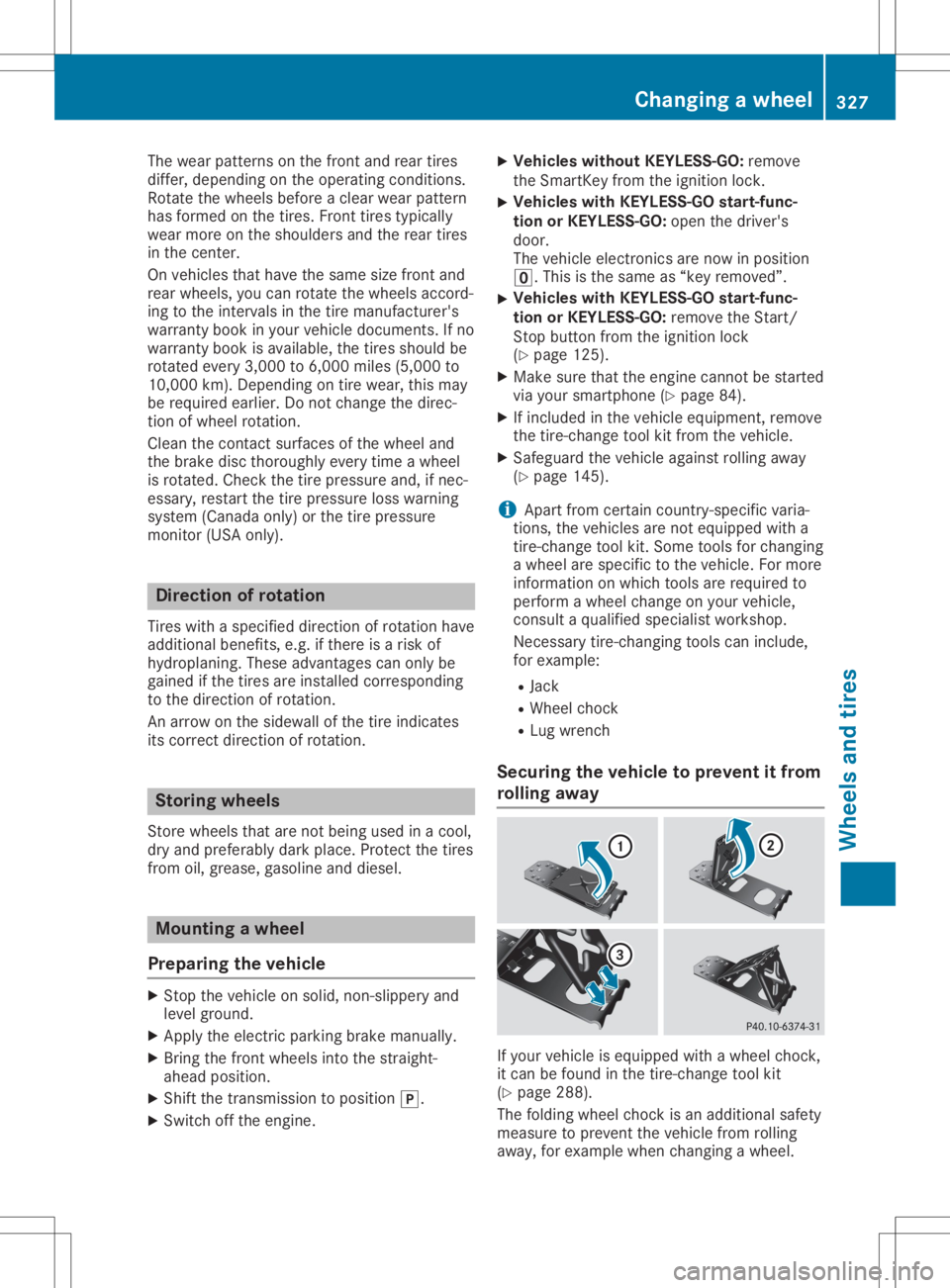
rolling away If
your vehicle isequipped withawheel chock,
it can befound inthe tire- change toolkit
(Y page 288).
The folding wheelchock isan additional safety
measure toprevent thevehicle fromrolling
away ,for example whenchanging awheel. Changing
awheel
327Wheels andtires Z