change time MERCEDES-BENZ GLA 2020 User Guide
[x] Cancel search | Manufacturer: MERCEDES-BENZ, Model Year: 2020, Model line: GLA, Model: MERCEDES-BENZ GLA 2020Pages: 346, PDF Size: 17.58 MB
Page 161 of 346
sound
andthedistance warninglampwilllight
up inthe instrument cluster.Brakeimmedi-
ately inorder toincrease thedistance tothe
vehicle infront ortake evasive actionprovided
it is safe todo so.
Act ive Distance AssistDISTRONIC operatesin
the speed rangebetween 0mph (0km/h) and
120 mph (200km/h) .
Change intoalower gearingood timeonlong
and steep downhill gradients. Thisisespeciall y
important ifthe vehicle isladen. Bydoing so,
you willmake useofthe braking effectofthe
engine. Thisrelieves theload onthe brake sys-
tem andprevents thebrakes fromoverheating
and wearing tooquickly.
Do not use Active Distance AssistDISTRONIC
on roads withsteep gradients.
For Active Distance AssistDISTRONIC to
assist youwhen driving, theradar sensor sys-
tem must beoperational.
As Act ive Distance AssistDISTRONIC trans-
mits radar waves, itcan resemble theradar
detectors ofthe responsible authorities.You
can refer tothe relevant chapterinthe Opera-
tor's Manual ifquestions areasked aboutthis.
i USA
only: Thisdevice hasbeen approved
by the FCC asa"Vehicul arRada rSystem".
The radar sensor isintended foruse inan
automotive radarsystem only.Removal,
tampering, oraltering ofthe device willvoid
any warranties, andisnot permitted bythe
FCC. Donot tamper with,alter, oruse inany
non- approved way.
Any unauthorized modificationtothis device
could voidtheuser's authority tooperate
the equip ment.
i Canada
only:Thisdevice complies with
RSS-21 0of Industry Canada.Operation is
subject tothe followi ngtwo conditions:
1. This device maynotcause interferen ce,
and
2. This device mustaccept anyinterferen ce
received, includinginterferen cethat may
cause undesired operationofthe device.
Removal, tampering, oraltering ofthe
device willvoid anywarranties, andisnot
permitted. Donot tamper with,alter, oruse
in any non- approved way.
Any unauthorized modificationtothis device
could voidtheuser's authority tooperate
the equip ment. Importa
ntsafety notes G
WARNING
Act ive Distance AssistDISTRONIC doesnot
react to:
R people oranimals
R stationary objectsinthe road, e.g.stop-
ped orparked vehicles
R oncoming vehiclesandcrossing traffic
As aresult, Active Distance Assist
DISTRONIC mayneither givewarnings nor
intervene insuch situations. Thereisarisk
of an accident.
Always paycareful attentiontothe traffic
situation andbeready tobrake. G
WARNING
Act ive Distance AssistDISTRONIC cannot
alwa ysclearly identify otherroadusers and
complex trafficsituations.
In such cases, Active Distance Assist
DISTRONIC can:
R give anunnecessary warningandthen
brake thevehicle
R neither giveawarning norintervene
R accelerate orbrake unexpectedly
There isarisk ofan accident.
Continue todrive carefully andbeready to
brake, especial lyifAct ive Distance Assist
DISTRONIC warnsyou. G
WARNING
Act ive Distance AssistDISTRONIC brakes
your vehicle withupto50% ofthe maximum
possible deceleration. Ifthis deceleration is
not sufficient, Active Distance Assist
DISTRONIC alertsyouwith avisual and
acoustic warning. Thereisarisk ofan acci-
dent.
Adjust yourspeed inthese cases andmain-
tain sufficient distance.
Apply thebrakes yourselfand/or takeeva-
sive action. Driving
systems
159Drivingandparking Z
Page 162 of 346
!
When
Active Distance AssistDISTRONIC
or the HOLD function isactivated, thevehi-
cle brakes automaticall yin certain situa-
tions.
To avoid damage tothe vehicle, deactivate
Act ive Distance AssistDISTRONIC andthe
HOLD function inthe followi ngorsimila rsit-
uations:
R when towing thevehicle
R in the carwash
Act ive Distance AssistDISTRONIC canneither
reduce therisk ofan accident ifyou failto
adap tyour driving style,noroverride thelaws
of physics. Active Distance AssistDISTRONIC
cannot takeintoaccount road,weather ortraf-
fic conditions. Active Distance Assist
DISTRONIC isonly anaid. You areresponsible
for the distance tothe vehicle infront ,for
vehicle speed,forbraking ingood timeandfor
staying inyour lane.
Do not use Active Distance AssistDISTRONIC:
R In road andtraffic conditions whichdonot
allow youtomaintain aconst antspeed, e.g.
in heavy traffic oron winding roads
R On slippe ryroad surfaces. Brakingoraccel-
erating couldcause thedrive wheels tolose
traction andthevehicle couldthenskid
R In poor visibil ity,e.g. due tofog, heavy rain
or snow
Act ive Distance AssistDISTRONIC maynot
detect narrow vehicles drivinginfront ,e.g.
motorcycles, orvehicles drivinginastaggered
formation.
In particular, thedetection ofobstacles canbe
impaired if:
R There isdirt onthe sensors oranything else
covering thesensors
R There issnow orheavy rain
R There isinterferenc eby other radarsources
R There arestrong radarreflections, forexam-
ple inparking garages
If Act ive Distance AssistDISTRONIC nolonger
detects avehicle infront ,Distance Pilot
DISTRONIC mayunexpectedly accelerateto
the speed stored. This
speed may:
R Be too high ifyou aredriving inaturning
lane oran exit lane
R Be sohigh when driving inthe right-hand
lane thatyouovertake vehiclesinthe left-
hand lane
R Be sohigh inthe left lane thatyoupass
vehicles drivingonthe right
If there isachange ofdrivers, advisethenew
driver ofthe speed stored.
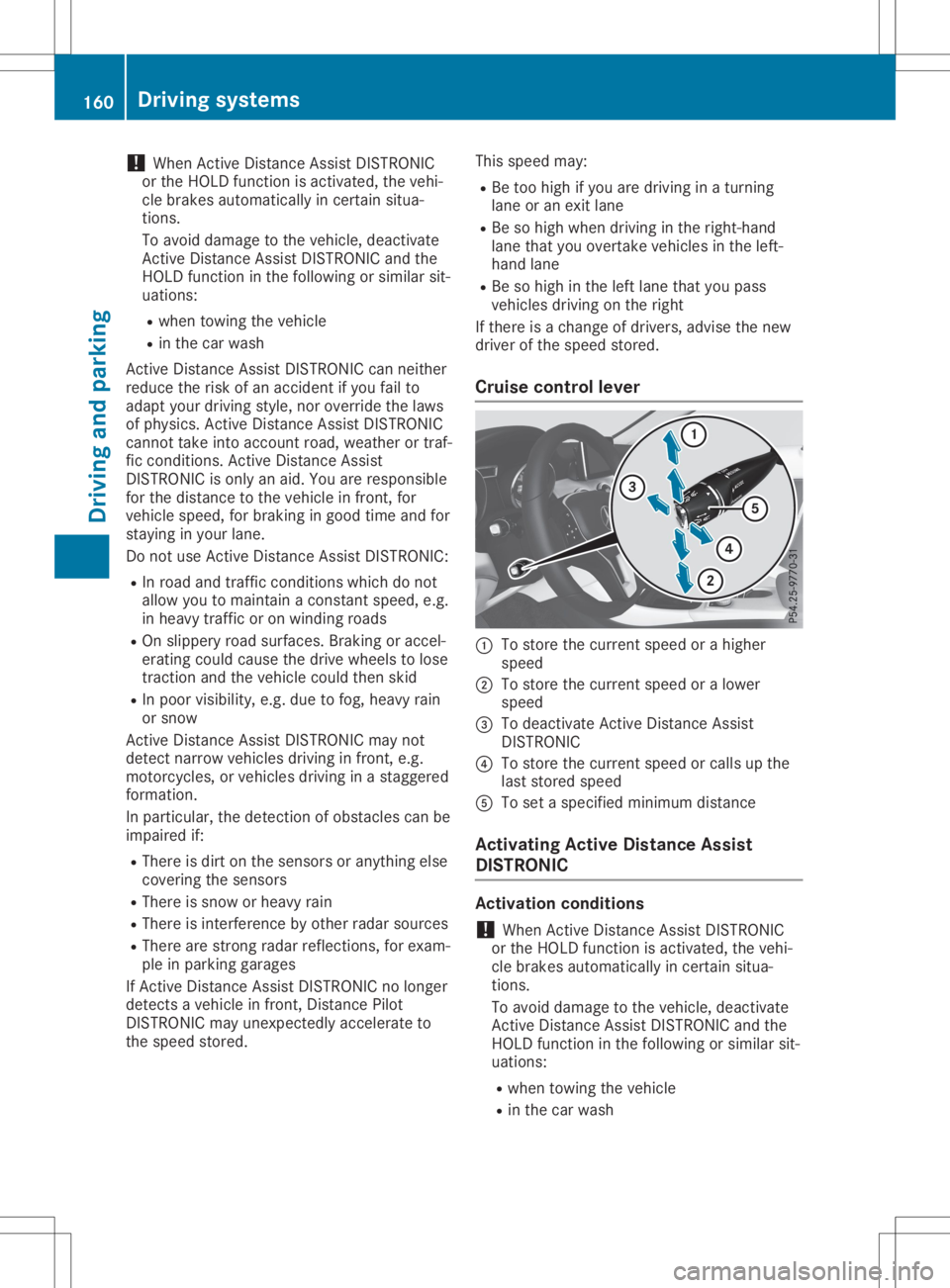
Cruise control lever 0043
Tostore thecurrent speedorahigher
speed
0044 Tostore thecurrent speedoralower
speed
0087 Todeactivate Active Distance Assist
DISTRONIC
0085 Tostore thecurrent speedorcalls upthe
last stored speed
0083 Toset aspecified minimum distance
Activating ActiveDistance Assist
DISTRONIC Activation
conditions
! When
Active Distance AssistDISTRONIC
or the HOLD function isactivated, thevehi-
cle brakes automaticall yin certain situa-
tions.
To avoid damage tothe vehicle, deactivate
Act ive Distance AssistDISTRONIC andthe
HOLD function inthe followi ngorsimila rsit-
uations:
R when towing thevehicle
R in the carwash 160
Driving
systemsDriving andparking
Page 164 of 346
Selec
tingthedrive progra m
Act ive Distanc eAssist DISTRONIC supportsa
sporty driving stylewhen youselect theS+
drive program (Ypage 138)orthe manual
drive program (Ypage 140). Acceleration
behind thevehicle infront ortothe setspeed
is then noticeably moredynamic. Ifyou have
selected theE(Mercedes-AMG vehicles:C)
drive program, thevehicle accelerates more
gently. Thissettin gis recommen dedinstop-
and-start traffic.
Changing lanes
If you want tochange tothe overtakin glane
on multi-lane roads,Active Distanc eAssist
DISTRONIC supportsyouif:
R you aredriving fasterthan45mph
(70 km/h)
R Act ive Distanc eAssist DISTRONIC ismain-
taining thedistance toavehicle infront
R you switch onthe appropriate turnsignal
R Act ive Distanc eAssist DISTRONIC doesnot
current lydetect adanger ofcollision
If these condition sare fulfilled, yourvehicle is
accelerated. Acceleration willbeinterrupt edif
changing lanestakes toolong orifthe dis-
tance between yourvehicle andthevehicle in
front becomes toosmall.
Stopping If Act ive Distanc eAssist DISTRONIC detects
that thevehicle infront isstopping, itbrakes
your vehicle untilitis stationary.
Once yourvehicle isstationary, itremains sta-
tionary andyoudonot need todepress the
brake.
i Aft
eratime, theelectric parking brake
secures thevehicle andrelieves theservice
brake.
i Depending
onthe specified minimum dis-
tance, yourvehicle willcome toastandst ill
at asufficient distancebehindthevehicle in
front .The specified minimum distanceisset
using thecont rolonthe cruise controllever. When
Active Distanc eAssist DISTRONIC is
activated, thetransm issionisshifted automati-
cally toposition 005Dif:
R the driver's seatbeltisnot fastened andthe
driver's doorisopen.
R the engine isswitched off,unless itis auto-
matically switchedoffbythe ECO start/
stop funct ion.
The electric parking brakeisapplie dautomati-
cally ifAct ive Distanc eAssist DISTRONIC is
active whenthevehicle isstationary and:
R asystem malfunction occurs.
R the power supply isinsufficient .
If amalfunction occurs,thetransm issionmay
also shift toposition 005Dautomatically.
Setting aspeed Keep
inmind thatitmay take abrief moment
until thevehicle hasaccelerated orbraked to
the speed set.
X Press thecruise controllever up0043 for a
higher speedordown 0044for alower speed.
X To
adj ust the setspeed in1mph incre-
ments (1km/h increments): brieflypush
the cruise controllever up0043 ordown 0044to
the pressure point.
The laststored speedincreases ordecrea-
ses in1mph (1km/h) incremen ts.
X To
adj ust the setspeed in5mph incre-
ments (10km/h increments): brieflypush
the cruise controllever up0043 ordown 0044
beyond thepressure point.
The laststored speedincreases ordecrea-
ses in5mph (10km/h) incremen ts.
i Act
ive Distanc eAssist DISTRONIC isnot
deactivated ifyou depress theaccelerator
pedal. Ifyou accelerate toovertake, Active
Distanc eAssist DISTRONIC adjuststhevehi-
cle's speed tothe last speed stored, after
you have finished overtakin g.
Setting aspecified minimum distance You
cansetthe specified minimum distance
for Active Distanc eAssist DISTRONIC byvary-
ing the time span between oneandtwosec-
onds. Thisdetermines thedistance thatActive
Distanc eAssist DISTRONIC isto maintain from
the vehicle infront ,depending onthe road
speed. Youcanseethis distance inthe multi-
funct iondisplay (Ypage 164). 162
Driving
systemsDriving andparking
Page 179 of 346
The
Parking AssistActiveSelectR Parking
AssistActiveSelectR
Observe Surrounding s Observe
Surrounding smessage appearson
the multifunct iondisplay .
As soon asthe parking procedure iscomplete,
the Active Parking AssistFinished Active
Parking AssistFinished mes-
sage appears andawarning tonesounds. The
vehicle isnow parked.
The vehicle iskept station arywithout the
driver having todepress thebrake pedal. The
braking effectiscanceled whenyoudepress
the accelerator pedal.
Act ive Parking Assistnolonger supports you
with steerin ginter ventions andbrake applica-
tions. When Active Parking Assistisfinished,
you must steer andbrake againyourself.
Act ive Parking Assistisstill availabl e.
Parking tips:
R The way your vehicle ispositioned inthe
parking spaceafterparking isdependent on
various factors.These include theposition
and shape ofthe vehicles parkedinfront
and behind itand thecondit ionsofthe loca-
tion. Itmay bethe case thatActive Parking
Assist guides youtoofarinto aparking
space, ornot farenough intoit.Insome
cases, itmay alsolead youacross oront o
the curb. Ifnecessary, canceltheparking
procedure withActive Parking Assist.
R You canalso preselect transmission position
005B. The vehicle redirect sand does notdrive
as far into theparking space.Should the
trans mission changetakeplace tooearly,
the parking procedure iscanceled. Asensi-
ble parking position cannolonger beach-
ieved fromthisposition.
Exiting apar king space In
order thatActive Parking Assistcansupport
you when exitingthe parking space:
R you need tohave parked usingActive Park-
ing Assist .
R the border ofthe parking spacemustbe
high enough atthe front andtherear. A
curb stoneis too small, forexample.
R the border ofthe parking spacemustnotbe
too wide, asthe position ofthe vehicle must
not exceed anangle of45° tothe start ing
position asitis maneuvered intotheparking
space.
R amaneuvering distanceofat least 3.3ft
(1.0 m)must beavailabl e. Act
ive Parking Assistcanonly assist youwith
exitin gaparking spaceifyou have parked the
vehicle parallel tothe direction oftravel using
Act ive Parking Assist.
i If
Act ive Parking Assistdetectsobstacles,
Act ive Parking Assistbrakes automatically
while thevehicle isexitin gthe parking
space. Youareresponsible forbraking in
good time.
X Start theengine.
X Release theelectric parking brake.
X Switch onthe turn signal inthe direction
you willdrive outofthe parking space.
X Shift thetrans mission toposition 005Bor005E.
The Start Parking Assist? Start
Parking Assist?Yes:OK Yes:
OKNo: No:
0038 message appearsonthe multifunct ion
display .
X To cancel theprocedur e:press the0038
button onthe multifunct ionsteerin gwheel
or pull away .
or X To
exit apar king space usingActive
Park ingAssist: pressthe0076 button on
the multifunct ionsteerin gwheel.
The Parking AssistActiveAcceler‐ Parking
AssistActiveAcceler‐
ate andBrake ate
andBrake Observe Surrounding s Observe
Surrounding s
message appearsonthe multifunct iondis-
play.
X Let goofthe multifunct ionsteerin gwheel.
X Pull away ,being ready tobrake atall times.
Do not exceed amaximum speedofapprox-
imately 6mph (10km/ h)when exitinga
park ingspac e.Otherwis e,Ac tivePark ing
As sist willbecan cele d.
X Dep endingonthemess ageoras requir ed,
shif tth etransm ission toposit ion005Bor005E.
Ac tivePark ingAssist imme diatelysteers in
th eoth erdirec tion.The Park ingAssist Park
ingAssist
Acti veAcce lerateand Brake Acti
veAcce lerateand BrakeObse rve Obse
rve
Surr oundings Surr
oundings messageappears onthe
mult ifunction display.
i You
willachie vethebest result sby waitin g
for thest eerin gproc edure tocom plete
befo repulling away.
If you back upafteract ivat ion, thest eerin g
wheel ismov edtothest raight -aheadposi-
tio n.
X Dr ive forwards andreverse asprom ptedby
th eAc tivePark ingAssist warn ingdisplays,
seve raltim esifnec essar y. Drivin
gsyst ems
177Driving andparking Z
Page 180 of 346
Once
youhave exited theparking spacecom-
pletely, thesteering wheelismoved tothe
straight-ahead position.Youhear atone and
the Active Parking AssistFinished Active
Parking AssistFinished mes-
sage appea rson the multifunction display.You
will then have tosteer andmerge intotraffic
on your own. Active Parking Assistisstill avail -
able. Youcantake overthesteering beforethe
vehicle hasexited theparking spacecom-
pletely. Thisisuseful ,for example whenyou
recognize thatitis alrea dypossible topull out
of the parking space.
Cance lingActive Parking Assist X
Stop themovement ofthe multifunction
steering wheelorsteer yoursel f.
Act ive Parking Assistwillbecanceled at
once. TheActive Parking AssistCan‐ Active
Parking AssistCan‐
celed celed
message appearsinthe multifunction
displa y.
or X Press thePARKTRONIC button
(Y page 173).
Act ive Parking Assistisswitched offand
Act ive Parking Assistisimmediately can-
celed. TheActive Parking AssistCan‐ Active
Parking AssistCan‐
celed celed
message appearsinthe multifunction
displa y.
Act ive Parking Assistiscanceled automaticall y
if:
R the electric parking brakeisengaged
R transmission position005Disselected
R parking usingActive Parking Assistisno
longer possible
R you aredriving fasterthan6mph (10km/h )
R awheel spins,ESP®
intervenes orfails. In
such cases the00E5 warning lamplights up
in the instrument cluster
A warning tonesounds. Theparking symbol
disapp earsandthemultifunction display
shows theActive Parking AssistCan‐ Active
Parking AssistCan‐
celed celed
message.
When Active Parking Assistiscanceled, you
must steer andbrake againyoursel f.
If asystem malfunction occurs,thevehicle is
braked toastandstill. Todrive on,depress the
accelerator again. Rear
view camera
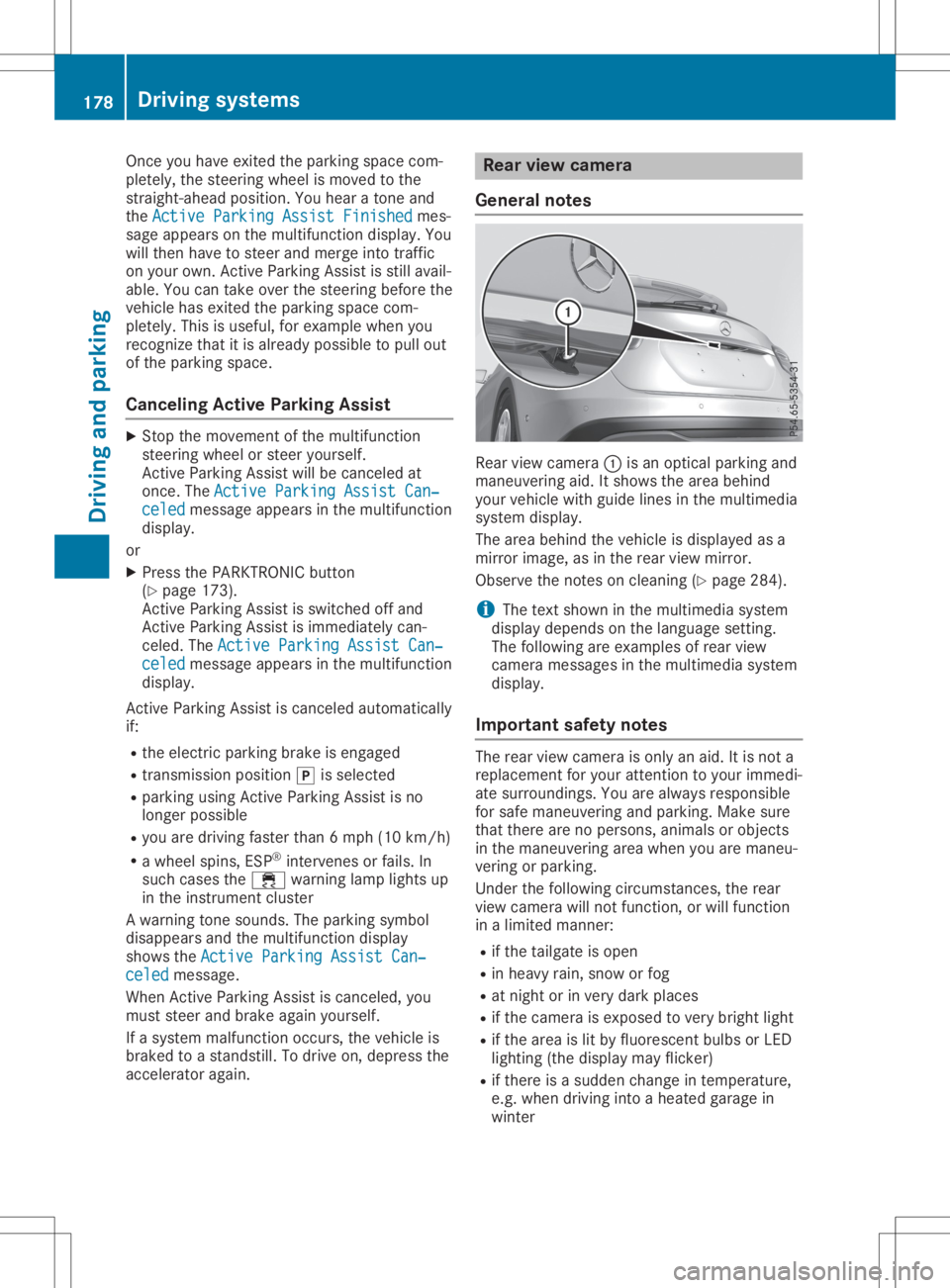
General notes Rear
viewcamera 0043isan optical parking and
maneuvering aid.Itshows thearea behind
your vehicle withguide linesinthe multimedia
system display.
The area behind thevehicle isdispla yedasa
mirror image, asinthe rear view mirror.
Observe thenotes oncleaning (Ypage 284).
i The
text shown inthe multimedia system
displa ydepends onthe langua gesetting.
The followi ngare examples ofrear view
camera messages inthe multimedia system
displa y.
Importa ntsafety notes The
rear view camera isonly anaid. Itis not a
replacement foryour attent iontoyour immedi-
ate surroundings. Youarealwa ysresponsible
for safe maneuvering andparking. Makesure
that there arenopersons, animalsorobjects
in the maneuvering areawhen youaremaneu-
vering orparking.
Under thefollowi ngcircumstances, therear
view camera willnotfunction, orwill function
in alimited manner:
R ifthe tailgate isopen
R in heavy rain,snow orfog
R at night orinvery dark places
R ifthe camera isexposed tovery bright light
R ifthe area islit by fluorescent bulbsorLED
lighting (thedispla ymay flicker)
R ifthere isasudden changeintemperature,
e.g. when driving intoaheated garagein
winter 178
Driving
systemsDriving andparking
Page 187 of 346
still
detects increasing lapsesinconcen tra-
tion, youwillbewarned againafter 15minutes
at the earliest. Thiswillonly happen ifATTEN-
TION ASSISTstill detects typicalindicators of
fatigue orincreasing lapsesinconcen tration.
Vehicles withtheCOMAND multimedia
system: ifawarning isoutput inthe multi-
function display,aservice stationsearchis
performed inthe multimedia system.Youcan
select aservice stationandnavigation tothis
service stationwillthen begin. Thisfunction
can beactivated ordeactivated inthe multi-
media system; seetheDigital Operator's Man-
ual . Lane
Tracking package
General notes The
Lane Tracking packageconsistsofBlind
Spot Assist (Ypage 185)andLane Keeping
Assist (Ypage 186).
Blind SpotAssis t General
notes
Blind SpotAssist monitors theareas oneither
side ofthe vehicle thatarenot visible tothe
driver withtwolateral, rear-facing radarsen-
sors. Awarning displayin the exterior mirrors
draws yourattent iontovehicles detected in
the monitored area.Ifyou then switch onthe
corresponding turnsignal tochange lane,you
will also receive anoptical andaudiblewarn-
ing.
Blind SpotAssist supports youfrom aspeed of
approximately 20mph (30km/h).
Importa ntsafety notes G
WARNING
Blind SpotAssist doesnotreact to:
R vehicles overtaken tooclosely onthe side,
placing theminthe blind spotarea
R vehicles whichapproach withalarge
speed differential andovertake yourvehi-
cle
As aresult, BlindSpotAssist maynotgive
warnings insuch situations. Thereisarisk
of an accident. Always
observe thetraffic conditions care-
fully ,and maintain asafe lateral distance.
Blind SpotAssist isonly anaid. Itmay failto
detect somevehicles andisno substitute for
attent ivedriving. Alwaysensurethatthere is
sufficient distancetothe side forother road
users andobstacles.
i USA
only:
This device hasbeen approved bythe FCC
as a"Vehicul arRada rSystem". Theradar
sensor isintended foruse inan automotive
radar system only.Removing, tampering
with, oraltering thedevice willvoid anywar-
ranties, andisnot permitted bythe FCC. Do
not tamper with,alter, oruse inany non-
approved way.
Any unauthorized modificationtothis device
could voidtheuser’s authority tooperate
the equip ment.
Rada rsenso rs
The radar sensors forBlind SpotAssist are
integrated intotherear bumper. Makesure
that thebumpers arefree from dirt,iceor
slush. Thesensors mustnotbecovered, for
example bycycle racks oroverhanging loads.
Following asevere impact orinthe event of
damage tothe bumpers, havethefunction of
the radar sensors checked ataqual ified spe-
cialist workshop. BlindSpotAssist maynolon-
ger work properly.
Monitoring rangeofthe senso rs
In particular, thedetection ofobstacles canbe
impaired if:
R there isdirt onthe sensors oranything else
covering thesensors
R there ispoor visibil ity,e.g. due tofog, heavy
rain orsnow
R anarrow vehicle traveling infront ,e.g. a
motorbike orbicycle
R the road hasvery wide lanes
R the road hasnarrow lanes
R you arenot driving inthe middle ofthe lane
R there arebarriers orother roadboundarie s
Vehicles inthe monitoring rangearethen not
indicated.
Blind SpotAssist monitors thearea upto10 ft
(3 m) behind yourvehicle anddirectly nextto
it. Driving
systems
185Drivingandparking Z
Page 189 of 346
In
such cases, LaneKeepi ngAssist can:
R give anunnecessary warning
R not give awarning
There isarisk ofan accident.
Alway spay particul arattention tothe traffic
situa tionandkeep within thelane, espe-
ciall yif Lane Keepi ngAssist alerts you . G
WARNING
The Lane Keepi ngAssist warning doesnot
return thevehicle tothe origina llane. There
is arisk ofan accident.
You shoul dalw ays steer, brakeoraccelera te
you rself, inparticul arifwarned byLane
Keepi ngAssist.
If you failtoada ptyou rdriving style,Lane
Keepi ngAssist canneither reducetherisk of
an accident noroverride thelawsof phys ics.
Lane Keepi ngAssist cannot takeintoaccount
the road, traffic andweather conditions. Lane
Keepi ngAssist ismerely anaid.You are
responsib lefor the distance tothe vehicle in
front, forvehicle speed,for braking ingood
time andforstayi nginyou rlane.
The Lane Keepi ngAssist doesnotkeep the
vehicle inthe lane.
The system maybeimpa iredormay notfunc-
tion if:
R there ispoor visibility,e.g. due toinsuffi-
cient illuminatio nof the road, ordue to
snow, rain,fogorspray
R there isglare ,e.g. from oncoming traffic,
the sun orreflection fromother vehicle s
(e.g. ifthe road surface iswet)
R the windshi eldisdirty, fogged up,dama ged
or covered, forinstance byasticker, inthe
vicinity ofthe camera
R there arenoorseveral unclearlane mark-
ings forone lane, e.g.roadw orks
R the lane markings areworn away,dark or
covered up,e.g. bydirt orsnow
R the distance tothe vehicle infront istoo
short andthus thelane markings cannotbe
detected
R the lane markings changequickly, e.g.lanes
branch off,cross oneanother ormerge R
the road isnarrow andwindi ng
R there arehighl yvaria bleshade conditions
on the roadw ay
Swi tching onLane Keeping Assist
X Switch onActive LaneKeepi ngAssist using
the on-board computer; todo so, select
Standard Standard
orAdaptive Adaptive
(Ypage 186).
If you drive atspeed sabove 40mph
(60 km/h) andlane markings aredetected,
the lines inthe assis tance graphi care
shown ingreen (Ypage 197). LaneKeepi ng
Assist isready foruse.
If Standard Standard
isselected, nowarning vibration
occurs if:
R you have switched onthe turn signal .In this
event, thewarnings aresupp ressed fora
certain periodoftime.
R adriving safetysystem intervenes, e.g.ABS,
BAS orESP ®
.
When Adaptive Adaptive
isselected, nowarning vibra-
tion occurs if:
R you have switched onthe turn signal .In this
event, thewarnings aresupp ressed fora
certain periodoftime.
R adriving safetysystem intervenes, e.g.ABS,
BAS orESP ®
.
R you accelera tehard, e.g.kickdown.
R you brake hard.
R you steer actively ,e.g. swerve toavoid an
obstacle orchange lanesquickly.
R you cutthe corner onasharp bend.
In order thatyouarewarned onlywhen neces-
sary andingood timeifyou cross thelane
marking, thesystem detects certaincondi-
tions andwarns youaccordingly .
The warning vibrationoccurs earlierif:
R you appro achtheouter lanemarking ona
bend
R the road hasvery widelanes, e.g.afreewa y
R the system detects solidlanemarkings
The warning vibrationoccurs laterif:
R the road hasnarrow lanes.
R you cutthe corner onabend Drivi
ngsystems
187Drivingand parking Z
Page 245 of 346
Gene
ralnotes
The multime diasystem section inthis Opera -
tor's Manua ldescrib esthe basi cprincipl esfor
opera tion.More information canbefound in
the Digital Operator'sManua l. Important
safetynotes G
WARNING
If you opera teinformation systemsandcom-
municatio nequ ipment integrated inthe
vehicle whendriving, youmay bedistracted
from thetraffic situation. Youcould also
lose control ofthe vehicle .There isarisk of
an accide nt.
Only opera tethis equipment whenthetraffic
situa tionpermits. Ifyou arenot sure that
this ispossi ble,park thevehicle paying
attention totraffic conditions andopera te
the equipment whenthevehicle isstation-
ary .
You must observe thelega lrequ irements for
the country inwhich youarecurrently driving
when operatingthemultime diasystem.
The multime diasystem calculates theroute to
the destinati onwithou ttaking thefollo wing
into account, forexampl e:
R traffic lights
R stop andyieldsigns
R parking orstopping restrictions
R road narrowi ng
R other roadandtraffic rulesand regul ations
The multime diasystem maygiveincorrect nav-
iga tion recommendati onsifthe actual street/
traffic situationdoes notcorrespond withthe
digi talmap's data.
For exampl e:
R adiverted route
R the road layout orthe direction ofaone-way
street hasbeen changed
For this reaso n,you must alwaysobserve road
and traffic rulesand regul ations duringyou r
journey. Roadand traffic rulesand regul ations
alw ayshave priorityover multime diasystem
driving recommendati ons. Navig
ation announcements areintended to
direct youwhiledriving withoutdiverting your
attention fromtheroad anddriving.
Plea sealw aysuse this feature instead ofcon-
sul ting themap displayfordirections. Looking
at the icons ormap displaycan distract you
from traffic conditions anddriving, and
increase therisk ofan accide nt.
This equipment complieswith FCCradiation
exposu relimi tsset forth foruncontrolled
equ ipment andmeets theFCC radiofreque ncy
(RF) Exposure Guideli nes inSuppl ement Cto
OET65.
This equipment hasvery lowlevel sof RF
energy thatisdeeme dto comply withoutmaxi-
mum permis siveexposu reeval uation(MPE).
However, itis recommended toinstall itat a
distance ofat lea st8inches (approx. 20cm)
betwee nthe radiation source andaperson's
body (notinclud inglimb ssuch ashands,
wrists, feetandlegs) . G
WARNING
Modi fications toelectronic components,
their software aswel las wiri ngcan impa ir
their function and/orthefunction ofother
networked components. Inparticu lar,sys-
tems releva ntto safety couldalsobeaffec-
ted. Asaresul t,these maynolonger func-
tion asintended and/orjeopardizethe oper-
ating safety ofthe vehicle .There isan
increase drisk ofan accide ntand injury.
Never tamper withthewiringaswel las elec-
tronic components ortheir software .You
shoul dhave allwork toelectrica land elec-
tronic equipment carried outataqua lified
specia listworkshop . Func
tionrestrictio ns
For safety reasons,some functions arerestric-
ted orunava ilable whil ethe vehicle isin
motion. Youwillnotice this,forexampl e,
becau seeither youwillnot beableto sele ct
certain menuitemsoramessag ewil lapp ear
to this effect. Func
tionrestrictio ns
243Multimedia system Z
Page 246 of 346
Opera
tingsystem Overview
General notes !
Do
not use thespace infron tof the dis-
play forstor age. Objec tsplaced herecould
damage thedisplay orimpair itsfunc tion.
Avoid anydirect contact with thedisplay
surface. Pressure onthe display surface
may result inimpairment sto the display,
which couldbeirrever sible.
Wearing polarized sunglasses mayimpair your
ability toread thedisplay.
The display hasanautomatic temperature-
con trolled switch- offfeature. Thebrightn essis
automatic allyreduced ifthe temper atureis
too high. Thedisplay maytempor arilyswitch
off complet ely.
Cleaning instructions !
Do
not touch thedisplay. Thedisplay hasa
very sensit ivehigh-gloss surface;thereisa
risk ofscrat ching .If you have toclean the
screen ,however, useamild cleanin gagent
and asoft ,lint- free cloth .
The display mustbeswitched offand have
cooled downbefore youstart cleanin g.Do not
apply pressure tothe display surface when
cleanin git, as this could cause irreversible
damage tothe display.
Switching themult imedia system
on/off X
Press the0043con trol knob.
Adju sting thevolume X
Turn the0043con trol knob.
The volume isadjusted:
R for the curren tlyselect edmedia source
R during trafficor navigation announcements
R in hands- freemode during anactive call
Switching thesound onoroff X
Press the0063 button onthe control panel.
If the audio output isswitched off,thesta-
tus line willshow the0063 symbol. Ifyou switch
themedia source orset the volume,
the sound isautomatic allyswitched on.
i Navigation
announcementswill beheard
even ifthe sound ismuted.
Functions The
multimedia systemhasthefollowing func-
tion s:
R Radio mode
R Media modewithmedia search
R Sound systems
R Navigation system
COMAND :navigation viathe hard drive
Audio 20:navigation viaSD card
R Communicat ionfunc tions
R SIRIUS Weather (COMAND )
R Vehicle functionswith system settings
R Favorit esfunc tions
Controller The
controller inthe cent ercon sole letsyou:
R select menuitemsonthe display
R ent ercharact ers
R select adestin ationonthe map
R save entries
The controller canbe:
R turn ed3
R slid leftorright 1
R slid forwards orback 4
R slid diagonally 2
R pressed brieflyorpressed andheld7
Back button You
canusethe0038 button toexit amenu or
to call upthe main menu ofthe curren toperat-
ing mode.
X To exit themenu: brieflypressthe0038
button .
The multimedia systemchanges tothe next
higher menulevelinthe curren toperatin g
mode.
X To call upthe main menu: pressthe0038
button forlonger thantwosecon ds.
The multimedia systemchanges tothe main
menu ofthe curren toperatin gmode. 244
Opera
tingsystemMult imedia system
Page 250 of 346
Auth
orizati onbyente ringapa sske y(p as s-
cod e):
X Sel ect the Bluetoo th®
nam eof the mob ile
pho ne.
The inputmenu forthe passke yis displ ayed .
X Ch oos eaone tosixtee n-digitnum bercom-
bi nati onasapa sske y.
X Enter thepasske yon the multimed iasys-
tem.
X Pre ss0054 toconfi rm.
X Enter andconfi rmthe passke yon the
mob ile pho ne.Dep endingonthe mob ile
pho neused ,confi rmthe conne ctionto the
mu ltimed iasystem andforthe PBAP and
MAP Bluetoo th®
pro files. The prompt to
confi rmmaytake uptotwo minu testobe
di spl ayed (seethe manuf actu rer'sop era ting
ins truc tions) . Co
nnectin gamob ile phon e(A udio
20 )
Requ iremen ts For
telephony viathe Bluetoo th®
inte rface, you
req uire atleas tone Bluetoo th®
-cap ablemob ile
pho nedependi ng on useof on e-te lepho ne
mode ortwo -teleph onemode. Themob ile
pho nemu stsupp ort Hand s-FreePro file 1.0 or
ab ove .
In two -teleph onemode youcan useallthe
fu nctio nsofthe multimed iasystem with the
main teleph one.With the additi onaltel e-
pho ne,yo ucan rece iveinco ming calls.
Mu ltimed iasystem :
X Sel ect Vehicle Veh
icle007BS ystemSet‐ Sys
tem Set‐
tin gs tin
gs007B ActivateBluetooth Act
ivateBluetooth.
X Activa teBlu etoo th®
0073.
Mob ile pho ne:
X Activa teBlu etoo th®
and ,if nece ssary,Blu e-
tooth ®
vis ibility for othe rde vice s(se ethe
ma nuf actu rer'sop era ting instruc tions) .
The Bluetoo th®
de vice namesfor allof one
ma nuf actu rer'spro ducts mig htbe identi cal.To
ma keitpo ssi ble to cle arly identi fyyour mob ile
pho ne,change thedevice name(se ethe man-
uf actu rer'sop era ting instruc tions) . If
the mob ile pho nesupp orts thePBAP (Phone
Bo ok Acce ssPro file) and MAP (Mess age
Acce ssPro file) Blu etoo th®
pro files, the follow-
ing info rma tionis trans mitte dafte ryo ucon-
nect themaintel ephone :
R Pho nebook
R Ca lllists
R Te xt mes sages and e-ma il
i Fur
ther informa tionon suita ble mob ile
pho nes can befou ndat: http:/ /
ww w.me rcedes -benz.c om/ conn ect
i In
the USA, youcan getin tou chwith the
Mer cedes-B enzCustom erAssi stance Center
on 1-800-FO R-MERC edes
(1-8 00-367 -6372).
In Ca nad a,youcan getin tou chwith the
Cu stom erRelatio ns Center on
1-800-3 87-0100.
Searching forand auth orizing (con-
necting) amobile phone Before
usingyourmobile phonewiththemulti-
media system forthe first time, youwillneed
to search forthe phone andthen authorize
(conn ect)it.Depending onthe mobile phone,
authorization eithertakesplacebymeans of
Secure SimplePairing orby enterin gapass-
key. Themultimedia systemautomatically
makes theprocedure thatisrelevant foryour
mobile phoneavailable.Themobile phoneis
alwa ysconn ected automatically afterauthori-
zation. Further information onusing amobile
phone withthemultimedia system(seethe
Digital Operator's Manual).
If the multimedia systemdoesnotdetect your
mobile phone, thismay bedue toparticular
security settingson your mobile phone(see
the manufacturer's operatinginstructions).
Searching foramobile phone
Multimedia system:
X Select Tel/ Tel/00A7007BConn.
Device Conn.
Device007BCon‐ Con‐
nect NewDevice nect
NewDevice.
X Select Connect viaVehicle Connect
viaVehicle.
X Select mobile phone. 248
Operat
ingsystemMultim ediasystem