steering MERCEDES-BENZ GLA 2020 Owner's Manual
[x] Cancel search | Manufacturer: MERCEDES-BENZ, Model Year: 2020, Model line: GLA, Model: MERCEDES-BENZ GLA 2020Pages: 346, PDF Size: 17.58 MB
Page 180 of 346
Once
youhave exited theparking spacecom-
pletely, thesteering wheelismoved tothe
straight-ahead position.Youhear atone and
the Active Parking AssistFinished Active
Parking AssistFinished mes-
sage appea rson the multifunction display.You
will then have tosteer andmerge intotraffic
on your own. Active Parking Assistisstill avail -
able. Youcantake overthesteering beforethe
vehicle hasexited theparking spacecom-
pletely. Thisisuseful ,for example whenyou
recognize thatitis alrea dypossible topull out
of the parking space.
Cance lingActive Parking Assist X
Stop themovement ofthe multifunction
steering wheelorsteer yoursel f.
Act ive Parking Assistwillbecanceled at
once. TheActive Parking AssistCan‐ Active
Parking AssistCan‐
celed celed
message appearsinthe multifunction
displa y.
or X Press thePARKTRONIC button
(Y page 173).
Act ive Parking Assistisswitched offand
Act ive Parking Assistisimmediately can-
celed. TheActive Parking AssistCan‐ Active
Parking AssistCan‐
celed celed
message appearsinthe multifunction
displa y.
Act ive Parking Assistiscanceled automaticall y
if:
R the electric parking brakeisengaged
R transmission position005Disselected
R parking usingActive Parking Assistisno
longer possible
R you aredriving fasterthan6mph (10km/h )
R awheel spins,ESP®
intervenes orfails. In
such cases the00E5 warning lamplights up
in the instrument cluster
A warning tonesounds. Theparking symbol
disapp earsandthemultifunction display
shows theActive Parking AssistCan‐ Active
Parking AssistCan‐
celed celed
message.
When Active Parking Assistiscanceled, you
must steer andbrake againyoursel f.
If asystem malfunction occurs,thevehicle is
braked toastandstill. Todrive on,depress the
accelerator again. Rear
view camera
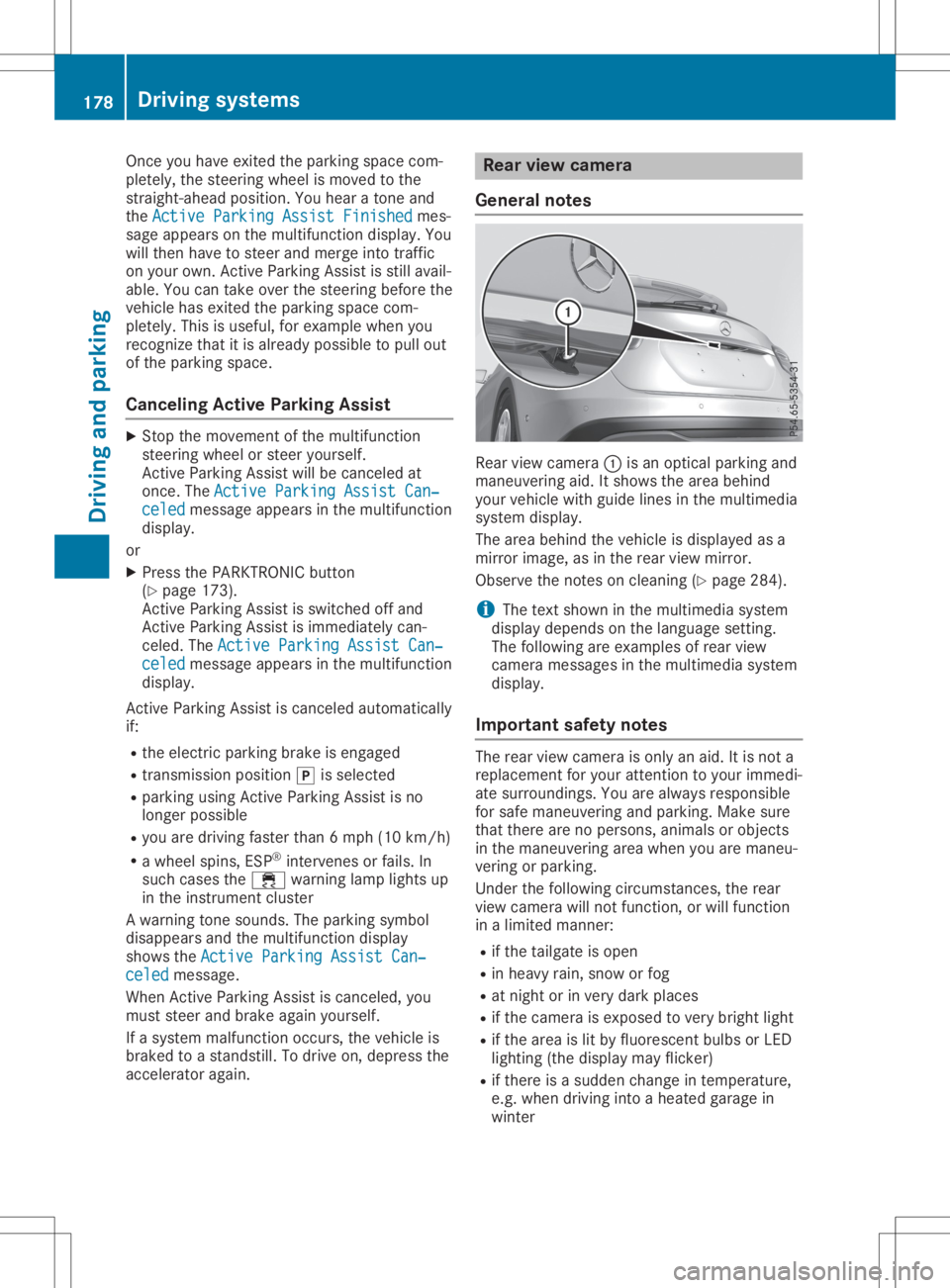
General notes Rear
viewcamera 0043isan optical parking and
maneuvering aid.Itshows thearea behind
your vehicle withguide linesinthe multimedia
system display.
The area behind thevehicle isdispla yedasa
mirror image, asinthe rear view mirror.
Observe thenotes oncleaning (Ypage 284).
i The
text shown inthe multimedia system
displa ydepends onthe langua gesetting.
The followi ngare examples ofrear view
camera messages inthe multimedia system
displa y.
Importa ntsafety notes The
rear view camera isonly anaid. Itis not a
replacement foryour attent iontoyour immedi-
ate surroundings. Youarealwa ysresponsible
for safe maneuvering andparking. Makesure
that there arenopersons, animalsorobjects
in the maneuvering areawhen youaremaneu-
vering orparking.
Under thefollowi ngcircumstances, therear
view camera willnotfunction, orwill function
in alimited manner:
R ifthe tailgate isopen
R in heavy rain,snow orfog
R at night orinvery dark places
R ifthe camera isexposed tovery bright light
R ifthe area islit by fluorescent bulbsorLED
lighting (thedispla ymay flicker)
R ifthere isasudden changeintemperature,
e.g. when driving intoaheated garagein
winter 178
Driving
systemsDriving andparking
Page 183 of 346
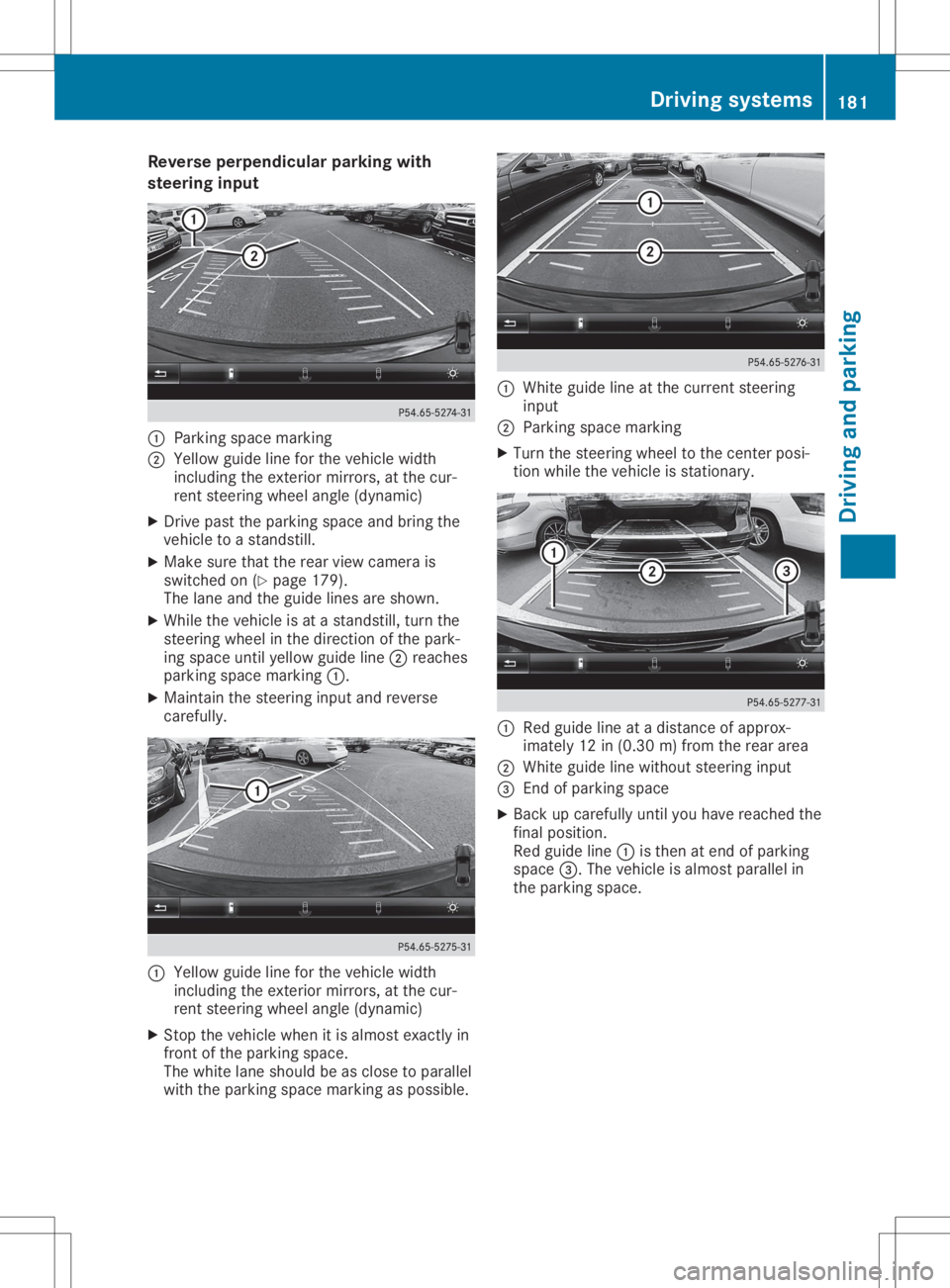
Reve
rseperpe ndicularparkin gwi th
ste ering input 0043
Parking spacemar king
0044 Yellow guide line for the vehi clewidth
incl uding the exteri ormirr ors, atthe cur-
rent steering wheelang le(dyna mic)
X Drive past the parking spaceand bring the
vehi cletoastand still.
X Ma kesure that therearvie wcame rais
swi tched on(Ypage 179 ).
The lane and theguide lines areshown.
X Whi lethe vehi cleisat astand still,turn the
stee ring wheelin the directi onofthe park-
ing spaceunti lye llow guide line 0044 reaches
pa rking spacemar king 0043.
X Ma inta inthe stee ring inputand reverse
care fully. 0043
Yellow guide line for the vehi clewidth
incl uding the exteri ormirr ors, atthe cur-
rent steering wheelang le(dyna mic)
X Stop thevehi clewhe nit is almost exactly in
front ofthe parking space.
The whitelane sho uld be asclo setoparal lel
wi th the parking spacemar king aspos sible. 0043
Whiteguide line atthe curr entstee ring
inp ut
0044 Parking spacemar king
X Tu rn the stee ring wheelto the center posi-
tion whilethe vehi cleisstati onary. 0043
Redgu ide line atadi stance ofappro x-
ima tely 12in(0.30 m)from the rearar ea
0044 Whiteguide line withou tste ering input
0087 End ofparki ng space
X Bac kup car efully unti lyo uha ve rea che dthe
fin alpo sitio n.
Re dgu ide line 0043 isthe nat end ofparki ng
sp ace 0087.The vehicleis almos tpa rallel in
the parki ng space . Dr
ivi ng system s
181Drivi ng andparki ng Z
Page 184 of 346
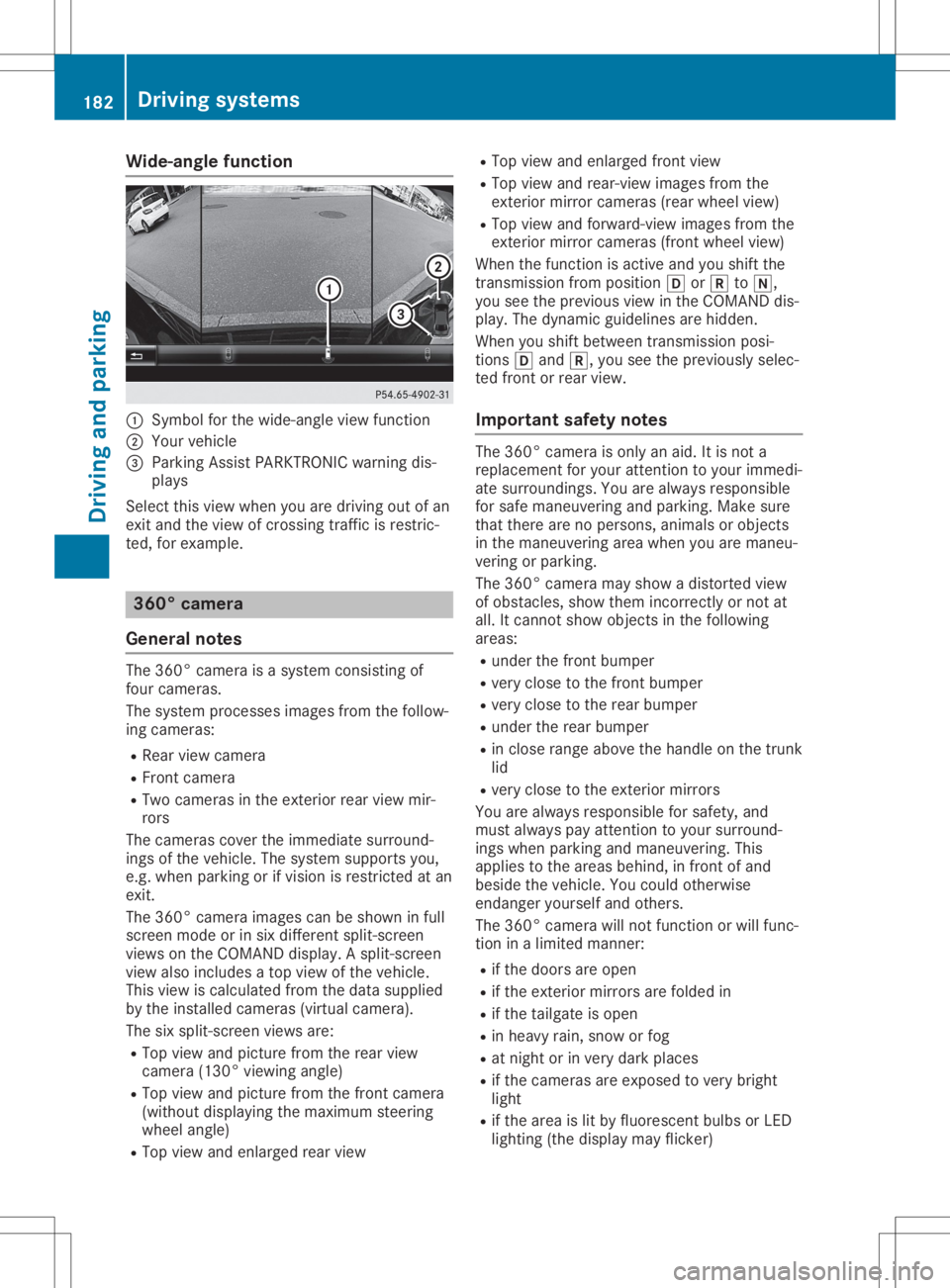
Wide-ang
lefuncti on 0043
Symbo lfor the wide-angl eview function
0044 You rvehicl e
0087 Parki ngAssist PARKTR ONICwarning dis-
pla ys
Select thisview whenyou aredrivi ngout ofan
exit and theview ofcrossing trafficisrestric-
ted, forexamp le. 360
°camera
Gene ralnote s The
360° camera isasyste mconsisting of
four camera s.
The syste mprocess esima ges from thefollow-
ing camera s:
R Rea rview camera
R Front camera
R Two camera sin the exterior rearview mir-
rors
The camera scover theimmed iatesurro und-
ings ofthe vehicl e.The syste msup ports you,
e.g. when parkingorifvisi onisrestricted atan
exit.
The 360° camera images can beshow nin full
screen modeorinsix diffe rent split-screen
view son the COMAND display.A spli t-screen
view alsoinclu desatop view ofthe vehicl e.
This view iscalcu latedfrom thedata supplied
by the instal ledcamera s(virtu alcamera ).
The sixspli t-screen viewsare:
R Top view andpicture fromtherear view
camera (130°viewingangl e)
R Top view andpicture fromthefront camera
(wi thout displaying the maximu msteering
whee langl e)
R Top view andenlarged rearview R
Top view andenlarged front view
R Top view andrear-vi ewima ges from the
exterior mirrorcamera s(rea rwhe elview )
R Top view andforwa rd-view images from the
exterior mirrorcamera s(front wheelview )
When thefunction isactive andyoushift the
transmiss ionfrom position 005Bor005E to005C,
you seetheprevi ousview inthe COMAND dis-
pla y.The dyna micguidel ines arehidd en.
When youshift betwe entransmiss ionposi -
tions 005Band 005E,you seetheprevi ouslysele c-
ted front orrear view.
Important safetynotes The
360° camera isonly anaid.It is not a
repl aceme ntfor you rattention toyou rimmed i-
ate surro undings. Youarealwaysrespo nsible
for safe maneu veringandparki ng.Make sure
that there arenoperso ns,anima lsor objects
in the maneu veringareawhenyou aremaneu -
vering orparki ng.
The 360° camera mayshow adistorte dview
of obsta cles,show themincorrectly ornot at
all .It cannot showobjects inthe followi ng
area s:
R under thefront bump er
R very close tothe front bump er
R very close tothe rear bump er
R under therear bump er
R in close range abovethe handl eon the trunk
lid
R very close tothe exterior mirrors
You arealwaysrespo nsiblefor safe ty,and
must alwayspay attention toyou rsurro und-
ings whenparki ngand maneu vering. This
app liesto the area sbehi nd,infront ofand
besi dethe vehicl e.You couldotherw ise
endang eryou rself andothers.
The 360° camera willnot function orwil lfunc-
tion inalimi ted manner:
R ifthe doors areopen
R ifthe exterior mirrorsarefoldedin
R ifthe tailgate isopen
R in hea vyrain, snow orfog
R at night orinvery dark places
R ifthe camera sare expose dto very bright
lig ht
R ifthe area islit by fluo rescent bulbsorLED
lig hting (thedisplaymay flicker) 182
Driv
ingsyste msDrivingand parking
Page 188 of 346
If
the lanes arenarrow, vehiclesdriving inthe
lane beyond thelane next toyou rvehicle may
be indicated ,especia llyifthe vehicle sare not
driving inthe middl eof their lane. Thismay be
the case ifthe vehicle sare driving onthe inner
side oftheir lane.
Due tothe nature ofthe system:
R warnings maybeissu edinerror when driv-
ing close tocrash barriersor simil arsolid
lane borders.
R warnings maybeinterrupted whenyouare
driving alongsideparticul arlylong vehicle s,
such astrucks, foraprolonged time.
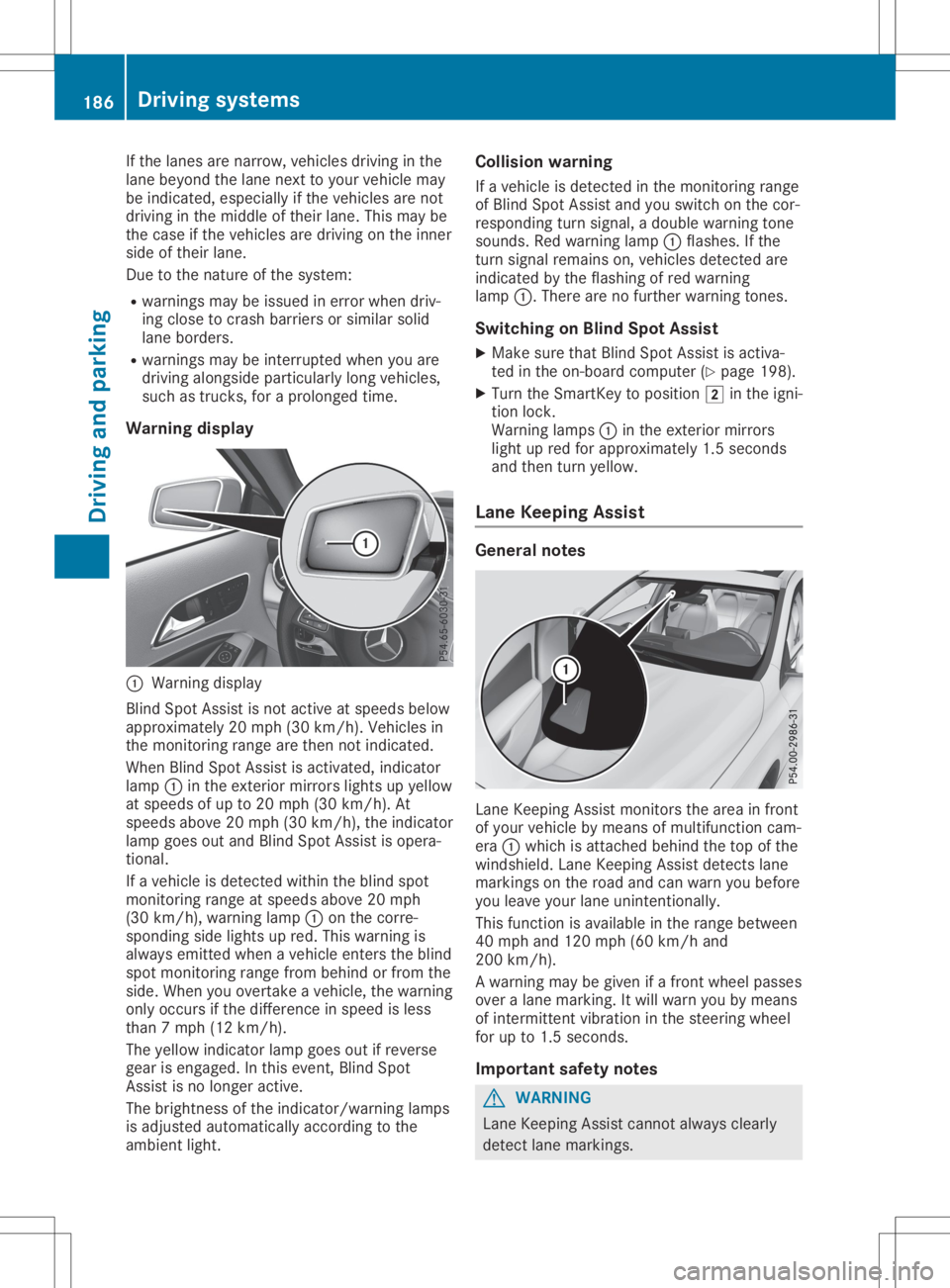
Warning display 0043
Warning display
Blind SpotAssist isnot active atspeed sbelow
appro ximately 20mph (30km/h). Vehiclesin
the monitoring rangearethen notindicated .
When BlindSpotAssist isactivated, indicator
lamp 0043inthe exterior mirrorslightsupyellow
at speed sof up to20 mph (30km/h ).At
speed sabove 20mph (30km/h), theindicator
lamp goesoutand Blind SpotAssist isopera -
tional.
If avehicle isdetected withintheblind spot
monitoring rangeatspeed sabove 20mph
(30 km/h), warning lamp0043onthe corre-
sponding sidelights upred. This warning is
alw ays emitted whenavehicle enterstheblind
spot monitoring rangefrombehind orfrom the
side. When youovertake avehicle ,the warning
only occurs ifthe difference inspeed isless
than 7mph (12km/h ).
The yellow indicator lampgoesoutifreverse
gear isengaged .In this event, BlindSpot
Assist isno longer active.
The brightness ofthe indicator/wa rninglamps
is adjusted automaticallyaccording tothe
ambi entlight. Col
lision warning
If avehicle isdetected inthe monitoring range
of Blind SpotAssist andyouswitch onthe cor-
respondi ngturn signal ,a doub lewarning tone
sounds. Redwarning lamp0043flashe s.Ifthe
turn signal remains on,vehicle sdetected are
indicated bythe flashi ngofred warning
lamp 0043.There arenofurther warning tones.
Swi tching onBlind SpotAssist
X Make surethatBlind SpotAssist isactiva-
ted inthe on-board computer (Ypage 198).
X Turn theSmartKey topositio n0048 inthe igni-
tion lock.
Warning lamps0043 inthe exterior mirrors
light upred forappro ximately 1.5seconds
and then turnyellow.
Lane Keeping Assist Gene
ralnotes Lane
Keepi ngAssist monitors thearea infront
of you rvehicle bymeans ofmultifu nctioncam-
era 0043which isattached behindthetop ofthe
windshi eld.Lane Keepi ngAssist detects lane
markings onthe road andcanwarn youbefore
you leaveyou rlane unintentionally .
This function isavai lablein the range betwee n
40 mph and120 mph (60km/h and
200 km/h).
A warning maybegiven ifafront wheel passes
over alane marking. Itwil lwarn youbymeans
of intermittent vibrationin the steering wheel
for upto1.5 seconds .
Important safetynotes G
WARNING
Lane Keepi ngAssist cannot always clearl y
detect lanemarkings. 186
Drivi
ngsystemsDrivi ngand parking
Page 231 of 346
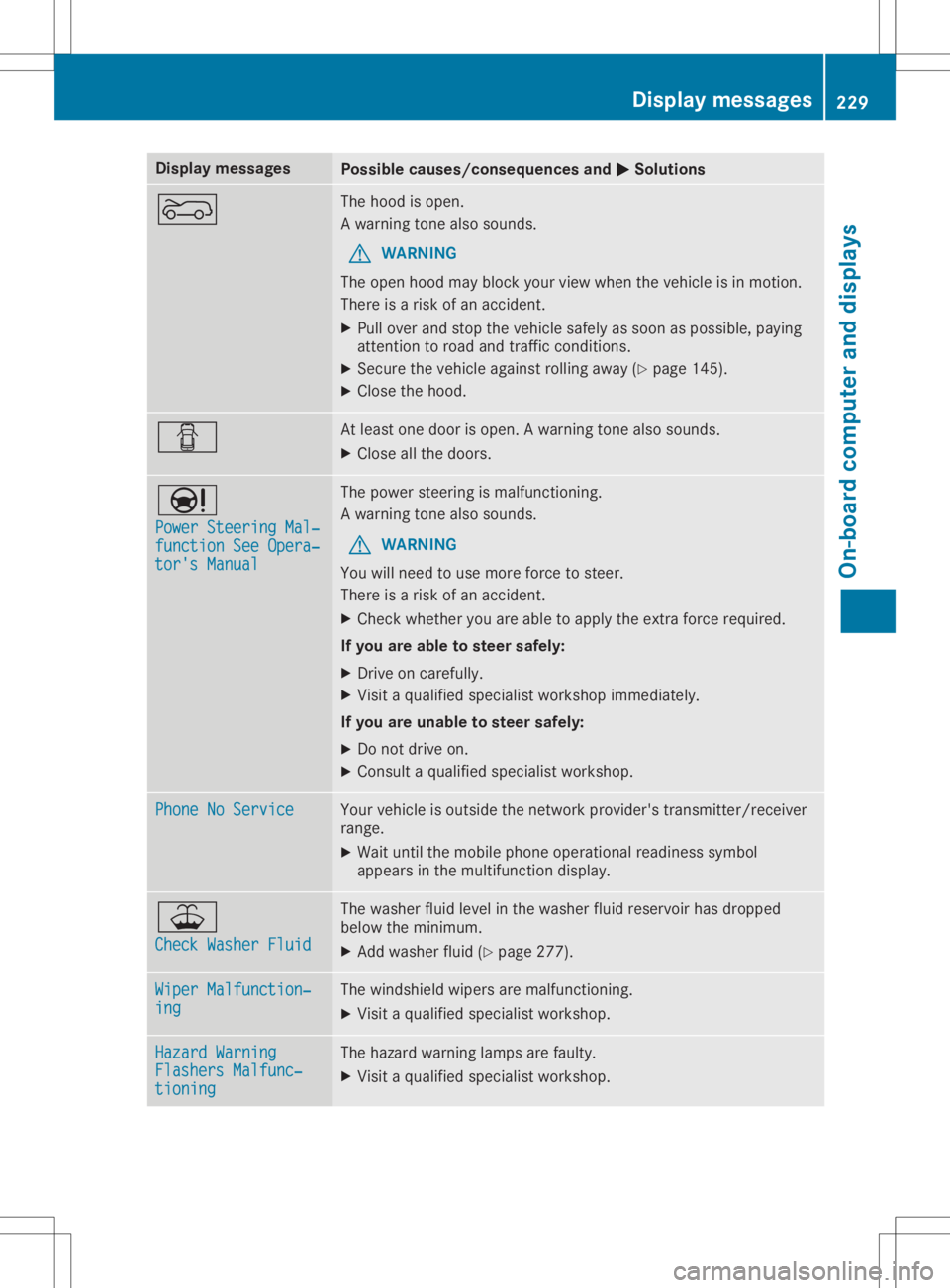
Disp
laymes sages Poss
iblecauses/co nsequences and 0050 0050
Solu tions 0066 The
hoodis open .
A warn ingtone also soun ds.
G WAR
NING
The open hoodmay blockyour viewwhen theveh icleis in mot ion.
The reisaris kof an acc iden t.
X Pull overand stop theveh iclesaf ely assoo nas pos sible,payin g
att ention toroa dand traff icco nd ition s.
X Se cur eth eveh icleagain strol lingaway (Ypage 145).
X Clos eth ehoo d. 0051 At
least onedoor isopen .A warn ingtone also soun ds.
X Clos eall thedoor s. 00CC
Pow erSteering Mal‐ Pow
erSteering Mal‐
fun ctionSee Opera‐ fun
ctionSee Opera‐
tor 'sManual tor
'sManual The
powe rst eer ing ismalf unction ing .
A warn ingtone also soun ds.
G WAR
NING
You willneed touse morefor ce tosteer .
The reisaris kof an acc iden t.
X Chec kwhet heryou areable toapply theex tra for ce req uire d.
If you areabl eto steer safely:
X Dr ive oncar eful ly.
X Vis itaqualif iedspecialistwor kshop immediat ely.
If you areuna bletosteer safely:
X Do notdri ve on.
X Con sult aqualif iedspecialistwor kshop . Pho
neNoServic e Pho
neNoServic e Your
vehicleis out side thene two rkpro vider'strans mitter/ rec eiver
ran ge.
X Wait untilth emob ilepho neoper ationalread inesssymb ol
appear sin themult ifunction disp lay. 00B2
Che ckWasher Fluid Che
ckWasher Fluid The
wash erflui dlev elin thewash erfluid reservoir has dropped
belo wthemin imum .
X Ad dwash erflui d(Y page 277). Wip
erMalfuncti on‐ Wip
erMalfuncti on‐
ing ing The
windsh ield wiper sare malf unction ing .
X Vis itaqualif iedspecialistwor kshop . Haz
ard Warning Haz
ard Warning
Fla shersMalfun c‐ Fla
shersMalfun c‐
tio ning tio
ning The
hazard warn inglamp sare fault y.
X Vis itaqualif iedspecialistwor kshop . Disp
laymes sage s
229On -boar dcomp uter anddi sp lay s Z
Page 237 of 346
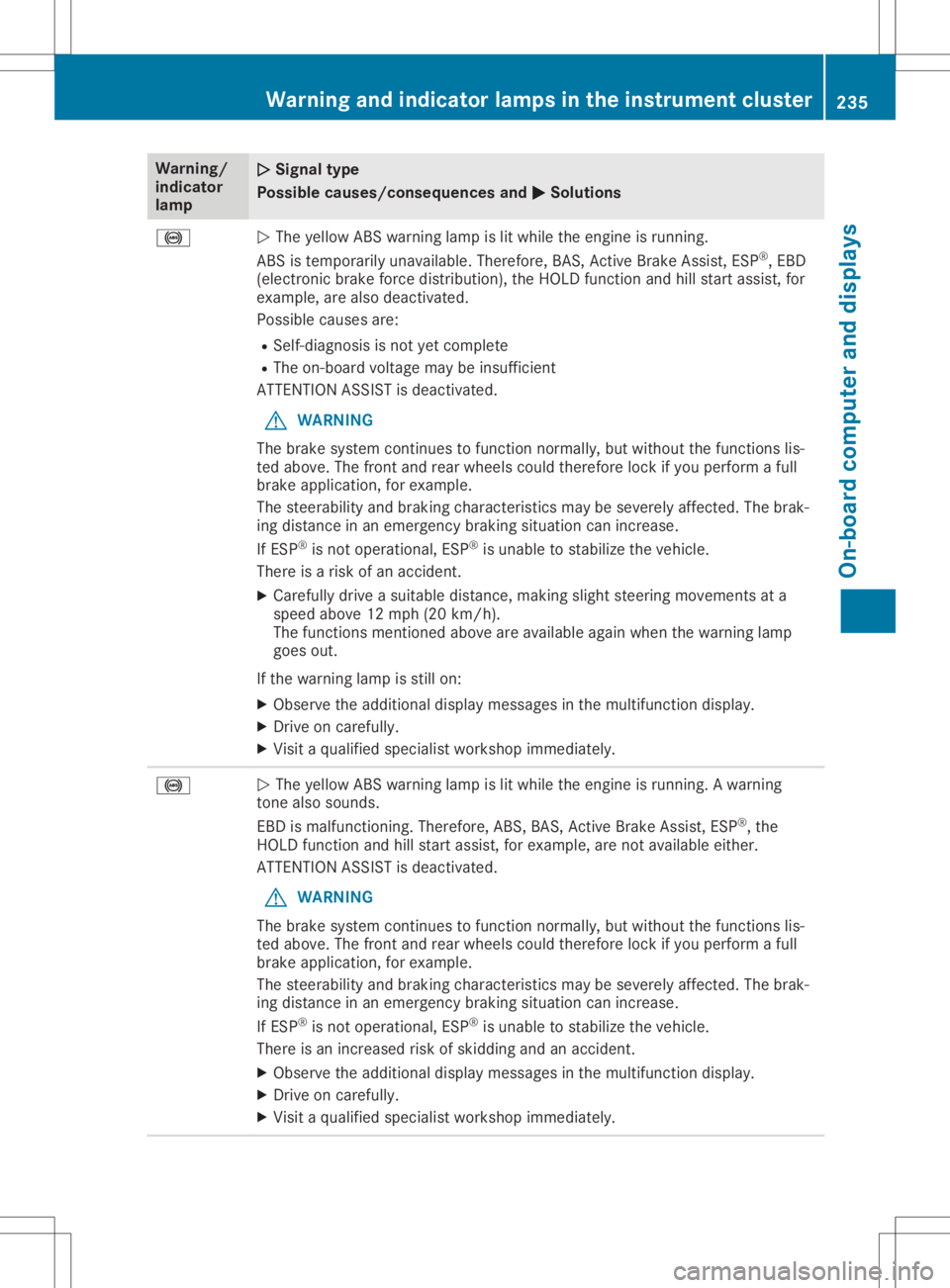
Warning/
indic ator
lamp 00510051
Sign altype
Poss iblecause s/cons equen cesand 0050 0050
Sol utions 0025
0051
The yellow ABS warning lamp islit whi lethe engine isrunning.
ABS istempora rilyunava ilable .There fore,BAS, Active BrakeAssist, ESP®
,EBD
(el ectronic brakeforcedistributio n),the HOLD function andhillstart assist,for
exampl e,are alsodea ctivated.
Possi blecaus esare:
R Self-di agnosi sis not yetcomple te
R The on-board voltagemay beinsuffi cient
ATTENTION ASSISTisdea ctivated.
G WARNING
The brake system continues tofunction normally,but witho utthe functions lis-
ted above.The front andrear whee lscoul dtherefore lockifyou perform afull
brake application, forexampl e.
The steerab ility and braki ngchara cteristics maybesevere lyaffected. Thebrak-
ing dista nceinan emerge ncybraki ngsitua tioncanincreas e.
If ESP ®
is not opera tional,ESP ®
is unab leto stabi lizethevehicl e.
There isarisk ofan accide nt.
X Ca reful lydrive asui table distance,making slightsteering movements ata
spee dabo ve12 mph (20km/h) .
The functions mentioned aboveare available againwhen thewarni nglamp
goes out.
If the warning lamp isstill on:
X Observe theadditiona ldisp laymessa gesinthe multi function display.
X Drive oncarefu lly.
X Visi ta qua lified speci alist worksho pimmed iately. 0025
0051
The yellow ABS warning lamp islit whi lethe engine isrunning. Awarni ng
tone alsosound s.
EBD ismalfu nctioning. Therefore,ABS, BAS, Active BrakeAssist, ESP®
,the
HOLD function andhillstart assist,for exampl e,are not available either.
ATTENTION ASSISTisdea ctivated.
G WARNING
The brake system continues tofunction normally,but witho utthe functions lis-
ted above.The front andrear whee lscoul dtherefore lockifyou perform afull
brake application, forexampl e.
The steerab ility and braki ngchara cteristics maybesevere lyaffected. Thebrak-
ing dista nceinan emerge ncybraki ngsitua tioncanincreas e.
If ESP ®
is not opera tional,ESP ®
is unab leto stabi lizethevehicl e.
There isan increas edrisk ofskiddi ngand anaccide nt.
X Observe theadditiona ldisp laymessa gesinthe multi function display.
X Drive oncarefu lly.
X Visi ta qua lified speci alist worksho pimmed iately. Warning
andindic atorlamps inthe instrum entcluster
235On-boardcomput erand displays Z
Page 240 of 346
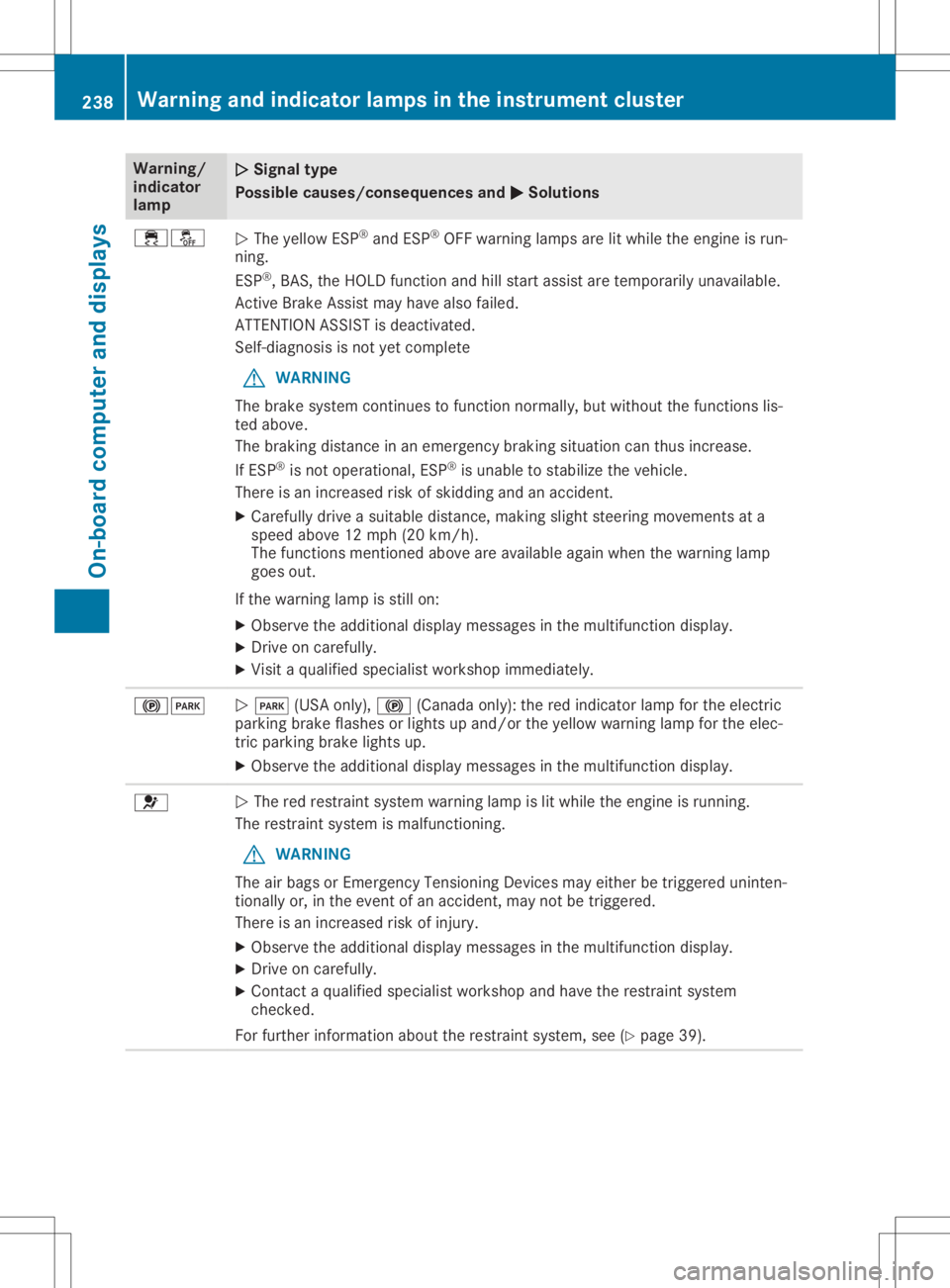
Warning/
indic ator
lamp 00510051
Sign altype
Poss iblecause s/cons equen cesand 0050 0050
Sol utions 00E500BB
0051
The yellow ESP®
and ESP®
OFF warning lamp sare litwhi lethe engine isrun-
ning.
ESP ®
,BAS, theHOLD function andhillstart assistare tempora rilyunava ilable .
Active BrakeAssist mayhave alsofail ed.
ATTENTION ASSISTisdea ctivated.
Self-di agnosi sis not yetcomple te
G WARNING
The brake system continues tofunction normally,but witho utthe functions lis-
ted above.
The braki ngdista nceinan emerge ncybraki ngsitua tioncanthus increas e.
If ESP ®
is not opera tional,ESP ®
is unab leto stabi lizethevehicl e.
There isan increas edrisk ofskiddi ngand anaccide nt.
X Ca reful lydrive asui table distance,making slightsteering movements ata
spee dabo ve12 mph (20km/h) .
The functions mentioned aboveare available againwhen thewarni nglamp
goes out.
If the warning lamp isstill on:
X Observe theadditiona ldisp laymessa gesinthe multi function display.
X Drive oncarefu lly.
X Visi ta qua lified speci alist worksho pimmed iately. 00240049
0051
0049 (USAonly),0024 (Canada only):the red indica torlamp forthe electric
parki ngbrake flashes orlights upand/or theyellow warni nglamp forthe elec-
tric parki ngbrake lights up.
X Observe theadditiona ldisp laymessa gesinthe multi function display. 0075
0051
The redrestrai ntsystem warning lamp islit whi lethe engine isrunning.
The restrai ntsystem ismalfu nctioning.
G WARNING
The airbag sor Emergency TensioningDevices mayeither betriggere duninten-
tional lyor, inthe event ofan accide nt,may notbetriggere d.
There isan increas edrisk ofinjury .
X Observe theadditiona ldisp laymessa gesinthe multi function display.
X Drive oncarefu lly.
X Contact aqua lified speci alist worksho pand have therestrai ntsystem
checked.
For further informati onabo utthe restrai ntsystem, see(Ypag e39). 238
Warning
andindic atorlamps inthe instrum entclusterOn-bo ardcomput erand displays
Page 259 of 346
Stowage
wellunder thecargo com-
par tment floor
Import antsafety notes G
WARNING
If you drive when thecargo compartmen t
floor isopen, object scould beflung around,
thus strikin gvehicle occupants. Thereisa
risk ofinjury, particularly inthe event ofsud-
den braking orasudden changeindirection.
Always closethecargo compartmen tfloor
before ajourney.
! The
maximum loadcapacity ofthe stow-
age well under thecargo compartmen tfloor
is 55 lbs (25 kg).
There isastowage areaforTIREFIT, thevehi-
cle tool kit,afolding box,etc.underneath the
cargo compartmen tfloor.
Opening/c losingthecargo compar t-
ment floor X
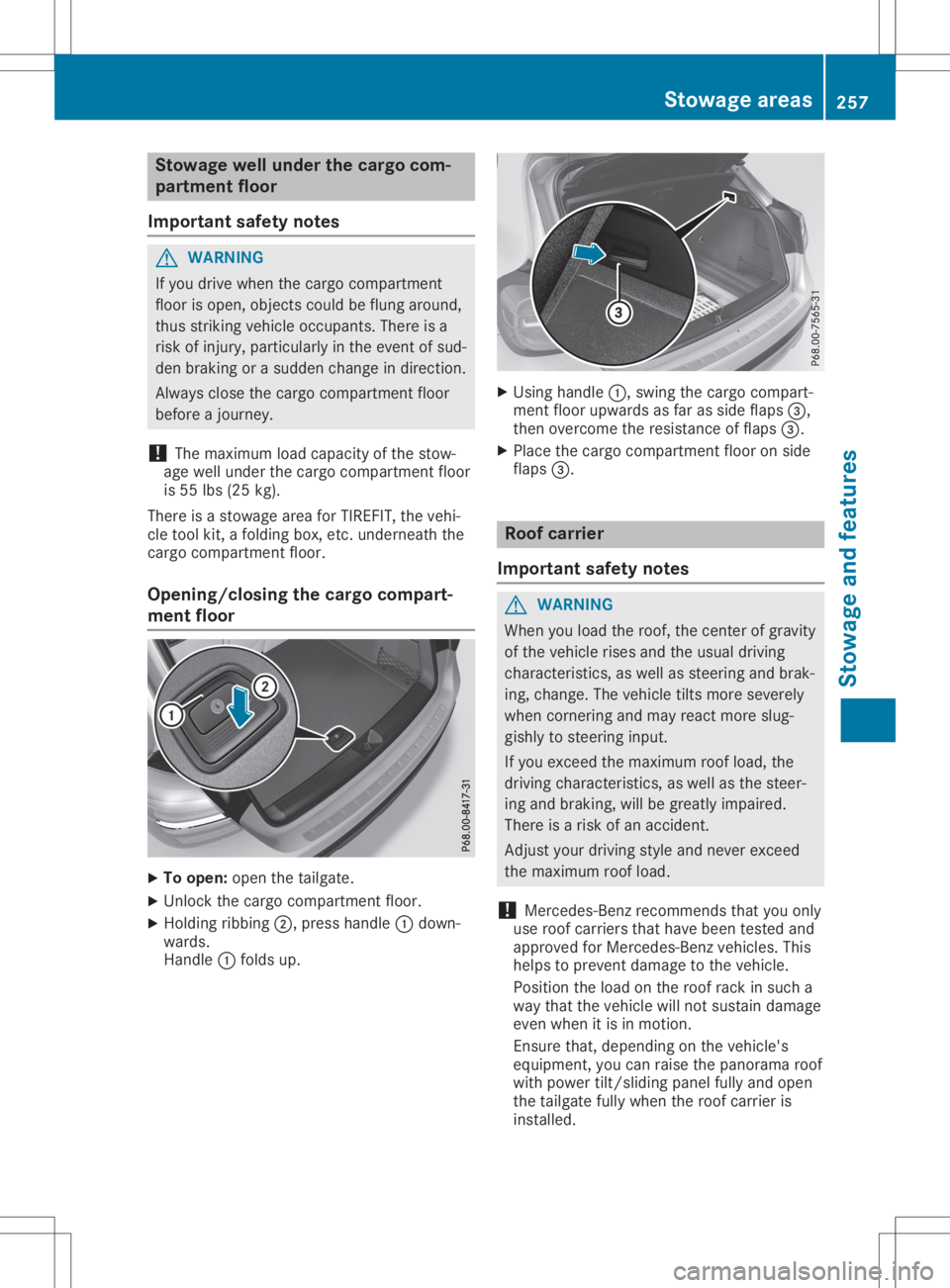
To open: openthetailgate.
X Unlock thecargo compartmen tfloor.
X Holding ribbing0044,press handle 0043down-
wards.
Handle 0043folds up. X
Using handle 0043,swing thecargo compart-
ment floorupwa rdsasfar asside flaps 0087,
then overcome theresistance offlaps 0087.
X Place thecargo compartmen tfloor onside
flaps 0087. Roof
carrier
Import antsafety notes G
WARNING
When youload theroof, thecent erofgravity
of the vehicle risesandtheusual driving
characterist ics,aswell assteering andbrak-
ing, change. Thevehicle tiltsmore severely
when corner ingand may react more slug-
gishly tosteering input.
If you exceed themaximum roofload, the
driving characterist ics,aswell asthe steer-
ing and braking, willbegreatly impaired.
There isarisk ofan accident.
Adjust yourdriving styleandnever exceed
the maximum roofload.
! Mercedes-B
enzrecommen dsthat youonly
use roof carriers thathave been tested and
approved forMercedes-B enzvehicles. This
helps toprevent damage tothe vehicle.
Position theload onthe roof rack insuch a
way that thevehicle willnotsustain damage
even when itis in motion.
Ensure that,depending onthe vehicle's
equipment, youcan raise thepanorama roof
with power tilt/sliding panelfullyandopen
the tailgate fullywhen theroof carrier is
installed. Stowage
areas
257Stowage andfeatu res Z
Page 267 of 346
If
amobil ephone network andGPS reception
are avai lable,the system transfers datatothe
Mercedes-Benz Customer Assistance Center,
for example :
R Curre ntlocation ofthe vehicle
R Vehicle identifica tionnumber
i The
displ ayofthe multimed iasystem indi-
cates thatacall isactive. During thecall,
you can change tothe naviga tionmenu by
pressing theNAVI button onthe multimed ia
system, forexample .
Voice outputis not avai lable.
A voice connection isestabl ishedbetween the
Mercedes-Benz Customer Assistance Center
and thevehicle occupants.
You receive information aboutopera tingyour
vehicle ,abou tthe nearest Mercedes-Benz Ser-
vice Center andabou tother productsand
services fromMercedes-Benz.
USA only: youcan find further information on
the Mercedes meconnect systemunder"Own-
ers Online" athttp://www.mbusa .com.
i The system hasnotbeen ableto initiate an
MB Info call, if:
R the indicator lampinMB Info callbut-
ton 0043isflashi ngcontinuously .
R no voice connection tothe Mercedes-
Benz Customer Assistance Centerhas
been establ ished.
This canoccur ifthe releva ntmobil ephone
network isnot avai lable,for example .
The Call Failed Call
Failed message appearsinthe
multifu nctiondisplay.
X To end acall: press the0076 button onthe
multifu nctionsteering wheel.
or X Press thecorresponding multimediasystem
button forending aphone call.
Call priority When
service callsareactive, e.g.Roadside
Assistance orMB Info calls ,an emergency call
can stillbeinitiated .In this case, anemer-
gency callwilltake priori tyand override all
other active calls.
The indicator lampofthe respective button
flashe suntil thecall isended. An
emergency callcan only beterminated by
the Mercedes-Benz Customer Assistance Cen-
ter.
All other callscanbeended bypressing:
R the 0076 button onthe multifu nctionsteer-
ing wheel
R the corresponding buttoninthe multime dia
system toend thevoice call
i When
acall isinitiated ,the audiosystem
is muted. Themobil ephone isno longer
connected tothe multime diasystem. How-
ever, ifyou want touse yourmobil ephone,
do soonly when thevehicle isstationary
and inasafe location.
Do wnl oading destination sin COMA ND Dow
nloadin gdestination s
Download ingdestinations givesyouaccess to
a datab asewith over 15mill ion points ofinter-
est (POIs). Thesecanbedownlo adedonthe
naviga tionsystem inyou rvehicle .If you know
the destination, theaddre sscan bedownlo a-
ded. Alternatively ,you can obtain thelocation
of Points ofInterest (POIs)/important destina-
tions inthe vicinity.
Furthermore, youcan downlo adroutes withup
to 20 way points.
You areprompted toconfirm routeguidance
to the addre ssentered.
The system calculatestheroute andsubse -
quently startstheroute guidance withthe
addre ssentered.
i If
you select No No,
the addre sscan besaved
in the addre ssbook.
i The
Destination Downloadfunctionis
avai lableifthe releva ntmobil ephone net-
work isavai lableand data transfer ispossi-
ble.
i The
Destination Downloadfunctioncan
only beused ifthe vehicle isequi pped with
a naviga tionsystem.
Route Assistance
This service ispart ofthe Mercedes mecon-
nect PLUS Package andcannot beobtained
sepa rately .
i You
canalso usetheRou teAssistance
function ifyou rvehicle isnot equi pped with
a naviga tionsystem. Fe
atur es
265Stowag eand features Z
Page 278 of 346
G
WARNING
Functions relevant tosafety arerestricted or
no longer available if:
R the engine isnot running
R the brake system orthe pow ersteering is
malfu nctioning
R there isamalfu nction inthe pow ersup ply
or the vehicl e'selectrica lsystem
When yourvehicl eis towed awayor towed
started, youmay requireconside rablymore
effort tosteer andbrake. Thereisarisk of
an accide nt.
In such cases, useatow bar. Before being
towed awayor tow started, makesurethe
steering movesfreely. X
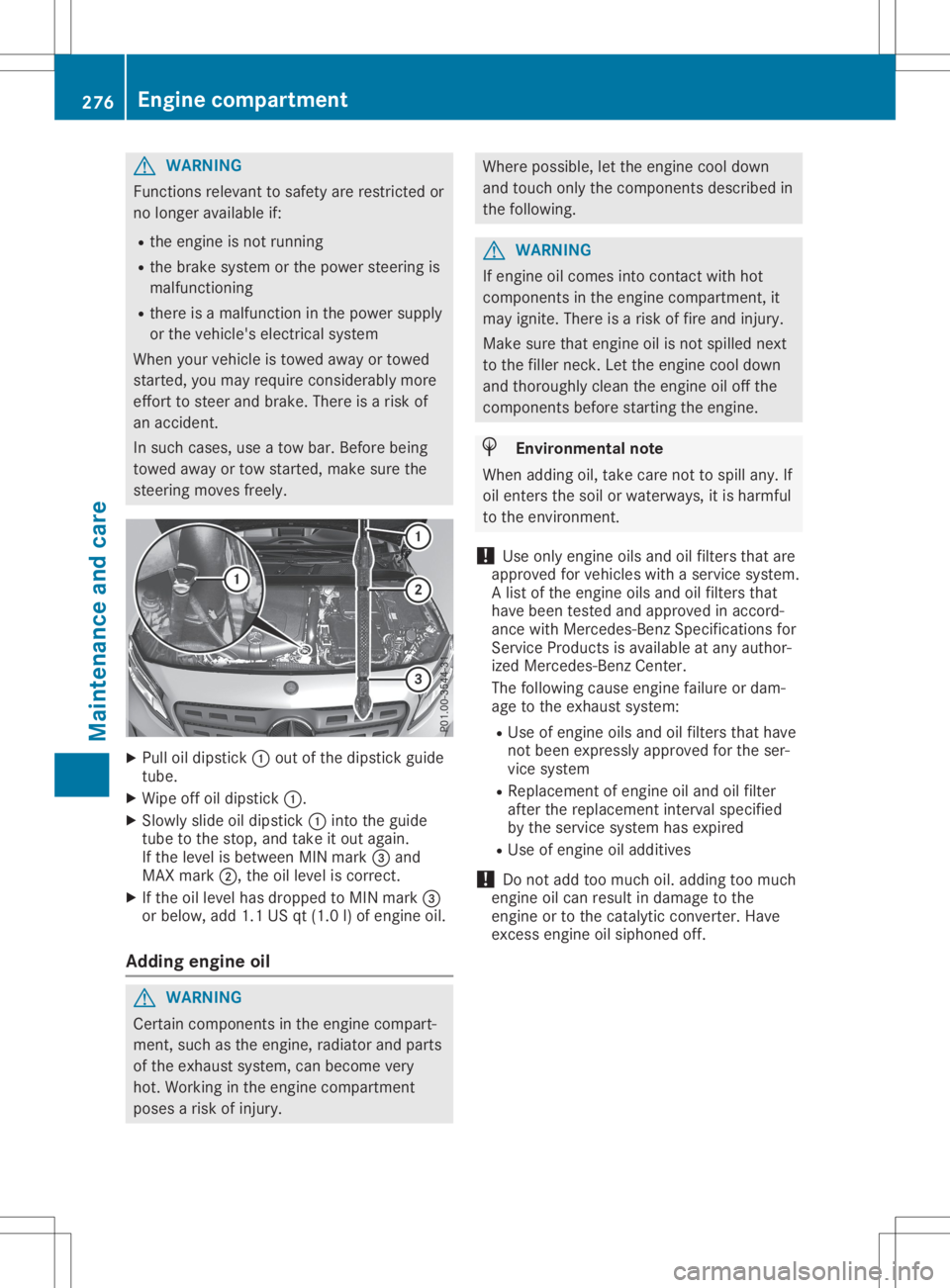
Pul loil dip stick 0043out ofthe dipstick guide
tube.
X Wip eoff oildip stick 0043.
X Slowl yslid eoil dip stick 0043into theguide
tube tothe stop, andtake itout again.
If the leve lis betwe enMIN mark 0087and
MAX mark 0044,theoilleve lis correct.
X Ifthe oilleve lhas dropp edtoMIN mark 0087
or bel ow, add 1.1USqt(1.0 l)of engine oil.
Adding engineoil G
WARNING
Certa incomponents inthe engine compart-
ment, suchasthe engine, radiator andparts
of the exhau stsystem, canbecome very
hot. Working inthe engine compartment
pose sa risk ofinjury . Where
possible,let the engine cooldown
and touch onlythecomponents describedin
the followi ng. G
WARNING
If engine oilcomes intocontact withhot
components inthe engine compartment, it
may ignite. Thereisarisk offire and injury .
Make surethatengine oilisnot spilled next
to the filler neck. Letthe engine cooldown
and thoroug hlyclea nthe engine oiloff the
components beforestarting theengine. H
Envi
ronmental note
When addingoil,take carenottospil lany. If
oil enters thesoil orwater ways,itis harmfu l
to the environment.
! Use
only engine oilsand oilfilters thatare
app roved forvehicl eswith aservice system.
A list ofthe engine oilsand oilfilters that
have been tested andapproved inaccord-
ance withMercede s-BenzSpecifications for
Service Productsisava ilable atany author-
ized Mercede s-BenzCenter.
The followi ngcaus eengine failure ordam-
age tothe exhau stsystem:
R Use ofengine oilsand oilfilters thathave
not been express lyapp roved forthe ser-
vice system
R Rep lace ment ofengine oiland oilfilter
after thereplacement intervalspecified
by the service system hasexpire d
R Use ofengine oiladd itives
! Do
not add toomuch oil.add ingtoo much
engine oilcan resu ltin dama getothe
engine ortothe catal yticconverter. Have
excess engineoilsiph oned off. 276
Eng
inecompar tmentMainten anceandcare