display MERCEDES-BENZ GLA 2020 Service Manual
[x] Cancel search | Manufacturer: MERCEDES-BENZ, Model Year: 2020, Model line: GLA, Model: MERCEDES-BENZ GLA 2020Pages: 346, PDF Size: 17.58 MB
Page 184 of 346
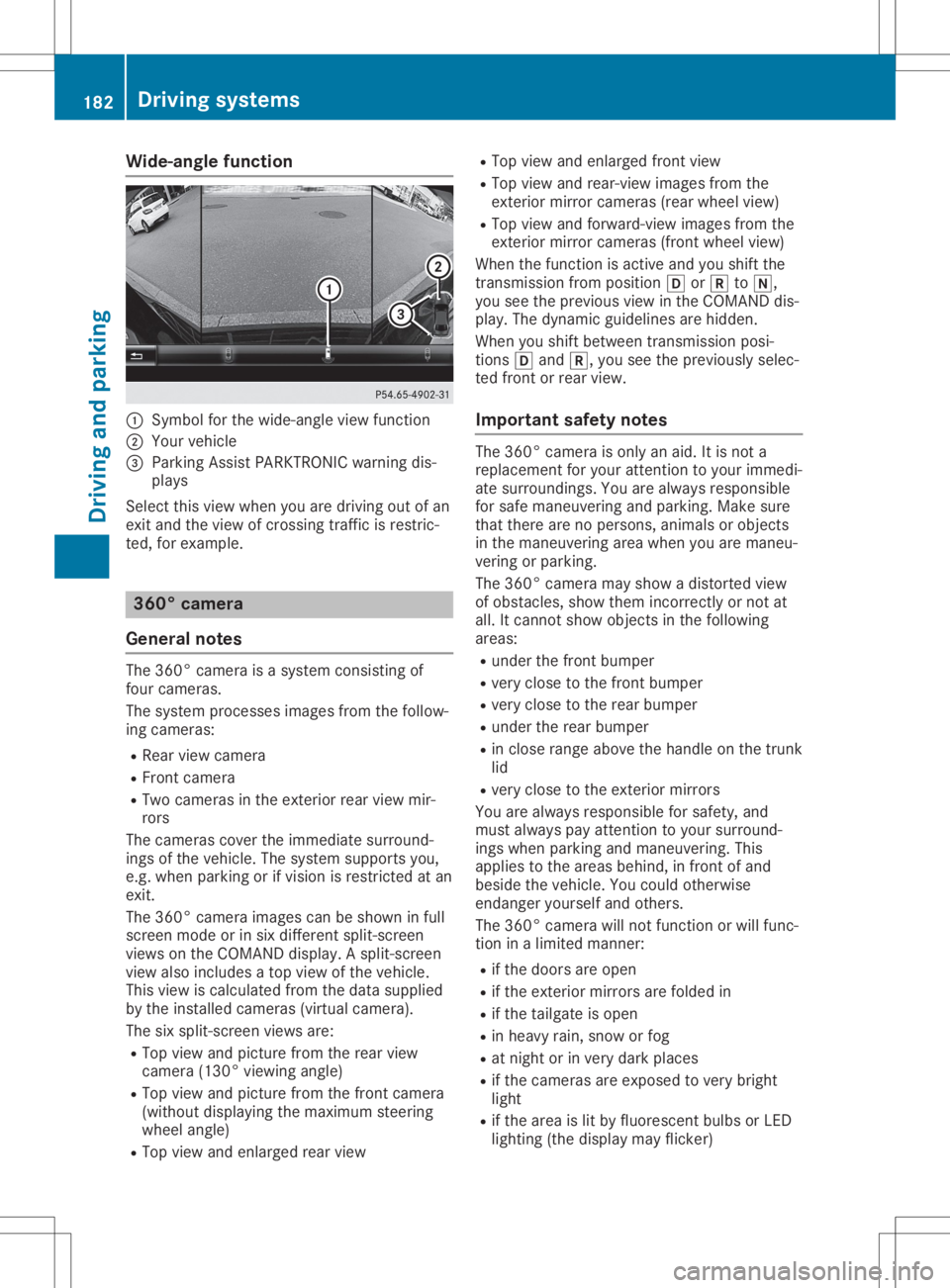
Wide-ang
lefuncti on 0043
Symbo lfor the wide-angl eview function
0044 You rvehicl e
0087 Parki ngAssist PARKTR ONICwarning dis-
pla ys
Select thisview whenyou aredrivi ngout ofan
exit and theview ofcrossing trafficisrestric-
ted, forexamp le. 360
°camera
Gene ralnote s The
360° camera isasyste mconsisting of
four camera s.
The syste mprocess esima ges from thefollow-
ing camera s:
R Rea rview camera
R Front camera
R Two camera sin the exterior rearview mir-
rors
The camera scover theimmed iatesurro und-
ings ofthe vehicl e.The syste msup ports you,
e.g. when parkingorifvisi onisrestricted atan
exit.
The 360° camera images can beshow nin full
screen modeorinsix diffe rent split-screen
view son the COMAND display.A spli t-screen
view alsoinclu desatop view ofthe vehicl e.
This view iscalcu latedfrom thedata supplied
by the instal ledcamera s(virtu alcamera ).
The sixspli t-screen viewsare:
R Top view andpicture fromtherear view
camera (130°viewingangl e)
R Top view andpicture fromthefront camera
(wi thout displaying the maximu msteering
whee langl e)
R Top view andenlarged rearview R
Top view andenlarged front view
R Top view andrear-vi ewima ges from the
exterior mirrorcamera s(rea rwhe elview )
R Top view andforwa rd-view images from the
exterior mirrorcamera s(front wheelview )
When thefunction isactive andyoushift the
transmiss ionfrom position 005Bor005E to005C,
you seetheprevi ousview inthe COMAND dis-
pla y.The dyna micguidel ines arehidd en.
When youshift betwe entransmiss ionposi -
tions 005Band 005E,you seetheprevi ouslysele c-
ted front orrear view.
Important safetynotes The
360° camera isonly anaid.It is not a
repl aceme ntfor you rattention toyou rimmed i-
ate surro undings. Youarealwaysrespo nsible
for safe maneu veringandparki ng.Make sure
that there arenoperso ns,anima lsor objects
in the maneu veringareawhenyou aremaneu -
vering orparki ng.
The 360° camera mayshow adistorte dview
of obsta cles,show themincorrectly ornot at
all .It cannot showobjects inthe followi ng
area s:
R under thefront bump er
R very close tothe front bump er
R very close tothe rear bump er
R under therear bump er
R in close range abovethe handl eon the trunk
lid
R very close tothe exterior mirrors
You arealwaysrespo nsiblefor safe ty,and
must alwayspay attention toyou rsurro und-
ings whenparki ngand maneu vering. This
app liesto the area sbehi nd,infront ofand
besi dethe vehicl e.You couldotherw ise
endang eryou rself andothers.
The 360° camera willnot function orwil lfunc-
tion inalimi ted manner:
R ifthe doors areopen
R ifthe exterior mirrorsarefoldedin
R ifthe tailgate isopen
R in hea vyrain, snow orfog
R at night orinvery dark places
R ifthe camera sare expose dto very bright
lig ht
R ifthe area islit by fluo rescent bulbsorLED
lig hting (thedisplaymay flicker) 182
Driv
ingsyste msDrivingand parking
Page 185 of 346
R
ifthe reisasudden changeintem perat ure,
e.g. when drivingint oaheate dgarage in
wint er
R ifthe camer alens esare dirtyor cov ered
R ifthe vehic lecom pone ntsare damaged in
which thecamer asare fitted. Inthis even t,
have thecamer aposit ionand setting
chec kedataqualified specialist workshop
Do not use the360 °camer ain this case. You
can otherwise injure others orcause damage
to obje ctsor the vehic le.
Activa tioncondit ions The
360°camer aimage canbedisplayed if:
R your vehic leisequipped witha360 °cam-
era
R COMA NDisswitc hedon;see thedigital
COMA NDoperat inginst ruct ions
R the 360° Camera 360°
Camerafunc tion isact ivate d
Switchin gon the360° camera X
Press andhold the00D4 buttononthe cen-
ter con sole forlong erthan twoseco nds; see
the digital COMANDoperat inginst ruct ions .
The followin gappears dependingon
wheth ergear 005Bor005E isselec ted:
R full screen display withtheimage from
the frontcamer a
R full screen display withtheimage from
the rear view camer a
Activa tingthe360° camerawith
COMAND X
Press the00D4 button;see thedigital
COMA NDoperat inginst ruct ions .
X Selec tSyst em Syst
embyturn ing00790052007A the
COMA NDcontroller andpress 0098tocon -
firm .
X Selec t360° Camera 360°
Cameraand press 0098tocon -
firm .
The followin gappears dependingon
wheth ergear 005Bor005E isselec ted:
R asplit screen with topview andtheimage
fro mthe frontcamer aor
R asplit screen with topview andtheimage
fro mthe rear view camer a
For further informat iononthe COMA NDcon-
tr oller; seethedigital COMANDoperat ing
inst ruct ions . Activa
tingthe360° camerausing
rever segear The
360°camer aimages canbeautom atically
displayed byengag ingreve rsegear.
X Make surethattheSmar tKey isin posit ion
0048 inthe ignit ionlock .
X Make surethattheActi vationbyRgear Acti
vationbyRgear
func tion isselec tedinCOMA ND(see Digital
Operat or'sManual).
X To show the360° cameraimage:engag e
reve rsegear.
The COMA NDdisplay showsthearea behin d
the vehic lein split screen:
R vehic lewith guide lines
R top view ofthe vehic le
Infor mation intheDigita lOper ator's
Man ual In
the Digit alOperat or'sManual youwillfind
inf ormat iononthe followin gtopic s:
R Disp lays inthe COMA NDdisplay
R Disp laywith thePARK TRONIC display
Exiting 360°cameradisp laymod e As
soon asyour vehic leexc eeds aspeed of
10 mph (16km/h) with thefunc tion activat ed,
the func tion switc hesoff.The COMA NDdis-
play switc hesback tothe prev iously selected
view. Youcanalso switc hthe display by
selec tingthe 0039 symbol inthe display and
press ing0098the COMA NDcontroller tocon -
firm . ATT
ENT ION ASSIST
Gener alnotes ATTE
NTIO NAS SIS Thelps youdurin glong ,
mon otonous journeys, suchason highways. It
is act ive inthe 37mph (60km/h) to125 mph
(200 km/h) rang e.IfATTE NTIO NAS SIS T
dete ctstypic alindic atorsof fat igue orinc reas-
ing lapses incon centration onthe part ofthe
drive r,itsuggest stak ing abreak . Driving
systems
183Driving andparking Z
Page 186 of 346
Imp
ortant safety notes AT
TENTI ON ASSIST ison lyan aid tothedriv er.
It mig htnotalways recogn izefatigue or
inc reas inginatten tiven ess intime orfail to
rec ogn izethem atall. The systemisno ta sub-
st itute forawell- restedand attentive driv er.
The function alit yof ATTENTI ON ASSIST is
res trict ed and warn ingsmay bedelaye dor not
oc cur atall:
R ifth elen gthof thejo urn eyisless than
appr oximat ely30min utes
R ifth eroad cond ition ispoor ,e. g. ifth esur -
fac eis une ven orifth ere arepothole s
R ifth ere isast ron gside wind
R ifyou have adopt edaspo rty driv ingstyle
wit hhigh cornerin gspee dsorhigh rates of
acc eler ation
R ifyou arepredom inantly driv ingslow erthan
37 mph (60km/h) orfas terth an 125mph
(20 0km/ h)
R ifthe timehas been setincorre ctly
R in act ive drivin gsituat ions,such aswhen
you chan gelanes orchan geyour speed
ATTE NTIO NAS SIS Tis reset when youcontinue
your journey and startsassess ingyour tired-
nes sagain if:
R you switc hoff the engin e
R you takeoff your seatbeltandopen the
drive r'sdoor, e.g.forachan geofdrive rsor
to tak eabreak
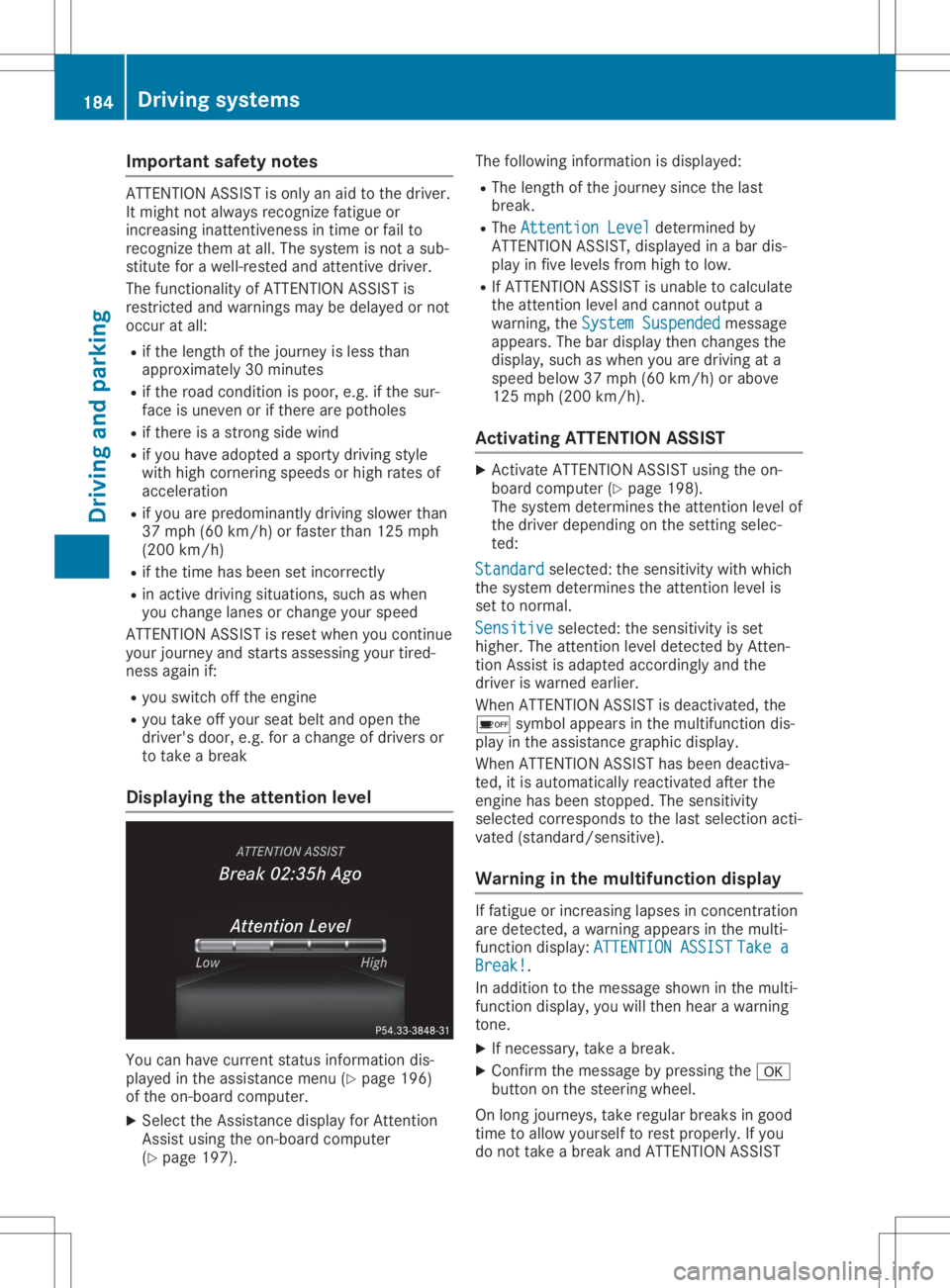
Displa yingtheat tent ionlevel You
canhave currentstatusinformat iondis-
played inthe assist ancemen u(Y page 196)
of the on-board computer .
X Selec tthe Assistan cedisplay forAtten tion
Ass istusing theon-board computer
(Y page 197). The
followin ginf ormat ionisdisplayed:
R The lengt hof the jour ney sincethe last
break .
R The Atte ntionLeve l Atte
ntionLeve ldete rmin edby
ATTE NTIO NAS SIS T,displayed inabar dis-
play infive levels fromhigh tolow.
R IfATTE NTIO NAS SIS Tis unable tocalc ulate
the attent ion level andcannot output a
warnin g,the Syst emSusp ended Syst
emSusp endedmess age
appears. Thebardisplay thenchan gesthe
display, suchaswhen youaredrivin gat a
speed below37mph (60km /h)or above
125 mph (200 km/h).
Activa tingATTENT ION ASSIST X
Ac tivate ATTE NTIO NAS SIS Tusing theon-
board computer (Ypage 198).
The systemdete rmin esthe attent ion level of
the drive rdepen dingonthe settingselec -
ted:
Stan dard Stan
dard selected:thesensitiv itywith which
the syst emdete rmin esthe attent ion level is
set tonor mal.
Sens itive Sens
itiveselec ted:thesensitiv ityisset
higher .The attent ion level detected byAtten -
tion Assistisadapted accordin glyand the
drive ris warne dearlier.
When ATTENTIO NAS SIS Tis deact ivated, the
00D7 symbol appears inthe multif unction dis-
play inthe assist ancegraphic display.
When ATTENTIO NAS SIS Thas been deact iva-
ted, itis autom atically react ivatedafterthe
engin ehas been stopped. Thesensitiv ity
selec tedcorrespo ndstothe last selec tionacti-
vate d(st andard /sensitive).
War ning inthemu ltifunct iondisp lay If
fat igue orinc reasin glapses incon centration
are dete cted, awarnin gappears inthe multi-
func tion display: ATTENTIONASSI ST ATTE
NTIONASSI STTake a Take
a
Brea k! Brea
k!.
In addition tothe mess ageshown inthe multi-
func tion display, youwillthenhear awarnin g
ton e.
X Ifnec essary, takeabreak .
X Conf irmthemess agebypress ingthe 0076
butt ononthe steerin gwheel.
On long journeys, takeregular breaksin good
tim eto allow yourself torest proper ly.Ifyou
do not takeabreak andATTE NTIO NAS SIS T 184
Driving
systemsDriving andparking
Page 187 of 346
still
detects increasing lapsesinconcen tra-
tion, youwillbewarned againafter 15minutes
at the earliest. Thiswillonly happen ifATTEN-
TION ASSISTstill detects typicalindicators of
fatigue orincreasing lapsesinconcen tration.
Vehicles withtheCOMAND multimedia
system: ifawarning isoutput inthe multi-
function display,aservice stationsearchis
performed inthe multimedia system.Youcan
select aservice stationandnavigation tothis
service stationwillthen begin. Thisfunction
can beactivated ordeactivated inthe multi-
media system; seetheDigital Operator's Man-
ual . Lane
Tracking package
General notes The
Lane Tracking packageconsistsofBlind
Spot Assist (Ypage 185)andLane Keeping
Assist (Ypage 186).
Blind SpotAssis t General
notes
Blind SpotAssist monitors theareas oneither
side ofthe vehicle thatarenot visible tothe
driver withtwolateral, rear-facing radarsen-
sors. Awarning displayin the exterior mirrors
draws yourattent iontovehicles detected in
the monitored area.Ifyou then switch onthe
corresponding turnsignal tochange lane,you
will also receive anoptical andaudiblewarn-
ing.
Blind SpotAssist supports youfrom aspeed of
approximately 20mph (30km/h).
Importa ntsafety notes G
WARNING
Blind SpotAssist doesnotreact to:
R vehicles overtaken tooclosely onthe side,
placing theminthe blind spotarea
R vehicles whichapproach withalarge
speed differential andovertake yourvehi-
cle
As aresult, BlindSpotAssist maynotgive
warnings insuch situations. Thereisarisk
of an accident. Always
observe thetraffic conditions care-
fully ,and maintain asafe lateral distance.
Blind SpotAssist isonly anaid. Itmay failto
detect somevehicles andisno substitute for
attent ivedriving. Alwaysensurethatthere is
sufficient distancetothe side forother road
users andobstacles.
i USA
only:
This device hasbeen approved bythe FCC
as a"Vehicul arRada rSystem". Theradar
sensor isintended foruse inan automotive
radar system only.Removing, tampering
with, oraltering thedevice willvoid anywar-
ranties, andisnot permitted bythe FCC. Do
not tamper with,alter, oruse inany non-
approved way.
Any unauthorized modificationtothis device
could voidtheuser’s authority tooperate
the equip ment.
Rada rsenso rs
The radar sensors forBlind SpotAssist are
integrated intotherear bumper. Makesure
that thebumpers arefree from dirt,iceor
slush. Thesensors mustnotbecovered, for
example bycycle racks oroverhanging loads.
Following asevere impact orinthe event of
damage tothe bumpers, havethefunction of
the radar sensors checked ataqual ified spe-
cialist workshop. BlindSpotAssist maynolon-
ger work properly.
Monitoring rangeofthe senso rs
In particular, thedetection ofobstacles canbe
impaired if:
R there isdirt onthe sensors oranything else
covering thesensors
R there ispoor visibil ity,e.g. due tofog, heavy
rain orsnow
R anarrow vehicle traveling infront ,e.g. a
motorbike orbicycle
R the road hasvery wide lanes
R the road hasnarrow lanes
R you arenot driving inthe middle ofthe lane
R there arebarriers orother roadboundarie s
Vehicles inthe monitoring rangearethen not
indicated.
Blind SpotAssist monitors thearea upto10 ft
(3 m) behind yourvehicle anddirectly nextto
it. Driving
systems
185Drivingandparking Z
Page 188 of 346
If
the lanes arenarrow, vehiclesdriving inthe
lane beyond thelane next toyou rvehicle may
be indicated ,especia llyifthe vehicle sare not
driving inthe middl eof their lane. Thismay be
the case ifthe vehicle sare driving onthe inner
side oftheir lane.
Due tothe nature ofthe system:
R warnings maybeissu edinerror when driv-
ing close tocrash barriersor simil arsolid
lane borders.
R warnings maybeinterrupted whenyouare
driving alongsideparticul arlylong vehicle s,
such astrucks, foraprolonged time.
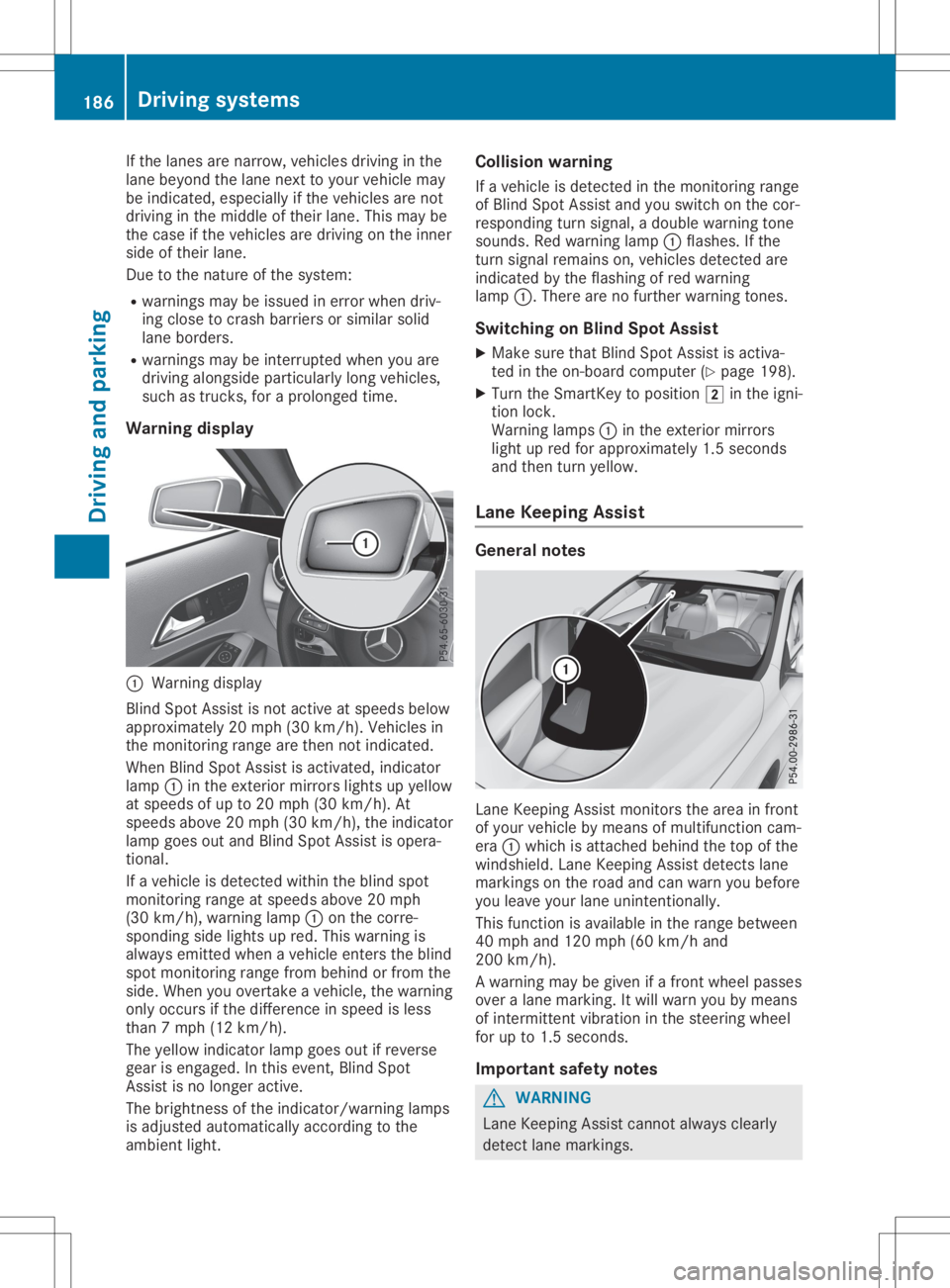
Warning display 0043
Warning display
Blind SpotAssist isnot active atspeed sbelow
appro ximately 20mph (30km/h). Vehiclesin
the monitoring rangearethen notindicated .
When BlindSpotAssist isactivated, indicator
lamp 0043inthe exterior mirrorslightsupyellow
at speed sof up to20 mph (30km/h ).At
speed sabove 20mph (30km/h), theindicator
lamp goesoutand Blind SpotAssist isopera -
tional.
If avehicle isdetected withintheblind spot
monitoring rangeatspeed sabove 20mph
(30 km/h), warning lamp0043onthe corre-
sponding sidelights upred. This warning is
alw ays emitted whenavehicle enterstheblind
spot monitoring rangefrombehind orfrom the
side. When youovertake avehicle ,the warning
only occurs ifthe difference inspeed isless
than 7mph (12km/h ).
The yellow indicator lampgoesoutifreverse
gear isengaged .In this event, BlindSpot
Assist isno longer active.
The brightness ofthe indicator/wa rninglamps
is adjusted automaticallyaccording tothe
ambi entlight. Col
lision warning
If avehicle isdetected inthe monitoring range
of Blind SpotAssist andyouswitch onthe cor-
respondi ngturn signal ,a doub lewarning tone
sounds. Redwarning lamp0043flashe s.Ifthe
turn signal remains on,vehicle sdetected are
indicated bythe flashi ngofred warning
lamp 0043.There arenofurther warning tones.
Swi tching onBlind SpotAssist
X Make surethatBlind SpotAssist isactiva-
ted inthe on-board computer (Ypage 198).
X Turn theSmartKey topositio n0048 inthe igni-
tion lock.
Warning lamps0043 inthe exterior mirrors
light upred forappro ximately 1.5seconds
and then turnyellow.
Lane Keeping Assist Gene
ralnotes Lane
Keepi ngAssist monitors thearea infront
of you rvehicle bymeans ofmultifu nctioncam-
era 0043which isattached behindthetop ofthe
windshi eld.Lane Keepi ngAssist detects lane
markings onthe road andcanwarn youbefore
you leaveyou rlane unintentionally .
This function isavai lablein the range betwee n
40 mph and120 mph (60km/h and
200 km/h).
A warning maybegiven ifafront wheel passes
over alane marking. Itwil lwarn youbymeans
of intermittent vibrationin the steering wheel
for upto1.5 seconds .
Important safetynotes G
WARNING
Lane Keepi ngAssist cannot always clearl y
detect lanemarkings. 186
Drivi
ngsystemsDrivi ngand parking
Page 191 of 346
The
outside temperat uredisplay isin the mul-
tifunc tiondisplay (Ypage 191).
There isashort delay before achange inout-
side temperat ureappears inthe multifunct ion
display . Coolant
temperaturegauge G
WARNIN
G
Opening thehood when theengine isover-
heated orwhen thereisafire inthe engine
compart mentcould expose youtohot gases
or other service products. Thereisarisk of
injury.
Let anoverheated enginecooldown before
opening thehood. Ifthere isafire inthe engine
compart ment,keep thehood closed
and cont actthe fire department .
! A
display message isshown ifthe coolant
temperat ureistoo high.
If the coolant temperat ureisover 248‡
(120 †),donot cont inue driving. The
engine willotherwise bedamaged.
The coolant temperat uregage isin the instr u-
ment cluster onthe right- hand side
(Y page 32).
The Hmarking inthe coolant temperat ure
gauge correspon dstoacoolant temperat ure
of approximately 248‡(120 †).
Under normal operating conditionsandatthe
correc tcoolant level,thecoolant temperat ure
gauge mayrisetothe Hmarking. Opera
tingtheon-board computer
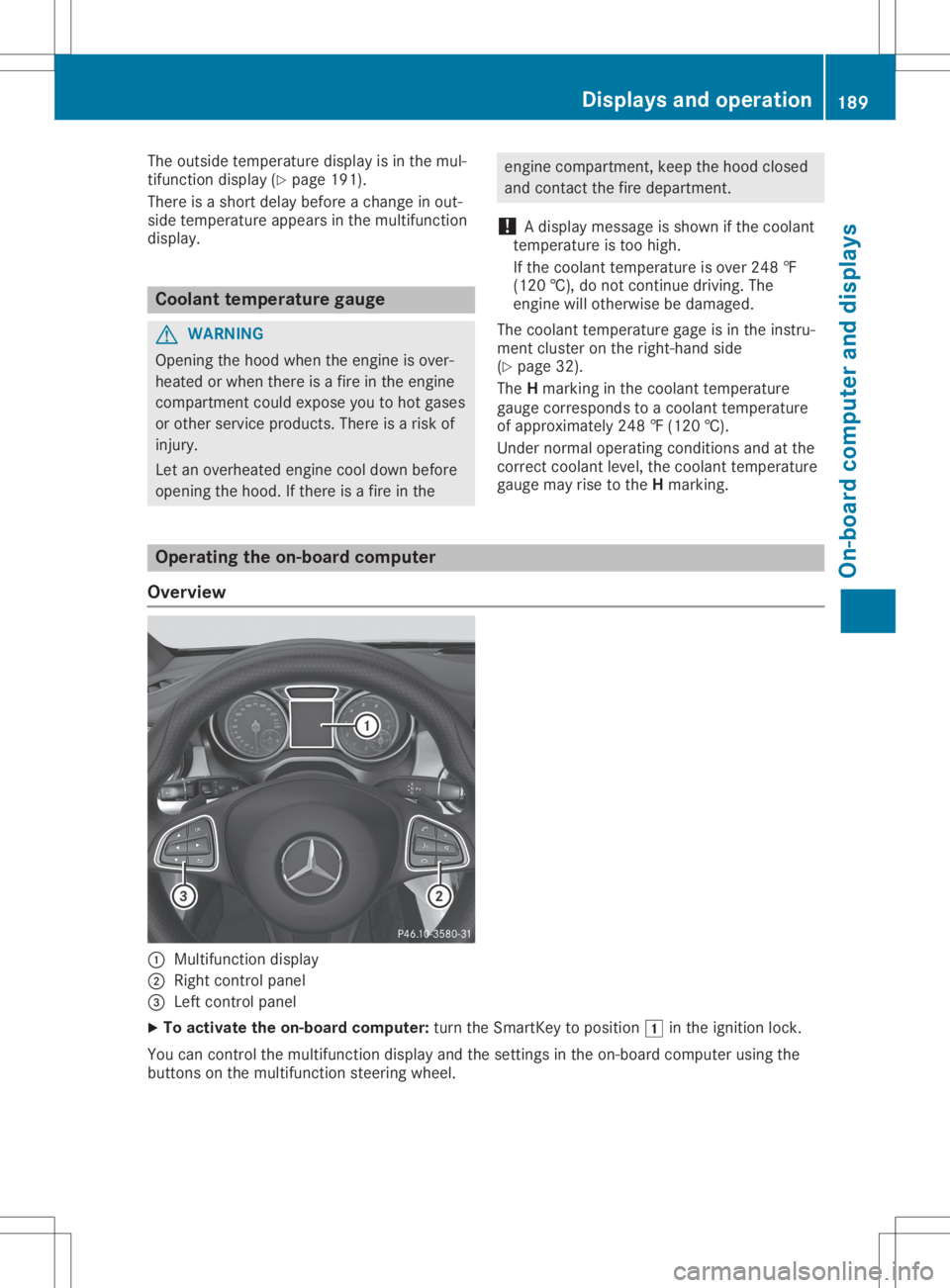
Overview 0043
Multifunct iondisplay
0044 Right controlpanel
0087 Left controlpanel
X To activat ethe on-board computer:turn theSmart Keytoposition 0047inthe ignition lock.
You cancont rolthe multifunct iondisplay andthesettings inthe on-board computer usingthe
button son the multifunct ionsteerin gwheel. Displays
andoperat ion
189On-board computerand display s Z
Page 192 of 346
Left
contr olpa nel 0059
0065 R
Calls upthemen uand men ubar 0063
0064 Pr
ess briefly:
R Sc rolls inlist s
R Sele ctsa subme nuorfun ction
R In theAud io Aud
iomen u:selec tstheprev ious ornex tst atio n,when thepres et
list orstatio nlist isact ive, oran audio track orvideo scene
R In theTel Tel
(telepho ne)men u:swit chesto thephon ebook andselec tsa
nam eor telephon enum ber 0063
0064 Pr
ess and hold :
R In theAud io Aud
iomen u:selec tsapres etlist orast atio nlist inthedesir edfre-
quen cyran ge, oran audio track orvideo sceneusin grapid scrollin g
R In theTel Tel
(Telep hone)men u:start srapid scrollin gif th ephon ebook is
open 0076 R
Conf irmsth eselec tionor display message
R In theTel Tel
(Telep hone)men u:swit chesto thetel ephon ebook andstart s
dialin gth eselec tednum ber 0038 Pr
ess briefly:
R Bac k
R Vehic leswith Audio 20:swit chesoff voic e-operat edcon trol for nav igat ion
(see theman ufacturer'soper atingins truct ions)
R Vehic leswith COMA ND:swit chesoff theVoic eCont rolSyst em(see the
separ ateoper atingins truct ions)
R Hide sdisplay messages orcalls upthelast Trip Tri
pmen ufun ction used
R Exits thephon ebook /redial memory 0038 Pr
ess and hold :
R Calls upthest andar ddisplay intheTri p Tri
pmen u Righ
tcontr olpa nel 00E3 R
Vehic leswith Audio 20:
Swit cheson voic e-operat edcon trol for nav igat ion(see theman ufacturer's
oper atingins truct ions)
R Vehic leswith COMA ND:
Swit chesoff theVoic eCont rolSyst em(see thesepar ateoper atingins truc-
tio ns) 0063 R
Mut e 00810082 R
Adju ststhe volum e 19
0 Di
spl ays and operatio nOn-bo ard computer anddisplay s
Page 193 of 346
0076 R
Rej ects or ends acall
R Exits th ephon ebook /redial memory 0061 R
Mak esoracc eptsa call
R Swi tches tothered ialmem ory Mu
ltifu nct ion displa y 0043
Perman entdisp lay:outside tempe rature or
spee d(Y page 199)
0044 Time
0087 Textfie ld
0085 Men ubar
0083 Drive program (Ypage 134)
0084 Tran smissio npos ition (Ypage 136)
In Mer cedes- AMGveh icles, theind icat ors in
th elower andupper partofthemult ifunction
disp laydiffer from thedisp lays shownhere.
X To dis pla ymen ubar 0085:pressthe0059
or 0065 buttonon thest eer ing whee l.
If you donotpre ssthebut tons any longer ,
men ubar 0085isfade dout afterafew sec-
on ds.
Tex tfie ld0087 sho wsthesele cted men uor
subm enuas well asdisp laymes sage s.
i Se
tth etime usin gth emult imed iasyst em;
see theDi git alOper ator'sMan ual.
Th efoll owing messagesma yap pea rin the
mu ltifu nct ion displa y:
R 0097Gears hiftrec omm endat ion,when shifting
man ually (Ypage 140)
R 005DA ctive Park ingAssist (Ypage 174) R
CRU ISE CRU
ISE Cruis eco ntrol (Ypage 157)
R 00D6 ECOstart /stopfun ction (Ypage 129)
R 00D9 HOLD function (Ypage 165)
R DSR DSR
Downh illSp eed Regulat ion
(Y page 169) Menu
sand submen us Menu
overview
Usi ngthe0059 or0065 buttonon thest eer ing
whee l,open themen ubar.
Oper ating theon -board comput er
(Y page 189).
De pen dingon theequip mentins talled inthe
veh icle, you can callupthefol lowin gmen us:
R Tri p Tri
pmen u(Y page 192)
R Nav i Nav
imen u(n avig ation instruct ions)
(Y page 193)
R Aud io Aud
iomen u(Y page 194)
R Tel Tel
men u(teleph one) (Y page 195)
R Dri veAssist Dri
veAssistmen u(ass istanc e)
(Y page 196)
R Ser v. Ser
v.men u(Y page 198)
R Set t. Set
t.men u(set ting s)(Y page 198)
R AMG AMG
men u(Mer cedes- AMGveh icles)
(Y page 201)
The displays fortheAud io Aud
io,Nav i Nav
iand Tel Tel
men usmay differ slig htly from those inyour
veh icle.
The exampl esgiven inthis Oper ator'sMan ual
apply toveh icles equip pedwithCOMA ND. Menu
sand submenus
191On-boar dcomp uter and displa ys Z
Page 194 of 346
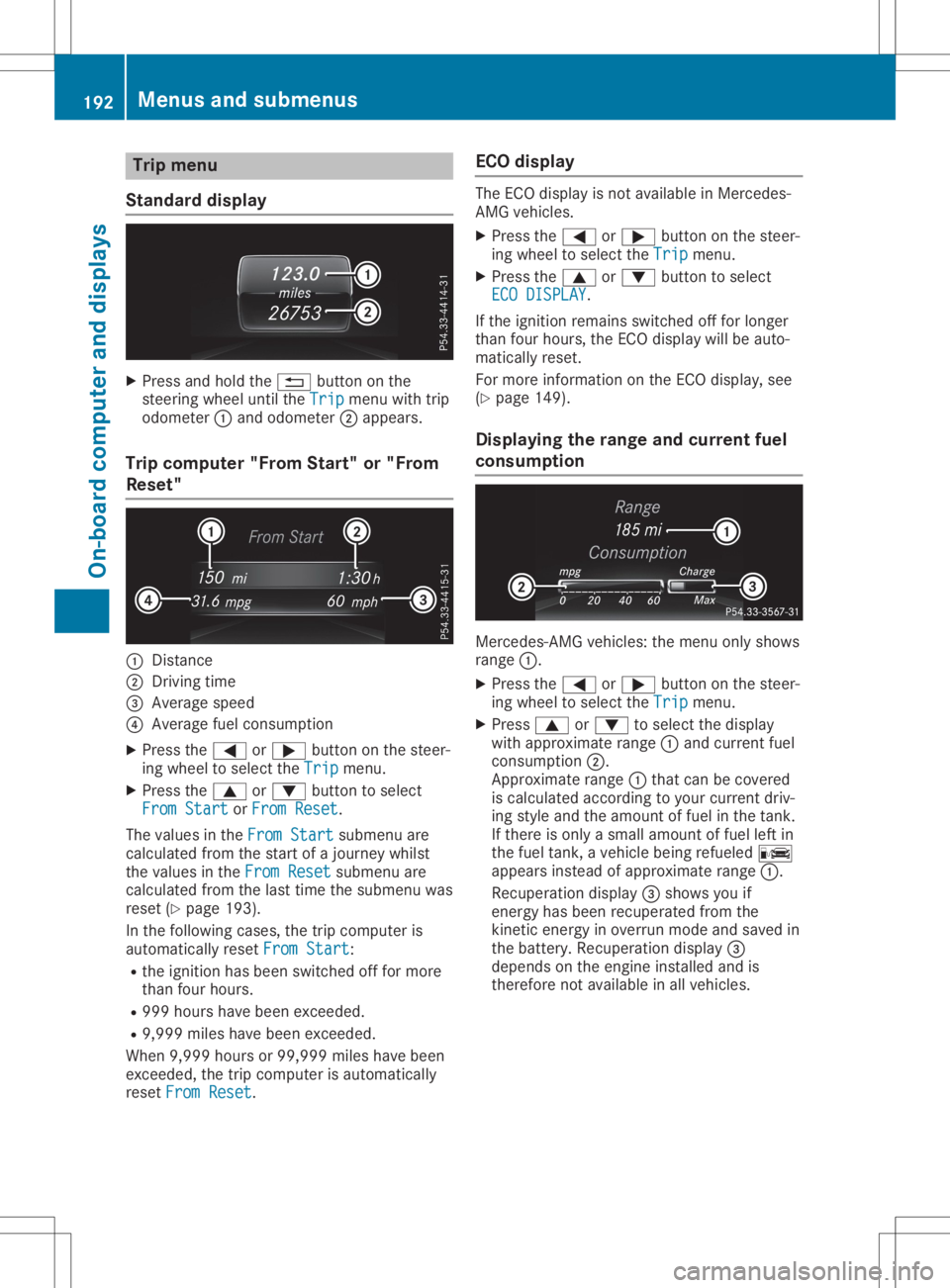
Trip
menu
Stan dard display X
Pre ssand holdthe 0038 button onthe
stee ringwh eelunti lthe Trip Tri
pmenu with trip
od ome ter0043and odome ter0044appe ars.
Trip compute r"F rom Start" or"From
Res et" 0043
Distance
0044 Driv ingtime
0087 Aver agesp ee d
0085 Aver agefu el cons umption
X Pre ssthe 0059 or0065 button onthe stee r-
ing wheelto sel ect the Trip Tri
pmenu .
X Pre ssthe 0063 or0064 button tosel ect
Fro mSta rt Fro
mSta rtorFro mRes et Fro
mRes et.
The values inthe FromSta rt Fro
mSta rtsubme nuare
cal cul ate dfro mthe startof ajou rney whilst
the values inthe FromRes et Fro
mRes etsubme nuare
cal cul ate dfro mthe last time thesubme nuwas
res et(Y page 193 ).
In the followi ng cas es, the trip comp uteris
au toma tically res etFro mSta rt Fro
mSta rt:
R the igniti onhasbe en switch edoff for mor e
tha nfou rhou rs.
R 999 hourshave been exce eded.
R 9,9 99 mileshave been exce eded.
Wh en9,9 99 hou rsor 99, 999 mileshave been
exce eded,the trip comp uteris au toma tically
res etFro mRes et Fro
mRes et. EC
Odis play The
ECO disp layis not availa bl e in Me rced es-
AMG vehicles.
X Pre ssthe 0059 or0065 button onthe stee r-
ing wheelto sel ect the Trip Tri
pmenu .
X Pre ssthe 0063 or0064 button tosel ect
ECO DISPLAY ECO
DISPLAY.
If the igniti onrem ains switch edoff for longe r
tha nfou rhou rs,the ECO disp laywi llbe auto-
ma tica lly res et.
For mor einfo rma tionon the ECO disp lay, see
(Y page 149 ).
Di spl aying the rang eand curren tfue l
co ns umptio n Me
rced es-AMG vehicles: the menu onlysho ws
ra nge 0043.
X Pre ssthe 0059 or0065 button onthe stee r-
ing wheelto sel ect the Trip Tri
pmenu .
X Pre ss0063 or0064 tosel ect the disp lay
wi th appro xim ate range 0043and current fuel
cons umption 0044.
App roximaterange 0043thatcan becove red
is cal cul ate dacc ording toyour cur rent driv-
ing styleand theamount offuel in the tank.
If the reisonl ya sma llam ount offuel left in
the fuel tank, aveh iclebe ing refueled 00A8
ap pe arsins tea dof appro xim ate range 0043.
Re cup erationdisp lay0087 sho wsyouif
ene rgy hasbe en recu perated fromthe
kine ticene rgy inove rrunmod eand saved in
the battery .Re cup erationdisp lay0087
de pends onthe engineinstalled and is
the refore not availabl e in allveh icles. 19
2 Me
nus and submen usOn-bo ard computer anddisplay s
Page 195 of 346
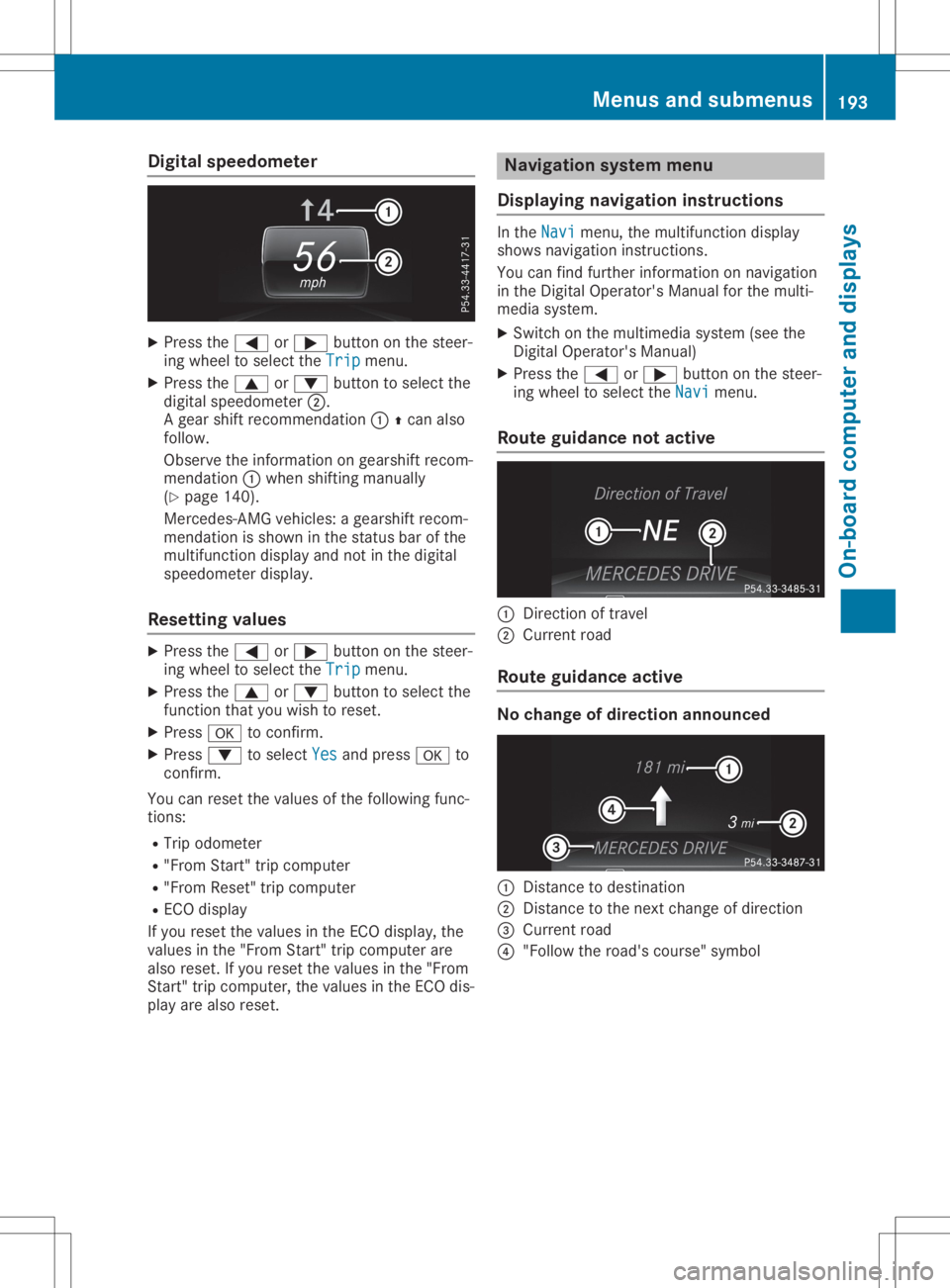
Digit
alsp eed ometer X
Press the0059 or0065 buttonon thest eer -
in g whee lto sel ectth eTri p Tri
pmen u.
X Press the0063 or0064 buttonto sel ectth e
digi talspe edo met er0044.
A gear shiftrec ommen dation 00430097can also
fo llow .
Obs erveth einfo rm ation ongear shiftrec om-
men dation 0043when shiftin g man ually
(Y page 140).
Mer cedes -AMG vehicles :a gear shiftrec om-
men dation issho wninthest at us bar ofthe
mult ifunction display andnotin thedigi tal
spe edo met erdis play.
Res etting value s X
Press the0059 or0065 buttonon thest eer -
in g whee lto sel ectth eTri p Tri
pmen u.
X Press the0063 or0064 buttonto sel ectth e
fun ction that you wish tores et.
X Press 0076 toconfirm .
X Press 0064 tosel ectYes Yes
andpress0076 to
co nfirm .
You canresetthevalu esofthefo llow ing fun c-
ti on s:
R Trip odo met er
R "Fr om Start "tr ip compu ter
R "Fr om Rese t"trip compu ter
R EC Odis play
If you resetthevalu esintheEC Odis play, the
valu esinthe"Fr om Start "tr ip compu terare
also reset.If you resetthevalu esinthe"Fr om
St art "tr ip compu ter, thevalu esintheEC Odis -
play arealso reset. Na
viga tion sys tem me nu
Disp laying naviga tion inst ructi ons In
theNav i Nav
imen u,themult ifunction display
sho wsnav igat ioninst ruc tion s.
You canfindfur ther info rm ation onnav igat ion
in theDi git alOpe rator's Man ualforth emult i-
med iasys tem.
X Swi tchon themult imediasyst em(seeth e
Di git alOpe rator's Man ual)
X Press the0059 or0065 buttonon thest eer -
in g whee lto sel ectth eNav i Nav
imen u.
Rou tegui dance notactive 0043
Direc tion oftrave l
0044 Curr entro ad
Rou tegui dance active No
cha nge ofdire cti on annou nced 0043
Distanc eto des tinat ion
0044 Distanc eto thene xt chang eof dir ection
0087 Curr entro ad
0085 "Follow thero ad's cours e"sym bol Men
usandsu bm enu s
193On- boa rdcom puteran ddis pla ys Z