engine MERCEDES-BENZ GLA 2020 Repair Manual
[x] Cancel search | Manufacturer: MERCEDES-BENZ, Model Year: 2020, Model line: GLA, Model: MERCEDES-BENZ GLA 2020Pages: 346, PDF Size: 17.58 MB
Page 161 of 346
sound
andthedistance warninglampwilllight
up inthe instrument cluster.Brakeimmedi-
ately inorder toincrease thedistance tothe
vehicle infront ortake evasive actionprovided
it is safe todo so.
Act ive Distance AssistDISTRONIC operatesin
the speed rangebetween 0mph (0km/h) and
120 mph (200km/h) .
Change intoalower gearingood timeonlong
and steep downhill gradients. Thisisespeciall y
important ifthe vehicle isladen. Bydoing so,
you willmake useofthe braking effectofthe
engine. Thisrelieves theload onthe brake sys-
tem andprevents thebrakes fromoverheating
and wearing tooquickly.
Do not use Active Distance AssistDISTRONIC
on roads withsteep gradients.
For Active Distance AssistDISTRONIC to
assist youwhen driving, theradar sensor sys-
tem must beoperational.
As Act ive Distance AssistDISTRONIC trans-
mits radar waves, itcan resemble theradar
detectors ofthe responsible authorities.You
can refer tothe relevant chapterinthe Opera-
tor's Manual ifquestions areasked aboutthis.
i USA
only: Thisdevice hasbeen approved
by the FCC asa"Vehicul arRada rSystem".
The radar sensor isintended foruse inan
automotive radarsystem only.Removal,
tampering, oraltering ofthe device willvoid
any warranties, andisnot permitted bythe
FCC. Donot tamper with,alter, oruse inany
non- approved way.
Any unauthorized modificationtothis device
could voidtheuser's authority tooperate
the equip ment.
i Canada
only:Thisdevice complies with
RSS-21 0of Industry Canada.Operation is
subject tothe followi ngtwo conditions:
1. This device maynotcause interferen ce,
and
2. This device mustaccept anyinterferen ce
received, includinginterferen cethat may
cause undesired operationofthe device.
Removal, tampering, oraltering ofthe
device willvoid anywarranties, andisnot
permitted. Donot tamper with,alter, oruse
in any non- approved way.
Any unauthorized modificationtothis device
could voidtheuser's authority tooperate
the equip ment. Importa
ntsafety notes G
WARNING
Act ive Distance AssistDISTRONIC doesnot
react to:
R people oranimals
R stationary objectsinthe road, e.g.stop-
ped orparked vehicles
R oncoming vehiclesandcrossing traffic
As aresult, Active Distance Assist
DISTRONIC mayneither givewarnings nor
intervene insuch situations. Thereisarisk
of an accident.
Always paycareful attentiontothe traffic
situation andbeready tobrake. G
WARNING
Act ive Distance AssistDISTRONIC cannot
alwa ysclearly identify otherroadusers and
complex trafficsituations.
In such cases, Active Distance Assist
DISTRONIC can:
R give anunnecessary warningandthen
brake thevehicle
R neither giveawarning norintervene
R accelerate orbrake unexpectedly
There isarisk ofan accident.
Continue todrive carefully andbeready to
brake, especial lyifAct ive Distance Assist
DISTRONIC warnsyou. G
WARNING
Act ive Distance AssistDISTRONIC brakes
your vehicle withupto50% ofthe maximum
possible deceleration. Ifthis deceleration is
not sufficient, Active Distance Assist
DISTRONIC alertsyouwith avisual and
acoustic warning. Thereisarisk ofan acci-
dent.
Adjust yourspeed inthese cases andmain-
tain sufficient distance.
Apply thebrakes yourselfand/or takeeva-
sive action. Driving
systems
159Drivingandparking Z
Page 163 of 346
To
activate Active Distan ceAssist DISTRONIC,
all the following conditionsmust befulfilled:
R the engine mustbestart ed.Itmay take up
to two minutes ofdriving beforeActive Dis-
tanc eAssist DISTRONIC isready foruse.
R the electric parking brakemustbereleased.
R ESP ®
must beactive, butnot inter vening.
R Act ive Parking Assistmustnotbeactivated.
R the trans mission mustbeinposition 005B.
R the driver's doormust beclosed whenyou
shift from 005Dto005B oryour seatbeltmust
be fasten ed.
R the front -passenger doormust beclosed.
R DSR must bedeactivated.
R the vehicle mustnotskid.
Activating X Briefly pullthecruise controllever towards
you 0085,up0043 ordown 0044.
Act ive Distan ceAssist DISTRONIC isactiva-
ted.
X Keep thecruise controllever pressed up0043
or down 0044until thedesired speedisset.
X Remove yourfootfrom theaccelerator
pedal.
Your vehicle adaptsitsspeed tothat ofthe
vehicle infront ,but only uptothe desired
stored speed.
i If
you donot fully release theaccelerator
pedal, theAct. Distance AssistSus‐ Act.
Distance AssistSus‐
pended pended
message appearsinthe multifunc-
tion display .The setdistance toaslower-
moving vehicleinfront willthen notbe
maintained. Youwillbedriving atthe speed
you determin eby the position ofthe accel-
erator pedal.
Act. Distance AssistSuspended Act.
Distance AssistSuspendedYou can
also activate Active Distan ceAssist
DIS TRONIC whenstation ary.Thelowest speed
that canbeset is20 mph (30km/ h).
Dri vin gwit hAct ive Dist ance Assi st
DIST RONIC Act
ivating atthecur rent speed orlas t
st or ed speed G
WAR
NING
If you callup thest or ed spe edand itdif fers
fr om thecur ren tspe ed, theveh icle acc eler -
at es ordec eler ates. Ifyou donotkn ow the st
or ed spe ed, theveh icle co uld acceler ate
or bra keune xpec tedly. Thereisaris kof an
acc iden t.
Pay atte nt ion tothero ad and traff icco nd i-
ti on sbef orecal lingup thest or ed spe ed. If
you donotkn ow thest or ed spe ed, stor eth e
des iredspe edagain .
X Brief lypull thecr uise contro llev ertoward s
you 0085.
X Rem oveyour foot from theacc eler ator
peda l.
The first time Active Distanc eAs sis t
DI ST RON ICisact ivat ed, itstor es thecur ren t
spe edorreg ulat esthespe edoftheveh icle
to thepre viously stor ed spe ed.
Pu llin gawa yan ddr ivin g
X If
you wantto pullawa ywit hAct ive Dis-
ta nce Assi stDIST RONIC: rem oveyour foot
fr om thebra kepeda l.
X Brief lypull thecr uise contro llev ertoward s
you 0085.
or X If
Act ive Dist ance Assi stDIST RONICis
act ivated: acc eler atebri efly.
Your vehicle pulls away andadapt sits spe ed
to that oftheveh icle in fron t.Ifno veh icle is
det ectedin fron t,your vehicle acc eler ates
to theset speed.
The vehicle can also pullaway when itis fac ing
an uniden tifie dobs tacle or isdri vin gon adif -
fe ren tlin efrom another veh icle. The vehicle
th en bra kesaut omatically. Berea dytobra ke
at all times .
If th ere isno veh icle in fron t,Ac tive Distanc e
As sis tDI ST RON ICope rates inthesam eway
as cruise contro l.
If Ac tive Distanc eAs sis tDI ST RON ICdet ects a
slo wer -moving veh icle in fron t,itbra kesyour
veh icle. Inthis way, thedis tanc eyou have
sel ectedis main tained.
If Ac tive Distanc eAs sis tDI ST RON ICdet ects a
fas ter-mo vingveh icle in fron t,itincr ease sth e
dri vin gspe ed. Howev er,theveh icle ison ly
acc eler ated up tothespe edyou havest or ed.
i Ac
tive Distanc eAs sis tDI ST RON ICisdeac -
ti vat ed when youdepr essthebra ke,ex ce pt
when theveh icle isstat ion ary. Dri
ving systems
161Dr ivi ng andparki ng Z
Page 164 of 346
Selec
tingthedrive progra m
Act ive Distanc eAssist DISTRONIC supportsa
sporty driving stylewhen youselect theS+
drive program (Ypage 138)orthe manual
drive program (Ypage 140). Acceleration
behind thevehicle infront ortothe setspeed
is then noticeably moredynamic. Ifyou have
selected theE(Mercedes-AMG vehicles:C)
drive program, thevehicle accelerates more
gently. Thissettin gis recommen dedinstop-
and-start traffic.
Changing lanes
If you want tochange tothe overtakin glane
on multi-lane roads,Active Distanc eAssist
DISTRONIC supportsyouif:
R you aredriving fasterthan45mph
(70 km/h)
R Act ive Distanc eAssist DISTRONIC ismain-
taining thedistance toavehicle infront
R you switch onthe appropriate turnsignal
R Act ive Distanc eAssist DISTRONIC doesnot
current lydetect adanger ofcollision
If these condition sare fulfilled, yourvehicle is
accelerated. Acceleration willbeinterrupt edif
changing lanestakes toolong orifthe dis-
tance between yourvehicle andthevehicle in
front becomes toosmall.
Stopping If Act ive Distanc eAssist DISTRONIC detects
that thevehicle infront isstopping, itbrakes
your vehicle untilitis stationary.
Once yourvehicle isstationary, itremains sta-
tionary andyoudonot need todepress the
brake.
i Aft
eratime, theelectric parking brake
secures thevehicle andrelieves theservice
brake.
i Depending
onthe specified minimum dis-
tance, yourvehicle willcome toastandst ill
at asufficient distancebehindthevehicle in
front .The specified minimum distanceisset
using thecont rolonthe cruise controllever. When
Active Distanc eAssist DISTRONIC is
activated, thetransm issionisshifted automati-
cally toposition 005Dif:
R the driver's seatbeltisnot fastened andthe
driver's doorisopen.
R the engine isswitched off,unless itis auto-
matically switchedoffbythe ECO start/
stop funct ion.
The electric parking brakeisapplie dautomati-
cally ifAct ive Distanc eAssist DISTRONIC is
active whenthevehicle isstationary and:
R asystem malfunction occurs.
R the power supply isinsufficient .
If amalfunction occurs,thetransm issionmay
also shift toposition 005Dautomatically.
Setting aspeed Keep
inmind thatitmay take abrief moment
until thevehicle hasaccelerated orbraked to
the speed set.
X Press thecruise controllever up0043 for a
higher speedordown 0044for alower speed.
X To
adj ust the setspeed in1mph incre-
ments (1km/h increments): brieflypush
the cruise controllever up0043 ordown 0044to
the pressure point.
The laststored speedincreases ordecrea-
ses in1mph (1km/h) incremen ts.
X To
adj ust the setspeed in5mph incre-
ments (10km/h increments): brieflypush
the cruise controllever up0043 ordown 0044
beyond thepressure point.
The laststored speedincreases ordecrea-
ses in5mph (10km/h) incremen ts.
i Act
ive Distanc eAssist DISTRONIC isnot
deactivated ifyou depress theaccelerator
pedal. Ifyou accelerate toovertake, Active
Distanc eAssist DISTRONIC adjuststhevehi-
cle's speed tothe last speed stored, after
you have finished overtakin g.
Setting aspecified minimum distance You
cansetthe specified minimum distance
for Active Distanc eAssist DISTRONIC byvary-
ing the time span between oneandtwosec-
onds. Thisdetermines thedistance thatActive
Distanc eAssist DISTRONIC isto maintain from
the vehicle infront ,depending onthe road
speed. Youcanseethis distance inthe multi-
funct iondisplay (Ypage 164). 162
Driving
systemsDriving andparking
Page 165 of 346
The
specified minimum distancecanbe
changed whileActive Distan ceAssist
DIS TRONIC isswitched onoroff.
i Make
surethatyoumaintain theminimum
distance tothe vehicle infront asrequired
by law. Adjust thedistance tothe vehicle in
front ifnecessary. X
To increase: turncontrol0087 indirec-
tion 0044.
Act ive Distan ceAssist DISTRONIC then
maintains agreater distance between your
vehicle andthevehicle infront .
X To decrease: turncontrol0087 indirec-
tion 0043.
Act ive Distan ceAssist DISTRONIC then
maintains ashorter distance between your
vehicle andthevehicle infront .
Deactivating ActiveDistance Assist
DISTRONIC There
areseveral waystodeactivate Active
Distan ceAssist DISTRONIC:
X Briefly pressthecruise controllever for-
wards 0043.
or X Brake, unless thevehicle isstation ary. X
Briefly pressthecruise controllever for-
wards 0043.
or X Brake, unless thevehicle isstation ary.
When youdeactivate Active Distan ceAssist
DIS TRONIC, theActive Distance Assist Active
Distance Assist
Off Off
message appearsonthe multifunct iondis-
play forapproximately fiveseconds.
i The
lastspeed stored remains storeduntil
you switch offthe engine. Active Distan ce
Assist DISTRONIC isnot deactivated ifyou
depress theaccelerator pedal.
Act ive Distan ceAssist DISTRONIC isautomati-
cally deactivated if:
R you engage theelectric parking brakeorif
the vehicle isautomatically securedwiththe
electric parking brake
R ESP ®
inter venes oryou deactivate ESP®
R the trans mission isin position 005D,005Eor005C
R you pull thecruise controllever towards you
in order topull away andthefront -
passenger doororone ofthe rear doors is
open
R the vehicle isskidding
R you activate Active Parking Assist
If Act ive Distan ceAssist DISTRONIC isdeacti-
vated automatically, youwillhear awarning
ton e.You willsee theActive Distance Active
Distance
Assist Off Assist
Offmessage onthe multifunct iondis-
play forapproximately fiveseconds.
Act ive Distan ceAssist DISTRONIC isalso auto-
matically deactivated whenyouactivate DSR.
The 00C6 DSRsymbol appears inthe multi-
funct iondisplay . Driving
systems
163Drivingandparking Z
Page 170 of 346
i
If
RACE START isused repea tedlywithin a
short period oftime, itis only available
aga inafter thevehicle hasbeen driven a
certain distance. AMG
adapt ivesport suspensi onsys-
tem
Gene ralnotes The
electronical lycontrolled dampingsystem
works continuously .This improves driving
safety andride comfort.
The dampi ngistuned individ uallyto each
wheel anddepends on:
R you rdriving style,e.g.sporty
R the road surface condition, e.g.bumps
R you rindivid ualselection ofSport orCom-
fort
The suspe nsion setting isadjusted usingthe
corresponding buttoninthe center console.
i The
mode canalso beset using theAMG
DYNAMIC SELECTcontroller (Ypage 133).
Each timeyoustart theengine withtheSmart-
Key orthe Start/St opbutton, Comfort mode
is activated. Forfurther information about
starting theengine, see(Ypage 125).
Sport mode The
firmer setting ofthe suspe nsion tuning in
Sport modeensures evenbetter contact with
the road. Select thismode whenemploy inga
sporty driving style,e.g.onwindi ngcountry
roads.
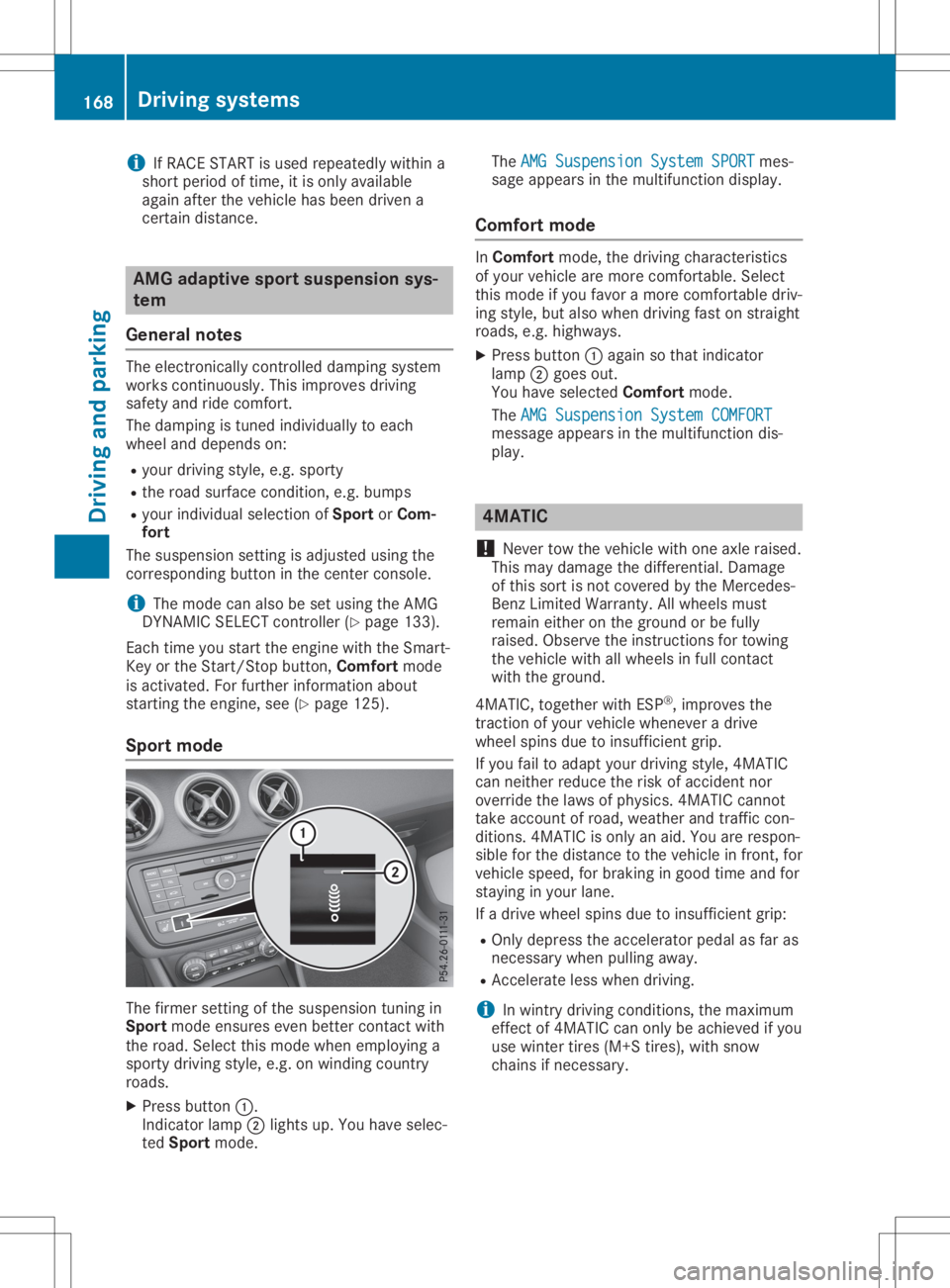
X Press button 0043.
Indicator lamp0044lights up.You have selec-
ted Sport mode. The
AMG Suspension SystemSPORT AMG
Suspension SystemSPORTmes-
sage appearsinthe multifu nctiondisplay.
Comfort mode In
Comfort mode,thedriving characteristics
of you rvehicle aremore comfortable. Select
this mode ifyou favor amore comfortable driv-
ing style, butalso when driving fastonstraight
roads, e.g.highw ays.
X Press button 0043aga inso that indicator
lamp 0044goes out.
You have selected Comfort mode.
The AMG Suspension SystemCOMFORT AMG
Suspension SystemCOMFORT
messag eappe arsinthe multifu nctiondis-
pla y. 4MATIC
! Never
towthevehicle withoneaxle raise d.
This may dama gethe differentia l.Damage
of this sort isnot covered bythe Mercedes-
Benz Limited Warranty.Allwheel smust
remain eitheronthe ground orbe fully
raise d.Observe theinstructions fortowing
the vehicle withallwheel sin full contact
with theground.
4MATIC, togetherwithESP®
,improves the
traction ofyou rvehicle whenever adrive
wheel spinsduetoinsufficie ntgrip.
If you failtoada ptyou rdriving style,4MATIC
can neither reducetherisk ofaccident nor
override thelawsof phys ics.4MATIC cannot
take account ofroad, weather andtraffic con-
ditions. 4MATIC isonly anaid.You arerespon-
sibl efor the distance tothe vehicle infront, for
vehicle speed,for braking ingood timeandfor
stayi nginyou rlane.
If adrive wheel spinsduetoinsufficie ntgrip:
R Only depres sthe accelera torpeda las far as
necessary whenpulling away.
R Accelerate lesswhen driving.
i In
wintry driving conditions, themaximum
effect of4MATIC canonly beachieve difyou
use winter tires(M+S tires),with snow
chains ifnecessary . 168
Drivi
ngsystemsDrivi ngand parking
Page 175 of 346
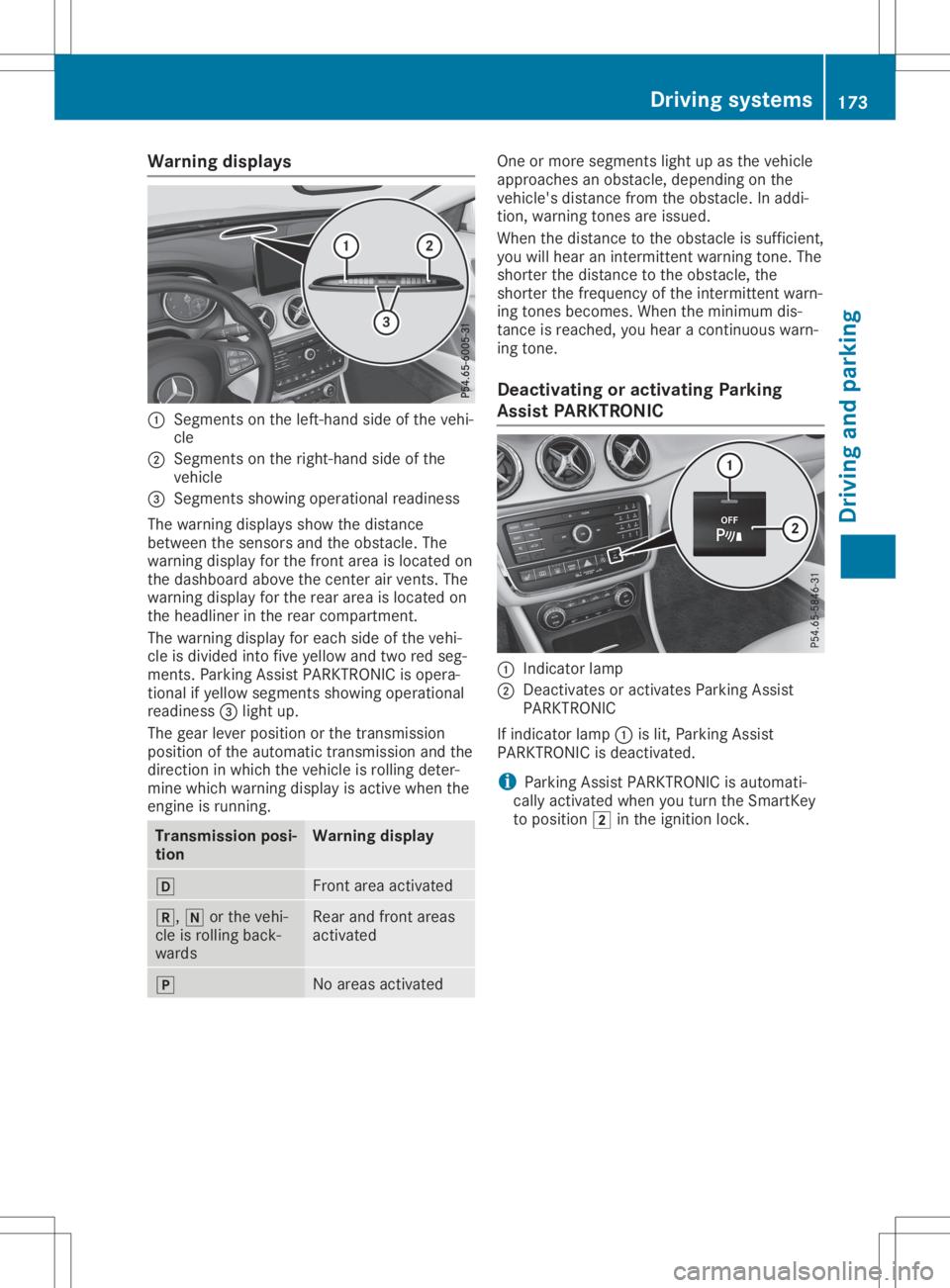
Warning
displays 0043
Segments onthe left-ha ndside ofthe vehi-
cle
0044 Segments onthe right-ha ndside ofthe
vehicl e
0087 Segments showingopera tional readiness
The warning displaysshow thedista nce
betwe enthe sensors andtheobsta cle.The
wa rning displayforthe front areaisloca tedon
the dashboa rdabo vethe center airvents. The
wa rning displayforthe rear area isloca tedon
the headliner inthe rear compa rtment.
The warning displayforeach sideofthe vehi-
cle isdivi ded into fiveyellow and tworedseg-
ments. ParkingAssist PARKTR ONICisopera -
tional ifyel low segme ntsshow ingopera tional
read iness 0087light up.
The gearleve rposi tion orthe transmiss ion
posi tion ofthe automatic transmiss ionand the
dire ction inwhi chthe vehicl eis roll ing deter-
mine whichwarning displayisactive whenthe
engine isrunning. Transmissi
onposi -
tion Warning
display 005B
Front
areaactiva ted 005E,
005Corthe vehi-
cle isroll ing back-
wa rds Rea
rand front areas
activa ted 005D
No
area sactiva ted One
ormore segme ntslight up asthe vehicl e
app roache san obsta cle,depe nding onthe
vehicl e'sdista ncefrom theobsta cle.Inadd i-
tion, warning tones areissu ed.
When thedista ncetothe obsta cleissuffi cient,
you willhea ran intermittent warning tone. The
shorter thedista ncetothe obsta cle,the
shorter thefrequ ency ofthe intermittent warn-
ing tones become s.When theminimu mdis-
tance isreache d,you heara continuou swa rn-
ing tone.
De activati ngoractivati ngParking
Ass istPARK TRONIC 0043
Indica torlam p
0044 Deactiva tesoractiva tesParki ngAssist
PARKTR ONIC
If indica torlam p0043 islit, Parki ngAssist
PARKTR ONICisdea ctivated.
i Parki
ngAssist PARKTR ONICisau tomati-
call yactiva tedwhe nyou turn theSmartKey
to posi tion 0048inthe igniti onlock. Driv
ingsyste ms
173Drivingand parking Z
Page 178 of 346
R
tha tar epa rallel to the directi onoftra vel
and atleas t39.5 in(1.0 m)longer thanyo ur
veh icle
R at right ang lesto the directi onoftrav eland
at leas t39.5 in(1.0 m)wid ertha nyo ur veh i-
cle
Wh endrivin gat spee ds below 19 mph
(30 km/h ),yo uwi llse epa rki ng symbo l0044 as
a sta tus indicator inthe instrument cluste r.
Wh enapa rki ng space hasbe en detecte d,an
ar row towards the right or the left also
ap pe ars. By default, Activ ePa rki ng Assi stonl y
di sp lays parki ng space son the front-
pa sse nge rsi de .Pa rki ng space son the driver 's
si de aredisp laye das soo nas the turnsigna l
on the driver 'sside isacti vated .Wh enparki ng
on the driver 'sside ,thi smu strem ain acti vated
unti lyo uconfi rmthe useof Activ ePa rki ng
Assi stby pre ssing the 0076 button onthe mul-
tifu nctio nste ering wheel.The syste mautoma t-
ica lly de term ineswh eth erthe parki ng space is
pa rallel or atright-a nglestothe directi onof
tra vel .
A pa rki ng space isdisp laye dwh ile yo uar e
dri vin gpa st it, and untilyo uar eap pro xim ately
50 ft(15 m)awa yfrom it.
Pa rki ng G
WA
RNI NG
If yo uleav ethe driver 'sseat wh en the vehi-
cle isonl ybe ing braked bythe Parki ng Pack-
ag ewi th rea rvi ew camer a,itcou ldrol l
aw ay:
R ifthe reisama lfunc tionin the syste mor
in the voltag esu pp ly
R ifthe electr icalsy ste minthe enginecom -
pa rtme nt,the batter yor the fuse sar e
tam pered with
R ifthe batter yis disco nnecte d
R ifthe vehicleis ac cel era ted ,e.g .by aveh i-
cle occu pant
Th ere isarisk ofan accid ent.
Bef ore leav ing the vehicle, alwa yssecu re it
ag ainst rolling away.
i If
Acti veParki ng Ass istde tects obsta cles,
Acti veParki ng Ass istbra kes automa tically
wh ile the vehicleis pa rki ng. Youar eres pon-
si bl e for braking ingo od tim e. X
Stop thevehiclewh en the parki ng space
sy mbo lsho wsthe desired parki ng spacein
the instrumen tclu ste r.
X Shi ftthe transmi ssion topositio n005E.
Th eSta rtParkingAss ist? Sta
rtParkingAss ist?Yes :OK Yes
:OK No: No:
0038 message appe arson the multifu ncti on
di sp lay.
X To canc elthe proc edure:pressthe 0038
bu tton onthe multifu ncti onsteering wheel
or pullaw ay.
or X To
park using Activ ePark ingAs sist:
pre ssthe 0076 button onthe multifu ncti on
ste ering wheel.
Th ePar kingAss ist Active Acceler‐ Par
kingAss ist Active Acceler‐
ate andBrake ate
andBrakeObs erveSur roundings Obs
erveSur roundings
mes sage appe arson the multifu ncti ondis-
pl ay .
X Let goofthe multifu ncti onsteering wheel.
X Ba ck up the vehicle, be ing readytobra keat
al ltim es.Wh enbackin gup ,dri ve atasp ee d
be low ap pro xim ately6mph (10km/h ).Oth -
erw ise, Acti veParki ng Ass istwi llbe can-
cel ed.
Acti veParki ng Ass istbra kes thevehicleto a
sta nds tillwh en the vehicleap pro ache sthe
rea rbo rde rof the parki ng space.
Ma neu vering maybe req uired intig ht park-
ing spaces.
Th ePar kingAss ist Active Select Par
kingAss ist Active Select
DOb serveSurroundings DOb
serveSurroundings message appe ars
on the multifu ncti ondisp lay.
X Shi ftthe transmi ssion topositio n005B while
the vehicleis sta tionar y.
Acti veParki ng Ass istim med iatel yste ers in
the otherdirec tion.
Th ePar kingAss ist Active Acceler‐ Par
kingAss ist Active Acceler‐
ate andBrake ate
andBrakeObs erveSur roundings Obs
erveSur roundings
mes sage appe arson the multifu ncti ondis-
pl ay .
i Yo
uwi llac hieve thebest res ults by waiting
for the steering pro ced ureto com plete
be for epu lling away.
X Dri veforwa rds and berea dytobra keatall
tim es.
Acti veParki ng Ass istbra kes thevehicleto a
sta nds tillwh en the vehicleap pro ache sthe
fro ntborde rof the parki ng space.
Ma neu vering maybe req uired intig ht park-
ing spaces. 17
6 Dr
ivi ng system sDrivi ng andparki ng
Page 179 of 346
The
Parking AssistActiveSelectR Parking
AssistActiveSelectR
Observe Surrounding s Observe
Surrounding smessage appearson
the multifunct iondisplay .
As soon asthe parking procedure iscomplete,
the Active Parking AssistFinished Active
Parking AssistFinished mes-
sage appears andawarning tonesounds. The
vehicle isnow parked.
The vehicle iskept station arywithout the
driver having todepress thebrake pedal. The
braking effectiscanceled whenyoudepress
the accelerator pedal.
Act ive Parking Assistnolonger supports you
with steerin ginter ventions andbrake applica-
tions. When Active Parking Assistisfinished,
you must steer andbrake againyourself.
Act ive Parking Assistisstill availabl e.
Parking tips:
R The way your vehicle ispositioned inthe
parking spaceafterparking isdependent on
various factors.These include theposition
and shape ofthe vehicles parkedinfront
and behind itand thecondit ionsofthe loca-
tion. Itmay bethe case thatActive Parking
Assist guides youtoofarinto aparking
space, ornot farenough intoit.Insome
cases, itmay alsolead youacross oront o
the curb. Ifnecessary, canceltheparking
procedure withActive Parking Assist.
R You canalso preselect transmission position
005B. The vehicle redirect sand does notdrive
as far into theparking space.Should the
trans mission changetakeplace tooearly,
the parking procedure iscanceled. Asensi-
ble parking position cannolonger beach-
ieved fromthisposition.
Exiting apar king space In
order thatActive Parking Assistcansupport
you when exitingthe parking space:
R you need tohave parked usingActive Park-
ing Assist .
R the border ofthe parking spacemustbe
high enough atthe front andtherear. A
curb stoneis too small, forexample.
R the border ofthe parking spacemustnotbe
too wide, asthe position ofthe vehicle must
not exceed anangle of45° tothe start ing
position asitis maneuvered intotheparking
space.
R amaneuvering distanceofat least 3.3ft
(1.0 m)must beavailabl e. Act
ive Parking Assistcanonly assist youwith
exitin gaparking spaceifyou have parked the
vehicle parallel tothe direction oftravel using
Act ive Parking Assist.
i If
Act ive Parking Assistdetectsobstacles,
Act ive Parking Assistbrakes automatically
while thevehicle isexitin gthe parking
space. Youareresponsible forbraking in
good time.
X Start theengine.
X Release theelectric parking brake.
X Switch onthe turn signal inthe direction
you willdrive outofthe parking space.
X Shift thetrans mission toposition 005Bor005E.
The Start Parking Assist? Start
Parking Assist?Yes:OK Yes:
OKNo: No:
0038 message appearsonthe multifunct ion
display .
X To cancel theprocedur e:press the0038
button onthe multifunct ionsteerin gwheel
or pull away .
or X To
exit apar king space usingActive
Park ingAssist: pressthe0076 button on
the multifunct ionsteerin gwheel.
The Parking AssistActiveAcceler‐ Parking
AssistActiveAcceler‐
ate andBrake ate
andBrake Observe Surrounding s Observe
Surrounding s
message appearsonthe multifunct iondis-
play.
X Let goofthe multifunct ionsteerin gwheel.
X Pull away ,being ready tobrake atall times.
Do not exceed amaximum speedofapprox-
imately 6mph (10km/ h)when exitinga
park ingspac e.Otherwis e,Ac tivePark ing
As sist willbecan cele d.
X Dep endingonthemess ageoras requir ed,
shif tth etransm ission toposit ion005Bor005E.
Ac tivePark ingAssist imme diatelysteers in
th eoth erdirec tion.The Park ingAssist Park
ingAssist
Acti veAcce lerateand Brake Acti
veAcce lerateand BrakeObse rve Obse
rve
Surr oundings Surr
oundings messageappears onthe
mult ifunction display.
i You
willachie vethebest result sby waitin g
for thest eerin gproc edure tocom plete
befo repulling away.
If you back upafteract ivat ion, thest eerin g
wheel ismov edtothest raight -aheadposi-
tio n.
X Dr ive forwards andreverse asprom ptedby
th eAc tivePark ingAssist warn ingdisplays,
seve raltim esifnec essar y. Drivin
gsyst ems
177Driving andparking Z
Page 191 of 346
The
outside temperat uredisplay isin the mul-
tifunc tiondisplay (Ypage 191).
There isashort delay before achange inout-
side temperat ureappears inthe multifunct ion
display . Coolant
temperaturegauge G
WARNIN
G
Opening thehood when theengine isover-
heated orwhen thereisafire inthe engine
compart mentcould expose youtohot gases
or other service products. Thereisarisk of
injury.
Let anoverheated enginecooldown before
opening thehood. Ifthere isafire inthe engine
compart ment,keep thehood closed
and cont actthe fire department .
! A
display message isshown ifthe coolant
temperat ureistoo high.
If the coolant temperat ureisover 248‡
(120 †),donot cont inue driving. The
engine willotherwise bedamaged.
The coolant temperat uregage isin the instr u-
ment cluster onthe right- hand side
(Y page 32).
The Hmarking inthe coolant temperat ure
gauge correspon dstoacoolant temperat ure
of approximately 248‡(120 †).
Under normal operating conditionsandatthe
correc tcoolant level,thecoolant temperat ure
gauge mayrisetothe Hmarking. Opera
tingtheon-board computer
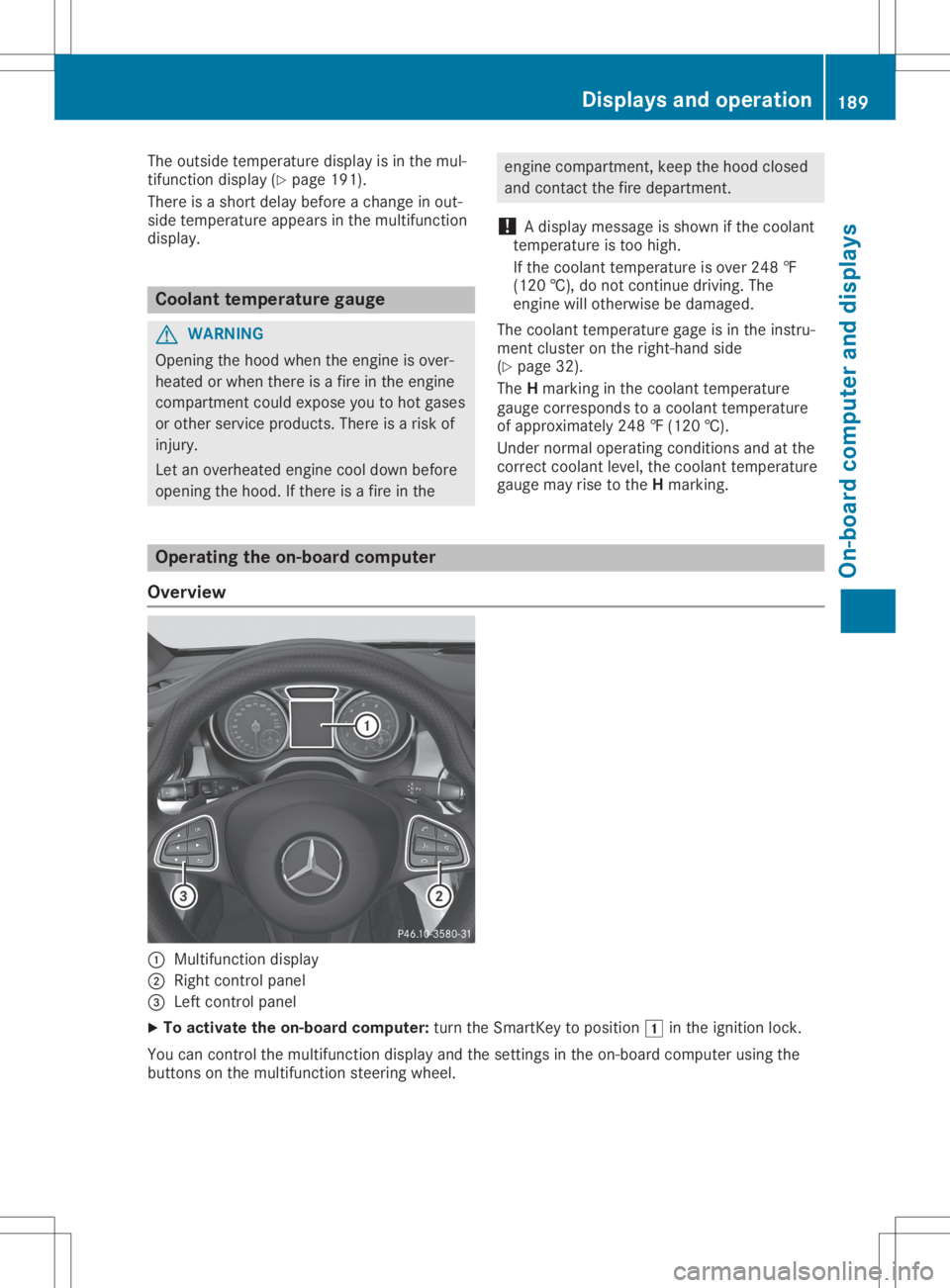
Overview 0043
Multifunct iondisplay
0044 Right controlpanel
0087 Left controlpanel
X To activat ethe on-board computer:turn theSmart Keytoposition 0047inthe ignition lock.
You cancont rolthe multifunct iondisplay andthesettings inthe on-board computer usingthe
button son the multifunct ionsteerin gwheel. Displays
andoperat ion
189On-board computerand display s Z
Page 194 of 346
Trip
menu
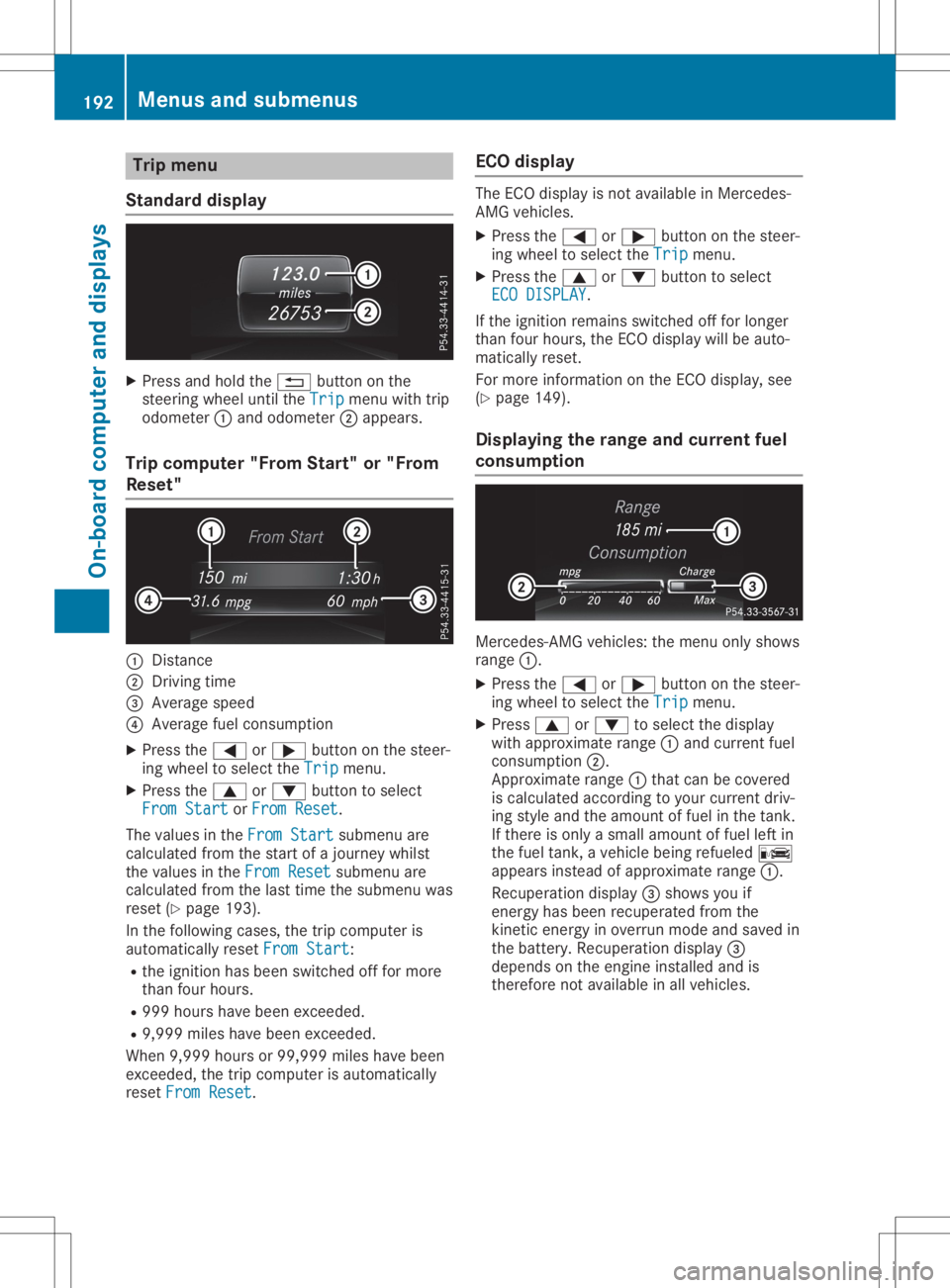
Stan dard display X
Pre ssand holdthe 0038 button onthe
stee ringwh eelunti lthe Trip Tri
pmenu with trip
od ome ter0043and odome ter0044appe ars.
Trip compute r"F rom Start" or"From
Res et" 0043
Distance
0044 Driv ingtime
0087 Aver agesp ee d
0085 Aver agefu el cons umption
X Pre ssthe 0059 or0065 button onthe stee r-
ing wheelto sel ect the Trip Tri
pmenu .
X Pre ssthe 0063 or0064 button tosel ect
Fro mSta rt Fro
mSta rtorFro mRes et Fro
mRes et.
The values inthe FromSta rt Fro
mSta rtsubme nuare
cal cul ate dfro mthe startof ajou rney whilst
the values inthe FromRes et Fro
mRes etsubme nuare
cal cul ate dfro mthe last time thesubme nuwas
res et(Y page 193 ).
In the followi ng cas es, the trip comp uteris
au toma tically res etFro mSta rt Fro
mSta rt:
R the igniti onhasbe en switch edoff for mor e
tha nfou rhou rs.
R 999 hourshave been exce eded.
R 9,9 99 mileshave been exce eded.
Wh en9,9 99 hou rsor 99, 999 mileshave been
exce eded,the trip comp uteris au toma tically
res etFro mRes et Fro
mRes et. EC
Odis play The
ECO disp layis not availa bl e in Me rced es-
AMG vehicles.
X Pre ssthe 0059 or0065 button onthe stee r-
ing wheelto sel ect the Trip Tri
pmenu .
X Pre ssthe 0063 or0064 button tosel ect
ECO DISPLAY ECO
DISPLAY.
If the igniti onrem ains switch edoff for longe r
tha nfou rhou rs,the ECO disp laywi llbe auto-
ma tica lly res et.
For mor einfo rma tionon the ECO disp lay, see
(Y page 149 ).
Di spl aying the rang eand curren tfue l
co ns umptio n Me
rced es-AMG vehicles: the menu onlysho ws
ra nge 0043.
X Pre ssthe 0059 or0065 button onthe stee r-
ing wheelto sel ect the Trip Tri
pmenu .
X Pre ss0063 or0064 tosel ect the disp lay
wi th appro xim ate range 0043and current fuel
cons umption 0044.
App roximaterange 0043thatcan becove red
is cal cul ate dacc ording toyour cur rent driv-
ing styleand theamount offuel in the tank.
If the reisonl ya sma llam ount offuel left in
the fuel tank, aveh iclebe ing refueled 00A8
ap pe arsins tea dof appro xim ate range 0043.
Re cup erationdisp lay0087 sho wsyouif
ene rgy hasbe en recu perated fromthe
kine ticene rgy inove rrunmod eand saved in
the battery .Re cup erationdisp lay0087
de pends onthe engineinstalled and is
the refore not availabl e in allveh icles. 19
2 Me
nus and submen usOn-bo ard computer anddisplay s