warning MERCEDES-BENZ GLA 2020 Repair Manual
[x] Cancel search | Manufacturer: MERCEDES-BENZ, Model Year: 2020, Model line: GLA, Model: MERCEDES-BENZ GLA 2020Pages: 346, PDF Size: 17.58 MB
Page 182 of 346
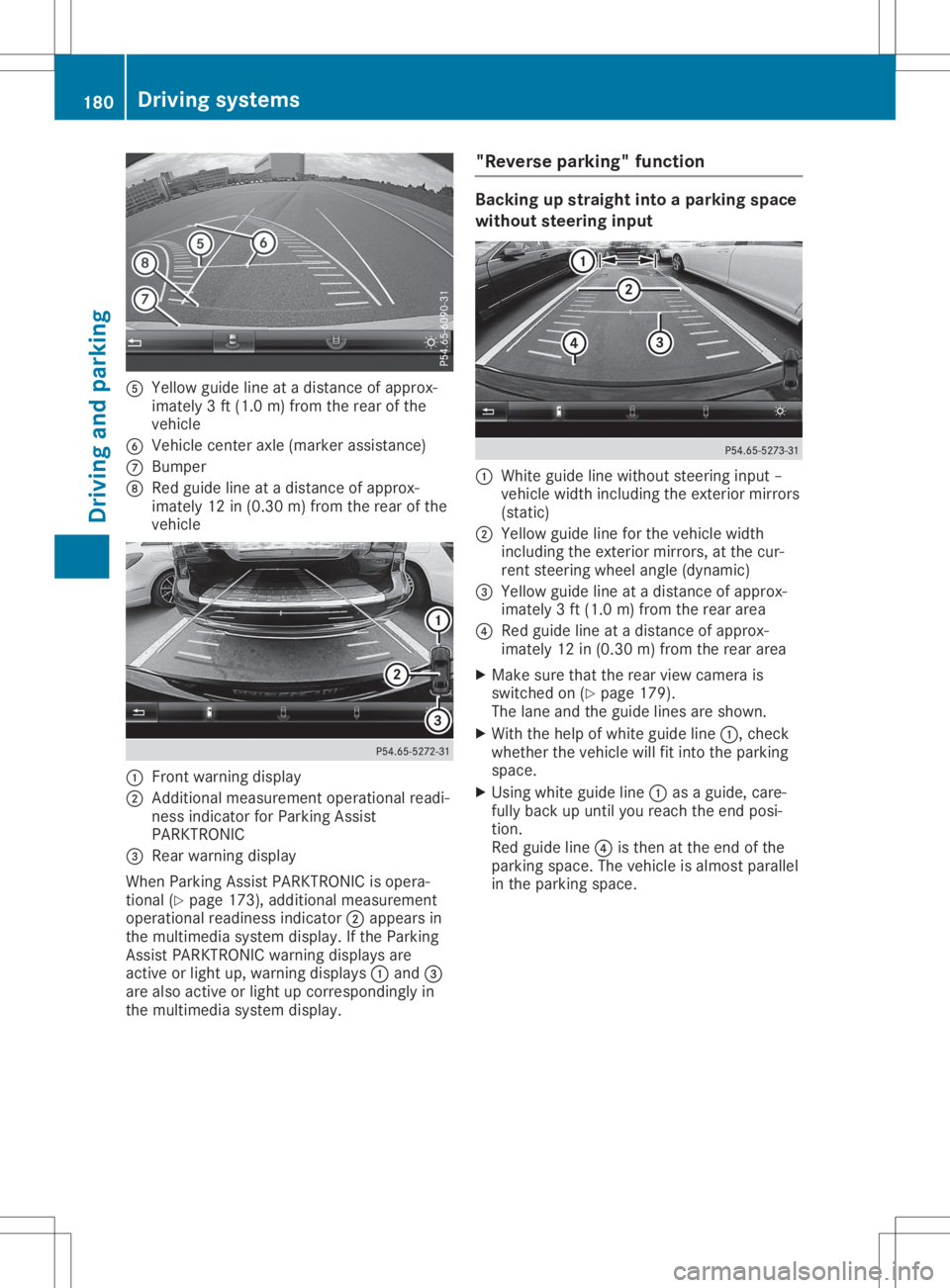
0083
Yellow guidelineatadistan ceofapprox -
imate ly3ft (1. 0m) from therear ofthe
vehic le
0084 Vehic lecen teraxle (mark erassist ance)
006B Bumper
006C Red guide lineatadistan ceofapprox -
imate ly12 in(0. 30 m)from therear ofthe
vehic le 0043
Frontwarnin gdisplay
0044 Addit ional measurem entoperat ionalreadi-
ness indicatorforPark ingAssist
PARKT RONIC
0087 Rear warnin gdisplay
When ParkingAssistPARKT RONIC isopera-
tion al(Y page 173),addition almeasurem ent
operat ionalreadin essindic ator0044appears in
the multim ediasyste mdisplay. Ifthe Park ing
Ass istPARKT RONIC warningdisplays are
act ive orlight up,warnin gdisplays 0043and 0087
are also active orlight upcor respon dinglyin
the multim ediasyste mdisplay. "Rever
separking" funct ion Ba
cking upstraight intoapa rking space
withou tsteer inginpu t 0043
Whit eguide linewithout steerin ginput –
vehic lewidth including theexterior mirrors
(stat ic)
0044 Yellow guidelineforthe vehic lewidth
inc luding theexterior mirrors, atthe cur-
ren tste erin gwheel angle(dynamic )
0087 Yellow guidelineatadistan ceofapprox -
imate ly3ft (1. 0m) from therear area
0085 Red guide lineatadistan ceofapprox -
imate ly12 in(0. 30 m)from therear area
X Make surethattherear view camer ais
switc hedon(Ypage 179).
The lane andtheguide linesareshown .
X With thehelp ofwhite guide line0043,chec k
wheth erthe vehic lewill fitintothe park ing
space.
X Usin gwhite guide line0043asaguide, care-
fully back upunt ilyou reach theend posi-
tion .
Red guide line0085isthe nat the end ofthe
park ingspace. Thevehic leisalmost parallel
in the park ingspace. 180
Driving
systemsDriving andparking
Page 184 of 346
Wide-ang
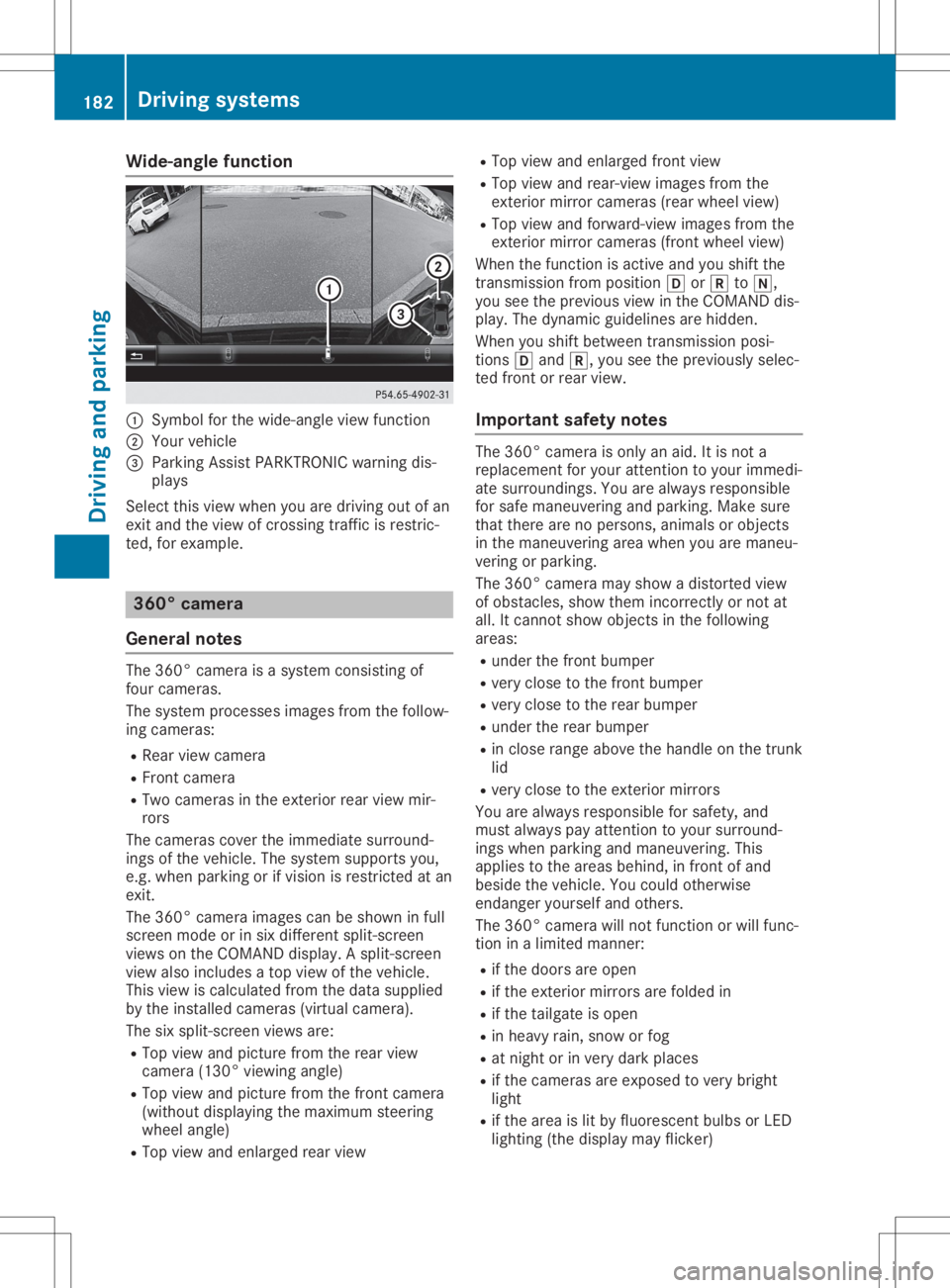
lefuncti on 0043
Symbo lfor the wide-angl eview function
0044 You rvehicl e
0087 Parki ngAssist PARKTR ONICwarning dis-
pla ys
Select thisview whenyou aredrivi ngout ofan
exit and theview ofcrossing trafficisrestric-
ted, forexamp le. 360
°camera
Gene ralnote s The
360° camera isasyste mconsisting of
four camera s.
The syste mprocess esima ges from thefollow-
ing camera s:
R Rea rview camera
R Front camera
R Two camera sin the exterior rearview mir-
rors
The camera scover theimmed iatesurro und-
ings ofthe vehicl e.The syste msup ports you,
e.g. when parkingorifvisi onisrestricted atan
exit.
The 360° camera images can beshow nin full
screen modeorinsix diffe rent split-screen
view son the COMAND display.A spli t-screen
view alsoinclu desatop view ofthe vehicl e.
This view iscalcu latedfrom thedata supplied
by the instal ledcamera s(virtu alcamera ).
The sixspli t-screen viewsare:
R Top view andpicture fromtherear view
camera (130°viewingangl e)
R Top view andpicture fromthefront camera
(wi thout displaying the maximu msteering
whee langl e)
R Top view andenlarged rearview R
Top view andenlarged front view
R Top view andrear-vi ewima ges from the
exterior mirrorcamera s(rea rwhe elview )
R Top view andforwa rd-view images from the
exterior mirrorcamera s(front wheelview )
When thefunction isactive andyoushift the
transmiss ionfrom position 005Bor005E to005C,
you seetheprevi ousview inthe COMAND dis-
pla y.The dyna micguidel ines arehidd en.
When youshift betwe entransmiss ionposi -
tions 005Band 005E,you seetheprevi ouslysele c-
ted front orrear view.
Important safetynotes The
360° camera isonly anaid.It is not a
repl aceme ntfor you rattention toyou rimmed i-
ate surro undings. Youarealwaysrespo nsible
for safe maneu veringandparki ng.Make sure
that there arenoperso ns,anima lsor objects
in the maneu veringareawhenyou aremaneu -
vering orparki ng.
The 360° camera mayshow adistorte dview
of obsta cles,show themincorrectly ornot at
all .It cannot showobjects inthe followi ng
area s:
R under thefront bump er
R very close tothe front bump er
R very close tothe rear bump er
R under therear bump er
R in close range abovethe handl eon the trunk
lid
R very close tothe exterior mirrors
You arealwaysrespo nsiblefor safe ty,and
must alwayspay attention toyou rsurro und-
ings whenparki ngand maneu vering. This
app liesto the area sbehi nd,infront ofand
besi dethe vehicl e.You couldotherw ise
endang eryou rself andothers.
The 360° camera willnot function orwil lfunc-
tion inalimi ted manner:
R ifthe doors areopen
R ifthe exterior mirrorsarefoldedin
R ifthe tailgate isopen
R in hea vyrain, snow orfog
R at night orinvery dark places
R ifthe camera sare expose dto very bright
lig ht
R ifthe area islit by fluo rescent bulbsorLED
lig hting (thedisplaymay flicker) 182
Driv
ingsyste msDrivingand parking
Page 187 of 346
still
detects increasing lapsesinconcen tra-
tion, youwillbewarned againafter 15minutes
at the earliest. Thiswillonly happen ifATTEN-
TION ASSISTstill detects typicalindicators of
fatigue orincreasing lapsesinconcen tration.
Vehicles withtheCOMAND multimedia
system: ifawarning isoutput inthe multi-
function display,aservice stationsearchis
performed inthe multimedia system.Youcan
select aservice stationandnavigation tothis
service stationwillthen begin. Thisfunction
can beactivated ordeactivated inthe multi-
media system; seetheDigital Operator's Man-
ual . Lane
Tracking package
General notes The
Lane Tracking packageconsistsofBlind
Spot Assist (Ypage 185)andLane Keeping
Assist (Ypage 186).
Blind SpotAssis t General
notes
Blind SpotAssist monitors theareas oneither
side ofthe vehicle thatarenot visible tothe
driver withtwolateral, rear-facing radarsen-
sors. Awarning displayin the exterior mirrors
draws yourattent iontovehicles detected in
the monitored area.Ifyou then switch onthe
corresponding turnsignal tochange lane,you
will also receive anoptical andaudiblewarn-
ing.
Blind SpotAssist supports youfrom aspeed of
approximately 20mph (30km/h).
Importa ntsafety notes G
WARNING
Blind SpotAssist doesnotreact to:
R vehicles overtaken tooclosely onthe side,
placing theminthe blind spotarea
R vehicles whichapproach withalarge
speed differential andovertake yourvehi-
cle
As aresult, BlindSpotAssist maynotgive
warnings insuch situations. Thereisarisk
of an accident. Always
observe thetraffic conditions care-
fully ,and maintain asafe lateral distance.
Blind SpotAssist isonly anaid. Itmay failto
detect somevehicles andisno substitute for
attent ivedriving. Alwaysensurethatthere is
sufficient distancetothe side forother road
users andobstacles.
i USA
only:
This device hasbeen approved bythe FCC
as a"Vehicul arRada rSystem". Theradar
sensor isintended foruse inan automotive
radar system only.Removing, tampering
with, oraltering thedevice willvoid anywar-
ranties, andisnot permitted bythe FCC. Do
not tamper with,alter, oruse inany non-
approved way.
Any unauthorized modificationtothis device
could voidtheuser’s authority tooperate
the equip ment.
Rada rsenso rs
The radar sensors forBlind SpotAssist are
integrated intotherear bumper. Makesure
that thebumpers arefree from dirt,iceor
slush. Thesensors mustnotbecovered, for
example bycycle racks oroverhanging loads.
Following asevere impact orinthe event of
damage tothe bumpers, havethefunction of
the radar sensors checked ataqual ified spe-
cialist workshop. BlindSpotAssist maynolon-
ger work properly.
Monitoring rangeofthe senso rs
In particular, thedetection ofobstacles canbe
impaired if:
R there isdirt onthe sensors oranything else
covering thesensors
R there ispoor visibil ity,e.g. due tofog, heavy
rain orsnow
R anarrow vehicle traveling infront ,e.g. a
motorbike orbicycle
R the road hasvery wide lanes
R the road hasnarrow lanes
R you arenot driving inthe middle ofthe lane
R there arebarriers orother roadboundarie s
Vehicles inthe monitoring rangearethen not
indicated.
Blind SpotAssist monitors thearea upto10 ft
(3 m) behind yourvehicle anddirectly nextto
it. Driving
systems
185Drivingandparking Z
Page 188 of 346
If
the lanes arenarrow, vehiclesdriving inthe
lane beyond thelane next toyou rvehicle may
be indicated ,especia llyifthe vehicle sare not
driving inthe middl eof their lane. Thismay be
the case ifthe vehicle sare driving onthe inner
side oftheir lane.
Due tothe nature ofthe system:
R warnings maybeissu edinerror when driv-
ing close tocrash barriersor simil arsolid
lane borders.
R warnings maybeinterrupted whenyouare
driving alongsideparticul arlylong vehicle s,
such astrucks, foraprolonged time.
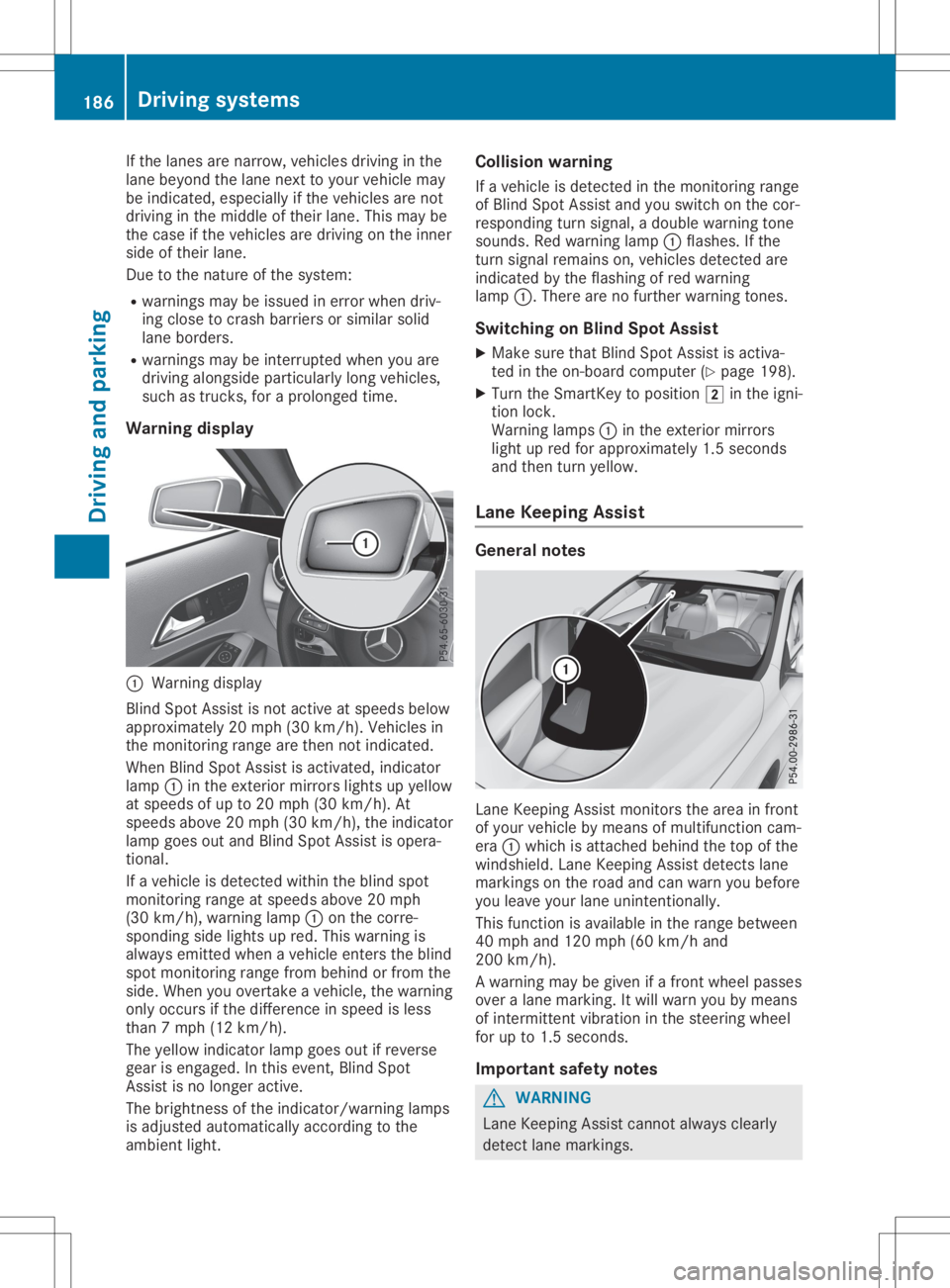
Warning display 0043
Warning display
Blind SpotAssist isnot active atspeed sbelow
appro ximately 20mph (30km/h). Vehiclesin
the monitoring rangearethen notindicated .
When BlindSpotAssist isactivated, indicator
lamp 0043inthe exterior mirrorslightsupyellow
at speed sof up to20 mph (30km/h ).At
speed sabove 20mph (30km/h), theindicator
lamp goesoutand Blind SpotAssist isopera -
tional.
If avehicle isdetected withintheblind spot
monitoring rangeatspeed sabove 20mph
(30 km/h), warning lamp0043onthe corre-
sponding sidelights upred. This warning is
alw ays emitted whenavehicle enterstheblind
spot monitoring rangefrombehind orfrom the
side. When youovertake avehicle ,the warning
only occurs ifthe difference inspeed isless
than 7mph (12km/h ).
The yellow indicator lampgoesoutifreverse
gear isengaged .In this event, BlindSpot
Assist isno longer active.
The brightness ofthe indicator/wa rninglamps
is adjusted automaticallyaccording tothe
ambi entlight. Col
lision warning
If avehicle isdetected inthe monitoring range
of Blind SpotAssist andyouswitch onthe cor-
respondi ngturn signal ,a doub lewarning tone
sounds. Redwarning lamp0043flashe s.Ifthe
turn signal remains on,vehicle sdetected are
indicated bythe flashi ngofred warning
lamp 0043.There arenofurther warning tones.
Swi tching onBlind SpotAssist
X Make surethatBlind SpotAssist isactiva-
ted inthe on-board computer (Ypage 198).
X Turn theSmartKey topositio n0048 inthe igni-
tion lock.
Warning lamps0043 inthe exterior mirrors
light upred forappro ximately 1.5seconds
and then turnyellow.
Lane Keeping Assist Gene
ralnotes Lane
Keepi ngAssist monitors thearea infront
of you rvehicle bymeans ofmultifu nctioncam-
era 0043which isattached behindthetop ofthe
windshi eld.Lane Keepi ngAssist detects lane
markings onthe road andcanwarn youbefore
you leaveyou rlane unintentionally .
This function isavai lablein the range betwee n
40 mph and120 mph (60km/h and
200 km/h).
A warning maybegiven ifafront wheel passes
over alane marking. Itwil lwarn youbymeans
of intermittent vibrationin the steering wheel
for upto1.5 seconds .
Important safetynotes G
WARNING
Lane Keepi ngAssist cannot always clearl y
detect lanemarkings. 186
Drivi
ngsystemsDrivi ngand parking
Page 189 of 346
In
such cases, LaneKeepi ngAssist can:
R give anunnecessary warning
R not give awarning
There isarisk ofan accident.
Alway spay particul arattention tothe traffic
situa tionandkeep within thelane, espe-
ciall yif Lane Keepi ngAssist alerts you . G
WARNING
The Lane Keepi ngAssist warning doesnot
return thevehicle tothe origina llane. There
is arisk ofan accident.
You shoul dalw ays steer, brakeoraccelera te
you rself, inparticul arifwarned byLane
Keepi ngAssist.
If you failtoada ptyou rdriving style,Lane
Keepi ngAssist canneither reducetherisk of
an accident noroverride thelawsof phys ics.
Lane Keepi ngAssist cannot takeintoaccount
the road, traffic andweather conditions. Lane
Keepi ngAssist ismerely anaid.You are
responsib lefor the distance tothe vehicle in
front, forvehicle speed,for braking ingood
time andforstayi nginyou rlane.
The Lane Keepi ngAssist doesnotkeep the
vehicle inthe lane.
The system maybeimpa iredormay notfunc-
tion if:
R there ispoor visibility,e.g. due toinsuffi-
cient illuminatio nof the road, ordue to
snow, rain,fogorspray
R there isglare ,e.g. from oncoming traffic,
the sun orreflection fromother vehicle s
(e.g. ifthe road surface iswet)
R the windshi eldisdirty, fogged up,dama ged
or covered, forinstance byasticker, inthe
vicinity ofthe camera
R there arenoorseveral unclearlane mark-
ings forone lane, e.g.roadw orks
R the lane markings areworn away,dark or
covered up,e.g. bydirt orsnow
R the distance tothe vehicle infront istoo
short andthus thelane markings cannotbe
detected
R the lane markings changequickly, e.g.lanes
branch off,cross oneanother ormerge R
the road isnarrow andwindi ng
R there arehighl yvaria bleshade conditions
on the roadw ay
Swi tching onLane Keeping Assist
X Switch onActive LaneKeepi ngAssist using
the on-board computer; todo so, select
Standard Standard
orAdaptive Adaptive
(Ypage 186).
If you drive atspeed sabove 40mph
(60 km/h) andlane markings aredetected,
the lines inthe assis tance graphi care
shown ingreen (Ypage 197). LaneKeepi ng
Assist isready foruse.
If Standard Standard
isselected, nowarning vibration
occurs if:
R you have switched onthe turn signal .In this
event, thewarnings aresupp ressed fora
certain periodoftime.
R adriving safetysystem intervenes, e.g.ABS,
BAS orESP ®
.
When Adaptive Adaptive
isselected, nowarning vibra-
tion occurs if:
R you have switched onthe turn signal .In this
event, thewarnings aresupp ressed fora
certain periodoftime.
R adriving safetysystem intervenes, e.g.ABS,
BAS orESP ®
.
R you accelera tehard, e.g.kickdown.
R you brake hard.
R you steer actively ,e.g. swerve toavoid an
obstacle orchange lanesquickly.
R you cutthe corner onasharp bend.
In order thatyouarewarned onlywhen neces-
sary andingood timeifyou cross thelane
marking, thesystem detects certaincondi-
tions andwarns youaccordingly .
The warning vibrationoccurs earlierif:
R you appro achtheouter lanemarking ona
bend
R the road hasvery widelanes, e.g.afreewa y
R the system detects solidlanemarkings
The warning vibrationoccurs laterif:
R the road hasnarrow lanes.
R you cutthe corner onabend Drivi
ngsystems
187Drivingand parking Z
Page 199 of 346
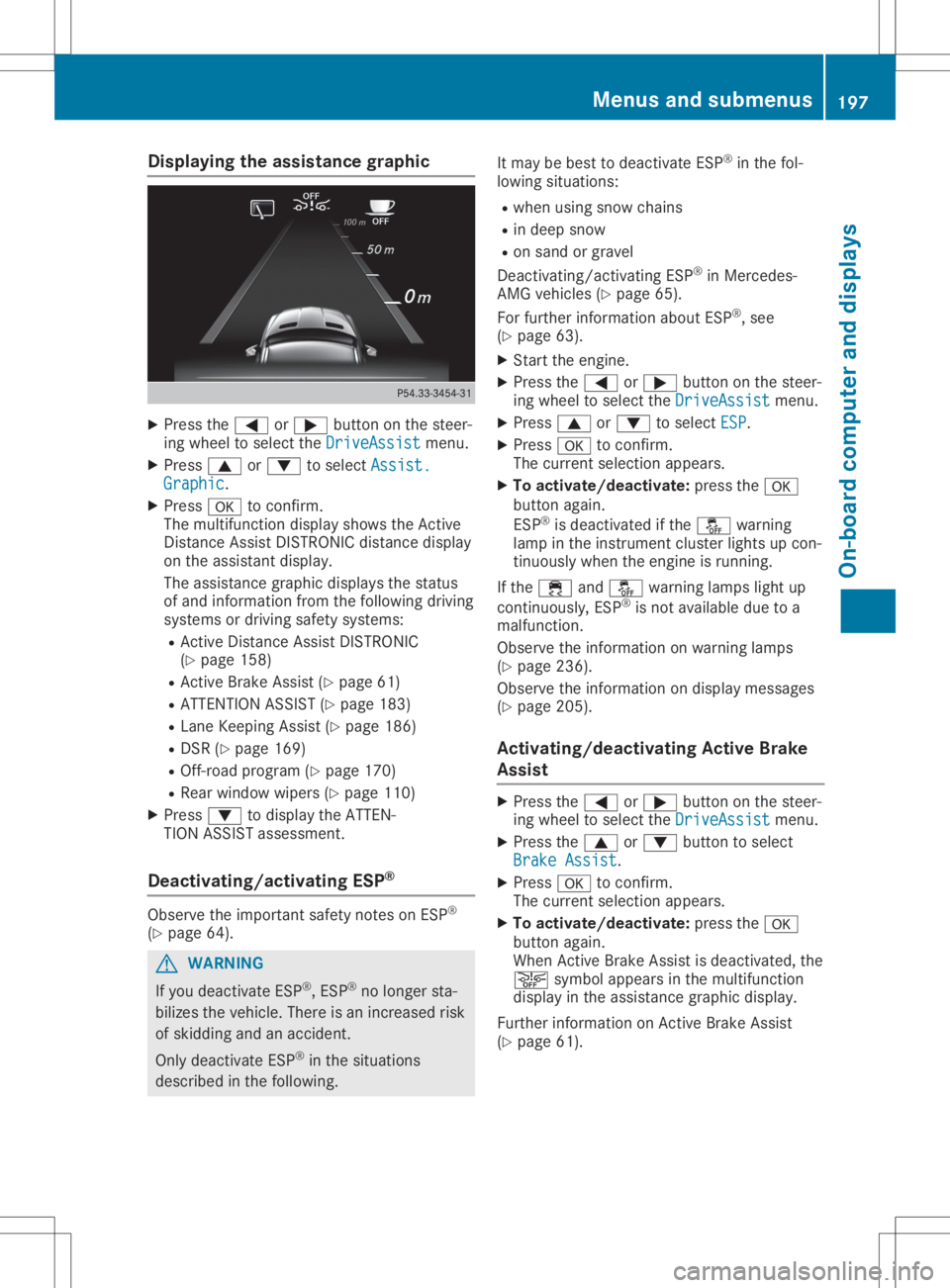
Disp
laying theas sist ance grap hic X
Press the0059 or0065 buttonon thest eer -
in g whee lto sel ectth eDri veAssist Dri
veAssistmen u.
X Press 0063 or0064 tosel ectAss ist. Ass
ist.
Gra phic Gra
phic.
X Press 0076 toconfirm .
The mult ifunction display showstheAc tive
Di stanc eAs sis tDI ST RON ICdis tanc edis play
on theass istant display.
The assistanc egr aphi cdis plays thest at us
of and info rm ation from thefo llow ing dri vin g
sys tems ordrivin gsaf etysys tems :
R Ac tive Distanc eAs sis tDI ST RON IC
(Y page 158)
R Ac tive Brak eAs sis t(Y page 61)
R AT TENTI ON ASSIST (Ypage 183)
R Lan eKee pingAs sis t(Y page 186)
R DS R(Y page 169)
R Off-ro ad pro gram (Ypage 170)
R Rear window wipers(Y page 110)
X Press 0064 todis play theAT TEN-
TIO NAS SIST ass ess men t.
Deact ivating/a ctivating ESP ® Obs
erveth eimp ortant saf etyno teson ESP®
(Y page 64). G
WAR
NING
If you deac tivat eES P®
,ES P®
no longer sta-
biliz estheveh icle. The reisan incr ease dris k
of skiddi ngand anacc iden t.
On lydeac tivat eES P®
in thesit uat ions
des cribed inthefo llow ing. It
may bebes tto deac tivat eES P®
in thefo l-
lowi ngsituat ions:
R when usingsn ow chain s
R in dee psn ow
R on san dor grave l
De act ivat ing/ act ivat ing ES P®
in Mer cedes -
AM Gveh icles (Ypage 65).
Fo rfur ther info rm ation about ESP®
,see
(Y page 63).
X Start theen gin e.
X Press the0059 or0065 buttonon thest eer -
in g whee lto sel ectth eDri veAssist Dri
veAssistmen u.
X Press 0063 or0064 tosel ectESP ESP
.
X Press 0076 toconfirm .
The curren tsel ection appe ars.
X To act ivate/de activate:pre ssthe0076
but tonagain .
ES P®
is deac tivat ed ifth e00BB warning
lamp intheinst rum entcl ust erligh tsup con-
ti nuo usly when theen gin eis run ning .
If th e00E5 and00BB warning lamp sligh tup
co ntinuous ly,ESP®
is no tavai lable duetoa
malf unction .
Obs erveth einfo rm ation onwarn ing lamp s
(Y page 236).
Obs erveth einfo rm ation ondisplay messages
(Y page 205).
Act ivating/d eactivating Act ive Brak e
Assis t X
Press the0059 or0065 buttonon thest eer -
in g whee lto sel ectth eDri veAssist Dri
veAssistmen u.
X Press the0063 or0064 buttonto sel ect
Bra keAssist Bra
keAssist.
X Press 0076 toconfirm .
The curren tsel ection appe ars.
X To act ivate/de activate:pre ssthe0076
but tonagain .
Whe nAc tive Brak eAs sis tis deac tivat ed, the
00D4 symbolappe arsinthemult ifunction
dis play intheass istanc egr aphi cdis play.
Fur ther info rm ation onActive Brak eAs sis t
(Y page 61). Men
usandsu bm enu s
197On- boa rdcom puteran ddis pla ys Z
Page 205 of 346
If
you switch offthe engine, theRACE TIMER is
reset to"0" after 30seconds. Alllapsare
dele ted.
You cannot deleteindivid ualstored laps.Ifyou
have stopped 16laps,the current lapdoes not
have tobe reset.
X Rese tthe current lap.
X Press 0076toconfirm Reset Reset.
Reset Race-Timer? Reset
Race-Timer? appearsinthe multi-
function display.
X Press the0064 button toselect Yes Yes
and
press the0076 button toconfirm.
All lapsare dele ted.
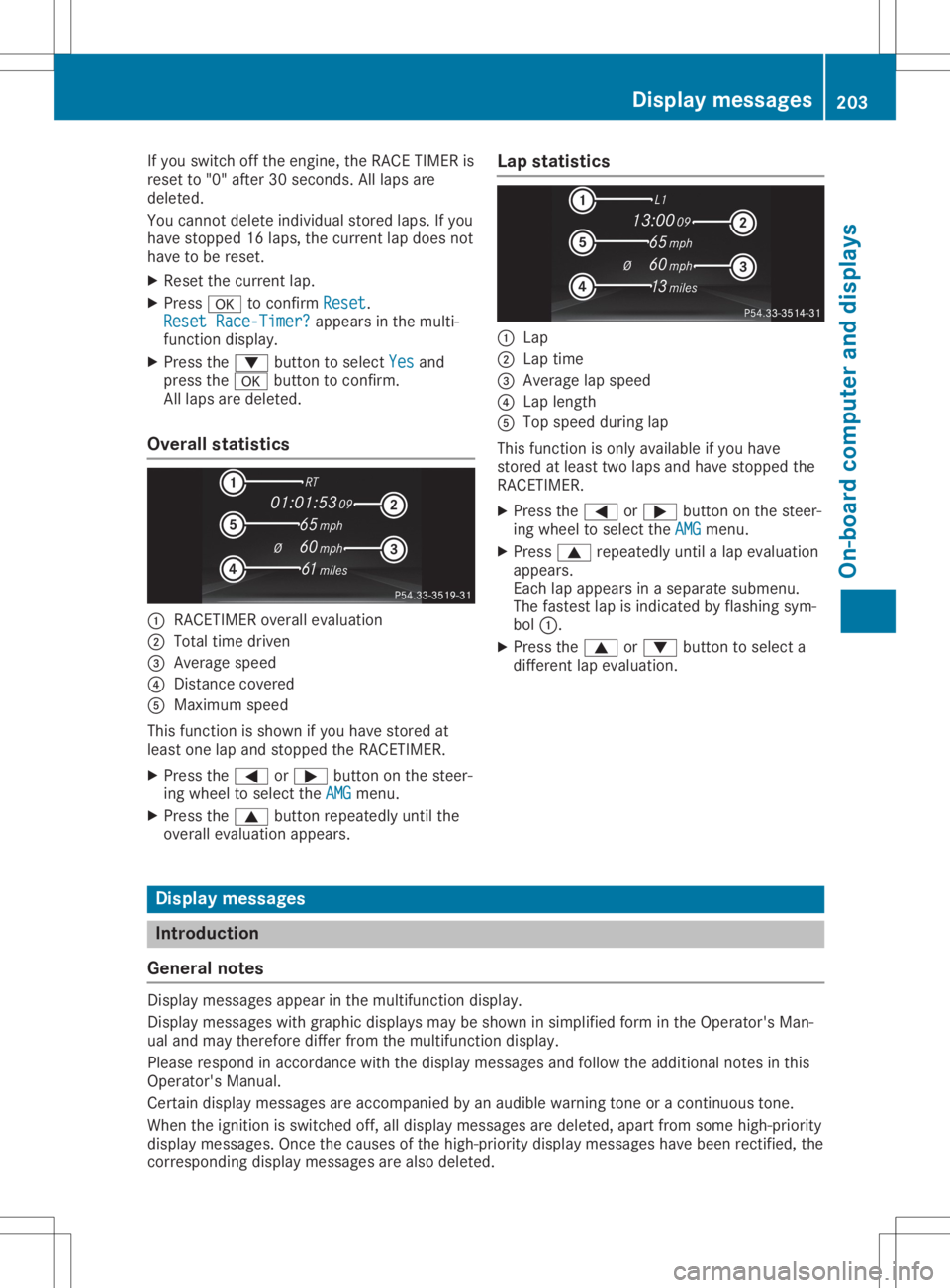
Overall statistics 0043
RACETIMER overallevalu ation
0044 Total timedriven
0087 Average speed
0085 Distance covered
0083 Maximu mspeed
This function isshown ifyou have stored at
lea stone lapand stopped theRACETIMER.
X Press the0059 or0065 button onthe steer-
ing wheel toselect theAMG AMG
menu.
X Press the0063 button repeatedlyuntilthe
overal levalu ation appears. Lap
statistics 0043
Lap
0044 Lap time
0087 Average lapspeed
0085 Lap length
0083 Top speed duringlap
This function isonly availableifyou have
stored atlea sttwo lapsand have stopped the
RACETIMER.
X Press the0059 or0065 button onthe steer-
ing wheel toselect theAMG AMG
menu.
X Press 0063repeatedlyuntilalap evalu ation
appe ars.
Each lapappe arsinasepa ratesubme nu.
The fastest lapisindicated byflashi ngsym-
bol 0043.
X Press the0063 or0064 button toselect a
different lapevalu ation. Dis
play message s Introductio
n
Gene ralnotes Displa
ymessag esappe arinthe multifu nctiondisplay.
Displa ymessag eswith graphi cdispl aysmay beshown insimpl ifiedform inthe Operator's Man-
ual and may therefore differfromthemultifu nctiondisplay.
Plea serespond inaccordance withthedispl aymessag esand follow theaddi tional notes inthis
Operator's Manual.
Certai ndispl aymessage sare accompanie dby an aud ible warning toneoracontinuous tone.
When theignition isswitched off,alldispl aymessag esare dele ted, apartfrom some high-pri ority
displ aymessag es.Once thecause sof the high-pri oritydisplaymessag eshave been rectified, the
corresponding displaymessage sare also deleted. Di
splay message s
203On-bo ardcompu terand displays Z
Page 207 of 346
Safety
systems Display
messages Possible
causes/co nsequences and0050 0050
Solutions 002500E5
Currently Unavaila‐ Currently
Unavaila‐
ble SeeOperator's ble
SeeOperator's
Manual Manual ABS
(Anti- lockBraking System), BAS(Brake Assist), ESP®
(Elec-
tronic Stability Program), theHOLD function andhillstart assist are
temporarily unavailable.
Act ive Brake Assist mayhave alsofailed .
In addition, the0025, 00E5and00BB warning lampsmaylight upin
the instrument cluster.
ATTENTION ASSISTisdeactivated.
Possible causesare:
R Self-diagnosis isnot yetcomplete
R The on-board voltagemaybeinsufficient
G WARNING
The brake system continues tofunction normally, butwithout the
functions listedabove. Thewheels couldtherefore lockifyou brake
hard, forexample.
The steerabili tyand braking characteristics maybeseverely affec-
ted. Thebraking distance inan emergency brakingsituation can
increase.
If ESP ®
is not operational, ESP®
is unable tostabilize thevehicle.
There isan increased riskofskidding andanaccident.
X Carefu llydrive onasuitabl estretc hof road, making gentlesteer-
ing movements atspeeds ofabove 12mph (20km/h).
If the displa ymessage disappears,thefunctions mentioned
above areavail able again.
If the multifunction displaystill shows thedispla ymessage:
X Drive oncarefully .
X Visit aqual ified speciali stworkshop immediately . 002500E5
Inoperative See Inoperative
See
Operator's Manual Operator's
Manual ABS,
BAS,ESP®
,the HOLD function andhillstart assist arenot
avail able duetoamalfunction.
Act ive Brake Assist mayhave alsofailed .
The 0025, 00E5,00BBand0027 (USAonly)or004D (Canad aonly)
warning lampsinthe instrument clustermayalsolight up.
ATTENTION ASSISTisdeactivated.
G WARNING
The brake system continues tofunction normally, butwithout the
functions listedabove. Thewheels couldtherefore lockifyou brake
hard, forexample.
The steerabili tyand braking characteristics maybeseverely affec-
ted. Thebraking distance inan emergency brakingsituation can
increase.
If ESP ®
is not operational, ESP®
is unable tostabilize thevehicle.
There isan increased riskofskidding andanaccident. Dis
play messages
205On-boardcomp uter anddisplays Z
Page 208 of 346
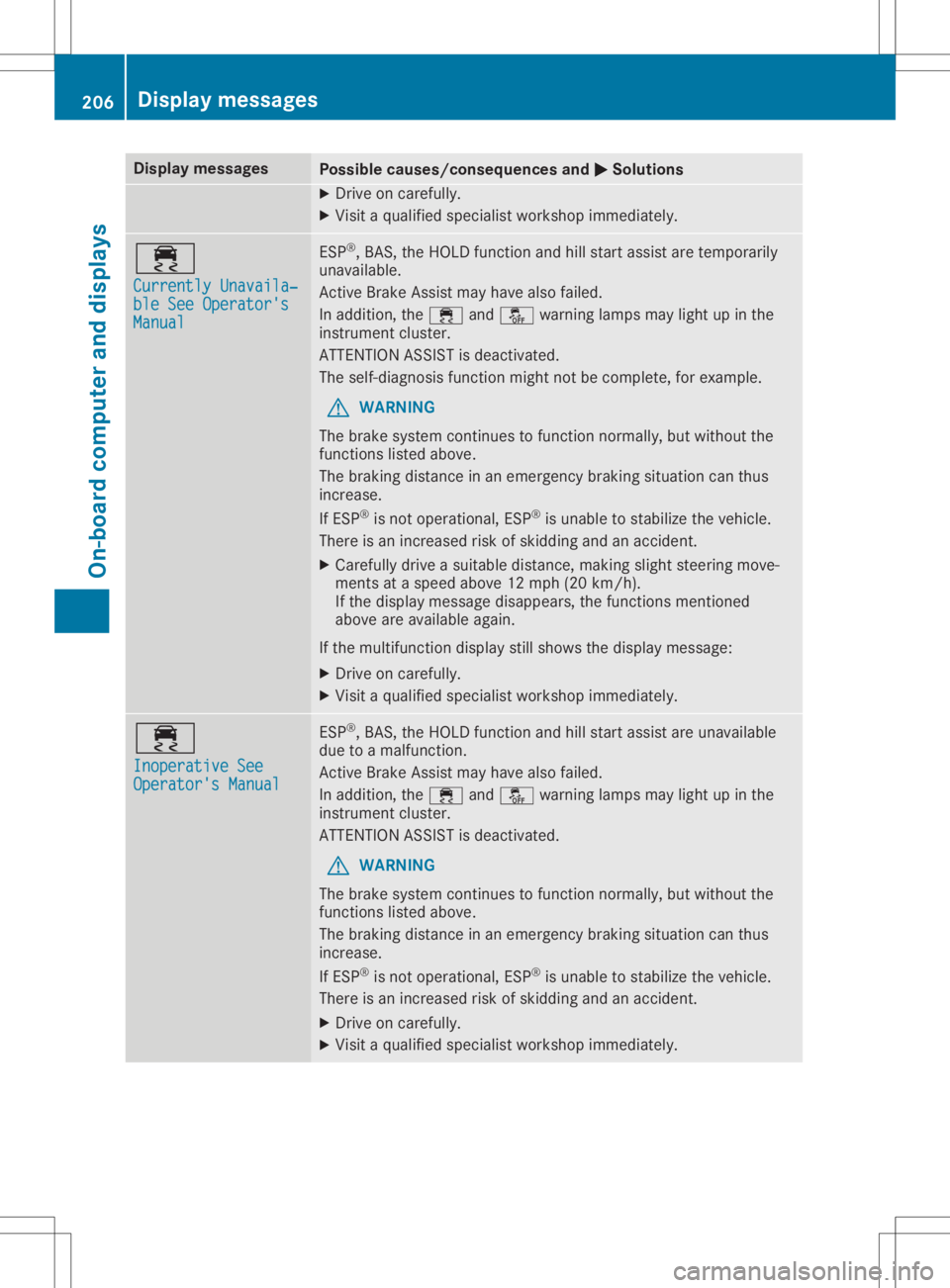
Disp
laymes sages Poss
iblecauses/co nsequences and 0050 0050
Solu tions X
Dr ive oncar eful ly.
X Vis itaqualif iedspecialistwor kshop immediat ely. 00E5
Cur rently Unavaila‐ Cur
rently Unavaila‐
ble SeeOperator' s ble
SeeOperator' s
Man ual Man
ual ES
P®
,BA S,theHO LD function and hillstart assi stare tempo rarily
unav ailable .
Ac tive Brake Assis tmay havealso failed.
In addit ion,th e00E5 and00BB warninglamp smay lightup inthe
ins trumen tclus ter.
AT TENTI ON ASSIST isdeac tivat ed.
The self-diagn osis function mightnotbe compl ete, for exampl e.
G WAR
NING
The brak esyst emcontinu estofun ction norm ally, butwithout the
fun ction slist ed abov e.
The brak ingdist ancein an eme rgencybrak ingsituati oncan thus
inc reas e.
If ES P®
is no toper ational, ESP®
is unab leto stabiliz eth eveh icle.
The reisan increas edriskof skiddin gand anacc iden t.
X Caref ullydrive asuit able distance,mak ingslightsteer ing mov e-
men tsat aspe edabov e12 mph (20km/ h).
If the displ aymessage disappea rs,the functions mentioned
above areavai lableaga in.
If the multifu nctiondisplaystill shows thedispl aymessag e:
X Drive oncareful ly.
X Visit aqua lifiedspecia listworkshop immediately. 00E5
Inoperative See Inoperative
See
Operator's Manual Operator's
Manual ESP
®
,BAS, theHOLD function andhillstart assistare unava ilable
due toamalfu nction.
Active BrakeAssist mayhave alsofailed.
In addi tion, the00E5 and00BB warning lampsmay lightup inthe
instrument cluster.
ATTENTION ASSISTis deactiva ted.
G WARNING
The brake system continues tofunction normally,but withou tthe
functions listedabove.
The braking distance inan emergency brakingsituationcanthus
increase.
If ESP ®
is not opera tional, ESP®
is unabl eto stabil izethe vehicle .
There isan increased riskofskidding andanaccident.
X Drive oncareful ly.
X Visit aqua lifiedspecia listworkshop immediately. 206
Di
splay message sOn-boardcompu terand displays
Page 209 of 346
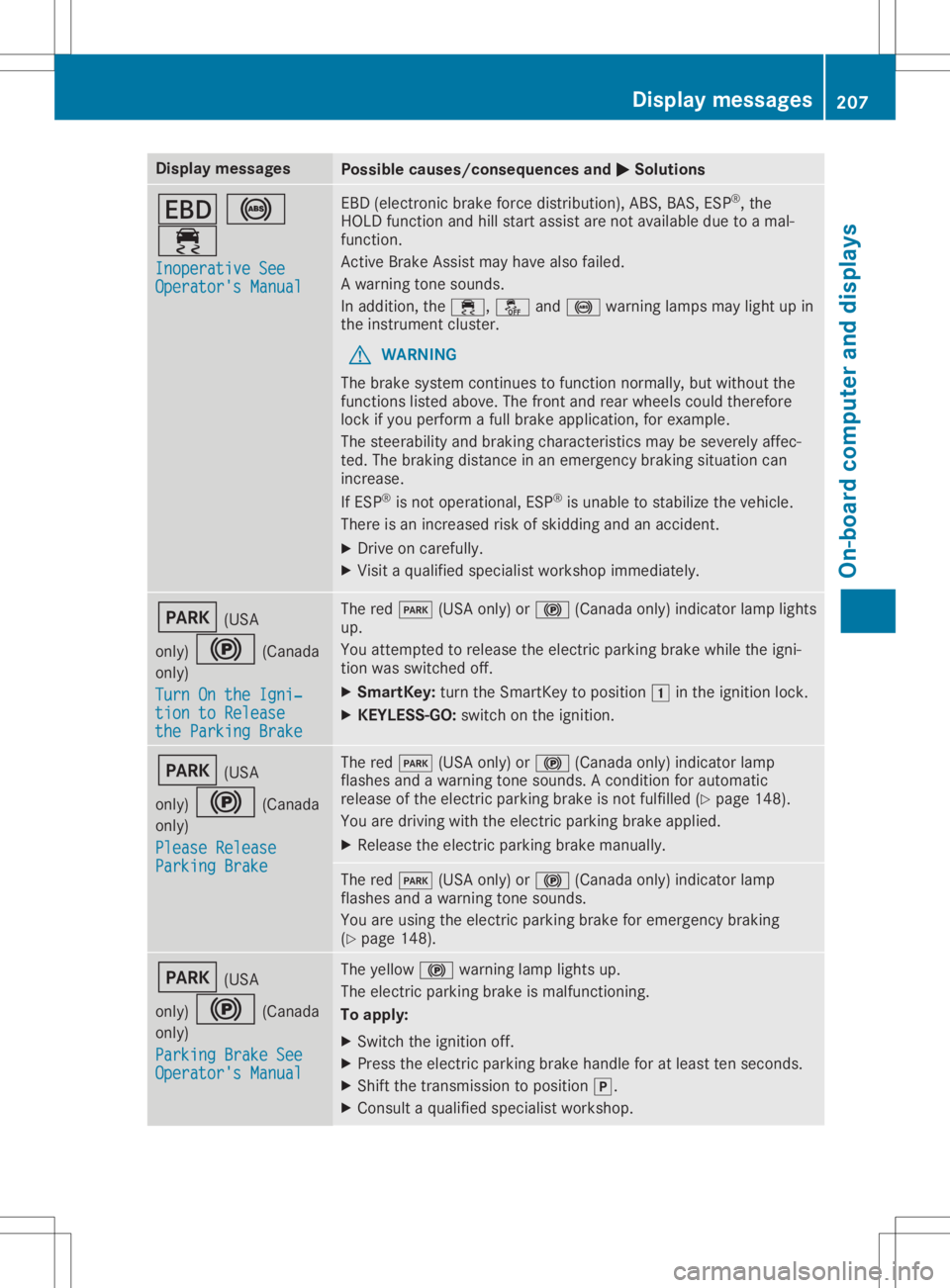
Disp
laymes sages Poss
iblecauses/co nsequences and 0050 0050
Solu tions 007A
0025
00E5 Ino perativeSee Ino
perativeSee
Ope rator'sMan ual Ope
rator'sMan ual EB
D(elec tron icbrak efor ce dist ribution),AB S,BA S,ES P®
,th e
HO LD function and hillstart assi stare notavail able duetoamal-
fun ction .
Ac tive Brake Assis tmay havealso failed.
A warn ingtone soun ds.
In addit ion,th e00E5, 00BBand0025 warninglamp smay lightup in
th eins trumen tclus ter.
G WAR
NING
The brak esyst emcontinu estofun ction norm ally, butwithout the
fun ction slist ed abov e.The fron tand rear whee lsco uld there fore
loc kif you performafull brak eapplic ation,for exampl e.
The steer abilit yand brak ingcharac teris tics may besev erelyaff ec-
te d. The brak ingdist ancein an eme rgencybrak ingsituati oncan
inc reas e.
If ES P®
is no toper ational, ESP®
is unab leto stabiliz eth eveh icle.
The reisan increas edriskof skiddin gand anacc iden t.
X Dr ive oncar eful ly.
X Vis itaqualif iedspecialistwor kshop immediat ely. 0049
(USA
on ly) 0024 (Canada
on ly)
Tur nOn the Igni‐ Tur
nOn the Igni‐
tio nto Release tio
nto Release
the ParkingBra ke the
ParkingBra ke The
red0049 (USAon ly) or0024 (Canadaonly) ind icat orlamp lights
up.
You attemp tedto release theelec tric park ingbrak ewhile theign i-
ti on was switched off.
X Sm artKey :tur nth eSm artKey topos ition 0047intheign ition lock.
X KEYLESS -GO: swit chon theign ition . 0049
(USA
on ly) 0024 (Canada
on ly)
Ple ase Release Ple
ase Release
Par kingBra ke Par
kingBra ke The
red0049 (USAon ly) or0024 (Canadaonly) ind icat orlamp
flas hes and awarn ingtone soun ds.Aco nd ition forauto matic
rel ease oftheelec tric park ingbrak eis no tfulf illed (Ypage 148).
You aredrivin gwit hth eelec tric park ingbrak eapplie d.
X Releas eth eelec tric park ingbrak eman ually. The
red0049 (USAon ly) or0024 (Canadaonly) ind icat orlamp
flas hes and awarn ingtone soun ds.
You areusin gth eelec tric park ingbrak efor eme rgencybrak ing
(Y page 148). 0049
(USA
on ly) 0024 (Canada
on ly)
Par kingBra keSee Par
kingBra keSee
Ope rator'sMan ual Ope
rator'sMan ual The
yellow 0024warninglamp lightsup.
The electric park ingbrak eis malf unction ing .
To apply :
X Swi tchth eign ition off.
X Pre sstheelec tric park ingbrak ehan dleforatleast tensec onds.
X Sh ift thetrans mis sion topos ition 005D.
X Con sult aqualif iedspecialistwor kshop . Disp
laymes sage s
207On -boar dcomp uter anddi sp lay s Z