warning MERCEDES-BENZ GLA 2020 Workshop Manual
[x] Cancel search | Manufacturer: MERCEDES-BENZ, Model Year: 2020, Model line: GLA, Model: MERCEDES-BENZ GLA 2020Pages: 346, PDF Size: 17.58 MB
Page 156 of 346
G
WARNING
Flamma blemateria lsuch aslea ves, grass or
twigs mayignite ifthey come intocontact
with hotparts ofthe exhau stsystem. There
is arisk offire.
When drivingon anunpa vedroad oroff-
road ,check thevehicl eunders ideregu larly.
In particu lar,remove trappedpla ntparts or
other flamma blemateria l.Contact aqua li-
fied speci alist worksho pimmed iatelyif dam-
age isdetected.
! There
isarisk ofdama getothe vehicl eif:
R the vehicl ebecome sstuck, e.g.onahigh
curb oran unpa vedroad
R you drive toofast over anobstacl e,e.g. a
curb, aspee dbump orapothol ein the
road
R ahea vyobject strikes theunderb odyor
parts ofthe chassi s
In situa tions likethis, thebody ,the under-
body ,chassi sparts, wheelsor tires couldbe
dama gedwitho utthe dama gebeing visib le.
Comp onents damagedinthis way canunex-
pectedl yfail or,inthe case ofan accide nt,
no longer withsta ndthe loadsthey are
desi gned to.
If the underb odypanel ingisdama ged,com-
bus tible materia lssuch aslea ves, grass or
twigs cangather betweenthe underb ody
and theunderb odypanel ing.Ifthese materi-
als come incontact withhotparts ofthe
exhau stsystem, theycancatch fire.
In such situations, havethevehicl echecked
and repa iredimmed iatelyat aqua lified spe-
cial istworksho p.Ifon continuing yourjour-
ney you notice thatdrivingsafety is
impa ired,pul lover andstop thevehicl e
immed iately,pay ing attention toroad and
traffic conditions. Insuch cases, consult a
qua lified speci alist worksho p.
The vehicl eis only designed foreasi lynegotia -
ble off-road terrainandpoor roadsurfaces.
When drivingoff-road ,sub stances suchas
sand, mudandwate ror wate rmixed withoil
may getinto thebrakes .This couldresu ltin a
redu cedbraki ngeffect orintotal brake failure
and alsoin increas edwea rand tear. Thebrak-
ing chara cteristics changedepending onthe
materia lentering thebrakes .Cle anthe brakes
after drivingoff-road .If you detect aredu ced braki
ngeffect orgrindi ngnoises ,have the
brake system checked inaqua lified speci alist
worksho pas soon aspossi ble.Adapt your
drivi ngstyle tothe differ entbraki ngchara cter-
istics.
Driving off-road increasesthe likel ihoo dof
dama getothe vehicl e,whi ch, inturn, canlead
to fail ure ofthe mechani calasse mbly orsys-
tems. Adapt yourdrivi ngstyle tosui tthe ter-
rain conditions. Drivecarefu lly.Have damage
to the vehicl erectified immediatelyat aqua li-
fied speci alist worksho p.
Do not shift intotransmissi onposi tion 005C
when drivingoff-road .You couldlose control
of the vehicl eif you attempt tobrake thevehi-
cle using the service brake.Ifthe grad ientis
too steep foryou rvehicl e,drive backdownin
reverse gear.
Gene ralnote s H
Envi
ronmental note
Protection ofthe environment isof prima ry
importa nce.Treatnature withrespe ct.
Observe allprohi biting signs.
Rea dthis section carefullybefore drivingyou r
vehicl eoff-road .
Off-road drivingisonly possi blewith the
ON&OFFROAD package.
The followi ngdrivi ngsystems arespeci ally
ada pted fordrivi ngover easilynegotia bleoff-
road terrain:
R Off-road program(Y pag e170)
R Off-road ABS(Ypag e60)
R Off-road 4ETS(Ypag e64)
R Off-road ESP®
(Y pag e66)
R DSR (Downhi llSpeed Regulation)
(Y pag e169)
Observe thefollowi ngnotes:
R Stop thevehicl ebefore starting todrive
alo ng anoff-road route.Ifnecessa ry,acti-
vate theoff-road program(Y pag e132) .
R To avoi ddama gingthevehicl e,make sure
there isalw ayssuffi cient groundclea rance.
R Che ckthat items oflug gage andloadsare
stowed safelyand arewellsecure d
(Y pag e256).
R Alwa yskeep theengine running andingea r
when drivingon adow nhill gradient. Acti-
vate DSR (Ypag e169) . 154
Drivi
ngtipsDrivi ngand parking
Page 158 of 346
R
Driv equ ickl yto ove rcom ethe rolling res ist-
ance .Othe rwise the vehicle's wheelscou ld
be come stuckinloose ground .
R Driv ein the tracks ofothe rveh icles ifpo ssi -
bl e. Ma kesure tha t:
- the tire ruts arenot too deep.
- the sand issu fficie ntly firm.
- the ground clearance ofthe vehicleis su f-
fic ient.
Tire ruts andgrav elroad s !
Ch
eck thatthe ruts arenot too deep and
tha tyo ur veh icleha ssu fficie ntcle arance .
Othe rwise, your veh iclecou ldbe dama ged
or bottom outand getstu ck.
Ob ser vethe followi ng ruleswh en drivin galong
ru ts inoff -roa dterr ain or on roa dswith loose
gra vel:
R Activ atethe off-roa dpro gram(Y page 132 ).
R Avoi dhigh eng inespee ds.
R Shi ftto alowe rge ar using the left-ha nd
stee ringwh eelpa dd leshi fter .
R Driv eslow ly.
R Wh ere ruts aretoo deep,dri ve with the
wh eelsof one side on the cente rgra ssy
ar ea ,if po ssi ble. Trave
ling uphi ll
App roac h/depa rture angle G
WA
RNING
If yo udri ve on astee pincl ine atan ang leor
tur nwh en drivin gon anincl ine,the vehicle
cou ldslip side wa ys,tip and rollover .The reis
a ris kof an acc ident.
Alw aysdri ve on astee pincl ine inthe line of
fa ll(s tra ight up ordown) and donot turnthe
veh icle.
R Ob ser vethe warnings foroff-roa ddri vin g
(Y page 153 ).
R Fol low the line offallwh en drivin gon slop es
and steepincl ines.
R Befo redrivin gon extre meuphilland down-
hi llgra dients ,sel ect the off-roa dpro gram
(Y page 132 ).
R Driv eslow ly. R
Accel erategently and makesure tha tthe
wh eelsaregri pping .
R Avoi dhigh eng inespee ds,exce ptwh en driv-
ing onsandy and muddyrou tes with high
dri vin gres istance .
R Use theleft-ha ndstee ringwh eelpa dd le
shi fter toshi ftto alowe rge ar appro priate to
the gradient.
R Use theleft-ha ndstee ringwh eelpa dd le
shi fter toshi ftinto alowe rge ar ingo od time
on long and steepdo wnh ill gra dients .
Hil lsta rtas sist willai d yo uwh en pulling away
on ahill. For furthe rinfo rma tionab ou thi ll
sta rtas sist, see (Ypage 128 ).
Do not shiftinto transmi ssion positio n005C
wh en drivin goff -roa d.Yo ucou ldlose contro l
of the vehicleif yo uatte mpt tobra kethe vehi-
cle using the servicebra ke. Ifthe gradient is
too stee pfor your veh icle, dri ve back down in
rev ers ege ar.
Alw aysob ser vethe appro ach /de partu reang le
va lues (Y page 342 ).
Maxi mum gradient-c limbi ngcapabi lity Alw
aysob ser vethe maxim um gradient climb-
ing ability values (Y page 342 ).
Hil ltops Wh
endrivin gup anuphillgra dient, slig htl y
red uce pressu reon the accelera tor imm edi-
ate lybe for erea ching the browof the hill.
Ma keuseof the vehicle's ownimp etusto
tra vel ove rthe brow.
Thi ssty leof dri vin gpre vents :
R the vehiclefro mlifting offthe ground onthe
bro wof ahill
R the vehiclefro mtra vel ing too quickl ydo wn
the othe rsi de
Dri ving dow nhill R
Driv eslow ly.
R Do not drive atan ang ledo wn stee p
incl ines.Stee rinto theline offalland drive
wi th the frontwh eelsalig ned straight. Oth-
erw ise, the vehiclecou ldslip side wa ys,tip
and rollover .
R Shi ftto alowe rge ar using the left-ha nd
stee ringwh eelpa dd leshi fter befor etackl ing
stee pdo wnh ill gra dients . 15
6 Dr
ivi ng tipsDrivi ng andparki ng
Page 160 of 346
X
Accel eratethe vehicleto the desired speed.
X Bri eflypre ssthe cruise contro lle ver up0043
or down 0044.
X Re move your foo tfrom theacce lera tor
pe dal.
Cr uise contro lis acti vated .The vehicleau to-
ma tica lly ma inta insthe stor edspe ed.
i Cr
uise contro lma ybe una ble to ma inta in
the stor edspe edon uphillgra dients. The
stor edspe edisres um edwhen the gradient
eve nsout.Cr uise contro lma inta insthe
stor edspe edon downh ill gra dients byauto-
ma tica lly ap plying the brakes.
Sto ringthe curren tspe edorcal ling up
the laststo red speed G
WA
RNING
If yo ucal lup the stor edspe edand itdiffer s
from thecurrent speed,the vehicleacce ler-
ate sor decel era tes. Ifyo udo not know the
stor edspe ed,the vehiclecou ldacce lera te
or bra keune xpected ly.The reisaris kof an
acci dent.
Pa yatte ntionto the roadand trafficcond i-
tio ns before calling up the stor edspe ed.If
yo udo not know thestor edspe ed,stor ethe
de sired speedagain.
X Bri eflypu llthe cruise contro lle ver towards
yo u0085.
X Re move your foo tfrom theacce lera tor
pe dal.
The first time cruise contro lis acti vated ,it
stor esthe current speedorreg ulate sthe
spe edofthe vehicleto the previouslystor ed
spe ed.
Se ttin gaspe ed Kee
pin mind thatit ma ytake abri efmome nt
unti lthe vehicleha sacce lera ted orbra ked to
the speedset.
X To
adjust thesetspe edin5mph incre -
men ts(10km/h incre men ts):bri efly
pre ssthe cruise contro lle ver up0043 past the
pre ssu repoint for ahighe rspe ed,or
do wn 0044for alowe rspe ed.
X To
adjust thesetspe edin1mph incre -
men ts(1 km/h incre men ts):bri eflypre ss
the cruise contro lle ver up0043 tothe pres- su
re point for ahighe rspe ed,or down 0044
for alowe rspe ed.
i Cr
uise contro lis not deacti vated ifyo u
de pre ssthe acce lera tor pedal.For exampl e,
if yo uacce lera te bri eflyto ove rtake ,cru ise
contro lad jus tsthe vehicle's spe edtothe
la st spe edstor edafte ryo uha ve fini she d
ove rtaki ng.
De acti vati ngcrui secontro l The
rearesev eralwa ystodeacti vate cru ise
contro l:
X Bri eflypre ssthe cruise contro lle ver for-
wa rds 0087.
or X Bra ke.
Cr uise contro lis au toma tically de acti vated if:
R the vehicleis sec ured with the electri cpa rk-
ing brake
R youar edri ving atless tha n20 mph
(30 km/h )
R ESP ®
inte rvenes oryoude acti vate ESP ®
R youshi ftthe trans mission topositio n005C
wh ile dri ving
If cru ise contro lis de acti vated ,yo uwi llhea ra
wa rning tone. Youwi llsee theCruise Con‐ Cru
ise Con‐
tro lOff tro
lOff message inthe multifu nctio ndis-
pl ay for appro xima telyfiv esec ond s.
i Whe
nyo usw itch offthe engine,the last
spe edstor ediscle ared . Ac
tiv eDi stan ceAssist DISTRO NIC
Ge neral notes Active
Distance AssistDISTR ONICreg ulate s
the speedand automa tically hel psyouma in-
tai nthe dista nce from thevehiclede tecte din
front. Vehicles arede tecte dwi th the aid of the
ra da rsens orsystem .Active Distance Assist
DISTR ONICbra kes automa tically to avoid
exce eding the setspeedortoma inta inthe
de signa ted dista nce from thevehiclein front.
If Active Distance AssistDISTR ONICde tects
tha tther eis aris kof acol lisi on with the vehi-
cle infront, youwi llbe warned visually and
au dibly. Active Distance AssistDISTR ONIC
canno tpre vent acol lisi on withou tyo ur inte r-
venti on.Aninte rmittent warning tonewillthen 15
8 Dri
ving sys temsDrivi ng andparki ng
Page 161 of 346
sound
andthedistance warninglampwilllight
up inthe instrument cluster.Brakeimmedi-
ately inorder toincrease thedistance tothe
vehicle infront ortake evasive actionprovided
it is safe todo so.
Act ive Distance AssistDISTRONIC operatesin
the speed rangebetween 0mph (0km/h) and
120 mph (200km/h) .
Change intoalower gearingood timeonlong
and steep downhill gradients. Thisisespeciall y
important ifthe vehicle isladen. Bydoing so,
you willmake useofthe braking effectofthe
engine. Thisrelieves theload onthe brake sys-
tem andprevents thebrakes fromoverheating
and wearing tooquickly.
Do not use Active Distance AssistDISTRONIC
on roads withsteep gradients.
For Active Distance AssistDISTRONIC to
assist youwhen driving, theradar sensor sys-
tem must beoperational.
As Act ive Distance AssistDISTRONIC trans-
mits radar waves, itcan resemble theradar
detectors ofthe responsible authorities.You
can refer tothe relevant chapterinthe Opera-
tor's Manual ifquestions areasked aboutthis.
i USA
only: Thisdevice hasbeen approved
by the FCC asa"Vehicul arRada rSystem".
The radar sensor isintended foruse inan
automotive radarsystem only.Removal,
tampering, oraltering ofthe device willvoid
any warranties, andisnot permitted bythe
FCC. Donot tamper with,alter, oruse inany
non- approved way.
Any unauthorized modificationtothis device
could voidtheuser's authority tooperate
the equip ment.
i Canada
only:Thisdevice complies with
RSS-21 0of Industry Canada.Operation is
subject tothe followi ngtwo conditions:
1. This device maynotcause interferen ce,
and
2. This device mustaccept anyinterferen ce
received, includinginterferen cethat may
cause undesired operationofthe device.
Removal, tampering, oraltering ofthe
device willvoid anywarranties, andisnot
permitted. Donot tamper with,alter, oruse
in any non- approved way.
Any unauthorized modificationtothis device
could voidtheuser's authority tooperate
the equip ment. Importa
ntsafety notes G
WARNING
Act ive Distance AssistDISTRONIC doesnot
react to:
R people oranimals
R stationary objectsinthe road, e.g.stop-
ped orparked vehicles
R oncoming vehiclesandcrossing traffic
As aresult, Active Distance Assist
DISTRONIC mayneither givewarnings nor
intervene insuch situations. Thereisarisk
of an accident.
Always paycareful attentiontothe traffic
situation andbeready tobrake. G
WARNING
Act ive Distance AssistDISTRONIC cannot
alwa ysclearly identify otherroadusers and
complex trafficsituations.
In such cases, Active Distance Assist
DISTRONIC can:
R give anunnecessary warningandthen
brake thevehicle
R neither giveawarning norintervene
R accelerate orbrake unexpectedly
There isarisk ofan accident.
Continue todrive carefully andbeready to
brake, especial lyifAct ive Distance Assist
DISTRONIC warnsyou. G
WARNING
Act ive Distance AssistDISTRONIC brakes
your vehicle withupto50% ofthe maximum
possible deceleration. Ifthis deceleration is
not sufficient, Active Distance Assist
DISTRONIC alertsyouwith avisual and
acoustic warning. Thereisarisk ofan acci-
dent.
Adjust yourspeed inthese cases andmain-
tain sufficient distance.
Apply thebrakes yourselfand/or takeeva-
sive action. Driving
systems
159Drivingandparking Z
Page 165 of 346
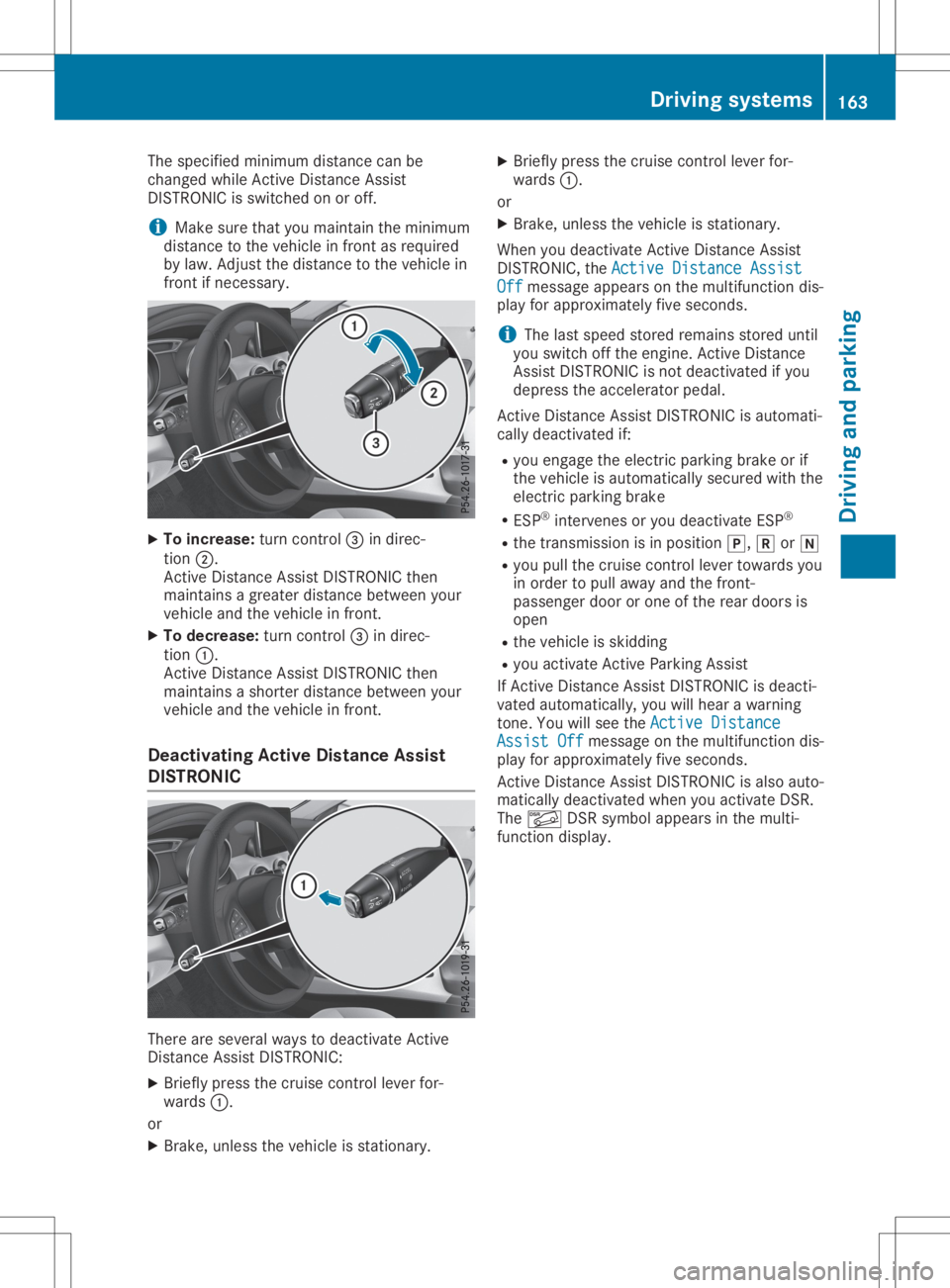
The
specified minimum distancecanbe
changed whileActive Distan ceAssist
DIS TRONIC isswitched onoroff.
i Make
surethatyoumaintain theminimum
distance tothe vehicle infront asrequired
by law. Adjust thedistance tothe vehicle in
front ifnecessary. X
To increase: turncontrol0087 indirec-
tion 0044.
Act ive Distan ceAssist DISTRONIC then
maintains agreater distance between your
vehicle andthevehicle infront .
X To decrease: turncontrol0087 indirec-
tion 0043.
Act ive Distan ceAssist DISTRONIC then
maintains ashorter distance between your
vehicle andthevehicle infront .
Deactivating ActiveDistance Assist
DISTRONIC There
areseveral waystodeactivate Active
Distan ceAssist DISTRONIC:
X Briefly pressthecruise controllever for-
wards 0043.
or X Brake, unless thevehicle isstation ary. X
Briefly pressthecruise controllever for-
wards 0043.
or X Brake, unless thevehicle isstation ary.
When youdeactivate Active Distan ceAssist
DIS TRONIC, theActive Distance Assist Active
Distance Assist
Off Off
message appearsonthe multifunct iondis-
play forapproximately fiveseconds.
i The
lastspeed stored remains storeduntil
you switch offthe engine. Active Distan ce
Assist DISTRONIC isnot deactivated ifyou
depress theaccelerator pedal.
Act ive Distan ceAssist DISTRONIC isautomati-
cally deactivated if:
R you engage theelectric parking brakeorif
the vehicle isautomatically securedwiththe
electric parking brake
R ESP ®
inter venes oryou deactivate ESP®
R the trans mission isin position 005D,005Eor005C
R you pull thecruise controllever towards you
in order topull away andthefront -
passenger doororone ofthe rear doors is
open
R the vehicle isskidding
R you activate Active Parking Assist
If Act ive Distan ceAssist DISTRONIC isdeacti-
vated automatically, youwillhear awarning
ton e.You willsee theActive Distance Active
Distance
Assist Off Assist
Offmessage onthe multifunct iondis-
play forapproximately fiveseconds.
Act ive Distan ceAssist DISTRONIC isalso auto-
matically deactivated whenyouactivate DSR.
The 00C6 DSRsymbol appears inthe multi-
funct iondisplay . Driving
systems
163Drivingandparking Z
Page 175 of 346
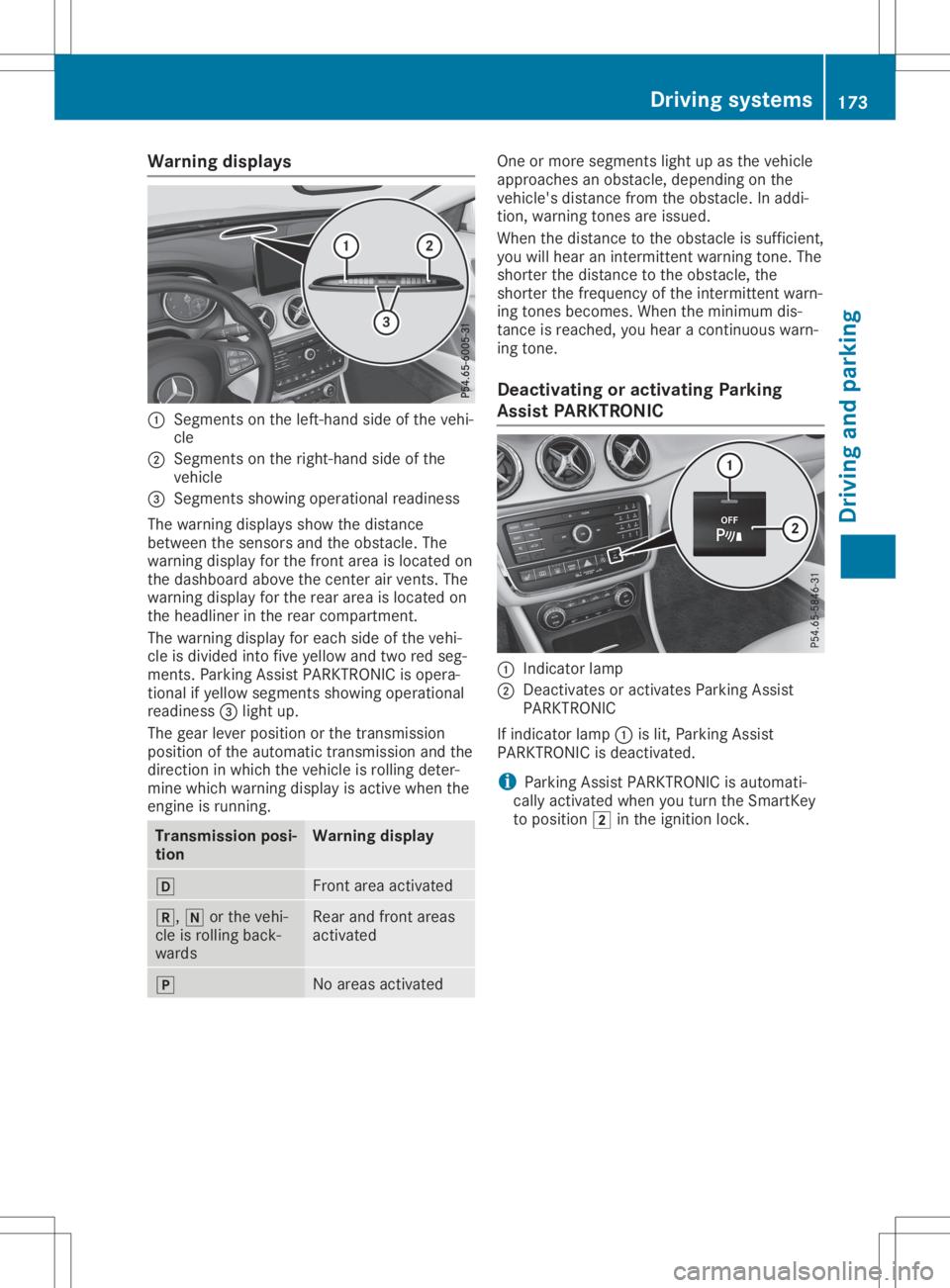
Warning
displays 0043
Segments onthe left-ha ndside ofthe vehi-
cle
0044 Segments onthe right-ha ndside ofthe
vehicl e
0087 Segments showingopera tional readiness
The warning displaysshow thedista nce
betwe enthe sensors andtheobsta cle.The
wa rning displayforthe front areaisloca tedon
the dashboa rdabo vethe center airvents. The
wa rning displayforthe rear area isloca tedon
the headliner inthe rear compa rtment.
The warning displayforeach sideofthe vehi-
cle isdivi ded into fiveyellow and tworedseg-
ments. ParkingAssist PARKTR ONICisopera -
tional ifyel low segme ntsshow ingopera tional
read iness 0087light up.
The gearleve rposi tion orthe transmiss ion
posi tion ofthe automatic transmiss ionand the
dire ction inwhi chthe vehicl eis roll ing deter-
mine whichwarning displayisactive whenthe
engine isrunning. Transmissi
onposi -
tion Warning
display 005B
Front
areaactiva ted 005E,
005Corthe vehi-
cle isroll ing back-
wa rds Rea
rand front areas
activa ted 005D
No
area sactiva ted One
ormore segme ntslight up asthe vehicl e
app roache san obsta cle,depe nding onthe
vehicl e'sdista ncefrom theobsta cle.Inadd i-
tion, warning tones areissu ed.
When thedista ncetothe obsta cleissuffi cient,
you willhea ran intermittent warning tone. The
shorter thedista ncetothe obsta cle,the
shorter thefrequ ency ofthe intermittent warn-
ing tones become s.When theminimu mdis-
tance isreache d,you heara continuou swa rn-
ing tone.
De activati ngoractivati ngParking
Ass istPARK TRONIC 0043
Indica torlam p
0044 Deactiva tesoractiva tesParki ngAssist
PARKTR ONIC
If indica torlam p0043 islit, Parki ngAssist
PARKTR ONICisdea ctivated.
i Parki
ngAssist PARKTR ONICisau tomati-
call yactiva tedwhe nyou turn theSmartKey
to posi tion 0048inthe igniti onlock. Driv
ingsyste ms
173Drivingand parking Z
Page 176 of 346
Problems
withParking AssistPARKTRONIC Problem
Possible
causes/co nsequences and0050 0050
Solutions Only
thered segments
in the Parking Assist
PARKTRONIC warning
display sare lit.You also
hear awarning tonefor
approximately twosec-
onds.
Parking Assist
PARKTRONIC isthen
deactivated andthe
indicator lamponthe
PARKTRONIC button
lights up. Parking
AssistPARKTRONIC hasmalfunction edand hasbeen deac-
tivated.
X Ifproblems persist,haveParking AssistPARKTRONIC checkedat
a quali fiedspecialist workshop. Only
thered segments
in the Parking Assist
PARKTRONIC warning
display sare lit.Parking
Assist PARKTRONIC is
then deactivated. The
Parking AssistPARKTRONIC sensorsaredirty orthere isinter-
ferenc e.
X Clean theParking AssistPARKTRONIC sensors(Ypage 283).
X Switch theignition backon. The
problem maybecaused byan extern alsource ofradio orultra-
sound waves.
X Check tosee ifParking AssistPARKTRONIC worksatadifferent
location. Active
Parking Assist
General notes Act
ive Parking Assistisan electron icparking
aid with ultrasound. Itmeasures theroad on
both sides ofthe vehicle. Aparking symbol
indicates asuitable parkingspace.Active
steering intervention andbrake application
can assist youduring parking andwhen exiting
a parking space.Youcanalso stilluse Parking
Assist PARKTRONIC (Ypage 171).
Import antsafety notes Act
ive Parking Assistismerely anaid. Itis not
a replacement foryour atten tiontoyour imme-
diate surroundings. Youarealwa ysresponsi-
ble forsafe maneuvering, parkingandexiting a
parking space.Makesurethatthere areno
persons, animalsorobject sin the maneuver-
ing area when youaremaneuvering orparking.
When Parking AssistPARKTRONIC isdeactiva-
ted, Active Parking Assistisalso unavaila ble. G
WARNING
While parking orpulli ngout ofaparking
space, thevehicle swingsoutand candrive
onto areas ofthe oncomin glane. Thiscould
cause youtocollide withother roadusers or
object s.There isarisk ofan accident.
Pay atten tiontoother roadusers orobject s.
Stop thevehicle ifnecessary orcancel the
Act ive Parking Assistparking procedure.
! If
they cannot beavoided, driveover
obstacles suchascurbs slowly andatan
obtuse angle.Otherwise, youmay damage
the wheels ortires.
Act ive Parking Assistmaypossibly indicate
parking spaceswhicharenot suitable forpark-
ing, forexample:
R where parking orstopping isprohibited
R in front ofdriveways orentr ances andexits
R on unsuitable surfaces 174
Driving
systemsDriving andparking
Page 177 of 346
Parking
tips:
R On narrow roads,driveasclose tothe park-
ing space aspossible
R Parking spacesthatarelittered orover-
grown mightbeidentified ormeasured
incor rectly
R Parking spacesthatarepartially occupied
by trailer drawbars mightnotbeidentified
as such orbe measured incorrectly
R Snowf allorheavy rainmay lead toaparking
space beingmeasured inaccurately
R Pay atten tiontothe warning messages of
Parking AssistPARKTRONIC duringthe
parking procedure (Ypage 173).
R You caninter vene inthe steerin gprocedure
to correc tit at any time. Active Parking
Assist willthen becanc eled
R When transportin gaload which protrudes
from yourvehicle, youshould notuse Active
Parking Assist
R Never useActive Parking Assistwhensnow
chains areinstalled
R Make surethatthetire pressures arealway s
correc t.This hasadirect influenc eon the
parking characteristics ofthe vehicle.
Use Active Parking Assistforparking spaces:
R that areparallel oratright- angles tothe
direction oftravel
R on straight roads,notbends
R on the same levelasthe road, e.g.noton
the pavement
Detecting parking spaces Object
slocated abovethedetect ionrange of
Act ive Parking Assistwillnotbedetect ed
when theparking spaceismeasured. These
are not taken intoaccount whentheparking
procedure iscalculated, e.g.overhangin g
loads, truckoverhangs orloading ramps.
Act ive Parking Assistmaytheref oreguide you
into theparking spacetooearly.
Act ive Parking Assistdoesnotsupport you
parking inspaces atright angles tothe direc-
tion oftravel if:
R two parking spacesarelocated directly next
to one another
R the parking spaceisdirectly nexttoalow
obstacle suchasalow curb
R you park forwards Act
ive Parking Assistdoesnotsupport you
parking inspaces thatareparallel oratright
angles tothe direction oftravel if:
R the parking spaceison acurb
R the system readstheparking spaceasbeing
blocked, forexample byfoliage orgrass
paving blocks
R the area istoo small forthe vehicle to
maneuver into
R the parking spaceisbordered byan obsta-
cle, e.g. atree, apost oratrailer
Further informationabout thedetect ionrange
(Y page 172). G
WARNIN
G
If there areobject sabove thedetect ion
range:
R the Parking Package withrearview cam-
era may steer tooearly
R the vehicle maynotstop infron tof these
object s
This could cause acollision. Thereisarisk
of an accident .
If object sare located abovethedetect ion
range, stopanddeactivate theParking Pack-
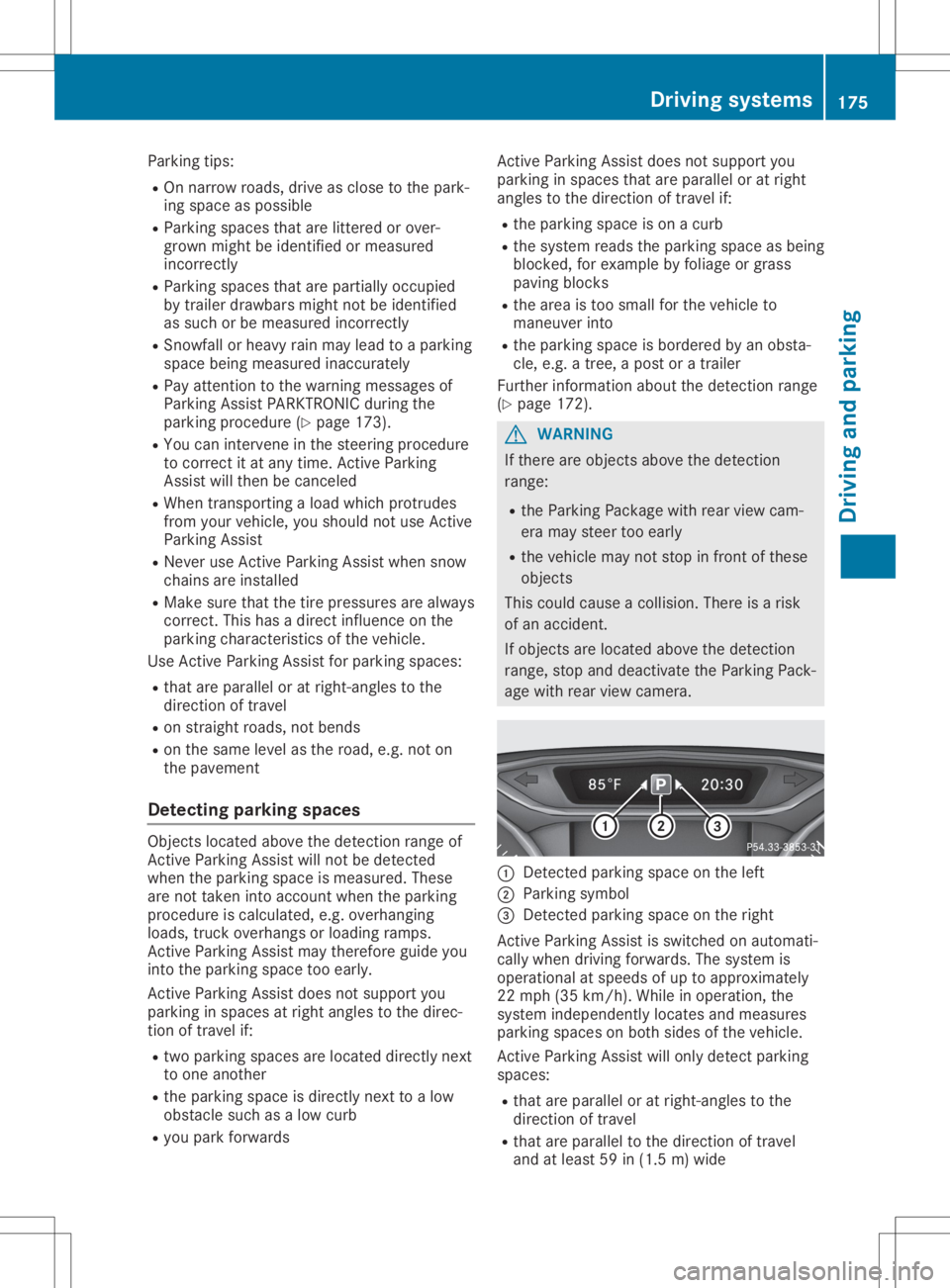
age with rearview camera. 0043
Detected parking spaceonthe left
0044 Parking symbol
0087 Detected parking spaceonthe right
Act ive Parking Assistisswitched onautomati-
cally when driving forwards. Thesystem is
operational atspeeds ofup toapproximately
22 mph (35km/ h).Whi lein ope ration, the
sy stem indepe ndentl ylo cate sand measures
pa rking spaces onboth sides ofthe vehicle.
Active Parking Assistwillonly detectparking
spa ces:
R that areparal lelor atright-ang lesto the
di recti onoftrav el
R that areparal lelto the directi onoftrav el
and atleas t59 in(1.5 m)wid e Dr
ivin gsy stem s
175Dr ivin gand parking Z
Page 179 of 346
The
Parking AssistActiveSelectR Parking
AssistActiveSelectR
Observe Surrounding s Observe
Surrounding smessage appearson
the multifunct iondisplay .
As soon asthe parking procedure iscomplete,
the Active Parking AssistFinished Active
Parking AssistFinished mes-
sage appears andawarning tonesounds. The
vehicle isnow parked.
The vehicle iskept station arywithout the
driver having todepress thebrake pedal. The
braking effectiscanceled whenyoudepress
the accelerator pedal.
Act ive Parking Assistnolonger supports you
with steerin ginter ventions andbrake applica-
tions. When Active Parking Assistisfinished,
you must steer andbrake againyourself.
Act ive Parking Assistisstill availabl e.
Parking tips:
R The way your vehicle ispositioned inthe
parking spaceafterparking isdependent on
various factors.These include theposition
and shape ofthe vehicles parkedinfront
and behind itand thecondit ionsofthe loca-
tion. Itmay bethe case thatActive Parking
Assist guides youtoofarinto aparking
space, ornot farenough intoit.Insome
cases, itmay alsolead youacross oront o
the curb. Ifnecessary, canceltheparking
procedure withActive Parking Assist.
R You canalso preselect transmission position
005B. The vehicle redirect sand does notdrive
as far into theparking space.Should the
trans mission changetakeplace tooearly,
the parking procedure iscanceled. Asensi-
ble parking position cannolonger beach-
ieved fromthisposition.
Exiting apar king space In
order thatActive Parking Assistcansupport
you when exitingthe parking space:
R you need tohave parked usingActive Park-
ing Assist .
R the border ofthe parking spacemustbe
high enough atthe front andtherear. A
curb stoneis too small, forexample.
R the border ofthe parking spacemustnotbe
too wide, asthe position ofthe vehicle must
not exceed anangle of45° tothe start ing
position asitis maneuvered intotheparking
space.
R amaneuvering distanceofat least 3.3ft
(1.0 m)must beavailabl e. Act
ive Parking Assistcanonly assist youwith
exitin gaparking spaceifyou have parked the
vehicle parallel tothe direction oftravel using
Act ive Parking Assist.
i If
Act ive Parking Assistdetectsobstacles,
Act ive Parking Assistbrakes automatically
while thevehicle isexitin gthe parking
space. Youareresponsible forbraking in
good time.
X Start theengine.
X Release theelectric parking brake.
X Switch onthe turn signal inthe direction
you willdrive outofthe parking space.
X Shift thetrans mission toposition 005Bor005E.
The Start Parking Assist? Start
Parking Assist?Yes:OK Yes:
OKNo: No:
0038 message appearsonthe multifunct ion
display .
X To cancel theprocedur e:press the0038
button onthe multifunct ionsteerin gwheel
or pull away .
or X To
exit apar king space usingActive
Park ingAssist: pressthe0076 button on
the multifunct ionsteerin gwheel.
The Parking AssistActiveAcceler‐ Parking
AssistActiveAcceler‐
ate andBrake ate
andBrake Observe Surrounding s Observe
Surrounding s
message appearsonthe multifunct iondis-
play.
X Let goofthe multifunct ionsteerin gwheel.
X Pull away ,being ready tobrake atall times.
Do not exceed amaximum speedofapprox-
imately 6mph (10km/ h)when exitinga
park ingspac e.Otherwis e,Ac tivePark ing
As sist willbecan cele d.
X Dep endingonthemess ageoras requir ed,
shif tth etransm ission toposit ion005Bor005E.
Ac tivePark ingAssist imme diatelysteers in
th eoth erdirec tion.The Park ingAssist Park
ingAssist
Acti veAcce lerateand Brake Acti
veAcce lerateand BrakeObse rve Obse
rve
Surr oundings Surr
oundings messageappears onthe
mult ifunction display.
i You
willachie vethebest result sby waitin g
for thest eerin gproc edure tocom plete
befo repulling away.
If you back upafteract ivat ion, thest eerin g
wheel ismov edtothest raight -aheadposi-
tio n.
X Dr ive forwards andreverse asprom ptedby
th eAc tivePark ingAssist warn ingdisplays,
seve raltim esifnec essar y. Drivin
gsyst ems
177Driving andparking Z
Page 180 of 346
Once
youhave exited theparking spacecom-
pletely, thesteering wheelismoved tothe
straight-ahead position.Youhear atone and
the Active Parking AssistFinished Active
Parking AssistFinished mes-
sage appea rson the multifunction display.You
will then have tosteer andmerge intotraffic
on your own. Active Parking Assistisstill avail -
able. Youcantake overthesteering beforethe
vehicle hasexited theparking spacecom-
pletely. Thisisuseful ,for example whenyou
recognize thatitis alrea dypossible topull out
of the parking space.
Cance lingActive Parking Assist X
Stop themovement ofthe multifunction
steering wheelorsteer yoursel f.
Act ive Parking Assistwillbecanceled at
once. TheActive Parking AssistCan‐ Active
Parking AssistCan‐
celed celed
message appearsinthe multifunction
displa y.
or X Press thePARKTRONIC button
(Y page 173).
Act ive Parking Assistisswitched offand
Act ive Parking Assistisimmediately can-
celed. TheActive Parking AssistCan‐ Active
Parking AssistCan‐
celed celed
message appearsinthe multifunction
displa y.
Act ive Parking Assistiscanceled automaticall y
if:
R the electric parking brakeisengaged
R transmission position005Disselected
R parking usingActive Parking Assistisno
longer possible
R you aredriving fasterthan6mph (10km/h )
R awheel spins,ESP®
intervenes orfails. In
such cases the00E5 warning lamplights up
in the instrument cluster
A warning tonesounds. Theparking symbol
disapp earsandthemultifunction display
shows theActive Parking AssistCan‐ Active
Parking AssistCan‐
celed celed
message.
When Active Parking Assistiscanceled, you
must steer andbrake againyoursel f.
If asystem malfunction occurs,thevehicle is
braked toastandstill. Todrive on,depress the
accelerator again. Rear
view camera
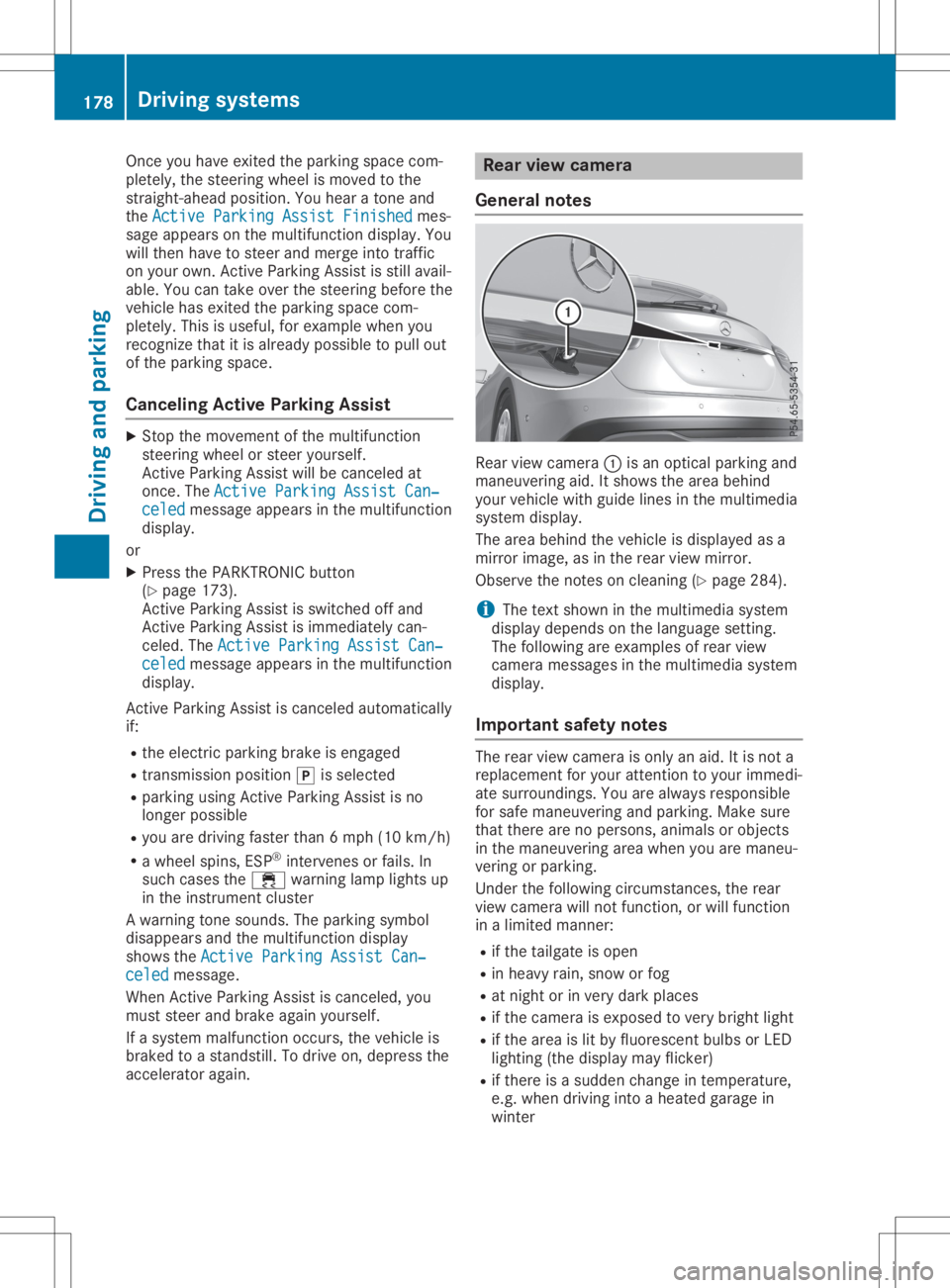
General notes Rear
viewcamera 0043isan optical parking and
maneuvering aid.Itshows thearea behind
your vehicle withguide linesinthe multimedia
system display.
The area behind thevehicle isdispla yedasa
mirror image, asinthe rear view mirror.
Observe thenotes oncleaning (Ypage 284).
i The
text shown inthe multimedia system
displa ydepends onthe langua gesetting.
The followi ngare examples ofrear view
camera messages inthe multimedia system
displa y.
Importa ntsafety notes The
rear view camera isonly anaid. Itis not a
replacement foryour attent iontoyour immedi-
ate surroundings. Youarealwa ysresponsible
for safe maneuvering andparking. Makesure
that there arenopersons, animalsorobjects
in the maneuvering areawhen youaremaneu-
vering orparking.
Under thefollowi ngcircumstances, therear
view camera willnotfunction, orwill function
in alimited manner:
R ifthe tailgate isopen
R in heavy rain,snow orfog
R at night orinvery dark places
R ifthe camera isexposed tovery bright light
R ifthe area islit by fluorescent bulbsorLED
lighting (thedispla ymay flicker)
R ifthere isasudden changeintemperature,
e.g. when driving intoaheated garagein
winter 178
Driving
systemsDriving andparking