Multifunction MERCEDES-BENZ GLA-Class 2017 X156 User Guide
[x] Cancel search | Manufacturer: MERCEDES-BENZ, Model Year: 2017, Model line: GLA-Class, Model: MERCEDES-BENZ GLA-Class 2017 X156Pages: 390, PDF Size: 8.37 MB
Page 159 of 390
ProblemPossible causes/consequences andMSolutions
The engine is not run-
ning smoothly and is
misfiring.There is a malfunction in the engine electronics or in a mechanical
component of the engine management system.
XOnly depress the accelerator pedal slightly.
Otherwise, non-combusted fuel may get into the catalytic con-
verter and damage it.
XHave the cause rectified immediately at a qualified specialist
workshop.
The coolant tempera-
ture gauge shows a
value above 248 ‡
(120 †). The coolant
warning lamp may also
be on and a warning
tone may sound.The coolant level is too low. The coolant is too hot and the engine
is no longer being cooled sufficiently.
XStop as soon as possible and allow the engine and the coolant to
cool down.
XCheck the coolant level (Ypage 311). Observe the warning
notes as you do so and add coolant if necessary.
DYNAMIC SELECT button (all vehicles
except Mercedes-AMG vehicles)
Use the DYNAMIC SELECT button to change
the drive program. Depending on the drive
program selected the following vehicle char-
acteristics will change:
Rthe drive (engine and transmission man-
agement)
Rthe steering
Rthe availability of the ECO start/stop func-
tion
Rthe climate control:
Each time you start the engine with the
SmartKey or the Start/Stop button, drive pro-
gram Cis activated. For further information
about starting the engine, see (
Ypage 151).
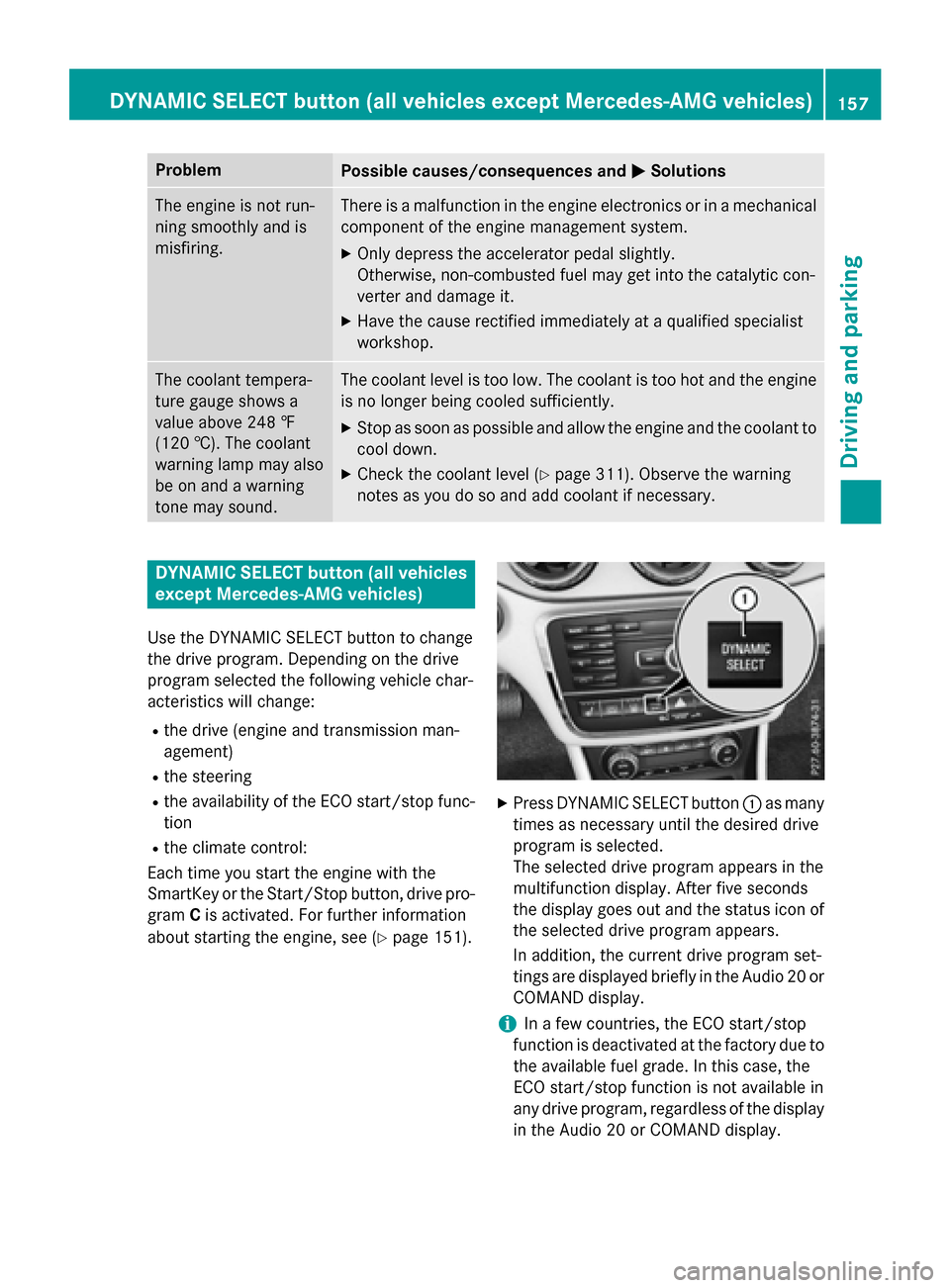
XPress DYNAMIC SELECT button :as many
times as necessary until the desired drive
program is selected.
The selected drive program appears in the
multifunction display. After five seconds
the display goes out and the status icon of
the selected drive program appears.
In addition, the current drive program set-
tings are displayed briefly in the Audio 20 or
COMAND display.
iIn a few countries, the ECO start/stop
function is deactivated at the factory due to the available fuel grade. In this case, the
ECO start/stop function is not available in
any drive program, regardless of the display
in the Audio 20 or COMAND display.
DYNAMIC SELECT button (all vehicles except Mercedes-AMG vehicles)157
Driving and parking
Z
Page 160 of 390
Available drive programs:
CComfortComfortable and econom-
ical driving characteristics
SSpo rtSporty driving character-
istics
IIndivi dualIndividual settings
Off-roadOptimal driving character-
istics for easily negotiable
off-road terrain
E EconomyParticularly economical
driving characteristics
Ad ditional information for drive programs
(
Ypage 164).
You can also change gear yourself using the
steering wheel paddleshifters. For further
information on the manual drive program
(
Ypage 166).
DYNAMIC SELECT controller
(Mercedes-AMG vehicles)
Use the DYNAMIC SELECT controller to
change the drive program. Depending on the
driv e program selected the following vehicle
characteristics will change:
Rthe drive
Rthe transmission management
RESP®
Rthe suspension (vehicles with AMG adap-
tive sport suspension system)
Rthe availab ility of the ECO start /stop func-
tion
Rthe availab ility of gliding mode
Each time you start the engine with the
Sm artKey or the Start /S top button, drive pro-
gram Cis activated. For further information
about starting the engine, see (
Ypage 151).
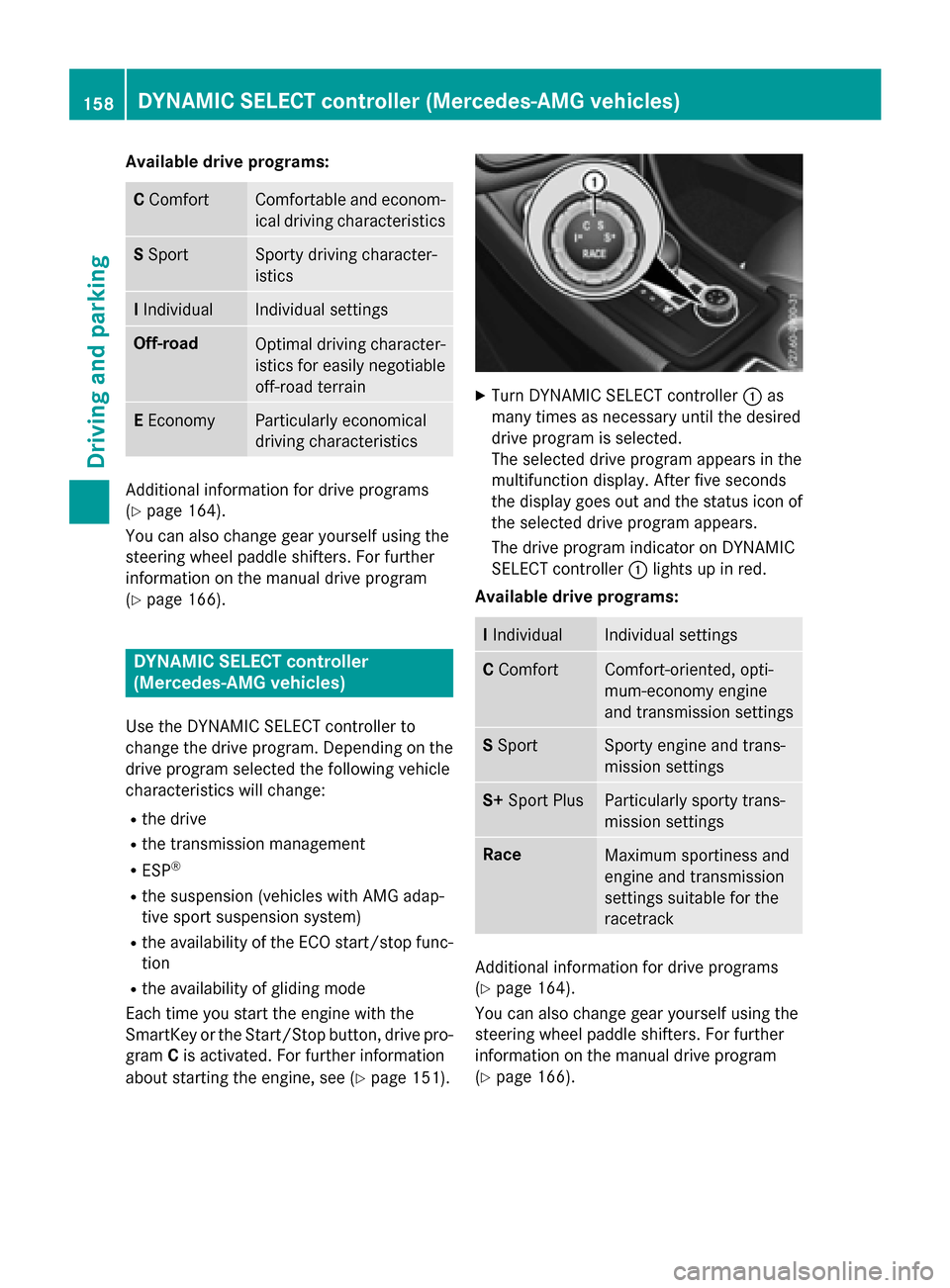
XTurn DYNAMIC SELECT controller :as
many times as necessary unt ilthe desired
driv e program isselected.
The selected drive program appears inthe
multifunction display. After five seconds
the disp lay goes out and the status icon of
the selected drive program appears.
The drive program indicator on DYNAMIC
SE LECT controller :lights up inred.
Available drive programs:
I Indivi dualIndividual settings
CComfortComfort-oriente d,opti-
mum-economy engine
and transmission settings
S Spo rtSporty engine and trans-
mission settings
S+ Sport PlusParticularly sporty trans-
mission settings
RaceMaximum sportiness and
engine and transmission
settings suitable for the
racetrack
Additional information for drive programs
(
Ypage 164).
You can also change gear yourself using the
steering wheel paddleshifters. For further
information on the manual drive program
(
Ypage 166).
158DYNAMIC SELECT controller (Mercedes-AMG vehicles)
Driving and parking
Page 161 of 390
Automa tic trans mission
Import ant safety notes
GWARNIN G
If th eengin espee dis abov eth eidlin gspee d
and you engage transmission position Dor R,
th evehicl ecould pull away suddenly. There is
a ris kof an accident.
When engagin gtransmission position Dor R,
always firmly depress th ebrak epedal and do
no tsimultaneously accelerate .
GWARNING
The automatic transmission switches to neu-
tral position Nwhen you switch off th eengine.
The vehicl emay rol laway. There is aris kof an
accident.
Afte rswitching off th eengine, always switch
to parking position P.Preven tth eparked vehi-
cle from rollin gaway by applyin gth eparking
brake.
DIRECT SELECT lever
Overview oftrans mission positions
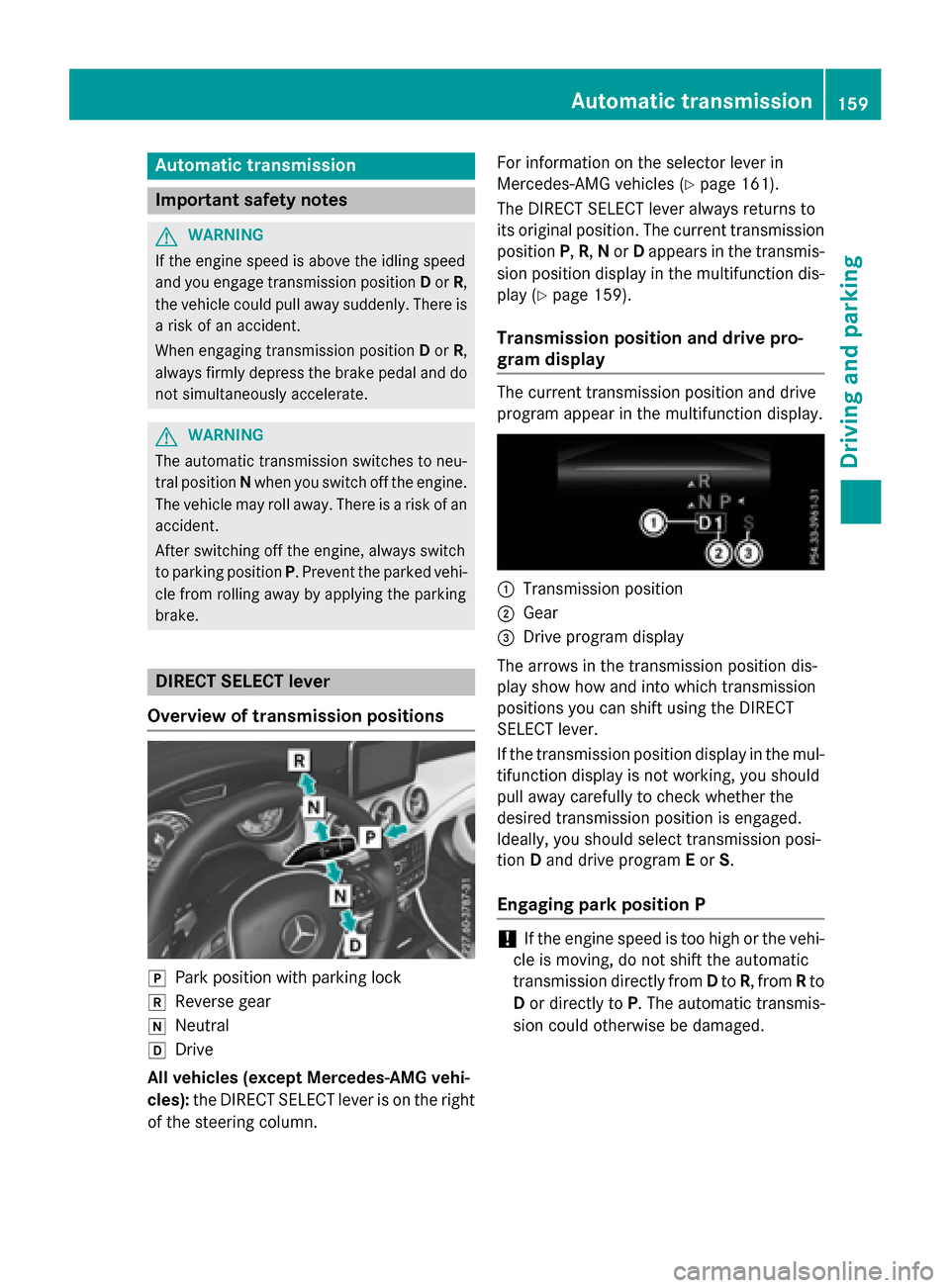
jPark position wit hparking loc k
kReversegear
iNeutral
hDrive
All vehicles (excep tMercedes-AM G vehi-
cles): theDIRECT SELECT lever is on th eright
of th esteering column . Fo
rinformation on th eselector lever in
Mercedes-AM Gvehicles (
Ypage 161).
The DIRECT SE LECT lever always return sto
it s original position .The curren ttransmission
position P,R,N or Dappear sin th etransmis -
sion position display in th emultifunction dis-
play (
Ypage 159).
Trans mission position and drive pr o-
gram display
The curren ttransmission position and driv e
program appear in th emultifunction display.
:Transmi ssion position
;Gear
=Drive program display
The arrows in th etransmission position dis-
play sho whow and int owhic htransmission
position syou can shif tusin gth eDIRECT
SE LECT lever.
If th etransmission position display in th emul-
tifunction display is no tworking ,you should
pull away carefully to chec kwhether th e
desired transmission position is engaged.
Ideally, you should select transmission posi-
tion Dand driv eprogram Eor S.
Engaging pa rkposition P
!If th eengin espee dis to ohigh or th evehi-
cle is moving ,do no tshif tth eautomatic
transmission directly from Dto R,from Rto
D or directly to P.The automatic transmis -
sion could otherwise be damaged.
Automatic transmission15 9
Driving an d parking
Z
Page 162 of 390
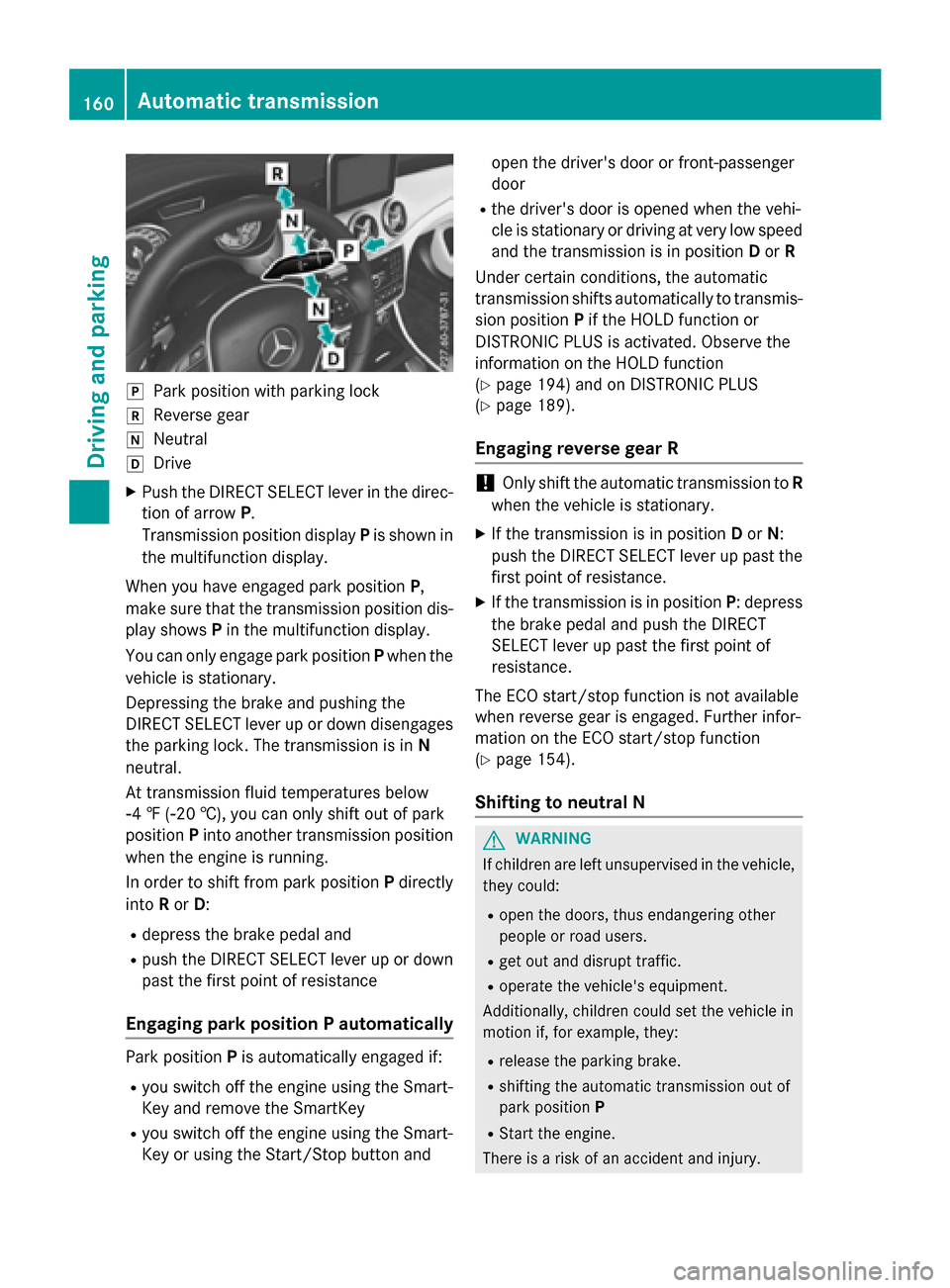
jPark position with parking lock
kReverse gear
iNeutral
hDrive
XPush the DIRECT SELECT lever in the direc-
tion of arrowP.
Transmission position display Pis shown in
the multifunction display.
When you have engaged park position P,
make sure that the transmission position dis-
play shows Pin the multifunction display.
You can only engage park position Pwhen the
vehicle is stationary.
Depressing the brake and pushing the
DIRECT SELECT lever up or down disengages
the parking lock. The transmission is in N
neutral.
At transmission fluid temperatures below
Ò4 ‡ (Ò20 †), you can only shift out of park
position Pinto another transmission position
when the engine is running.
In order to shift from park position Pdirectly
into Ror D:
Rdepress the brake pedal and
Rpush the DIRECT SELECT lever up or down
past the first point of resistance
Engaging park position P automatically
Park position Pis automatically engaged if:
Ryou switch off the engine using the Smart-
Key and remove the SmartKey
Ryou switch off the engine using the Smart-
Key or using the Start/Stop button and open the driver's door or front-passenger
door
Rthe driver's door is opened when the vehi-
cle is stationary or driving at very low speed
and the transmission is in position Dor R
Under certain conditions, the automatic
transmission shifts automatically to transmis-
sion position Pif the HOLD function or
DISTRONIC PLUS is activated. Observe the
information on the HOLD function
(
Ypage 194) and on DISTRONIC PLUS
(
Ypage 189).
Engaging reverse gear R
!Only shift the automatic transmission to R
when the vehicle is stationary.
XIf the transmission is in position Dor N:
push the DIRECT SELECT lever up past the
first point of resistance.
XIf the transmission is in position P: depress
the brake pedal and push the DIRECT
SELECT lever up past the first point of
resistance.
The ECO start/stop function is not available
when reverse gear is engaged. Further infor-
mation on the ECO start/stop function
(
Ypage 154).
Shifting to neutral N
GWARNING
If children are left unsupervised in the vehicle,
they could:
Ropen the doors, thus endangering other
people or road users.
Rget out and disrupt traffic.
Roperate the vehicle's equipment.
Additionally, children could set the vehicle in
motion if, for example, they:
Rrelease the parking brake.
Rshifting the automatic transmission out of
park position P
RStart the engine.
There is a risk of an accident and injury.
160Automatic transmission
Driving and parking
Page 163 of 390
When leaving the vehicle, always take the
SmartKey with you and lock the vehicle. Never
leave children or animals unattended in the
vehicle. Always keep the SmartKey out of
reach of children.
XIf the transmission is in positionDor R:
push the DIRECT SELECT lever up or down
to the first point of resistance.
XIf the transmission is in position P: depress
the brake pedal and push the DIRECT
SELECT lever up or down to the first point of
resistance.
If you switch the engine off with the trans-
mission in position Ror D, the automatic
transmission shifts to Nautomatically.
With the SmartKey: if you then open the
driver's door or the front-passenger door or
remove the SmartKey from the ignition, the
automatic transmission shifts to Pautomati-
cally.
With the Start/Stop button: if you then
open the driver's door or the front-passenger
door, the automatic transmission shifts to P
automatically.
If you want the automatic transmission to
remain in neutral N, e.g. when having the
vehicle cleaned in an automatic car wash with
a towing system:
Using the SmartKey:
XSwitch on the ignition.
XDepress the brake pedal and keep it
depressed.
XShift to neutral N.
XRelease the brake pedal.
XRelease the electric parking brake.
XSwitch off the ignition and leave the Smart-
Key in the ignition lock.
With the Start/Stop button:
XRemove the Start/Stop button from the
ignition lock.
XInsert the SmartKey into the ignition lock.
XSwitch on the ignition.
XDepress the brake pedal and keep it
depressed.
XShift to neutral N.
XRelease the brake pedal.
XRelease the electric parking brake.
XSwitch off the ignition and leave the Smart-
Key in the ignition lock.
Engaging drive position D
XIf the transmission is in position Ror N:
push the DIRECT SELECT lever down past
the first point of resistance.
XIf the transmission is in position P: depress
the brake pedal and push the DIRECT
SELECT lever down past the first point of
resistance.
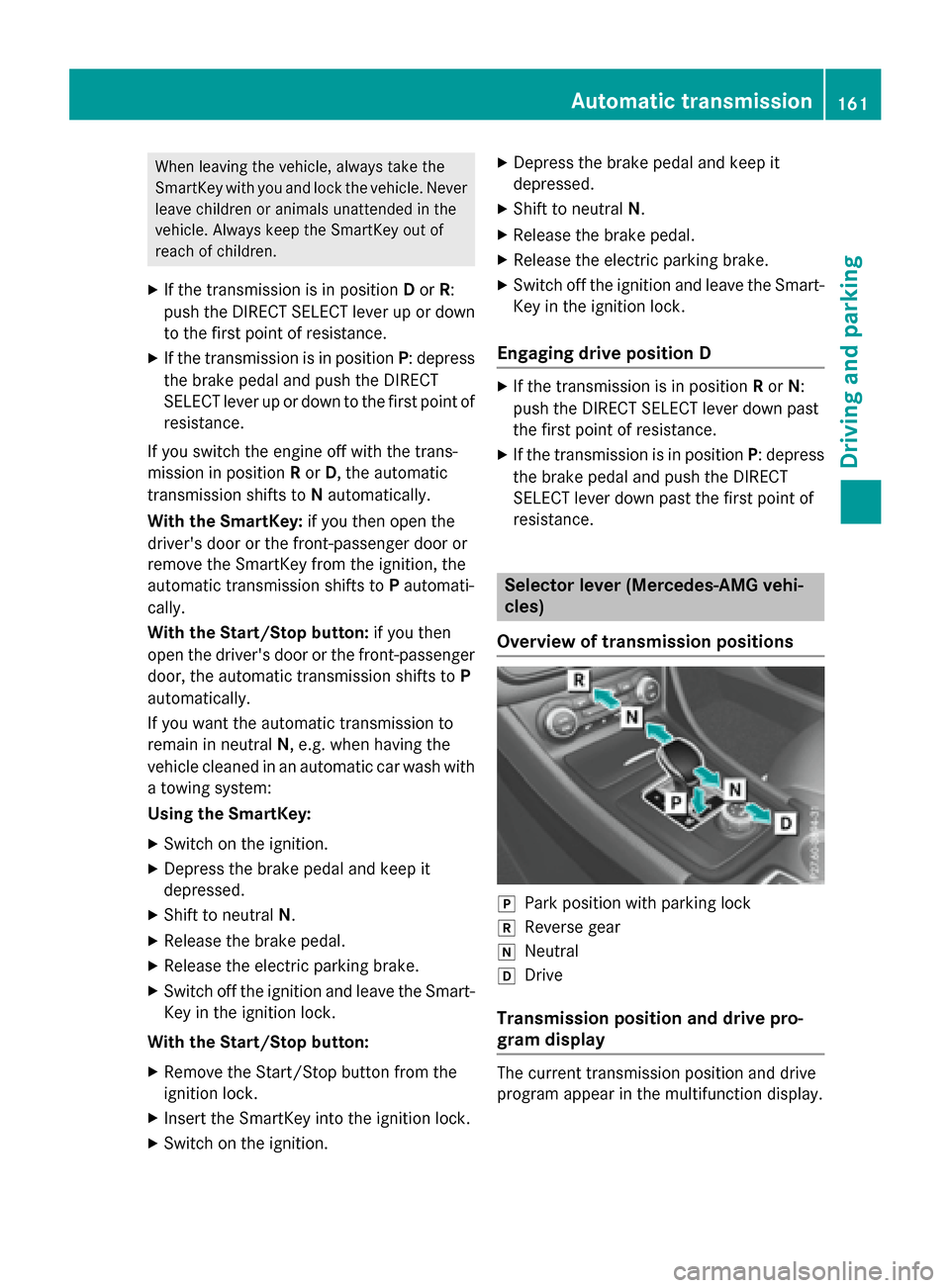
Selector lever (Mercedes-AMG vehi-
cles)
Overview of transmission positions
jPark position with parking lock
kReverse gear
iNeutral
hDrive
Transmission position and drive pro-
gram display
The current transmission position and drive
program appear in the multifunction display.
Automatic transmission161
Driving and parking
Z
Page 165 of 390
ANeutral
Do not shift the transmission toN
while driving. Otherwise, the auto-
matic transmission could be dam-
aged.
No power is transmitted from the
engine to the drive wheels.
Releasing the brakes will allow you
to move the vehicle freely, e.g. to
push it or tow it.
If ESP
®is deactivated or faulty:
shift the transmission to position N
if the vehicle is in danger of skid-
ding, e.g. on icy roads.
If you switch the engine off with the
transmission in position Ror D, the
automatic transmission shifts to N
automatically.
!Rolling in neutral Ncan damage
the drive train.
7Drive
The automatic transmission
changes gear automatically. All
forward gears are available.
Driving tips
Changing gear
The automatic transmission shifts to the indi-
vidual gears automatically when it is in trans-
mission position D. This automatic gear shift-
ing behavior is determined by:
Rthe selected drive program
Rthe position of the accelerator pedal
Rthe road speed
Accelerator pedal position
Your style of driving influences how the auto- matic transmission shifts gear:
Rlittle throttle: early upshifts
Rmore throttle: late upshifts
Holding the vehicle stationary on uphill
gradients
GWARNING
If the clutch overheats, the electronic man-
agement system is automatically deactivated. This interrupts the power transmission. The
vehicle may, for example, roll backwards on
gradients. There is a risk of an accident.
Never hold the vehicle stationary on uphill
gradients by depressing the accelerator.
The clutch may overheat if you hold the vehi-
cle stationary on uphill gradients by depress-ing the accelerator pedal. If the clutch over-
heats, a warning tone sounds.
All vehicles (except Mercedes-AMG vehi-
cles): theStop Vehicle Shift to P
Leave Engine Runningdisplay message
appears in the multifunction display. You will
only be able to continue your journey once the
clutch has cooled down and the display mes-
sage in the multifunction display has disap-
peared.
Mercedes-AMG vehicles: theTrans. Oil
Overheated Drive on with Caredisplay
message appears in the multifunction dis-
play.
Do not hold the vehicle stationary on uphill
gradients by depressing the accelerator
pedal. Instead, only ever hold the vehicle sta-
tionary on uphill gradients by:
Rdepressing the brake pedal
Ractivating the HOLD function
Rengaging the electric parking brake
Kickdown
Use kickdown for maximum acceleration.
XDepress the accelerator pedal beyond the
pressure point.
The automatic transmission shifts to a
lower gear depending on the engine speed.
XEase off the accelerator pedal once the
desired speed is reached.
The automatic transmission shifts back up.
Automatic transmission163
Driving an d parking
Z
Page 169 of 390
Permanent setting (Mercedes-AMG
vehicles)
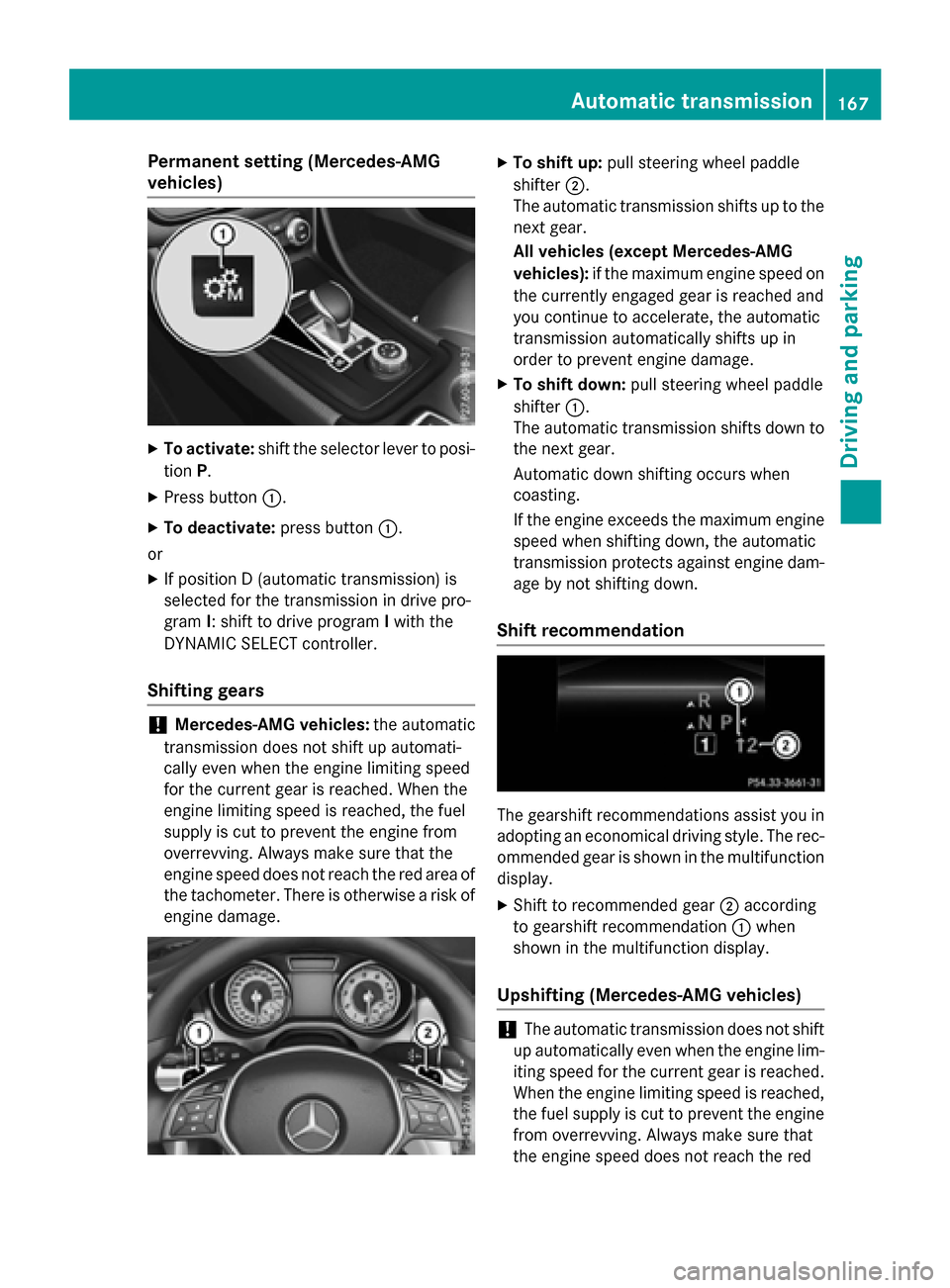
XTo activate:shift the selector lever to posi-
tion P.
XPress button :.
XTo deactivate: press button:.
or
XIf position D (automatic transmission) is
selected for the transmission in drive pro-
gram I: shift to drive program Iwith the
DYNAMIC SELECT controller.
Shifting gears
!Mercedes-AMG vehicles: the automatic
transmission does not shift up automati-
cally even when the engine limiting speed
for the current gear is reached. When the
engine limiting speed is reached, the fuel
supply is cut to prevent the engine from
overrevving. Always make sure that the
engine speed does not reach the red area of
the tachometer. There is otherwise a risk of
engine damage.
XTo shift up: pull steering wheel paddle
shifter ;.
The automatic transmission shifts up to the next gear.
All vehicles (except Mercedes-AMG
vehicles): if the maximum engine speed on
the currently engaged gear is reached and
you continue to accelerate, the automatic
transmission automatically shifts up in
order to prevent engine damage.
XTo shift down: pull steering wheel paddle
shifter :.
The automatic transmission shifts down to
the next gear.
Automatic down shifting occurs when
coasting.
If the engine exceeds the maximum engine
speed when shifting down, the automatic
transmission protects against engine dam-
age by not shifting down.
Shift recommendation
The gearshift recommendations assist you in
adopting an economical driving style. The rec-
ommended gear is shown in the multifunction
display.
XShift to recommended gear ;according
to gearshift recommendation :when
shown in the multifunction display.
Upshifting (Mercedes-AMG vehicles)
!The automatic transmission does not shift
up automatically even when the engine lim-
iting speed for the current gear is reached.
When the engine limiting speed is reached,
the fuel supply is cut to prevent the engine
from overrevving. Always make sure that
the engine speed does not reach the red
Automatic transmission167
Driving and parking
Z
Page 170 of 390
area of the tachometer. There is otherwise
a risk of engine damage.
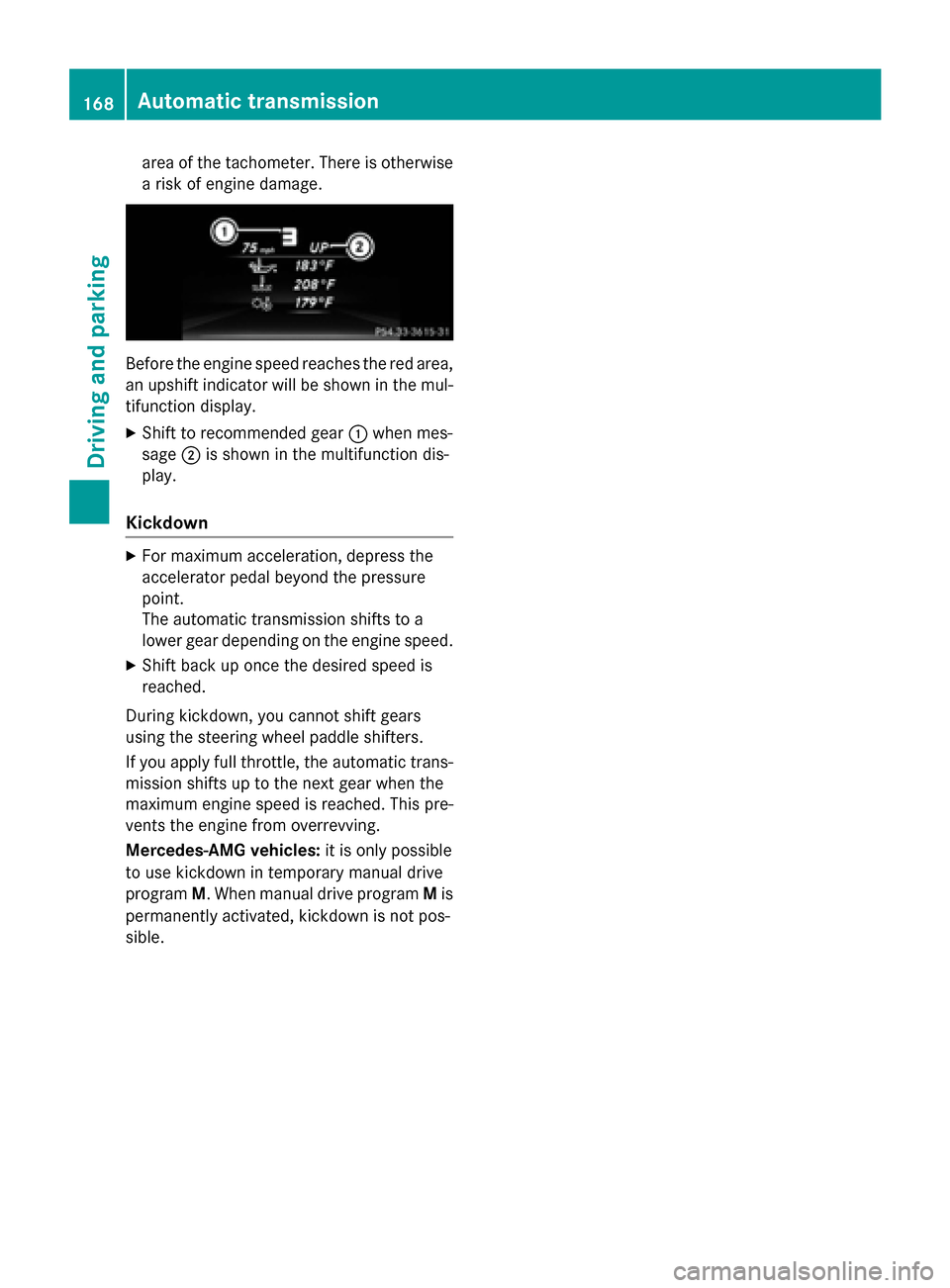
Before the engine speed reaches the red area,
an upshift indicator will be shown in the mul-
tifunction display.
XShift to recommended gear:when mes-
sage ;is shown in the multifunction dis-
play.
Kickdown
XFor maximum acceleration, depress the
accelerator pedal beyond the pressure
point.
The automatic transmission shifts to a
lower gear depending on the engine speed.
XShift back up once the desired speed is
reached.
During kickdown, you cannot shift gears
using the steering wheel paddle shifters.
If you apply full throttle, the automatic trans-
mission shifts up to the next gear when the
maximum engine speed is reached. This pre-
vents the engine from overrevving.
Mercedes-AMG vehicles: it is only possible
to use kickdown in temporary manual drive
program M. When manual drive program Mis
permanently activated, kickdown is not pos-
sible.
168Automatic transmission
Driving and parking
Page 172 of 390
!Overfilling the fuel tank could damage the
fuel system.
!Take care not to spill any fuel on painted
surfaces. You could otherwise damage the
paintwork.
!Use a filter when refueling from a fuel can.
Otherwise, the fuel lines and/or injection
system could be blocked by particles from
the fuel can.
Do not get into the vehicle again during the
refueling process. Otherwise, electrostatic
charge could build up again.
If you overfill the fuel tank, fuel could spray
out when the fuel pump nozzle is removed.
For further information on fuel and fuel quality (
Ypage 377).
Refueling
General information
The fuel filler flap is unlocked/locked auto-
matically when you unlock/lock the vehicle
with the SmartKey.
The position of the fuel filler cap is displayed
æ in the instrument cluster. The arrow on
the filling pump indicates the side of the vehi-
cle.
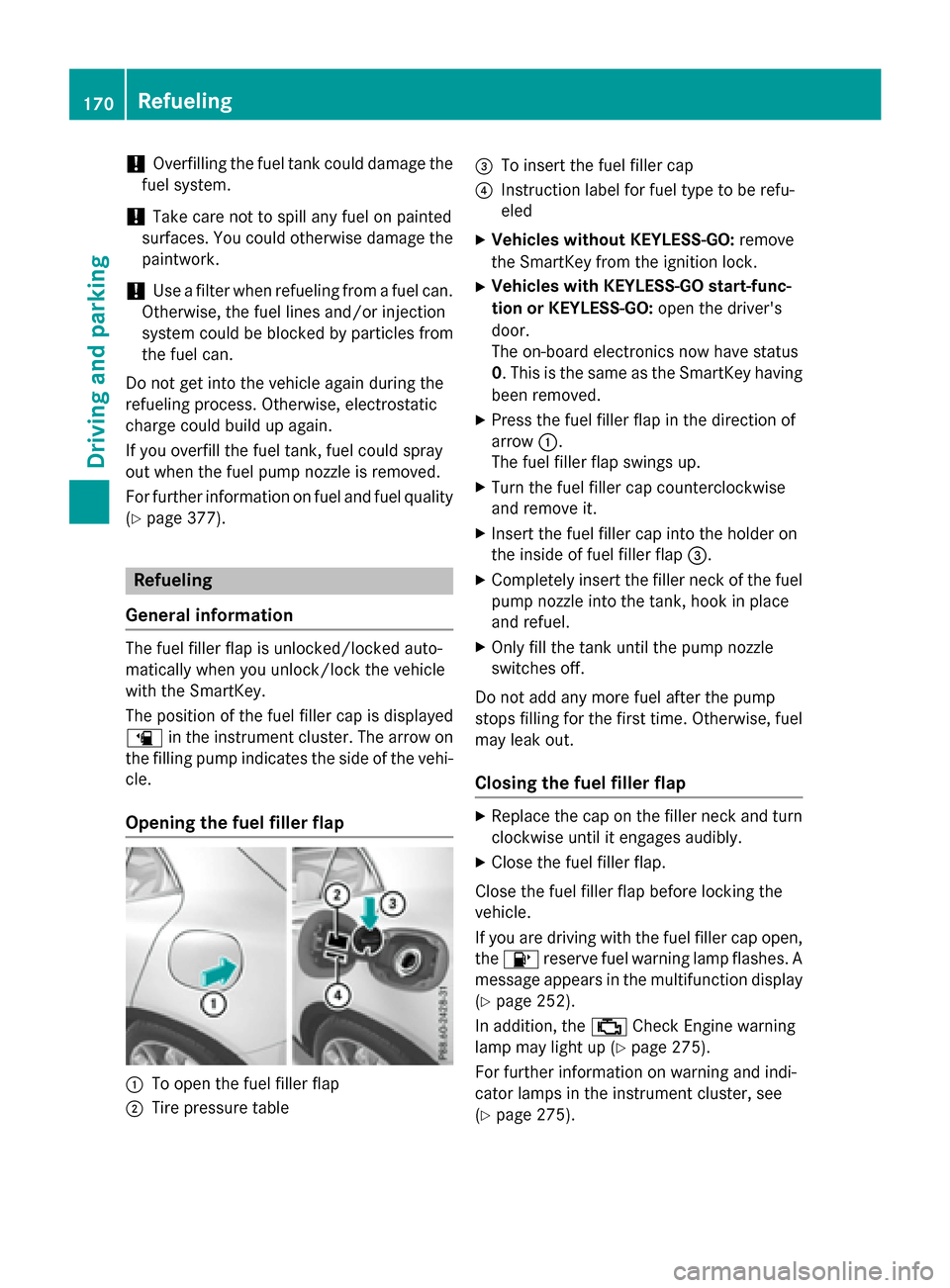
Opening the fuel filler flap
:To open the fuel filler flap
;Tire pressure table
=To insert the fuel filler cap
?Instruction label for fuel type to be refu-
eled
XVehicles without KEYLESS-GO: remove
the SmartKey from the ignition lock.
XVehicles with KEYLESS-GO start-func-
tion or KEYLESS-GO: open the driver's
door.
The on-board electronics now have status
0. This is the same as the SmartKey having
been removed.
XPress the fuel filler flap in the direction of
arrow :.
The fuel filler flap swings up.
XTurn the fuel filler cap counterclockwise
and remove it.
XInsert the fuel filler cap into the holder on
the inside of fuel filler flap =.
XCompletely insert the filler neck of the fuel
pump nozzle into the tank, hook in place
and refuel.
XOnly fill the tank until the pump nozzle
switches off.
Do not add any more fuel after the pump
stops filling for the first time. Otherwise, fuel
may leak out.
Closing the fuel filler flap
XReplace the cap on the filler neck and turn
clockwise until it engages audibly.
XClose the fuel filler flap.
Close the fuel filler flap before locking the
vehicle.
If you are driving with the fuel filler cap open,
the 8 reserve fuel warning lamp flashes. A
message appears in the multifunction display
(
Ypage 252).
In addition, the ;Check Engine warning
lamp may light up (
Ypage 275).
For further information on warning and indi-
cator lamps in the instrument cluster, see
(
Ypage 275).
170Refueling
Driving and parking
Page 174 of 390
Switching off the engine
Important safety notes
GWARNING
The automatic transmission switches to neu-
tral position Nwhen you switch off the engine.
The vehicle may roll away. There is a risk of an
accident.
After switching off the engine, always switch
to parking position P. Prevent the parked vehi-
cle from rolling away by applying the parking
brake.
Vehicles with automatic transmission
XApply the electric parking brake.
XAll vehicles (except Mercedes-AMG
vehicles): shift the transmission to posi-
tion P.
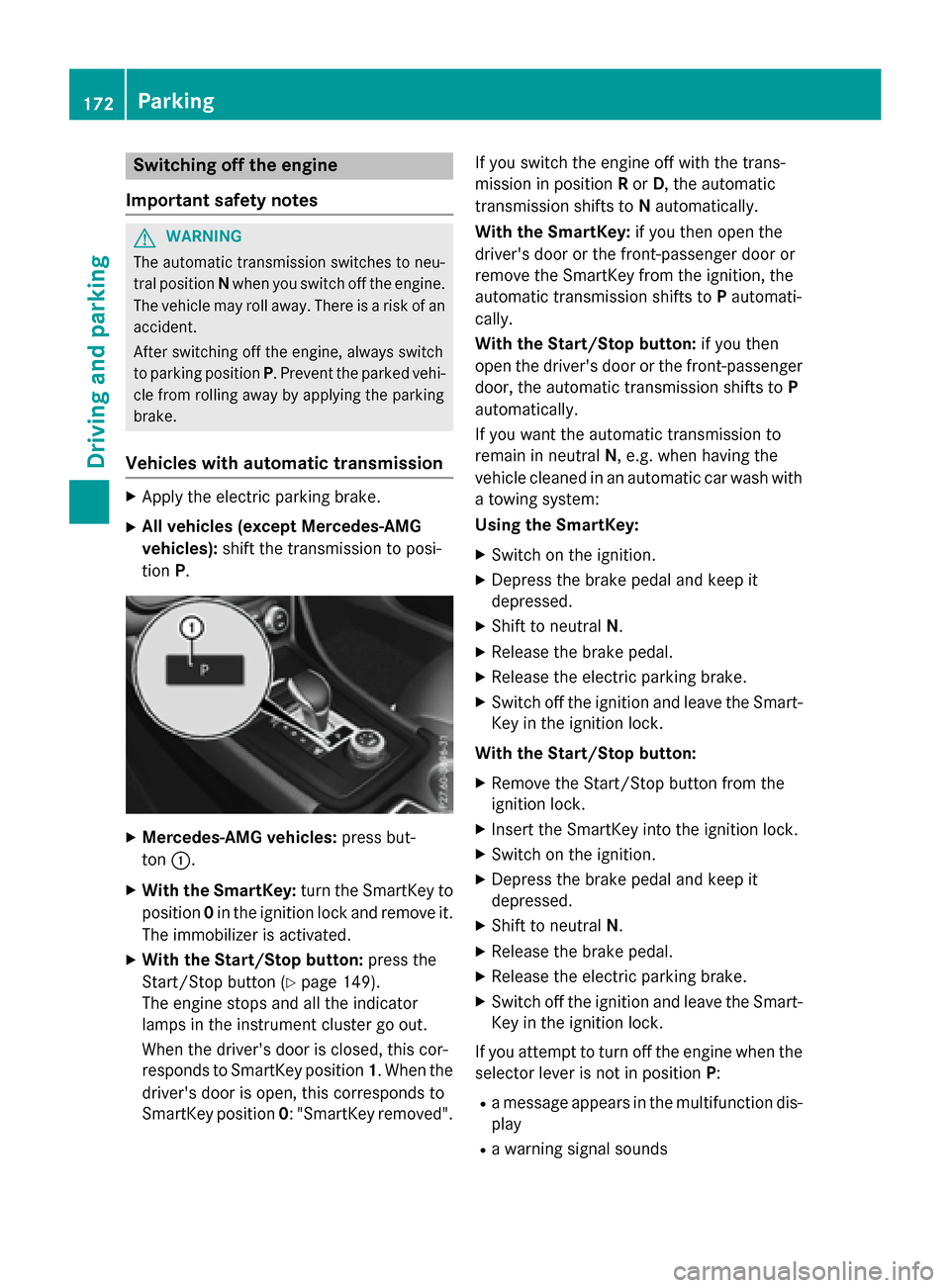
XMercedes-AMG vehicles: press but-
ton :.
XWith the SmartKey: turn the SmartKey to
position 0in the ignition lock and remove it.
The immobilizer is activated.
XWith the Start/Stop button: press the
Start/Stop button (
Ypage 149).
The engine stops and all the indicator
lamps in the instrument cluster go out.
When the driver's door is closed, this cor-
responds to SmartKey position 1. When the
driver's door is open, this corresponds to
SmartKey position 0: "SmartKey removed". If you switch the engine off with the trans-
mission in position
Ror D, the automatic
transmission shifts to Nautomatically.
With the SmartKey: if you then open the
driver's door or the front-passenger door or
remove the SmartKey from the ignition, the
automatic transmission shifts to Pautomati-
cally.
With the Start/Stop button: if you then
open the driver's door or the front-passenger door, the automatic transmission shifts to P
automatically.
If you want the automatic transmission to
remain in neutral N, e.g. when having the
vehicle cleaned in an automatic car wash with
a towing system:
Using the SmartKey:
XSwitch on the ignition.
XDepress the brake pedal and keep it
depressed.
XShift to neutral N.
XRelease the brake pedal.
XRelease the electric parking brake.
XSwitch off the ignition and leave the Smart-
Key in the ignition lock.
With the Start/Stop button:
XRemove the Start/Stop button from the
ignition lock.
XInsert the SmartKey into the ignition lock.
XSwitch on the ignition.
XDepress the brake pedal and keep it
depressed.
XShift to neutral N.
XRelease the brake pedal.
XRelease the electric parking brake.
XSwitch off the ignition and leave the Smart-
Key in the ignition lock.
If you attempt to turn off the engine when the
selector lever is not in position P:
Ra message appears in the multifunction dis-
play
Ra warning signal sounds
172Parking
Driving and parking