Multifunction MERCEDES-BENZ GLA-Class 2017 X156 Owner's Manual
[x] Cancel search | Manufacturer: MERCEDES-BENZ, Model Year: 2017, Model line: GLA-Class, Model: MERCEDES-BENZ GLA-Class 2017 X156Pages: 390, PDF Size: 8.37 MB
Page 2 of 390
Publication details
Internet
Further information about Mercedes-Benz
vehicles and about Daimler AG can be found
on the following websites:
http://www.mbusa.com (USA only)
http://www.mercedes-benz.ca (Canada
only)
Editorial office
©Daimler AG: not to be reprinted, translated
or otherwise reproduced, in whole or in part,
without written permission from Daimler AG.
Vehicle manufacturer
Daimler AG
Mercedesstraße 137
70327 Stuttgart
Germany
Symbols
Registered trademarks:
RBluetooth®is a registered trademark of
Bluetooth SIG Inc.
RDTS is a registered trademark of DTS, Inc.
RDolby and MLP are registered trademarks
of DOLBY Laboratories.
RBabySmart™, ESP®and PRE-SAFE®are
registered trademarks of Daimler AG.
RHomeLink®is a registered trademark of
Johnson Controls.
RiPod®and iTunes®are registered trade-
marks of Apple Inc.
RLogic7®is a registered trademark of Har-
man International Industries.
RMicrosoft®and Windows media®are reg-
istered trademarks of Microsoft Corpora-
tion.
RSIRIUS is a registered trademark of Sirius
XM Radio Inc.
RHD Radio is a registered trademark of iBiq-
uity Digital Corporation.
RGracenote®is a registered trademark of
Gracenote, Inc.
RZAGATSurvey®and related brands are reg-
istered trademarks of ZagatSurvey, LLC.
In this Operator's Manual you will find the fol-
lowing symbols:
GWARNING
Warning notes make you aware of dangers
which could pose a threat to your health or
life, or to the health and life of others.
HEnvironmental note
Environmental notes provide you with infor-
mation on environmentally aware actions or
disposal.
!Notes on material damage alert you to
dangers that could lead to damage to your
vehicle.
iPractical tips or further information that
could be helpful to you. X
This symbol indicates an instruction
that must be followed.
X Several of these symbols in succes-
sion indicate an instruction with sev-
eral steps.
(Y
page) This symbol tells you where you can
find more information about a topic.
YY This symbol indicates a warning or an
instruction that is continued on the
next page.
Dis‐
play
This text indicates a message on the
multifunction display/multimedia
display.
As at 08.01.2015
Page 10 of 390
Function/notes ............................. 184
Important safety notes .................. 184
Setting a speed .............................. 185
Storing and maintaining current
speed ............................................. 185
Cup holder
Center console .............................. 289
Important safety notes .................. 288
Rear compartment ......................... 289
Customer Assistance Center
(CAC) ..................................................... 26
Customer Relations Department ....... 26
D
Dashboard
see Cockpit
Dashboard lighting
see Instrument cluster lighting
Data
see Technical data
Daytime running lamps
Display message ............................ 250
Function/notes ............................. 116
Switching on/off (on-board com-
puter) ............................................. 230
Declarations of conformity ................. 25
Diagnostics connection ...................... 25
Digital speedometer ......................... 223
DIRECT SELECT lever
Automatic transmission ................. 159
Display messages
ASSYST PLUS ................................ 312
Calling up (on-board computer) ..... 235
Driving systems ............................. 253
Engine ............................................ 251
General notes ................................ 235
Hiding (on-board computer) ........... 235
Lights ............................................. 247
Safety systems .............................. 236
SmartKey ....................................... 265
Tires ............................................... 258
Vehicle ........................................... 261
Distance control
see DISTRONIC PLUS
Distance recorder ............................. 221
Distance warning (warning lamp) .... 277Distance warning function
Function/notes ................................ 67
Warning lamp ................................. 277
DISTRONIC PLUS
Activation conditions ..................... 187
Cruise control lever ....................... 187
Deactivating ................................... 190
Display message ............................ 255
Displays in the multifunction dis-
play ................................................ 191
Driving tips .................................... 192
Function/notes ............................. 186
Important safety notes .................. 186
Setting the specified minimum
distance ......................................... 190
Stopping ........................................ 189
Doors
Automatic locking (on-board com-
puter) ............................................. 230
Automatic locking (switch) ............... 84
Central locking/unlocking
(SmartKey) ....................................... 76
Control panel ................................... 38
Display message ............................ 264
Emergency locking ........................... 85
Emergency unlocking ....................... 84
Important safety notes .................... 83
Opening (from inside) ...................... 83
Drinking and driving ......................... 175
Drive prog ram
Au
tomatic transmission ................. 164
Display ........................................... 161
Display (DIRECT SELECT lever) ...... 159
SETUP (on-board computer) .......... 232
Driver's door
see Doors
Driver's seat
see Seats
Driving abroad
Mercedes-Benz Service ................. 313
Driving dynamics display
Off-road program ........................... 200
Driving in mountainous terrain
Approach/departure angle ............ 183
Driving off-road
see Off-road driving
Driving on flooded roads .................. 179
8Index
Page 15 of 390
Locking centrallysee Central locking
Locking verification signal (on-
board computer) .............................. .230
Low-beam headlamps
Changing bulbs .............................. 123
Display message ............................ 248
Switching on/off ........................... 117
Lumbar support
Adjusting the 4-way lumbar sup-
port ................................................ 106
M
M+S tires ............................................ 342
Malfunction message
see Display messages
Matte finish (cleaning instruc-
tions) ..................................................3 16
mbrace
Call priority ....................................2 96
Display message ............................ 242
Downloading destinations
(COMAND) ..................................... 296
Downloading routes ....................... 299
Emergency call .............................. 293
General notes ................................ 292
Geo fencing ................................... 300
Locating a stolen vehicle ...............2 98
MB info call button ........................ 295
Remote fault diagnosis .................. 298
Remote vehicle locking .................. 298
Roadside Assistance button .......... 294
Search & Send ............................... 297
Self-test ......................................... 293
Speed alert .................................... 300
System .......................................... 292
Triggering the vehicle alarm ........... 300
Vehicle remote unlocking .............. 297
Mechanical key
Function/notes ................................ 79
Inserting .......................................... 79
Locking vehicle ................................ 85
Removing ......................................... 79
Unlocking the driver's door .............. 84
Memory card (audio) ......................... 225
Memory function ............................... 112 Message memory (on-board com-
puter)
.................................................. 235
Messages
see Display messages
Mirror turn signal
Cleaning ......................................... 317
Mirrors
see Exterior mirrors
see Rear-view mirror
see Vanity mirror (in the sun visor)
Mobile phone
Frequencies ................................... 374
Installation ..................................... 374
Menu (on-board computer) ............ 226
Transmission output (maximum) .... 374
Modifying the programming
(SmartKey) ........................................... 78
MOExtended tires .............................. 323
Mounting wheels
Lowering the vehicle ...................... 366
Mounting a new wheel ................... 366
Preparing the vehicle ..................... 363
Raisi
ng the vehicle ......................... 364
Removing a wheel .......................... 366
Securing the vehicle against roll-
ing away ........................................ 364
MP3
Operation ....................................... 225
Multifunction display
Function/notes ............................. 221
Permanent display ......................... 230
Multifunction steering wheel
Operating the on-board compute r..2 19
Overview .......................................... 33
N
Navigation
Menu (on-board computer) ............ 223
Notes on breaking-in a new vehi-
cle ....................................................... 148
O
Occupant Classification System
(OCS)
Conditions ....................................... 51
Faults ............................................... 55
Index13
Page 20 of 390
Stowage compartmentsArmrest (front) ............................... 282
Armrest (under) ............................. 282
Center console .............................. 281
Center console (rear) ..................... 282
Cup holders ................................... 288
Eyeglasses compartment ............... 281
Glove box ....................................... 281
Important safety information ......... 281
Map pockets .................................. 283
Stowage net ................................... 283
Under driver's seat/front-
passenger seat .............................. 282
Stowage net ....................................... 283
Summer tires ..................................... 342
Sun visor ............................................ 290
Suspension
Adaptive Damping System ............. 199
Suspension setting
AMG adaptive sport suspension
system ........................................... 196
Switching air-recirculation mode
on/off ................................................. 143
T
Tachometer ........................................ 219
Tail lamps
see Lights
Tailgate
Display message ............................ 263
Emergency unlocking ....................... 89
Important safety notes .................... 85
Limiting the opening angle ............... 89
Obstruction detection ...................... 86
Opening dimensions ...................... 383
Opening/closing (from outside) ....... 87
Opening/closing automatically
from inside ....................................... 88
Opening/closing automatically
from outside .................................... 87
Tank
see Fuel tank
Tank content
Fuel gauge ....................................... 31
Technical data
Capacities ...................................... 377
Information .................................... 374 Tires/wheels ................................. 367
Vehicle data ................................... 383
TELEAID
Call priority .................................... 296
Downloading destinations
(COMAND) ..................................... 296
Downloading routes ....................... 299
Emergency call .............................. 293
General notes ................................ 292
Geo fencing ................................... 300
Locating a stolen vehicle ............... 298
MB info call button ........................ 295
Remote vehicle locking .................. 298
Roadside Assistance button .......... 294
Search & Send ............................... 297
Self-test ......................................... 293
Speed alert .................................... 300
System .......................................... 292
Triggering the vehicle alarm ........... 300
Vehicle Health Check .................... 298
Vehicle remote unlocking .............. 297
Telephone
Accepting a call (multifunction
steering wheel) .............................. 226
Display message ............................ 264
Introduction ................................... 226
Menu (on-board computer) ............ 226
Number from the phone book ........ 226
Redialing ........................................ 227
Rejecting/ending a call ................. 226
Temperature
Coolant .......................................... 219
Coolant (on-board computer,
Mercedes-AMG vehicles) ............... 231
Engine oil (on-board computer,
Mercedes-AMG vehicles) ............... 231
Outside temperature ...................... 219
Setting (
climate control) ................ 139
Transmission oil (on-board com-
puter, Mercedes-AMG vehicles) ..... 231
Through-loading feature ................... 283
Timing (RACETIMER) ......................... 232
Tire pressure
Calling up (on-board computer) ..... 348
Checking manually ........................ 347
Display message ............................ 258
Maximum ....................................... 346
Not reached (TIREFIT) .................... 326
18Index
Page 31 of 390
Cockpit................................................. 30
Instrument cluster ..............................31
Multifunction steering wheel .............33
Center console .................................... 35
Door control panel .............................. 38
Overhead control panel ......................39
29
At a glance
Page 33 of 390
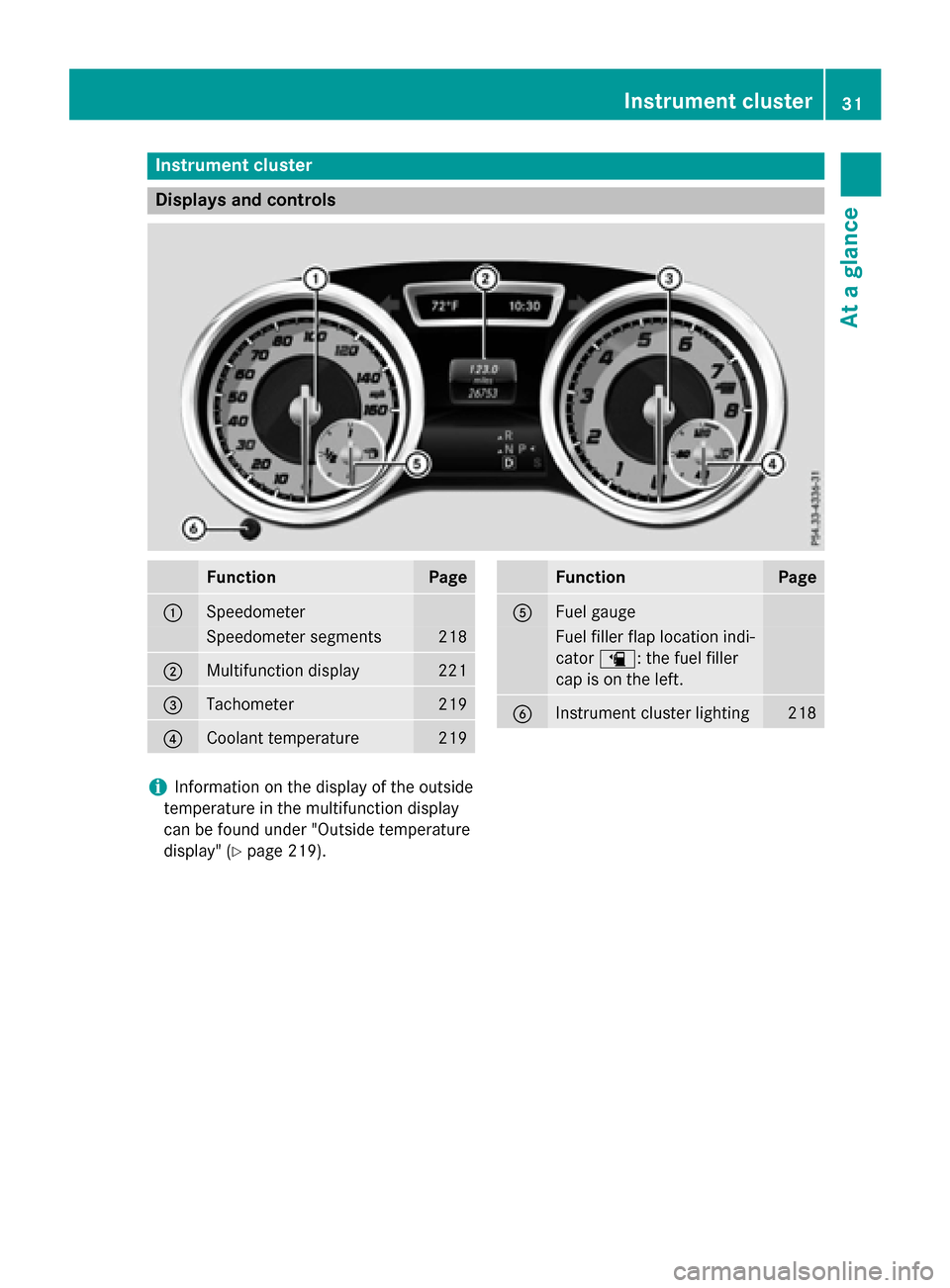
Instrument cluster
Displays and controls
FunctionPage
:Speedometer
Speedometer segments218
;Multifunction display221
=Tachometer219
?Coolant temperature219
FunctionPage
AFuel gauge
Fuel filler flap location ind i-
cator æ: the fuel filler
cap ison the left.
BInstrument cluster lighting218
iInformation on the display of the outside
temperature inthe multifunction display
can befound under "Outside temperature
disp lay" (
Ypage 219).
Instrument cluster31
At a glance
Page 35 of 390
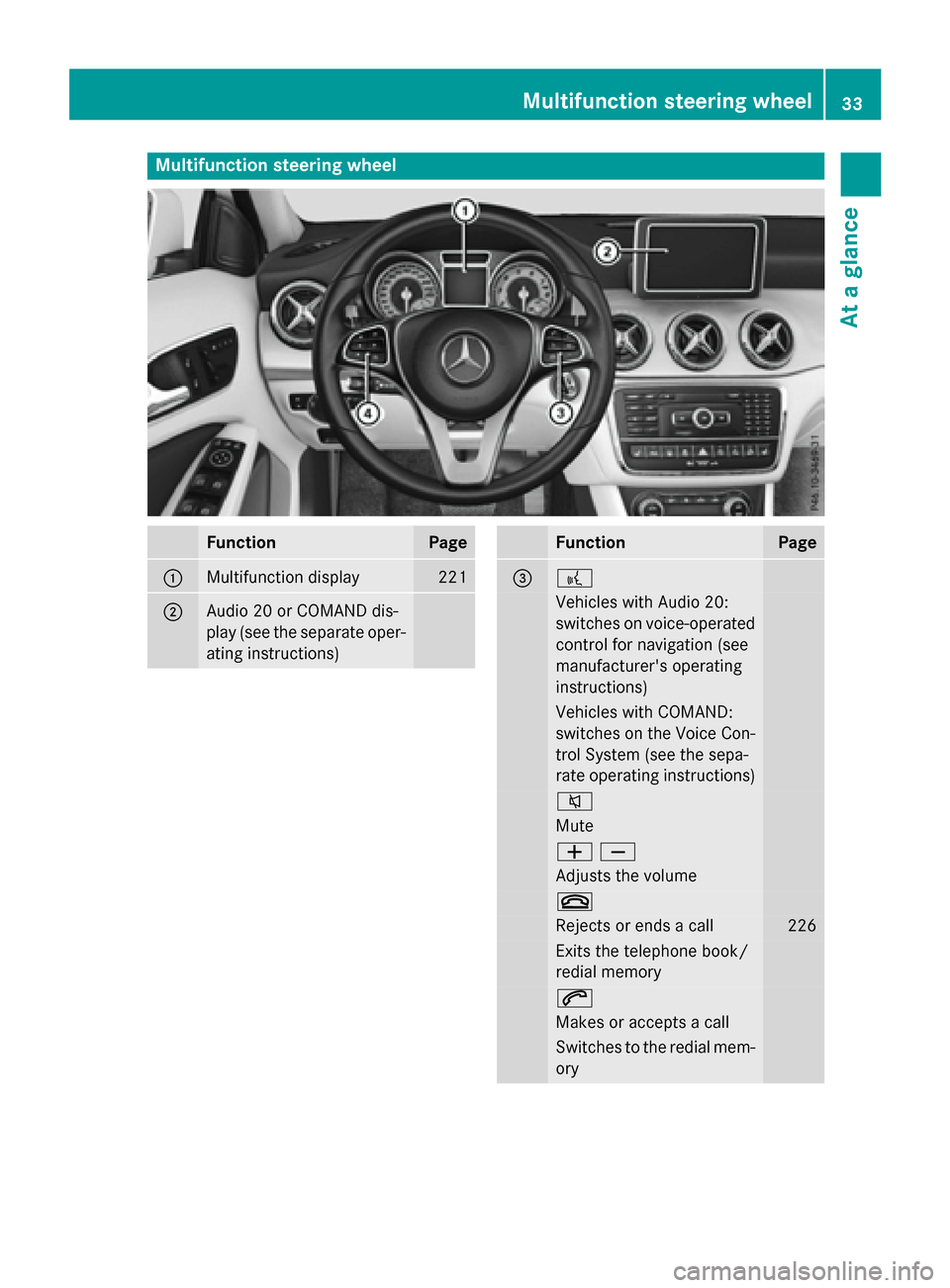
Multifunction steering wheel
FunctionPage
:Multifunction display221
;Audio 20 or COMAND dis-
play (see the separate oper-
ating instructions)
FunctionPage
=?
Vehicles with Audio 20:
switches on voice-operated
control for navigation (see
manufacturer's operating
instructions)
Vehicles with COMAND:
switches on the Voice Con-
trol System (see the sepa-
rate operating instructions)
8
Mute
WX
Adjusts the volume
~
Rejects or ends a call226
Exits the telephone book/
redial memory
6
Makes or accepts a call
Switches to the redial mem-
ory
Multifunction steering wheel33
At a glance
Page 36 of 390
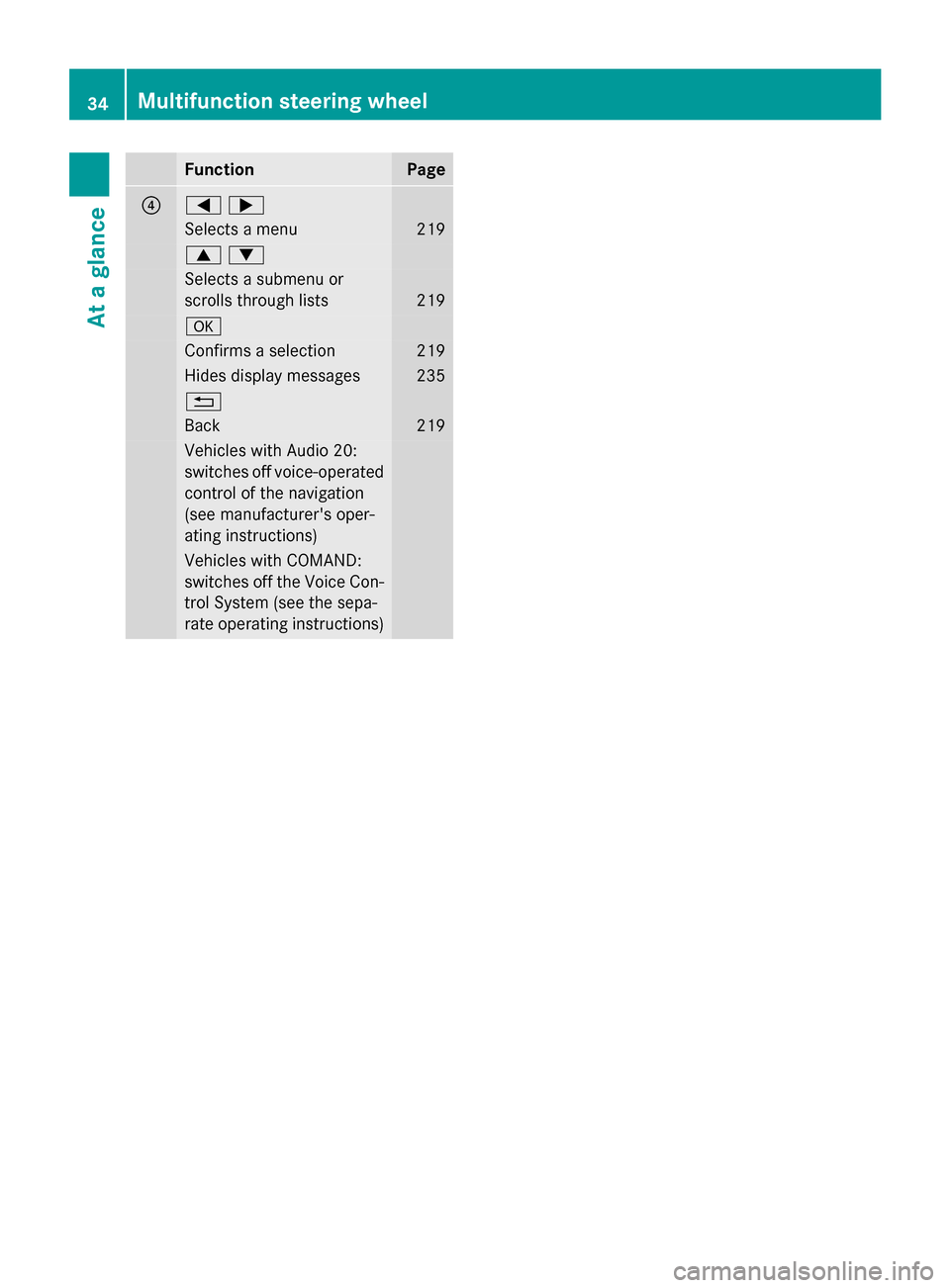
FunctionPage
?=;
Selects a menu219
9:
Selects a submenu or
scrolls through lists
219
a
Confirms a selection219
Hides display messages235
%
Back219
Vehicles with Audio 20:
switches off voice-operated
control of the navigation
(see manufacturer's oper-
ating instructions)
Vehicles with COMAND:
switches off the Voice Con-
trol System (see the sepa-
rate operating instructions)
34Multifunction steering wheel
At a glance
Page 73 of 390
You can select between the following states
of ESP®:
RESP®is activated.
RSPORT handling mode is activated.
RESP®is deactivated.
GWARNING
When SPORT handling mode is activated,
there is a greater risk of skidding and acci-
dents.
Only activate SPORT handling mode in the sit-
uations described in the following.
GWARNING
If you deactivate ESP
®, ESP®no longer sta-
bilizes the vehicle. There is an increased risk
of skidding and an accident.
Only deactivate ESP
®in the situations descri-
bed in the following.
In the following situations, it may be better to activate SPORT handling mode or deactivate
ESP
®:
Rwhen using snow chains
Rin deep snow
Ron sand or gravel
Ron specially designated roads when the
vehicle's own oversteering and understeer-
ing characteristics are desired
Driving in SPORT handling mode or without
ESP
®requires an extremely qualified and
experienced driver.
iActivate ESP®as soon as the situations
described above no longer apply. ESP®will
otherwise not be able to stabilize the vehi-
cle if the vehicle starts to skid or a wheel
starts to spin.
!Avoid spinning the driven wheels for an
extended period with ESP®deactivated.
You could otherwise damage the drivetrain. Deactivating/activating ESP
®
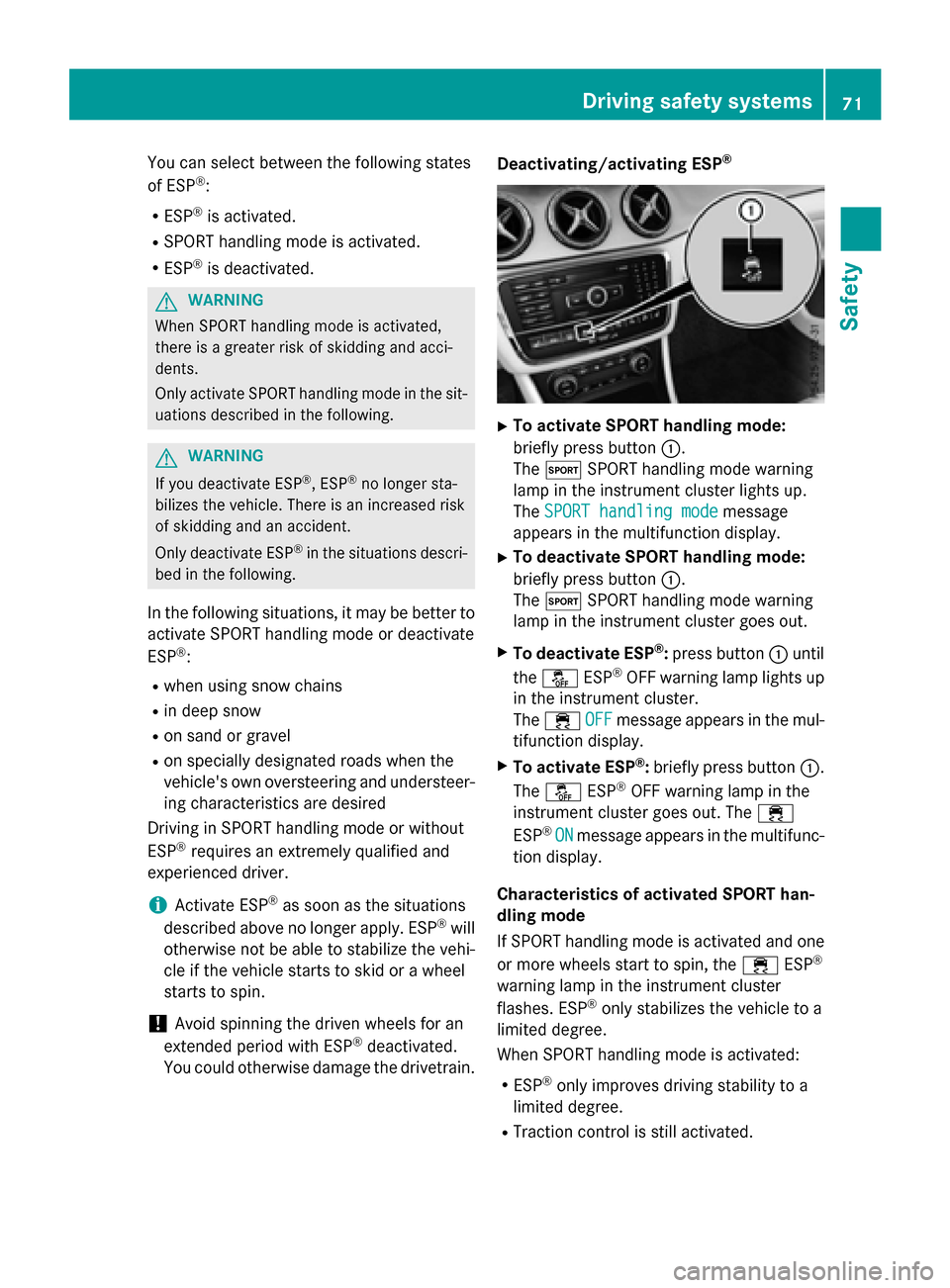
XTo activate SPORT handling mode:
briefly press button
:.
The M SPORT handling mode warning
lamp in the instrument cluster lights up.
The SPORT handling mode
message
appears in the multifunction display.
XTo deactivate SPORT handling mode:
briefly press button :.
The M SPORT handling mode warning
lamp in the instrument cluster goes out.
XTo deactivate ESP®: press button :until
the å ESP®OFF warning lamp lights up
in the instrument cluster.
The ÷ OFF
message appears in the mul-
tifunction display.
XTo activate ESP®: briefly press button :.
The å ESP®OFF warning lamp in the
instrument cluster goes out. The ÷
ESP
®ONmessage appears in the multifunc-
tion display.
Characteristics of activated SPORT han-
dling mode
If SPORT handling mode is activated and one
or more wheels start to spin, the ÷ESP
®
warning lamp in the instrument cluster
flashes. ESP®only stabilizes the vehicle to a
limited degree.
When SPORT handling mode is activated:
RESP®only improves driving stability to a
limited degree.
RTraction control is still activated.
Driving safety systems71
Safety
Z
Page 153 of 390
You can only switch between Start/Stop but-
ton mode and SmartKey operation when the
vehicle is stationary.
You must also engage park positionP.
XRemove Start/Stop button:from ignition
lock ;.
You do not have to remove the Start/Stop
button from the ignition lock when you leave
the vehicle. You should, however, always take
the SmartKey with you when leaving the vehi-
cle. As long as the SmartKey is in the vehicle:
Rthe vehicle can be started using the Start/ Stop button
Rthe electrically powered equipment can be
operated
Starting the engine
Important safety notes
GWARNING
If children are left unsupervised in the vehicle,
they could:
Ropen the doors, thus endangering other
people or road users.
Rget out and disrupt traffic.
Roperate the vehicle's equipment.
Additionally, children could set the vehicle in
motion if, for example, they:
Rrelease the parking brake.
Rshifting the automatic transmission out of
park position P
RStart the engine.
There is a risk of an accident and injury.
When leaving the vehicle, always take the
SmartKey with you and lock the vehicle. Never
leave children or animals unattended in the
vehicle. Always keep the SmartKey out of
reach of children.
GWARNING
Combustion engines emit poisonous exhaust
gases such as carbon monoxide. Inhaling
these exhaust gases leads to poisoning. There
is a risk of fatal injury. Therefore never leave
the engine running in enclosed spaces with-
out sufficient ventilation.
GWARNING
Flammable materials introduced through
environmental influence or by animals can
ignite if in contact with the exhaust system or
parts of the engine that heat up. There is a risk
of fire.
Carry out regular checks to make sure that
there are no flammable foreign materials in
the engine compartment or in the exhaust
system.
!Do not depress the accelerator when
starting the engine.
General notes
During a cold start, the engine runs at higher
speeds to enable the catalytic converter to
reach its operating temperature. The sound of
the engine may change during this time.
Automatic transmission
XShift the transmission to position P
(
Ypage 159).
The transmission position display in the
multifunction display shows
P (
Ypage 159).
iYou can start the engine in transmission
position Pand N.
Starting procedure with the SmartKey
To start the engine using the SmartKey
instead of the Start/Stop button, pull the
Start/Stop button out of the ignition lock.
XTurn the SmartKey to position 3in the igni-
tion lock and release it as soon as the
engine is running (
Ypage 149).
Driving151
Driving and parking
Z