ESP MERCEDES-BENZ GLA-Class 2017 X156 Workshop Manual
[x] Cancel search | Manufacturer: MERCEDES-BENZ, Model Year: 2017, Model line: GLA-Class, Model: MERCEDES-BENZ GLA-Class 2017 X156Pages: 390, PDF Size: 8.37 MB
Page 180 of 390
Servicing the brakes
!The brake fluid level may be too low, if:
Rif the red brake warning lamp lights up inthe instrument cluster and
Ryou hear a warning tone while the engineis running
Observe additional warning messages in
the multifunction display.
The brake fluid level may be too low due to
brake pad wear or leaking brake lines.
Have the brake system checked immedi-
ately. Consult a qualified specialist work-
shop to arrange this.
!A function or performance test should
only be carried out on a 2-axle dynamom-
eter. If you wish to operate the vehicle on
such a dynamometer, please consult a
qualified specialist workshop in advance.
You could otherwise damage the drive train
or the brake system.
!As the ESP®system operates automati-
cally, the engine and the ignition must be
switched off (the SmartKey must be in posi-
tion 0or 1in the ignition lock) if:
Rthe electric parking brake is tested on a
brake dynamometer (for a maximum of
ten seconds)
Rthe vehicle is towed with the front axle
raised.
Braking triggered automatically by ESP
®
may seriously damage the brake system.
All checks and maintenance work on the
brake system must be carried out at a quali-
fied specialist workshop.
Have brake pads installed and brake fluid
replaced at a qualified specialist workshop.
If the brake system has only been subject to
moderate loads, you should test the function-
ality of your brakes at regular intervals.
You can find a description of Brake Assist
(BAS) on (
Ypage 66).
Mercedes-Benz recommends that you only
have brake pads/linings installed on your vehicle which have been approved for
Mercedes-Benz vehicles or which correspond
to an equivalent quality standard. Brake
pads/linings which have not been approved
for Mercedes-Benz vehicles or which are not
of an equivalent quality could affect your vehi-
cle's operating safety.
Mercedes-Benz recommends that you only
use brake fluid that has been specially
approved for your vehicle by Mercedes-Benz,
or which corresponds to an equivalent quality
standard. Brake fluid which has not been
approved for Mercedes-Benz vehicles or
which is not of an equivalent quality could
affect your vehicle's operating safety.
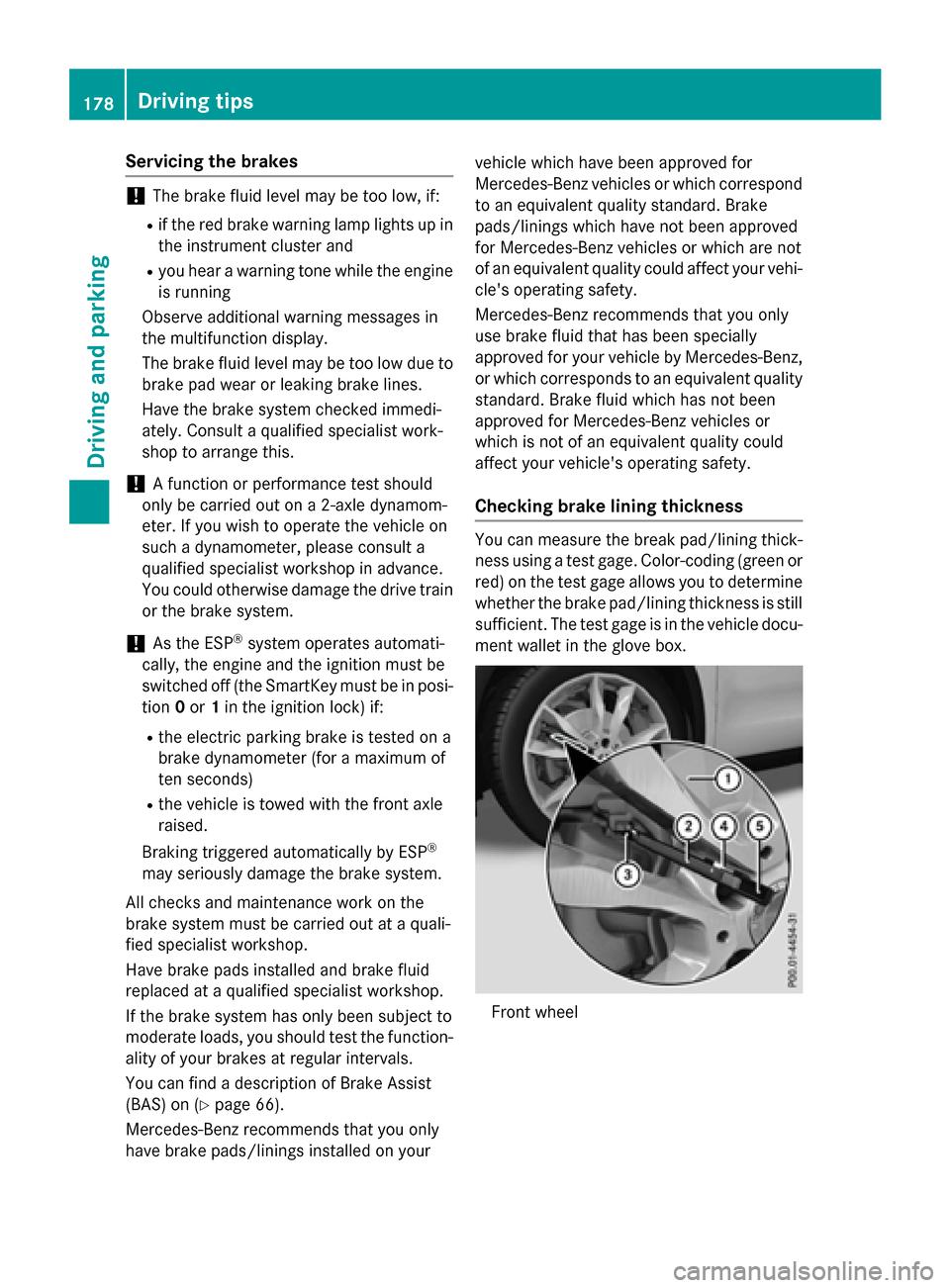
Checking brake lining thickness
You can measure the break pad/lining thick- ness using a test gage. Color-coding (green or
red) on the test gage allows you to determine
whether the brake pad/lining thickness is still
sufficient. The test gage is in the vehicle docu-
ment wallet in the glove box.
Front wheel
178Driving tips
Driving and parking
Page 182 of 390
GDANGER
If th eexhaust pipe is blocke dor adequate
ventilation is no tpossible, poisonous gase s
suc has carbon monoxide (CO) may ente rth e
vehicle. This is th ecase, e.g. if th evehicl e
become strapped in snow. There is aris kof
fatal injury.
If you leav eth eengin eor th eauxiliary heating
running, mak esur eth eexhaust pipe and area
around th evehicl eare clear of snow. To
ensur ean adequate supply of fresh air, open a
window on th eside of th evehicl ethat is no t
facing int oth ewind.
Hav eyour vehicl ewinter-proofe dat aquali-
fie dspecialist workshop at th eonset of win -
ter.
Drive particularly carefully on slipper yroad
surfaces. Avoid sudde nacceleration ,steering
and brakin gmaneuvers .Do no tuse th ecruise
control or DISTRONI CPLUS.
If th evehicl ethreaten sto skid or canno tbe
stoppe dwhen moving at low speed:
XShift th etransmission to position N.
XTry to bring th evehicl eunder control usin g
corrective steering .
The outside temperature indicator is no t
designed to serve as an ice-warnin gdevice
and is therefor eunsuitable for that purpose .
Changes in th eoutside temperature are dis-
played after ashort delay.
Indicate dtemperatures jus tabov eth efreez -
in g p
oin tdo no tguarantee that th eroad sur -
fac eis free of ice .The road may still be icy,
especially in wooded areas or on bridges .
You should pay special attention to road con-
dition swhen temperatures are around freez -
in g point.
Fo rmor einformation on drivin gwit hsnow
chains, see (
Ypage 343).
Fo rmor einformation on drivin gwit hsummer
tires ,see (
Ypage 342).
Observ eth enote sin th e"Winte roperation "
section (
Ypage 342).
Off-road driving
Import ant safety notes
GWARNIN G
If you drive on asteep inclin eat an angle or
tur nwhen drivin gon an incline, th evehicl e
could slip sideways, ti pand rollover. There is a
ris kof an accident.
Always drive on asteep inclin ein th elin eof
fall (straight up or down )and do no ttur nth e
vehicle.
GWARNIN G
Flammabl ematerial suc has leaves, grass or
twigs may ignit eif they come int ocontact wit h
hot part sof th eexhaust system. There is aris k
of fire.
Whe ndrivin goff roa dor on unpaved roads,
chec kth evehicle's underside regularly. In
particular, remove part sof plants or other
flammabl ematerials whic hhav ebecome
trapped .In th ecas eof damage, contact a
qualified specialist workshop .
!There isaris kof damag eto th evehicl eif:
Rth evehicl ebecome sstuck ,e.g. on ahigh
cur bor an unpaved road
Ryou drive to ofas tove ran obstacle, e.g. a
cur bor ahole in th eroad
Raheav yobjec tstrikes th eundercarriage
or part sof th echassi s
In situation slik ethis, th ebody, th eunder-
carriage, chassi sparts, wheels or tires
could be damaged without th edamag e
bein gvisible. Components damaged in this
way can unexpectedly fail or, in th ecas eof
an accident, no longer withstand th estrain
they are designed to .
If th eunderbody panelin gis damaged,
combustible materials suc has leaves,
gras sor twigs can gather between th e
underbody and th eunderbody paneling. If
these materials come in contact wit hhot
part sof th eexhaust system, they can catch
fire.
180Driving tips
Driving and parking
Page 183 of 390
In such situations, have the vehicle
checked and repaired immediately at a
qualified specialist workshop. If on con-
tinuing your journey you notice that driving
safety is impaired, pull over and stop the
vehicle immediately, paying attention to
road and traffic conditions. In such cases,
consult a qualified specialist workshop.
The vehicle is only designed for easily nego-
tiable off-road terrain and poor road surfaces.
When driving off-road, substances such as
sand, mud and water or water mixed with oil
may get into the brakes. This could result in a
reduced braking effect or in total brake failure and also in increased wear and tear. The brak-
ing characteristics change depending on the
material ingressing the brakes. Clean the
brakes after driving off-road. If you detect a
reduced braking effect or grinding noises,
have the brake system checked in a qualified
specialist workshop as soon as possible.
Adapt your driving style to the different brak-
ing characteristics.
Driving off-road increases the likelihood of
damage to the vehicle, which, in turn, can lead
to failure of the mechanical assembly or sys-
tems. Adapt your driving style to suit the ter-
rain conditions. Drive carefully. Have damage
to the vehicle rectified immediately at a quali-
fied specialist workshop.
Do not switch to transmission position N
when driving off-road. If you try to brake the
vehicle using the service brake, you could
lose control of the vehicle. If the gradient is
too steep for your vehicle, drive back down in
reverse gear.
General notes
HEnvironmental note
Protection of the environment is of primary
importance. Treat nature with respect.
Observe all prohibiting signs.
Read this section carefully before driving your
vehicle off-road. Off-road driving is only possible with the Off-
Road Engineering package (
Ypage 199).
The following driving systems are specially
adapted for driving over easily negotiable off-
road terrain:
ROff-road program (Ypage 199)
ROff-road ABS (Ypage 66)
ROff-road 4ETS (Ypage 69)
ROff-road ESP®(Ypage 72)
RDSR (Downhill Speed Regulation)
(
Ypage 197)
Observe the following notes:
RStop the vehicle before starting to drive
along an off-road route. If necessary, acti-
vate the off-road program (
Ypage 157).
RTo avoid damaging the vehicle, make sure
there is always sufficient ground clearance.
RCheck that items of luggage and loads are
stowed safely and are well secured
(
Ypage 285).
RAlways keep the engine running and in gear
when driving on a downhill gradient. Acti-
vate DSR (
Ypage 197).
RDrive slowly and evenly, if necessary at a
walking pace.
REnsure that the wheels are in contact with
the ground at all times.
RDrive with extreme care on unfamiliar off-
road routes where visibility is poor. For
safety reasons, get out of the vehicle first
and survey the off-road route.
RCheck the depth of water before fording
rivers and streams.
RWatch out for obstacles.
RTake care when turning on an uphill or
downhill slope or when driving across a
slope. The vehicle could otherwise tip over.
RAlways keep the side windows and the pan-
orama roof with power tilt/sliding panel
closed during the journey.
RDo not deviate from marked routes.
Do not use the HOLD function when driving
off-road, on steep uphill or downhill gradients or on slippery or loose surfaces. The HOLD
Driving tips181
Driving and parking
Z
Page 186 of 390
RActivate DSR. If this is not sufficient, brake
gently. When doing so, make sure that the
vehicle is facing in the direction of the line
of fall.
RCheck that the brakes are working normally
after a long downhill stretch.
Off-road ABS is activated when the off-road
program is selected.
At speeds below 18 mph (30 km/h), the front
wheels lock cyclically during braking. The dig-
ging-in effect achieved in the process reduces the stopping distance on off-road terrain. The
steerability of the vehicle is considerably
reduced if the wheels lock.
Driving systems
Cruise Control
General notes
Cruise control maintains a constant road
speed for you. It brakes automatically in order to avoid exceeding the set speed. On long and
steep downhill gradients, especially if the
vehicle is laden, you must select a low gear in
good time. You need to have previously selec-
ted manual gearshifting M(
Ypage 166). By
doing so, you will make use of the braking
effect of the engine. This relieves the load on
the brake system and prevents the brakes
from overheating and wearing too quickly.
Use cruise control only if road and traffic con-
ditions make it appropriate to maintain a
steady speed for a prolonged period. You can
store any road speed above 20 mph
(30 km/h).
The speed indicated in the speedometer may
differ slightly from the speed stored.
Important safety notes
If you fail to adapt your driving style, cruise
control can neither reduce the risk of an acci-
dent nor override the laws of physics. Cruise
control cannot take into account the road,
traffic and weather conditions. Cruise control is only an aid. You are responsible for the dis-
tance to the vehicle in front, for vehicle speed,
for braking in good time and for staying in
your lane.
Do not use cruise control:
Rin road and traffic conditions which do not
allow you to maintain a constant speed e.g.
in heavy traffic or on winding roads
Ron slippery road surfaces. Braking or accel-
erating could cause the drive wheels to lose
traction and the vehicle could then skid
Rwhen there is poor visibility, e.g. due to fog,
heavy rain or snow
If there is a change of drivers, advise the new
driver of the speed stored.
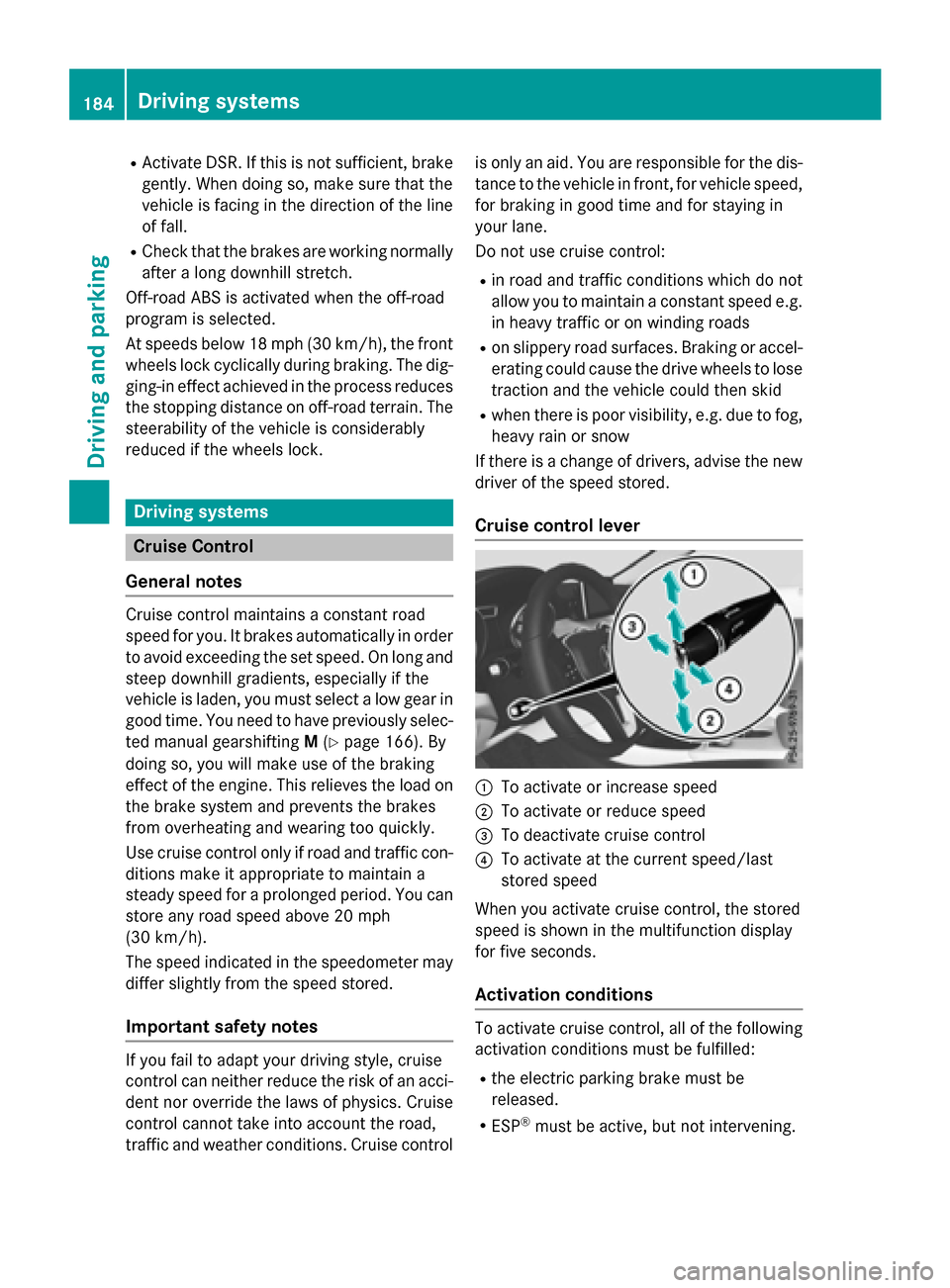
Cruise control lever
:To activate or increase speed
;To activate or reduce speed
=To deactivate cruise control
?To activate at the current speed/last
stored speed
When you activate cruise control, the stored
speed is shown in the multifunction display
for five seconds.
Activation conditions
To activate cruise control, all of the following
activation conditions must be fulfilled:
Rthe electric parking brake must be
released.
RESP®must be active, but not intervening.
184Driving systems
Driving an d parking
Page 187 of 390
Storing, maintaining and calling up a
speed
Storing and maintaining the current
speed
You can store the current speed if you are
driving faster than 20 mph (30 km/h).
XAccelerate the vehicle to the desired
speed.
XBriefly press the cruise control lever up:
or down ?.
XRemove your foot from the accelerator
pedal.
Cruise control is activated. The vehicle
automatically maintains the stored speed.
iCruise control may be unable to maintain
the stored speed on uphill gradients. The
stored speed is resumed when the gradient
evens out. Cruise control maintains the
stored speed on downhill gradients by
automatically applying the brakes.
Storing the current speed or calling up the
last stored speed
GWARNING
If you call up the stored speed and it differs
from the current speed, the vehicle acceler-
ates or decelerates. If you do not know the
stored speed, the vehicle could accelerate or brake unexpectedly. There is a risk of an acci-
dent.
Pay attention to the road and traffic condi-
tions before calling up the stored speed. If you
do not know the stored speed, store the
desired speed again.
XBriefly pull the cruise control lever towards
you =.
XRemove your foot from the accelerator
pedal.
The first time cruise control is activated, it
stores the current speed or regulates the
speed of the vehicle to the previously
stored speed.
Setting a speed
Keep in mind that it may take a brief moment
until the vehicle has accelerated or braked to
the speed set.
XPress the cruise control lever up :for a
higher speed or down ?for a lower speed.
XTo adjust the set speed in 1 mph incre-
ments (1 km/h increments): briefly
press the cruise control lever up :or
down ?to the pressure point.
The last stored speed increases or decrea-
ses in 1 mph (1 km/h) increments.
XTo adjust the set speed in 5 mph incre-
ments (10 km/h increments): briefly
press the cruise control lever up :or
down ?to the pressure point.
The last stored speed increases or decrea-
ses in 5 mph (10 km/h) increments.
iCruise control is not deactivated if you
depress the accelerator pedal. For exam-
ple, if you accelerate briefly to overtake,
cruise control adjusts the vehicle's speed
to the last speed stored after you have fin- ished overtaking.
Deactivating cruise control
There are several ways to deactivate cruise
control:
XBriefly press the cruise control lever for-
wards =.
or
XBrake.
Cruise control is automatically deactivated if:
Rthe vehicle is secured with the electric
parking brake
Ryou are driving at less than 20 mph
(30 km/h)
RESP®intervenes or you deactivate ESP®
Ryou shift the transmission to position N
while driving
If cruise control is deactivated, you will hear a
warning tone. You will see the Cruise con‐
Driving systems185
Driving and parking
Z
Page 188 of 390
trol Offmessage in the multifunction dis-
play for approximately five seconds.
iWhen you switch off the engine, the last
speed stored is cleared.
DISTRONIC PLUS
General notes
DISTRONIC PLUS regulates the speed and
automatically helps you maintain the dis-
tance to the vehicle detected in front. Vehi-
cles are detected with the aid of the radar
sensor system. DISTRONIC PLUS brakes
automatically to avoid exceeding the set
speed or to maintain the designated distance
from the vehicle in front.
Change into a lower gear in good time on long
and steep downhill gradients. This is espe-
cially important if the vehicle is laden. By
doing so, you will make use of the braking
effect of the engine. This relieves the load on
the brake system and prevents the brakes
from overheating and wearing too quickly.
If DISTRONIC PLUS detects that there is a risk
of a collision, you will be warned visually and
acoustically. DISTRONIC PLUS cannot pre-
vent a collision without your intervention. An
intermittent warning tone will then sound and the distance warning lamp will light up in the
instrument cluster. Brake immediately in
order to increase the distance to the vehicle
in front or take evasive action provided it is
safe to do so.
DISTRONIC PLUS operates in range between
0 mph (0 km/h) and 120 mph (200 km/h).
Do not use DISTRONIC PLUS while driving on
roads with steep gradients.
Important safety notes
GWARNING
DISTRONIC PLUS does not react to:
Rpeople or animals
Rstationary obstacles on the road, e.g. stop- ped or parked vehicles
Roncoming and crossing traffic
As a result, DISTRONIC PLUS may neither give
warnings nor intervene in such situations.
There is a risk of an accident.
Always pay careful attention to the traffic sit- uation and be ready to brake.
GWARNING
DISTRONIC PLUS cannot always clearly iden-
tify other road users and complex traffic sit-
uations.
In such cases, DISTRONIC PLUS may:
Rgive an unnecessary warning and then
brake the vehicle
Rneither give a warning nor intervene
Raccelerate or brake unexpectedly
There is a risk of an accident.
Continue to drive carefully and be ready to
brake, in particular when warned to do so by
DISTRONIC PLUS.
GWARNING
DISTRONIC PLUS brakes your vehicle with up to 50% of the maximum possible deceleration.
If this braking force is insufficient, DISTRONIC
PLUS warns you visually and audibly. There isa risk of an accident.
In such cases, apply the brakes yourself and
try to take evasive action.
!If DISTRONIC PLUS or the HOLD function
is activated, the vehicle brakes automati-
cally in certain situations.
186Driving systems
Driving and parking
Page 189 of 390
To prevent damage to the vehicle, deacti-
vate DISTRONIC PLUS and the HOLD func-tion in the following or other similar situa-
tions:
Rwhen towing the vehicle
Rin the car wash
If you fail to adapt your driving style,
DISTRONIC PLUS can neither reduce the risk
of accident nor override the laws of physics.
DISTRONIC PLUS cannot take into account
the road, traffic and weather conditions.
DISTRONIC PLUS is only an aid. You are
responsible for the distance to the vehicle in
front, for vehicle speed, for braking in good
time and for staying in your lane.
Do not use DISTRONIC PLUS:
Rin road and traffic conditions which do not
allow you to maintain a constant speed, e.g.
in heavy traffic or on winding roads
Ron slippery road surfaces. Braking or accel-
erating could cause the drive wheels to lose
traction and the vehicle could then skid
Rwhen there is poor visibility, e.g. due to fog,
heavy rain or snow
DISTRONIC PLUS may not detect narrow
vehicles driving in front, e.g. motorcycles, or
vehicles driving on a different line.
In particular, the detection of obstacles can
be impaired if:
Rthere is dirt on the sensors or anything else covering the sensors
Rthere is snow or heavy rain
Rthere is interference by other radar sources
Rthere are strong radar reflections, for
example, in parking garages
If DISTRONIC PLUS no longer detects a vehi- cle in front, DISTRONIC PLUS may unexpect-
edly accelerate the vehicle to the stored
speed. This speed may:
Rbe too high if you are driving in a filter lane
or an exit lane
Rbe so high when driving in the right-hand
lane that you overtake vehicles in the left-
hand lane
Rbe so high when driving in the left-hand lane
that you overtake vehicles in the right-hand
lane
If there is a change of drivers, advise the new
driver of the speed stored.
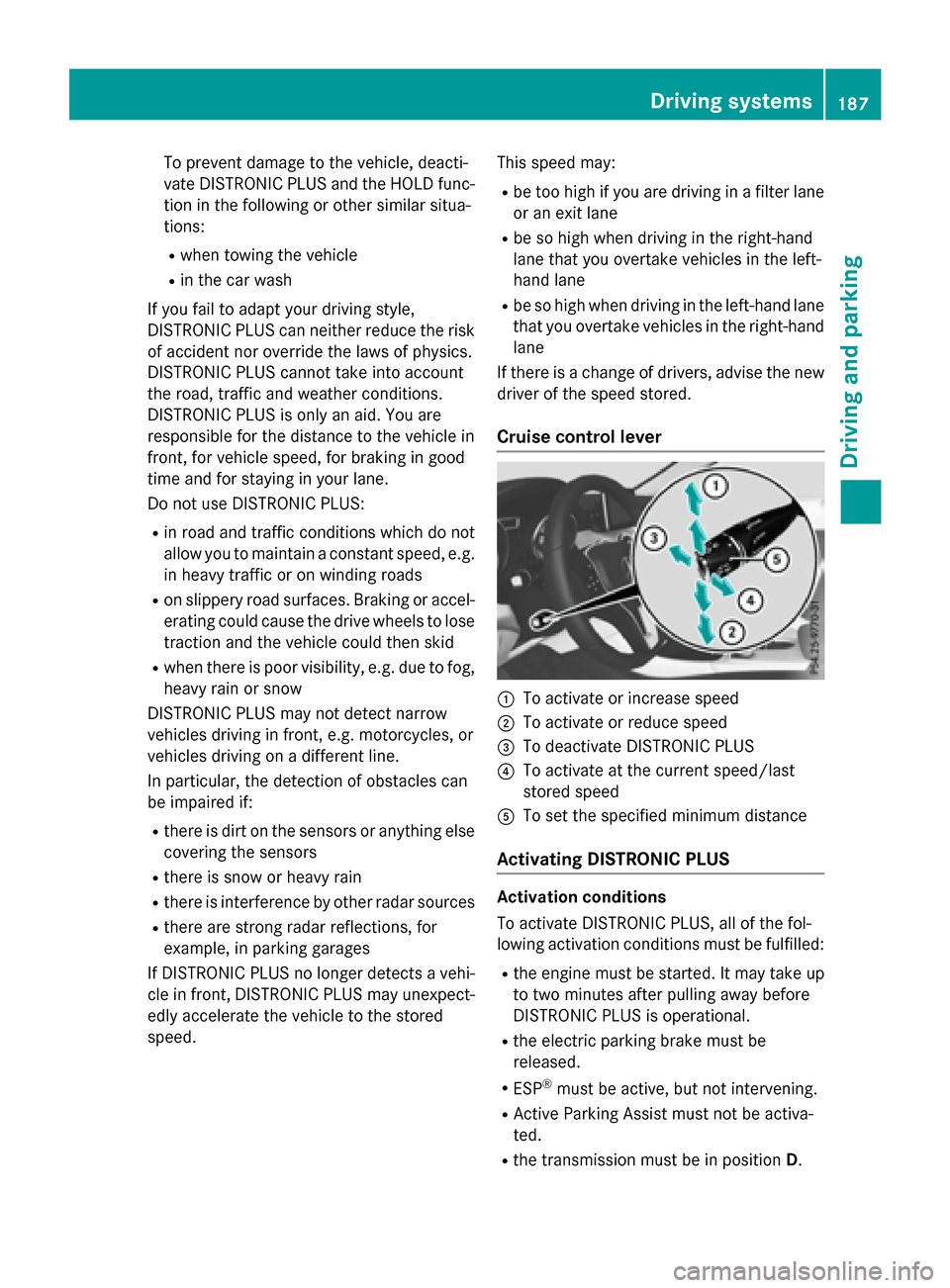
Cruise control lever
:To activate or increase speed
;To activate or reduce speed
=To deactivate DISTRONIC PLUS
?To activate at the current speed/last
stored speed
ATo set the specified minimum distance
Activating DISTRONIC PLUS
Activation conditions
To activate DISTRONIC PLUS, all of the fol-
lowing activation conditions must be fulfilled:
Rthe engine must be started. It may take up
to two minutes after pulling away before
DISTRONIC PLUS is operational.
Rthe electric parking brake must be
released.
RESP®must be active, but not intervening.
RActive Parking Assist must not be activa-
ted.
Rthe transmission must be in position D.
Driving systems187
Driving and parking
Z
Page 192 of 390
press the cruise control lever up:or
down ?to the pressure point.
The last stored speed increases or decrea-
ses in 1 mph (1 km/h) increments.
XTo adjust the set speed in 5 mph incre-
ments (10 km/h increments): briefly
press the cruise control lever up :or
down ?to the pressure point.
The last stored speed increases or decrea-
ses in 5 mph (10 km/h) increments.
iDISTRONIC PLUS is not deactivated if you
depress the accelerator pedal. If you accel-
erate to overtake, DISTRONIC PLUS
adjusts the vehicle's speed to the last
speed stored after you have finished over-
taking.
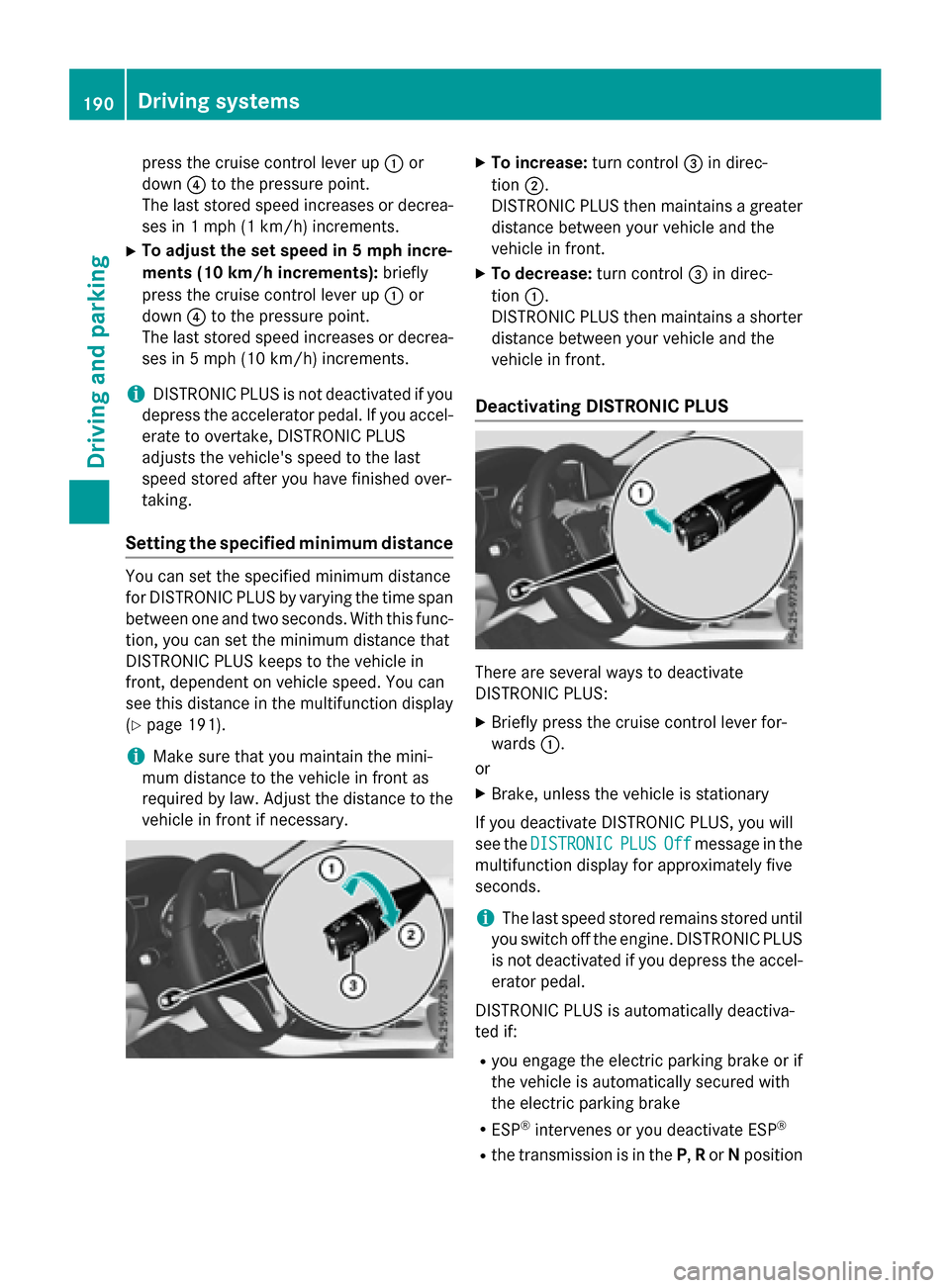
Setting the specified minimum distance
You can set the specified minimum distance
for DISTRONIC PLUS by varying the time span
between one and two seconds. With this func-
tion, you can set the minimum distance that
DISTRONIC PLUS keeps to the vehicle in
front, dependent on vehicle speed. You can
see this distance in the multifunction display
(
Ypage 191).
iMake sure that you maintain the mini-
mum distance to the vehicle in front as
required by law. Adjust the distance to the vehicle in front if necessary.
XTo increase: turn control=in direc-
tion ;.
DISTRONIC PLUS then maintains a greater
distance between your vehicle and the
vehicle in front.
XTo decrease: turn control=in direc-
tion :.
DISTRONIC PLUS then maintains a shorter
distance between your vehicle and the
vehicle in front.
Deactivating DISTRONIC PLUS
There are several ways to deactivate
DISTRONIC PLUS:
XBriefly press the cruise control lever for-
wards :.
or
XBrake, unless the vehicle is stationary
If you deactivate DISTRONIC PLUS, you will
see the DISTRONIC
PLUSOffmessage in the
multifunction display for approximately five
seconds.
iThe last speed stored remains stored until
you switch off the engine. DISTRONIC PLUS
is not deactivated if you depress the accel-
erator pedal.
DISTRONIC PLUS is automatically deactiva-
ted if:
Ryou engage the electric parking brake or if
the vehicle is automatically secured with
the electric parking brake
RESP®intervenes or you deactivate ESP®
Rthe transmission is in the P,Ror Nposition
190Driving systems
Driving and parking
Page 193 of 390
Ryou pull thecruise contro llever toward s
you in order to pull away and th efront-
passenger doo ror on eof th erea rdoors is
ope n
Rthevehicl eis skiddin g
Ryou activat eActive Parking Assis t
If DISTRONIC PLU Sis deactivated, you will
hear awarnin gtone .You will see th e
DISTRONIC PLU SOff
message in th emulti-
function display fo rapproximately fiv esec -
onds.
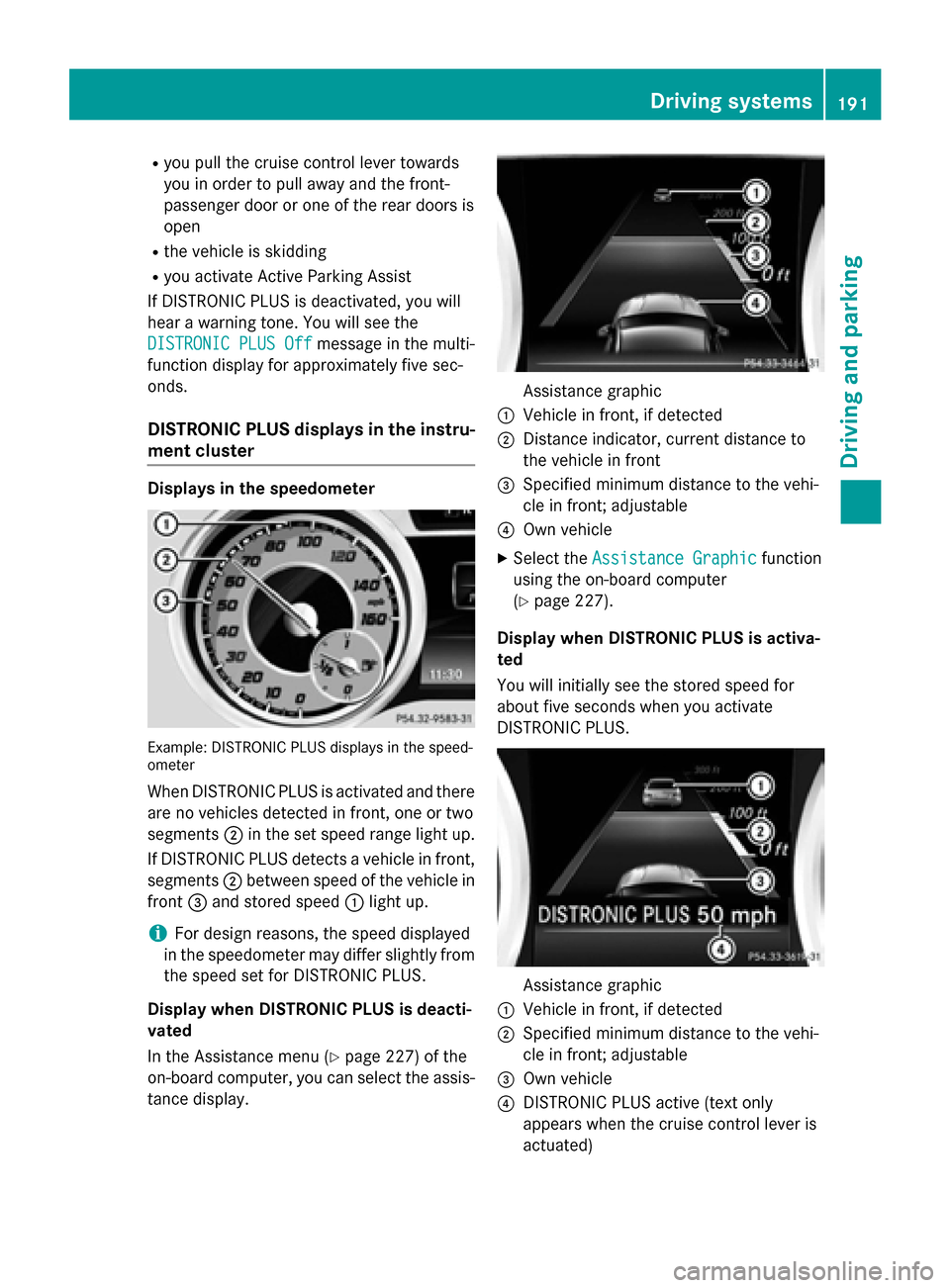
DISTRONIC PLUS display sin th einstru -
ment cluste r
Displaysin th espeedometer
Example: DISTRONIC PLU Sdisplays in th espeed-
omete r
WhenDISTRONIC PLU Sis activated and there
are no vehicles detecte din front, on eor tw o
segments ;in th eset speed range ligh tup.
If DISTRONIC PLU Sdetects avehicl ein front,
segments ;between speed of th evehicl ein
fron t= and stored speed :ligh tup.
iFo rdesign reasons, th espeed displayed
in th espeedometer may differ slightly from
th espeed set fo rDISTRONIC PLUS.
Display when DISTRONIC PLUS is deacti -
vate d
In th eAssistanc emen u (
Ypage 227) of th e
on-boar dcomputer, you can select th eassis-
tanc edisplay.
Assistanc egraphi c
:Vehiclein front, if detecte d
;Distanceindicator ,curren tdistanc eto
th evehicl ein fron t
=Specified minimum distanc eto th evehi-
cle in front; adjustable
?Own vehicl e
XSelectth eAssistanc eGraphi cfunction
usin gth eon-boar dcomputer
(
Ypage 227).
Display when DISTRONIC PLUS is activa -
te d
You will initially see th estored speed fo r
about fiv eseconds when you activat e
DISTRONIC PLUS.
Assistanc egraphi c
:Vehiclein front, if detecte d
;Specified minimum distanc eto th evehi-
cle in front; adjustable
=Own vehicl e
?DISTRONIC PLU Sactive (tex tonly
appears when th ecruise contro llever is
actuated)
Driving systems19 1
Driving an d parking
Z
Page 195 of 390
detected vehicle turns a corner and reveals
an obstacle or stationary vehicle, DISTRONIC
PLUS will not brake for these.
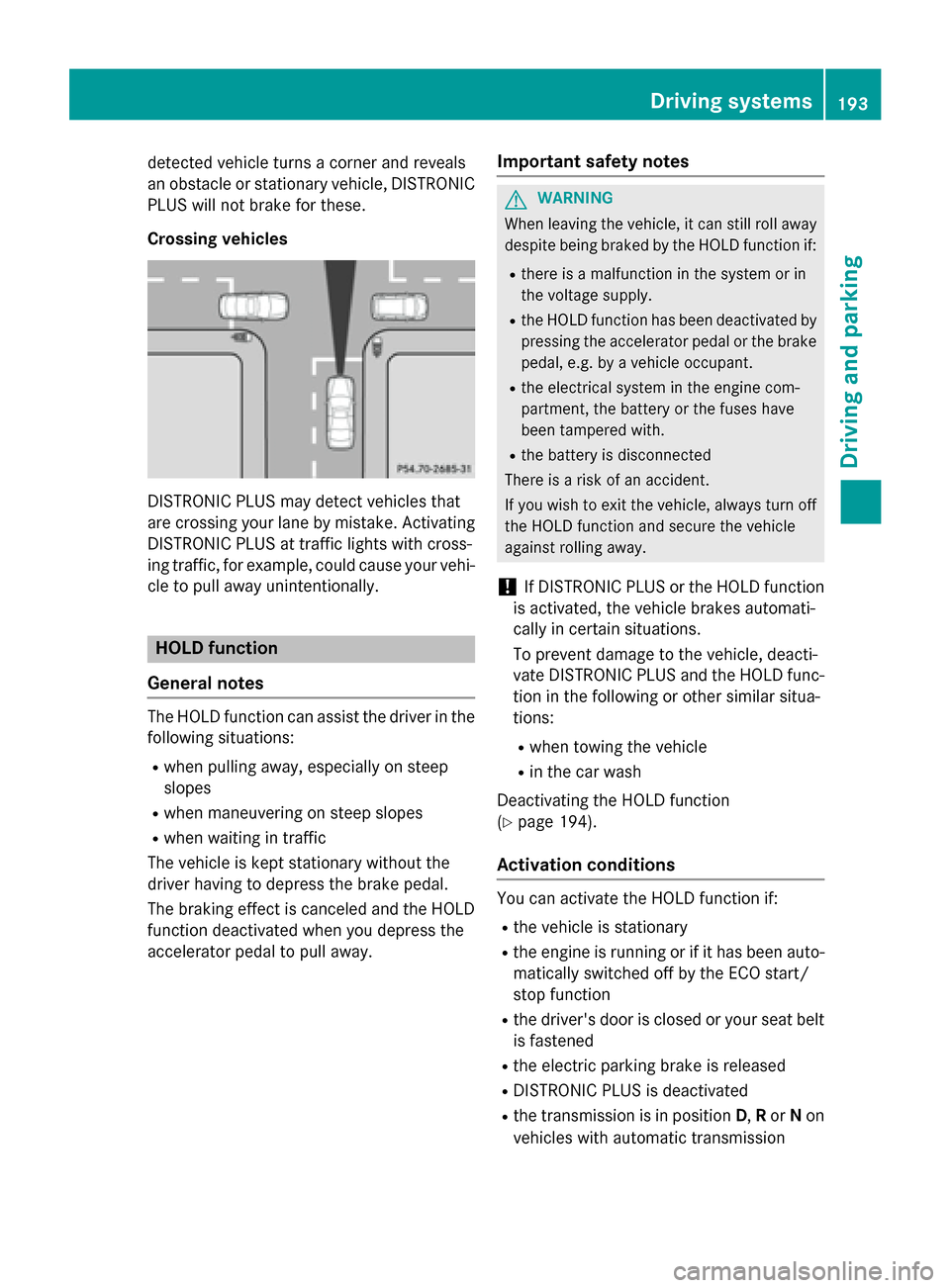
Crossing vehicles
DISTRONIC PLUS may detect vehicles that
are crossing your lane by mistake. Activating
DISTRONIC PLUS at traffic lights with cross-
ing traffic, for example, could cause your vehi-
cle to pull away unintentionally.
HOLD function
General notes
The HOLD function can assist the driver in the
following situations:
Rwhen pulling away, especially on steep
slopes
Rwhen maneuvering on steep slopes
Rwhen waiting in traffic
The vehicle is kept stationary without the
driver having to depress the brake pedal.
The braking effect is canceled and the HOLD
function deactivated when you depress the
accelerator pedal to pull away.
Important safety notes
GWARNING
When leaving the vehicle, it can still roll away despite being braked by the HOLD function if:
Rthere is a malfunction in the system or in
the voltage supply.
Rthe HOLD function has been deactivated by
pressing the accelerator pedal or the brake
pedal, e.g. by a vehicle occupant.
Rthe electrical system in the engine com-
partment, the battery or the fuses have
been tampered with.
Rthe battery is disconnected
There is a risk of an accident.
If you wish to exit the vehicle, always turn off the HOLD function and secure the vehicle
against rolling away.
!If DISTRONIC PLUS or the HOLD function
is activated, the vehicle brakes automati-
cally in certain situations.
To prevent damage to the vehicle, deacti-
vate DISTRONIC PLUS and the HOLD func-
tion in the following or other similar situa-
tions:
Rwhen towing the vehicle
Rin the car wash
Deactivating the HOLD function
(
Ypage 194).
Activation conditions
You can activate the HOLD function if:
Rthe vehicle is stationary
Rthe engine is running or if it has been auto-
matically switched off by the ECO start/
stop function
Rthe driver's door is closed or your seat belt
is fastened
Rthe electric parking brake is released
RDISTRONIC PLUS is deactivated
Rthe transmission is in position D,Ror Non
vehicles with automatic transmission
Driving systems193
Driving and parking
Z