windscreen MERCEDES-BENZ GLA SUV 2013 Owner's Manual
[x] Cancel search | Manufacturer: MERCEDES-BENZ, Model Year: 2013, Model line: GLA SUV, Model: MERCEDES-BENZ GLA SUV 2013Pages: 401, PDF Size: 11.9 MB
Page 141 of 401
Useful information
i This Owner's Manual describes all mod-
els, series and optional equipment for your
vehicle that were available at the time of
going to press. National variations are pos- sible. Note that your vehicle may not be
equipped with all of the functions descri-
bed. This is also the case for systems and
functions relevant to safety.
i Read the information on qualified special-
ist workshops: (Y page 25). Overview of climate control systems
Important safety notes
Observe the settings recommended on the
following pages. The windows could other-
wise mist up.
To prevent the windows from misting up:
R switch off climate control only briefly
R switch on air-recirculation mode only
briefly
R switch on the cooling with air dehumidifi-
cation function
R switch on the "demist windscreen" function
briefly, if required
The air-conditioning system/
THERMOTRONIC automatic climate control
regulates the temperature and the humidity
of the vehicle interior and filters undesirable
substances from the air.
The THERMOTRONIC air-conditioning sys-
tem/automatic climate control can only be
operated when the engine is running. Opti-
mum operation is only achieved with the side windows and panorama sliding sunroof
closed.
The residual heat function can only be acti-
vated or deactivated with the ignition
switched off (Y page 149).
Always keep the ventilation flaps behind the
side panelling clear (Y page 131). Otherwise
the vehicle will not be ventilated correctly. i
Ventilate the vehicle for a brief period
during warm weather, e.g. using the con-
venience opening feature (Y page 99). This
will speed up the cooling process and the
desired interior temperature will be
reached more quickly.
i The integrated filter filters out most par-
ticles of dust and soot and completely fil-
ters out pollen. With THERMOTRONIC auto- matic climate control, gaseous pollutants
and odours will also be reduced. A clogged
filter reduces the amount of air supplied to
the vehicle interior. For this reason, you
should always observe the interval for
replacing the filter, which is specified in the Service Booklet. As this depends on envi-
ronmental conditions, e.g. heavy air pollu-
tion, the interval may be shorter than statedin the Service Booklet.
i It is possible that the residual heat func-
tion may be activated automatically an hour
after the key has been removed in order to
dry the automatic climate control. The vehi- cle is then ventilated for 30 minutes. 138
Overview of climate control systemsClimate control
Page 142 of 401
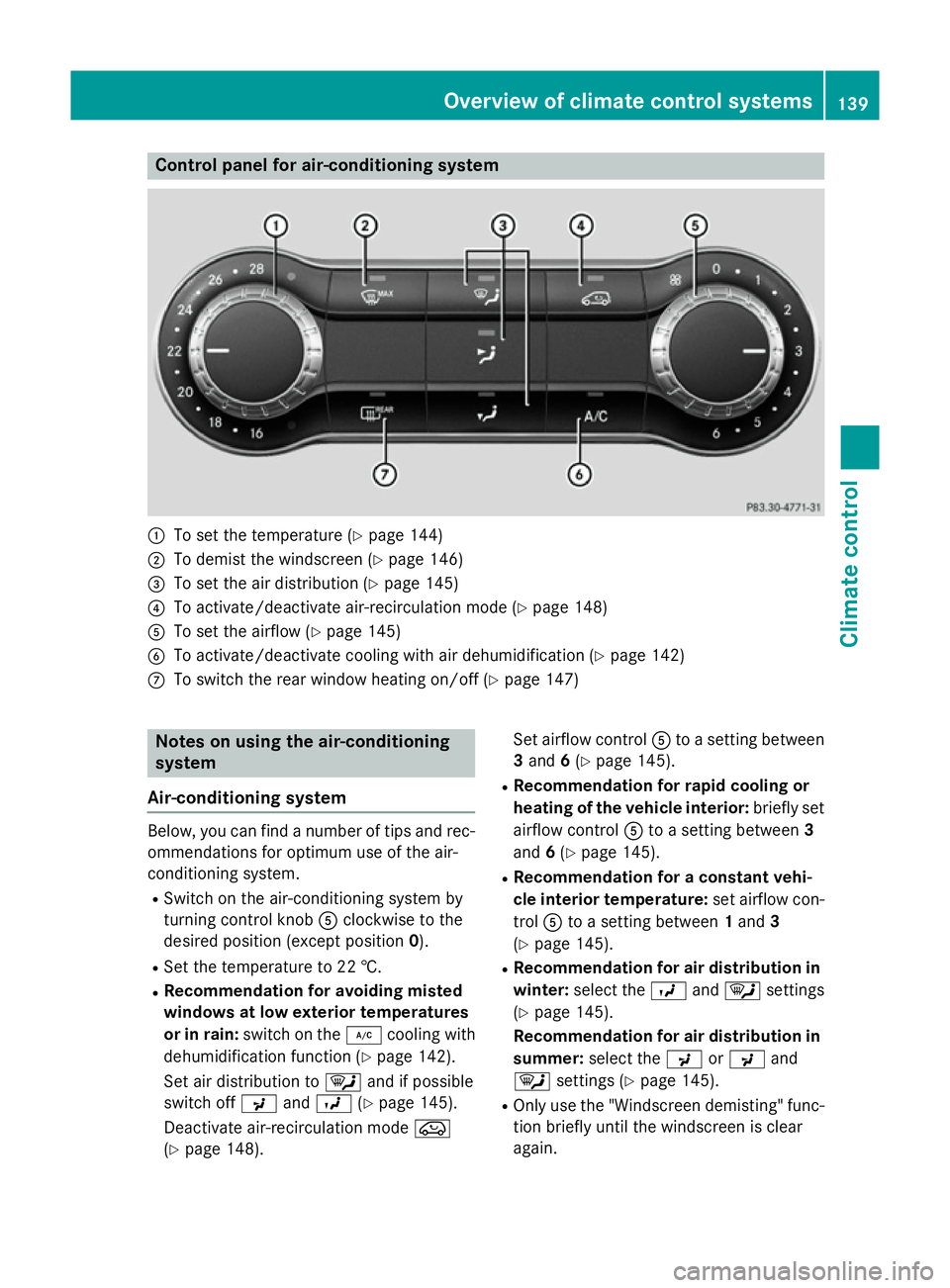
Control panel for air-conditioning system
:
To set the temperature (Y page 144)
; To demist the windscreen (Y page 146)
= To set the air distribution (Y page 145)
? To activate/deactivate air-recirculation mode (Y page 148)
A To set the airflow (Y page 145)
B To activate/deactivate cooling with air dehumidification (Y page 142)
C To switch the rear window heating on/off (Y page 147)Notes on using the air-conditioning
system
Air-conditioning system Below, you can find a number of tips and rec-
ommendations for optimum use of the air-
conditioning system.
R Switch on the air-conditioning system by
turning control knob Aclockwise to the
desired position (except position 0).
R Set the temperature to 22 †.
R Recommendation for avoiding misted
windows at low exterior temperatures
or in rain: switch on the ¿cooling with
dehumidification function (Y page 142).
Set air distribution to ¯and if possible
switch off PandO (Ypage 145).
Deactivate air-recirculation mode e
(Y page 148). Set airflow control
Ato a setting between
3 and 6(Y page 145).
R Recommendation for rapid cooling or
heating of the vehicle interior: briefly set
airflow control Ato a setting between 3
and 6(Y page 145).
R Recommendation for a constant vehi-
cle interior temperature: set airflow con-
trol Ato a setting between 1and 3
(Y page 145).
R Recommendation for air distribution in
winter: select the Oand¯ settings
(Y page 145).
Recommendation for air distribution in
summer: select the PorP and
¯ settings (Y page 145).
R Only use the "Windscreen demisting" func-
tion briefly until the windscreen is clear
again. Overview of climate control systems
139Climate control
Page 144 of 401
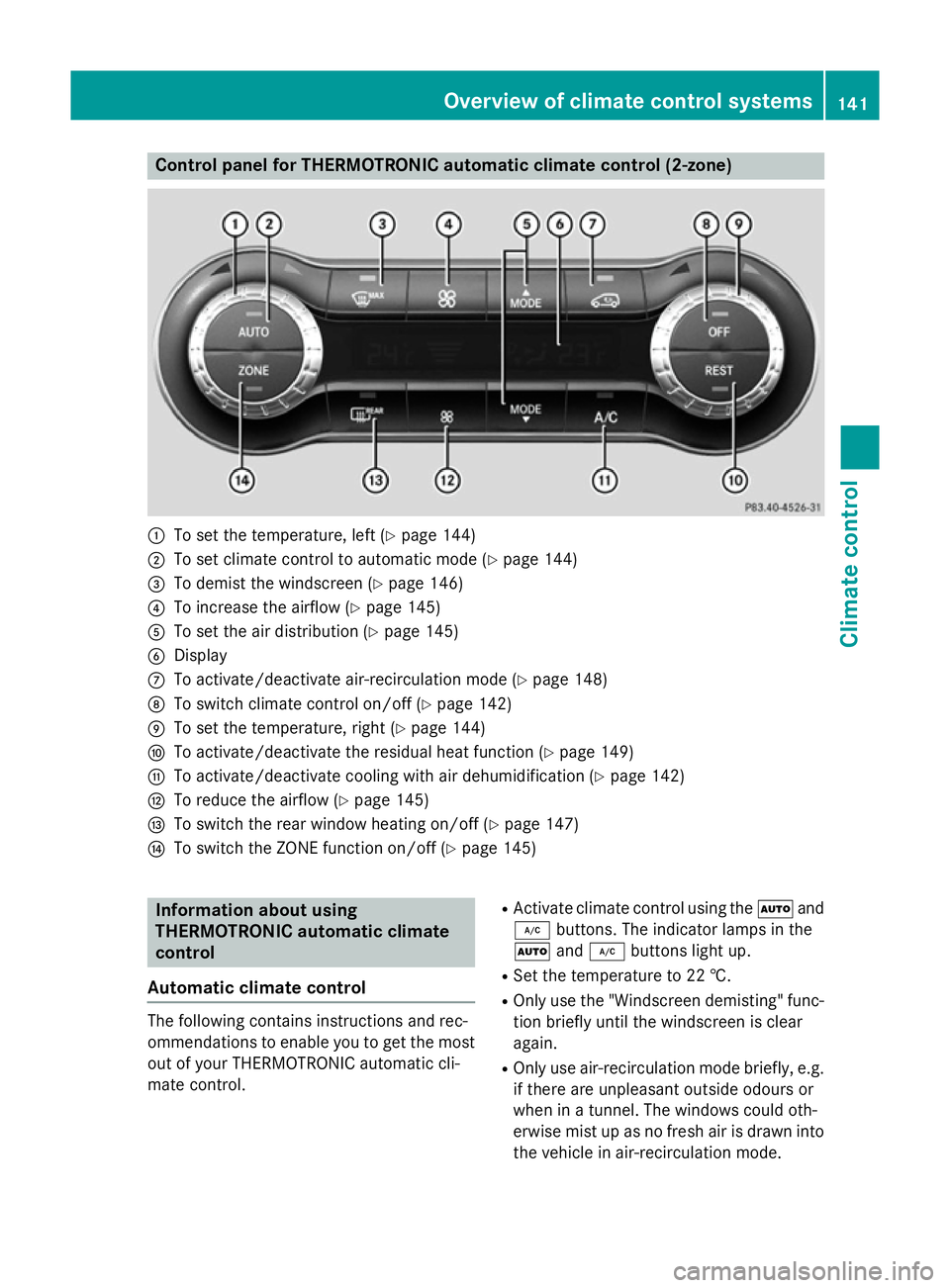
Control panel for THERMOTRONIC automatic climate control (2-zone)
:
To set the temperature, left (Y page 144)
; To set climate control to automatic mode (Y page 144)
= To demist the windscreen (Y page 146)
? To increase the airflow (Y page 145)
A To set the air distribution (Y page 145)
B Display
C To activate/deactivate air-recirculation mode (Y page 148)
D To switch climate control on/off (Y page 142)
E To set the temperature, right (Y page 144)
F To activate/deactivate the residual heat function (Y page 149)
G To activate/deactivate cooling with air dehumidification (Y page 142)
H To reduce the airflow (Y page 145)
I To switch the rear window heating on/off (Y page 147)
J To switch the ZONE function on/off (Y page 145)Information about using
THERMOTRONIC automatic climate
control
Automatic climate control The following contains instructions and rec-
ommendations to enable you to get the most
out of your THERMOTRONIC automatic cli-
mate control. R
Activate climate control using the Ãand
¿ buttons. The indicator lamps in the
à and¿ buttons light up.
R Set the temperature to 22 †.
R Only use the "Windscreen demisting" func-
tion briefly until the windscreen is clear
again.
R Only use air-recirculation mode briefly, e.g.
if there are unpleasant outside odours or
when in a tunnel. The windows could oth-
erwise mist up as no fresh air is drawn into
the vehicle in air-recirculation mode. Overview of climate control systems
141Climate control
Page 149 of 401
The temperature setting for the driver's
side is not adopted for the front-passenger
side.
X To deactivate: press theábutton.
The indicator lamp in the ábutton goes
out.
The temperature setting for the driver's
side is adopted for the front-passenger
side. Demisting the windscreen
You can use this function to defrost the wind-
screen or to demist the inside of the wind-
screen and the side windows.
i You should only select the "Windscreen
demisting" function until the windscreen is
clear again.
X Turn the key to position 2in the ignition
lock (Y page 159).
X To activate: press the¬button.
The indicator lamp in the ¬button lights
up.
The climate control system switches to the
following functions:
R high airflow
R high temperature
R air distribution to the windscreen and
front side windows
R air-recirculation mode off
i The "Windscreen demisting" function
automatically sets the blower output to the optimum demisting effect. As a result, the
airflow may increase or decrease automat-
ically after the button is pressed.
i You can adjust the blower output man-
ually while the "Windscreen demisting"
function is in operation:
R Air-conditioning system: turn airflow
control Aclockwise or anti-clockwise
(Y page 139).
R THERMOTRONIC automatic climate con-
trol: press the óorô button. X
To deactivate: press the¬button.
The indicator lamp in the ¬button goes
out. The previous settings are reactivated.
Air-recirculation mode remains deactiva-
ted.
or
X THERMOTRONIC automatic climate con-
trol: press the Ãbutton.
The indicator lamp in the ¬button goes
out. Airflow and air distribution are set to
automatic mode.
or X Climate control: turn temperature con-
trol :clockwise or anti-clockwise
(Y page 139).
THERMOTRONIC automatic climate con-
trol: turn temperature control :orE
clockwise or anti-clockwise (Y page 141). Demisting the windows
Windows misted up on the inside Air-conditioning system
X Activate the ¿"Cooling with air dehu-
midification" function.
X If the windows continue to mist up, activate
the ¬ "Windscreen demisting" function.
i You should only select this setting until
the windscreen is clear again.
THERMOTRONIC automatic climate con-
trol
X Activate the ¿"Cooling with air dehu-
midification" function.
X Activate automatic mode Ã.
X If the windows continue to mist up, activate
the ¬ "Windscreen demisting" function.
i You should only select this setting until
the windscreen is clear again.
Windows misted up on the outside X
Activate the windscreen wipers.
X Set the air distribution to PorO. 146
Operating the climate control systemClimate control
Page 150 of 401
i
You should only select this setting until
the windscreen is clear again. Rear window heating
General notes The rear window heating has a high current
draw. You should therefore switch it off as
soon as the window is clear. It otherwise
switches off automatically after several
minutes.
If the battery voltage is too low, the rear win-
dow heating may switch off.
Activating/deactivating X
Turn the key to position 2in the ignition
lock (Y page 159).
X Press the ¤button.
The indicator lamp in the ¤button lights
up or goes out. Operating the climate control system
147Climate control
Page 158 of 401
Display messages
Possible causes/consequences and
M
MSolutions The auxiliary heating cannot be switched on or has switched itself
off.
There is too little fuel in the fuel tank.
X Refuel at the nearest filling station.
X Make another attempt to switch on the auxiliary heating using
the remote control. The auxiliary heating cannot be switched on or has switched itself
off.
The auxiliary heating is faulty.
X Have the auxiliary heating checked at a qualified specialist
workshop. Adjusting the air vents
Important safety notes
G
WARNING
Very hot or very cold air can flow from the air vents. This could result in burns or frostbite in the immediate vicinity of the air vents. There
is a risk of injury.
Make sure that all vehicle occupants always
maintain a sufficient distance to the air out-
lets. If necessary, redirect the airflow to
another area of the vehicle interior.
In order to ensure the direct flow of fresh air
through the air vents into the vehicle interior,
please observe the following notes:
R keep the air inlet between the windscreen
and the bonnet free of blockages, such as
ice, snow or leaves.
R never cover the vents or ventilation grilles
in the vehicle interior.
i Move the adjusters for the air vents ver-
tically or horizontally, to set the direction of the airflow.
i Optimal climate control function is ach-
ieved by opening the air vents fully and set-
ting the adjusters to the middle position. Setting the centre air vents
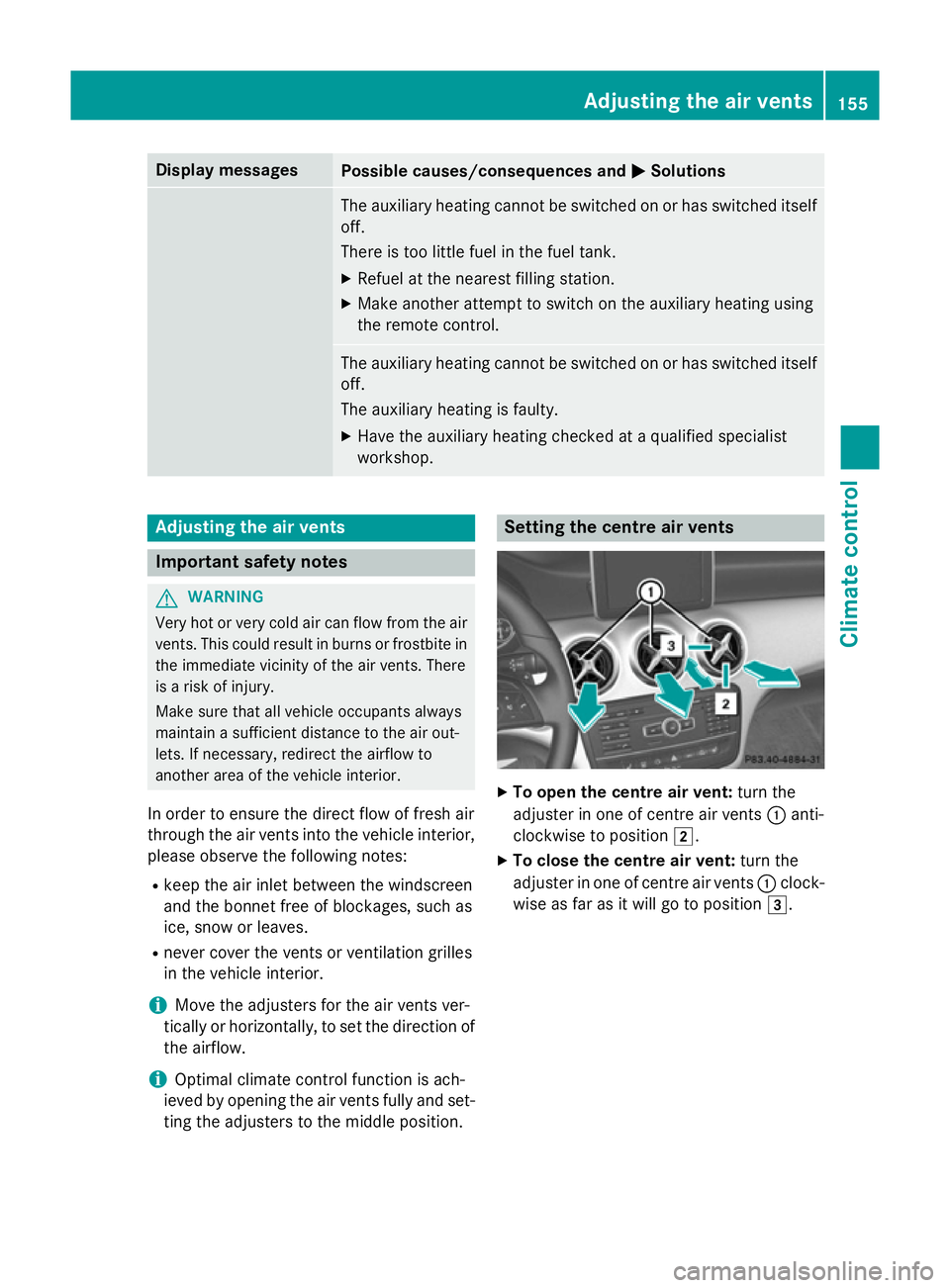
X
To open the centre air vent: turn the
adjuster in one of centre air vents :anti-
clockwise to position 2.
X To close the centre air vent: turn the
adjuster in one of centre air vents :clock-
wise as far as it will go to position 3. Adjusting the air vents
155Climate control Z
Page 162 of 401
G
WARNING
If you switch off the ignition while driving,
safety-relevant functions are only available
with limitations, or not at all. This could affect, for example, the power steering and the brake
boosting effect. You will require considerably
more effort to steer and brake. There is a risk of an accident.
Do not switch off the ignition while driving. G
WARNING
If the parking brake has not been fully
released when driving, the parking brake can:
R overheat and cause a fire
R lose its hold function.
There is a risk of fire and an accident. Release
the parking brake fully before driving off.
! Warm up the engine quickly. Do not use
the engine's full performance until it has
reached operating temperature.
Only set the automatic transmission to the
respective drive positions when the vehicle
is stationary.
Where possible, avoid spinning the drive
wheels when pulling away on slippery
roads. Otherwise, you could damage the
drive train.
! AMG vehicles:
avoid full-load operation
and engine speeds greater than 5000 rpm
when the engine is cold. This helps to pro-
tect the engine and avoids uncomfortable
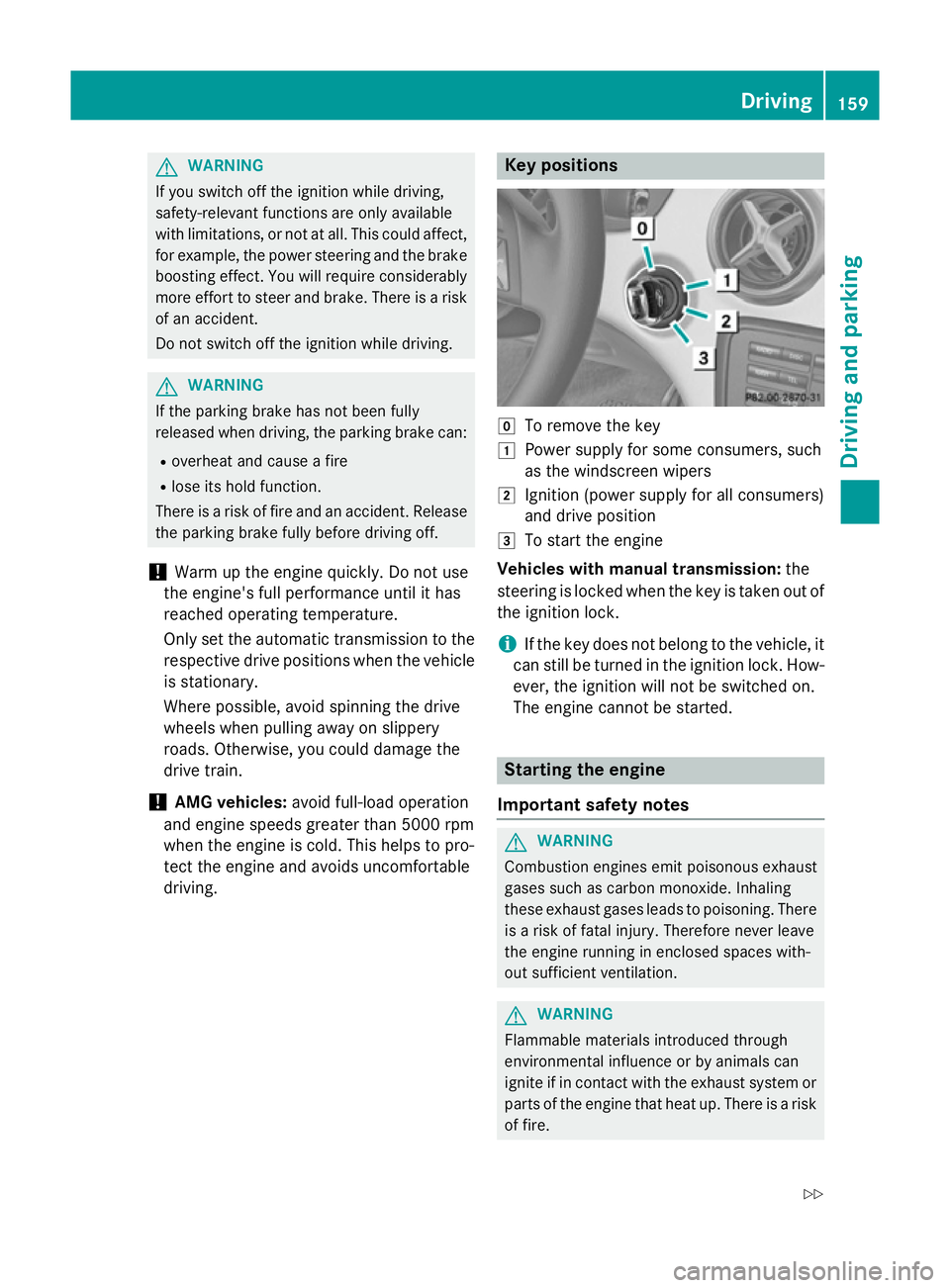
driving. Key positions
g
To remove the key
1 Power supply for some consumers, such
as the windscreen wipers
2 Ignition (power supply for all consumers)
and drive position
3 To start the engine
Vehicles with manual transmission: the
steering is locked when the key is taken out of
the ignition lock.
i If the key does not belong to the vehicle, it
can still be turned in the ignition lock. How- ever, the ignition will not be switched on.
The engine cannot be started. Starting the engine
Important safety notes G
WARNING
Combustion engines emit poisonous exhaust
gases such as carbon monoxide. Inhaling
these exhaust gases leads to poisoning. There is a risk of fatal injury. Therefore never leave
the engine running in enclosed spaces with-
out sufficient ventilation. G
WARNING
Flammable materials introduced through
environmental influence or by animals can
ignite if in contact with the exhaust system or parts of the engine that heat up. There is a risk
of fire. Driving
159Driving and parking
Z
Page 165 of 401
ECO start/stop function
Introduction The ECO start/stop function switches the
engine off automatically if the vehicle is stop-
ped under certain conditions.
When pulling away again, the engine starts
automatically. The ECO start/stop function
thereby helps you to reduce the fuel con-
sumption and emissions of your vehicle.
Important safety notes G
WARNING
If the engine is switched off automatically and you exit the vehicle, the engine is restarted
automatically. The vehicle may begin moving. There is a risk of accident and injury.
If you wish to exit the vehicle, always turn off
the ignition and secure the vehicle against
rolling away.
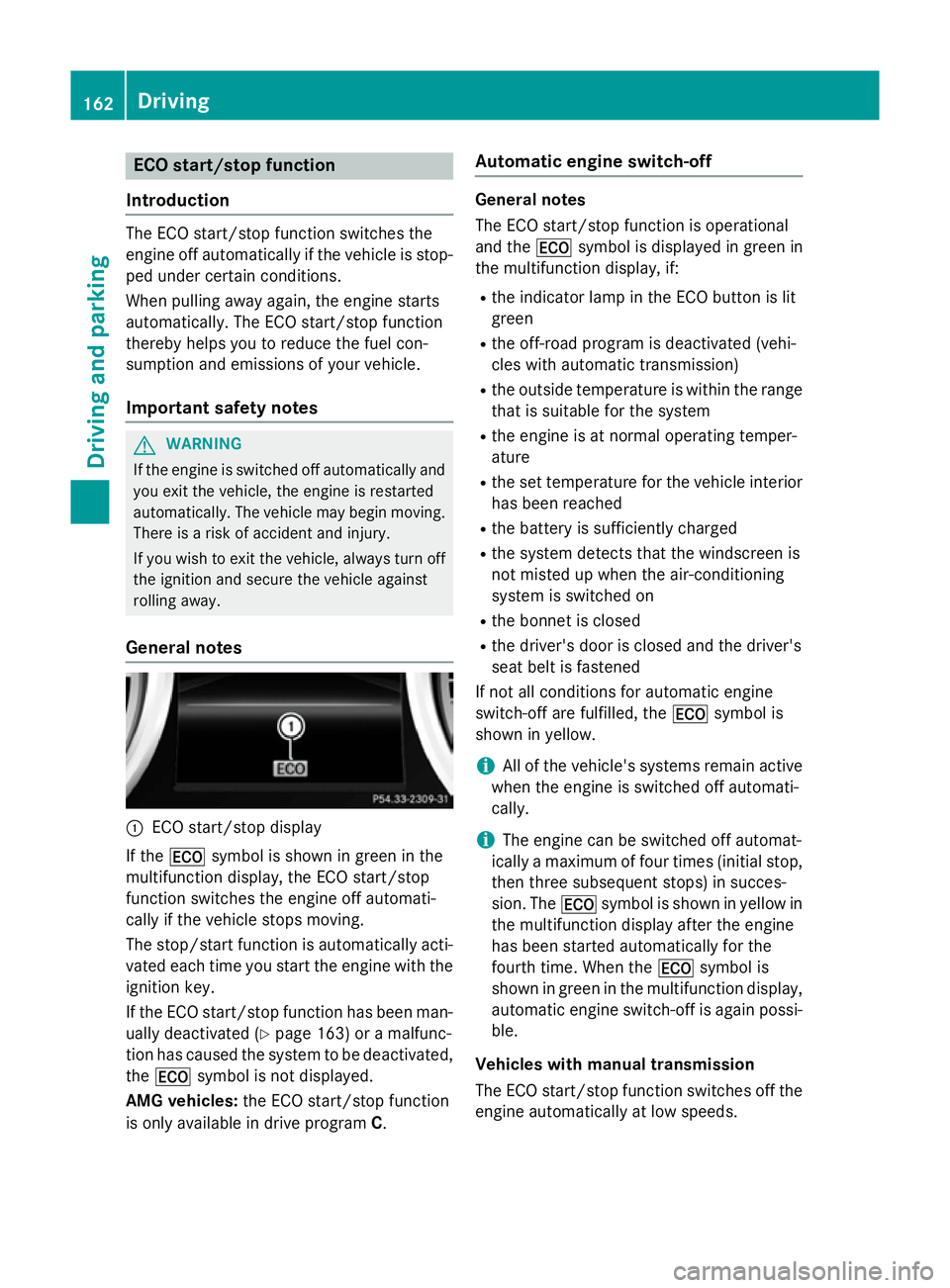
General notes :
ECO start/stop display
If the ¤ symbol is shown in green in the
multifunction display, the ECO start/stop
function switches the engine off automati-
cally if the vehicle stops moving.
The stop/start function is automatically acti-
vated each time you start the engine with the ignition key.
If the ECO start/stop function has been man- ually deactivated (Y page 163) or a malfunc-
tion has caused the system to be deactivated, the ¤ symbol is not displayed.
AMG vehicles: the ECO start/stop function
is only available in drive program C.Automatic engine switch-off General notes
The ECO start/stop function is operational
and the
¤symbol is displayed in green in
the multifunction display, if:
R the indicator lamp in the ECO button is lit
green
R the off-road program is deactivated (vehi-
cles with automatic transmission)
R the outside temperature is within the range
that is suitable for the system
R the engine is at normal operating temper-
ature
R the set temperature for the vehicle interior
has been reached
R the battery is sufficiently charged
R the system detects that the windscreen is
not misted up when the air-conditioning
system is switched on
R the bonnet is closed
R the driver's door is closed and the driver's
seat belt is fastened
If not all conditions for automatic engine
switch-off are fulfilled, the ¤symbol is
shown in yellow.
i All of the vehicle's systems remain active
when the engine is switched off automati-
cally.
i The engine can be switched off automat-
ically a maximum of four times (initial stop,
then three subsequent stops) in succes-
sion. The ¤symbol is shown in yellow in
the multifunction display after the engine
has been started automatically for the
fourth time. When the ¤symbol is
shown in green in the multifunction display,
automatic engine switch-off is again possi- ble.
Vehicles with manual transmission
The ECO start/stop function switches off the engine automatically at low speeds. 162
DrivingDriving and parking
Page 224 of 401
Speed Limit Assist
General notes Speed Limit Assist shows you detected speed
limits in the multifunction display. Data from
the navigation system is also used for this
purpose. If a traffic sign indicating a speed
limit or the end of a speed limit is detected, it
is shown in the multifunction display. If Speed
Limit Assist does not detect any traffic signs, the speed limit from the digital road map is
taken and shown in the display.
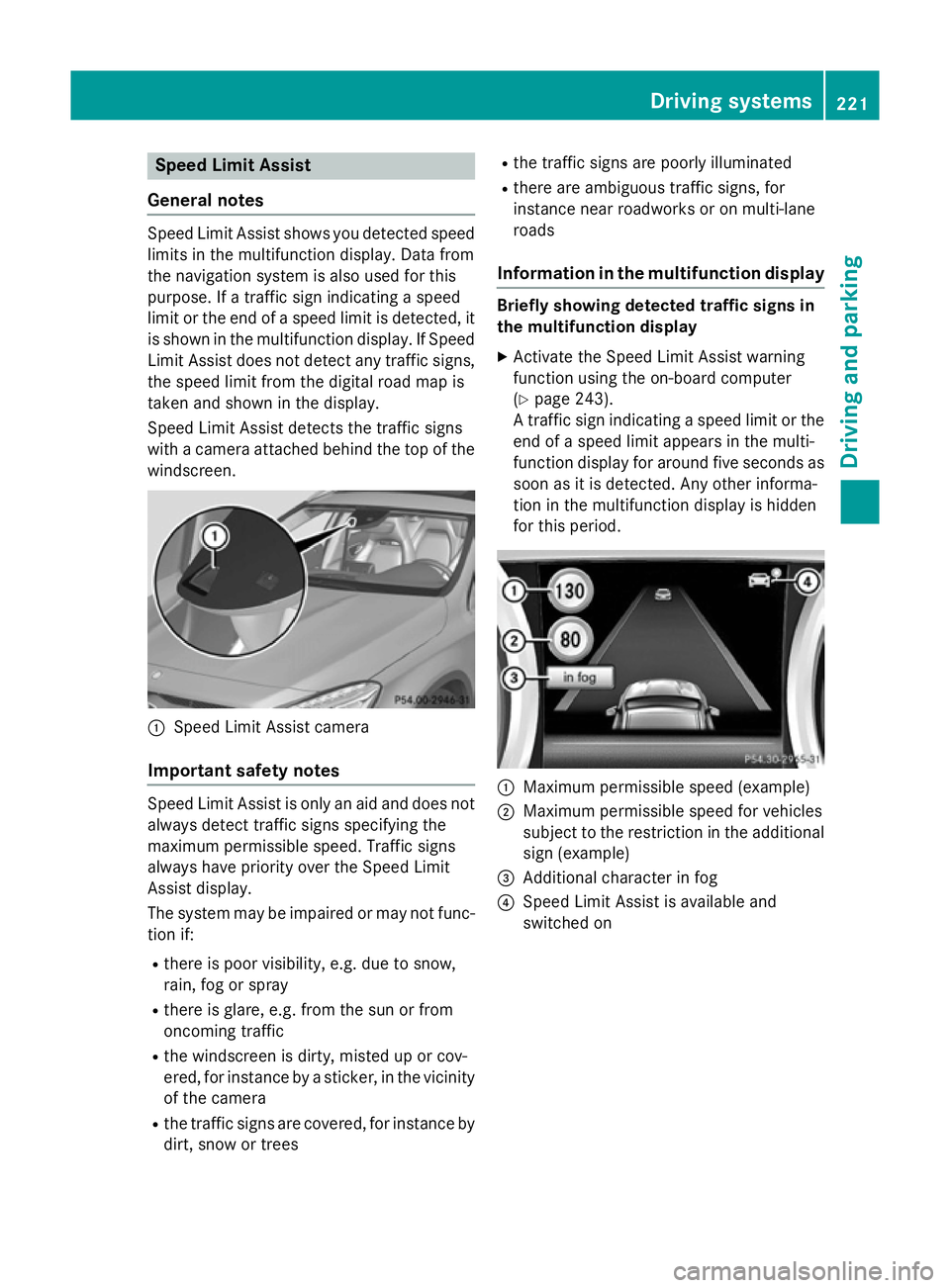
Speed Limit Assist detects the traffic signs
with a camera attached behind the top of the
windscreen. :
Speed Limit Assist camera
Important safety notes Speed Limit Assist is only an aid and does not
always detect traffic signs specifying the
maximum permissible speed. Traffic signs
always have priority over the Speed Limit
Assist display.
The system may be impaired or may not func-
tion if:
R there is poor visibility, e.g. due to snow,
rain, fog or spray
R there is glare, e.g. from the sun or from
oncoming traffic
R the windscreen is dirty, misted up or cov-
ered, for instance by a sticker, in the vicinity of the camera
R the traffic signs are covered, for instance by
dirt, snow or trees R
the traffic signs are poorly illuminated
R there are ambiguous traffic signs, for
instance near roadworks or on multi-lane
roads
Information in the multifunction display Briefly showing detected traffic signs in
the multifunction display
X Activate the Speed Limit Assist warning
function using the on-board computer
(Y page 243).
A traffic sign indicating a speed limit or the
end of a speed limit appears in the multi-
function display for around five seconds as
soon as it is detected. Any other informa-
tion in the multifunction display is hidden
for this period. :
Maximum permissible speed (example)
; Maximum permissible speed for vehicles
subject to the restriction in the additional
sign (example)
= Additional character in fog
? Speed Limit Assist is available and
switched on Driving systems
221Driving and parking Z
Page 227 of 401
Activating Blind Spot Assist
X Make sure that Blind Spot Assist is activa-
ted in the on-board computer
(Y page 245).
X Turn the key to position 2in the ignition
lock.
Warning lamps :in the exterior mirrors
light up red for approximately 1.5 seconds
and then turn yellow.
Towing a trailer
If you attach a trailer, make sure that you have
correctly established the electrical connec-
tion. This can be accomplished by checking
the trailer lighting. Blind Spot Assist is then
deactivated. The indicator lamp lights up yel-
low in the exterior mirrors and the Blind
Blind
Spot Assist currently unavailable
Spot Assist currently unavailable
See Owner's Manual
See Owner's Manual message appears in
the multifunction display.
i You can deactivate the indicator lamps in
the exterior mirrors.
To do so, deactivate Blind Spot Assist if:
R the key is in position 2in the ignition lock
R the engine is not running
R the electrical connection to the trailer
has been established
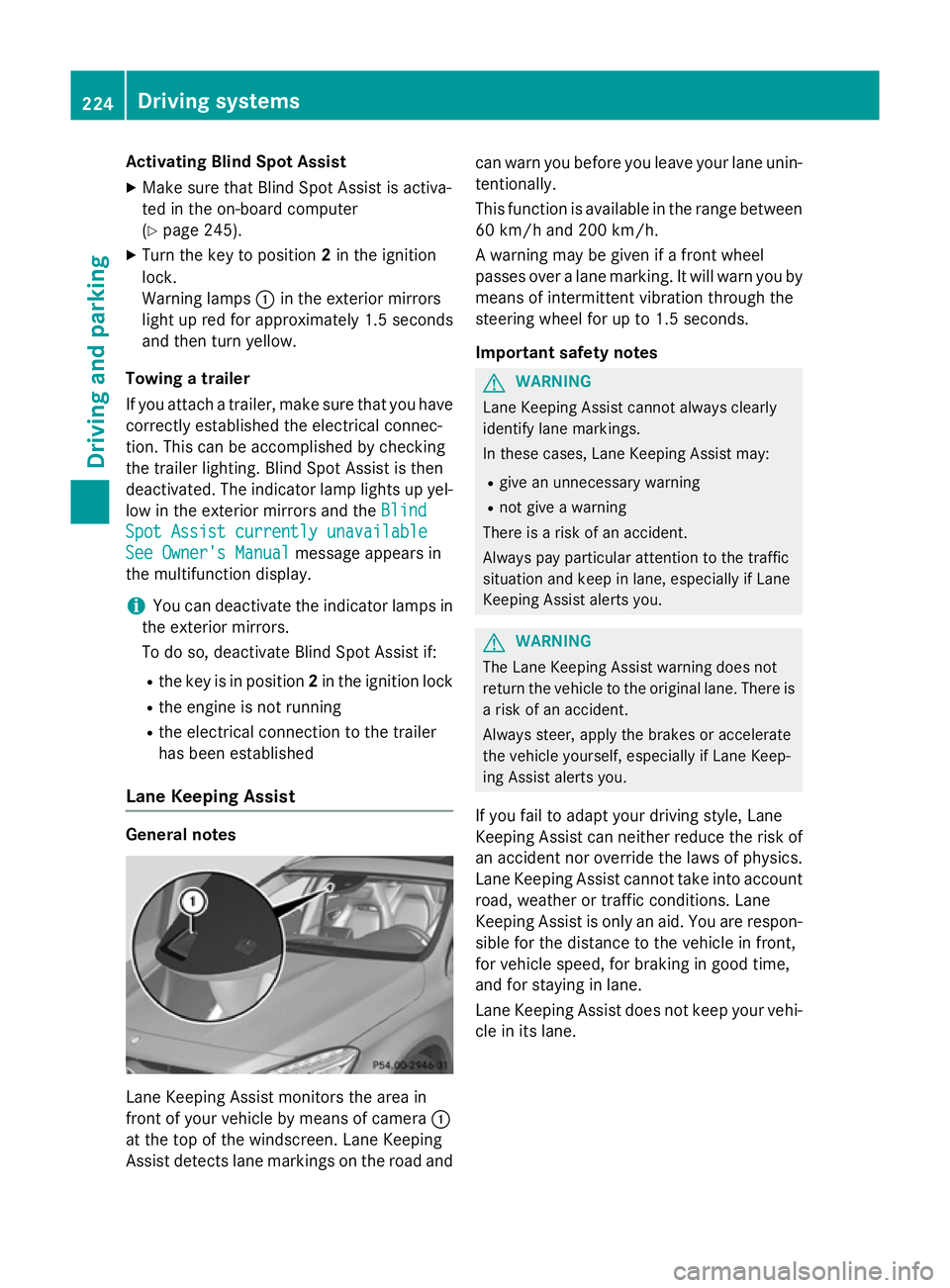
Lane Keeping Assist General notes
Lane Keeping Assist monitors the area in
front of your vehicle by means of camera :
at the top of the windscreen. Lane Keeping
Assist detects lane markings on the road and can warn you before you leave your lane unin-
tentionally.
This function is available in the range between
60 km/h and 200 km/h.
A warning may be given if a front wheel
passes over a lane marking. It will warn you by means of intermittent vibration through the
steering wheel for up to 1.5 seconds.
Important safety notes G
WARNING
Lane Keeping Assist cannot always clearly
identify lane markings.
In these cases, Lane Keeping Assist may:
R give an unnecessary warning
R not give a warning
There is a risk of an accident.
Always pay particular attention to the traffic
situation and keep in lane, especially if Lane
Keeping Assist alerts you. G
WARNING
The Lane Keeping Assist warning does not
return the vehicle to the original lane. There is a risk of an accident.
Always steer, apply the brakes or accelerate
the vehicle yourself, especially if Lane Keep-
ing Assist alerts you.
If you fail to adapt your driving style, Lane
Keeping Assist can neither reduce the risk of
an accident nor override the laws of physics. Lane Keeping Assist cannot take into account
road, weather or traffic conditions. Lane
Keeping Assist is only an aid. You are respon- sible for the distance to the vehicle in front,
for vehicle speed, for braking in good time,
and for staying in lane.
Lane Keeping Assist does not keep your vehi-
cle in its lane. 224
Driving systemsDriving and pa
rking