display MERCEDES-BENZ GLA SUV 2013 Owner's Guide
[x] Cancel search | Manufacturer: MERCEDES-BENZ, Model Year: 2013, Model line: GLA SUV, Model: MERCEDES-BENZ GLA SUV 2013Pages: 401, PDF Size: 11.9 MB
Page 111 of 401
Useful information
i This Owner's Manual describes all mod-
els, series and optional equipment for your
vehicle that were available at the time of
going to press. National variations are pos- sible. Note that your vehicle may not be
equipped with all of the functions descri-
bed. This is also the case for systems and
functions relevant to safety.
i Read the information on qualified special-
ist workshops: (Y page 25). Correct driver's seat position
G
WARNING
You could lose control of the vehicle while
driving if you:
R adjust the driver's seat, steering wheel or
mirrors
R fasten the seat belt
There is a risk of an accident.
Adjust the driver's seat, head restraint, steer-
ing wheel and mirrors and fasten your seat
belt before starting the engine. Observe the safety notes on seat adjustment
(Y page 109). X
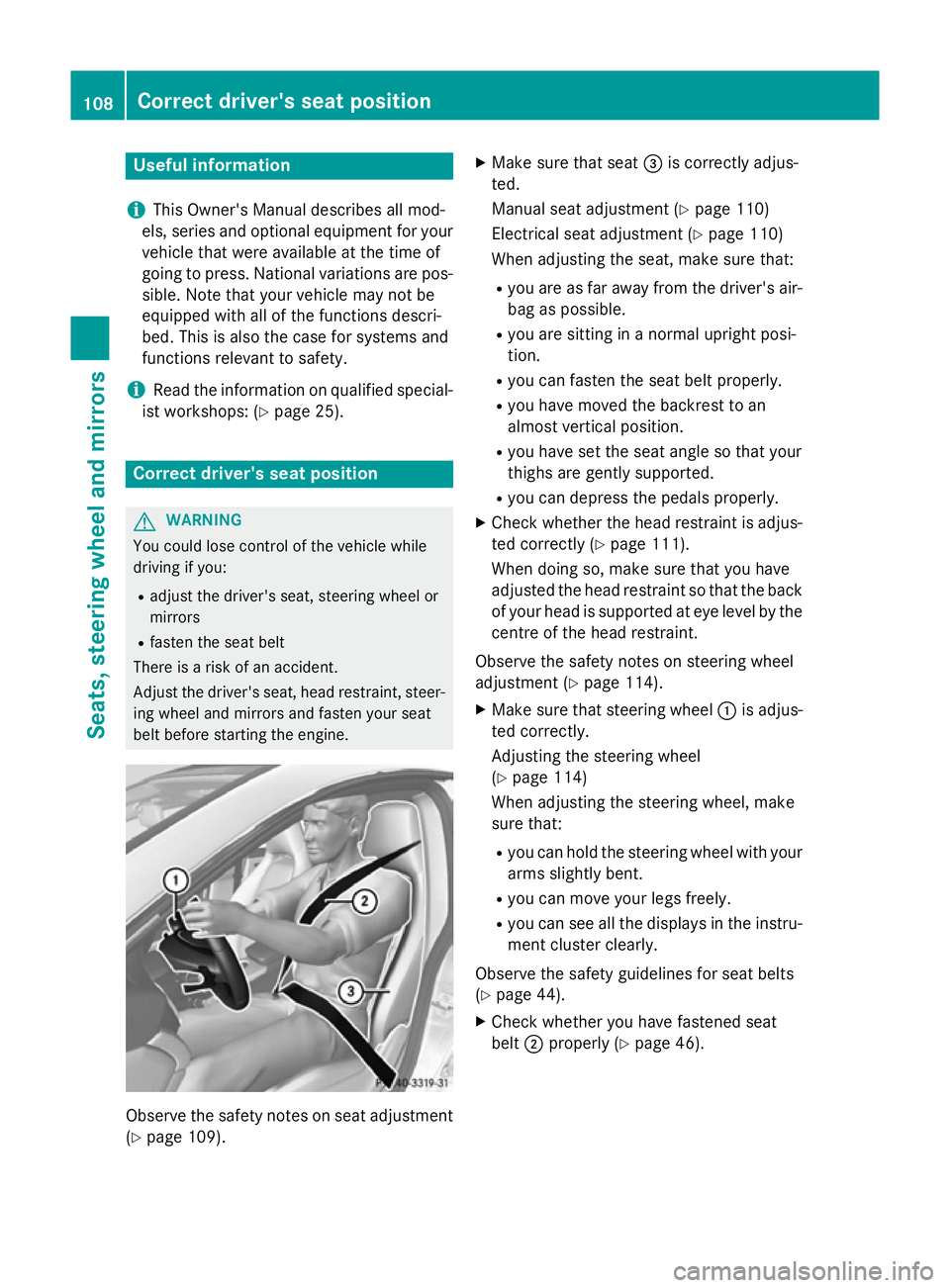
Make sure that seat =is correctly adjus-
ted.
Manual seat adjustment (Y page 110)
Electrical seat adjustment (Y page 110)
When adjusting the seat, make sure that:
R you are as far away from the driver's air-
bag as possible.
R you are sitting in a normal upright posi-
tion.
R you can fasten the seat belt properly.
R you have moved the backrest to an
almost vertical position.
R you have set the seat angle so that your
thighs are gently supported.
R you can depress the pedals properly.
X Check whether the head restraint is adjus-
ted correctly (Y page 111).
When doing so, make sure that you have
adjusted the head restraint so that the back of your head is supported at eye level by the centre of the head restraint.
Observe the safety notes on steering wheel
adjustment (Y page 114).
X Make sure that steering wheel :is adjus-
ted correctly.
Adjusting the steering wheel
(Y page 114)
When adjusting the steering wheel, make
sure that:
R you can hold the steering wheel with your
arms slightly bent.
R you can move your legs freely.
R you can see all the displays in the instru-
ment cluster clearly.
Observe the safety guidelines for seat belts
(Y page 44).
X Check whether you have fastened seat
belt ;properly (Y page 46).108
Correct driver's seat positionSeats, steering wheel and mirrors
Page 129 of 401
Important safety notes
G
WARNING
Adaptive Highbeam Assist does not recognise road users:
R who have no lights, e.g. pedestrians
R who have poor lighting, e.g. cyclists
R whose lighting is blocked, e.g. by a barrier
In very rare cases, Adaptive Highbeam Assist
recognises road users too late or not at all. In
this, or in similar situations, the automatic
main-beam headlamps will not be deactivated
or activated regardless. There is a risk of an
accident.
Always carefully observe the traffic conditions and switch off the main-beam headlamps in
good time.
Adaptive Highbeam Assist cannot take into
account road, weather or traffic conditions.
Adaptive Highbeam Assist is only an aid. You
are responsible for adjusting the vehicle's
lighting to the prevailing light, visibility and
traffic conditions.
In particular, the detection of obstacles can
be restricted if there is:
R poor visibility, e.g. due to fog, heavy rain or
snow
R dirt on the sensors or if the sensors are
obscured
Switching Adaptive Highbeam Assist
on/off X
To switch on: turn the light switch to Ã.
X Press the combination switch beyond the
pressure point in the direction of arrow :.
The _ indicator lamp in the multifunc-
tion display lights up when it is dark and the
light sensor activates the dipped-beam
headlamps.
If you are driving at speeds above approx-
imately 45 km/h:
The headlamp range is set automatically
depending on the distance between the
vehicle and other road users. If you are driving at speeds above approx-
imately 55 km/h and no other road users
are detected:
The main-beam headlamps are switched on
automatically. The Kindicator lamp in
the instrument cluster also lights up.
If you are driving at speeds below 45 km/h
or other road users are detected or the
roads are adequately lit:
The main-beam headlamps are switched off automatically. The Kindicator lamp in
the instrument cluster goes out. The _
indicator lamp in the multifunction display
remains lit.
X To switch off: move the combination
switch back to its normal position or move the light switch to another position.
The _ indicator lamp in the multifunc-
tion display goes out. Headlamps misted up on the inside
Under certain climatic and physical condi-
tions, moisture may form in the headlamp.
This moisture will not impair the function of
the headlamp. 126
Exterior lightingLights and windscreen wipers
Page 143 of 401
R
Only use air-recirculation mode briefly, e.g.
if there are unpleasant outside odours or
when in a tunnel. The windows could oth-
erwise mist up as no fresh air is drawn into
the vehicle in air-recirculation mode.
R Vehicles with COMAND Online: if you
change the settings of the climate control
system, the climate status display appears for three seconds at the bottom of the
screen in the COMAND display. See also
the separate COMAND Online operating
instructions. You will see the current set-
tings of the various climate control func-
tions.
ECO start/stop function During automatic engine switch-off, the cli-
mate control only operates at a reduced capa-
city. If you require the full climate control out-
put, you can switch off the ECO start/stop
function by pressing the ECO button
(Y page 163). 140
Overview of climate control systemsClimate control
Page 144 of 401
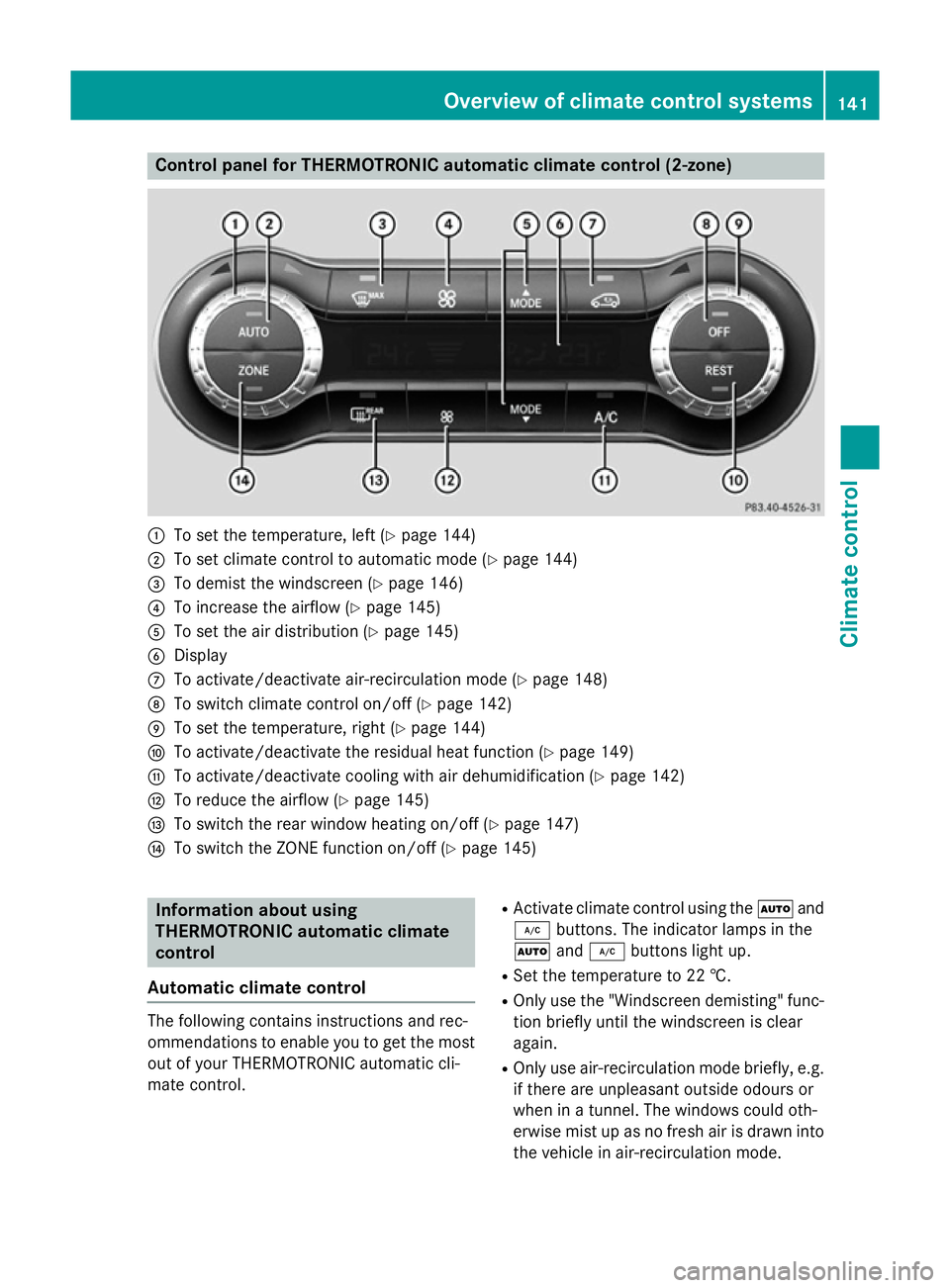
Control panel for THERMOTRONIC automatic climate control (2-zone)
:
To set the temperature, left (Y page 144)
; To set climate control to automatic mode (Y page 144)
= To demist the windscreen (Y page 146)
? To increase the airflow (Y page 145)
A To set the air distribution (Y page 145)
B Display
C To activate/deactivate air-recirculation mode (Y page 148)
D To switch climate control on/off (Y page 142)
E To set the temperature, right (Y page 144)
F To activate/deactivate the residual heat function (Y page 149)
G To activate/deactivate cooling with air dehumidification (Y page 142)
H To reduce the airflow (Y page 145)
I To switch the rear window heating on/off (Y page 147)
J To switch the ZONE function on/off (Y page 145)Information about using
THERMOTRONIC automatic climate
control
Automatic climate control The following contains instructions and rec-
ommendations to enable you to get the most
out of your THERMOTRONIC automatic cli-
mate control. R
Activate climate control using the Ãand
¿ buttons. The indicator lamps in the
à and¿ buttons light up.
R Set the temperature to 22 †.
R Only use the "Windscreen demisting" func-
tion briefly until the windscreen is clear
again.
R Only use air-recirculation mode briefly, e.g.
if there are unpleasant outside odours or
when in a tunnel. The windows could oth-
erwise mist up as no fresh air is drawn into
the vehicle in air-recirculation mode. Overview of climate control systems
141Climate control
Page 145 of 401
R
Use the ZONE function to adopt the tem-
perature settings on the driver's side for
the front-passenger side as well. The indi-
cator lamp in the ábutton goes out.
R Use the residual heat function if you want to
heat or ventilate the vehicle interior when
the ignition is switched off. The residual
heat function can only be activated or deac- tivated with the ignition switched off.
R Vehicles with COMAND Online: if you
change the settings of the climate control
system, the climate status display appears for three seconds at the bottom of the
screen in the COMAND display. See also
the separate COMAND Online operating
instructions. You will see the current set-
tings of the various climate control func-
tions.
ECO start/stop function During automatic engine switch-off, the cli-
mate control only operates at a reduced capa- city. If you require the full climate control out-
put, you can switch off the ECO start/stop
function by pressing the ECO button
(Y page 163). Operating the climate control system
Switching climate control on/off
General notes When the climate control is switched off, the
air supply and air circulation are also
switched off. The windows could mist up.
Therefore, only switch off climate control
briefly. Air-conditioning system X
Turn the key to position 2in the ignition
lock (Y page 159).
X To switch on: turn controlAclockwise to
the desired position (except position 0)
(Y page 139).
X To switch off: turn controlAanti-clock-
wise to position 0(Y page 139).
THERMOTRONIC automatic climate
control X
Turn the key to position 2in the ignition
lock (Y page 159).
X To activate: press theÃbutton.
The indicator lamp in the Ãbutton lights
up. Airflow and air distribution are set to
automatic mode.
or
X Press the ^button.
The indicator lamp in the ^button goes
out. The previous settings are reactivated.
X To deactivate: press the^button.
The indicator lamp in the ^button lights
up.
i THERMOTRONIC automatic climate con-
trol: switch on climate control primarily
using the Ãbutton. Activating/deactivating the cooling
with air dehumidification function
General notes If you deactivate the "Cooling with air-dehu-
midification" function, the air inside the vehi-
cle will not be cooled. The air inside the vehi- cle will also not be dehumidified. The win-
dows can mist up more quickly. Therefore,
only deactivate the "Cooling with air-dehu-
midification" function briefly.
The "Cooling with air dehumidification" func-
tion is only available when the engine is run-
ning. The air inside the vehicle is cooled and 142
Operating the climate control systemClimate control
Page 154 of 401
Switching the auxiliary heating/venti-
lation on/off using the centre console
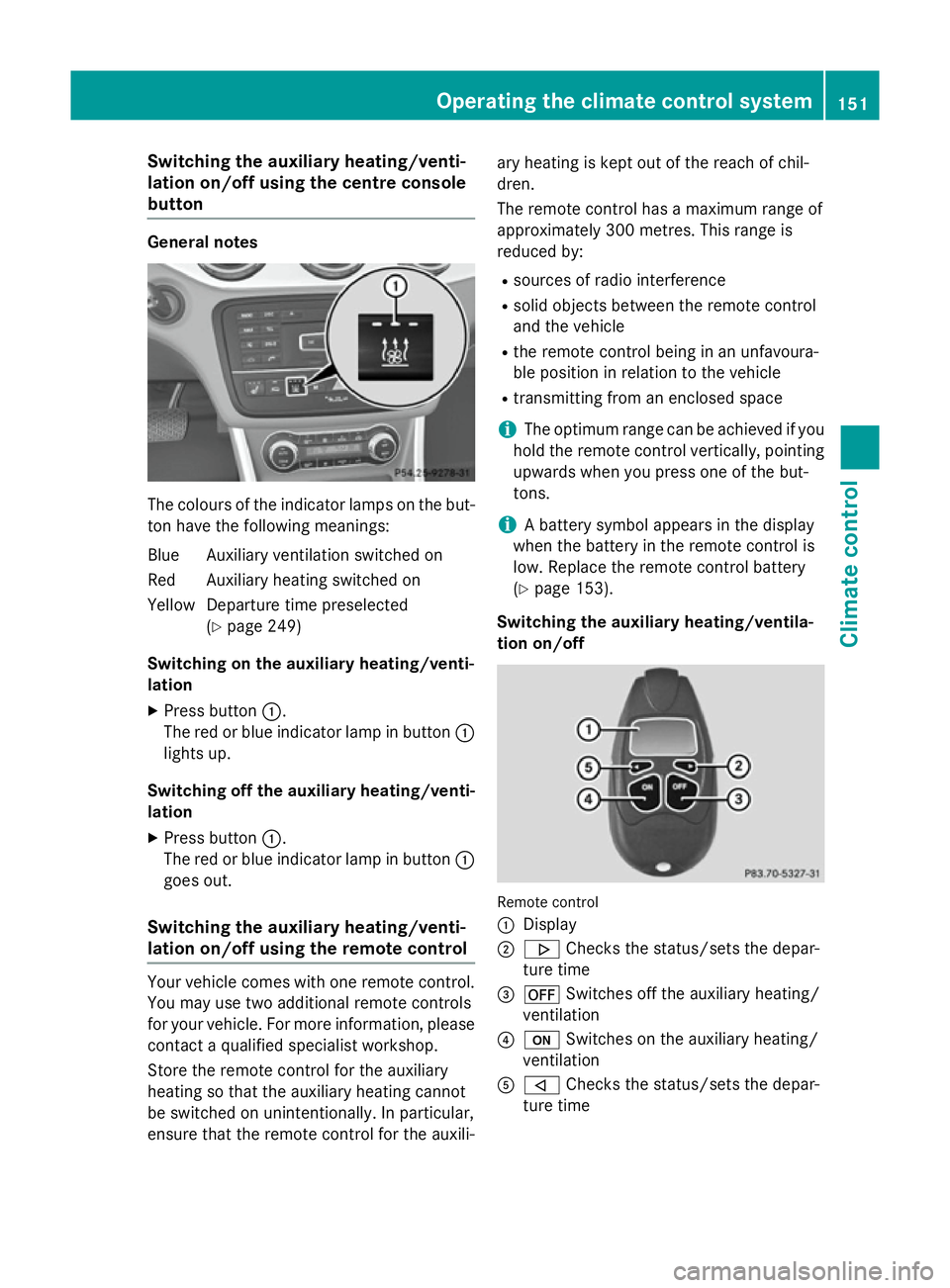
button General notes
The colours of the indicator lamps on the but-
ton have the following meanings:
Blue Auxiliary ventilation switched on
Red Auxiliary heating switched on
Yellow Departure time preselected (Ypage 249)
Switching on the auxiliary heating/venti-
lation
X Press button :.
The red or blue indicator lamp in button :
lights up.
Switching off the auxiliary heating/venti- lation
X Press button :.
The red or blue indicator lamp in button :
goes out.
Switching the auxiliary heating/venti-
lation on/off using the remote control Your vehicle comes with one remote control.
You may use two additional remote controls
for your vehicle. For more information, please contact a qualified specialist workshop.
Store the remote control for the auxiliary
heating so that the auxiliary heating cannot
be switched on unintentionally. In particular,
ensure that the remote control for the auxili- ary heating is kept out of the reach of chil-
dren.
The remote control has a maximum range of
approximately 300 metres. This range is
reduced by:
R sources of radio interference
R solid objects between the remote control
and the vehicle
R the remote control being in an unfavoura-
ble position in relation to the vehicle
R transmitting from an enclosed space
i The optimum range can be achieved if you
hold the remote control vertically, pointing upwards when you press one of the but-
tons.
i A battery symbol appears in the display
when the battery in the remote control is
low. Replace the remote control battery
(Y page 153).
Switching the auxiliary heating/ventila-
tion on/off Remote control
:
Display
; . Checks the status/sets the depar-
ture time
= ^ Switches off the auxiliary heating/
ventilation
? u Switches on the auxiliary heating/
ventilation
A , Checks the status/sets the depar-
ture time Operating the climate control system
151Climate control Z
Page 155 of 401
X
To activate: press theubutton.
ON
ON is shown in the remote control display.
X To switch off: press the^button.
OFF
OFF is shown in the remote control display.
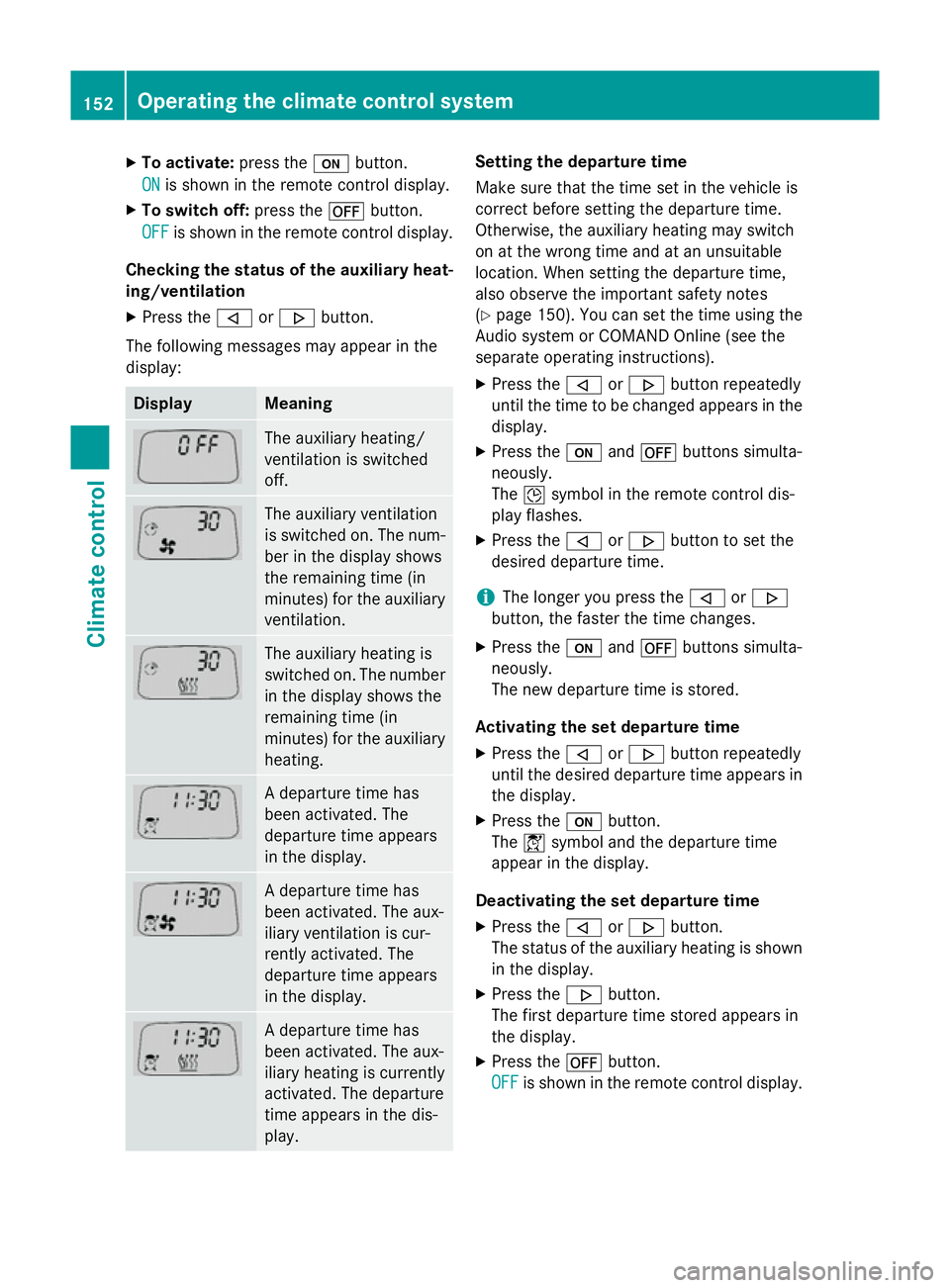
Checking the status of the auxiliary heat- ing/ventilation
X Press the ,or. button.
The following messages may appear in the
display: Display Meaning
The auxiliary heating/
ventilation is switched
off.
The auxiliary ventilation
is switched on. The num-
ber in the display shows
the remaining time (in
minutes) for the auxiliary
ventilation. The auxiliary heating is
switched on. The number
in the display shows the
remaining time (in
minutes) for the auxiliary heating. A departure time has
been activated. The
departure time appears
in the display.
A departure time has
been activated. The aux-
iliary ventilation is cur-
rently activated. The
departure time appears
in the display.
A departure time has
been activated. The aux-
iliary heating is currently
activated. The departure
time appears in the dis-
play. Setting the departure time
Make sure that the time set in the vehicle is
correct before setting the departure time.
Otherwise, the auxiliary heating may switch
on at the wrong time and at an unsuitable
location. When setting the departure time,
also observe the important safety notes
(Y
page 150). You can set the time using the
Audio system or COMAND Online (see the
separate operating instructions).
X Press the ,or. button repeatedly
until the time to be changed appears in the
display.
X Press the uand^ buttons simulta-
neously.
The Îsymbol in the remote control dis-
play flashes.
X Press the ,or. button to set the
desired departure time.
i The longer you press the
,or.
button, the faster the time changes.
X Press the uand^ buttons simulta-
neously.
The new departure time is stored.
Activating the set departure time X Press the ,or. button repeatedly
until the desired departure time appears in
the display.
X Press the ubutton.
The Ísymbol and the departure time
appear in the display.
Deactivating the set departure time
X Press the ,or. button.
The status of the auxiliary heating is shown in the display.
X Press the .button.
The first departure time stored appears in
the display.
X Press the ^button.
OFF OFF is shown in the remote control display. 152
Operating the climate control systemClimate control
Page 157 of 401
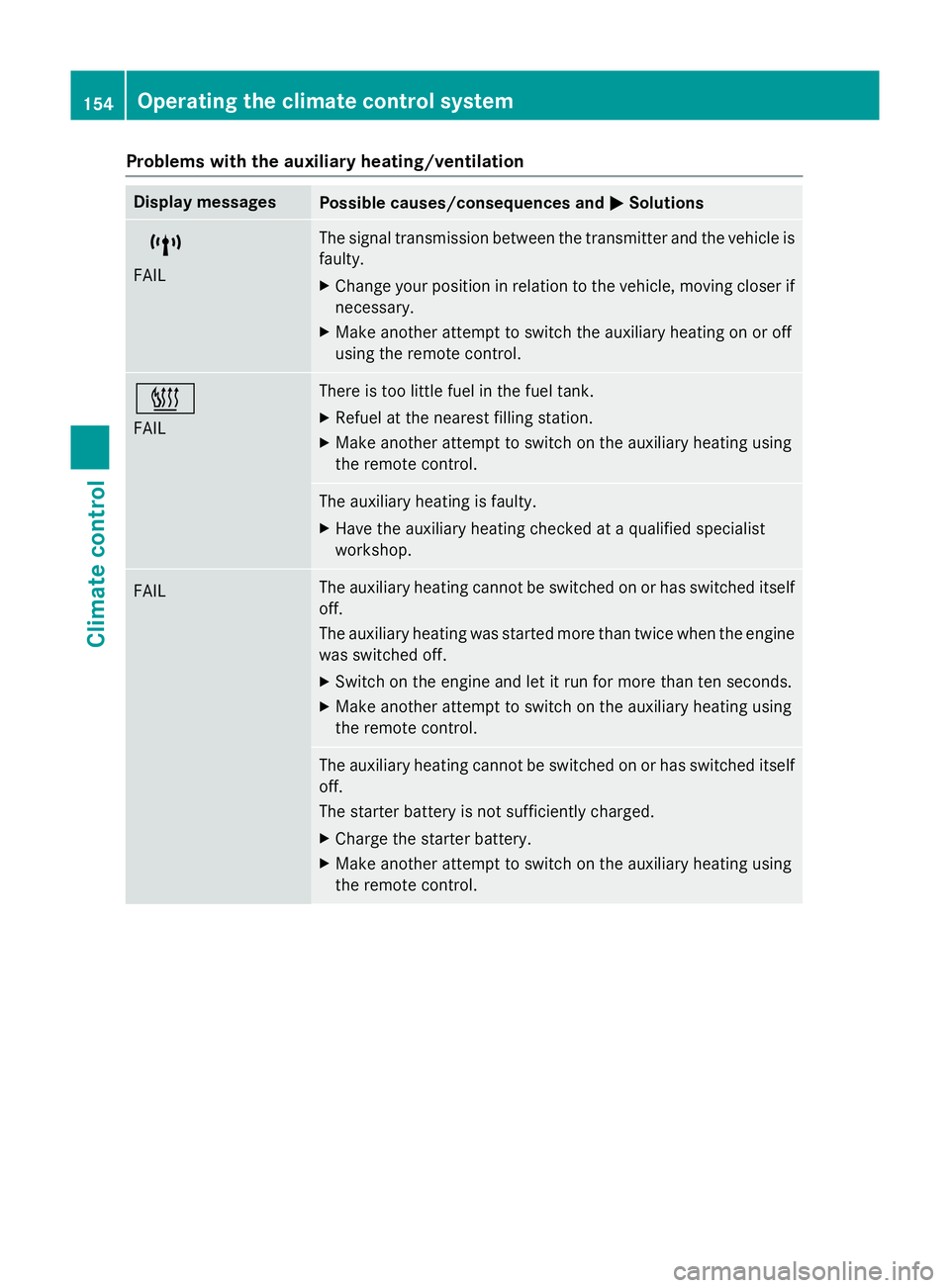
Problems with the auxiliary heating/ventilation
Display messages
Possible causes/consequences and
M
MSolutions $
FAIL The signal transmission between the transmitter and the vehicle is
faulty.
X Change your position in relation to the vehicle, moving closer if
necessary.
X Make another attempt to switch the auxiliary heating on or off
using the remote control. ©
FAIL There is too little fuel in the fuel tank.
X Refuel at the nearest filling station.
X Make another attempt to switch on the auxiliary heating using
the remote control. The auxiliary heating is faulty.
X Have the auxiliary heating checked at a qualified specialist
workshop. FAIL The auxiliary heating cannot be switched on or has switched itself
off.
The auxiliary heating was started more than twice when the engine
was switched off.
X Switch on the engine and let it run for more than ten seconds.
X Make another attempt to switch on the auxiliary heating using
the remote control. The auxiliary heating cannot be switched on or has switched itself
off.
The starter battery is not sufficiently charged.
X Charge the starter battery.
X Make another attempt to switch on the auxiliary heating using
the remote control. 154
Operating the climate control systemClimate control
Page 158 of 401
Display messages
Possible causes/consequences and
M
MSolutions The auxiliary heating cannot be switched on or has switched itself
off.
There is too little fuel in the fuel tank.
X Refuel at the nearest filling station.
X Make another attempt to switch on the auxiliary heating using
the remote control. The auxiliary heating cannot be switched on or has switched itself
off.
The auxiliary heating is faulty.
X Have the auxiliary heating checked at a qualified specialist
workshop. Adjusting the air vents
Important safety notes
G
WARNING
Very hot or very cold air can flow from the air vents. This could result in burns or frostbite in the immediate vicinity of the air vents. There
is a risk of injury.
Make sure that all vehicle occupants always
maintain a sufficient distance to the air out-
lets. If necessary, redirect the airflow to
another area of the vehicle interior.
In order to ensure the direct flow of fresh air
through the air vents into the vehicle interior,
please observe the following notes:
R keep the air inlet between the windscreen
and the bonnet free of blockages, such as
ice, snow or leaves.
R never cover the vents or ventilation grilles
in the vehicle interior.
i Move the adjusters for the air vents ver-
tically or horizontally, to set the direction of the airflow.
i Optimal climate control function is ach-
ieved by opening the air vents fully and set-
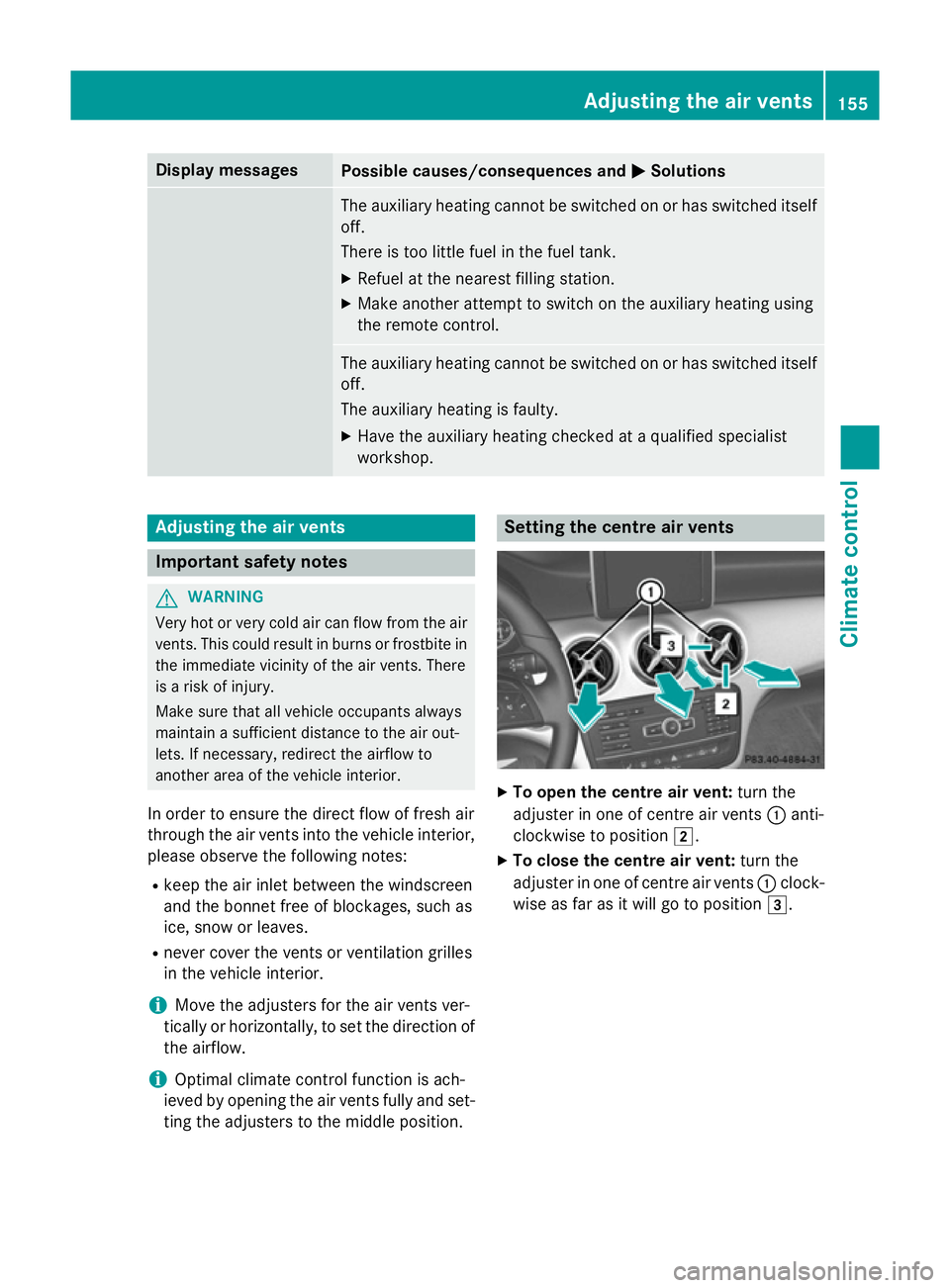
ting the adjusters to the middle position. Setting the centre air vents
X
To open the centre air vent: turn the
adjuster in one of centre air vents :anti-
clockwise to position 2.
X To close the centre air vent: turn the
adjuster in one of centre air vents :clock-
wise as far as it will go to position 3. Adjusting the air vents
155Climate control Z
Page 163 of 401
Carry out regular checks to make sure that
there are no flammable foreign materials in
the engine compartment or in the exhaust
system.
! Do not depress the accelerator when
starting the engine.
i Vehicles with a petrol engine:
the
engine runs at a higher engine speed during the cold start procedure so that the cata-
lytic converter can reach operating tem-
perature more quickly. The sound of the
engine may change as a result.
Manual transmission X
Depress the brake pedal and keep it
depressed.
X Depress the clutch pedal fully.
X Shift to neutral N.
i You can only start the engine when the
clutch pedal is fully depressed.
Automatic transmission X
Shift the transmission to position P.
Transmission position display Pis shown in
the multifunction display.
i When the transmission is in position
N,
you can also start the engine with the brake pedal depressed.
Starting procedure X
To start a petrol engine: turn the key to
position 3in the ignition lock (Y page 159)
and release it as soon as the engine is run-
ning.
X To start a diesel engine: turn the key to
position 2(Y page 159) in the ignition lock.
The % preglow indicator lamp in the
instrument cluster lights up.
X When the %preglow indicator lamp
goes out, turn the key to position
3 (Y page 159) and release it as soon as the
engine is running. i
You can start the engine without preglow
if the engine is warm. Pulling away
Manual transmission !
Change gear in good time and avoid spin-
ning the wheels. Otherwise, you could dam- age the vehicle.
X Depress the brake pedal and keep it
depressed.
X Depress the clutch pedal fully.
X Shift to either first gear or reverse gear R.
X Release the electric parking brake
(Y page 180).
X Release the brake pedal.
X Slowly release the clutch pedal and gently
depress the accelerator pedal.
i Follow the shift recommendations in the
multifunction display for an economical
driving style (Y page 167).
i The vehicle locks centrally once you have
pulled away. The locking knobs in the doors
drop down.
You can open the doors from the inside at
any time.
You can also deactivate the automatic lock- ing feature (Y page 249).
Automatic transmission i
It is only possible to shift the transmission
from position Pto the desired position if
you depress the brake pedal. Only then can
the parking lock be deactivated. If you do
not depress the brake pedal, the DIRECT
SELECT lever can still be moved but the
parking lock remains engaged.
i At transmission fluid temperatures below
Ò20 †, you can only shift out of position P
into another transmission position when
the engine is running. 160
DrivingDriving and parking