ESP MERCEDES-BENZ GLA SUV 2013 Manual Online
[x] Cancel search | Manufacturer: MERCEDES-BENZ, Model Year: 2013, Model line: GLA SUV, Model: MERCEDES-BENZ GLA SUV 2013Pages: 401, PDF Size: 11.9 MB
Page 246 of 401
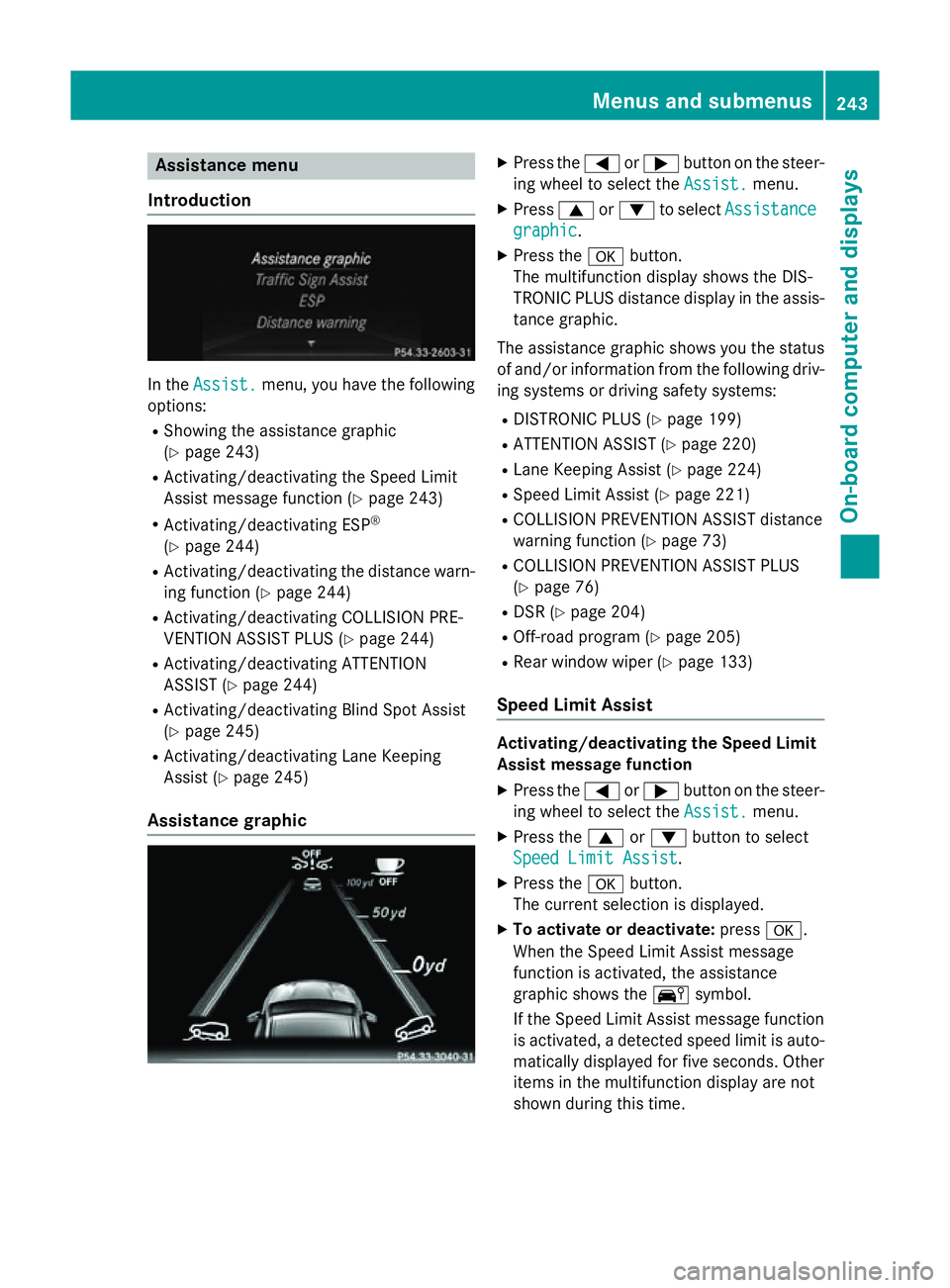
Assistance menu
Introduction In the
Assist.
Assist. menu, you have the following
options:
R Showing the assistance graphic
(Y page 243)
R Activating/deactivating the Speed Limit
Assist message function (Y page 243)
R Activating/deactivating ESP ®
(Y page 244)
R Activating/deactivating the distance warn-
ing function (Y page 244)
R Activating/deactivating COLLISION PRE-
VENTION ASSIST PLUS (Y page 244)
R Activating/deactivating ATTENTION
ASSIST (Y page 244)
R Activating/deactivating Blind Spot Assist
(Y page 245)
R Activating/deactivating Lane Keeping
Assist (Y page 245)
Assistance graphic X
Press the =or; button on the steer-
ing wheel to select the Assist. Assist.menu.
X Press 9or: to select Assistance
Assistance
graphic
graphic.
X Press the abutton.
The multifunction display shows the DIS-
TRONIC PLUS distance display in the assis- tance graphic.
The assistance graphic shows you the status
of and/or information from the following driv- ing systems or driving safety systems:
R DISTRONIC PLUS (Y page 199)
R ATTENTION ASSIST (Y page 220)
R Lane Keeping Assist (Y page 224)
R Speed Limit Assist (Y page 221)
R COLLISION PREVENTION ASSIST distance
warning function (Y page 73)
R COLLISION PREVENTION ASSIST PLUS
(Y page 76)
R DSR (Y page 204)
R Off-road program (Y page 205)
R Rear window wiper (Y page 133)
Speed Limit Assist Activating/deactivating the Speed Limit
Assist message function
X Press the =or; button on the steer-
ing wheel to select the Assist. Assist.menu.
X Press the 9or: button to select
Speed Limit Assist
Speed Limit Assist .
X Press the abutton.
The current selection is displayed.
X To activate or deactivate: pressa.
When the Speed Limit Assist message
function is activated, the assistance
graphic shows the Äsymbol.
If the Speed Limit Assist message function is activated, a detected speed limit is auto-
matically displayed for five seconds. Other items in the multifunction display are not
shown during this time. Menus and sub
menus
243On-board computer and displays Z
Page 247 of 401
Deactivating/activating ESP
®Observe the "Important safety notes" section
in the description of ESP ®
(Y page 77). G
WARNING
If you deactivate ESP ®
, ESP ®
no longer sta-
bilises the vehicle. There is an increased risk
of skidding and an accident.
Only deactivate ESP ®
in the situations descri-
bed in the following.
It may be best to deactivate ESP ®
in the fol-
lowing situations:
R when using snow chains
R in deep snow
R on sand or gravel
Deactivating/activating ESP ®
on AMG vehi-
cles (Y page 78).
For further information about ESP ®
, see
(Y page 76).
X Start the engine.
X Press the =or; button on the steer-
ing wheel to select the Assist.
Assist. menu.
X Press the 9or: button to select
ESP ESP .
X Press the abutton.
The current selection is displayed.
X To activate/deactivate: press thea
button again.
ESP ®
is deactivated if the åwarning
lamp in the instrument cluster lights up
continuously when the engine is running.
If the ÷ warning lamp and the åwarn-
ing lamp are lit continuously, ESP ®
is not
available due to a malfunction.
Observe the information on warning lamps
(Y page 291).
Observe the information on display messages
(Y page 255). Activating/deactivating the distance
warning function X
Press the =or; button on the steer-
ing wheel to select the Assist. Assist.menu.
X Press 9or: to select Distance
Distance
warning warning.
X Press the abutton.
The current selection is displayed.
X To activate/deactivate: press thea
button again.
When the distance warning function is
deactivated, the æsymbol appears in
the multifunction display in the assistance
graphic display.
Further information on the distance warning
function (Y page 73).
Activating/deactivating COLLISION
PREVENTION ASSIST PLUS X
Press the =or; button on the steer-
ing wheel to select the Assist. Assist.menu.
X Press the 9or: button to select
Collision Prevent. Assist
Collision Prevent. Assist .
X Press the abutton.
The current selection is displayed.
X To activate/deactivate: press thea
button again.
When COLLISION PREVENTION ASSIST
PLUS is deactivated, the æsymbol
appears in the multifunction display in the
assistance graphic display.
For further information about COLLISION
PREVENTION ASSIST PLUS, see (Y page 76).
Activating/deactivating ATTENTION
ASSIST X
Press the =or; button on the steer-
ing wheel to select the Assist.
Assist. menu.
X Press the 9or: button to select
ATTENTION ASSIST ATTENTION ASSIST .244
Menus and submenusOn-boa
rdcompu ter and displays
Page 254 of 401
Resetting to factory settings
X
Press the =or; button on the steer-
ing wheel to select the Settings
Settings menu.
X Press the :or9 button to select the
Factory setting
Factory setting submenu.
X Press ato confirm.
The Reset all settings?
Reset all settings? message
appears.
X Press the :or9 button to select No
No
or Yes
Yes.
X Press the abutton to confirm the selec-
tion.
If you have selected Yes Yes, the multifunction
display shows a confirmation message.
For safety reasons, not all functions are reset: the Limit
Limit speed
speed(winter
(winter tyres)
tyres)function
in permanent SPEEDTRONIC can only be set
in the Vehicle
Vehicle submenu. If you want to reset
the Daytime
Daytime driving
drivinglights
lightsin theLights
Lights
submenu, you must turn the key to position 1
in the ignition lock. AMG menu in AMG vehicles
AMG displays :
Digital speedometer
; Gear indicator
= Upshift indicator
? Engine oil temperature
A Coolant temperature
B Transmission fluid temperature
X Press the =or; button on the steer-
ing wheel to select the AMG
AMG menu.
Upshift indicator UP
UP = indicates that the
engine has reached the overrevving range
when in the manual gearshift program. Upshift indicator
UP UP= fades out other mes-
sages until you have shifted up.
If the engine oil temperature is below 80 †,
oil temperature ?is shown in blue. Avoid
using the full output of the engine during this time.
If the transmission fluid temperature is below
50 †, oil temperature Bis shown in blue.
Avoid using the full output of the engine dur-
ing this time.
SETUP :
Drive program (C C/SS/MM)
; ESP ®
mode (ON ON/OFFOFF) or SPORT handling
mode (SPORT SPORT)
SETUP shows the drive program, the ESP ®
(Electronic Stability Program) mode and the
SPORT handling mode. X Press the =or; button on the steer-
ing wheel to select the AMG AMGmenu.
X Press the 9button repeatedly until
SETUP is displayed.
RACETIMER Displaying and starting the RACETIMER
:
Lap
; RACETIMER
The RACETIMER is only intended for use on a closed race circuit. Do not use the function on
public roads. Menus and submenus
251On-board computer and displays Z
Page 257 of 401
Display messages
General notes
Display messages appear in the multifunction display.
Display messages with graphic symbols are simplified in the Owner's Manual and may differ
from the symbols in the multifunction display.
Please respond in accordance with the display messages and follow the additional notes in this Owner's Manual.
Certain display messages are accompanied by an audible warning tone or a continuous tone.
When the ignition is switched off, all display messages are deleted apart from some high-
priority display messages. Once the causes of the high-priority display messages have been
rectified, the corresponding display messages are also deleted.
When you stop and park the vehicle, please observe the notes on the HOLD function
(Y page 201) and parking (Y page 179).Hiding display messages
X Press the aor% button on the steering wheel to hide the display message.
The display message is cleared.
The multifunction display shows high-priority display messages in red. Some high-priority dis- play messages cannot be hidden.
The multifunction display shows these messages continuously until the causes for the mes-
sages have been remedied. Message memory
The on-board computer saves certain display messages in the message memory. You can call
up the display messages:
X Press the =or; button on the steering wheel to select the Serv.
Serv. menu.
If there are display messages, the multifunction display shows 2 messages
2 messages, for example.
X Press the 9or: button to select the entry, e.g. 2 messages
2 messages.
X Press ato confirm.
X Press the 9or: button to scroll through the display messages. 254
Display
messagesOn-board computer and displays
Page 258 of 401
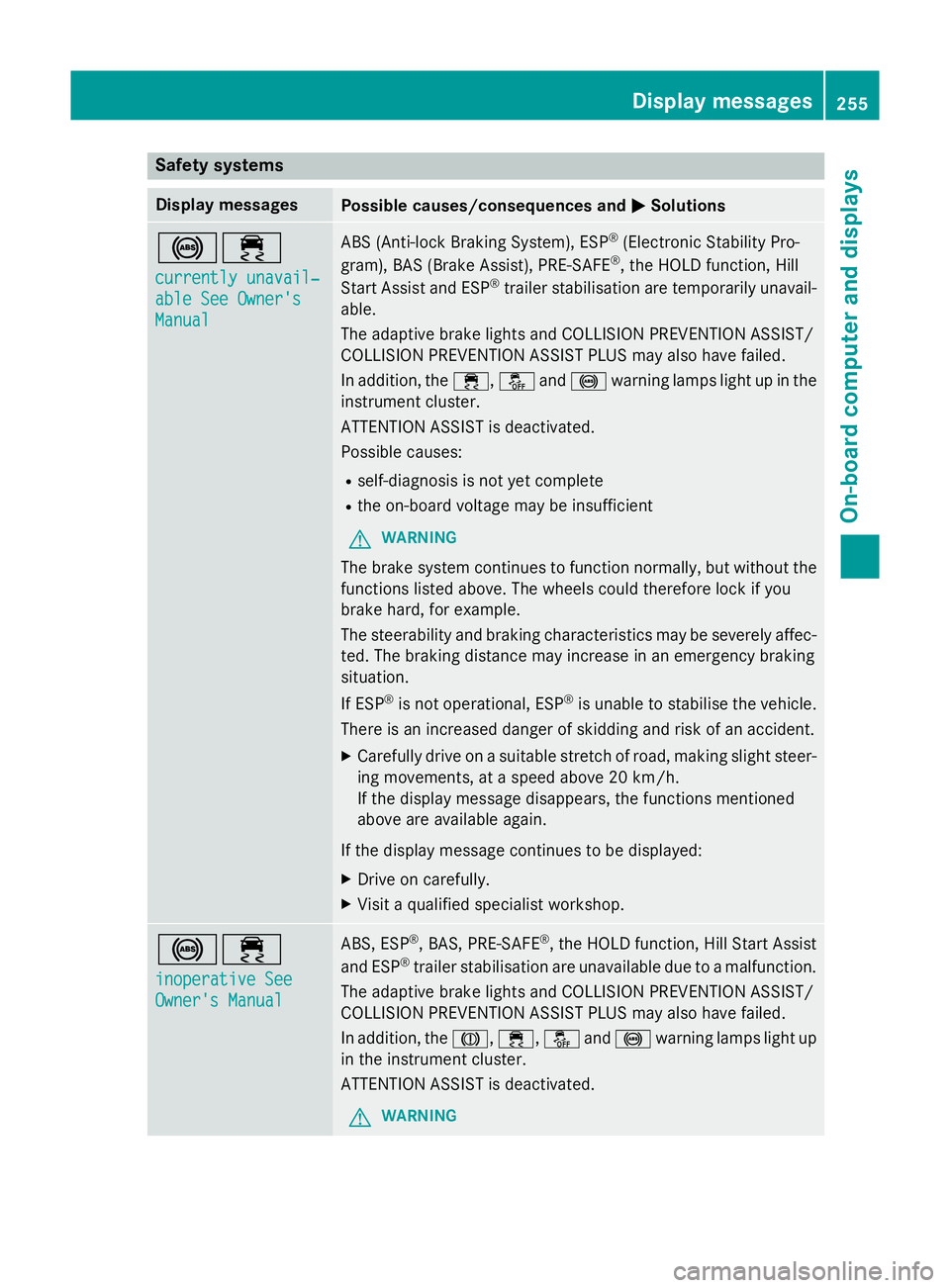
Safety systems
Display messages
Possible causes/consequences and
M
MSolutions !÷
currently unavail‐ currently unavail‐
able See Owner's able See Owner's
Manual Manual ABS (Anti-lock Braking System), ESP
®
(Electronic Stability Pro-
gram), BAS (Brake Assist), PRE-SAFE ®
, the HOLD function, Hill
Start Assist and ESP ®
trailer stabilisation are temporarily unavail-
able.
The adaptive brake lights and COLLISION PREVENTION ASSIST/
COLLISION PREVENTION ASSIST PLUS may also have failed.
In addition, the ÷,åand! warning lamps light up in the
instrument cluster.
ATTENTION ASSIST is deactivated.
Possible causes:
R self-diagnosis is not yet complete
R the on-board voltage may be insufficient
G WARNING
The brake system continues to function normally, but without the functions listed above. The wheels could therefore lock if you
brake hard, for example.
The steerability and braking characteristics may be severely affec-ted. The braking distance may increase in an emergency braking
situation.
If ESP ®
is not operational, ESP ®
is unable to stabilise the vehicle.
There is an increased danger of skidding and risk of an accident.
X Carefully drive on a suitable stretch of road, making slight steer-
ing movements, at a speed above 20 km/h.
If the display message disappears, the functions mentioned
above are available again.
If the display message continues to be displayed:
X Drive on carefully.
X Visit a qualified specialist workshop. !÷
inoperative See inoperative See
Owner's Manual Owner's Manual ABS, ESP
®
, BAS, PRE-SAFE ®
, the HOLD function, Hill Start Assist
and ESP ®
trailer stabilisation are unavailable due to a malfunction.
The adaptive brake lights and COLLISION PREVENTION ASSIST/
COLLISION PREVENTION ASSIST PLUS may also have failed.
In addition, the J,÷,åand! warning lamps light up
in the instrument cluster.
ATTENTION ASSIST is deactivated.
G WARNING Display messages
255On-board computer and displays Z
Page 259 of 401
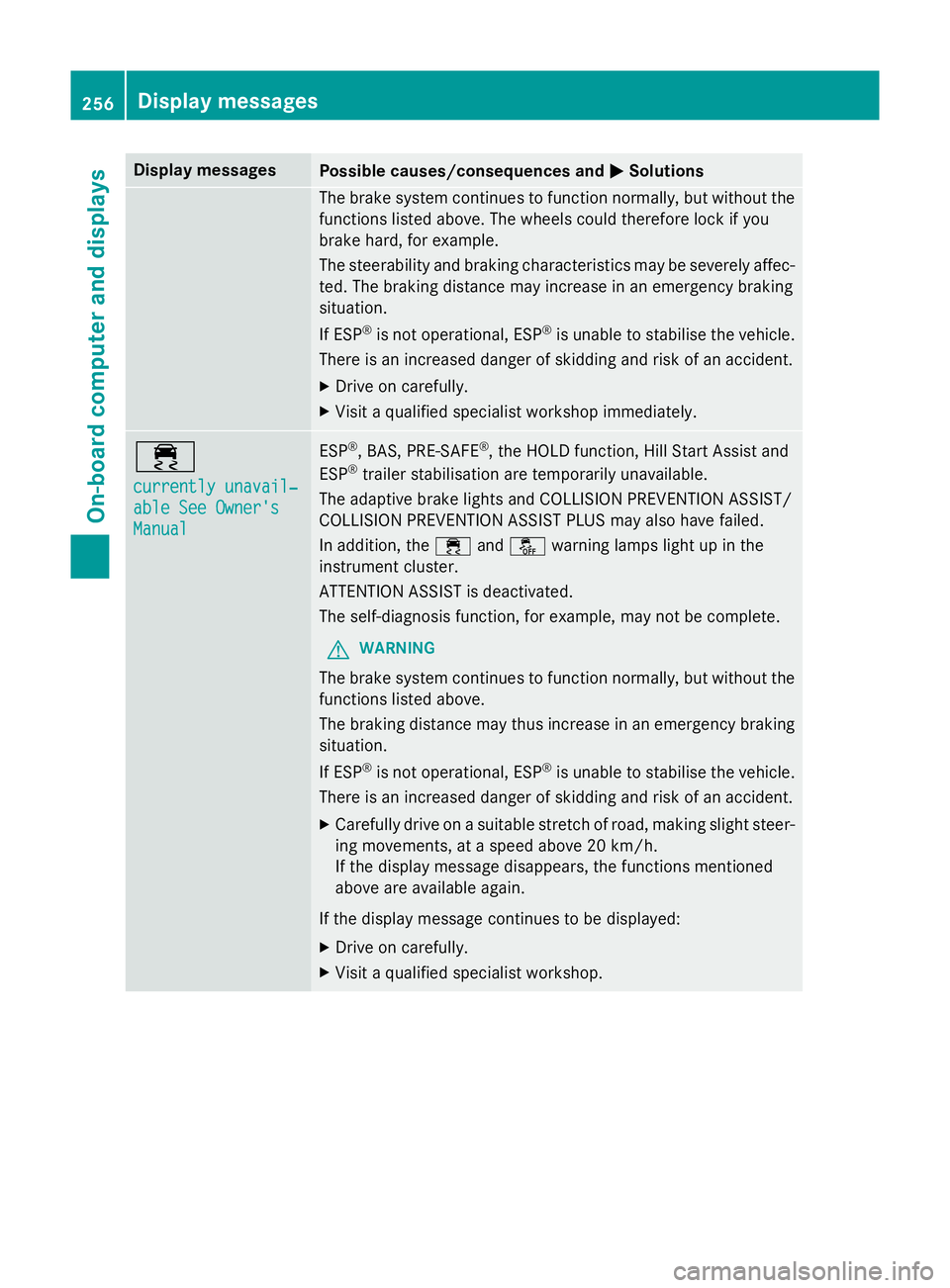
Display messages
Possible causes/consequences and
M
MSolutions The brake system continues to function normally, but without the
functions listed above. The wheels could therefore lock if you
brake hard, for example.
The steerability and braking characteristics may be severely affec- ted. The braking distance may increase in an emergency braking
situation.
If ESP ®
is not operational, ESP ®
is unable to stabilise the vehicle.
There is an increased danger of skidding and risk of an accident.
X Drive on carefully.
X Visit a qualified specialist workshop immediately. ÷
currently unavail‐ currently unavail‐
able See Owner's able See Owner's
Manual Manual ESP
®
, BAS, PRE-SAFE ®
, the HOLD function, Hill Start Assist and
ESP ®
trailer stabilisation are temporarily unavailable.
The adaptive brake lights and COLLISION PREVENTION ASSIST/
COLLISION PREVENTION ASSIST PLUS may also have failed.
In addition, the ÷andå warning lamps light up in the
instrument cluster.
ATTENTION ASSIST is deactivated.
The self-diagnosis function, for example, may not be complete.
G WARNING
The brake system continues to function normally, but without the functions listed above.
The braking distance may thus increase in an emergency braking
situation.
If ESP ®
is not operational, ESP ®
is unable to stabilise the vehicle.
There is an increased danger of skidding and risk of an accident.
X Carefully drive on a suitable stretch of road, making slight steer-
ing movements, at a speed above 20 km/h.
If the display message disappears, the functions mentioned
above are available again.
If the display message continues to be displayed:
X Drive on carefully.
X Visit a qualified specialist workshop. 256
Display
messagesOn-board computer and displays
Page 260 of 401
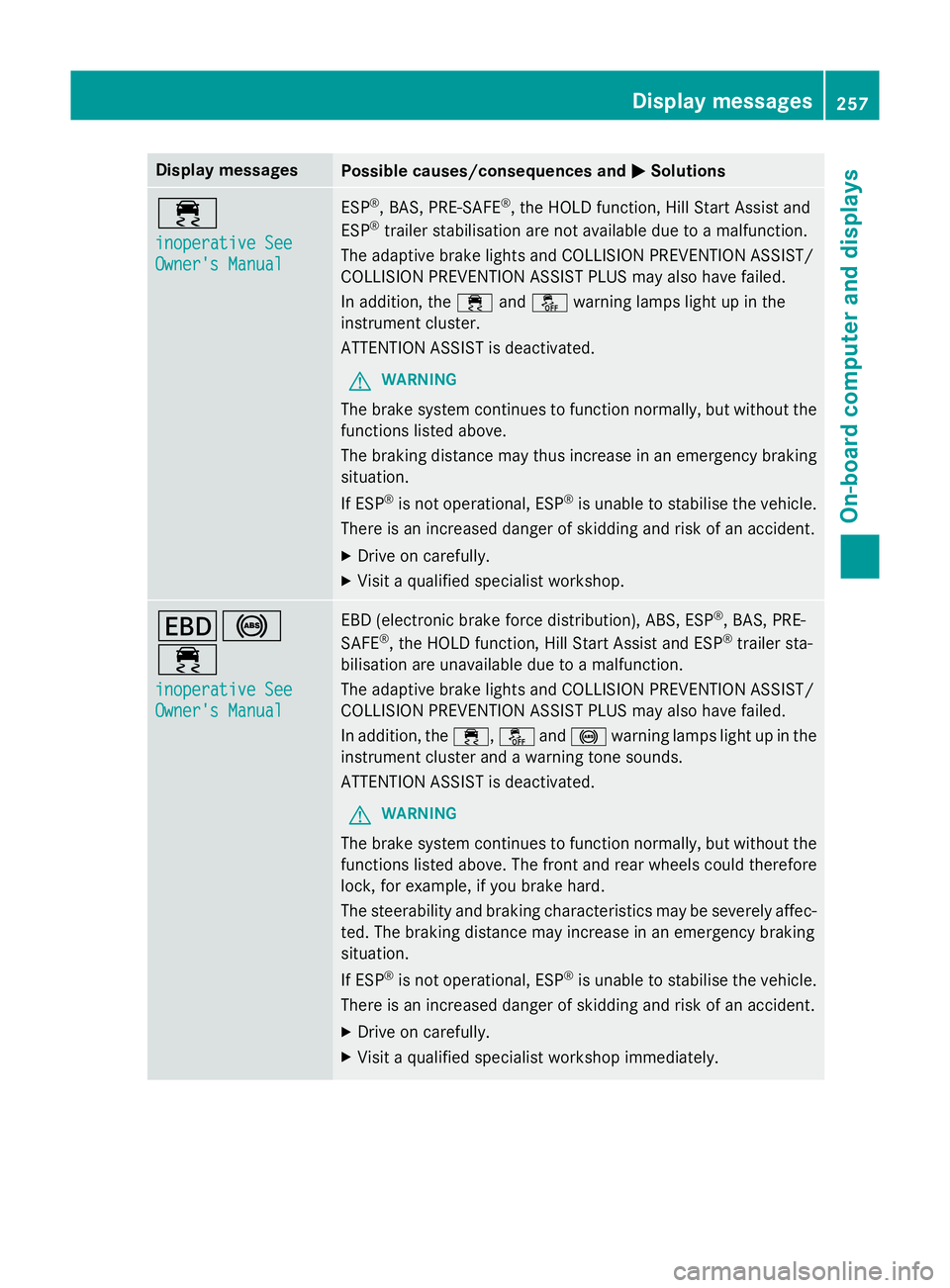
Display messages
Possible causes/consequences and
M
MSolutions ÷
inoperative See inoperative See
Owner's Manual Owner's Manual ESP
®
, BAS, PRE-SAFE ®
, the HOLD function, Hill Start Assist and
ESP ®
trailer stabilisation are not available due to a malfunction.
The adaptive brake lights and COLLISION PREVENTION ASSIST/
COLLISION PREVENTION ASSIST PLUS may also have failed.
In addition, the ÷andå warning lamps light up in the
instrument cluster.
ATTENTION ASSIST is deactivated.
G WARNING
The brake system continues to function normally, but without the functions listed above.
The braking distance may thus increase in an emergency braking
situation.
If ESP ®
is not operational, ESP ®
is unable to stabilise the vehicle.
There is an increased danger of skidding and risk of an accident.
X Drive on carefully.
X Visit a qualified specialist workshop. T!
÷
inoperative See inoperative See
Owner's Manual Owner's Manual EBD (electronic brake force distribution), ABS, ESP
®
, BAS, PRE-
SAFE ®
, the HOLD function, Hill Start Assist and ESP ®
trailer sta-
bilisation are unavailable due to a malfunction.
The adaptive brake lights and COLLISION PREVENTION ASSIST/
COLLISION PREVENTION ASSIST PLUS may also have failed.
In addition, the ÷,åand! warning lamps light up in the
instrument cluster and a warning tone sounds.
ATTENTION ASSIST is deactivated.
G WARNING
The brake system continues to function normally, but without the functions listed above. The front and rear wheels could therefore
lock, for example, if you brake hard.
The steerability and braking characteristics may be severely affec-ted. The braking distance may increase in an emergency braking
situation.
If ESP ®
is not operational, ESP ®
is unable to stabilise the vehicle.
There is an increased danger of skidding and risk of an accident.
X Drive on carefully.
X Visit a qualified specialist workshop immediately. Display
messages
257On-board computer and displays Z
Page 265 of 401
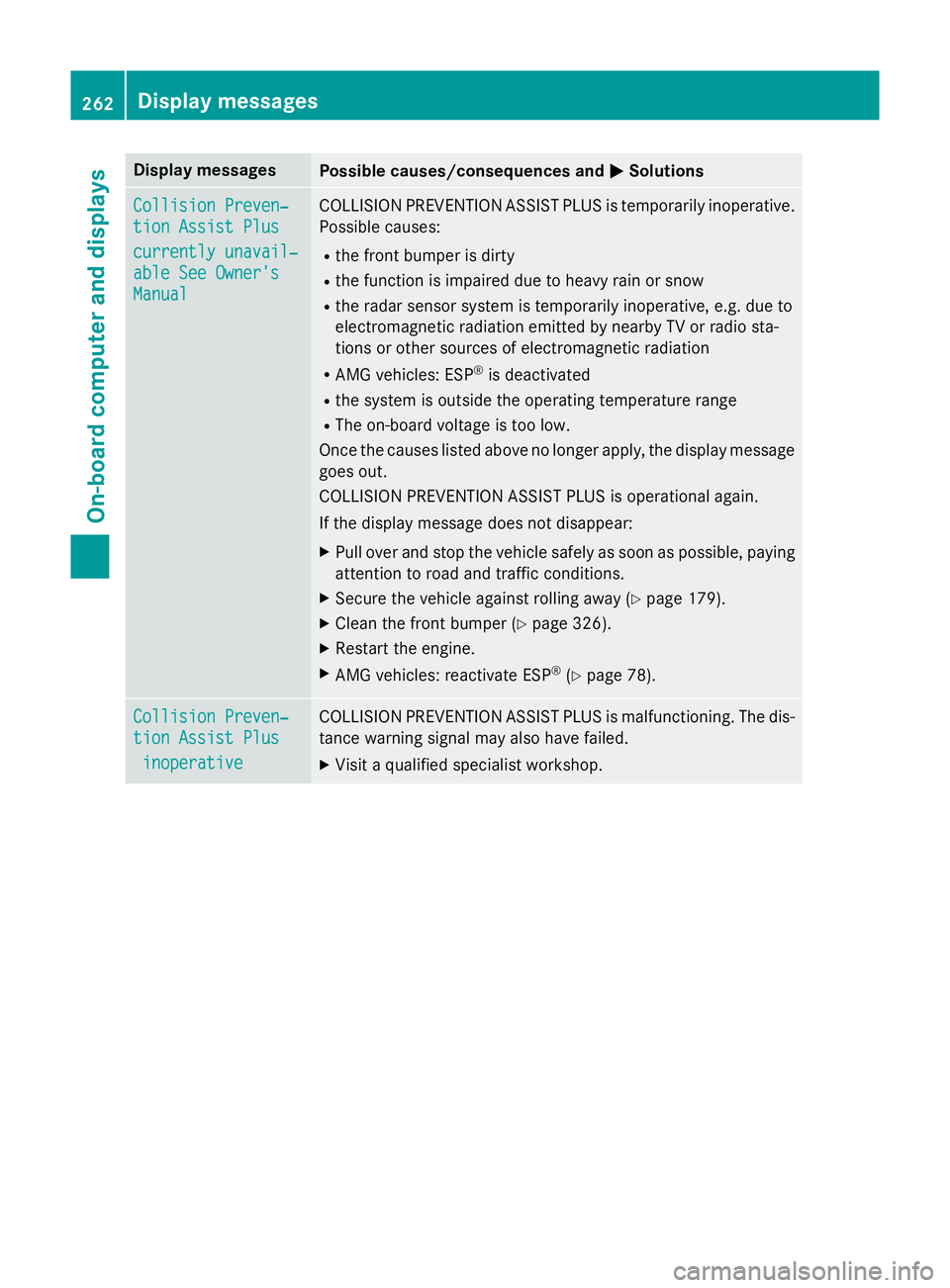
Display messages
Possible causes/consequences and
M
MSolutions Collision Preven‐
Collision Preven‐
tion Assist Plus tion Assist Plus
currently unavail‐ currently unavail‐
able See Owner's able See Owner's
Manual Manual COLLISION PREVENTION ASSIST PLUS is temporarily inoperative.
Possible causes:
R the front bumper is dirty
R the function is impaired due to heavy rain or snow
R the radar sensor system is temporarily inoperative, e.g. due to
electromagnetic radiation emitted by nearby TV or radio sta-
tions or other sources of electromagnetic radiation
R AMG vehicles: ESP ®
is deactivated
R the system is outside the operating temperature range
R The on-board voltage is too low.
Once the causes listed above no longer apply, the display message goes out.
COLLISION PREVENTION ASSIST PLUS is operational again.
If the display message does not disappear:
X Pull over and stop the vehicle safely as soon as possible, paying
attention to road and traffic conditions.
X Secure the vehicle against rolling away (Y page 179).
X Clean the front bumper (Y page 326).
X Restart the engine.
X AMG vehicles: reactivate ESP ®
(Y page 78). Collision Preven‐ Collision Preven‐
tion Assist Plus tion Assist Plus
inoperative
inoperative COLLISION PREVENTION ASSIST PLUS is malfunctioning. The dis-
tance warning signal may also have failed.
X Visit a qualified specialist workshop. 262
Display
messagesOn-board computer and displays
Page 266 of 401
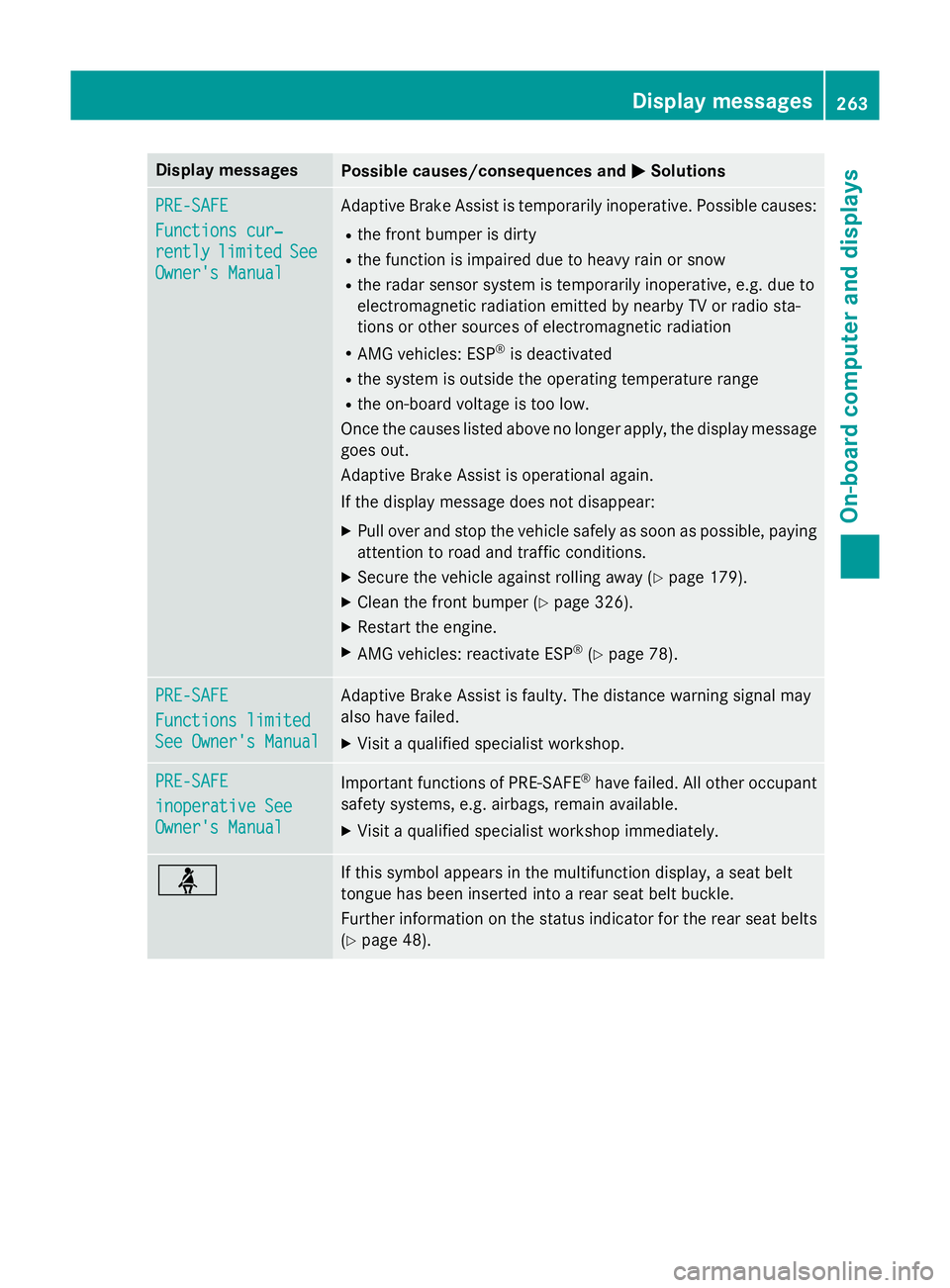
Display messages
Possible causes/consequences and
M
MSolutions PRE-SAFE
PRE-SAFE
Functions cur‐ Functions cur‐
rently rently
limited
limited See
See
Owner's Manual
Owner's Manual Adaptive Brake Assist is temporarily inoperative. Possible causes:
R the front bumper is dirty
R the function is impaired due to heavy rain or snow
R the radar sensor system is temporarily inoperative, e.g. due to
electromagnetic radiation emitted by nearby TV or radio sta-
tions or other sources of electromagnetic radiation
R AMG vehicles: ESP ®
is deactivated
R the system is outside the operating temperature range
R the on-board voltage is too low.
Once the causes listed above no longer apply, the display message goes out.
Adaptive Brake Assist is operational again.
If the display message does not disappear:
X Pull over and stop the vehicle safely as soon as possible, paying
attention to road and traffic conditions.
X Secure the vehicle against rolling away (Y page 179).
X Clean the front bumper (Y page 326).
X Restart the engine.
X AMG vehicles: reactivate ESP ®
(Y page 78). PRE-SAFE PRE-SAFE
Functions limited Functions limited
See Owner's Manual See Owner's Manual Adaptive Brake Assist is faulty. The distance warning signal may
also have failed.
X Visit a qualified specialist workshop. PRE-SAFE PRE-SAFE
inoperative See inoperative See
Owner's Manual Owner's Manual
Important functions of PRE-SAFE
®
have failed. All other occupant
safety systems, e.g. airbags, remain available.
X Visit a qualified specialist workshop immediately. ü If this symbol appears in the multifunction display, a seat belt
tongue has been inserted into a rear seat belt buckle.
Further information on the status indicator for the rear seat belts
(Y page 48). Display
messages
263On-board computer and displays Z
Page 280 of 401
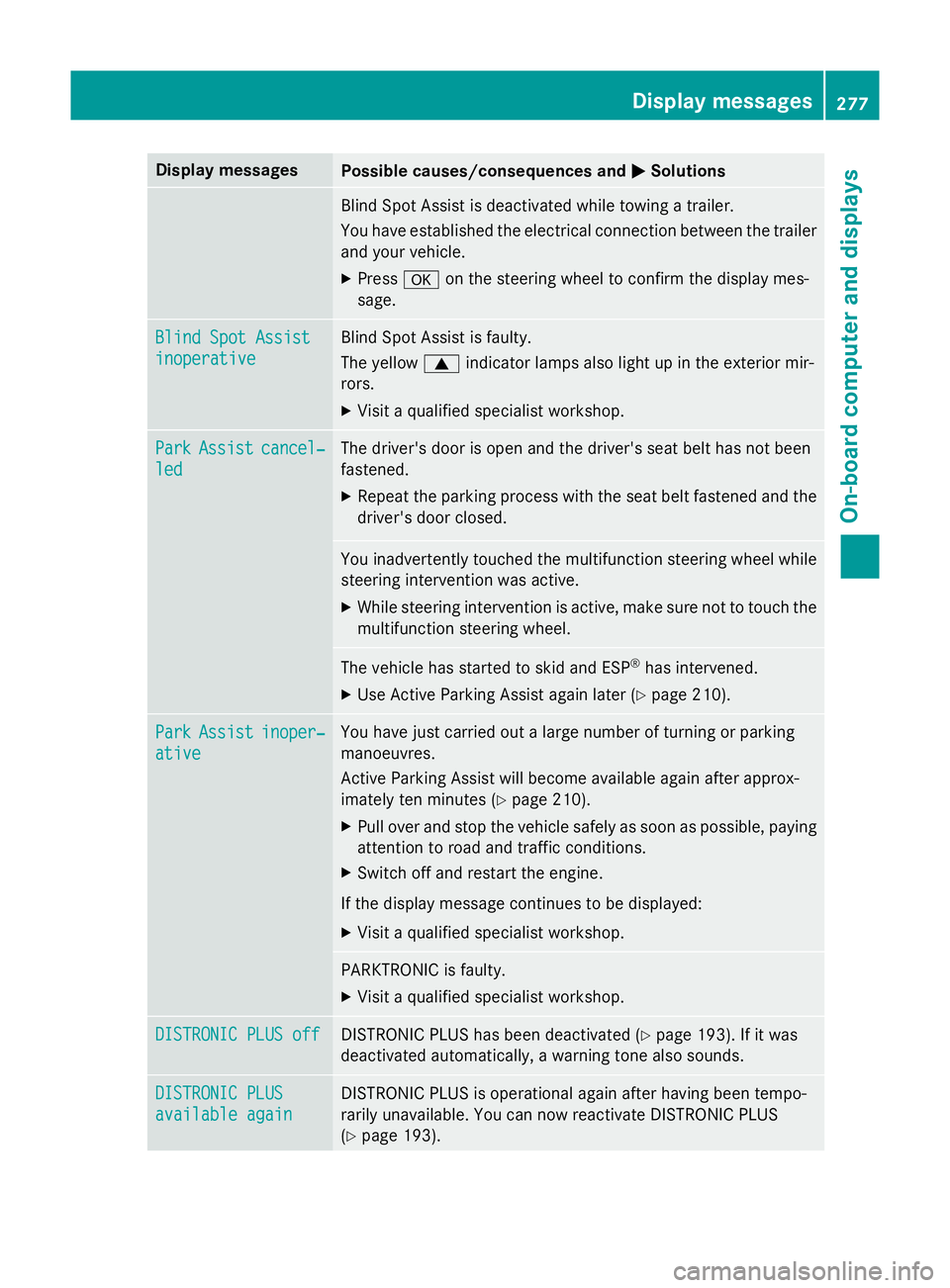
Display messages
Possible causes/consequences and
M
MSolutions Blind Spot Assist is deactivated while towing a trailer.
You have established the electrical connection between the trailer
and your vehicle.
X Press aon the steering wheel to confirm the display mes-
sage. Blind Spot Assist Blind Spot Assist
inoperative inoperative Blind Spot Assist is faulty.
The yellow
9indicator lamps also light up in the exterior mir-
rors.
X Visit a qualified specialist workshop. Park Park
Assist
Assist cancel‐
cancel‐
led
led The driver's door is open and the driver's seat belt has not been
fastened.
X Repeat the parking process with the seat belt fastened and the
driver's door closed. You inadvertently touched the multifunction steering wheel while
steering intervention was active.
X While steering intervention is active, make sure not to touch the
multifunction steering wheel. The vehicle has started to skid and ESP
®
has intervened.
X Use Active Parking Assist again later (Y page 210).Park Park
Assist
Assist inoper‐
inoper‐
ative
ative You have just carried out a large number of turning or parking
manoeuvres.
Active Parking Assist will become available again after approx-
imately ten minutes (Y
page 210).
X Pull over and stop the vehicle safely as soon as possible, paying
attention to road and traffic conditions.
X Switch off and restart the engine.
If the display message continues to be displayed: X Visit a qualified specialist workshop. PARKTRONIC is faulty.
X Visit a qualified specialist workshop. DISTRONIC PLUS off DISTRONIC PLUS off DISTRONIC PLUS has been deactivated (Y
page 193). If it was
deactivated automatically, a warning tone also sounds. DISTRONIC PLUS
DISTRONIC PLUS
available again available again DISTRONIC PLUS is operational again after having been tempo-
rarily unavailable. You can now reactivate DISTRONIC PLUS
(Y
page 193). Display
messages
277On-board computer and displays Z