buttons MERCEDES-BENZ GLA SUV 2013 Owners Manual
[x] Cancel search | Manufacturer: MERCEDES-BENZ, Model Year: 2013, Model line: GLA SUV, Model: MERCEDES-BENZ GLA SUV 2013Pages: 401, PDF Size: 11.9 MB
Page 21 of 401
Speed Limit Assist
Activating/deactivating the warn-ing function .................................... 243
Display message ............................2 75
Display message in the multifunc-
tion display ................................... .221
Function/notes ............................ .221
Important safety notes .................. 221
Speed, controlling
see Cruise control
Speedometer
Activating/deactivating the addi-
tional speedometer ........................ 246
Digital ............................................ 238
In the Instrument cluster ................. 32
Segments ...................................... 235
Selecting the unit of measure-
ment .............................................. 246
see Instrument cluster
SPEEDTRONIC
Deactivating variable ..................... 192
Display message ............................ 278
Function/notes ............................ .191
Important safety notes .................. 191
LIM indicator lamp ......................... 191
Permanent ..................................... 193
Selecting ........................................ 192
Storing the current spee d.............. 192
Variable ......................................... 191
SPORT handling mode
Activating/deactivating (AMG
vehicles) .......................................... 78
Warning lamp ................................. 292
SRS (Supplemental Restraint Sys-
tem)
Display message ............................ 264
Start/stop function
see ECO start/stop function
Starting (engine) ................................ 159
STEER CONTROL .................................. 81
Steering (display message) .............. 286
Steering wheel
Adjusting (manually) ...................... 114
Button overview ............................... 35
Buttons (on-board computer) ......... 235
Cleaning ......................................... 328
Gearshift paddle s........................... 171
Important safety notes .................. 114 Steering wheel gearshift paddles
.... 171
Stopwatch (RACETIMER) ................... 251
Stowage areas ................................... 301
Stowage compartments
Armrest (front) ............................... 302
Armrest (under )............................. 302
Centre console .............................. 301
Centre console (rear) ..................... 303
Cup holder ..................................... 308
Glove compartment ....................... 301
Important safety information ......... 301
Luggage net ................................... 303
Spectacles compartment ............... 301
Under driver's seat/front-
passenger seat .............................. 302
Summer tyres .................................... 354
Sun visor ............................................ 309
Surround lighting (on-board com-
puter) .................................................. 247 T
Tail lamps Display message ............................ 270
see Lights
Tailgate
Display message ............................ 285
Emergency unlocking ....................... 97
Important safety notes .................... 94
Limiting the opening angle ............... 97
Obstruction detection ...................... 95
Opening dimensions ...................... 391
Opening/closing (from outside) ....... 95
Opening/closing automatically
from inside ....................................... 96
Opening/closing automatically
from outside .................................... 96
Technical data
Emergency spare wheel ................. 379
Information .................................... 382
Trailer load s................................... 394
Tyres/wheels ................................. 366
Vehicle data ................................... 391
Telephone
Accepting a call ............................. 242
Display message ............................ 287
Menu (on-board computer) ............ 241
Number from the phone book ........ 242 18
Index
Page 90 of 401
is triggered if the door is opened from the
inside. Switch off the alarm . Key functions
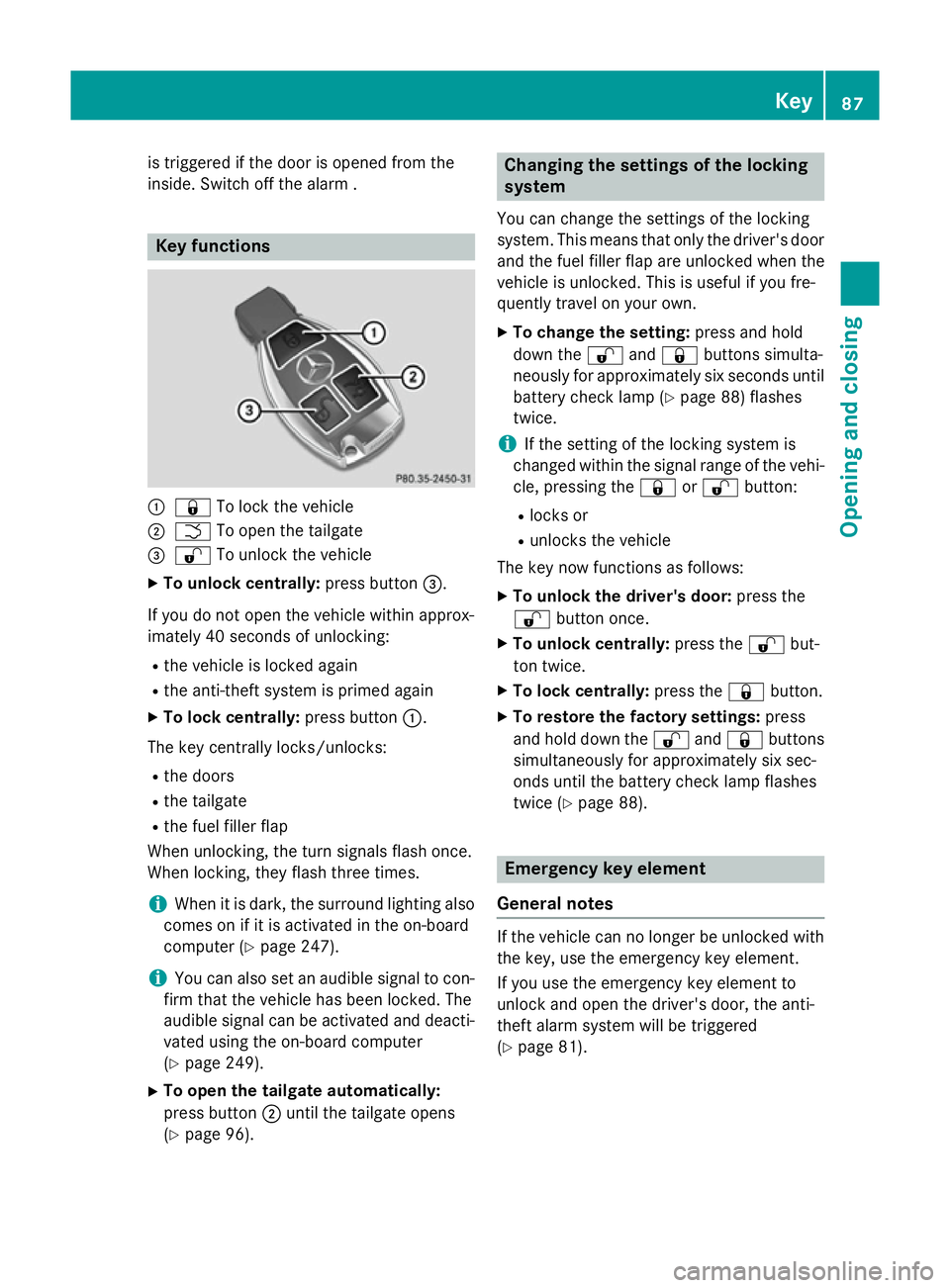
:
& To lock the vehicle
; F To open the tailgate
= % To unlock the vehicle
X To unlock centrally: press button=.
If you do not open the vehicle within approx-
imately 40 seconds of unlocking: R the vehicle is locked again
R the anti-theft system is primed again
X To lock centrally: press button:.
The key centrally locks/unlocks: R the doors
R the tailgate
R the fuel filler flap
When unlocking, the turn signals flash once.
When locking, they flash three times.
i When it is dark, the surround lighting also
comes on if it is activated in the on-board
computer (Y page 247).
i You can also set an audible signal to con-
firm that the vehicle has been locked. The
audible signal can be activated and deacti- vated using the on-board computer
(Y page 249).
X To open the tailgate automatically:
press button ;until the tailgate opens
(Y page 96). Changing the settings of the locking
system
You can change the settings of the locking
system. This means that only the driver's door
and the fuel filler flap are unlocked when the
vehicle is unlocked. This is useful if you fre-
quently travel on your own.
X To change the setting: press and hold
down the %and& buttons simulta-
neously for approximately six seconds until
battery check lamp (Y page 88) flashes
twice.
i If the setting of the locking system is
changed within the signal range of the vehi- cle, pressing the &or% button:
R locks or
R unlocks the vehicle
The key now functions as follows:
X To unlock the driver's door: press the
% button once.
X To unlock centrally: press the%but-
ton twice.
X To lock centrally: press the&button.
X To restore the factory settings: press
and hold down the %and& buttons
simultaneously for approximately six sec-
onds until the battery check lamp flashes
twice (Y page 88). Emergency key element
General notes If the vehicle can no longer be unlocked with
the key, use the emergency key element.
If you use the emergency key element to
unlock and open the driver's door, the anti-
theft alarm system will be triggered
(Y page 81). Key
87Opening and closing Z
Page 92 of 401
X
Press the &or% button.
The battery is working properly if battery
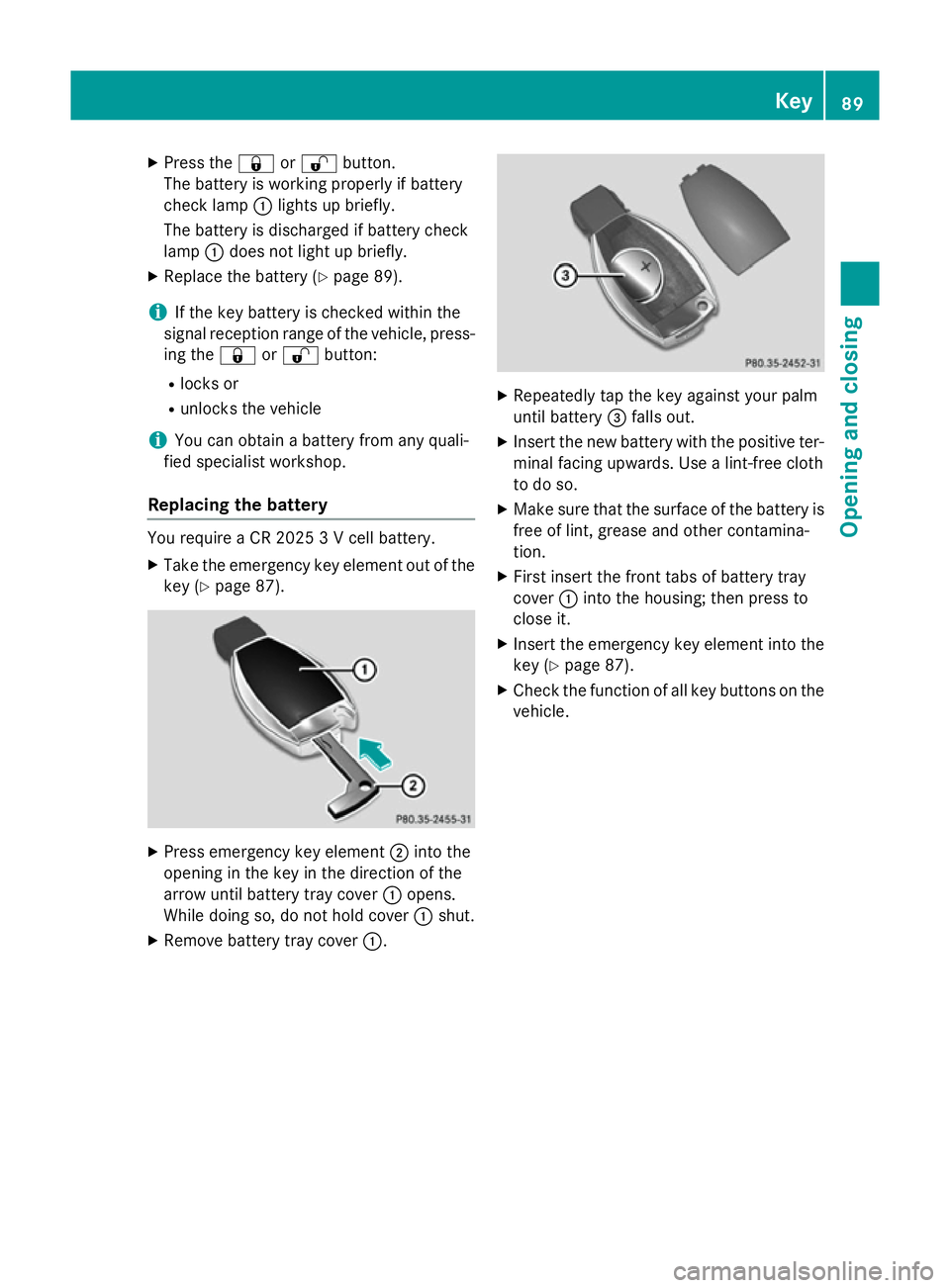
check lamp :lights up briefly.
The battery is discharged if battery check
lamp :does not light up briefly.
X Replace the battery (Y page 89).
i If the key battery is checked within the
signal reception range of the vehicle, press- ing the &or% button:
R locks or
R unlocks the vehicle
i You can obtain a battery from any quali-
fied specialist workshop.
Replacing the battery You require a CR 2025 3 V cell battery.
X Take the emergency key element out of the
key (Y page 87). X
Press emergency key element ;into the
opening in the key in the direction of the
arrow until battery tray cover :opens.
While doing so, do not hold cover :shut.
X Remove battery tray cover :. X
Repeatedly tap the key against your palm
until battery =falls out.
X Insert the new battery with the positive ter-
minal facing upwards. Use a lint-free cloth
to do so.
X Make sure that the surface of the battery is
free of lint, grease and other contamina-
tion.
X First insert the front tabs of battery tray
cover :into the housing; then press to
close it.
X Insert the emergency key element into the
key (Y page 87).
X Check the function of all key buttons on the
vehicle. Key
89Opening and closing Z
Page 96 of 401
When a locked door is opened from inside the
vehicle, the previous unlocking process will
be observed if the vehicle has been:
R locked with the locking button for the cen-
tral locking or
R locked automatically
Tthe vehicle will be fully unlocked if it had
previously been fully unlocked. Only the door which has been opened form the inside is
unlocked if only the driver's door had been
previously unlocked.
Only for the United Kingdom: if the vehicle
has been locked with the key, the double lock function is activated as standard. It is then not
possible to open the doors from inside the
vehicle. You can deactivate the double lock
function by deactivating the interior motion
sensor (Y page 82). The doors can then be
opened from the inside after the vehicle has
been locked from the outside. You can open
the rear doors from inside the vehicle if they
are not secured by the child-proof locks
(Y page 71). The anti-theft alarm system is
triggered if the door is opened from the
inside. Switch off the alarm (Y page 81).
When a locked door is opened from inside the vehicle, the previous unlocking process will
be observed if the vehicle has been:
R locked with the locking button for the cen-
tral locking or
R locked automatically
Tthe vehicle will be fully unlocked if it had
previously been fully unlocked. Only the door which has been opened form the inside is
unlocked if only the driver's door had been
previously unlocked. Automatic locking feature
X
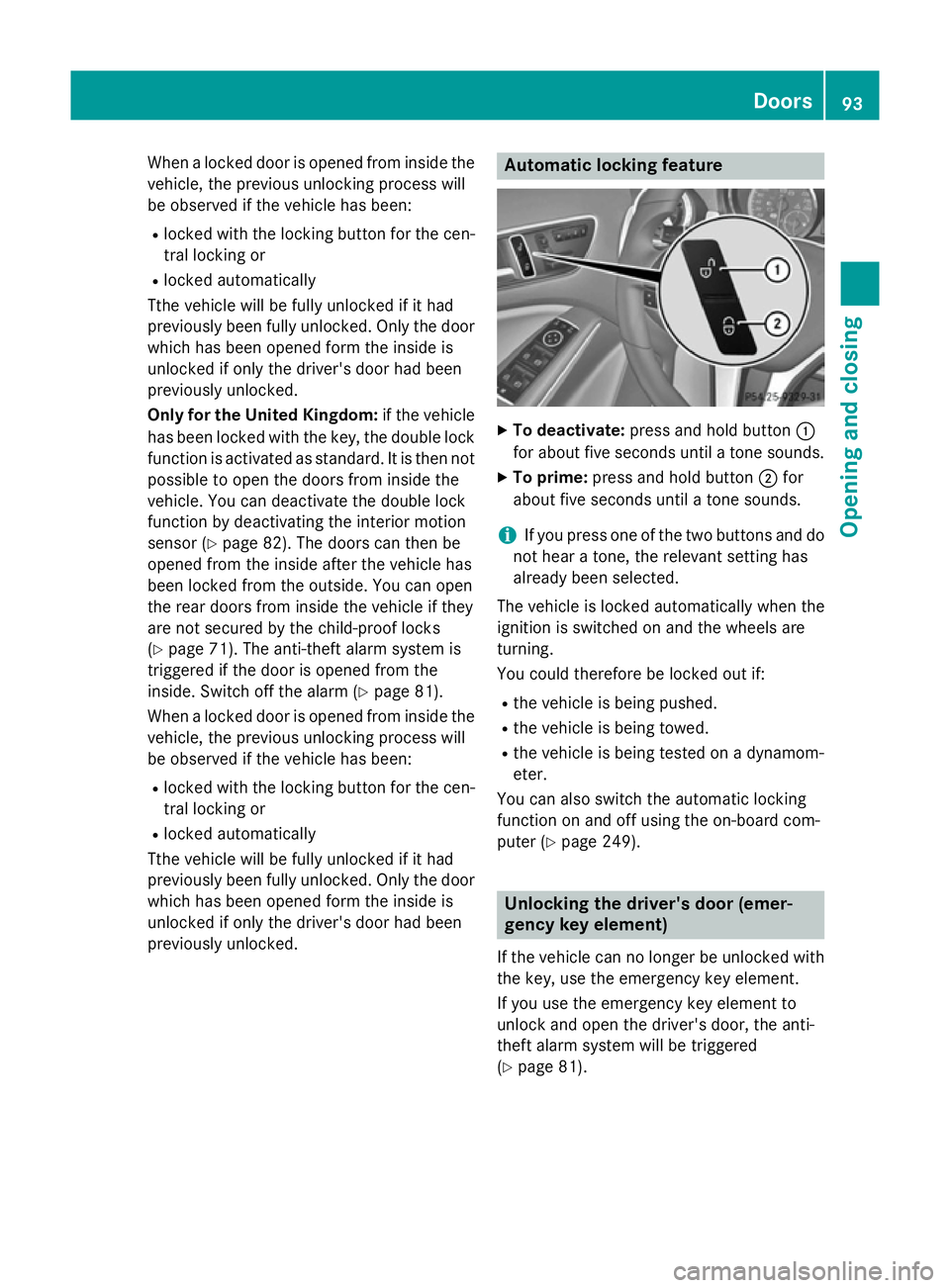
To deactivate: press and hold button :
for about five seconds until a tone sounds.
X To prime: press and hold button ;for
about five seconds until a tone sounds.
i If you press one of the two buttons and do
not hear a tone, the relevant setting has
already been selected.
The vehicle is locked automatically when the
ignition is switched on and the wheels are
turning.
You could therefore be locked out if:
R the vehicle is being pushed.
R the vehicle is being towed.
R the vehicle is being tested on a dynamom-
eter.
You can also switch the automatic locking
function on and off using the on-board com-
puter (Y page 249). Unlocking the driver's door (emer-
gency key element)
If the vehicle can no longer be unlocked with
the key, use the emergency key element.
If you use the emergency key element to
unlock and open the driver's door, the anti-
theft alarm system will be triggered
(Y page 81). Doors
93Opening and closing Z
Page 112 of 401
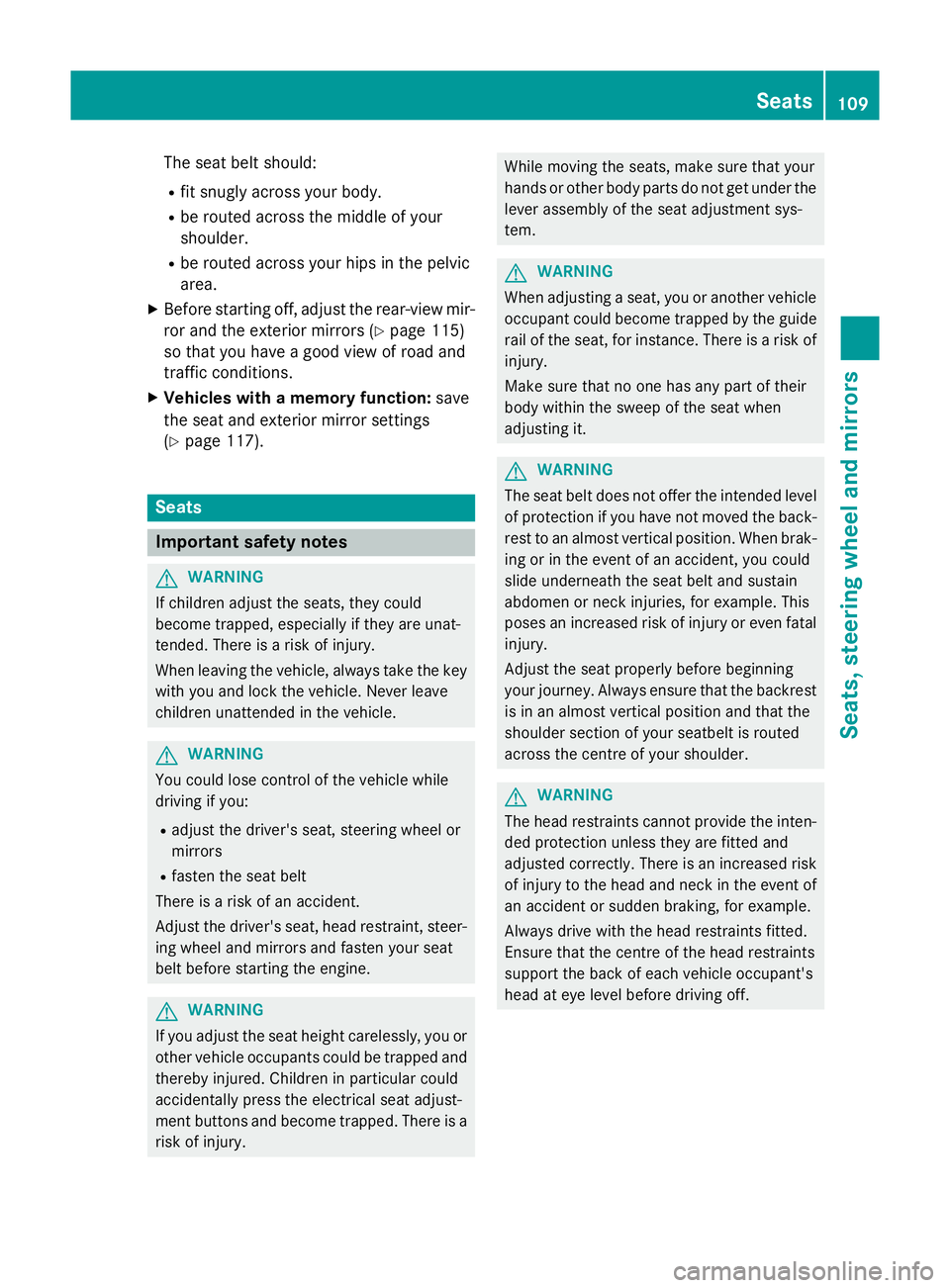
The seat belt should:
R fit snugly across your body.
R be routed across the middle of your
shoulder.
R be routed across your hips in the pelvic
area.
X Before starting off, adjust the rear-view mir-
ror and the exterior mirrors (Y page 115)
so that you have a good view of road and
traffic conditions.
X Vehicles with a memory function: save
the seat and exterior mirror settings
(Y page 117). Seats
Important safety notes
G
WARNING
If children adjust the seats, they could
become trapped, especially if they are unat-
tended. There is a risk of injury.
When leaving the vehicle, always take the key with you and lock the vehicle. Never leave
children unattended in the vehicle. G
WARNING
You could lose control of the vehicle while
driving if you:
R adjust the driver's seat, steering wheel or
mirrors
R fasten the seat belt
There is a risk of an accident.
Adjust the driver's seat, head restraint, steer-
ing wheel and mirrors and fasten your seat
belt before starting the engine. G
WARNING
If you adjust the seat height carelessly, you or other vehicle occupants could be trapped andthereby injured. Children in particular could
accidentally press the electrical seat adjust-
ment buttons and become trapped. There is a
risk of injury. While moving the seats, make sure that your
hands or other body parts do not get under the
lever assembly of the seat adjustment sys-
tem. G
WARNING
When adjusting a seat, you or another vehicle occupant could become trapped by the guiderail of the seat, for instance. There is a risk of
injury.
Make sure that no one has any part of their
body within the sweep of the seat when
adjusting it. G
WARNING
The seat belt does not offer the intended level of protection if you have not moved the back-
rest to an almost vertical position. When brak-
ing or in the event of an accident, you could
slide underneath the seat belt and sustain
abdomen or neck injuries, for example. This
poses an increased risk of injury or even fatal injury.
Adjust the seat properly before beginning
your journey. Always ensure that the backrest
is in an almost vertical position and that the
shoulder section of your seatbelt is routed
across the centre of your shoulder. G
WARNING
The head restraints cannot provide the inten-
ded protection unless they are fitted and
adjusted correctly. There is an increased risk of injury to the head and neck in the event of
an accident or sudden braking, for example.
Always drive with the head restraints fitted.
Ensure that the centre of the head restraints
support the back of each vehicle occupant's
head at eye level before driving off. Seats
109Seats, steering wheel and mirrors Z
Page 144 of 401
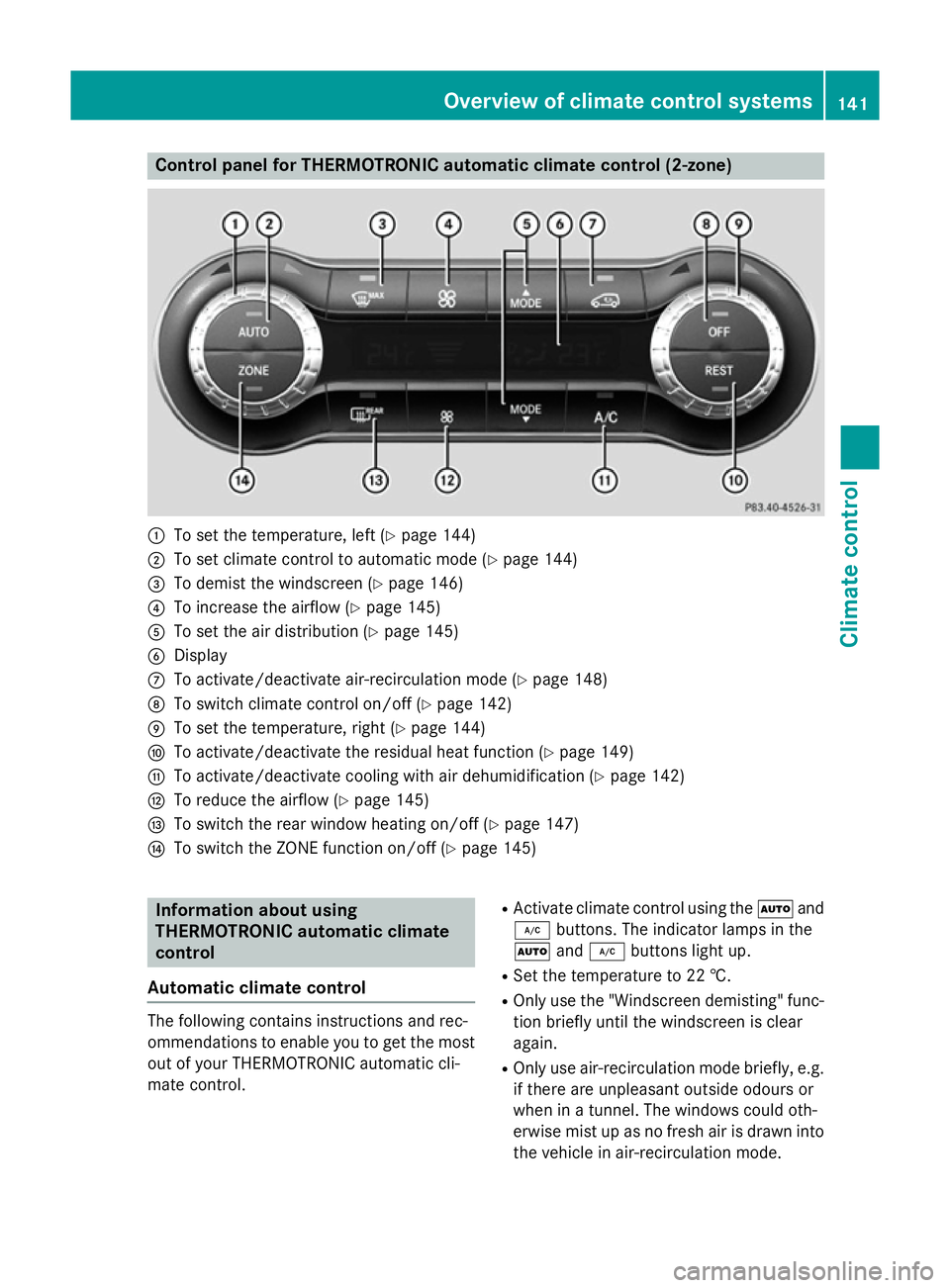
Control panel for THERMOTRONIC automatic climate control (2-zone)
:
To set the temperature, left (Y page 144)
; To set climate control to automatic mode (Y page 144)
= To demist the windscreen (Y page 146)
? To increase the airflow (Y page 145)
A To set the air distribution (Y page 145)
B Display
C To activate/deactivate air-recirculation mode (Y page 148)
D To switch climate control on/off (Y page 142)
E To set the temperature, right (Y page 144)
F To activate/deactivate the residual heat function (Y page 149)
G To activate/deactivate cooling with air dehumidification (Y page 142)
H To reduce the airflow (Y page 145)
I To switch the rear window heating on/off (Y page 147)
J To switch the ZONE function on/off (Y page 145)Information about using
THERMOTRONIC automatic climate
control
Automatic climate control The following contains instructions and rec-
ommendations to enable you to get the most
out of your THERMOTRONIC automatic cli-
mate control. R
Activate climate control using the Ãand
¿ buttons. The indicator lamps in the
à and¿ buttons light up.
R Set the temperature to 22 †.
R Only use the "Windscreen demisting" func-
tion briefly until the windscreen is clear
again.
R Only use air-recirculation mode briefly, e.g.
if there are unpleasant outside odours or
when in a tunnel. The windows could oth-
erwise mist up as no fresh air is drawn into
the vehicle in air-recirculation mode. Overview of climate control systems
141Climate control
Page 148 of 401
Only change the temperature setting in
small increments. Start at 22 †.
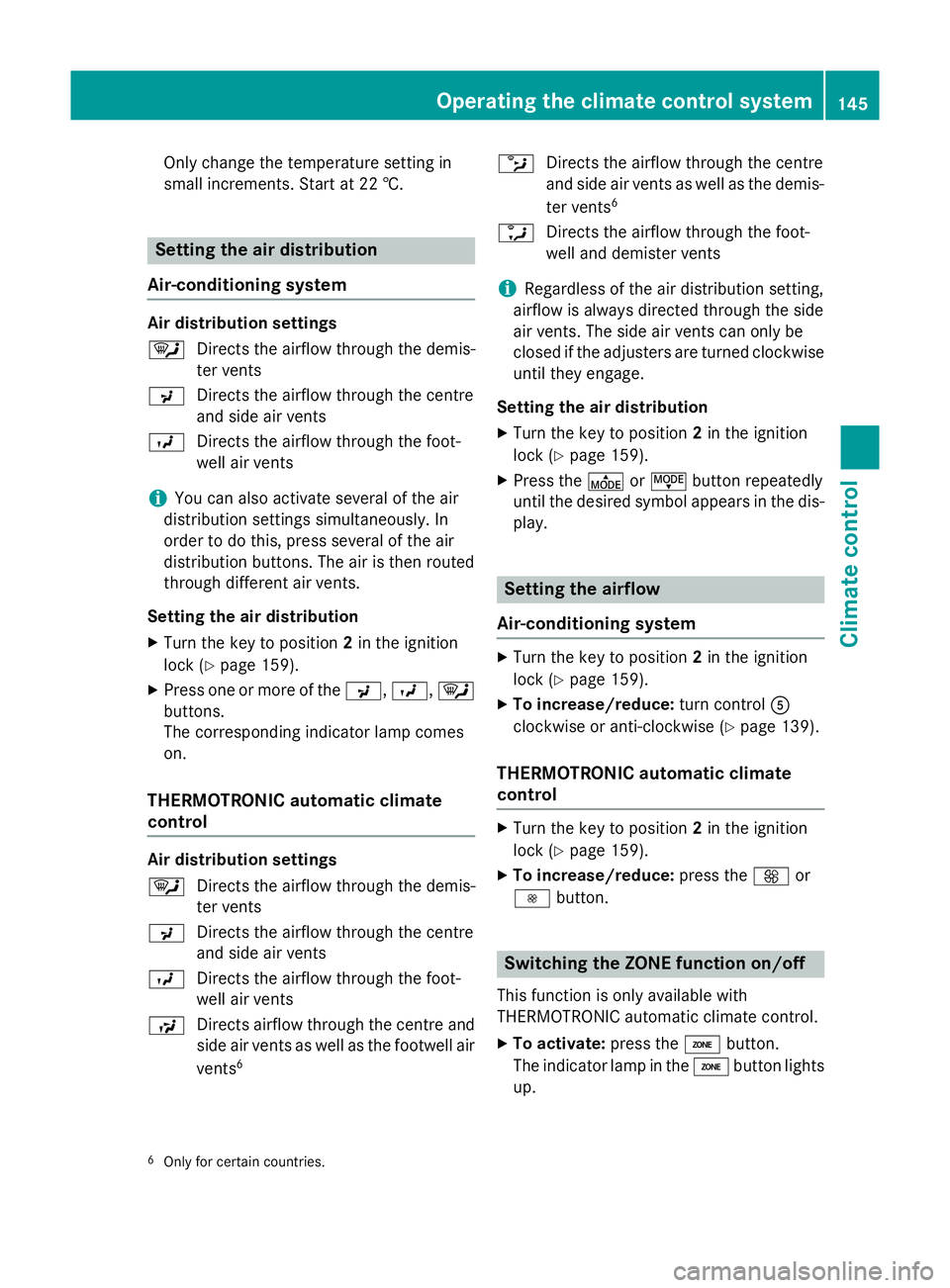
Setting the air distribution
Air-conditioning system Air distribution settings
¯
Directs the airflow through the demis-
ter vents
P Directs the airflow through the centre
and side air vents
O Directs the airflow through the foot-
well air vents
i You can also activate several of the air
distribution settings simultaneously. In
order to do this, press several of the air
distribution buttons. The air is then routed
through different air vents.
Setting the air distribution
X Turn the key to position 2in the ignition
lock (Y page 159).
X Press one or more of the P,O, ¯
buttons.
The corresponding indicator lamp comes
on.
THERMOTRONIC automatic climate
control Air distribution settings
¯
Directs the airflow through the demis-
ter vents
P Directs the airflow through the centre
and side air vents
O Directs the airflow through the foot-
well air vents
S Directs airflow through the centre and
side air vents as well as the footwell air
vents 6 b
Directs the airflow through the centre
and side air vents as well as the demis-
ter vents 6
a Directs the airflow through the foot-
well and demister vents
i Regardless of the air distribution setting,
airflow is always directed through the side
air vents. The side air vents can only be
closed if the adjusters are turned clockwise until they engage.
Setting the air distribution
X Turn the key to position 2in the ignition
lock (Y page 159).
X Press the ÉorË button repeatedly
until the desired symbol appears in the dis- play. Setting the airflow
Air-conditioning system X
Turn the key to position 2in the ignition
lock (Y page 159).
X To increase/reduce: turn controlA
clockwise or anti-clockwise (Y page 139).
THERMOTRONIC automatic climate
control X
Turn the key to position 2in the ignition
lock (Y page 159).
X To increase/reduce: press theKor
I button. Switching the ZONE function on/off
This function is only available with
THERMOTRONIC automatic climate control.
X To activate: press theábutton.
The indicator lamp in the ábutton lights
up.
6 Only for certain countries. Operating the climate control system
145Climate control
Page 155 of 401
X
To activate: press theubutton.
ON
ON is shown in the remote control display.
X To switch off: press the^button.
OFF
OFF is shown in the remote control display.
Checking the status of the auxiliary heat- ing/ventilation
X Press the ,or. button.
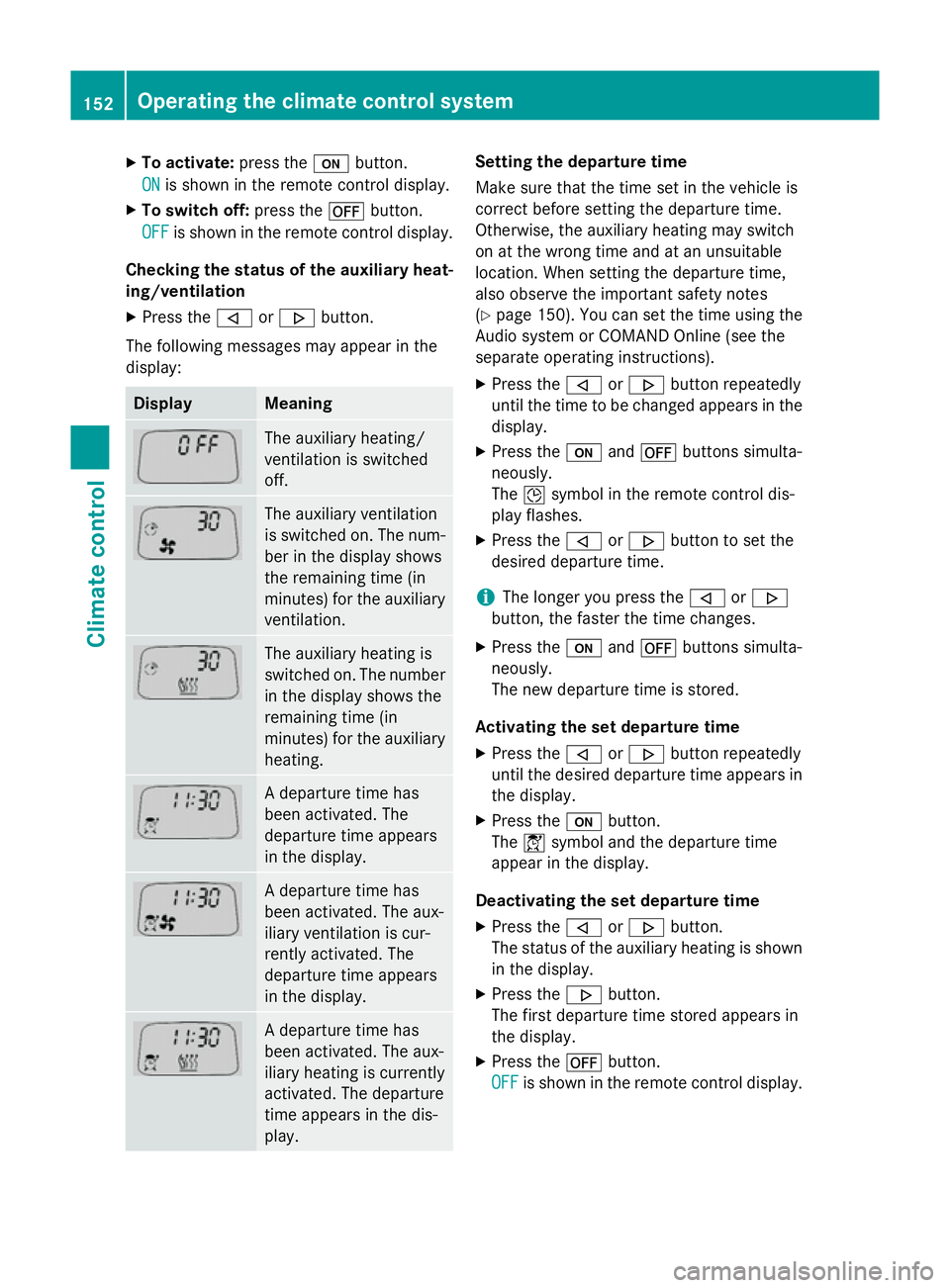
The following messages may appear in the
display: Display Meaning
The auxiliary heating/
ventilation is switched
off.
The auxiliary ventilation
is switched on. The num-
ber in the display shows
the remaining time (in
minutes) for the auxiliary
ventilation. The auxiliary heating is
switched on. The number
in the display shows the
remaining time (in
minutes) for the auxiliary heating. A departure time has
been activated. The
departure time appears
in the display.
A departure time has
been activated. The aux-
iliary ventilation is cur-
rently activated. The
departure time appears
in the display.
A departure time has
been activated. The aux-
iliary heating is currently
activated. The departure
time appears in the dis-
play. Setting the departure time
Make sure that the time set in the vehicle is
correct before setting the departure time.
Otherwise, the auxiliary heating may switch
on at the wrong time and at an unsuitable
location. When setting the departure time,
also observe the important safety notes
(Y
page 150). You can set the time using the
Audio system or COMAND Online (see the
separate operating instructions).
X Press the ,or. button repeatedly
until the time to be changed appears in the
display.
X Press the uand^ buttons simulta-
neously.
The Îsymbol in the remote control dis-
play flashes.
X Press the ,or. button to set the
desired departure time.
i The longer you press the
,or.
button, the faster the time changes.
X Press the uand^ buttons simulta-
neously.
The new departure time is stored.
Activating the set departure time X Press the ,or. button repeatedly
until the desired departure time appears in
the display.
X Press the ubutton.
The Ísymbol and the departure time
appear in the display.
Deactivating the set departure time
X Press the ,or. button.
The status of the auxiliary heating is shown in the display.
X Press the .button.
The first departure time stored appears in
the display.
X Press the ^button.
OFF OFF is shown in the remote control display. 152
Operating the climate control systemClimate control
Page 238 of 401
At high outside temperatures and when driv-
ing uphill, the coolant temperature may rise
to the end of the scale. Rev counter
! Do not drive in the overrevving range.
Doing so will damage the engine.
The red band in the rev counter indicates the
engine's overrevving range.
The fuel supply is interrupted to protect the
engine when the red band is reached. Outside temperature display
You should pay special attention to road con-
ditions when temperatures are around the
freezing point.
The outside temperature display is in the mul- tifunction display.
Changes in the outside temperature are dis-
played after a short delay. Speedometer with segments
The speedometer is divided into segments on
vehicles with DISTRONIC PLUS.
The segments in the speedometer indicate
which speed range is available.
R Cruise control activated (Y page 188):
The segments light up from the stored
speed to the maximum speed.
R Variable SPEEDTRONIC activated
(Y page 192):
The segments light up from the start of the
scale to the selected limit speed.
R DISTRONIC PLUS activated (Y page 193):
One or two segments in the set speed
range light up.
R DISTRONIC PLUS detects a vehicle in front:
The segments between the speed of the
vehicle in front and the stored speed light
up. Operating the on-board computer
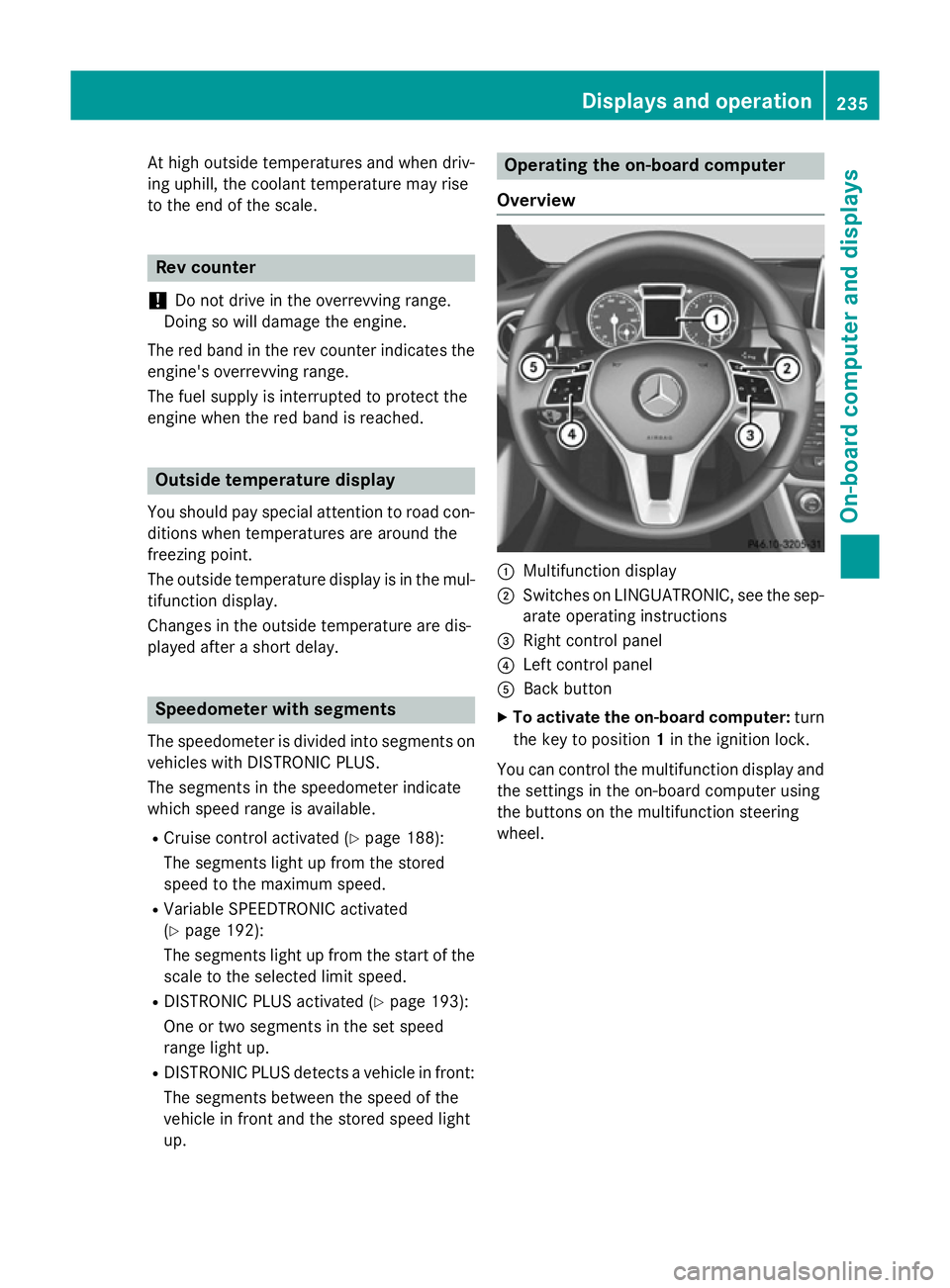
Overview :
Multifunction display
; Switches on LINGUATRONIC, see the sep-
arate operating instructions
= Right control panel
? Left control panel
A Back button
X To activate the on-board computer: turn
the key to position 1in the ignition lock.
You can control the multifunction display and
the settings in the on-board computer using
the buttons on the multifunction steering
wheel. Displays and operation
235On-board computer and displays Z
Page 316 of 401
X
Open the telephone compartment
(Y page 302).
X Place the mobile phone bracket into the
pre-installed fitting; see the separate instal- lation instructions for the mobile phone fit-
ting.
X Insert the mobile phone into the mobile
phone bracket; see the separate installa-
tion instructions for the mobile phone fit-
ting.
Operating the mobile phone You can operate the telephone using the
6 and~ buttons on the multifunction
steering wheel. You can operate other mobile
phone functions via the on-board computer
(Y page 241).
When you remove the key from the ignition
lock, the mobile phone is disconnected from
the hands-free system. Active calls will first
be transferred to the mobile phone directly.
Mobile phone bracket in the stowage
compartment You can fold the pre-installed bracket up to
improve access to the stowage space
beneath it. Depending on the vehicle equip-
ment, a USB port or a Media Interface is
installed in the stowage compartment
(Y
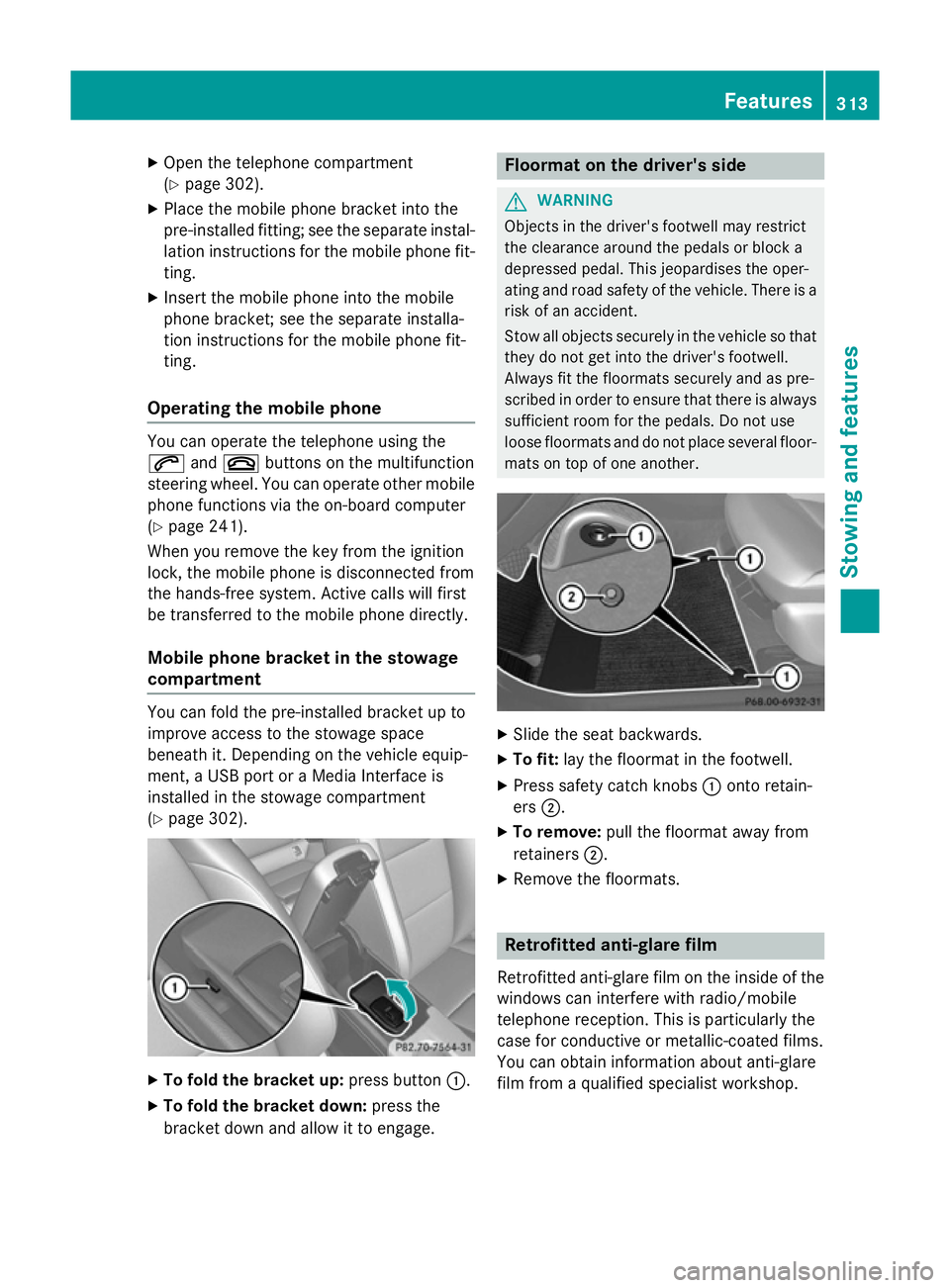
page 302). X
To fold the bracket up: press button:.
X To fold the bracket down: press the
bracket down and allow it to engage. Floormat on the driver's side
G
WARNING
Objects in the driver's footwell may restrict
the clearance around the pedals or block a
depressed pedal. This jeopardises the oper-
ating and road safety of the vehicle. There is a risk of an accident.
Stow all objects securely in the vehicle so that
they do not get into the driver's footwell.
Always fit the floormats securely and as pre-
scribed in order to ensure that there is always sufficient room for the pedals. Do not use
loose floormats and do not place several floor-mats on top of one another. X
Slide the seat backwards.
X To fit: lay the floormat in the footwell.
X Press safety catch knobs :onto retain-
ers ;.
X To remove: pull the floormat away from
retainers ;.
X Remove the floormats. Retrofitted anti-glare film
Retrofitted anti-glare film on the inside of the
windows can interfere with radio/mobile
telephone reception. This is particularly the
case for conductive or metallic-coated films.
You can obtain information about anti-glare
film from a qualified specialist workshop. Features
313Stowing and features Z