bonnet MERCEDES-BENZ GLA SUV 2013 Owners Manual
[x] Cancel search | Manufacturer: MERCEDES-BENZ, Model Year: 2013, Model line: GLA SUV, Model: MERCEDES-BENZ GLA SUV 2013Pages: 401, PDF Size: 11.9 MB
Page 9 of 401
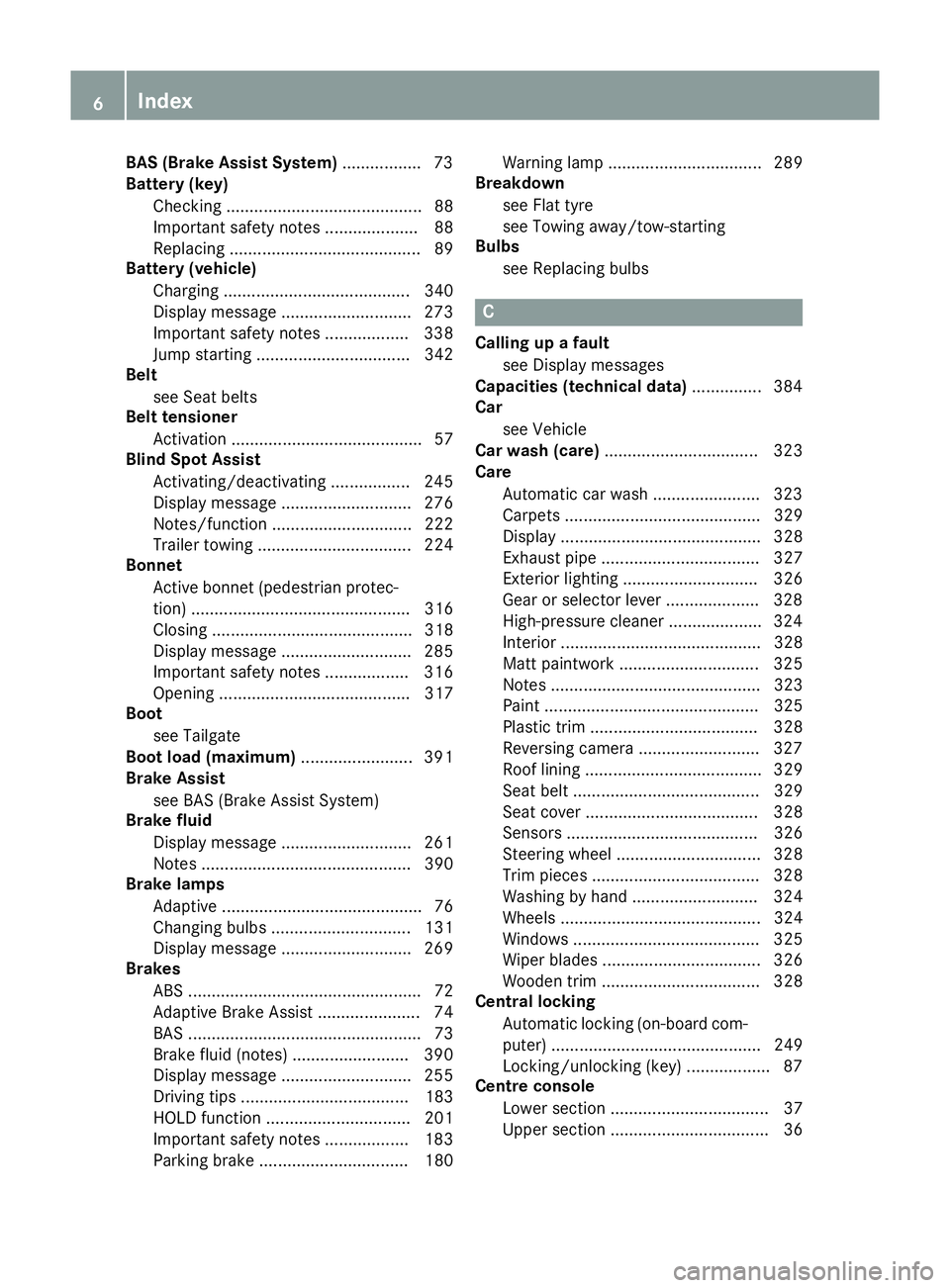
BAS (Brake Assist System)
................. 73
Battery (key)
Checking .......................................... 88
Important safety notes .................... 88
Replacing ......................................... 89
Battery (vehicle)
Charging ........................................ 340
Display message ............................ 273
Important safety notes .................. 338
Jump starting ................................. 342
Belt
see Seat belts
Belt tensioner
Activation ......................................... 57
Blind Spot Assist
Activating/deactivating ................. 245
Display message ............................ 276
Notes/function .............................. 222
Trailer towing ................................. 224
Bonnet
Active bonnet (pedestrian protec-tion) ............................................... 316
Closing ........................................... 318
Display message ............................ 285
Important safety notes .................. 316
Opening ......................................... 317
Boot
see Tailgate
Boot load (maximum) ........................ 391
Brake Assist
see BAS (Brake Assist System)
Brake fluid
Display message ............................ 261
Notes ............................................. 390
Brake lamps
Adaptive ........................................... 76
Changing bulb s.............................. 131
Display message ............................ 269
Brakes
ABS .................................................. 72
Adaptive Brake Assist ...................... 74
BAS .................................................. 73
Brake fluid (notes) ......................... 390
Display message ............................ 255
Driving tips .................................... 183
HOLD function ............................... 201
Important safety notes .................. 183
Parking brake ................................ 180 Warning lamp ................................. 289
Breakdown
see Flat tyre
see Towing away/tow-starting
Bulbs
see Replacing bulbs C
Calling up a fault see Display messages
Capacities (technical data) ............... 384
Car
see Vehicle
Car wash (care) ................................. 323
Care
Automatic car wash ....................... 323
Carpets .......................................... 329
Display ........................................... 328
Exhaust pipe .................................. 327
Exterior lighting ............................. 326
Gear or selector lever .................... 328
High-pressure cleaner .................... 324
Interior ........................................... 328
Matt paintwork .............................. 325
Notes ............................................. 323
Paint .............................................. 325
Plastic trim .................................... 328
Reversing camera .......................... 327
Roof lining ...................................... 329
Seat belt ........................................ 329
Seat cove r..................................... 328
Sensors ......................................... 326
Steering wheel ............................... 328
Trim pieces .................................... 328
Washing by hand ........................... 324
Wheels ........................................... 324
Windows ........................................ 325
Wiper blades .................................. 326
Wooden trim .................................. 328
Central locking
Automatic locking (on-board com-
puter) ............................................. 249
Locking/unlocking (key) .................. 87
Centre console
Lower section .................................. 37
Upper section .................................. 36 6
Index
Page 33 of 401
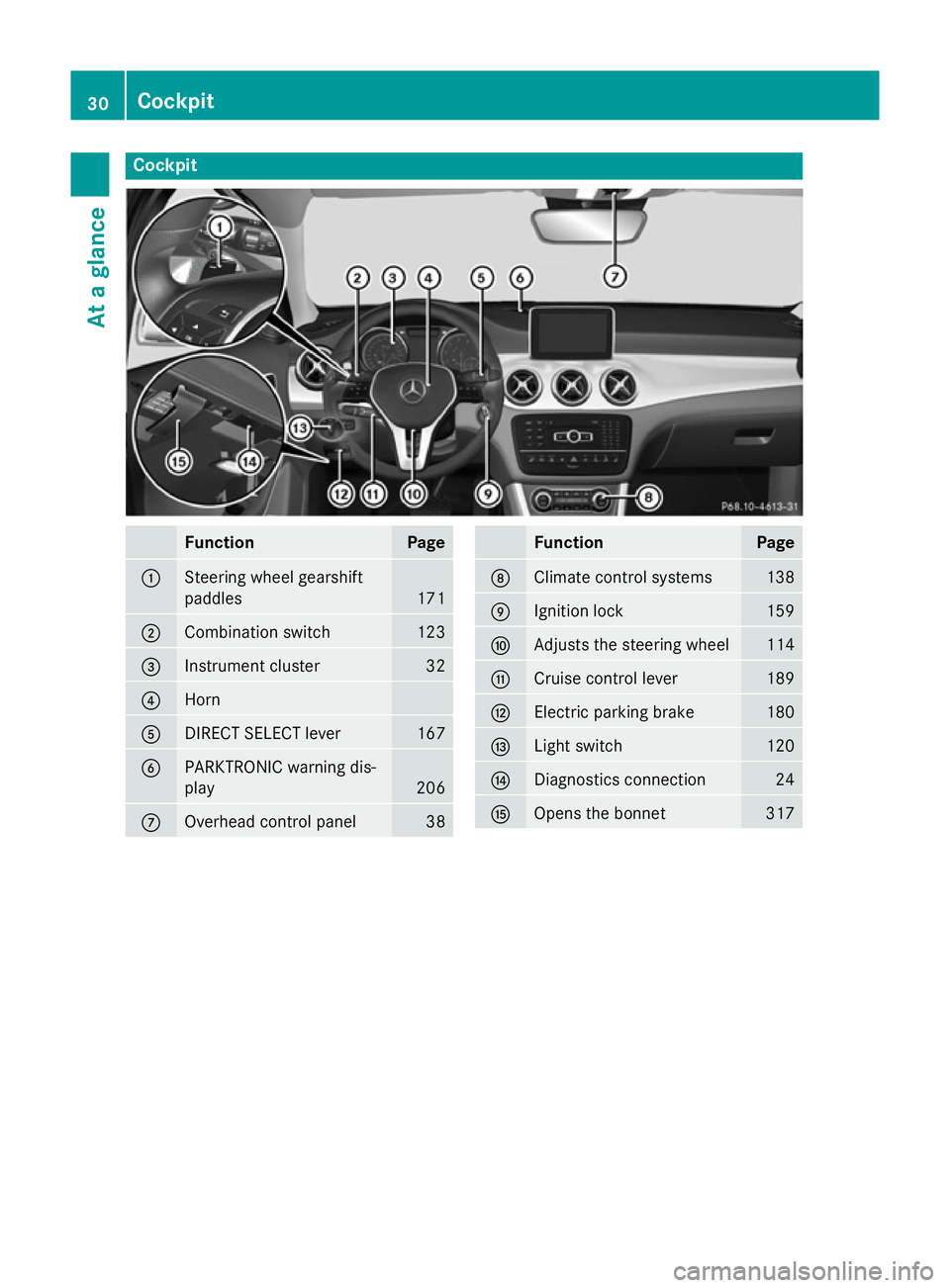
Cockpit
Function Page
:
Steering wheel gearshift
paddles
171
;
Combination switch 123
=
Instrument cluster 32
?
Horn
A
DIRECT SELECT lever 167
B
PARKTRONIC warning dis-
play
206
C
Overhead control panel 38 Function Page
D
Climate control systems 138
E
Ignition lock 159
F
Adjusts the steering wheel 114
G
Cruise control lever 189
H
Electric parking brake 180
I
Light switch 120
J
Diagnostics connection 24
K
Opens the bonnet 31730
CockpitAt a glance
Page 34 of 401
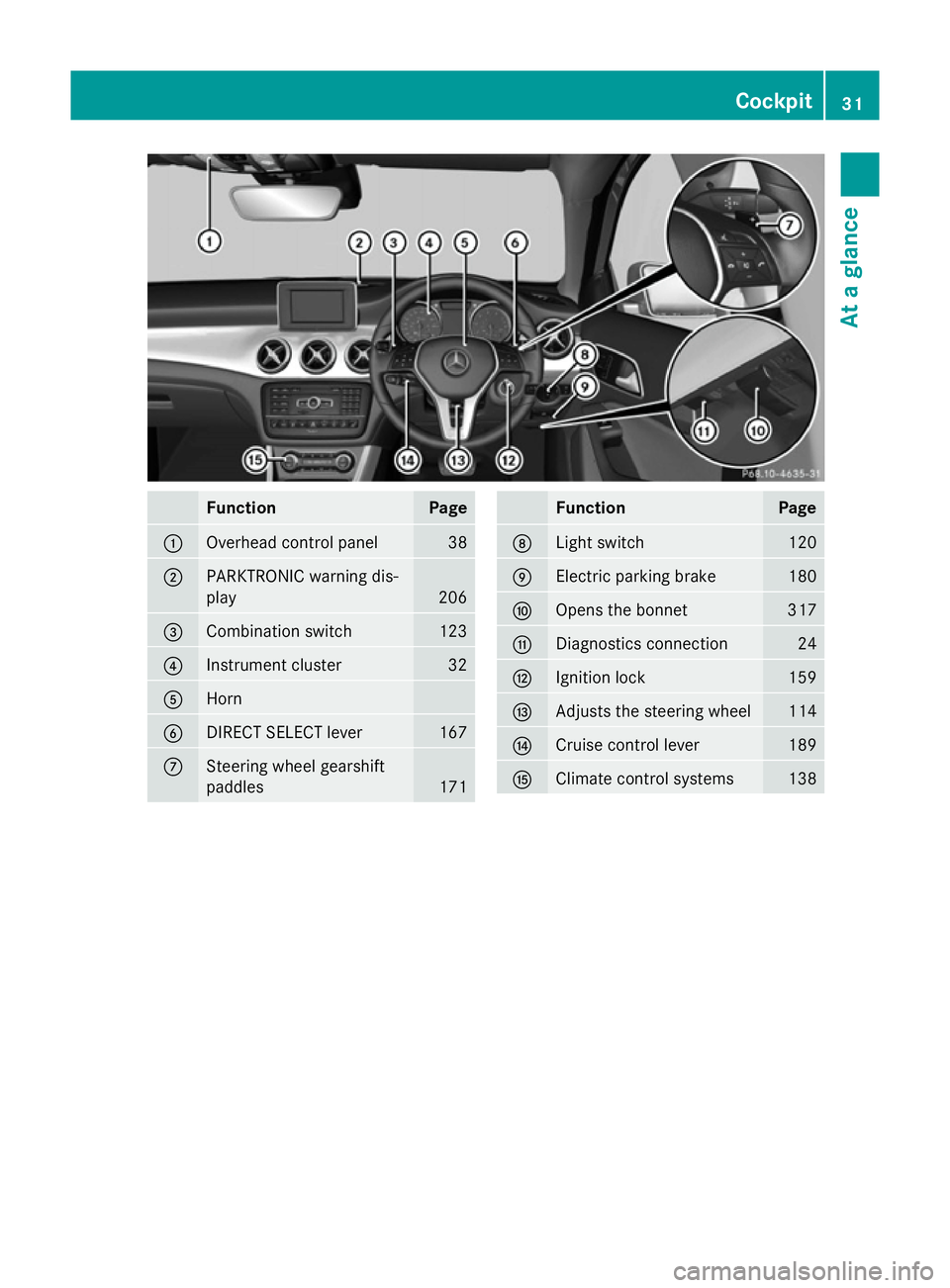
Function Page
:
Overhead control panel 38
;
PARKTRONIC warning dis-
play 206
=
Combination switch 123
?
Instrument cluster 32
A
Horn
B
DIRECT SELECT lever 167
C
Steering wheel gearshift
paddles
171 Function Page
D
Light switch 120
E
Electric parking brake 180
F
Opens the bonnet 317
G
Diagnostics connection 24
H
Ignition lock 159
I
Adjusts the steering wheel 114
J
Cruise control lever 189
K
Climate control systems 138Cockpit
31At a glance
Page 84 of 401
STEER CONTROL
General notes STEER CONTROL helps you by transmitting a
noticeable steering force to the steering
wheel in the direction required for vehicle
stabilisation.
This steering support is provided in particular
if:
R both right wheels or both left wheels are on
a wet or slippery road surface when you
brake.
R the vehicle starts to skid.
Important safety notes No steering support is provided from STEER
CONTROL, if
R ESP ®
is malfunctioning.
R the steering is faulty.
Power steering will, however, continue to
function. Anti-theft systems
Immobiliser
The immobiliser prevents your vehicle from
being started without the correct key.
X To activate: remove the key from the igni-
tion lock.
X To deactivate: switch on the ignition.
When leaving the vehicle, always take the key
with you and lock the vehicle. The engine can
be started by anyone with a valid key that is
left inside the vehicle.
i The immobiliser is always deactivated
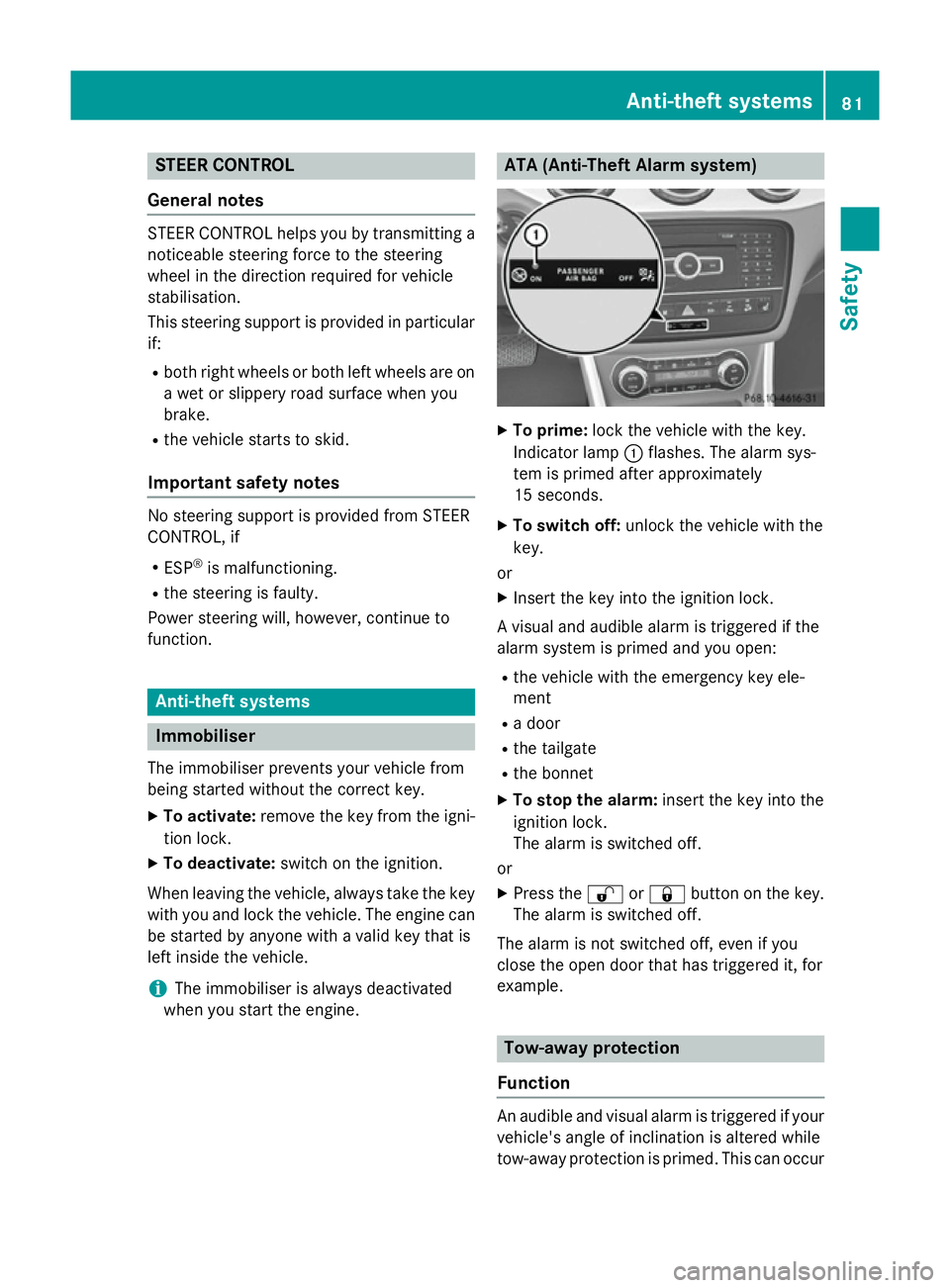
when you start the engine. ATA (Anti-Theft Alarm system)
X
To prime: lock the vehicle with the key.
Indicator lamp :flashes. The alarm sys-
tem is primed after approximately
15 seconds.
X To switch off: unlock the vehicle with the
key.
or
X Insert the key into the ignition lock.
A visual and audible alarm is triggered if the
alarm system is primed and you open:
R the vehicle with the emergency key ele-
ment
R a door
R the tailgate
R the bonnet
X To stop the alarm: insert the key into the
ignition lock.
The alarm is switched off.
or
X Press the %or& button on the key.
The alarm is switched off.
The alarm is not switched off, even if you
close the open door that has triggered it, for
example. Tow-away protection
Function An audible and visual alarm is triggered if your
vehicle's angle of inclination is altered while
tow-away protection is primed. This can occur Anti-theft systems
81Safety Z
Page 133 of 401
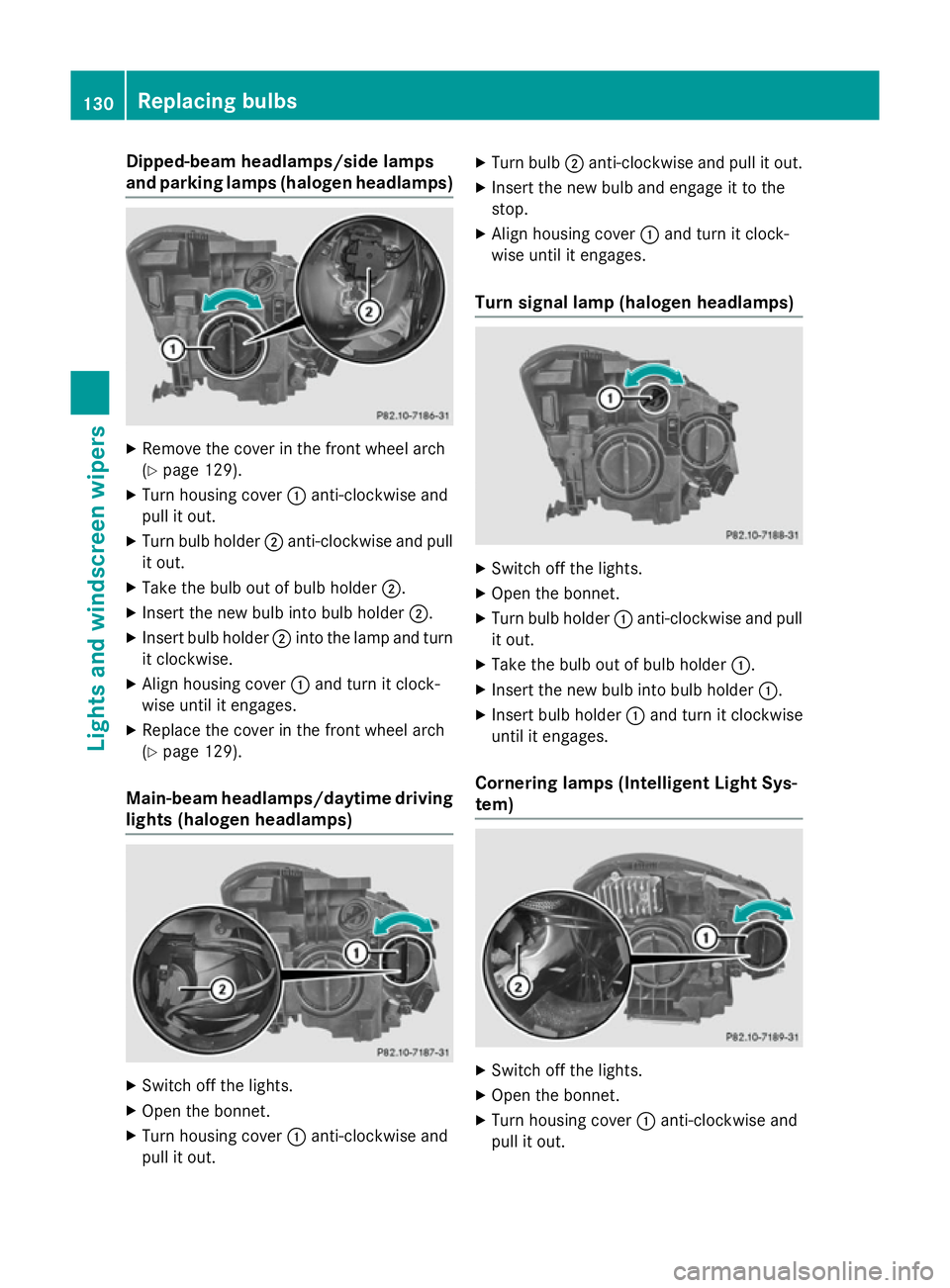
Dipped-beam headlamps/side lamps
and parking lamps (halogen headlamps) X
Remove the cover in the front wheel arch
(Y page 129).
X Turn housing cover :anti-clockwise and
pull it out.
X Turn bulb holder ;anti-clockwise and pull
it out.
X Take the bulb out of bulb holder ;.
X Insert the new bulb into bulb holder ;.
X Insert bulb holder ;into the lamp and turn
it clockwise.
X Align housing cover :and turn it clock-
wise until it engages.
X Replace the cover in the front wheel arch
(Y page 129).
Main-beam headlamps/daytime driving lights (halogen headlamps) X
Switch off the lights.
X Open the bonnet.
X Turn housing cover :anti-clockwise and
pull it out. X
Turn bulb ;anti-clockwise and pull it out.
X Insert the new bulb and engage it to the
stop.
X Align housing cover :and turn it clock-
wise until it engages.
Turn signal lamp (halogen headlamps) X
Switch off the lights.
X Open the bonnet.
X Turn bulb holder :anti-clockwise and pull
it out.
X Take the bulb out of bulb holder :.
X Insert the new bulb into bulb holder :.
X Insert bulb holder :and turn it clockwise
until it engages.
Cornering lamps (Intelligent Light Sys-
tem) X
Switch off the lights.
X Open the bonnet.
X Turn housing cover :anti-clockwise and
pull it out. 130
Replacing bulbsLigh
ts and windscreen wipers
Page 136 of 401
!
Vehicles with a rain sensor: if the wind-
screen becomes dirty in dry weather con-
ditions, the windscreen wipers may be acti- vated inadvertently. This could damage the
windscreen wiper blades or scratch the
windscreen.
For this reason, you should always switch
off the windscreen wipers in dry weather.
Vehicles with a rain sensor: in theÄor
Å position, the appropriate wiping fre-
quency is automatically set according to the
intensity of the rain. In the Åposition, the
rain sensor is more sensitive than in the Ä
position, causing the windscreen wipers to
wipe more frequently.
If the wiper blades are worn, the windscreen
will no longer be wiped properly. This could
prevent you from observing the traffic condi-
tions. Switching the rear window wiper on/
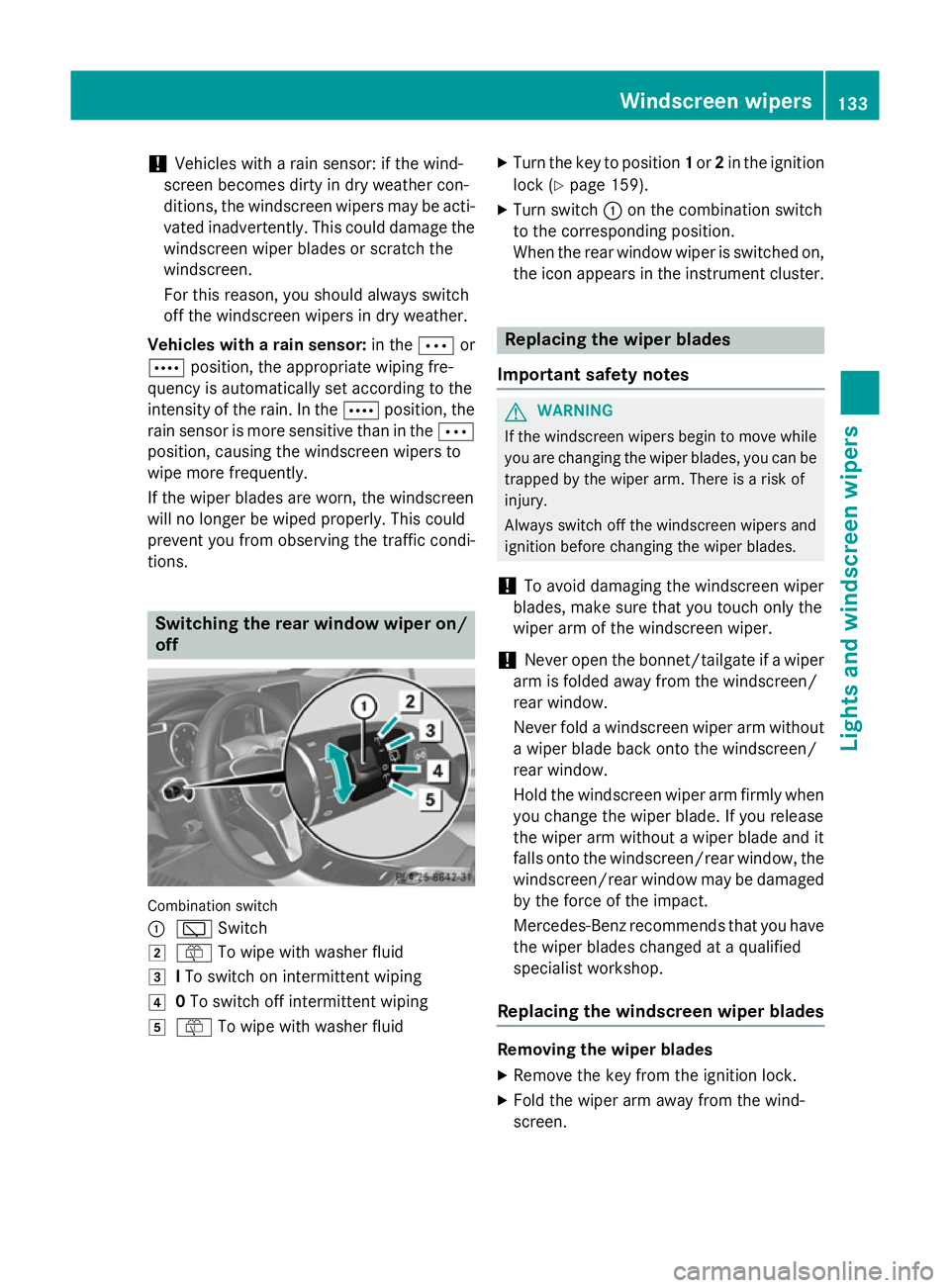
off Combination switch
:
è Switch
2 ô To wipe with washer fluid
3 ITo switch on intermittent wiping
4 0To switch off intermittent wiping
5 ô To wipe with washer fluid X
Turn the key to position 1or 2in the ignition
lock (Y page 159).
X Turn switch :on the combination switch
to the corresponding position.
When the rear window wiper is switched on,
the icon appears in the instrument cluster. Replacing the wiper blades
Important safety notes G
WARNING
If the windscreen wipers begin to move while
you are changing the wiper blades, you can be trapped by the wiper arm. There is a risk of
injury.
Always switch off the windscreen wipers and
ignition before changing the wiper blades.
! To avoid damaging the windscreen wiper
blades, make sure that you touch only the
wiper arm of the windscreen wiper.
! Never open the bonnet/tailgate if a wiper
arm is folded away from the windscreen/
rear window.
Never fold a windscreen wiper arm without a wiper blade back onto the windscreen/
rear window.
Hold the windscreen wiper arm firmly when
you change the wiper blade. If you release
the wiper arm without a wiper blade and it
falls onto the windscreen/rear window, the windscreen/rear window may be damaged
by the force of the impact.
Mercedes-Benz recommends that you have
the wiper blades changed at a qualified
specialist workshop.
Replacing the windscreen wiper blades Removing the wiper blades
X Remove the key from the ignition lock.
X Fold the wiper arm away from the wind-
screen. Windscreen wipers
133Lights and windscreen wipers Z
Page 158 of 401
Display messages
Possible causes/consequences and
M
MSolutions The auxiliary heating cannot be switched on or has switched itself
off.
There is too little fuel in the fuel tank.
X Refuel at the nearest filling station.
X Make another attempt to switch on the auxiliary heating using
the remote control. The auxiliary heating cannot be switched on or has switched itself
off.
The auxiliary heating is faulty.
X Have the auxiliary heating checked at a qualified specialist
workshop. Adjusting the air vents
Important safety notes
G
WARNING
Very hot or very cold air can flow from the air vents. This could result in burns or frostbite in the immediate vicinity of the air vents. There
is a risk of injury.
Make sure that all vehicle occupants always
maintain a sufficient distance to the air out-
lets. If necessary, redirect the airflow to
another area of the vehicle interior.
In order to ensure the direct flow of fresh air
through the air vents into the vehicle interior,
please observe the following notes:
R keep the air inlet between the windscreen
and the bonnet free of blockages, such as
ice, snow or leaves.
R never cover the vents or ventilation grilles
in the vehicle interior.
i Move the adjusters for the air vents ver-
tically or horizontally, to set the direction of the airflow.
i Optimal climate control function is ach-
ieved by opening the air vents fully and set-
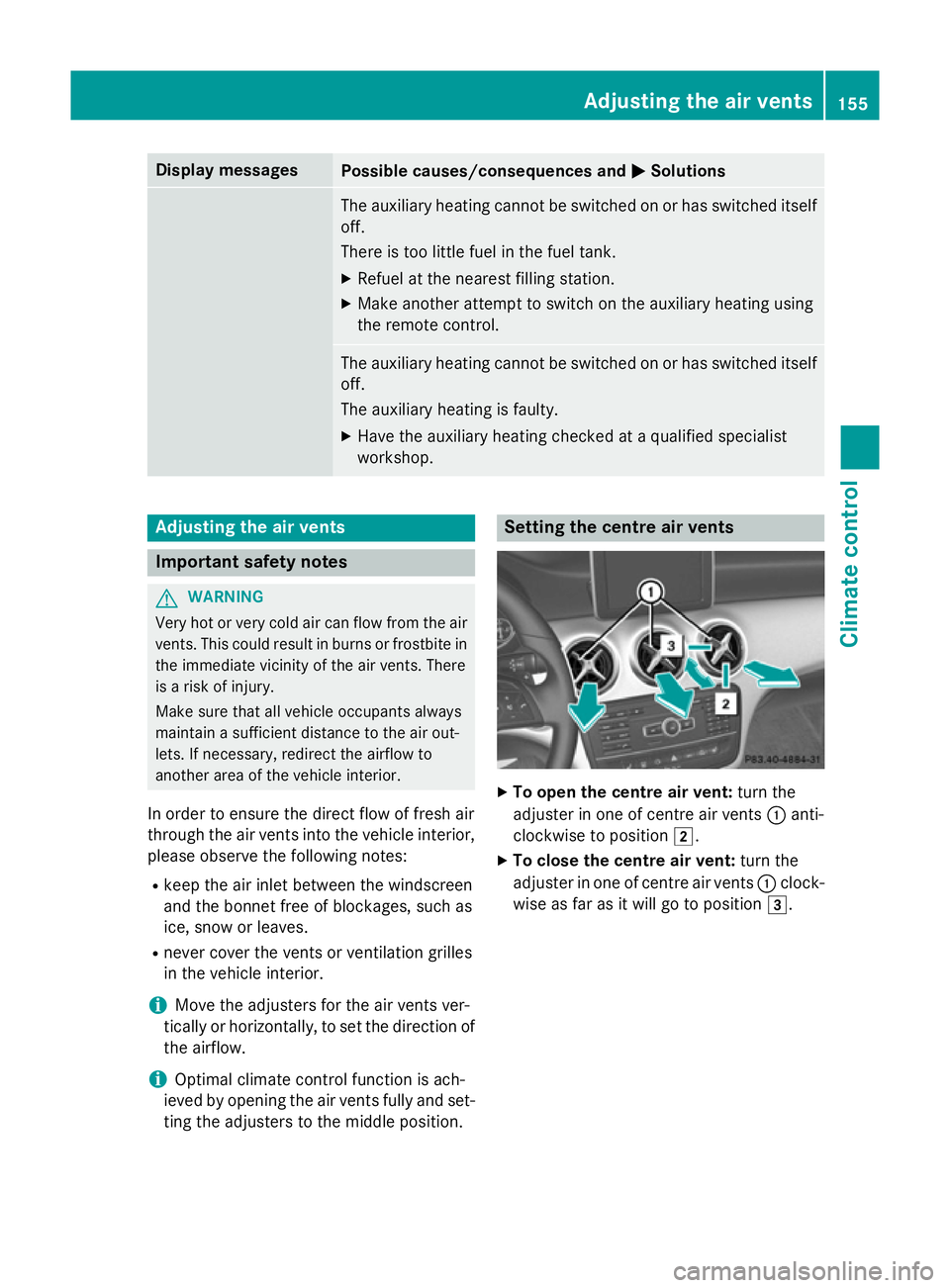
ting the adjusters to the middle position. Setting the centre air vents
X
To open the centre air vent: turn the
adjuster in one of centre air vents :anti-
clockwise to position 2.
X To close the centre air vent: turn the
adjuster in one of centre air vents :clock-
wise as far as it will go to position 3. Adjusting the air vents
155Climate control Z
Page 165 of 401
ECO start/stop function
Introduction The ECO start/stop function switches the
engine off automatically if the vehicle is stop-
ped under certain conditions.
When pulling away again, the engine starts
automatically. The ECO start/stop function
thereby helps you to reduce the fuel con-
sumption and emissions of your vehicle.
Important safety notes G
WARNING
If the engine is switched off automatically and you exit the vehicle, the engine is restarted
automatically. The vehicle may begin moving. There is a risk of accident and injury.
If you wish to exit the vehicle, always turn off
the ignition and secure the vehicle against
rolling away.
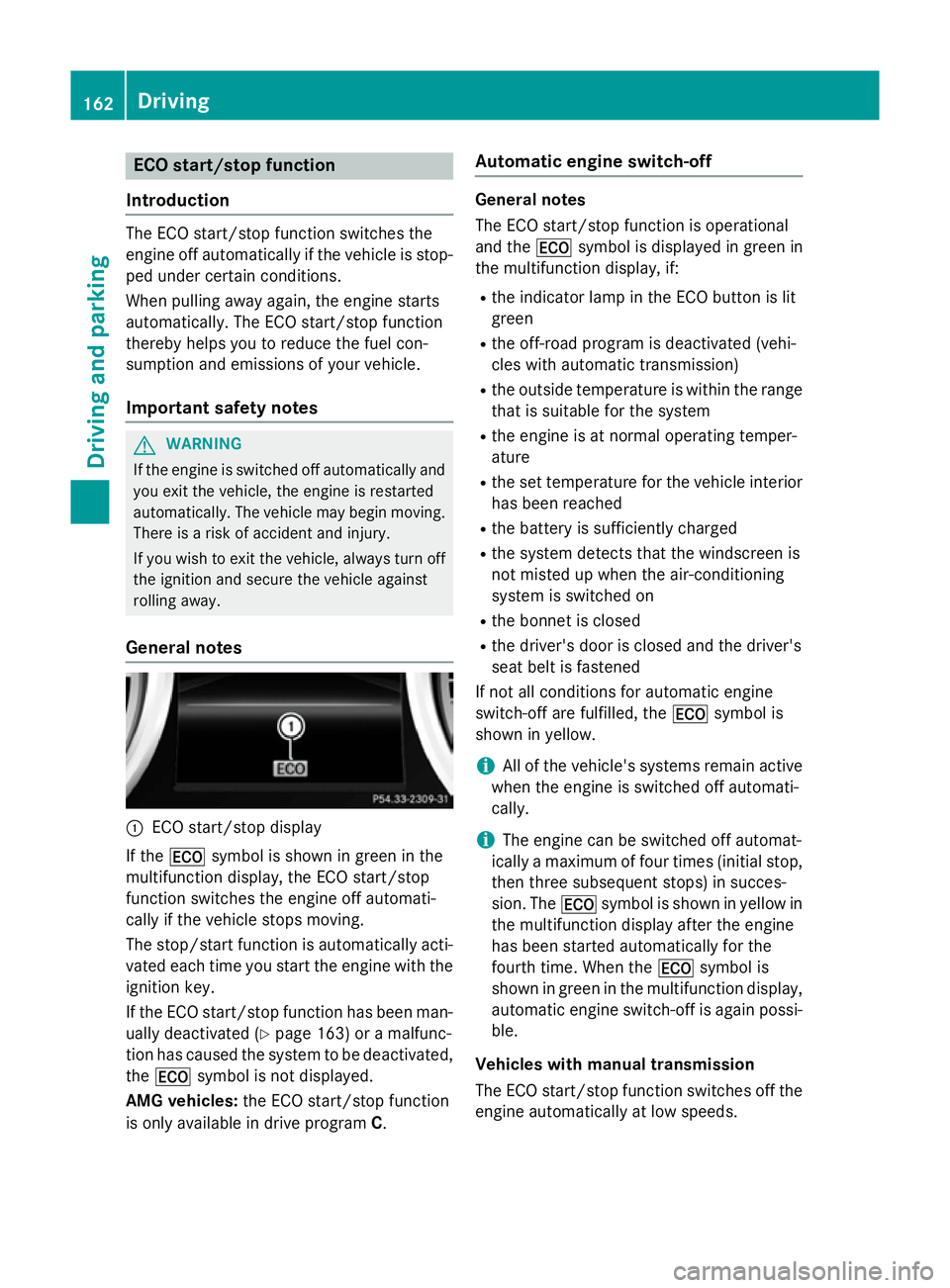
General notes :
ECO start/stop display
If the ¤ symbol is shown in green in the
multifunction display, the ECO start/stop
function switches the engine off automati-
cally if the vehicle stops moving.
The stop/start function is automatically acti-
vated each time you start the engine with the ignition key.
If the ECO start/stop function has been man- ually deactivated (Y page 163) or a malfunc-
tion has caused the system to be deactivated, the ¤ symbol is not displayed.
AMG vehicles: the ECO start/stop function
is only available in drive program C.Automatic engine switch-off General notes
The ECO start/stop function is operational
and the
¤symbol is displayed in green in
the multifunction display, if:
R the indicator lamp in the ECO button is lit
green
R the off-road program is deactivated (vehi-
cles with automatic transmission)
R the outside temperature is within the range
that is suitable for the system
R the engine is at normal operating temper-
ature
R the set temperature for the vehicle interior
has been reached
R the battery is sufficiently charged
R the system detects that the windscreen is
not misted up when the air-conditioning
system is switched on
R the bonnet is closed
R the driver's door is closed and the driver's
seat belt is fastened
If not all conditions for automatic engine
switch-off are fulfilled, the ¤symbol is
shown in yellow.
i All of the vehicle's systems remain active
when the engine is switched off automati-
cally.
i The engine can be switched off automat-
ically a maximum of four times (initial stop,
then three subsequent stops) in succes-
sion. The ¤symbol is shown in yellow in
the multifunction display after the engine
has been started automatically for the
fourth time. When the ¤symbol is
shown in green in the multifunction display,
automatic engine switch-off is again possi- ble.
Vehicles with manual transmission
The ECO start/stop function switches off the engine automatically at low speeds. 162
DrivingDriving and parking
Page 206 of 401
i
RACE START is only available in AMG vehi-
cles.
Activation conditions You can activate RACE START if:
R the doors, the bonnet and the tailgate are
closed
R the engine is running and the transmission,
traction control and engine are at operating
temperature
R SPORT handling mode is activated
(Y page 78)
R the steering wheel is in the straight-ahead
position.
R the vehicle is stationary and the brake
pedal is depressed (left foot)
R the transmission is in position D
R drive program Mis selected (Y page 171).
Activating RACE START X
Depress the brake pedal with your left foot
and keep it depressed.
X Pull and hold both steering wheel gearshift
paddles.
X The RACE START Confirm: Paddle UP
RACE START Confirm: Paddle UP
Cancel: Paddle DOWN
Cancel: Paddle DOWN message appears
in the multifunction display.
X Release both steering wheel gearshift pad-
dles.
i If the activation conditions are no longer
fulfilled, RACE START is cancelled. The
RACE START not possible See Own‐
RACE START not possible See Own‐
er's
er's Manual Manual message appears in the mul-
tifunction display.
X To cancel: pull the left steering wheel shift
paddle (Y page 171).
or
X To confirm: pull the right steering wheel
shift paddle (Y page 171).
The RACE START available Depress
RACE START available Depress
accelerator
accelerator message appears in the mul-
tifunction display. i
If you do not depress the accelerator
pedal within a few seconds, RACE START is cancelled. The multifunction display shows
the RACE START cancelled
RACE START cancelled message.
X Fully depress the accelerator pedal.
The engine speed is increased.
The RACE START Release brake to RACE START Release brake to
start
start message appears in the multifunc-
tion display.
i If the brake pedal is not released after a
short while, RACE START is cancelled. The
multifunction display shows the RACE
RACE
START cancelled START cancelled message.
X Take your foot off the brake, but keep the
accelerator pedal depressed.
The vehicle pulls away at maximum accel-
eration.
The RACE RACE START
START active
active message appears
in the multifunction display.
RACE START is deactivated when the vehicle
reaches a speed of approximately 50 km/h.
Drive program Sis activated. SPORT handling
mode remains activated.
RACE START is deactivated immediately if
you release the accelerator pedal during
RACE START or if any of the activation condi- tions are no longer fulfilled. The RACE RACESTART
START
not possible
not possible orRACE START cancelled
RACE START cancelled
message appears in the multifunction dis-
play.
i After using it several times in short suc-
cession, RACE START will be unavailable
until a certain distance has been driven. 4MATIC
4MATIC ensures that all four wheels are per-
manently driven. Together with ESP ®
, it
improves the traction of your vehicle when-
ever a drive wheel spins due to insufficient
grip.
If you fail to adapt your driving style, 4MATIC
can neither reduce the risk of an accident nor override the laws of physics. 4MATIC cannot Driving systems
203Driving and parking Z
Page 237 of 401
Useful information
i This Owner's Manual describes all mod-
els, series and optional equipment for your
vehicle that were available at the time of
going to press. National variations are pos- sible. Note that your vehicle may not be
equipped with all of the functions descri-
bed. This is also the case for systems and
functions relevant to safety.
i Read the information on qualified special-
ist workshops: (Y page 25). Important safety notes
G
WARNING
Operating the integrated information systems and communications equipment in the vehicle
while driving will distract you from traffic con-
ditions. You could then lose control of the
vehicle. There is a risk of an accident.
Only operate these devices if road traffic con-
ditions permit. If you are unsure about the
surrounding conditions, pull over to a safe
location and make entries only while the vehi-
cle is stationary. G
WARNING
If the instrument cluster has failed or mal-
functioned, you may not recognise function
restrictions relevant to safety. The operating
safety of your vehicle may be impaired. There is a risk of an accident.
Drive on carefully. Have the vehicle checked
at a qualified specialist workshop immedi-
ately.
You must observe the legal requirements for
the country in which you are currently driving when operating the on-board computer.
The on-board computer only shows messages
or warnings from certain systems in the mul- tifunction display. You should therefore make
sure your vehicle is operating safely at all times. Otherwise, a vehicle that is not oper-
ating safely may cause an accident.
For an overview, see the instrument panel
illustration (Y
page 32). Displays and operation
Instrument cluster lighting
The lighting in the instrument cluster, in the
displays and the controls in the vehicle inte-
rior can be adjusted using the brightness con- trol knob.
The brightness control knob is on the bottom
left of the instrument cluster (Y page 32).
X Turn the brightness control knob clockwise
or anti-clockwise.
If the light switch is set to Ã,Tor
L, the brightness is dependant upon
the brightness of the ambient light.
i The light sensor in the instrument cluster
automatically controls the brightness of
the multifunction display.
In daylight, the displays in the instrument
cluster are not illuminated. Coolant temperature gauge
G
WARNING
If you open the bonnet while the engine is
overheating or while there is a fire in the
engine compartment, you could come into
contact with hot gases or other leaking ser-
vice products. There is a danger of injury.
Allow an overheating engine to cool down
before opening the bonnet. If there is a fire in the engine compartment, leave the bonnet
closed and notify the fire brigade.
The coolant temperature gauge is in the
instrument cluster on the right-hand side.
Under normal operating conditions and with
the specified coolant level, the coolant tem-
perature may rise to 120 †. 234
Displays and operationOn-board computer and displays