lane assist MERCEDES-BENZ GLA SUV 2013 Owners Manual
[x] Cancel search | Manufacturer: MERCEDES-BENZ, Model Year: 2013, Model line: GLA SUV, Model: MERCEDES-BENZ GLA SUV 2013Pages: 401, PDF Size: 11.9 MB
Page 12 of 401
Drive program
Automatic ...................................... 172
Display .......................................... .169
Display (DIRECT SELECT lever) ...... 168
Manual .......................................... .172
Driver's door
see Door
Driving abroad
Mercedes-Benz Service ................. 323
Symmetrical dipped bea m............. 120
Driving in mountainous terrain
Approach/departure angle ............ 187
Driving off-road
see Off-road driving
Driving on flooded roads .................. 184
Driving safety system
COLLISION PREVENTION ASSIST
PLUS ................................................ 76
EBD (electronic brake force distri- bution) ............................................. 80
Driving safety systems
4ETS (Electronic Traction Sys-
tem) ................................................. 77
ABS (Anti-lock Braking System) ....... 72
ADAPTIVE BRAK E............................. 80
Adaptive Brake Assist ...................... 74
Adaptive brake lights ....................... 76
BAS (Brake Assist System) .............. 73
COLLISION PREVENTION ASSIST .... 73
Distance warning function ............... 73
ESP® (Electronic Stability Pro-
gram) ............................................... 76
ETS (Electronic Traction System) ..... 77
ETS/4ETS (Electronic Traction
System) ........................................... 77
Important safety guidelines ............. 72
Overview .......................................... 72
STEER CONTROL ............................. 81
Driving systems
Active Parking Assist ..................... 210
ATTENTION ASSIST ........................ 220
Blind Spot Assist ............................ 222
Cruise control ................................ 188
Display message ............................ 275
Distronic Plus ................................ 193
HOLD function ............................... 201
Lane Keeping Assist ...................... 224
Lane package ................................ 222 PARKTRONIC ................................. 206
RACE START (AMG vehicles) .......... 202
Reversing camera .......................... 215
Speed Limit Assist ......................... 221
SPEEDTRONIC ............................... 191
Driving tips
Aquaplaning ................................... 184
Automatic transmission ................. 170
Brakes ........................................... 183
DISTRONIC PLUS ........................... 199
Downhill gradient ........................... 183
Driving abroad ............................... 120
Driving in winter ............................. 184
Driving on flooded roads ................ 184
Driving on sand .............................. 187
Driving on wet roads ...................... 184
General .......................................... 182
Icy road surfaces ........................... 184
Limited braking efficiency on sal-
ted roads ....................................... 184
New brake pads/linings ................ 184
Off-road driving .............................. 185
Running-in tips ............................... 158
Snow chains .................................. 355
Symmetrical dipped beam ............. 120
Towing a traile r.............................. 225
Travelling uphill .............................. 187
Tyre ruts ........................................ 187
Wet road surface ........................... 183
DSR (Downhill Speed Regulation)
Display message ............................ 275
Function/note s............................. 204
DVD audio (on-board computer) ...... 241 E
EASY-VARIO-PLUS system Luggage compartment enlarge-
ment .............................................. 304
EBD (electronic brake force distri-
bution)
Display message ............................ 257
Function/note s................................ 80
ECO display
Function/note s............................. 182
On-board computer ....................... 238
ECO start/stop function
Automatic engine start .................. 163 Index
9
Page 16 of 401
Starting the engine ........................ 160
Key positions (ignition lock) ............ 159
Kickdown
Driving tips .................................... 170
Manual drive progra m.................... 174
Kneebag ............................................... 50 L
Lamps see Warning and indicator lamps
Lane Keeping Assist
Activating/deactivating ................. 245
Display message ............................ 276
Function/information .................... 224
Lane package ..................................... 222
Lap time (RACETIMER) ...................... 251
Lashing eyelets ................................. 306
Licence plate lamp (display mes-
sage) ................................................... 270
Light sensor (display message) ....... 271
Lighting
see Lights
Lights
Activating/deactivating the Intel-
ligent Light System ........................ 247
Activating/deactivating the inte-
rior lighting delayed switch-off ....... 248
Active light function ....................... 124
Automatic headlamp mode ............ 121
Cornering light function ................. 124
Dipped-beam headlamp s............... 121
Display message ............................ 268
Driving abroad ............................... 120
Foglamps ....................................... 121
Foglamps (extended range) ........... 125
Hazard warning lamps ................... 123
Headlamp flashe r........................... 123
Headlamp range ............................ 122
Light switch ................................... 120
Main-beam headlamp s................... 123
Motorway mode ............................. 124
Off-road lights ................................ 125
Parking lamps ................................ 122
Rear foglamp ................................. 122
Setting the ambient lighting
brightness (on-board computer) .... 247
Side lamps ..................................... 122 Switching the daytime driving
lights on/off (on-board com-
puter) ............................................. 246
Switching the daytime driving
lights on/off (switch) ..................... 121
Switching the exterior lighting
delayed switch-off on/off (on-
board computer) ............................ 247
Switching the surround lighting
on/off (on-board computer) .......... 247
Turn signals ................................... 123
see Interior lighting
see Replacing bulbs
LIM indicator lamp
Cruise control ................................ 189
DISTRONIC PLUS ........................... 194
Variable SPEEDTRONIC ................. 191
Limiting the speed
see SPEEDTRONIC
Loading guidelines ............................ 300
Locking
see Central locking
Locking (doors)
Automatic ........................................ 93
Emergency locking ........................... 94
From inside (central locking but-
ton) .................................................. 92
Locking centrally
see Central locking
Locking verification signal (on-
board computer) ............................... 249
Luggage compartment enlarge-
ment ................................................... 304
Important safety notes .................. 304
Notes on use ................................. 305
Luggage compartment floor
Important safety notes .................. 307
opening/closing ............................ 307
stowage well, under ....................... 307
Luggage net ....................................... 303
Lumbar support
Adjusting the 4-way lumbar sup-
port ................................................ 112 M
M+S tyres ........................................... 354 Index
13
Page 204 of 401
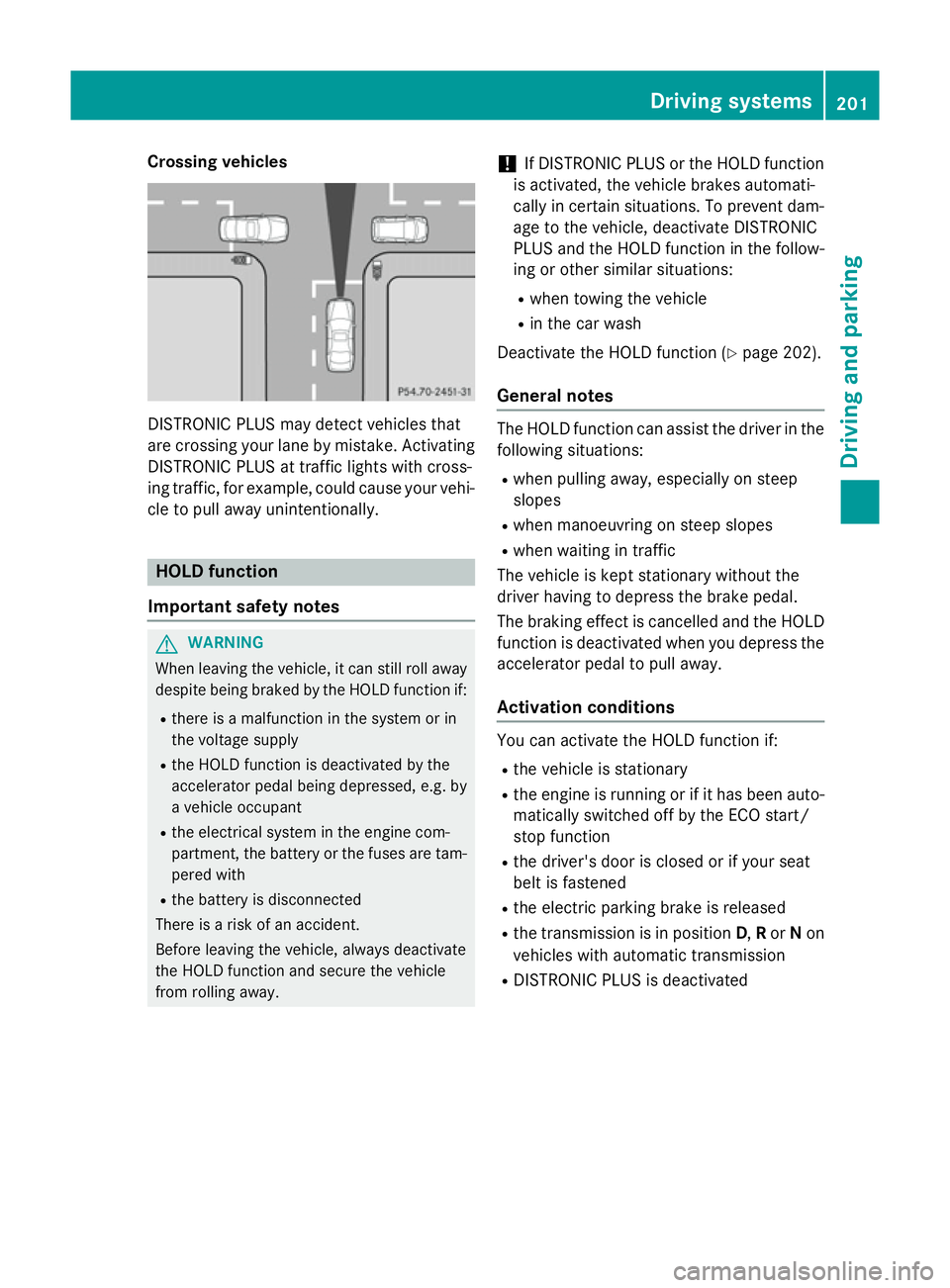
Crossing vehicles
DISTRONIC PLUS may detect vehicles that
are crossing your lane by mistake. Activating DISTRONIC PLUS at traffic lights with cross-
ing traffic, for example, could cause your vehi-
cle to pull away unintentionally. HOLD function
Important safety notes G
WARNING
When leaving the vehicle, it can still roll away despite being braked by the HOLD function if:
R there is a malfunction in the system or in
the voltage supply
R the HOLD function is deactivated by the
accelerator pedal being depressed, e.g. by
a vehicle occupant
R the electrical system in the engine com-
partment, the battery or the fuses are tam-
pered with
R the battery is disconnected
There is a risk of an accident.
Before leaving the vehicle, always deactivate
the HOLD function and secure the vehicle
from rolling away. !
If DISTRONIC PLUS or the HOLD function
is activated, the vehicle brakes automati-
cally in certain situations. To prevent dam-
age to the vehicle, deactivate DISTRONIC
PLUS and the HOLD function in the follow-
ing or other similar situations:
R when towing the vehicle
R in the car wash
Deactivate the HOLD function (Y page 202).
General notes The HOLD function can assist the driver in the
following situations:
R when pulling away, especially on steep
slopes
R when manoeuvring on steep slopes
R when waiting in traffic
The vehicle is kept stationary without the
driver having to depress the brake pedal.
The braking effect is cancelled and the HOLD function is deactivated when you depress the
accelerator pedal to pull away.
Activation conditions You can activate the HOLD function if:
R
the vehicle is stationary
R the engine is running or if it has been auto-
matically switched off by the ECO start/
stop function
R the driver's door is closed or if your seat
belt is fastened
R the electric parking brake is released
R the transmission is in position D,Ror Non
vehicles with automatic transmission
R DISTRONIC PLUS is deactivated Driving systems
201Driving and parking Z
Page 207 of 401
take account of road, weather and traffic con-
ditions. 4MATIC is only an aid. You are
responsible for the distance to the vehicle in
front, for vehicle speed, for braking in good
time, and for staying in lane.
If a drive wheel spins due to insufficient grip:
R when pulling away, only depress the accel-
erator pedal as far as is necessary.
R accelerate less when driving.
! Never tow the vehicle with one axle
raised. This may damage the transfer case.
Damage of this sort is not covered by the
Mercedes-Benz implied warranty. All
wheels must remain either on the ground or be fully raised. Observe the instructions for
towing the vehicle with all wheels in full
contact with the ground.
i In wintry driving conditions, the maximum
effect of 4MATIC can only be achieved if
you use winter tyres (M+S tyres), with snow
chains if necessary. DSR
Important safety notes i
DSR (Downhill Speed Regulation) is only
available for vehicles with the Off-Road
Engineering package.
DSR is an aid to assist you when driving down-
hill. It keeps the speed of travel at the speed
selected on the on-board computer. The
steeper the downhill gradient, the greater the
DSR braking effect on the vehicle. When driv-
ing on flat stretches of road or on an uphill
gradient, the DSR braking effect is minimal or
non-existent.
DSR controls the vehicle’s speed when it is
activated and the transmission is in position
D, Ror N. By accelerating or braking, you can
always drive at a higher or a lower speed than
that set on the on-board computer.
If you fail to adapt your driving style, DSR can
neither reduce the risk of accident nor over-
ride the laws of physics. DSR cannot take account of road, weather and traffic condi-
tions. DSR is only an aid. You are responsible
for the distance to the vehicle in front, for
vehicle speed, for braking in good time, and
for staying in lane.
You are always responsible for keeping con-
trol of the vehicle and for assessing whether
the downhill gradient can be managed. DSR
may not always be able to keep to the set
speed, depending on road surface and tyre
conditions. Select a set speed suitable for theprevailing conditions and when necessary,
apply the brakes manually. G
WARNING
If the speed driven and the set speed deviate and you activate DSR on a slippery road sur-
face, the wheels may lose traction. This
increases the risk of skidding and having an
accident.
Before switching DSR on, please take into
consideration the road surface and the differ-
ence between driving speed and the set
speed.
For information about driving off-road, see
(Y page 185).
Activating/deactivating DSR G
WARNING
If you drive faster than the set speed and acti-
vate DSR, the vehicle will decelerate on down- hill gradients. If you do not know the set
speed, the vehicle could decelerate unexpect-edly. There is a risk of an accident.
Decelerate the vehicle to the set speed before
activating DSR. If you do not know what the
stored set speed is, store the desired set
speed again.
Activating
You can only activate DSR when driving at
speeds below 30 km/h. 204
Driving systemsDriving and parking
Page 213 of 401
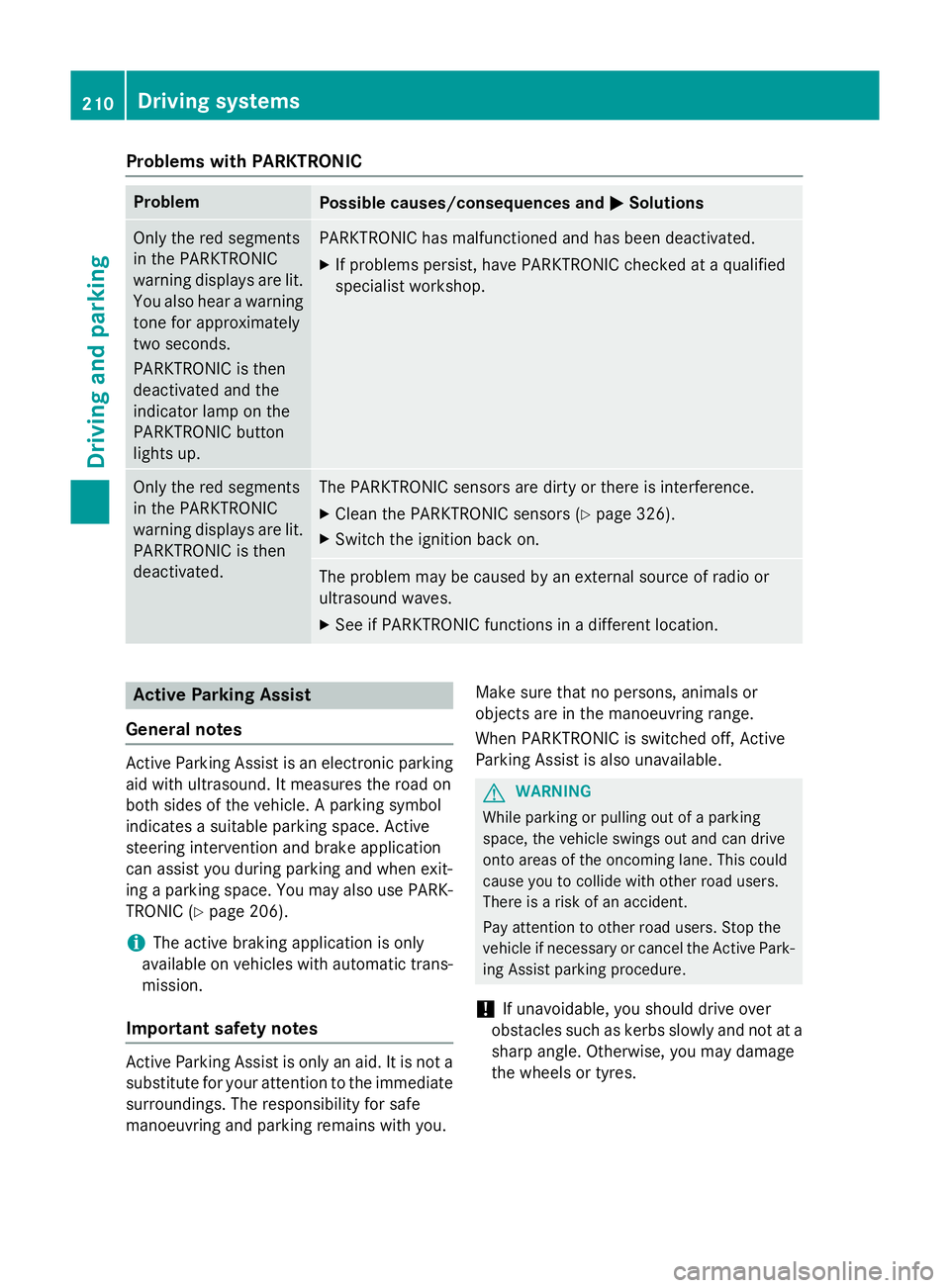
Problems with PARKTRONIC
Problem
Possible causes/consequences and
M
MSolutions Only the red segments
in the PARKTRONIC
warning displays are lit.
You also hear a warning
tone for approximately
two seconds.
PARKTRONIC is then
deactivated and the
indicator lamp on the
PARKTRONIC button
lights up. PARKTRONIC has malfunctioned and has been deactivated.
X If problems persist, have PARKTRONIC checked at a qualified
specialist workshop. Only the red segments
in the PARKTRONIC
warning displays are lit.
PARKTRONIC is then
deactivated. The PARKTRONIC sensors are dirty or there is interference.
X Clean the PARKTRONIC sensors (Y page 326).
X Switch the ignition back on. The problem may be caused by an external source of radio or
ultrasound waves.
X See if PARKTRONIC functions in a different location. Active Parking Assist
General notes Active Parking Assist is an electronic parking
aid with ultrasound. It measures the road on
both sides of the vehicle. A parking symbol
indicates a suitable parking space. Active
steering intervention and brake application
can assist you during parking and when exit-
ing a parking space. You may also use PARK- TRONIC (Y page 206).
i The active braking application is only
available on vehicles with automatic trans- mission.
Important safety notes Active Parking Assist is only an aid. It is not a
substitute for your attention to the immediate surroundings. The responsibility for safe
manoeuvring and parking remains with you. Make sure that no persons, animals or
objects are in the manoeuvring range.
When PARKTRONIC is switched off, Active
Parking Assist is also unavailable. G
WARNING
While parking or pulling out of a parking
space, the vehicle swings out and can drive
onto areas of the oncoming lane. This could
cause you to collide with other road users.
There is a risk of an accident.
Pay attention to other road users. Stop the
vehicle if necessary or cancel the Active Park- ing Assist parking procedure.
! If unavoidable, you should drive over
obstacles such as kerbs slowly and not at a
sharp angle. Otherwise, you may damage
the wheels or tyres. 210
Driving systemsDriving and parking
Page 220 of 401
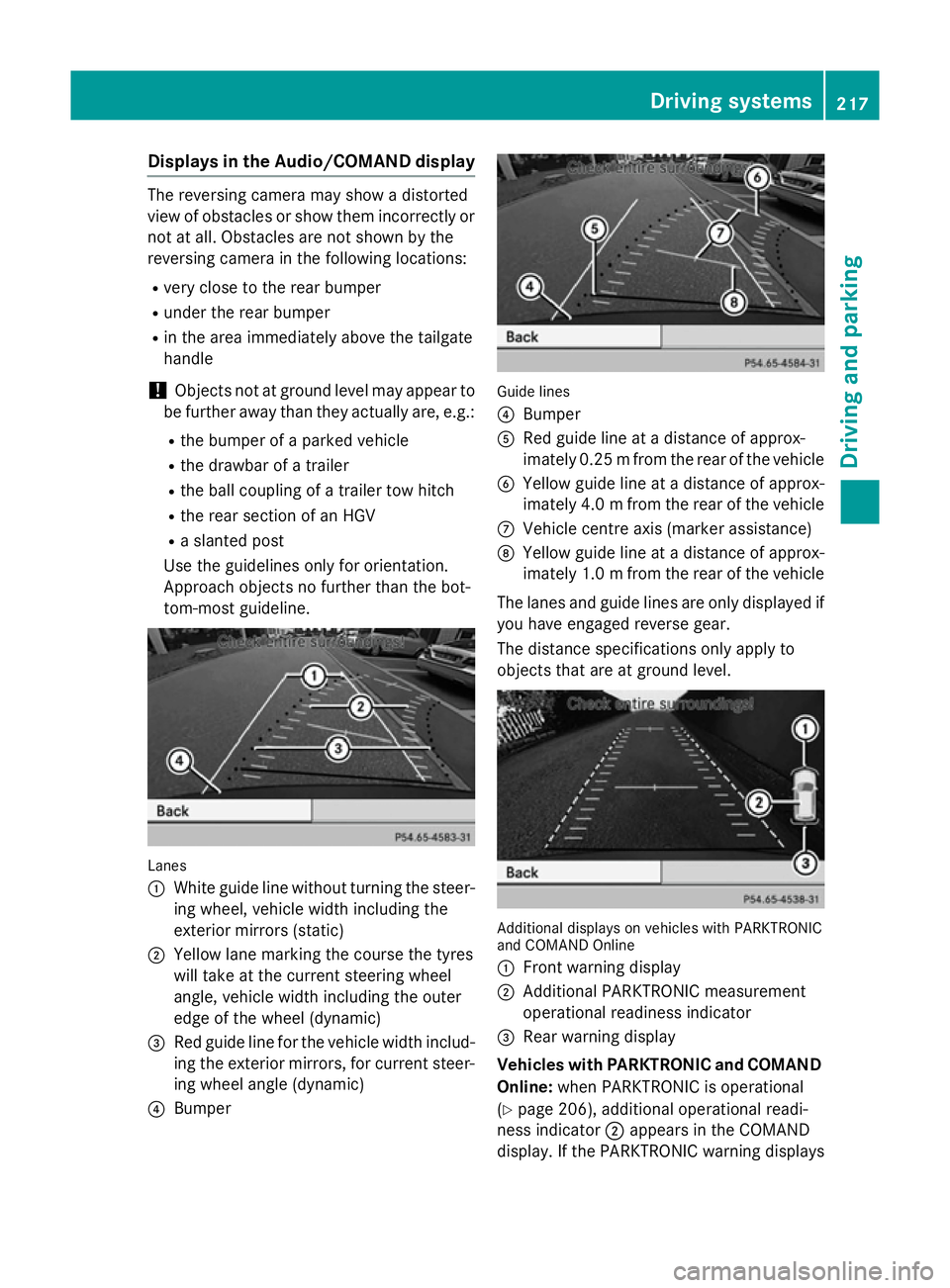
Displays in the Audio/COMAND display
The reversing camera may show a distorted
view of obstacles or show them incorrectly or not at all. Obstacles are not shown by the
reversing camera in the following locations:
R very close to the rear bumper
R under the rear bumper
R in the area immediately above the tailgate
handle
! Objects not at ground level may appear to
be further away than they actually are, e.g.:
R the bumper of a parked vehicle
R the drawbar of a trailer
R the ball coupling of a trailer tow hitch
R the rear section of an HGV
R a slanted post
Use the guidelines only for orientation.
Approach objects no further than the bot-
tom-most guideline. Lanes
:
White guide line without turning the steer-
ing wheel, vehicle width including the
exterior mirrors (static)
; Yellow lane marking the course the tyres
will take at the current steering wheel
angle, vehicle width including the outer
edge of the wheel (dynamic)
= Red guide line for the vehicle width includ-
ing the exterior mirrors, for current steer-
ing wheel angle (dynamic)
? Bumper Guide lines
?
Bumper
A Red guide line at a distance of approx-
imately 0.25 mfrom the rear of the vehicle
B Yellow guide line at a distance of approx-
imately 4.0 mfrom the rear of the vehicle
C Vehicle centre axis (marker assistance)
D Yellow guide line at a distance of approx-
imately 1.0 mfrom the rear of the vehicle
The lanes and guide lines are only displayed if
you have engaged reverse gear.
The distance specifications only apply to
objects that are at ground level. Additional displays on vehicles with PARKTRONIC
and COMAND Online
:
Front warning display
; Additional PARKTRONIC measurement
operational readiness indicator
= Rear warning display
Vehicles with PARKTRONIC and COMAND
Online: when PARKTRONIC is operational
(Y page 206), additional operational readi-
ness indicator ;appears in the COMAND
display. If the PARKTRONIC warning displays Driving systems
217Driving and parking Z
Page 223 of 401
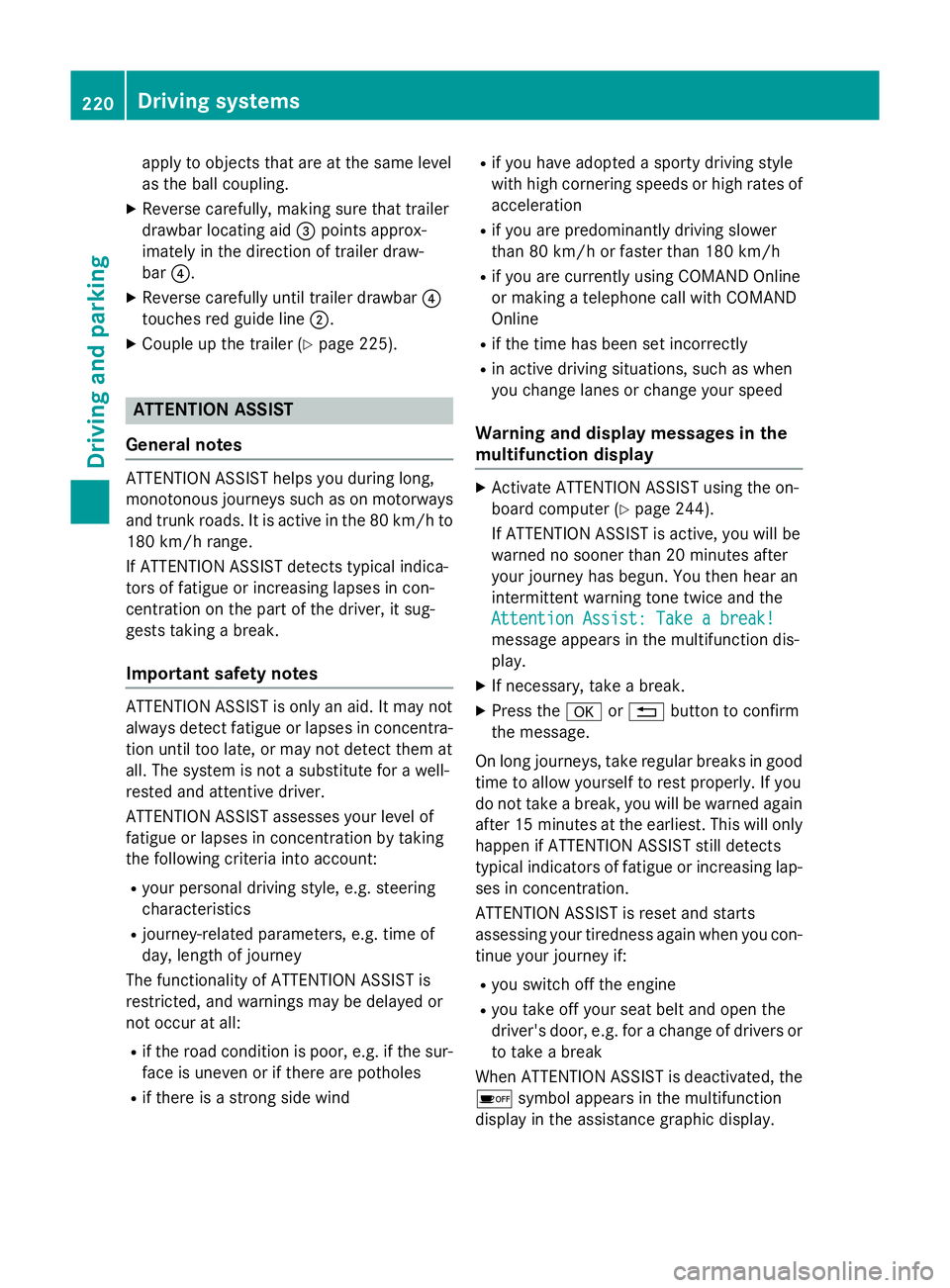
apply to objects that are at the same level
as the ball coupling.
X Reverse carefully, making sure that trailer
drawbar locating aid =points approx-
imately in the direction of trailer draw-
bar ?.
X Reverse carefully until trailer drawbar ?
touches red guide line ;.
X Couple up the trailer (Y page 225).ATTENTION ASSIST
General notes ATTENTION ASSIST helps you during long,
monotonous journeys such as on motorways and trunk roads. It is active in the 80 km/h to
180 km/h range.
If ATTENTION ASSIST detects typical indica-
tors of fatigue or increasing lapses in con-
centration on the part of the driver, it sug-
gests taking a break.
Important safety notes ATTENTION ASSIST is only an aid. It may not
always detect fatigue or lapses in concentra-
tion until too late, or may not detect them at
all. The system is not a substitute for a well-
rested and attentive driver.
ATTENTION ASSIST assesses your level of
fatigue or lapses in concentration by taking
the following criteria into account:
R your personal driving style, e.g. steering
characteristics
R journey-related parameters, e.g. time of
day, length of journey
The functionality of ATTENTION ASSIST is
restricted, and warnings may be delayed or
not occur at all:
R if the road condition is poor, e.g. if the sur-
face is uneven or if there are potholes
R if there is a strong side wind R
if you have adopted a sporty driving style
with high cornering speeds or high rates of
acceleration
R if you are predominantly driving slower
than 80 km/h or faster than 180 km/h
R if you are currently using COMAND Online
or making a telephone call with COMAND
Online
R if the time has been set incorrectly
R in active driving situations, such as when
you change lanes or change your speed
Warning and display messages in the
multifunction display X
Activate ATTENTION ASSIST using the on-
board computer (Y page 244).
If ATTENTION ASSIST is active, you will be
warned no sooner than 20 minutes after
your journey has begun. You then hear an
intermittent warning tone twice and the
Attention Assist: Take a break! Attention Assist: Take a break!
message appears in the multifunction dis-
play.
X If necessary, take a break.
X Press the aor% button to confirm
the message.
On long journeys, take regular breaks in good
time to allow yourself to rest properly. If you
do not take a break, you will be warned again
after 15 minute sat the earliest. This will only
happen if ATTENTION ASSIST still detects
typical indicators of fatigue or increasing lap-
ses in concentration.
ATTENTION ASSIST is reset and starts
assessing your tiredness again when you con- tinue your journey if:
R you switch off the engine
R you take off your seat belt and open the
driver's door, e.g. for a change of drivers or
to take a break
When ATTENTION ASSIST is deactivated, the é symbol appears in the multifunction
display in the assistance graphic display. 220
Driving systemsDriving an
d parking
Page 224 of 401
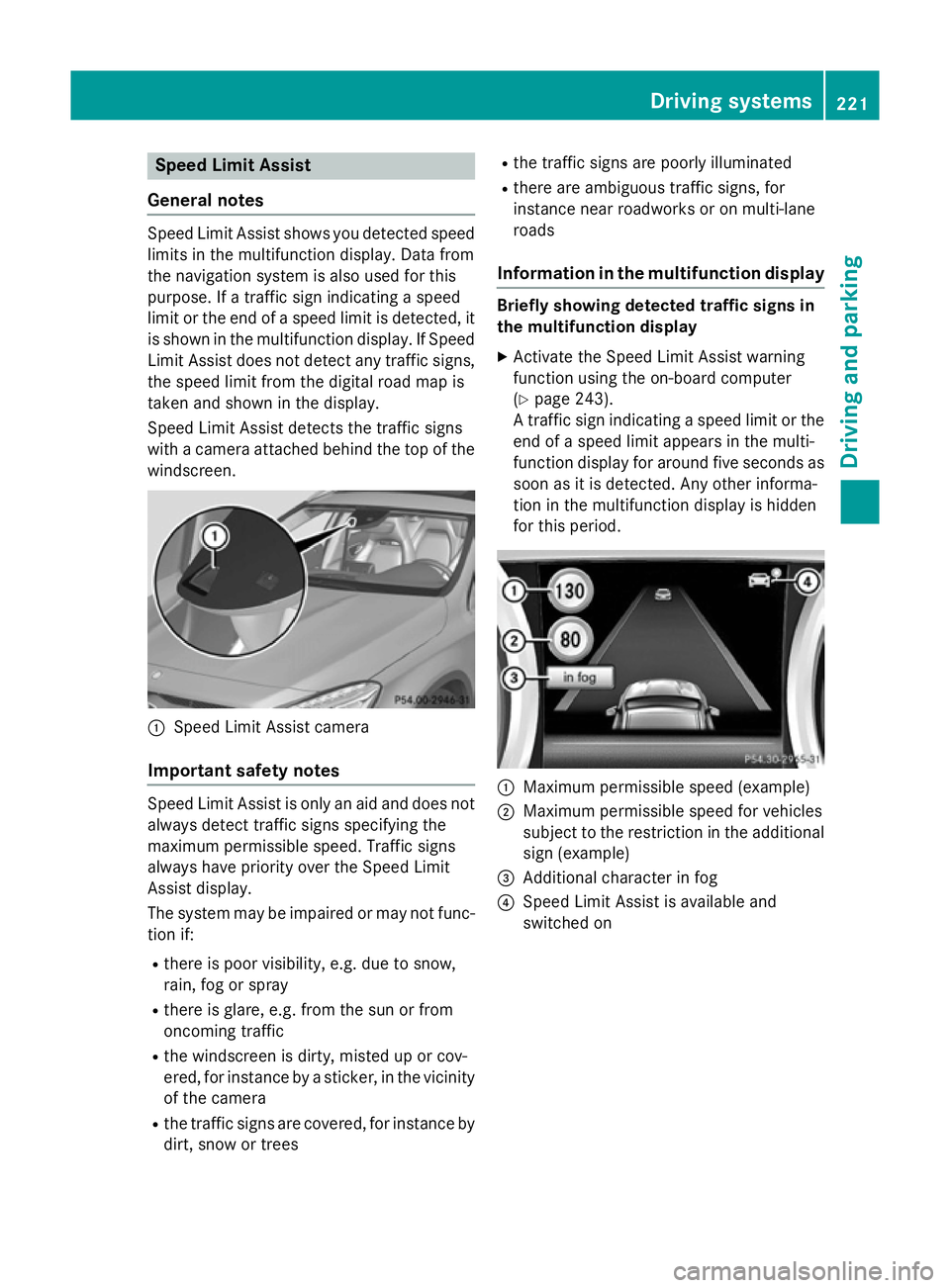
Speed Limit Assist
General notes Speed Limit Assist shows you detected speed
limits in the multifunction display. Data from
the navigation system is also used for this
purpose. If a traffic sign indicating a speed
limit or the end of a speed limit is detected, it
is shown in the multifunction display. If Speed
Limit Assist does not detect any traffic signs, the speed limit from the digital road map is
taken and shown in the display.
Speed Limit Assist detects the traffic signs
with a camera attached behind the top of the
windscreen. :
Speed Limit Assist camera
Important safety notes Speed Limit Assist is only an aid and does not
always detect traffic signs specifying the
maximum permissible speed. Traffic signs
always have priority over the Speed Limit
Assist display.
The system may be impaired or may not func-
tion if:
R there is poor visibility, e.g. due to snow,
rain, fog or spray
R there is glare, e.g. from the sun or from
oncoming traffic
R the windscreen is dirty, misted up or cov-
ered, for instance by a sticker, in the vicinity of the camera
R the traffic signs are covered, for instance by
dirt, snow or trees R
the traffic signs are poorly illuminated
R there are ambiguous traffic signs, for
instance near roadworks or on multi-lane
roads
Information in the multifunction display Briefly showing detected traffic signs in
the multifunction display
X Activate the Speed Limit Assist warning
function using the on-board computer
(Y page 243).
A traffic sign indicating a speed limit or the
end of a speed limit appears in the multi-
function display for around five seconds as
soon as it is detected. Any other informa-
tion in the multifunction display is hidden
for this period. :
Maximum permissible speed (example)
; Maximum permissible speed for vehicles
subject to the restriction in the additional
sign (example)
= Additional character in fog
? Speed Limit Assist is available and
switched on Driving systems
221Driving and parking Z
Page 225 of 401
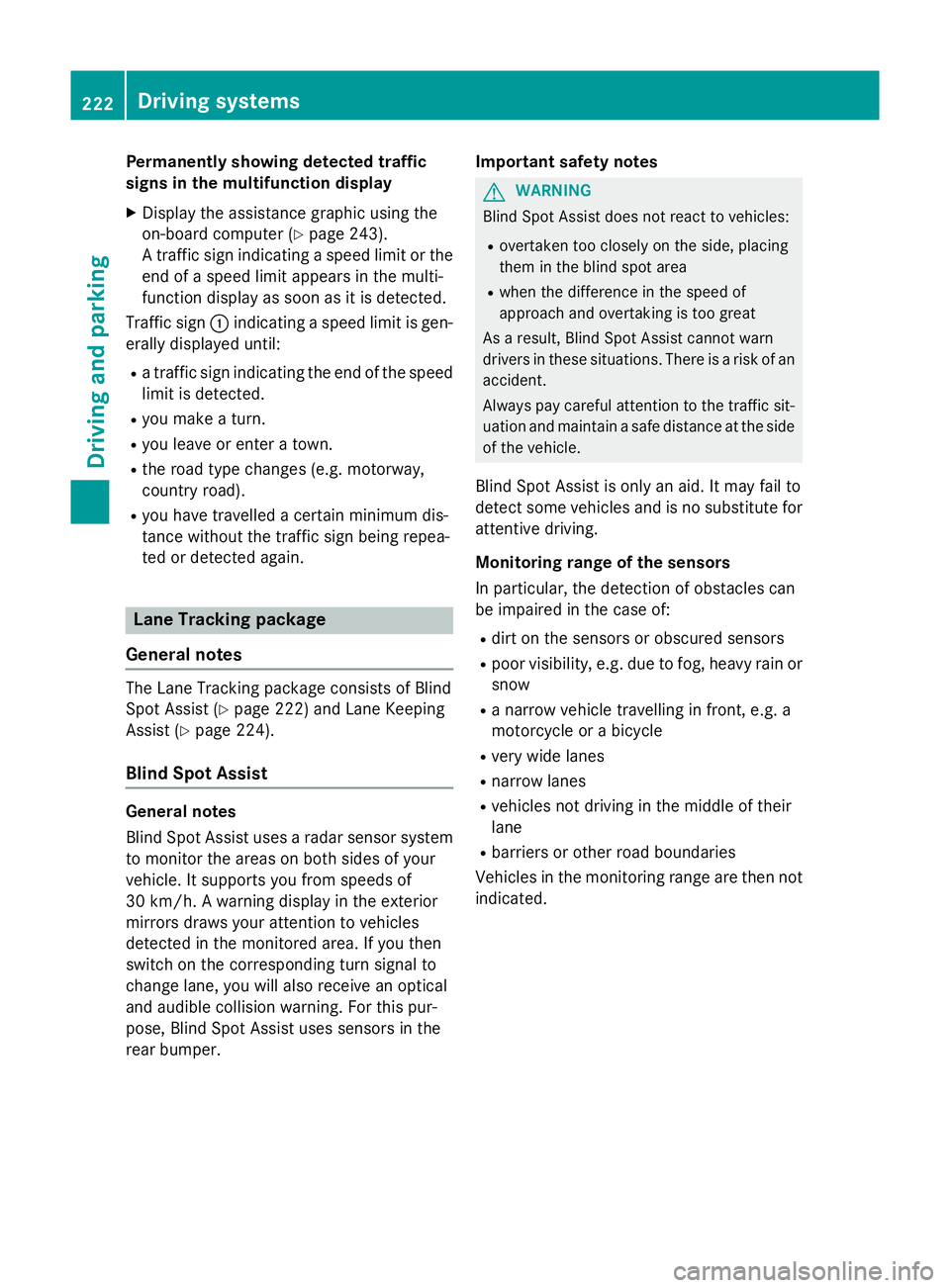
Permanently showing detected traffic
signs in the multifunction display
X Display the assistance graphic using the
on-board computer (Y page 243).
A traffic sign indicating a speed limit or the
end of a speed limit appears in the multi-
function display as soon as it is detected.
Traffic sign :indicating a speed limit is gen-
erally displayed until:
R a traffic sign indicating the end of the speed
limit is detected.
R you make a turn.
R you leave or enter a town.
R the road type changes (e.g. motorway,
country road).
R you have travelled a certain minimum dis-
tance without the traffic sign being repea-
ted or detected again. Lane Tracking package
General notes The Lane Tracking package consists of Blind
Spot Assist (Y page 222) and Lane Keeping
Assist (Y page 224).
Blind Spot Assist General notes
Blind Spot Assist uses a radar sensor system
to monitor the areas on both sides of your
vehicle. It supports you from speeds of
30 km/h. A warning display in the exterior
mirrors draws your attention to vehicles
detected in the monitored area. If you then
switch on the corresponding turn signal to
change lane, you will also receive an optical
and audible collision warning. For this pur-
pose, Blind Spot Assist uses sensors in the
rear bumper. Important safety notes G
WARNING
Blind Spot Assist does not react to vehicles:
R overtaken too closely on the side, placing
them in the blind spot area
R when the difference in the speed of
approach and overtaking is too great
As a result, Blind Spot Assist cannot warn
drivers in these situations. There is a risk of an accident.
Always pay careful attention to the traffic sit- uation and maintain a safe distance at the side
of the vehicle.
Blind Spot Assist is only an aid. It may fail to
detect some vehicles and is no substitute for
attentive driving.
Monitoring range of the sensors
In particular, the detection of obstacles can
be impaired in the case of:
R dirt on the sensors or obscured sensors
R poor visibility, e.g. due to fog, heavy rain or
snow
R a narrow vehicle travelling in front, e.g. a
motorcycle or a bicycle
R very wide lanes
R narrow lanes
R vehicles not driving in the middle of their
lane
R barriers or other road boundaries
Vehicles in the monitoring range are then not indicated. 222
Driving systemsDriving and parking
Page 226 of 401
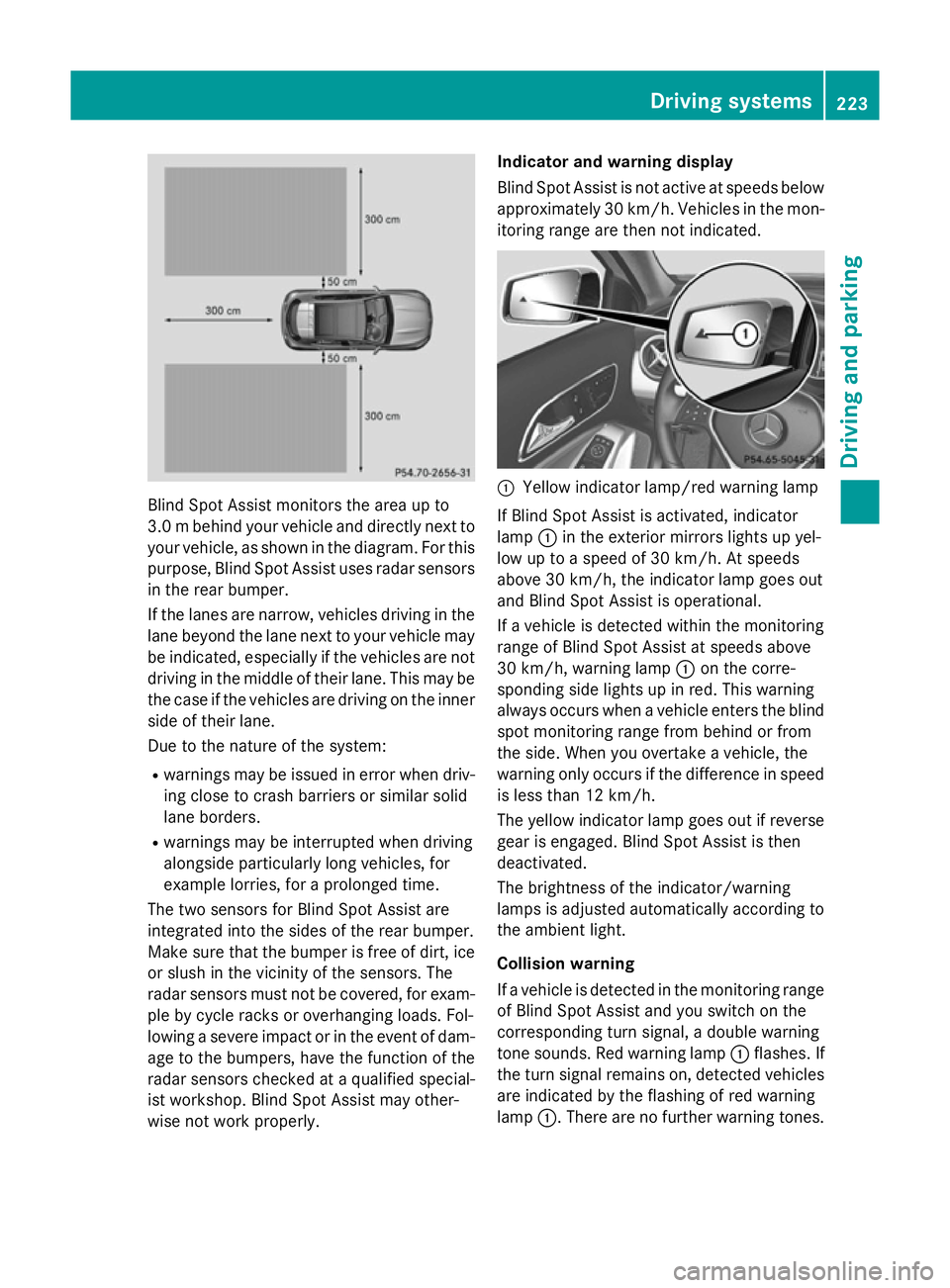
Blind Spot Assist monitors the area up to
3.0 mbehind your vehicle and directly next to
your vehicle, as shown in the diagram. For this
purpose, Blind Spot Assist uses radar sensors in the rear bumper.
If the lanes are narrow, vehicles driving in the
lane beyond the lane next to your vehicle may
be indicated, especially if the vehicles are not
driving in the middle of their lane. This may be the case if the vehicles are driving on the inner
side of their lane.
Due to the nature of the system:
R warnings may be issued in error when driv-
ing close to crash barriers or similar solid
lane borders.
R warnings may be interrupted when driving
alongside particularly long vehicles, for
example lorries, for a prolonged time.
The two sensors for Blind Spot Assist are
integrated into the sides of the rear bumper.
Make sure that the bumper is free of dirt, ice
or slush in the vicinity of the sensors. The
radar sensors must not be covered, for exam- ple by cycle racks or overhanging loads. Fol-
lowing a severe impact or in the event of dam- age to the bumpers, have the function of the
radar sensors checked at a qualified special-
ist workshop. Blind Spot Assist may other-
wise not work properly. Indicator and warning display
Blind Spot Assist is not active at speeds below
approximately 30 km/h. Vehicles in the mon-
itoring range are then not indicated. :
Yellow indicator lamp/red warning lamp
If Blind Spot Assist is activated, indicator
lamp :in the exterior mirrors lights up yel-
low up to a speed of 30 km/h. At speeds
above 30 km/h, the indicator lamp goes out
and Blind Spot Assist is operational.
If a vehicle is detected within the monitoring
range of Blind Spot Assist at speeds above
30 km/h, warning lamp :on the corre-
sponding side lights up in red. This warning
always occurs when a vehicle enters the blind
spot monitoring range from behind or from
the side. When you overtake a vehicle, the
warning only occurs if the difference in speed is less than 12 km/h.
The yellow indicator lamp goes out if reversegear is engaged. Blind Spot Assist is then
deactivated.
The brightness of the indicator/warning
lamps is adjusted automatically according to
the ambient light.
Collision warning
If a vehicle is detected in the monitoring range
of Blind Spot Assist and you switch on the
corresponding turn signal, a double warning
tone sounds. Red warning lamp :flashes. If
the turn signal remains on, detected vehicles
are indicated by the flashing of red warning
lamp :. There are no further warning tones. Driving systems
223Driving and parking Z