check engine light MERCEDES-BENZ GLA SUV 2013 Owners Manual
[x] Cancel search | Manufacturer: MERCEDES-BENZ, Model Year: 2013, Model line: GLA SUV, Model: MERCEDES-BENZ GLA SUV 2013Pages: 401, PDF Size: 11.9 MB
Page 10 of 401
Changing bulbs
Brake lamps .................................. .131
Cornering light function ................. 130
Dipped-beam headlamps .............. .130
Main-beam headlamps ................... 130
Rear foglamp ................................. 131
Reversing lamps ............................ 131
Turn signals (front) ......................... 130
Turn signals (rear) .......................... 131
Charging
see Charging the high-voltage battery
Child seat
Forward-facing restraint system ...... 64
ISOFIX .............................................. 61
On the front-passenger sea t............ 63
Rearward-facing restraint system .... 64
Recommendations ........................... 68
Suitable positions ............................ 64
Top Tether ....................................... 62
Child-proof locks
Important safety notes .................... 70
Rear doors ....................................... 71
Children
Restraint systems ............................ 60
Cigarette lighter ................................ 310
Cleaning
Trailer tow hitch ............................. 327
Climate control
Air conditioning ............................. 139
Auxiliary heating/ventilation .......... 150
Controlling automaticall y............... 144
Convenience opening/closing
(air-recirculation mode) ................. 148
Cooling with air dehumidification .. 142
Demisting the windows .................. 146
Demisting the windscreen ............. 146
Important safety notes .................. 138
Indicator lamp ................................ 144
Information on using
THERMOTRONIC automatic cli-
mate control .................................. 141
Notes on using the air-condition-
ing system ..................................... 139
Overview of systems ...................... 138
Problem with the rear window
heating .......................................... 148
Problems with cooling with air
dehumidification ............................ 144 Setting the air distribution ............. 145
Setting the air vents ...................... 155
Setting the airflow ......................... 145
Setting the temperature ................ 144
Switching air-recirculation mode
on/of
f............................................ 148
Switching on/of f........................... 142
Switching residual heat on/off ...... 149
Switching the rear window heat-
ing on/of f...................................... 147
Switching the ZONE function on/
off .................................................. 145
THERMOTRONIC (2-zone) auto-
matic climate control ..................... 141
Cockpit
Overview .......................................... 30
see Instrument cluster
COLLISION PREVENTION ASSIST
Activating/deactivating the dis-
tance warning function .................. 244
Display message ............................ 255
Operation/note s.............................. 73
COLLISION PREVENTION ASSIST
PLUS
Activating/deactivating ................. 244
Display message ............................ 262
Operation/note s.............................. 76
COMAND Online
see separate operating instructions
Combination switch .......................... 123
Consumption statistics (on-board
computer) .......................................... 237
Convenience closing feature .............. 99
Convenience opening feature ............ 99
Convenience opening/closing (air-
recirculation mode) ........................... 148
Coolant (engine)
Checking the level ......................... 320
Display message ............................ 272
Important safety notes .................. 390
Temperature (on-board com-
puter) ............................................. 251
Temperature gaug e........................ 234
Warning lamp ................................. 295
Cooling
see Climate control
Copyright ............................................. 27 Index
7
Page 13 of 401
Automatic engine switch-off .......... 162
Deactivating/activating ................. 163
General information ....................... 162
Important safety note
s.................. 162
Introduction ................................... 162
Electrical fuses
see Fuses
Electromagnetic compatibility
Declaration of conformity ................ 24
Electronic Stability Program
see ESP® (Electronic Stability Program)
Emergency
Automatic measures after an acci-
dent ................................................. 59
Emergency key
Unlocking the driver's doo r.............. 93
Emergency key element
Function/note s................................ 87
Inserting .......................................... 87
Locking vehicle ................................ 94
Emergency release
Driver's door .................................... 93
Emergency spare wheel
General notes ................................ 378
Important safety notes .................. 377
Removing ....................................... 378
Technical data ............................... 379
Emergency unlocking
Tailgate ............................................ 97
Vehicle ............................................. 93
Engine
Display message ............................ 272
ECO start/stop function ................ 162
Engine number ............................... 384
Jump-starting ................................. 342
Running irregularly ......................... 165
Starting problems .......................... 165
Starting the engine with the key .... 160
Stopping ........................................ 179
Tow-starting (vehicle) ..................... 348
Warning lamp (engine diagnos-
tics) ............................................... 295
Engine electronics
Notes ............................................. 382
Problem (fault) ............................... 165
Engine oil
Additives ........................................ 389
Checking the oil level ..................... 318 Checking the oil level using the
dipstick .......................................... 318
Display message ............................ 274
Filling capacity ............................... 389
Notes about oil grade s................... 388
Notes on oil level/consumption .... 318
Temperature (on-board com-
puter) ............................................. 251
Topping up ..................................... 319
Viscosity ........................................ 389
Environmental protection
Returning an end-of-life vehicle ....... 22
ESP® (Electronic Stability Pro-
gram)
4ETS ................................................ 77
AMG menu (on-board computer) ... 251
Characteristics ................................. 77
Deactivating/activating (AMG
vehicles) .......................................... 78
Deactivating/activating (except
AMG vehicles) ................................ 244
Deactivating/activating (notes;
except AMG vehicles) ...................... 78
Display message ............................ 255
ETS .................................................. 77
ETS/4ETS ........................................ 77
Function/note s................................ 76
General notes .................................. 76
Important safety guidelines ............. 77
Trailer stabilisation .......................... 80
Warning lamp ................................. 291
ETS (Electronic Traction System) ....... 77
ETS/4ETS (Electronic Traction Sys-
tem) ...................................................... 77
Exhaust pipe (cleaning instruc-
tions) .................................................. 327
Exterior lighting
Settings options ............................. 120
see Lights
Exterior mirrors
Adjusting ....................................... 115
Anti-dazzle mode (automatic) ........ 116
Folding in when locking (on-board
computer) ...................................... 250
Folding in/out (automatically )....... 116
Folding in/out (electrically) ........... 115
Out of position (troubleshooting) ... 116
Parking position ............................. 116 10
Index
Page 15 of 401
H
Handbrake see Parking brake
Hazard warning lamps ...................... 123
Display message ............................ 287
Head restraints
Adjusting ....................................... 111
Adjusting (electrically) ................... 111
Adjusting (manually) ...................... 111
Adjusting (rear) .............................. 112
Fitting/removing (rear) .................. 112
Headlamp
Cleaning system (function) ............ 124
Cleaning system (notes) ............... .391
Headlamps
Misting up ...................................... 126
Topping up the cleaning system .... 321
see Automatic headlamp mode
Heating
see Climate control
High-pressure cleaners .................... 324
Hill start assist .................................. 161
HOLD function
Activating ....................................... 202
Deactivating ................................... 202
Display message ............................ 275
Function/notes ............................ .201 I
Ignition lock see Key positions
Immobiliser .......................................... 81
Indicator and warning lamp
Restraint system ............................ 294
Indicator and warning lamps
Coolant .......................................... 295
DISTRONIC PLUS ........................... 297
Engine diagnostics ......................... 295
SPORT handling mode ................... 292
Indicator lamps
Display message ............................ 269
see Warning and indicator lamps
Indicators
see Turn signals
Instrument cluster
Overview .......................................... 32 Settings ......................................... 246
Warning and indicator lamps ........... 34
Instrument cluster lighting .............. 234
Intelligent Light System
Activating/deactivating ................. 247
Display message ............................ 271
Overview ........................................ 124
Setting the dipped-beam head-
lamps for driving on the right/left .. 247
Interior lighting ................................. 127
Automatic control system .............. 127
Delayed switch-off (on-board
computer) ...................................... 248
Emergency lighting ........................ 128
Manual control ............................... 128
Overview ........................................ 127
Reading lamp ................................. 127
Setting the ambient lighting
brightness (on-board computer) .... 247
Interior motion sensor
Deactivating ..................................... 83
Function .......................................... .82
Priming ............................................ 82
Switching off .................................... 82
ISOFIX child seat securing system ....61 J
Jack Storage location ............................3 33
Using ............................................. 363
Jump starting (engine) ......................342 K
Key Changing the battery ....................... 89
Checking the battery ....................... 88
Convenience closing feature ............ 99
Convenience opening feature .......... 99
Display message ............................ 287
Door central locking/unlocking ....... 87
Emergency key element ................... 87
Important safety notes .................... 86
Loss ................................................. 90
Modifying the programming ............. 87
Positions (ignition lock) ................. 159
Problem (malfunction) ..................... 90 12
Index
Page 17 of 401
Main-beam headlamps
Changing bulbs .............................. 130
Display message ............................ 270
Switching on/off ........................... 123
Manual transmission
Engaging reverse gear ................... 167
Gear lever ...................................... 166
Pulling away ................................... 160
Shift recommendation ................... 167
Shifting to neutral ......................... .167
Starting the engine ........................ 160
Matt finish (cleaning instructions) .. 325
Media Interface
see Separate operating instructions
Memory card (audio) ......................... 241
Memory function ............................... 117
Mercedes-Benz Service Centre
see Qualified specialist workshop
Message memory (on-board com-
puter) ................................................. .254
Messages
see Display messages
Mirrors
see Exterior mirrors
see Rear-view mirror
see Vanity mirror (in sun visor)
Mobile phone
Frequencies ................................... 382
Installation ..................................... 382
Menu (on-board computer) ............ 241
Notes/placing in the bracket ......... 312
Transmission output (maximum) .... 382
Mobile telephone
Pre-installed bracket ..................... .313
Modifying the programming (key) ..... 87
MOExtended tyres .............................334
Motorway mode ................................ 124
MP3
Operating ....................................... 241
see Separate operating instructions
Multifunction display
Function/notes ............................ .236
Permanent display ......................... 246
Multifunction steering wheel
Operating the on-board computer .. 235
Overview .......................................... 35 N
Navigation Menu (on-board computer) ............ 239
see separate operating instructions
Notes on running in a new vehicle .. 158 O
Occupant safety Automatic measures after an acci-
dent ................................................. 59
Children in the vehicle ..................... 59
Important safety notes .................... 43
Pets in the vehicle ........................... 71
PRE-SAFE® (anticipatory occu-
pant protection) ............................... 59
Odometer .......................................... .237
see Total distance recorder
see Trip meter
Off-road driving
Approach/departure angle ............ 393
Checklist after driving off-road ...... 186
Checklist before driving off-road .... 186
General information ....................... 185
Important safety notes .................. 185
Maximum gradient climbing abil-
ity ................................................. .393
Maximum water depth ................... 392
Travelling uphill .............................. 187
Off-road lights ................................... .125
Off-road program ............................... 205
Off-road system
DSR ............................................... 204
Off road drive program .................. 205
Off-road 4ETS .................................. 77
Off-road ABS ................................... .73
Off-road ESP® ................................. 80
Oil
see Engine oil
On-board computer
AMG menu .....................................2 51
Assistance menu ........................... 243
Audio menu ................................... 240
Convenience submenu .................. 250
Display messages .......................... 254
Displaying a service message ....... .322
DISTRONIC PLUS ........................... 199 14
Index
Page 46 of 401
Important safety notes
G
WARNING
If the restraint system is modified, it may no
longer work as intended. The restraint system
may then not perform its intended protective function by failing in an accident or triggering
unexpectedly, for example. There is an
increased risk of injury, possibly even fatal.
Never modify parts of the restraint system. Do not attempt to modify the wiring as well as
electronic components or their software.
If it is necessary to modify an airbag system to
accommodate a person with disabilities, con- tact a Mercedes-Benz Service Centre. Restraint system warning lamp
The functions of the restraint system are
checked after the ignition is switched on and at regular intervals while the engine is run-
ning. Therefore, malfunctions can be detec-
ted in good time.
The restraint system warning lamp in the
instrument cluster lights up when the ignition is switched on. It goes out no later than a few
seconds after the engine is started. The com- ponents of the restraint system are in opera-
tional readiness.
A malfunction has occurred if the 6
restraint system warning lamp:
R does not light up after the ignition is
switched on
R does not go out after a few seconds with
the engine running
R lights up again while the engine is running G
WARNING
If the restraint system is malfunctioning,
restraint system components may be trig-
gered unintentionally or might not be trig-
gered at all in the event of an accident with a high rate of vehicle deceleration. This can
effect belt tensioners or airbags, for example. There is an increased risk of serious or even
fatal injuries.
Have the restraint system checked and
repaired immediately at a qualified specialist
workshop.
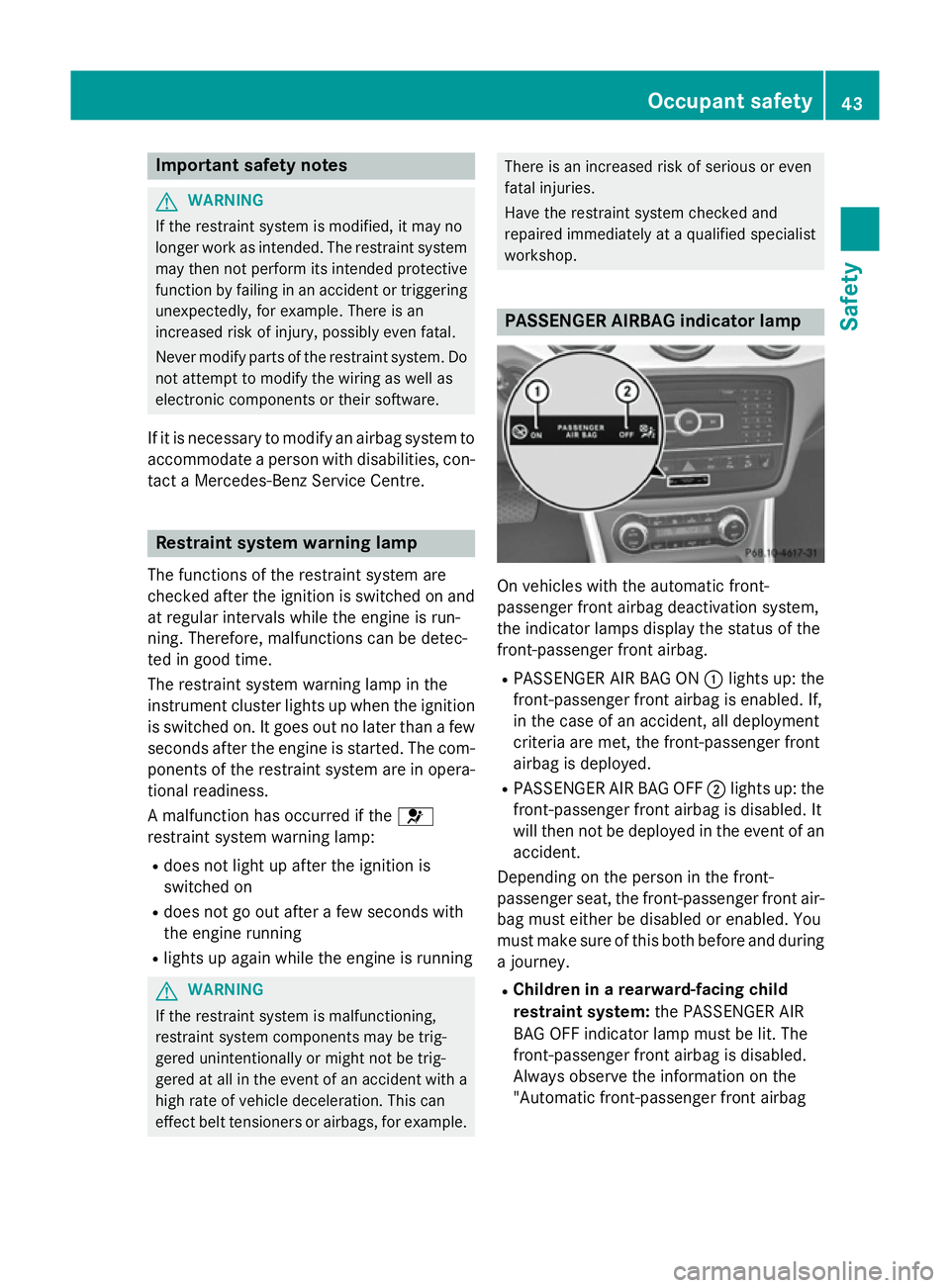
PASSENGER AIRBAG indicator lamp
On vehicles with the automatic front-
passenger front airbag deactivation system,
the indicator lamps display the status of the
front-passenger front airbag.
R PASSENGER AIR BAG ON :lights up: the
front-passenger front airbag is enabled. If,
in the case of an accident, all deployment
criteria are met, the front-passenger front
airbag is deployed.
R PASSENGER AIR BAG OFF ;lights up: the
front-passenger front airbag is disabled. It
will then not be deployed in the event of an
accident.
Depending on the person in the front-
passenger seat, the front-passenger front air-
bag must either be disabled or enabled. You
must make sure of this both before and during
a journey.
R Children in a rearward-facing child
restraint system: the PASSENGER AIR
BAG OFF indicator lamp must be lit. The
front-passenger front airbag is disabled.
Always observe the information on the
"Automatic front-passenger front airbag Occupant safety
43Safety Z
Page 75 of 401
Driving safety systems
Driving safety systems overview
In this section, you will find information about the following driving safety systems:
R ABS (Anti-lock BrakingSystem)
(Y page 72)
R BAS (Brake Assist System) (Y page 73)
R COLLISION PREVENTION ASSIST (distance
warning function and adaptive Brake
Assist) (Y page 73)
R COLLISION PREVENTION ASSIST PLUS
(Y page 73)
R Adaptive brake lamps (Y page 76)
R ESP ®
(E lectronic StabilityProgram)
(Y page 76)
R EBD (electronic brake forcedistribution)
(Y page 80)
R ADAPTIVE BRAKE (Y page 80)
R STEER CONTROL (Y page 81)Important safety notes
If you fail to adapt your driving style or if you
are inattentive, the driving safety systems can
neither reduce the risk of accident nor over-
ride the laws of physics. Driving safety sys-
tems are merely aids designed to assist driv- ing. You are responsible for the distance to
the vehicle in front, for vehicle speed and forbraking in good time. Always adapt your driv- ing style to suit the prevailing road, weather
and traffic conditions and maintain a safe dis-
tance from the vehicle in front. Drive care-
fully.
i The driving safety systems described only
work as effectively as possible when there
is adequate contact between the tyres and
the road surface. Pay particular attention to the information regarding tyres, recom-
mended minimum tyre tread depths etc. inthe "Wheels and tyres" section
(Y page 352). In wintry driving conditions, always use
winter tyres (M+S tyres) and, if necessary,
snow chains. Only in this way will the driv-
ing safety systems described in this section
work as effectively as possible. ABS (Anti-lock Braking System)
General notes ABS regulates brake pressure in such a way
that the wheels do not lock when you brake.
This allows you to continue steering the vehi- cle when braking.
The ! ABS warning lamp in the instrument
cluster lights up when the ignition is switched on. It goes out when the engine is running.
Important safety notes i
Observe the "Important safety notes" sec-
tion for driving safety systems (Y page 72). G
WARNING
If ABS is faulty, the wheels could lock when
braking. The steerability and braking charac-
teristics may be severely impaired. Addition-
ally, further driving safety systems are deac-
tivated. There is an increased danger of skid- ding and accidents.
Drive on carefully. Have ABS checked imme-
diately at a qualified specialist workshop.
If ABS is malfunctioning, other systems,
including driving safety systems, will also
become inoperative. Observe the information on the ABS warning lamp (Y page 289) and
display messages which may be shown in the
instrument cluster (Y page 255).
ABS works from a speed of about
8 km/hupwards, regardless of road-surface
conditions. ABS works on slippery surfaces,
even when you only brake gently. 72
Driving safety syste
msSafety
Page 80 of 401
ESP
®
monitors driving stability and traction,
i.e. power transmission between the tyres
and the road surface.
If ESP ®
detects that the vehicle is deviating
from the direction desired by the driver, one
or more wheels are braked to stabilise the
vehicle. The engine output is also modified to keep the vehicle on the desired course within
physical limits. ESP ®
assists the driver when
pulling away on wet or slippery roads. ESP ®
can also stabilise the vehicle during braking.
ETS/4ETS (Electronic Traction System) i
Observe the "Important safety notes" sec-
tion (Y page 72).
ETS/4ETS traction control is part of ESP ®
.
ETS brakes the drive wheels individually if
they spin. This enables you to pull away and
accelerate on slippery surfaces, for example
if the road surface is slippery on one side. In
addition, more drive torque is transferred to
the wheel or wheels with traction.
ETS remains active when you deactivate
ESP ®
.
Off-road 4ETS (Electronic Traction Sys-
tem) A 4ETS system specifically suited to off-road
terrain is activated automatically once the off-
road program is activated (Y page 205).
Important safety notes G
WARNING
If ESP ®
is malfunctioning, ESP ®
is unable to
stabilise the vehicle. In addition, other driving
safety systems are switched off. This increa-
ses the risk of skidding and an accident.
Drive on carefully. Have ESP ®
checked at a
qualified specialist workshop.
! When testing the electric parking brake
on a braking dynamometer, switch off the
ignition. Application of the brakes by ESP ®
may otherwise destroy the brake system. !
Vehicles with 4MATIC: switch off the igni-
tion when the electric parking brake is
being tested using a dynamometer.
Application of the brakes by ESP ®
may oth-
erwise destroy the brake system.
! Vehicles with 4MATIC: function or per-
formance tests may only be carried out on
a 2-axle dynamometer. Before operating
the vehicle on such a dynamometer, please
consult a qualified specialist workshop.
You could otherwise damage the drive train
or the brake system.
! Do not tow vehicles with 4MATIC with the
front or rear axle raised.
Vehicles without 4MATIC: when towing your
vehicle with the front axle raised, it is impor-
tant that you observe the notes on ESP ®
(Y page 346).
Vehicles with 4MATIC: when towing your
vehicle with both axles on the ground, it is
important that you observe the notes on ESP ®
(Y page 347).
ESP ®
is deactivated if the åESP®
OFF
warning lamp in the instrument cluster lights up continuously when the engine is running.
If the ÷ ESP®
warning lamp and the å
ESP ®
OFF warning lamp are lit continuously,
ESP ®
is not available due to a malfunction.
Observe the information on warning lamps
(Y page 291) and display messages which
may be shown in the instrument cluster
(Y page 255).
i Only use wheels with the recommended
tyre sizes. Only then will ESP ®
function
properly.
Characteristics of ESP ® General notes
If the
÷ ESP warning lamp goes out before
beginning the journey, ESP ®
is automatically
active.
If ESP ®
intervenes, the ÷ESP®
warning
lamp flashes in the instrument cluster. Driving safety systems
77Safety Z
Page 94 of 401
Problem
Possible causes/consequences and
M
MSolutions The engine cannot be
started using the key. The on-board voltage is too low.
X Switch off non-essential consumers, e.g. seat heating or interior
lighting, and try to start the engine again.
If this does not work:
X Check the starter battery and charge it if necessary
(Y page 338).
or
X Jump-start the vehicle (Y page 342).
or
X Consult a qualified specialist workshop. The engine cannot be
started using the key. The steering lock is mechanically blocked.
X Remove the key and reinsert it into the ignition lock. While doing
this, turn the steering wheel in both directions. Doors
Important safety notes
G
WARNING
If children are left unsupervised in the vehicle, they could:
R open doors, thereby endangering other per-
sons or road users
R get out and be struck by oncoming traffic
R operate vehicle equipment and become
trapped, for example
In addition, the children could also set the
vehicle in motion, for example, if they:
R release the parking brake
R shift the automatic transmission out of park
position P or shift manual transmission into
neutral
R start the engine
There is a risk of an accident and injury.
When leaving the vehicle, always take the key with you and lock the vehicle. Never leave
children and animals unattended in the vehi-
cle. Keep the keys out of the reach of children. G
WARNING
If persons (particularly children) are exposed
to heat or cold for a prolonged period, there is a risk of serious or even fatal injuries. Never
leave persons (particularly children) unatten-
ded in the vehicle.
Stow luggage or loads preferably in the lug-
gage compartment. Observe the loading
guidelines (Y page 300).
United Kingdom only: G
WARNING
When the double locks are activated, the
doors can no longer be opened from the
inside. People in the vehicle can no longer get out, e.g. in hazardous situations. There is a
risk of injury.
Therefore, do not leave any people unsuper-
vised in the vehicle, particularly children, eld-
erly people or people in need of special assis-
tance. Do not activate the double lock when
people are in the vehicle.
If the vehicle has been locked with the key,
the double lock function is activated as stand-
ard. It is then not possible to open the doors
from inside the vehicle. You can deactivate Doors
91Opening and closing Z
Page 111 of 401
Useful information
i This Owner's Manual describes all mod-
els, series and optional equipment for your
vehicle that were available at the time of
going to press. National variations are pos- sible. Note that your vehicle may not be
equipped with all of the functions descri-
bed. This is also the case for systems and
functions relevant to safety.
i Read the information on qualified special-
ist workshops: (Y page 25). Correct driver's seat position
G
WARNING
You could lose control of the vehicle while
driving if you:
R adjust the driver's seat, steering wheel or
mirrors
R fasten the seat belt
There is a risk of an accident.
Adjust the driver's seat, head restraint, steer-
ing wheel and mirrors and fasten your seat
belt before starting the engine. Observe the safety notes on seat adjustment
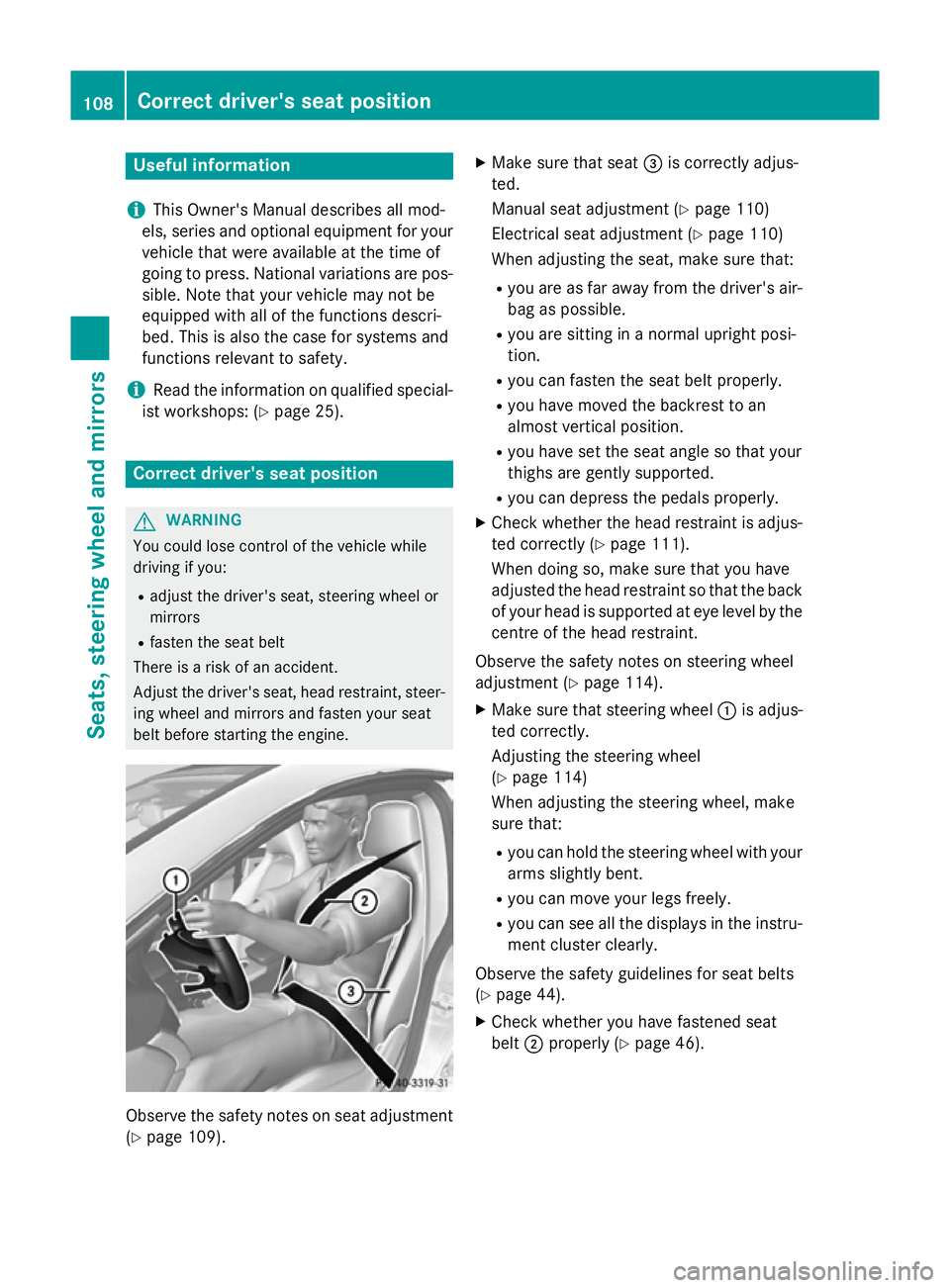
(Y page 109). X
Make sure that seat =is correctly adjus-
ted.
Manual seat adjustment (Y page 110)
Electrical seat adjustment (Y page 110)
When adjusting the seat, make sure that:
R you are as far away from the driver's air-
bag as possible.
R you are sitting in a normal upright posi-
tion.
R you can fasten the seat belt properly.
R you have moved the backrest to an
almost vertical position.
R you have set the seat angle so that your
thighs are gently supported.
R you can depress the pedals properly.
X Check whether the head restraint is adjus-
ted correctly (Y page 111).
When doing so, make sure that you have
adjusted the head restraint so that the back of your head is supported at eye level by the centre of the head restraint.
Observe the safety notes on steering wheel
adjustment (Y page 114).
X Make sure that steering wheel :is adjus-
ted correctly.
Adjusting the steering wheel
(Y page 114)
When adjusting the steering wheel, make
sure that:
R you can hold the steering wheel with your
arms slightly bent.
R you can move your legs freely.
R you can see all the displays in the instru-
ment cluster clearly.
Observe the safety guidelines for seat belts
(Y page 44).
X Check whether you have fastened seat
belt ;properly (Y page 46).108
Correct driver's seat positionSeats, steering wheel and mirrors
Page 117 of 401
Problems with the seat heating
Problem
Possible causes/consequences and
M
MSolutions The seat heating has
switched off prema-
turely or cannot be
switched on. The on-board voltage is too low because too many electrical con-
sumers are switched on.
X Switch off electrical consumers that you do not need, such as
the rear window heating or interior lighting.
Once the battery is sufficiently charged, the seat heating will
switch back on automatically. Steering wheel
Important safety notes
G
WARNING
You could lose control of the vehicle while
driving if you:
R adjust the driver's seat, steering wheel or
mirrors
R fasten the seat belt
There is a risk of an accident.
Adjust the driver's seat, head restraint, steer-
ing wheel and mirrors and fasten your seat
belt before starting the engine. G
WARNING
Children could become trapped by the steer-
ing wheel if they adjust it. There is a risk of
injury.
When leaving the vehicle, always take the key with you and lock the vehicle. Never leave
children unattended in the vehicle. Adjusting the steering wheel
G
WARNING
The steering wheel may move unexpectedly if you adjust it while driving. This could cause
you to lose control of the vehicle. There is a
risk of an accident.
Make sure that the steering wheel is locked
before driving off. Never unlock the steering
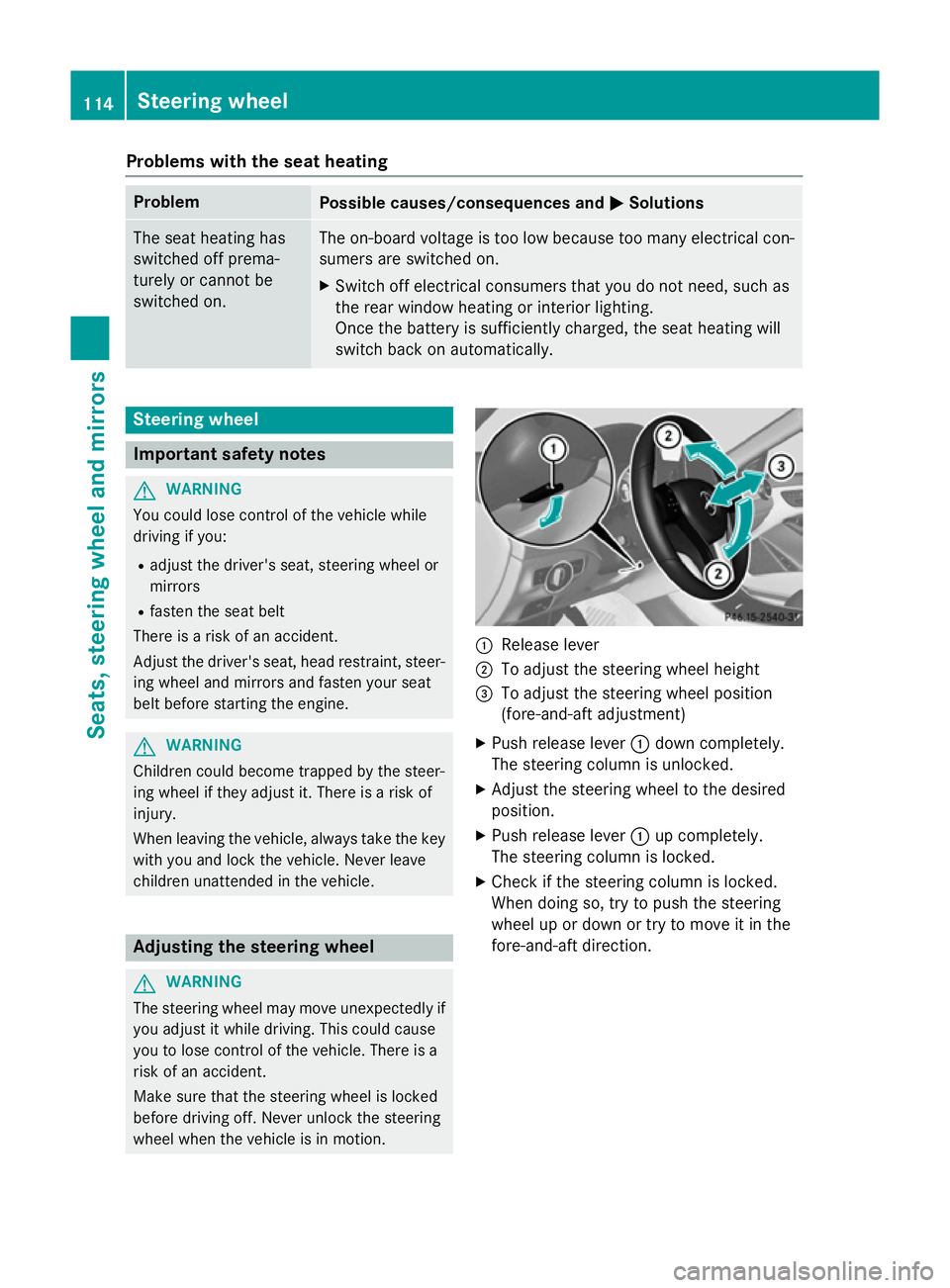
wheel when the vehicle is in motion. :
Release lever
; To adjust the steering wheel height
= To adjust the steering wheel position
(fore-and-aft adjustment)
X Push release lever :down completely.
The steering column is unlocked.
X Adjust the steering wheel to the desired
position.
X Push release lever :up completely.
The steering column is locked.
X Check if the steering column is locked.
When doing so, try to push the steering
wheel up or down or try to move it in the
fore-and-aft direction. 114
Steering wheelSeats, steering wheel and mirrors