brake sensor MERCEDES-BENZ GLA SUV 2017 User Guide
[x] Cancel search | Manufacturer: MERCEDES-BENZ, Model Year: 2017, Model line: GLA SUV, Model: MERCEDES-BENZ GLA SUV 2017Pages: 369, PDF Size: 7.56 MB
Page 146 of 369
Running-in notes
Important safety notes
In certain driving and driving safety systems, the sensors adjust automatically while a certain dis-
tance is being driven after the vehicle has been delivered or after repairs. Full system effective-
ness is not reached until the end of this teach-in process.
Brake pads/linings and discs that are either new or have been replaced only achieve optimum
braking effect after several hundred kilometres
of driving. Compensate for the reduced braking
effect by applying greater force to the brake
pedal. The first 1500 km
The more you treat the engine with sufficient
care at the start, the more satisfied you will be
with the engine performance later on.
R Drive at varying vehicle speeds and engine
speeds for the first 1500 km.
R Avoid overstraining the vehicle during this
period, e.g. driving at full throttle.
R Change gear in good time, before the rev
counter needle is Ôof the way to the red area
of the rev counter.
R Do not shift down a gear manually in order to
brake.
R Vehicles with automatic transmission: try
to avoid depressing the accelerator pedal
beyond the point of resistance (kickdown).
Additional notes on running in Mercedes-AMG
vehicles:
R for the first 1,500 km do not drive at speeds
above 140 km/h.
R only allow the engine to reach a maximum
engine speed of 4,500 rpm briefly.
After 1,500 km, you may gradually bring the
vehicle up to full road and engine speeds.
You should also observe these notes on running- in if the engine or parts of the drive train on your
vehicle have been replaced.
Always observe the maximum permissible
speed. Driving
Important safety notes
G
WARNING
Objects in the driver's footwell may restrict
the clearance around the pedals or block a
depressed pedal. This jeopardises the oper-
ating and road safety of the vehicle. There is a risk of an accident.
Stow all objects securely in the vehicle so that
they do not get into the driver's footwell.
Always fit the floormats securely and as pre-
scribed in order to ensure that there is always sufficient room for the pedals. Do not use
loose floormats and do not place several floor-mats on top of one another. G
WARNING
Unsuitable footwear can hinder correct usage of the pedals, e.g.:
R shoes with thick soles
R shoes with high heels
R slippers
There is a risk of an accident.
Wear suitable footwear to ensure correct
usage of the pedals. G
WARNING
If you switch off the ignition while driving,
safety-relevant functions are only available
with limitations, or not at all. This could affect, for example, the power steering and the brake
boosting effect. You will require considerably
more effort to steer and brake. There is a risk of an accident.
Do not switch off the ignition while driving. G
WARNING
If the parking brake has not been fully
released when driving, the parking brake can:
R overheat and cause a fire
R lose its hold function.
There is a risk of fire and an accident. Release
the parking brake fully before driving off. Driving
143Driving and parking Z
Page 183 of 369
Cruise control or Distance Pilot DISTRONIC is
selected.
Vehicles with manual transmission: the lim-
iter switches off if you shift to a higher gear and as a result, the engine speed is too low.
i The last speed stored is cleared when you
switch off the engine.
Permanent limiter If you wish to restrict the maximum speed of the
vehicle for an extended period (e.g. when driving with winter tyres), the desired maximum speed
can be set with the permanent limiter.
You can use the on-board computer to limit the
speed to a value between 160 km/h and
240 km/h (Y page 229).
Shortly before the stored speed is reached, it
appears in the multifunction display. When you
confirm the message with aor%, the
display is suppressed until you next switch off
the engine. The speed will only be displayed
again once the engine has been restarted.
The permanent limiter remains active even if the variable limiter is deactivated. The driven speed
will remain below the stored speed even in the
event of kickdown. Distance Pilot DISTRONIC
General notes Distance Pilot DISTRONIC regulates the speed
and automatically helps you maintain the dis-
tance to the vehicle detected in front. The sys-
tem detects vehicles using the radar sensor sys-
tem. Distance Pilot DISTRONIC brakes automat- ically to avoid exceeding the set speed or to
maintain the designated distance from the vehi- cle in front.
If Distance Pilot DISTRONIC detects that there is
a risk of a collision with the vehicle in front, you will be warned visually and acoustically. Without
your intervention, Distance Pilot DISTRONIC
cannot prevent a collision. An intermittent warn- ing tone will then sound and the distance warn- ing lamp will light up in the instrument cluster.
Brake immediately to increase the distance to
the vehicle in front, or take evasive action, pro-
vided it is safe to do so.
Distance Pilot DISTRONIC operates in the rangebetween 0 km/h and 200 km/h. Shift to a lower gear in good time on long and
steep downhill gradients. Take particular note of
this when driving a laden vehicle. By doing so,
you will make use of the braking effect of the
engine. This relieves the load on the brake sys-
tem and prevents the brakes from overheating
and wearing too quickly.
Do not use Distance Pilot DISTRONIC on roads
with steep gradients.
For Distance Pilot DISTRONIC to assist you
when driving, the radar sensor system must be
operational.
Important safety notes G
WARNING
Distance Pilot DISTRONIC does not recognise
R people or animals
R stationary objects on the road, e.g. stopped
or parked vehicles
R oncoming vehicles or crossing traffic
As a result, Distance Pilot DISTRONIC may
neither give warnings nor intervene in such
situations. There is a risk of an accident.
Always pay careful attention to the traffic sit-
uation and be ready to brake. G
WARNING
Distance Pilot DISTRONIC cannot always
clearly identify other road users and complex
traffic situations.
In such cases, Distance Pilot DISTRONIC may:
R give an unnecessary warning and then
brake the vehicle
R neither give a warning nor intervene
R accelerate or brake unexpectedly
There is a risk of an accident.
Continue to drive carefully and be ready to
brake, especially if Distance Pilot DISTRONIC
warns you. G
WARNING
Distance Pilot DISTRONIC brakes your vehicle with up to 50% of the maximum possible
deceleration. If this deceleration is not suffi-
cient, Distance Pilot DISTRONIC alerts you 180
Driving systemsDriving and parking
Page 184 of 369
with a visual and acoustic warning. There is a
risk of an accident.
Apply the brakes yourself in these situations
and try to take evasive action.
! When Distance Pilot DISTRONIC or the
HOLD function is activated, the vehicle
brakes automatically in certain situations.
To avoid damage to the vehicle, deactivate
Distance Pilot DISTRONIC and the HOLD
function in the following or similar situations:
R when towing away
R in a car wash
If you fail to adapt your driving style, Distance
Pilot DISTRONIC can neither reduce the risk of
an accident nor override the laws of physics.
Distance Pilot DISTRONIC cannot take into
account road, weather or traffic conditions. Dis-
tance Pilot DISTRONIC is only an aid. You are
responsible for the distance to the vehicle in
front, for vehicle speed, for braking in good time
and for staying in lane.
Do not use Distance Pilot DISTRONIC:
R in road and traffic conditions that do not allow
you to maintain a constant speed, e.g. in
heavy traffic or on winding roads.
R on smooth or slippery roads. Braking or accel-
erating can cause the drive wheels to lose
traction and the vehicle could then skid.
R in poor visibility, e.g. due to fog, heavy rain or
snow.
Distance Pilot DISTRONIC may not detect nar-
row vehicles driving in front, e.g. motorcycles, or
vehicles driving on a different line.
In particular, the detection of obstacles can be
impaired in the following situations:
R dirt on the sensors or obscured sensors
R snow or heavy rain
R interference by other radar sources
R strong radar reflections, e.g. in multi-storey
car parks
If Distance Pilot DISTRONIC no longer detects a vehicle in front, Distance Pilot DISTRONIC may
unexpectedly accelerate to the speed stored. This speed can:
R be too high for a filter lane or a slip road
R be so high on the right lane that you pass
vehicles driving in the left lane
R be so high in the left lane that you pass vehi-
cles driving in the right lane
If a new driver takes over, advise the new driver
of the speed stored.
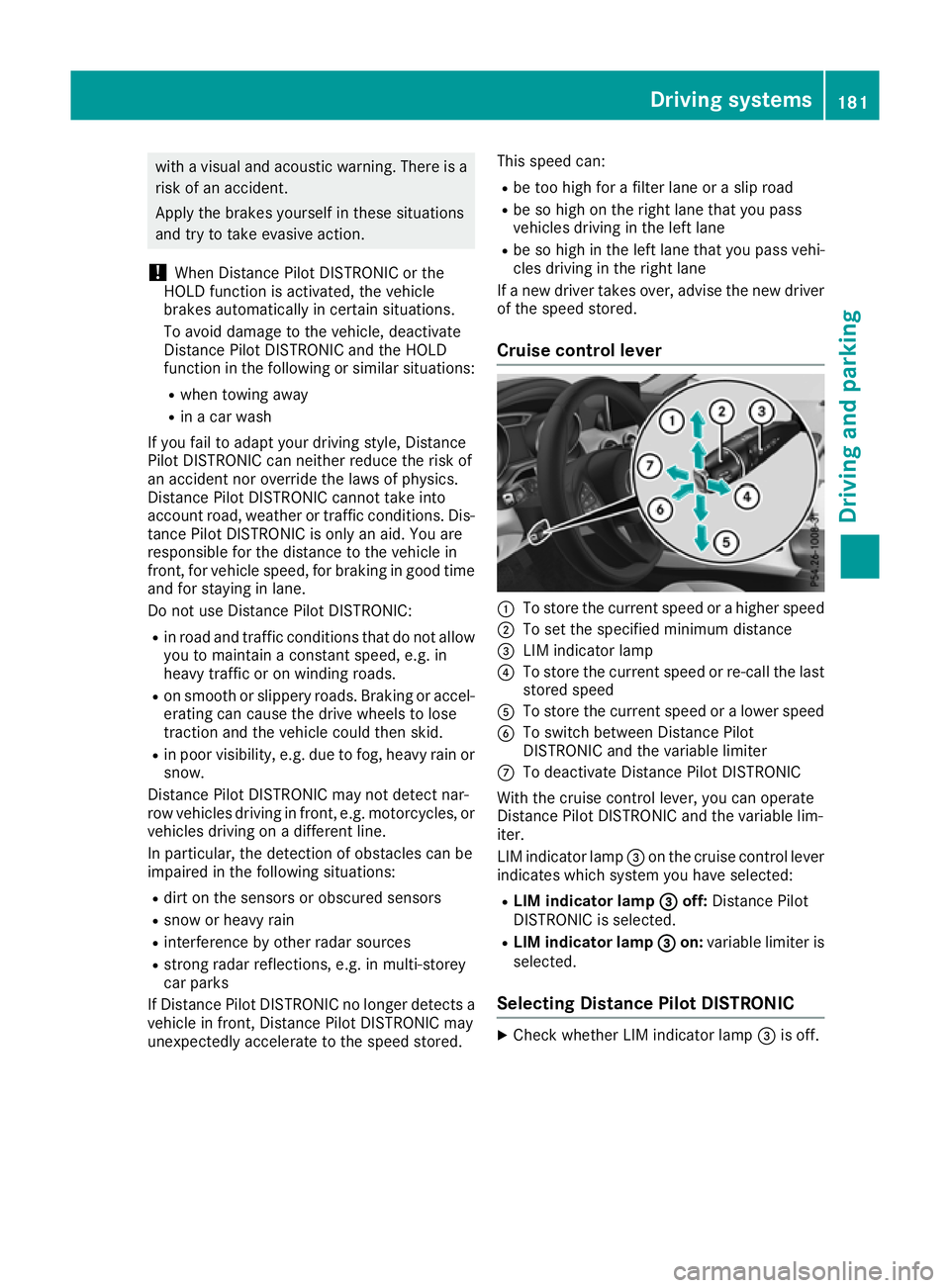
Cruise control lever :
To store the current speed or a higher speed
; To set the specified minimum distance
= LIM indicator lamp
? To store the current speed or re-call the last
stored speed
A To store the current speed or a lower speed
B To switch between Distance Pilot
DISTRONIC and the variable limiter
C To deactivate Distance Pilot DISTRONIC
With the cruise control lever, you can operate
Distance Pilot DISTRONIC and the variable lim-
iter.
LIM indicator lamp =on the cruise control lever
indicates which system you have selected:
R LIM indicator lamp = =off: Distance Pilot
DISTRONIC is selected.
R LIM indicator lamp = =on: variable limiter is
selected.
Selecting Distance Pilot DISTRONIC X
Check whether LIM indicator lamp =is off. Driving systems
181Driving and parking Z
Page 196 of 369
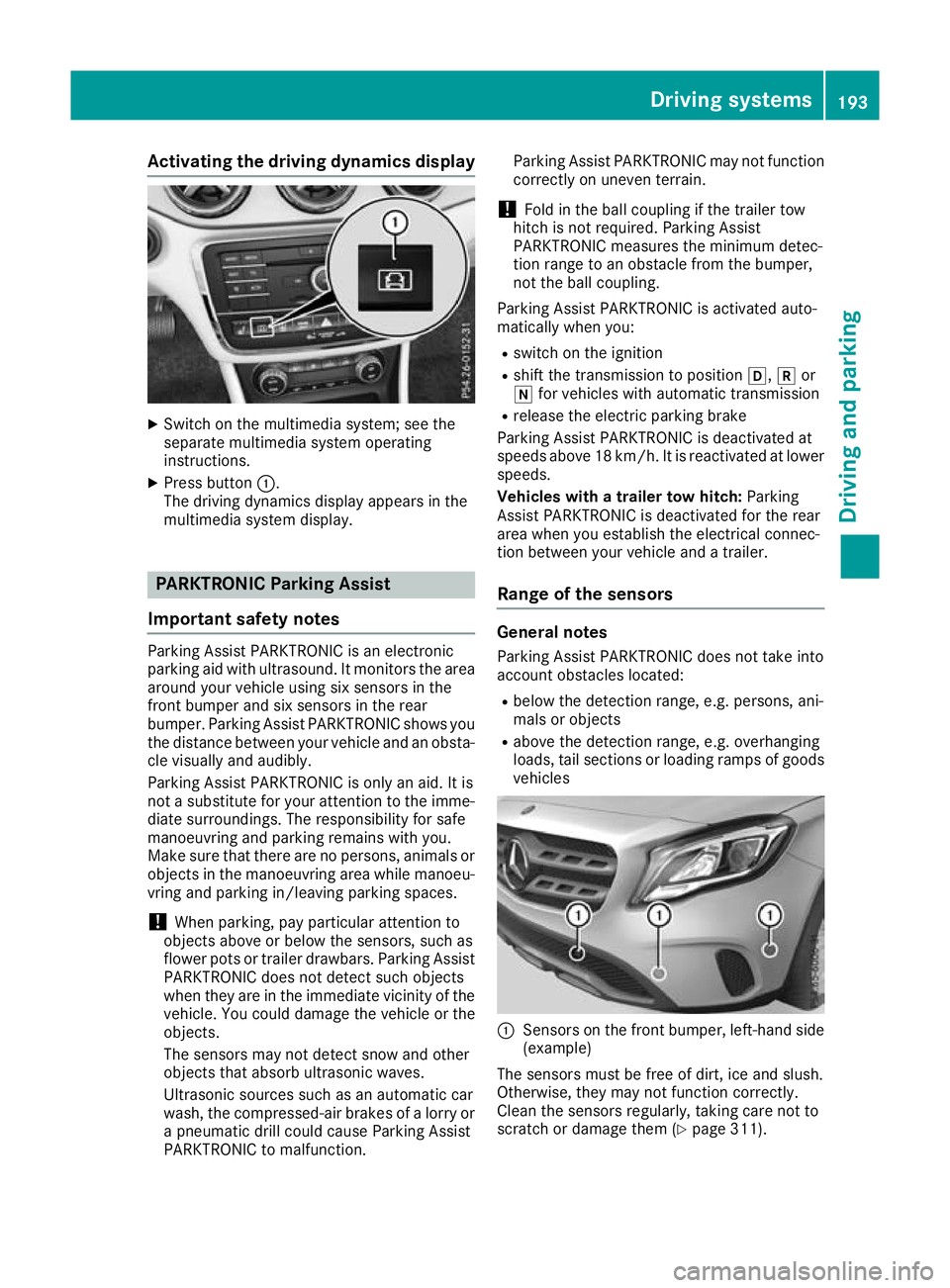
Activating the driving dynamics display
X
Switch on the multimedia system; see the
separate multimedia system operating
instructions.
X Press button :.
The driving dynamics display appears in the
multimedia system display. PARKTRONIC Parking Assist
Important safety notes Parking Assist PARKTRONIC is an electronic
parking aid with ultrasound. It monitors the area
around your vehicle using six sensors in the
front bumper and six sensors in the rear
bumper. Parking Assist PARKTRONIC shows you
the distance between your vehicle and an obsta- cle visually and audibly.
Parking Assist PARKTRONIC is only an aid. It is
not a substitute for your attention to the imme-
diate surroundings. The responsibility for safe
manoeuvring and parking remains with you.
Make sure that there are no persons, animals or
objects in the manoeuvring area while manoeu-
vring and parking in/leaving parking spaces.
! When parking, pay particular attention to
objects above or below the sensors, such as
flower pots or trailer drawbars. Parking Assist PARKTRONIC does not detect such objects
when they are in the immediate vicinity of the
vehicle. You could damage the vehicle or the
objects.
The sensors may not detect snow and other
objects that absorb ultrasonic waves.
Ultrasonic sources such as an automatic car
wash, the compressed-air brakes of a lorry or
a pneumatic drill could cause Parking Assist
PARKTRONIC to malfunction. Parking Assist PARKTRONIC may not function
correctly on uneven terrain.
! Fold in the ball coupling if the trailer tow
hitch is not required. Parking Assist
PARKTRONIC measures the minimum detec-
tion range to an obstacle from the bumper,
not the ball coupling.
Parking Assist PARKTRONIC is activated auto-
matically when you:
R switch on the ignition
R shift the transmission to position h,kor
i for vehicles with automatic transmission
R release the electric parking brake
Parking Assist PARKTRONIC is deactivated at
speeds above 18 km/h. It is reactivated at lower
speeds.
Vehicles with a trailer tow hitch: Parking
Assist PARKTRONIC is deactivated for the rear
area when you establish the electrical connec-
tion between your vehicle and a trailer.
Range of the sensors General notes
Parking Assist PARKTRONIC does not take into
account obstacles located:
R below the detection range, e.g. persons, ani-
mals or objects
R above the detection range, e.g. overhanging
loads, tail sections or loading ramps of goods vehicles :
Sensors on the front bumper, left-hand side
(example)
The sensors must be free of dirt, ice and slush.
Otherwise, they may not function correctly.
Clean the sensors regularly, taking care not to
scratch or damage them (Y page 311). Driving systems
193Driving and parking Z
Page 244 of 369
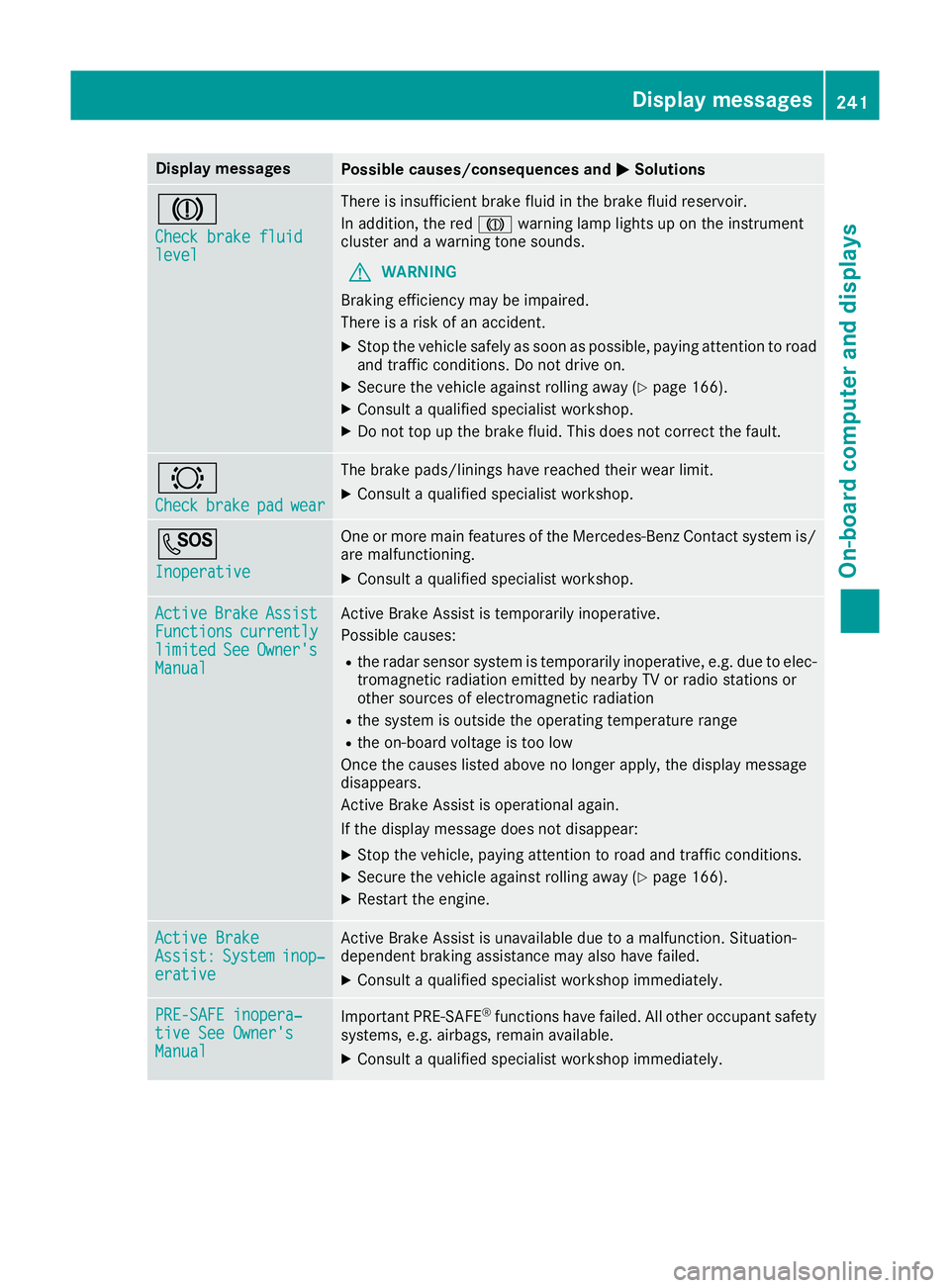
Display messages
Possible causes/consequences and
M
MSolutions J
Check brake fluid Check brake fluid
level level There is insufficient brake fluid in the brake fluid reservoir.
In addition, the red Jwarning lamp lights up on the instrument
cluster and a warning tone sounds.
G WARNING
Braking efficiency may be impaired.
There is a risk of an accident.
X Stop the vehicle safely as soon as possible, paying attention to road
and traffic conditions. Do not drive on.
X Secure the vehicle against rolling away (Y page 166).
X Consult a qualified specialist workshop.
X Do not top up the brake fluid. This does not correct the fault. #
Check Check
brake
brakepad
padwear
wear The brake pads/linings have reached their wear limit.
X Consult a qualified specialist workshop. G
Inoperative Inoperative One or more main features of the Mercedes-Benz Contact system is/
are malfunctioning.
X Consult a qualified specialist workshop. Active
Active
Brake
BrakeAssist
Assist
Functions
Functions currently
currently
limited
limited See
SeeOwner's
Owner's
Manual
Manual Active Brake Assist is temporarily inoperative.
Possible causes:
R the radar sensor system is temporarily inoperative, e.g. due to elec-
tromagnetic radiation emitted by nearby TV or radio stations or
other sources of electromagnetic radiation
R the system is outside the operating temperature range
R the on-board voltage is too low
Once the causes listed above no longer apply, the display message
disappears.
Active Brake Assist is operational again.
If the display message does not disappear:
X Stop the vehicle, paying attention to road and traffic conditions.
X Secure the vehicle against rolling away (Y page 166).
X Restart the engine. Active Brake Active Brake
Assist: Assist:
System
Systeminop‐
inop‐
erative
erative Active Brake Assist is unavailable due to a malfunction. Situation-
dependent braking assistance may also have failed.
X Consult a qualified specialist workshop immediately. PRE-SAFE inopera‐
PRE-SAFE inopera‐
tive See Owner's tive See Owner's
Manual Manual
Important PRE-SAFE
®
functions have failed. All other occupant safety
systems, e.g. airbags, remain available.
X Consult a qualified specialist workshop immediately. Display
messages
241On-board computer and displays Z
Page 245 of 369
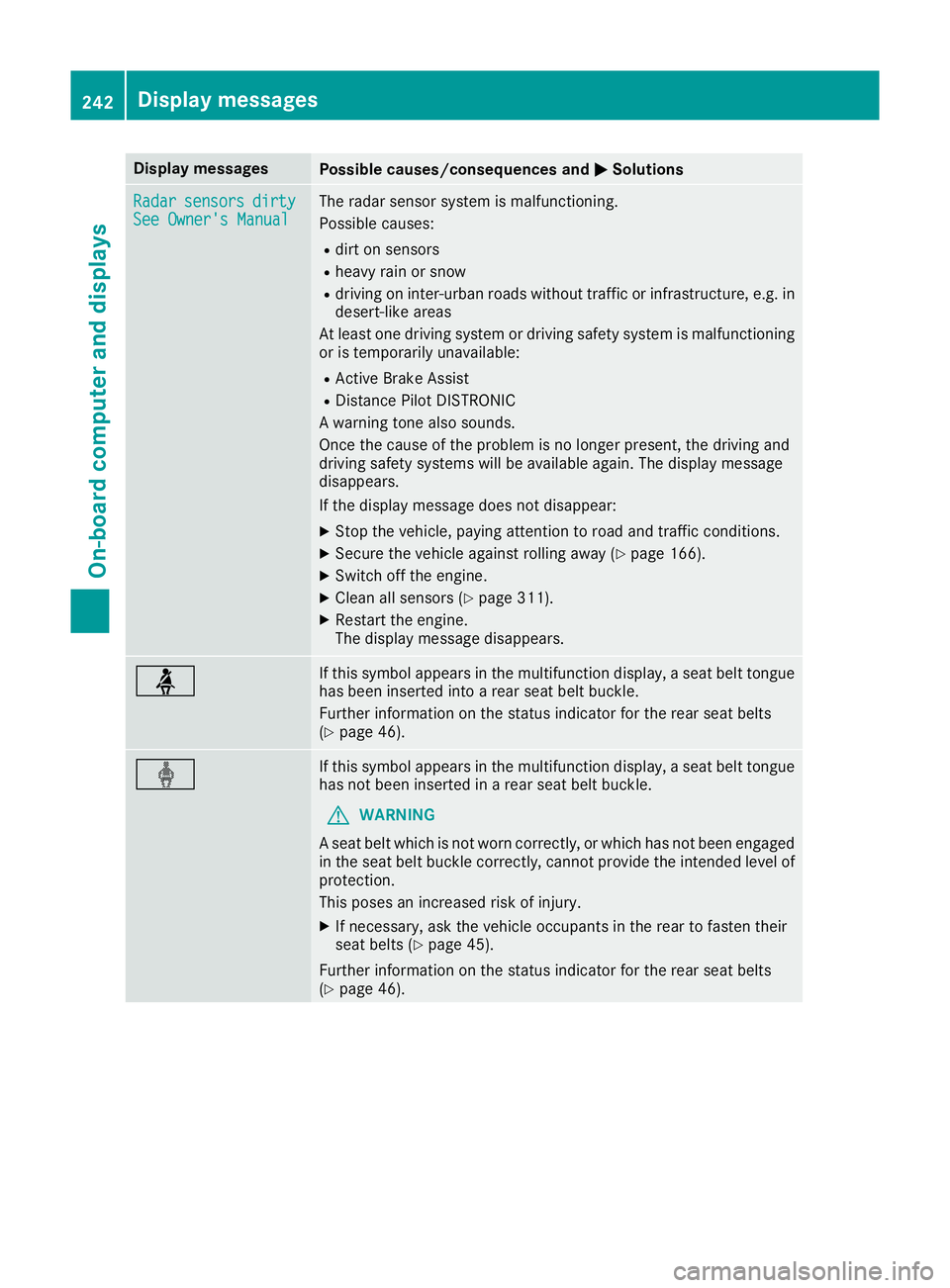
Display messages
Possible causes/consequences and
M
MSolutions Radar
Radar
sensors
sensors dirty
dirty
See Owner's Manual
See Owner's Manual The radar sensor system is malfunctioning.
Possible causes:
R dirt on sensors
R heavy rain or snow
R driving on inter-urban roads without traffic or infrastructure, e.g. in
desert-like areas
At least one driving system or driving safety system is malfunctioning or is temporarily unavailable:
R Active Brake Assist
R Distance Pilot DISTRONIC
A warning tone also sounds.
Once the cause of the problem is no longer present, the driving and
driving safety systems will be available again. The display message
disappears.
If the display message does not disappear:
X Stop the vehicle, paying attention to road and traffic conditions.
X Secure the vehicle against rolling away (Y page 166).
X Switch off the engine.
X Clean all sensors (Y page 311).
X Restart the engine.
The display message disappears. ü If this symbol appears in the multifunction display, a seat belt tongue
has been inserted into a rear seat belt buckle.
Further information on the status indicator for the rear seat belts
(Y page 46). ý If this symbol appears in the multifunction display, a seat belt tongue
has not been inserted in a rear seat belt buckle.
G WARNING
A seat belt which is not worn correctly, or which has not been engaged
in the seat belt buckle correctly, cannot provide the intended level of protection.
This poses an increased risk of injury.
X If necessary, ask the vehicle occupants in the rear to fasten their
seat belts (Y page 45).
Further information on the status indicator for the rear seat belts
(Y page 46). 242
Display
messagesOn-board computer and displays
Page 260 of 369
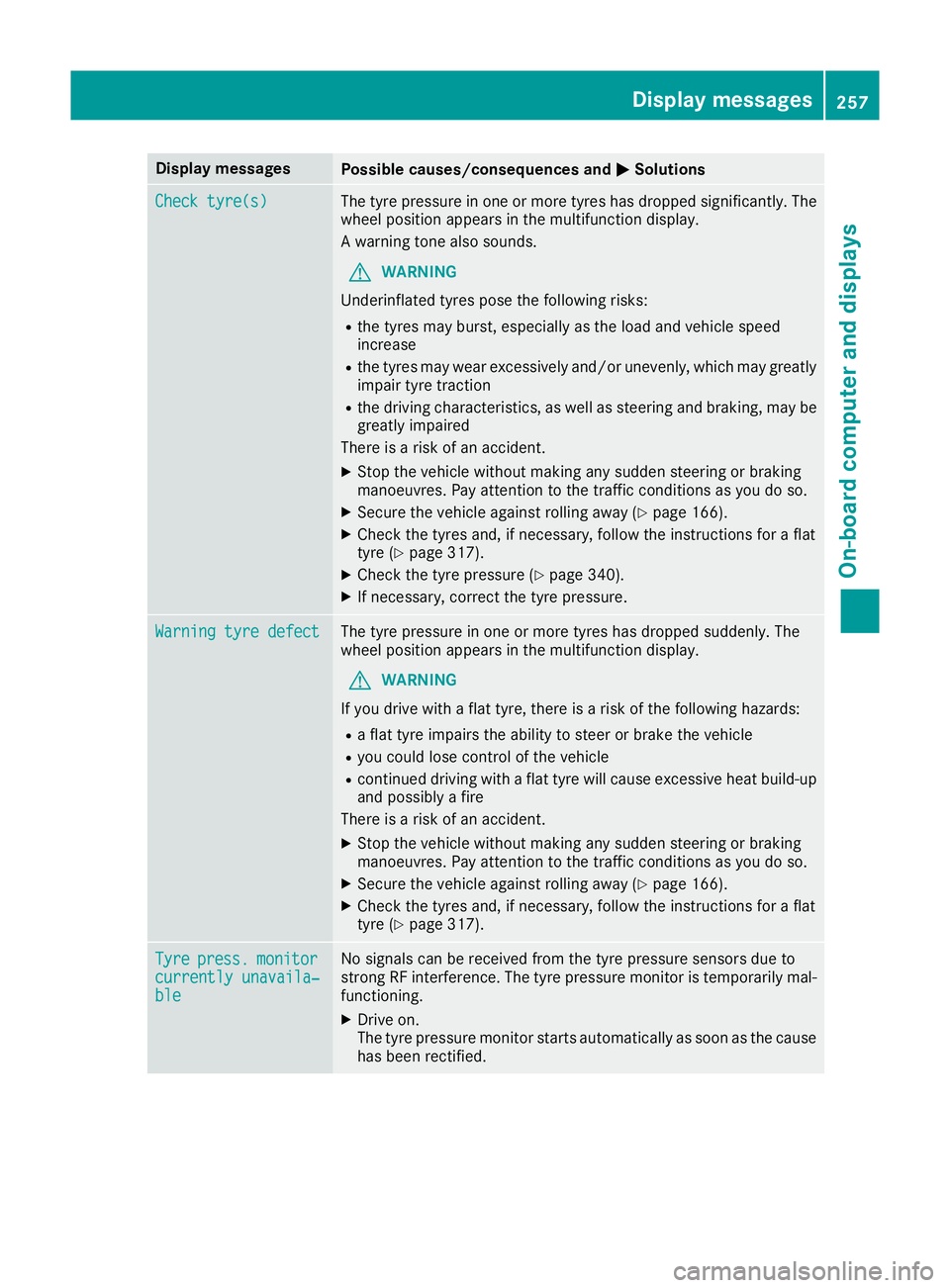
Display messages
Possible causes/consequences and
M
MSolutions Check tyre(s)
Check tyre(s) The tyre pressure in one or more tyres has dropped significantly. The
wheel position appears in the multifunction display.
A warning tone also sounds.
G WARNING
Underinflated tyres pose the following risks:
R the tyres may burst, especially as the load and vehicle speed
increase
R the tyres may wear excessively and/or unevenly, which may greatly
impair tyre traction
R the driving characteristics, as well as steering and braking, may be
greatly impaired
There is a risk of an accident.
X Stop the vehicle without making any sudden steering or braking
manoeuvres. Pay attention to the traffic conditions as you do so.
X Secure the vehicle against rolling away (Y page 166).
X Check the tyres and, if necessary, follow the instructions for a flat
tyre (Y page 317).
X Check the tyre pressure (Y page 340).
X If necessary, correct the tyre pressure. Warning tyre defect Warning tyre defect The tyre pressure in one or more tyres has dropped suddenly. The
wheel position appears in the multifunction display.
G WARNING
If you drive with a flat tyre, there is a risk of the following hazards: R a flat tyre impairs the ability to steer or brake the vehicle
R you could lose control of the vehicle
R continued driving with a flat tyre will cause excessive heat build-up
and possibly a fire
There is a risk of an accident.
X Stop the vehicle without making any sudden steering or braking
manoeuvres. Pay attention to the traffic conditions as you do so.
X Secure the vehicle against rolling away (Y page 166).
X Check the tyres and, if necessary, follow the instructions for a flat
tyre (Y page 317). Tyre Tyre
press.
press. monitor
monitor
currently unavaila‐
currently unavaila‐
ble ble No signals can be received from the tyre pressure sensors due to
strong RF interference. The tyre pressure monitor is temporarily mal-
functioning.
X Drive on.
The tyre pressure monitor starts automatically as soon as the cause
has been rectified. Display
messages
257On-board computer and displays Z
Page 261 of 369
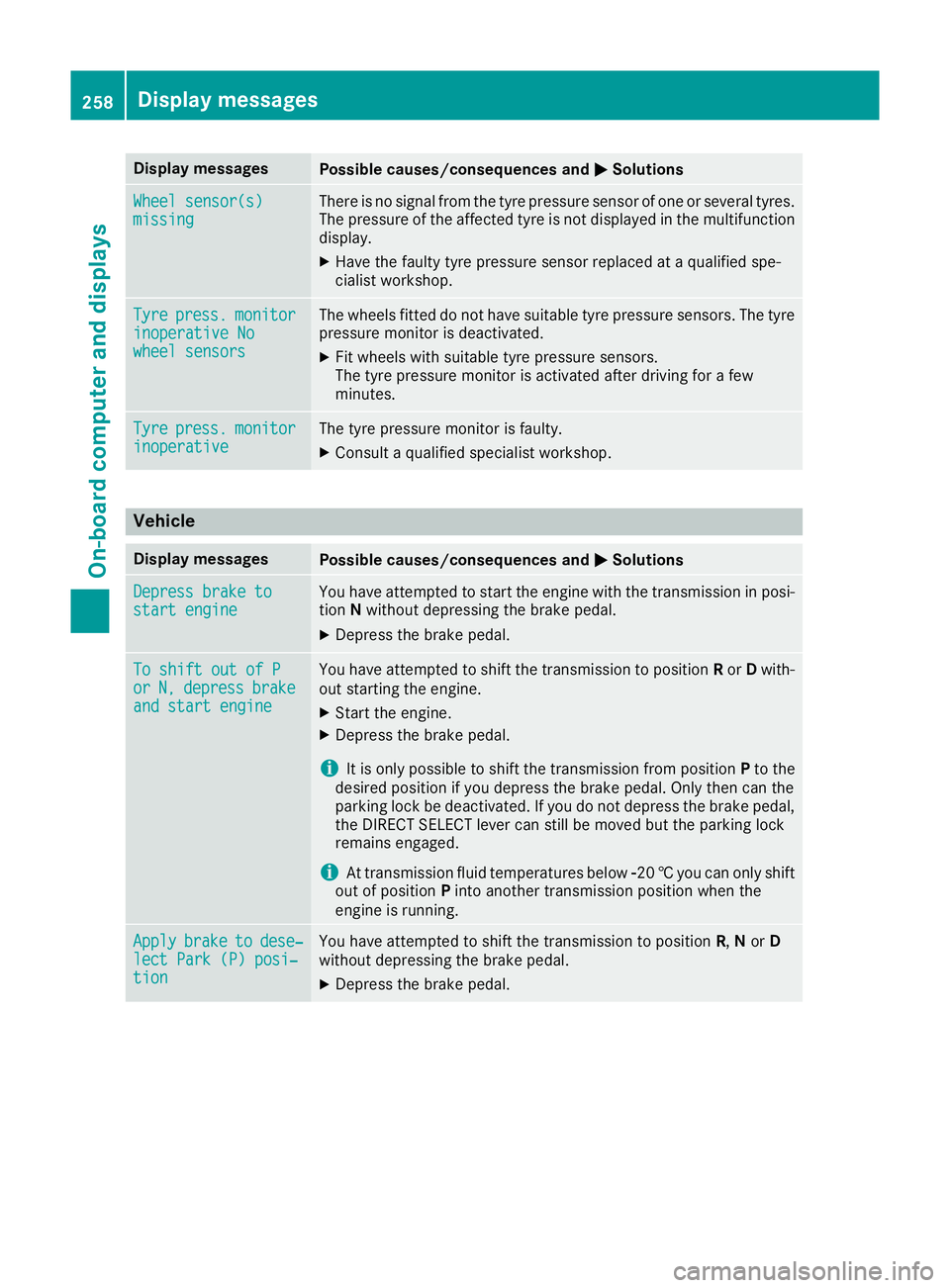
Display messages
Possible causes/consequences and
M
MSolutions Wheel sensor(s)
Wheel sensor(s)
missing missing There is no signal from the tyre pressure sensor of one or several tyres.
The pressure of the affected tyre is not displayed in the multifunction
display.
X Have the faulty tyre pressure sensor replaced at a qualified spe-
cialist workshop. Tyre Tyre
press.
press. monitor
monitor
inoperative No
inoperative No
wheel sensors wheel sensors The wheels fitted do not have suitable tyre pressure sensors. The tyre
pressure monitor is deactivated.
X Fit wheels with suitable tyre pressure sensors.
The tyre pressure monitor is activated after driving for a few
minutes. Tyre Tyre
press.
press. monitor
monitor
inoperative
inoperative The tyre pressure monitor is faulty.
X Consult a qualified specialist workshop. Vehicle
Display messages
Possible causes/consequences and
M
MSolutions Depress brake to
Depress brake to
start engine start engine You have attempted to start the engine with the transmission in posi-
tion Nwithout depressing the brake pedal.
X Depress the brake pedal. To shift out of P
To shift out of P
or or
N,
N,depress
depress brake
brake
and start engine
and start engine You have attempted to shift the transmission to position
Ror Dwith-
out starting the engine.
X Start the engine.
X Depress the brake pedal.
i It is only possible to shift the transmission from position
Pto the
desired position if you depress the brake pedal. Only then can the
parking lock be deactivated. If you do not depress the brake pedal,
the DIRECT SELECT lever can still be moved but the parking lock
remains engaged.
i At transmission fluid temperatures below
Ò20†you can only shift
out of position Pinto another transmission position when the
engine is running. Apply
Apply
brake
braketo
todese‐
dese‐
lect Park (P) posi‐
lect Park (P) posi‐
tion tion You have attempted to shift the transmission to position
R,Nor D
without depressing the brake pedal.
X Depress the brake pedal. 258
Display messagesOn-board computer and displays