stop start MERCEDES-BENZ GLA SUV 2017 Repair Manual
[x] Cancel search | Manufacturer: MERCEDES-BENZ, Model Year: 2017, Model line: GLA SUV, Model: MERCEDES-BENZ GLA SUV 2017Pages: 369, PDF Size: 7.56 MB
Page 252 of 369
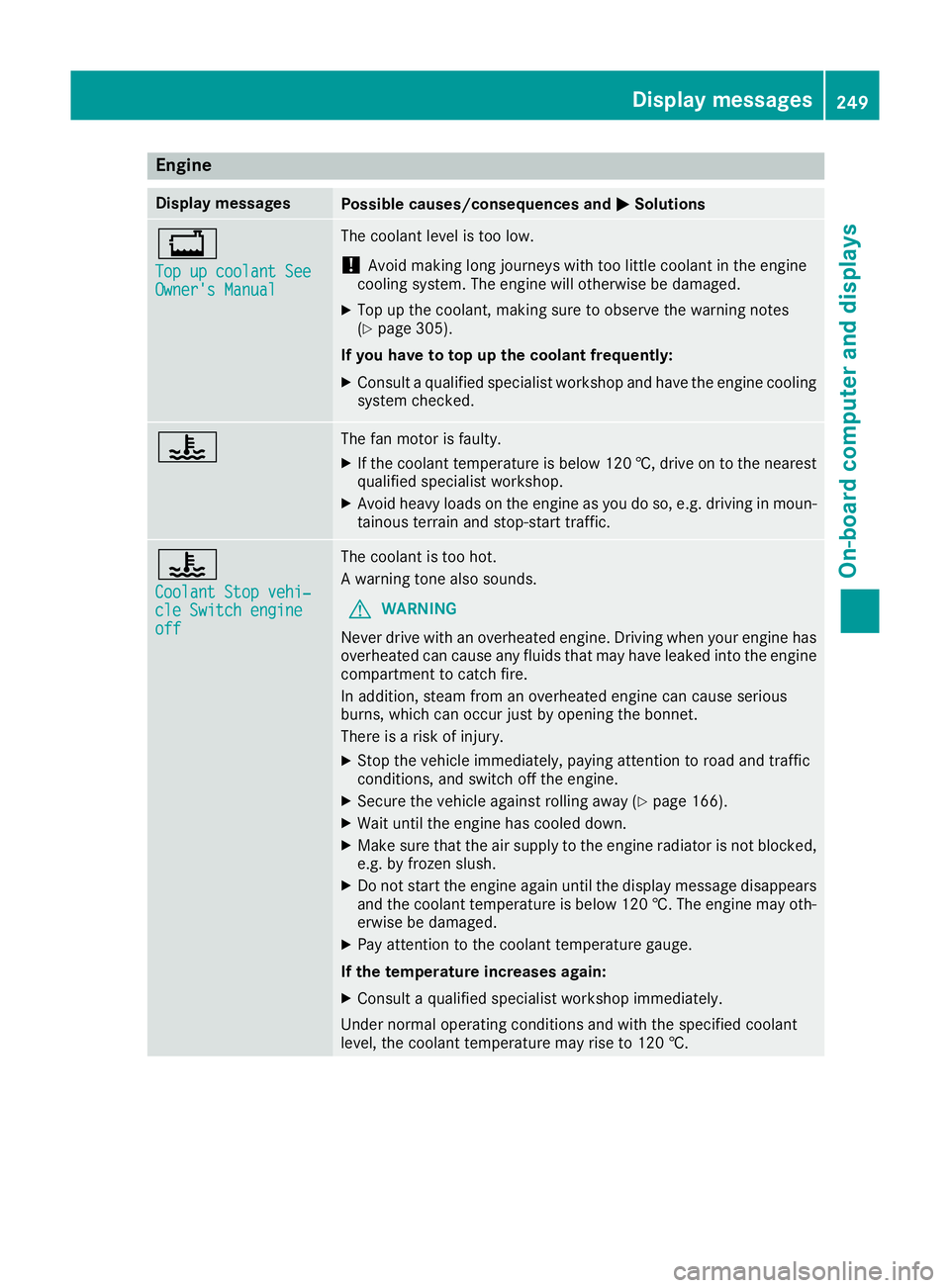
Engine
Display messages
Possible causes/consequences and
M
MSolutions +
Top up coolant See Top up coolant See
Owner's Manual Owner's Manual The coolant level is too low.
! Avoid making long journeys with too little coolant in the engine
cooling system. The engine will otherwise be damaged.
X Top up the coolant, making sure to observe the warning notes
(Y page 305).
If you have to top up the coolant frequently: X Consult a qualified specialist workshop and have the engine cooling
system checked. ? The fan motor is faulty.
X If the coolant temperature is below 120 †, drive on to the nearest
qualified specialist workshop.
X Avoid heavy loads on the engine as you do so, e.g. driving in moun-
tainous terrain and stop-start traffic. ?
Coolant Stop vehi‐ Coolant Stop vehi‐
cle Switch engine cle Switch engine
off off The coolant is too hot.
A warning tone also sounds.
G WARNING
Never drive with an overheated engine. Driving when your engine has
overheated can cause any fluids that may have leaked into the engine compartment to catch fire.
In addition, steam from an overheated engine can cause serious
burns, which can occur just by opening the bonnet.
There is a risk of injury.
X Stop the vehicle immediately, paying attention to road and traffic
conditions, and switch off the engine.
X Secure the vehicle against rolling away (Y page 166).
X Wait until the engine has cooled down.
X Make sure that the air supply to the engine radiator is not blocked,
e.g. by frozen slush.
X Do not start the engine again until the display message disappears
and the coolant temperature is below 120 †. The engine may oth- erwise be damaged.
X Pay attention to the coolant temperature gauge.
If the temperature increases again:
X Consult a qualified specialist workshop immediately.
Under normal operating conditions and with the specified coolant
level, the coolant temperature may rise to 120 †. Display messages
249On-board computer and displays Z
Page 255 of 369
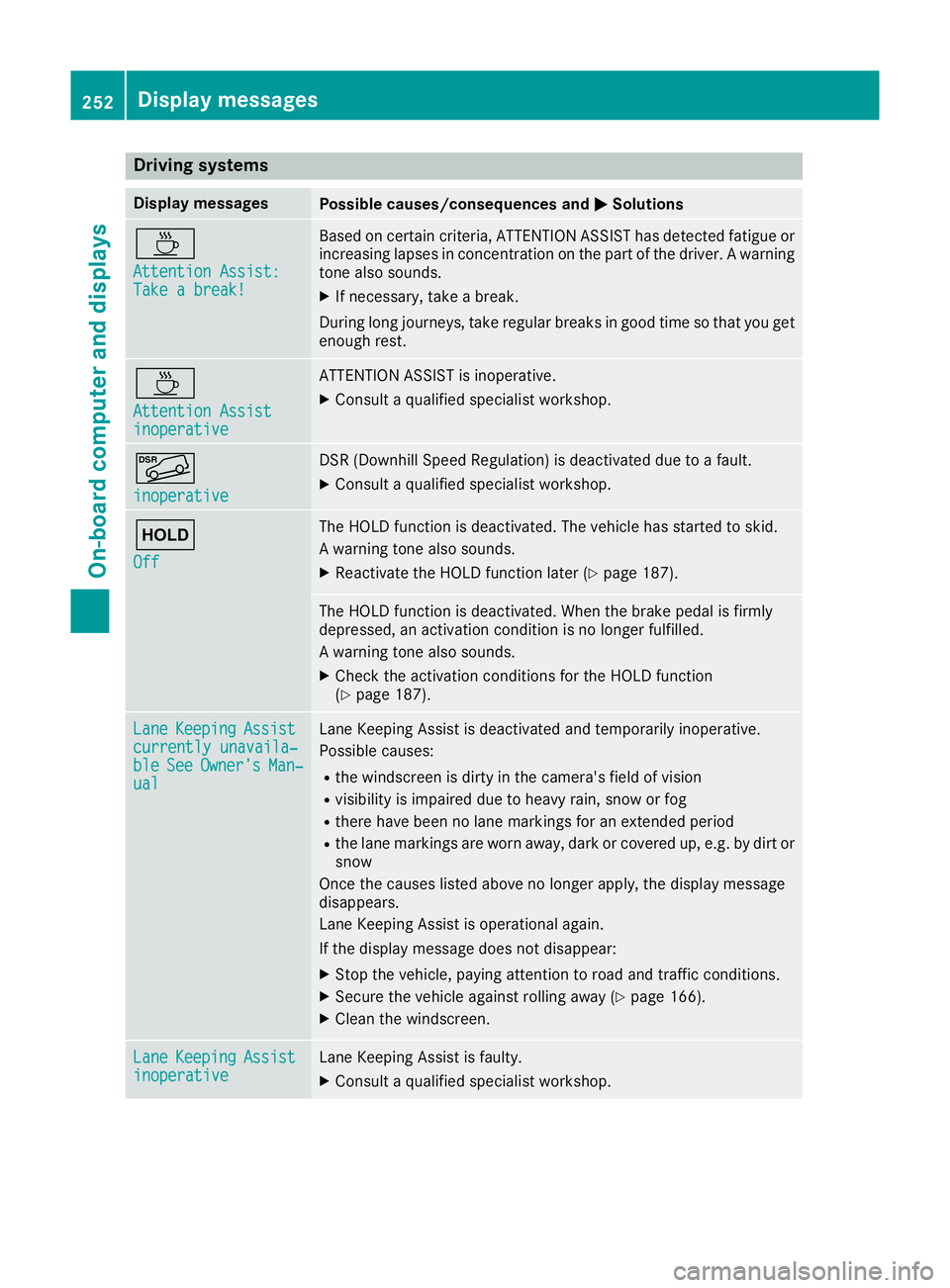
Driving systems
Display messages
Possible causes/consequences and
M
MSolutions À
Attention Assist: Attention Assist:
Take a break! Take a break! Based on certain criteria, ATTENTION ASSIST has detected fatigue or
increasing lapses in concentration on the part of the driver. A warning tone also sounds.
X If necessary, take a break.
During long journeys, take regular breaks in good time so that you get enough rest. À
Attention Assist Attention Assist
inoperative inoperative ATTENTION ASSIST is inoperative.
X Consult a qualified specialist workshop. Ã
inoperative inoperative DSR (Downhill Speed Regulation) is deactivated due to a fault.
X Consult a qualified specialist workshop. ë
Off Off The HOLD function is deactivated. The vehicle has started to skid.
A warning tone also sounds.
X Reactivate the HOLD function later (Y page 187). The HOLD function is deactivated. When the brake pedal is firmly
depressed, an activation condition is no longer fulfilled.
A warning tone also sounds.
X Check the activation conditions for the HOLD function
(Y page 187). Lane Lane
Keeping
Keeping Assist
Assist
currently unavaila‐
currently unavaila‐
ble ble See
SeeOwner's
Owner's Man‐
Man‐
ual
ual Lane Keeping Assist is deactivated and temporarily inoperative.
Possible causes:
R the windscreen is dirty in the camera's field of vision
R visibility is impaired due to heavy rain, snow or fog
R there have been no lane markings for an extended period
R the lane markings are worn away, dark or covered up, e.g. by dirt or
snow
Once the causes listed above no longer apply, the display message
disappears.
Lane Keeping Assist is operational again.
If the display message does not disappear:
X Stop the vehicle, paying attention to road and traffic conditions.
X Secure the vehicle against rolling away (Y page 166).
X Clean the windscreen. Lane Lane
Keeping
Keeping Assist
Assist
inoperative
inoperative Lane Keeping Assist is faulty.
X Consult a qualified specialist workshop. 252
Display
messagesOn-board computer and displays
Page 256 of 369
Display messages
Possible causes/consequences and
M
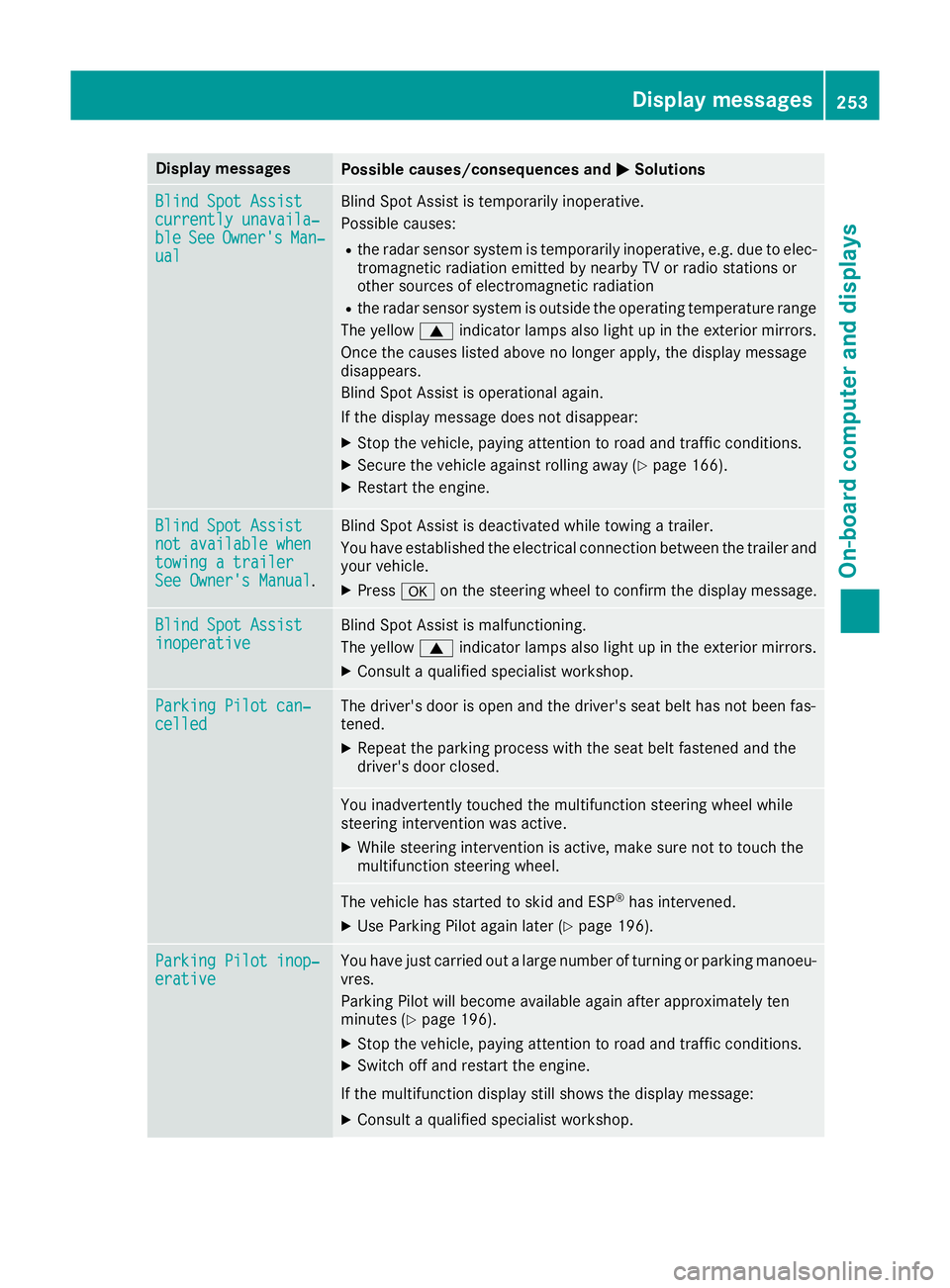
MSolutions Blind Spot Assist
Blind Spot Assist
currently unavaila‐ currently unavaila‐
ble ble
See
SeeOwner's
Owner's Man‐
Man‐
ual
ual Blind Spot Assist is temporarily inoperative.
Possible causes:
R the radar sensor system is temporarily inoperative, e.g. due to elec-
tromagnetic radiation emitted by nearby TV or radio stations or
other sources of electromagnetic radiation
R the radar sensor system is outside the operating temperature range
The yellow 9indicator lamps also light up in the exterior mirrors.
Once the causes listed above no longer apply, the display message
disappears.
Blind Spot Assist is operational again.
If the display message does not disappear:
X Stop the vehicle, paying attention to road and traffic conditions.
X Secure the vehicle against rolling away (Y page 166).
X Restart the engine. Blind Spot Assist Blind Spot Assist
not available when not available when
towing a trailer towing a trailer
See Owner's Manual See Owner's Manual
. Blind Spot Assist is deactivated while towing a trailer.
You have established the electrical connection between the trailer and
your vehicle.
X Press aon the steering wheel to confirm the display message. Blind Spot Assist
Blind Spot Assist
inoperative inoperative Blind Spot Assist is malfunctioning.
The yellow
9indicator lamps also light up in the exterior mirrors.
X Consult a qualified specialist workshop. Parking Pilot can‐ Parking Pilot can‐
celled celled The driver's door is open and the driver's seat belt has not been fas-
tened.
X Repeat the parking process with the seat belt fastened and the
driver's door closed. You inadvertently touched the multifunction steering wheel while
steering intervention was active.
X While steering intervention is active, make sure not to touch the
multifunction steering wheel. The vehicle has started to skid and ESP
®
has intervened.
X Use Parking Pilot again later (Y page 196).Parking Pilot inop‐ Parking Pilot inop‐
erative erative You have just carried out a large number of turning or parking manoeu-
vres.
Parking Pilot will become available again after approximately ten
minutes (Y page 196).
X Stop the vehicle, paying attention to road and traffic conditions.
X Switch off and restart the engine.
If the multifunction display still shows the display message:
X Consult a qualified specialist workshop. Display
messages
253On-board computer and displays Z
Page 257 of 369
Display messages
Possible causes/consequences and
M
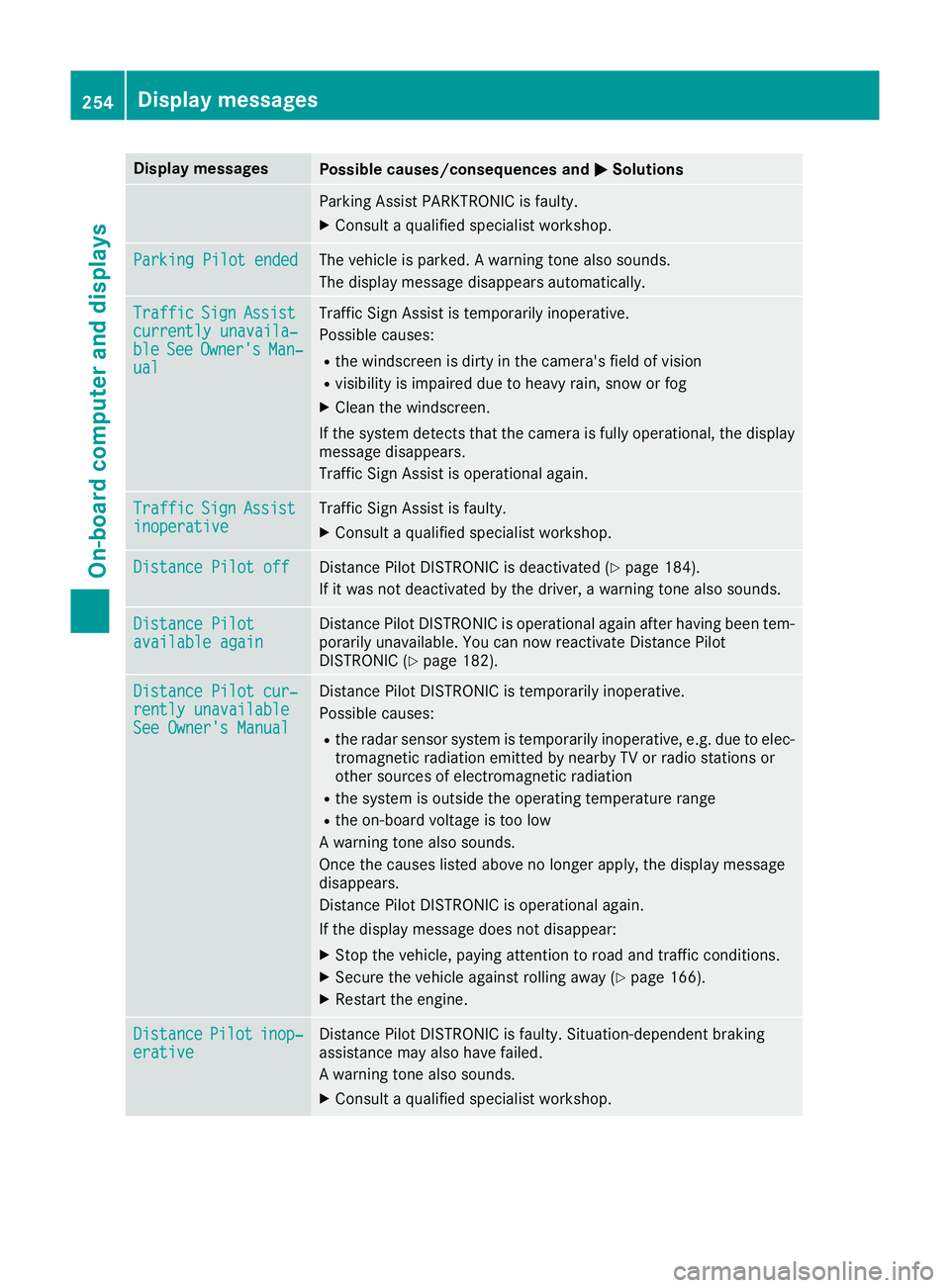
MSolutions Parking Assist PARKTRONIC is faulty.
X Consult a qualified specialist workshop. Parking Pilot ended
Parking Pilot ended The vehicle is parked. A warning tone also sounds.
The display message disappears automatically. Traffic
Traffic
Sign
Sign Assist
Assist
currently unavaila‐
currently unavaila‐
ble ble See
SeeOwner's
Owner's Man‐
Man‐
ual
ual Traffic Sign Assist is temporarily inoperative.
Possible causes:
R the windscreen is dirty in the camera's field of vision
R visibility is impaired due to heavy rain, snow or fog
X Clean the windscreen.
If the system detects that the camera is fully operational, the display message disappears.
Traffic Sign Assist is operational again. Traffic Traffic
Sign
Sign Assist
Assist
inoperative
inoperative Traffic Sign Assist is faulty.
X Consult a qualified specialist workshop. Distance Pilot off
Distance Pilot off Distance Pilot DISTRONIC is deactivated (Y
page 184).
If it was not deactivated by the driver, a warning tone also sounds. Distance Pilot
Distance Pilot
available again available again Distance Pilot DISTRONIC is operational again after having been tem-
porarily unavailable. You can now reactivate Distance Pilot
DISTRONIC (Y page 182). Distance Pilot cur‐
Distance Pilot cur‐
rently unavailable rently unavailable
See Owner's Manual See Owner's Manual Distance Pilot DISTRONIC is temporarily inoperative.
Possible causes:
R the radar sensor system is temporarily inoperative, e.g. due to elec-
tromagnetic radiation emitted by nearby TV or radio stations or
other sources of electromagnetic radiation
R the system is outside the operating temperature range
R the on-board voltage is too low
A warning tone also sounds.
Once the causes listed above no longer apply, the display message
disappears.
Distance Pilot DISTRONIC is operational again.
If the display message does not disappear:
X Stop the vehicle, paying attention to road and traffic conditions.
X Secure the vehicle against rolling away (Y page 166).
X Restart the engine. Distance Distance
Pilot
Pilotinop‐
inop‐
erative
erative Distance Pilot DISTRONIC is faulty. Situation-dependent braking
assistance may also have failed.
A warning tone also sounds.
X Consult a qualified specialist workshop. 254
Display
messagesOn-board computer and displays
Page 259 of 369
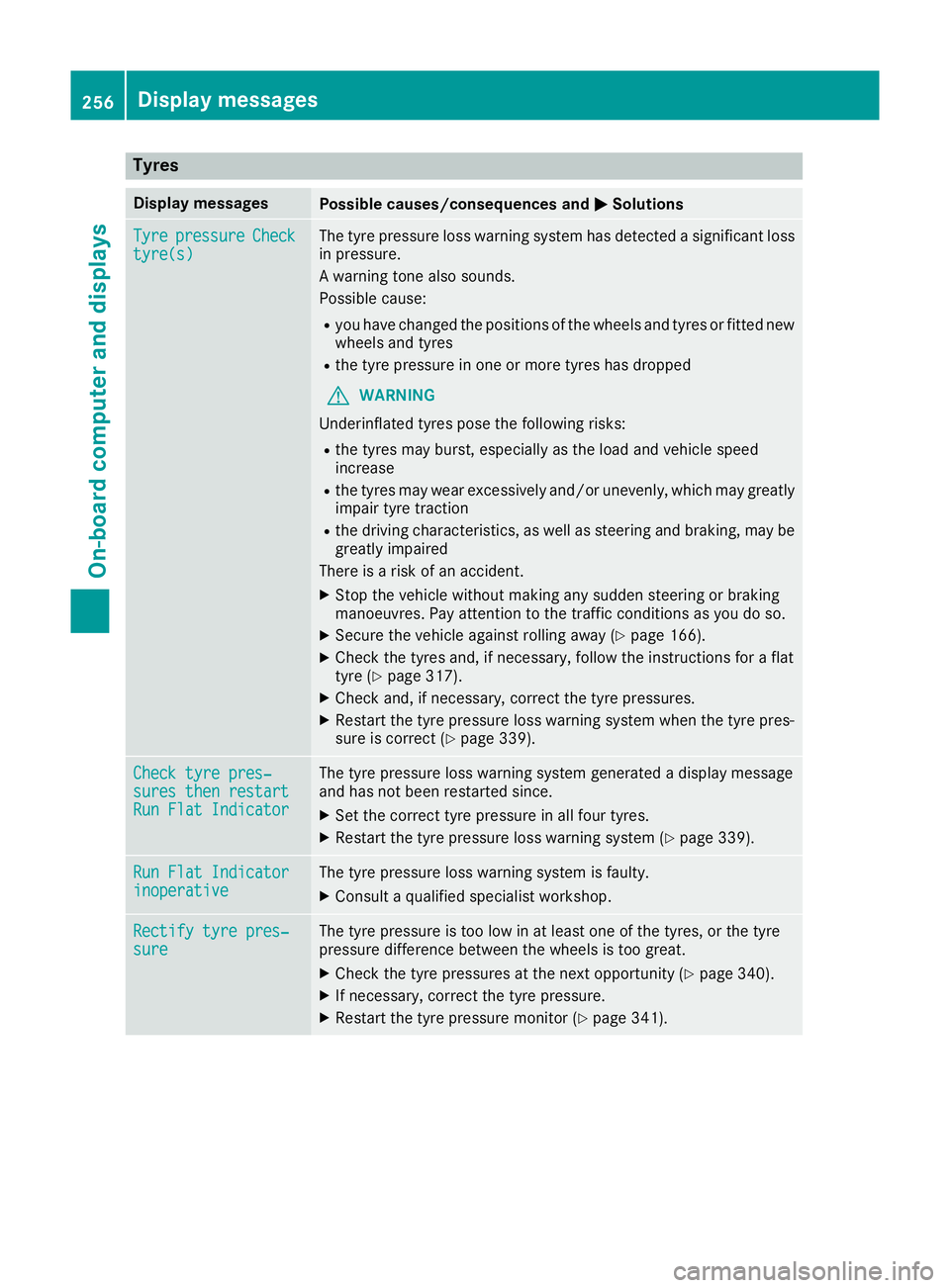
Tyres
Display messages
Possible causes/consequences and
M
MSolutions Tyre
Tyre
pressure
pressure Check
Check
tyre(s)
tyre(s) The tyre pressure loss warning system has detected a significant loss
in pressure.
A warning tone also sounds.
Possible cause:
R you have changed the positions of the wheels and tyres or fitted new
wheels and tyres
R the tyre pressure in one or more tyres has dropped
G WARNING
Underinflated tyres pose the following risks:
R the tyres may burst, especially as the load and vehicle speed
increase
R the tyres may wear excessively and/or unevenly, which may greatly
impair tyre traction
R the driving characteristics, as well as steering and braking, may be
greatly impaired
There is a risk of an accident.
X Stop the vehicle without making any sudden steering or braking
manoeuvres. Pay attention to the traffic conditions as you do so.
X Secure the vehicle against rolling away (Y page 166).
X Check the tyres and, if necessary, follow the instructions for a flat
tyre (Y page 317).
X Check and, if necessary, correct the tyre pressures.
X Restart the tyre pressure loss warning system when the tyre pres-
sure is correct (Y page 339). Check tyre pres‐ Check tyre pres‐
sures then restart sures then restart
Run Flat Indicator Run Flat Indicator The tyre pressure loss warning system generated a display message
and has not been restarted since.
X Set the correct tyre pressure in all four tyres.
X Restart the tyre pressure loss warning system (Y page 339).Run Flat Indicator Run Flat Indicator
inoperative inoperative The tyre pressure loss warning system is faulty.
X Consult a qualified specialist workshop. Rectify tyre pres‐
Rectify tyre pres‐
sure sure The tyre pressure is too low in at least one of the tyres, or the tyre
pressure difference between the wheels is too great.
X Check the tyre pressures at the next opportunity (Y page 340).
X If necessary, correct the tyre pressure.
X Restart the tyre pressure monitor (Y page 341).256
Display
messagesOn-board computer and displays
Page 260 of 369
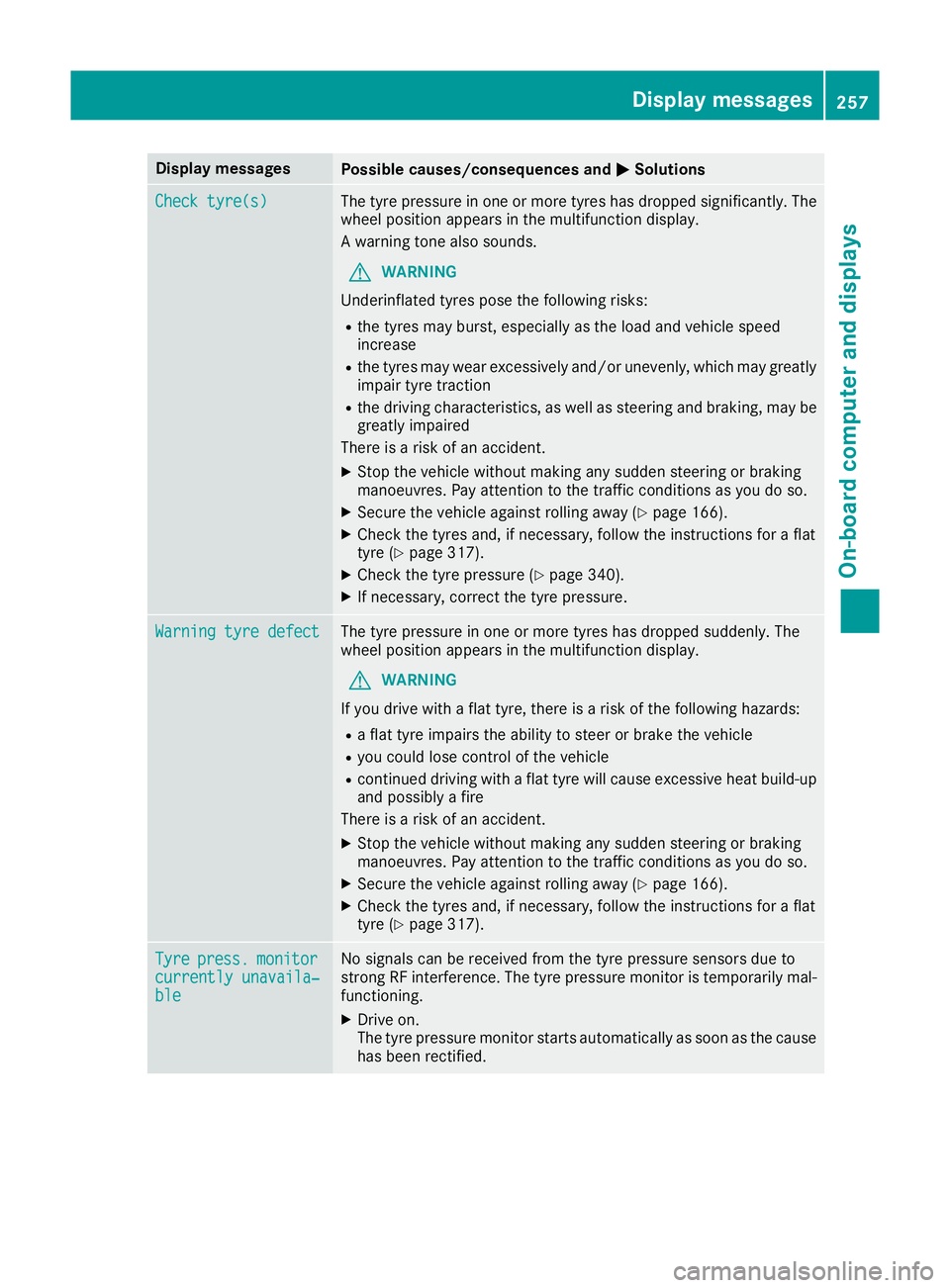
Display messages
Possible causes/consequences and
M
MSolutions Check tyre(s)
Check tyre(s) The tyre pressure in one or more tyres has dropped significantly. The
wheel position appears in the multifunction display.
A warning tone also sounds.
G WARNING
Underinflated tyres pose the following risks:
R the tyres may burst, especially as the load and vehicle speed
increase
R the tyres may wear excessively and/or unevenly, which may greatly
impair tyre traction
R the driving characteristics, as well as steering and braking, may be
greatly impaired
There is a risk of an accident.
X Stop the vehicle without making any sudden steering or braking
manoeuvres. Pay attention to the traffic conditions as you do so.
X Secure the vehicle against rolling away (Y page 166).
X Check the tyres and, if necessary, follow the instructions for a flat
tyre (Y page 317).
X Check the tyre pressure (Y page 340).
X If necessary, correct the tyre pressure. Warning tyre defect Warning tyre defect The tyre pressure in one or more tyres has dropped suddenly. The
wheel position appears in the multifunction display.
G WARNING
If you drive with a flat tyre, there is a risk of the following hazards: R a flat tyre impairs the ability to steer or brake the vehicle
R you could lose control of the vehicle
R continued driving with a flat tyre will cause excessive heat build-up
and possibly a fire
There is a risk of an accident.
X Stop the vehicle without making any sudden steering or braking
manoeuvres. Pay attention to the traffic conditions as you do so.
X Secure the vehicle against rolling away (Y page 166).
X Check the tyres and, if necessary, follow the instructions for a flat
tyre (Y page 317). Tyre Tyre
press.
press. monitor
monitor
currently unavaila‐
currently unavaila‐
ble ble No signals can be received from the tyre pressure sensors due to
strong RF interference. The tyre pressure monitor is temporarily mal-
functioning.
X Drive on.
The tyre pressure monitor starts automatically as soon as the cause
has been rectified. Display
messages
257On-board computer and displays Z
Page 263 of 369
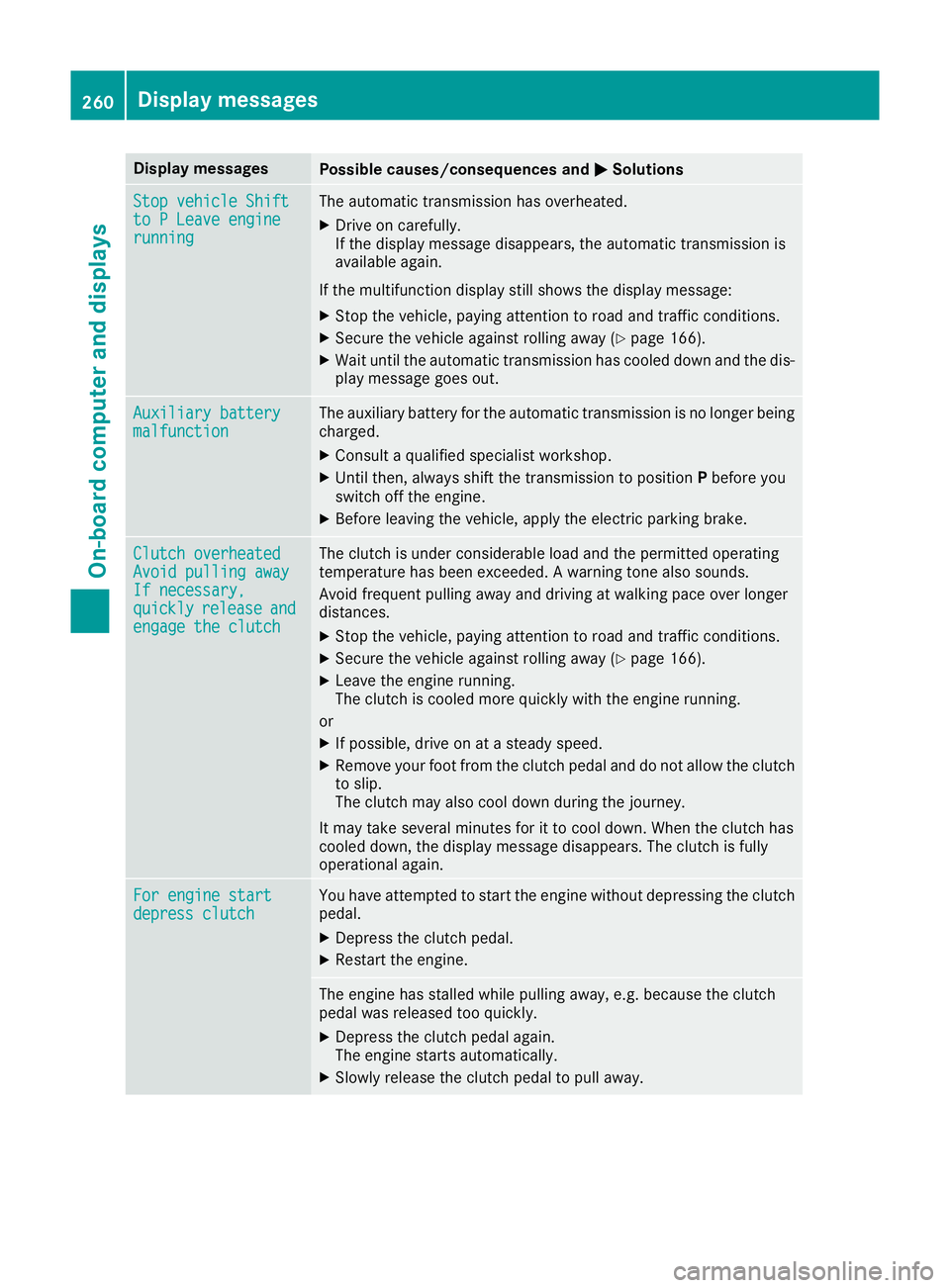
Display messages
Possible causes/consequences and
M
MSolutions Stop vehicle Shift
Stop vehicle Shift
to P Leave engine to P Leave engine
running running The automatic transmission has overheated.
X Drive on carefully.
If the display message disappears, the automatic transmission is
available again.
If the multifunction display still shows the display message:
X Stop the vehicle, paying attention to road and traffic conditions.
X Secure the vehicle against rolling away (Y page 166).
X Wait until the automatic transmission has cooled down and the dis-
play message goes out. Auxiliary battery Auxiliary battery
malfunction malfunction The auxiliary battery for the automatic transmission is no longer being
charged.
X Consult a qualified specialist workshop.
X Until then, always shift the transmission to position Pbefore you
switch off the engine.
X Before leaving the vehicle, apply the electric parking brake. Clutch overheated
Clutch overheated
Avoid pulling away Avoid pulling away
If necessary, If necessary,
quickly quickly
release
release and
and
engage the clutch
engage the clutch The clutch is under considerable load and the permitted operating
temperature has been exceeded. A warning tone also sounds.
Avoid frequent pulling away and driving at walking pace over longer
distances.
X Stop the vehicle, paying attention to road and traffic conditions.
X Secure the vehicle against rolling away (Y page 166).
X Leave the engine running.
The clutch is cooled more quickly with the engine running.
or X If possible, drive on at a steady speed.
X Remove your foot from the clutch pedal and do not allow the clutch
to slip.
The clutch may also cool down during the journey.
It may take several minutes for it to cool down. When the clutch has
cooled down, the display message disappears. The clutch is fully
operational again. For engine start For engine start
depress clutch depress clutch You have attempted to start the engine without depressing the clutch
pedal.
X Depress the clutch pedal.
X Restart the engine. The engine has stalled while pulling away, e.g. because the clutch
pedal was released too quickly.
X Depress the clutch pedal again.
The engine starts automatically.
X Slowly release the clutch pedal to pull away. 260
Display
messagesOn-board computer and displays
Page 266 of 369
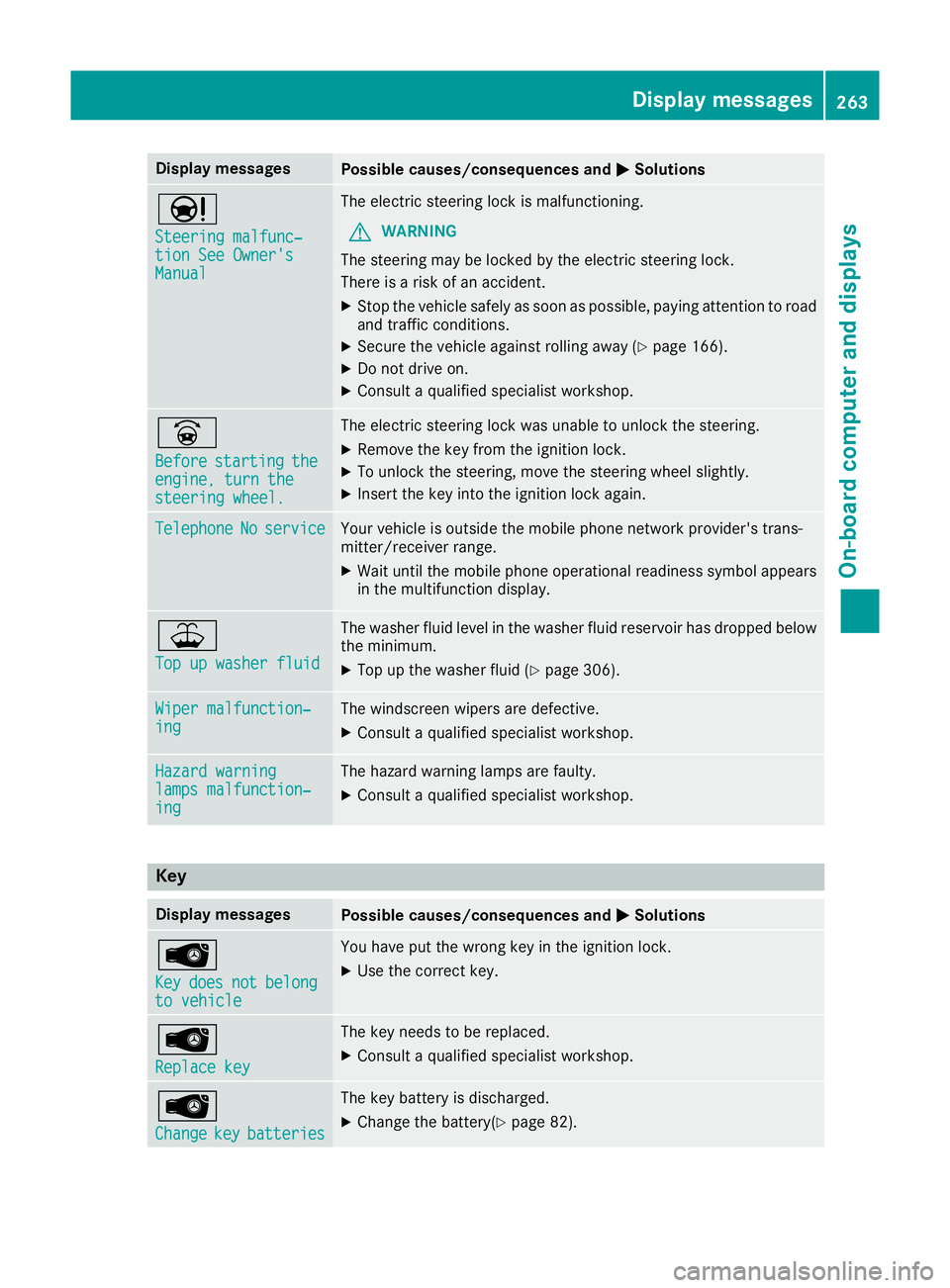
Display messages
Possible causes/consequences and
M
MSolutions Ð
Steering malfunc‐ Steering malfunc‐
tion See Owner's tion See Owner's
Manual Manual The electric steering lock is malfunctioning.
G WARNING
The steering may be locked by the electric steering lock.
There is a risk of an accident.
X Stop the vehicle safely as soon as possible, paying attention to road
and traffic conditions.
X Secure the vehicle against rolling away (Y page 166).
X Do not drive on.
X Consult a qualified specialist workshop. _
Before Before
starting
starting the
the
engine, turn the
engine, turn the
steering wheel. steering wheel. The electric steering lock was unable to unlock the steering.
X Remove the key from the ignition lock.
X To unlock the steering, move the steering wheel slightly.
X Insert the key into the ignition lock again. Telephone
Telephone
No
Noservice
service Your vehicle is outside the mobile phone network provider's trans-
mitter/receiver range.
X Wait until the mobile phone operational readiness symbol appears
in the multifunction display. ¥
Top up washer fluid Top up washer fluid The washer fluid level in the washer fluid reservoir has dropped below
the minimum.
X Top up the washer fluid (Y page 306).Wiper malfunction‐
Wiper malfunction‐
ing ing The windscreen wipers are defective.
X Consult a qualified specialist workshop. Hazard warning
Hazard warning
lamps malfunction‐ lamps malfunction‐
ing ing The hazard warning lamps are faulty.
X Consult a qualified specialist workshop. Key
Display messages
Possible causes/consequences and
M
MSolutions Â
Key Key
does
does not
notbelong
belong
to vehicle
to vehicle You have put the wrong key in the ignition lock.
X Use the correct key. Â
Replace key Replace key The key needs to be replaced.
X Consult a qualified specialist workshop. Â
Change Change
key
keybatteries
batteries The key battery is discharged.
X Change the battery(Y page 82). Display
messages
263On-board computer and displays Z
Page 267 of 369
Display messages
Possible causes/consequences and
M
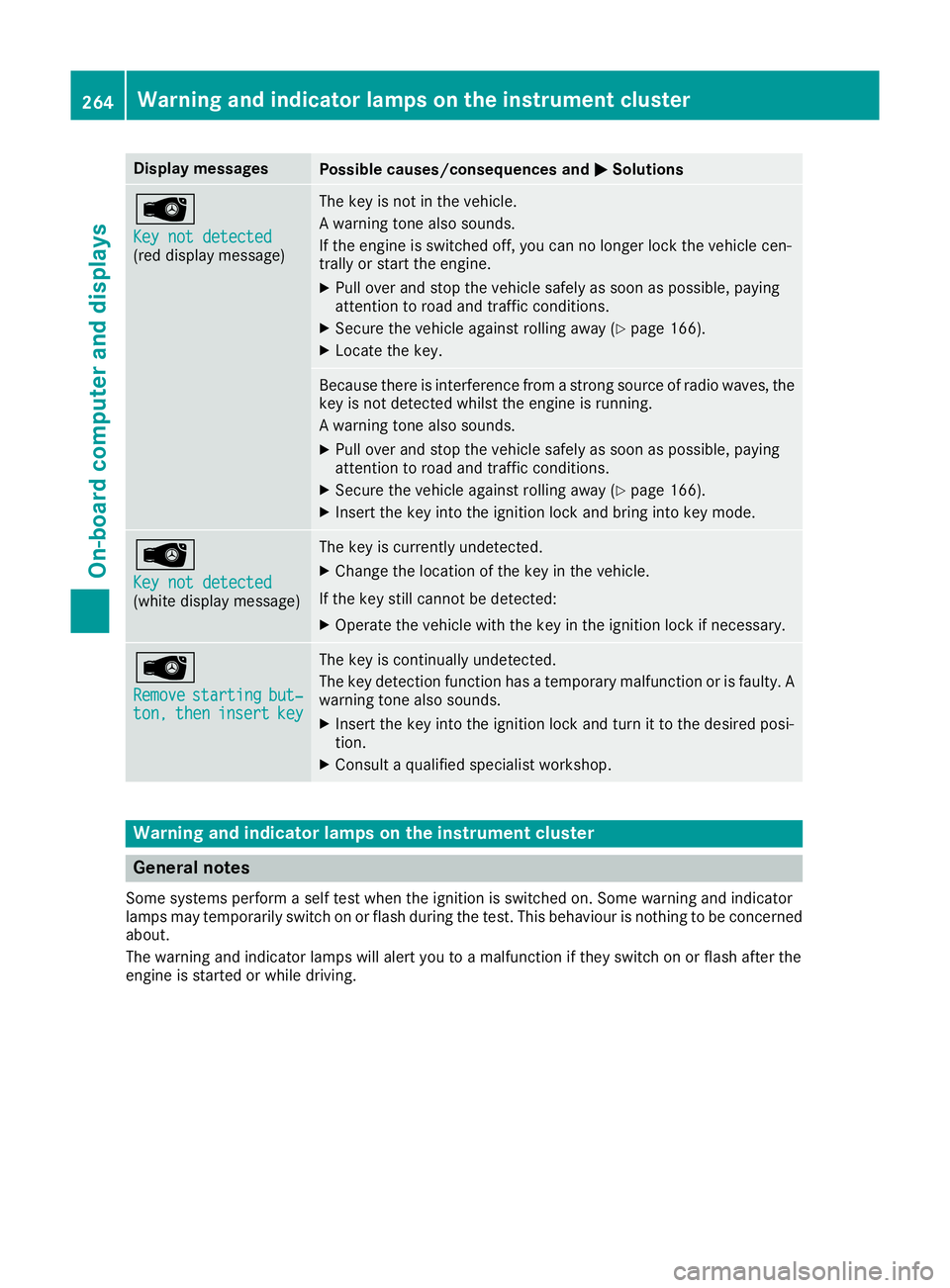
MSolutions Â
Key not detected Key not detected
(red display message) The key is not in the vehicle.
A warning tone also sounds.
If the engine is switched off, you can no longer lock the vehicle cen-
trally or start the engine.
X Pull over and stop the vehicle safely as soon as possible, paying
attention to road and traffic conditions.
X Secure the vehicle against rolling away (Y page 166).
X Locate the key. Because there is interference from a strong source of radio waves, the
key is not detected whilst the engine is running.
A warning tone also sounds.
X Pull over and stop the vehicle safely as soon as possible, paying
attention to road and traffic conditions.
X Secure the vehicle against rolling away (Y page 166).
X Insert the key into the ignition lock and bring into key mode. Â
Key not detected Key not detected
(white display message) The key is currently undetected.
X Change the location of the key in the vehicle.
If the key still cannot be detected:
X Operate the vehicle with the key in the ignition lock if necessary. Â
Remove Remove
starting
starting but‐
but‐
ton,
ton, then
theninsert
insert key
key The key is continually undetected.
The key detection function has a temporary malfunction or is faulty. A
warning tone also sounds.
X Insert the key into the ignition lock and turn it to the desired posi-
tion.
X Consult a qualified specialist workshop. Warning and indicator lamps on the instrument cluster
General notes
Some systems perform a self test when the ignition is switched on. Some warning and indicator
lamps may temporarily switch on or flash during the test. This behaviour is nothing to be concerned about.
The warning and indicator lamps will alert you to a malfunction if they switch on or flash after the
engine is started or while driving. 264
Wa
rning and indi cator lamps on the instrument clusterOn-board computer and displays
Page 276 of 369
Warning/
indicator
lamp
N N
Signal type
Possible causes/consequences and M
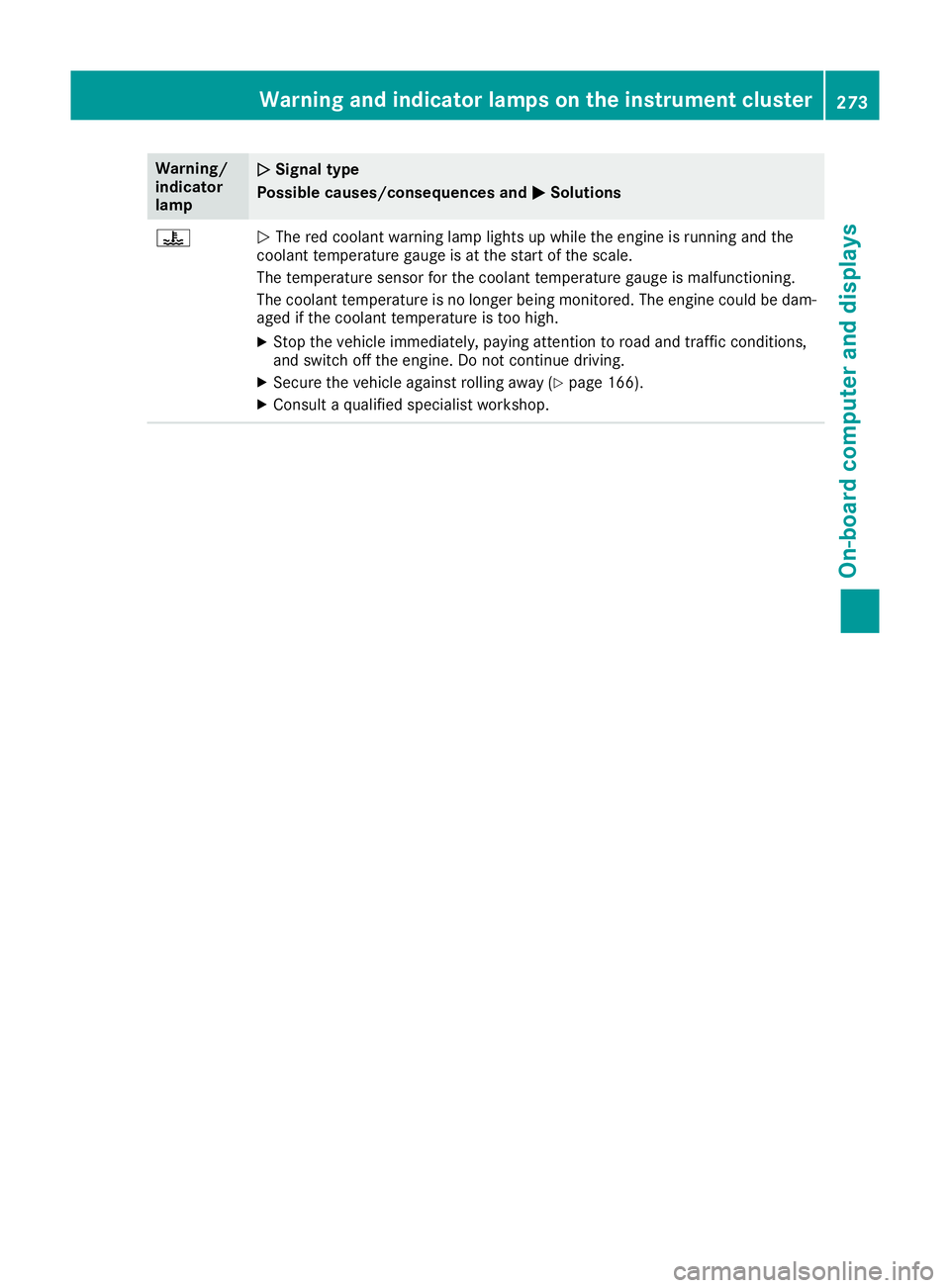
MSolutions ?
N
The red coolant warning lamp lights up while the engine is running and the
coolant temperature gauge is at the start of the scale.
The temperature sensor for the coolant temperature gauge is malfunctioning.
The coolant temperature is no longer being monitored. The engine could be dam-
aged if the coolant temperature is too high.
X Stop the vehicle immediately, paying attention to road and traffic conditions,
and switch off the engine. Do not continue driving.
X Secure the vehicle against rolling away (Y page 166).
X Consult a qualified specialist workshop. Warning and indicator lamps on the instrument cluster
273On-board computer and displays Z