buttons MERCEDES-BENZ GLA SUV 2017 Owners Manual
[x] Cancel search | Manufacturer: MERCEDES-BENZ, Model Year: 2017, Model line: GLA SUV, Model: MERCEDES-BENZ GLA SUV 2017Pages: 369, PDF Size: 7.56 MB
Page 10 of 369
Display message ............................ 247
Brakes
ABS .................................................. 68
BAS .................................................. 69
Brake fluid (notes) ........................ .356
Braking assistance appropriate to
the situation ..................................... 71
Display message ............................ 235
Driving tips ................................... .170
Hill start assist ............................... 147
HOLD function ............................... 186
Important safety notes .................. 170
Parking brake ................................ 167
Warning lamp ................................. 266
Braking assistance appropriate to
the situation
Function/notes ................................ 71
Breakdown
Where will I find...? ........................ 315
see Flat tyre
see Tow-starting
see Towing away
Buttons on the steering column ...... 218C
Calling up a fault see Display messages
Car
see Vehicle
Car wash (care) ................................. 308
Care
Automatic car wash ....................... 308
Carpets .......................................... 314
Display .......................................... .312
Exhaust pipe .................................. 312
Exterior lighting ............................ .311
Gear or selector lever .................... 313
High-pressure cleaner .................... 309
Interior .......................................... .312
Matt paintwork .............................. 309
Notes ............................................. 308
Paint .............................................. 309
Plastic trim ................................... .312
Reversing camera .......................... 311
Roof lining ...................................... 314
Seat belt ........................................ 313
Seat cover ..................................... 313 Sensors ......................................... 311
Steering wheel ............................... 313
Trim pieces ................................... .313
Washing by hand ........................... 308
Wheels .......................................... .310
Windows ........................................ 310
Wiper blades .................................. 310
Wooden trim .................................. 313
CD
See also Digital Owner's Manual ... 277
CD player (on-board computer) ........224
Central locking
Automatic locking (on-board com-
puter) ............................................. 229
Locking/unlocking (key ).................. 79
Centre console
Lower section .................................. 37
Upper section .................................. 36
Changing a wheel
Wheels and tyres ........................... 343
Child
Restraint system .............................. 57
Child seat
Forward-facing restraint system ...... 61
i-Size ................................................ 57
ISOFIX .............................................. 57
On the front-passenger sea t............ 60
Rearward-facing restraint system .... 61
Recommendations ........................... 65
Suitable positions ............................ 61
Top Tether ....................................... 59
Child-proof locks
Important safety notes .................... 66
Rear doors ....................................... 67
Children in the vehicle
Important safety notes .................... 56
Cigarette lighter ................................ 298
Cleaning
Mirror turn signal ........................... 311
Trailer tow hitch ............................. 312
Climate control
Air conditioning ............................. 129
Auxiliary heating/ventilation .......... 137
Controlling automaticall y............... 132
Convenience opening/closing
(air-recirculation mode) ................. 136
Cooling with air dehumidification .. 132
Demisting the windows .................. 135 Index
7
Page 23 of 369
Spare wheel
see Emergency spare wheel
Specialist workshop ............................30
Spectacles compartment ................. 289
Speed limiter
Display message ............................2 55
Important safety notes .................. 178
Selecting ........................................ 179
Speed, controlling
see Cruise control
Speedometer
Activating/deactivating the addi-
tional speedometer ........................ 228
Digital ............................................ 222
In the Instrument cluster ................. 34
Segments ...................................... 217
Selecting a display unit .................. 228
SPORT handling mode
Deactivating/activating
(Mercedes-AMG vehicles) ................ 73
Warning lamp ................................. 270
Start-off assist
Activating ....................................... 188
Important safety notes .................. 187
Start/Stop button
Removing ....................................... 145
Starting the engine ........................ 146
Start/stop function
see ECO start/stop function
Starting (engine) ................................ 145
Starting the engine
see Starting (engine)
STEER CONTROL .................................. 75
Steering
Display message ............................ 262
Steering assistant STEER CON-
TROL
see STEER CONTROL
Steering wheel
Adjusting (manually) ...................... 111
Button overview ............................... 35
Buttons (on-board computer) ......... 218
Cleaning ......................................... 313
Gearshift paddle s........................... 161
Important safety notes .................. 111
Steering wheel gearshift paddles .... 161
Stopwatch (RACETIMER) ................... 232Stowage compartment
Map pockets .................................. 290
Stowage compartments
Armrest (front) ............................... 289
Armrest (under) ............................. 290
Centre console .............................. 289
Centre console (rear) ..................... 290
Cup holde r..................................... 296
Glove compartment ....................... 289
Important safety information ......... 288
Spectacles compartment ............... 289
Under driver's seat/front-
passenger sea t.............................. 290
Stowage net ....................................... 290
Stowage space
Stowage net ................................... 290
Summer opening
see Convenience opening feature
Summer tyres .................................... 336
Sun visor ............................................ 297
Suspension settings
AMG RIDE CONTROL sports sus-
pension .......................................... 189
Switching on media mode
Via the device list .......................... 286 T
Tail lamps see Lights
Tailgate
Display message ............................ 261
Emergency unlocking ................. 94, 97
Important safety notes .................... 89
Limiting the opening angle ............... 93
Obstruction detectio n...................... 89
Opening dimensions ...................... 358
Opening/closing (from outside) .. 90, 95 Opening/closing automatically
from inside ....................................... 92
Opening/closing automatically
from outside .................................... 90
Tank
see Fuel tank
Technical data
Capacities ...................................... 352
Information .................................... 350
Trailer load s................................... 359 20
Index
Page 28 of 369
Introduction
The printed Owner's Manual provides informa-
tion about the safe operation of your vehicle.
The Digital Owner's Manual provides compre-
hensive and specifically adapted information on
your vehicle's equipment and multimedia sys-
tem. You can call up the Digital Owner's Manual
via the multimedia system.
i You will not incur any costs when calling up
the Digital Owner's Manual. The Digital Own-
er's Manual works without connecting to the
internet.
There are three ways to access the topics of the Digital Owner's Manual:
R Visual search
The visual search allows you to explore your
vehicle "virtually". Starting from either the
vehicle exterior view or interior view, you can
access many of the different topics covered
by the Digital Owner's Manual. To access the vehicle interior section, select the "Vehicle
interior" view.
R Keyword search
The keyword search allows you to search for a
keyword by entering characters.
R Contents
You can select individual sections in the con-
tents.
i The Digital Owner's Manual is deactivated
for safety reasons while driving. Operation
Calling up the Digital Owner's Manual
X Press the Øbutton on the centre console.
The vehicle overview appears.
X Select the "Owner's Manual" menu item by
turning 3or pressing 7the controller.
X Acknowledge 7the message about the
warning and safety notes.
The basic menu for the Digital Owner's Man-
ual appears. Operating the Digital Owner's Manual
General notes Please observe the information about the oper-
ation of the controller (Y page 278).
Content pages You can access the pages of content by means
of a visual search or a keyword search or by
using the table of contents.
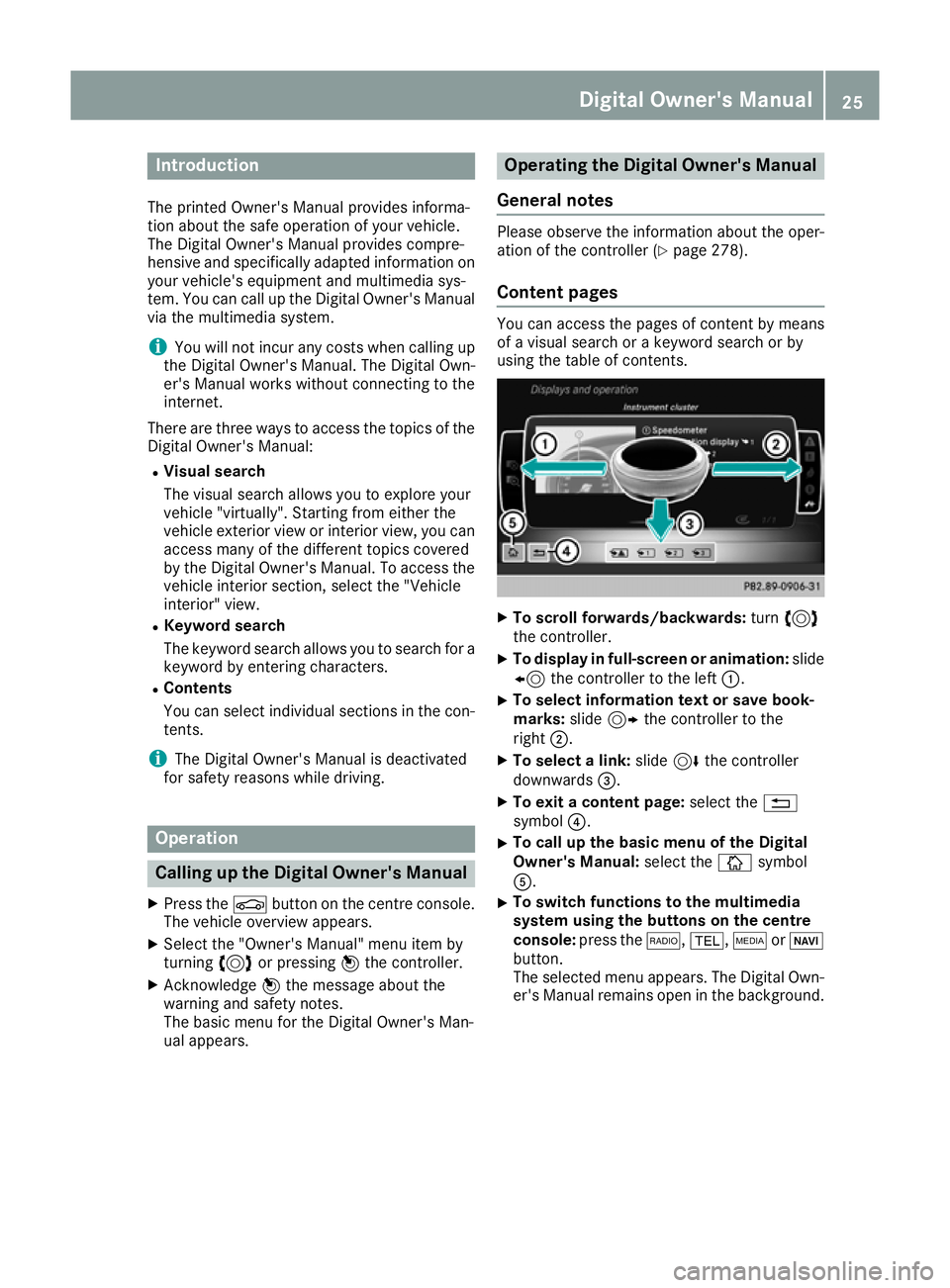
X
To scroll forwards/backwards: turn3
the controller.
X To display in full-screen or animation: slide
8 the controller to the left :.
X To select information text or save book-
marks:
slide9 the controller to the
right ;.
X To select a link: slide6the controller
downwards =.
X To exit a content page: select the%
symbol ?.
X To call up the basic menu of the Digital
Owner's Manual:
select theÞsymbol
A.
X To switch functions to the multimedia
system using the buttons on the centre
console: press the $,%,ÕorØ
button.
The selected menu appears. The Digital Own- er's Manual remains open in the background. Digital Owner's Manual
25
Page 84 of 369
Deactivating and activating
If you do not intend to use the vehicle for an
extended period of time, you can deactivate
KEYLESS-GO. The key will then use very little
power, thereby conserving battery power. For
the purposes of activation or deactivation, the
vehicle does not have to be nearby.
X To deactivate: press the&button on the
key twice in rapid succession.
The battery check lamp of the key flashes
twice briefly and lights up once, then KEY-
LESS-GO is deactivated (Y page 82).
X To activate: press any button on the key.
or X Insert the key into the ignition lock.
KEYLESS-GO and all its associated features
are available again. Changing the settings of the locking
system
You can change the settings of the locking sys-
tem. This means that only the driver's door and
the fuel filler flap are unlocked when the vehicle is unlocked. This is useful if you frequently travelalone.
X To change the setting: press and hold down
the % and& buttons simultaneously
for about six seconds until the battery indica-
tor lamp flashes twice (Y page 82).
If the setting of the locking system is changed
within the signal range of the vehicle, pressing
the & or% button:
R locks or
R unlocks the vehicle
The key now functions as follows:
X To unlock: press the%button once.
X To unlock centrally: press the%button
twice.
X To lock centrally: press the&button. The KEYLESS-GO function is changed as fol-
lows:
X To unlock the driver's door: touch the inner
surface of the door handle on the driver's
door.
X To unlock centrally: touch the inner surface
of the door handle on the front-passenger
door or the rear door.
X To lock centrally: touch the outer sensor
surface on one of the door handles.
X To restore the factory settings: press and
hold down the %and& buttons simul-
taneously for approximately six seconds until
the battery check lamp flashes twice
(Y page 82). Emergency key element
General notes If the vehicle can no longer be unlocked with the
key or KEYLESS-GO, use the emergency key ele-
ment.
If you use the emergency key element to unlock
and open the driver's door or the tailgate, the
anti-theft alarm system will be triggered
(Y page 76).
There are several ways to deactivate the alarm:
X To deactivate the alarm with the key: press
the % or& button on the key.
or X Insert the key into the ignition lock.
or X To deactivate the alarm with KEYLESS-GO:
press the Start/Stop button in the ignition
lock. The key must be in the vehicle.
or X Lock or unlock the vehicle using KEYLESS-
GO. The key must be outside the vehicle.
If you unlock the vehicle using the emergency
key element, the fuel filler flap will not be
unlocked automatically. X To unlock the fuel filler flap: insert the key
into the ignition lock. Key
81Opening and closing Z
Page 86 of 369
X
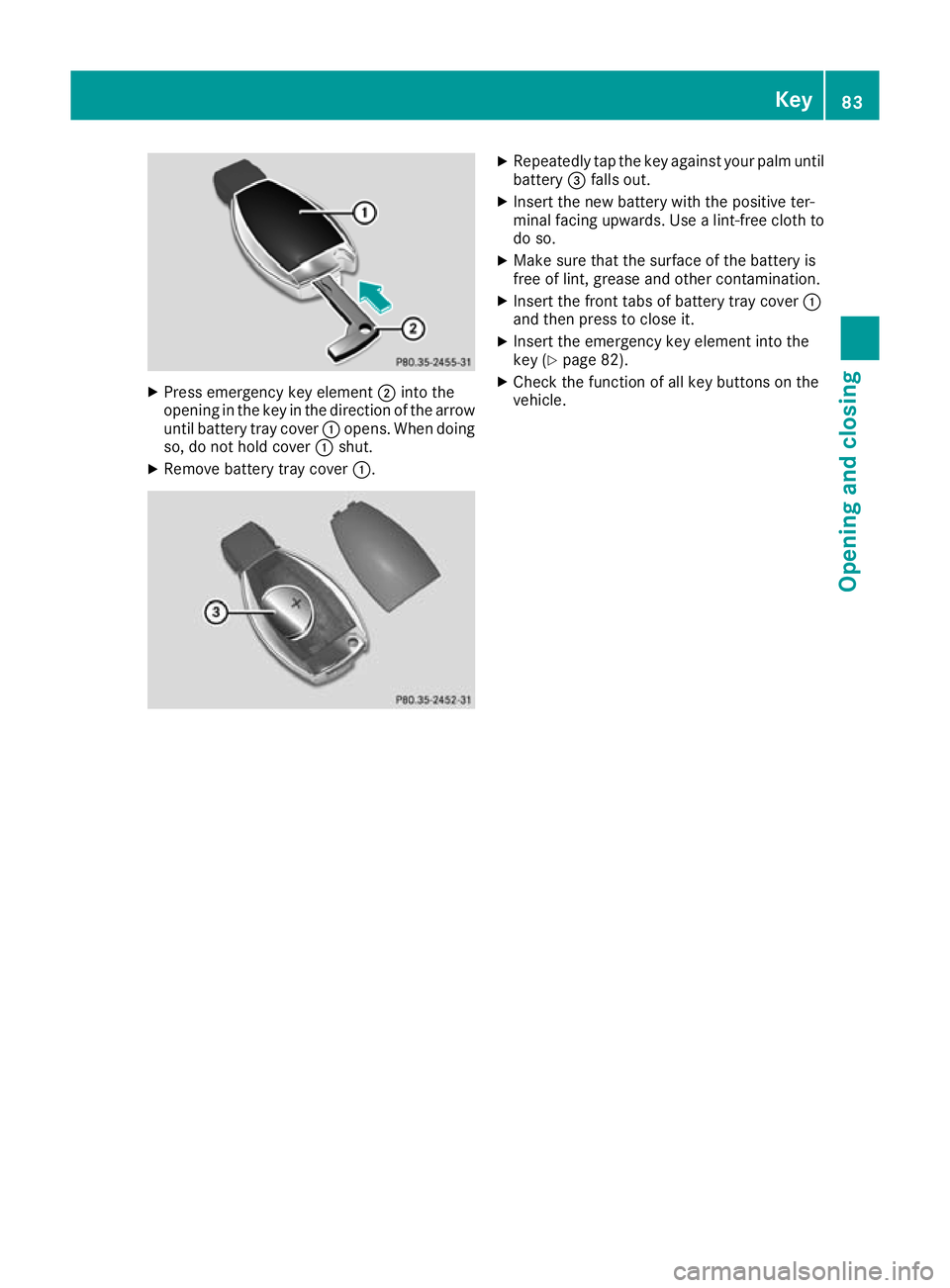
Press emergency key element ;into the
opening in the key in the direction of the arrow
until battery tray cover :opens. When doing
so, do not hold cover :shut.
X Remove battery tray cover :. X
Repeatedly tap the key against your palm until
battery =falls out.
X Insert the new battery with the positive ter-
minal facing upwards. Use a lint-free cloth to
do so.
X Make sure that the surface of the battery is
free of lint, grease and other contamination.
X Insert the front tabs of battery tray cover :
and then press to close it.
X Insert the emergency key element into the
key (Y page 82).
X Check the function of all key buttons on the
vehicle. Key
83Opening and closing Z
Page 91 of 369
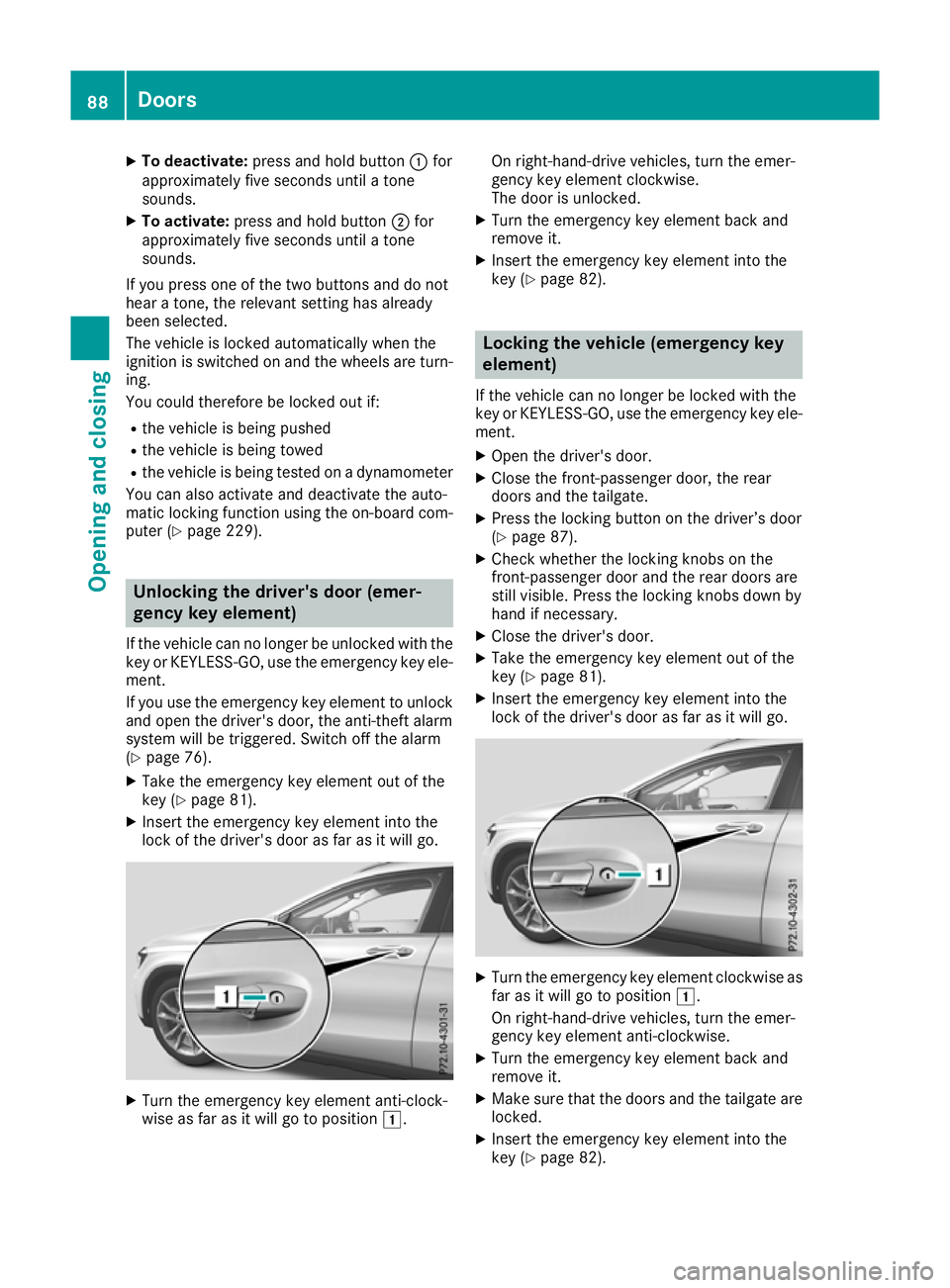
X
To deactivate: press and hold button :for
approximately five seconds until a tone
sounds.
X To activate: press and hold button ;for
approximately five seconds until a tone
sounds.
If you press one of the two buttons and do not
hear a tone, the relevant setting has already
been selected.
The vehicle is locked automatically when the
ignition is switched on and the wheels are turn-
ing.
You could therefore be locked out if:
R the vehicle is being pushed
R the vehicle is being towed
R the vehicle is being tested on a dynamometer
You can also activate and deactivate the auto-
matic locking function using the on-board com- puter (Y page 229). Unlocking the driver's door (emer-
gency key element)
If the vehicle can no longer be unlocked with the key or KEYLESS-GO, use the emergency key ele-
ment.
If you use the emergency key element to unlock
and open the driver's door, the anti-theft alarm
system will be triggered. Switch off the alarm
(Y page 76).
X Take the emergency key element out of the
key (Y page 81).
X Insert the emergency key element into the
lock of the driver's door as far as it will go. X
Turn the emergency key element anti-clock-
wise as far as it will go to position 1.On right-hand-drive vehicles, turn the emer-
gency key element clockwise.
The door is unlocked.
X Turn the emergency key element back and
remove it.
X Insert the emergency key element into the
key (Y page 82). Locking the vehicle (emergency key
element)
If the vehicle can no longer be locked with the
key or KEYLESS-GO, use the emergency key ele-
ment.
X Open the driver's door.
X Close the front-passenger door, the rear
doors and the tailgate.
X Press the locking button on the driver’s door
(Y page 87).
X Check whether the locking knobs on the
front-passenger door and the rear doors are
still visible. Press the locking knobs down by
hand if necessary.
X Close the driver's door.
X Take the emergency key element out of the
key (Y page 81).
X Insert the emergency key element into the
lock of the driver's door as far as it will go. X
Turn the emergency key element clockwise as
far as it will go to position 1.
On right-hand-drive vehicles, turn the emer-
gency key element anti-clockwise.
X Turn the emergency key element back and
remove it.
X Make sure that the doors and the tailgate are
locked.
X Insert the emergency key element into the
key (Y page 82). 88
DoorsOpening and closing
Page 110 of 369
G
WARNING
If the driver's seat is not correctly engaged, it could unexpectedly move while driving. This
could cause you to lose control of the vehicle. There is a risk of an accident.
Always ensure that the driver's seat is
engaged before starting the vehicle. G
WARNING
You could lose control of the vehicle while
driving if you:
R adjust the driver's seat, steering wheel or
mirrors
R fasten the seat belt
There is a risk of an accident.
Adjust the driver's seat, head restraint, steer-
ing wheel and mirrors and fasten your seat
belt before starting the engine. G
WARNING
If you adjust the seat height carelessly, you or other vehicle occupants could be trapped andthereby injured. Children in particular could
accidentally press the electrical seat adjust-
ment buttons and become trapped. There is a
risk of injury.
While moving the seats, make sure that your
hands or other body parts do not get under the
lever assembly of the seat adjustment sys-
tem.
! To avoid damage to the seats and the seat
heating, observe the following information:
R do not spill any liquids on the seats. If liquid
is spilled on the seats, dry them as soon aspossible.
R if the seat covers are damp or wet, do not
switch on the seat heating. The seat heat-
ing should also not be used to dry the seats.
R clean the seat covers as recommended;
see the "Interior care" section.
R do not transport heavy loads on the seats.
Do not place sharp objects on the seat
cushions, e.g. knives, nails or tools. The seats should only be occupied by passen-
gers, if possible.
R when the seat heating is in operation, do
not cover the seats with insulating materi-
als, e.g. blankets, coats, bags, seat covers,
child seats or booster seats.
! Make sure that there are no objects in the
footwell under or behind the seats when mov-
ing the seats back. There is a risk that the
seats and/or the objects could be damaged.
i Further related subjects:
R Luggage compartment enlargement (fold-
ing down the rear seats) (Y page 291) Adjusting the seats manually
Vehicles without the seating comfort
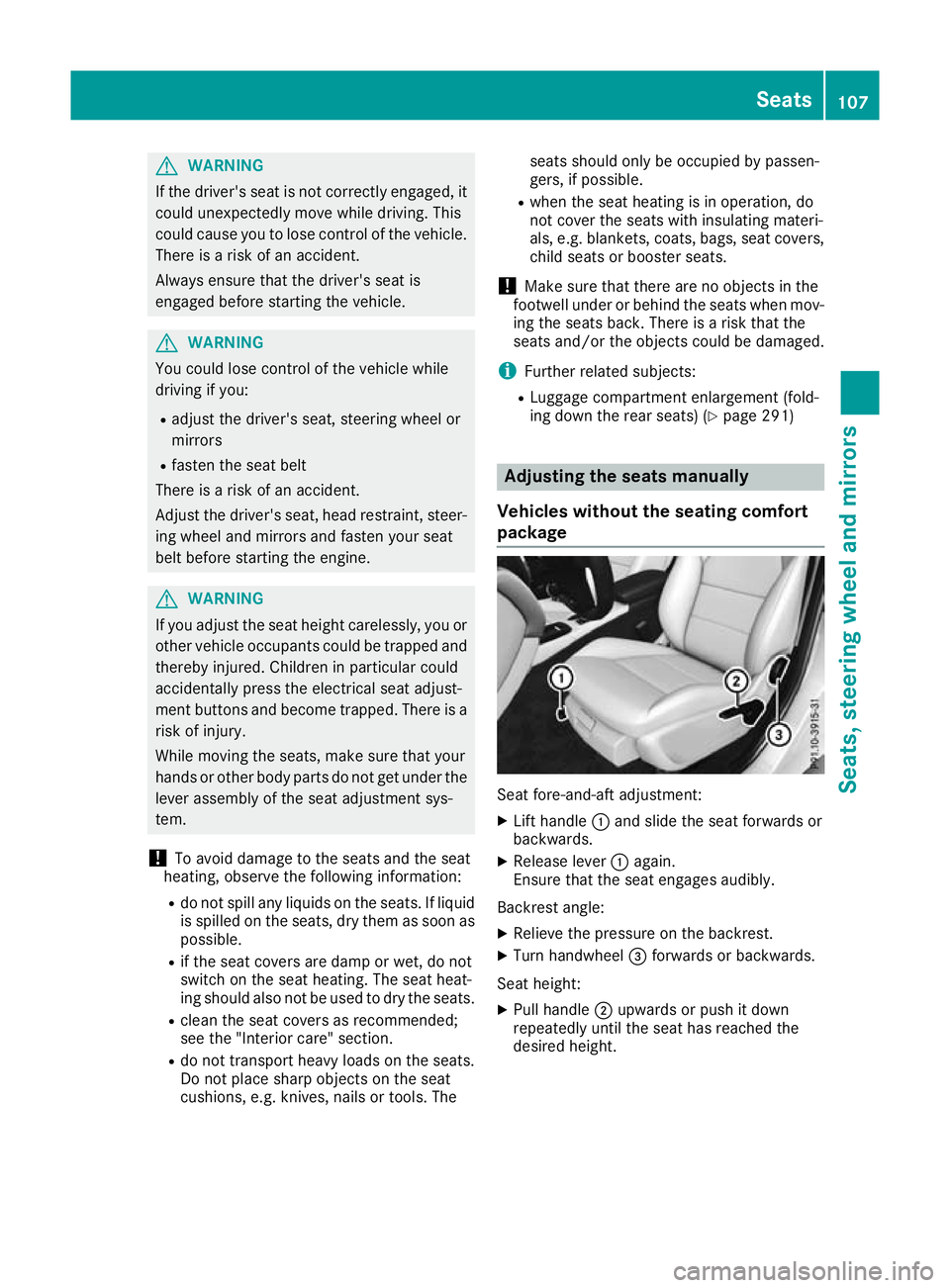
package Seat fore-and-aft adjustment:
X
Lift handle :and slide the seat forwards or
backwards.
X Release lever :again.
Ensure that the seat engages audibly.
Backrest angle:
X Relieve the pressure on the backrest.
X Turn handwheel =forwards or backwards.
Seat height: X Pull handle ;upwards or push it down
repeatedly until the seat has reached the
desired height. Seats
107Seats, steering wheel and mirrors Z
Page 134 of 369
I
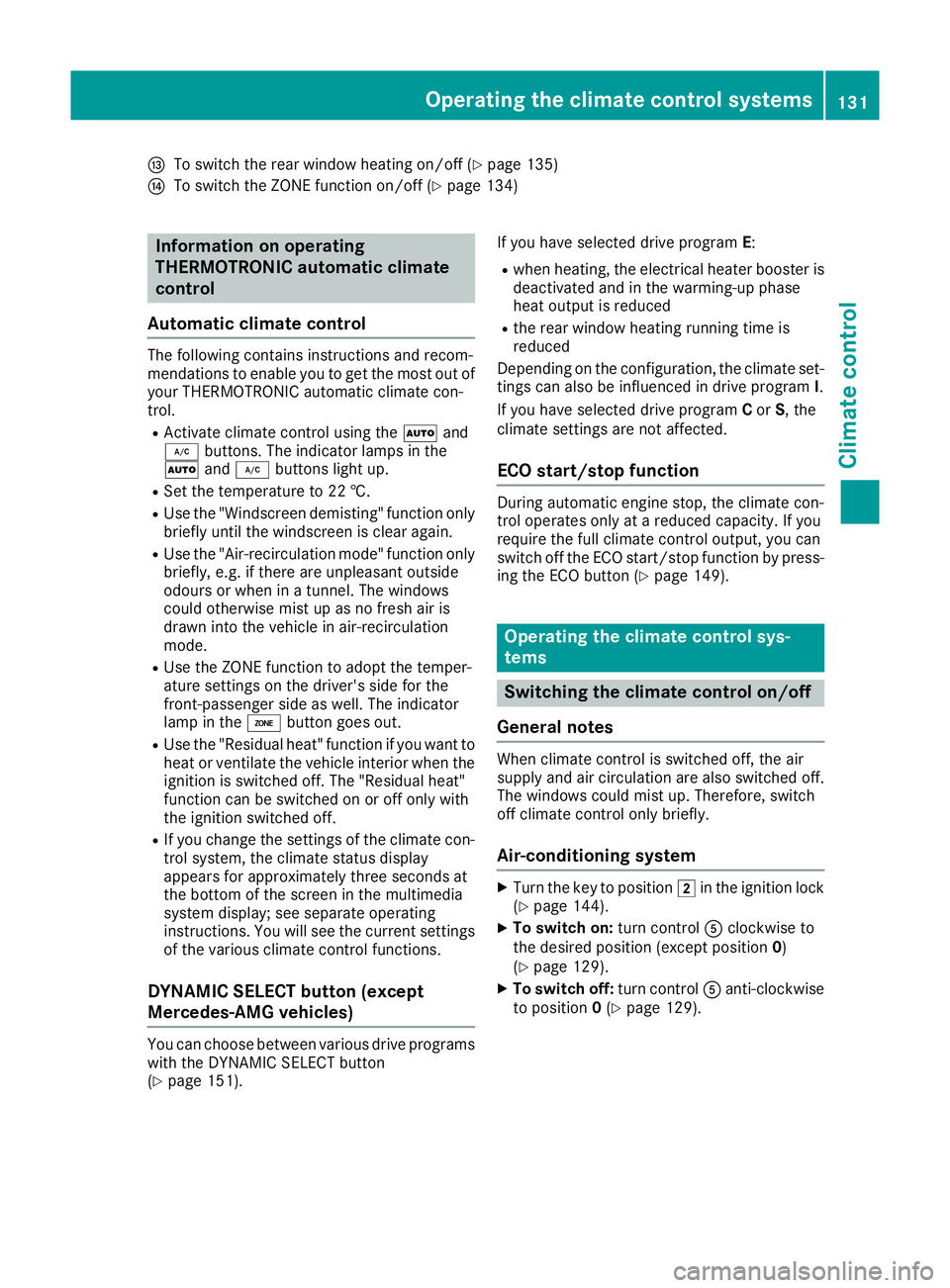
To switch the rear window heating on/off (Y page 135)
J To switch the ZONE function on/off (Y page 134)Information on operating
THERMOTRONIC automatic climate
control
Automatic climate control The following contains instructions and recom-
mendations to enable you to get the most out of
your THERMOTRONIC automatic climate con-
trol.
R Activate climate control using the Ãand
¿ buttons. The indicator lamps in the
à and¿ buttons light up.
R Set the temperature to 22 †.
R Use the "Windscreen demisting" function only
briefly until the windscreen is clear again.
R Use the "Air-recirculation mode" function only
briefly, e.g. if there are unpleasant outside
odours or when in a tunnel. The windows
could otherwise mist up as no fresh air is
drawn into the vehicle in air-recirculation
mode.
R Use the ZONE function to adopt the temper-
ature settings on the driver's side for the
front-passenger side as well. The indicator
lamp in the ábutton goes out.
R Use the "Residual heat" function if you want to
heat or ventilate the vehicle interior when the
ignition is switched off. The "Residual heat"
function can be switched on or off only with
the ignition switched off.
R If you change the settings of the climate con-
trol system, the climate status display
appears for approximately three seconds at
the bottom of the screen in the multimedia
system display; see separate operating
instructions. You will see the current settings of the various climate control functions.
DYNAMIC SELECT button (except
Mercedes-AMG vehicles) You can choose between various drive programs
with the DYNAMIC SELECT button
(Y page 151). If you have selected drive program
E:
R when heating, the electrical heater booster is
deactivated and in the warming-up phase
heat output is reduced
R the rear window heating running time is
reduced
Depending on the configuration, the climate set-
tings can also be influenced in drive program I.
If you have selected drive program Cor S, the
climate settings are not affected.
ECO start/stop function During automatic engine stop, the climate con-
trol operates only at a reduced capacity. If you
require the full climate control output, you can
switch off the ECO start/stop function by press-
ing the ECO button (Y page 149). Operating the climate control sys-
tems
Switching the climate control on/off
General notes When climate control is switched off, the air
supply and air circulation are also switched off.
The windows could mist up. Therefore, switch
off climate control only briefly.
Air-conditioning system X
Turn the key to position 2in the ignition lock
(Y page 144).
X To switch on: turn controlAclockwise to
the desired position (except position 0)
(Y page 129).
X To switch off: turn controlAanti-clockwise
to position 0(Y page 129). Operating the climate control systems
131Climate control
Page 136 of 369

Setting climate control to automatic
mode X
Turn the key to position 2in the ignition lock
(Y page 144).
X Set the desired temperature.
X To activate: press theÃbutton.
The indicator lamp in the Ãbutton lights
up. Automatic air distribution and airflow are
activated.
X To switch to manual mode: press theÉ
or Ë button.
or
X Press the KorI button.
The indicator lamp in the Ãbutton goes
out. Automatic air distribution and airflow are deactivated. Setting the temperature
Air-conditioning system You can set the temperature for the entire vehi-
cle. The set temperature is automatically main-
tained at a constant level.
X Turn the key to position 2in the ignition lock
(Y page 144).
X To increase or reduce: turn control:anti-
clockwise or clockwise (Y page 129). Change
the temperature setting only in small incre-
ments. Start at 22 †.
THERMOTRONIC automatic climate
control Different temperatures can be set for the driv-
er's and front-passenger sides. The set temper- ature is automatically maintained at a constant
level.
X Turn the key to position 2in the ignition lock
(Y page 144).
X To increase or decrease: turn control:or
E anti-clockwise or clockwise (Y page 130).
Change the temperature setting only in small
increments. Start at 22 †. Setting the air distribution
Air-conditioning system Air distribution settings
¯ Directs the airflow through the demister
vents
P Directs the airflow through the centre
and side air vents
O Directs the airflow through the footwell
air vents
i You can also activate several of the air dis-
tribution settings simultaneously. In order to
do this, press several of the air distribution
buttons. The air is then routed through differ-
ent air vents.
i Regardless of the air distribution setting,
airflow is always directed through the side air vents. The side air vents can only be closed if
the adjusters are turned clockwise until they
engage.
Setting the air distribution X Turn the key to position 2in the ignition lock
(Y page 144).
X Press one or more of the P,O,¯
buttons.
The corresponding indicator lamp comes on.
THERMOTRONIC automatic climate
control Air distribution settings
¯ Directs the airflow through the demister
vents
P Directs the airflow through the centre
and side air vents
O Directs the airflow through the footwell
air vents
S Directs the airflow through the centre
and side air vents as well as the footwell
air vents
b Directs the airflow through the centre
and side air vents as well as the demister
vents
a Directs the airflow through the footwell
and demister vents
_ Directs the airflow through the demister
vents, the centre and side air vents as
well as the footwell air vents Operating the climate control systems
133Climate control
Page 143 of 369
time and at an unsuitable location. When setting
the departure time, observe the important
safety notes (Y page 137).
X Briefly press the ubutton.
X Press the ,or. button repeatedly
until the time to be changed appears in the
display.
X Press the uand^ buttons at the same
time.
The Îsymbol in the remote control display
flashes.
X Press the ,or. button to set the
desired departure time.
i The longer you press the
,or. but-
ton, the faster the time changes.
X Press the uand^ buttons at the same
time.
The new departure time is stored.
Activating the set departure time X Briefly press the ubutton.
X Press the ,or. button repeatedly
until the desired departure time appears in
the display.
X Press the ubutton.
The Ísymbol, the departure time and,
depending on the selected departure time,
the letter A, BorCappear in the display.
Deactivating the set departure time
X Briefly press the ubutton.
The status of the auxiliary heating is shown on
the display.
X Press the .button.
The first departure time stored appears on the
display.
X Press the ^button.
OFF is shown in the remote control display.
Replacing the remote control battery Important safety notes
G
WARNING
Batteries contain toxic and corrosive substan- ces. If batteries are swallowed, it can result in
severe health problems. There is a risk of fatal injury. Keep batteries out of the reach of children. If
a battery is swallowed, seek medical attention
immediately. H
Environmental note Batteries contain pollutants.
It is illegal to dispose of them
with the household rubbish.
They must be collected sep-
arately and disposed of in anenvironmentally responsible
recycling system. Dispose of batteries in an
environmentally responsible
manner. Take discharged
batteries to a qualified spe-
cialist workshop or to a col-
lection point for used batter-
ies.
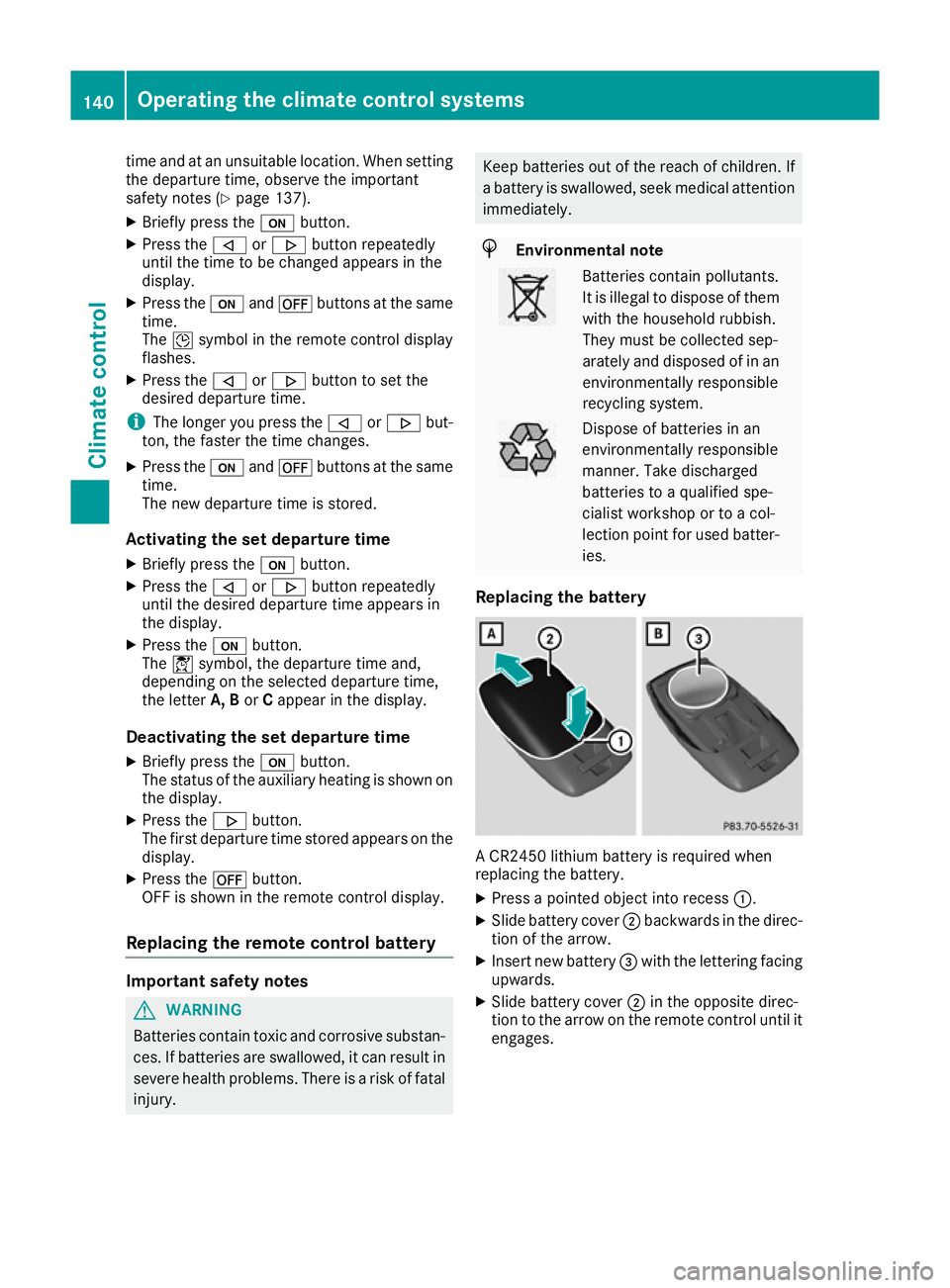
Replacing the battery A CR2450 lithium battery is required when
replacing the battery.
X Press a pointed object into recess :.
X Slide battery cover ;backwards in the direc-
tion of the arrow.
X Insert new battery =with the lettering facing
upwards.
X Slide battery cover ;in the opposite direc-
tion to the arrow on the remote control until it engages. 140
Operating the climate control systemsClimate control