buttons MERCEDES-BENZ GLA SUV 2017 User Guide
[x] Cancel search | Manufacturer: MERCEDES-BENZ, Model Year: 2017, Model line: GLA SUV, Model: MERCEDES-BENZ GLA SUV 2017Pages: 369, PDF Size: 7.56 MB
Page 221 of 369
The outside temperature display is in the multi-
function display (Y page 220).
There is a short delay before a change in outside
temperature appears in the multifunction dis-
play. Coolant temperature display
G
WARNING
If you open the bonnet while the engine is
overheating or while there is a fire in the
engine compartment, you could come into
contact with hot gases or other leaking ser-
vice products. There is a danger of injury. Allow an overheating engine to cool down
before opening the bonnet. If there is a fire in the engine compartment, leave the bonnet
closed and notify the fire brigade.
The coolant temperature gauge is in the instru-
ment cluster on the right-hand side (Y page 34).
Under normal operating conditions and with the correct coolant level, the coolant temperature
may rise to 120 †.
At high outside temperatures and when driving
in mountainous terrain, the coolant temperature may rise to the end of the scale. Operating the on-board computer
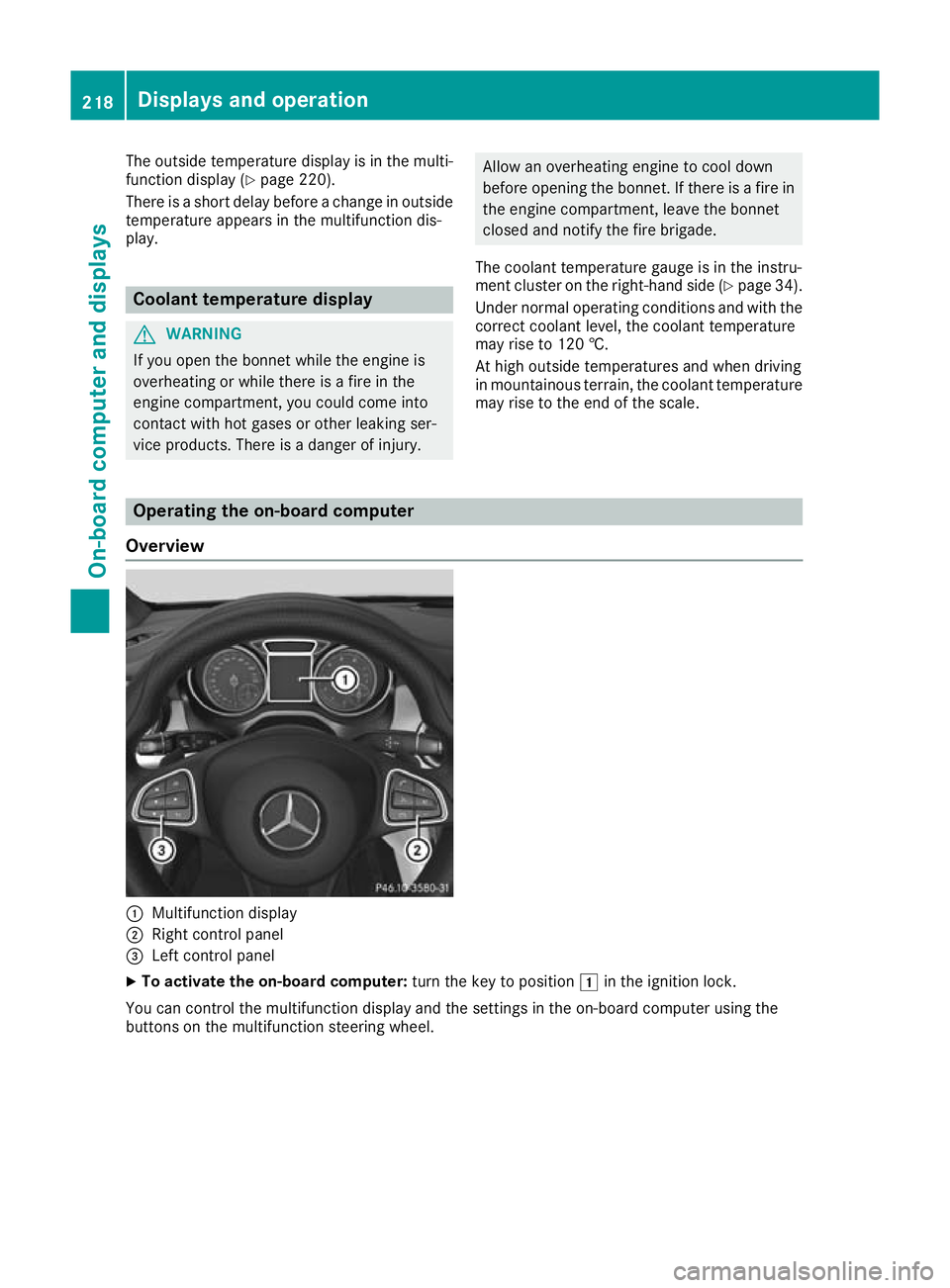
Overview :
Multifunction display
; Right control panel
= Left control panel
X To activate the on-board computer: turn the key to position1in the ignition lock.
You can control the multifunction display and the settings in the on-board computer using the
buttons on the multifunction steering wheel. 218
Displays and operationOn-board computer and displays
Page 223 of 369
~ R
Rejecting or ending a call
R Exits the telephone book/redial memory 6 R
Makes or accepts a call
R Switches to the redial memory Multifunction display
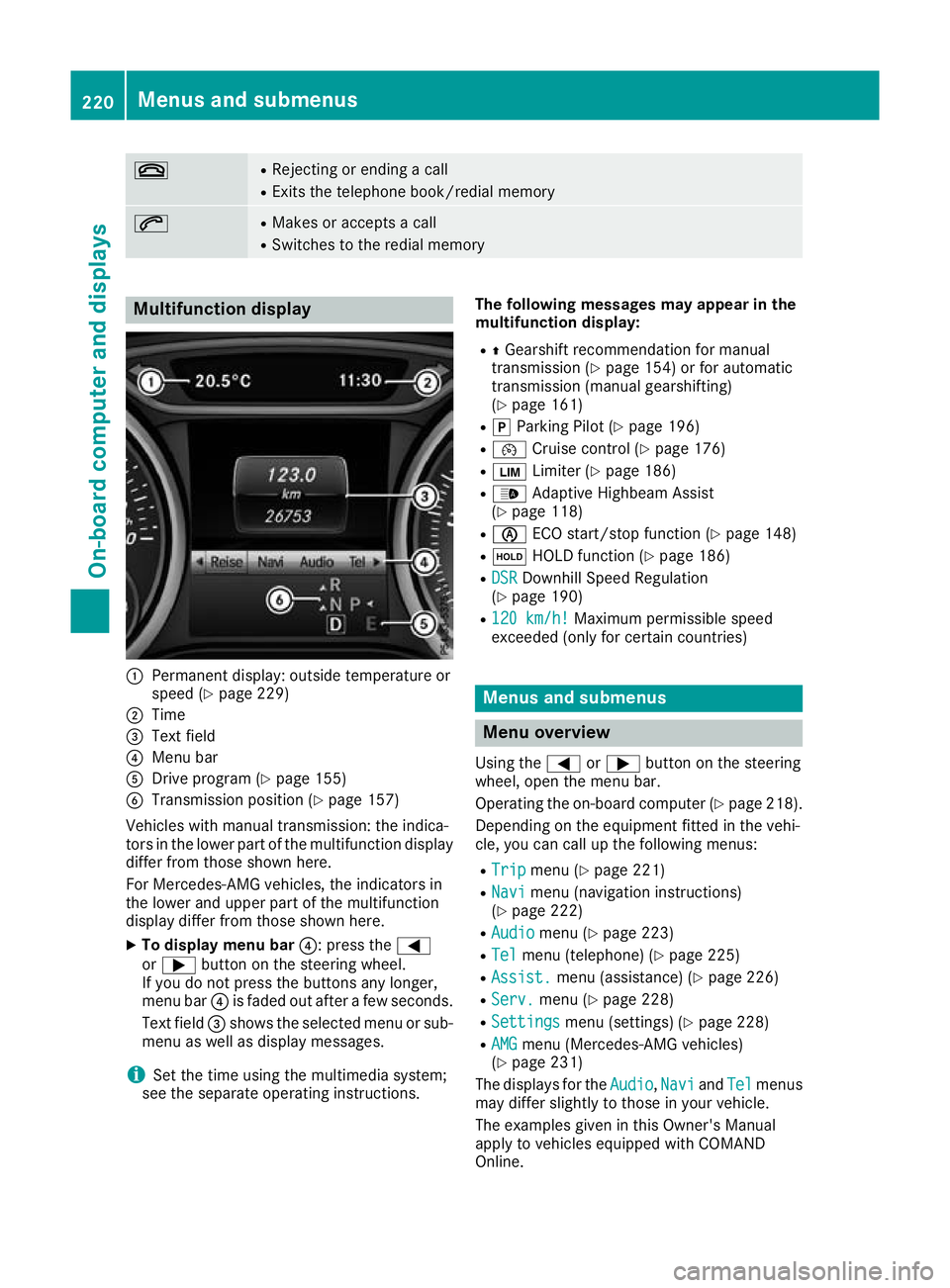
:
Permanent display: outside temperature or
speed (Y page 229)
; Time
= Text field
? Menu bar
A Drive program (Y page 155)
B Transmission position (Y page 157)
Vehicles with manual transmission: the indica-
tors in the lower part of the multifunction display
differ from those shown here.
For Mercedes-AMG vehicles, the indicators in
the lower and upper part of the multifunction
display differ from those shown here.
X To display menu bar ?: press the=
or ; button on the steering wheel.
If you do not press the buttons any longer,
menu bar ?is faded out after a few seconds.
Text field =shows the selected menu or sub-
menu as well as display messages.
i Set the time using the multimedia system;
see the separate operating instructions. The following messages may appear in the
multifunction display:
R ZGearshift recommendation for manual
transmission (Y page 154) or for automatic
transmission (manual gearshifting)
(Y page 161)
R j Parking Pilot (Y page 196)
R ¯ Cruise control (Y page 176)
R È Limiter (Y page 186)
R _ Adaptive Highbeam Assist
(Y page 118)
R è ECO start/stop function (Y page 148)
R ë HOLD function (Y page 186)
R DSR
DSR Downhill Speed Regulation
(Y page 190)
R 120 km/h! 120 km/h! Maximum permissible speed
exceeded (only for certain countries) Menus and submenus
Menu overview
Using the =or; button on the steering
wheel, open the menu bar.
Operating the on-board computer (Y page 218).
Depending on the equipment fitted in the vehi-
cle, you can call up the following menus:
R Trip Trip menu (Y page 221)
R Navi
Navi menu (navigation instructions)
(Y page 222)
R Audio
Audio menu (Y page 223)
R Tel Tel menu (telephone) (Y page 225)
R Assist. Assist. menu (assistance) (Y page 226)
R Serv.
Serv. menu (Y page 228)
R Settings
Settings menu (settings) (Y page 228)
R AMG
AMG menu (Mercedes-AMG vehicles)
(Y page 231)
The displays for the Audio
Audio,Navi
NaviandTel
Tel menus
may differ slightly to those in your vehicle.
The examples given in this Owner's Manual
apply to vehicles equipped with COMAND
Online. 220
Menus and submenusOn-board computer and displays
Page 304 of 369
charge the mobile phone, you must connect it to
a USB port.
Further information on the telephone module
with Bluetooth ®
(SAP profile) can be found in the
Digital Owner's Manual.
Operating the mobile phone You can operate the phone using the
6and
~ buttons on the multifunction steering
wheel. You can operate other mobile phone
functions via the on-board computer
(Y page 225).
When you remove the key from the ignition lock, the mobile phone is disconnected from the vehi-cle. You can then no longer make calls using the
hands-free system.
If a call is active and you remove the key from
the ignition lock, the conversation is transferred
over to the mobile phone. It is then possible to
continue the conversation on the mobile phone.
Mobile phone bracket in the stowage
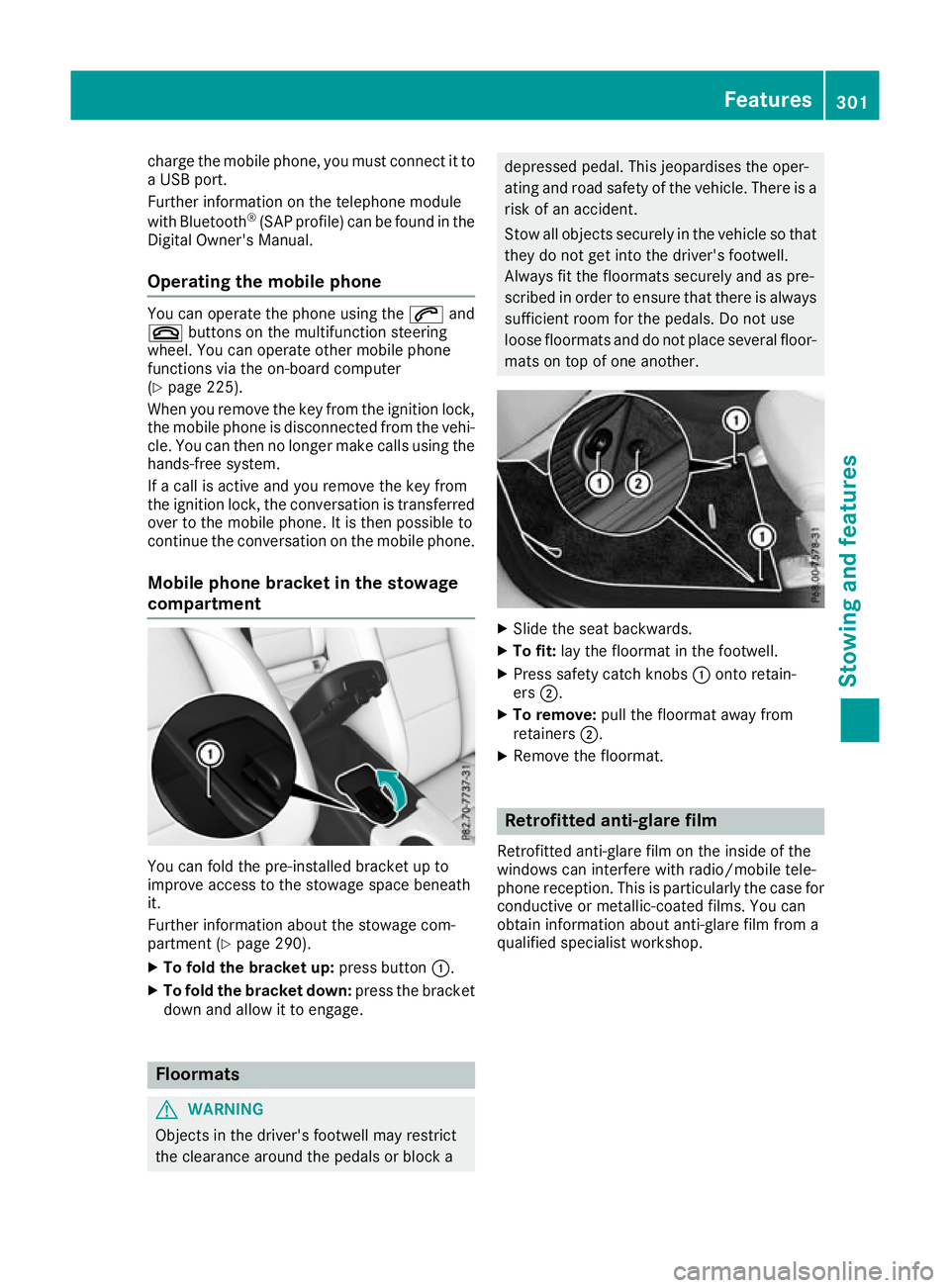
compartment You can fold the pre-installed bracket up to
improve access to the stowage space beneath
it.
Further information about the stowage com-
partment (Y
page 290).
X To fold the bracket up: press button:.
X To fold the bracket down: press the bracket
down and allow it to engage. Floormats
G
WARNING
Objects in the driver's footwell may restrict
the clearance around the pedals or block a depressed pedal. This jeopardises the oper-
ating and road safety of the vehicle. There is a
risk of an accident.
Stow all objects securely in the vehicle so that
they do not get into the driver's footwell.
Always fit the floormats securely and as pre-
scribed in order to ensure that there is always sufficient room for the pedals. Do not use
loose floormats and do not place several floor-mats on top of one another. X
Slide the seat backwards.
X To fit: lay the floormat in the footwell.
X Press safety catch knobs :onto retain-
ers ;.
X To remove: pull the floormat away from
retainers ;.
X Remove the floormat. Retrofitted anti-glare film
Retrofitted anti-glare film on the inside of the
windows can interfere with radio/mobile tele-
phone reception. This is particularly the case for conductive or metallic-coated films. You can
obtain information about anti-glare film from a
qualified specialist workshop. Features
301Stowing and features Z