sensor MERCEDES-BENZ GLA SUV 2018 User Guide
[x] Cancel search | Manufacturer: MERCEDES-BENZ, Model Year: 2018, Model line: GLA SUV, Model: MERCEDES-BENZ GLA SUV 2018Pages: 338, PDF Size: 5.59 MB
Page 73 of 338
KEYLESS-GOstart function
Gene ral notes
Bear in min dthat th eengin ecan be started by
any of th evehicl eoccupant sif there is aSmart -
Key in th evehicle.
Changing the settings ofthe locking
system
You can chang eth esetting sof th elocking sys-
tem. This mean sthat only th edriver's door and
th efuel filler flap are unlocke dwhen th evehicl e
is unlocked. This is useful if you frequentl ytravel
on your own .
XTo change th esetting: press and hold th e
% and& buttons simultaneousl yfor
approximately six seconds until th ebattery
indicator lamp flashes twice (
Ypage 72).
If th esetting of th elocking system is changed
within th esignal range of th evehicle, pressing
th e& or% button:
Rlocks or
Runlocks th evehicl e
The SmartKey no wfunction sas follows :
XTo unlock: press the% buttononce .
XTo unlock centrally: press the% button
twice .
XTo lock centrally: press the& button.
The KEYLESS-GO function is changed as fol -
lows :
XTo unlock th edriver's door :touch th einner
surfac eof th edoor handle on th edriver's
door .
XTo unlock centrally: touch theinner surfac e
of th edoor handle on th efront-passenger
door or th erear door .
XTo lock centrally: touch theouter sensor
surfac eon on eof th edoor handles .
XTo restoreth efactory settings: press and
hold th e% and& buttons sim ultane-
ousl yfor approximately six seconds until th e
battery chec klamp flashes twice
(
Ypage 72) .
Mechanical key
Gene ral notes
If th evehicl ecan no longer be locke dor
unlocke dwit hth eSmartKey or KEYLESS-GO ,
use th emechanical key.
If you use th emechanical ke yto unloc kand
open th edriver's door or th etrunk lid, th eanti-
theft alarm system will be triggered (
Ypage 67).
There are several ways to tur noff th ealarm :
XTo deactivate th ealarm wit hth ekey :press
th e% or& buttonon th ekey.
or
XInser tth eSmartKey int oth eignition lock.
or
XTo deactivate th ealarm wit hKEYLESS-GO:
press th eStart/Sto pbutto nin th eignition
lock. The SmartKey mus tbe in th evehicle.
or
XLoc kor unloc kth evehicl eusin gKEYLESS -
GO. The SmartKey mus tbe outside th evehi-
cle .
If you unloc kth evehicl eusin gth emechanical
key, th efuel filler flap will no tbe unlocke dauto -
matically.
XTo unlock th efuel filler flap: insert the
SmartKey int oth eignition lock.
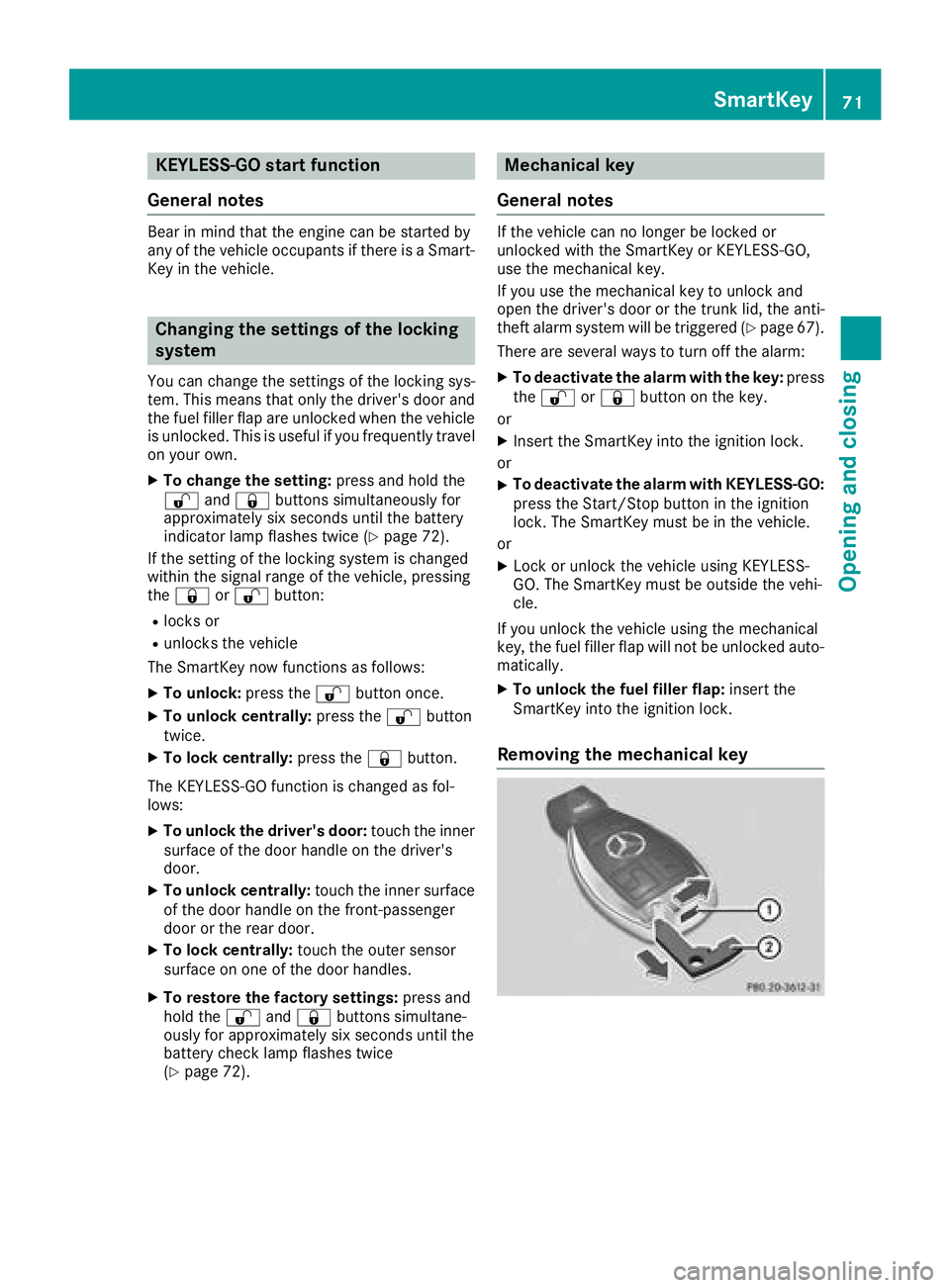
Removing the mechanical key
SmartKey71
Opening and closing
Z
Page 82 of 338
XTo stop the closing process: press but-
ton :on the tailgate again.
or
XPull the handle in the tailgate.
or
XPress the Fbutton on the SmartKey until
the tailgate stops.
or
XPress or pull the remote operating switch on
the driver's door.
HANDS-FREE ACCESS
Important safety notes
GWARNING
The vehicle exhaust system can become very
hot. If you use HANDS-FREE ACCESS, you
could burn yourself by touching the exhaust
system. There is a risk of injury. Always
ensure that you make the kicking movement
only within the detection range of the sensors.
!If the SmartKey is within the rear detection
range of KEYLESS-GO, the following situa-
tions, for example, could lead to the uninten-
tional opening of the tailgate:
Rwhen using an automatic car wash
Rwhen using a power washer
Make sure that the SmartKey is at least 10 ft
(3 m) away from the vehicle.
iYou can also deactivate KEYLESS-GO. Fur-
ther information on deactivating and activat-
ing KEYLESS-GO (
Ypage 70).
General notes
With KEYLESS-GO and HANDS-FREE ACCESS,
you can open or close the tailgate or stop the
procedure without using your hands. This is use- ful if you have your hands full. To do this, make
a kicking movement under the bumper with your
foot.
Observe the following points:
RCarry your KEYLESS-GO key about your per-
son. The SmartKey must be at the rear of the vehicle in the detection range of KEYLESS-
GO.
RWhen making the kicking movement, make
sure that you are standing firmly on the
ground and that there is sufficient clearance
to the rear of the vehicle. You could otherwise
lose your balance, for example on ice.
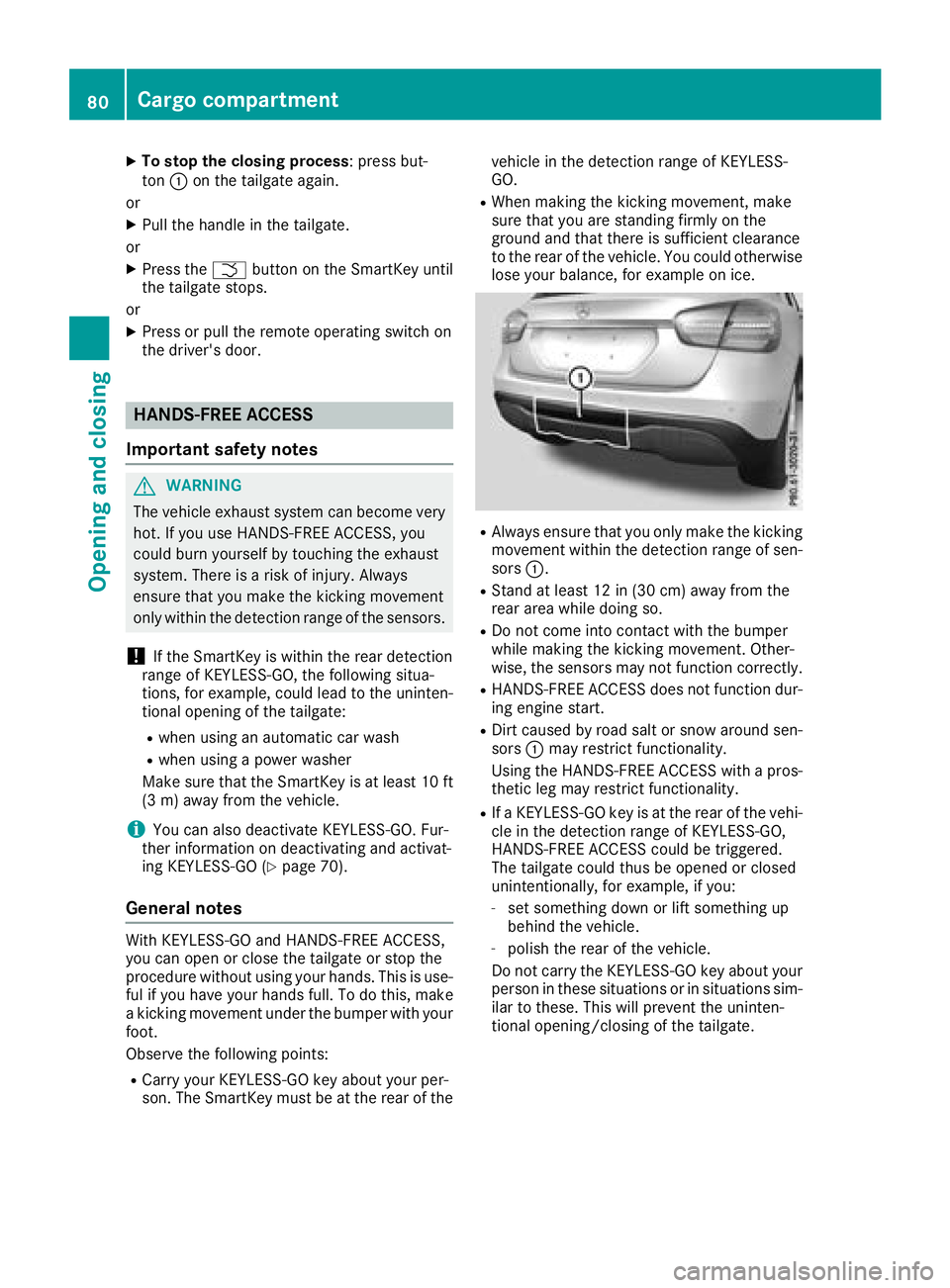
RAlways ensure that you only make the kicking
movement within the detection range of sen-
sors :.
RStand at least 12 in (30 cm) away from the
rear area while doing so.
RDo not come into contact with the bumper
while making the kicking movement. Other-
wise, the sensors may not function correctly.
RHANDS-FREE ACCESS does not function dur-
ing engine start.
RDirt caused by road salt or snow around sen-
sors:may restrict functionality.
Using the HANDS-FREE ACCESS with a pros-
thetic leg may restrict functionality.
RIf a KEYLESS-GO key is at the rear of the vehi-
cle in the detection range of KEYLESS-GO,
HANDS-FREE ACCESS could be triggered.
The tailgate could thus be opened or closed
unintentionally, for example, if you:
-set something down or lift something up
behind the vehicle.
-polish the rear of the vehicle.
Do not carry the KEYLESS-GO key about your person in these situations or in situations sim-
ilar to these. This will prevent the uninten-
tional opening/closing of the tailgate.
80Cargo compartment
Opening and closing
Page 83 of 338
Operation
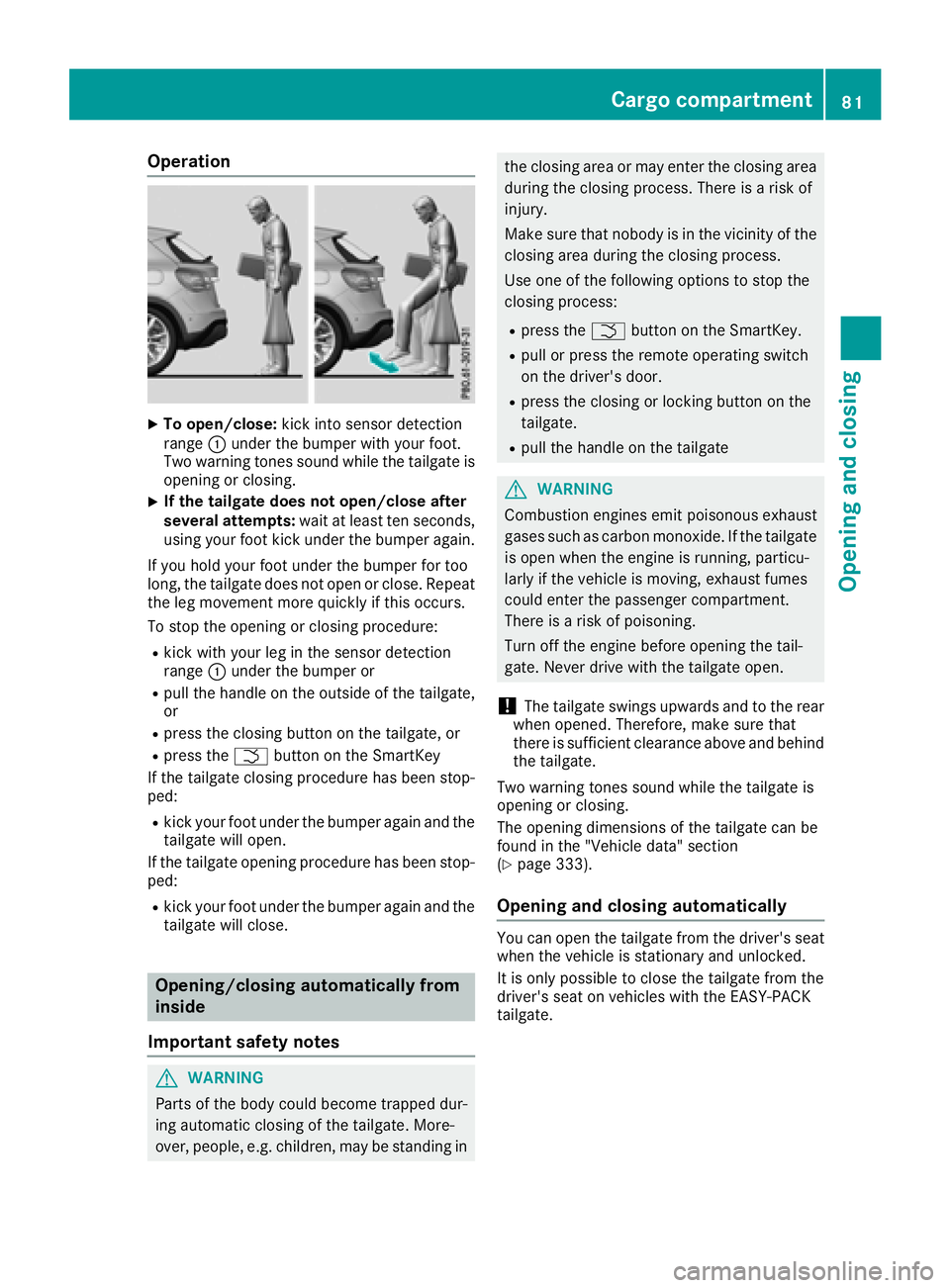
XTo open/close:kick into sensor detection
range :under the bumper with your foot.
Two warning tones sound while the tailgate is
opening or closing.
XIf the tailgate does not open/close after
several attempts: wait at least ten seconds,
using your foot kick under the bumper again.
If you hold your foot under the bumper for too
long, the tailgate does not open or close. Repeat
the leg movement more quickly if this occurs.
To stop the opening or closing procedure:
Rkick with your leg in the sensor detection
range :under the bumper or
Rpull the handle on the outside of the tailgate,
or
Rpress the closing button on the tailgate, or
Rpress the Fbutton on the SmartKey
If the tailgate closing procedure has been stop-
ped:
Rkick your foot under the bumper again and the tailgate will open.
If the tailgate opening procedure has been stop-
ped:
Rkick your foot under the bumper again and the
tailgate will close.
Opening/closing automatically from
inside
Important safety notes
GWARNING
Parts of the body could become trapped dur-
ing automatic closing of the tailgate. More-
over, people, e.g. children, may be standing in
the closing area or may enter the closing area
during the closing process. There is a risk of
injury.
Make sure that nobody is in the vicinity of the
closing area during the closing process.
Use one of the following options to stop the
closing process:
Rpress the Fbutton on the SmartKey.
Rpull or press the remote operating switch
on the driver's door.
Rpress the closing or locking button on the
tailgate.
Rpull the handle on the tailgate
GWARNING
Combustion engines emit poisonous exhaust
gases such as carbon monoxide. If the tailgate
is open when the engine is running, particu-
larly if the vehicle is moving, exhaust fumes
could enter the passenger compartment.
There is a risk of poisoning.
Turn off the engine before opening the tail-
gate. Never drive with the tailgate open.
!The tailgate swings upwards and to the rear
when opened. Therefore, make sure that
there is sufficient clearance above and behind
the tailgate.
Two warning tones sound while the tailgate is
opening or closing.
The opening dimensions of the tailgate can be
found in the "Vehicle data" section
(
Ypage 333).
Opening and closing automatically
You can open the tailgate from the driver's seat
when the vehicle is stationary and unlocked.
It is only possible to close the tailgate from the
driver's seat on vehicles with the EASY-PACK
tailgate.
Cargo compartment81
Opening and closing
Z
Page 87 of 338
Convenience closing feature
Important safety notes
GWARNING
When the convenience closing feature is oper- ating, parts of the body could become trapped
in the closing area of the side window and the
sliding sunroof. There is a risk of injury.
Observe the complete closing procedure
when the convenience closing feature is oper-
ating. Make sure that no body parts are in
close proximity during the closing procedure.
Vehicles with KEYLESS-GO or KEYLESS-GO
start function: you can do the following at the
same time:
Rlock the vehicle
Rclose the side windows
Rclose the panorama roof with power tilt/slid- ing panel
On vehicles with a panorama roof with power
tilt/sliding panel, you can then close the roller
sunblind.
iNotes on the automatic reversing feature
for:
Rthe side window (Ypage 83)
Rthe panorama roof with power tilt/sliding
panel (Ypage 87)
Rthe roller sunblind (Ypage 89)
Using the SmartKey
XVehicles with KEYLESS-GO or KEYLESS-
GO start function: for the following opera-
tions, point the tip of the SmartKey at the
handle on the driver's door. The SmartKey
must be close to the driver's door handle.
iVehicles with KEYLESS-GO or KEYLESS-
GO start function: the SmartKey must be in
close proximity to the vehicle.
XPress and hold the &button until the side
windows and the panorama sliding sunroof
are fully closed.
XMake sure that all the side windows and the
panorama roof with power tilt/sliding panel
are closed. On vehicles with a panorama roof with power
tilt/sliding panel:
XPress and hold the
&button again until the
roller sunblind of the panorama sliding sun-
roof closes.
XTo interrupt convenience closing: release
the & button.
Using KEYLESS-GO
The driver's door and the door at which the han-
dle is used, must both be closed. The SmartKey
must be outside the vehicle. The gap between
the SmartKey and the corresponding door han-
dle should not be greater than 3 ft (1 m).
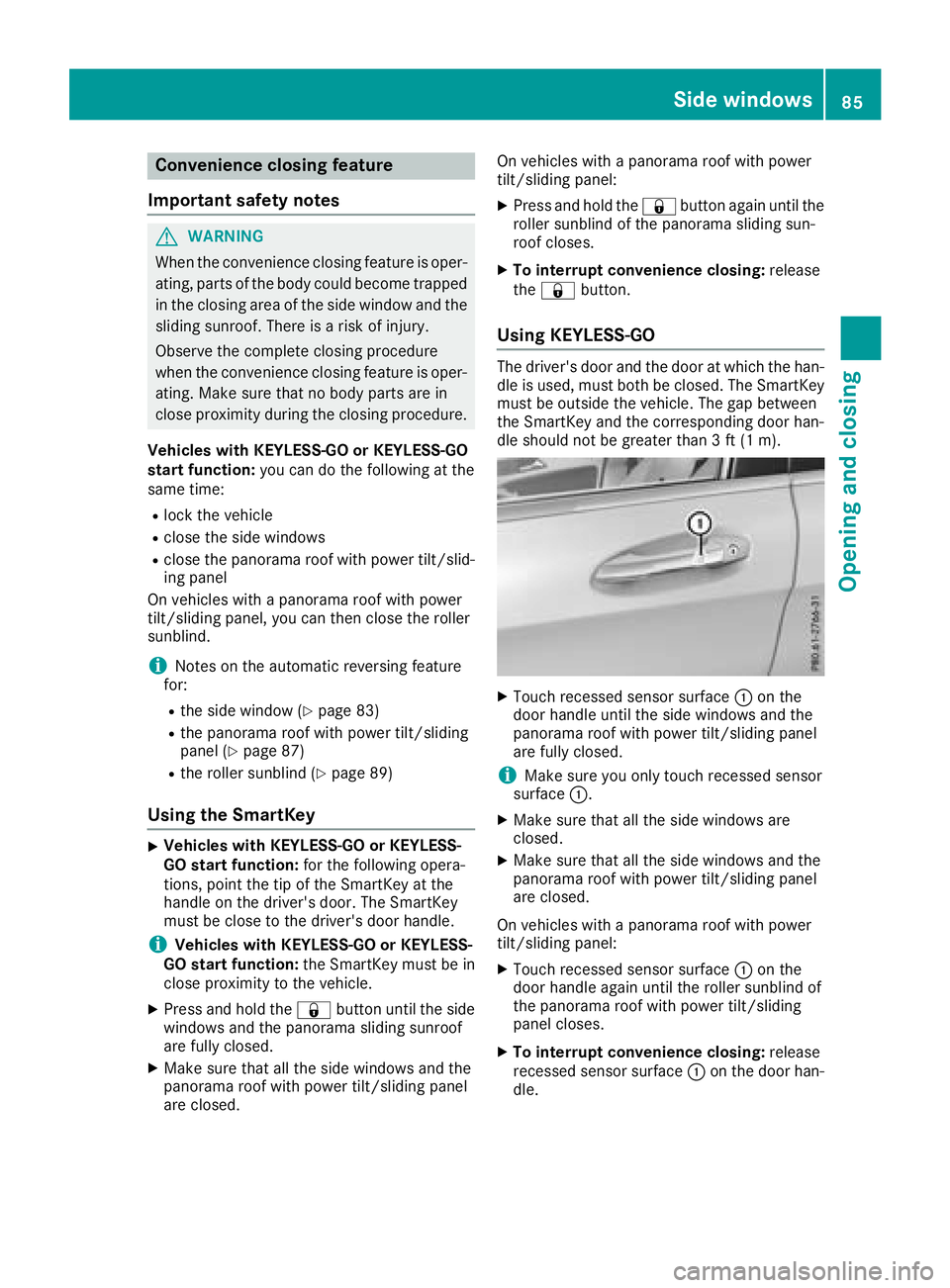
XTouch recessed sensor surface :on the
door handle until the side windows and the
panorama roof with power tilt/sliding panel
are fully closed.
iMake sure you only touch recessed sensor
surface :.
XMake sure that all the side windows are
closed.
XMake sure that all the side windows and the
panorama roof with power tilt/sliding panel
are closed.
On vehicles with a panorama roof with power
tilt/sliding panel:
XTouch recessed sensor surface :on the
door handle again until the roller sunblind of
the panorama roof with power tilt/sliding
panel closes.
XTo interrupt convenience closing: release
recessed sensor surface :on the door han-
dle.
Side windows85
Opening and closing
Z
Page 90 of 338
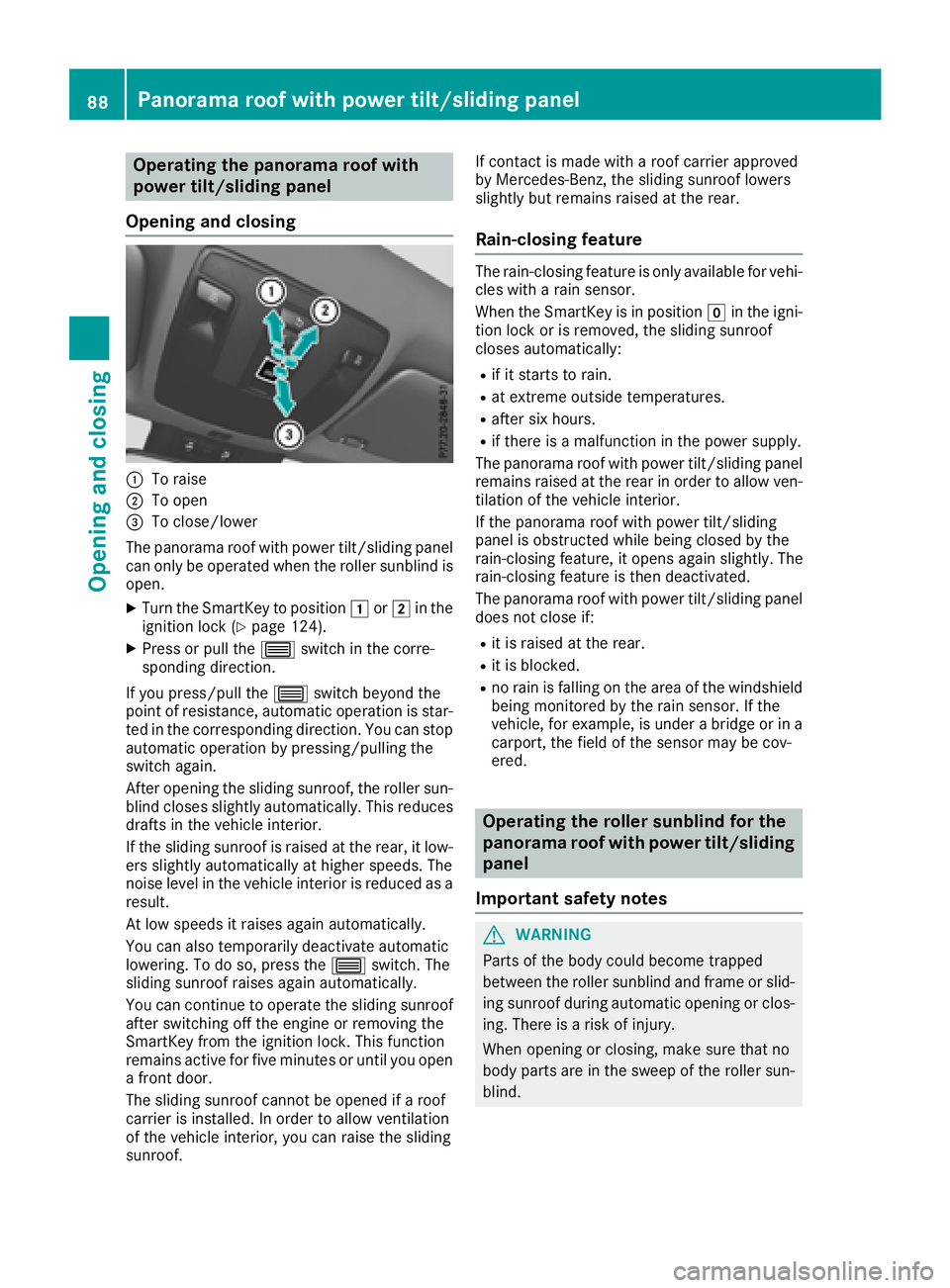
Operating the panorama roof with
power tilt/sliding panel
Opening and closing
:To raise
;To open
=To close/lower
The panorama roof with power tilt/sliding panel
can only be operated when the roller sunblind is
open.
XTurn the SmartKey to position 1or2 in the
ignition lock (Ypage 124).
XPress or pull the 3switch in the corre-
sponding direction.
If you press/pull the 3switch beyond the
point of resistance, automatic operation is star-
ted in the corresponding direction. You can stop
automatic operation by pressing/pulling the
switch again.
After opening the sliding sunroof, the roller sun-
blind closes slightly automatically. This reduces
drafts in the vehicle interior.
If the sliding sunroof is raised at the rear, it low-
ers slightly automatically at higher speeds. The
noise level in the vehicle interior is reduced as a
result.
At low speeds it raises again automatically.
You can also temporarily deactivate automatic
lowering. To do so, press the 3switch. The
sliding sunroof raises again automatically.
You can continue to operate the sliding sunroof
after switching off the engine or removing the
SmartKey from the ignition lock. This function
remains active for five minutes or until you open
a front door.
The sliding sunroof cannot be opened if a roof
carrier is installed. In order to allow ventilation
of the vehicle interior, you can raise the sliding
sunroof. If contact is made with a roof carrier approved
by Mercedes-Benz, the sliding sunroof lowers
slightly but remains raised at the rear.
Rain-closing feature
The rain-closing feature is only available for vehi-
cles with a rain sensor.
When the SmartKey is in position gin the igni-
tion lock or is removed, the sliding sunroof
closes automatically:
Rif it starts to rain.
Rat extreme outside temperatures.
Rafter six hours.
Rif there is a malfunction in the power supply.
The panorama roof with power tilt/sliding panel
remains raised at the rear in order to allow ven-
tilation of the vehicle interior.
If the panorama roof with power tilt/sliding
panel is obstructed while being closed by the
rain-closing feature, it opens again slightly. The
rain-closing feature is then deactivated.
The panorama roof with power tilt/sliding panel
does not close if:
Rit is raised at the rear.
Rit is blocked.
Rno rain is falling on the area of the windshield
being monitored by the rain sensor. If the
vehicle, for example, is under a bridge or in a
carport, the field of the sensor may be cov-
ered.
Operating the roller sunblind for the
panorama roof with power tilt/sliding
panel
Important safety notes
GWARNING
Parts of the body could become trapped
between the roller sunblind and frame or slid-
ing sunroof during automatic opening or clos-
ing. There is a risk of injury.
When opening or closing, make sure that no
body parts are in the sweep of the roller sun-
blind.
88Panorama roof with power tilt/sliding panel
Opening and closing
Page 103 of 338
Exterior lighting
General notes
For reasons of safety, Mercedes-Benz recom-
mends that you drive with the lights switched on
even during the daytime. In some countries,
operation of the headlamps varies due to legal
requirements and self-imposed obligations.
Setting the exterior lighting
Setting options
Exterior lighting can be set using the:
Rlight switch
Rcombination switch (Ypage 103)
Ron-board computer (Ypage 196)
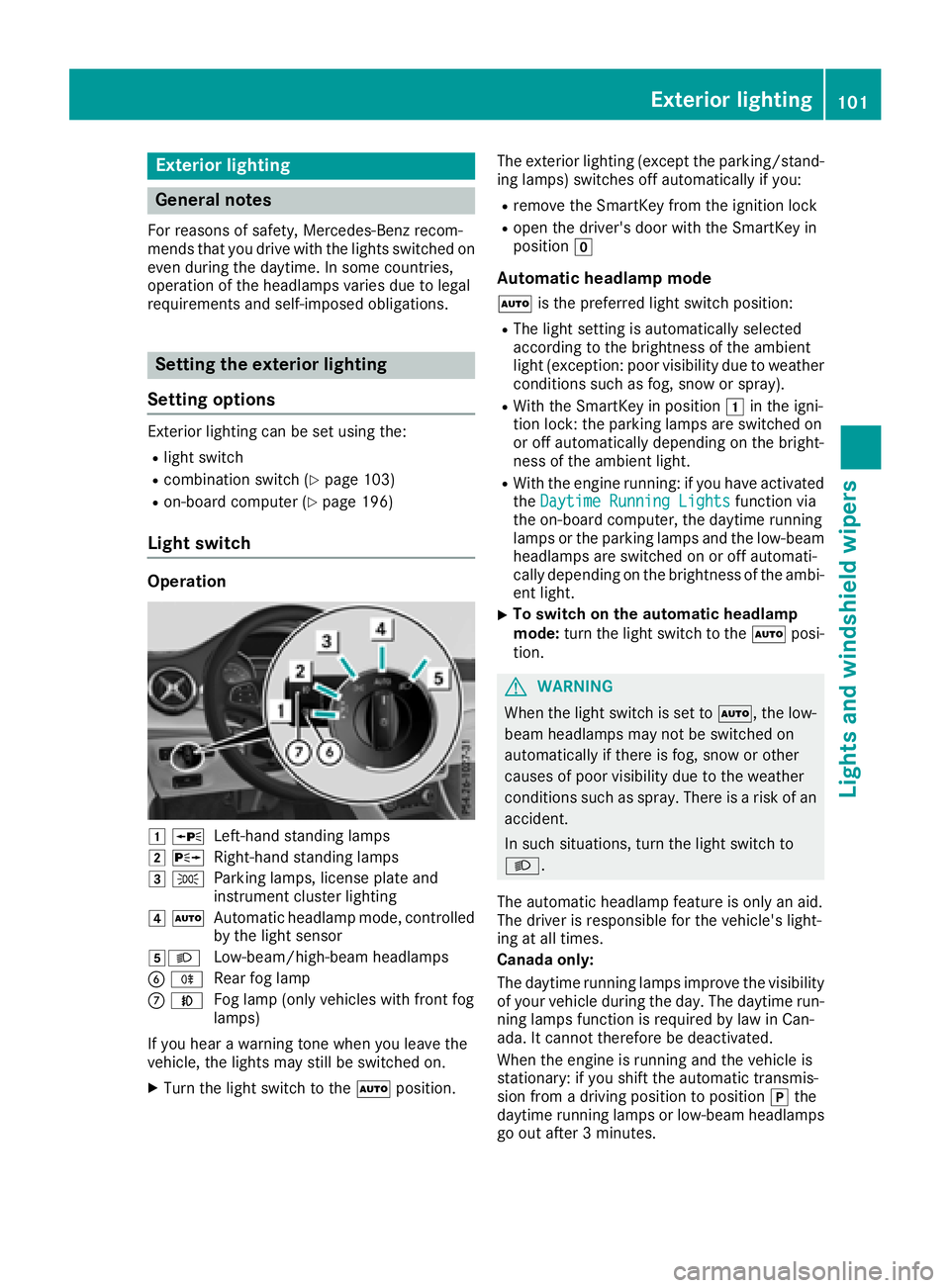
Light switch
Operation
1 WLeft-hand standing lamps
2XRight-hand standing lamps
3TParking lamps, license plate and
instrument cluster lighting
4ÃAutomatic headlamp mode, controlled
by the light sensor
5LLow-beam/high-beam headlamps
B RRear fog lamp
CNFog lamp (only vehicles with front fog
lamps)
If you hear a warning tone when you leave the
vehicle, the lights may still be switched on.
XTurn the light switch to the Ãposition. The exterior lighting (except the parking/stand-
ing lamps) switches off automatically if you:
Rremove the SmartKey from the ignition lock
Ropen the driver's door with the SmartKey in
position
g
Automatic headlamp mode
Ãis the preferred light switch position:
RThe light setting is automatically selected
according to the brightness of the ambient
light (exception: poor visibility due to weather
conditions such as fog, snow or spray).
RWith the SmartKey in position 1in the igni-
tion lock: the parking lamps are switched on
or off automatically depending on the bright-
ness of the ambient light.
RWith the engine running: if you have activated
the Daytime Running Lightsfunction via
the on-board computer, the daytime running
lamps or the parking lamps and the low-beam
headlamps are switched on or off automati-
cally depending on the brightness of the ambi-
ent light.
XTo switch on the automatic headlamp
mode: turn the light switch to the Ãposi-
tion.
GWARNING
When the light switch is set to Ã, the low-
beam headlamps may not be switched on
automatically if there is fog, snow or other
causes of poor visibility due to the weather
conditions such as spray. There is a risk of an
accident.
In such situations, turn the light switch to
L.
The automatic headlamp feature is only an aid.
The driver is responsible for the vehicle's light-
ing at all times.
Canada only:
The daytime running lamps improve the visibility
of your vehicle during the day. The daytime run-
ning lamps function is required by law in Can-
ada. It cannot therefore be deactivated.
When the engine is running and the vehicle is
stationary: if you shift the automatic transmis-
sion from a driving position to position jthe
daytime running lamps or low-beam headlamps
go out after 3 minutes.
Exterior lighting101
Lights and windshield wipers
Z
Page 104 of 338
When the engine is running, the vehicle is sta-
tionary and in bright ambient light: if you turn the
light switch to theTposition, the daytime
running lamps and parking lamps turn on.
If the engine is running and you turn the light
switch to the Lposition, the manual settings
take precedence over the daytime running
lamps.
USA only:
The daytime running lamps improve the visibility
of your vehicle during the day. To do this, the
daytime running lamps function must be
switched on using the on-board computer
(
Ypage 196).
If the engine is running and you turn the light
switch to the TorL position, the manual
settings take precedence over the daytime run-
ning lamps.
Low-beam headlamps
Even if the light sensor does not detect that it is
dark, the parking lamps and low-beam head-
lamps switch on when the ignition is switched on
and the light switch is set to the Lposition.
This is a particularly useful function in the event
of rain and fog.
XTo switch on the low-beam headlamps:
turn the SmartKey to position 2in the igni-
tion lock or start the engine.
XTurn the light switch to L.
The green Lindicator lamp in the instru-
ment cluster lights up.
Front fog lamps
In conditions where visibility is poor due to fog,
snow or rain, the fog lamps improve visibility as
well as making it easier for other road users to
see you. They can be operated together with the
parking lamps or together with the parking
lamps and low-beam headlamps.
XTo switch on the fog lamps: turn the Smart-
Key to position 2in the ignition lock or start
the engine.
XTurn the light switch to LorÃ.
XPress the Nbutton.
The green Nindicator lamp in the instru-
ment cluster lights up.
XTo switch off the fog lamps: press theN
button.
The green Nindicator lamp in the instru-
ment cluster goes out.
Rear fog lamp
The rear fog lamp improves visibility of your
vehicle for the traffic behind in the event of thick
fog. Please take note of the country-specif ic
regulat
ions for the use of rear fog lamps.
XTo switch on the rear fog lamp: turn the
SmartKey in the ignition lock to position 2or
start the engine.
XTurn the light switch to LorÃ.
XPress the Rbutton.
The yellow Rindicator lamp in the instru-
ment cluster lights up.
XTo switch off the rear fog lamp: press the
R button.
The yellow Rindicator lamp in the instru-
ment cluster goes out.
Parking lamps
!If the battery charge is very low, the parking
lamps or standing lamps are automatically
switched off to enable the next engine start.
Always park your vehicle safely and in a well lit
area, in accordance with the relevant legal
stipulations. Avoid using the Tparking
lamps over a period of several hours. If pos-
sible, switch on the right-hand Xor left-
hand W standing lamps.
XTo switch on: turn the light switch to T.
The green Tindicator lamp in the instru-
ment cluster lights up.
Standing lamps
Switching on the standing lamps ensures the
corresponding side of the vehicle is illuminated.
XTo switch on the standing lamps: the
SmartKey is not in the ignition lock or it is in
position gin the ignition lock.
XTurn the light switch to W(left-hand side of
the vehicle) or X(right-hand side of the
vehicle).
102Exterior lighting
Lights and windshield wipers
Page 110 of 338
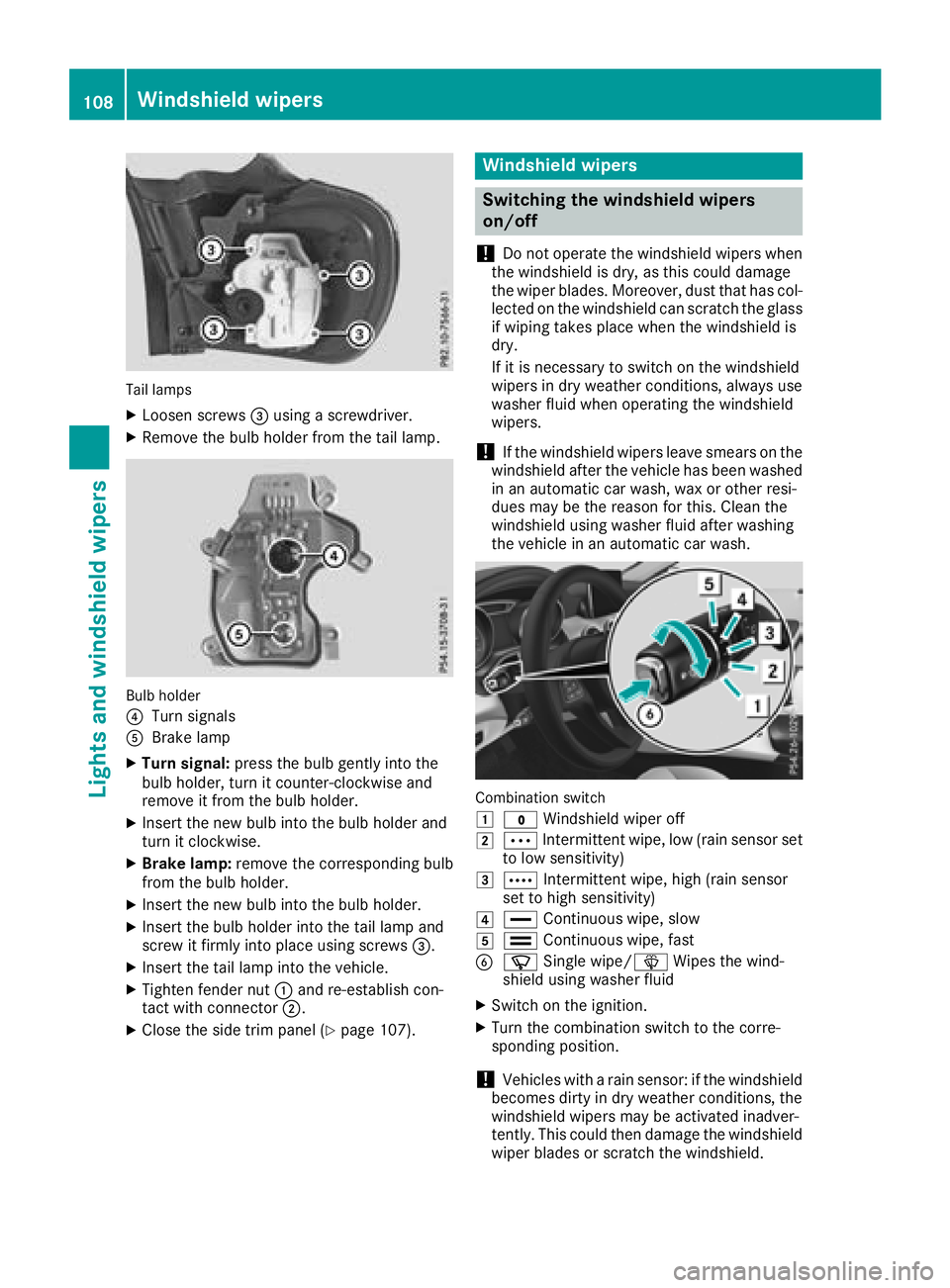
Tail lamps
XLoosen screws=using a screwdriver.
XRemove the bulb holder from the tail lamp.
Bulb holder
?
Turn signals
ABrake lamp
XTurn signal: press the bulb gently into the
bulb holder, turn it counter-clockwise and
remove it from the bulb holder.
XInsert the new bulb into the bulb holder and
turn it clockwise.
XBrake lamp: remove the corresponding bulb
from the bulb holder.
XInsert the new bulb into the bulb holder.
XInsert the bulb holder into the tail lamp and
screw it firmly into place using screws =.
XInsert the tail lamp into the vehicle.
XTighten fender nut:and re-establish con-
tact with connector ;.
XClose the side trim panel (Ypage 107).
Windshield wipers
Switching the windshield wipers
on/off
!
Do not operate the windshield wipers when
the windshield is dry, as this could damage
the wiper blades. Moreover, dust that has col-
lected on the windshield can scratch the glass
if wiping takes place when the windshield is
dry.
If it is necessary to switch on the windshield
wipers in dry weather conditions, always use
washer fluid when operating the windshield
wipers.
!If the windshield wipers leave smears on the
windshield after the vehicle has been washed
in an automatic car wash, wax or other resi-
dues may be the reason for this. Clean the
windshield using washer fluid after washing
the vehicle in an automatic car wash.
Combination switch
1
$ Windshield wiper off
2ÄIntermittent wipe, low (rain sensor set
to low sensitivity)
3Å Intermittent wipe, high (rain sensor
set to high sensitivity)
4° Continuous wipe, slow
5¯Continuous wipe, fast
BíSingle wipe/î Wipes the wind-
shield using washer fluid
XSwitch on the ignition.
XTurn the combination switch to the corre-
sponding position.
!Vehicles with a rain sensor: if the windshield
becomes dirty in dry weather conditions, the
windshield wipers may be activated inadver-
tently. This could then damage the windshield
wiper blades or scratch the windshield.
108Windshield wipers
Lights and windshield wipers
Page 111 of 338
For this reason, you should always switch off
the windshield wipers in dry weather.
Vehicles with a rain sensor: in the ÄorÅ
position, the appropriate wiping frequency is
automatically set according to the intensity of
the rain. In the Åposition, the rain sensor is
more sensitive than in the Äposition, caus-
ing the windshield wiper to wipe more fre-
quently.
If the wiper blades are worn, the windshield will
no longer be wiped properly. This could prevent
you from observing the traffic conditions.
Switching the rear window wiper on/
off
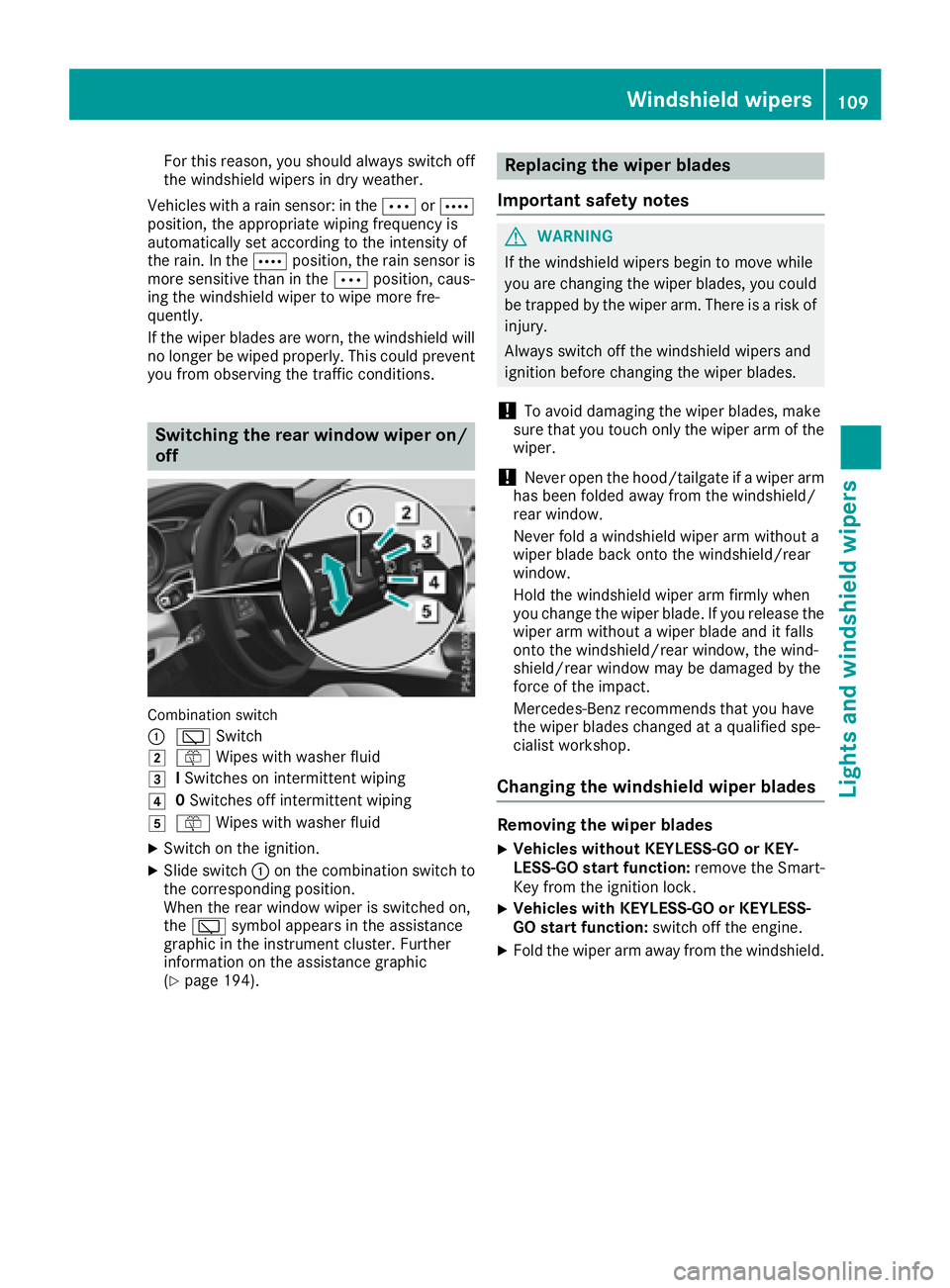
Combination switch
:
è Switch
2ôWipes with washer fluid
3ISwitches on intermittent wiping
40 Switches off intermittent wiping
5ô Wipes with washer fluid
XSwitch on the ignition.
XSlide switch :on the combination switch to
the corresponding position.
When the rear window wiper is switched on,
the è symbol appears in the assistance
graphic in the instrument cluster. Further
information on the assistance graphic
(
Ypage 194).
Replacing the wiper blades
Important safety notes
GWARNING
If the windshield wipers begin to move while
you are changing the wiper blades, you could be trapped by the wiper arm. There is a risk of
injury.
Always switch off the windshield wipers and
ignition before changing the wiper blades.
!To avoid damaging the wiper blades, make
sure that you touch only the wiper arm of the
wiper.
!Never open the hood/tailgate if a wiper arm
has been folded away from the windshield/
rear window.
Never fold a windshield wiper arm without a
wiper blade back onto the windshield/rear
window.
Hold the windshield wiper arm firmly when
you change the wiper blade. If you release the
wiper arm without a wiper blade and it falls
onto the windshield/rear window, the wind-
shield/rear window may be damaged by the
force of the impact.
Mercedes-Benz recommends that you have
the wiper blades changed at a qualified spe-
cialist workshop.
Changing the windshield wiper blades
Removing the wiper blades
XVehicles without KEYLESS-GO or KEY-
LESS-GO start function: remove the Smart-
Key from the ignition lock.
XVehicles with KEYLESS-GO or KEYLESS-
GO start function: switch off the engine.
XFold the wiper arm away from the windshield.
Windshield wipers109
Lights and windshield wipers
Z
Page 125 of 338
Notes on breaking-in a new vehicle
Important safety notes
The sensor system of some driving and driving
safety systems adjusts automatically while a
certain distance is being driven after the vehiclehas been delivered or after repairs. Full system
effectiveness is not reached until the end of this
teach-in procedure.
New and replaced brake pads and discs only
reach their optimum braking effect after several hundred kilometers of driving. Compensate for
this by applying greater force to the brake pedal.
The first 1000 miles (1500 km)
The more you look after the engine when it is
new, the more satisfied you will be with its per-
formance in the future.
RYou should therefore drive at varying vehicle
and engine speeds for the first 1000 miles
(1500 km).
RAvoid heavy loads, e.g. driving at full throttle,during this period.
RChange gear in good time, before the tach-
ometer needle is Ôof the way to the red area
of the tachometer.
RDo not manually shift to a lower gear to brake
the vehicle.
RTry to avoid depressing the accelerator pedal
beyond the point of resistance (kickdown).
RIdeally, for the first 1000 miles (1500 km),
driv ein progra mE.
Addition al breaking-in notes for Mercedes-AMG
vehicles:
RDo not drive faster than 85 mph (140 km/h)
for the first 1,000 miles (1,500 km).
ROnly allow the engine to reach a maximum
engine speed of 4,500 rpm briefly.
RChange gear in good time.
After 1,000 miles (1,500 km), you can increase
the engine speed gradually and bring the vehicle
to full speed.
You should also observe these notes on break-
ing-in if the engine or parts of the drive train on
your vehicle have been replaced.
Always observe the maxim
um permissible
speed.
Driving
Important safety notes
GWARNING
Objects in the driver's footwell can restrict the pedal travel or obstruct a depressed pedal.
The operating and road safety of the vehicle is
jeopardized. There is a risk of an accident.
Make sure that all objects in the vehicle are
stowed correctly, and that they cannot enter
the driver's footwell. Install the floormats
securely and as specified in order to ensure
sufficient clearance for the pedals. Do not use
loose floormats and do not place floormats on
top of one another.
GWARNING
Unsuitable footwear can hinder correct usage of the pedals, e.g.:
Rshoes with thick soles
Rshoes with high heels
Rslippers
There is a risk of an accident.
Wear suitable footwear to ensure correct
usage of the pedals.
GWARNING
If you switch off the ignition while driving,
safety-relevant functions are only available
with limitations, or not at all. This could affect, for example, the power steering and the brake
boosting effect. You will require considerably
more effort to steer and brake. There is a risk
of an accident.
Do not switch off the ignition while driving.
GWARNING
If the parking brake has not been fully
released when driving, the parking brake can:
Roverheat and cause a fire
Rlose its hold function.
There is a risk of fire and an accident. Release
the parking brake fully before driving off.
Driving123
Driving and parking
Z