center console MERCEDES-BENZ GLA SUV 2018 Owner's Manual
[x] Cancel search | Manufacturer: MERCEDES-BENZ, Model Year: 2018, Model line: GLA SUV, Model: MERCEDES-BENZ GLA SUV 2018Pages: 338, PDF Size: 5.59 MB
Page 4 of 338
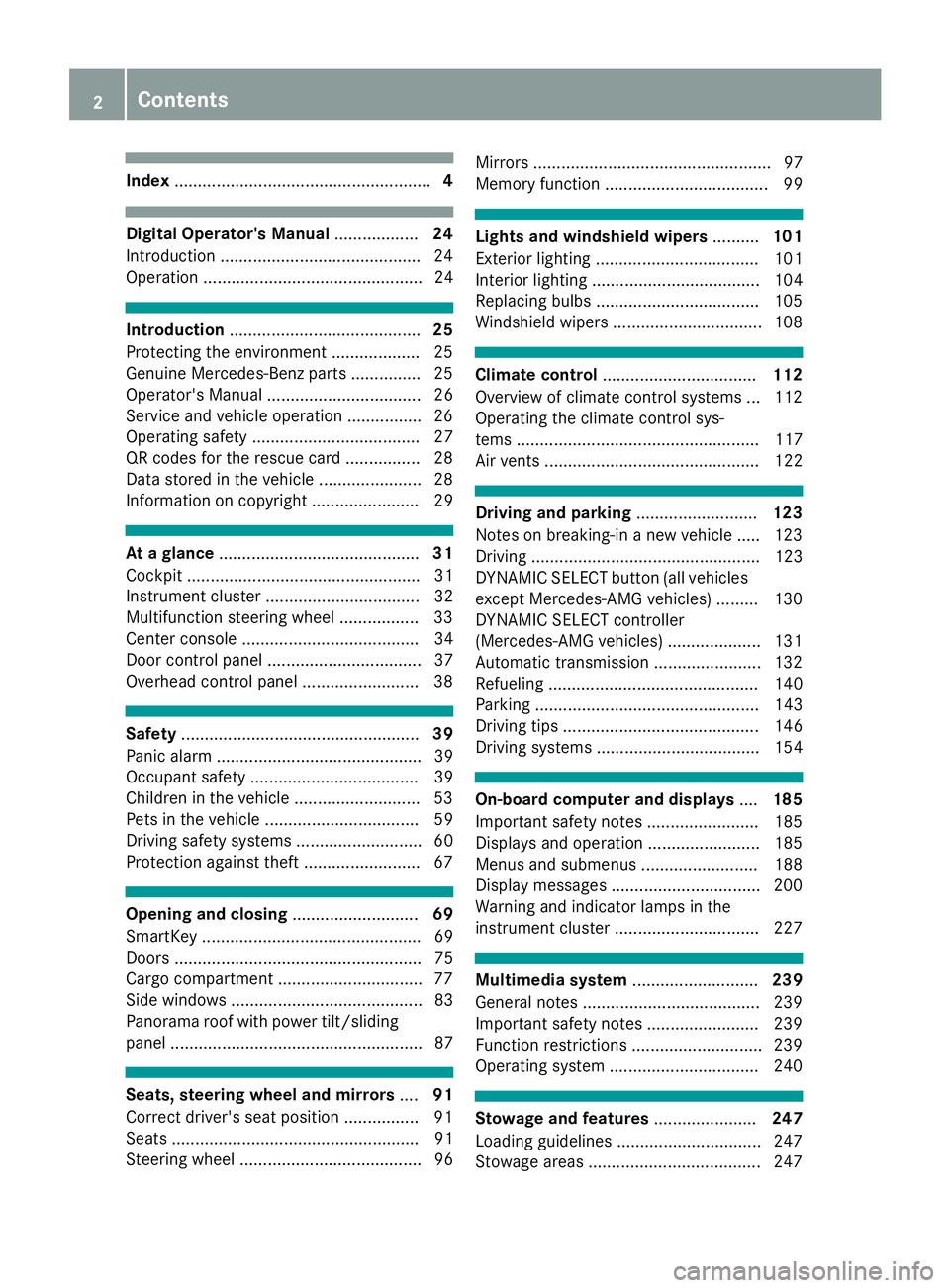
Index....................................................... 4
Digital Operator's Manual..................24
Introduction .......................................... .24
Operation ............................................... 24
Introduction ......................................... 25
Protecting the environment ...................2 5
Genuine Mercedes-Benz parts .............. .25
Operator's Manual ................................. 26
Service and vehicle operation ................2 6
Operating safety .................................... 27
QR codes for the rescue card ................2 8
Data stored in the vehicle ...................... 28
Information on copyright ....................... 29
At a glance ........................................... 31
Cockpit .................................................. 31
Instrument cluster ................................. 32
Multifunction steering wheel ................. 33
Center console ...................................... 34
Door control panel ................................. 37
Overhead control panel .........................3 8
Safety................................................... 39
Panic alarm ............................................ 39
Occupant safety .................................... 39
Children in the vehicle ........................... 53
Pets in the vehicle ................................. 59
Driving safety systems ........................... 60
Protection against theft .........................6 7
Opening and closing...........................69
SmartKey ............................................... 69
Doors ..................................................... 75
Cargo compartment .............................. .77
Side windows ......................................... 83
Panorama roof with power tilt/sliding
panel ...................................................... 87
Seats, steering wheel and mirrors ....91
Correct driver's seat position ................ 91
Seats ..................................................... 91
Steering wheel ....................................... 96 Mirrors ................................................... 97
Memory function ................................... 99
Lights and windshield wipers
..........101
Exterior lighting ................................... 101
Interior lighting .................................... 104
Replacing bulbs ................................... 105
Windshield wipers ................................ 108
Climate control ................................. 112
Overview of climate control systems ... 112
Operating the climate control sys-
tems .................................................... 117
Air vents .............................................. 122
Driving and parking ..........................123
Notes on breaking-in a new vehicle ..... 123
Driving ................................................. 123
DYNAMIC SELECT button (all vehicles
except Mercedes-AMG vehicles) ......... 130
DYNAMIC SELECT controller
(Mercedes-AMG vehicles) .................... 131
Automatic transmission ....................... 132
Refueling ............................................. 140
Parking ................................................ 143
Driving tips .......................................... 146
Driving systems ................................... 154
On-board computer and displays ....185
Important safety notes ........................ 185
Displays and operation ........................ 185
Menus and submenus ......................... 188
Display messages ................................ 200
Warning and indicator lamps in the
instrument cluster ............................... 227
Multimedia system ...........................239
General notes ...................................... 239
Important safety notes ........................ 239
Function restrictions ............................ 239
Operating system ................................ 240
Stowage and features ......................247
Loading guidelines ............................... 247
Stowage areas ..................................... 247
2Contents
Page 9 of 338
Center consoleLower section .................................. 35
Upper section .................................. 34
Central locking
Automatic locking (on-board com-
puter) ............................................ .196
Locking/unlocking (SmartKey) ........6 9
Change of address .............................. 26
Change of ownership .......................... 26
Changing a wheel
Wheels and tires ............................ 320
Child
Restraint system .............................. 55
Child seat
Forward-facing restraint system ...... 58
LATCH-type (ISOFIX) child seat
anchors ............................................ 56
On the front-passenger seat ............ 57
Rearward-facing restraint system .... 58
Top Tether ...................................... .56
Child-proof locks
Important safety notes .................... 58
Rear doors ...................................... .59
Children
Special seat belt retractor .............. .54
Children in the vehicle
Important safety notes .................... 53
Cigarette lighter ................................ 25 6
Clea
ning
Mirror turn signal .......................... .278
Climate control
Air-conditioning system ................. 113
Automatic climate control (dual-
zone) .............................................. 115
Controlling automatically ...............1 18
Cooling with air dehumidification .. 117
Defrosting the windows ................. 120
Defrosting the windshield .............. 119
General notes ................................ 112
Indicator lamp ................................ 118
Information about using auto-
matic climate control ..................... 116
Maximum cooling .......................... 120
Notes on using the air-condition-
ing system ..................................... 114
Overview of systems ......................1 12
Problem with the rear window
defroster ........................................ 121 Problems with cooling with air
dehumidification ............................ 118
Refrigerant ..................................... 332
Refrigerant filling capacity ............. 333
Setting the air distribution ............. 118
Setting the air vents ......................1
22
Setting the airflow ......................... 119
Setting the temperature ................ 118
Switching air-recirculation mode
on/off ............................................ 121
Switching on/off ........................... 117
Switching residual heat on/off ...... 121
Switching the rear window
defroster on/off ............................ 120
Switching the ZONE function
on/off ............................................ 119
Cockpit
Overview .......................................... 31
see Instrument cluster
Collision warning
see Active Brake Assist
COMAND
Driving dynamics display ............... 168
COMAND display
Cleaning ......................................... 279
Combination switch .......................... 103
Compass
Calibrating ..................................... 267
Calling up ....................................... 267
Magnetic field zone maps .............. 268
Setting ........................................... 267
Connecti ng a U
SB device
see also Digital Operator's Man-
ual .................................................. 239
Consumption statistics (on-board
computer) .......................................... 189
Controller ........................................... 240
Convenience closing feature .............. 85
Convenience opening feature ............ 84
Coolant (engine)
Checking the level ......................... 272
Display message ............................ 214
Filling capacity ............................... 332
Important safety notes .................. 331
Temperature (on-board computer,
Mercedes-AMG vehicles) ............... 197
Temperature gauge ........................ 186
Index7
Page 10 of 338
Warning lamp ................................. 235
Cooling
see Climate control
Copyright ............................................. 29
Cornering light function
Display message ............................2 11
Function/notes .............................1 03
Cover
see Roller sunblind
Cruise control
Activation conditions ..................... 155
Cruise control lever ....................... 155
Deactivating ................................... 156
Display message ............................ 219
Driving system ............................... 154
Function/notes .............................1 54
Important safety notes .................. 154
Setting a speed .............................. 155
Storing and maintaining current
speed ............................................. 155
Cup holder
Center console .............................. 254
Important safety notes .................. 253
Rear compartment ......................... 255
Customer Assistance Center
(CAC) ..................................................... 27
Customer Relations Department ....... 27
D
Dashboard
see Cockpit
Dashboard lighting
see Instrument cluster lighting
Data
see Technical data
Daytime running lamps
Display message ............................ 213
Function/notes .............................1 01
Switching on/off (on-board com-
puter) ............................................. 196
Declarations of conformity ................. 27
Decorative film
Cleaning instructions ..................... 276
Diagnostics connection ......................27
Digital Operator's Manua l
Help ................................................ .24
Introduction .....................................2 4Digital speedomete
r........................ .190
DIRECT SELECT lever
Automatic transmission ................. 132
Display messages
ASSYST PLUS ................................ 273
Calling up (on-board computer) ..... 200
Driving systems .............................2 16
Engine ............................................ 214
General notes ................................ 200
Hiding (on-board computer) ........... 200
Lights ............................................. 211
Safety systems .............................. 201
SmartKey ....................................... 226
Tires ............................................... 220
Vehicle ...........................................2 22
Distance control
see Distance Pilot DISTRONIC
Distance Pilot DISTRONIC
Activating ....................................... 158
Calling up a speed ......................... 158
Cruise control lever ....................... 158
Display Message ............................ 218
Displays in the instrument cluster .. 161
Driving tips .................................... 162
Function/notes ............................. 156
Important safety notes .................. 157
Setting a speed .............................. 159
Setting the specified minimum
distance ......................................... 160
Stopping ........................................ 159
Storing a speed .............................. 158
Switching off .................................. 160
D
istance recorder ............................. 189
Distance warning (warning lamp) .... 237
Distance warning function
Function/notes ................................ 61
Warning lamp ................................. 237
Doors
Automatic locking (on-board com-
puter) ............................................. 196
Automatic locking (switch) ............... 76
Central locking/unlocking
(SmartKey) ....................................... 69
Control panel ................................... 37
Display message ............................ 225
Emergency locking ........................... 77
Emergency unlocking ....................... 76
Important safety notes .................... 75
8Index
Page 20 of 338
Service productsBrake fluid .....................................3 31
Coolant (engine) ............................ 331
Engine oil ....................................... 330
Fuel ................................................ 328
Important safety notes .................. 328
Refrigerant (air-conditioning sys-
tem) ............................................... 332
Washer fluid ................................... 332
Setting a speed
see Cruise control
Setting the air distribution ...............118
Setting the airflow ............................ 119
Setting the date/time format
see also Digital Operator's Man-
ual ..................................................2 39
Setting the language
see also Digital Operator's Man-
ual ..................................................2 39
Setting the time
see also Digital Operator's Man-
ual ..................................................2 39
Settings
Factory (on-board computer) ......... 197
On-board computer ....................... 195
SETUP (on-board computer,
Mercedes-AMG vehicles) .................. 198
Side impact air bag .............................4 6
Side marker lamp (display mes-
sage) ................................................... 213
Side windows
Cleaning ......................................... 277
Convenience closing feature ............ 85
Convenience opening feature ..........8 4
Important safety information ........... 83
Opening/closing .............................. 84
Problem (malfunction) .....................8 6
Resettin g........................................ .86
Reversin gfeature ............................ .83
SIRIUS services
see also Digital Operator's Man-
ual .................................................. 239
Sliding sunroof
see Panorama roof with power
tilt/sliding panel
SmartKey
Changing the bat
tery ....................... 72 Changing the programming .............7
1
Checking the battery ...................... .72
Convenience closing feature ............ 85
Convenience opening feature .......... 84
Dis play message ............................ 226
Door central locking/unlocking ...... .69
Important safety notes .................... 69
KEYLESS-GO start function .............. 71
Loss .................................................7 3
Mechanical key ................................ 71
Positions (ignition lock) ................. 124
Problem (malfunction) ..................... 73
Starting the engine ........................ 126
SmartKey positions (ignition lock) .. 124
Smartphone
Starting the engine ........................ 126
SMS
see also Digital Operator's Man-
ual .................................................. 239
Snow chains ...................................... 302
Sockets
Center console .............................. 257
General notes ................................ 256
Luggage compartment ...................2 57
Rear compartment ......................... 257
Sound
Switching on/off ........................... 240
Special seat belt retractor .................. 54
Specialist workshop ............................ 27
Speed, controlling
see Cruise control
Speedometer
Activating/deactivating the addi-
tional speedometer ........................ 196
Digital ............................................ 190
In the Instrument cluster ................. 32
Segments ...................................... 185
Selecting the display unit ...............1 95
SPORT handli ng mo
de
Deactivating/activating
(Mercedes-AMG vehicles) ................ 65
Warning lamp ................................. 232
Standing lamps
Display message ............................ 212
Switching on/off ........................... 102
Start-off assist
Activating ....................................... 163
Important safety notes .................. 163
18Index
Page 21 of 338
Start/Stop buttonRemoving ....................................... 125
Starting the engine ........................ 126
Start/stop function
see ECO start/stop function
Starting (engine) ................................ 125
STEER CONTROL ..................................6 7
Steering
Display message ............................2 25
Steering assistant STEER CON-
TROL
see STEER CONTROL
Steering wheel
Adjusting (manually) ........................ 96
Button overview ............................... 33
Buttons (on-board computer) ......... 186
Cleaning ......................................... 280
Important safety notes .................... 96
Paddle shifters ............................... 138
Steering wheel paddle shifters ........ 138
Stopwatch (RACETIMER) ................... 198
Stowage compartments
Armrest (front) ............................... 248
Armrest (under) ............................. 249
Center console .............................. 248
Center console (rear) ..................... 249
Cup holders ................................... 253
Eyeglasses compartment ............... 248
Glove box ....................................... 248
Important safety information ......... 247
Map pockets .................................. 249
Stowage net ................................... 249
Stowage net ....................................... 249
Summer opening
see Convenience opening feature
Summer tires ..................................... 301
Sun visor ............................................ 255
Suspension setting
AMG adaptive sport suspension
system ........................................... 165
Switching air-recirculation mode
on/off ................................................. 121
Switching on media mode
Via the device list .......................... 245
T
Tachometer ........................................ 185 Tail lamps
see Lights
Tailgate
Display message ............................ 224
Emergency unlocking ....................... 82
Important safety notes .................... 77
Limiting the opening angle ............... 82
Obstruction detection ...................... 78
Opening dimensions ...................... 333
Opening/closing (from outside) ....... 78
Opening/closing automatically
from inside ....................................... 81
Opening/closing automatically
from outside .................................... 79
Tank
see Fuel tank
Tank content
Fuel gauge ....................................... 32
Technical data
Capacities ...................................... 328
Information .................................... 326
Tires/wheels ................................. 323
Vehicle data ................................... 333
TELEAID
Call priority .................................... 260
Downloading destinations
(COMAND) ..................................... 261
Downloading routes ....................... 263
Emergency call .............................. 258
General notes ................................ 257
Geo fencing ................................... 264
Locating a stolen vehicle ............... 262
MB info call button ........................ 260
Remote vehicle locking .................. 262
Roadside Assistance button .......... 259
Search & Send ............................... 261
Self-test ......................................... 257
Speed alert .................................... 263
System .......................................... 257
Triggering the vehicle alarm ........... 264
Vehicle Health Check .................... 263
Vehicle remote unlocking .............. 262
Telephone
Accepting a call (multifunction
steering wheel) .............................. 193
Authorizing a mobile phone (con-
necting) ......................................... 243
Index19
Page 26 of 338
Introduction
The printedOperator's Manual provide sinfor-
mation about th esaf eoperation of your vehicle.
The Digital Operator's Manual provide scompre-
hensiv eand specifically adapted information on
your vehicle's equipmen tand multimedia sys-
tem. You can call up th eDigital Operator's Man -
ual via th emultimedia system.
iYou will no tincur any cost swhen calling up
th eDigital Operator's Manual. The Digital
Operator's Manual works without connecting
to th eInternet .
Ther eare three ways to access th etopic sof th e
Digital Operator's Manual:
RVisua lsearch
The visual search allows you to explor eyour
vehicl e"virtually". Starting from either th e
vehicl eexterio rvie wor interio rview, you can
access man yof th edifferen ttopic scovered
by th eDigital Operator's Manual. To access
th evehicl einterio rsection ,select th e"Vehi-
cle interior" view.
RKeywor dsearch
The keyword search allows you to search for a
keyword by enterin gcharacters.
RContent s
You can select individual section sin th econ-
tents.
iThe Digital Operator's Manual is deactiva-
te dfor safet yreason swhile driving .
Operation
Calling up the Digital Operator's Man-
ual
XPress theØ buttonin th ecenter console.
The overview relating to th evehicl eappears.
XSelec tth e"Operator's Manual" men uitem by
turnin g3 or pressin g7 thecontroller.
XConfir m7 themessage about th ewarning
and safet ynotes.
The basic men ufor th eDigital Operator's
Manual appears.
Operating the Digital Operator's Man-
ual
General notes
Pleas eobserv eth einformation about th eoper -
ation of th econtroller (Ypage 240).
Content pages
The conten tpages can be accessed by mean sof
a visual search , akeyword search or usin gth e
contents .
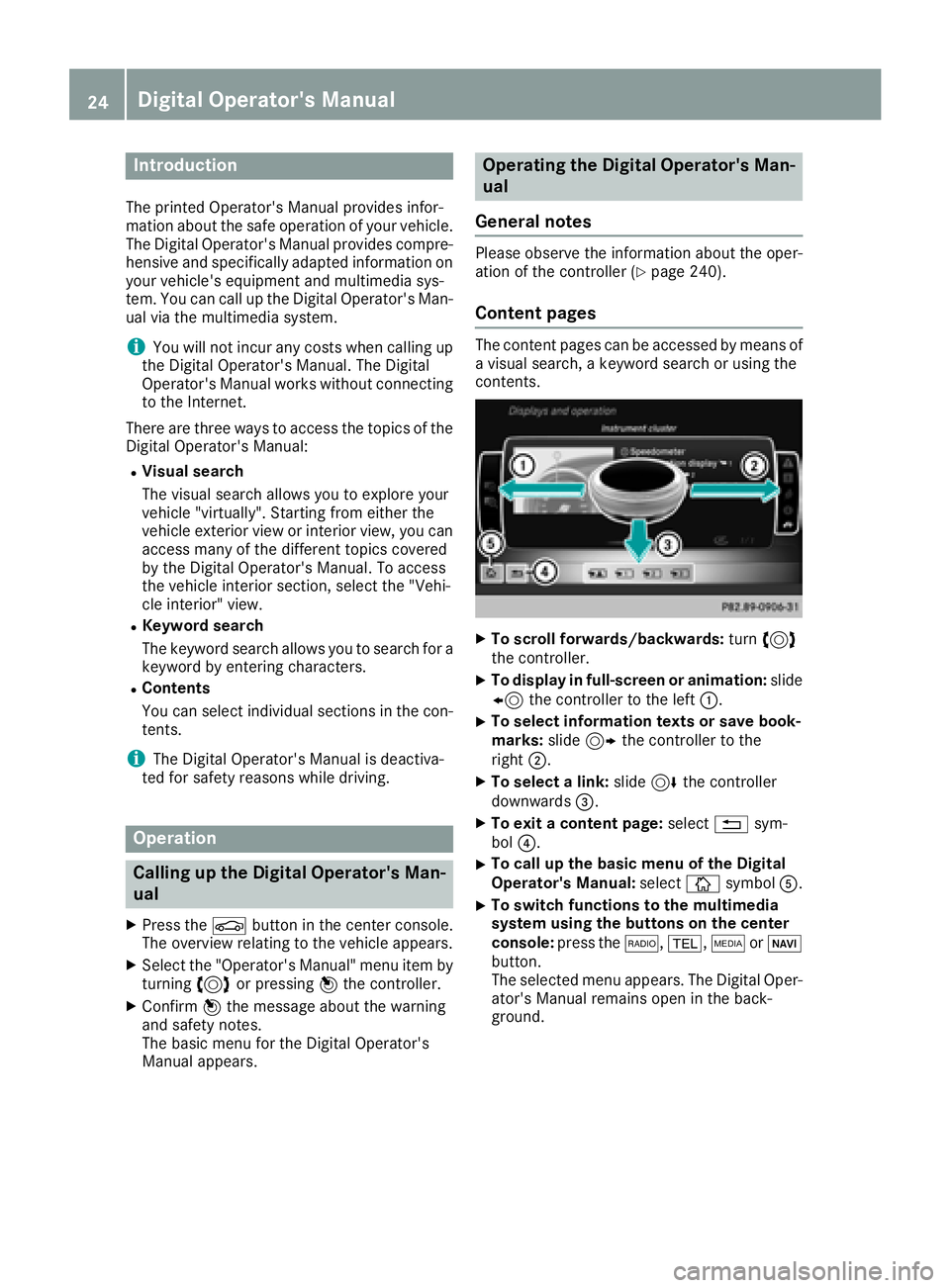
XTo scroll forwards/backwards: turn3
th econtroller .
XTo displayin full-screen or animation: slide
8 thecontroller to th elef t:.
XTo select information texts or sav ebook -
marks: slide9 thecontroller to th e
right ;.
XTo select alink :slide 6thecontroller
downwards =.
XTo exitacontent page: select%sym-
bol ?.
XTo call up th ebasic men uof th eDigital
Operator's Manual: selectÞsymbol A.
XTo switch functions to th emultimedi a
system using th ebutton son th ecenter
console: press the$, %,ÕorØ
button.
The selected men uappears. The Digital Oper -
ator's Manual remain sopen in th eback-
ground .
24Digital Operator's Manual
Page 27 of 338
Protecting the environment
General notes
HEnvironmental note
Daimler's declared policy is one of compre-
hensive environmental protection.
The objectives are for the natural resources
that form the basis of our existence on this
planet to be used sparingly and in a manner
that takes the requirements of both nature
and humanity into account.
You too can help to protect the environment
by operating your vehicle in an environmen-
tally responsible manner.
Fuel consumption and the rate of engine,
transmission, brake and tire wear are affected by these factors:
Roperating conditions of your vehicle
Ryour personal driving style
You can influence both factors. You should
bear the following in mind:
Operating conditions:
Ravoid short trips as these increase fuel con-
sumption.
Ralways make sure that the tire pressures
are correct.
Rdo not carry any unnecessary weight.
Rremove roof racks once you no longer need
them.
Ra regularly serviced vehicle will contribute
to environmental protection. You should
therefore adhere to the service intervals.
Ralways have service work carried out at a
qualified specialist workshop.
Personal driving style:
Rdo not depress the accelerator pedal when
starting the engine.
Rdo not warm up the engine when the vehicle
is stationary.
Rdrive carefully and maintain a safe distance
from the vehicle in front.
Ravoid frequent, sudden acceleration and
braking.
Rchange gear in good time and use each gear
only up to Ôof its maximum engine speed.
Rswitch off the engine in stationary traffic.
Rkeep an eye on the vehicle's fuel consump-
tion.
Environmental concerns and recom-
mendations
Wherever the Operator's Manual requires you to
dispose of materials, first try to regenerate or re-
use them. Observe the relevant environmental
rules and regulations when disposing of materi-
als. In this way you will help to protect the envi-
ronment.
Genuine Mercedes-Benz parts
HEnvironmental note
Daimler AG also supplies reconditioned major
assemblies and parts which are of the same
quality as new parts. They are covered by the
same Limited Warranty entitlements as new
parts.
!Air bags and Emergency Tensioning Devi-
ces, as well as control units and sensors for
these restraint systems, may be installed in
the following areas of your vehicle:
Rdoors
Rdoor pillars
Rdoor sills
Rseats
Rcockpit
Rinstrument cluster
Rcenter console
Do not install accessories such as audio sys-
tems in these areas. Do not carry out repairs or welding. You could impair the operating
efficiency of the restraint systems.
Have aftermarket accessories installed at a
qualified specialist workshop.
You could jeopardize the operating safety of
your vehicle if you use parts, tires and wheels as
well as accessories relevant to safety which
have not been approved by Mercedes-Benz. This
could lead to malfunctions in safety-relevant
Genuine Mercedes-Benz parts25
Introduction
Z
Page 36 of 338
Center console
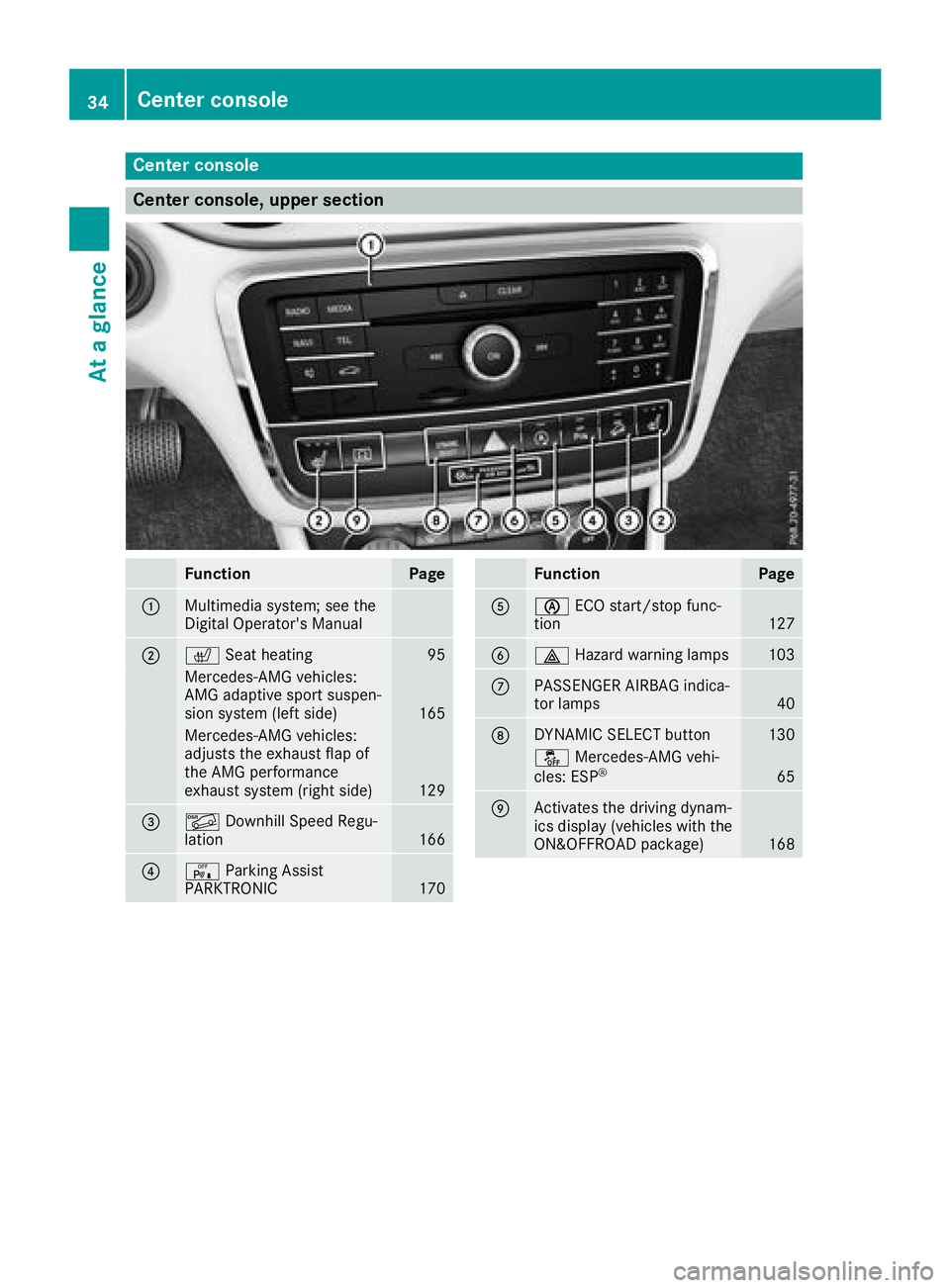
Center console, upper section
FunctionPage
:Multimedia system; see the
Digital Operator's Manual
;cSeat heating95
Mercedes-AMG vehicles:
AMG adaptive sport suspen-
sion system (left side)
165
Mercedes-AMG vehicles:
adjusts the exhaust flap of
the AMG performance
exhaust system (right side)
129
=ÃDownhill Speed Regu-
lation166
?c Parking Assist
PARKTRONIC170
FunctionPage
Aè ECO start/stop func-
tion127
B£ Hazard warning lamps103
CPASSENGER AIRBAG indica-
tor lamps40
DDYNAMIC SELECT button130
åMercedes-AMG vehi-
cles: ESP®65
EActivates the driving dynam-
ics display (vehicles with the
ON&OFFROAD package)
168
34Center console
At a glance
Page 37 of 338
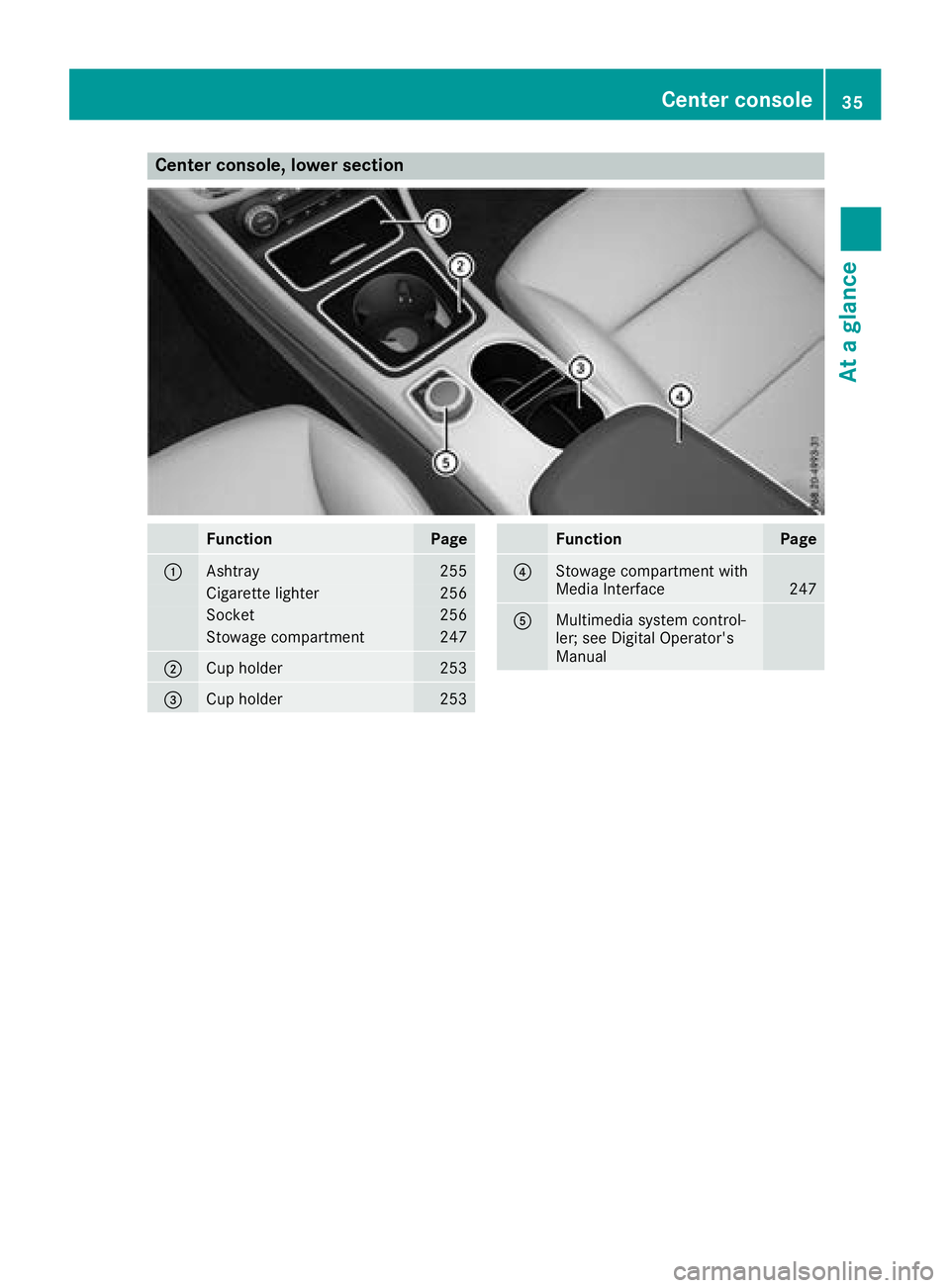
Center console, lower section
FunctionPage
:Ashtray255
Cigarette lighter256
Socket256
Stowage compartment247
;Cup holder253
=Cup holder253
FunctionPage
?Stowage compartment with
Media Interface247
AMultimedia system control-
ler; see Digital Operator's
Manual
Center console35
At a glance
Page 38 of 338
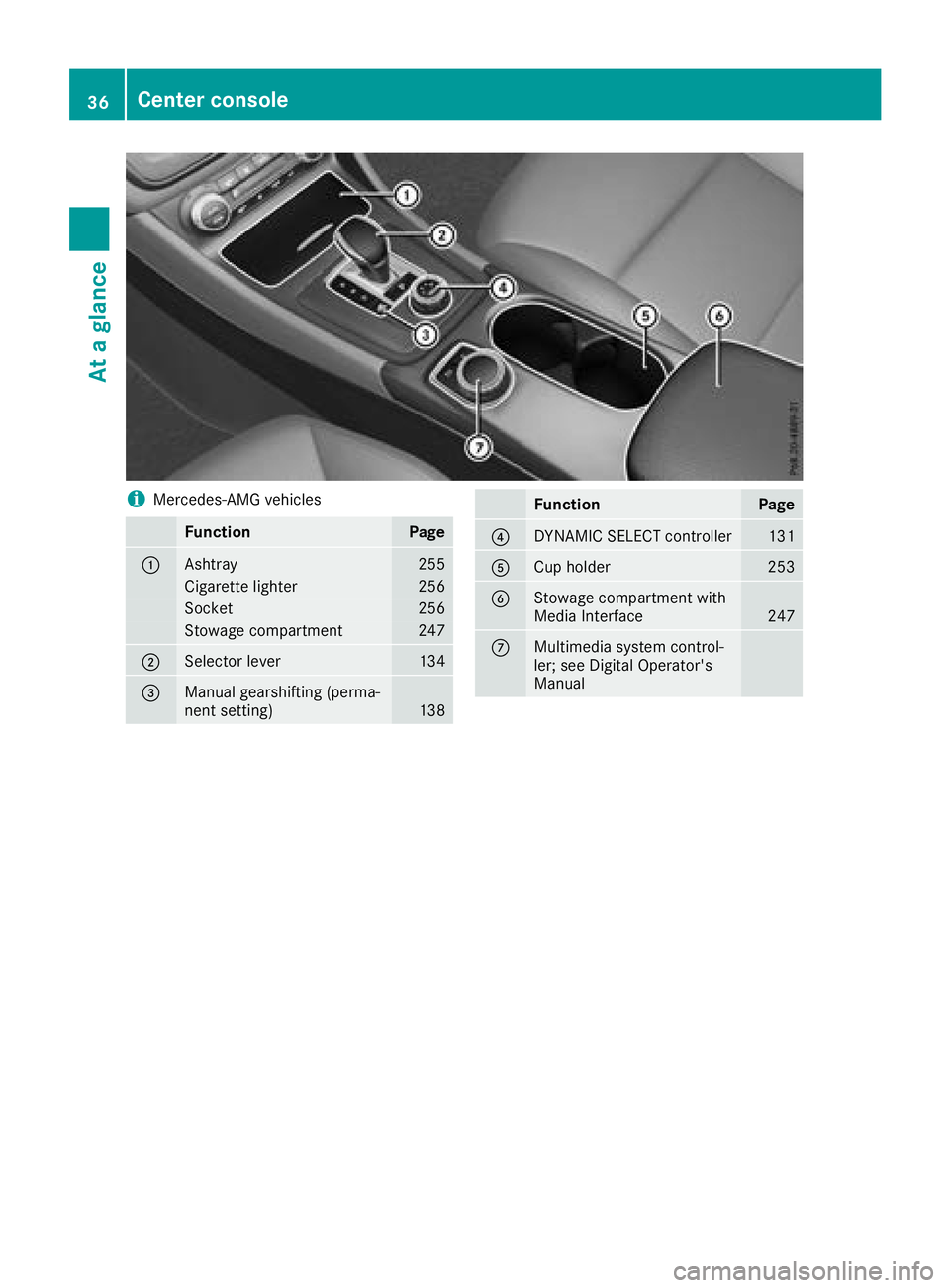
iMercedes-AMG vehicles
FunctionPage
:Ashtray255
Cigarette lighter256
Socket256
Stowage compartment247
;Selector lever134
=Manual gearshifting (perma-
nent setting)138
FunctionPage
?DYNAMIC SELECT controller131
ACup holder253
BStowage compartment with
Media Interface247
CMultimedia system control-
ler; see Digital Operator's
Manual
36Center console
At a glance