trailer MERCEDES-BENZ GLA SUV 2018 Owner's Manual
[x] Cancel search | Manufacturer: MERCEDES-BENZ, Model Year: 2018, Model line: GLA SUV, Model: MERCEDES-BENZ GLA SUV 2018Pages: 338, PDF Size: 5.59 MB
Page 12 of 338
DYNAMIC SELECT controller
(Mercedes-AMG vehicles).................131
E
EASY-PACK tailgate
see Tailgate
EBD (electronic brake force distri-
bution)
Display message ............................ 203
Function/notes ................................ 67
ECO display
Function/notes .............................1 47
On-board computer ....................... 189
ECO start/stop function
Automatic engine start .................. 128
Automatic engine switch-off .......... 128
Deactivating/activating ................. 129
General information ....................... 128
Important safety notes .................. 128
Introduction ................................... 127
Electronic Stability Program
see ESP
®(Electronic Stability Program)
Emergency
Automatic measures after an acci-
dent ................................................. 53
Emergency braking
see BAS (Brake Assist System)
Emergency release
Driver's door ....................................7 6
Vehicle .............................................7 6
Emergency spare wheel
General notes ................................ 32 5
Im portant safety notes .................. 324
Removing .......................................3 25
Emergency Tensioning Devices
Activation ......................................... 51
Engine
Check Engine warning lamp ........... 234
Display message ............................ 214
ECO start/stop function ................ 127
Engine number ............................... 328
Irregular running ............................ 129
Jump-starting ................................. 291
Starting (important safety notes) ... 125
Starting problems .......................... 129
Starting the engine with the
SmartKey ....................................... 126 Starting via smartphone ................ 126
Starting with the Start/Stop but-
ton ................................................. 126
Switching off .................................. 143
Tow-starting (vehicle) ..................... 297
Engine electronics
Problem (malfunction) ................... 129
E
ngine oil
Adding ...........................................2 71
Additives ........................................ 331
Checking the oil level ..................... 270
Checking the oil level using the
dipstick .......................................... 270
Display message ............................ 215
Filling capacity ............................... 331
Notes about oil grades ................... 330
Notes on oil level/consumption .... 270
Temperature (on-board computer,
Mercedes-AMG vehicles) ...............1 97
Engine oil additives
see Additives (engine oil)
Entering an address
see also Digital Operator's Man-
ual ..................................................2 39
ESC (Electronic Stability Control)
see ESP
®(Electronic Stability Program)
ESP®(Electronic Stability Pro-
gram)
AMG menu (on-board computer) ... 198
Characteristics ................................. 64
Deactivating/activating (button
in Mercedes-AMG vehicles) ............. 65
Deactivating/activating (except
Mercedes‑ AMG vehicles) ................. 64
Deactivating/activating (on-
board computer, except
Mercedes-AMG vehicles) ...............1 94
Display message ............................ 201
Function/notes ................................ 63
General notes .................................. 63
Important safety information ........... 64
Trailer stabilization ........................... 66
Warning lamp ................................. 231
ETS/4ETS (Electronic Traction Sys-
tem) ...................................................... 63
Exhaust
see Exhaust pipe
10Index
Page 23 of 338
Maximum tire load .........................316
Maximum tire load (definition) ....... 318
MOExtended tires .......................... 301
Optional equipment weight (defi-
nition) ............................................ 319
PSI (pounds per square inch) (def-
inition) ...........................................3 19
Replacing ....................................... 319
Service life ..................................... 300
Sidewall (definition) ....................... 319
Speed rating (definition) ................ 318
Storing ...........................................3 20
Structure and characteristics
(definition) ..................................... 317
Summer tires ................................. 301
Temperature .................................. 314
TIN (Tire Identification Number)
(definition) ..................................... 319
Tire bead (definition) ......................3 19
Tire pressure (definition) ................ 319
Tire pressures (recommended) ...... 318
Tire size (data) ............................... 323
Tire size designation, load-bearing
capacity, speed rating .................... 314
Tire tread ....................................... 300
Tire tread (definition) ..................... 319
Total load limit (definition) ............. 319
Traction ......................................... 313
Traction (definition) ....................... 319
Tread wear ..................................... 313
Uniform Tire Quality Grading
Standards ...................................... 313
Uniform Tire Quality Grading
Standards (definition) .................... 318
Wear indicator (definition) ............. 319
Wheel rim (definition) .................... 318
see Flat tire
Tool
see Vehicle tool kit
Top Tether ............................................ 56
Tow-starting
Emergency engine starting ............ 297
Important safety notes .................. 294
Installing the towing eye ................ 295
Removing the towing eye ............... 295
Towing a trailer
ESP
®(Electronic Stability Pro-
gram) ............................................... 66 To
wing away
Important safety guidelines ........... 294
Installing the towing eye ................ 295
Notes for 4MATIC vehicles ............ 296
Removing the towing eye ............... 295
Transporting the vehicle ................ 296
With both axles on the ground ....... 296
With the front axle raised ............... 295
Towing eye ......................................... 283
Traction system
see ETS/4ETS (Electronic Trac-
tion System)
Traffic reports
see also Digital Operator's Man-
ual .................................................. 239
Transmission
see Automatic transmission
Transmission position display
(DIRECT SELECT lever) ...................... 132
Transporting the vehicle .................. 296
Traveling uphill
Brow of hill ..................................... 154
Driving downhill ............................. 154
Maximum gradient-climbing capa-
bility ............................................... 154
Trim pieces (cleaning instruc-
tions) .................................................. 280
Trip computer (on-board com-
puter) .................................................. 189
Trip odometer
Calling up ....................................... 189
Resetting (on-board computer) ...... 190
Trunk
Emergency release button ............... 83
Opening (from outside the vehi-
cle, HANDS-FREE ACCESS) .............. 80
Trunk lid
see Tailgate
Turn signals
Display message ............................ 211
Replacing bulbs (front) ................... 107
Switching on/off ........................... 103
Two-way radio
Frequencies ................................... 326
Installation ..................................... 326
Transmission output (maximum) .... 326
Index21
Page 68 of 338
SPORT handling modemessage appears in
the multifunction display.
XTo deactivate SPORT handling mode:
briefly press button :.
The M SPORT handling mode warning
lamp in the instrument cluster goes out.
XTo deactivate ESP®: press button :until
the å ESP®OFF warning lamp lights up in
the instrument cluster.
The ÷ OFF
message appears in the multi-
function display.
XTo activate ESP®: briefly press button :.
The å ESP®OFF warning lamp in the
instrument cluster goes out. The ÷ESP®
ONmessage appears in the multifunction dis-
play.
Characteristics of activated SPORT han-
dling mode
If SPORT handling mode is activated and one or
more wheels start to spin, the ÷ESP®warn-
ing lamp in the instrument cluster flashes. ESP®
only stabilizes the vehicle to a limited degree.
When SPORT handling mode is activated:
RESP®only improves driving stability to a limi-
ted degree.
RTraction control is still activated.
RThe engine's torque is only restricted to a
limited degree and the drive wheels may start
to spin.
The spinning of the wheels results in a cutting
action for better traction on loose surfaces.
RESP®still provides support when you brake
firmly.
Characteristics when ESP®is deactivated
If ESP®is deactivated and one or more wheels
start to spin, the ÷ESP®warning lamp in the
instrument cluster does not flash. In such situa-
tions, ESP
®will not stabilize the vehicle.
If you deactivate ESP®:
RESP®no longer improves driving stability.
REngine torque is no longer limited and the
drive wheels are able to spin.
The spinning of the wheels results in a cutting
action for better traction on loose surfaces.
RTraction control is still activated.
RActive Brake Assist is no longer available; nor
is it activated if you brake firmly with assis-
tance from ESP
®.
RESP®still provides support when you brake
firmly.
Off-road ESP®
An ESP®system specifically suited to off-road
terrain is activated automatically once the off-
road program is activated (
Ypage 167).
Offroad ESP®intervenes with a delay if there is
oversteering or understeering, thus improving
traction.
ESP®trailer stabilization
General information
If your vehicle/trailer combination begins to
swerve, ESP®assists you in this situation. ESP®
slows the vehicle down by braking and limiting
the engine output until the vehicle/trailer com-
bination has stabilized.
Important safety notes
GWARNING
If road and weather conditions are poor,
trailer stabilization will not be able to prevent
the vehicle/trailer combination from swerv-
ing. Trailers with a high center of gravity can
tip over before ESP
®can detect this. There is
a risk of an accident.
Always adapt your driving style to the prevail-
ing road and weather conditions.
If your vehicle with trailer (vehicle/trailer com-
bination) begins to lurch, you can only stabilize
the vehicle/trailer combination by depressing
the brake firmly.
ESP
®trailer stabilization is active above speeds
of about 65 km/h.
ESP
®trailer stabilization does not work if ESP®
is deactivated or disabled because of a malfunc-
tion.
66Driving safety systems
Safety
Page 170 of 338
XSelect theAssistance Graphicfunction
using the on-board computer (Ypage 194).
When the off-road program is activated, sym-
bol :appears in the assistance graphic dis-
play.
Driving dynamics display (vehicles
with the ON&OFFROAD package)
General notes
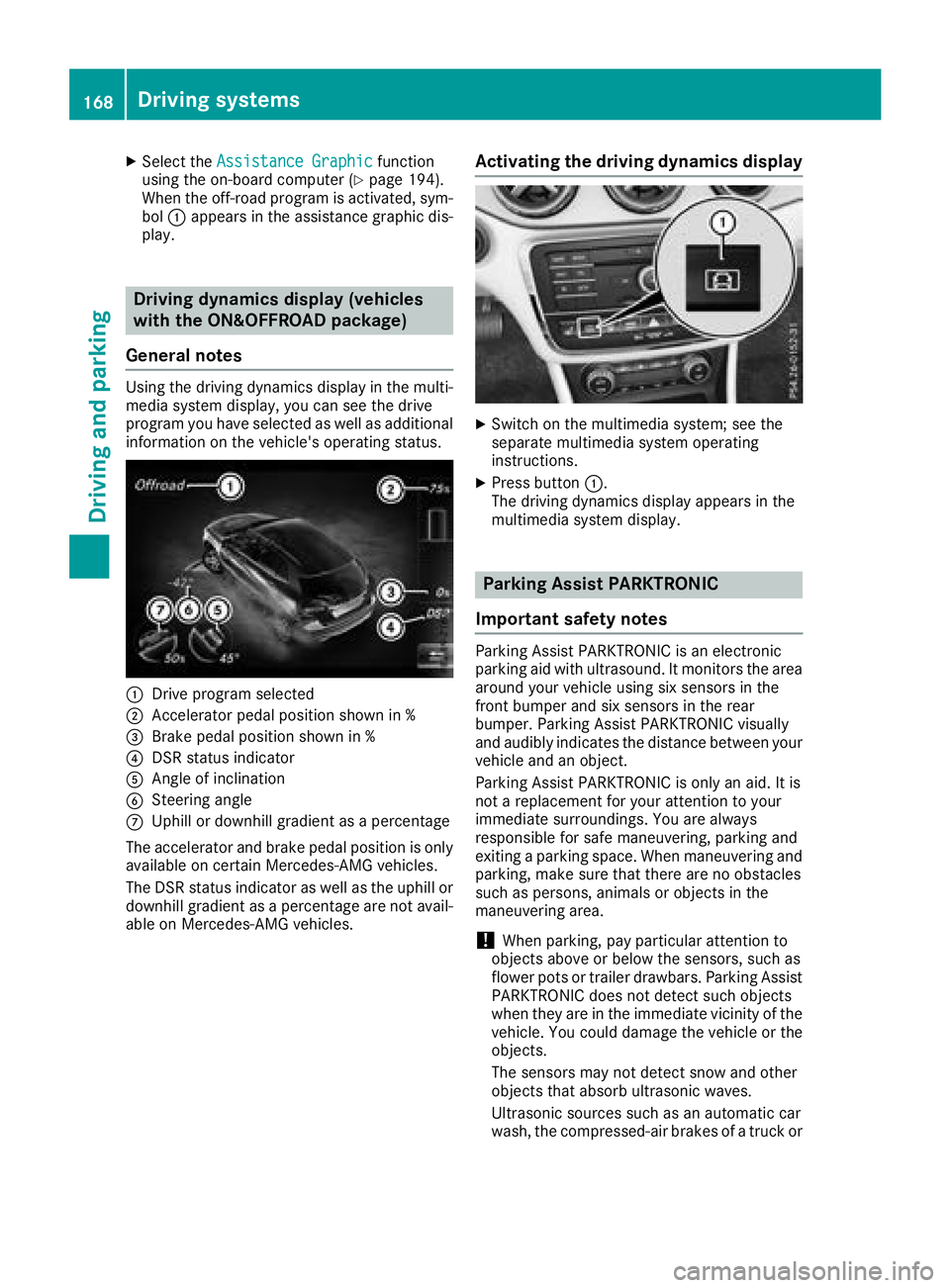
Using the driving dynamics display in the multi-
media system display, you can see the drive
program you have selected as well as additional
information on the vehicle's operating status.
:Drive program selected
;Accelerator pedal position shown in %
=Brake pedal position shown in %
?DSR status indicator
AAngle of inclination
BSteering angle
CUphill or downhill gradient as a percentage
The accelerator and brake pedal position is only available on certain Mercedes-AMG vehicles.
The DSR status indicator as well as the uphill or
downhill gradient as a percentage are not avail-
able on Mercedes-AMG vehicles.
Activating the driving dynamics display
XSwitch on the multimedia system; see the
separate multimedia system operating
instructions.
XPress button :.
The driving dynamics display appears in the
multimedia system display.
Parking Assist PARKTRONIC
Important safety notes
Parking Assist PARKTRONIC is an electronic
parking aid with ultrasound. It monitors the area
around your vehicle using six sensors in the
front bumper and six sensors in the rear
bumper. Parking Assist PARKTRONIC visually
and audibly indicates the distance between your
vehicle and an object.
Parking Assist PARKTRONIC is only an aid. It is
not a replacement for your attention to your
immediate surroundings. You are always
responsible for safe maneuvering, parking and
exiting a parking space. When maneuvering and
parking, make sure that there are no obstacles
such as persons, animals or objects in the
maneuvering area.
!When parking, pay particular attention to
objects above or below the sensors, such as
flower pots or trailer drawbars. Parking Assist
PARKTRONIC does not detect such objects
when they are in the immediate vicinity of the vehicle. You could damage the vehicle or the
objects.
The sensors may not detect snow and other
objects that absorb ultrasonic waves.
Ultrasonic sources such as an automatic car
wash, the compressed-air brakes of a truck or
168Driving systems
Driving and parking
Page 174 of 338
Parking tips:
ROn narrow roads, drive as close to the parkingspace as possible.
RParking spaces that are littered or overgrown
might be identified or measured incorrectly.
RParking spaces that are partially occupied by
trailer drawbars might not be identified as
such or be measured incorrectly.
RSnowfall or heavy rain may lead to a parking
space being measured inaccurately.
RPay attention to the warning messages of
Parking Assist PARKTRONIC during the park-
ing procedure (
Ypage 170).
RYou can intervene to correct the steering pro-
cedure at any time. Parking Pilot will then be
canceled.
RWhen transporting a load that protrudes from
your vehicle, you must not use Parking Pilot.
RNever use Parking Pilot when snow chains are
mounted.
RMake sure that the tire pressures are always
correct. This has a direct influence on the
parking characteristics of the vehicle.
Use Parking Pilot for parking spaces that are:
Rthat are parallel or at right-angles to the direc- tion of travel
Ron straight roads, not bends
Ron the same level as the road, e.g. not on the
pavement
Detecting parking spaces
Objects located above the detection range of
Parking Pilot will not be detected when the park-
ing space is measured. These are not taken into
account when the parking procedure is calcula-ted, e.g. overhanging loads, truck overhangs or
loading ramps. Parking Pilot may therefore
guide you into the parking space too early.
Parking Pilot does not assist you parking in
spaces perpendicular to the direction of travel if:
Rtwo parking spaces are located directly next
to one another
Rthe parking space is directly next to a low
obstacle such as a low curb
Ryou forward-park Parking Pilot does not assist you parking in
spaces parallel or perpendicular to the direction
of travel if:
Rthe parking space is on a curb
Rthe system reads the parking space as being
blocked, for example by foliage or grass pav-
ing blocks
Rthe area is too small for the vehicle to maneu-
ver into
Rthe parking space is bordered by an obstacle,
e.g. a tree, a post or a trailer
For further information on the detection range
(
Ypage 169).
GWARNING
If there are objects above the detection range:
RParking Pilot may steer in too early
Rthe vehicle may not stop in front of these
objects
You may cause a collision as a result. There is
a risk of an accident.
If objects are located above the detection
range, stop and deactivate Parking Pilot.
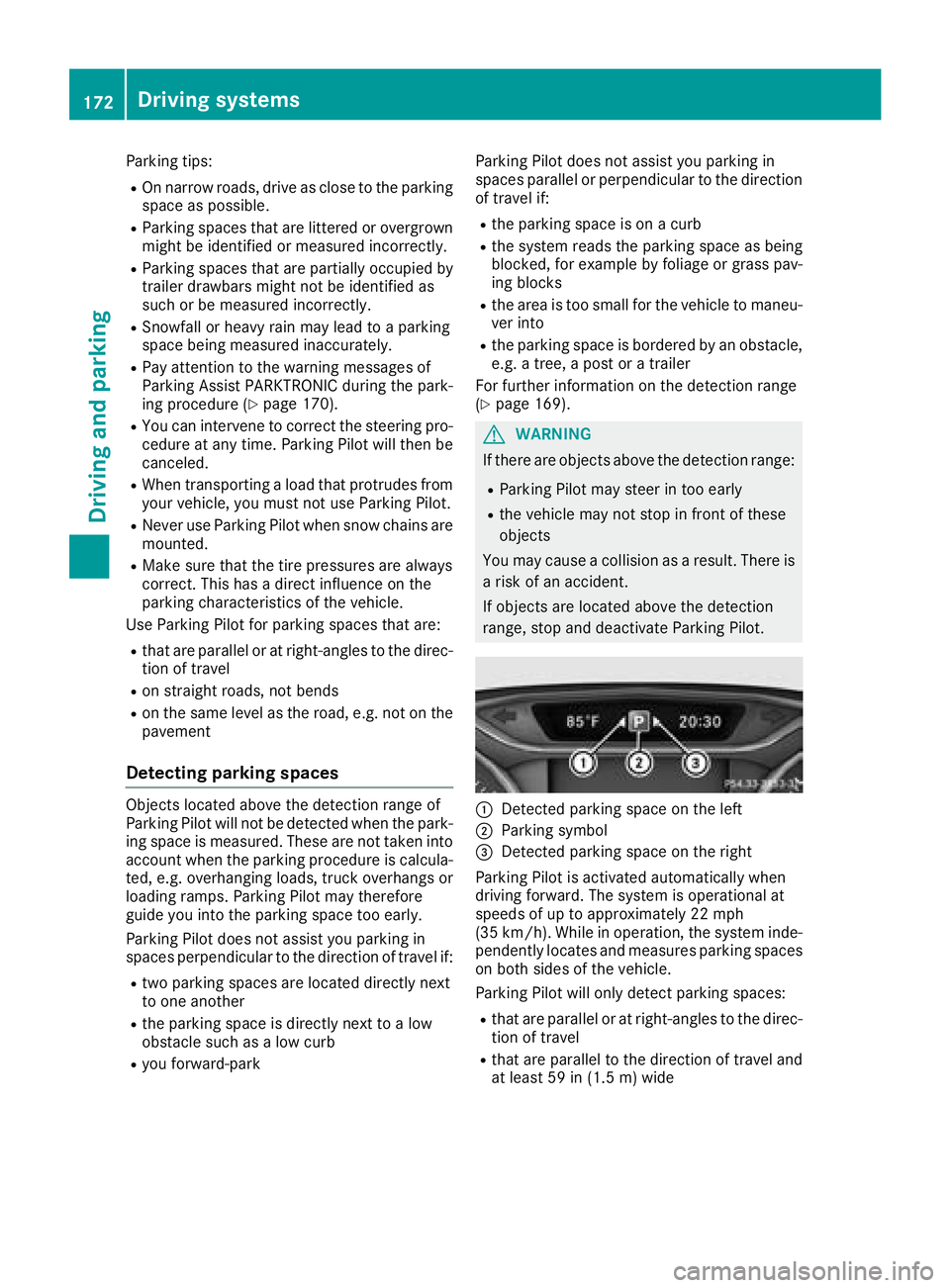
:Detected parking space on the left
;Parking symbol
=Detected parking space on the right
Parking Pilot is activated automatically when
driving forward. The system is operational at
speeds of up to approximately 22 mph
(35 km/h). While in operation, the system inde-
pendently locates and measures parking spaces on both sides of the vehicle.
Parking Pilot will only detect parking spaces:
Rthat are parallel or at right-angles to the direc-tion of travel
Rthat are parallel to the direction of travel and
at least 59 in (1.5 m) wide
172Driving systems
Driving and parking
Page 178 of 338
Activating/deactivating the rear view
camera
XTo activate:makesur ethat th eSmartKey is
in position 2in th eignition lock.
XMak esur ethat th eActivatio nby Rgea rfunction is selected in th emultimedia system;
see th eDigital Operator' sManual.
XEngage revers egear .
The area behind th evehicl eis shown wit h
guide lines in th emultimedia system display.
The imag efrom th erear vie wcamera is avail -
able throughout th emaneuverin gprocess.
To deactivate: therear vie wcamera deacti -
vates if you shif tth etransmission to jor after
drivin gforward s ashort distance.
Messages in the multimedia system dis-
play
The rear vie wcamera may sho w adistorted vie w
of obstacles, sho wthem incorrectl yor no tat all.
The rear vie wcamera does no tsho wobjects in
th efollowin gpositions:
Rver yclose to th erear bumper
Runder th erear bumper
Rin th earea immediately abov eth etailgat e
handle
!Objects no tat ground level may appear to
be further away than they actually are, e.g. :
Rthebumper of aparked vehicl e
Rthedrawbar of atrailer
Rth eball couplin gof atrailer to whitch
Rtherear section of an HGV
Raslante dpos t
Use th eguidelines only for orientation .
Approach objects no further than th ebottom-
mos tguideline.
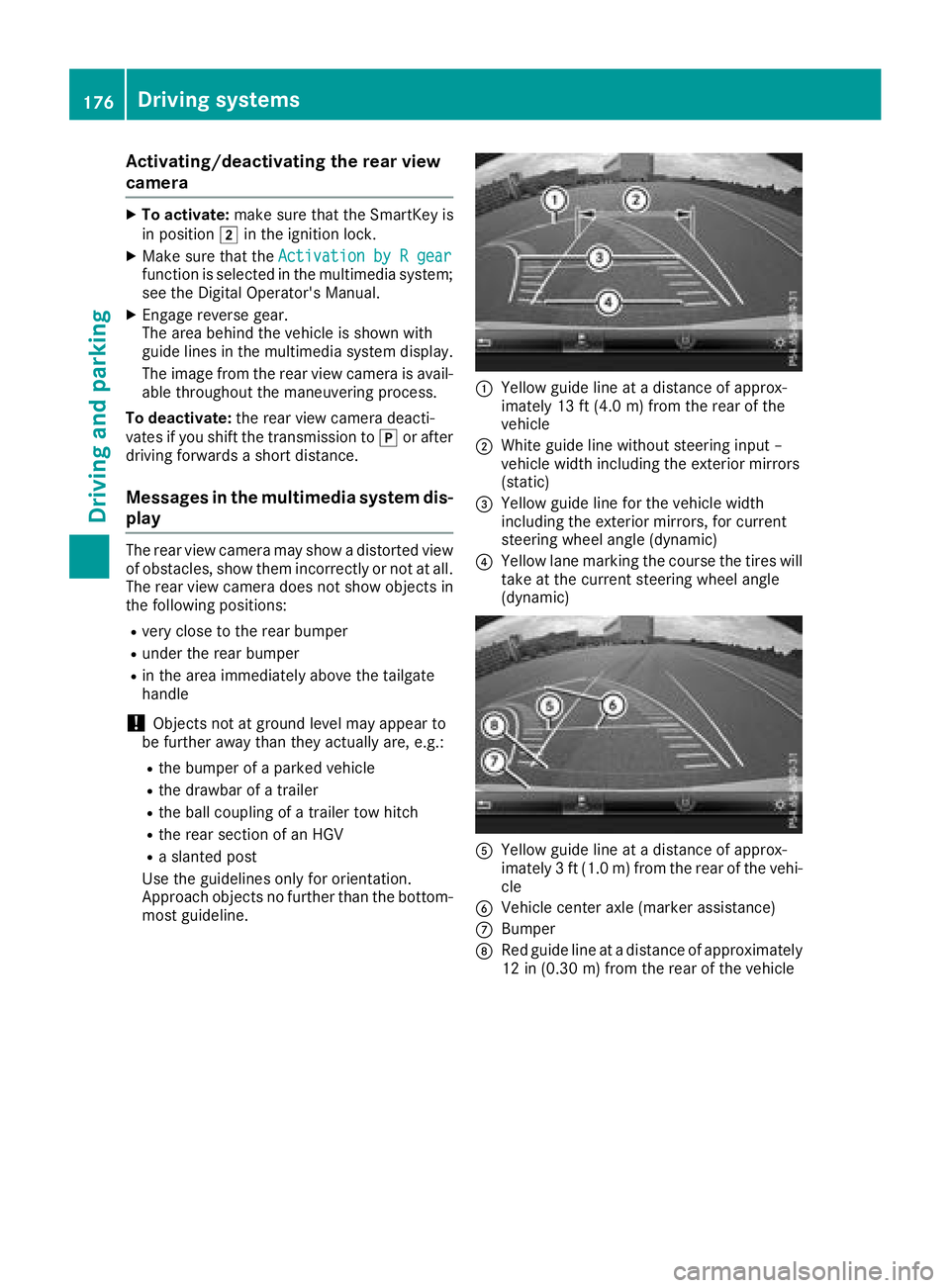
:Yello wguide lin eat adistanc eof approx -
imately 13 ft (4. 0m) from th erear of th e
vehicl e
;Whiteguide lin ewithout steering input –
vehicl ewidt hincludin gth eexterio rmirror s
(static)
=Yello wguide lin efor th evehicl ewidt h
includin gth eexterio rmirrors, for curren t
steering whee langle (dynamic )
?Yellowlan emarking th ecours eth etires will
tak eat th ecurren tsteering whee langle
(dynamic )
AYellowguide lin eat adistanc eof approx -
imately 3ft (1. 0m) from th erear of th evehi-
cle
BVehicl ecenter axl e(marke rassistance)
CBumper
DRed guide lin eat adistanc eof approximately
12 in (0.30m) from the rear of the vehicle
176Driving system s
Driving an d parking
Page 296 of 338
Towing and tow-starting
Important safety notes
GWARNING
Functions relevant to safety are restricted or
no longer available if:
Rthe engine is not running.
Rthe brake system or the power steering is
malfunctioning.
Rthere is a malfunction in the voltage supply or the vehicle's electrical system.
If your vehicle is being towed, much more
force may be necessary to steer or brake.
There is a risk of an accident.
In such cases, use a tow bar. Before towing,
make sure that the steering moves freely.
GWARNING
You can no longer steer the vehicle if the
steering wheel lock has been engaged. There
is a risk of an accident.
Always switch off the ignition when towing the
vehicle with a tow cable or a tow bar.
GWARNING
When towing or tow-starting another vehicle
and its weight is greater than the permissible
gross weight of your vehicle, the:
Rthe towing eye could detach itself
Rthe vehicle/trailer combination could roll-
over.
There is a risk of an accident.
When towing or tow-starting another vehicle,
its weight should not be greater than the per- missible gross weight of your vehicle.
Details on the permissible gross vehicle weight
of your vehicle can be found on the vehicle iden-
tification plate (
Ypage 327).
!When Active Brake Assist, Distance Pilot
DISTRONIC or the HOLD function is activated,
the vehicle brakes automatically in certain
situations. To avoid damage to the vehicle, deactivate
these systems in the following or similar sit-
uations:
Rwhen towing the vehicle
Rin the car wash
!Make sure that the electric parking brake is
released. If the electric parking brake is faulty,
visit a qualified specialist workshop.
!Only secure the tow rope or tow bar at the
towing eyes. Otherwise, the vehicle could be
damaged.
!Do not use the towing eyes for recovery pur-
poses as this could damage the vehicle. If in
doubt, recove
r the vehicle with a crane.
!When towing, pull away slowly and
smoothly. If the tractive power is too high, the
vehicles could be damaged.
!The vehicle can be towed a maximum of
30 miles (50km). The towing speed of 30 mph (50km/h) must not be exceeded.
If the vehicle has to be towed more than
30 miles (50km), the front axle must be raised
or the entire vehicle raised and transported.
!Do not tow with sling-type equipment. This
could damage the vehicle.
!When towing away vehicles with KEYLESS-
GO, use the key instead of the Start/Stop
button. The automatic transmission may oth-
erwise shift to position jwhen you open the
driver's or front-passenger door, which could
damage the transmission.
!Vehicles with automatic transmission must
not be started by tow-starting. This could oth-
erwise damage the transmission.
It is better to have the vehicle transported than
to have it towed away.
If the vehicle can no longer be driven because of
an accident or breakdown, you have the follow-
ing options:
RTransporting the vehicle.
As a rule, you should have the vehicle trans-
ported.
RTowing the vehicle with a tow rope or tow bar.
Only tow the vehicle in e
xceptional cases.
294Towing and tow-starting
Breakdown assistance
Page 298 of 338
XShift the automatic transmission to position
j.
XRelease the brake pedal.
XRelease the electric parking brake.
XSwitch off the automatic locking
(Ypage 196).
XSwitch on the hazard warning lamps
(Ypage 103).
XTurn the SmartKey in the ignition lock to posi-
tion gand leave the SmartKey in the ignition
lock.
Towing a vehicle with both axles on
the ground
It is important that you observe the safety
instructions when towing away your vehicle
(
Ypage 294).
XOn vehicles with KEYLESS-GO or the KEY-
LESS-GO start function: you must use the
SmartKey instead of the Start/Stop button
(
Ypage 125).
The automatic transmission automatically shifts
to position jwhen you open the driver's or
front-passenger door or when you remove the
SmartKey from the ignition lock. In order to
ensure that the automatic transmission stays in
position iwhen towing away the vehicle, you
must observe the following points:
XMake sure that the vehicle is stationary.
XTurn the SmartKey to position 2in the igni-
tion lock.
XDepress and hold the brake pedal.
XShift the automatic transmission to position
i.
XLeave the SmartKey in position 2in the igni-
tion lock.
XRelease the brake pedal.
XRelease the electric parking brake.
XSwitch on the hazard warning lamps
(Ypage 103).
iIn order to signal a change of direction when
towing the vehicle with the hazard warning
lamps switched on, use the combination
switch as usual. In this case, only the indicator
lamps for the direction of travel flash. After
resetting the combination switch, the hazard
warning lamp starts fla shing a
gain.
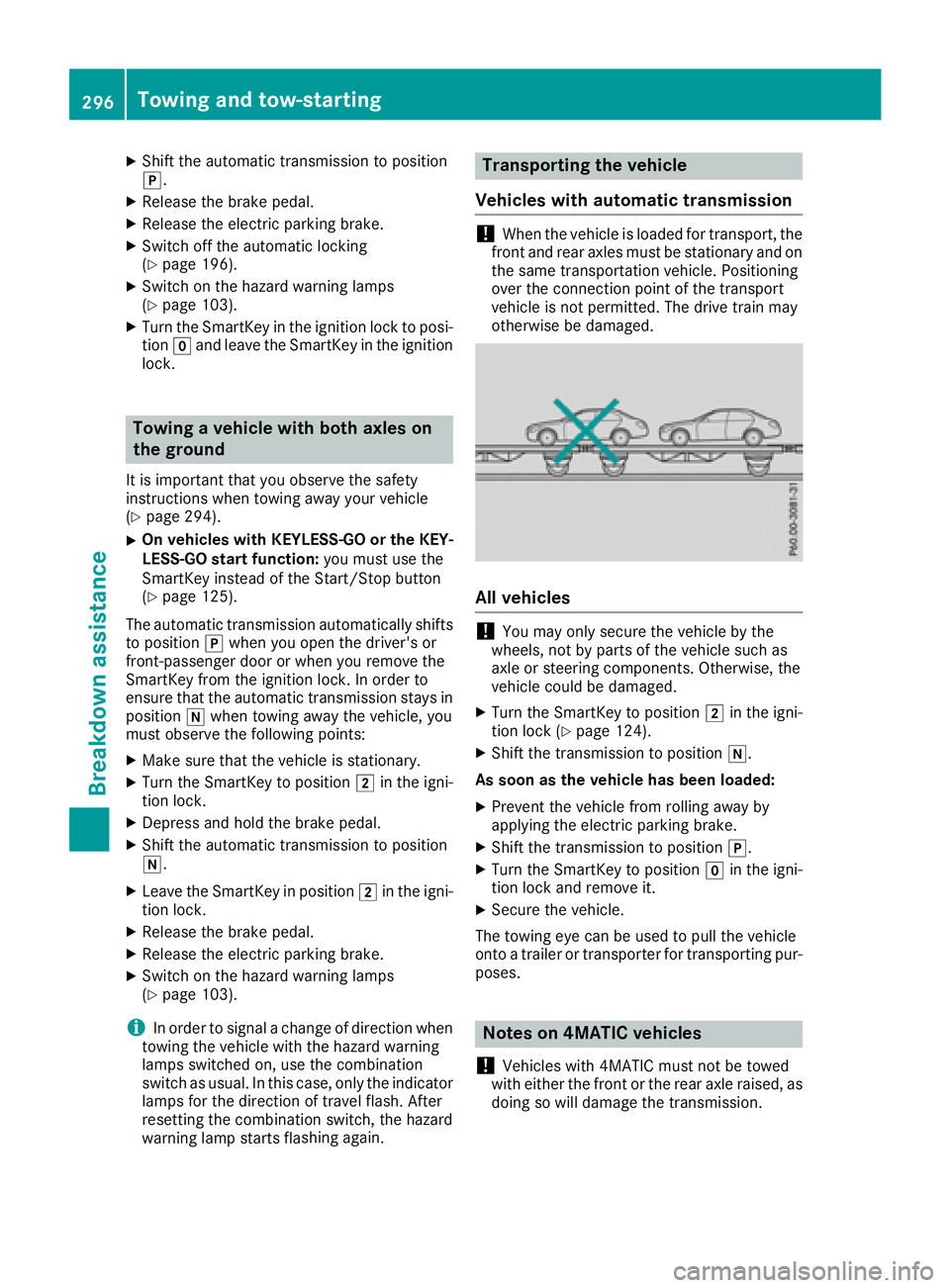
Transporting the vehicle
Vehicles with automatic transmission
!When the vehicle is loaded for transport, the
front and rear axles must be stationary and on the same transportation vehicle. Positioning
over the connection point of the transport
vehicle is not permitted. The drive train may
otherwise be damaged.
All vehicles
!You may only secure the vehicle by the
wheels, not by parts of the vehicle such as
axle or steering components. Otherwise, the
vehicle could be damaged.
XTurn the SmartKey to position 2in the igni-
tion lock (Ypage 124).
XShift the transmission to position i.
As soon as the vehicle has been loaded:
XPrevent the vehicle from rolling away by
applying the electric parking brake.
XShift the transmission to position j.
XTurn the SmartKey to positiongin the igni-
tion lock and remove it.
XSecure the vehicle.
The towing eye can be used to pull the vehicle
onto a trailer or transporter for transporting pur- poses.
Notes on 4MATIC vehicles
!
Vehicles with 4MATIC must not be towed
with either the front or the rear axle raised, as
doing so will damage the transmission.
296Towing and tow-starting
Breakdown assistance
Page 299 of 338
Vehicles with 4MATIC may only either be towed
away with both axles on the ground or be loaded
up and transported.
If the vehicle's transmission, front, or rear axle is
damaged, have the vehicle transported on a
truck or trailer.
In the event of damage to the electrical sys-
tem:
If the battery is defective, the automatic trans-
mission will be locked in position j. To shift the
automatic transmission to position i, you
must provide power to the vehicle's on-board
electrical system in the same way as when jump-
starting (
Ypage 291).
Have the vehicle transported on a transporter or
trailer.
Tow-starting (emergency engine
starting)
!
Vehicles with automatic transmission must
not be tow-started. You could otherwise dam-
age the automatic transmission.
iYou can find information on "Jump-starting"
under (Ypage 291).
Fuses
Important safety notes
GWARNING
If you manipulate or bridge a faulty fuse or if
you replace it with a fuse with a higher amper- age, the electric cables could be overloaded.
This could result in a fire. There is a risk of an
accident and injury.
Always replace faulty fuses with the specified
new fuses having the correct amperage.
!Only use fuses that have been approved for
Mercedes-Benz vehicles and which have the
correct fuse rating for the system concerned.
Only use fuses marked with an "S". Other-
wise, components or systems could be dam-
aged.
!Make sure that no moisture can enter the
fuse box when the cover is open.
!When closing the cover, make sure that it is
lying correctly on the fuse box. Moisture seep-
ing in or dirt could otherwise impair the oper-
ation of the fuses.
The fuses in your vehicle serve to close down
faulty circuits. If a fuse blows, all the compo-
nents on the circuit and their functions stop
operating.
Blown fuses must be replaced with fuses of the same rating, which you can recognize by the
color and value. The fuse ratings are listed in the
fuse allocation chart.
The fuse allocation chart is in the fuse box in the
front-passenger footwell (
Ypage 298).
If a newly inserted fuse also blows, have the
cause traced and rectified at a qualified special-
ist workshop, e.g. an authorized Mercedes-Benz
Center.
Before changing a fuse
XSecure the vehicle against rolling away
(Ypage 143).
XSwitch off all electrical consumers.
XVehicles without KEYLESS-GO: remove the
SmartKey from the ignition lock.
XVehicles with KEYLESS-GO start-function
or KEYLESS-GO: open the driver's door.
The vehicle electronics are now in position
g. This is the same as the SmartKey being
removed from the ignition.
The fuses are located in various fuse boxes:
RFuse box in the engine compartment on the
left-hand side of the vehicle, when viewed in
the direction of travel
RFuse box in the front-passenger footwell
The fuse allocation chart is on the fuse box in the
front-passenger footwell (
Ypage 298).
Fuse box in the engine compartment
GWARNING
When the hood is open and the windshield
wipers are set in motion, you can be injured by
the wiper linkage. There is a risk of injury.
Always switch off the windshield wipers and
the ignition before opening the hood.
Fuses297
Breakdown assistance
Z
Page 315 of 338
Permissible Gross Vehicle Weight Rating
(GVWR):the gross weight of the vehicle, all pas-
sengers, load and trailer load/noseweight (if
applicable) must not exceed the permissible
gross vehicle weight.
Gross Axle Weight Rating (GAWR): the maxi-
mum permissible weight that can be carried by
one axle (front or rear axle).
To ensure that your vehicle does not exceed the
maximum permissible values (gross vehicle
weight and maximum gross axle weight rating),
have your loaded vehicle (including driver, occu-
pants, cargo, and full trailer load if applicable)
weighed on a suitable vehicle weighbridge.
All about wheels and tires
Uniform Tire Quality Grading Stand-
ards
Overview of Tire Quality Grading Stand-
ards
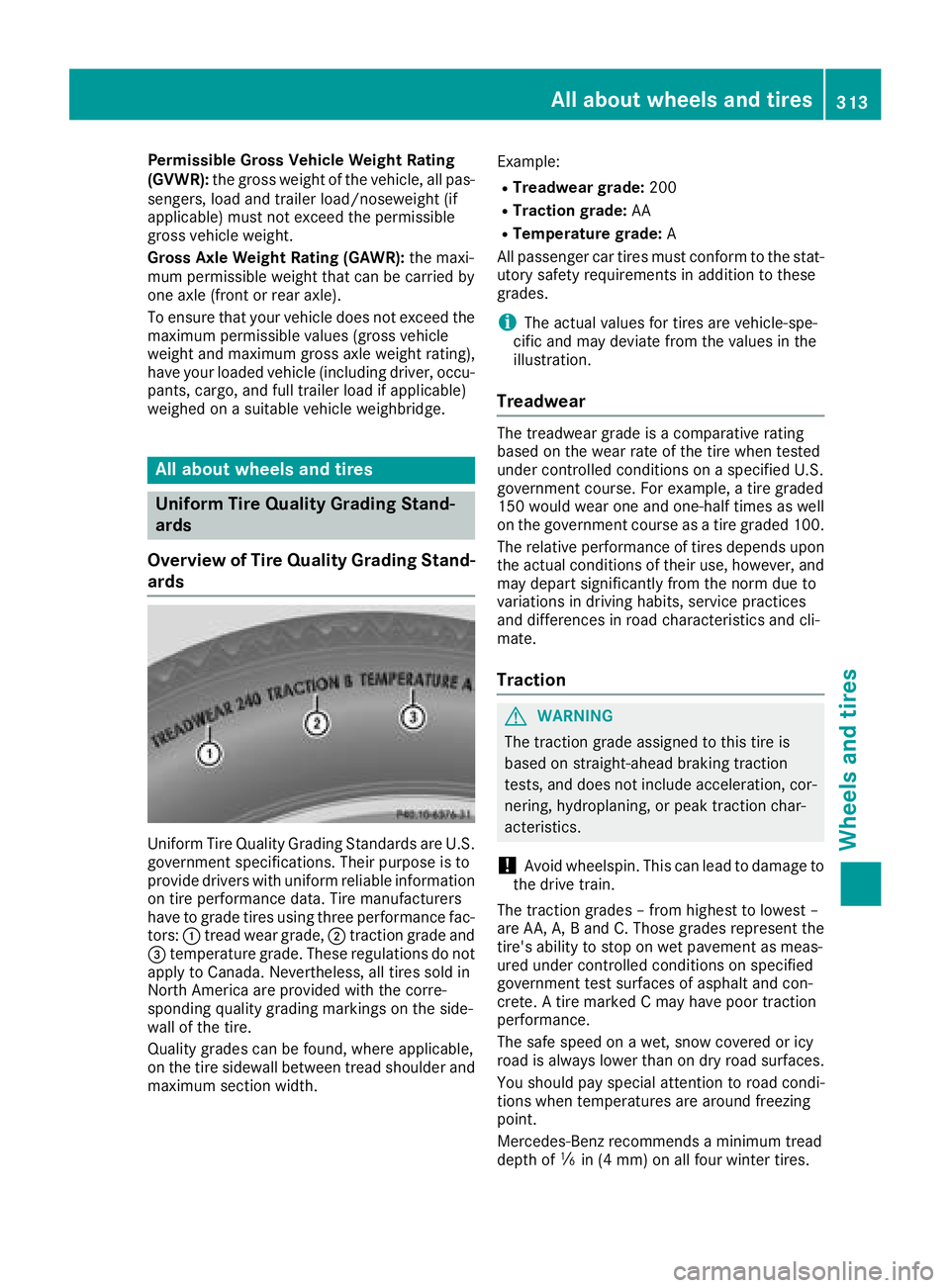
Uniform Tire Quality Grading Standards are U.S. government specifications. Their purpose is to
provide drivers with uniform reliable information
on tire performance data. Tire manufacturers
have to grade tires using three performance fac-
tors: :tread wear grade, ;traction grade and
= temperature grade. These regulations do not
apply to Canada. Nevertheless, all tires sold in
North America are provided with the corre-
sponding quality grading markings on the side-
wall of the tire.
Quality grades can be found, where applicable,
on the tire sidewall between tread shoulder and
maximum section width. Example:
RTreadwear grade:
200
RTraction grade:AA
RTemperature grade: A
All passenger car tires must conform to the stat-
utory safety requirements in addition to these
grades.
iThe actual values for tires are vehicle-spe-
cific and may deviate from the values in the
illustration.
Treadwear
The treadwear grade is a comparative rating
based on the wear rate of the tire when tested
under controlled conditions on a specified U.S.
government course. For example, a tire graded
150 would wear one and one-half times as well
on the government course as a tire graded 100.
The relative performance of tires depends upon the actual conditions of their use, however, and
may depart significantly from the norm due to
variations in driving habits, service practices
and differences in road characteristics and cli-
mate.
Traction
GWARNING
The traction grade assigned to this tire is
based on straight-ahead braking traction
tests, and does not include acceleration, cor-
nering, hydroplaning, or peak traction char-
acteristics.
!Avoid wheelspin. This can lead to damage to
the drive train.
The traction grades – from highest to lowest –
are AA, A, B and C. Those grades represent the
tire's ability to stop on wet pavement as meas-
ured under controlled conditions on specified
government test surfaces of asphalt and con-
crete. A tire marked C may have poor traction
performance.
The safe speed on a wet, snow covered or icy
road is always lower than on dry road surfaces.
You should pay special attention to road condi-
tions when temperatures are around freezing
point.
Mercedes-Benz recommends a minimum tread
depth of ãin (4 mm) on all four winter tires.
All about wheels and tires313
Wheels and tires
Z