trunk MERCEDES-BENZ GLA SUV 2018 Owner's Manual
[x] Cancel search | Manufacturer: MERCEDES-BENZ, Model Year: 2018, Model line: GLA SUV, Model: MERCEDES-BENZ GLA SUV 2018Pages: 338, PDF Size: 5.59 MB
Page 23 of 338
Maximum tire load .........................316
Maximum tire load (definition) ....... 318
MOExtended tires .......................... 301
Optional equipment weight (defi-
nition) ............................................ 319
PSI (pounds per square inch) (def-
inition) ...........................................3 19
Replacing ....................................... 319
Service life ..................................... 300
Sidewall (definition) ....................... 319
Speed rating (definition) ................ 318
Storing ...........................................3 20
Structure and characteristics
(definition) ..................................... 317
Summer tires ................................. 301
Temperature .................................. 314
TIN (Tire Identification Number)
(definition) ..................................... 319
Tire bead (definition) ......................3 19
Tire pressure (definition) ................ 319
Tire pressures (recommended) ...... 318
Tire size (data) ............................... 323
Tire size designation, load-bearing
capacity, speed rating .................... 314
Tire tread ....................................... 300
Tire tread (definition) ..................... 319
Total load limit (definition) ............. 319
Traction ......................................... 313
Traction (definition) ....................... 319
Tread wear ..................................... 313
Uniform Tire Quality Grading
Standards ...................................... 313
Uniform Tire Quality Grading
Standards (definition) .................... 318
Wear indicator (definition) ............. 319
Wheel rim (definition) .................... 318
see Flat tire
Tool
see Vehicle tool kit
Top Tether ............................................ 56
Tow-starting
Emergency engine starting ............ 297
Important safety notes .................. 294
Installing the towing eye ................ 295
Removing the towing eye ............... 295
Towing a trailer
ESP
®(Electronic Stability Pro-
gram) ............................................... 66 To
wing away
Important safety guidelines ........... 294
Installing the towing eye ................ 295
Notes for 4MATIC vehicles ............ 296
Removing the towing eye ............... 295
Transporting the vehicle ................ 296
With both axles on the ground ....... 296
With the front axle raised ............... 295
Towing eye ......................................... 283
Traction system
see ETS/4ETS (Electronic Trac-
tion System)
Traffic reports
see also Digital Operator's Man-
ual .................................................. 239
Transmission
see Automatic transmission
Transmission position display
(DIRECT SELECT lever) ...................... 132
Transporting the vehicle .................. 296
Traveling uphill
Brow of hill ..................................... 154
Driving downhill ............................. 154
Maximum gradient-climbing capa-
bility ............................................... 154
Trim pieces (cleaning instruc-
tions) .................................................. 280
Trip computer (on-board com-
puter) .................................................. 189
Trip odometer
Calling up ....................................... 189
Resetting (on-board computer) ...... 190
Trunk
Emergency release button ............... 83
Opening (from outside the vehi-
cle, HANDS-FREE ACCESS) .............. 80
Trunk lid
see Tailgate
Turn signals
Display message ............................ 211
Replacing bulbs (front) ................... 107
Switching on/off ........................... 103
Two-way radio
Frequencies ................................... 326
Installation ..................................... 326
Transmission output (maximum) .... 326
Index21
Page 73 of 338
KEYLESS-GOstart function
Gene ral notes
Bear in min dthat th eengin ecan be started by
any of th evehicl eoccupant sif there is aSmart -
Key in th evehicle.
Changing the settings ofthe locking
system
You can chang eth esetting sof th elocking sys-
tem. This mean sthat only th edriver's door and
th efuel filler flap are unlocke dwhen th evehicl e
is unlocked. This is useful if you frequentl ytravel
on your own .
XTo change th esetting: press and hold th e
% and& buttons simultaneousl yfor
approximately six seconds until th ebattery
indicator lamp flashes twice (
Ypage 72).
If th esetting of th elocking system is changed
within th esignal range of th evehicle, pressing
th e& or% button:
Rlocks or
Runlocks th evehicl e
The SmartKey no wfunction sas follows :
XTo unlock: press the% buttononce .
XTo unlock centrally: press the% button
twice .
XTo lock centrally: press the& button.
The KEYLESS-GO function is changed as fol -
lows :
XTo unlock th edriver's door :touch th einner
surfac eof th edoor handle on th edriver's
door .
XTo unlock centrally: touch theinner surfac e
of th edoor handle on th efront-passenger
door or th erear door .
XTo lock centrally: touch theouter sensor
surfac eon on eof th edoor handles .
XTo restoreth efactory settings: press and
hold th e% and& buttons sim ultane-
ousl yfor approximately six seconds until th e
battery chec klamp flashes twice
(
Ypage 72) .
Mechanical key
Gene ral notes
If th evehicl ecan no longer be locke dor
unlocke dwit hth eSmartKey or KEYLESS-GO ,
use th emechanical key.
If you use th emechanical ke yto unloc kand
open th edriver's door or th etrunk lid, th eanti-
theft alarm system will be triggered (
Ypage 67).
There are several ways to tur noff th ealarm :
XTo deactivate th ealarm wit hth ekey :press
th e% or& buttonon th ekey.
or
XInser tth eSmartKey int oth eignition lock.
or
XTo deactivate th ealarm wit hKEYLESS-GO:
press th eStart/Sto pbutto nin th eignition
lock. The SmartKey mus tbe in th evehicle.
or
XLoc kor unloc kth evehicl eusin gKEYLESS -
GO. The SmartKey mus tbe outside th evehi-
cle .
If you unloc kth evehicl eusin gth emechanical
key, th efuel filler flap will no tbe unlocke dauto -
matically.
XTo unlock th efuel filler flap: insert the
SmartKey int oth eignition lock.
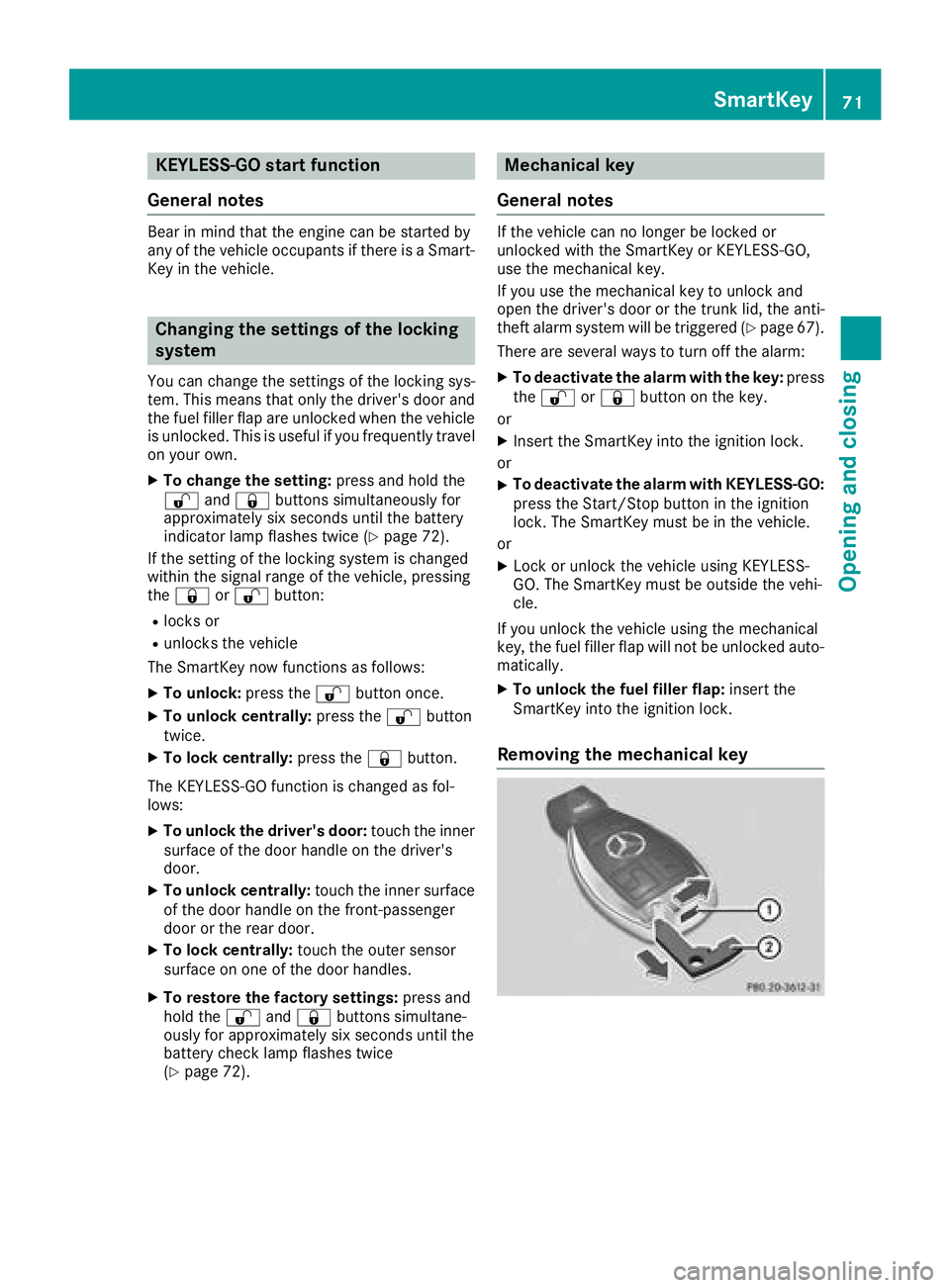
Removing the mechanical key
SmartKey71
Opening and closing
Z
Page 85 of 338
XFold the rear seat backrest forwards
(Ypage 251).
XTake the mechanical key out of the SmartKey
(Ypage 71).
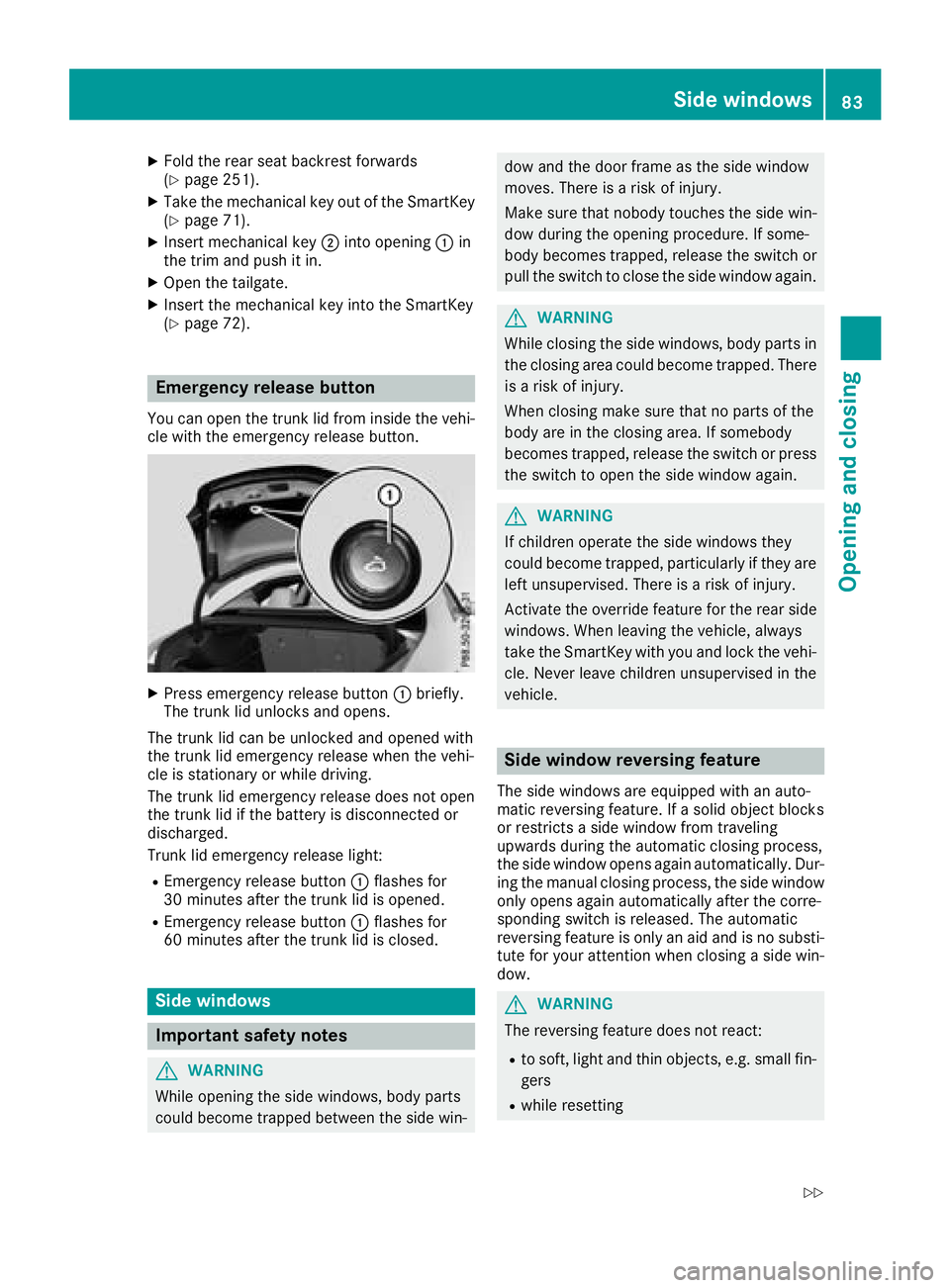
XInsert mechanical key;into opening :in
the trim and push it in.
XOpen the tailgate.
XInsert the mechanical key into the SmartKey
(Ypage 72).
Emergency release button
You can open the trunk lid from inside the vehi-
cle with the emergency release button.
XPress emergency release button :briefly.
The trunk lid unlocks and opens.
The trunk lid can be unlocked and opened with
the trunk lid emergency release when the vehi-
cle is stationary or while driving.
The trunk lid emergency release does not open
the trunk lid if the battery is disconnected or
discharged.
Trunk lid emergency release light:
REmergency release button :flashes for
30 minutes after the trunk lid is opened.
REmergency release button :flashes for
60 minutes after the trunk lid is closed.
Side windows
Important safety notes
GWARNING
While opening the side windows, body parts
could become trapped between the side win-
dow and the door frame as the side window
moves. There is a risk of injury.
Make sure that nobody touches the side win- dow during the opening procedure. If some-
body becomes trapped, release the switch or
pull the switch to close the side window again.
GWARNING
While closing the side windows, body parts in
the closing area could become trapped. There is a risk of injury.
When closing make sure that no parts of the
body are in the closing area. If somebody
becomes trapped, release the switch or press
the switch to open the side window again.
GWARNING
If children operate the side windows they
could become trapped, particularly if they are left unsupervised. There is a risk of injury.
Activate the override feature for the rear side
windows. When leaving the vehicle, always
take the SmartKey with you and lock the vehi-
cle. Never leave children unsupervised in the
vehicle.
Side window reversing feature
The side windows are equipped with an auto-
matic reversing feature. If a solid object blocks
or restricts a side window from traveling
upwards during the automatic closing process,
the side window opens again automatically. Dur-
ing the manual closing process, the side windowonly opens again automatically after the corre-
sponding switch is released. The automatic
reversing feature is only an aid and is no substi-
tute for your attention when closing a side win-
dow.
GWARNING
The reversing feature does not react:
Rto soft, light and thin objects, e.g. small fin-
gers
Rwhile resetting
Side windows83
Opening and closing
Z
Page 166 of 338
Canceling start-off assist
XRemove your foot from the accelerator pedal.
XReactivate ESP®.
RACE START (Mercedes-AMG vehi-
cles)
Important safety notes
iRACE ST ART must not beused on normal
roads. RACE ST ART must only be activated
and used on dedicated road circuits, outside
of public road use.
iRACE ST ARTisonly availab le in
Mercedes‑AMG veh icles.
GWAR NING
If you use RACE ST ART, individual tires may
start to spinand the veh iclecould skid.
Dependin g on the selected ESP
®mode, there
is an increased risk of skiddin g and having an
acc iden t. Make sure that no persons, animals
or obstacles are within range of the veh icle.
RACE ST ART enables optimal acceleration from
a standing start. For this, a suitably high-grip
road surface isrequired and the veh icleand tires
must be ingood working order.
iObserve the safety notes on driving safety
systems (Ypage 60).
Be sure to read the safety notes and informa-
tion on ESP
®(Ypage 63).
Conditions for activation
You can activate RACE START if:
Rthe doors, hood and the trunk lidare closed.
Rthe engine isrunning and the transmission,
all- wheel drive clutch and the engine are at
operating temperature.
Rthe steering wheel is inthe straight-ahead
position.
Rthe veh icle isstationary and the brake pedal is
depr essed (left foot).
Rthe transmission is inposition h.
Rdrive program S,S+ orRACE isselected
(Ypage 131)
Activating RACE START
XDepress the brake pedal with your left foot
and keep it depressed.
XPull and hold both steering wheel paddle shift-
ers.
XThe RACE START Confirm: Paddle UPCancel: Paddle DOWNmessage appears in
the multifunction display.
XRelease both steering wheel paddle shifters.
iIf the activation conditions are no longer ful-
fille d,RACE START is canceled. The RACE
START Not Possible See Operator'sManualmessage appears in the multifunction
display.
XTo cancel: pull the left steering wheel paddle
shifter (Ypage 138).
or
XTo confi rm:pull the right steering wheel pad-
dle shifter (Ypage 138).
The RACESTARTAvailableDepressgaspedalmessage appears inthe multifunction
display.
iIf you donot depress the accelerator pedal
wit hin a few seconds, RACE START is can-
celed. The multifunction display shows the
RACE START Canceled
message.
XFully depress the accelerator pedal.
The engine speed is increased.
The RACE
STARTReleasebraketostartmessage appears in the multifunction display.
iIfyou do not release the brake pedal within
a short time, RACE START willbe canceled.
The multifunction display shows theRACE
START Canceledmessage.
XTake your foot off the brake, but keep the
accelerator pedal depressed.
The vehicle pulls away at maximum acceler-
ation.
The RACE
STARTActivemessage appears in
the multifunction display.
RACE START is deactivated when the vehicle
reaches a speed of approximately 50 km/h.
RACE START is deactivated immediately if you
release the accelerator pedal during RACE
ST ART or ifany of the activation conditions are
no longer fulfilled. The RACE START Not Pos‐
sible See Operator's ManualorRACESTART Canceledmessage appears inthe mul-
tifunction display.
164Driving systems
Driving and parking
Page 181 of 338
RTop view and picture from the rear view cam-
era (130° viewing angle)
RTop view and picture from the front camera
(without displaying the maximum steering
wheel angle)
RTop view and enlarged rear view
RTop view and enlarged front view
RTop view and rear-view images from the exte-
rior mirror cameras (rear wheel view)
RTop view and forward-view images from the
exterior mirror cameras (front wheel view)
When the function is active and you shift the
transmission from position hork toi, you
see the previous view in the COMAND display.
The dynamic guidelines are hidden.
When you shift between transmission positions
h and k, you see the previously selected front
or rear view.
Important safety notes
The 360° camera is only an aid. It is not a
replacement for your attention to your immedi-
ate surroundings. You are always responsible
for safe maneuvering and parking. Make sure
that there are no persons, animals or objects in
the maneuvering area when you are maneuver-
ing or parking.
The 360° camera may show a distorted view of
obstacles, show them incorrectly or not at all. It
cannot show objects in the following areas:
Runder the front bumper
Rvery close to the front bumper
Rvery close to the rear bumper
Runder the rear bumper
Rin close range above the handle on the trunk
lid
Rvery close to the exterior mirrors
You are always responsible for safety, and must
always pay attention to your surroundings when parking and maneuvering. This applies to the
areas behind, in front of and beside the vehicle.
You could otherwise endanger yourself and oth-
ers.
The 360° camera will not function or will func-
tion in a limited manner:
Rif the doors are open
Rif the exterior mirrors are folded in
Rif the tailgate is open
Rin heavy rain, snow or fog
Rat night or in very dark places
Rif the cameras are exposed to very bright light
Rif the area is lit by fluorescent bulbs or LED
lighting (the display may flicker)
Rif there is a sudden change in temperature,
e.g. when driving into a heated garage in win-
ter
Rif the camera lenses are dirty or covered
Rif the vehicle components are damaged in
which the cameras are fitted. In this event,
have the camera position and setting checked
at a qualified specialist workshop
Do not use the 360° camera in this case. You
can otherwise injure others or cause damage to
objects or the vehicle.
Activation conditions
The 360° camera image can be displayed if:
Ryour vehicle is equipped with a 360° camera
RCOMAND is switched on; see the digital
COMAND operating instructions
Rthe 360° Camerafunction is activated
Switching on the 360° camera
XPress and hold the Øbutton on the center
console for longer than two seconds; see the
digital COMAND operating instructions.
The following appears depending on whether
gear hork is selected:
Rfull screen display with the image from the
front camera
Rfull screen display with the image from the
rear view camera
Activating the 360° camera with
COMAND
XPress the Øbutton; see the digital
COMAND operating instructions.
XSelect Systemby turning cVdthe COMAND
controller and press Wto confirm.
XSelect 360°Cameraand press Wto confirm.
The following appears depending on whether
gear hork is selected:
Ra split screen with top view and the image
from the front camera or
Ra split screen with top view and the image
from the rear view camera
Driving systems179
Driving and parking
Z
Page 252 of 338
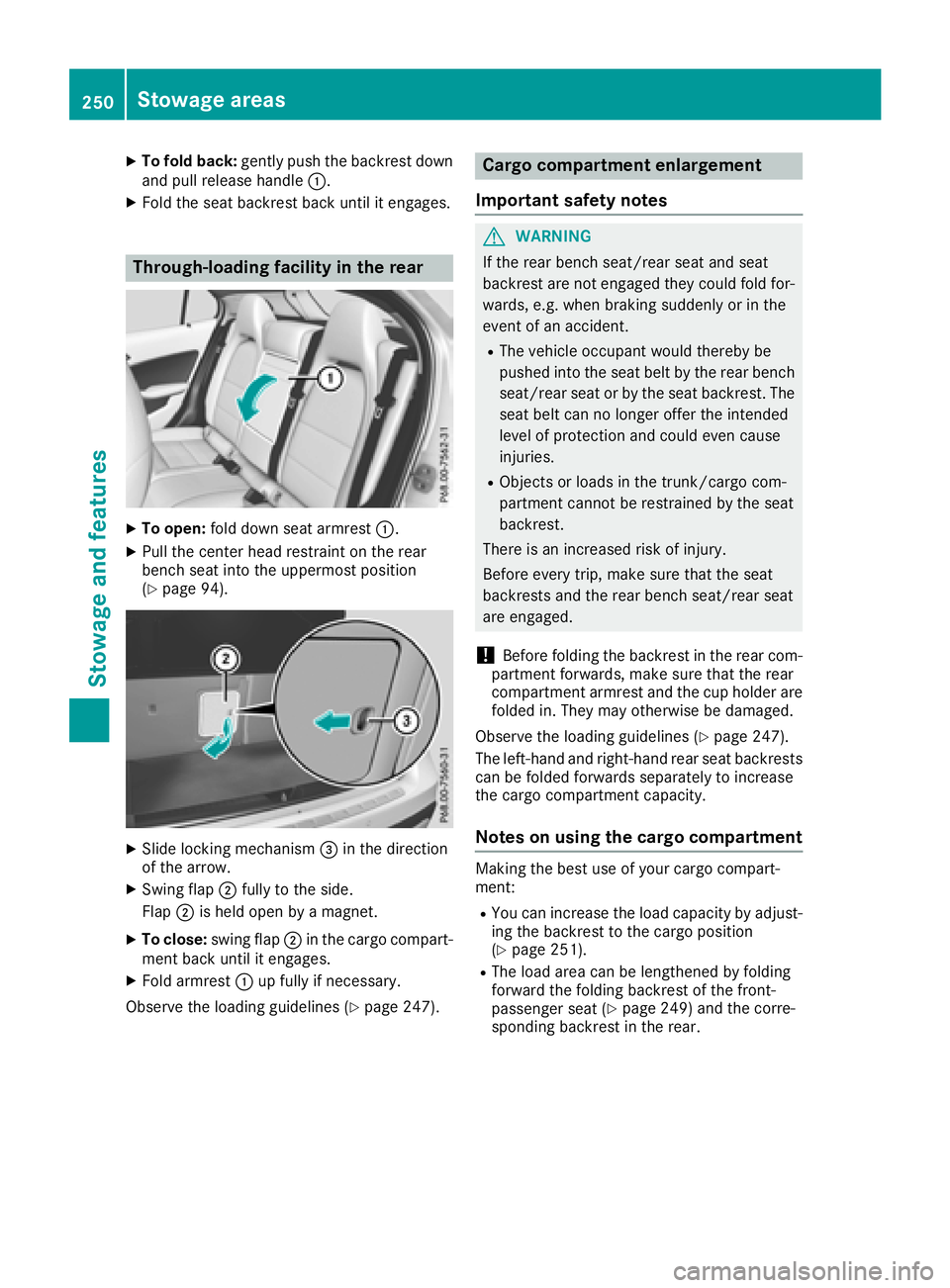
XTo fold back:gently push the backrest down
and pull release handle :.
XFold the seat backrest back until it engages.
Through-loading facility in the rear
XTo open:fold down seat armrest :.
XPull the center head restraint on the rear
bench seat into the uppermost position
(
Ypage 94).
XSlide locking mechanism =in the direction
of the arrow.
XSwing flap ;fully to the side.
Flap ;is held open by a magnet.
XTo close: swing flap ;in the cargo compart-
ment back until it engages.
XFold armrest :up fully if necessary.
Observe the loading guidelines (
Ypage 247).
Cargo compartment enlargement
Important safety notes
GWARNING
If the rear bench seat/rear seat and seat
backrest are not engaged they could fold for-
wards, e.g. when braking suddenly or in the
event of an accident.
RThe vehicle occupant would thereby be
pushed into the seat belt by the rear bench
seat/rear seat or by the seat backrest. The
seat belt can no longer offer the intended
level of protection and could even cause
injuries.
RObjects or loads in the trunk/cargo com-
partment cannot be restrained by the seat
backrest.
There is an increased risk of injury.
Before every trip, make sure that the seat
backrests and the rear bench seat/rear seat
are engaged.
!Before folding the backrest in the rear com-
partment forwards, make sure that the rear
compartment armrest and the cup holder are
folded in. They may otherwise be damaged.
Observe the loading guidelines (
Ypage 247).
The left-hand and right-hand rear seat backrests
can be folded forwards separately to increase
the cargo compartment capacity.
Notes on using the cargo compartment
Making the best use of your cargo compart-
ment:
RYou can increase the load capacity by adjust-
ing the backrest to the cargo position
(
Ypage 251).
RThe load area can be lengthened by folding
forward the folding backrest of the front-
passenger seat (
Ypage 249) and the corre-
sponding backrest in the rear.
250Stowage areas
Stowag ean d features
Page 285 of 338
Warning triangle
Removing/replacing the warning trian-
gle
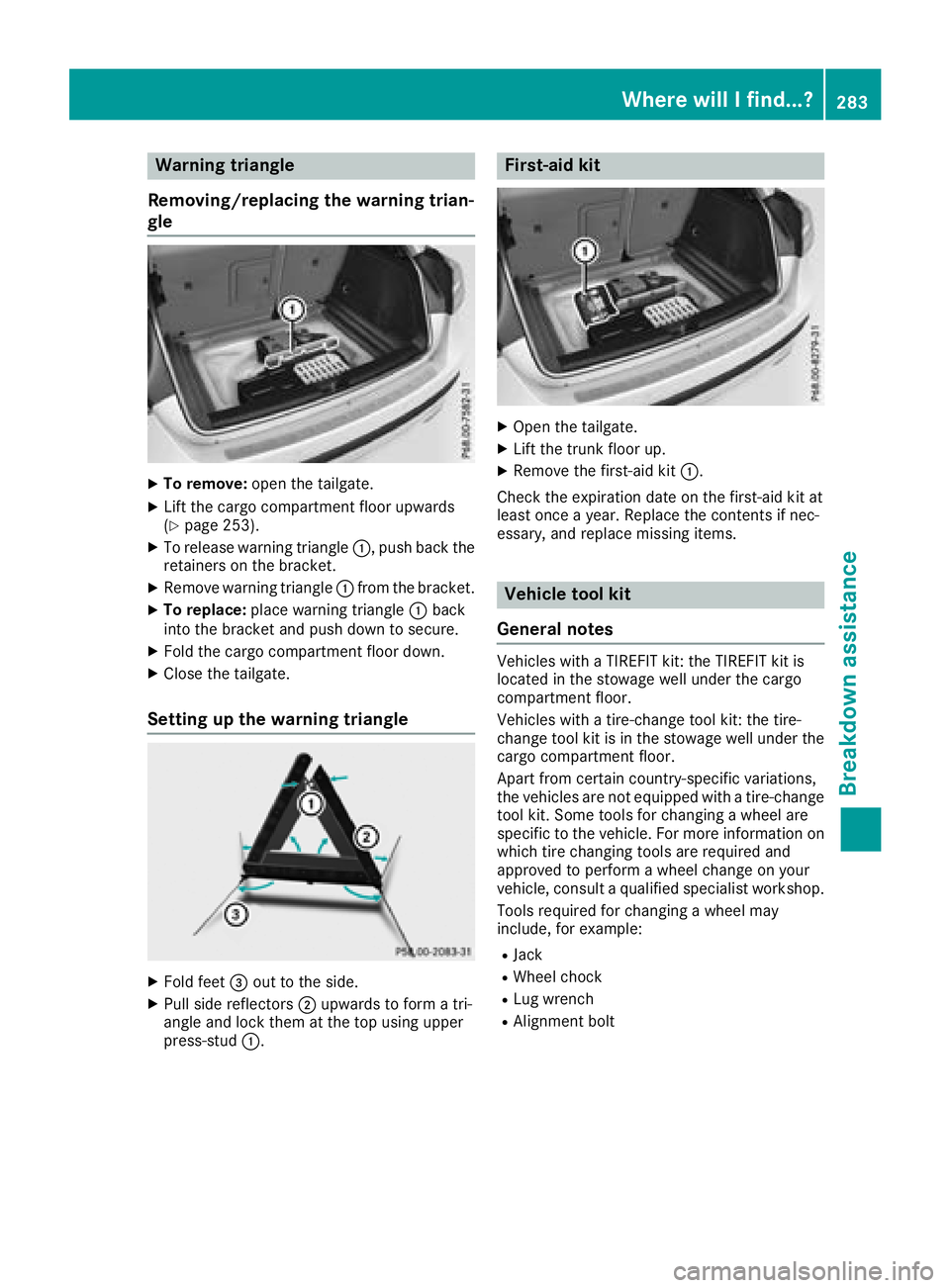
XTo remove: open the tailgate.
XLift the cargo compartment floor upwards
(Ypage 253).
XTo release warning triangle :, push back the
retainers on the bracket.
XRemove warning triangle :from the bracket.
XTo replace: place warning triangle :back
into the bracket and push down to secure.
XFold the cargo compartment floor down.
XClose the tailgate.
Setting up the warning triangle
XFold feet =out to the side.
XPull side reflectors ;upwards to form a tri-
angle and lock them at the top using upper
press-stud :.
First-aid kit
XOpen the tailgate.
XLift the trunk floor up.
XRemove the first-aid kit :.
Check the expiration date on the first-aid kit at
least once a year. Replace the contents if nec-
essary, and replace missing items.
Vehicle tool kit
General notes
Vehicles with a TIREFIT kit: the TIREFIT kit is
located in the stowage well under the cargo
compartment floor.
Vehicles with a tire-change tool kit: the tire-
change tool kit is in the stowage well under the
cargo compartment floor.
Apart from certain country-specific variations,
the vehicles are not equipped with a tire-change
tool kit. Some tools for changing a wheel are
specific to the vehicle. For more information on
which tire changing tools are required and
approved to perform a wheel change on your
vehicle, consult a qualified specialist workshop.
Tools required for changing a wheel may
include, for example:
RJack
RWheel chock
RLug wrench
RAlignment bolt
Where will I find...?283
Breakdown assistance
Page 329 of 338
The maximum transmission output (PEAK) at the
base of the antenna must not exceed the fol-
lowing values:
Frequency bandMaximum
transmission output
Short wave
3 - 54 MHz100 W
4 m waveband
74 - 88 MHz30 W
2 m waveband
144 - 174 MHz50 W
Trunked radio system/
Tetra
380 - 460 MHz10 W
70 cm waveband
400 - 460 MHz35 W
Mobile communications
(2G/3G/4G)10 W
The following can be used in the vehicle without
restrictions:
RRF transmitters with a maximum transmis-
sion output of up to 100 mW
RRF transmitters with transmitter frequencies
in the 380 - 410 MHz frequency band and a
maximum transmission output of up to 2 W
(trunked radio system/Tetra)
RMobile phones (2G/3G/4G)
There is no restriction for antenna positions on
the outside of the vehicle for the following fre-
quency bands:
RTrunked radio system/Tetra
R70 cm waveband
R2G/3G/4G
Identification plates
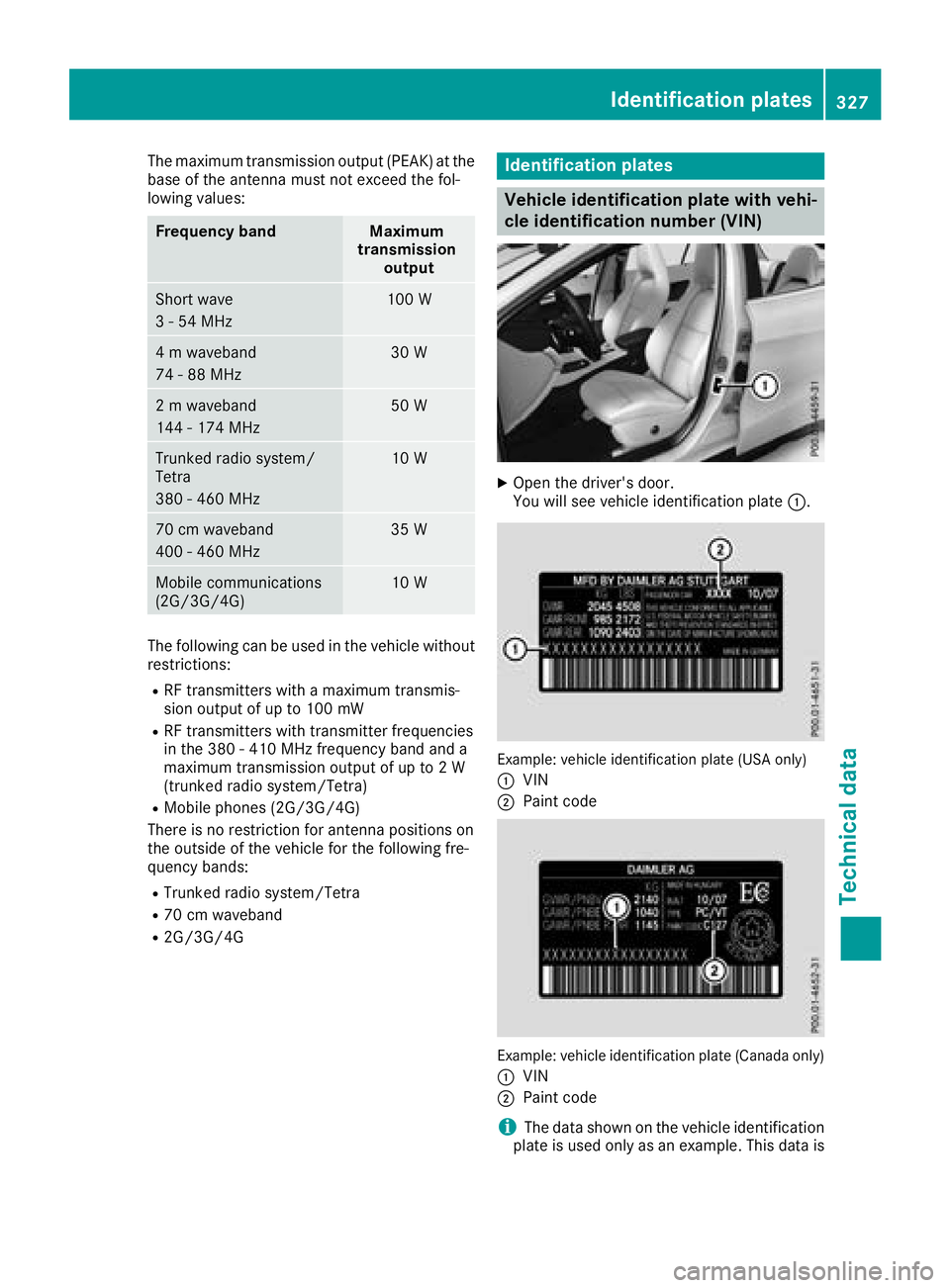
Vehicle identification plate with vehi-
cle identification number (VIN)
XOpen the driver's door.
You will see vehicle identification plate :.
Example: vehicle identification plate (USA only)
:
VIN
;Paint code
Example: vehicle identification plate (Canada only)
:
VIN
;Paint code
iThe data shown on the vehicle identification
plate is used only as an example. This data is
Identification plates327
Technical data
Z