charging MERCEDES-BENZ GLB SUV 2019 User Guide
[x] Cancel search | Manufacturer: MERCEDES-BENZ, Model Year: 2019, Model line: GLB SUV, Model: MERCEDES-BENZ GLB SUV 2019Pages: 689, PDF Size: 11.39 MB
Page 514 of 689
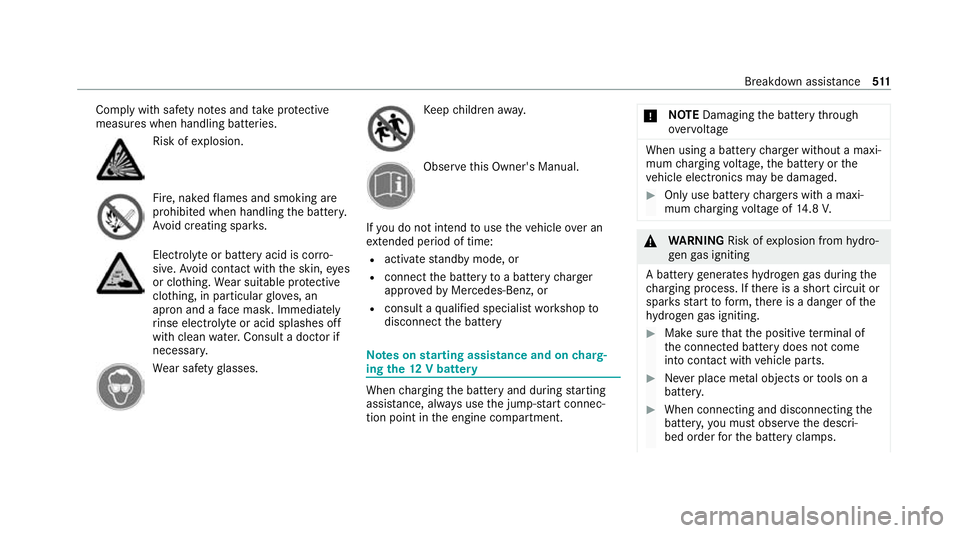
Comply with saf
ety no tes and take protective
measures when handling batteries. Risk of
explosion. Fire, naked
flames and smoking are
prohibi ted when handling the batter y.
Av oid creating spar ks. Electrolyte
or battery acid is cor ro‐
sive. Avoid contact with the skin, eyes
or clo thing. Wear suitable pr otective
clo thing, in particular glove s, an
apron and a face mas k.Immedia tely
ri nse electrolyte or acid splashes off
with clean water.Consult a doc tor if
necessar y. We
ar saf etygl asses. Ke
ep children away. Obser
vethis Owner's Manual.
If yo u do not intend touse theve hicle over an
ex tended pe riod of time:
R activate standby mode, or
R connect the battery toa bat tery charger
appr oved byMercedes-Benz, or
R consult a qualified specialist workshop to
disconnect the battery Note
s onstarting assi stance and on charg‐
ing the12 V battery When
charging the battery and during starting
assis tance, al ways use the jump-s tart connec‐
tion point in the engine compartment. *
NO
TEDamaging the battery thro ugh
ove rvoltage When using a battery
charge r without a maxi‐
mum charging voltage, the battery or the
ve hicle electronics may be damaged. #
Only use battery charge rs with a maxi‐
mum charging voltage of 14.8 V. &
WARNING Risk ofexplosion from hydro‐
ge nga s igniting
A battery generates hydrogen gas during the
ch arging process. If there is a short circuit or
spar ksstart toform ,th ere is a danger of the
hy drogen gas igniting. #
Make sure that the positive term inal of
th e connected battery does not come
into conta ct withvehicle parts. #
Never place me tal objects or tools on a
batter y. #
When connecting and disconnecting the
batter y,yo u must obse rveth e descri‐
bed order forth e battery clamps. Breakdown assis
tance 511
Page 515 of 689
#
When giving starting assis tance, al ways
make sure that you on lyconnect bat‐
te ry term inals with identical polarity. #
During starting assis tance, you must
obse rveth e described order for con‐
necting and disconnecting the jump
lead. #
Do not connect or disconnect the bat‐
te ry cla mp s while the engine is running. &
WARNING Risk ofexplosion during
ch arging process and starting assis tance
During thech arging process and starting
assis tance, the battery may release an explo‐
sive gas mixture. #
Avoid fire , naked flames, creating
spar ksand smoking. #
Make sure that there is suf ficient venti‐
lation du ring thech arging process and
during starting assis tance. #
Do not lean over a batter y. &
WARNING Risk ofexplosion from a fro‐
zen battery
A dischar ged battery may freeze at temp era‐
tures slightly abo veor below freezing point.
During starting assis tance or battery charg‐
ing, bat tery gas can be released. #
Alw ays allow a battery tothaw before
ch arging it or per form ing starting assis‐
ta nce. If
th e indicator/warning lamps in the instrument
clus ter do not light up at low temp eratures, it is
ve ry likely that the dischar ged battery has fro‐
zen. In this case you may neither jump-s tart the
ve hicle nor charge the batter y.
The service life of a battery that has been
th awe d may be dramatically shor tened. The
st arting characteristics may be impaired, espe‐
cially at low temp eratures.
It is recommended that you ha veathaw ed bat‐
te ry checked at a qualified specialist workshop. *
NO
TEDama gecaused bynumerous or
ex tended attem ptsto start the engine Nume
rous or extended attem ptsto start the
engine may damage the catalytic con verter
due tonon-combu sted fuel. #
Avoid numerous and extended attem pts
to start the engine. Obser
vethefo llowing points during starting
assis tance and when charging the battery:
R Only use undamaged jump lead/charging
cables with a suf ficient cross-section and
insula tedte rm inal clamps.
R Non- insulated parts of thete rm inal clamps
must not come into con tact wi thother me tal
parts while the jump lead/charging cable is
connected tothe battery/jump-s tart connec‐
tion point.
R The jump lead/charging cable must not
come into contact wi thany parts which may
mo vewhen the engine is running.
R Alw ays make sure that nei ther you nor the
battery is elect rostatically charge d. 512
Breakdown assis tance
Page 516 of 689
R
Keep away from fire and naked flames.
R Do not lean overth e batter y.
Obser vethe additional following points when
ch arging the battery:
R Only use battery charge rs tested and
appr oved for Mercedes-Benz.
R Read the battery charge r's operating instruc‐
tions before charging the batter y.
Obser vethe additional following points during
st arting assis tance:
R Forst arting assis tance, only use batteries
wi th a nominal voltage of 12V.
R The vehicles must not touch.
R Petrol engine: only acceptstarting assis‐
ta nce if the engine and exhaust sy stem are
cold. St
arting assi stance and charging the12 V
battery Requ
irements: R
The vehicle is secured with the electric park‐
ing brake.
R Automatic transmission: the transmission
is in position j.
R Manual transmission: the transmission is in
neutral.
R The ignition and all electrical consumers are
switched off.
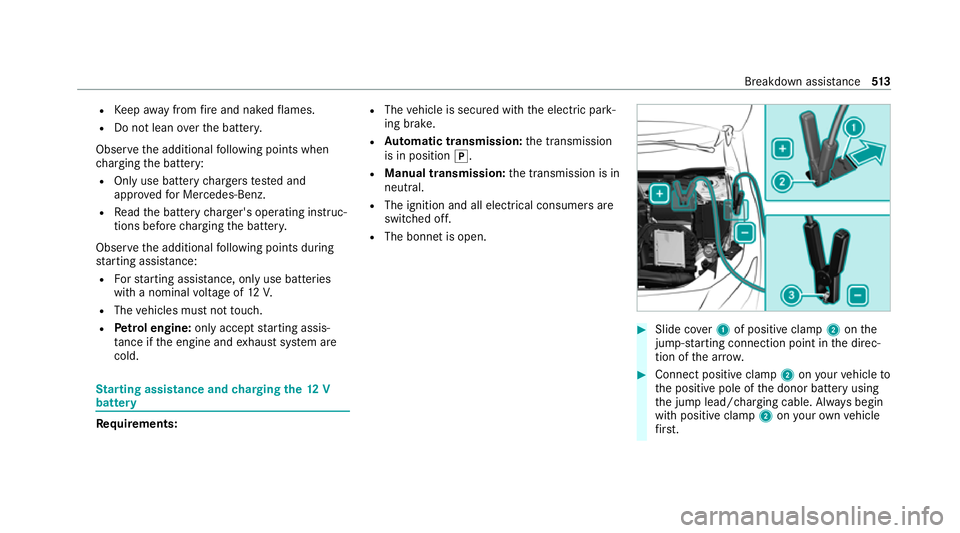
R The bonn etis open. #
Slide co ver1 of positive clamp 2onthe
jump-s tarting connection point in the direc‐
tion of the ar row. #
Connect positive clamp 2onyour vehicle to
th e positive pole of the donor battery using
th e jump lead/charging cable. Alw ays begin
with positive clamp 2onyour ow nve hicle
fi rs t. Breakdown assi
stance 513
Page 517 of 689
#
During starting assi stance: start the
engine of the donor vehicle and run at idle
speed. #
Connect the negative pole of the donor bat‐
te ry and ear thpoint 3ofyour ow nve hicle
by using the jump lead/charging cable. Begin
with the donor battery firs t. #
During starting assi stance: start the
engine of your ow nve hicle. #
During thech arging process: start the
ch arging process. #
During starting assi stance: letthe engines
ru nfo r se veral minutes. #
During starting assi stance: before discon‐
necting the jump lead, switch on an electrical
consumer in your ow nve hicle, e.g. there ar
wind owheater or lighting.
When thest arting assis tance/charging process
is compl ete: #
First,re mo vethe jump lead/charging cable
from ear thpoint 3and the negative pole of
th e donor batter y,then from positive clamp
2 and the positive pole of the donor bat‐ te
ry. Begin ea chtime wi th the conta cts on
yo ur ow nve hicle firs t. #
Afterre moving the jump lead/charging
cable, close co ver1 of positive clamp 2.
Fu rther information can be obtained at a quali‐
fi ed specialist workshop. Re
placing the 12V battery #
Obser vethe no tes on the12 V battery
(/ page 509).
Mercedes-Benz recommends that you ha vethe
12 V battery replaced at a qualified specialist
wo rkshop, e.g. at a Mercedes-Benz Service
Centre.
Obser vethefo llowing no tes if youwa ntto
re place the battery yourself:
R Alw aysre place a faulty bat tery with a battery
which meets the specific vehicle require‐
ments.
The vehicle is equipped with an AGMtech nol‐
ogy battery (Absorbent Glass Mat). Fullve hi‐
cle functionality is only guaranteed with an AG
M batter y.Fo r saf etyre asons, Mercedes-
Benz recommends that you on lyuse bat ter‐
ies which have been tested and appr ovedfor
yo ur vehicle byMercedes-Benz.
R Carryover de tach able parts, such as vent
hoses, elbow fittings or term inal co vers from
th e battery being replaced.
R Make sure that theve nt hose is al ways con‐
nected tothe original opening on the side of
th e batter y.
Fit any existing or supplied cell caps.
Otherwise, gases or battery acid could
escape.
R Make sure that de tach able parts are recon‐
nected in the same way. To
w- starting or towing away Pe
rm itted towing me thods Mercedes-Benz
recommends transporting your
ve hicle in the case of a breakdown, rath er than
to wing it away. 514
Breakdown assis tance
Page 646 of 689
Au
tomatic front passen ger front air‐
bag shu toff .......................................... 44, 46
Fu nction of the automatic front
passenger front airbag deactivation
sy stem ................................................... 44
PA SSENGER AIR BAG indicator lamp .... .46
Au tomatic mir rorfo lding function
Ac tivating/deactivating ...................... .174
Au tomatic transmission
DIRECT SELECT le ver .......................... 203
Drive program display .......................... 19 9
Drive programs .................................... 19 8
DY NA MIC SELECT switch .................... 19 8
Engaging drive position ....................... 205
Engaging neutral ................................. 204
Engaging pa rkposition ........................ 204
Enga gingreve rsege ar ........................ .204
Kickdown ............................................ 206
Manual gear changing ........................ .205
St eering wheel gearshift paddles ........ 205
Tr ansmission position display .............. 203
Tr ansmission positions ........................ 203
Au tomatic transmission (problem)
see Transmission (problem) Axle load
Perm issible .......................................... 550
Tr ailer operation .................................. 565 B
Bag hook .................................................. 13 9
Ball ne ck
Fo lding out/in .................................... .288
BA S (Brake Assist Sy stem) .................... .226
Battery Cha rging (Remo teOnline) .................... 189
Ke y ........................................................ 84
Re mo tecontrol (s tationary heater) ...... 182
Battery see Battery (vehicle)
Battery (vehicle) ...................................... 514
Charging .............................................. 513
Charging (Remo teOnline) .................... 189
No tes .................................................. 509
No tes (s tarting assis tance and
ch arging) .............................................. 511
Re placing .............................................5 14
St arting assis tance .............................. 513Belt
see Seat belt
Bic ycle rack
Tr ailer operation .................................. 291
Blind Spot Assist .................................... .282
Ac tivating/deactivating ...................... .285
Fu nction .............................................. 282
Sy stem limitations ...............................2 82
Blo wer
see Climate control
BlueTEC see AdBlue ®
Blue tooth ®
............................................... 366
Information .......................................... 366
Setting up an Internet connection ....... 460
Switching on/off ................................. 366
Bonnet Resetting (active bonnet) .................... 485
Boot lid see Tailgate
Brake Assist Sy stem
see BAS (Brake Assi stSystem) Index
643
Page 667 of 689
Vo
ice commands (LINGU ATRO NIC) .....3 24
Mir rors
see Outside mir rors
Mobile phone Cancelling permission for Internet
connection ........................................... 461
Damage de tection (pa rked vehicle) ..... 223
Fr equencies ......................................... 549
Locking theve hicle ................................ 88
St arting theve hicle .............................. 187
Tr ansmission output (maximum) ........ .549
Un locking theve hicle ............................88
Wi reless charging ................................ 15 2
see Apple CarPlay ®
Mobile phone see Android Auto
see Mercedes-Benz Link
see Telephone
Mobile phone voice recognition
St arting .............................................. .430
St opping ..............................................4 30
Model series see Vehicle identification plate
MOExtended tyres ..................................5 03Mo
torw ay mode ....................................... 15 9
MULTIBEAM LED see Intelligent Light Sy stem
Multifunction display Overview of the displa ys...................... 299
Multifunction steering wheel
Overview of buttons ............................ 295
Multifunction steering wheel
see Steering wheel
Multimedia sy stem
Ac tivating/deactivating DSR ............... 24 2
Ac tivating/deactivating standby
mode .................................................. .224
Ac tivating/deactivating voice ampli‐
fi cation torear .................................... .365
Ad justing thevo lume .......................... .356
Central control elements ..................... 332
Configu ring displ aysettings ................3 63
Configu ring drive program I ................. 200
ENERGIZING COMFORT programme
(o ve rview) ............................................ 374
ENERGIZING seat kinetics ................... 373
Favo urites ............................................ 350
Main functions .................................... 342 MBUX In
terior Assis tant (no tes) ..........3 36
Overview ............................................. 329
Re storing thefa ctory settings .............. 372
St andby mode function ...................... .224
St arting the ENERG IZINGCOMFORT
programme .......................................... 375
Switching the sound on/off ................3 55
Multimedia sy stem
see Display (multimedia sy stem)
see Ente ring characters
see MBUX In terior Assis tant (multi‐
media sy stem)
see Noti fications Centre
see Profile
see Sug gestions
see Themes
see Touch Control
see Touchpad
Music online Calling up ............................................ .474
Con figuring options ............................. 475
Sea rch function ................................... 474664
Index
Page 672 of 689
Re
ading light
Switching on/off using poses .............. 341
Re ading light
see Interior lighting
Re alwo od (Care) .................................... .499
Re ar door (child saf ety lock) .................... 79
Re ar fog light
Switching on/off .................................1 56
Re ar seat
see Seat
see Third rowof seats
Re ar seat belt
St atus display ........................................ 41
Re ar seat belt status display .................... 41
Re ar window
Changing the wiper blade .................... 17 0
Re ar window heater ................................ 175
Re ar window wipers
Ac tivating/deactivating ...................... .168
Re ar-view mir ror
see Outside mir rors Re
cycling
see Take -ba ckof end-of-life vehicles
Re ducing agent
see AdBlue ®
Re fuelling
Re fuelling theve hicle .......................... 209
To pping up AdBlue ®
............................. 213
Re gistration
Ve hicle .................................................. 30
Re mo tecont rol (stationa ryheater/
ve ntilation)
Displa ys............................................... 181
Problems ............................................. 183
Re placing the battery .......................... 182
Setting ................................................. 180
Re mo teOnline
Charging the battery ............................1 89
Cooling or heating theve hicle inte‐
ri or .......................................................1 89
St arting theve hicle ............................. 189
Re placing a bulb
see Changing bulbs
Re scue card ............................................... 31Re
ser ve
Fu el ..................................................... 556
Re set function (multimedia sy stem) .....3 72
Re sidual heat ...........................................1 78
Re storing (factory settings)
see Reset function (multimedia sy stem)
Re stra int sy stem ...................................... .35
Basic instructions forch ildren .............. .50
Fu nction in an accident ........................ .36
Fu nctionality .......................................... 36
Malfunction ........................................... 36
Pr otection ..............................................35
Re duced pr otection ...............................35
Self-test ................................................. 36
Wa rning lamp ........................................ 36
Re versege ar
Inserting .............................................. 204
Re versing camera .................................. .263
Care .................................................... 497
Fu nction .............................................. 263
Opening the camera co ver (360°
Camera) ............................................. .270
Switching auto matic operation
on/off (360° Camera) ......................... 270 Index
669
Page 678 of 689
Mounting dimensions (trailer hitch) ..... 563
No tes (trailer hitch) ............................. 563
Overhang dimension (trailer hitch) ...... 563
To ngue weight .................................... .565
To wing capacity (trailer operation) ...... 564
Ve hicle identification plate .................. 550
Te lephone ........................................ 305, 425
Ac tivating functions du ring a call ........ 430
Calls wi thseveral participants ............ .430
Changing a function ............................ 427
Connecting a mobile phone (Near
Field Communication (NFC)) .............. .428
Connecting a mobile phone (Pass‐
ke y) .................................................... .426
Connecting a mobile phone (Secu re
Simple Pairing) .................................... 426
Disconnecting a mobile phone ............ 428
Importing con tacts ............................. .433
Importing contacts (o verview) ............ .432
Incoming call during an existing call .... 431
Information .......................................... 426
Inter changing mobile phones .............. 427
Locking theve hicle (mobile phone) .......88
Menu (on-board computer) .................. 305
Mobile phone voice recognition .......... 430 No
tes .................................................. 423
Operating modes ................................. 426
Re ception and transmission volume .... 429
Re placing mobile phones .................... 427
Setting theringtone ............................ 429
St arting theve hicle (mobile phone) ..... 187
Switching mobile phones (Near Field
Communication (NFC)) ........................ 428
Te lephone menu overview ...................4 25
Te lephone operation ............................ 430
Un locking theve hicle (mobile phone) ....88
Using Near Field Communication
(NFC) ................................................... 428
Vo ice commands (LINGU ATRO NIC) ...... 319
Wi reless charging (mobile phone) ........ 15 2
Te lephone number
Dialling (on-board computer) .............. .305
Te lephone operation
see Calls
Te lephony operating modes
Blue tooth ®
Te lephony .......................... 426
Te mp erature ............................................ .175
Te xt messages
Vo ice commands (LINGU ATRO NIC) .....3 24Te
xt messages
see Messages
Themes ..................................................... 346
Calling up ............................................ 347
Deleting ............................................... 348
Fa stening ............................................. 347
Modifying ............................................ 348
Moving ................................................ 348
Overview ............................................. 346
Third row of seats .................................... 131
Fo lding back the backrest on the
th ird row of seats ................................ 13 3
Fo lding the backrest on theth ird row
of seats forw ards ................................ .131
Getting in/out ...................................... 11 6
Height limit ........................................... 111
Through-loading feature
see Load compartment
see Seat
see Third rowof seats
Ti e-d owney es .......................................... 13 8
Time Manual time setting ............................. 364 Index
675
Page 685 of 689
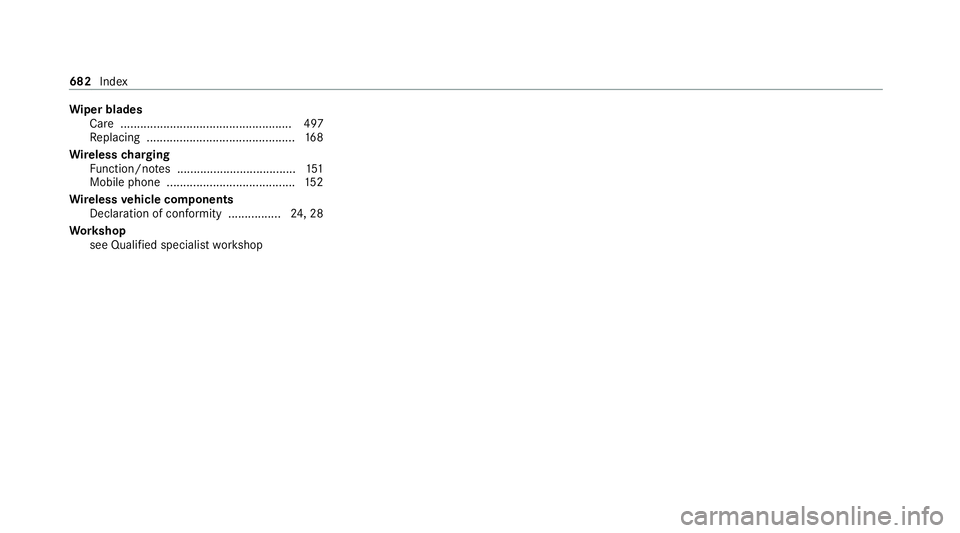
Wi
per blades
Ca re .................................................... 497
Re placing .............................................1 68
Wire lesscharging
Fu nction/no tes .................................... 151
Mobile phone ....................................... 15 2
Wire lessvehicle comp onents
Declaration of con form ity ................ 24, 28
Wo rkshop
see Qualified specialist workshop 682
Index