climate control MERCEDES-BENZ GLB SUV 2019 Owners Manual
[x] Cancel search | Manufacturer: MERCEDES-BENZ, Model Year: 2019, Model line: GLB SUV, Model: MERCEDES-BENZ GLB SUV 2019Pages: 689, PDF Size: 11.39 MB
Page 6 of 689
Mir
rors ........................................................ 171
Operating the sun visors ............................. 174Climate control
......................................... 175
Overview of climate contro l systems ..........1 75
Operating the climate control sy stem ......... 176 Driving and pa
rking ................................. 18 5
Driving ........................................................ 185
DY NA MIC SELECT switch ............................1 98
Manual transmission .................................. 201
Au tomatic transmission .............................. 203
Fu nction of the 4MATIC .............................. 208
Re fuelling ................................................... 209
Pa rking ........................................................ 215
Driving and driving sa fety sy stems .............2 24
Tr ailer hit ch................................................ 288
Bicycle rack function .................................. 291
Ve hicle towing instructions ........................ .293 Instrument Display and on-board
comp uter.................................................. 294
Instrument display overview ...................... .294 Overview of
the buttons on thesteering
wheel ..........................................................2 95
Operating the on-board computer .............. 296
Ad justing the design of the instrument
display ........................................................ 297
Showing display conte nt onthe instru‐
ment clus ter ............................................... 298
Overview of displa yson the multifunc‐
tion display .................................................2 99
Ad justing the instrument lighting ............... 300
Menus and submenus ................................ 300
Head-up Display ......................................... 307 LINGU
ATRO NIC ........................................ 309
No tes on operating saf ety .......................... 309
Ope ration .................................................... 310
Using LINGU ATRO NIC ef fectively ................ 312
Essential voice commands .......................... 313 MBUX multimedia sy
stem ...................... 329
Overview and operation .............................. 329
Sy stem settings .......................................... 363
Fit & Healt hy............................................... 373
Na vigation ................................................... 378Te
lephone .................................................. .423
Online and Internet functions ..................... 459
Media ........................................................ .468
Ra dio .......................................................... 477
Sound ......................................................... 480 Main
tenance and care ............................. 484
ASS YST PLUS service inter val display ........ 484
Engine compartment .................................. 485
Cleaning and care ...................................... .491 Breakdown assistance
............................501
Emergency .................................................. 501
Flat tyre ...................................................... 503
Battery (vehicle) ......................................... 509
To w- starting or towing away ........................ 514
Electrical fuses ........................................... 520 Wheels and tyres
..................................... 524
No tes on noise or unusual handling char‐
acteristics .................................................. .524
No tes on regular lyinspecting wheels and
tyres .......................................................... .524 Con
tents 3
Page 10 of 689
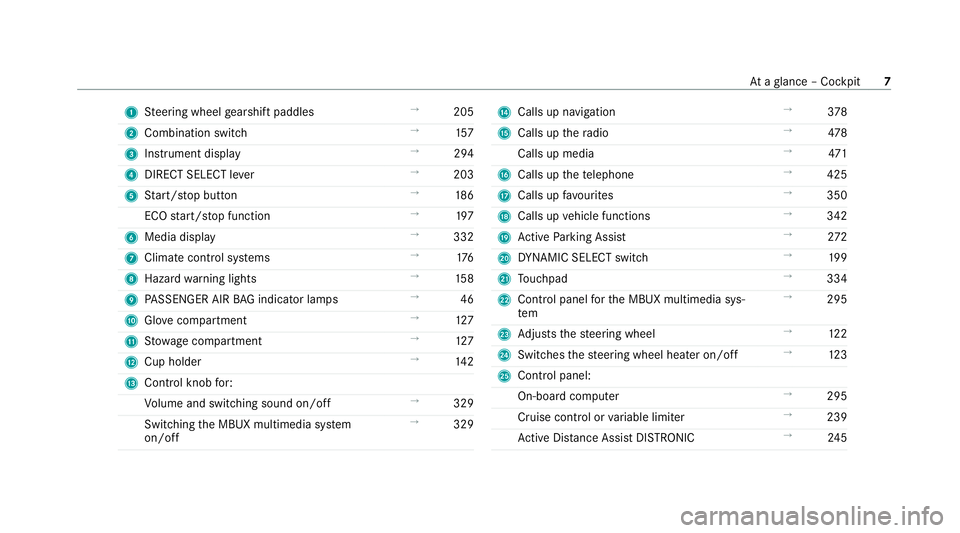
1
Steering wheel gearshift paddles →
205
2 Combination swit ch →
157
3 Instrument display →
294
4 DIRECT SELECT le ver →
203
5 Start/ stop button →
186
ECO start/ stop function →
197
6 Media display →
332
7 Climate contro l systems →
176
8 Haza rdwa rning lights →
15 8
9 PASSENGER AIR BAG indicator lamps →
46
A Glovecompa rtment →
127
B Stow age compartment →
127
C Cup holder →
14 2
D Control knob for:
Vo lume and switching sound on/off →
329
Swit ching the MBUX multimedia sy stem
on/off →
329 E
Calls up navigation →
378
F Calls up thera dio →
478
Calls up media →
471
G Calls up thete lephone →
425
H Calls up favo urites →
350
I Calls up vehicle functions →
342
J Active Parking Assist →
272
K DYNA MIC SELECT switch →
19 9
L Touchpad →
334
M Control panel forth e MBUX multimedia sys‐
tem →
295
N Adjusts thesteering wheel →
12 2
O Switches thesteering wheel heater on/off →
12 3
P Control panel:
On-board co mputer →
295
Cruise cont rol or variable limiter →
239
Ac tive Dis tance Assi stDISTRONIC →
24 5 At
aglance – Cockpit 7
Page 36 of 689
Depending on
the equipment, this includes, for
ex ample:
R settings forth e seat and steering wheel posi‐
tions
R suspension and climate control settings
R customisations such as interior lighting
If yo ur vehicle is accordingly equipped, you can
connect your smartphone or ano ther mobile end
device totheve hicle. You can cont rolth is by
means of the control elements integrated in the
ve hicle. Images and audio from the smartphone
can be output via the multimedia sy stem. Cer‐
tai n information is simultaneously trans ferred to
yo ur smartphone.
Depending on the type of integration, this can
include:
R general vehicle data
R position data
This allo wsyouto use selected apps on your
smartphone, such as navigation or music play‐
bac k.There is no fur ther interaction between the
smartphone and theve hicle; in particular, vehi‐
cle data is not directly accessible. Which type of fur
ther data processing occurs is de term ined by
th e pr ovider of the specific app used. Which set‐
tings you can make, if an y,depends on the spe‐
cific app and the operating sy stem of your
smartphone. Online services
Wire
less network connection
If yo ur vehicle has a wireless network connec‐
tion, it enables data tobe exc hanged between
yo ur vehicle and additional sy stems. The wire‐
less network connection is enabled via theve hi‐
cle's transmission and reception unit or via con‐
nected mobile end devices (e.g. sma rtphones).
Online functions can be used via the wireless
network connection. This includes online serv‐
ices and applications/apps pr ovided bythe man‐
ufacturer or other pr oviders.
Manu factu rer's se rvices
Re garding online services of the manufacturer,
th e individual functions are described bythe
manufacturer in a suita ble place (e.g. Owner's
Manual, website of the manufacturer) along with
th ere leva nt da taprotection information. Per‐ sonal data may be used
forth e pr ovision of
online services. Data is exchanged via a secure
connection, e.g. the manufacturer's designated
IT sy stems. Personal data is collected, pro‐
cessed and used via the pr ovision of services
exc lusively on the basis of legal permissions or
with prior consent.
The services and functions (sometimes subject
to afe e) can usually be activated or deactivated.
In some cases, this also applies tothe entire
ve hicle's data connection. This excludes, in par‐
ticular, legally prescribed functions and services.
Third pa rty services
If it is possible touse online services from other
pr ov iders, these services are there sponsibility
of the pr ovider in question and subject tothat
pr ov ider's data pr otection conditions and terms
of use. The manufacturer has no influence on
th e conte ntexc hanged.
Fo rth is reason, please ask the service pr ovider
fo r information about the type, extent and pur‐
pose of the collection and use of personal data
when services are pr ovided bythird parties. General no
tes33
Page 167 of 689
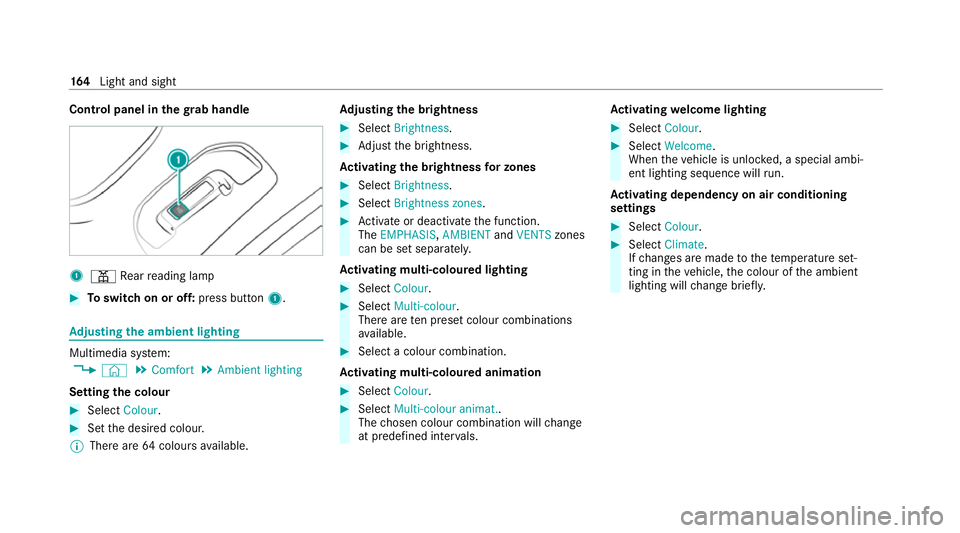
Control panel in
thegr ab handle 1
p Rear reading lamp #
Toswitch on or off: press button1. Ad
justing the ambient lighting Multimedia sy
stem:
4 © 5
Comfort 5
Ambient lighting
Setting the colour #
Select Colour. #
Set the desired colour.
% There are 64colours available. Ad
justing the brightness #
Select Brightness . #
Adjust the brightness.
Ac tivating the brightness for zones #
Select Brightness . #
Select Brightness zones . #
Activate or deacti vate the function.
The EMPHASIS, AMBIENTandVENTS zones
can be set separatel y.
Ac tivating multi-coloured lighting #
Select Colour. #
Select Multi-colour.
The reare ten preset colour combinations
av ailable. #
Select a colour combination.
Ac tivating multi-coloured animation #
Select Colour. #
Select Multi-colour animat..
The chosen colour combination will change
at predefined inter vals. Ac
tivating welcome lighting #
Select Colour. #
Select Welcome.
When theve hicle is unloc ked, a special ambi‐
ent lighting sequence will run.
Ac tivating dependency on air conditioning
settings #
Select Colour. #
Select Climate.
If ch anges are made tothete mp erature set‐
ting in theve hicle, the colour of the ambient
lighting will change brief ly. 16 4
Light and sight
Page 178 of 689
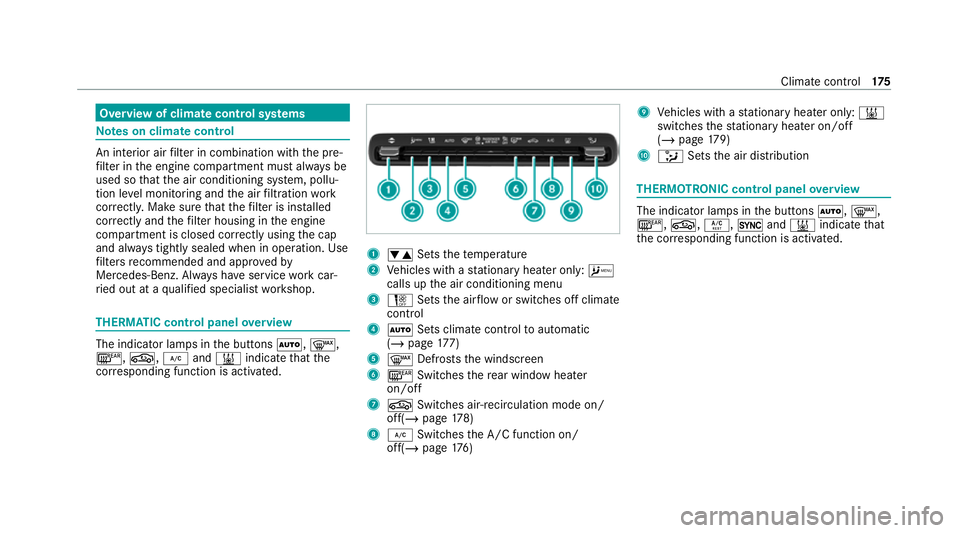
Overview of climate control sy
stems Note
s on climate control An interior air
filter in combination with the pre‐
fi lter in the engine compartment must alw ays be
used so that the air conditioning sy stem, pollu‐
tion le vel monitoring and the air filtration work
cor rectl y.Make sure that thefilter is ins talled
cor rectly and thefilter housing in the engine
compartment is closed cor rectly using the cap
and alw ays tightly sealed when in operation. Use
fi lters recommended and appr ovedby
Mercedes-Benz. Alw ays ha veservice workcar‐
ri ed out at a qualified specialist workshop. THERMATIC control panel
overview The indicator lamps in
the buttons Ã,¬,
¤, g,¿and& indicate that the
cor responding function is activated. 1
w Setsthete mp erature
2 Vehicles with a stationary heater on ly:A
calls upthe air conditioning menu
3 H Setsthe air flow or switches off climate
control
4 Ã Sets climate control toautomatic
(/ page 177)
5 ¬ Defrosts the windscreen
6 ¤ Switches there ar wind owheater
on/off
7 g Switches air-recirculation mode on/
off(/ page178)
8 ¿ Switches the A/C function on/
off(/ page176) 9
Vehicles with a stationary heater on ly:&
swit ches thest ationary heater on/off
(/ page 179)
A _ Setsthe air distribution THERMOTRONIC control panel
overview The indicator lamps in
the buttons Ã,¬,
¤, g,Á,0and& indicate that
th e cor responding function is activated. Climate
control 175
Page 179 of 689
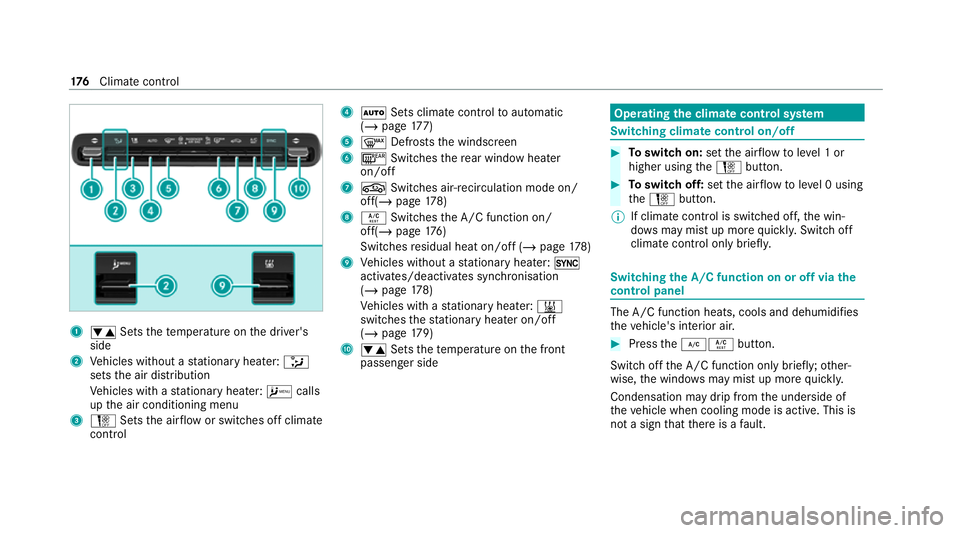
1
w Setsthete mp erature on the driver's
side
2 Vehicles without a stationary heater: _
sets the air distribution
Ve hicles with a stationary heater: Acalls
up the air conditioning menu
3 H Setsthe air flow or switches off climate
control 4
à Sets climate control toautomatic
(/ page 177)
5 ¬ Defrosts the windscreen
6 ¤ Switches there ar wind owheater
on/off
7 g Switches air-recirculation mode on/
off(/ page178)
8 Á Switches the A/C function on/
off(/ page176)
Switches residual heat on/off (/ page178)
9 Vehicles without a stationary heater: 0
activates/deactivates syn chronisation
(/ page 178)
Ve hicles with a stationary heater: &
swit ches thest ationary heater on/off
(/ page 179)
A w Setsthete mp erature on the front
passenger side Operating
the clima tecont rol sy stem Switching clima
tecont rol on/off #
Toswitch on: setthe air flow toleve l 1 or
higher using theH button. #
Toswitch off: setthe air flow toleve l 0 using
th eH button.
% If climate control is switched off, the win‐
do ws may mist up more quickl y.Switch off
climate control only brie fly. Switching
the A/C function on or off via the
cont rol panel The A/C function heats, cools and dehumidifies
th
eve hicle's interior air. #
Press the¿Á button.
Switch off the A/C function only brief ly;ot her‐
wise, the windo wsmay mist up more quickl y.
Condensation may drip from the underside of
th eve hicle when cooling mode is active. This is
not a sign that there is a fault. 176
Climate cont rol
Page 180 of 689
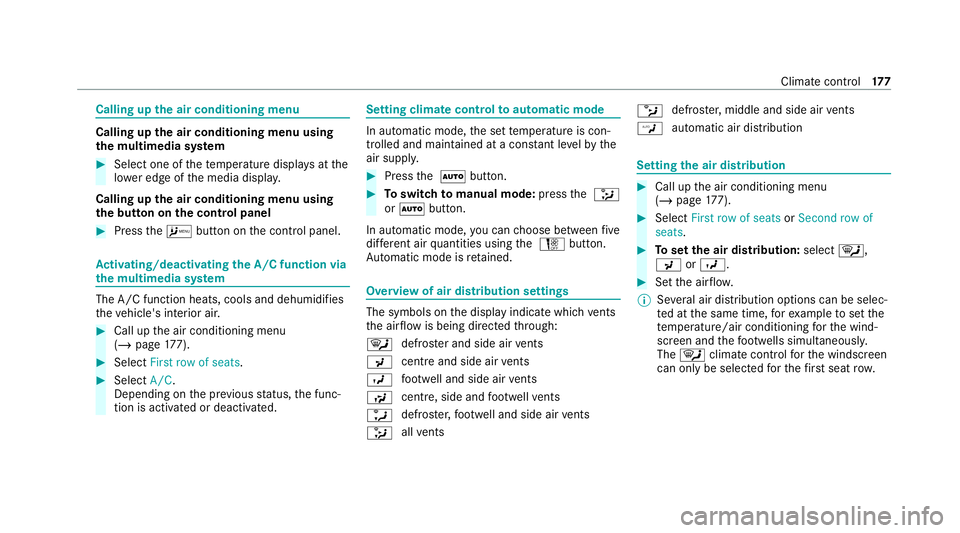
Calling up
the air conditioning menu Calling up
the air conditioning menu using
th e multimedia sy stem #
Select one of thete mp erature displa ysatthe
lo we r edge of the media displa y.
Calling up the air conditioning menu using
th e but ton on the control panel #
Press theA button on the control panel. Ac
tivating/deactivating the A/C function via
the multimedia sy stem The A/C function heats, cools and dehumidifies
th eve hicle's interior air. #
Call up the air conditioning menu
(/ page 177). #
Select First row of seats. #
Select A/C.
Depending on the pr evious status, the func‐
tion is activated or deactivated. Setting climate control
toautomatic mode In auto
matic mode, the set temp erature is con‐
trolled and maintained at a const ant levelby the
air suppl y. #
Press the à button. #
Toswitch tomanual mode: pressthe _
or à button.
In automatic mode, you can choose between five
dif fere nt air quantities using the H button.
Au tomatic mode is retained. Overview of air distribution settings
The symbols on
the display indicate which vents
th e air flow is being directed thro ugh:
¯ def
rost er and side air vents
P centre and side air
vents
O fo
ot we ll and side air vents
S centre, side and
foot we llve nts
a defros
ter,fo ot we ll and side air vents
_ all
vents b
defros
ter,middle and side air vents
W au
tomatic air distribution Setting
the air distribution #
Call up the air conditioning menu
(/ page 177). #
Select First row of seats orSecond row of
seats. #
Toset the air distribution: select¯,
P orO. #
Set the air flow.
% Several air distribution options can be selec‐
te d at the same time, forex ample toset the
te mp erature/air conditioning forth e wind‐
screen and thefo ot we lls simultaneousl y.
The ¯ climate contro lfo rth e windscreen
can only be selected forth efirs t seat row. Climate cont
rol17 7
Page 181 of 689
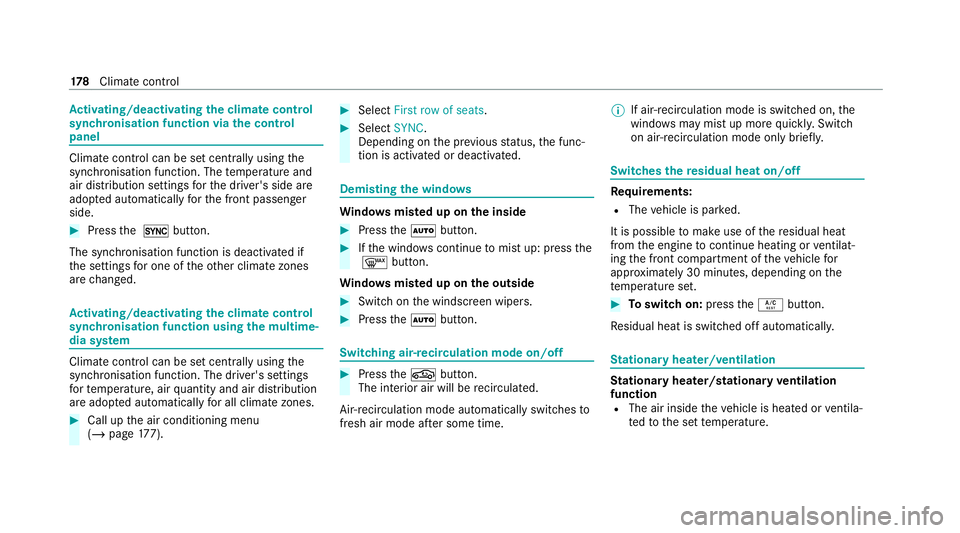
Ac
tivating/deactivating the climate control
syn chro nisation function via the control
panel Climate control can be set centrally using
the
synchronisation function. The temp erature and
air distribution settings forth e driver's side are
adop ted automatically forth e front passenger
side. #
Press the 0 button.
The synchronisation function is deactivated if
th e settings for one of theot her climate zones
are changed. Ac
tivating/deactivating the climate control
syn chro nisation function using the multime‐
dia sy stem Climate control can be set centrally using
the
synchronisation function. The driver's settings
fo rte mp erature, air quantity and air distribution
are adop ted automatically for all clima tezones. #
Call up the air conditioning menu
(/ page 177). #
Select First row of seats. #
Select SYNC.
Depending on the pr evious status, the func‐
tion is activated or deactivated. Demisting
the windo ws Wi
ndo wsmis ted up on the inside #
Press theà button. #
Ifth e windo wscontinue tomist up: press the
¬ button.
Wi ndo wsmis ted up on the outside #
Switch on the windscreen wipers. #
Press theà button. Switching air-recirculation mode on/off
#
Press theg button.
The interior air will be recirculated.
Air-reci rculation mode automatically swit ches to
fresh air mode af ter some time. %
If air-recirculation mode is switched on, the
windo wsmay mist up more quickl y.Switch
on ai r-re circulation mode only brie fly. Switches
there sidual heat on/off Re
quirements:
R The vehicle is par ked.
It is possible tomake use of there sidual heat
from the engine tocontinue heating or ventilat‐
ing the front compartment of theve hicle for
appr oximately 30 minutes, depending on the
te mp erature set. #
Toswitch on: presstheÁ button.
Re sidual heat is switched off automaticall y. St
ationary heater/ventilation St
ationary heater/stationary ventilation
function R The air inside theve hicle is heated or ventila‐
te dto the set temp erature. 17 8
Climate cont rol
Page 182 of 689
R
The air inside theve hicle cannot be cooled
down totemp eratures below the outside
te mp erature.
R Ifth e outside temp erature changes, ventila‐
tion mode au tomatical lyswitches toheating
mode or heating mode automatically
switches toventilation mode.
The stationary heater and theex haust gas outlet
are situated in front of theright-hand front
wheel.
Switching thest ationary heater/stationary
ve ntilation on/off via the control panel &
DANG ER Risk of fata l injury due topoi‐
sonous exhaust gases
If th eta ilpipe is bloc ked or suf ficient ventila‐
tion is not possible, poisonous exhaust gases
such as carbon monoxide may enter theve hi‐
cle. This is the case in enclosed spaces or if
th eve hicle gets stuck in sn ow,fo rex ample. #
Alw ays switch thest ationary heater off
in enclosed spaces without an air
ex traction sy stems, e.g. in garage s. #
Keep theta ilpipe and the area around
th eve hicle free from snow when the
engine or thest ationary heater are run‐
ning. #
Open a window on the windward side of
th eve hicle toensure an adequate sup‐
ply of fresh air. &
WARNING Risk offire due tohot station‐
ary heater components
When thest ationary heater is swit ched on,
parts of theve hicle can become very hot,
e.g. thest ationary heater exhaust sy stem.
Flammable materials such as lea ves, grass or
twigs may ignite if they come into contact
wi th:
R hot parts of thest ationary heater exhaust
sy stem
R theex haust gas itself
There is a risk of fire. #
When thest ationary heater is swit ched
on, make sure that: R
hot vehicle parts do not come into
contact with flammable materials.
R theex haust gas can flow out of the
st ationary heater exhaust pipe
unhindered.
R theex haust gas does not come into
contact with flammable materials. *
NO
TEBattery discharge caused bysta‐
tionary heater or stationary ventilation
operation Ope
rating thest ationary heater or stationary
ve ntilation drains the batter y. #
After heating or ventilating theve hicle
twice, drive for a longer period of time. Re
quirements:
R The fuel tank has been filled toat least Õ. Climate control
17 9
Page 185 of 689
Fu
rther possible displa ys:
R Time: activated departure time.
R Zero minutes: theru nning time forth est a‐
tionary heater is inc reased, as the engine has
not yetre ached operating temp erature when
it is star ted.
R OFF: thest ationary heater/ stationary venti‐
lation is switched off.
Re placing the remo tecont rol bat tery (sta‐
tiona ryheater) &
DANG ER Serious damage tohealth
caused byswallowing batteries
Batteries contain toxic and cor rosive sub‐
st ances. Swallowing bat teries may cause
serious damage tohealth.
There is a risk of fata l injur y. #
Keep batteries out of there ach of chil‐
dren. #
If batteries are swallo wed, seek medical
attention immediately. +
ENVIRONMEN
TALNO TEEnvironmental
dama gedue toimproper disposal of bat‐
te ries Batteries conta
intoxic and cor ro‐
sive subs tances. #
Ta
ke dischar ged batteries to a
qu alified specialist workshop or to a
collection point for used batteries. Re
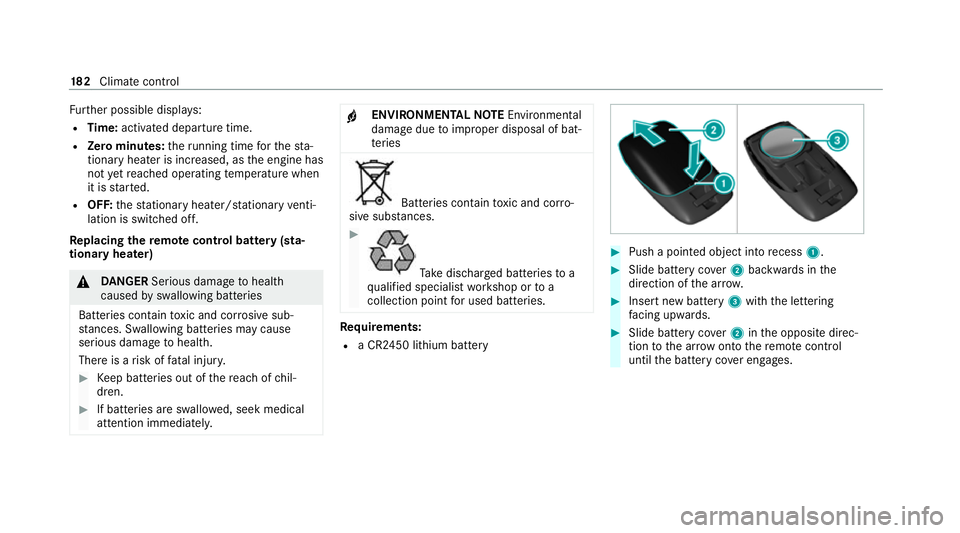
quirements:
R a CR2450 lithium battery #
Push a pointed object into recess 1. #
Slide battery co ver2 backwards in the
direction of the ar row. #
Insert new battery 3with the lettering
fa cing up wards. #
Slide battery co ver2 inthe opposite direc‐
tion tothe ar row onto there mo tecontrol
until the battery co ver engages. 18 2
Climate cont rol