radio MERCEDES-BENZ GLB SUV 2021 Owner's Manual
[x] Cancel search | Manufacturer: MERCEDES-BENZ, Model Year: 2021, Model line: GLB SUV, Model: MERCEDES-BENZ GLB SUV 2021Pages: 446, PDF Size: 39.05 MB
Page 9 of 446
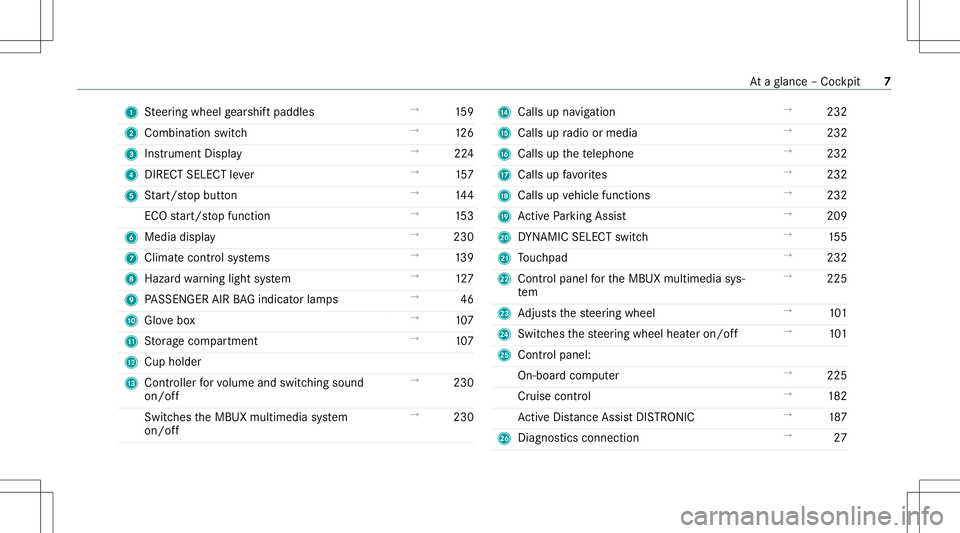
1
Steer ing wheel gearshif tpaddles →
159
2 Comb inationswit ch →
126
3 Instrument Display →
224
4 DIRECT SELECT leve r →
157
5 Start/ stop butt on →
144
ECO star t/ stop funct ion →
153
6 Media display →
230
7 Climat econt rolsy stems →
139
8 Haza rdwa rning light system →
127
9 PASSENGER AIRBAGind icat orlam ps →
46
A Glovebox →
107
B Stor ag ecom partmen t →
107
C Cup holder
D Controller forvo lume andswitc hingsound
on/ off →
230
Swit ches theMBUX multimedia system
on/ off →
230 E
Calls upnavig ation →
232
F Calls upradio ormedia →
232
G Calls upthete lephon e →
232
H Calls upfavo rite s →
232
I Calls up vehicle functions →
232
J ActivePa rking Assist →
209
K DYNA MIC SELE CTswitc h →
155
L Touc hpad →
232
M Control pan elforth eMBUX multimedia sys‐
te m →
225
N Adjus tsthesteer ing wheel →
101
O Switches thesteer ing wheel heateron/ off →
101
P Control pan el:
On -bo ardco mp uter →
225
Cr uise contro l →
182
Ac tiveDis tance AssistDIS TRONI C →
187
Q Diagno stics con nection →
27 At
aglanc e– Coc kpit 7
Page 28 of 446
*
NO
TEDama getotheve hicle In
thefo llo wing situat ions,in par ticular ,th er e
is arisk ofdamag eto theve hicle:
R The vehicle becomes grounded, e.g.ona
high curb oran unpavedro ad
R The vehicle isdriven toofa st over an
obs tacle ,e.g. acurb ,spe edbump orpot‐
hole
R Ahea vyobject strike sth eunderbody or
ch assis components
In situatio nssuc has this, thebody ,th e
und erbody ,ch assis components,wheels or
tir es coul dbe damag edwithout thedamag e
being visible. Componen tsdamag edinthis
wa ycan unexpec tedly failor ,in thecase of
an acciden t,ma yno tabsorb theloads that
ar ise asintend ed.
If th eunderbody panelingisdamag ed,flam‐
mable materials suchas lea ves, grass or
twigs cancollect between theunderbody and
th eunderbody paneling.Thesematerials may
ignit eif th ey come intocont actwith hot
par tson theex haus tsy stem. #
Have theve hicle checkedand repair ed
immediat elyat aqu alif ied spec ialist
wo rkshop.
or #
Ifdr iving safetyis im pair edwhile con‐
ti nui ng your jour ne y,pull over and stop
th eve hicle immediat elyin accor dance
wit hth etraf fic condi tions,and cont act
a qu alif ied spec ialistwo rkshop. Dec
laration ofconf ormity forwi reless vehi‐
cle comp onent s
US A:"Radio based devic es ofthis vehicle com‐
ply withPa rt15 oftheFCC Rules. Opera tionis
subje ctto thefo llo wing twocon dition s:1) These
de vice sma yno tcause harmful interfere nce, and
2) The sedevice smu stacc eptan yint erfere nce
re cei ved, includin gint erfere nce that ma ycaus e
unde sired oper ation.Chan gesor modif ications
no tex pressl yappr ovedby thepar tyresponsible
fo rcom pliance could void theuser's author ityto
oper ateth eeq uipment. " Canada
:"This vehicle contains license-e xemp t
tr ans mitter( s)/r ece iver( s)that com plywit hInno ‐
va tio n,Scie nceand Econo micDe velopmen tCan‐
ada ’sRSS (s).Operatio nis subj ectto thefo llo w‐
ing twocon dition s:(1) These device sma yno t
cause interfere nce, and(2)The sedevice smu st
acc eptan yint erfere nce, including interfere nce
th at ma ycaus eunde sired oper ationof the
de vice. "
US A:"W ireless chargin gsy stem formobil ede vi‐
ces (mode l:WMI2 Wireless Mobile Inte rface) :
This devic ecom plies withPa rt18 oftheFCC
Ru les."
The name andaddr essofthere sponsible party
is:
peik eracus ticGmbH
Max-Planc k-St r.28-32
61 38 1Fr iedr ichsdor f
Ger man y 26
General notes
Page 36 of 446
Re
gis tere dtrademar ks R
Bluetoo th®
is are gis tere dtra demar kof Blue‐
to othSIG, Inc.
R DTS™ isare gis tere dtra demar kof DT S,Inc.
R Dolb y®
and MLP ™arere gis tere dtrademar ks
of DOLB YLabor ator ies.
R Bab ySmar t™,ESP®
and PRE-S AFE®
arere g‐
is te re dtra demar ksofMer cedes-B enzAG.
R HomeL ink®
is are gis tere dtra demar kof Gen‐
te xCo rporation.
R iPod ®
and iTune s®
arere gis tere dtra demar ks
of Apple Inc.
R Burmes ter®
is are gis tere dtrademar kof
Bur mes terAu diosy steme GmbH.
R Micr osoft®
and Windo wsMedia ®
arere gis‐
te re dtrademar ksofMicr osoftCor poration.
R SIRIUS ®
is are gis tere dtra demar kof Sir ius
XM Radio Inc.
R HD Radio™ isare gis tere dtrademar kof iBiq‐
uity Digital Corporation. R
Graceno te®
is are gis tere dtrademar kof
Gr aceno te,Inc .
R ZAGA TSurve y®
and relat ed brands arere gis‐
te re dtrademar ksofZag atSur vey, LL C. 34
Generalno tes
Page 70 of 446
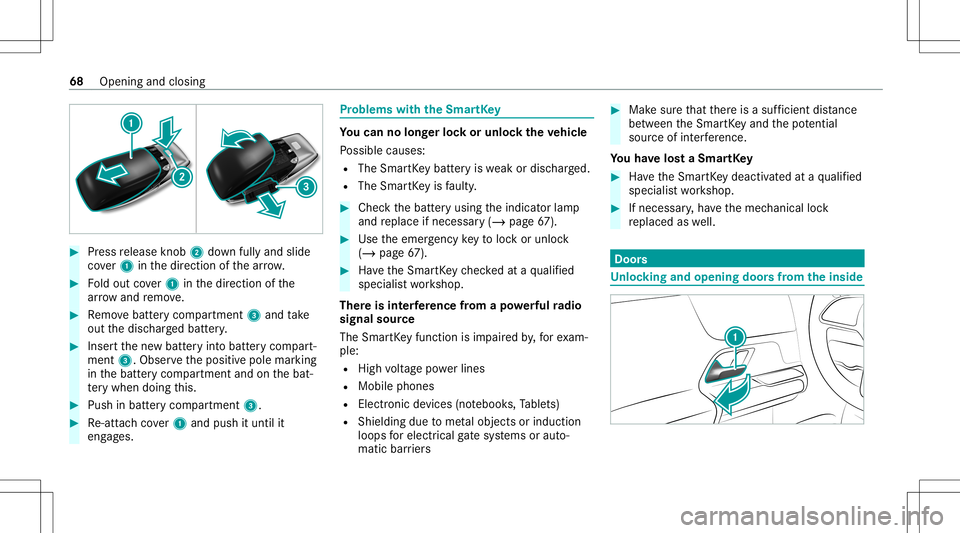
#
Press release knob 2 down fullyand slide
co ver1 inthedir ect ion ofthear row . #
Foldout cover1 inthedir ect ion ofthe
ar row and remo ve. #
Remo vebatt erycom partmen t3 and take
out thedisc hargedbatt ery. #
Inser tth ene wbatt eryint obatt erycom part‐
ment 3.Obser vethepositiv epole marking
in thebatt erycom partmen tand onthebat‐
te ry when doingth is. #
Push inbatt erycom partment 3. #
Re-att achco ver1 and push ituntil it
eng ages. Pr
obl ems with theSm artK ey Yo
ucan nolon gerlo ck orunloc kth eve hicl e
Po ssible causes:
R The Smar tKey batt eryis we ak ordisc harged.
R The Smar tKey isfaulty . #
Chec kth ebatt eryusing theindicat orlam p
and replace ifnec essar y(/ page67 ). #
Use theemer gency keyto loc kor unloc k
(/ page67 ). #
Have theSmar tKey checkedat aqu alif ied
spec ialistwo rkshop.
Ther eis int erfere nce from apo we rful radio
sig nal source
The Smar tKey function isim pai redby ,fo rex am‐
ple:
R Highvo ltag epo we rlines
R Mobi lephones
R Electr onicdevices (notebook s,Table ts)
R Shielding duetome talobje ctsor induc tion
loops forelectr icalgate systems oraut o‐
matic barrier s #
Mak esur eth at ther eis asuf ficie ntdist anc e
be tween theSmar tKey and thepo tentia l
sou rceof interfere nce.
Yo uha ve los ta Sma rtKe y #
Have theSmar tKey deactiv ated ataqu alif ied
spec ialistwo rkshop. #
Ifnecessar y,ha ve themec hanical lock
re placed aswell. Door
s Un
loc king andopening doorsfrom theinsid e 68
Openingand closing
Page 72 of 446
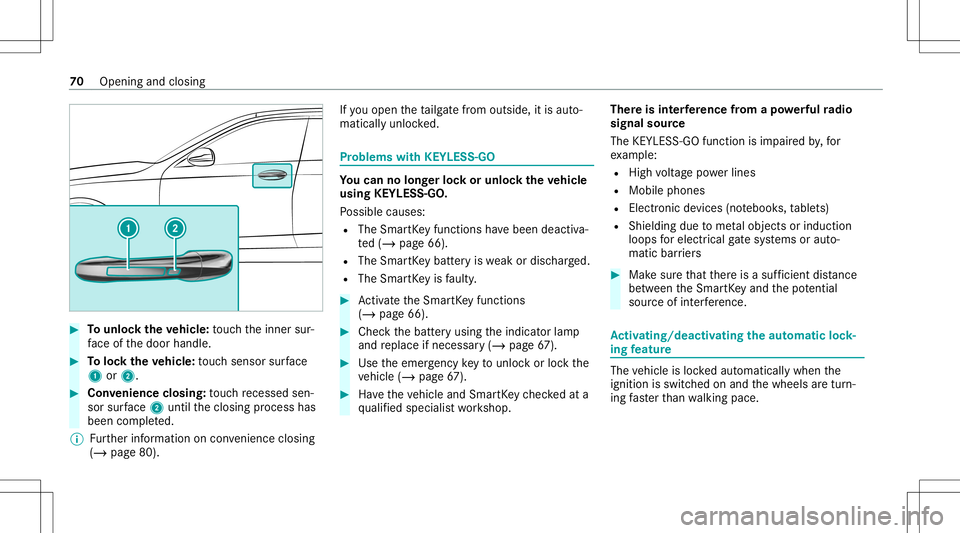
#
Tounlo cktheve hicl e:touc hth einner sur‐
fa ce ofthedoor handle. #
Toloc kth eve hicl e:touc hsen sor surface
1 or2. #
Convenience closing:touc hre cess edsen‐
sor surface 2untilth eclosing process has
been completed.
% Further information oncon venie nce closing
(/ page 80) . If
yo uopen theta ilg atefrom outs ide,itis aut o‐
matic allyunloc ked. Pr
oblems withKEYLE SS-GO Yo
ucan nolon gerlo ck orunloc kth eve hicl e
using KEYLESS-GO .
Po ssible causes:
R The Smar tKey functions have been deactiv a‐
te d(/ page66).
R The Smar tKey batt eryis we ak ordisc harged.
R The Smar tKey isfaulty . #
Activateth eSmar tKey functions
(/ page66). #
Che ckthebatt eryusing theindicat orlam p
and replace ifnec essar y(/ page67 ). #
Use theemer gency keyto unlo ckorloc kth e
ve hicle (/page67 ). #
Have theve hicle andSmar tKey checkedat a
qu alif ied spec ialistwo rkshop. Ther
eis int erfere nce from apo we rful radio
sig nal source
The KEYLESS-G Ofuncti onisim pa ired by,fo r
ex am ple:
R Highvo ltag epo we rlines
R Mobi lephones
R Electr onicdevices (notebook s,table ts)
R Shielding duetome talobje ctsor induc tion
loops forelectr icalgate systems oraut o‐
matic barrier s #
Mak esur eth at ther eis asuf ficie ntdist anc e
be tween theSmar tKey and thepo tentia l
sou rceof interfere nce. Ac
tiv atin g/deac tivatin gthe automati clo ck ‐
ing featur e The
vehicle isloc kedaut omatic allywhen the
ignit ionisswitc hedonand thewheels aretur n‐
ing faster than walkin gpace. 70
Openingand closing
Page 228 of 446
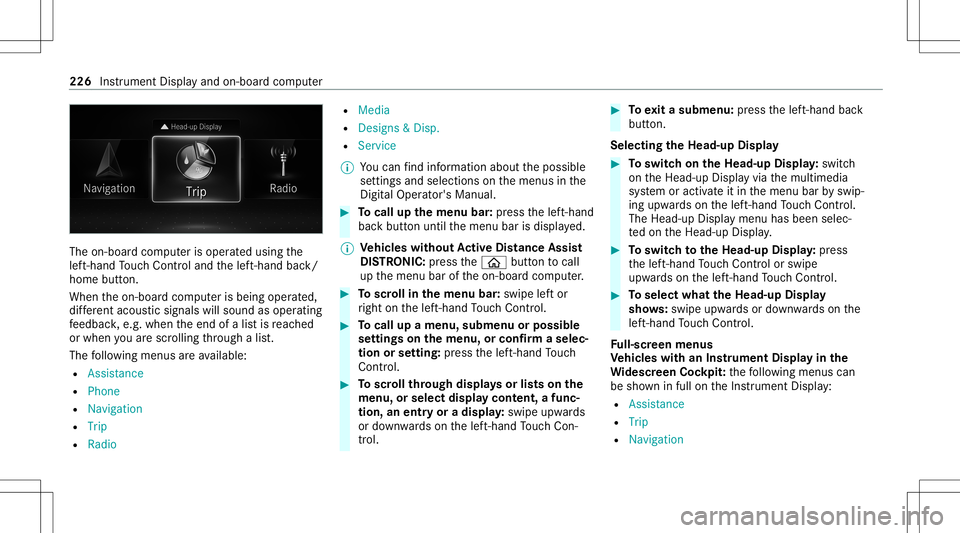
The
on-boar dcom puterisoper ated using the
lef t-hand Touc hCon trol and thelef t-hand back/
home button.
When theon- boar dcom puterisbeing operated,
dif fere nt aco ustic signa lswillsou ndasoperati ng
fe edbac k,e.g. when theend ofalis tis reac hed
or when youar esc rolling thro ugh alis t.
The follo wing menusareav ailable:
R Assist anc e
R Phon e
R Navi gation
R Trip
R Radio R
Media
R Design s& Dis p.
R Service
% Youcan find informa tionab ou tth epossible
se ttings andselect ionsonthemenus inthe
Dig ital Op erator' sMa nua l. #
Tocall upthemenu bar:press thelef t-hand
bac kbutt onuntil themenu barisdispla yed.
% Ve
hicl eswithout Activ eDi stance Assist
DI ST RO NIC :pr ess the00E2 buttontocal l
up themenu baroftheon- boar dcom puter. #
Toscr ollinthemenu bar:swipe leftor
ri ght onthelef t-hand Touc hCon trol. #
Tocall upamen u,sub men uor poss ible
se ttings onthemenu ,or conf irm aselec‐
tion orsetting: press thelef t-hand Touc h
Con trol. #
Toscr ollthrough displa ysorlists on the
menu ,or select displaycont ent,afun c‐
tion, anentr yor adisp lay: swipe upwards
or down wardson thelef t-hand Touc hCon ‐
tr ol. #
Toexitasubm enu:press thelef t-hand back
butt on.
Selecting theHead -upDispla y #
Toswitc hon theHead -upDispla y:switc h
on theHead-up Displayvia themultimedia
sy stem oractiv ateit in themenu barbyswip‐
ing upw ards on thelef t-hand Touc hCon trol.
The Head -upDisplaymen uhas been selec‐
te don theHead-up Display. #
Toswitc hto theHead -upDispla y:press
th elef t-hand Touc hCon trol or swipe
upw ards on thelef t-hand Touc hCon trol. #
Toselect whattheHead -upDispla y
sho ws:sw ipe up wa rdsor down wardson the
lef t-hand Touc hCon trol.
Fu ll-scr eenmenu s
Ve hicl eswith anIns trument Displayin the
Wi des cree nCo ckpit: thefo llo wing menuscan
be sho wninfull ontheIns trument Display:
R Assist ance
R Trip
R Navigation 226
Instrument Displayand on-boar dcom puter
Page 232 of 446
Ov
ervie wand oper ation No
teson theMB UX multim edia system &
WARNIN GRisk ofdist ra ction from infor‐
mati onsystems andcomm unication s
eq uipment
If yo uoper ateinf ormat ionand comm unic a‐
tio neq uipme ntintegratedin theve hicle
when driving, youwill bedistract ed from the
tr af fic situ ation. Thiscou ldalso cau seyouto
lose control of theve hicle. #
Onlyoper ateth is eq uipmen twhen the
tr af fic situ ation per mits. #
Ifyo ucan notbe sur eof this, stop the
ve hicle whilstpa ying attention toroad
and traffic condi tions andoperate the
eq uipment withth eve hicle statio nary. Yo
umus tobse rveth eleg alrequ iremen tsforth e
cou ntryin whi chyouar ecur rentl ydr ivi ng when
op erati ng themultimedia system. Ov
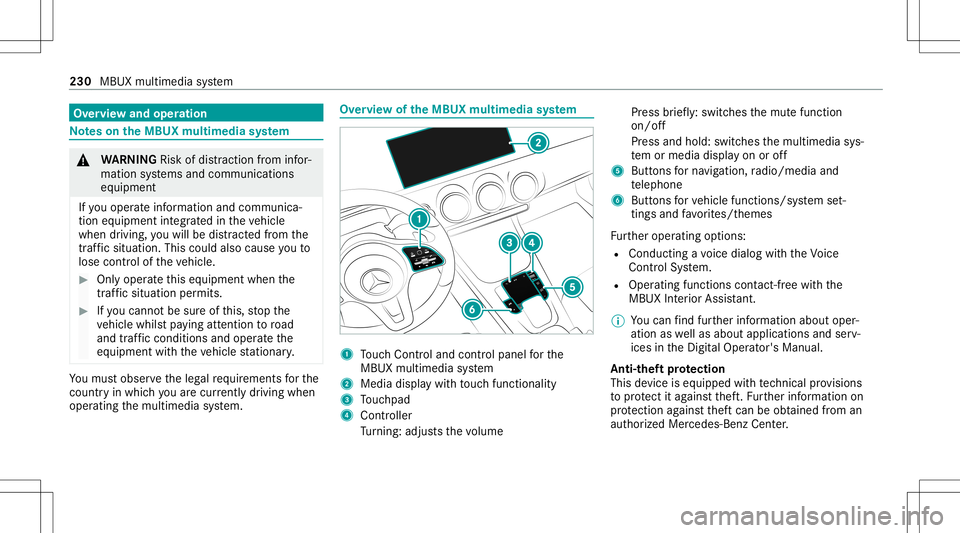
ervie wof theMB UX multim edia system 1
Touc hCon trol and contro lpanel forth e
MBUX multimedia system
2 Media displaywit hto uc hfun ction alit y
3 Touc hpad
4 Con troller
Tu rning: adjus tsthevo lume Pr
ess brief ly:swi tches themut efunc tion
on/ off
Pr ess and hold: switchesthemultimedia sys‐
te m or media display on oroff
5 Butt ons forna vig ation, radio/media and
te lephon e
6 Buttons forve hicle functions/sy stem set‐
ting sand favo rite s/t hemes
Fu rther oper ating options:
R Conducting avo ice dialog withth eVo ice
Cont rolSy stem.
R Oper ating functionscon tact-free with the
MBUX Interior Assis tant.
% Youcan find further information aboutoper‐
ation aswellas about applicat ionsandserv‐
ices intheDigit alOper ator's Manual.
Anti-t heftpr otection
This devic eis eq uipped withte ch nica lpr ov ision s
to protect itag ains tth eft. Fu rther information on
pr otect ion agains tth eftcan beobt ained from an
aut hor ized Mercedes- BenzCenter. 230
MBUX multimedia system
Page 235 of 446
Swi
ping tothelef tof right :selects thepr ev i‐
ous ornext radio statio n/music trac k
3 © Callsupthehome screen
4 Touc hpad #
Toselect amenu option: swipe andpress. #
Touse handwr itingrecognit ion:write a
ch aract eron theto uc hpad. #
Toopen orclose theNo tificatio nsCen‐
te r: swip edo wn orup withtw ofing ers. #
Tozoo minand outofthe map: movetwo
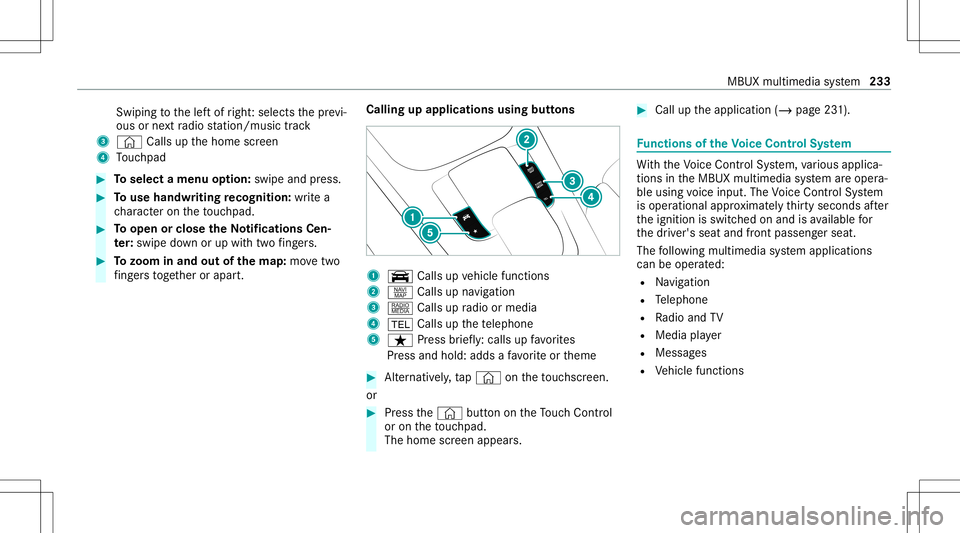
fi ng ersto get her orapar t. Calling
upapplications usingbuttons 1
y Callsup vehicle functions
2 z Callsup navig ation
3 | Callsup radio ormedia
4 002B Callsupthete lephon e
5 ß Press brief ly:cal lsup favo rite s
Pr ess and hold: addsafa vo rite or theme #
Alternativ ely,tap © ontheto uc hsc reen.
or #
Press the© buttonontheTo uc hCon trol
or on theto uc hpad.
The hom esc reen appear s. #
Call uptheapplication (/page23 1). Fu
nctions oftheVo ice Contr olSy stem Wi
th theVo ice Cont rolSy stem, various applica‐
tions intheMBUX multimedia system areoper a‐
ble using voice input. TheVoice Cont rolSy stem
is oper ational approximat elyth irty seco ndsafte r
th eignition isswitc hedonand isavailable for
th edr iver's seat andfront passeng erseat.
The follo wing multim ediasystem applications
can beoper ated:
R Navig ation
R Telephon e
R Radio and TV
R Media player
R Messag es
R Vehicle functions MBUX
multimedia system 233
Page 239 of 446
#
b)Press amemor yposition buttonora
seat adjus tmentswitc hon thedr iver's
door .
The adjus tmentpr ocess isstopped. The
driver's seat iseq uipped withan access pre‐
ve nter.
If th edr iver's door isopen, thedr iver's seat will
no tbe setaf te rcall ing upthedr iver's profile.
Pr ofiles stor eyo ur vehicle settin gsand settin gs
fo rth emultimedia system. Ifth eve hicle isused
by severaldr iver s, thedr iver can select their
ow npr ofile wi thout needing tochang eth ese t‐
ting sof other driver s.
% Information onprofiles from Mer cedes me
conn ectcan befound intheDigita lOper a‐
to r's Manua l.
Ve hicle settin gsare, forex am ple, driver' sseat ,
st eer ing wheel andmirrorse ttings, climatecon‐
tr ol and amb ient lighti ng.Forth ese ttings ofthe
multime diasystem, youcan select,fo rex am ple,
ra dio statio ns,pr ev ious destination sas wellas
th emes, suggestion sand favo rite s. Fo
rre cur ring drivi ng situa tions, such aslon g
dr ives on thefree wa y,yo ucan save your prefer‐
re dse ttings inath eme intheve hicle. Inath eme
yo ucan save thedispla yof thedigit almap, your
pr efer redra dio statio nand prefer reddr ive pr o‐
gr am, forex am ple.
The vehicle canlearnth ehabits ofthedr iver .It
th en offers sugg estions forth emos tpr obable
na vig ation destinat ions, media sources, radio
st atio nsorcon tacts. Therequ iremen tsforth at
ar eth eselect ionofapr ofile, your consen tto the
re cor ding ofdata and sufficie ntcoll ecteddata.
Fa vorite spr ov ide quick acc ess toapplic ations
th at areused often. Youcan selectfavo rite s
fr om categor iesoradd them direct lyto an appli‐
cat ion. Conf
iguringprofiles, themes andsugg es‐
tions Multi
media system:
4 © 5
f Profiles
Cr eating ane wprofile #
Select 0081Create Profile. #
Select anavatar. #
Enterth ename andconfirm with0076. #
Sele ctCont inue 0048 . #
Sele ctCurren tSet tings. #
Sele ctSav e. #
ActivateBlu etoo th®
and selec tCon nect
Phon e,to connect amob ile pho newith the
user profile . #
Select Finish.
Select ingprofile optio ns #
Select 0062 fora pr ofile .
The follo wing functionsar eav ailable:
R Editing,rese ttin gor dele ting apr ofile
R Resettin gth emes orfavo rite s MBUX
multimedia system 23
7
Page 251 of 446
Obser
vetheadditional information onstow ing
mobile communic ationsde vice scor rectly:
R Loa ding theve hicle (/page10 4)
R Stow ing and secur ingthemobile phone
(/ page12 3)
Blue tooth®
connect ion:
The men uvie wand theav ailable function sin the
te lephon emen uar ein par tdepen dentonthe
Blu etoo th®
pr ofile ofthecon nect edmobile
phone. Fullfunc tionality isonl yav ailable ifth e
mobil ephone supports both ofthefo llo wing
Blue tooth®
pr ofiles:
R PBAP (Phone BookAccess Profile)
- The cont acts onthemobile phoneare
sho wnautomaticall yon themultimedia
sy stem.
R MAP (Messag eAc cess Profile)
- The mob ile pho nemess agefuncti onscan
be used on themultimedia system.
Ir re spectiv eof this, Blue tooth®
audio function al‐
ity can byused withan ymob ileradio unit. Fo
rinf ormation onthera ng eof func tions ofthe
mobil era dio unit tobe con nected, see theman‐
uf actur er'soper ating instruction s.
Ne tworkco nn ectio n:
The follo wing cases canlead tothecall being
discon nectedwhile theve hicle isin mo tion:
R Youswit chintoatransm ission /recep tion
st atio n,inwhic hno com mun ication chann el
is free.
R The SIM car dused isno tcom patible withth e
ne tworkav ailable
R amobi lephon ewit h"T winc ard" islogg edinto
th ene tworkwit hth esecon dSIM cardat the
same time
The multimedia system suppor tscalls inHD
Vo ice ®
forim prove dspeec hqu alit y.Arequ ire‐
men tfo rth is isthat themobile phoneandthe
mobil ephone networkpr ov ider oftheper son
yo uar ecalli ngsuppo rtHD Voice ®
.
Depe ndingon thequ alit yof thecon nect ion,the
vo ice qualit yma yfluct uate. Fu
rther information canbeobt ained from an
aut hor ized Mercedes-Ben zCent eror at:
https: //www .mercedes-benz .com/connect MBUX
multimedia system 24
9