page 31 MERCEDES-BENZ GLC 2017 Owners Manual
[x] Cancel search | Manufacturer: MERCEDES-BENZ, Model Year: 2017, Model line: GLC, Model: MERCEDES-BENZ GLC 2017Pages: 374, PDF Size: 8.42 MB
Page 206 of 374
which the maximum permissible speed for vehi-
cle/trailer combinations is above 60 mph
(100 km/h).
When towing a trailer, your vehicle's handling
characteristics will be different in comparison to
when driving without a trailer and it will con-
sume more fuel.
Shift to a lower gear on long and steep downhill
gradients.
This also applies to: R
activated DISTRONIC PLUS R
activated cruise control
This will use the braking effect of the engine, so
that less braking will be required to maintain the
speed. This relieves the load on the brake sys-
tem and prevents the brakes from overheating
and wearing too quickly. If you need additional
braking, depress the brake pedal repeatedly
rather than continuously.
Driving tips If the trailer swings from side to side: X
Do not accelerate. X
Do not counter-steer. X
Brake if necessary. R
Maintain a greater distance from the vehicle
in front than when driving without a trailer. R
Avoid braking abruptly. If possible, brake gen-
tly at first to allow the trailer to run on. Then,
increase the braking force rapidly. R
The values given for gradient-climbing capa-
bilities from a standstill refer to sea level.
When driving in mountainous areas, note that
the power output of the engine and, conse-
quently, the vehicle's gradient-climbing capa-
bility, decreases with increasing altitude.
Installing the ball coupling
G WARNING
If the ball coupling is not correctly installed
and secured, it could come loose while driving
and endanger other road users. There is a risk
of an accident and injury.
Install and secure the ball coupling as descri-
bed in the ball coupling manufacturer's instal-
lation instructions. Make sure that the ball coupling is correctly installed and secured
before every journey.
G WARNING
If the ball coupling is not installed and secured
correctly the trailer may come loose. There is
a risk of an accident.
Install and secure the ball coupling as descri-
bed in the ball coupling installation instruc-
tions. Make sure that the ball coupling is
installed and secured correctly before every
journey.
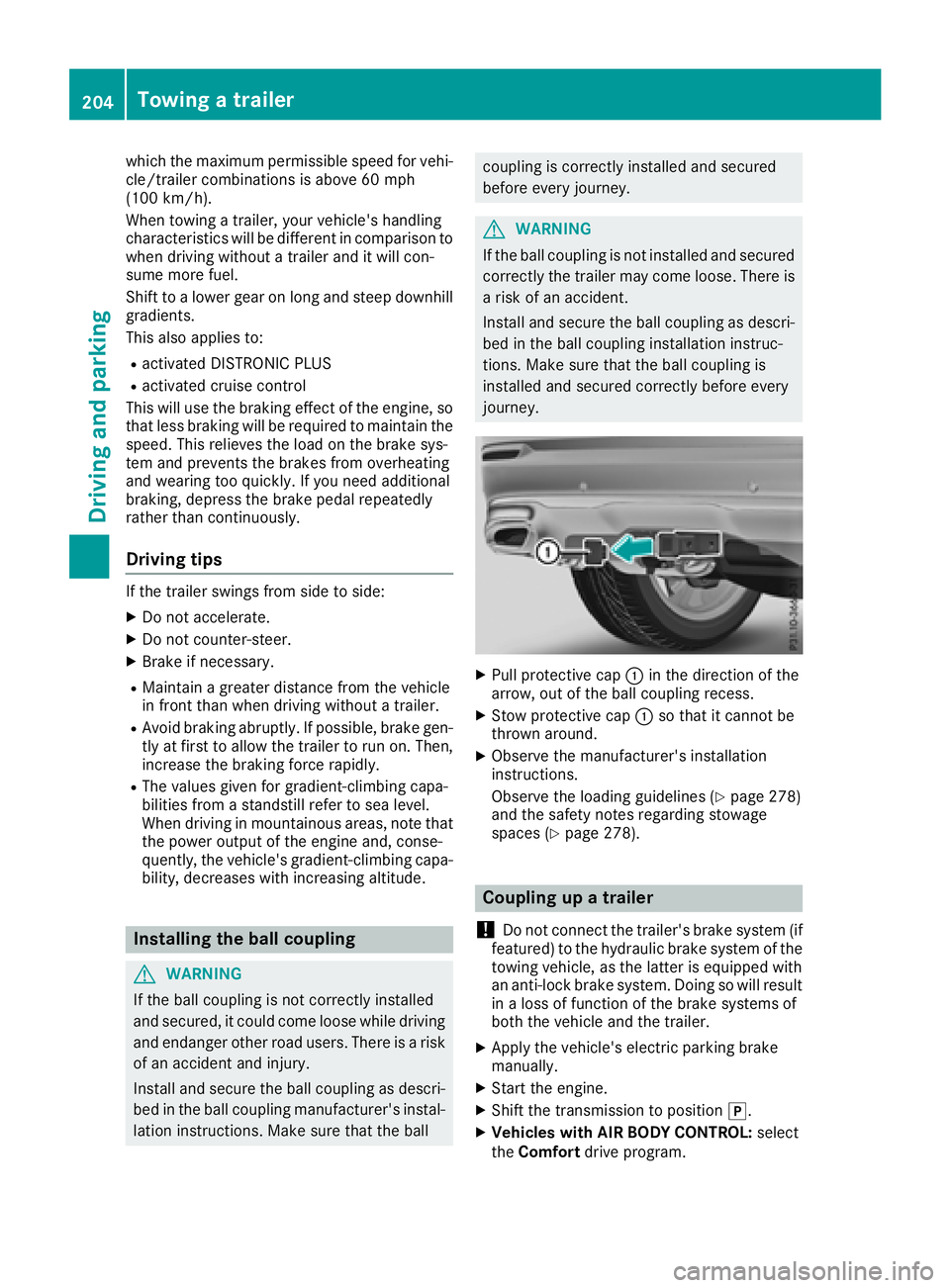
X
Pull protective cap C in the direction of the
arrow, out of the ball coupling recess. X
Stow protective cap C so that it cannot be
thrown around. X
Observe the manufacturer's installation
instructions.
Observe the loading guidelines ( Y
page 278)
and the safety notes regarding stowage
spaces ( Y
page 278).
Coupling up a trailer
! Do not connect the trailer's brake system (if
featured) to the hydraulic brake system of the
towing vehicle, as the latter is equipped with
an anti-lock brake system. Doing so will result
in a loss of function of the brake systems of
both the vehicle and the trailer. X
Apply the vehicle's electric parking brake
manually. X
Start the engine. X
Shift the transmission to position ] .X
Vehicles with AIR BODY CONTROL: select
the Comfort drive program.204
Towing a trailer
Driving and parking
Page 208 of 374
When overtaking, pay particular attention to the
extended length of your vehicle/trailer combi-
nation.
Due to the length of the vehicle/trailer combi-
nation, you require additional road space when
overtaking before you can change back to the
original lane.
If the automatic transmission repeatedly shifts
between gears on uphill or downhill gradients,
shift to a lower gear.
Driving in a lower gear and at a reduced speed
decreases the risk of engine damage.
If the coolant temperature increases signifi-
cantly when climate control is switched on,
switch climate control off.
Coolant heat can also be dissipated by opening
the windows and switching the ventilation
blower and the interior temperature to the high-
est level.
Decoupling a trailer
G WARNING
If you uncouple a trailer with the overrun
brake engaged, you could trap your hand
between the vehicle and the trailer drawbar.
There is a risk of injury.
Do not uncouple a trailer if the overrun brake
is engaged.
G WARNING
Vehicles with level control:
The vehicle is lowered as soon as you discon-
nect the trailer cable. This could result in your
limbs or those of other people that are
between the vehicle body and tires or under-
neath the vehicle being trapped. There is a
risk of injury.
Make sure that nobody is in the immediate
vicinity of the wheel housings or under the
vehicle when you disconnect the trailer cable.
! Do not disconnect a trailer with an engaged
overrun brake. Otherwise, your vehicle could
be damaged by the rebounding of the overrun
brake. X
Apply the vehicle's parking brake manually. X
Shift the transmission to position ] . X
Close all doors and the tailgate. X
Switch off the engine. X
Secure the vehicle and trailer against rolling
away. X
Remove the trailer cable. X
Remove the safety chains, if there are any. X
Uncouple the trailer.
Removing the ball coupling X
Observe the manufacturer's installation
instructions. X
Press the protective cap into the ball coupling
recess. X
Make sure that the protective cap is firmly in
place.
Observe the loading guidelines ( Y
page 278)
and the safety notes regarding stowage spaces
( Y
page 278).
Information on cleaning and care of the trailer
tow hitch ( Y
page 316).
Trailer power supply
! Accessories with a maximum power con-
sumption of 180 W can be connected to the
permanent power supply.
You must not charge a trailer battery using the
power supply.
The trailer socket of your vehicle is equipped at
the factory with a permanent power supply.
The permanent power supply is supplied via
trailer socket pin 4.
The trailer's permanent power supply is
switched off in the event of low vehicle supply
voltage and after six hours at the latest.
A qualified specialist workshop can provide
more information about installing the trailer
electrics.
Permissible trailer loads and trailer
drawbar noseweights
Weight specifications
The gross trailer weight is calculated as the
weight of the trailer plus the weight of the load
and the trailer's equipment.206
Towing a trailer
Driving and parking
Page 209 of 374
You will find permissible trailer loads under
"Technical data" ( Y
page 371).
Loading a trailer R
When loading the trailer, make sure that nei-
ther the permissible gross trailer weight nor
the permissible gross vehicle weight are
exceeded. The permissible gross vehicle
weight is indicated on the identification plate
on the B-pillar on the driver's side of the vehi-
cle.
You can find the maximum permissible values
on the type plates of your vehicle and the
trailer. When calculating how much weight
the vehicle and trailer may carry, pay atten-
tion to the respective lowest values. R
The trailer drawbar load on the ball coupling
must be added to the rear axle load to avoid
exceeding the permissible gross axle weight.
The permissible gross vehicle weight is indi-
cated on the identification plate on the B-pil-
lar on the driver's side of the vehicle.
Mercedes-Benz recommends a trailer load
where the trailer drawbar noseweight accounts
for 8% to 15% of the permissible gross trailer
weight.
Additional accessories, passengers and load
reduce the permissible trailer load and nose-
weight that your vehicle can tow.
Checking the vehicle and trailer weight R
Have the towing vehicle, including the driver,
passengers and load, and completely loaded
trailer weighed on a suitable weighing
machine. This will allow you to ensure that the
weights of the towing vehicle and trailer com-
ply with the maximum permissible values. R
Check the gross axle weight rating of the front
and rear axles, the gross weight of the trailer
and trailer drawbar load. Towing a trailer 207
Driving and parking Z
Page 210 of 374
Important safety notes
G WARNIN G
If you operate information systems and com-
munication equipmen t integrate d in th e vehi-
cle while driving , you will be distracte d from
traffic conditions. You could also lose control
of th e vehicle. Ther e is a ris k of an accident.
Only operate th e equipmen t when th e traffic
situation permits. If you are no t sur e that this
is possible , park th e vehicl e payin g attention
to traffic condition s and operate th e equip-
men t when th e vehicl e is stationary.
You must observ e th e legal requirements for th e
country in whic h you are currentl y driving when
operating th e on-board computer.
G WARNIN G
If th e instrumen t cluste r has faile d or mal-
functioned, you may no t recognize function
restriction s in systems relevan t to safety. The
operating safet y of your vehicl e may be
impaired . Ther e is a ris k of an accident.
Drive on carefully. Hav e th e vehicl e checke d
at a qualified specialist workshop immedi-
ately.
If th e operating safet y of your vehicl e is
impaired , pull ove r as soo n as it is saf e to do so.
Contac t a qualified specialist workshop.
The on-board computer only shows message s or
warning s from certain systems in th e multifunc-
tion display. You should therefor e mak e sur e
your vehicl e is operating safely at all times .
Fo r an overview, see th e instrumen t panel illus-
tration ( Y
page 36). Displays and operation
Instrument cluster lighting
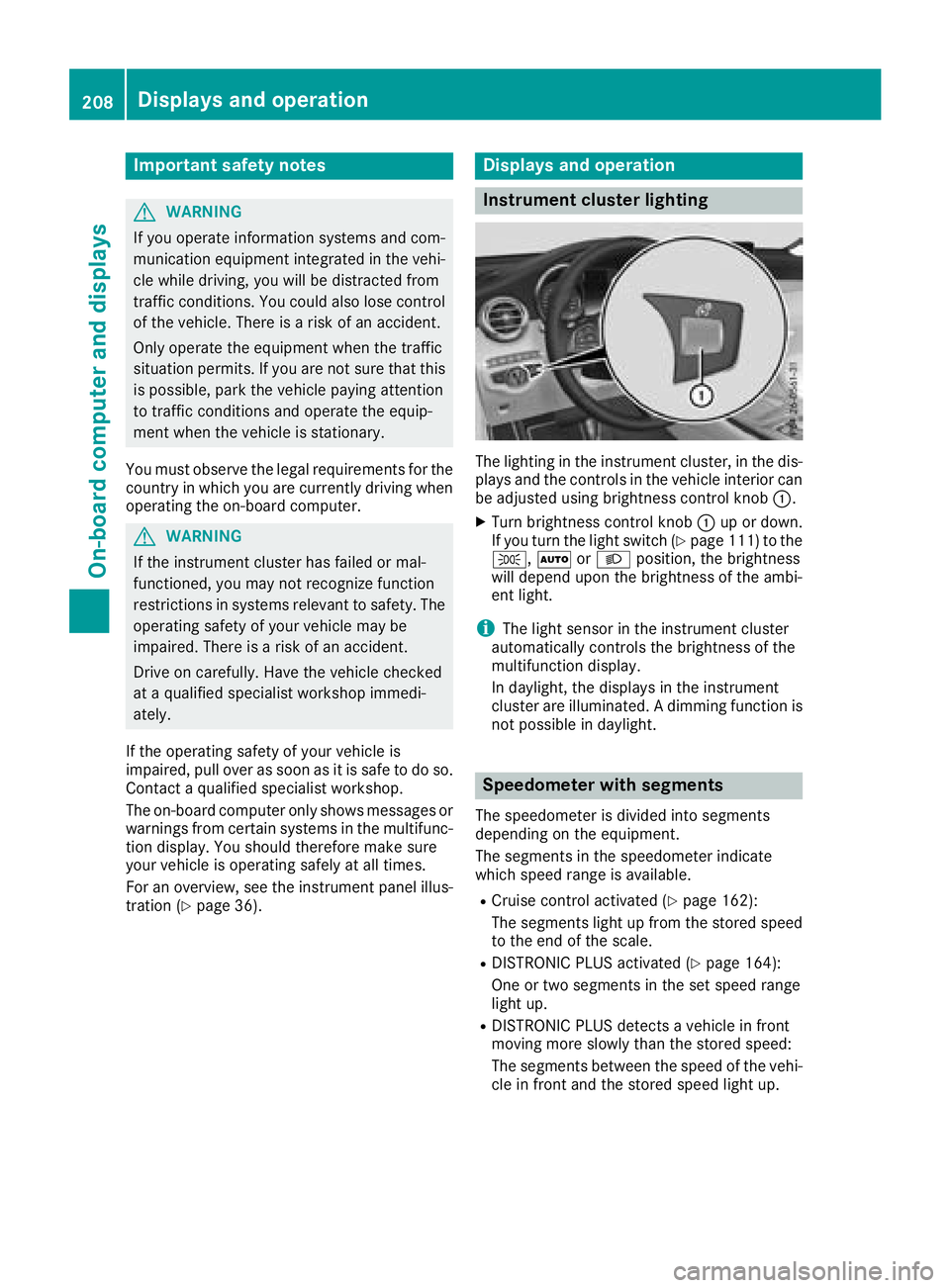
The lighting in th e instrumen t cluster, in th e dis-
plays and th e control s in th e vehicl e interior can
be adjusted usin g brightness control knob C .X
Turn brightness control knob C up or down .
If you tur n th e ligh t switch ( Y
page 111) to th e
` , X or X position , th e brightness
will depend upon th e brightness of th e ambi -
en t light.
i The ligh t sensor in th e instrumen t cluste r
automatically control s th e brightness of th e
multifunction display.
In daylight, th e displays in th e instrumen t
cluste r are illuminated. A dimming function is
no t possible in daylight.
Speedometer with segments The speedometer is divided int o segments
depending on th e equipment.
The segments in th e speedometer indicat e
whic h spee d range is available. R
Cruis e control activated ( Y
page 162):
The segments ligh t up from th e store d spee d
to th e en d of th e scale.R
DISTRONI C PLU S activated ( Y
page 164):
On e or two segments in th e set spee d range
ligh t up. R
DISTRONI C PLU S detects a vehicl e in fron t
moving mor e slowly than th e store d speed:
The segments between th e spee d of th e vehi-
cle in fron t and th e store d spee d ligh t up.208
Displays and operation
On-board computer and displays
Page 211 of 374
Tachometer
! Do not drive in the overrevving range, as this
could damage the engine.
The red band in the tachometer indicates the
engine's overrevving range.
The fuel supply is interrupted to protect the
engine when the red band is reached.
Outside temperature display You should pay special attention to road condi-
tions when temperatures are around freezing
point.
Bear in mind that the outside temperature dis-
play indicates the temperature measured and
does not record the road temperature.
The outside temperature display is in the multi-
function display ( Y
page 210).
Changes in the outside temperature are dis-
played after a short delay.
Coolant temperature gauge
G WARNING
Opening the hood when the engine is over-
heated or when there is a fire in the engine
compartment could expose you to hot gases
or other service products. There is a risk of
injury.
Let an overheated engine cool down before
opening the hood. If there is a fire in the
engine compartment, keep the hood closed
and contact the fire department.
! A display message is shown if the coolant
temperature is too high.
If the coolant temperature is over 248 ‡
(120 †), do not continue driving. The engine
will otherwise be damaged.
The coolant temperature gauge is in the lower
section of the tachometer ( Y
page 36).
Under normal operating conditions and with the
specified coolant level, the coolant temperature
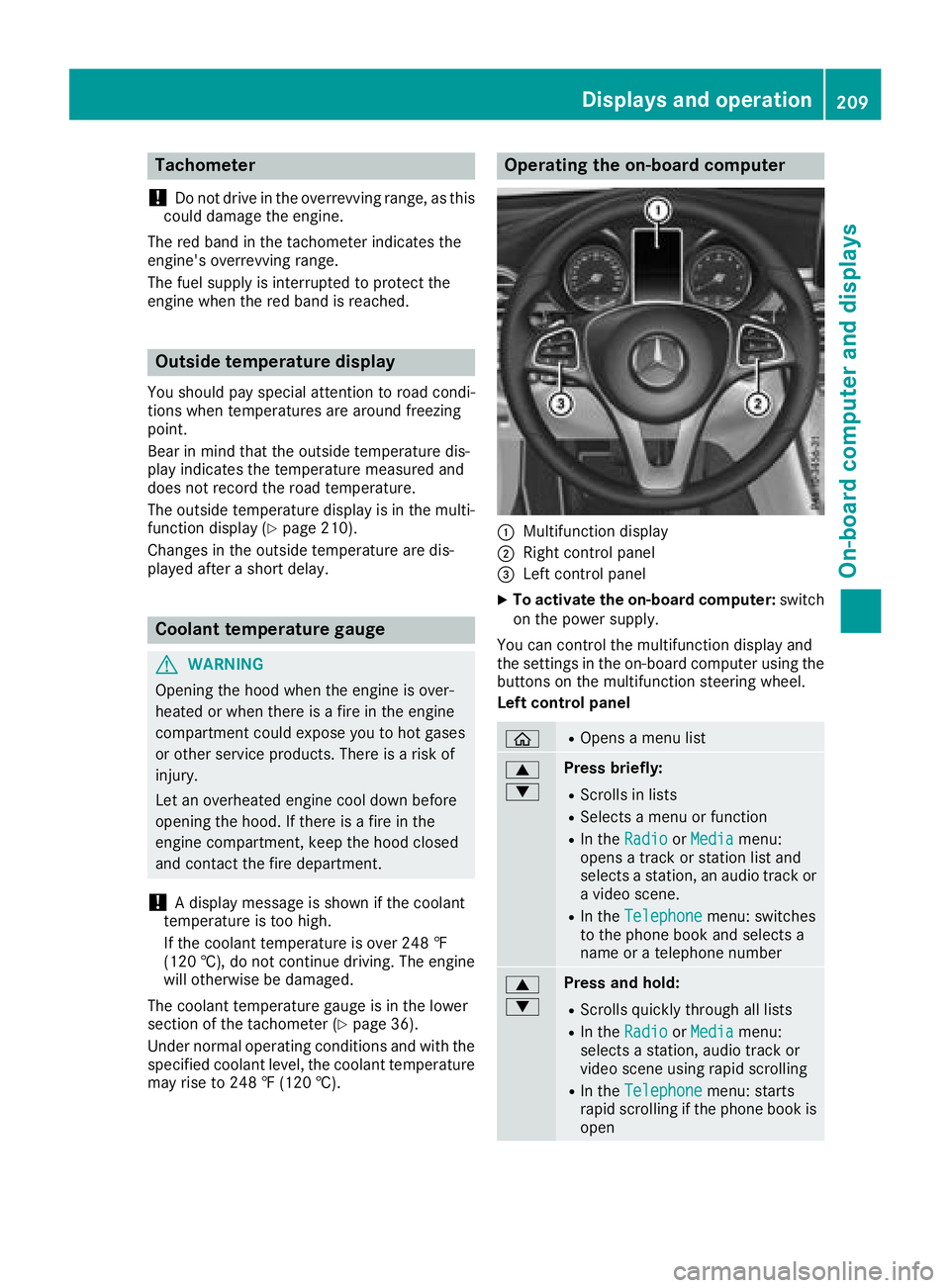
may rise to 248 ‡ (120 †). Operating the on-board computer
C
Multifunction display D
Right control panel
Page 213 of 374
R
O DISTRONIC PLUS Steering Assist and
Stop&Go Pilot ( Y
page 169)R
Page 222 of 374
X
Press d or c to select the AdBlue
submenu. X
Press v to confirm your selection.
The range and DEF level appear in a bar graph
in the multifunction display.
Observe the information and notes on "Refuel-
ing" ( Y
page 151).
Settings menu
Introduction Depending on the equipment installed in the
vehicle, you have the following options in the
Settings menu:R
Changing assistance settings ( Y
page 220).R
Changing head-up display settings
( Y
page 222).R
Changing the light settings ( Y
page 223).R
Changing the instrument cluster settings
( Y
page 223).R
Restoring the factory settings ( Y
page 223).
Assistance submenu
Deactivating/activating ESP ®
Observe the "Important safety notes" section in
the description of ESP ®
( Y
page 70).
G WARNING
If you deactivate ESP ®
, ESP ®
no longer sta-
bilizes the vehicle. There is an increased risk
of skidding and an accident.
Only deactivate ESP ®
in the situations descri-
bed in the following.
It may be best to deactivate ESP ®
in the follow-
ing situations: R
when using snow chains R
in deep snow R
on sand or gravel
Deactivating/activating ESP ®
in Mercedes-
AMG vehicles ( Y
page 71).
For further information about ESP ®
, see
( Y
page 70). X
Start the engine. X
Press the
Page 229 of 374
Display messages
Introduction
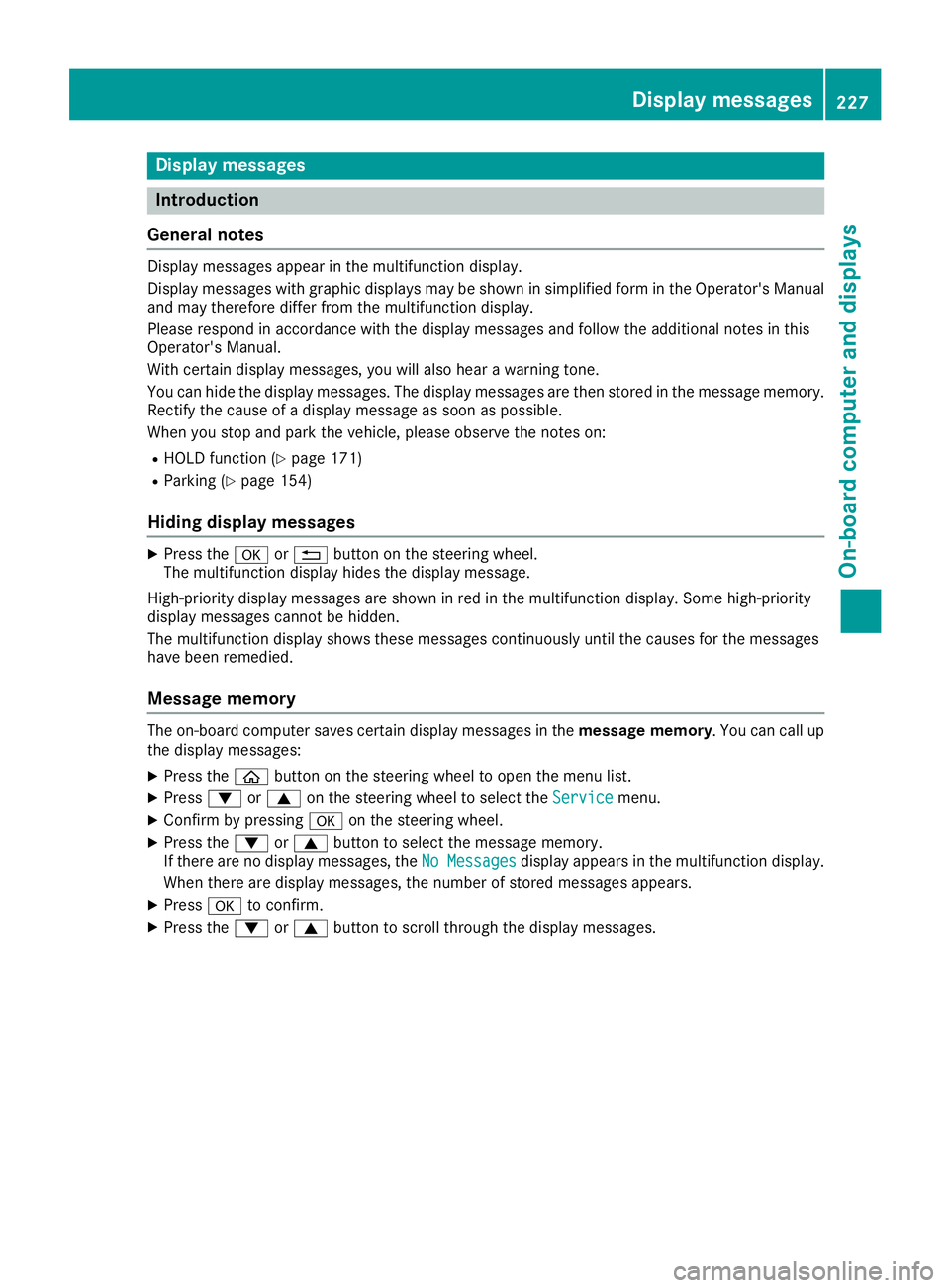
General notes Display messages appear in th e multifunction display.
Display messages wit h graphi c displays may be shown in simplified form in th e Operator's Manual
and may therefore diffe r from th e multifunction display.
Please respon d in accordance wit h th e display messages and follow th e additional note s in this
Operator's Manual.
Wit h certain display messages, you will also hear a warnin g tone .
You can hide th e display messages. The display messages are then stored in th e messag e memory.
Rectify th e cause of a display messag e as soo n as possible.
Whe n you stop and par k th e vehicle, please observ e th e note s on :R
HOLD function ( Y
page 171)R
Parking ( Y
page 154)
Hiding display messages X
Press th e v or 8 butto n on th e steerin g wheel.
The multifunction display hide s th e display message.
High-priorit y display messages are shown in red in th e multifunction display. Some high-priorit y
display messages canno t be hidden .
The multifunction display shows these messages continuously until th e causes fo r th e messages
hav e bee n remedied.
Message memory The on-boar d compute r saves certain display messages in th e message memory . You can cal l up
th e display messages: X
Press th e
Page 233 of 374
Display messages
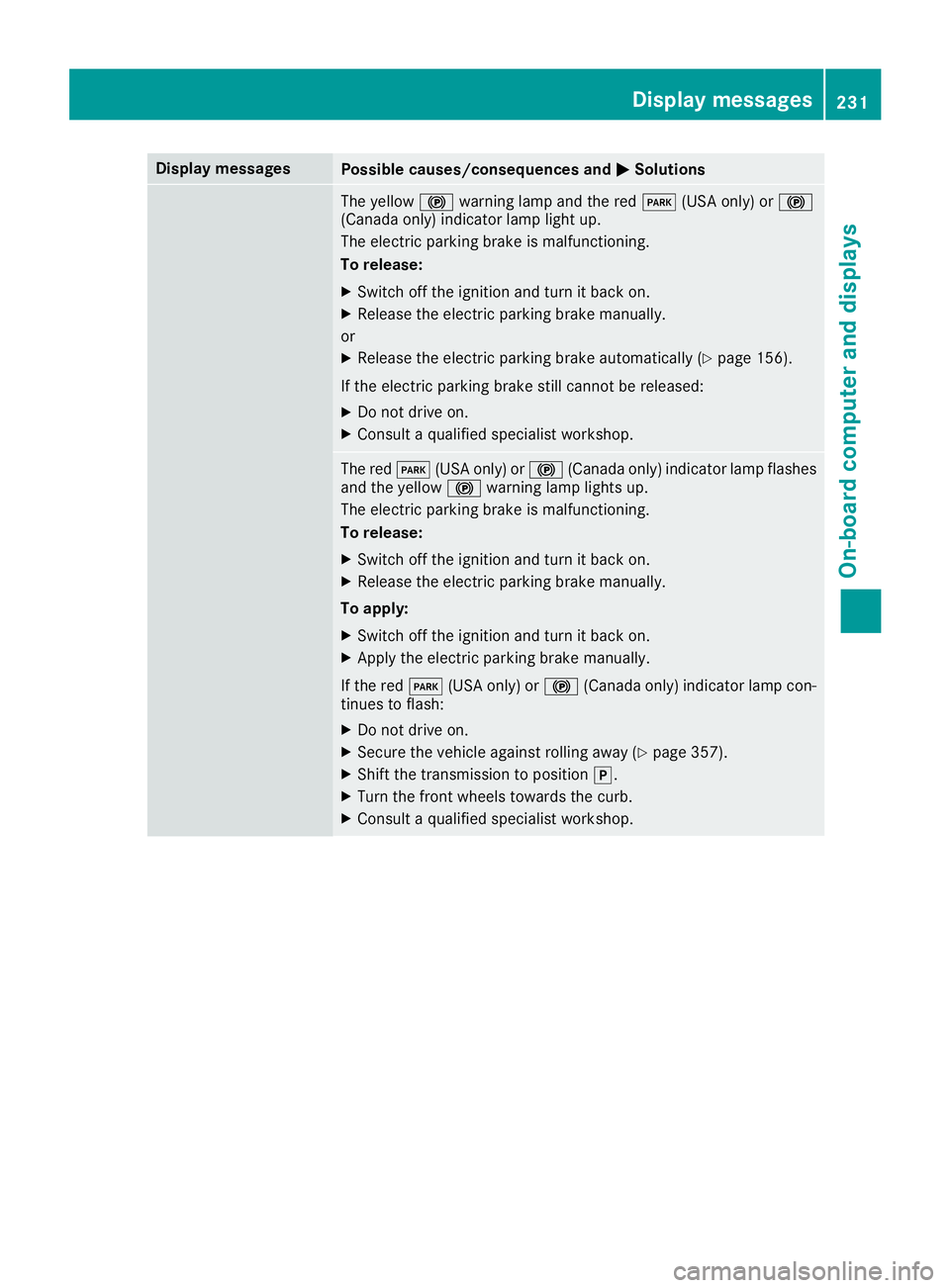
Possible causes/consequences and P Solutions
The yellow $ warning lamp and th e red I (US A only) or $
(Canada only) indicator lamp ligh t up.
The electric parking brak e is malfunctioning .
To release: X
Switc h off th e ignition and tur n it bac k on .X
Releas e th e electric parking brak e manually.
or X
Releas e th e electric parking brak e automatically ( Y
page 156).
If th e electric parking brak e still canno t be released:X
Do no t drive on .X
Consult a qualified specialist workshop .
The red I (US A only) or $ (Canada only) indicator lamp flashes
and th e yellow $ warning lamp lights up.
The electric parking brak e is malfunctioning .
To release: X
Switc h off th e ignition and tur n it bac k on .X
Releas e th e electric parking brak e manually.
To apply : X
Switc h off th e ignition and tur n it bac k on .X
Apply th e electric parking brak e manually.
If th e red I (US A only) or $ (Canada only) indicator lamp con-
tinue s to flash: X
Do no t drive on .X
Secur e th e vehicl e against rollin g away ( Y
page 357).X
Shift th e transmission to position ] .X
Turn th e fron t wheels toward s th e curb.X
Consult a qualified specialist workshop .Display messages 23 1
On-board computer and displays Z
Page 234 of 374
Display messages
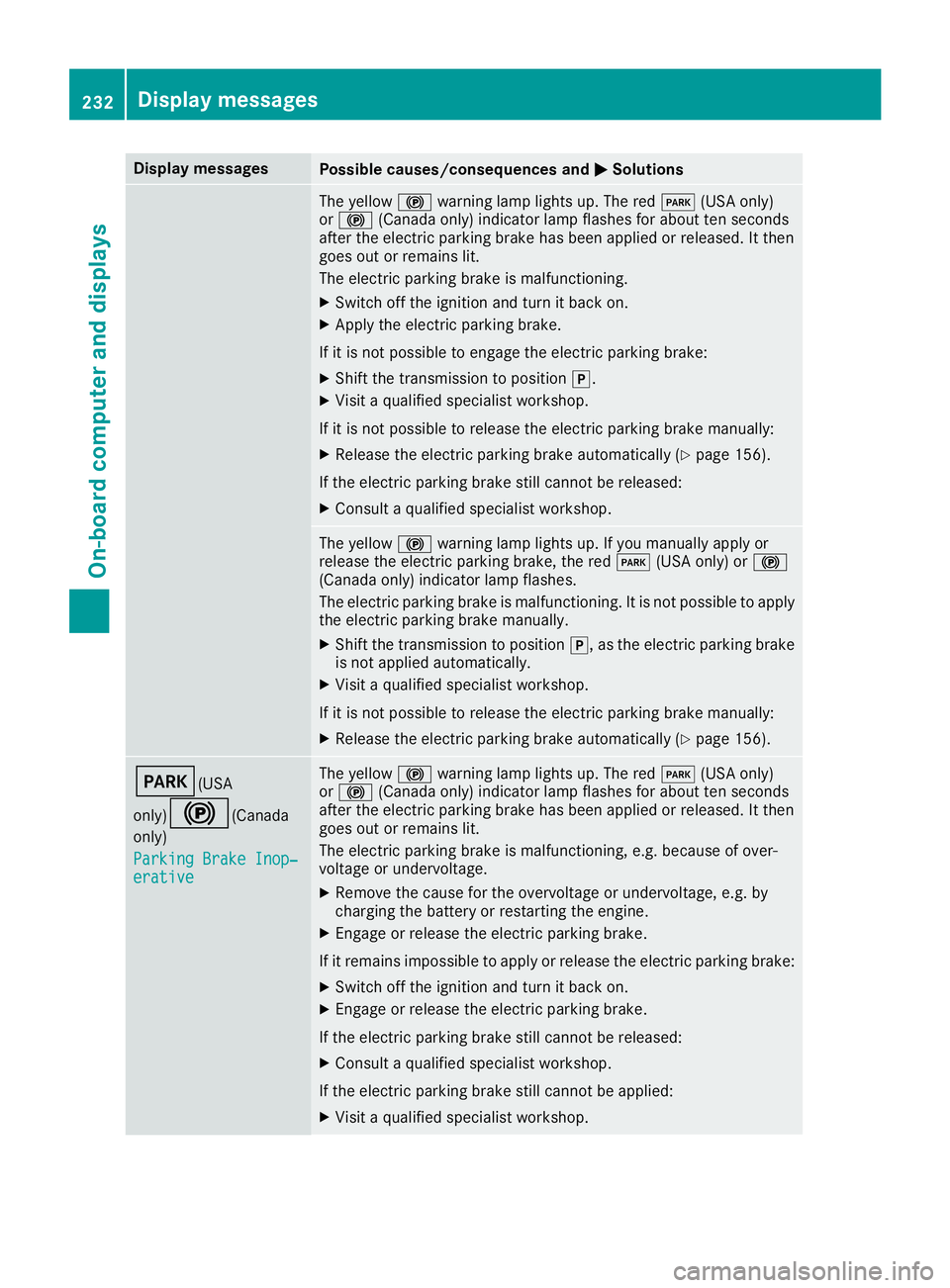
Possible causes/consequences and P Solutions
The yellow $ warning lamp lights up. The red I (US A only)
or $ (Canada only) indicator lamp flashes for about te n seconds
after th e electric parking brak e has been applie d or released. It then
goe s out or remain s lit .
The electric parking brak e is malfunctioning .X
Switc h off th e ignition and tur n it bac k on .X
Apply th e electric parking brake.
If it is no t possibl e to engage th e electric parking brake:X
Shift th e transmission to position ] .X
Visit a qualified specialist workshop .
If it is no t possibl e to release th e electric parking brak e manually:X
Releas e th e electric parking brak e automatically ( Y
page 156).
If th e electric parking brak e still canno t be released:X
Consult a qualified specialist workshop .
The yellow $ warning lamp lights up. If you manually apply or
release th e electric parking brake, th e red I (US A only) or $
(Canada only) indicator lamp flashes .
The electric parking brak e is malfunctioning . It is no t possibl e to apply
th e electric parking brak e manually.X
Shift th e transmission to position ] , as th e electric parking brak e
is no t applie d automatically.X
Visit a qualified specialist workshop .
If it is no t possibl e to release th e electric parking brak e manually:X
Releas e th e electric parking brak e automatically ( Y
page 156).
I (USA
only)
$ ( Canada
only)
Parkin g Brake Inop‐
erativ e The yellow $ warning lamp lights up. The red I (US A only)
or $ (Canada only) indicator lamp flashes for about te n seconds
after th e electric parking brak e has been applie d or released. It then
goe s out or remain s lit .
The electric parking brak e is malfunctioning , e.g. because of over-
voltag e or undervoltage. X
Remove th e caus e for th e overvoltage or undervoltage, e.g. by
charging th e battery or restarting th e engine.X
Engage or release th e electric parking brake.
If it remain s impossible to apply or release th e electric parking brake:X
Switc h off th e ignition and tur n it bac k on .X
Engage or release th e electric parking brake.
If th e electric parking brak e still canno t be released:X
Consult a qualified specialist workshop .
If th e electric parking brak e still canno t be applied:X
Visit a qualified specialist workshop .232
Display messages
On-board computer and displays