automatic transmission MERCEDES-BENZ GLC 2017 User Guide
[x] Cancel search | Manufacturer: MERCEDES-BENZ, Model Year: 2017, Model line: GLC, Model: MERCEDES-BENZ GLC 2017Pages: 374, PDF Size: 8.42 MB
Page 65 of 374
Forward-facing child restraint system Always mov e th e front-passenger's seat as far
bac k as possible if th e child must be secured on
th e front-passenger seat in a forward-facing
child restrain t system. Full y retrac t th e seat
cushion length. The base of th e child restrain t
system must always res t on th e seat cushion of
th e front-passenger's seat . As muc h as possible
of th e backrest of th e child restrain t system
must be resting on th e backrest of th e front-
passenger's seat . The child restrain t system
may no t touch th e roo f or be subjected to a load
by th e head restraint. Adjus t th e angle of th e
seat backrest and th e head restraint position
accordingly. Always mak e sure th e shoulder belt
is correctly secured , runnin g from th e belt outlet
to th e belt guide of th e child restrain t system.
The shoulder belt strap must be routed forward
and down from th e vehicl e belt outlet . Adjus t th e
belt outlet and front-passenger seat as required.
Always comply wit h th e manufacturer' s instal -
lation and operating instruction s for th e child
restrain t system.
Child-proof locks
Important safety notes
G WARNIN G
If children are traveling in th e vehicle, they
could: R
open doors, thus endangering other people
or road user sR
exit th e vehicl e and be caught by oncomin g
traffic R
operate vehicl e equipmen t and become
trapped
Ther e is a ris k of an acciden t and injury.
Always activat e th e child-proof locks and
override feature if children are traveling in th e
vehicle. When leaving th e vehicle, always tak e
th e ke y wit h you and loc k th e vehicle. Never
leav e children unattended in th e vehicle.
Override feature for :R
th e rear door s ( Y
page 64)R
th e rear side windows ( Y
page 64) G WARNIN G
If you leav e children unsupervised in th e vehi-
cle , they could set it in motion by, for example :R
release th e parking brake. R
shif t th e automatic transmission out of th e
parking position P . R
start th e engine.
In addition , they may operate vehicl e equip-
men t and become trapped . Ther e is a ris k of
an acciden t and injury.
When leaving th e vehicle, always tak e th e
SmartKey wit h you and loc k th e vehicle. Never
leav e children unsupervised in th e vehicle.
G WARNIN G
If persons, particularly children are subjected
to prolonged exposure to extreme heat or
cold, there is a ris k of injury, possibly eve n
fatal. Never leav e children unattended in th e
vehicle.
G WARNIN G
If th e child restraint system is subjected to
direct sunlight, part s may get ver y hot . Chil-
dre n may burn themselve s on these parts,
particularly on th e metal part s of th e child
restraint system. Ther e is a ris k of injury.
If you leav e th e vehicle, taking th e child wit h
you, always ensure that th e child restraint
system is no t expose d to direct sunlight. Pro -
tect it wit h a blanket, for example . If th e child
restraint system has been expose d to direct
sunlight, let it cool down before securin g th e
child in it . Never leav e children unattended in
th e vehicle.Children in the vehicle 63
Safety Z
Page 79 of 374
SmartKey
Important safety notes
G WARNING
If children are left unsupervised in the vehicle,
they could: R
open the doors, thus endangering other
people or road users. R
get out and disrupt traffic. R
operate the vehicle's equipment.
Additionally, children could set the vehicle in
motion if, for example, they: R
release the parking brake. R
shifting the automatic transmission out of
park position PR
Start the engine.
There is a risk of an accident and injury.
When leaving the vehicle, always take the
SmartKey with you and lock the vehicle. Never
leave children or animals unattended in the
vehicle. Always keep the SmartKey out of
reach of children.
G WARNING
If you attach heavy or large objects to the
SmartKey, the SmartKey could be uninten-
tionally turned in the ignition lock. This could
cause the engine to be switched off. There is a
risk of an accident.
Do not attach any heavy or large objects to the
SmartKey. Remove any bulky key rings before
inserting the SmartKey into the ignition lock.
! Keep the SmartKey away from strong mag-
netic fields. Otherwise, the remote control
function could be affected.
Strong magnetic fields can occur in the vicin-
ity of powerful electrical installations.
Do not keep the SmartKey: R
with electronic devices, e.g. a mobile phone
or another SmartKey. R
with metallic objects, e.g. coins or metal foil. R
inside metallic objects, e.g. a metal case.
This can affect the functionality of the Smart-
Key. Vehicles with KEYLESS-GO start function: do
not keep the SmartKey in the cargo compart-
ment. Otherwise, the SmartKey may not be
detected, e.g. when starting the engine using
the Start/Stop button.
A brief radio connection between the vehicle
and the SmartKey determines whether a valid
SmartKey is in, or in the direct vicinity of, the
vehicle. This occurs, for example: R
when starting the engine R
while driving R
when using HANDS-FREE ACCESS R
when the external door handles are touched R
during convenience closing
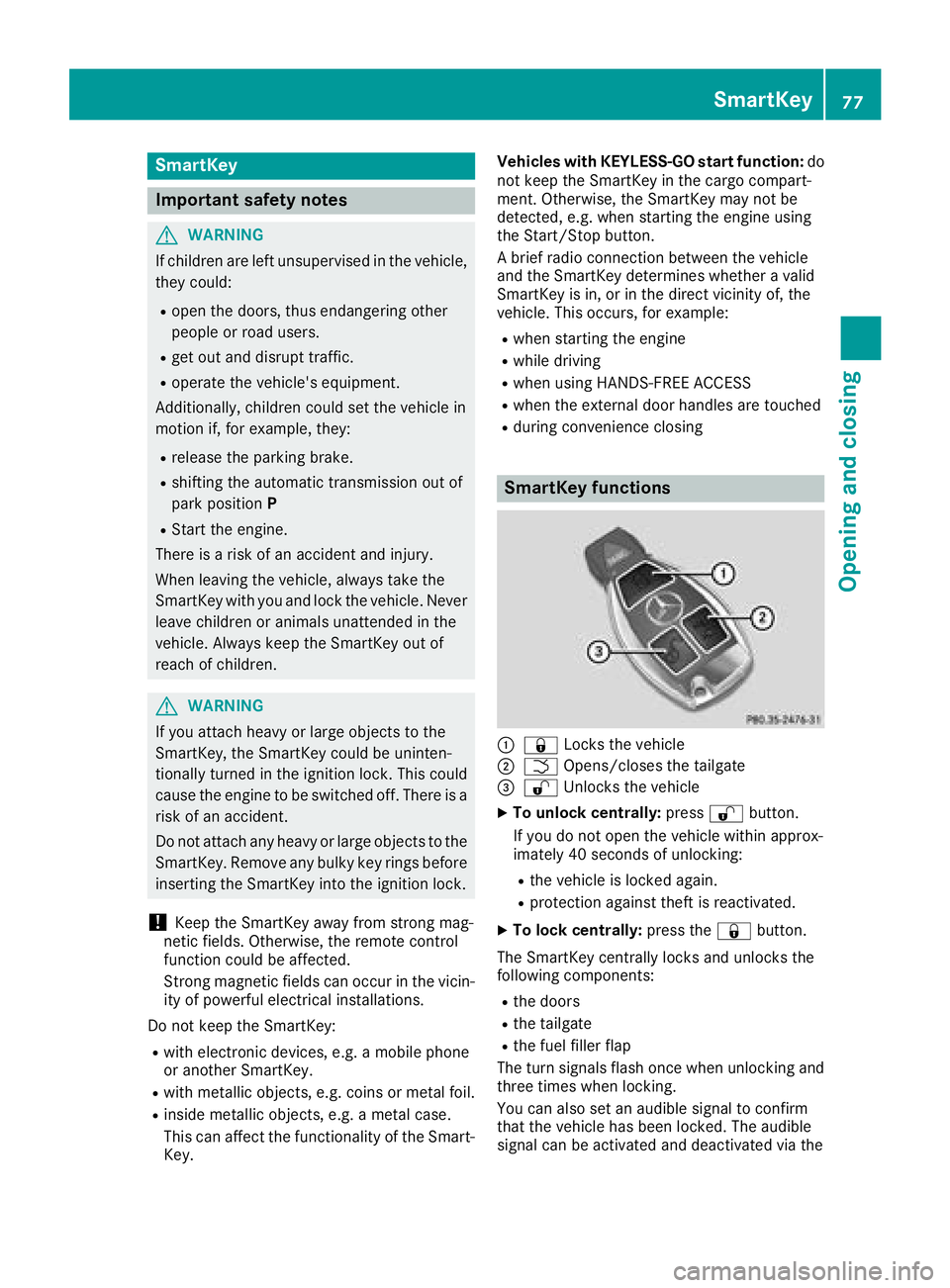
SmartKey functions
C
7 Locks the vehicleD
T Opens/closes the tailgate
Page 134 of 374
! Do not warm up the engine with the vehicle
stationary. Drive off immediately. Avoid high
engine speeds and driving at full throttle until
the engine has reached its operating temper-
ature.
Only shift the automatic transmission to the
desired drive position when the vehicle is sta-
tionary.
Where possible, avoid spinning the drive
wheels when pulling away on slippery roads.
You could otherwise damage the drive train.
Key positions
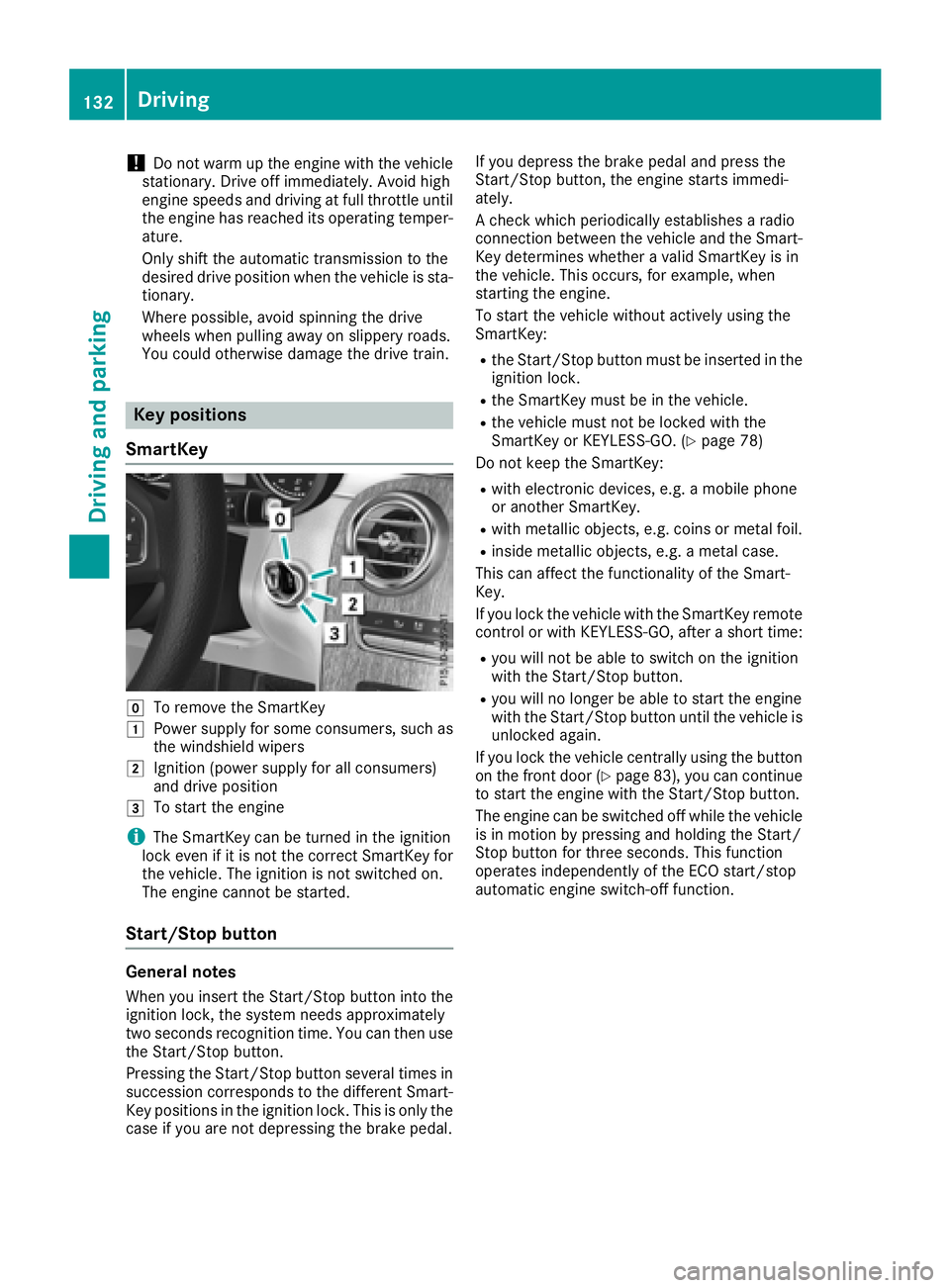
SmartKey
Z
To remove the SmartKeyG
Power supply for some consumers, such as
the windshield wipersH
Ignition (power supply for all consumers)
and drive positionI
To start the engine
i The SmartKey can be turned in the ignition
lock even if it is not the correct SmartKey for
the vehicle. The ignition is not switched on.
The engine cannot be started.
Start/Stop button
General notes
When you insert the Start/Stop button into the
ignition lock, the system needs approximately
two seconds recognition time. You can then use
the Start/Stop button.
Pressing the Start/Stop button several times in
succession corresponds to the different Smart-
Key positions in the ignition lock. This is only the
case if you are not depressing the brake pedal. If you depress the brake pedal and press the
Start/Stop button, the engine starts immedi-
ately.
A check which periodically establishes a radio
connection between the vehicle and the Smart-
Key determines whether a valid SmartKey is in
the vehicle. This occurs, for example, when
starting the engine.
To start the vehicle without actively using the
SmartKey: R
the Start/Stop button must be inserted in the
ignition lock. R
the SmartKey must be in the vehicle. R
the vehicle must not be locked with the
SmartKey or KEYLESS-GO. ( Y
page 78)
Do not keep the SmartKey: R
with electronic devices, e.g. a mobile phone
or another SmartKey. R
with metallic objects, e.g. coins or metal foil. R
inside metallic objects, e.g. a metal case.
This can affect the functionality of the Smart-
Key.
If you lock the vehicle with the SmartKey remote
control or with KEYLESS-GO, after a short time: R
you will not be able to switch on the ignition
with the Start/Stop button. R
you will no longer be able to start the engine
with the Start/Stop button until the vehicle is
unlocked again.
If you lock the vehicle centrally using the button
on the front door ( Y
page 83), you can continue
to start the engine with the Start/Stop button.
The engine can be switched off while the vehicle
is in motion by pressing and holding the Start/
Stop button for three seconds. This function
operates independently of the ECO start/stop
automatic engine switch-off function.132
Driving
Driving and parking
Page 135 of 374
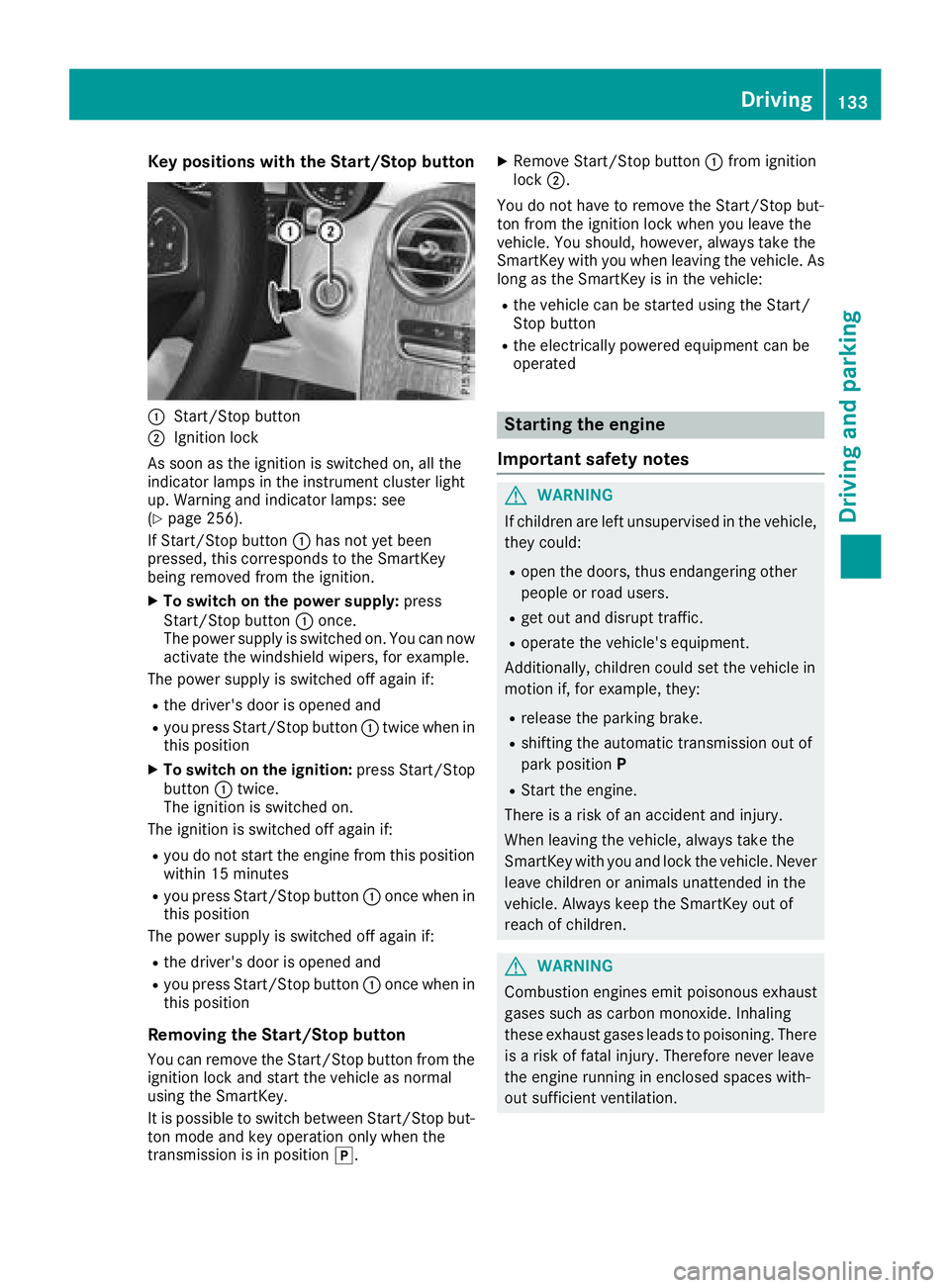
Key positions with th e Start/S top but ton
C
Start/Sto p butto nD
Ignition loc k
As soo n as th e ignition is switched on , all th e
indicator lamps in th e instrumen t cluste r ligh t
up. Warning and indicator lamps : see
( Y
page 256).
If Start/Sto p butto n C has no t yet been
pressed, this correspond s to th e SmartKey
bein g remove d from th e ignition .X
To switch on th e power supply : press
Start/Sto p butto n C once.
The power suppl y is switched on . You can no w
activat e th e windshield wipers, for example .
The power suppl y is switched off again if:R
th e driver' s door is opened andR
you press Start/Sto p butto n C twice when in
this position X
To switch on th e ignition: press Start/Sto p
butto n C twice.
The ignition is switched on .
The ignition is switched off again if: R
you do no t start th e engin e from this position
within 15 minute sR
you press Start/Sto p butto n C once when in
this position
The power suppl y is switched off again if:R
th e driver' s door is opened andR
you press Start/Sto p butto n C once when in
this position
Removing the Start/S top but ton
You can remove th e Start/Sto p butto n from th e
ignition loc k and start th e vehicl e as normal
usin g th e SmartKey.
It is possible to switch between St art/Sto p b ut -
to n mo d e and ke y operation only when th e
transmission is in position ] . X
Remove Start/Sto p butto n C from ignition
loc k D .
You do no t have to remove th e Start/Sto p but -
to n from th e ignition loc k when you leav e th e
vehicle. You should, however , always tak e th e
SmartKey wit h you when leaving th e vehicle. As
lon g as th e SmartKey is in th e vehicle:R
th e vehicl e can be started usin g th e Start /
Stop butto n R
th e electrically powered equipmen t can be
operate d
Starting the engine
Important safety notes
G WARNIN G
If children are lef t unsupervised in th e vehicle,
they could: R
open th e doors, thus endangering other
people or road users. R
get out and disrupt traffic. R
operate th e vehicle's equipment.
Additionally, children could set th e vehicl e in
motion if, for example , they:R
release th e parking brake. R
shiftin g th e automatic transmission out of
park positio n P R
Start th e engine.
Ther e is a ris k of an acciden t and injury.
When leaving th e vehicle, always tak e th e
SmartKey wit h you and loc k th e vehicle. Never
leav e children or animals unattended in th e
vehicle. Always keep th e SmartKey out of
reac h of children .
G WARNIN G
Combustion engines emit poisonous exhaust
gase s suc h as carbon monoxide. Inhalin g
these exhaust gase s leads to poisoning . Ther e
is a ris k of fatal injury. Therefore never leav e
th e engin e runnin g in enclosed spaces with-
out sufficien t ventilation .Driving 133
Driving and parking Z
Page 136 of 374
G WARNING
Flammable materials introduced through
environmental influence or by animals can
ignite if in contact with the exhaust system or
parts of the engine that heat up. There is a risk
of fire.
Carry out regular checks to make sure that
there are no flammable foreign materials in
the engine compartment or in the exhaust
system.
General notes Vehicles with a gasoline engine: the catalytic
converter is preheated for up to 30 seconds
after a cold start. The sound of the engine may
change during this time.
Automatic transmission X
Shift the transmission to position ]
( Y
page 141).
The transmission position indicator on the
multifunction display shows ]
( Y
page 142).
i You can start the engine in transmission
position ] and \\ .
Starting procedure with the SmartKey To start the engine using the SmartKey instead
of the Start/Stop button, pull the Start/Stop
button out of the ignition lock. X
To start a diesel engine: turn the SmartKey
to position H in the ignition lock
( Y
page 132).
The \( preglow indicator lamp in the instru-
ment cluster lights up. X
Turn the SmartKey to position I in the igni-
tion lock ( Y
page 132) and release it as soon
as the engine is running.
i Vehicles with a diesel engine: you can
start the engine without preglow if the engine
is warm.
If the engine will not start: X
Remove the SmartKey from the ignition lock. X
Reinsert the SmartKey into the ignition lock
after a short waiting period. X
Turn the SmartKey to position H in the igni-
tion lock ( Y
page 132).
The indicator lamps in the instrument cluster
light up ( Y
page 256). X
Turn the SmartKey to position I in the igni-
tion lock ( Y
page 132) and release it as soon
as the engine is running.
Starting procedure with the Start/Stop
button The Start/Stop button is only available on vehi-
cles with KEYLESS-GO or the KEYLESS-GO start
function.
The Start/Stop button can be used to start the
vehicle manually without inserting the SmartKey
into the ignition lock. The Start/Stop button
must be inserted in the ignition lock and the
SmartKey must be in the vehicle. This mode for
starting the engine operates independently of
the ECO start/stop automatic engine start func-
tion.
You can start the engine if a valid SmartKey is in
the vehicle. Switch off the engine and always
take the SmartKey with you when leaving the
vehicle, even if you only leave it for a short time.
Pay attention to the important safety notes. X
Depress the brake pedal and keep it
depressed. X
Press the Start/Stop button once
( Y
page 133).
Vehicles with a gasoline engine: the engine
starts.
Vehicles with a diesel engine: preglow is
activated and the engine starts.
Starting procedure via smartphone Observe the important safety notes on starting
the engine ( Y
page 133).
You can also start your engine via your smart-
phone from outside the vehicle. In this case, the
previously selected climate control setting is
activated. In this way you can cool or heat the
interior of the vehicle before starting the jour-
ney.
Only start the engine via your smartphone if it is
safe to start and run the engine where your vehi-
cle is parked.
Observe the legal stipulations in the area where
your vehicle is parked. Engine start via smart-
phone may be limited to certain countries or
regions.134
Driving
Driving and parking
Page 137 of 374
You can execute a maximum of two consecutive
starting attempts via your smartphone. If you
press the start/stop button or insert the Smart-
Key into the ignition lock, you can carry out two
more starting attempts with your smartphone.
The engine runs for ten minutes when starting
with the smartphone.
Once you have started the engine, you can
switch the engine off via your smartphone at any
time.
You can only start the engine via your smart-
phone if: R
the SmartKey is in the ignition lock R
park position ] is selectedR
the accelerator pedal is not depressed R
the anti-theft alarm system is not activated R
the panic alarm is not activated R
the hazard warning lamps are switched off R
the hood is closed R
the doors are closed and locked R
the windows and sliding sunroof are closed
Also make sure that: R
the fuel tank is sufficiently filled R
the starter battery has been sufficiently
charged
G WARNING
Limbs could be crushed or trapped if the
engine is started unintentionally during ser-
vice or maintenance work. There is a risk of
injury.
Always secure the engine against uninten-
tional starting before carrying out mainte-
nance or repair work.
Make sure that the engine cannot be started via
your smartphone before carrying out mainte-
nance or repairs. You can prevent an engine
start via your smartphone, for example, if you: R
switch on the hazard warning lamps R
do not lock the doors R
open a side window R
open the sliding sunroof Pulling away
General notes
G WARNING
If the engine speed is above the idling speed
and you engage transmission position D or R ,
the vehicle could pull away suddenly. There is
a risk of an accident.
When engaging transmission position D or R ,
always firmly depress the brake pedal and do
not simultaneously accelerate.
Depress the accelerator carefully when pulling
away.
The vehicle locks centrally once you have pulled
away. The locking knobs in the doors drop down.
You can open the doors from the inside at any
time.
You can also deactivate the automatic locking
feature, see the Digital Operator's Manual.
It is possible to shift the transmission from posi-
tion ] to the desired position only if you
depress the brake pedal. Only then is the park-
ing lock released. If you do not depress the
brake pedal, the DIRECT SELECT lever can still
be moved but the parking lock remains
engaged.
i Upshifts take place at higher engine speeds
after a cold start. This helps the catalytic con-
verter to reach its operating temperature
more quickly.
Information on the automatic release of the
electric parking brake ( Y
page 156).
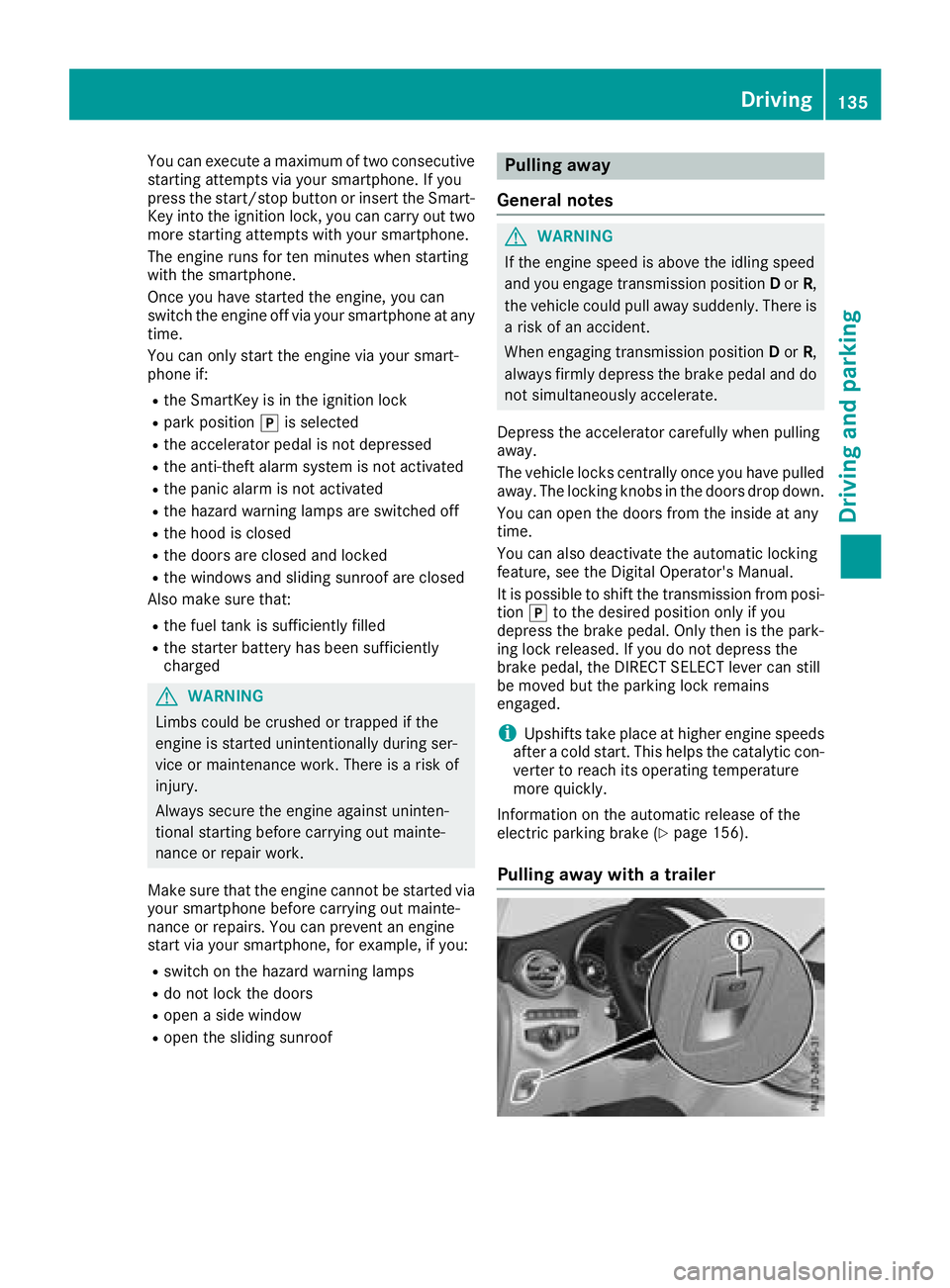
Pulling away with a trailer Driving 135
Driving and parking Z
Page 138 of 374
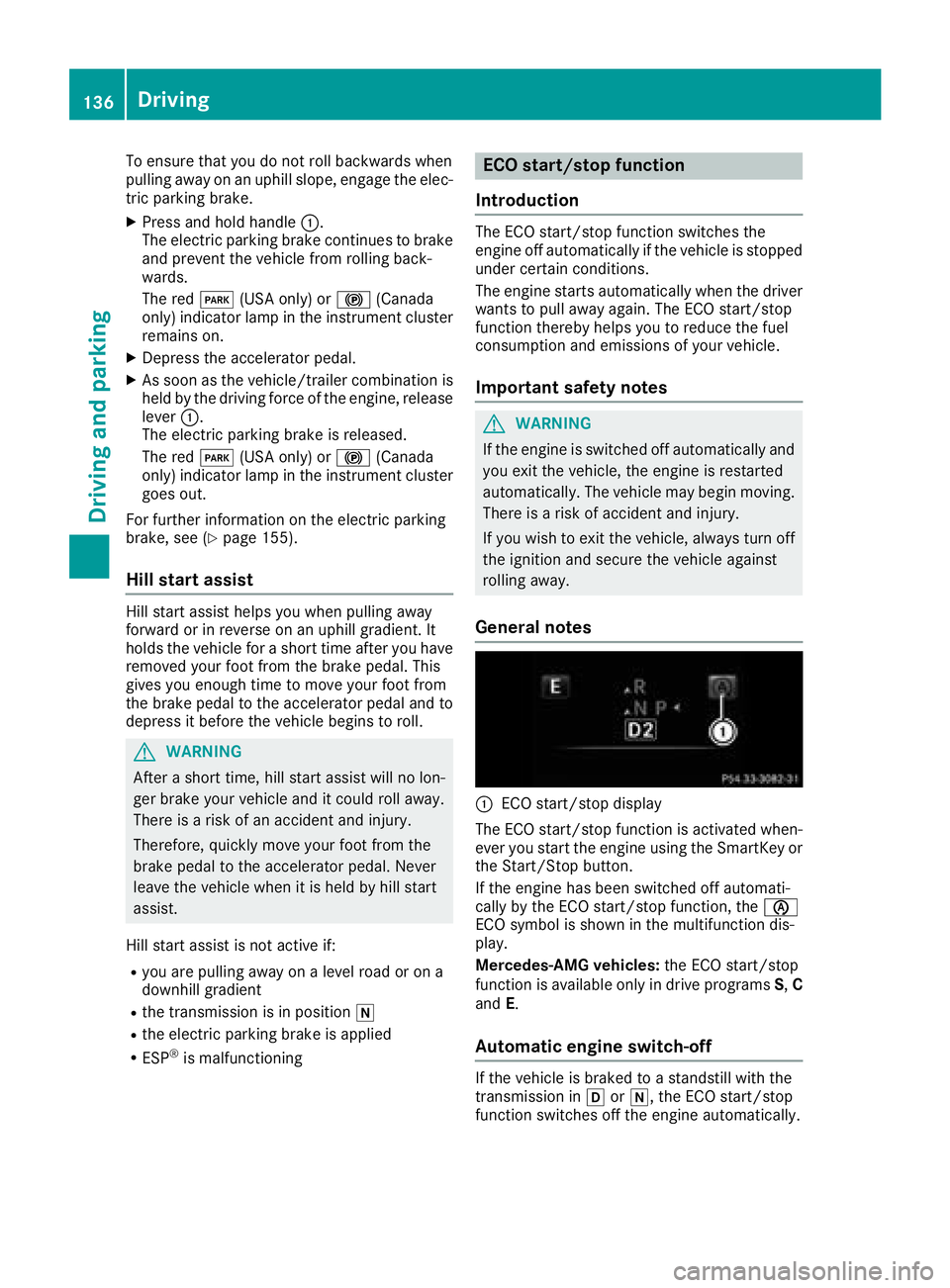
To ensure that you do not roll backwards when
pulling away on an uphill slope, engage the elec-
tric parking brake. X
Press and hold handle C .
The electric parking brake continues to brake
and prevent the vehicle from rolling back-
wards.
The red I (USA only) or $ (Canada
only) indicator lamp in the instrument cluster
remains on. X
Depress the accelerator pedal. X
As soon as the vehicle/trailer combination is
held by the driving force of the engine, release
lever C .
The electric parking brake is released.
The red I (USA only) or $ (Canada
only) indicator lamp in the instrument cluster
goes out.
For further information on the electric parking
brake, see ( Y
page 155).
Hill start assist Hill start assist helps you when pulling away
forward or in reverse on an uphill gradient. It
holds the vehicle for a short time after you have
removed your foot from the brake pedal. This
gives you enough time to move your foot from
the brake pedal to the accelerator pedal and to
depress it before the vehicle begins to roll.
G WARNING
After a short time, hill start assist will no lon-
ger brake your vehicle and it could roll away.
There is a risk of an accident and injury.
Therefore, quickly move your foot from the
brake pedal to the accelerator pedal. Never
leave the vehicle when it is held by hill start
assist.
Hill start assist is not active if: R
you are pulling away on a level road or on a
downhill gradient R
the transmission is in position \\R
the electric parking brake is applied R
ESP ®
is malfunctioning ECO start/stop function
Introduction The ECO start/stop function switches the
engine off automatically if the vehicle is stopped
under certain conditions.
The engine starts automatically when the driver
wants to pull away again. The ECO start/stop
function thereby helps you to reduce the fuel
consumption and emissions of your vehicle.
Important safety notes
G WARNING
If the engine is switched off automatically and
you exit the vehicle, the engine is restarted
automatically. The vehicle may begin moving.
There is a risk of accident and injury.
If you wish to exit the vehicle, always turn off
the ignition and secure the vehicle against
rolling away.
General notes
C
ECO start/stop display
The ECO start/stop function is activated when-
ever you start the engine using the SmartKey or
the Start/Stop button.
If the engine has been switched off automati-
cally by the ECO start/stop function, the
Page 139 of 374
The ECO start/stop function is operational
when: R
the indicator lamp in the ECO button is lit
green R
the outside temperature and the atmospheric
air pressure is within the range that is suitable
for the system R
the engine is at normal operating temperature R
the set temperature for the vehicle interior
has been reached R
the battery is sufficiently charged R
the system detects that the windshield is not
fogged up when the air-conditioning system is
switched on R
the hood is closed R
the driver's door is closed and the driver's
seat belt is fastened
All of the vehicle's systems remain active when
the engine is stopped automatically.
The HOLD function can also be activated if the
engine has been switched off automatically. It is
then not necessary to continue applying the
brakes during the automatic stop phase. When
you depress the accelerator pedal, the engine
starts automatically and the braking effect of
the HOLD function is deactivated.
Automatic engine switch-off can take place a
maximum of four times in a row (initial stop, then
three subsequent stops).
Automatic engine start The engine starts automatically if: R
you switch off the ECO start/stop function by
pressing the ECO button R
you switch to drive program S+R
Mercedes-AMG vehicles: you permanently
activate manual gearshifting ( Y
page 145)R
in transmission position [ or \\ , the brake
pedal is released and the HOLD function is not
active R
you depress the accelerator pedal R
you engage reverse gear ^R
you move the transmission out of position ]R
you unfasten your seat belt or open the driv-
er's door R
the vehicle starts to roll R
the brake system requires this R
the temperature in the vehicle interior devi-
ates from the set range R
the system detects moisture on the wind-
shield when the air-conditioning system is
switched on R
the condition of charge of the battery is too
low
Shifting the transmission to position ] does
not start the engine.
Deactivating or activating the ECO
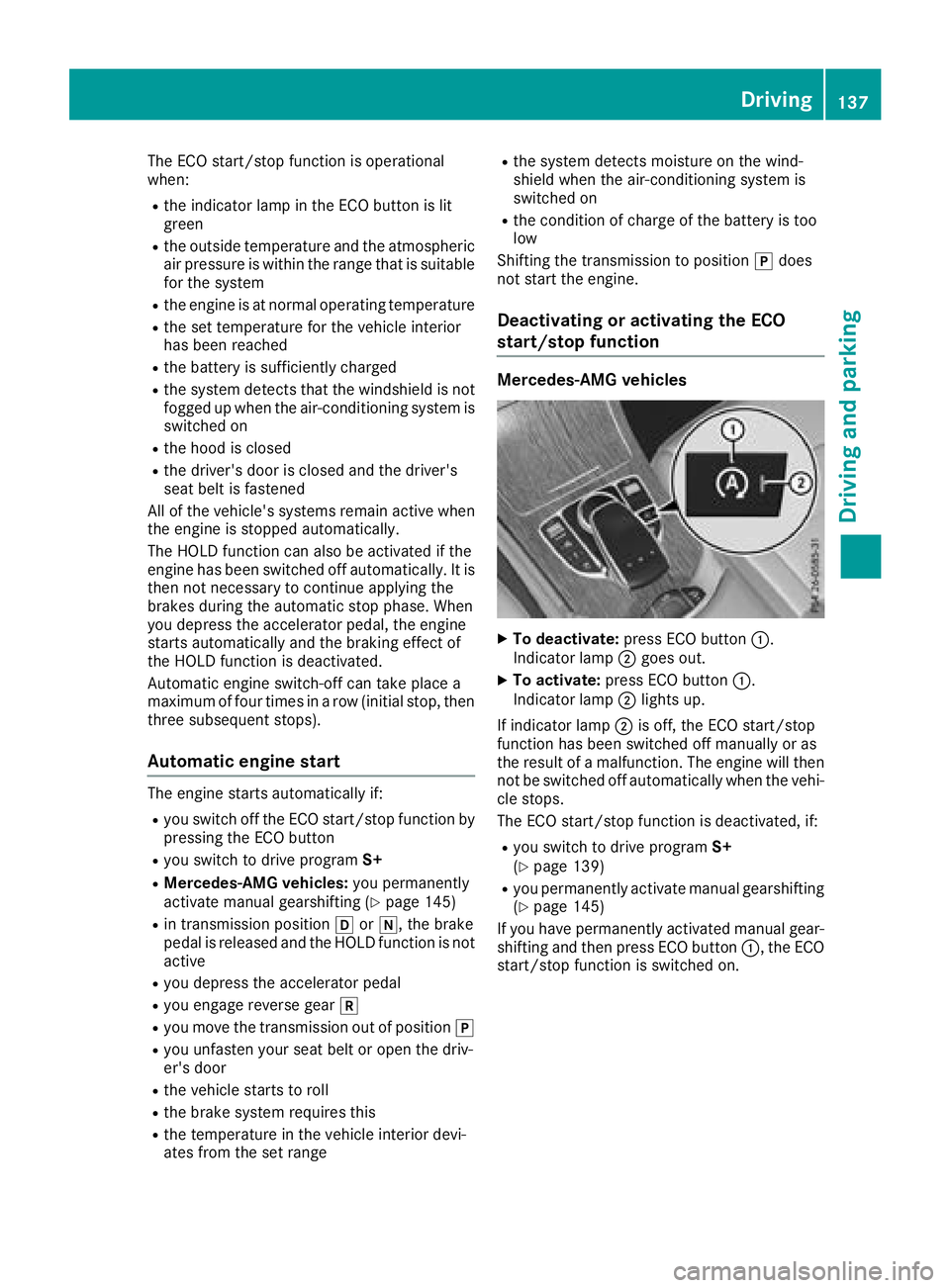
start/stop function Mercedes-AMG vehicles
X
To deactivate: press ECO button C .
Indicator lamp D goes out.X
To activate: press ECO button C .
Indicator lamp D lights up.
If indicator lamp D is off, the ECO start/stop
function has been switched off manually or as
the result of a malfunction. The engine will then
not be switched off automatically when the vehi-
cle stops.
The ECO start/stop function is deactivated, if: R
you switch to drive program S+
( Y
page 139) R
you permanently activate manual gearshifting
( Y
page 145)
If you have permanently activated manual gear-
shifting and then press ECO button C , the ECO
start/stop function is switched on. Driving 137
Driving and parking Z
Page 141 of 374
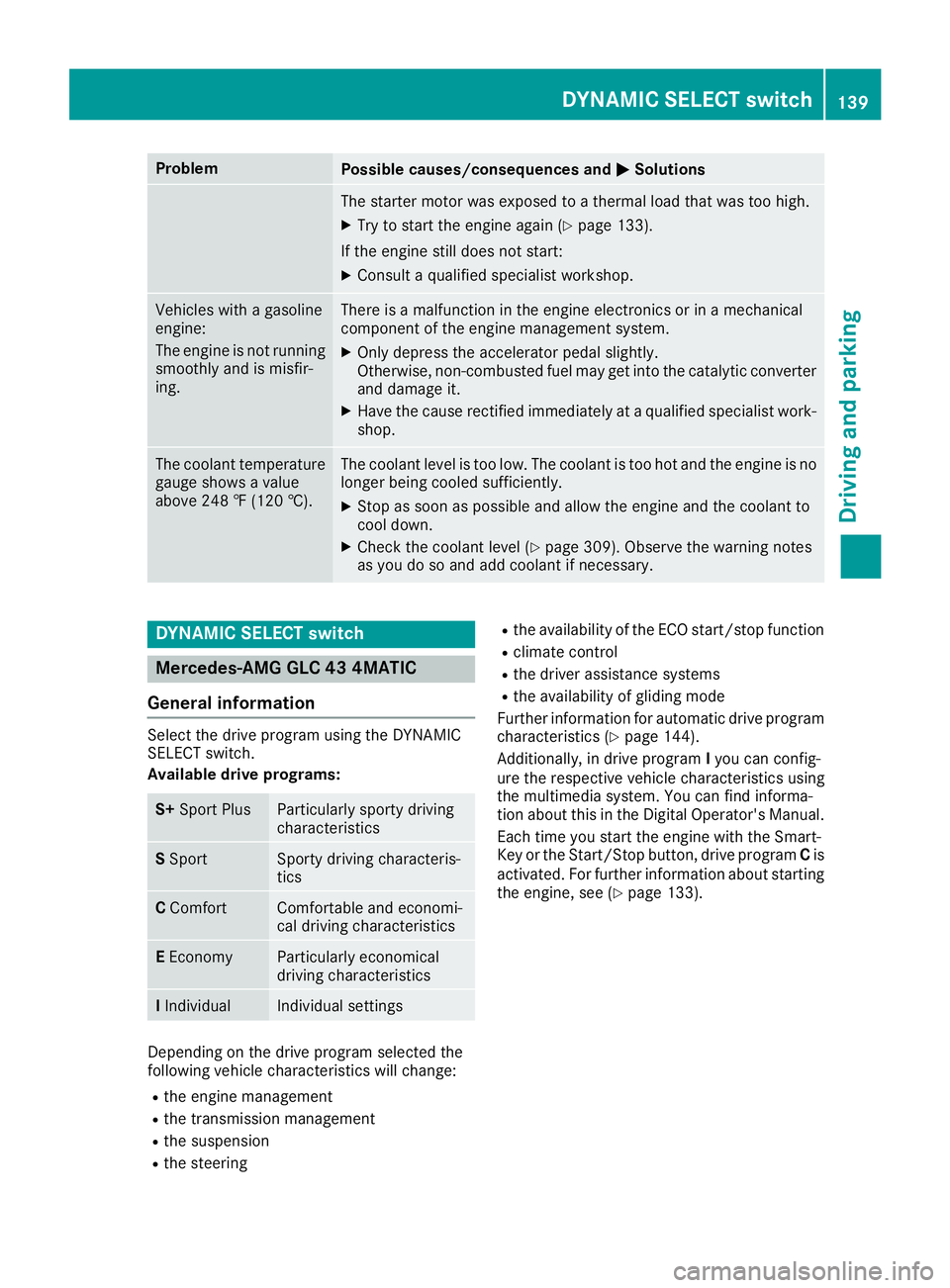
Problem
Possible causes/consequences and P Solutions
The starter motor was exposed to a thermal load that was too high. X
Try to start the engine again ( Y
page 133).
If the engine still does not start: X
Consult a qualified specialist workshop.
Vehicles with a gasoline
engine:
The engine is not running
smoothly and is misfir-
ing. There is a malfunction in the engine electronics or in a mechanical
component of the engine management system. X
Only depress the accelerator pedal slightly.
Otherwise, non-combusted fuel may get into the catalytic converter
and damage it. X
Have the cause rectified immediately at a qualified specialist work-
shop.
The coolant temperature
gauge shows a value
above 248 ‡ (120 †). The coolant level is too low. The coolant is too hot and the engine is no
longer being cooled sufficiently. X
Stop as soon as possible and allow the engine and the coolant to
cool down. X
Check the coolant level ( Y
page 309). Observe the warning notes
as you do so and add coolant if necessary.
DYNAMIC SELECT switch
Mercedes-AMG GLC 43 4MATIC
General information Select the drive program using the DYNAMIC
SELECT switch.
Available drive programs:
S+ Sport Plus Particularly sporty driving
characteristics
S Sport Sporty driving characteris-
tics
C Comfort Comfortable and economi-
cal driving characteristics
E Economy Particularly economical
driving characteristics
I Individual Individual settings
Depending on the drive program selected the
following vehicle characteristics will change: R
the engine management R
the transmission management R
the suspension R
the steering R
the availability of the ECO start/stop function R
climate control R
the driver assistance systems R
the availability of gliding mode
Further information for automatic drive program
characteristics ( Y
page 144).
Additionally, in drive program I you can config-
ure the respective vehicle characteristics using
the multimedia system. You can find informa-
tion about this in the Digital Operator's Manual.
Each time you start the engine with the Smart-
Key or the Start/Stop button, drive program C is
activated. For further information about starting
the engine, see ( Y
page 133).DYNAMIC SELECT switch 139
Driving and parking Z
Page 143 of 374
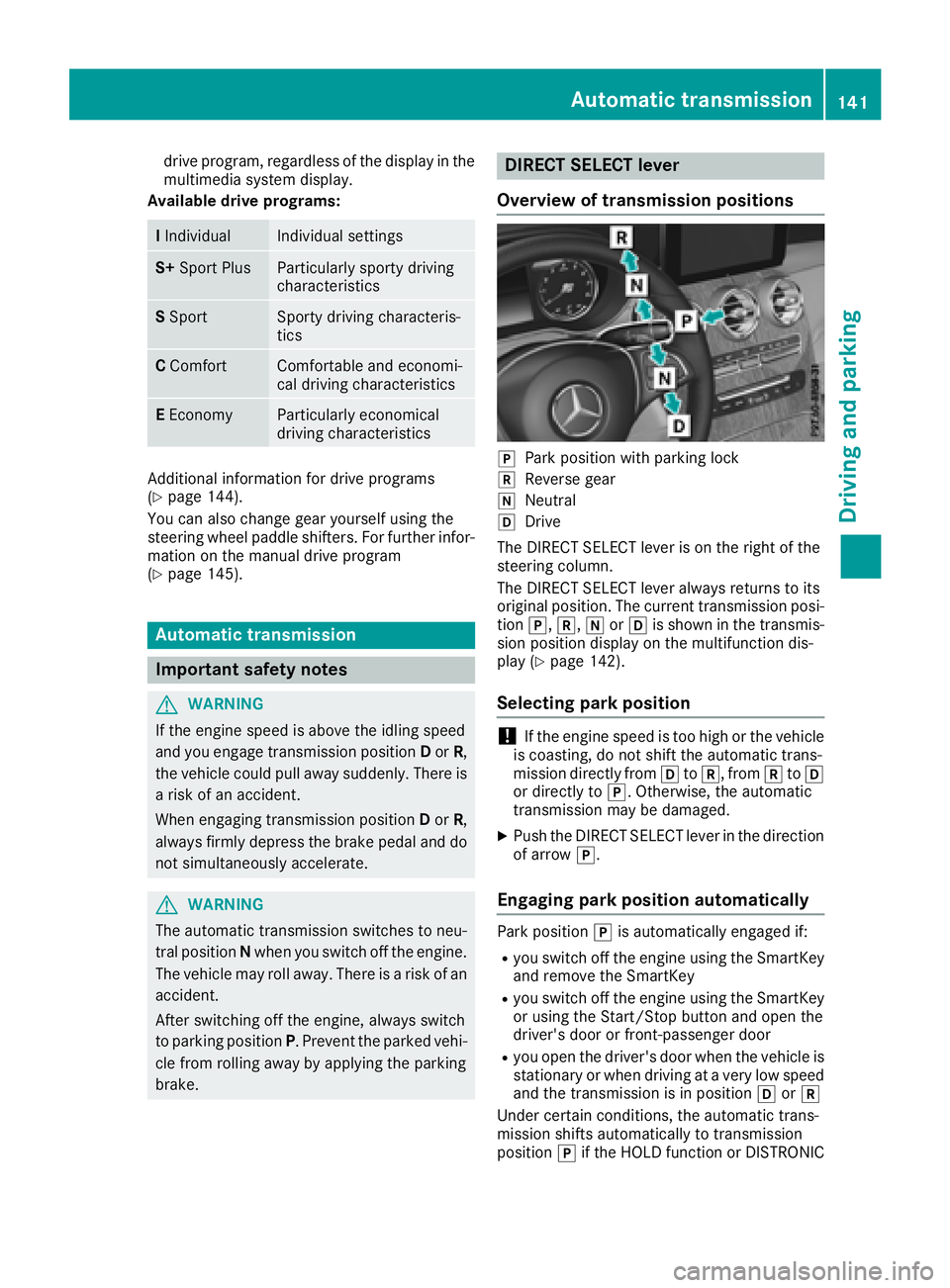
drive program, regardless of the display in the
multimedia system display.
Available drive programs:
I Individual Individual settings
S+ Sport Plus Particularly sporty driving
characteristics
S Sport Sporty driving characteris-
tics
C Comfort Comfortable and economi-
cal driving characteristics
E Economy Particularly economical
driving characteristics
Additional information for drive programs
( Y
page 144).
You can also change gear yourself using the
steering wheel paddle shifters. For further infor-
mation on the manual drive program
( Y
page 145).
Automatic transmission
Important safety notes
G WARNING
If the engine speed is above the idling speed
and you engage transmission position D or R ,
the vehicle could pull away suddenly. There is
a risk of an accident.
When engaging transmission position D or R ,
always firmly depress the brake pedal and do
not simultaneously accelerate.
G WARNING
The automatic transmission switches to neu-
tral position N when you switch off the engine.
The vehicle may roll away. There is a risk of an
accident.
After switching off the engine, always switch
to parking position P . Prevent the parked vehi-
cle from rolling away by applying the parking
brake. DIRECT SELECT lever
Overview of transmission positions
]
Park position with parking lock ^
Reverse gear \\
Neutral [
Drive
The DIRECT SELECT lever is on the right of the
steering column.
The DIRECT SELECT lever always returns to its
original position. The current transmission posi-
tion ] , ^ , \\ or [ is shown in the transmis-
sion position display on the multifunction dis-
play ( Y
page 142).
Selecting park position
! If the engine speed is too high or the vehicle
is coasting, do not shift the automatic trans-
mission directly from [ to ^ , from ^ to [
or directly to ] . Otherwise, the automatic
transmission may be damaged. X
Push the DIRECT SELECT lever in the direction
of arrow ] .
Engaging park position automatically Park position ] is automatically engaged if: R
you switch off the engine using the SmartKey
and remove the SmartKey R
you switch off the engine using the SmartKey
or using the Start/Stop button and open the
driver's door or front-passenger door R
you open the driver's door when the vehicle is
stationary or when driving at a very low speed
and the transmission is in position [ or ^
Under certain conditions, the automatic trans-
mission shifts automatically to transmission
position ] if the HOLD function or DISTRONICAutomatic transmission 141
Driving and parking Z