ECO mode MERCEDES-BENZ GLC 2017 Owners Manual
[x] Cancel search | Manufacturer: MERCEDES-BENZ, Model Year: 2017, Model line: GLC, Model: MERCEDES-BENZ GLC 2017Pages: 374, PDF Size: 8.42 MB
Page 7 of 374
Airbag
Warning lamp ................................ .2 62
Alarm
ATA (Anti-Theft Alarm system) ......... 76
Switching off (ATA) .......................... 76
Switching the function on/off
(ATA) ................................................ 76
Alarm system
see ATA (Anti-Theft Alarm system)
AMG
Performance Seat .......................... 102
AMG menu (on-board computer) ..... 224
Anti-lock braking system
see ABS (Anti-lock Braking System)
Armrest
Stowage compartment .................. 279
Ashtray ............................................... 292
Assistance display (on-board com-
puter) ................................................. .2 19
Assistance menu (on-board com-
puter) ................................................. .2 20
ASSYST PLUS
Displaying a service message ....... .3 10
Driving abroad ............................... 311
Hiding a service message .............. 310
Resetting the service interval dis-
play ................................................ 311
Service message ............................ 310
Special service requirements ......... 311
ATA (Anti-Theft Alarm system)
Activating/deactivating ................... 76
Function .......................................... .7 6
Switching off the alarm .................... 76
ATTENTION ASSIST
Activating/deactivating ................. 221
Display message ............................ 244
Displaying level .............................. 192
Function/notes ............................. 191
Authorized Mercedes-Benz Center
see Qualified specialist workshop
Authorized workshop
see Qualified specialist workshop
AUTO lights
Display message ............................ 239
see Lights
Automatic car wash (care) ............... 311 Automatic engine start (ECO start/
stop function) .................................... 137
Automatic engine switch-off (ECO
start/stop function) .......................... 136
Automatic headlamp mode .............. 111
Automatic transmission
Accel erato r pedal position ............. 143
C
hanging gear ............................... 143
DIRECT SELECT lever ..................... 141
Display message ............................ 252
Double-clutch function .................. 143
Drive program ................................ 144
Drive program display .................... 142
Driving tips .................................... 143
DYNAMIC SELECT switch .............. 139
Emergency running mode .............. 148
Engaging drive position .................. 142
Engaging neutral ............................ 142
Engaging park position automati-
cally ............................................... 141
Engaging reverse gear ................... 142
Engaging the park position ............ 141
Gearshift recommendation ............ 147
Gliding mode ................................. 144
Kickdown ....................................... 144
Manual shifting .............................. 145
Oil temperature (on-board com-
puter, Mercedes-AMG vehicles) ..... 224
Overview ........................................ 141
Permanent setting ......................... 146
Problem (malfunction) ................... 148
Pulling away ................................... 135
Starting the engine ........................ 134
Steering wheel paddle shifters ...... 145
Trailer towing ................................. 144
Transmission position display
(DIRECT SELECT lever) ................... 142
Transmission positions .................. 143
Automatic transmission emer-
gency mode ....................................... 148
Axle load, permissible (trailer tow-
ing) ...................................................... 371
B
Back button ....................................... 269
Backup lamp
Display message ............................ 239 Index 5
Page 14 of 374
Front wheel arch cover
Installing/removing ...................... .1 17
Fuel
Additives ........................................ 366
Consumption statistics .................. 213
Displaying the current consump-
tion ................................................ 213
Displaying the range ..................... .2 13
Driving tips ................................... .1 57
E10 ................................................ 365
Fuel gauge ....................................... 36
Gasoline ......................................... 365
Grade (gasoline) ............................ 365
Important safety notes .................. 365
Low outside temperatures ............. 367
Problem (malfunction) ................... 151
Quality (diesel) ............................... 366
Refueling ........................................ 148
Tank content/reserve fuel ............. 365
Fuel filler flap
Closing ........................................... 150
Fuel filter (display message) ............ 243
Fuel level
Calling up the range (on-board
computer) ...................................... 213
Fuel tank
Capacity ........................................ 365
Problem (malfunction) ................... 151
Fuses
Allocation chart ............................. 334
Before changing ............................. 333
Dashboard fuse box ....................... 334
Fuse box in the cargo compart-
ment .............................................. 334
Fuse box in the engine compart-
ment .............................................. 334
Fuse box in the front-passenger
footwell .......................................... 334
Important safety notes .................. 333
G
G-Meter (on-board computer,
Mercedes-AMG vehicles) .................. 224
Garage door opener
Clearing the memory ..................... 305
General notes ................................ 302
Important safety notes .................. 302 Opening/closing the garage doo r. .3 04
Problems when programming ....... .3 04
Programming (button in the rear-
view mirror) ................................... 303
Synchronizing the rolling code ....... 303
Gasoline ............................................. 365
Gear indicator (on-board com-
puter, Mercedes-AMG vehicles) ....... 224
Genuine parts ...................................... 27
Glove box .......................................... .2 79
Google™ Local Search
see also Digital Operator's Man-
ual ................................................. .2 68
H HANDS-FREE ACCESS .......................... 87
Handwriting recognition
Switching text reader function
on/off ............................................ 271
Touchpad ....................................... 270
Hazard warning lamps ..................... .1 13
Head restraints
Adjusting (electrically) ................... 101
Adjusting (manually) ..................... .1 01
Adjusting (rear) .............................. 101
Adjusting the fore-and-aft posi-
tion manually ................................. 101
General notes ................................ 101
Important safety notes .................. 100
Installing/removing (rear) .............. 102
Head-up display
Adjusting the brightness ................ 222
Displays and operating .................. 211
Function/notes ............................ .2 11
Important safety notes .................. 211
Selecting displays .......................... 222
Setting the position ....................... 222
Storing settings (memory func-
tion) ............................................... 109
Headlamps
Display message ............................ 239
Fogging up ..................................... 114
see Automatic headlamp mode
Heating
see Climate control
High beam flasher ............................ .1 1212
Index
Page 22 of 374
Problem (malfunction) ..................... 81
Starting the engine ........................ 134
Smartphone
Starting the engine ........................ 134
SMS
see also Digital Operator's Man-
ual .................................................. 268
Snow chains ...................................... 338
Socket (12 V)
Cargo compartment ....................... 293
Center console .............................. 293
General notes ................................ 293
Rear compartment ........................ .2 93
Sound
Switching on/off ........................... 269
Special seat belt retractor .................. 59
Specialist workshop ............................ 31
Speed, controlling
see Cruise control
Speedometer
Activating/deactivating the addi-
tional speedometer ........................ 223
Digital ............................................ 213
In the Instrument cluster ................. 36
Segments ...................................... 208
Selecting the display unit .............. .2 23
SPORT handling mode
Deactivating/activating
(Mercedes-AMG vehicles) ................ 71
Warning lamp ................................. 261
Standing lamps
Display message ............................ 239
Switching on/off ........................... 112
Start button
Display message ............................ 256
Start/Stop button
Key positions ................................. 133
Starting the engine ........................ 134
Start/stop function
see ECO start/stop function
Starting (engine) ................................ 133
STEER CONTROL .................................. 75
Steering
Display message ............................ 254
Warning lamps ............................... 267
Steering Assist and Stop&Go Pilot .. 169 Steering Assist and Stop&Go Pilot
(DISTRONIC PLUS)
Display message ............................ 248
Steering assistant STEER CON-
TROL
see STEER CONTROL
Stee ring w heel
Adju sting (electrically) ................... 105
Adjusting (manually) ...................... 104
Button overview ............................... 37
Buttons (on-board computer) ......... 209
Cleaning ......................................... 317
EASY ENTRY/EXIT feature ............. 105
Important safety notes .................. 104
Storing settings (memory func-
tion) ............................................... 109
Steering wheel heating
Problem (malfunction) ................... 105
Switching on/off ........................... 105
Steering wheel paddle shifters ........ 145
Stop&Go Pilot and Steering Assist .. 169
Stopwatch (RACETIMER) ................... 225
Stowage areas ................................... 278
Stowage compartments
Armrest (under) ............................. 279
Center console .............................. 279
Cup holders ................................... 290
Door ............................................... 280
Eyeglasses compartment ............... 279
Glove box ....................................... 279
Important safety information ......... 278
Map pockets .................................. 280
Rear ............................................... 280
Stowage net ................................... 280
see Stowage areas
Stowage net ....................................... 280
Summer tires
In winter ........................................ 338
Sun visor ............................................ 291
Suspension settings
AIR BODY CONTROL ...................... 173
Suspension tuning
AMG sports suspension based on
AIR BODY CONTROL ...................... 174
SETUP (on-board computer,
Mercedes-AMG vehicles) ............... 22520
Index
Page 23 of 374
SUV
(Sport Utility Vehicle) ....................... 30
Switching air-recirculation mode
on/off ................................................ .1 28
Switching on media mode
Via the device list .......................... 276
T Tachometer ........................................ 209
Tail lamps
Display message ............................ 239
Tailgate
Display message ............................ 253
Emergency unlocking ....................... 89
HANDS-FREE ACCESS ..................... 87
Important safety notes .................... 84
Limiting the opening angle ............... 89
Obstruction detection ...................... 85
Opening dimensions ...................... 370
Opening/closing (automatically
from inside) ...................................... 88
Opening/closing (automatically
from outside) ................................... 86
Opening/closing (manually from
outside) ............................................ 85
Reversing feature ............................. 85
Tank content
Fuel gauge ....................................... 36
Technical data
Capacities ...................................... 364
Drawbar load (maximum) ............... 371
Information .................................... 362
Trailer loads ................................... 371
Vehicle data ................................... 370
Telephone
Accepting a call (multifunction
steering wheel) .............................. 218
Authorizing a mobile phone (con-
necting) ......................................... 275
Connecting a mobile phone (gen-
eral information) ............................ 275
Display message ............................ 254
Introduction ................................... 218
Menu (on-board computer) ............ 218
Number from the phone book ........ 218
Redialing ........................................ 219
Rejecting/ending a call ................. 218 see also Digital Operator's Man-
ual .................................................. 268
Switching between mobile
phones ........................................... 276
see Mobile phone
Temperature
Coolant (display in the instrument
cluster) .......................................... 209
Engine oil (on-board computer,
Mercedes-AMG vehicles) ............... 224
Outside temperature ...................... 209
Setting (climate control) ................ 126
Transmission oil (on-board com-
puter, Mercedes-AMG vehicles) ..... 224
Timing (RACETIMER) ......................... 225
Tire pressure
Calling up (on-board computer) ..... 343
C h ecking manually ........................ 342
Display message ............................ 250
Maximum ....................................... 342
Not reached (TIREFIT) .................... 324
Notes ............................................. 341
Reached (TIREFIT) .......................... 324
Recommended ............................... 339
Using the TIREFIT kit ...................... 323
Tire pressure loss warning system
General notes ................................ 342
Important safety notes .................. 342
Restarting ...................................... 343
Tire pressure monitor
Checking the tire pressure elec-
tronically ........................................ 345
Function/notes ............................. 343
General notes ................................ 343
Important safety notes .................. 344
Radio type approval for the tire
pressure monitor ........................... 346
Restarting ...................................... 345
Warning lamp ................................. 266
Warning message .......................... 345
Tire pressure sensors
Display message ............................ 251
Tire-change tool kit ........................... 320
TIREFIT kit
Important safety notes .................. 322
Storage location ............................ 320
Tire pressure not reached .............. 324
Tire pressure reached .................... 324 Index 21
Page 125 of 374
Overview of climate control systems
General notes Observe the settings recommended on the fol-
lowing pages. The windows could otherwise fog
up.
To prevent the windows from fogging up: R
switch off climate control only briefly R
switch on air-recirculation mode only briefly R
switch on the cooling with air dehumidifica-
tion function R
activate the "Windshield defrosting" function
briefly, if required
Climate control regulates the temperature and
air humidity in the vehicle interior. The interior
filter cleans the air, thus improving the interior
climate.
The "Cooling with air dehumidification" function
is only available when the engine is running.
Optimum climate control is only achieved with
the side windows and roof closed.
If you start the engine using your smartphone,
the last selected climate control setting is reac-
tivated ( Y
page 134). The integrated filter filters out most particles of
dust and soot and completely filters out pollen.
It also reduces gaseous pollutants and odors. A
clogged filter reduces the amount of air supplied
to the vehicle interior. For this reason, you
should always observe the interval for replacing
the filter, which is specified in the Maintenance
Booklet. As it depends on environmental condi-
tions, e.g. heavy air pollution, the interval may
be shorter than stated in the Maintenance Book-
let.
i Ventilate the vehicle for a brief period during
warm weather, e.g. using the convenience
opening feature ( Y
page 91). This will speed
up the cooling process and the desired inte-
rior temperature will be reached more
quickly.
i It is possible that the blower may be activa-
ted automatically 60 minutes after the Smart-
Key has been removed depending on various
factors, e.g. the outside temperature. The
vehicle is then ventilated for 30 minutes to dry
the automatic climate control.
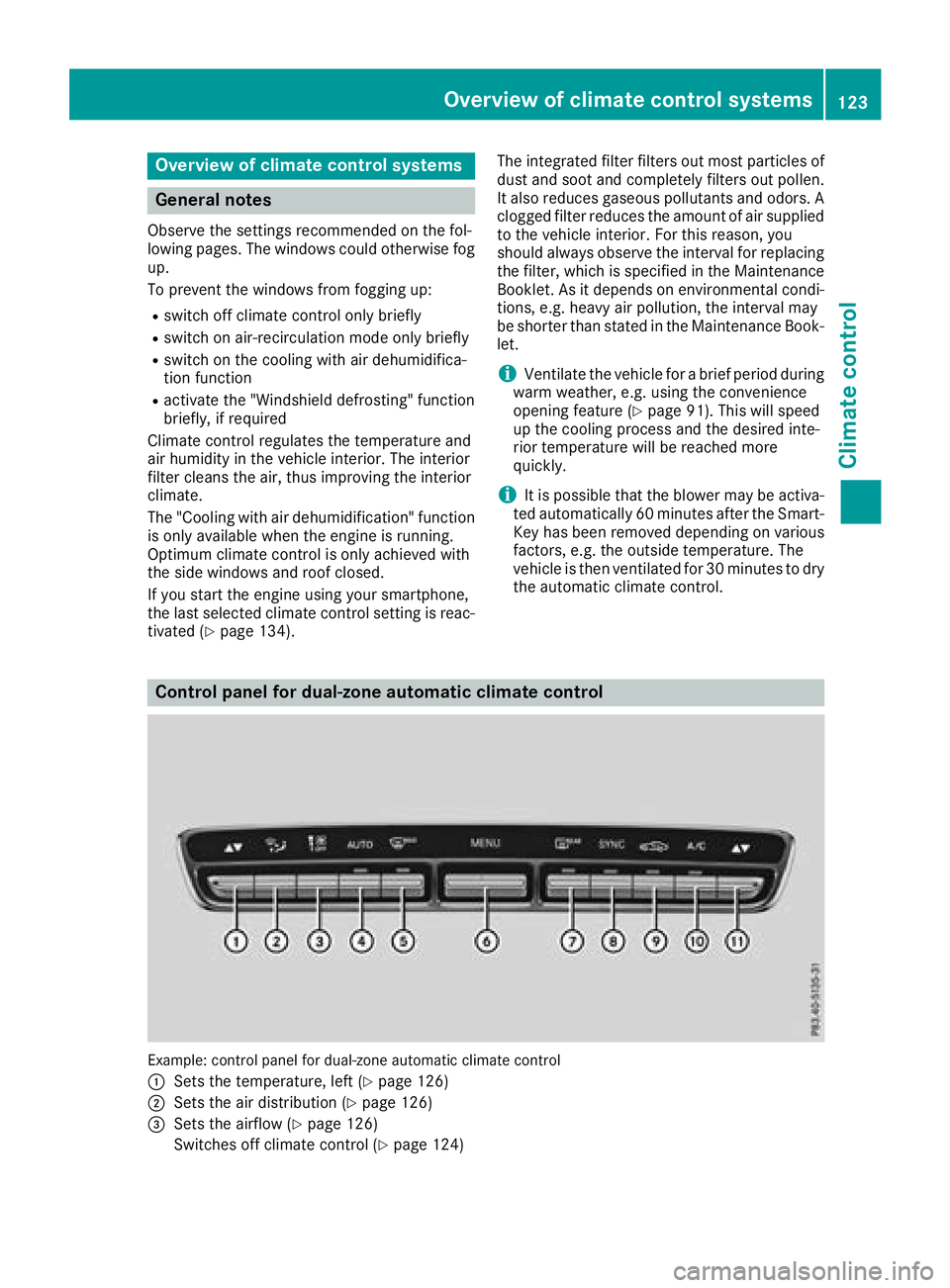
Control panel for dual-zone automatic climate control
Example: control panel for dual-zone automatic climate control
C
Sets the temperature, left ( Y
page 126)
D
Sets the air distribution ( Y
page 126)
Page 136 of 374
G WARNING
Flammable materials introduced through
environmental influence or by animals can
ignite if in contact with the exhaust system or
parts of the engine that heat up. There is a risk
of fire.
Carry out regular checks to make sure that
there are no flammable foreign materials in
the engine compartment or in the exhaust
system.
General notes Vehicles with a gasoline engine: the catalytic
converter is preheated for up to 30 seconds
after a cold start. The sound of the engine may
change during this time.
Automatic transmission X
Shift the transmission to position ]
( Y
page 141).
The transmission position indicator on the
multifunction display shows ]
( Y
page 142).
i You can start the engine in transmission
position ] and \\ .
Starting procedure with the SmartKey To start the engine using the SmartKey instead
of the Start/Stop button, pull the Start/Stop
button out of the ignition lock. X
To start a diesel engine: turn the SmartKey
to position H in the ignition lock
( Y
page 132).
The \( preglow indicator lamp in the instru-
ment cluster lights up. X
Turn the SmartKey to position I in the igni-
tion lock ( Y
page 132) and release it as soon
as the engine is running.
i Vehicles with a diesel engine: you can
start the engine without preglow if the engine
is warm.
If the engine will not start: X
Remove the SmartKey from the ignition lock. X
Reinsert the SmartKey into the ignition lock
after a short waiting period. X
Turn the SmartKey to position H in the igni-
tion lock ( Y
page 132).
The indicator lamps in the instrument cluster
light up ( Y
page 256). X
Turn the SmartKey to position I in the igni-
tion lock ( Y
page 132) and release it as soon
as the engine is running.
Starting procedure with the Start/Stop
button The Start/Stop button is only available on vehi-
cles with KEYLESS-GO or the KEYLESS-GO start
function.
The Start/Stop button can be used to start the
vehicle manually without inserting the SmartKey
into the ignition lock. The Start/Stop button
must be inserted in the ignition lock and the
SmartKey must be in the vehicle. This mode for
starting the engine operates independently of
the ECO start/stop automatic engine start func-
tion.
You can start the engine if a valid SmartKey is in
the vehicle. Switch off the engine and always
take the SmartKey with you when leaving the
vehicle, even if you only leave it for a short time.
Pay attention to the important safety notes. X
Depress the brake pedal and keep it
depressed. X
Press the Start/Stop button once
( Y
page 133).
Vehicles with a gasoline engine: the engine
starts.
Vehicles with a diesel engine: preglow is
activated and the engine starts.
Starting procedure via smartphone Observe the important safety notes on starting
the engine ( Y
page 133).
You can also start your engine via your smart-
phone from outside the vehicle. In this case, the
previously selected climate control setting is
activated. In this way you can cool or heat the
interior of the vehicle before starting the jour-
ney.
Only start the engine via your smartphone if it is
safe to start and run the engine where your vehi-
cle is parked.
Observe the legal stipulations in the area where
your vehicle is parked. Engine start via smart-
phone may be limited to certain countries or
regions.134
Driving
Driving and parking
Page 141 of 374
Problem
Possible causes/consequences and P Solutions
The starter motor was exposed to a thermal load that was too high. X
Try to start the engine again ( Y
page 133).
If the engine still does not start: X
Consult a qualified specialist workshop.
Vehicles with a gasoline
engine:
The engine is not running
smoothly and is misfir-
ing. There is a malfunction in the engine electronics or in a mechanical
component of the engine management system. X
Only depress the accelerator pedal slightly.
Otherwise, non-combusted fuel may get into the catalytic converter
and damage it. X
Have the cause rectified immediately at a qualified specialist work-
shop.
The coolant temperature
gauge shows a value
above 248 ‡ (120 †). The coolant level is too low. The coolant is too hot and the engine is no
longer being cooled sufficiently. X
Stop as soon as possible and allow the engine and the coolant to
cool down. X
Check the coolant level ( Y
page 309). Observe the warning notes
as you do so and add coolant if necessary.
DYNAMIC SELECT switch
Mercedes-AMG GLC 43 4MATIC
General information Select the drive program using the DYNAMIC
SELECT switch.
Available drive programs:
S+ Sport Plus Particularly sporty driving
characteristics
S Sport Sporty driving characteris-
tics
C Comfort Comfortable and economi-
cal driving characteristics
E Economy Particularly economical
driving characteristics
I Individual Individual settings
Depending on the drive program selected the
following vehicle characteristics will change: R
the engine management R
the transmission management R
the suspension R
the steering R
the availability of the ECO start/stop function R
climate control R
the driver assistance systems R
the availability of gliding mode
Further information for automatic drive program
characteristics ( Y
page 144).
Additionally, in drive program I you can config-
ure the respective vehicle characteristics using
the multimedia system. You can find informa-
tion about this in the Digital Operator's Manual.
Each time you start the engine with the Smart-
Key or the Start/Stop button, drive program C is
activated. For further information about starting
the engine, see ( Y
page 133).DYNAMIC SELECT switch 139
Driving and parking Z
Page 146 of 374
reduces load change reactions and is conducive
to a sporty driving style. The sound generated by
the double-clutch function depends on the drive
program selected.
Kickdown Use kickdown for maximum acceleration. X
Depress the accelerator pedal beyond the
pressure point.
The automatic transmission shifts to a lower
gear depending on the engine speed. X
Ease off the accelerator pedal once the
desired speed is reached.
The automatic transmission shifts back up.
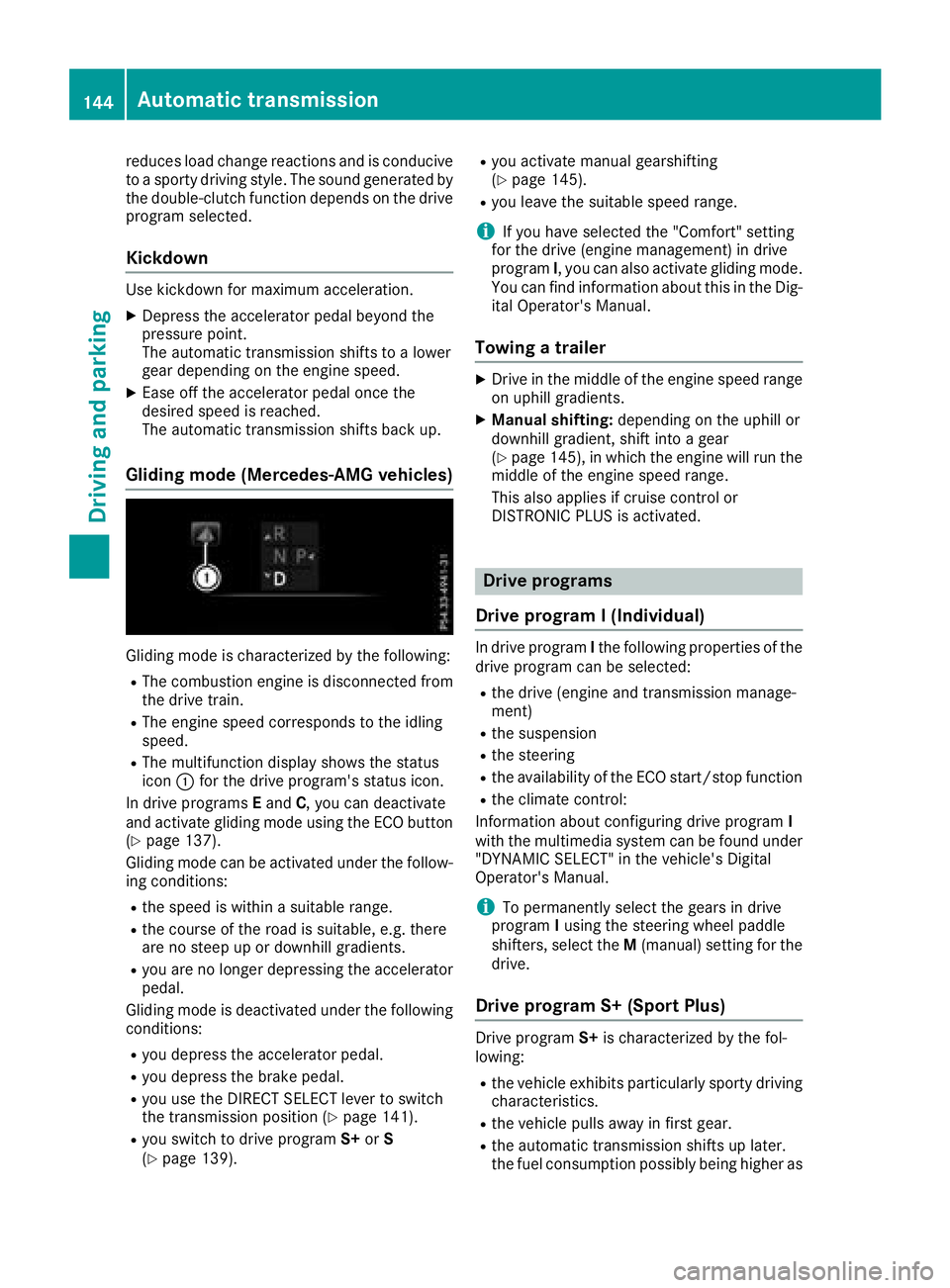
Gliding mode (Mercedes-AMG vehicles)
Gliding mode is characterized by the following: R
The combustion engine is disconnected from
the drive train. R
The engine speed corresponds to the idling
speed. R
The multifunction display shows the status
icon C for the drive program's status icon.
In drive programs E and C , you can deactivate
and activate gliding mode using the ECO button
( Y
page 137).
Gliding mode can be activated under the follow-
ing conditions: R
the speed is within a suitable range. R
the course of the road is suitable, e.g. there
are no steep up or downhill gradients. R
you are no longer depressing the accelerator
pedal.
Gliding mode is deactivated under the following
conditions: R
you depress the accelerator pedal. R
you depress the brake pedal. R
you use the DIRECT SELECT lever to switch
the transmission position ( Y
page 141).R
you switch to drive program S+ or S
( Y
page 139). R
you activate manual gearshifting
( Y
page 145). R
you leave the suitable speed range.
i If you have selected the "Comfort" setting
for the drive (engine management) in drive
program I , you can also activate gliding mode.
You can find information about this in the Dig-
ital Operator's Manual.
Towing a trailer X
Drive in the middle of the engine speed range
on uphill gradients. X
Manual shifting: depending on the uphill or
downhill gradient, shift into a gear
( Y
page 145), in which the engine will run the
middle of the engine speed range.
This also applies if cruise control or
DISTRONIC PLUS is activated.
Drive programs
Drive program I (Individual) In drive program I the following properties of the
drive program can be selected: R
the drive (engine and transmission manage-
ment) R
the suspension R
the steering R
the availability of the ECO start/stop function R
the climate control:
Information about configuring drive program I
with the multimedia system can be found under
"DYNAMIC SELECT" in the vehicle's Digital
Operator's Manual.
i To permanently select the gears in drive
program I using the steering wheel paddle
shifters, select the M (manual) setting for the
drive.
Drive program S+ (Sport Plus)
Drive program S+ is characterized by the fol-
lowing: R
the vehicle exhibits particularly sporty driving
characteristics. R
the vehicle pulls away in first gear. R
the automatic transmission shifts up later.
the fuel consumption possibly being higher as144
Automatic transmission
Driving and parking
Page 147 of 374
a result of the later automatic transmission
shift points. R
the suspension exhibits particularly stiff
springing and damping settings (vehicles with
AIR BODY CONTROL). R
gliding mode is not available (Mercedes-AMG
vehicles). R
the ECO start/stop function is not available.
Drive program S (Sport) Drive program S is characterized by the follow-
ing: R
the vehicle exhibits sporty driving character-
istics. R
the vehicle pulls away in first gear. R
the automatic transmission shifts up later.
the fuel consumption possibly being higher as
a result of the later automatic transmission
shift points. R
the suspension exhibits particularly stiff
springing and damping settings (vehicles with
AIR BODY CONTROL). R
gliding mode is not available (Mercedes-AMG
vehicles). R
the ECO start/stop function is not available.
Drive program C (Comfort) Drive program C is characterized by the follow-
ing: R
the vehicle delivers comfortable, economical
handling characteristics. R
the vehicle pulls away more gently in forward
and reverse gears, unless the accelerator
pedal is depressed fully. R
the vehicle has improved driving stability, for
example on slippery road surfaces. R
optimal fuel consumption resulting from the
automatic transmission shifting up sooner.
The vehicle is driven in the low engine speed
range and the wheels are less likely to spin. R
gliding mode is not available (Mercedes-AMG
vehicles). Drive program E (Economy) Drive program E is characterized by the follow-
ing: R
the vehicle exhibits comfortable, economical
handling characteristics. R
the vehicle pulls away more gently in forward
and reverse gears, unless the accelerator
pedal is depressed fully. R
the vehicle has improved driving stability, for
example on slippery road surfaces. R
optimal fuel consumption resulting from the
automatic transmission shifting up sooner.
The vehicle is driven in the low engine speed
range and the wheels are less likely to spin. R
during deceleration, the engine is disconnec-
ted from the drive train. The vehicle uses
kinetic energy and consumes less fuel. R
the cooling and heating output of the climate
control system has been reduced.
Manual gear shifting
General notes You can change gear yourself using the steering
wheel paddle shifters. The transmission must be
in position [ to do this.
Depending on which steering wheel paddle
shifter is pulled, the automatic transmission
immediately shifts into the next gear down or
up, if permitted.
Mercedes-AMG vehicles: to use manual shift-
ing, you have two options: R
temporary setting R
permanent setting
If you activate manual gearshifting, the multi-
function display will show the current gear
instead of transmission position [ .
If you deactivate manual gearshifting, the gears
will be shifted automatically again.Automatic transmission 145
Driving and parking Z
Page 149 of 374
make sure that the engine speed does not
reach the red area of the tachometer. X
To shift down: pull steering wheel paddle
shifter C .
The automatic transmission shifts down to
the next gear.
Automatic down shifting occurs when coast-
ing.
If the engine exceeds the maximum engine
speed when shifting down, the automatic
transmission protects against engine damage
by not shifting down.
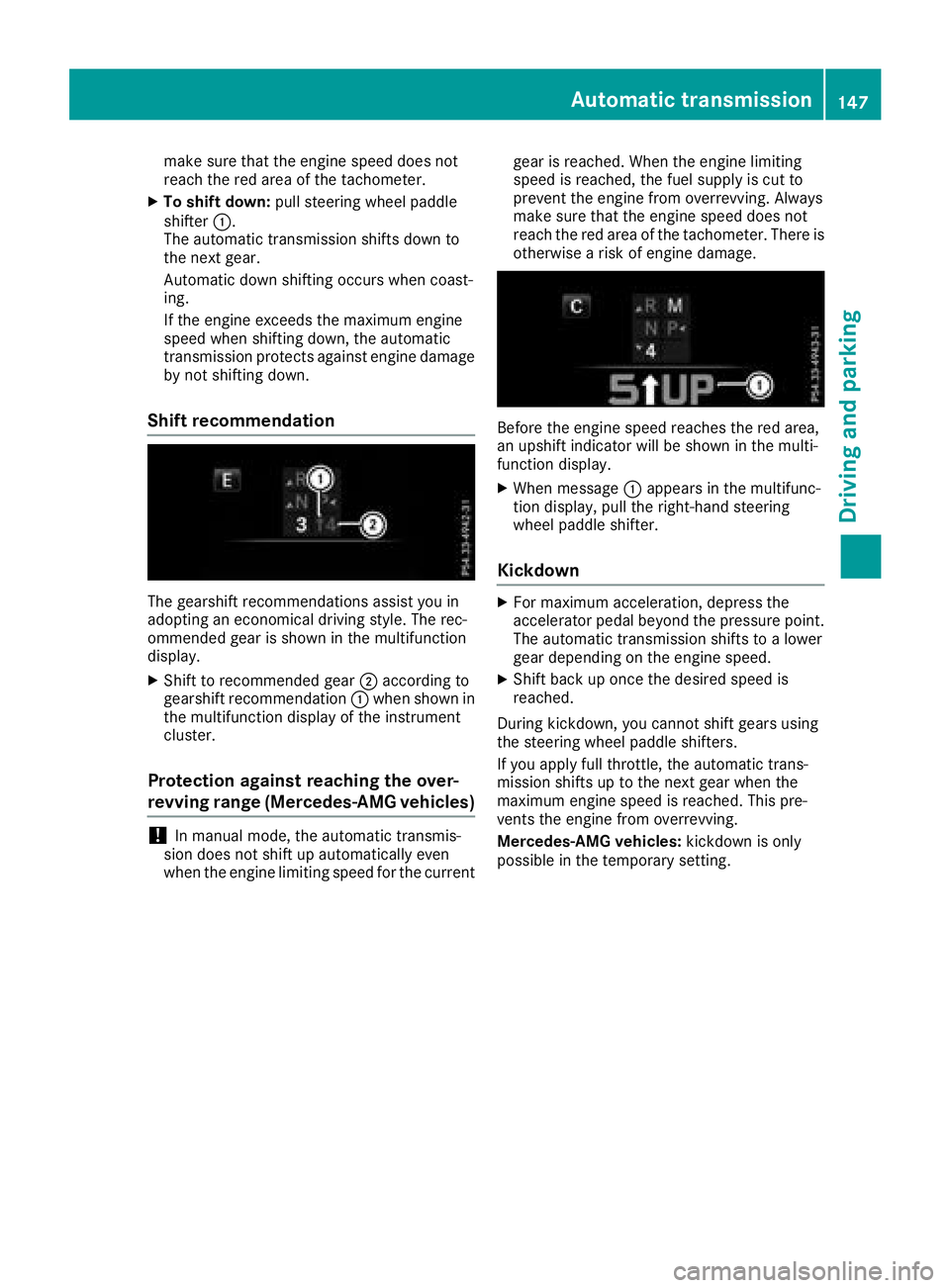
Shift recommendation
The gearshift recommendations assist you in
adopting an economical driving style. The rec-
ommended gear is shown in the multifunction
display. X
Shift to recommended gear D according to
gearshift recommendation C when shown in
the multifunction display of the instrument
cluster.
Protection against reaching the over-
revving range (Mercedes-AMG vehicles)
! In manual mode, the automatic transmis-
sion does not shift up automatically even
when the engine limiting speed for the current gear is reached. When the engine limiting
speed is reached, the fuel supply is cut to
prevent the engine from overrevving. Always
make sure that the engine speed does not
reach the red area of the tachometer. There is
otherwise a risk of engine damage.
Before the engine speed reaches the red area,
an upshift indicator will be shown in the multi-
function display. X
When message C appears in the multifunc-
tion display, pull the right-hand steering
wheel paddle shifter.
Kickdown X
For maximum acceleration, depress the
accelerator pedal beyond the pressure point.
The automatic transmission shifts to a lower
gear depending on the engine speed. X
Shift back up once the desired speed is
reached.
During kickdown, you cannot shift gears using
the steering wheel paddle shifters.
If you apply full throttle, the automatic trans-
mission shifts up to the next gear when the
maximum engine speed is reached. This pre-
vents the engine from overrevving.
Mercedes-AMG vehicles: kickdown is only
possible in the temporary setting.Automatic transmission 147
Driving and parking Z