keyless MERCEDES-BENZ GLC 2017 User Guide
[x] Cancel search | Manufacturer: MERCEDES-BENZ, Model Year: 2017, Model line: GLC, Model: MERCEDES-BENZ GLC 2017Pages: 374, PDF Size: 8.42 MB
Page 90 of 374
could thus be opened or closed unintention-
ally, for example, if you: -
install or remove the ball coupling. -
couple or uncouple a trailer. -
install or remove a rear-mounted bicycle
rack. -
load/unload bicycles on/from a rear-
mounted bicycle rack. -
sit on the edge of the cargo compartment. -
set something down or lift something up
behind the vehicle. -
polish the rear of the vehicle.
Do not carry the KEYLESS-GO key about your
person in these situations or in situations sim-
ilar to these. This will prevent unintentional
opening or closing of the tailgate.
Important safety notes
G WARNING
The vehicle's exhaust system may be very hot.
You could burn yourself by touching the
exhaust system if you use HANDS-FREE
ACCESS. There is a risk of injury. Always
ensure that you only make the kicking move-
ment within the detection range of sensors.
! If the SmartKey is within the rear detection
range of KEYLESS-GO, the following situa-
tions, for example, could lead to the uninten-
tional opening of the tailgate: R
using a car wash R
using a power washer
Make sure that the SmartKey is at least 10 ft
(3 m) away from the vehicle.
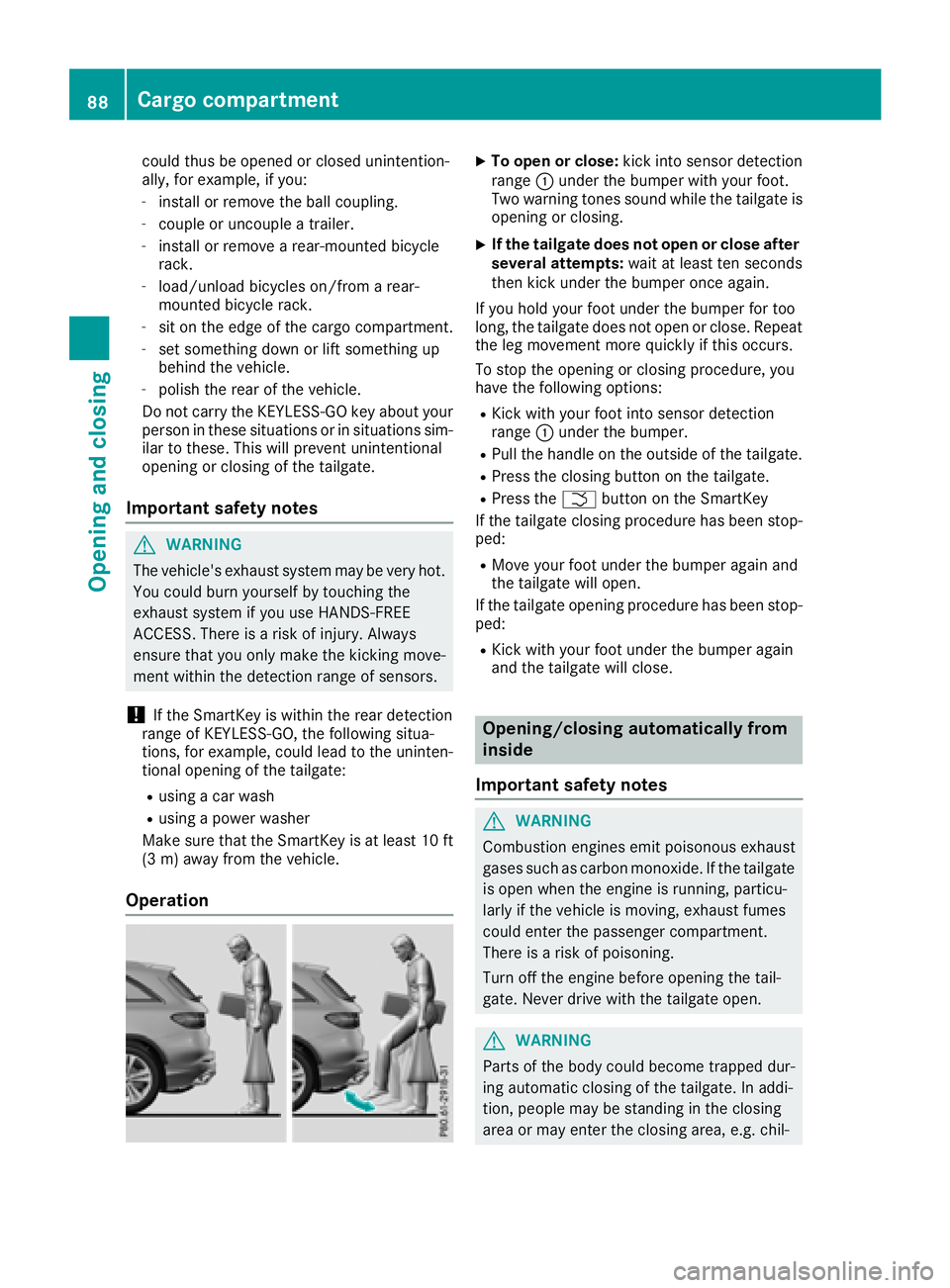
Operation X
To open or close: kick into sensor detection
range C under the bumper with your foot.
Two warning tones sound while the tailgate is
opening or closing. X
If the tailgate does not open or close after
several attempts: wait at least ten seconds
then kick under the bumper once again.
If you hold your foot under the bumper for too
long, the tailgate does not open or close. Repeat
the leg movement more quickly if this occurs.
To stop the opening or closing procedure, you
have the following options: R
Kick with your foot into sensor detection
range C under the bumper. R
Pull the handle on the outside of the tailgate. R
Press the closing button on the tailgate. R
Press the T button on the SmartKey
If the tailgate closing procedure has been stop-
ped: R
Move your foot under the bumper again and
the tailgate will open.
If the tailgate opening procedure has been stop-
ped: R
Kick with your foot under the bumper again
and the tailgate will close.
Opening/closing automatically from
inside
Important safety notes
G WARNING
Combustion engines emit poisonous exhaust
gases such as carbon monoxide. If the tailgate
is open when the engine is running, particu-
larly if the vehicle is moving, exhaust fumes
could enter the passenger compartment.
There is a risk of poisoning.
Turn off the engine before opening the tail-
gate. Never drive with the tailgate open.
G WARNING
Parts of the body could become trapped dur-
ing automatic closing of the tailgate. In addi-
tion, people may be standing in the closing
area or may enter the closing area, e.g. chil-88
Cargo compartment
Opening and closing
Page 94 of 374
Vehicles with KEYLESS-GO or KEYLESS-GO
start function: if the SmartKey is in close prox-
imity to the vehicle, the convenience closing
function is available.
When you lock the vehicle, you can simultane-
ously: R
close the side windows R
close the panorama roof with power tilt/slid-
ing panel
On vehicles with a panorama roof with power
tilt/sliding panel, you can then close the roller
sunblinds.
Notes on the automatic reversing feature for: R
the side window ( Y
page 90)R
the panorama roof with power tilt/sliding
panel ( Y
page 94)
Using the SmartKey X
Press and hold the 7 button until the side
windows and the panorama roof with power
tilt/sliding panel are fully closed. X
Make sure that all the side windows and the
panorama roof with power tilt/sliding panel
are closed. X
Press and hold the 7 button again until the
roller sunblinds of the panorama roof with
power tilt/sliding panel are closed. X
To interrupt convenience closing: release
the 7 button.
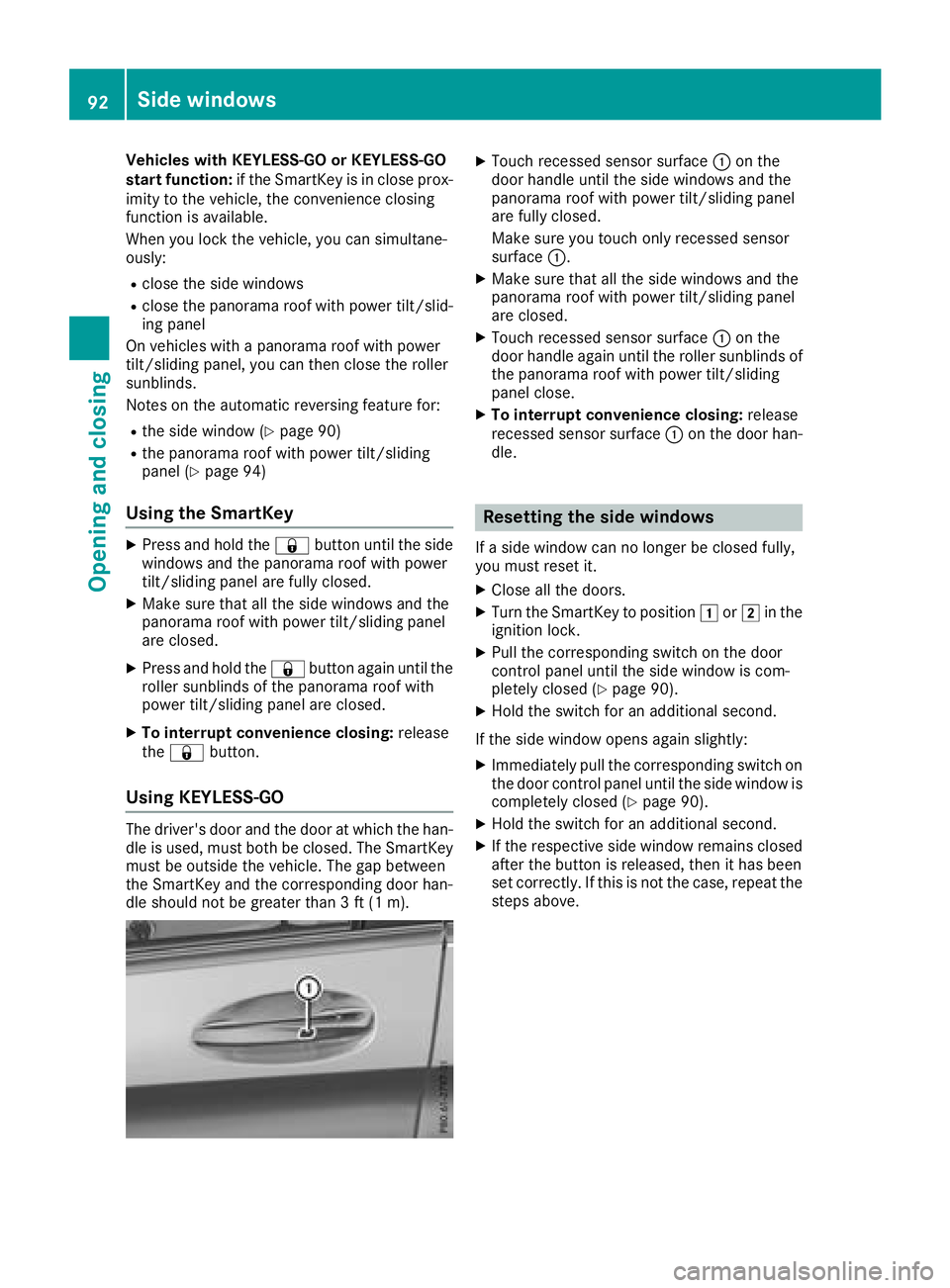
Using KEYLESS-GO The driver's door and the door at which the han-
dle is used, must both be closed. The SmartKey
must be outside the vehicle. The gap between
the SmartKey and the corresponding door han-
dle should not be greater than 3 ft (1 m). X
Touch recessed sensor surface C on the
door handle until the side windows and the
panorama roof with power tilt/sliding panel
are fully closed.
Make sure you touch only recessed sensor
surface C . X
Make sure that all the side windows and the
panorama roof with power tilt/sliding panel
are closed. X
Touch recessed sensor surface C on the
door handle again until the roller sunblinds of
the panorama roof with power tilt/sliding
panel close. X
To interrupt convenience closing: release
recessed sensor surface C on the door han-
dle.
Resetting the side windows If a side window can no longer be closed fully,
you must reset it. X
Close all the doors. X
Turn the SmartKey to position G or H in the
ignition lock. X
Pull the corresponding switch on the door
control panel until the side window is com-
pletely closed ( Y
page 90).X
Hold the switch for an additional second.
If the side window opens again slightly: X
Immediately pull the corresponding switch on
the door control panel until the side window is
completely closed ( Y
page 90).X
Hold the switch for an additional second. X
If the respective side window remains closed
after the button is released, then it has been
set correctly. If this is not the case, repeat the
steps above.92
Side windows
Opening and closing
Page 108 of 374
control of the vehicle. There is a risk of an
accident.
Always wait until the adjustment process is
complete before driving off.
The EASY-ENTRY/EXIT feature makes getting in
and out of your vehicle easier.
You can activate and deactivate the EASY-
ENTRY/EXIT feature using the multimedia sys-
tem (see the Digital Operator's Manual)
Position of the steering wheel when the
EASY-ENTRY/EXIT feature is active The steering wheel swings up when you: R
remove the SmartKey from the ignition lock R
with KEYLESS-GO or KEYLESS-GO start
function: open the driver's door; the voltage
supply must be switched on R
with the SmartKey: open the driver's door;
the SmartKey must be in position Z or G in
the ignition lock ( Y
page 132)R
open the driver's door when the ignition is
switched off
i The steering wheel only tilts up if the driving
position is stored after the steering column
adjustment has been adjusted ( Y
page 109).
The most recent driving position of the steering
wheel is stored if: R
the ignition is switched off R
the setting is stored using the memory func-
tion ( Y
page 109)
i The steering wheel only moves up if it has
not already reached the upper steering lim-
iter.
Position of the steering wheel for driv-
ing The steering wheel is moved to the last selected
position when: R
the driver's door is closed and you insert the
SmartKey into the ignition lock R
you close the driver's door when the ignition
is switched on R
you press the Start/Stop button once in vehi-
cles with KEYLESS-GO or the KEYLESS-GO
start function i The steering wheel only returns to the last
set position if the driving position is stored
after the seat or steering column has been
adjusted ( Y
page 109).
The most recent driving position of the steering
wheel is stored if: R
the ignition is switched off R
the setting is stored using the memory func-
tion ( Y
page 109)
Crash-responsive EASY-EXIT feature If the crash-responsive EASY-EXIT feature is trig-
gered in an accident, the steering column will
move up when the driver's door is opened or the
SmartKey is removed from the ignition lock. This
makes it easier to exit the vehicle and rescue the
occupants.
The crash-responsive EASY-EXIT feature is
operational only if the EASY-EXIT/ENTRY fea-
ture is activated in the multimedia system (see
Digital Operator's Manual).
Mirrors
Exterior mirrors
Important safety notes
G WARNING
You could lose control of your vehicle if you do
the following while driving: R
adjust the driver's seat, head restraint,
steering wheel or mirrors R
fasten the seat belt
There is a risk of an accident.
Adjust the driver's seat, head restraint, steer-
ing wheel and mirror and fasten your seat belt
before starting the engine.
G WARNING
The exterior mirror on the front-passenger
side reduces the size of the image. Visible
objects are actually closer than they appear.
This means that you could misjudge the dis-
tance from road users traveling behind, e.g.
when changing lane. There is a risk of an acci-
dent.106
Mirrors
Seats, steering wheel and mirrors
Page 134 of 374
! Do not warm up the engine with the vehicle
stationary. Drive off immediately. Avoid high
engine speeds and driving at full throttle until
the engine has reached its operating temper-
ature.
Only shift the automatic transmission to the
desired drive position when the vehicle is sta-
tionary.
Where possible, avoid spinning the drive
wheels when pulling away on slippery roads.
You could otherwise damage the drive train.
Key positions
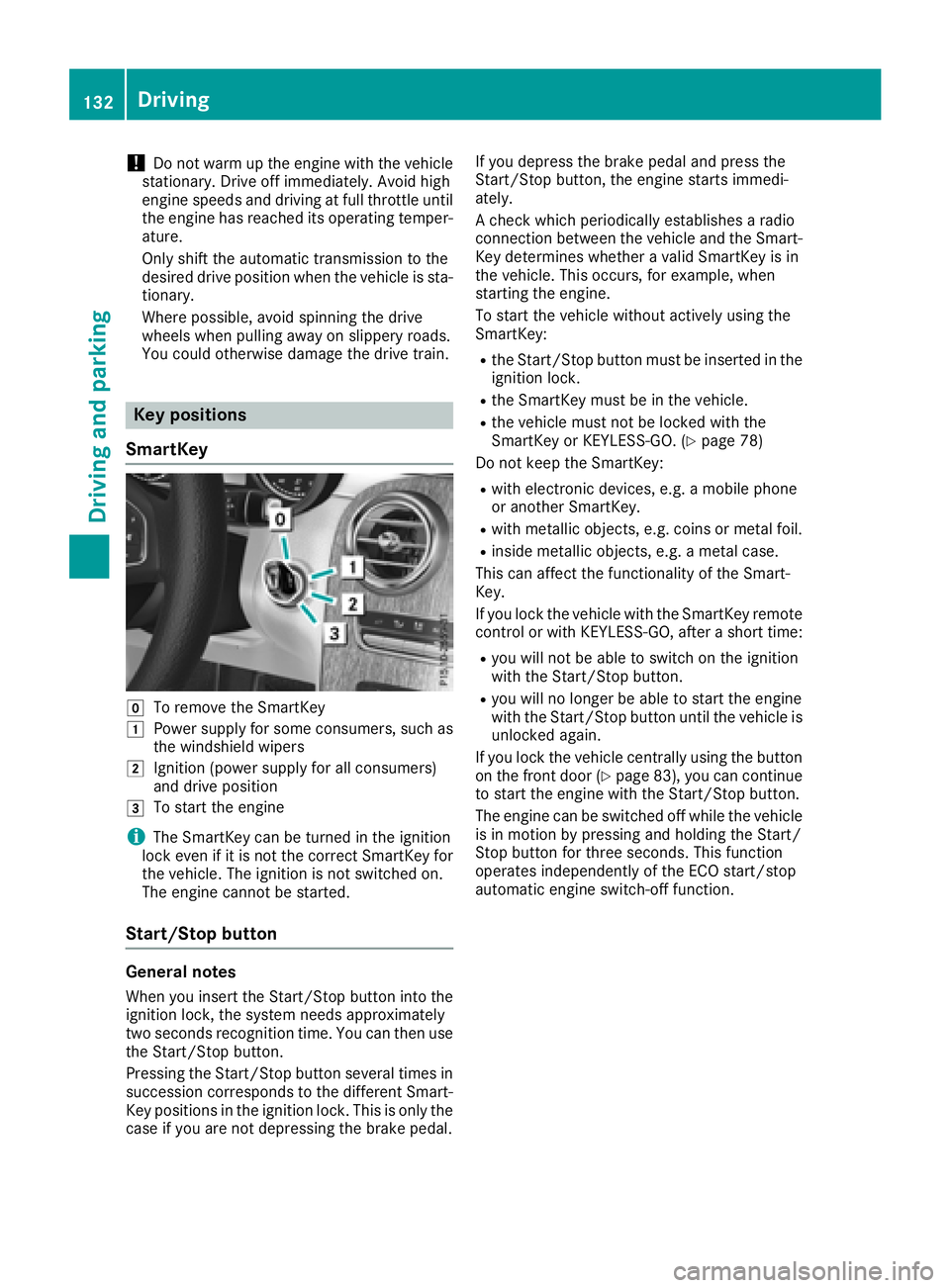
SmartKey
Z
To remove the SmartKeyG
Power supply for some consumers, such as
the windshield wipersH
Ignition (power supply for all consumers)
and drive positionI
To start the engine
i The SmartKey can be turned in the ignition
lock even if it is not the correct SmartKey for
the vehicle. The ignition is not switched on.
The engine cannot be started.
Start/Stop button
General notes
When you insert the Start/Stop button into the
ignition lock, the system needs approximately
two seconds recognition time. You can then use
the Start/Stop button.
Pressing the Start/Stop button several times in
succession corresponds to the different Smart-
Key positions in the ignition lock. This is only the
case if you are not depressing the brake pedal. If you depress the brake pedal and press the
Start/Stop button, the engine starts immedi-
ately.
A check which periodically establishes a radio
connection between the vehicle and the Smart-
Key determines whether a valid SmartKey is in
the vehicle. This occurs, for example, when
starting the engine.
To start the vehicle without actively using the
SmartKey: R
the Start/Stop button must be inserted in the
ignition lock. R
the SmartKey must be in the vehicle. R
the vehicle must not be locked with the
SmartKey or KEYLESS-GO. ( Y
page 78)
Do not keep the SmartKey: R
with electronic devices, e.g. a mobile phone
or another SmartKey. R
with metallic objects, e.g. coins or metal foil. R
inside metallic objects, e.g. a metal case.
This can affect the functionality of the Smart-
Key.
If you lock the vehicle with the SmartKey remote
control or with KEYLESS-GO, after a short time: R
you will not be able to switch on the ignition
with the Start/Stop button. R
you will no longer be able to start the engine
with the Start/Stop button until the vehicle is
unlocked again.
If you lock the vehicle centrally using the button
on the front door ( Y
page 83), you can continue
to start the engine with the Start/Stop button.
The engine can be switched off while the vehicle
is in motion by pressing and holding the Start/
Stop button for three seconds. This function
operates independently of the ECO start/stop
automatic engine switch-off function.132
Driving
Driving and parking
Page 136 of 374
G WARNING
Flammable materials introduced through
environmental influence or by animals can
ignite if in contact with the exhaust system or
parts of the engine that heat up. There is a risk
of fire.
Carry out regular checks to make sure that
there are no flammable foreign materials in
the engine compartment or in the exhaust
system.
General notes Vehicles with a gasoline engine: the catalytic
converter is preheated for up to 30 seconds
after a cold start. The sound of the engine may
change during this time.
Automatic transmission X
Shift the transmission to position ]
( Y
page 141).
The transmission position indicator on the
multifunction display shows ]
( Y
page 142).
i You can start the engine in transmission
position ] and \\ .
Starting procedure with the SmartKey To start the engine using the SmartKey instead
of the Start/Stop button, pull the Start/Stop
button out of the ignition lock. X
To start a diesel engine: turn the SmartKey
to position H in the ignition lock
( Y
page 132).
The \( preglow indicator lamp in the instru-
ment cluster lights up. X
Turn the SmartKey to position I in the igni-
tion lock ( Y
page 132) and release it as soon
as the engine is running.
i Vehicles with a diesel engine: you can
start the engine without preglow if the engine
is warm.
If the engine will not start: X
Remove the SmartKey from the ignition lock. X
Reinsert the SmartKey into the ignition lock
after a short waiting period. X
Turn the SmartKey to position H in the igni-
tion lock ( Y
page 132).
The indicator lamps in the instrument cluster
light up ( Y
page 256). X
Turn the SmartKey to position I in the igni-
tion lock ( Y
page 132) and release it as soon
as the engine is running.
Starting procedure with the Start/Stop
button The Start/Stop button is only available on vehi-
cles with KEYLESS-GO or the KEYLESS-GO start
function.
The Start/Stop button can be used to start the
vehicle manually without inserting the SmartKey
into the ignition lock. The Start/Stop button
must be inserted in the ignition lock and the
SmartKey must be in the vehicle. This mode for
starting the engine operates independently of
the ECO start/stop automatic engine start func-
tion.
You can start the engine if a valid SmartKey is in
the vehicle. Switch off the engine and always
take the SmartKey with you when leaving the
vehicle, even if you only leave it for a short time.
Pay attention to the important safety notes. X
Depress the brake pedal and keep it
depressed. X
Press the Start/Stop button once
( Y
page 133).
Vehicles with a gasoline engine: the engine
starts.
Vehicles with a diesel engine: preglow is
activated and the engine starts.
Starting procedure via smartphone Observe the important safety notes on starting
the engine ( Y
page 133).
You can also start your engine via your smart-
phone from outside the vehicle. In this case, the
previously selected climate control setting is
activated. In this way you can cool or heat the
interior of the vehicle before starting the jour-
ney.
Only start the engine via your smartphone if it is
safe to start and run the engine where your vehi-
cle is parked.
Observe the legal stipulations in the area where
your vehicle is parked. Engine start via smart-
phone may be limited to certain countries or
regions.134
Driving
Driving and parking
Page 144 of 374
PLUS is activated. Observe the information on
the HOLD function ( Y
page 172) and on
DISTRONIC PLUS ( Y
page 167).
Engaging reverse gear
! Only move the automatic transmission to
^ when the vehicle is stationary.X
Depress the brake pedal. X
Push the DIRECT SELECT lever up past the
first point of resistance.
The ECO start/stop function is not available
when reverse gear is engaged. Further informa-
tion on the ECO start/stop function
( Y
page 136).
Shifting to neutral
G WARNING
If children are left unsupervised in the vehicle,
they could: R
open the doors, thus endangering other
people or road users. R
get out and disrupt traffic. R
operate the vehicle's equipment.
Additionally, children could set the vehicle in
motion if, for example, they: R
release the parking brake. R
shifting the automatic transmission out of
park position PR
Start the engine.
There is a risk of an accident and injury.
When leaving the vehicle, always take the
SmartKey with you and lock the vehicle. Never
leave children or animals unattended in the
vehicle. Always keep the SmartKey out of
reach of children. X
If the transmission is in position [ or ^ :
push the DIRECT SELECT lever up or down to
the first point of resistance. X
If the transmission is in position ] : depress
the brake pedal and push the DIRECT SELECT
lever up or down to the first point of resist-
ance.
If you switch the engine off with the transmis-
sion in position ^ or [ , the automatic trans-
mission shifts to \\ automatically. With the SmartKey: if you then open the driv-
er's door or the front-passenger door or remove
the SmartKey from the ignition, the automatic
transmission shifts to ] automatically.
With the Start/Stop button: if you then open
the driver's door or the front-passenger door,
the automatic transmission shifts automatically
to ] .
If you want the automatic transmission to
remain in neutral \\ , e.g. when having the vehi-
cle cleaned in an automatic car wash with a
towing system: X
Vehicles with KEYLESS-GO or KEYLESS-
GO start function: remove the Start/Stop
button from the ignition lock. X
Insert the SmartKey into the ignition lock. X
All vehicles: switch the ignition on. X
Depress the brake pedal and keep it
depressed. X
Engage neutral \\ .X
Release the brake pedal. X
Release the electric parking brake. X
Switch off the ignition and leave the SmartKey
in the ignition lock.
Engaging drive position X
If the transmission is in position ^ or \\ :
push the DIRECT SELECT lever down past the
first point of resistance. X
If the transmission is in position ] : depress
the brake pedal and push the DIRECT SELECT
lever down past the first point of resistance.
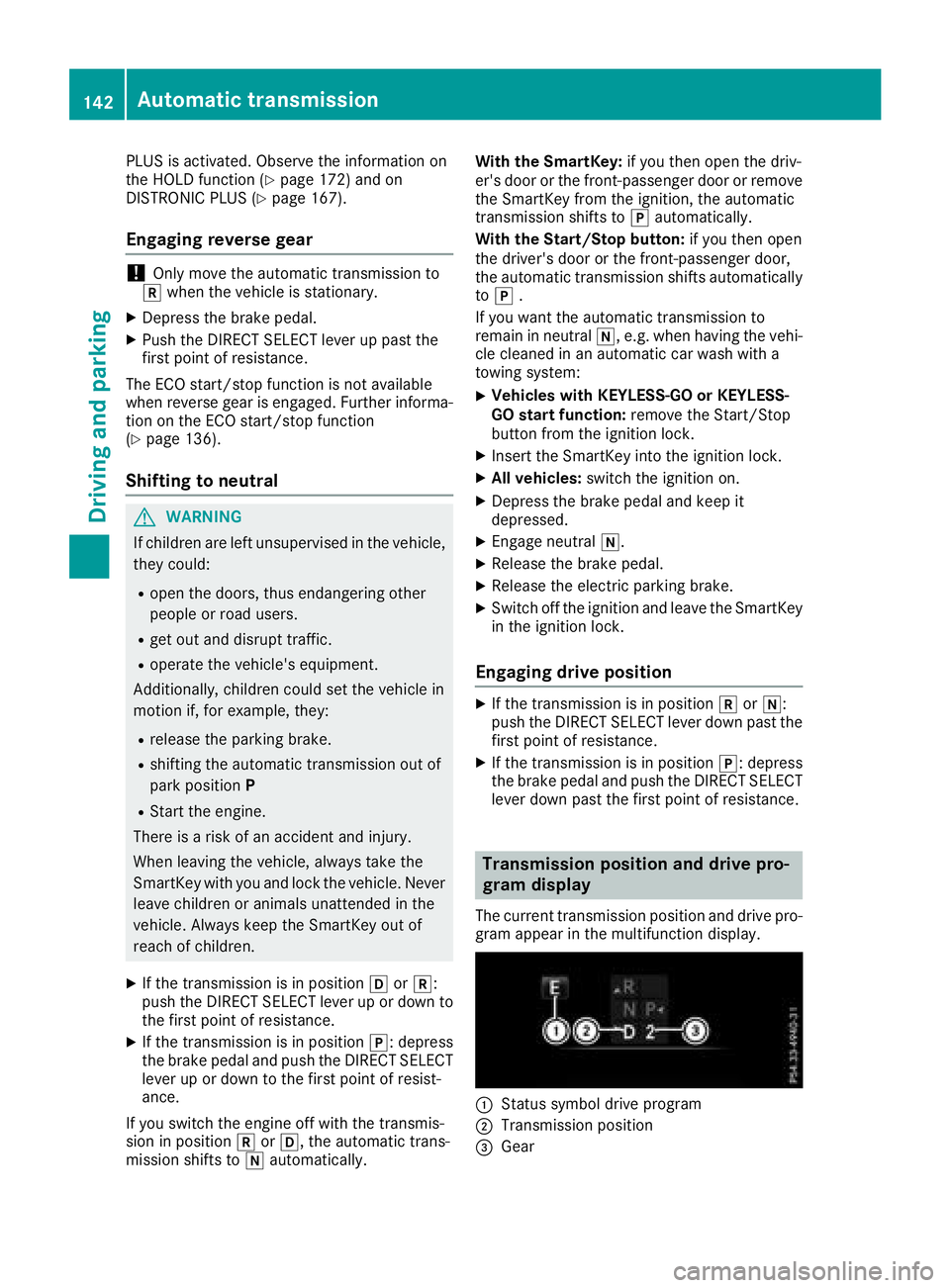
Transmission position and drive pro-
gram display The current transmission position and drive pro-
gram appear in the multifunction display.
C
Status symbol drive program
D
Transmission position
Page 152 of 374
X
Switch off the engine. X
Remove the SmartKey from the ignition lock.
or, in vehicles with KEYLESS-GO start-function
or KEYLESS ‑ GOX
Open the driver's door.
The vehicle electronics are now in position
Page 153 of 374
Problems with fuel and the fuel tank Problem
Possible causes/consequences and P Solutions
Fuel is leaking from the
vehicle.
G WARNING
The fuel line or the fuel tank is faulty.
Risk of explosion or fire. X
Apply the electric parking brake. X
Switch off the engine. X
Remove the SmartKey from the ignition lock.
or, in vehicles with KEYLESS-GO start-function or KEYLESS ‑ GOX
Open the driver's door.
The vehicle electronics are now in position
Page 311 of 374
Where possible, let the engine cool down and
touch only the components described in the
following.
G WARNING
The engine compartment contains moving
components. Certain components, such as
the radiator fan, may continue to run or start
again suddenly when the ignition is off. There
is a risk of injury.
If you need to do any work inside the engine
compartment: R
switch off the ignition R
never reach into the area where there is a
risk of danger from moving components,
such as the fan rotation area R
remove jewelry and watches R
keep items of clothing and hair, for exam-
ple, away from moving parts
G WARNING
The cooling system is pressurized, particularly
when the motor is warm. If you open the cap,
you could be scalded if hot coolant sprays out.
There is a risk of injury.
Let the engine cool down before you open the
cap. Wear gloves and eye protection. Slowly
open the cap to relieve pressure.
G WARNING
Opening the hood when the engine is over-
heated or when there is a fire in the engine
compartment could expose you to hot gases
or other service products. There is a risk of
injury.
Let an overheated engine cool down before
opening the hood. If there is a fire in the
engine compartment, keep the hood closed
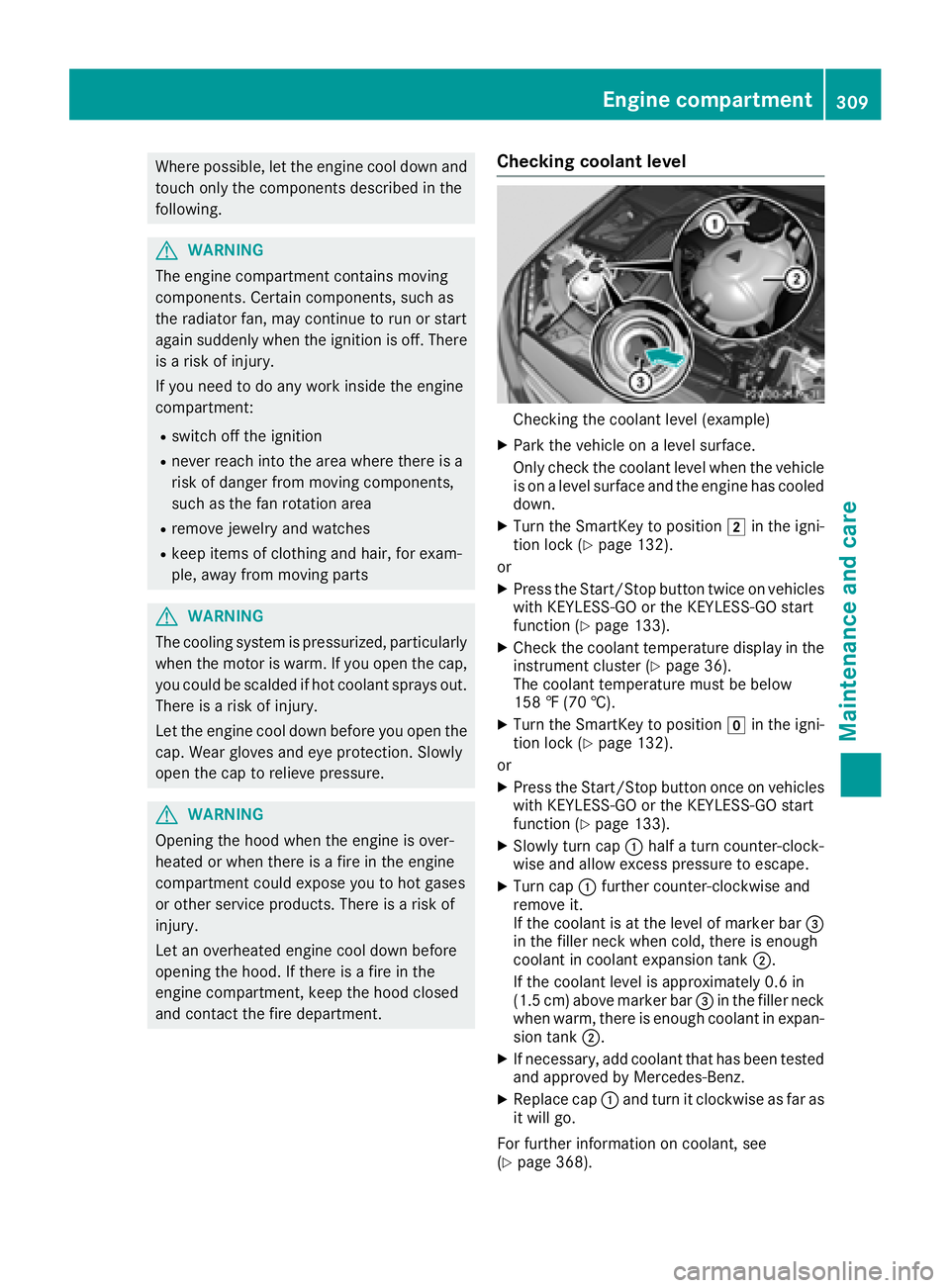
and contact the fire department. Checking coolant level
Checking the coolant level (example) X
Park the vehicle on a level surface.
Only check the coolant level when the vehicle
is on a level surface and the engine has cooled
down. X
Turn the SmartKey to position H in the igni-
tion lock ( Y
page 132).
or X
Press the Start/Stop button twice on vehicles
with KEYLESS-GO or the KEYLESS-GO start
function ( Y
page 133). X
Check the coolant temperature display in the
instrument cluster ( Y
page 36).
The coolant temperature must be below
158 ‡ (70 †). X
Turn the SmartKey to position Z in the igni-
tion lock ( Y
page 132).
or X
Press the Start/Stop button once on vehicles
with KEYLESS-GO or the KEYLESS-GO start
function ( Y
page 133). X
Slowly turn cap C half a turn counter-clock-
wise and allow excess pressure to escape. X
Turn cap C further counter-clockwise and
remove it.
If the coolant is at the level of marker bar
Page 314 of 374
To avoid damage to the vehicle, deactivate
DISTRONIC PLUS and the HOLD function in
the following or similar situations: R
when towing the vehicle R
in the car wash
! Never clean your vehicle in a Touchless
Automatic Car Wash as these use special
cleaning agents. These cleaning agents can
damage the paintwork or plastic parts.
! Make sure that: R
the side windows and sliding sunroof are
closed completely R
the blower is switched off R
the windshield wiper switch is in position 0R
the 360° camera or the rear view camera is
deactivated
The vehicle may otherwise be damaged.
! If the SmartKey is within the rear detection
range of KEYLESS-GO, the following situa-
tions, for example, could lead to the uninten-
tional opening of the tailgate: R
using a car wash R
using a power washer
Make sure that the SmartKey is at least 3 m
away from the vehicle.
! If the SmartKey is within the rear detection
range of KEYLESS-GO, the following situa-
tions, for example, could lead to the uninten-
tional opening of the tailgate: R
using a car wash R
using a power washer
Make sure that the SmartKey is at least 10 ft
(3 m) away from the vehicle.
! Make sure that the automatic transmission
is in neutral position \\ when washing your
vehicle in a tow-through car wash. The vehicle
may otherwise be damaged. R
Operating with the SmartKey:
Do not remove the SmartKey from the igni-
tion lock. Do not open the driver's door
when the engine is switched off or at very
low speeds. Otherwise, when in transmis-
sion position [ or ^ , the automatic
transmission will automatically switch to
park position ] and block the wheels.R
Operating with the Start/Stop button:
Do not open the driver's door when the
engine is switched off or at very low speeds. Otherwise, when in transmission
position [ or ^ , the automatic transmis-
sion will automatically switch to park posi-
tion ] and block the wheels.
Observe the following to make sure that the
automatic transmission stays in neutral position
\\ :
Operating with the SmartKey and Start/Stop
button: X
Make sure that the ignition is switched on. X
Make sure that the vehicle is stationary. X
Depress and hold the brake pedal.
Operating with the Start/Stop button only: X
Engage park position ] .X
Release the brake pedal. X
Remove Start/Stop button from ignition lock
( Y
page 133). X
Insert the SmartKey into the ignition lock. X
Switch on the ignition. X
Depress and hold the brake pedal.
Operating with the SmartKey and Start/Stop
button: X
Shift to neutral \\ .X
Release the brake pedal. X
Release the electric parking brake, if neces-
sary. X
Switch off the ignition and leave the SmartKey
in the ignition lock.
You can wash the vehicle in an automatic car
wash from the very start.
If the vehicle is very dirty, pre-wash it before
cleaning it in an automatic car wash.
After using an automatic car wash, wipe off wax
from the windshield and the wiper blades. This
will prevent smears and reduce wiping noises
caused by residue on the windshield.
Washing by hand In some countries, washing by hand is only
allowed at specially equipped washing bays.
Observe the legal requirements in each country. X
Do not use hot water and do not wash the
vehicle in direct sunlight. X
Use a soft sponge to clean. X
Use a mild cleaning agent, such as a car
shampoo approved by Mercedes-Benz.312
Care
Maintenance and care