brake MERCEDES-BENZ GLC 2017 Owner's Manual
[x] Cancel search | Manufacturer: MERCEDES-BENZ, Model Year: 2017, Model line: GLC, Model: MERCEDES-BENZ GLC 2017Pages: 374, PDF Size: 8.42 MB
Page 72 of 374
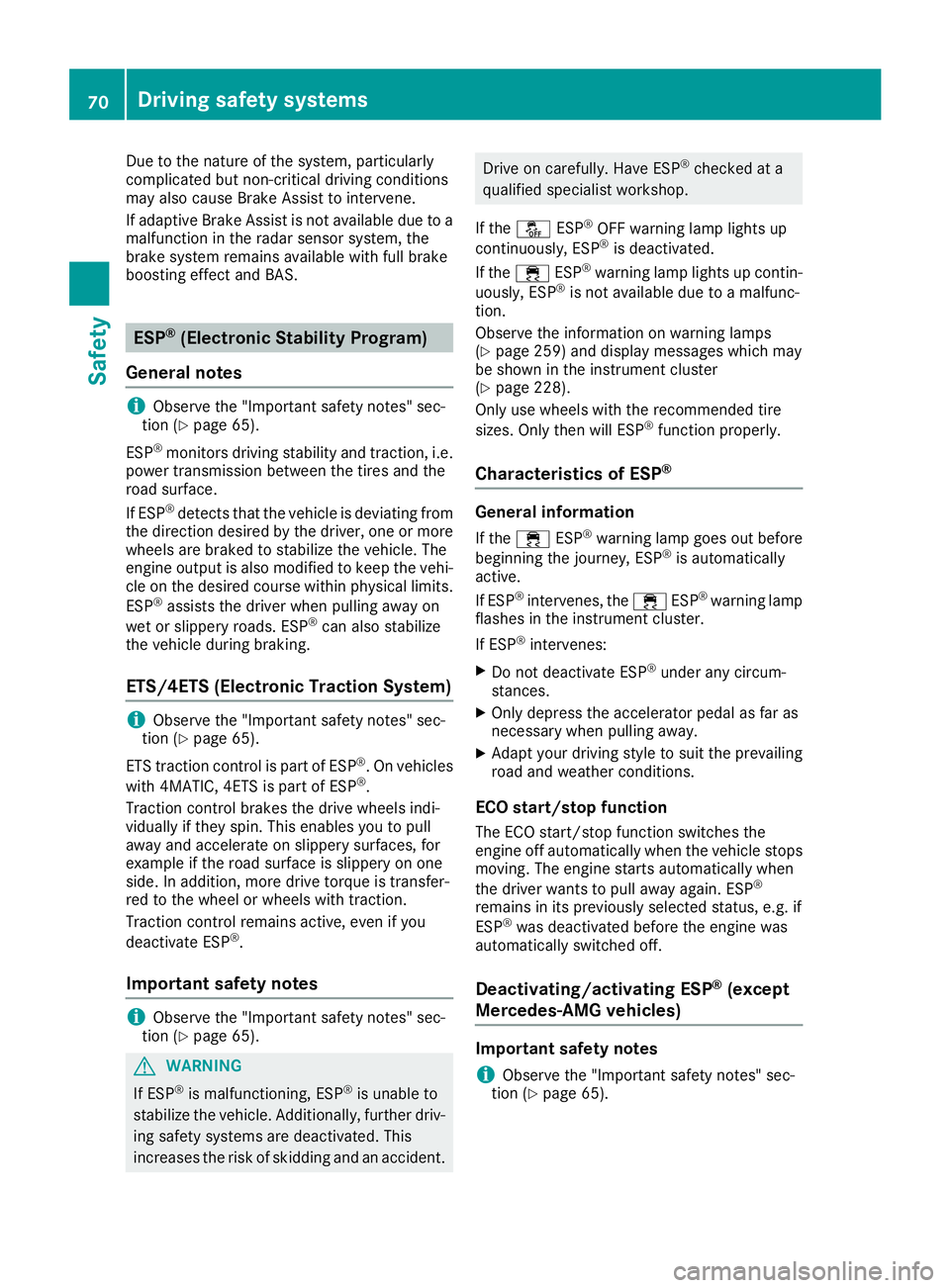
Due to the nature of the system, particularly
complicated but non-critical driving conditions
may also cause Brake Assist to intervene.
If adaptive Brake Assist is not available due to a
malfunction in the radar sensor system, the
brake system remains available with full brake
boosting effect and BAS.
ESP ®
(Electronic Stability Program)
General notes
i Observe the "Important safety notes" sec-
tion ( Y
page 65).
ESP ®
monitors driving stability and traction, i.e.
power transmission between the tires and the
road surface.
If ESP ®
detects that the vehicle is deviating from
the direction desired by the driver, one or more
wheels are braked to stabilize the vehicle. The
engine output is also modified to keep the vehi-
cle on the desired course within physical limits.
ESP ®
assists the driver when pulling away on
wet or slippery roads. ESP ®
can also stabilize
the vehicle during braking.
ETS/4ETS (Electronic Traction System)
i Observe the "Important safety notes" sec-
tion ( Y
page 65).
ETS traction control is part of ESP ®
. On vehicles
with 4MATIC, 4ETS is part of ESP ®
.
Traction control brakes the drive wheels indi-
vidually if they spin. This enables you to pull
away and accelerate on slippery surfaces, for
example if the road surface is slippery on one
side. In addition, more drive torque is transfer-
red to the wheel or wheels with traction.
Traction control remains active, even if you
deactivate ESP ®
.
Important safety notes
i Observe the "Important safety notes" sec-
tion ( Y
page 65).
G WARNING
If ESP ®
is malfunctioning, ESP ®
is unable to
stabilize the vehicle. Additionally, further driv-
ing safety systems are deactivated. This
increases the risk of skidding and an accident. Drive on carefully. Have ESP ®
checked at a
qualified specialist workshop.
If the
Page 75 of 374
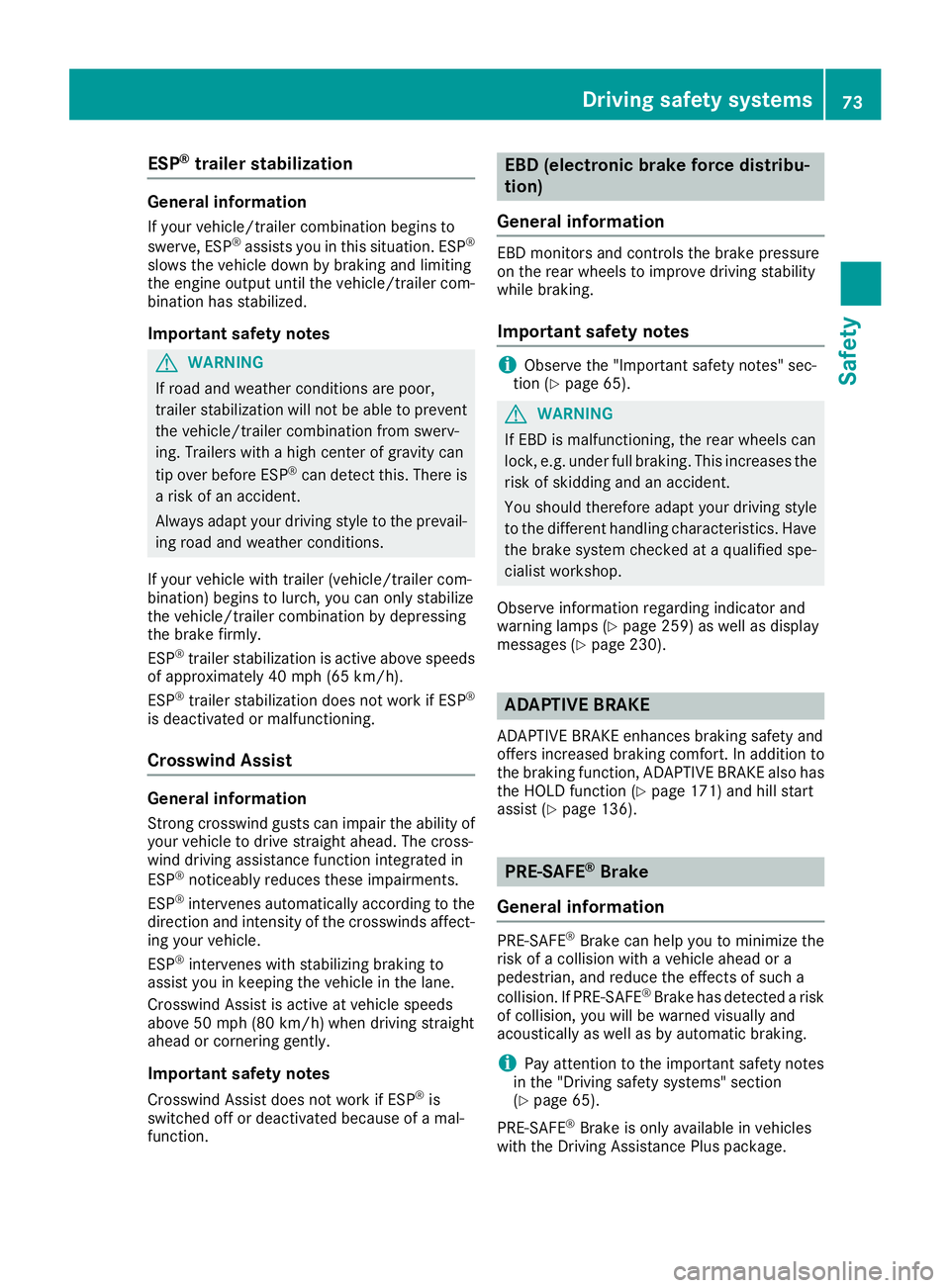
ESP ®
trailer stabilizationGeneral information If your vehicle/trailer combination begins to
swerve, ESP ®
assists you in this situation. ESP ®
slows the vehicle down by braking and limiting
the engine output until the vehicle/trailer com-
bination has stabilized.
Important safety notes
G WARNING
If road and weather conditions are poor,
trailer stabilization will not be able to prevent
the vehicle/trailer combination from swerv-
ing. Trailers with a high center of gravity can
tip over before ESP ®
can detect this. There is
a risk of an accident.
Always adapt your driving style to the prevail-
ing road and weather conditions.
If your vehicle with trailer (vehicle/trailer com-
bination) begins to lurch, you can only stabilize
the vehicle/trailer combination by depressing
the brake firmly.
ESP ®
trailer stabilization is active above speeds
of approximately 40 mph (65 km/h).
ESP ®
trailer stabilization does not work if ESP ®
is deactivated or malfunctioning.
Crosswind Assist
General information Strong crosswind gusts can impair the ability of
your vehicle to drive straight ahead. The cross-
wind driving assistance function integrated in
ESP ®
noticeably reduces these impairments.
ESP ®
intervenes automatically according to the
direction and intensity of the crosswinds affect-
ing your vehicle.
ESP ®
intervenes with stabilizing braking to
assist you in keeping the vehicle in the lane.
Crosswind Assist is active at vehicle speeds
above 50 mph (80 km/h) when driving straight
ahead or cornering gently.
Important safety notes
Crosswind Assist does not work if ESP ®
is
switched off or deactivated because of a mal-
function. EBD (electronic brake force distribu-
tion)
General information EBD monitors and controls the brake pressure
on the rear wheels to improve driving stability
while braking.
Important safety notes
i Observe the "Important safety notes" sec-
tion ( Y
page 65).
G WARNING
If EBD is malfunctioning, the rear wheels can
lock, e.g. under full braking. This increases the
risk of skidding and an accident.
You should therefore adapt your driving style
to the different handling characteristics. Have
the brake system checked at a qualified spe-
cialist workshop.
Observe information regarding indicator and
warning lamps ( Y
page 259) as well as display
messages ( Y
page 230).
ADAPTIVE BRAKE ADAPTIVE BRAKE enhances braking safety and
offers increased braking comfort. In addition to
the braking function, ADAPTIVE BRAKE also has
the HOLD function ( Y
page 171) and hill start
assist ( Y
page 136).
PRE-SAFE ®
Brake
General information PRE-SAFE ®
Brake can help you to minimize the
risk of a collision with a vehicle ahead or a
pedestrian, and reduce the effects of such a
collision. If PRE-SAFE ®
Brake has detected a risk
of collision, you will be warned visually and
acoustically as well as by automatic braking.
i Pay attention to the important safety notes
in the "Driving safety systems" section
( Y
page 65).
PRE ‑ SAFE ®
Brake is only available in vehicles
with the Driving Assistance Plus package.Driving safety systems 73
Safety Z
Page 76 of 374
For PRE-SAFE ®
Brake to assist you when driving,
the radar sensor system and the camera system
must be switched on and be operational.
With the help of the radar sensor system and the
camera system, PRE-SAFE ®
Brake can detect
obstacles that are in front of your vehicle for an
extended period of time.
In addition, pedestrians in the path of your vehi-
cle can be detected.
PRE-SAFE ®
Brake detects pedestrians using
typical characteristics such as the body con-
tours and posture of a person standing upright.
i Observe the restrictions described in the
"Important safety notes" section
( Y
page 74).
Important safety notes
G WARNING
PRE-SAFE ®
Brake will initially brake your vehi-
cle by a partial application of the brakes if a
danger of collision is detected. There may be
a collision unless you brake yourself. Even
after subsequent full application of the brakes
a collision cannot always be avoided, partic-
ularly when approaching at too high a speed.
There is a risk of an accident.
Always apply the brakes yourself and try to
take evasive action, provided it is safe to do
so.
In the event of a partial application of the brakes,
the vehicle is braked with up to 50% of the full
braking pressure.
G WARNING
PRE-SAFE ®
Brake cannot always clearly iden-
tify objects and complex traffic conditions.
In these cases, PRE-SAFE ®
Brake may:R
give an unnecessary warning and then
brake the vehicle R
not give a warning or intervene
There is a risk of an accident.
Always pay particular attention to the traffic
situation and be ready to brake, especially if
PRE-SAFE ®
Brake warns you. Terminate the
intervention in a non-critical driving situation. G WARNING
PRE-SAFE ®
Brake cannot always clearly iden-
tify people, especially if they are moving. In
these cases, PRE-SAFE ®
Brake cannot inter-
vene. There is a risk of an accident.
Always pay particular attention to the traffic
situation and be ready to brake, especially if
PRE-SAFE ®
Brake warns you.
In order to maintain the appropriate distance to
the vehicle in front and thus prevent a collision,
you must apply the brakes yourself.
G WARNING
PRE-SAFE ®
Brake does not react: R
to small people, e.g. children R
to animals R
to oncoming vehicles R
to crossing traffic R
when cornering
As a result, PRE-SAFE ®
Brake may neither
give warnings nor intervene in all critical sit-
uations. There is a risk of an accident.
Always pay careful attention to the traffic sit-
uation and be ready to brake.
In the event of snowfall or heavy rain, the rec-
ognition can be impaired.
Recognition by the radar sensor system is also
impaired if: R
there is dirt on the sensors or anything else
covering the sensors R
there is interference by other radar sources R
there are strong radar reflections, for exam-
ple in parking garages R
a narrow vehicle is traveling in front, e.g. a
motorbike R
a vehicle is traveling in front on a different line
relative to the center of your vehicle
Recognition by the camera system is also
impaired in the event of: R
dirt on the camera or if the camera is covered R
glare on the camera system, e.g. from the sun
being low in the sky74
Driving safety systems
Safety
Page 77 of 374
R
darkness R
or if: -
pedestrians move quickly, e.g. into the path
of the vehicle -
the camera system no longer recognizes a
pedestrian as a person due to special cloth-
ing or other objects -
a pedestrian is concealed by other objects -
the typical outline of a pedestrian is not
distinguishable from the background
Following damage to the front end of the vehicle,
have the configuration and operation of the
radar sensors checked at a qualified specialist
workshop. This also applies to collisions at slow
speeds where there is no visible damage to the
front of the vehicle.
Following damage to the windshield, have the
configuration and operation of the camera sys-
tem checked at a qualified specialist workshop.
Function X
To activate/deactivate: activate or deacti-
vate PRE-SAFE ®
Brake in the on-board com-
puter ( Y
page 221).
If the PRE-SAFE ®
Brake is not activated, the
Page 79 of 374
SmartKey
Important safety notes
G WARNING
If children are left unsupervised in the vehicle,
they could: R
open the doors, thus endangering other
people or road users. R
get out and disrupt traffic. R
operate the vehicle's equipment.
Additionally, children could set the vehicle in
motion if, for example, they: R
release the parking brake. R
shifting the automatic transmission out of
park position PR
Start the engine.
There is a risk of an accident and injury.
When leaving the vehicle, always take the
SmartKey with you and lock the vehicle. Never
leave children or animals unattended in the
vehicle. Always keep the SmartKey out of
reach of children.
G WARNING
If you attach heavy or large objects to the
SmartKey, the SmartKey could be uninten-
tionally turned in the ignition lock. This could
cause the engine to be switched off. There is a
risk of an accident.
Do not attach any heavy or large objects to the
SmartKey. Remove any bulky key rings before
inserting the SmartKey into the ignition lock.
! Keep the SmartKey away from strong mag-
netic fields. Otherwise, the remote control
function could be affected.
Strong magnetic fields can occur in the vicin-
ity of powerful electrical installations.
Do not keep the SmartKey: R
with electronic devices, e.g. a mobile phone
or another SmartKey. R
with metallic objects, e.g. coins or metal foil. R
inside metallic objects, e.g. a metal case.
This can affect the functionality of the Smart-
Key. Vehicles with KEYLESS-GO start function: do
not keep the SmartKey in the cargo compart-
ment. Otherwise, the SmartKey may not be
detected, e.g. when starting the engine using
the Start/Stop button.
A brief radio connection between the vehicle
and the SmartKey determines whether a valid
SmartKey is in, or in the direct vicinity of, the
vehicle. This occurs, for example: R
when starting the engine R
while driving R
when using HANDS-FREE ACCESS R
when the external door handles are touched R
during convenience closing
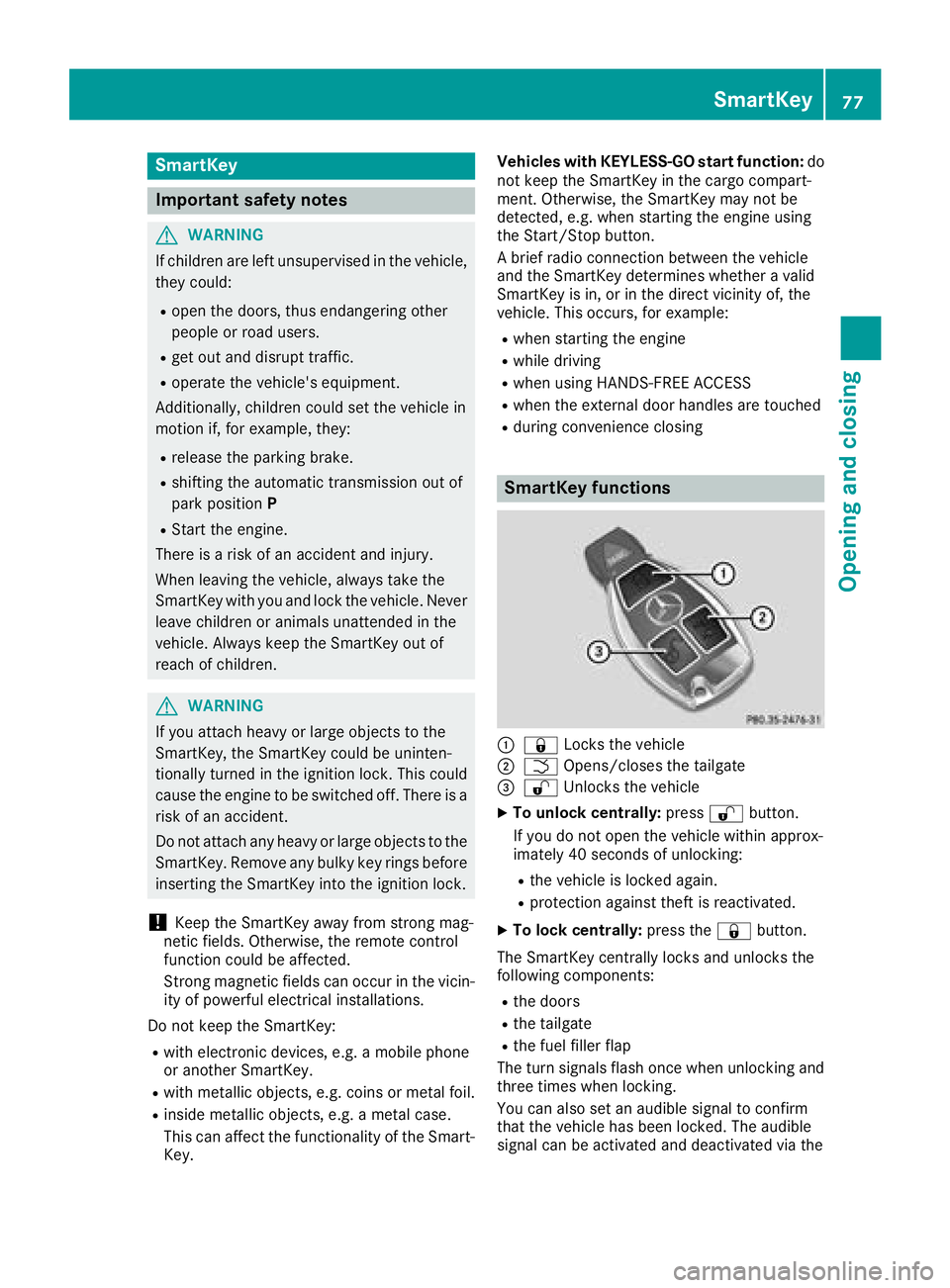
SmartKey functions
C
7 Locks the vehicleD
T Opens/closes the tailgate
Page 85 of 374
Door s
Important safet y notes
G WARNING
If children are lef t unsupervised in th e vehicle,
they could: R
ope n th e doors , thus endangerin g other
people or road users. R
get out and disrup t traffic .R
operat e th e vehicle' s equipment.
Additionally, children could set th e vehicle in
motion if, fo r example, they:R
release th e parking brake .R
shiftin g th e automatic transmissio n out of
par k position PR
Start th e engine.
There is a ris k of an acciden t and injury.
Whe n leavin g th e vehicle, always take th e
SmartKey wit h you and loc k th e vehicle. Never
leav e children or animals unattended in th e
vehicle. Always keep th e SmartKey out of
reach of children .
Unlockin g an d opening doors from
th e insideYou can ope n a doo r from insid e th e vehicle
eve n if it has bee n locked. You can only ope n th e
rea r doors from insid e th e vehicle if they are no t
secure d by th e child-proof locks ( Y
page 64). If
th e vehicle has bee n locke d wit h th e SmartKey
or wit h KEYLESS-GO , opening a doo r from th e
insid e will trigger th e anti-thef t alar m system.
Switc h of f th e alar m ( Y
page 76) . X
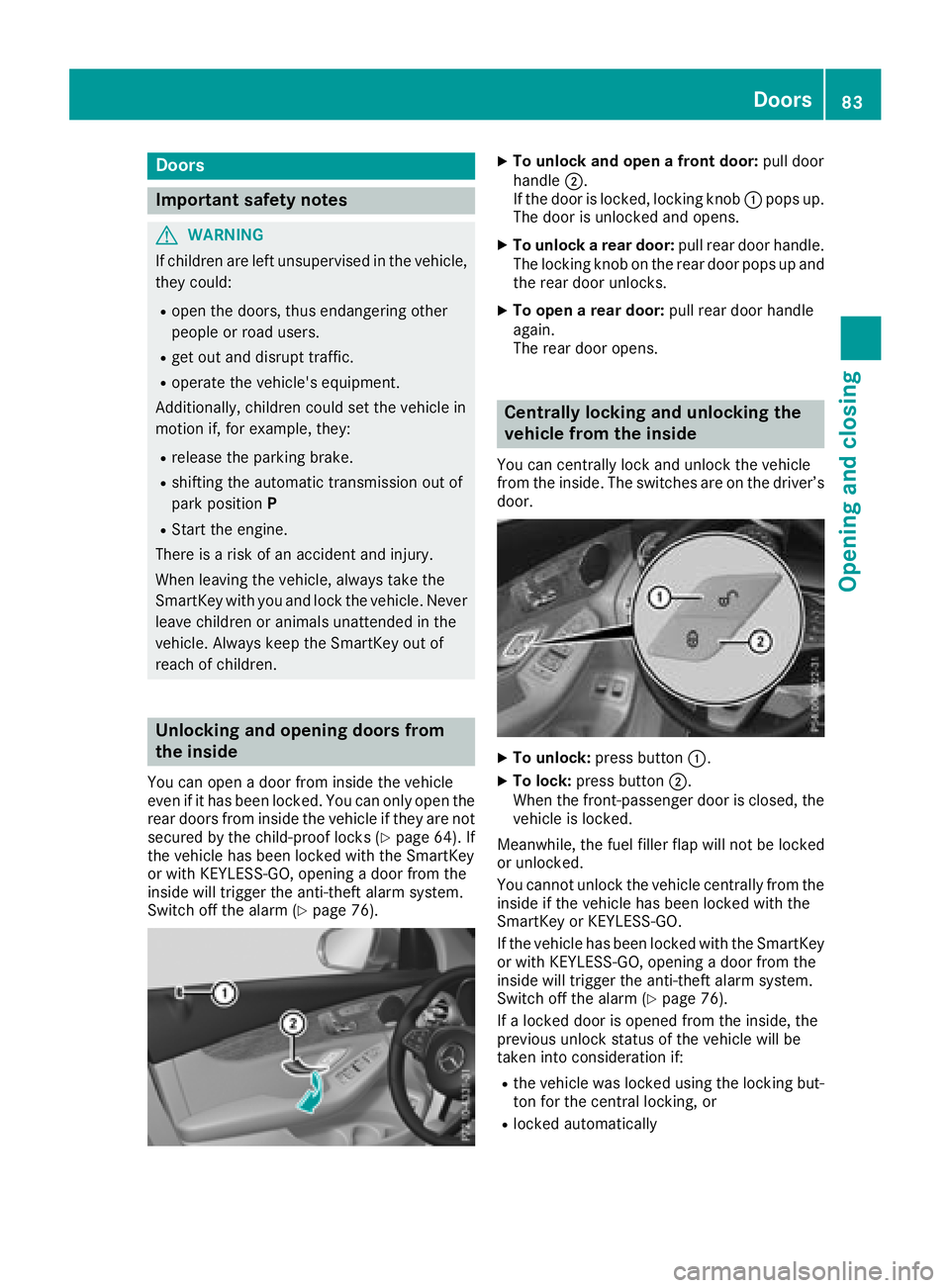
To unlock an d ope n a front door: pull doo r
handle D .
If th e doo r is locked, locking knob C pop s up.
The doo r is unlocke d and opens .X
To unlock a rear door: pull rea r doo r handle.
The locking knob on th e rea r doo r pop s up and
th e rea r doo r unlocks .X
To ope n a rear door: pull rea r doo r handle
again .
The rea r doo r opens .
Centrally locking an d unlocking th e
vehicle from th e insideYou can centrall y loc k and unloc k th e vehicle
from th e inside. The switches are on th e driver’s
door.
X
To unlock : press butto n C .X
To lock : press butto n D .
Whe n th e front-passenger doo r is closed, th e
vehicle is locked.
Meanwhile, th e fue l filler flap will no t be locke d
or unlocked.
You canno t unloc k th e vehicle centrall y from th e
insid e if th e vehicle has bee n locke d wit h th e
SmartKey or KEYLESS-GO .
If th e vehicle has bee n locke d wit h th e SmartKey
or wit h KEYLESS-GO , opening a doo r from th e
insid e will trigger th e anti-thef t alar m system.
Switc h of f th e alar m ( Y
page 76).
If a locke d doo r is opene d from th e inside, th e
previous unloc k status of th e vehicle will be
take n into consideration if: R
th e vehicle was locke d usin g th e locking but -
to n fo r th e central locking , orR
locke d automatically Doors 83
Opening and closing Z
Page 133 of 374
Notes on breaking-in a new vehicle
Important safety notes The sensor system of some driving and driving
safety systems adjusts automatically while a
certain distance is being driven after the vehicle
has been delivered or after repairs. Full system
effectiveness is not reached until the end of this
teach-in procedure.
New and replaced brake pads and discs only
reach their optimum braking effect after several
hundred kilometers of driving. Compensate for
this by applying greater force to the brake pedal.
The first 1000 miles (1500 km) The more you look after the engine when it is
new, the more satisfied you will be with its per-
formance in the future. R
You should therefore drive at varying vehicle
and engine speeds for the first 1000 miles
(1500 km). R
Avoid heavy loads, e.g. driving at full throttle,
during this period. R
When changing gears manually, change up in
good time, before the tachometer needle rea-
ches
Page 134 of 374
! Do not warm up the engine with the vehicle
stationary. Drive off immediately. Avoid high
engine speeds and driving at full throttle until
the engine has reached its operating temper-
ature.
Only shift the automatic transmission to the
desired drive position when the vehicle is sta-
tionary.
Where possible, avoid spinning the drive
wheels when pulling away on slippery roads.
You could otherwise damage the drive train.
Key positions
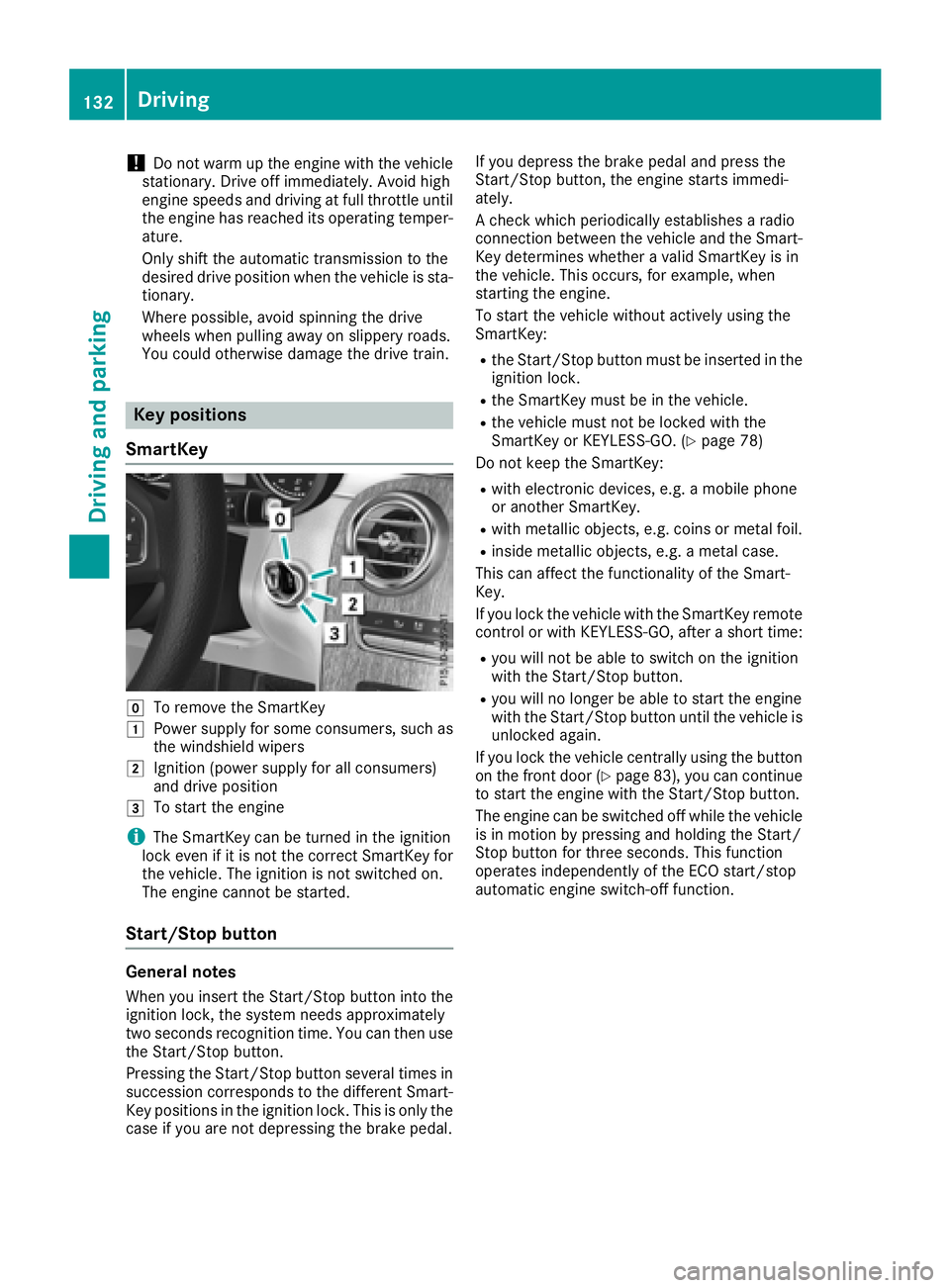
SmartKey
Z
To remove the SmartKeyG
Power supply for some consumers, such as
the windshield wipersH
Ignition (power supply for all consumers)
and drive positionI
To start the engine
i The SmartKey can be turned in the ignition
lock even if it is not the correct SmartKey for
the vehicle. The ignition is not switched on.
The engine cannot be started.
Start/Stop button
General notes
When you insert the Start/Stop button into the
ignition lock, the system needs approximately
two seconds recognition time. You can then use
the Start/Stop button.
Pressing the Start/Stop button several times in
succession corresponds to the different Smart-
Key positions in the ignition lock. This is only the
case if you are not depressing the brake pedal. If you depress the brake pedal and press the
Start/Stop button, the engine starts immedi-
ately.
A check which periodically establishes a radio
connection between the vehicle and the Smart-
Key determines whether a valid SmartKey is in
the vehicle. This occurs, for example, when
starting the engine.
To start the vehicle without actively using the
SmartKey: R
the Start/Stop button must be inserted in the
ignition lock. R
the SmartKey must be in the vehicle. R
the vehicle must not be locked with the
SmartKey or KEYLESS-GO. ( Y
page 78)
Do not keep the SmartKey: R
with electronic devices, e.g. a mobile phone
or another SmartKey. R
with metallic objects, e.g. coins or metal foil. R
inside metallic objects, e.g. a metal case.
This can affect the functionality of the Smart-
Key.
If you lock the vehicle with the SmartKey remote
control or with KEYLESS-GO, after a short time: R
you will not be able to switch on the ignition
with the Start/Stop button. R
you will no longer be able to start the engine
with the Start/Stop button until the vehicle is
unlocked again.
If you lock the vehicle centrally using the button
on the front door ( Y
page 83), you can continue
to start the engine with the Start/Stop button.
The engine can be switched off while the vehicle
is in motion by pressing and holding the Start/
Stop button for three seconds. This function
operates independently of the ECO start/stop
automatic engine switch-off function.132
Driving
Driving and parking
Page 135 of 374
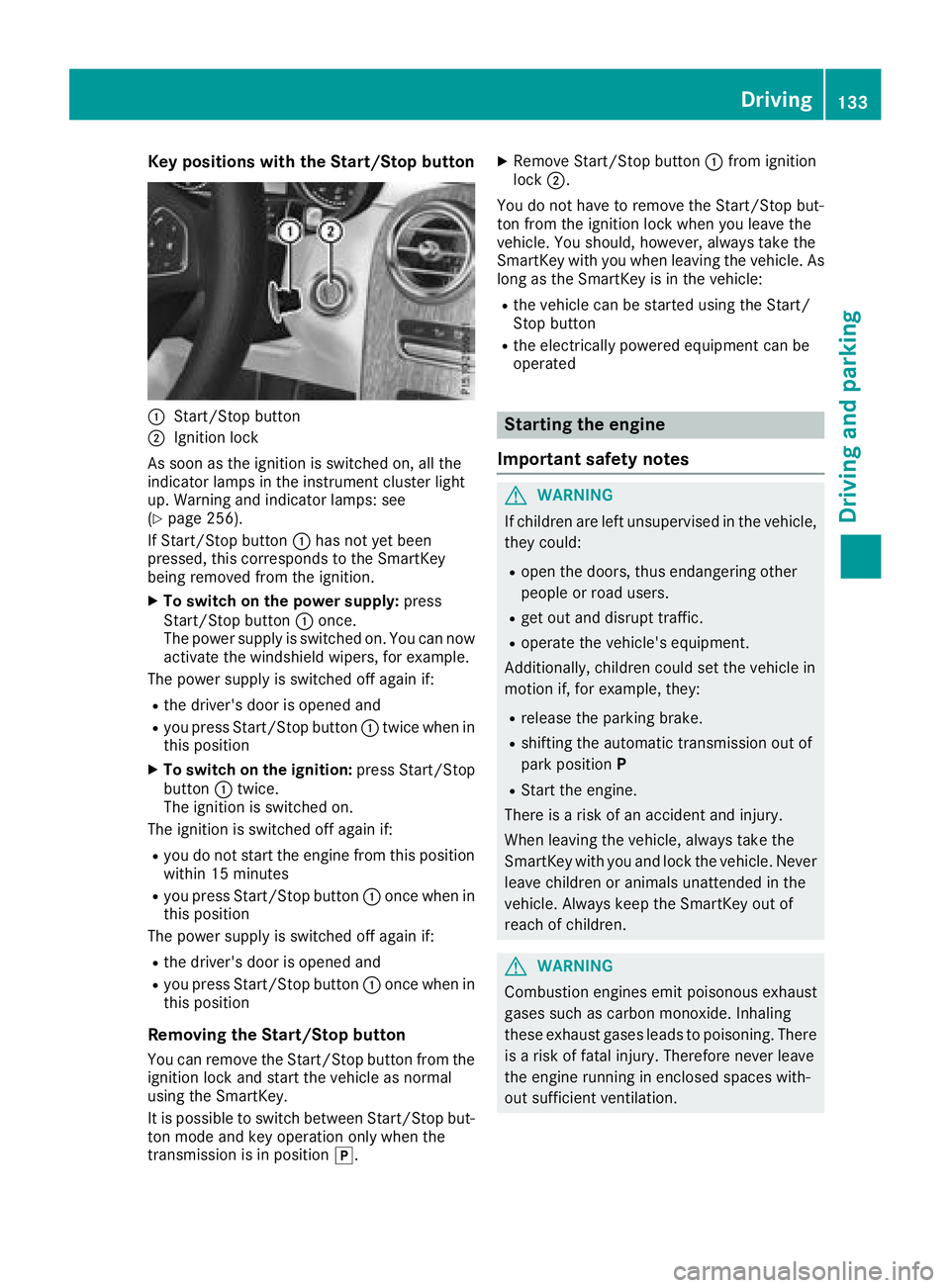
Key positions with th e Start/S top but ton
C
Start/Sto p butto nD
Ignition loc k
As soo n as th e ignition is switched on , all th e
indicator lamps in th e instrumen t cluste r ligh t
up. Warning and indicator lamps : see
( Y
page 256).
If Start/Sto p butto n C has no t yet been
pressed, this correspond s to th e SmartKey
bein g remove d from th e ignition .X
To switch on th e power supply : press
Start/Sto p butto n C once.
The power suppl y is switched on . You can no w
activat e th e windshield wipers, for example .
The power suppl y is switched off again if:R
th e driver' s door is opened andR
you press Start/Sto p butto n C twice when in
this position X
To switch on th e ignition: press Start/Sto p
butto n C twice.
The ignition is switched on .
The ignition is switched off again if: R
you do no t start th e engin e from this position
within 15 minute sR
you press Start/Sto p butto n C once when in
this position
The power suppl y is switched off again if:R
th e driver' s door is opened andR
you press Start/Sto p butto n C once when in
this position
Removing the Start/S top but ton
You can remove th e Start/Sto p butto n from th e
ignition loc k and start th e vehicl e as normal
usin g th e SmartKey.
It is possible to switch between St art/Sto p b ut -
to n mo d e and ke y operation only when th e
transmission is in position ] . X
Remove Start/Sto p butto n C from ignition
loc k D .
You do no t have to remove th e Start/Sto p but -
to n from th e ignition loc k when you leav e th e
vehicle. You should, however , always tak e th e
SmartKey wit h you when leaving th e vehicle. As
lon g as th e SmartKey is in th e vehicle:R
th e vehicl e can be started usin g th e Start /
Stop butto n R
th e electrically powered equipmen t can be
operate d
Starting the engine
Important safety notes
G WARNIN G
If children are lef t unsupervised in th e vehicle,
they could: R
open th e doors, thus endangering other
people or road users. R
get out and disrupt traffic. R
operate th e vehicle's equipment.
Additionally, children could set th e vehicl e in
motion if, for example , they:R
release th e parking brake. R
shiftin g th e automatic transmission out of
park positio n P R
Start th e engine.
Ther e is a ris k of an acciden t and injury.
When leaving th e vehicle, always tak e th e
SmartKey wit h you and loc k th e vehicle. Never
leav e children or animals unattended in th e
vehicle. Always keep th e SmartKey out of
reac h of children .
G WARNIN G
Combustion engines emit poisonous exhaust
gase s suc h as carbon monoxide. Inhalin g
these exhaust gase s leads to poisoning . Ther e
is a ris k of fatal injury. Therefore never leav e
th e engin e runnin g in enclosed spaces with-
out sufficien t ventilation .Driving 133
Driving and parking Z
Page 136 of 374
G WARNING
Flammable materials introduced through
environmental influence or by animals can
ignite if in contact with the exhaust system or
parts of the engine that heat up. There is a risk
of fire.
Carry out regular checks to make sure that
there are no flammable foreign materials in
the engine compartment or in the exhaust
system.
General notes Vehicles with a gasoline engine: the catalytic
converter is preheated for up to 30 seconds
after a cold start. The sound of the engine may
change during this time.
Automatic transmission X
Shift the transmission to position ]
( Y
page 141).
The transmission position indicator on the
multifunction display shows ]
( Y
page 142).
i You can start the engine in transmission
position ] and \\ .
Starting procedure with the SmartKey To start the engine using the SmartKey instead
of the Start/Stop button, pull the Start/Stop
button out of the ignition lock. X
To start a diesel engine: turn the SmartKey
to position H in the ignition lock
( Y
page 132).
The \( preglow indicator lamp in the instru-
ment cluster lights up. X
Turn the SmartKey to position I in the igni-
tion lock ( Y
page 132) and release it as soon
as the engine is running.
i Vehicles with a diesel engine: you can
start the engine without preglow if the engine
is warm.
If the engine will not start: X
Remove the SmartKey from the ignition lock. X
Reinsert the SmartKey into the ignition lock
after a short waiting period. X
Turn the SmartKey to position H in the igni-
tion lock ( Y
page 132).
The indicator lamps in the instrument cluster
light up ( Y
page 256). X
Turn the SmartKey to position I in the igni-
tion lock ( Y
page 132) and release it as soon
as the engine is running.
Starting procedure with the Start/Stop
button The Start/Stop button is only available on vehi-
cles with KEYLESS-GO or the KEYLESS-GO start
function.
The Start/Stop button can be used to start the
vehicle manually without inserting the SmartKey
into the ignition lock. The Start/Stop button
must be inserted in the ignition lock and the
SmartKey must be in the vehicle. This mode for
starting the engine operates independently of
the ECO start/stop automatic engine start func-
tion.
You can start the engine if a valid SmartKey is in
the vehicle. Switch off the engine and always
take the SmartKey with you when leaving the
vehicle, even if you only leave it for a short time.
Pay attention to the important safety notes. X
Depress the brake pedal and keep it
depressed. X
Press the Start/Stop button once
( Y
page 133).
Vehicles with a gasoline engine: the engine
starts.
Vehicles with a diesel engine: preglow is
activated and the engine starts.
Starting procedure via smartphone Observe the important safety notes on starting
the engine ( Y
page 133).
You can also start your engine via your smart-
phone from outside the vehicle. In this case, the
previously selected climate control setting is
activated. In this way you can cool or heat the
interior of the vehicle before starting the jour-
ney.
Only start the engine via your smartphone if it is
safe to start and run the engine where your vehi-
cle is parked.
Observe the legal stipulations in the area where
your vehicle is parked. Engine start via smart-
phone may be limited to certain countries or
regions.134
Driving
Driving and parking