reset MERCEDES-BENZ GLC 2018 User Guide
[x] Cancel search | Manufacturer: MERCEDES-BENZ, Model Year: 2018, Model line: GLC, Model: MERCEDES-BENZ GLC 2018Pages: 390, PDF Size: 9.04 MB
Page 155 of 390
reach the red area of the tachometer. There is
otherwise a risk of engine damage.
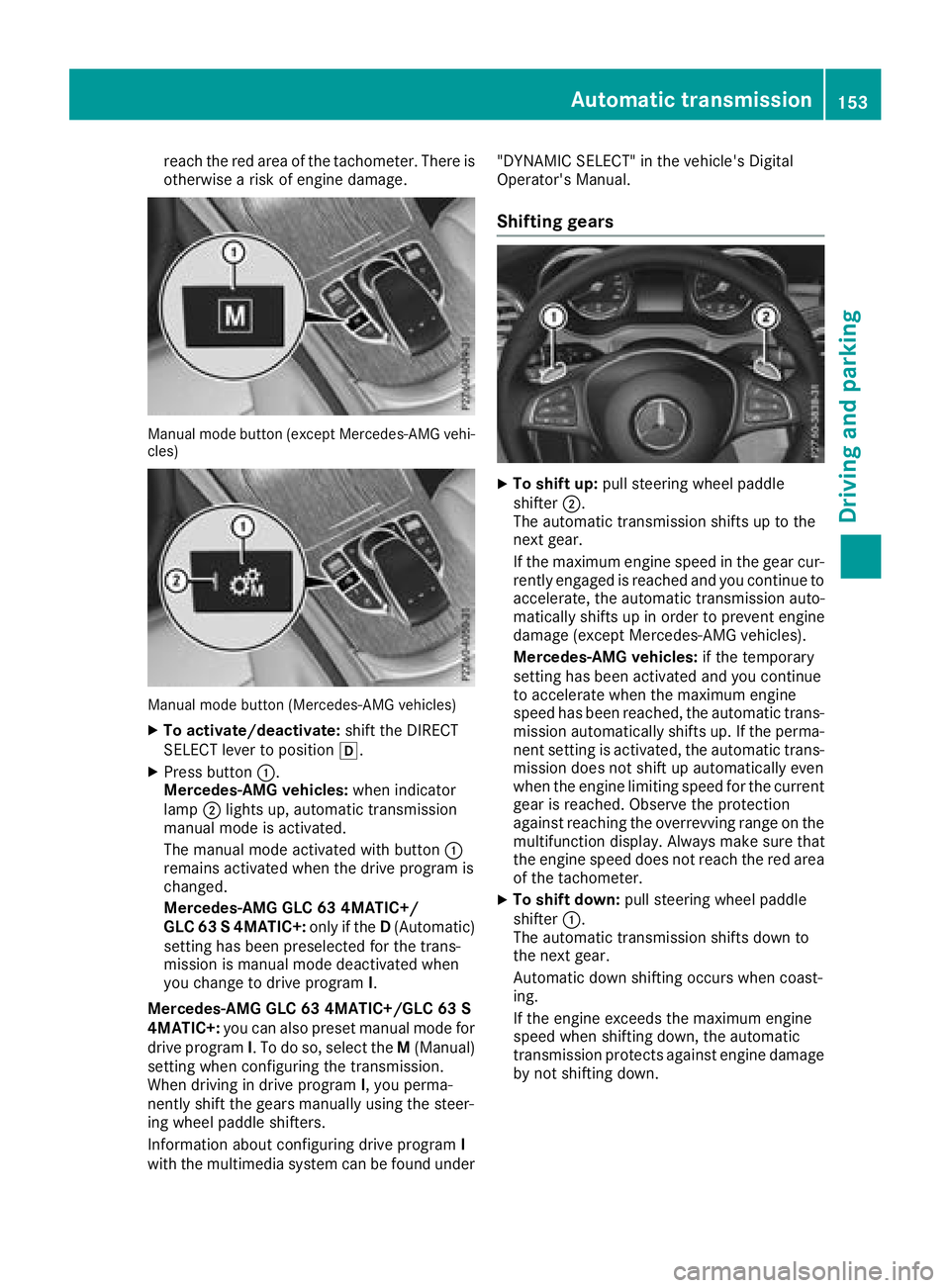
Manual mode button (except Mercedes-AMG vehi-
cles)
Manual mode button (Mercedes-AMG vehicles) X
To activate/deactivate: shift the DIRECT
SELECT lever to position [ .X
Press button C .
Mercedes-AMG vehicles: when indicator
lamp D lights up, automatic transmission
manual mode is activated.
The manual mode activated with button C
remains activated when the drive program is
changed.
Mercedes-AMG GLC 63 4MATIC+/
GLC 63 S 4MATIC+: only if the D (Automatic)
setting has been preselected for the trans-
mission is manual mode deactivated when
you change to drive program I .
Mercedes-AMG GLC 63 4MATIC+/GLC 63 S
4MATIC+: you can also preset manual mode for
drive program I . To do so, select the M (Manual)
setting when configuring the transmission.
When driving in drive program I , you perma-
nently shift the gears manually using the steer-
ing wheel paddle shifters.
Information about configuring drive program I
with the multimedia system can be found under "DYNAMIC SELECT" in the vehicle's Digital
Operator's Manual.
Shifting gears X
To shift up: pull steering wheel paddle
shifter D .
The automatic transmission shifts up to the
next gear.
If the maximum engine speed in the gear cur-
rently engaged is reached and you continue to
accelerate, the automatic transmission auto-
matically shifts up in order to prevent engine
damage (except Mercedes-AMG vehicles).
Mercedes-AMG vehicles: if the temporary
setting has been activated and you continue
to accelerate when the maximum engine
speed has been reached, the automatic trans-
mission automatically shifts up. If the perma-
nent setting is activated, the automatic trans-
mission does not shift up automatically even
when the engine limiting speed for the current
gear is reached. Observe the protection
against reaching the overrevving range on the
multifunction display. Always make sure that
the engine speed does not reach the red area
of the tachometer. X
To shift down: pull steering wheel paddle
shifter C .
The automatic transmission shifts down to
the next gear.
Automatic down shifting occurs when coast-
ing.
If the engine exceeds the maximum engine
speed when shifting down, the automatic
transmission protects against engine damage
by not shifting down.Automatic transmission 153
Driving and parking Z
Page 228 of 390
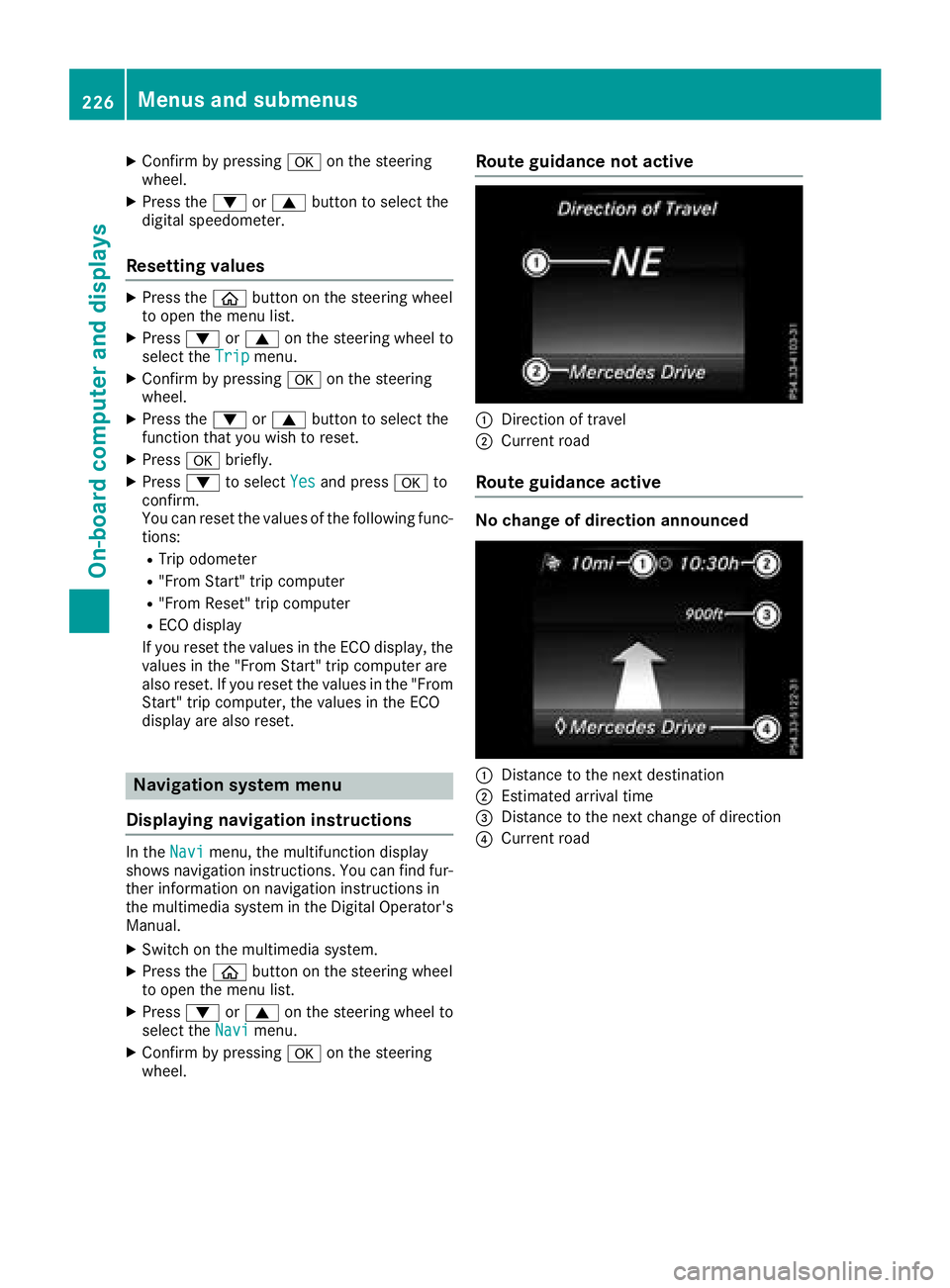
X
Confirm by pressing v on the steering
wheel. X
Press the d or c button to select the
digit al speedometer.
Resetting values X
Press the
Page 240 of 390
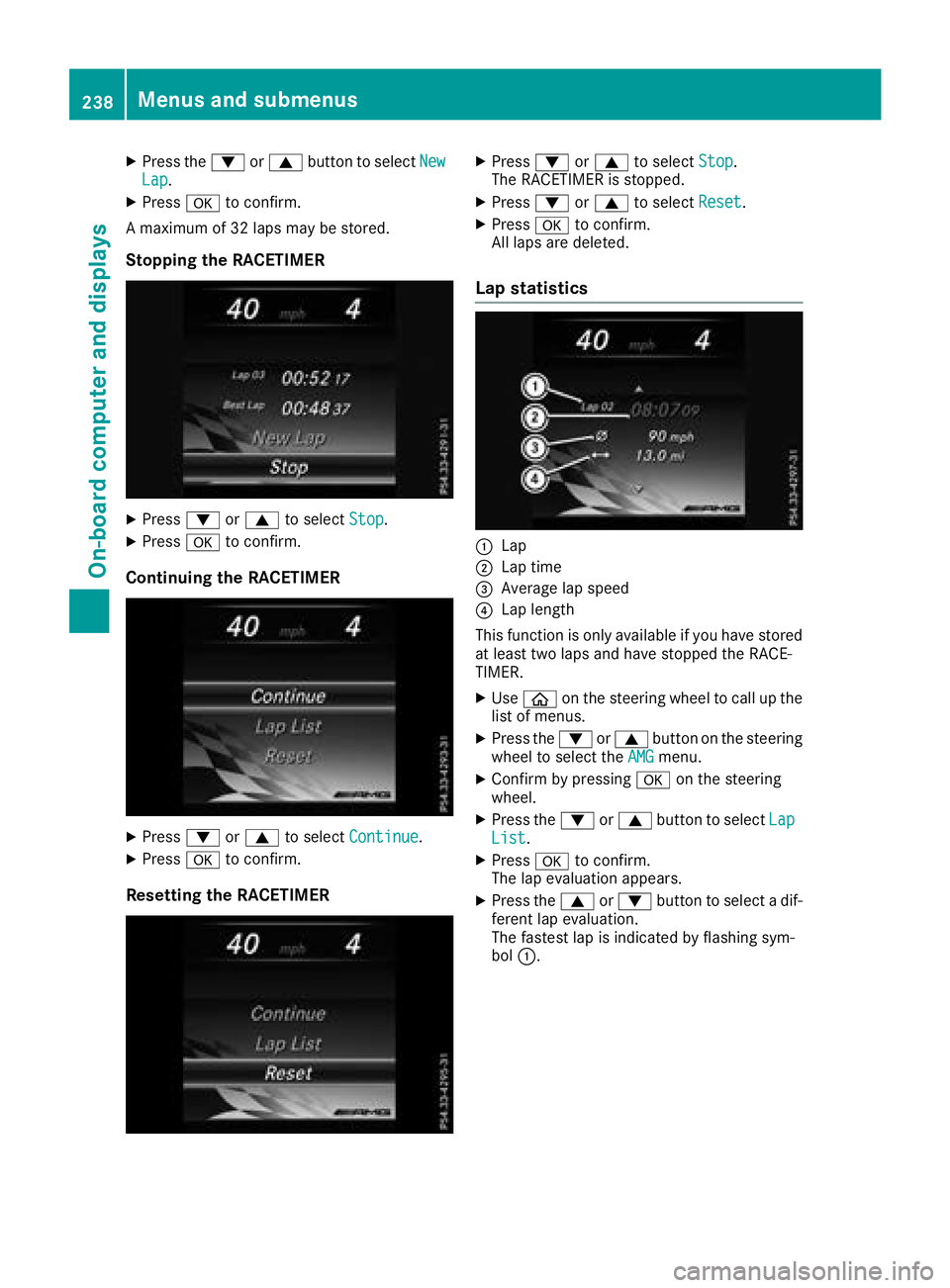
X
Press the d or c button to select New
Lap .X
Press v to confirm.
A maximum of 32 laps may be stored.
Stopping the RACETIMER X
Press d or c to select Stop .X
Press v to confirm.
Continuing the RACETIMER
X
Press d or c to select Continue .X
Press v to confirm.
Resetting the RACETIMER X
Press d or c to select Stop .
The RACETIMER is stopped. X
Press d or c to select Reset .X
Press v to confirm.
All laps are deleted.
Lap statistics
C
Lap D
Lap time
Page 347 of 390
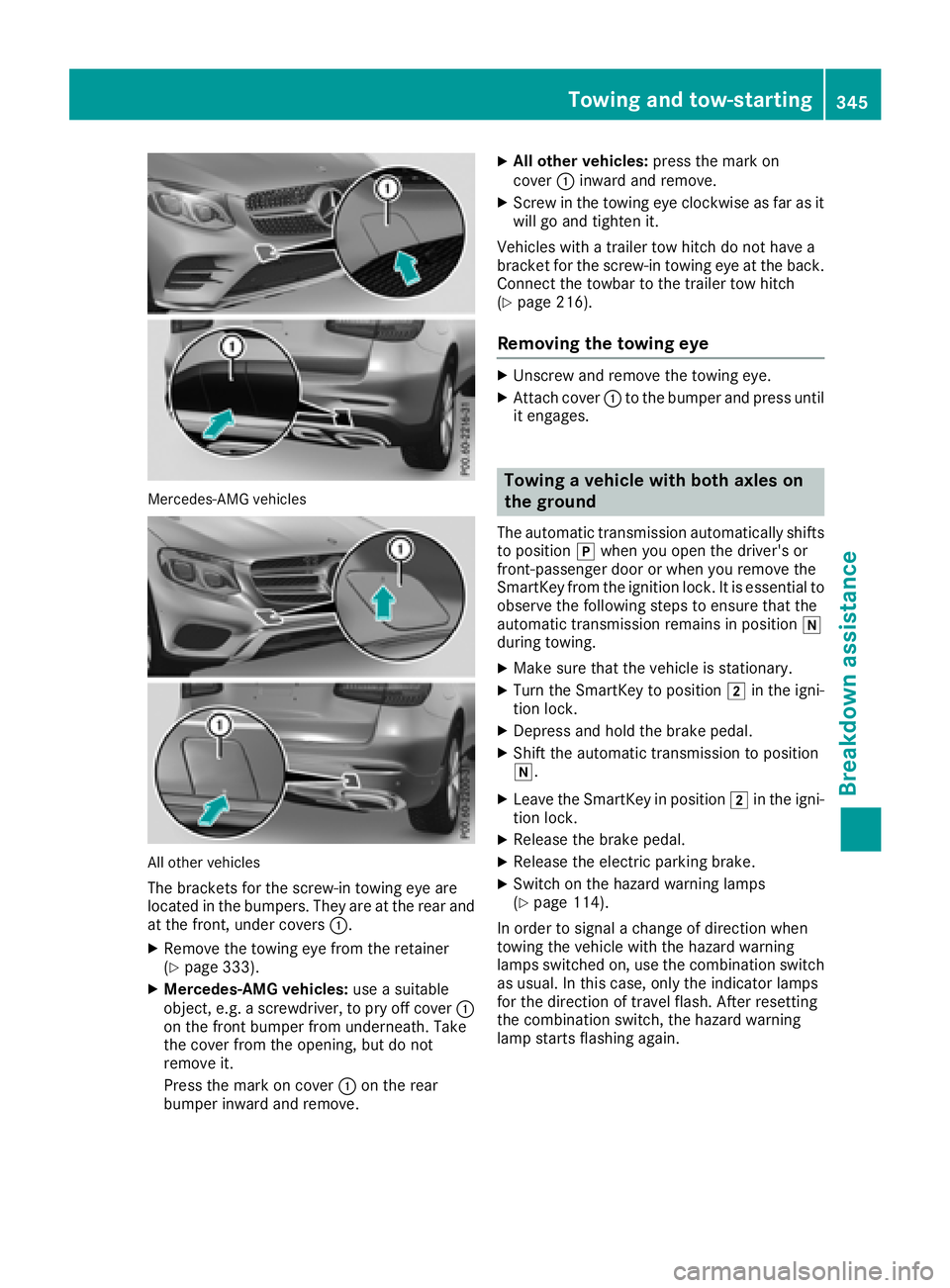
Mercedes-AMG vehicles
All other vehicles
The brackets for the screw-in towing eye are
located in the bumpers. They are at the rear and
at the front, under covers C .X
Remove the towing eye from the retainer
( Y
page 333). X
Mercedes-AMG vehicles: use a suitable
object, e.g. a screwdriver, to pry off cover C
on the front bumper from underneath. Take
the cover from the opening, but do not
remove it.
Press the mark on cover C on the rear
bumper inward and remove. X
All other vehicles: press the mark on
cover C inward and remove. X
Screw in the towing eye clockwise as far as it
will go and tighten it.
Vehicles with a trailer tow hitch do not have a
bracket for the screw-in towing eye at the back.
Connect the towbar to the trailer tow hitch
( Y
page 216).
Removing the towing eye X
Unscrew and remove the towing eye. X
Attach cover C to the bumper and press until
it engages.
Towing a vehicle with both axles on
the ground The automatic transmission automatically shifts
to position ] when you open the driver's or
front-passenger door or when you remove the
SmartKey from the ignition lock. It is essential to
observe the following steps to ensure that the
automatic transmission remains in position \\
during towing. X
Make sure that the vehicle is stationary. X
Turn the SmartKey to position H in the igni-
tion lock. X
Depress and hold the brake pedal. X
Shift the automatic transmission to position
\\ . X
Leave the SmartKey in position H in the igni-
tion lock. X
Release the brake pedal. X
Release the electric parking brake. X
Switch on the hazard warning lamps
( Y
page 114).
In order to signal a change of direction when
towing the vehicle with the hazard warning
lamps switched on, use the combination switch
as usual. In this case, only the indicator lamps
for the direction of travel flash. After resetting
the combination switch, the hazard warning
lamp starts flashing again.Towing and tow-starting 345
Breakdown assistance Z
Page 355 of 390
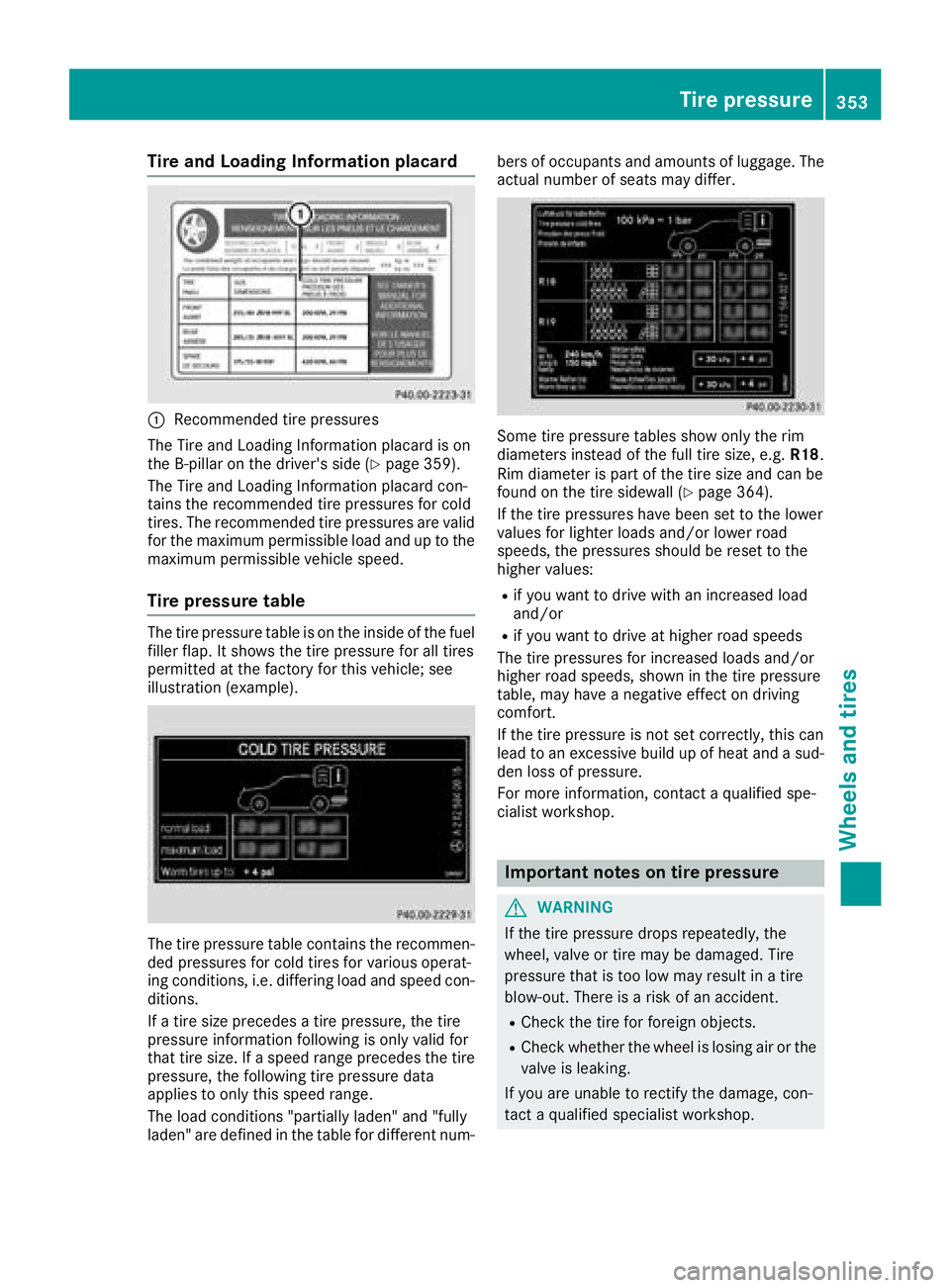
Tire and Loading Information placard
C
Recommended tire pressures
The Tire and Loading Information placard is on
the B-pillar on the driver's side ( Y
page 359).
The Tire and Loading Information placard con-
tains the recommended tire pressures for cold
tires. The recommended tire pressures are valid
for the maximum permissible load and up to the
maximum permissible vehicle speed.
Tire pressure table The tire pressure table is on the inside of the fuel
filler flap. It shows the tire pressure for all tires
permitted at the factory for this vehicle; see
illustration (example).
The tire pressure table contains the recommen-
ded pressures for cold tires for various operat-
ing conditions, i.e. differing load and speed con-
ditions.
If a tire size precedes a tire pressure, the tire
pressure information following is only valid for
that tire size. If a speed range precedes the tire
pressure, the following tire pressure data
applies to only this speed range.
The load conditions "partially laden" and "fully
laden" are defined in the table for different num- bers of occupants and amounts of luggage. The
actual number of seats may differ.
Some tire pressure tables show only the rim
diameters instead of the full tire size, e.g. R18 .
Rim diameter is part of the tire size and can be
found on the tire sidewall ( Y
page 364).
If the tire pressures have been set to the lower
values for lighter loads and/or lower road
speeds, the pressures should be reset to the
higher values: R
if you want to drive with an increased load
and/or R
if you want to drive at higher road speeds
The tire pressures for increased loads and/or
higher road speeds, shown in the tire pressure
table, may have a negative effect on driving
comfort.
If the tire pressure is not set correctly, this can
lead to an excessive build up of heat and a sud-
den loss of pressure.
For more information, contact a qualified spe-
cialist workshop.
Important notes on tire pressure
G WARNING
If the tire pressure drops repeatedly, the
wheel, valve or tire may be damaged. Tire
pressure that is too low may result in a tire
blow-out. There is a risk of an accident. R
Check the tire for foreign objects. R
Check whether the wheel is losing air or the
valve is leaking.
If you are unable to rectify the damage, con-
tact a qualified specialist workshop. Tire pressure 353
Wheels and tires Z