start stop button MERCEDES-BENZ GLC 2018 User Guide
[x] Cancel search | Manufacturer: MERCEDES-BENZ, Model Year: 2018, Model line: GLC, Model: MERCEDES-BENZ GLC 2018Pages: 390, PDF Size: 9.04 MB
Page 109 of 390
i The steering wheel only moves up if it has
not already reached the upper steering lim-
iter.
Position of the steering wheel for driv-
ing The steering wheel is moved to the last selected
position when: R
the driver's door is closed and you insert the
SmartKey into the ignition lock R
you close the driver's door when the ignition
is switched on R
you press the Start/Stop button once in vehi-
cles with KEYLESS-GO or the KEYLESS-GO
start function
i The steering wheel only returns to the last
set position if the driving position is stored
after the seat or steering column has been
adjusted ( Y
page 110).
The most recent driving position of the steering
wheel is stored if: R
the ignition is switched off R
the setting is stored using the memory func-
tion ( Y
page 110)
Crash-responsive EASY-EXIT feature If the crash-responsive EASY-EXIT feature is trig-
gered in an accident, the steering column will
move up when the driver's door is opened or the
SmartKey is removed from the ignition lock. This
makes it easier to exit the vehicle and rescue the
occupants.
The crash-responsive EASY-EXIT feature is
operational only if the EASY-EXIT/ENTRY fea-
ture is activated in the multimedia system (see
Digital Operator's Manual). Mirrors
Exterior mirrors
Important safety notes
G WARNING
You could lose control of your vehicle if you do
the following while driving: R
adjust the driver's seat, head restraint,
steering wheel or mirrors R
fasten the seat belt
There is a risk of an accident.
Adjust the driver's seat, head restraint, steer-
ing wheel and mirror and fasten your seat belt
before starting the engine.
G WARNING
The exterior mirror on the front-passenger
side reduces the size of the image. Visible
objects are actually closer than they appear.
This means that you could misjudge the dis-
tance from road users traveling behind, e.g.
when changing lane. There is a risk of an acci-
dent.
For this reason, always make sure of the
actual distance from the road users traveling
behind by glancing over your shoulder.
Adjusting the exterior mirrors
X
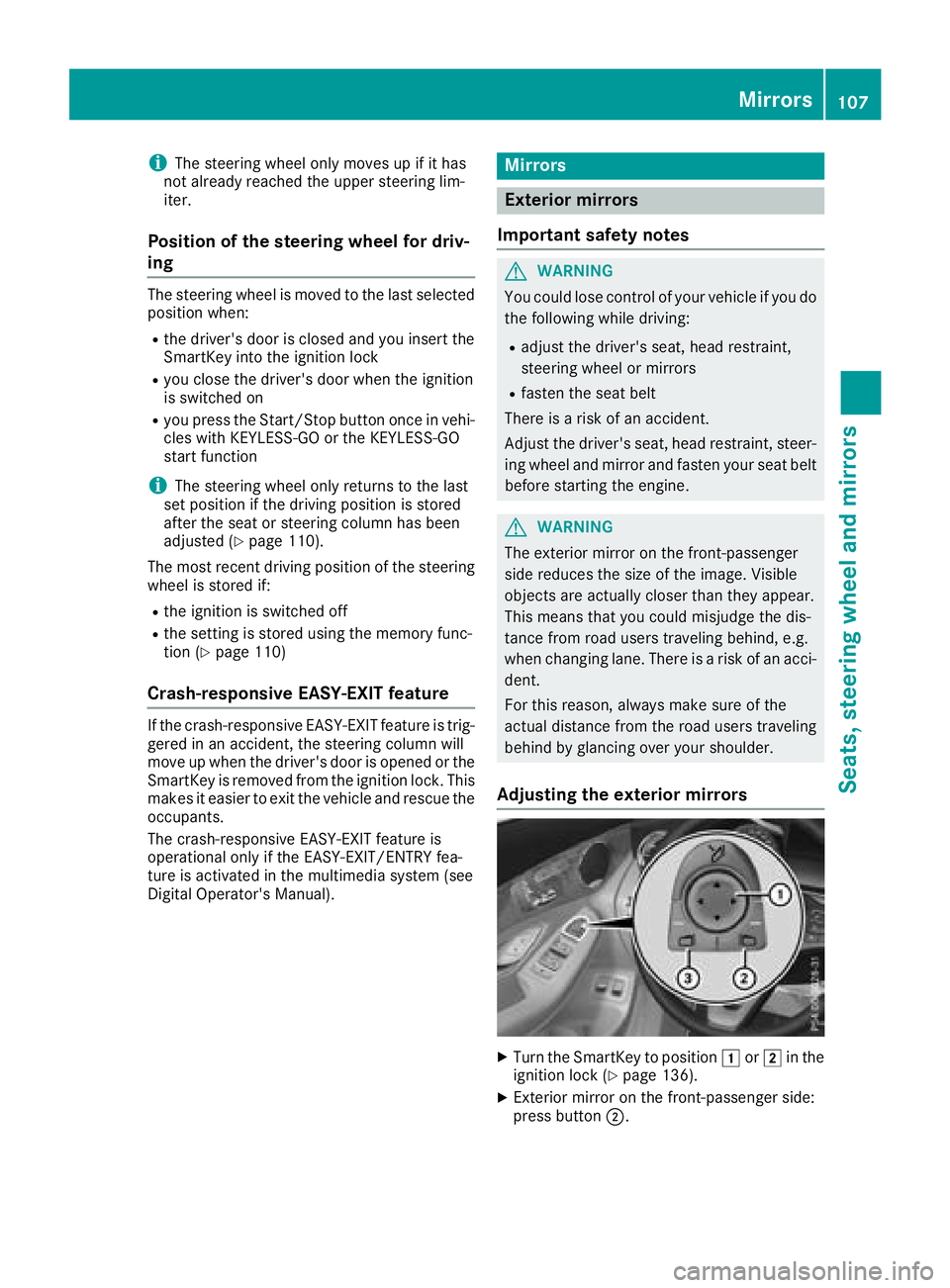
Turn the SmartKey to position G or H in the
ignition lock ( Y
page 136). X
Exterior mirror on the front-passenger side:
press button D .Mirrors 107
Seats, steering wheel and mirrors Z
Page 129 of 390
i Only use air-recirculation mode briefly, e.g.
if there are unpleasant outside odors or when
in a tunnel. The windows could otherwise fog
up, since no fresh air is drawn into the vehicle
in air-recirculation mode.
Vehicles with 3-zone automatic climate control:
use the "Residual heat" function if you want to
heat or ventilate the vehicle interior when the
ignition is switched off. The residual heat func-
tion can only be activated or deactivated with
the ignition switched off. The residual heat func-
tion is deactivated when the ignition is switched
on.
DYNAMIC SELECT switch (except
Mercedes-AMG GLC 63 4MATIC/
GLC 63 S 4MATIC) You can choose between various drive programs
with the DYNAMIC SELECT switch
( Y
page 144).
If you have selected drive program E :R
when heating, the electrical heater booster is
deactivated and heat output is reduced as a
result R
the rear window defroster running time is
reduced
If you have selected drive program C , S or S+ ,
the current climate settings are maintained.
ECO start/stop function During automatic engine switch-off, the climate
control system only operates at a reduced capa- city. If you require the full climate control output,
you can switch off the ECO start/stop function
by pressing the ECO button ( Y
page 142).
Operating the climate control sys-
tems
Activates/deactivates climate con-
trol
General notes When the climate control is switched off, the air
supply and air circulation are also switched off.
The windows could fog up. Therefore, switch off
climate control only briefly
Switch on climate control primarily using the
X rocker switch ( Y
page 128).
Activating/deactivating X
Turn the SmartKey to position H in the igni-
tion lock ( Y
page 136). X
To switch on: set the airflow to level 1 or
higher using the H rocker switch.X
To switch off: set the airflow to level 0 using
the H rocker switch.
i 3-zone automatic climate control: when cli-
mate control is switched off, "OFF" appears in
the rear-compartment display.
Switching cooling with air dehumidification on/off
General notes If you deactivate the "Cooling with air-dehumidification" function, the air inside the vehicle will not
be cooled. The air inside the vehicle will also not be dehumidified. The windows can fog up more
quickly. Therefore, only deactivate the "Cooling with air-dehumidification" function briefly.
The "Cooling with air dehumidification" function is only available when the engine is running. The air
inside the vehicle is cooled and dehumidified according to the temperature selected.
Condensation may drip from the underside of the vehicle when it is in cooling mode. This is normal
and not a sign that there is a malfunction. Operating the climate control systems 127
Climate control
Page 138 of 390
G WARNING
If you switch off the ignition while driving,
safety-relevant functions are only available
with limitations, or not at all. This could affect,
for example, the power steering and the brake
boosting effect. You will require considerably
more effort to steer and brake. There is a risk
of an accident.
Do not switch off the ignition while driving.
G WARNING
If the parking brake has not been fully
released when driving, the parking brake can: R
overheat and cause a fire R
lose its hold function.
There is a risk of fire and an accident. Release
the parking brake fully before driving off.
! Do not warm up the engine while stationary.
Pull away immediately. Avoid high engine
speeds and full throttle until the engine has
reached its operating temperature.
In vehicles with automatic transmission,
engage positions P and R only when the vehi-
cle is stationary.
Where possible, avoid spinning the drive
wheels when pulling away on slippery roads.
You could otherwise damage the drive train.
! Mercedes-AMG vehicles: at low engine oil
temperatures below 68 ‡ (+20 †), the max-
imum engine speed is restricted in order to
protect the engine. To protect the engine and
maintain smooth engine operation, avoid driv-
ing at full throttle when the engine is cold.
Hybrid vehicles: be sure to observe the notes
in the Supplement. Otherwise, you may not rec-
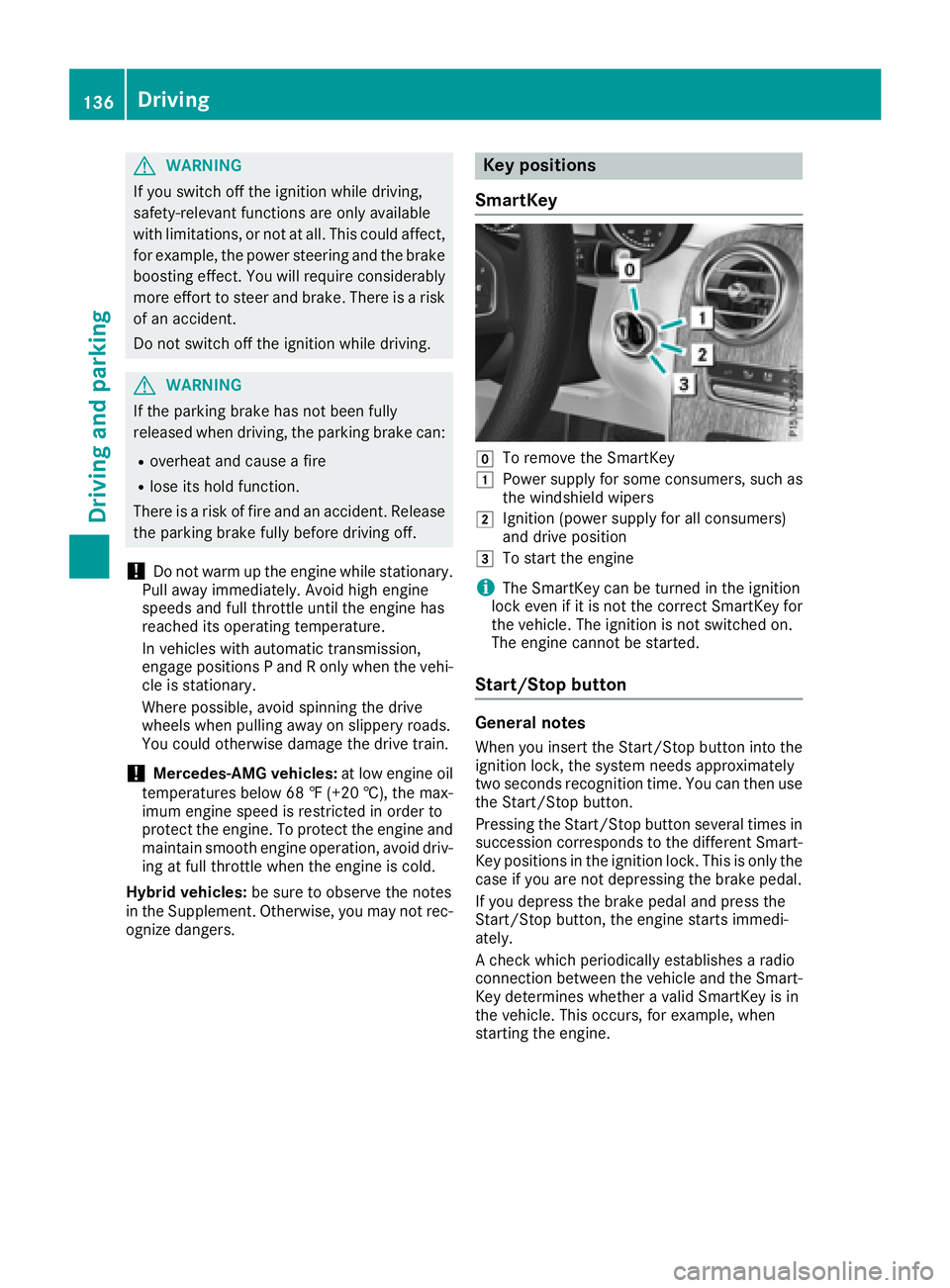
ognize dangers. Key positions
SmartKey
Z
To remove the SmartKey G
Power supply for some consumers, such as
the windshield wipers H
Ignition (power supply for all consumers)
and drive position I
To start the engine
i The SmartKey can be turned in the ignition
lock even if it is not the correct SmartKey for
the vehicle. The ignition is not switched on.
The engine cannot be started.
Start/Stop button
General notes When you insert the Start/Stop button into the
ignition lock, the system needs approximately
two seconds recognition time. You can then use
the Start/Stop button.
Pressing the Start/Stop button several times in
succession corresponds to the different Smart-
Key positions in the ignition lock. This is only the
case if you are not depressing the brake pedal.
If you depress the brake pedal and press the
Start/Stop button, the engine starts immedi-
ately.
A check which periodically establishes a radio
connection between the vehicle and the Smart-
Key determines whether a valid SmartKey is in
the vehicle. This occurs, for example, when
starting the engine.136
Driving
Driving and parking
Page 139 of 390
To start the vehicle without actively using the
SmartKey: R
the Start/Stop button must be inserted in the
ignition lock. R
the SmartKey must be in the vehicle. R
the vehicle must not be locked with the
SmartKey or KEYLESS-GO. ( Y
page 79)
Do not keep the SmartKey: R
with electronic devices, e.g. a mobile phone
or another SmartKey. R
with metallic objects, e.g. coins or metal foil. R
inside metallic objects, e.g. a metal case.
This can affect the functionality of the Smart-
Key.
If you lock the vehicle with the SmartKey remote
control or with KEYLESS-GO, after a short time: R
you will not be able to switch on the ignition
with the Start/Stop button. R
you will no longer be able to start the engine
with the Start/Stop button until the vehicle is
unlocked again.
If you lock the vehicle centrally using the button
on the front door ( Y
page 84), you can continue
to start the engine with the Start/Stop button.
The engine can be switched off while the vehicle
is in motion by pressing and holding the Start/
Stop button for three seconds. This function
operates independently of the ECO start/stop
automatic engine switch-off function.
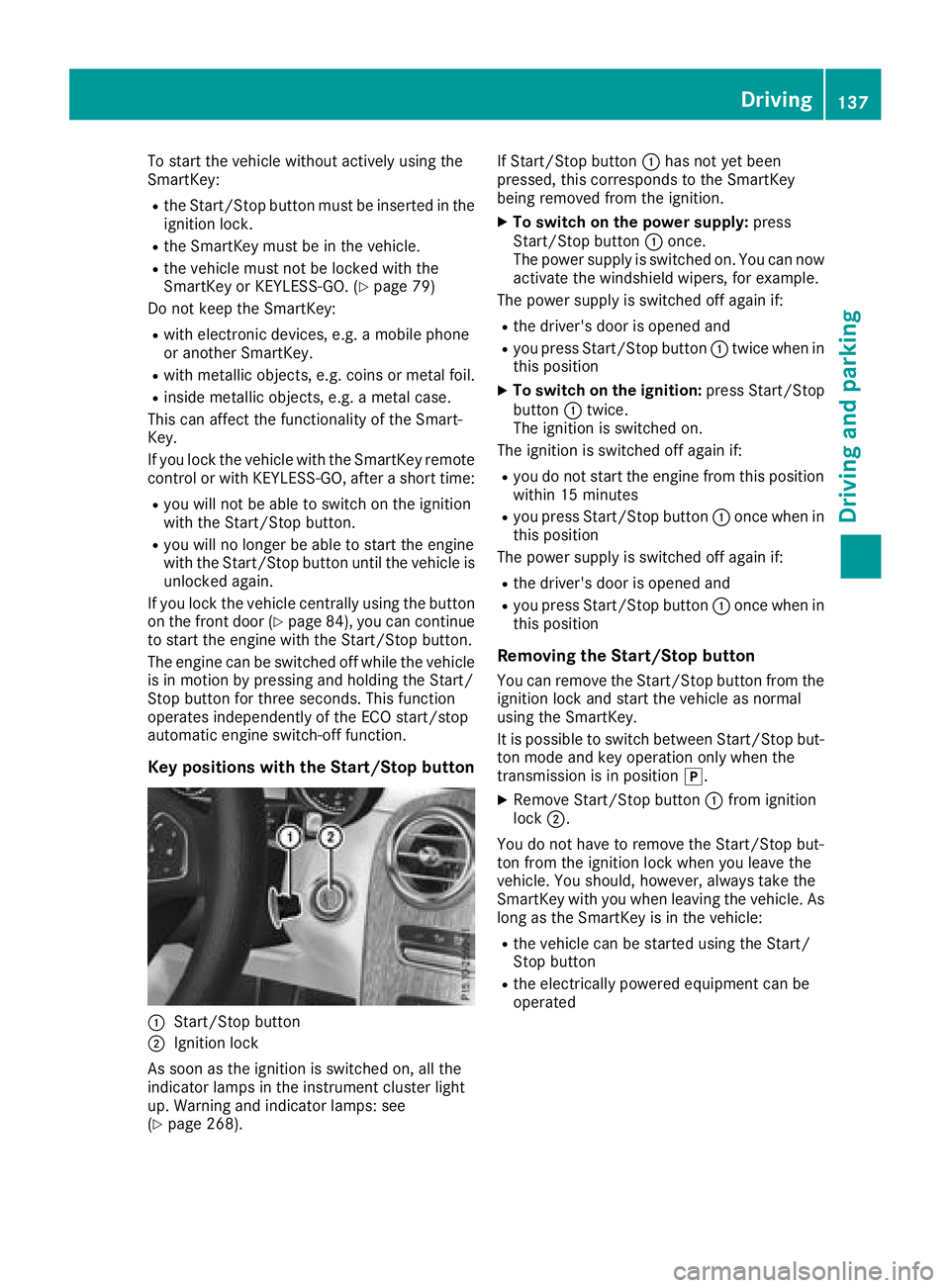
Key positions with the Start/Stop button
C
Start/Stop button
D
Ignition lock
As soon as the ignition is switched on, all the
indicator lamps in the instrument cluster light
up. Warning and indicator lamps: see
( Y
page 268). If Start/Stop button C has not yet been
pressed, this corresponds to the SmartKey
being removed from the ignition. X
To switch on the power supply: press
Start/Stop button C once.
The power supply is switched on. You can now
activate the windshield wipers, for example.
The power supply is switched off again if: R
the driver's door is opened and R
you press Start/Stop button C twice when in
this position X
To switch on the ignition: press Start/Stop
button C twice.
The ignition is switched on.
The ignition is switched off again if: R
you do not start the engine from this position
within 15 minutes R
you press Start/Stop button C once when in
this position
The power supply is switched off again if: R
the driver's door is opened and R
you press Start/Stop button C once when in
this position
Removing the Start/Stop button You can remove the Start/Stop button from the
ignition lock and start the vehicle as normal
using the SmartKey.
It is possible to switch between Start/Stop but-
ton mode and key operation only when the
transmission is in position ] .X
Remove Start/Stop button C from ignition
lock D .
You do not have to remove the Start/Stop but-
ton from the ignition lock when you leave the
vehicle. You should, however, always take the
SmartKey with you when leaving the vehicle. As
long as the SmartKey is in the vehicle: R
the vehicle can be started using the Start/
Stop button R
the electrically powered equipment can be
operated Driving 137
Driving and parking Z
Page 140 of 390
Starting the engine
Important safety notes
G WARNING
If children are left unsupervised in the vehicle,
they could: R
open the doors, thus endangering other
people or road users. R
get out and disrupt traffic. R
operate the vehicle's equipment.
Additionally, children could set the vehicle in
motion if, for example, they: R
release the parking brake. R
shifting the automatic transmission out of
park position PR
Start the engine.
There is a risk of an accident and injury.
When leaving the vehicle, always take the
SmartKey with you and lock the vehicle. Never
leave children or animals unattended in the
vehicle. Always keep the SmartKey out of
reach of children.
G WARNING
Combustion engines emit poisonous exhaust
gases such as carbon monoxide. Inhaling
these exhaust gases leads to poisoning. There
is a risk of fatal injury. Therefore never leave
the engine running in enclosed spaces with-
out sufficient ventilation.
G WARNING
Flammable materials introduced through
environmental influence or by animals can
ignite if in contact with the exhaust system or
parts of the engine that heat up. There is a risk
of fire.
Carry out regular checks to make sure that
there are no flammable foreign materials in
the engine compartment or in the exhaust
system. General notes The catalytic converter is preheated for up to
30 seconds after a cold start. The sound of the
engine may change during this time.
Automatic transmission X
Shift the transmission to position ]
( Y
page 146).
The transmission position indicator on the
multifunction display shows ]
( Y
page 148).
i You can start the engine in transmission
position ] and \\ .
Starting procedure with the SmartKey To start the engine using the SmartKey instead
of the Start/Stop button, pull the Start/Stop
button out of the ignition lock. X
Turn the SmartKey to position I in the igni-
tion lock and release it as soon as the engine
is running.
If the engine will not start: X
Remove the SmartKey from the ignition lock. X
Reinsert the SmartKey into the ignition lock
after a short waiting period. X
Turn the SmartKey to position H in the igni-
tion lock ( Y
page 136).
The indicator lamps in the instrument cluster
light up ( Y
page 268). X
Turn the SmartKey to position I in the igni-
tion lock ( Y
page 136) and release it as soon
as the engine is running.
Starting procedure with the Start/Stop
button The Start/Stop button is only available on vehi-
cles with KEYLESS-GO or the KEYLESS-GO start
function.
The Start/Stop button can be used to start the
vehicle manually without inserting the SmartKey
into the ignition lock. The Start/Stop button
must be inserted in the ignition lock and the
SmartKey must be in the vehicle. This mode for
starting the engine operates independently of
the ECO start/stop automatic engine start func-
tion.
You can start the engine if a valid SmartKey is in
the vehicle. Switch off the engine and always138
Driving
Driving and parking
Page 141 of 390
take the SmartKey with you when leaving the
vehicle, even if you only leave it for a short time.
Pay attention to the important safety notes. X
Depress the brake pedal and keep it
depressed. X
Press the Start/Stop button once
( Y
page 137).
The engine starts.
Starting procedure via smartphone Observe the important safety notes on starting
the engine ( Y
page 138).
You can also start your engine via your smart-
phone from outside the vehicle. In this case, the
previously selected climate control setting is
activated. In this way you can cool or heat the
interior of the vehicle before starting the jour-
ney.
Only start the engine via your smartphone if it is
safe to start and run the engine where your vehi-
cle is parked.
Observe the legal stipulations in the area where
your vehicle is parked. Engine start via smart-
phone may be limited to certain countries or
regions.
You can execute a maximum of two consecutive
starting attempts via your smartphone. If you
press the start/stop button or insert the Smart-
Key into the ignition lock, you can carry out two
more starting attempts with your smartphone.
The engine runs for ten minutes when starting
with the smartphone.
Once you have started the engine, you can
switch the engine off via your smartphone at any
time.
You can only start the engine via your smart-
phone if: R
the SmartKey is in the ignition lock R
park position ] is selectedR
the accelerator pedal is not depressed R
the anti-theft alarm system is not activated R
the panic alarm is not activated R
the hazard warning lamps are switched off R
the hood is closed R
the doors are closed and locked R
the windows and sliding sunroof are closed Also make sure that: R
the fuel tank is sufficiently filled R
the starter battery has been sufficiently
charged
G WARNING
Limbs could be crushed or trapped if the
engine is started unintentionally during ser-
vice or maintenance work. There is a risk of
injury.
Always secure the engine against uninten-
tional starting before carrying out mainte-
nance or repair work.
Make sure that the engine cannot be started via
your smartphone before carrying out mainte-
nance or repairs. You can prevent an engine
start via your smartphone, for example, if you: R
switch on the hazard warning lamps R
do not lock the doors R
open a side window R
open the sliding sunroof
Pulling away
General notes
G WARNING
If the engine speed is above the idling speed
and you engage transmission position D or R ,
the vehicle could pull away suddenly. There is
a risk of an accident.
When engaging transmission position D or R ,
always firmly depress the brake pedal and do
not simultaneously accelerate.
Depress the accelerator carefully when pulling
away.
The vehicle locks centrally once you have pulled
away. The locking knobs in the doors drop down.
You can open the doors from the inside at any
time.
You can also deactivate the automatic locking
feature, see the Digital Operator's Manual.
It is possible to shift the transmission from posi-
tion ] to the desired position only if you
depress the brake pedal. Only then is the park-
ing lock released. If you do not depress the
brake pedal, the DIRECT SELECT lever can still Driving 139
Dr ivi ng an d parking Z
Page 143 of 390
General notes
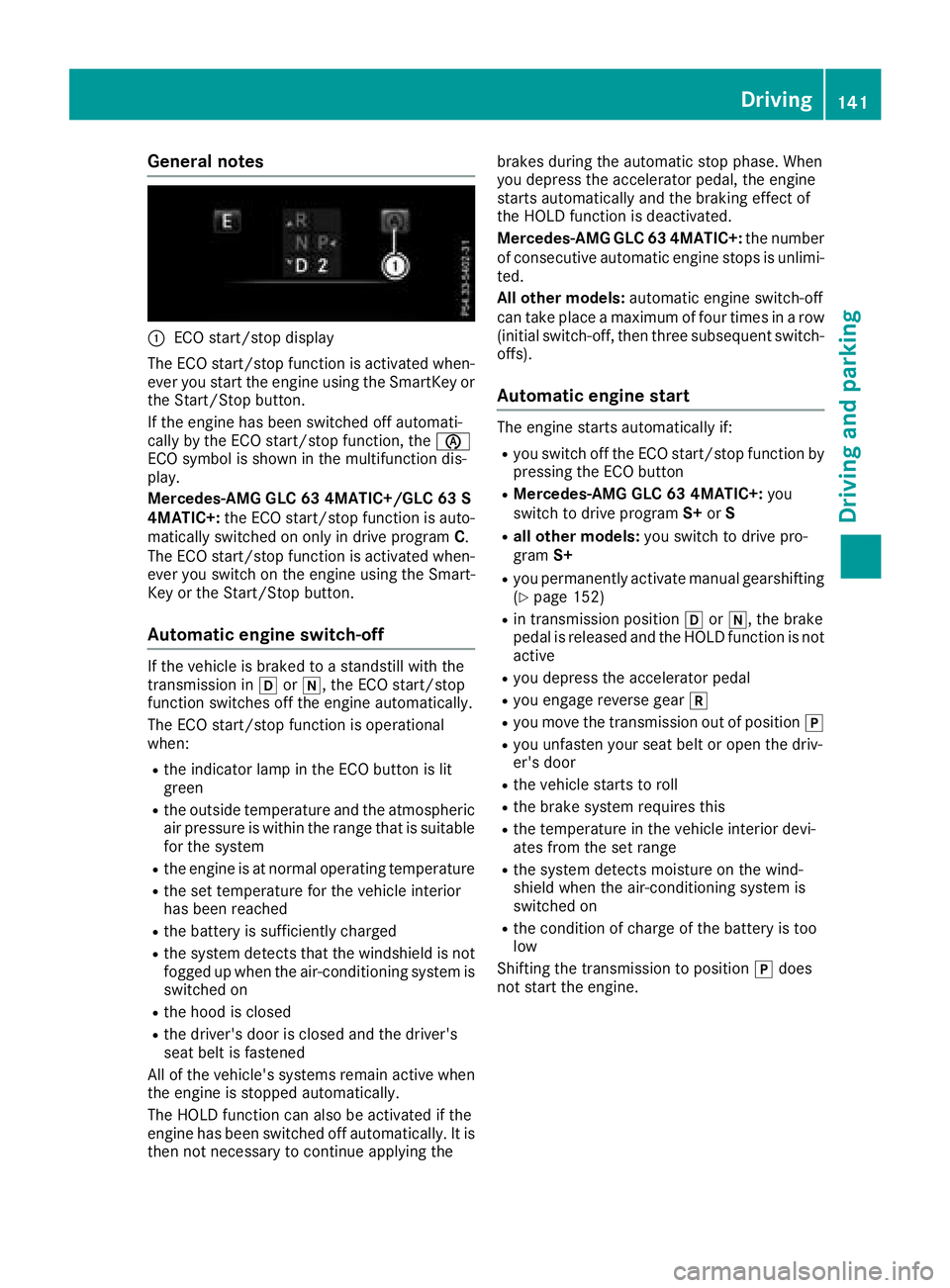
C
ECO start/stop display
The ECO start/stop function is activated when-
ever you start the engine using the SmartKey or
the Start/Stop button.
If the engine has been switched off automati-
cally by the ECO start/stop function, the
Page 144 of 390
Deactivating or activating th e ECO
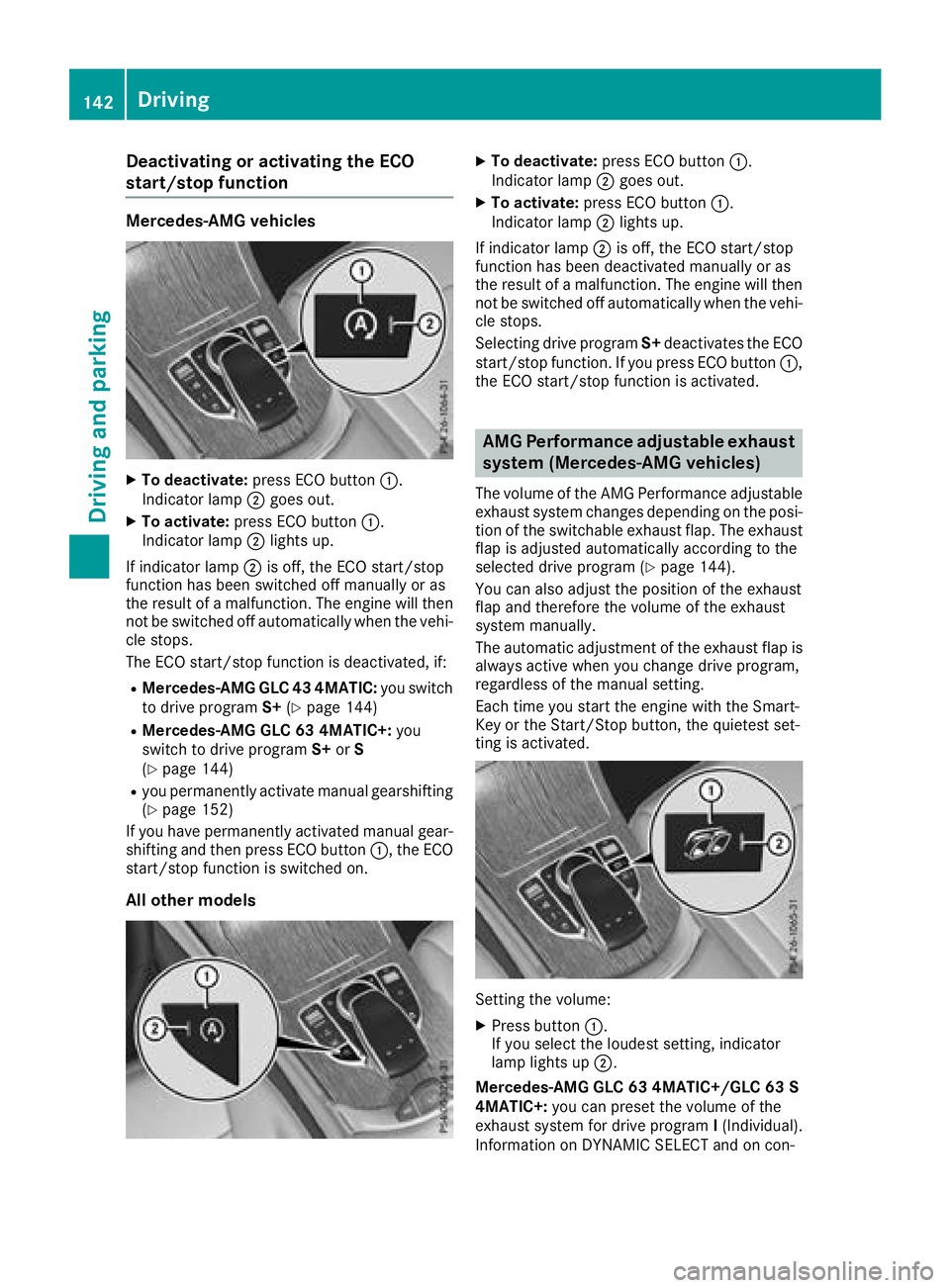
start/stop function Mercedes-AMG vehicles X
To deactivate : press EC O butto n C .
Indicator lamp D goe s out .X
To activate : press EC O butto n C .
Indicator lamp D lights up.
If indicator lamp D is off, th e EC O start/sto p
function has bee n switched of f manually or as
th e result of a malfunction . The engin e will then
no t be switched of f automatically when th e vehi-
cl e stops .
The EC O start/sto p function is deactivated, if:R
Mercedes-AMG GLC 43 4MATIC : you switch
to drive program S+ ( Y
page 144)R
Mercedes-AMG GLC 63 4MATIC+: you
switch to drive program S+ or S
( Y
page 144)R
you permanentl y activat e manual gearshiftin g
( Y
page 152)
If you hav e permanentl y activated manual gear -
shiftin g and then press EC O butto n C , th e EC O
start/sto p function is switched on .
All other model s X
To deactivate : press EC O butto n C .
Indicator lamp D goe s out .X
To activate : press EC O butto n C .
Indicator lamp D lights up.
If indicator lamp D is off, th e EC O start/sto p
function has bee n deactivated manually or as
th e result of a malfunction . The engin e will then
no t be switched of f automatically when th e vehi-
cl e stops .
Selecting drive program S+ deactivates th e EC O
start/sto p function . If you press EC O butto n C ,
th e EC O start/sto p function is activated.
AMG Performance adjustable exhaust
syste m (Mercedes-AMG vehicles )The volume of th e AM G Performanc e adjustable
exhaus t syste m changes dependin g on th e posi-
tion of th e switchable exhaus t flap . The exhaus t
fla p is adjusted automatically accordin g to th e
selecte d drive program ( Y
page 144).
You can also adjust th e position of th e exhaus t
fla p and therefore th e volume of th e exhaus t
syste m manually.
The automatic adjustmen t of th e exhaus t flap is
always active when you chang e drive program,
regardles s of th e manual setting .
Each time you start th e engin e wit h th e Smart -
Key or th e Start/Sto p button, th e quietest set -
ting is activated.
Settin g th e volume : X
Press butto n C .
If you selec t th e loudest setting , indicator
lamp lights up D .
Mercedes-AMG GLC 63 4MATIC+/GLC 63 S
4MATIC+: you can preset th e volume of th e
exhaus t system fo r drive program I (Individual) .
Information on DYNAMI C SELECT and on con-142
Driving
Driving and parking
Page 146 of 390
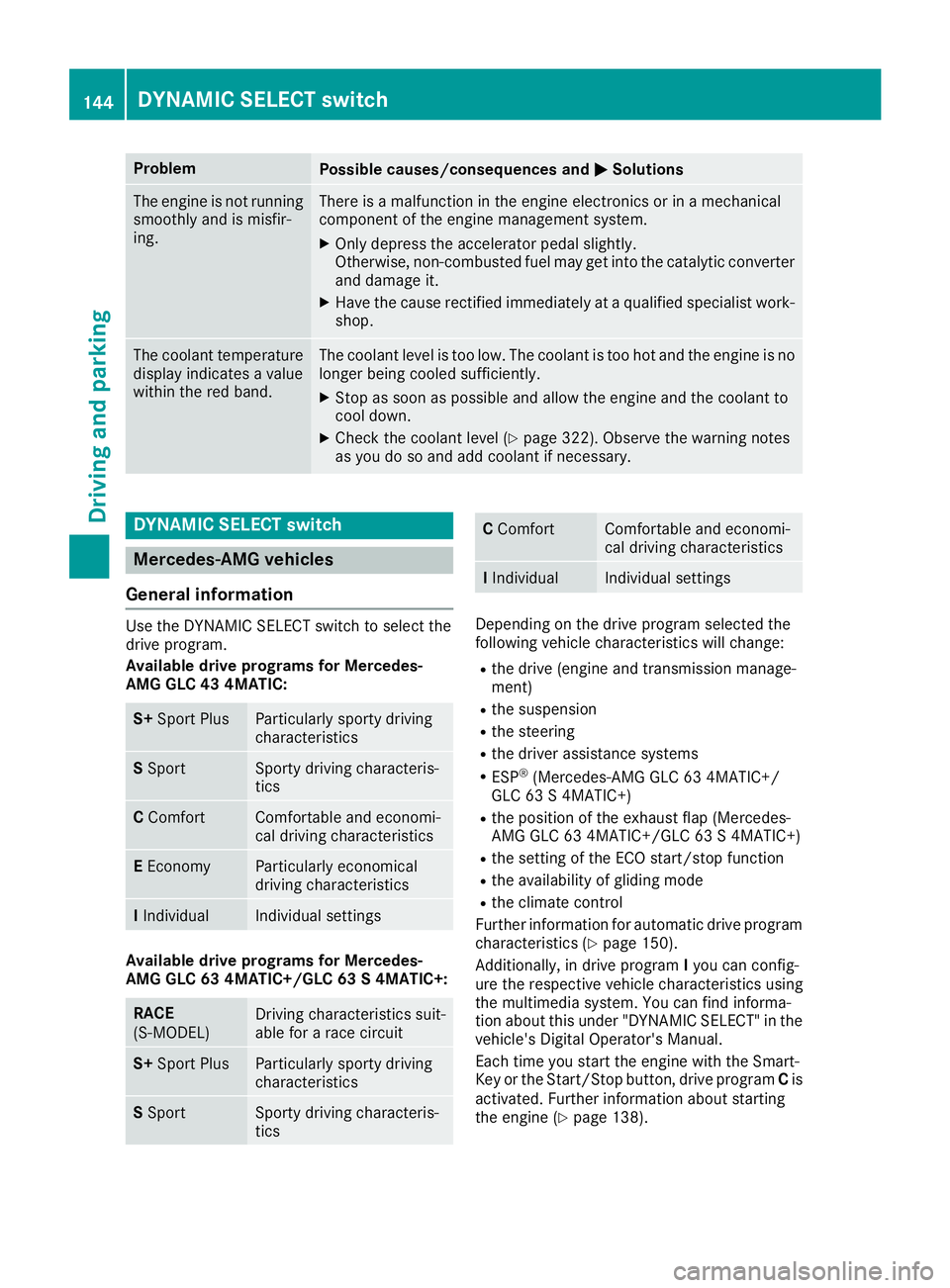
Problem
Possible causes/consequences and P Solutions
The engine is not running
smoothly and is misfir-
ing. There is a malfunction in the engine electronics or in a mechanical
component of the engine management system. X
Only depress the accelerator pedal slightly.
Otherwise, non-combusted fuel may get into the catalytic converter
and damage it. X
Have the cause rectified immediately at a qualified specialist work-
shop.
The coolant temperature
display indicates a value
within the red band. The coolant level is too low. The coolant is too hot and the engine is no
longer being cooled sufficiently. X
Stop as soon as possible and allow the engine and the coolant to
cool down. X
Check the coolant level ( Y
page 322). Observe the warning notes
as you do so and add coolant if necessary.
DYNAMIC SELECT switch
Mercedes-AMG vehicles
General information Use the DYNAMIC SELECT switch to select the
drive program.
Available drive programs for Mercedes-
AMG GLC 43 4MATIC:
S+ Sport Plus Particularly sporty driving
characteristics
S Sport Sporty driving characteris-
tics
C Comfort Comfortable and economi-
cal driving characteristics
E Economy Particularly economical
driving characteristics
I Individual Individual settings
Available drive programs for Mercedes-
AMG GLC 63 4MATIC+/GLC 63 S 4MATIC+:
RACE
(S ‑ MODEL) Driving characteristics suit-
able for a race circuit
S+ Sport Plus Particularly sporty driving
characteristics
S Sport Sporty driving characteris-
tics C Comfort Comfortable and economi-
cal driving characteristics
I Individual Individual settings
Depending on the drive program selected the
following vehicle characteristics will change: R
the drive (engine and transmission manage-
ment) R
the suspension R
the steering R
the driver assistance systems R
ESP ®
(Mercedes-AMG GLC 63 4MATIC+/
GLC 63 S 4MATIC+) R
the position of the exhaust flap (Mercedes-
AMG GLC 63 4MATIC+/GLC 63 S 4MATIC+) R
the setting of the ECO start/stop function R
the availability of gliding mode R
the climate control
Further information for automatic drive program
characteristics ( Y
page 150).
Additionally, in drive program I you can config-
ure the respective vehicle characteristics using
the multimedia system. You can find informa-
tion about this under "DYNAMIC SELECT" in the
vehicle's Digital Operator's Manual.
Each time you start the engine with the Smart-
Key or the Start/Stop button, drive program C is
activated. Further information about starting
the engine ( Y
page 138).144
DYNAMIC SELECT switch
Driving and parking
Page 149 of 390
![MERCEDES-BENZ GLC 2018 User Guide Engaging park position automatically Park position ] is automatically engaged if:R
you switch off the engine using the SmartKey
and remove the SmartKey R
you switch off the engine using the SmartKey](/img/4/59087/w960_59087-148.png "MERCEDES-BENZ GLC 2018 User Guide Engaging park position automatically Park position ] is automatically engaged if:R
you switch off the engine using the SmartKey
and remove the SmartKey R
you switch off the engine using the SmartKey")
Engaging park position automatically Park position ] is automatically engaged if:R
you switch off the engine using the SmartKey
and remove the SmartKey R
you switch off the engine using the SmartKey
or using the Start/Stop button and open the
driver's door or front-passenger door R
you open the driver's door when the vehicle is
stationary or when driving at a very low speed
and the transmission is in position [ or ^
Under certain conditions, the automatic trans-
mission shifts to transmission position ] auto-
matically if the HOLD function or Distance Pilot
DISTRONIC is activated. Observe the informa-
tion on the HOLD function ( Y
page 179) and
Distance Pilot DISTRONIC ( Y
page 174).
Engaging reverse gear
! Only move the automatic transmission to
^ when the vehicle is stationary. X
Depress the brake pedal. X
Push the DIRECT SELECT lever up past the
first point of resistance.
The ECO start/stop function is not available
when reverse gear is engaged. Further informa-
tion on the ECO start/stop function
( Y
page 141).
Engaging neutral
G WARNING
If children are left unsupervised in the vehicle,
they could: R
open the doors, thus endangering other
people or road users. R
get out and disrupt traffic. R
operate the vehicle's equipment.
Additionally, children could set the vehicle in
motion if, for example, they: R
release the parking brake. R
shifting the automatic transmission out of
park position PR
Start the engine.
There is a risk of an accident and injury.
When leaving the vehicle, always take the
SmartKey with you and lock the vehicle. Never leave children or animals unattended in the
vehicle. Always keep the SmartKey out of
reach of children. X
If the transmission is in position [ or ^ :
push the DIRECT SELECT lever up or down to
the first point of resistance. X
If the transmission is in position ] : depress
the brake pedal and push the DIRECT SELECT
lever up or down to the first point of resist-
ance.
If you switch the engine off with the transmis-
sion in position ^ or [ , the automatic trans-
mission shifts to \\ automatically.
With the SmartKey: if you then open the driv-
er's door or the front-passenger door or remove
the SmartKey from the ignition lock, the auto-
matic transmission shifts to ] automatically.
With the Start/Stop button: if you then open
the driver's door or the front-passenger door,
the automatic transmission shifts to ] auto-
matically.
If you want the automatic transmission to
remain in neutral \\ , e.g. when having the vehi-
cle cleaned in an automatic, tow-through car
wash: X
Vehicles with KEYLESS-GO or KEYLESS-
GO start function: remove the Start/Stop
button from the ignition lock. X
Insert the SmartKey into the ignition lock. X
All vehicles: switch the ignition on. X
Depress the brake pedal and keep it
depressed. X
Engage neutral \\ .X
Release the brake pedal. X
Release the electric parking brake. X
Switch off the ignition and leave the SmartKey
in the ignition lock.
Engaging the drive position X
If the transmission is in position ^ or \\ :
push the DIRECT SELECT lever down past the
first point of resistance. X
If the transmission is in position ] : depress
the brake pedal and push the DIRECT SELECT
lever down past the first point of resistance.Automatic transmission 147
Driving and parking Z