light MERCEDES-BENZ GLC 2018 Repair Manual
[x] Cancel search | Manufacturer: MERCEDES-BENZ, Model Year: 2018, Model line: GLC, Model: MERCEDES-BENZ GLC 2018Pages: 390, PDF Size: 9.04 MB
Page 166 of 390
R
In order to prevent any salt build-up, apply the
brakes occasionally while paying attention to
the traffic conditions. R
Carefully depress the brake pedal and the
beginning and end of a journey. R
Maintain a greater distance to the vehicle
ahead.
Servicing the brakes
! The brake fluid level may be too low, if: R
if the red brake warning lamp lights up in
the instrument cluster and R
you hear a warning tone while the engine is
running
Observe additional warning messages in the
multifunction display.
The brake fluid level may be too low due to
brake pad wear or leaking brake lines.
Have the brake system checked immediately.
Consult a qualified specialist workshop to
arrange this.
! Vehicles with 4MATIC: function or per-
formance tests may only be carried out on a 2-
axle dynamometer. If you wish to operate the
vehicle on such a dynamometer, please con-
sult a qualified specialist workshop in
advance. You could otherwise damage the
drive train or the brake system.
! Vehicles with 4MATIC: the ESP ®
system
operates automatically. If the electric parking
brake is tested on a brake dynamometer, the
engine and ignition must be switched off: turn
the SmartKey in the ignition lock to position
Page 169 of 390
R
Take care when turning on an uphill or down-
hill slope or when driving across a slope. The
vehicle could otherwise tip over. R
Always keep the side windows and the pano-
rama roof with power tilt/sliding panel closed
during the journey. R
Do not deviate from marked routes.
Do not use the HOLD function when driving off-
road, on steep uphill or downhill gradients or on
slippery or loose surfaces. The HOLD function
cannot hold the vehicle on such surfaces.
Checklist before driving off-road X
Engine oil level: check the engine oil level
and add oil if necessary.
When driving on steep gradients, the engine
oil level must be sufficiently high to ensure a
correct oil supply in the vehicle. X
Wheels and tires: check the tire tread depth
and tire pressure. X
Check for damage and remove any foreign
objects, e.g. small stones, from the wheels/
tires. X
Replace any missing valve caps. X
Replace dented or damaged wheels. X
Rims: dented or bent rims can result in a loss
of tire pressure and damage the tire bead.
Before driving off-road, check the wheels and
replace them if necessary.
Checklist after driving off-road
! If you detect damage to the vehicle after
driving off-road, have the vehicle checked
immediately at a qualified specialist work-
shop. X
Deactivate off-road program ( Y
page 181).X
Deactivate DSR ( Y
page 180).X
Clean the headlamps and rear lights and
check for damage. X
Clean the front and rear license plates. X
Clean the wheels/tires with a water jet and
remove any foreign objects. X
Clean the wheels, wheel housings and the
vehicle underside with a water jet; check for
any foreign objects and damage. X
Check whether twigs or other parts of plants
have become trapped. These increase the risk
of fire and can damage fuel pipes, brake hoses or the rubber bellows of the axle joints
and propeller shafts. X
After the trip, examine without fail the entire
undercarriage, wheels, tires, brakes, body-
work structure, steering, chassis and exhaust
system for damage. X
After driving in sand, mud, gravel, water or
similar dirty conditions, have the following
checked and cleaned: R
brake discs R
wheels R
brake pads R
axle joints X
If you detect strong vibrations after off-road
travel, check for foreign objects in the wheels
and drive train and remove them if necessary.
Foreign objects can disturb the balance and
cause vibrations.
Driving over poor road surfaces places greater
demands on your vehicle than driving on normal
roads. After driving off-road, check the vehicle.
This allows you to detect damage promptly and
reduce the risk of an accident to yourself and
other road users.
Driving on sand Observe the following rules when driving on
sand: R
Select the off-road program ( Y
page 181).R
Avoid high engine speeds. R
Use the left-hand steering wheel paddle
shifter to shift to a lower gear appropriate to
the terrain. R
Drive quickly to overcome the rolling resist-
ance. Otherwise the vehicle's wheels could
become stuck in loose ground. R
Drive in the tracks of other vehicles if possi-
ble. Make sure that: -
the tire ruts are not too deep. -
the sand is sufficiently firm. -
the ground clearance of the vehicle is suf-
ficient.
Tire ruts and gravel roads
! Check that the ruts are not too deep and
that your vehicle has sufficient clearance.
Otherwise, your vehicle could be damaged or
bottom out and get stuck. Driving tips 167
Driving and parking Z
Page 170 of 390
Observe the following rules when driving along
ruts in off-road terrain or on roads with loose
gravel: R
Activate the off-road program ( Y
page 181).R
Avoid high engine speeds. R
Shift to a lower gear using the left-hand steer-
ing wheel paddle shifter. R
Drive slowly. R
Where ruts are too deep, drive with the
wheels of one side on the center grassy area,
if possible.
Traveling uphill
Approach/departure angle
G WARNING
If you drive on a steep incline at an angle or
turn when driving on an incline, the vehicle
could slip sideways, tip and rollover. There is a
risk of an accident.
Always drive on a steep incline in the line of
fall (straight up or down) and do not turn the
vehicle. R
Observe the warnings for off-road driving
( Y
page 165).R
Follow the line of fall when driving on slopes
and steep inclines. R
Before driving on extreme uphill and downhill
gradients, select the off-road program
( Y
page 181).R
Drive slowly. R
Accelerate gently and make sure that the
wheels are gripping. R
Avoid high engine speeds, except when driv-
ing on sandy and muddy routes with high driv-
ing resistance. R
Use the left-hand steering wheel paddle
shifter to shift to a lower gear appropriate to
the gradient. R
Use the left-hand steering wheel paddle
shifter to shift into a lower gear in good time
on long and steep downhill gradients.
Hill start assist will aid you when pulling away on
a hill. For further information about hill start
assist, see ( Y
page 140).
Do not shift into transmission position \\ when
driving off-road. You could lose control of the vehicle if you attempt to brake the vehicle using
the service brake. If the gradient is too steep for
your vehicle, drive back down in reverse gear.
Always observe the approach/departure angle
values ( Y
page 384).
Maximum gradient-climbing capability Always observe the maximum gradient climbing
ability values ( Y
page 384).
Hilltops When driving up an uphill gradient, slightly
reduce pressure on the accelerator immediately
before reaching the brow of the hill. Make use of
the vehicle's own impetus to travel over the
brow.
This style of driving prevents: R
the vehicle from lifting off the ground on the
brow of a hill R
the vehicle from traveling too quickly down
the other side
Driving downhill R
Drive slowly. R
Do not drive at an angle down steep inclines.
Steer into the line of fall and drive with the
front wheels aligned straight. Otherwise, the
vehicle could slip sideways, tip and rollover. R
Shift to a lower gear using the left-hand steer-
ing wheel paddle shifter before tackling steep
downhill gradients. R
Activate DSR. If this is not sufficient, brake
gently. When doing so, make sure that the
vehicle is facing in the direction of the line of
fall. R
Check that the brakes are working normally
after a long downhill stretch.
Off-road ABS is activated when the off-road pro-
gram is selected.
At speeds below 18 mph (30 km/h), the front
wheels lock cyclically during braking. The dig-
ging-in effect achieved in the process reduces
the stopping distance on off-road terrain. The
steerability of the vehicle is considerably
reduced if the wheels lock.168
Driving tips
Driving and parking
Page 171 of 390
Drivin g systems
Mercedes-Benz Intelligent Drive Mercedes-Ben z Intelligen t Drive stand s fo r inno -
vative driver assistanc e and safet y systems
whic h enhance comfor t and suppor t th e driver in
critical situations. Wit h these intelligen t coordi-
nated systems Mercedes-Ben z has set a mile-
ston e on th e pat h toward s autonomous driving.
Mercedes-Ben z Intelligen t Drive embraces all
elements of active and passive safet y in on e well
though t out syste m – fo r th e safet y of th e vehi-
cl e occupant s and that of other road users.
Further information on drivin g safet y systems
( Y
page 66).
Cruis e contro l
General notes Cruise contro l maintain s a constant road speed
fo r you. It brake s automatically in order to avoid
exceedin g th e set speed. Change into a lowe r
gear in goo d time on lon g and steep downhill
gradients. Thi s is especially important if th e
vehicle is lade n or towin g a trailer . By doin g so,
you will mak e use of th e braking effect of th e
engine. Thi s relieves th e load on th e brake sys -
te m and prevents th e brake s from overheatin g
and wearin g to o quickly.
Use cruise contro l only if road and traffic con-
dition s mak e it appropriat e to maintain a steady
speed fo r a prolonged period. You can stor e any
road speed abov e 20 mph (30 km/h).
Important safet y notesCruise contro l can neither reduce th e ris k of an
acciden t if you fai l to adapt your drivin g style no r
override th e laws of physics. Cruise contro l can -
no t take into accoun t th e road, traffic and
weather conditions. Cruise contro l is only an
aid. You are responsible fo r maintainin g a saf e
distanc e to th e vehicle in front, fo r vehicle
speed, fo r braking in goo d time and fo r stayin g in
lane. Do no t use cruise control: R
in road and traffic condition s whic h do no t
allow you to maintain a constant speed, e.g. in
heav y traffic or on windin g roadsR
on slipper y road surfaces. Brakin g or accel-
erating could cause th e drive wheels to los e
traction and th e vehicle could then skid R
when there is poo r visibility, e.g. due to fog,
heav y rain or snow
If there is a chang e of drivers, advise th e ne w
driver of th e speed stored.
i The speed indicated in th e speedometer
may diffe r slightly from th e speed stored.
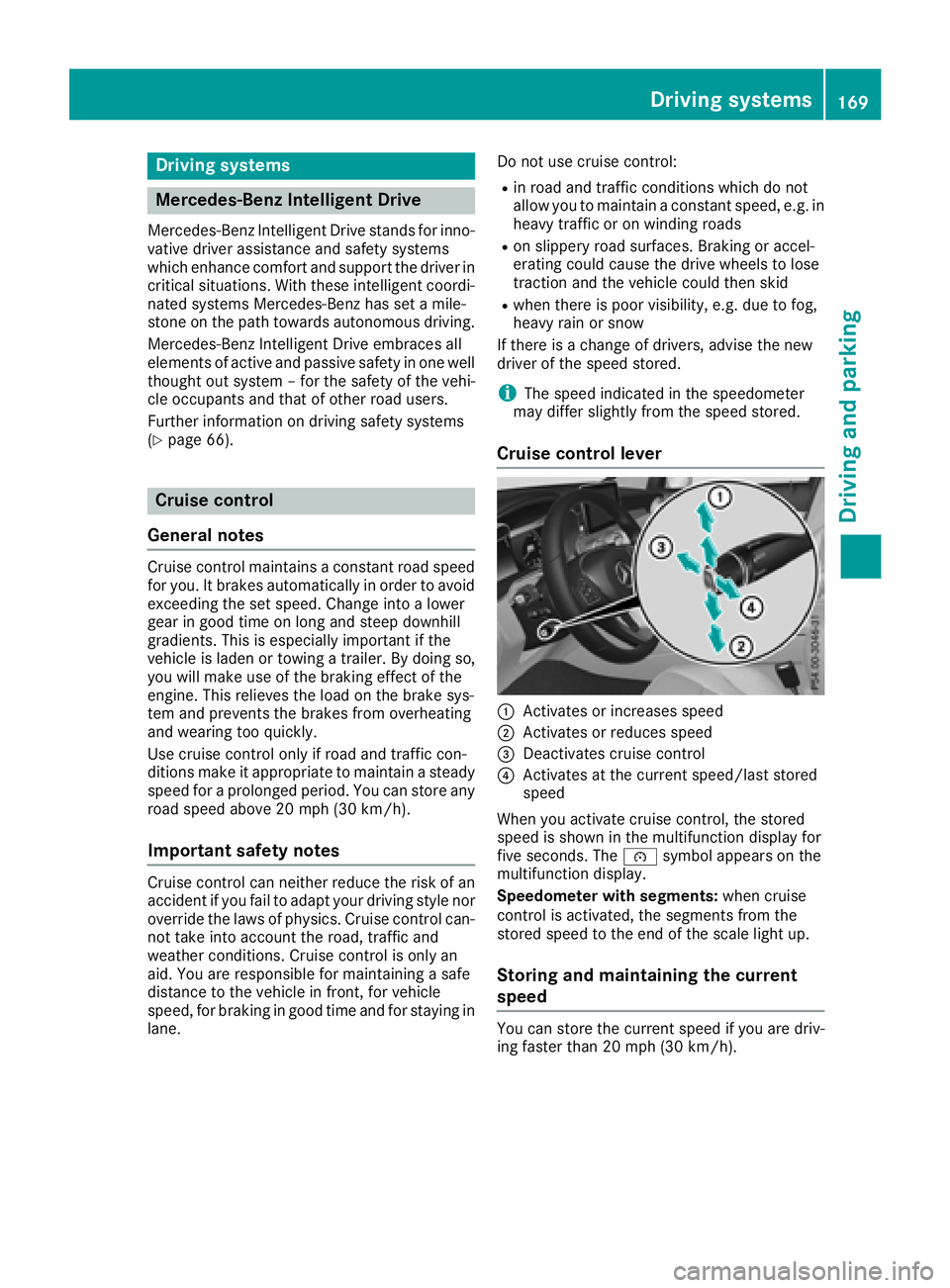
Cruis e contro l lever
C
Activates or increase s speedD
Activates or reduce s speed
Page 173 of 390
Change into a lower gear in good time on long
and steep downhill gradients. This is especially
impo rtant if the veh icle is laden. By doin g so, you
will make use of the braking effect of the engine.
This relieves the load on the brake system and
prevents the brakes from overheating and wear-
ing too quic kly.
If Distance Pilot DI ST RONIC detects that there is
a risk of a co llisio n, you will be warned visually
and acoustically. Without your intervention, Dis-
tance Pilot DISTRONIC cannot prevent a co lli-
sion. An intermittent warning tone will then
sound and the dist ance warning lamp will light
up in the instrument cluster. Brake immediately
in order to increase the dist ance to the veh icle in
front or take evasive action pro vide d it is safe to
do so.
Distance Pilot DI ST RONIC operates in the range
between 0 mph (0 km/h) and 120 mph
(200 km/h).
Do not use Distance Pilot DI ST RONIC while driv -
ing on roads with steep gradients.
Sin ce Distance Pilot DI ST RONIC transmits radar
waves, it can resemble the radar detectors of
the respon sible authorities. You can refer to the
relevant chapter in the Operator's Manual if
questions are asked about this.
i USA only: This device has been approved by
the FCC as a "Vehicular Radar System". The
radar sensor is intended for use in an aut o-
m
otive radar system only. Removal, tamper-
ing, or altering of the device will void any war-
ranties, and is not permitted by the FCC. Do
not tamper wit h, alter, or use in any non-
approved way.
Any unauthorized mod ific ation to th is device
could void the user's authority to operate the
equipm ent.
i Canada only: This device co mplie s wit h
RSS -210 of In dustry Canada. Operation is
subject to the foll owin g two conditions:
1. This device may not cause interference,
and
2. This device must accept any interference
receive d, inc ludin g interference that may
cause undesired operation of the device.
Removal, tampering, or altering of the device
will void any warranties, and is not permitte d.
Do not tamper wit h, alter, or use in any non-
approved way. Any unauthorized modification to this device
could void the user's authority to operate the
equipment.
Important safety notes
G WARNING
Distance Pilot DI ST RONIC does not react to: R
people or animals R
stationary objects on the road, e.g. st oppe d
or parked vehicles R
oncoming vehicles and crossing traffic
As a result, Distance Pilot DI ST RONIC may
neither give warnings nor intervene in such
situations. There is a risk of an accident.
Alwa ys pay careful attention to the traff ic sit-
uation and be ready to brake.
G WARNING
Distance Pilot DI ST RONIC cannot always
clearly identify other road users and co mple x
traff ic situations.
In such cases, Distance Pilot DI ST RONIC may:R
give an unnecessary warning and then
brake the vehicle R
neither give a warning nor intervene R
accelerate or brake unexpect edly
There is a risk of an accident.
Continue to drive carefully and be ready to
brake, especially if Distance Pilot DISTRONIC
warns you.
G WARNING
Distance Pilot DI ST RONIC brakes your vehicle
with up to 50% of the maximum poss ible
deceleration. If this deceleration is not suffi-
cient, Distance Pilot DI ST RONIC alerts you
wit h a visual and acoustic warning. There is a
risk of an accident.
Apply the brakes yourself in these situations
and try to take evasive action.
! When Distance Pilot DI ST RONIC or the
HOLD function are activated, the vehicle
brakes automatically in certain situations.Driving systems 171
Driving and parking Z
Page 179 of 390
Distance Pilo t DISTRONI C wit h Steering
Pilo tGeneral notes
Distanc e Pilo t DISTRONIC wit h Steerin g Pilo t
aids you in keepin g th e vehicle in th e middle of
th e lan e by means of moderat e steerin g inter-
vention s in a speed range from 0 – 12 5 mph
(0 - 20 0 km/h).
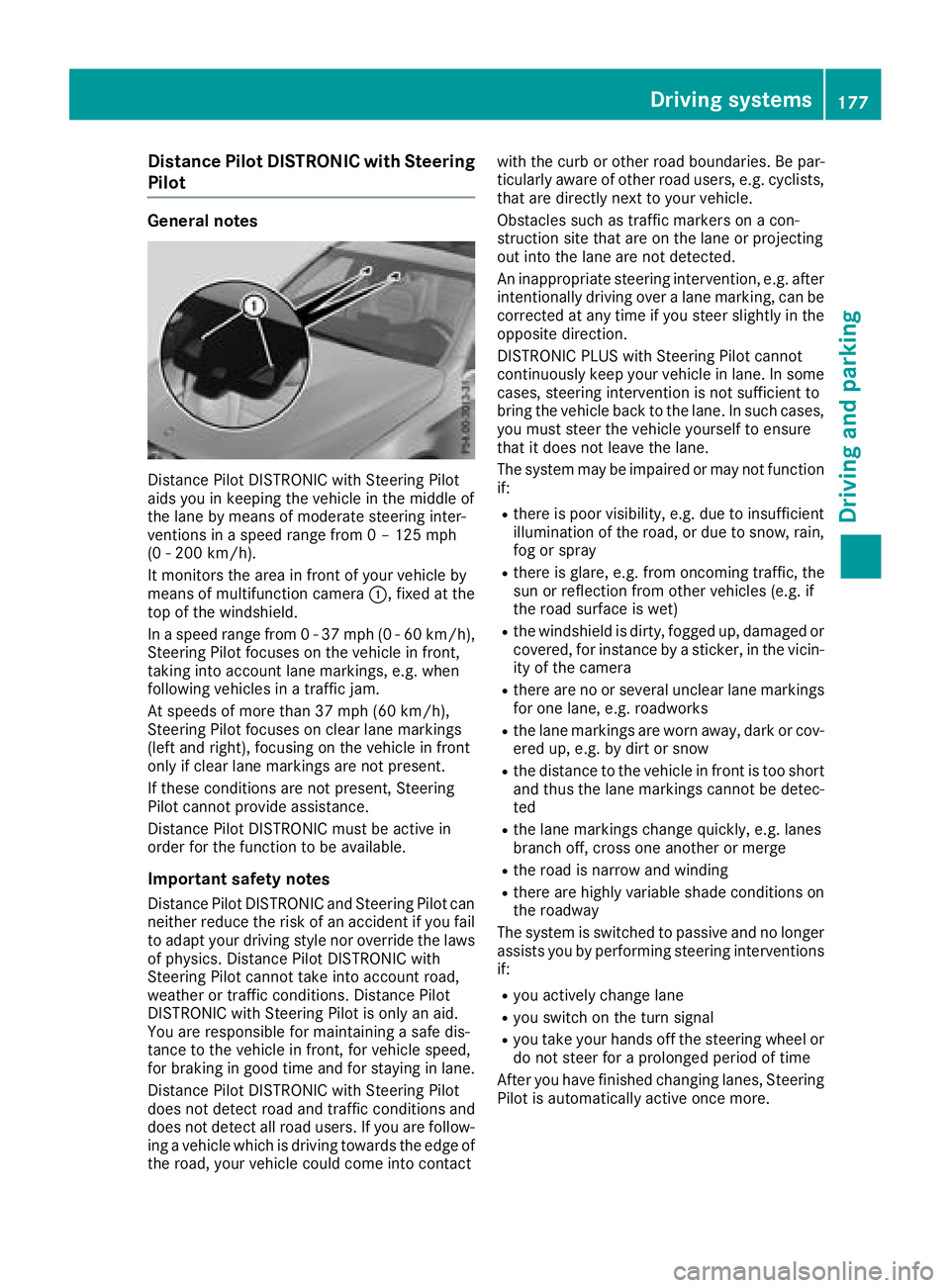
It monitors th e are a in fron t of your vehicle by
means of multifunction camera C , fixed at th e
to p of th e windshield .
In a speed range from 0 - 37 mph (0 - 60 km/ h) ,
Steering Pilot focuses on the vehicle in front,
taking into account lane markings, e.g. when
following vehicles in a traffic jam.
At speeds of more than 37 mph (60 km/h),
Steering Pilot focuses on clear lane markings
(left and right), focusing on the vehicle in front
only if clear lane markings are not present.
If these conditions are not present, Steering
Pilot cannot provide assistance.
Distance Pilot DISTRONIC must be active in
order for the function to be available.
Important safety notes
Distance Pilot DISTRONIC and Steering Pilot can
neither reduce the risk of an accident if you fail
to adapt your driving style nor override the laws
of physics. Distance Pilot DISTRONIC with
Steering Pilot cannot take into account road,
weather or traffic conditions. Distance Pilot
DISTRONIC with Steering Pilot is only an aid.
You are responsible for maintaining a safe dis-
tance to the ve hi
cle in front, for vehicle speed,
for braking in good time and for staying in lane.
Distance Pilot DISTRONIC with Steering Pilot
does not detect road and traffic conditions and
does not detect all road users. If you are follow-
ing a vehicle which is driving towards the edge of
the road, your vehicle could come into contact with the curb or other road boundaries. Be par-
ticularly aware of other road users, e.g. cyclists,
that are directly next to your vehicle.
Obstacles such as traffic markers on a con-
struction site that are on the lane or projecting
out into the lane are not detected.
An inappropriate steering intervention, e.g. after
intentionally driving over a lane marking, can be
corrected at any time if you steer slightly in the
opposite direction.
DISTRONIC PLUS with Steering Pilot cannot
continuously keep your vehicle in lane. In some
cases, steering intervention is not sufficient to
bring the vehicle back to the lane. In such cases,
you must steer the vehicle yourself to ensure
that it does not leave the lane.
The system may be impaired or may not function
if: R
there is poor visibility, e.g. due to insufficient
illumination of the road, or due to snow, rain,
fog or spray R
there is glare, e.g. from oncoming traffic, the
sun or reflection from other vehicles (e.g. if
the road su rface i s wet) R
the windshield is dirty, fogged up, damaged or
covered, for instance by a sticker, in the vicin-
ity of the camera R
there are no or several unclear lane markings
for one lane, e.g. roadworks R
the lane markings are worn away, dark or cov-
ered up, e.g. by dirt or snow R
the distance to the vehicle in front is too short
and thus the lane markings cannot be detec-
ted R
the lane markings change quickly, e.g. lanes
branch off, cross one another or merge R
the road is narrow and winding R
there are highly variable shade conditions on
the roadway
The system is switched to passive and no longer
assists you by performing steering interventions
if: R
you actively change lane R
you switch on the turn signal R
you take your hands off the steering wheel or
do not steer for a prolonged period of time
After you have finished changing lanes, Steering
Pilot is automatically active once more.Driving systems 177
Driving and parking Z
Page 180 of 390
Steering Pilot cannot provide assistance: R
on very sharp corners R
when towing a trailer R
when a loss of tire pressure or a defective tire
has been detected and displayed
Pay attention also to the important safety notes
on Distance Pilot DISTRONIC ( Y
page 171).
The steering interventions are carried out with a
limited steering moment. The system requires
the driver to keep his hands on the steering
wheel and to steer himself.
If you do not steer yourself or if you take your
hands off the steering wheel for a prolonged
period of time, the system will first alert you with
a visual warning. A steering wheel symbol
appears in the multifunction display. If you have
still not started to steer and have not taken hold
of the steering wheel, a warning tone also
sounds to remind you to take control of the
vehicle after five seconds at the latest. Steering
Pilot is then switched to passive. Distance Pilot
DISTRONIC remains active.
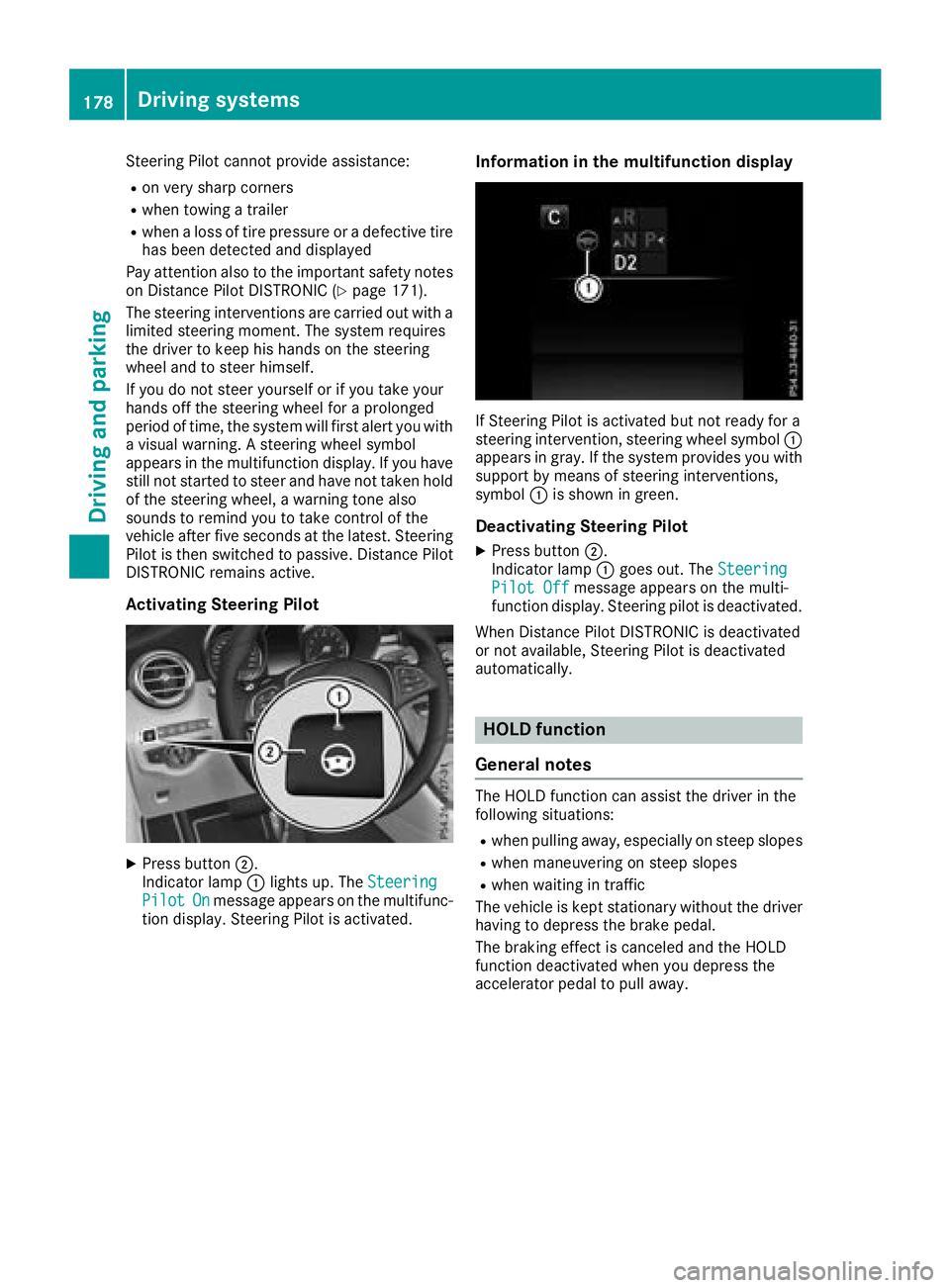
Activating Steering Pilot
X
Press button D .
Indicator lamp C lights up. The Steering
Pilot On message appears on the multifunc-
tion display. Steering Pilot is activated. Information in the multifunction display
If Steering Pilot is activated but not ready for a
steering intervention, steering wheel symbol C
appears in gray. If the system provides you with
support by means of steering interventions,
symbol C is shown in green.
Deactivating Steering Pilot X
Press button D .
Indicator lamp C goes out. The Steering
Pilot Off message appears on the multi-
function display. Steering pilot is deactivated.
When Distance Pilot DISTRONIC is deactivated
or not available, Steering Pilot is deactivated
automatically.
HOLD function
General notes The HOLD function can assist the driver in the
following situations: R
when pulling away, especially on steep slopes R
when maneuvering on steep slopes R
when waiting in traffic
The vehicle is kept stationary without the driver
having to depress the brake pedal.
The braking effect is canceled and the HOLD
function deactivated when you depress the
accelerator pedal to pull away.178
Driving systems
Driving and parking
Page 182 of 390
The electric parking brake secures the vehicle
automatically if the HOLD function is activated
when the vehicle is stationary and: R
a system malfunction occurs R
the power supply is insufficient
If a malfunction occurs, the transmission may
also be shifted to position ] automatically.
DSR
General notes DSR (Downhill Speed Regulation) is an aid to
assist you when driving downhill that is available
only in vehicles with the Off-Road Engineering
package.
It keeps the speed of travel at the speed selec-
ted on the on-board computer. The steeper the
downhill gradient, the greater the DSR braking
effect on the vehicle. When driving on flat
stretches of road or on an uphill gradient, the
DSR braking effect is minimal or nonexistent.
DSR controls the vehicle’s speed when it is acti-
vated and the transmission is in position [ , ^
or \\ . You can drive at a higher or a lower speed
than that set on the on-board computer at any
time by accelerating or braking.
Important safety notes
G WARNING
If the speed driven and the set speed deviate
and you activate DSR on a slippery road sur-
face, the wheels may lose traction. There is an
increased danger of skidding and accidents.
Before switching DSR on, please take into
consideration the road surface and the differ-
ence between driving speed and the set
speed.
DSR can neither reduce the risk of accident if
you fail to adapt your driving style nor override
the laws of physics. DSR cannot take account of
road, weather and traffic conditions. DSR is only
an aid. You are responsible for maintaining a
safe distance to the vehicle in front, for vehicle
speed, for braking in good time and for staying in
lane.
You are always responsible for keeping control
of the vehicle and for assessing whether the
downhill gradient can be managed. DSR may not always be able to keep to the set speed, depend-
ing on road surface and tire conditions. Select a
set speed suitable for the prevailing conditions
and when necessary, apply the brakes manually.
Further information about "Driving off-road"
( Y
page 165).
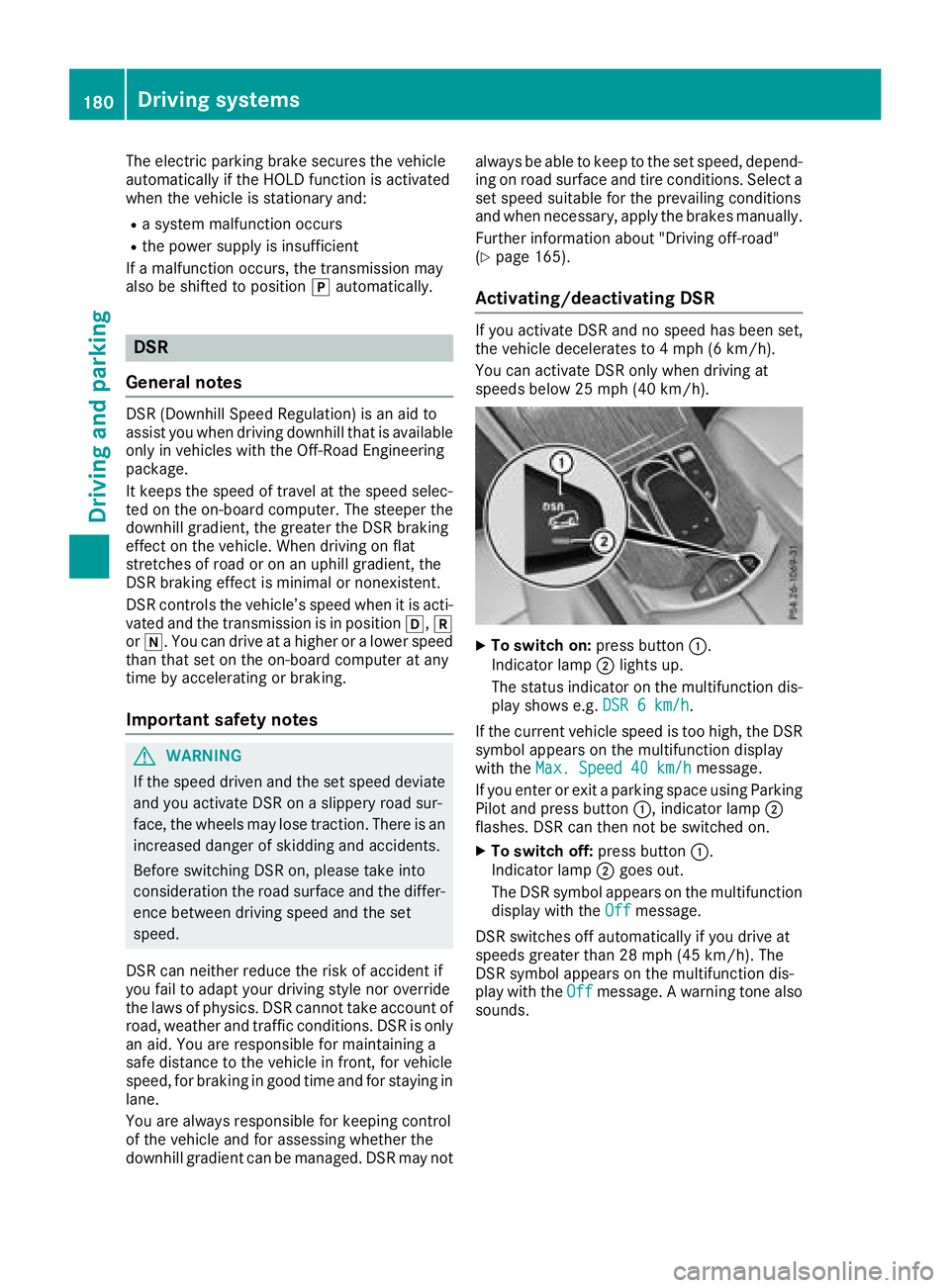
Activating/deactivating DSR If you activate DSR and no speed has been set,
the vehicle decelerates to 4 mph (6 km/h).
You can activate DSR only when driving at
speeds below 25 mph (40 km/h).
X
To switch on: press button C .
Indicator lamp D lights up.
The status indicator on the multifunction dis-
play shows e.g. DSR 6 km/h .
If the current vehicle speed is too high, the DSR
symbol appears on the multifunction display
with the Max. Speed 40 km/h message.
If you enter or exit a parking space using Parking
Pilot and press button C , indicator lamp D
flashes. DSR can then not be switched on. X
To switch off: press button C .
Indicator lamp D goes out.
The DSR symbol appears on the multifunction
display with the Off message.
DSR switches off automatically if you drive at
speeds greater than 28 mph (45 km/h). The
DSR symbol appears on the multifunction dis-
play with the Off message. A warning tone also
sounds.180
Driving systems
Driving and parking
Page 187 of 390
S (Sport) R
the suspension setting is
more taut R
the vehicle is set to low level R
at higher speeds, the vehicle
level does not continue to
lower R
Mercedes-AMG GLC 63
4MATIC+/GLC 63 S
4MATIC+: the 4MATIC+ is
synchronised more dynami-
cally
S+ (Sport
Plus)
Mercedes-
AMG GLC
63 4MATIC
+/GLC
63 S
4MATIC+:
RACE R
the suspension setting is
even more taut R
the vehicle is set to low level R
at higher speeds, the vehicle
level does not continue to
lower R
Mercedes-AMG GLC 63
4MATIC+/GLC 63 S
4MATIC+: the 4MATIC+ is
synchronised more dynami-
cally
Important safety notes
G WARNING
When the vehicle is being lowered, people
could become trapped if their limbs are
between the vehicle body and the wheels or
underneath the vehicle. There is a risk of
injury.
Make sure no one is underneath the vehicle or
in the immediate vicinity of the wheel arches
when the vehicle is being lowered.
i If one of the doors is open, the vehicle is not
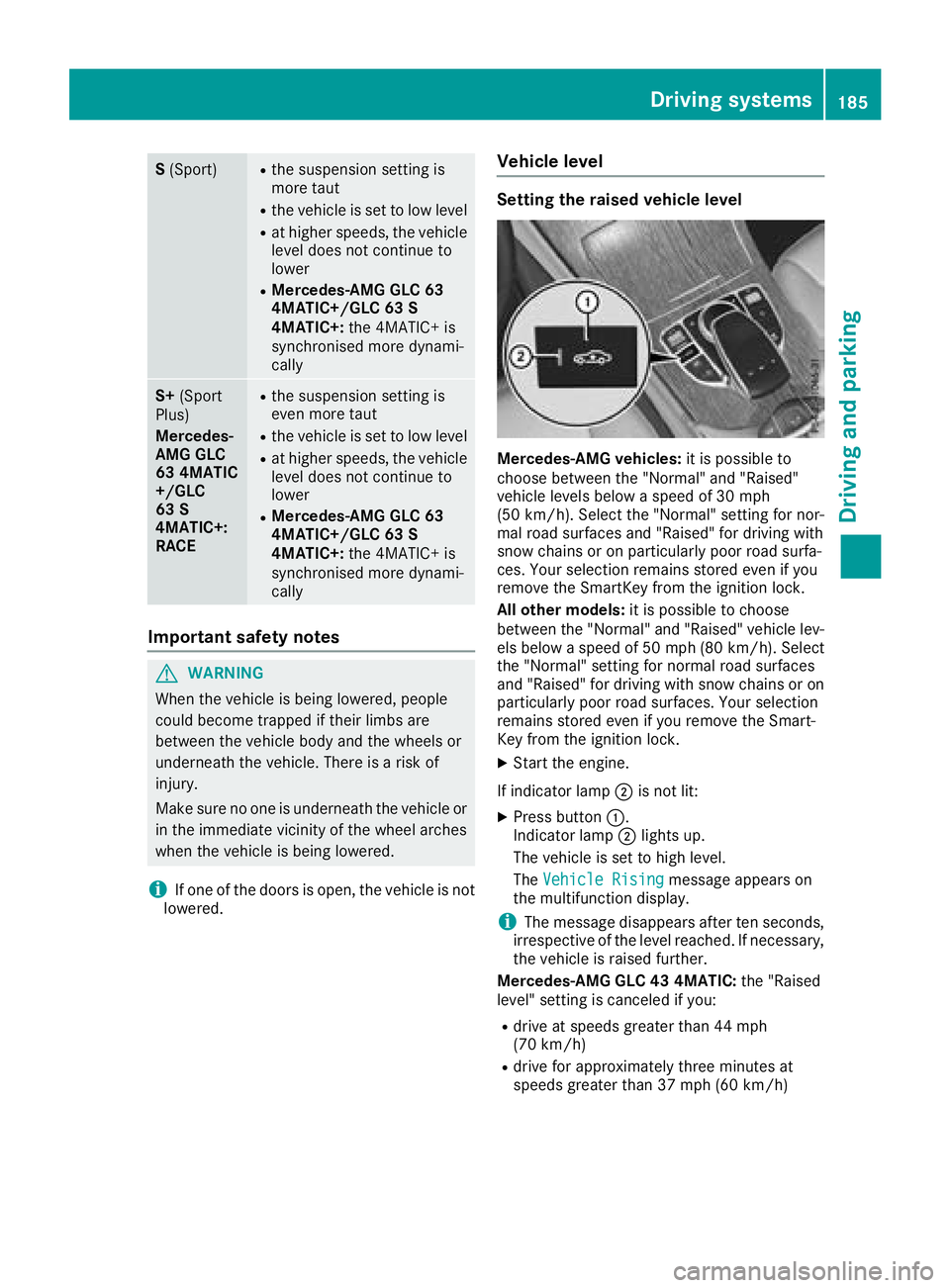
lowered. Vehicle level Setting the raised vehicle level
Mercedes-AMG vehicles: it is possible to
choose between the "Normal" and "Raised"
vehicle levels below a speed of 30 mph
(50 km/h). Select the "Normal" setting for nor-
mal road surfaces and "Raised" for driving with
snow chains or on particularly poor road surfa-
ces. Your selection remains stored even if you
remove the SmartKey from the ignition lock.
All other models: it is possible to choose
between the "Normal" and "Raised" vehicle lev-
els below a speed of 50 mph (80 km/ h) . Select
the "Normal" setting for normal road surfaces
and "Raised" for driving with snow chains or on
particularly poor road surfaces. Your selection
remains stored even if you remove the Smart-
Key from the ignition lock. X
Start the engine.
If indicator lamp D is not lit: X
Press button C .
Indicator lamp D lights up.
The vehicle is set to high level.
The Vehicle Rising
message appears on
the multifunction display.
i The message disappears after ten seconds,
irrespective of the level reached. If necessary,
the vehicle is raised further.
Mercedes-AMG GLC 43 4MATIC: the "Raised
level" setting is canceled if you: R
drive at speeds greater than 44 mph
(70 km/h) R
drive for approximately three minutes at
speeds greater than 37 mph (60 km/h)Driving systems 185
Driving and parking Z
Page 190 of 390
Parking Pilot
General notes Parking Pilot is an electronic parking aid with
ultrasound. It measures the road on both sides
of the vehicle. A parking symbol indicates a suit-
able parking space. Active steering intervention
and brake application can assist you during
parking and when exiting a parking space. You
can also still use Parking Assist PARKTRONIC
( Y
page 191).
Important safety notes Parking Pilot is only an aid. It is not a replace-
ment for your attention to your immediate sur-
roundings. You are always responsible for safe
maneuvering, parking and exiting a parking
space. Make sure that no persons, animals or
objects are in the path of your vehicle.
When Parking Assist PARKTRONIC is deactiva-
ted, Parking Pilot is also unavailable.
For vehicles with a trailer tow hitch installed, the
minimum length for parking spaces is slightly
longer.
If you have attached a trailer to your vehicle, you
should not use Parking Pilot. Once the electrical
connection is established between your vehicle
and the trailer, Parking Pilot is no longer availa-
ble. Parking Assist PARKTRONIC is deactivated
for the rear area.
G WARNING
While parking or pulling out of a parking
space, the vehicle swings out and can drive
onto areas of the oncoming lane. This could
result in a collision with another road user.
There is a risk of an accident.
Pay attention to other road users. Stop the
vehicle if necessary or cancel the Parking Pilot
parking procedure.
! If they cannot be avoided, drive over obsta-
cles such as curbs slowly and at an obtuse
angle. Otherwise, you may damage the
wheels or tires.
Parking Pilot may also display spaces not suita-
ble for parking, e.g.: R
where parking or stopping is prohibited R
in front of driveways or entrances and exits R
on unsuitable surfaces Parking tips: R
On narrow roads, drive as close to the parking
space as possible. R
Parking spaces that are littered or overgrown
might be identified or measured incorrectly. R
Parking spaces that are partially occupied by
trailer drawbars might not be identified as
such or be measured incorrectly. R
Snowfall or heavy rain may lead to a parking
space being measured inaccurately. R
Pay attention to the warning messages of
Parking Assist PARKTRONIC during the park-
ing procedure ( Y
page 193).R
You can intervene in the steering procedure
to correct it at any time. Parking Pilot is then
canceled- R
When transporting a load that protrudes from
your vehicle, you should not use Parking Pilot- R
Never use Parking Pilot when snow chains are
mounted. R
Always pay attention to the specified tire
pressure for your vehicle. This has a direct
influence on the parking characteristics of the
vehicle.
Use Parking Pilot for parking spaces that are: R
parallel or at right angles to the direction of
travel R
on straight roads, not bends R
on the same level as the road, e.g. not on the
pavement
Detecting parking spaces Objects located above the detection range of
Parking Pilot will not be detected when the park-
ing space is measured. These are not taken into
account when the parking procedure is calcula-
ted, e.g. overhanging loads, tail sections or load-
ing ramps of trucks. Parking Pilot may therefore
guide you into the parking space too early.
G WARNING
If there are objects above the detection range: R
Parking Pilot may steer in too early R
the vehicle may not stop in front of these
objects
You may cause a collision as a result. There is
a risk of an accident.
If objects are located above the detection
range, stop and deactivate Parking Pilot.188
Driving systems
Driving and parking