cruise control MERCEDES-BENZ GLC 2018 Owners Manual
[x] Cancel search | Manufacturer: MERCEDES-BENZ, Model Year: 2018, Model line: GLC, Model: MERCEDES-BENZ GLC 2018Pages: 390, PDF Size: 9.04 MB
Page 10 of 390
Control panel for dual-zone auto-
mat ic clim ate control .................... .1 24
Controlling automatically .............. .1 28
Cooling with air dehumidification .. 128
Cooling with air dehumidification
(multimedia system) ..................... .2 85
Defrosting the windows ................. 130
Defrosting the windshield .............. 130
ECO start/stop function ................ 127
General notes ................................ 124
Indicator lamp ................................ 128
Ionization ....................................... 133
Ionization (multimedia system) ...... 285
Notes on using the automatic cli-
mate control .................................. 126
Overview ........................................ 284
Overview of systems ..................... .1 24
Perfume atomizer .......................... 132
Perfume atomizer (multimedia
system) .......................................... 285
Pre-entry climate control (via key)
(multimedia system) ..................... .2 85
Pre-entry climate control at
departure time (multimedia sys-
tem) ............................................... 285
Problem with the rear window
defroster ........................................ 131
Problems with cooling with air
dehumidification ............................ 128
Rear control panel ......................... 125
Refrigerant ..................................... 381
Refrigerant filling capacity ............. 382
Setting the air distribution ............. 129
Setting the air vents ..................... .1 33
Setting the airflow ......................... 129
Setting the climate mode .............. .1 28
Setting the climate mode (multi-
media system) ............................... 285
Setting the temperature ................ 128
Switching air-recirculation mode
on/off ............................................ 131
Switching on/off ........................... 127
Switching residual heat on/off ...... 131
Switching the rear window
defro ster on/off ............................ 130
Sw i
tching the synchronization
function on and off ........................ 130 Synchronization function (multi-
media system) ............................... 285
Climate control settings
Multimedia system ........................ 284
Climate control system
Climate control .............................. 127
Coat hooks ......................................... 299
Cockpit
Overview .......................................... 36
Code for Apps
see QR code
COMAND display
Cleaning ......................................... 329
Combination switch .......................... 113
Connecting a USB device
see also Digital Operator's Man-
ual ................................................. .2 80
Consumption statistics (on-board
computer) .......................................... 225
Controller .......................................... .2 81
Controlling the speed
see Distance Pilot DISTRONIC
Convenience closing feature .............. 92
Convenience opening feature ............ 92
Coolant (engine)
Checking the level ......................... 322
Display message ............................ 252
Filling capacity ............................... 381
Important safety notes .................. 380
Temperature display in the instru-
ment cluster .................................. 221
Warning lamp ................................. 275
Cooling
see Climate control
Copyright ............................................. 35
Cornering light function
Display message ............................ 251
Function/notes ............................ .1 14
Crosswind Assist ................................. 73
Cruise control
Cruise control lever ....................... 169
Deactivating ................................... 170
Display message ............................ 261
Driving system ............................... 169
Function/notes ............................ .1 69
General notes ................................ 169
Important safety notes .................. 1698
Index
Page 11 of 390
Setting a speed .............................. 170
Storing and maintaining current
speed ............................................. 169
Storing the current speed or call-
ing up the last stored speed .......... 170
Cup holder
Center console .............................. 302
Important safety notes .................. 302
Rear compartment ......................... 302
Customer Assistance Center
(CAC) ..................................................... 32
Customer Relations Department ....... 32
D Data
see Technical data
Data carrier
Selecting ........................................ 229
Daytime running lamps
Display message ............................ 251
Function/notes ............................. 112
Switching on/off (on-board com-
puter) ............................................. 234
Diagnostics connection ...................... 32
Digital Operator's Manual
Help ................................................. 27
Introduction ..................................... 27
Digital speedometer ......................... 225
DIRECT SELECT lever
Automatic transmission ................. 146
Display
see Display messages
see Warning and indicator lamps
Display messages
ASSYST PLUS ................................ 322
Calling up (on-board computer) ..... 239
Driving systems ............................. 256
Engine ............................................ 252
General notes ................................ 239
Hiding (on-board computer) ........... 239
Introduction ................................... 239
Lights ............................................. 251
Safety systems .............................. 240
SmartKey ....................................... 267
Tires ............................................... 262
Vehicle ........................................... 264 Distance Pilot DISTRONIC
Activating ....................................... 172
Activation conditions ..................... 172
Cruise control lever ....................... 172
Display Message ............................ 259
Displays in the instrument cluster .. 175
Driving tips .................................... 176
Driving with Distance Pilot
DISTRONIC .................................... 173
Function/notes ............................. 170
Important safety notes .................. 171
Setting a speed .............................. 174
Setting the specified minimum
distance ......................................... 174
Stopping ........................................ 174
Switching off .................................. 176
with Steering Pilot ......................... 177
Distance recorder ............................. 224
Distance warning (warning lamp) .... 277
Distance warning function
Function/notes ................................ 68
Distance warning system
see Active Brake Assist
Doors
Automatic locking (switch) ............... 85
Central locking/unlocking
(SmartKey) ....................................... 78
Control panel ................................... 43
Display message ............................ 266
Emergency lo cking ........................... 85
Eme rg ency unlocking ....................... 85
Important safety notes .................... 84
Opening (from inside) ...................... 84
Drinking and driving ......................... 161
Drive program
Automatic transmission ................. 150
SETUP (on-board computer,
Mercedes-AMG vehicles) ............... 236
Drive programs
Display (DIRECT SELECT lever) ...... 148
DYNAMIC SELECT switch .............. 144
Drive system
DSR ............................................... 180
Driver's door
see Doors
Driving abroad
Mercedes-Benz Service ................. 323
Driving Assistance PLUS package ... 209Index 9
Page 12 of 390
Driving downhil l ................................ 16 8
Driving in mountainous terrain
Approach/departur e angle ............ 16 8
Driving off-road
Drivin g downhill ............................ .1 68
see Off-road driving
Driving on flooded roads .................. 165
Driving safety system
Active Brake Assist .......................... 67
Crosswind Assist ............................ .7 3
Driving safet y systems
AB S (Anti-loc k Braking System) ...... .6 6
Active Brake Assist with cross-
traffic function ................................. 73
ADAPTIVE BRAKE ............................. 73
Adaptive Brake Assist ...................... 68
BAS (Brake Assist System) .............. 67
Distance warning function ............... 67
EBD (electronic brake force distri-
bution) ............................................. 73
ESP ®
(Electronic Stability Pro-
gram) ............................................... 69
Important safety information ........... 66
Overview .......................................... 66
STEER CONTROL ............................. 76
Driving system
AIR BODY CONTROL ...................... 184
AMG sports suspension based on
AIR BODY CONTROL ...................... 186
Distance Pilot DISTRONIC ............. 170
Distance Pilot DISTRONIC with
Steering Pilot ................................. 177
Off-road program ........................... 181
Parking assist PARKTRONIC .......... 191
Parking Pilot .................................. 188
RACE START (Mercedes-AMG
vehicles) ........................................ 183
Driving systems
360°camera .................................. 199
Active Blind Spot Assist ................. 209
Active Lane Keeping Assist ............ 212
ATTENTION ASSIST ........................ 203
Blind Spot Assist ............................ 205
Cruise control ................................ 169
Display message ............................ 256
Driving Assistance Plus package ... 209
HOLD function ............................... 178
Lane Ke eping Assist ...................... 207 Lane
Tracking package .................. 205
Rear view camera .......................... 194
Traffic Sign Assist .......................... 205
Driving tips
Automatic transmission ................. 149
Brakes ........................................... 163
Break-in period .............................. 135
Distance Pilot DISTRONIC ............. 176
Downhill gradient ........................... 163
Drinking and driving ....................... 161
Driving in winter ............................. 165
Driving on flooded roads ................ 165
Driving on sand .............................. 167
Driving on wet roads ...................... 164
Exhaust check ............................... 161
Fuel ................................................ 161
General .......................................... 160
Hydroplaning ................................. 164
Icy road surfaces ........................... 165
Important safety notes .................. 135
Limited braking efficiency on sal-
ted roads ....................................... 163
Off-road driving .............................. 165
Snow chains .................................. 351
Subjecting brakes to a load ........... 163
The first 1000 miles (1500 km) ..... 135
Tire ruts ......................................... 167
Towing a trailer .............................. 215
Traveling uphill ............................... 168
Wet road surface ........................... 163
DSR (Downhill Speed Regulation)
Display message ............................ 259
Function/notes ............................. 180
DVD video
Operating (on-board computer) ..... 229
see also Digital Operator's Man-
ual .................................................. 280
DYNAMIC SELECT switch
Automatic transmission ................. 144
Climate control (dual-zone auto-
matic climate control) .................... 127
E
EASY-ENTRY feature
Function/notes ............................. 106
EASY-EXIT feature
Function/notes ............................. 10610
Index
Page 22 of 390
Service message
see ASSYST PLUS
Service products
Brake fluid .................................... .3 80
Coolant (engine) ............................ 380
Engine oil ....................................... 379
Fuel ................................................ 377
Important safety notes .................. 377
Refrigerant (air-conditioning sys-
tem) ............................................... 381
Washer fluid ................................... 381
Setting the date/time format
see also Digital Operator's Man-
ual ................................................. .2 80
Setting the language
see also Digital Operator's Man-
ual ................................................. .2 80
Setting the time
see also Digital Operator's Man-
ual ................................................. .2 80
Settings
Factory (on-board computer) ......... 235
On-board computer ....................... 231
SETUP (on-board computer,
Mercedes-AMG vehicles) .................. 236
Side impact air bag ............................ .5 1
Side marker lamp (display mes-
sage) ................................................... 251
Side running board
Cleaning ......................................... 328
Side windows
Cleaning ......................................... 327
Convenience closing feature ............ 92
Convenience opening feature ......... .9 2
Important safety information ........... 91
Opening/closing .............................. 91
Problem (malfunction) .................... .9 4
Resettin g ........................................ .9 3
Reversin g feature ............................ .9 1
SIRIUS services
see also Digital Operator's Man-
ual .................................................. 280
Ski and snowboard bag ............... ..... 292
Sliding sunroof
Important safet y
notes .................... 94
Problem (malfunction) ..................... 97
see Panorama roof with power
tilt/sliding panel SmartKey
Changing the battery ....................... 81
Changing the programming ............ .8 0
Checking the battery ...................... .8 1
Convenience closing feature ............ 93
Convenience opening feature .......... 92
Display message ............................ 267
Door central locking/unlocking ...... .7 8
Important safety notes .................... 78
KEYLESS-GO start function .............. 80
Loss ................................................ .8 2
Mechanical key ................................ 80
Overview .......................................... 78
Positions (ignition lock) ................. 136
Problem (malfunction) ..................... 82
Starting the engine ........................ 138
Smartphone
Starting the engine ........................ 139
SMS
see also Digital Operator's Man-
ual .................................................. 280
Snow chains ...................................... 351
Socket (12 V)
Cargo compartment ....................... 305
Center console .............................. 305
General notes ................................ 305
Rear compartment ........................ .3 05
Sound
Switching on/off ........................... 281
Special seat belt retractor .................. 60
Specialist workshop ............................ 32
Speed, controlling
see Cruise control
Speedometer
Activating/deactivating the addi-
tional spee dometer ........................ 235
Di gi tal ............................................ 225
In the Instrument cluster ................. 37
Segments ...................................... 220
Selecting the display unit .............. .2 34
SPORT handling mode
Deactivating/activating
(Mercedes-AMG vehicles) ................ 71
Warning lamp ................................. 273
Sports exhaust system
AMG ............................................... 142
Standing lamps
Display message ............................ 25120
Index
Page 152 of 390
Gliding mode is deactivated under the following
conditions: R
You depress the accelerator pedal. R
You depress the brake pedal. R
You change the transmission position
( Y
page 146).R
You switch to drive program RACE
(Mercedes-AMG GLC 63 S 4MATIC), S+ or S
( Y
page 144).R
You activate manual gearshifting
( Y
page 152).R
You leave the suitable speed range.
i If you have selected the "Eco" or "Comfort"
(Mercedes-AMG GLC 63 4MATIC/
GLC 63 S 4MATIC setting for the drive (engine
and transmission management) in drive pro-
gram I , you can also activate gliding mode.
Information on DYNAMIC SELECT and on con-
figuring drive program I with the multimedia
system (see the Digital Operator's Manual).
Towing a trailer X
Drive in the middle of the engine speed range
on uphill gradients. X
Manual shifting: depending on the uphill or
downhill gradient, shift into a gear
( Y
page 152), in which the engine will run the
middle of the engine speed range.
This also applies when cruise control or Dis-
tance Pilot DISTRONIC are activated.
Drive programs
All vehicles except Mercedes-AMG GLC
63 4MATIC+/GLC 63 S 4MATIC+
Drive program I (Individual)
In drive program I the following properties of the
drive program can be selected: R
the drive (engine and transmission manage-
ment)
and therefore indirectly the availability of glid-
ing mode and the properties of the driver
assistance systems R
the suspension R
the steering R
the availability of the ECO start/stop function R
the climate control Information about configuring drive program I
with the multimedia system can be found under
"DYNAMIC SELECT" in the vehicle's Digital
Operator's Manual.
Drive program S+ (Sport Plus) Drive program S+ is characterized by the fol-
lowing: R
the vehicle exhibits particularly sporty driving
characteristics. R
the vehicle pulls away in first gear. R
the automatic transmission shifts up later.
The fuel consumption possibly being higher
as a result of the later automatic transmission
shift points. R
the suspension exhibits particularly stiff
springing and damping settings (vehicles with
AIR BODY CONTROL). R
gliding mode is not available. R
the ECO start/stop function is deactivated
( Y
page 141).
Drive program S (Sport) Drive program S is characterized by the follow-
ing: R
the vehicle exhibits sporty driving character-
istics. R
the vehicle pulls away in first gear. R
the automatic transmission shifts up later.
The fuel consumption possibly being higher
as a result of the later automatic transmission
shift points. R
the suspension exhibits stiff springing and
damping settings (vehicles with
AIR BODY CONTROL). R
gliding mode is not available. R
the ECO start/stop function is activated
( Y
page 141).
Drive program C (Comfort)
Drive program C is characterized by the follow-
ing: R
the vehicle delivers comfortable, economical
handling characteristics. R
the vehicle pulls away more gently in forward
and reverse gears, unless the accelerator
pedal is depressed fully. R
the vehicle has improved driving stability, for
example on slippery road surfaces. R
optimal fuel consumption resulting from the
automatic transmission shifting up sooner.150
Automatic transmission
Driving and parking
Page 167 of 390
R
avoid sudden steering movements R
brake carefully
Driving on flooded roads
! Bear in mind that vehicles traveling in front
or in the opposite direction create waves. This
may cause the maximum permissible water
depth to be exceeded.
Failure to observe these notes may result in
damage to the engine, electrical systems and
transmission.
If you have to drive on stretches of road on which
water has collected, please bear in mind that: R
in the case of standing water, the water level
may be no higher than the lower edge of the
vehicle body R
you should drive no faster than walking pace
Winter driving
G WARNING
If you shift down on a slippery road surface in
an attempt to increase the engine's braking
effect, the drive wheels could lose their grip.
There is an increased danger of skidding and
accidents.
Do not shift down for additional engine brak-
ing on a slippery road surface.
G DANGER
If the exhaust pipe is blocked or adequate
ventilation is not possible, poisonous gases
such as carbon monoxide (CO) may enter the
vehicle. This is the case, e.g. if the vehicle
becomes trapped in snow. There is a risk of
fatal injury.
If you leave the engine or the auxiliary heating
running, make sure the exhaust pipe and area
around the vehicle are clear of snow. To
ensure an adequate supply of fresh air, open a
window on the side of the vehicle that is not
facing into the wind.
Have your vehicle winter-proofed at a qualified
specialist workshop at the onset of winter.
Drive particularly carefully on slippery road sur-
faces. Avoid sudden acceleration, steering and braking maneuvers. Do not use cruise control or
Distance Pilot DISTRONIC.
If the vehicle threatens to skid or cannot be
stopped when moving at low speed: X
Shift the transmission to position \\ .
The outside temperature indicator is not
designed to serve as an ice-warning device and
is therefore unsuitable for that purpose.
Changes in the outside temperature are dis-
played after a short delay.
Indicated temperatures just above the freezing
point do not guarantee that the road surface is
free of ice. The road may still be icy, especially in
wooded areas or on bridges. The vehicle could
skid if you fail to adapt your driving style. Always
adapt your driving st yle an d drive at a speed to
suit the prevailing weather conditions.
You should pay special attention to road condi-
tions when temperatures are around freezing
point.
For more information on driving with snow
chains, see ( Y
page 351).
For more information on driving with summer
tires, see ( Y
page 351).
Observe the notes in the "Winter operation" sec-
tion ( Y
page 351).
Off-road driving
Important safety notes
G WARNING
If you drive on a steep incline at an angle or
turn when driving on an incline, the vehicle
could slip sideways, tip and rollover. There is a
risk of an accident.
Always drive on a steep incline in the line of
fall (straight up or down) and do not turn the
vehicle.
G WARNING
Flammable material such as leaves, grass or
twigs may ignite if they come into contact with
hot parts of the exhaust system. There is a risk
of fire.
When driving on an unpaved road or off-road,
check the vehicle underside regularly. In par-
ticular, remove trapped plant parts or other Driving tips 165
Driving and parking Z
Page 171 of 390
Drivin g systems
Mercedes-Benz Intelligent Drive Mercedes-Ben z Intelligen t Drive stand s fo r inno -
vative driver assistanc e and safet y systems
whic h enhance comfor t and suppor t th e driver in
critical situations. Wit h these intelligen t coordi-
nated systems Mercedes-Ben z has set a mile-
ston e on th e pat h toward s autonomous driving.
Mercedes-Ben z Intelligen t Drive embraces all
elements of active and passive safet y in on e well
though t out syste m – fo r th e safet y of th e vehi-
cl e occupant s and that of other road users.
Further information on drivin g safet y systems
( Y
page 66).
Cruis e contro l
General notes Cruise contro l maintain s a constant road speed
fo r you. It brake s automatically in order to avoid
exceedin g th e set speed. Change into a lowe r
gear in goo d time on lon g and steep downhill
gradients. Thi s is especially important if th e
vehicle is lade n or towin g a trailer . By doin g so,
you will mak e use of th e braking effect of th e
engine. Thi s relieves th e load on th e brake sys -
te m and prevents th e brake s from overheatin g
and wearin g to o quickly.
Use cruise contro l only if road and traffic con-
dition s mak e it appropriat e to maintain a steady
speed fo r a prolonged period. You can stor e any
road speed abov e 20 mph (30 km/h).
Important safet y notesCruise contro l can neither reduce th e ris k of an
acciden t if you fai l to adapt your drivin g style no r
override th e laws of physics. Cruise contro l can -
no t take into accoun t th e road, traffic and
weather conditions. Cruise contro l is only an
aid. You are responsible fo r maintainin g a saf e
distanc e to th e vehicle in front, fo r vehicle
speed, fo r braking in goo d time and fo r stayin g in
lane. Do no t use cruise control: R
in road and traffic condition s whic h do no t
allow you to maintain a constant speed, e.g. in
heav y traffic or on windin g roadsR
on slipper y road surfaces. Brakin g or accel-
erating could cause th e drive wheels to los e
traction and th e vehicle could then skid R
when there is poo r visibility, e.g. due to fog,
heav y rain or snow
If there is a chang e of drivers, advise th e ne w
driver of th e speed stored.
i The speed indicated in th e speedometer
may diffe r slightly from th e speed stored.
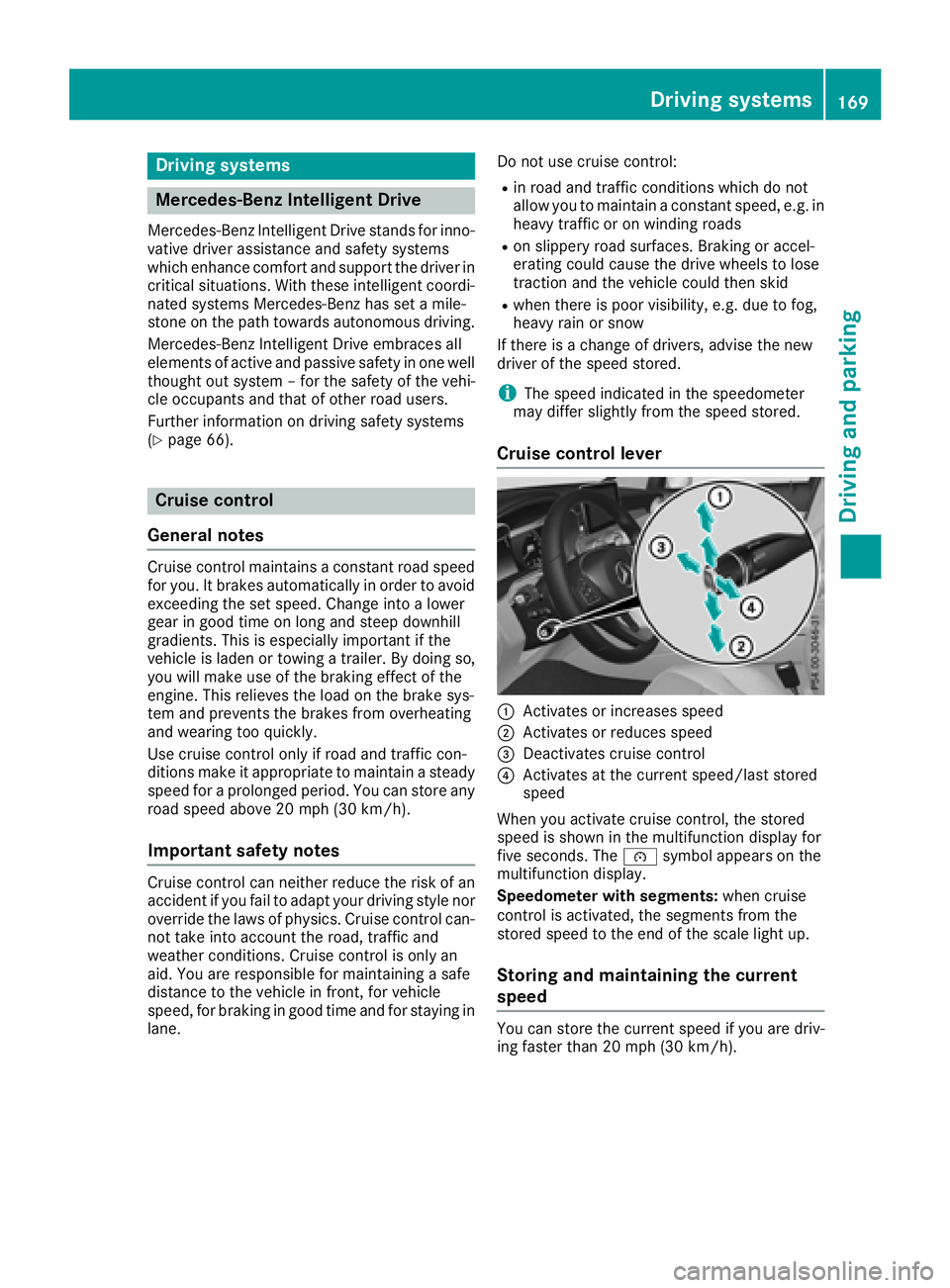
Cruis e contro l lever
C
Activates or increase s speedD
Activates or reduce s speed
Page 172 of 390
X
Accelerate the vehicle to the desired speed. X
Briefly press the cruise control lever up C or
down D .X
Remove your foot from the accelerator pedal.
Cruise control is activated. The vehicle auto-
matically maintains the stored speed.
i Cruise control may be unable to maintain
the stored speed on uphill gradients. The
stored speed is resumed when the gradient
evens out. Cruise control maintains the
stored speed on downhill gradients by auto-
matically applying the brakes.
Storing the current speed or calling up
the last stored speed
G WARNING
If you call up the stored speed and it is lower
than the current speed, the vehicle deceler-
ates. If you do not know the stored speed, the
vehicle could decelerate unexpectedly. There
is a risk of an accident.
Pay attention to the road and traffic condi-
tions before calling up the stored speed. If you
do not know the stored speed, store the
desired speed again. X
Briefly pull the cruise control lever towards
you
Page 174 of 390
To avoid damage to the vehicle, deactivate
these systems in the following or similar sit-
uations: R
when towing the vehicle R
in the car wash
Distance Pilot DISTRONIC can neither reduce
the risk of an accident if you fail to adapt your
driving style nor override the laws of physics.
Distance Pilot DISTRONIC cannot take into
account road, weather or traffic conditions. Dis-
tance Pilot DISTRONIC is only an aid. You are
responsible for maintaining a safe distance to
the vehicle in front, for vehicle speed, for brak-
ing in good time and for staying in lane.
Do not use Distance Pilot DISTRONIC: R
in road and traffic conditions which do not
allow you to maintain a constant speed, e.g. in
heavy traffic or on winding roads R
on slippery road surfaces. Braking or accel-
erating could cause the drive wheels to lose
traction and the vehicle could then skid R
in poor visibility, e.g. due to fog, heavy rain or
snow
Distance Pilot DISTRONIC may not detect nar-
row vehicles driving in front, e.g. motorcycles, or
vehicles driving on a different line.
In particular, the detection of obstacles can be
impaired if: R
there is dirt on the sensors or anything else
covering the sensors R
there is snow or heavy rain R
there is interference by other radar sources R
there are strong radar reflections, for exam-
ple in parking garages
If Distance Pilot DISTRONIC no longer detects a
vehicle in front, it may unexpectedly accelerate
to the speed stored.
This speed may: R
be too high if you are driving in a turning lane
or an exit lane R
be so high in the right lane that you pass vehi-
cles driving on the left (in countries where
they drive on the right) R
be so high in the left lane that you pass vehi-
cles driving on the right (in countries where
they drive on the left)
If there is a change of drivers, advise the new
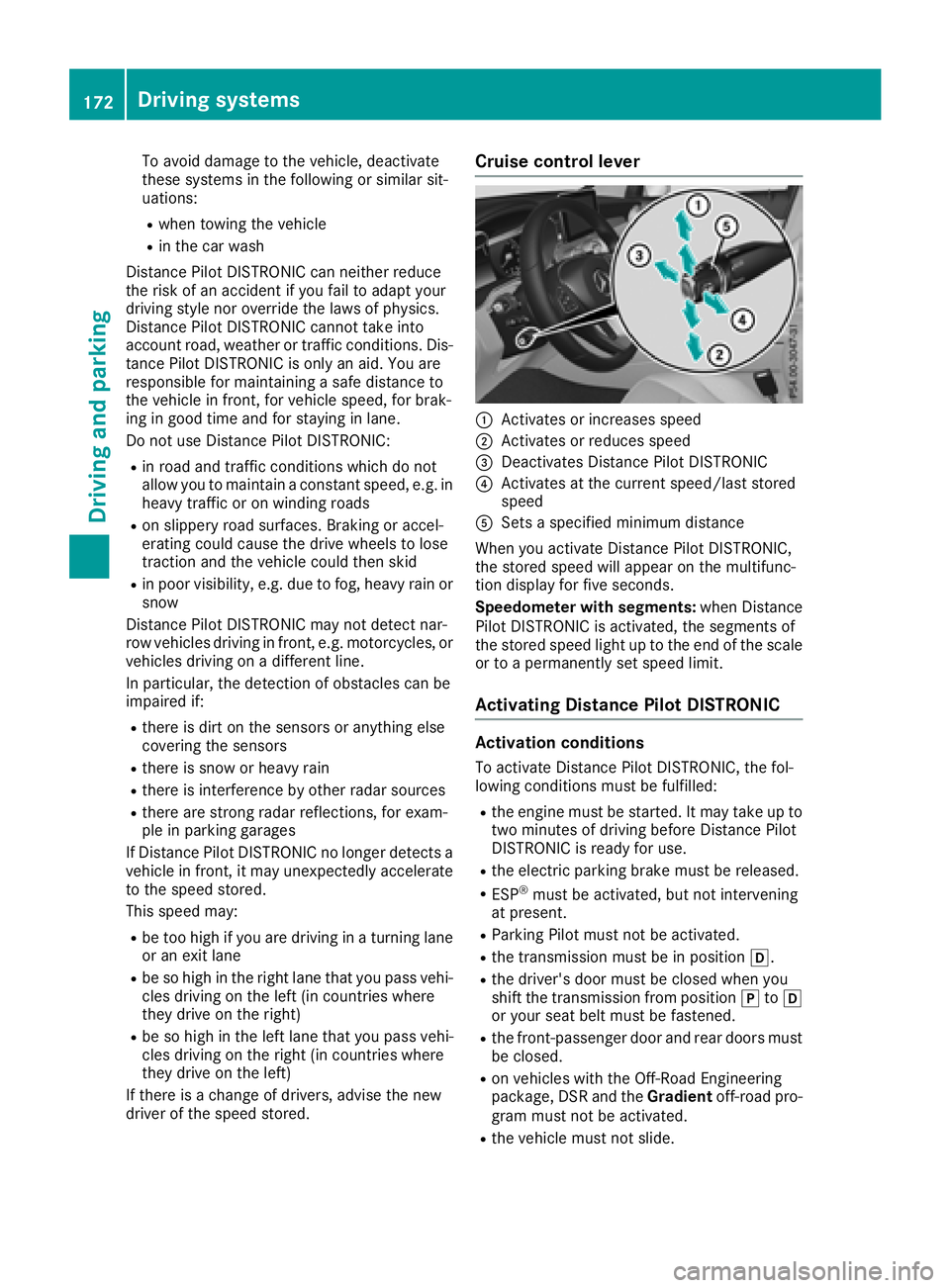
driver of the speed stored. Cruise control lever
C
Activates or increases speed D
Activates or reduces speed
Page 175 of 390
Activating X
Briefl y pull th e cruise control leve r towards
you