warning MERCEDES-BENZ GLC 2019 Owners Manual
[x] Cancel search | Manufacturer: MERCEDES-BENZ, Model Year: 2019, Model line: GLC, Model: MERCEDES-BENZ GLC 2019Pages: 370, PDF Size: 19.55 MB
Page 203 of 370
Lane-correcting brake application
If you leave your lane, under certain circumstan-ces the vehicle will brake briefly on one side.This is meant to assist you in bringing the vehicleback to the original lane.
GWARNING
A lane-correcting brake application cannot
always bring the vehicle back into the original
lane. There is a risk of an accident.
Always steer, brake or accelerate yourself,
especially if Active Lane Keeping Assist warns
you or makes a lane-correcting brake appli-
cation.
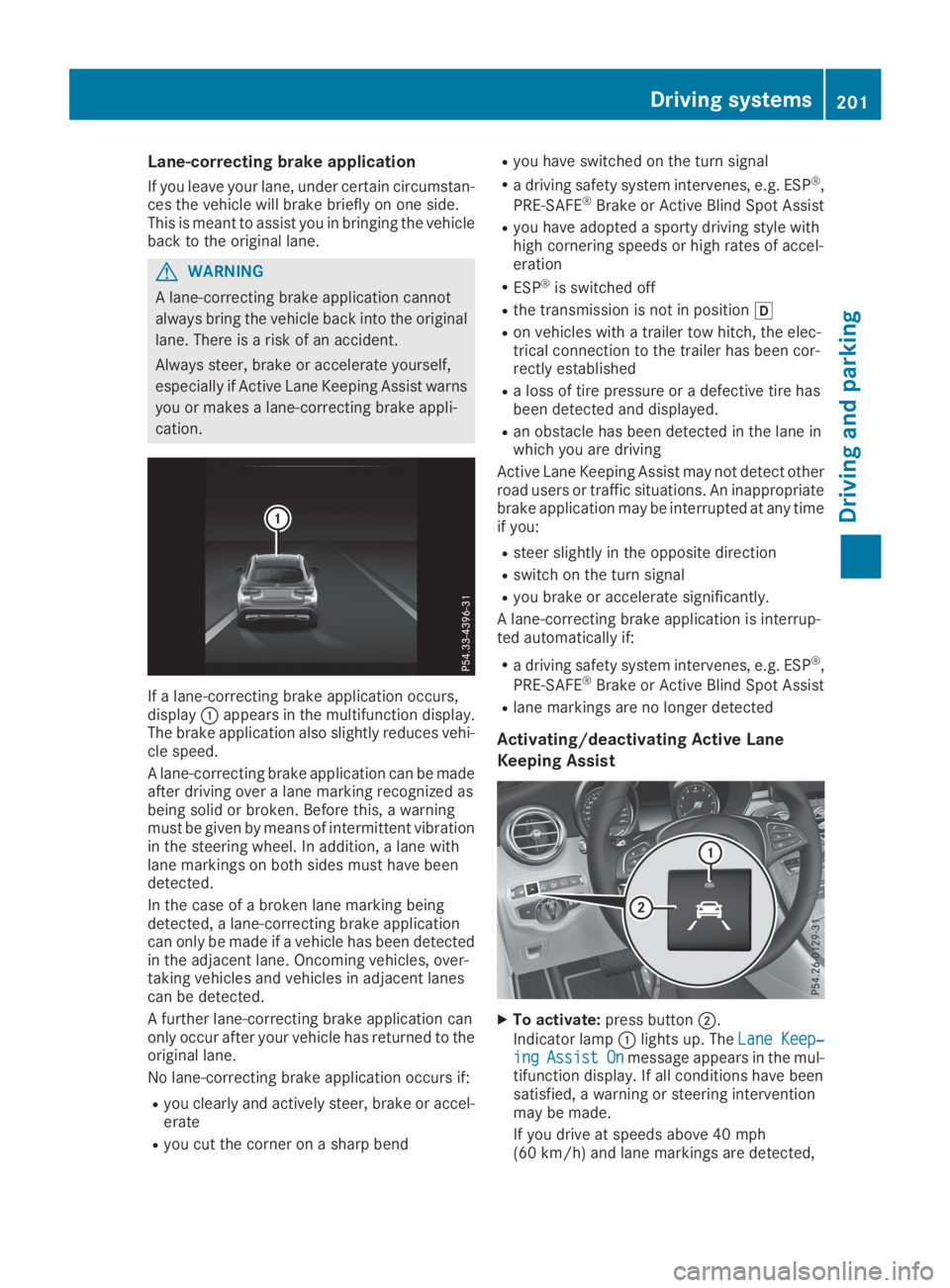
If a lane-correcting brake application occurs,displayCappears in the multifunction display.The brake application also slightly reduces vehi-cle speed.
A lane-correcting brake application can be madeafter driving over a lane marking recognized asbeing solid or broken. Before this, a warningmust be given by means of intermittent vibrationin the steering wheel. In addition, a lane withlane markings on both sides must have beendetected.
In the case of a broken lane marking beingdetected, a lane-correcting brake applicationcan only be made if a vehicle has been detectedin the adjacent lane. Oncoming vehicles, over-taking vehicles and vehicles in adjacent lanescan be detected.
A further lane-correcting brake application canonly occur after your vehicle has returned to theoriginal lane.
No lane-correcting brake application occurs if:
Ryou clearly and actively steer, brake or accel-erate
Ryou cut the corner on a sharp bend
Ryou have switched on the turn signal
Ra driving safety system intervenes, e.g. ESP®,
PRE-SAFE®Brake or Active Blind Spot Assist
Ryou have adopted a sporty driving style withhigh cornering speeds or high rates of accel-eration
RESP®is switched off
Rthe transmission is not in position[
Ron vehicles with a trailer tow hitch, the elec-trical connection to the trailer has been cor-rectly established
Ra loss of tire pressure or a defective tire hasbeen detected and displayed.
Ran obstacle has been detected in the lane inwhich you are driving
Active Lane Keeping Assist may not detect otherroad users or traffic situations. An inappropriatebrake application may be interrupted at any timeif you:
Rsteer slightly in the opposite direction
Rswitch on the turn signal
Ryou brake or accelerate significantly.
A lane-correcting brake application is interrup-ted automatically if:
Ra driving safety system intervenes, e.g. ESP®,
PRE-SAFE®Brake or Active Blind Spot Assist
Rlane markings are no longer detected
Activating/deactivating Active Lane
Keeping Assist
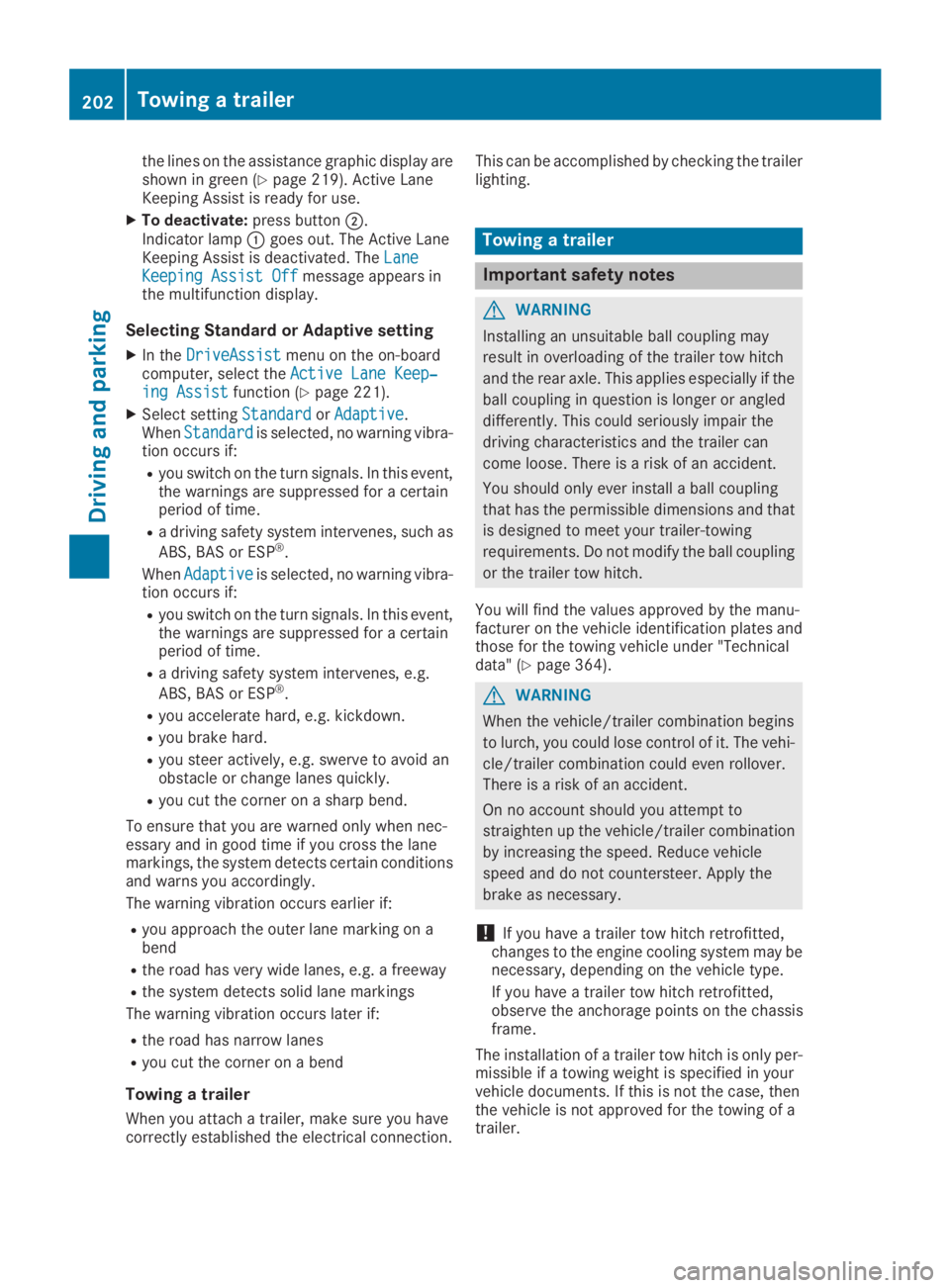
XTo activate:press buttonD.
Indicator lampClights up. TheLane Keep‐Lane Keep‐ingingAssistAssistOnOnmessage appears in the mul-tifunction display. If all conditions have beensatisfied, a warning or steering interventionmay be made.
If you drive at speeds above 40 mph(60 km/h) and lane markings are detected,
Driving systems201
Driving and parking
Z
Page 204 of 370
the lines on the assistance graphic display areshown in green (Ypage 219). Active LaneKeeping Assist is ready for use.
XTo deactivate:press buttonD.Indicator lampCgoes out. The Active LaneKeeping Assist is deactivated. TheLaneLaneKeeping Assist OffKeeping Assist Offmessage appears inthe multifunction display.
Selecting Standard or Adaptive setting
XIn theDriveAssistDriveAssistmenu on the on-boardcomputer, select theActive Lane Keep‐Active Lane Keep‐ing Assisting Assistfunction (Ypage 221).
XSelect settingStandardStandardorAdaptiveAdaptive.WhenStandardStandardis selected, no warning vibra-tion occurs if:
Ryou switch on the turn signals. In this event,the warnings are suppressed for a certainperiod of time.
Ra driving safety system intervenes, such as
ABS, BAS or ESP®.
WhenAdaptiveAdaptiveis selected, no warning vibra-tion occurs if:
Ryou switch on the turn signals. In this event,the warnings are suppressed for a certainperiod of time.
Ra driving safety system intervenes, e.g.
ABS, BAS or ESP®.
Ryou accelerate hard, e.g. kickdown.
Ryou brake hard.
Ryou steer actively, e.g. swerve to avoid anobstacle or change lanes quickly.
Ryou cut the corner on a sharp bend.
To ensure that you are warned only when nec-essary and in good time if you cross the lanemarkings, the system detects certain conditionsand warns you accordingly.
The warning vibration occurs earlier if:
Ryou approach the outer lane marking on abend
Rthe road has very wide lanes, e.g. a freeway
Rthe system detects solid lane markings
The warning vibration occurs later if:
Rthe road has narrow lanes
Ryou cut the corner on a bend
Towing a trailer
When you attach a trailer, make sure you havecorrectly established the electrical connection.
This can be accomplished by checking the trailerlighting.
Towing a trailer
Important safety notes
GWARNING
Installing an unsuitable ball coupling may
result in overloading of the trailer tow hitch
and the rear axle. This applies especially if the
ball coupling in question is longer or angled
differently. This could seriously impair the
driving characteristics and the trailer can
come loose. There is a risk of an accident.
You should only ever install a ball coupling
that has the permissible dimensions and that
is designed to meet your trailer-towing
requirements. Do not modify the ball coupling
or the trailer tow hitch.
You will find the values approved by the manu-facturer on the vehicle identification plates andthose for the towing vehicle under "Technicaldata" (Ypage 364).
GWARNING
When the vehicle/trailer combination begins
to lurch, you could lose control of it. The vehi-
cle/trailer combination could even rollover.
There is a risk of an accident.
On no account should you attempt to
straighten up the vehicle/trailer combination
by increasing the speed. Reduce vehicle
speed and do not countersteer. Apply the
brake as necessary.
!If you have a trailer tow hitch retrofitted,changes to the engine cooling system may benecessary, depending on the vehicle type.
If you have a trailer tow hitch retrofitted,observe the anchorage points on the chassisframe.
The installation of a trailer tow hitch is only per-missible if a towing weight is specified in yourvehicle documents. If this is not the case, thenthe vehicle is not approved for the towing of atrailer.
202Towing a trailer
Driving an d parking
Page 206 of 370
which the maximum permissible speed for vehi-cle/trailer combinations is above 60 mph(100 km/h).
When towing a trailer, your vehicle's handlingcharacteristics will be different in comparison towhen driving without a trailer and it will con-sume more fuel.
Shift to a lower gear on long and steep downhillgradients.
This also applies to:
Ractivated DISTRONIC PLUS
Ractivated cruise control
This will use the braking effect of the engine, sothat less braking will be required to maintain thespeed. This relieves the load on the brake sys-tem and prevents the brakes from overheatingand wearing too quickly. If you need additionalbraking, depress the brake pedal repeatedlyrather than continuously.
Driving tips
If the trailer swings from side to side:
XDo not accelerate.
XDo not counter-steer.
XBrake if necessary.
RMaintain a greater distance from the vehiclein front than when driving without a trailer.
RAvoid braking abruptly. If possible, brake gen-tly at first to allow the trailer to run on. Then,increase the braking force rapidly.
RThe values given for gradient-climbing capa-bilities from a standstill refer to sea level.When driving in mountainous areas, note thatthe power output of the engine and, conse-quently, the vehicle's gradient-climbing capa-bility, decreases with increasing altitude.
Installing the ball coupling
GWARNING
If the ball coupling is not correctly installed
and secured, it could come loose while driving
and endanger other road users. There is a risk
of an accident and injury.
Install and secure the ball coupling as descri-
bed in the ball coupling manufacturer's instal-
lation instructions. Make sure that the ball
coupling is correctly installed and secured
before every journey.
GWARNING
If the ball coupling is not installed and secured
correctly the trailer may come loose. There is
a risk of an accident.
Install and secure the ball coupling as descri-
bed in the ball coupling installation instruc-
tions. Make sure that the ball coupling is
installed and secured correctly before every
journey.
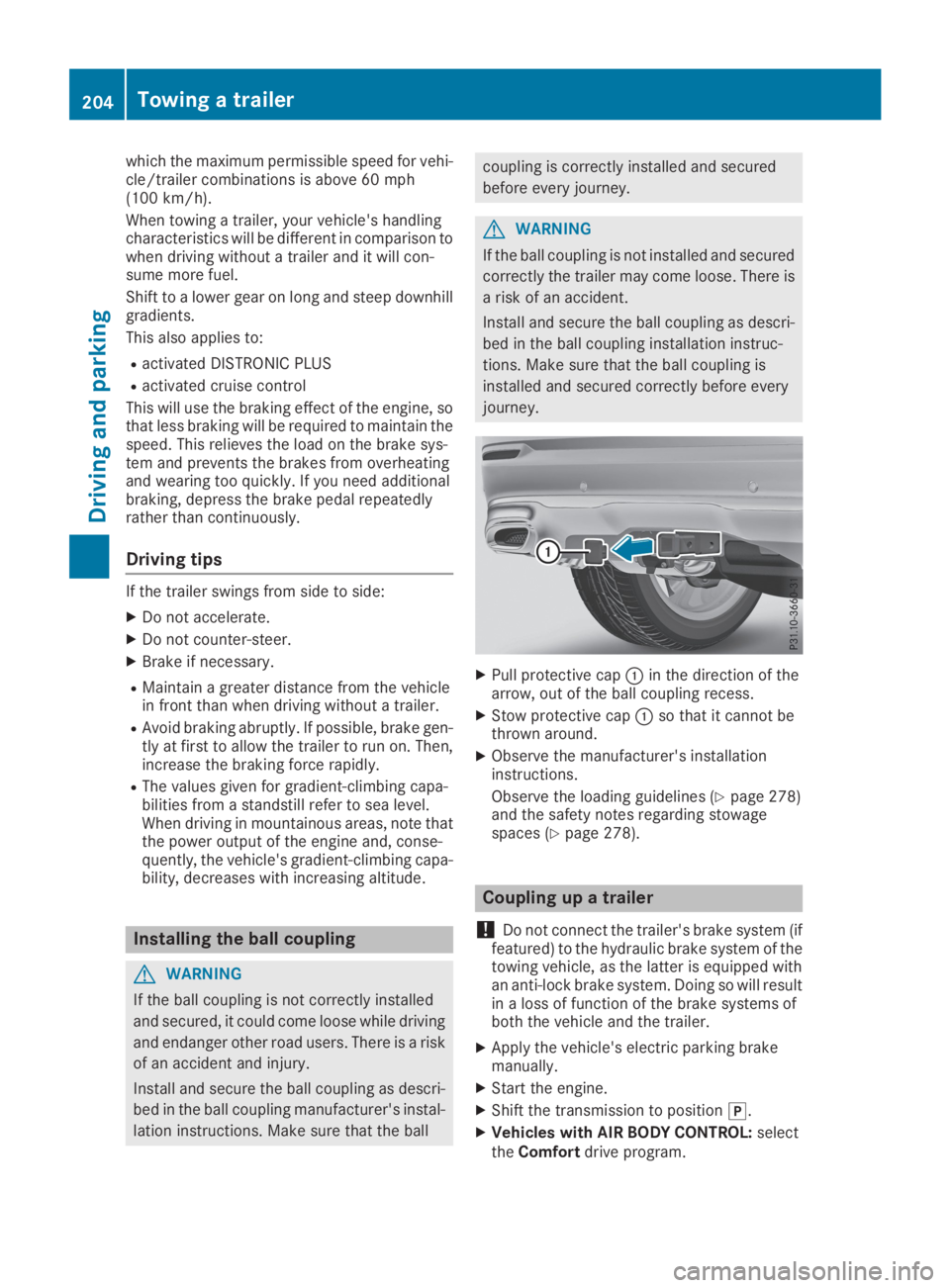
XPull protective capCin the direction of thearrow, out of the ball coupling recess.
XStow protective capCso that it cannot bethrown around.
XObserve the manufacturer's installationinstructions.
Observe the loading guidelines (Ypage 278)and the safety notes regarding stowagespaces (Ypage 278).
Coupling up a trailer
!Do not connect the trailer's brake system (iffeatured) to the hydraulic brake system of thetowing vehicle, as the latter is equipped withan anti-lock brake system. Doing so will resultin a loss of function of the brake systems ofboth the vehicle and the trailer.
XApply the vehicle's electric parking brakemanually.
XStart the engine.
XShift the transmission to position].
XVehicles with AIR BODY CONTROL:selecttheComfortdrive program.
204Towing a trailer
Driving and parking
Page 208 of 370
When overtaking, pay particular attention to theextended length of your vehicle/trailer combi-nation.
Due to the length of the vehicle/trailer combi-nation, you require additional road space whenovertaking before you can change back to theoriginal lane.
If the automatic transmission repeatedly shiftsbetween gears on uphill or downhill gradients,shift to a lower gear.
Driving in a lower gear and at a reduced speeddecreases the risk of engine damage.
If the coolant temperature increases signifi-cantly when climate control is switched on,switch climate control off.
Coolant heat can also be dissipated by openingthe windows and switching the ventilationblower and the interior temperature to the high-est level.
Decoupling a trailer
GWARNING
If you uncouple a trailer with the overrun
brake engaged, you could trap your hand
between the vehicle and the trailer drawbar.
There is a risk of injury.
Do not uncouple a trailer if the overrun brake
is engaged.
GWARNING
Vehicles with level control:
The vehicle is lowered as soon as you discon-
nect the trailer cable. This could result in your
limbs or those of other people that are
between the vehicle body and tires or under-
neath the vehicle being trapped. There is a
risk of injury.
Make sure that nobody is in the immediate
vicinity of the wheel housings or under the
vehicle when you disconnect the trailer cable.
!Do not disconnect a trailer with an engagedoverrun brake. Otherwise, your vehicle couldbe damaged by the rebounding of the overrunbrake.
XApply the vehicle's parking brake manually.
XShift the transmission to position].
XClose all doors and the tailgate.
XSwitch off the engine.
XSecure the vehicle and trailer against rollingaway.
XRemove the trailer cable.
XRemove the safety chains, if there are any.
XUncouple the trailer.
Removing the ball coupling
XObserve the manufacturer's installationinstructions.
XPress the protective cap into the ball couplingrecess.
XMake sure that the protective cap is firmly inplace.
Observe the loading guidelines (Ypage 278)and the safety notes regarding stowage spaces(Ypage 278).
Information on cleaning and care of the trailertow hitch (Ypage 310).
Trailer power supply
!Accessories with a maximum power con-sumption of 180 W can be connected to thepermanent power supply.
You must not charge a trailer battery using thepower supply.
The trailer socket of your vehicle is equipped atthe factory with a permanent power supply.
The permanent power supply is supplied viatrailer socket pin 4.
The trailer's permanent power supply isswitched off in the event of low vehicle supplyvoltage and after six hours at the latest.
A qualified specialist workshop can providemore information about installing the trailerelectrics.
Permissible trailer loads and trailer
drawbar noseweights
Weight specifications
The gross trailer weight is calculated as theweight of the trailer plus the weight of the loadand the trailer's equipment.
206Towing a trailer
Driving and parking
Page 210 of 370
Important safety notes
GWARNING
If you operate information systems and com-
munication equipment integrated in the vehi-
cle when driving, you may be distracted from
the traffic situation. You could also lose con-
trol of the vehicle. There is a risk of an acci-
dent.
Only operate this equipment when the traffic
situation permits. If you are not sure that this
is possible, park the vehicle paying attention
to traffic conditions and operate the equip-
ment when the vehicle is stationary.
You must observe the legal requirements for thecountry in which you are currently driving whenoperating the on-board computer.
GWARNING
If the instrument cluster has failed or mal-
functioned, you may not recognize function
restrictions in systems relevant to safety. The
operating safety of your vehicle may be
impaired. There is a risk of an accident.
Drive on carefully. Have the vehicle checked
at a qualified specialist workshop immedi-
ately.
If the operating safety of your vehicle isimpaired, pull over as soon as it is safe to do so.Contact a qualified specialist workshop.
The on-board computer only shows messages orwarnings from certain systems in the multifunc-tion display. You should therefore make sureyour vehicle is operating safely at all times.
For an overview, see the instrument panel illus-tration (Ypage 36).
Displays and operation
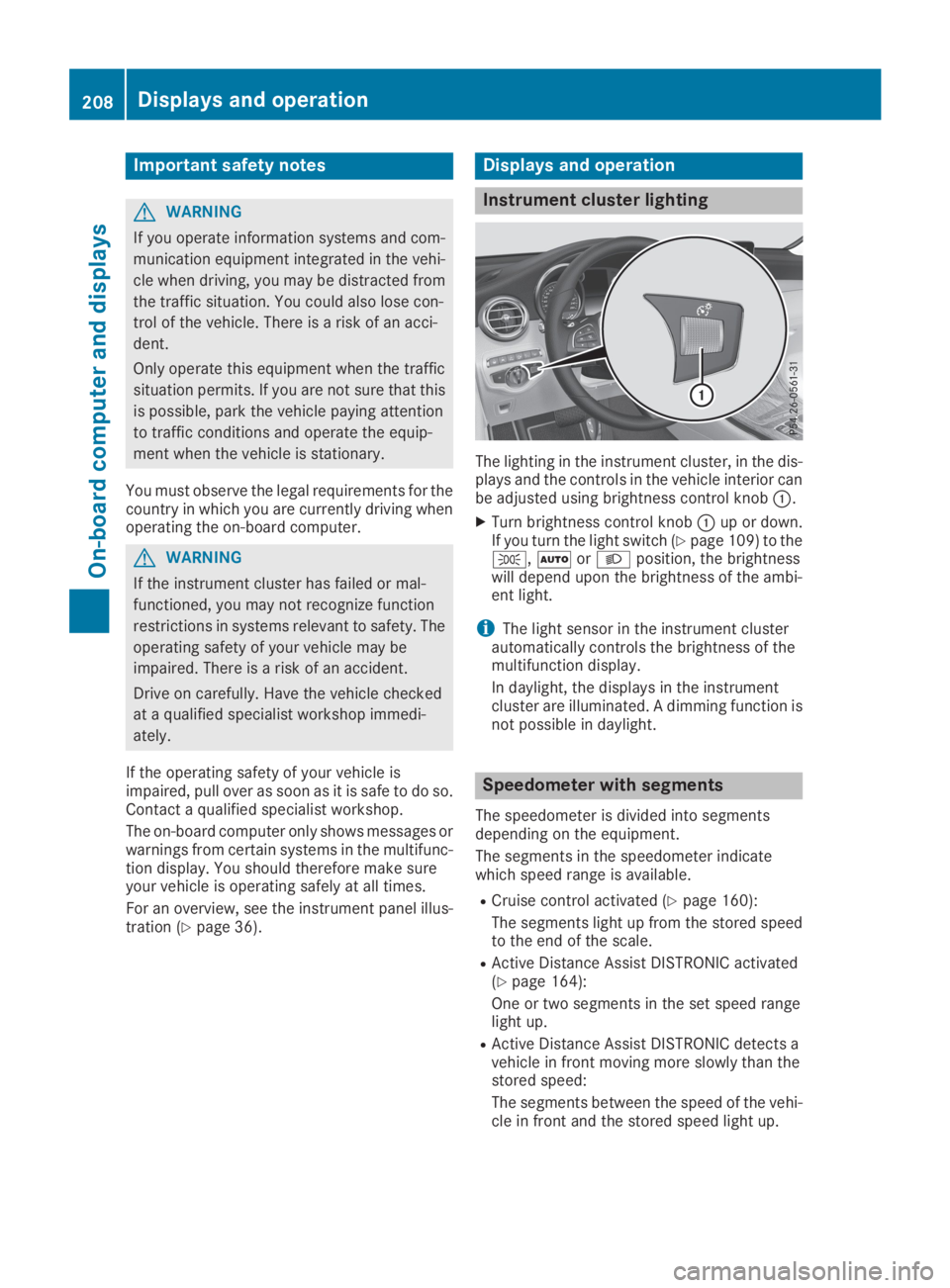
Instrument cluster lighting
The lighting in the instrument cluster, in the dis-plays and the controls in the vehicle interior canbe adjusted using brightness control knobC.
XTurn brightness control knobCup or down.If you turn the light switch (Ypage 109) to the`,XorXposition, the brightnesswill depend upon the brightness of the ambi-ent light.
iThe light sensor in the instrument clusterautomatically controls the brightness of themultifunction display.
In daylight, the displays in the instrumentcluster are illuminated. A dimming function isnot possible in daylight.
Speedometer with segments
The speedometer is divided into segmentsdepending on the equipment.
The segments in the speedometer indicatewhich speed range is available.
RCruise control activated (Ypage 160):
The segments light up from the stored speedto the end of the scale.
RActive Distance Assist DISTRONIC activated(Ypage 164):
One or two segments in the set speed rangelight up.
RActive Distance Assist DISTRONIC detects avehicle in front moving more slowly than thestored speed:
The segments between the speed of the vehi-cle in front and the stored speed light up.
208Displays and operation
On-board computer and displays
Page 211 of 370
Tachometer
!Do not drive in the overrevving range, as thiscould damage the engine.
The red band in the tachometer indicates theengine's overrevving range.
The fuel supply is interrupted to protect theengine when the red band is reached.
Outside temperature display
You should pay special attention to road condi-tions when temperatures are around freezingpoint.
Bear in mind that the outside temperature dis-play indicates the temperature measured anddoes not record the road temperature.
The outside temperature display is in the multi-function display (Ypage 210).
Changes in the outside temperature are dis-played after a short delay.
Coolant temperature gage
GWARNING
Opening the hood when the engine is over-
heated or when there is a fire in the engine
compartment could expose you to hot gases
or other service products. There is a risk of
injury.
Let an overheated engine cool down before
opening the hood. If there is a fire in the
engine compartment, keep the hood closed
and contact the fire department.
!If the coolant temperature is too high, a dis-play message is shown.
If the coolant temperature display is in thearea marked in red, do not continue driving.Otherwise, the engine will be damaged.
The coolant temperature gauge is in the lowersection of the tachometer (Ypage 36).
Under normal operating conditions and at thecorrect coolant level, the display may rise to thered mark.
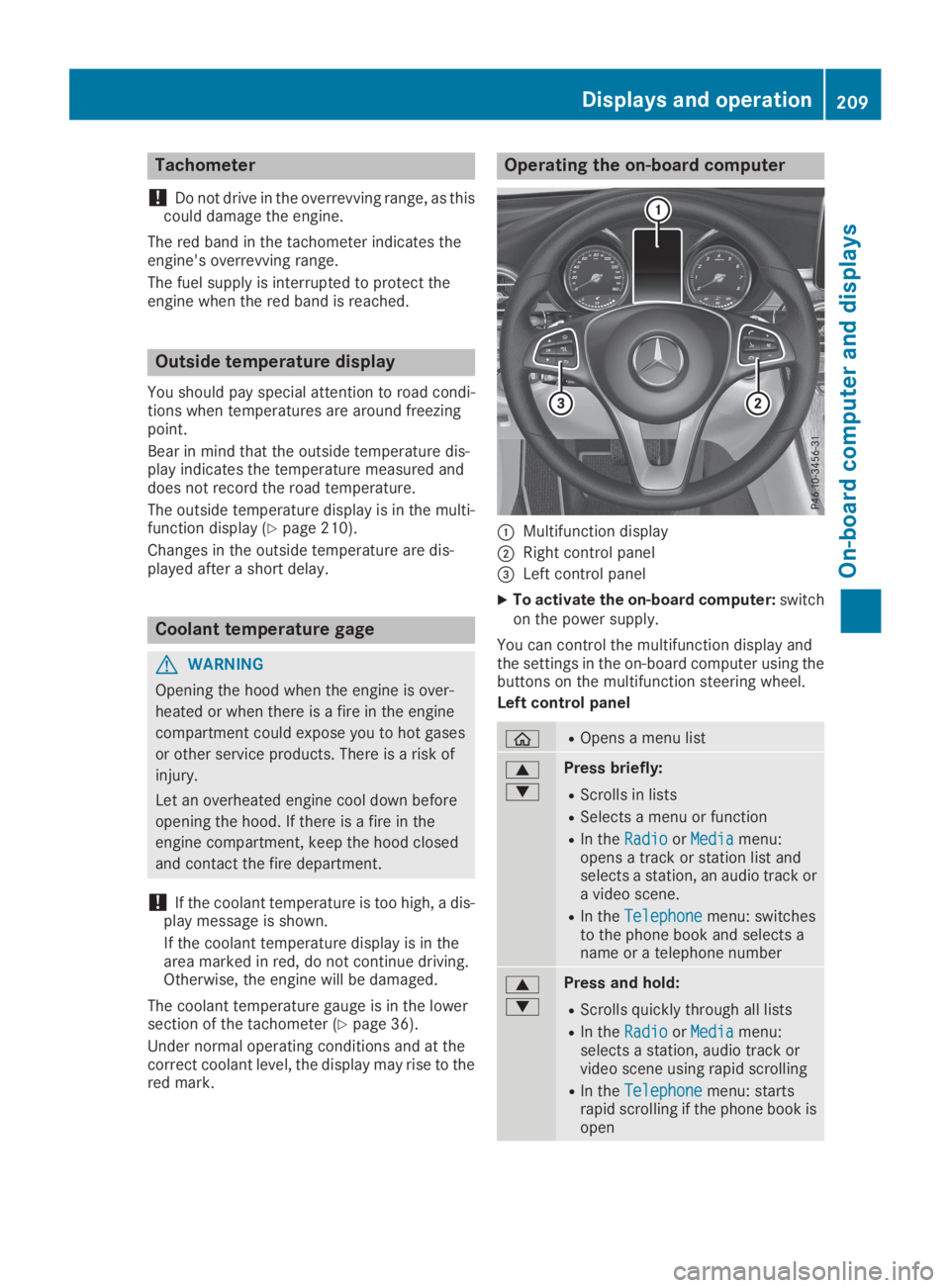
Operating the on-board computer
CMultifunction display
DRight control panel
Page 220 of 370
XTo select a DVD drive or DVD media:pressvbriefly. The list containing the mediasources appears.
XPressdorcto select the correspond-ing DVD single drive or disc.
XPressvto confirm.
XTo open the scene list:press thedorcbutton briefly.
XTo select the next or previous scene in thescene list:press thedorcbuttonbriefly.
XTo select a scene from the scene list usingrapid scrolling:press and holddorcuntil desired sceneCis reached.
XPressvto confirm your selection.
Telephone menu
Introduction
GWARNING
If you operate information systems and com-
munication equipment integrated in the vehi-
cle when driving, you may be distracted from
the traffic situation. You could also lose con-
trol of the vehicle. There is a risk of an acci-
dent.
Only operate this equipment when the traffic
situation permits. If you are not sure that this
is possible, park the vehicle paying attention
to traffic conditions and operate the equip-
ment when the vehicle is stationary.
When telephoning, you must observe the legalrequirements for the country in which you arecurrently driving.
XSwitch on the mobile phone (see the manu-facturer’s operating instructions).
XSwitch on the multimedia system.
XEstablish a Bluetooth®connection to the mul-timedia system (see the Digital Operator'sManual).
XPress the
Page 222 of 370
RChanging the instrument cluster settings(Ypage 222).
RRestoring the factory settings (Ypage 223).
Assistance submenu
Traffic Sign Assist
You can activate or deactivate the warning func-tion of Traffic Sign Assist in theTrafficTrafficSignSignAssistAssistmenu. When the function is activated,detected traffic signs and information appear inthe multifunction display for five seconds.
XPress
Page 229 of 370
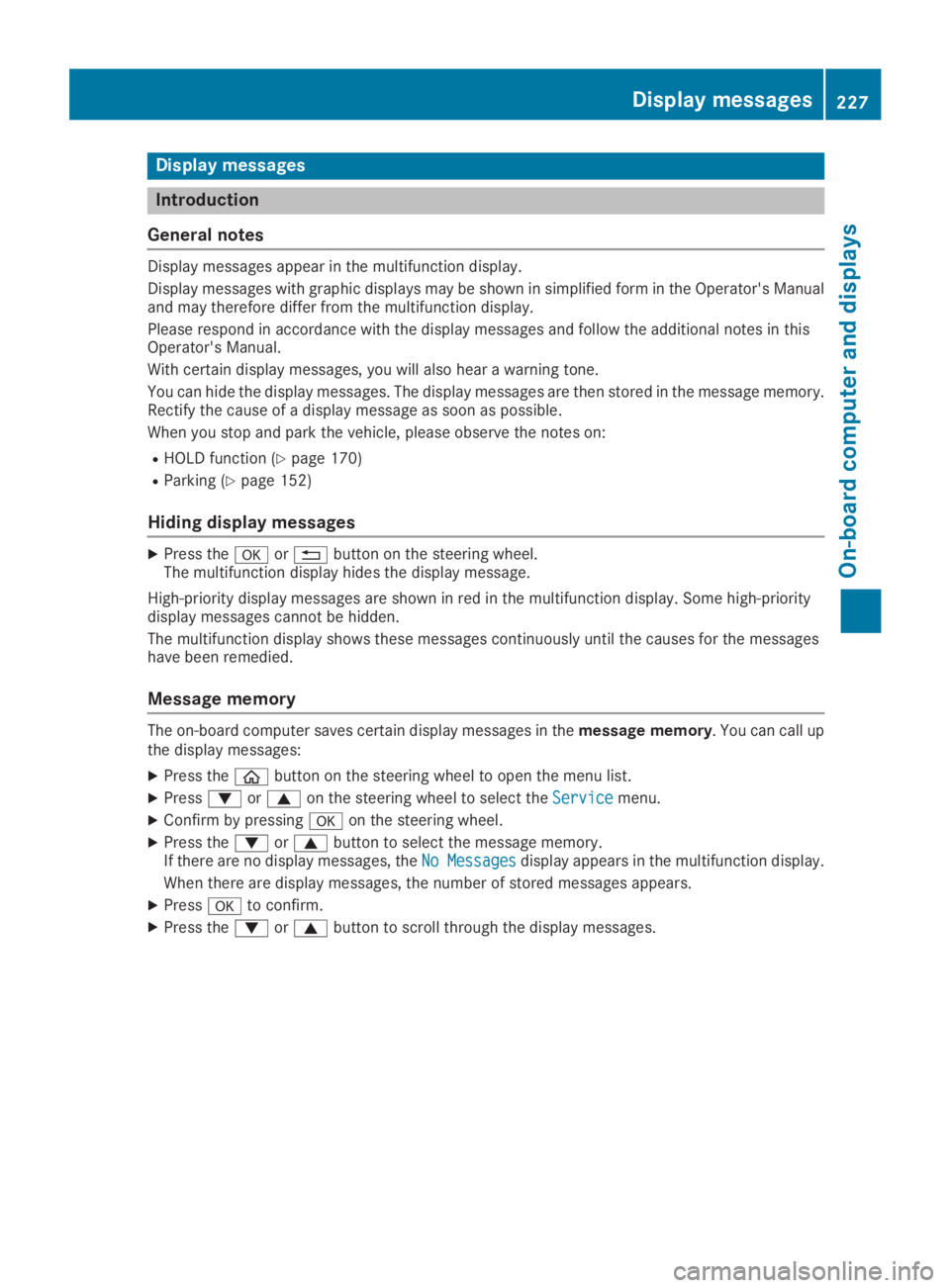
Display messages
Introduction
General notes
Display messages appear in the multifunction display.
Display messages with graphic displays may be shown in simplified form in the Operator's Manualand may therefore differ from the multifunction display.
Please respond in accordance with the display messages and follow the additional notes in thisOperator's Manual.
With certain display messages, you will also hear a warning tone.
You can hide the display messages. The display messages are then stored in the message memory.Rectify the cause of a display message as soon as possible.
When you stop and park the vehicle, please observe the notes on:
RHOLD function (Ypage 170)
RParking (Ypage 152)
Hiding display messages
XPress thevor8button on the steering wheel.The multifunction display hides the display message.
High-priority display messages are shown in red in the multifunction display. Some high-prioritydisplay messages cannot be hidden.
The multifunction display shows these messages continuously until the causes for the messageshave been remedied.
Message memory
The on-board computer saves certain display messages in themessage memory. You can call upthe display messages:
XPress the
Page 233 of 370
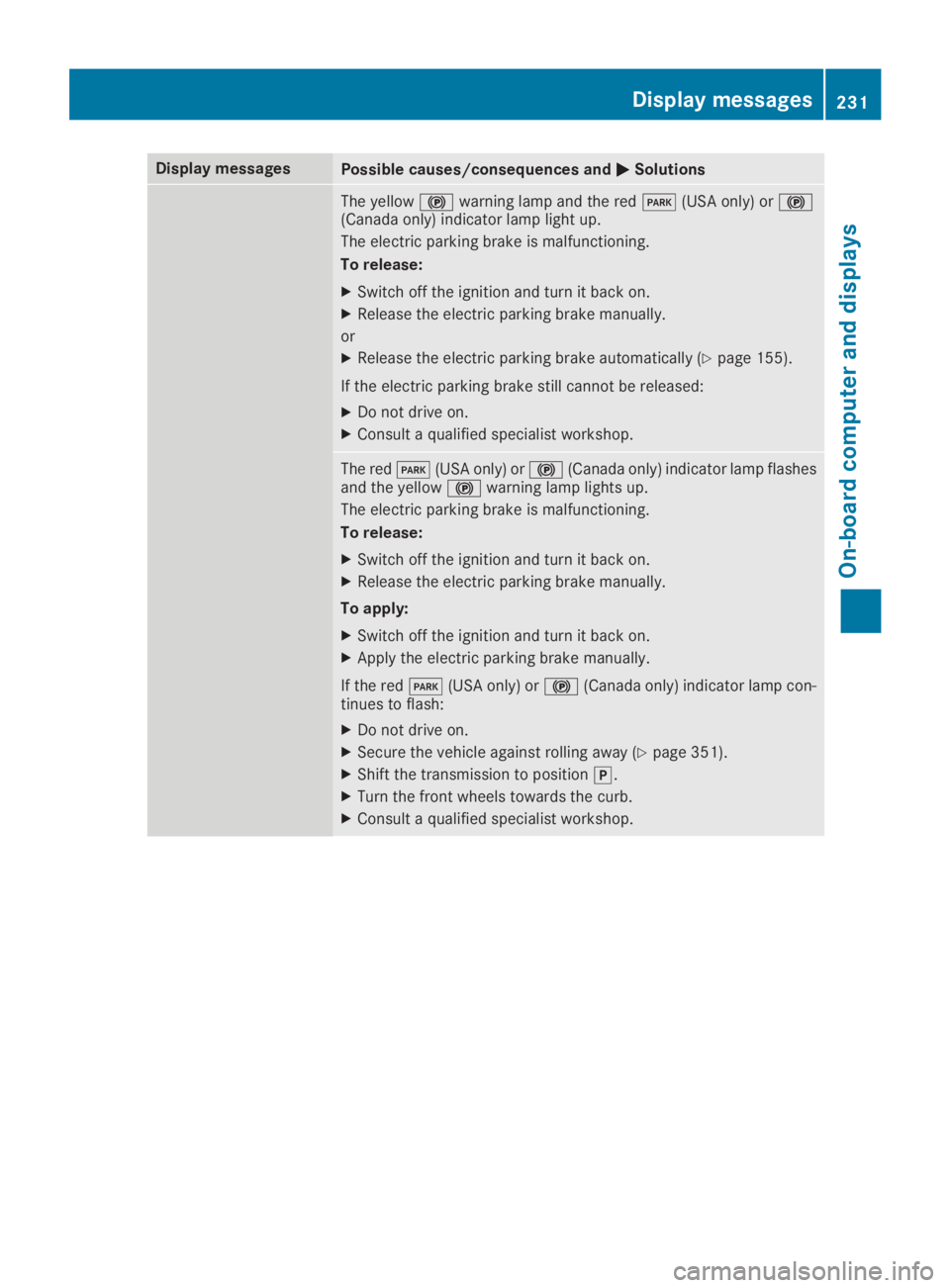
Display messagesPossible causes/consequences andPPSolutions
The yellow$warning lamp and the redI(USA only) or$(Canada only) indicator lamp light up.
The electric parking brake is malfunctioning.
To release:
XSwitch off the ignition and turn it back on.
XRelease the electric parking brake manually.
or
XRelease the electric parking brake automatically (Ypage 155).
If the electric parking brake still cannot be released:
XDo not drive on.
XConsult a qualified specialist workshop.
The redI(USA only) or$(Canada only) indicator lamp flashesand the yellow$warning lamp lights up.
The electric parking brake is malfunctioning.
To release:
XSwitch off the ignition and turn it back on.
XRelease the electric parking brake manually.
To apply:
XSwitch off the ignition and turn it back on.
XApply the electric parking brake manually.
If the redI(USA only) or$(Canada only) indicator lamp con-tinues to flash:
XDo not drive on.
XSecure the vehicle against rolling away (Ypage 351).
XShift the transmission to position].
XTurn the front wheels towards the curb.
XConsult a qualified specialist workshop.
Displaymessages231
On-b oard computer and displays
Z