warning MERCEDES-BENZ GLC 2019 Owners Manual
[x] Cancel search | Manufacturer: MERCEDES-BENZ, Model Year: 2019, Model line: GLC, Model: MERCEDES-BENZ GLC 2019Pages: 370, PDF Size: 19.55 MB
Page 164 of 370
Active Distance Assist DISTRONIC
General notes
Active Distance Assist DISTRONIC regulates thespeed and automatically helps you maintain thedistance from the vehicle detected in front.Vehicles are detected with the aid of the radarsensor system. Active Distance AssistDISTRONIC brakes automatically so that the setspeed is not exceeded.
Change into a lower gear in good time on longand steep downhill gradients. This is especiallyimportant if the vehicle is laden. By doing so, youwill make use of the braking effect of the engine.This relieves the load on the brake system andprevents the brakes from overheating and wear-ing too quickly.
If Active Distance Assist DISTRONIC detectsthat there is a risk of a collision with the vehiclein front, you will be warned visually and audibly.Active Distance Assist DISTRONIC cannot pre-vent a collision without your intervention. Anintermittent warning tone will then sound andthe distance warning lamp will light up in theinstrument cluster. Brake immediately in orderto increase the distance to the vehicle in front ortake evasive action provided it is safe to do so.
Active Distance Assist DISTRONIC operates inthe speed range between 0 mph(0 km/h) and120 mph (200 km/h).
Do not use Active Distance Assist DISTRONICwhile driving on roads with steep gradients.
As Active Distance Assist DISTRONIC transmitsradar waves, it can resemble the radar detectorsof the responsible authorities. You can refer tothe relevant chapter in the Operator's Manual ifquestions are asked about this.
iUSA only: This device has been approved bythe FCC as a "Vehicular Radar System". Theradar sensor is intended for use in an auto-motive radar system only. Removal, tamper-ing, or altering of the device will void any war-ranties, and is not permitted by the FCC. Donot tamper with, alter, or use in any non-approved way.
Any unauthorized modification to this devicecould void the user's authority to operate theequipment.
iCanada only: This device complies withRSS-210 of Industry Canada. Operation issubject to the following two conditions:
1. This device may not cause interference,and
2. This device must accept any interferencereceived, including interference that maycause undesired operation of the device.
Removal, tampering, or altering of the devicewill void any warranties, and is not permitted.Do not tamper with, alter, or use in any non-approved way.
Any unauthorized modification to this devicecould void the user's authority to operate theequipment.
Important safety notes
GWARNING
Active Distance Assist DISTRONIC does not
react to:
Rpeople or animals
Rstationary objects in the road, e.g. stopped
or parked vehicles
Roncoming vehicles and crossing traffic
As a result, Active Distance Assist DISTRONIC
may neither give warnings nor intervene in
such situations. There is a risk of an accident.
Always pay careful attention to the traffic sit-
uation and be ready to brake.
GWARNING
Active Distance Assist DISTRONIC cannot
always clearly identify other road users and
complex traffic situations.
In such cases, Active Distance Assist
DISTRONIC can:
Rgive an unnecessary warning and then
brake the vehicle
Rneither give a warning nor intervene
Raccelerate or brake unexpectedly
There is a risk of an accident.
Continue to drive carefully and be ready to
brake, especially if Active Distance Assist
DISTRONIC warns you.
GWARNING
Active Distance Assist DISTRONIC brakes
your vehicle with up to 50% of the maximum
162Driving systems
Driving and parking
Page 165 of 370
possible deceleration. If this deceleration is
not sufficient, Active Distance Assist
DISTRONIC alerts you with a visual and acous-
tic warning. There is a risk of an accident.
Adjust your speed in these cases and main-
tain sufficient distance. Apply the brakes
yourself and try to take evasive action.
!When Active Distance Assist DISTRONIC orthe HOLD function is activated, the vehiclebrakes automatically in certain situations.
To avoid damage to the vehicle, deactivateActive Distance Assist DISTRONIC and theHOLD function in the following or similar sit-uations:
Rwhen towing the vehicle
Rin the car wash
Active Distance Assist DISTRONIC can neitherreduce the risk of an accident if you fail to adaptyour driving style, nor override the laws of phys-ics. Active Distance Assist DISTRONIC cannottake into account road, weather or traffic con-ditions. Active Distance Assist DISTRONIC isonly an aid. You are responsible for maintaininga safe distance to the vehicle in front, for vehiclespeed, for braking in good time and for staying inlane.
Do not use Active Distance Assist DISTRONIC:
RIn road and traffic conditions which do notallow you to maintain a constant speed, e.g. inheavy traffic or on winding roads
ROn slippery road surfaces. Braking or accel-erating could cause the drive wheels to losetraction and the vehicle could then skid
RIn poor visibility, e.g. due to fog, heavy rain orsnow
Active Distance Assist DISTRONIC may notdetect narrow vehicles driving in front, e.g.motorcycles, or vehicles driving in a staggeredformation.
In particular, the detection of obstacles can beimpaired if:
RThere is dirt on the sensors or anything elsecovering the sensors
RThere is snow or heavy rain
RThere is interference by other radar sources
RThere are strong radar reflections, for exam-ple in parking garages
If Active Distance Assist DISTRONIC no longerdetects a vehicle in front, Distance Pilot
DISTRONIC may unexpectedly accelerate to thespeed stored.
This speed may:
RBe too high if you are driving in a turning laneor an exit lane
Rbe so high in the right lane that you pass vehi-cles driving on the left (in countries wherethey drive on the right)
Rbe so high in the left lane that you pass vehi-cles driving on the right (in countries wherethey drive on the left)
If there is a change of drivers, advise the newdriver of the speed stored.
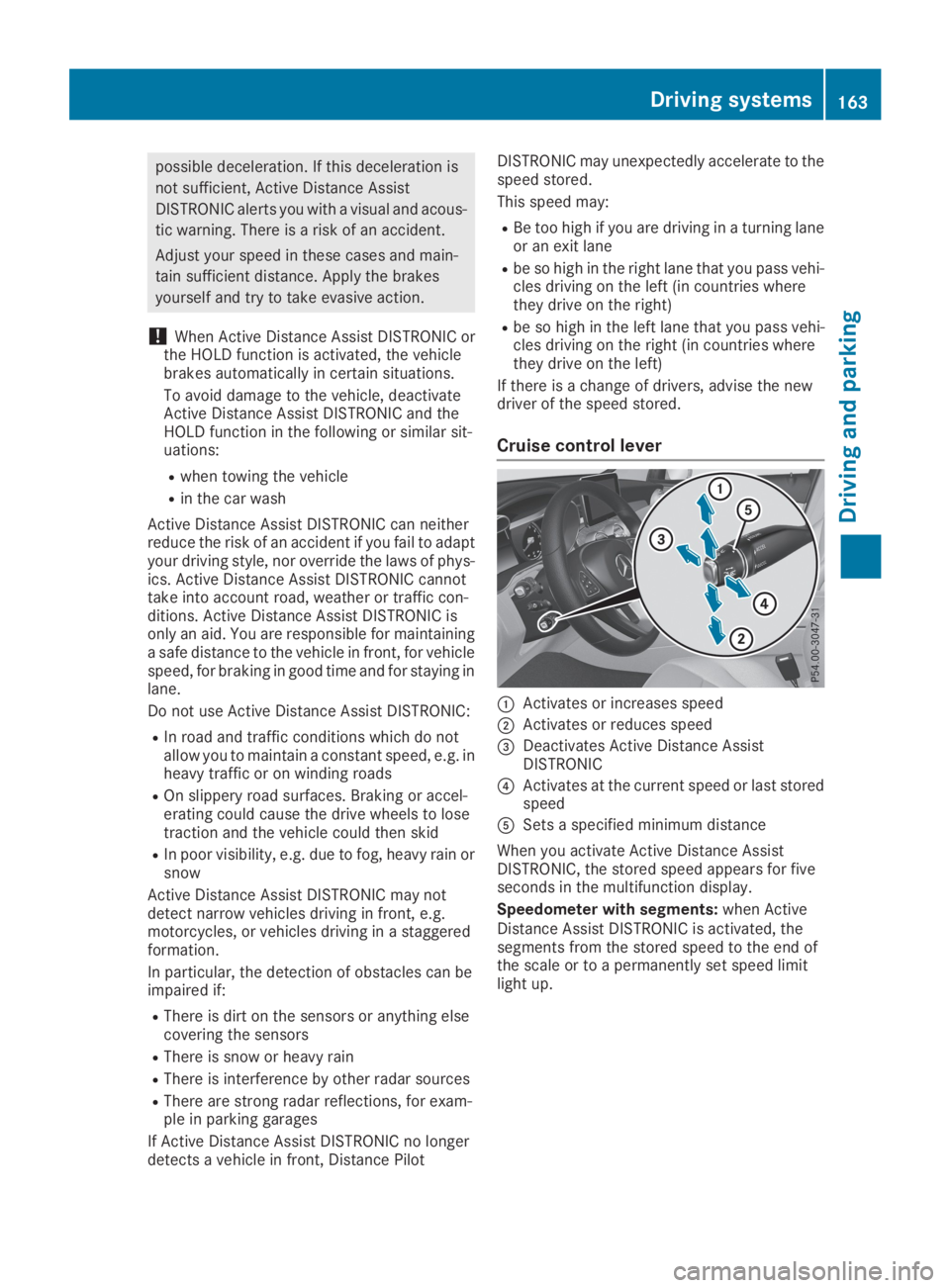
Cruise control lever
CActivates or increases speed
DActivates or reduces speed
Page 167 of 370
If Active Distance Assist DISTRONIC detects afaster-moving vehicle in front, it increases thedriving speed to the set speed.
Selecting the drive program
Active Distance Assist DISTRONIC supports asporty driving style when you have selected theSorS+, drive program (Ypage 145). Accelera-tion behind the vehicle in front or to the setspeed is then noticeably more dynamic. If youhave selected theCorEdriving program, thevehicle accelerates more gently. This setting isrecommended in stop-and-start traffic.
Changing lanes
If you change to the overtaking lane Active Dis-tance Assist DISTRONIC supports you if:
Ryou are driving faster than 45 mph (70 km/h)
Ryou switch on the appropriate turn signal
RActive Distance Assist DISTRONIC does notcurrently detect a danger of collision
If these conditions are fulfilled, your vehicle isaccelerated. Acceleration will be interrupted ifchanging lanes takes too long or if the distancebetween your vehicle and the vehicle in frontbecomes too small.
When you change lanes, Active Distance AssistDISTRONIC monitors the left lane on left-hand-drive vehicles or the right lane on right-hand-drive vehicles.
Stopping
GWARNING
If you leave the driver's seat when the vehicle
is only being braked by Active Distance Assist
DISTRONIC, it could roll away:
Rif there is a malfunction in the system or in
the voltage supply
Rif Active Distance Assist DISTRONIC is
deactivated using the cruise control lever,
for example by a vehicle occupant or from
outside the vehicle
Rif the electrical system in the engine com-
partment, the battery or the fuses are tam-
pered with
Rif the battery is disconnected
Rif the vehicle is accelerated, e.g. by a vehi-
cle occupant
There is a risk of an accident.
Always deactivate Active Distance Assist
DISTRONIC and secure the vehicle against
rolling away before you leave it.
Further information on deactivating Active Dis-tance Assist DISTRONIC (Ypage 167).
If Active Distance Assist DISTRONIC detectsthat the vehicle in front is stopping, it brakesyour vehicle until it is stationary.
Once your vehicle is stationary, it remains sta-tionary and you do not need to depress thebrake.
After a time, the electric parking brake securesthe vehicle and relieves the service brake.
Depending on the specified minimum distance,your vehicle will come to a standstill at a suffi-cient distance behind the vehicle in front. Thespecified minimum distance is set using thecontrol on the cruise control lever.
When Active Distance Assist DISTRONIC is acti-vated, the transmission is shifted automaticallyto position]if:
Rthe driver's seat belt is not fastened and thedriver's door is open
Rthe engine is switched off, unless it is auto-matically switched off by the ECO start/stopfunction
The electric parking brake is applied automati-cally if Active Distance Assist DISTRONIC isactive when the vehicle is stationary and:
Ra system malfunction occurs
Rthe power supply is insufficient
If a malfunction occurs, the transmission mayalso be shifted to position]automatically.
Setting a speed
XPush the cruise control lever upCfor ahigher speed or downDfor a lower speed.
XTo adjust the set speed in 1 mph incre-ments (1 km/h increments):briefly pushthe cruise control lever upCor downDtothe pressure point.Every time the cruise control lever is pressedupCor downDthe last speed stored isincreased or reduced.
XTo adjust the set speed in 5 mph incre-ments (10 km/h increments):briefly push
Driving systems165
Driving and parking
Z
Page 171 of 370
Rthe distance to the vehicle in front is too shortand thus the lane markings cannot be detec-ted
Rthe lane markings change quickly, e.g. lanesbranch off, cross one another or merge
Rthe road is narrow and winding
Rthere are highly variable shade conditions onthe roadway
The system is switched to passive and no longerassists you by performing steering interventionsif:
Ryou actively change lane
Ryou switch on the turn signal
Ryou take your hands off the steering wheel ordo not steer for a prolonged period of time
Once you have finished changing lanes, ActiveSteering Assist automatically reactivates.
Active Steering Assist cannot provide assis-tance:
Ron very sharp corners
Rwhen towing a trailer
Rwhen a loss of tire pressure or a defective tirehas been detected and displayed
Observe the important safety notes on ActiveDistance Assist DISTRONIC (Ypage 162).
The steering interventions are carried out with alimited steering moment. The system requiresthe driver to keep his hands on the steeringwheel and to steer himself.
If you do not steer yourself or if you take yourhands off the steering wheel for a prolongedperiod of time, the system will first alert you witha visual warning. A steering wheel symbolappears in the multifunction display. If you havestill not started to steer and have not taken holdof the steering wheel after five seconds at thelatest, a warning tone also sounds to remind youto take control of the vehicle. Active SteeringAssist is then switched to passive. Active Dis-tance Assist DISTRONIC remains active.
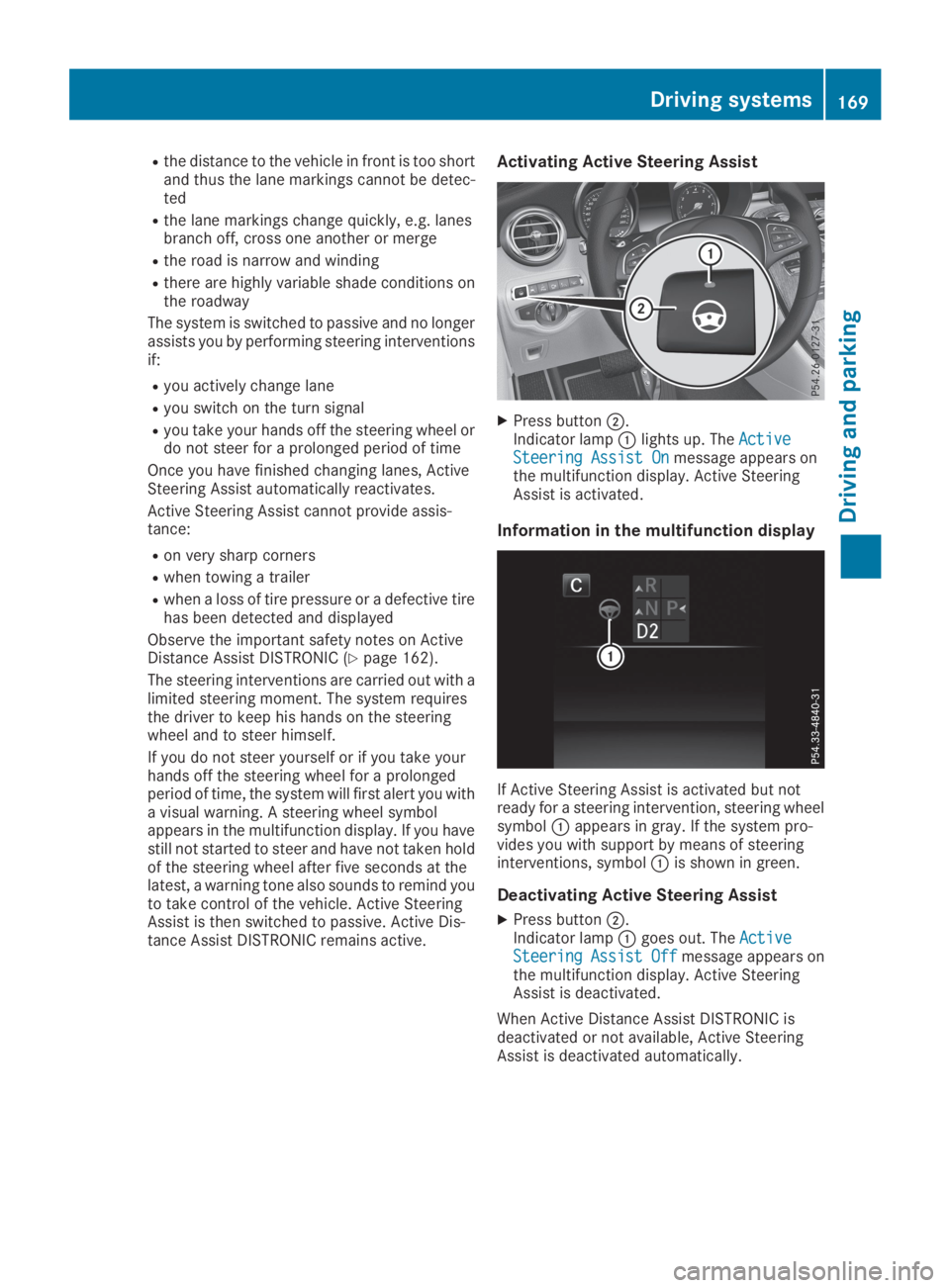
Activating Active Steering Assist
XPress buttonD.Indicator lampClights up. TheActiveActiveSteering Assist OnSteering Assist Onmessage appears onthe multifunction display. Active SteeringAssist is activated.
Information in the multifunction display
If Active Steering Assist is activated but notready for a steering intervention, steering wheelsymbolCappears in gray. If the system pro-vides you with support by means of steeringinterventions, symbolCis shown in green.
Deactivating Active Steering Assist
XPress buttonD.Indicator lampCgoes out. TheActiveActiveSteeringSteeringAssistAssistOffOffmessage appears onthe multifunction display. Active SteeringAssist is deactivated.
When Active Distance Assist DISTRONIC isdeactivated or not available, Active SteeringAssist is deactivated automatically.
Driving systems169
Driving an d parking
Z
Page 172 of 370
HOLD function
General notes
The HOLD function can assist the driver in thefollowing situations:
Rwhen pulling away, especially on steep slopes
Rwhen maneuvering on steep slopes
Rwhen waiting in traffic
The vehicle is kept stationary without the driverhaving to depress the brake pedal.
The braking effect is canceled and the HOLDfunction deactivated when you depress theaccelerator pedal to pull away.
Important safety notes
GWARNING
If the vehicle is only braked using the HOLD
function, the vehicle may roll away in the fol-
lowing situations when you leave the vehicle:
Rif there is a malfunction in the system or in
the voltage supply
Rif the HOLD function is deactivated by
depressing the accelerator pedal or brake
pedal, e.g. by a vehicle occupant
Rif the electrical system in the engine com-
partment, the battery or the fuses are tam-
pered with or the battery is disconnected
There is a risk of an accident.
Always deactivate the HOLD function and
secure the vehicle against rolling away before
you leave it.
!When DISTRONIC PLUS or the HOLD func-tion is activated, the vehicle brakes automat-ically in certain situations.
To avoid damage to the vehicle, deactivateDISTRONIC PLUS and the HOLD function inthe following or similar situations:
Rwhen towing the vehicle
Rin the car wash
Deactivating the HOLD function (Ypage 170).
Activation conditions
You can activate the HOLD function if all of thefollowing conditions are fulfilled:
Rthe vehicle is stationary.
Rthe engine is running or if it has been auto-matically switched off by the ECO start/stopfunction.
Rthe driver's door is closed or your seat belt isfastened.
Rthe electric parking brake is released.
Rthe transmission is in position[,^or\\.
RDISTRONIC PLUS is deactivated.
Activating the HOLD function
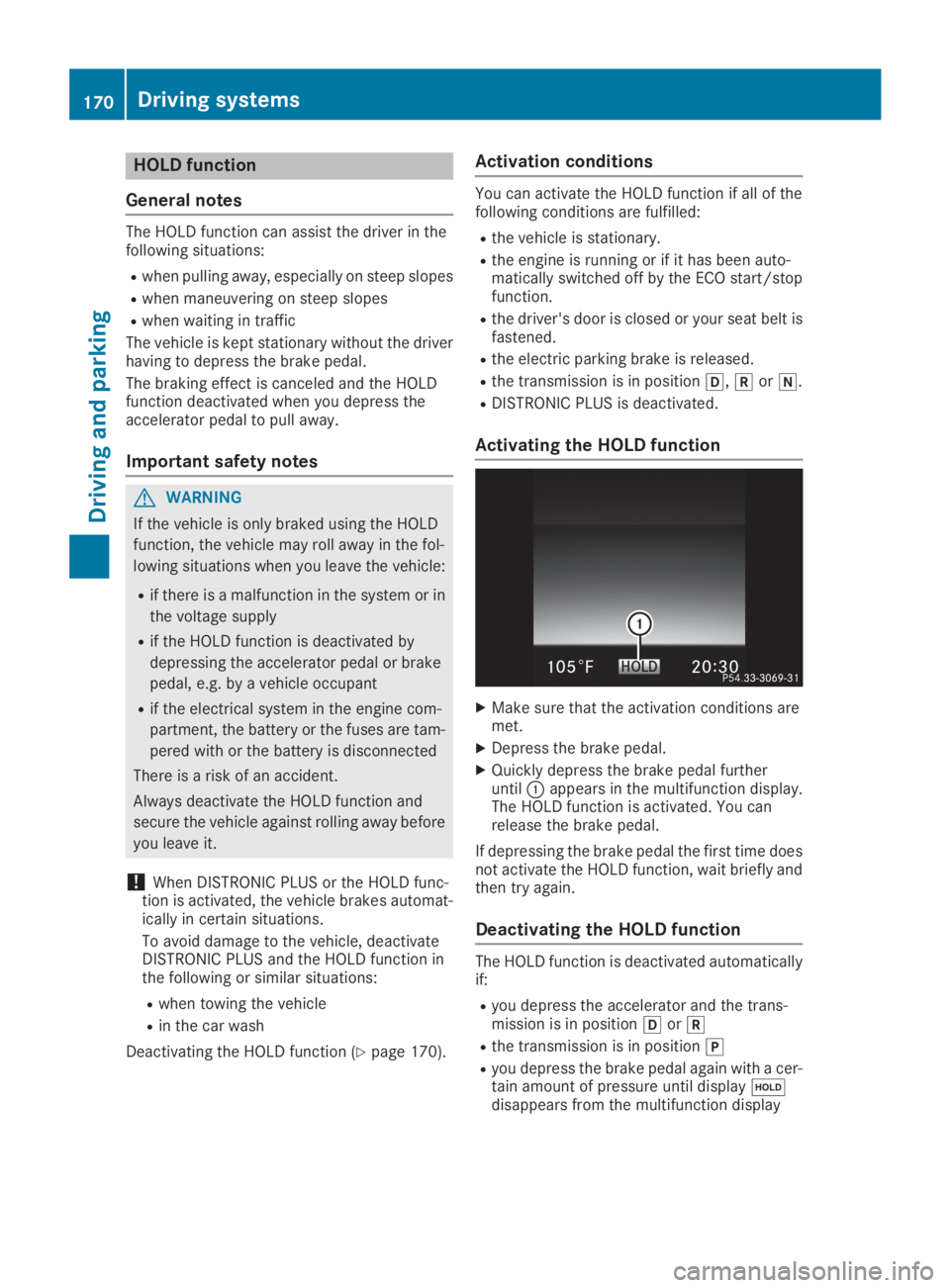
XMake sure that the activation conditions aremet.
XDepress the brake pedal.
XQuickly depress the brake pedal furtheruntilCappears in the multifunction display.The HOLD function is activated. You canrelease the brake pedal.
If depressing the brake pedal the first time doesnot activate the HOLD function, wait briefly andthen try again.
Deactivating the HOLD function
The HOLD function is deactivated automaticallyif:
Ryou depress the accelerator and the trans-mission is in position[or^
Rthe transmission is in position]
Ryou depress the brake pedal again with a cer-tain amount of pressure until display
Page 173 of 370
Ryou secure the vehicle using the electric park-ing brake
Ryou activate DISTRONIC PLUS
After a time, the electric parking brake securesthe vehicle and relieves the service brake.
When the HOLD function is activated, the trans-mission is shifted automatically to position]if:
Rthe driver's seat belt is not fastened and thedriver's door is open
Rthe engine is switched off, unless it is auto-matically switched off by the ECO start/stopfunction
The electric parking brake secures the vehicleautomatically if the HOLD function is activatedwhen the vehicle is stationary and:
Ra system malfunction occurs
Rthe power supply is insufficient
If a malfunction occurs, the transmission mayalso be shifted to position]automatically.
RACE START
Important safety notes
iRACE START is only available for theMercedes-AMG GLC 63 4MATIC+ andMercedes-AMG GLC 63 S 4MATIC+ models.
iRACE START must not be used on normalroads. RACE START must only be activatedand used on dedicated road circuits, outsideof public road use.
iRACE START is only available after the vehi-cle has been run-in (Ypage 130).
RACE START enables optimal acceleration froma standing start. For this, a suitably high-griproad surface is required and the vehicle and tiresmust be in good working order.
GWARNING
If you use RACE START, individual tires may
start to spin and the vehicle could skid.
Depending on the selected ESP®mode, there
is an increased risk of skidding and having an
accident. Make sure that no persons, animals
or obstacles are within range of the vehicle.
iObserve the safety notes on driving safetysystems (Ypage 65).
Be sure to read the safety notes and informa-
tion on ESP®(Ypage 68).
Activation conditions
You can activate RACE START if:
Rthe doors are closed
Rthe hood is closed
Rthe tailgate is closed
Rthe engine is running and the engine andtransmission are at operating temperature
Rthe steering wheel is in the straight-aheadposition.
Rthe vehicle is on a level surface
Rthe vehicle is stationary, the brake pedal isdepressed (left foot) and the parking brake isreleased
Rthe transmission is in position[
Rthe drive programS,S+orRaceis selected.(Ypage 139)
Activating RACE START
XQuickly depress the accelerator pedal fully.The engine speed is increased.
iIf the activation conditions are not fulfilled,RACE START cannot be carried out. TheRACERACESTART Not Possible See Operator'sSTART Not Possible See Operator'sManualManualmessage appears in the multifunctiondisplay.
XTheRACERACESTARTSTARTReleaseReleasebrakebraketotostartstartmessage appears on the multifunction dis-play.
iIn this phase you can adjust RACE STARTdepending on the road conditions: you canvary the engine speed by pulling on one of thesteering wheel paddle shifters. The segmentsin the multifunction display flicker rapidly.
iIf you do not release the brake pedal withina short time, RACE START will be canceled.TheRACE START CanceledRACE START Canceledmessageappears in the multifunction display.
XTake your foot off the brake, but keep theaccelerator pedal depressed.The vehicle pulls away at maximum acceler-ation.
TheRACE START ActiveRACE START Activemessage appearson the multifunction display.
Driving systems171
Driving and pa rking
Z
Page 175 of 370
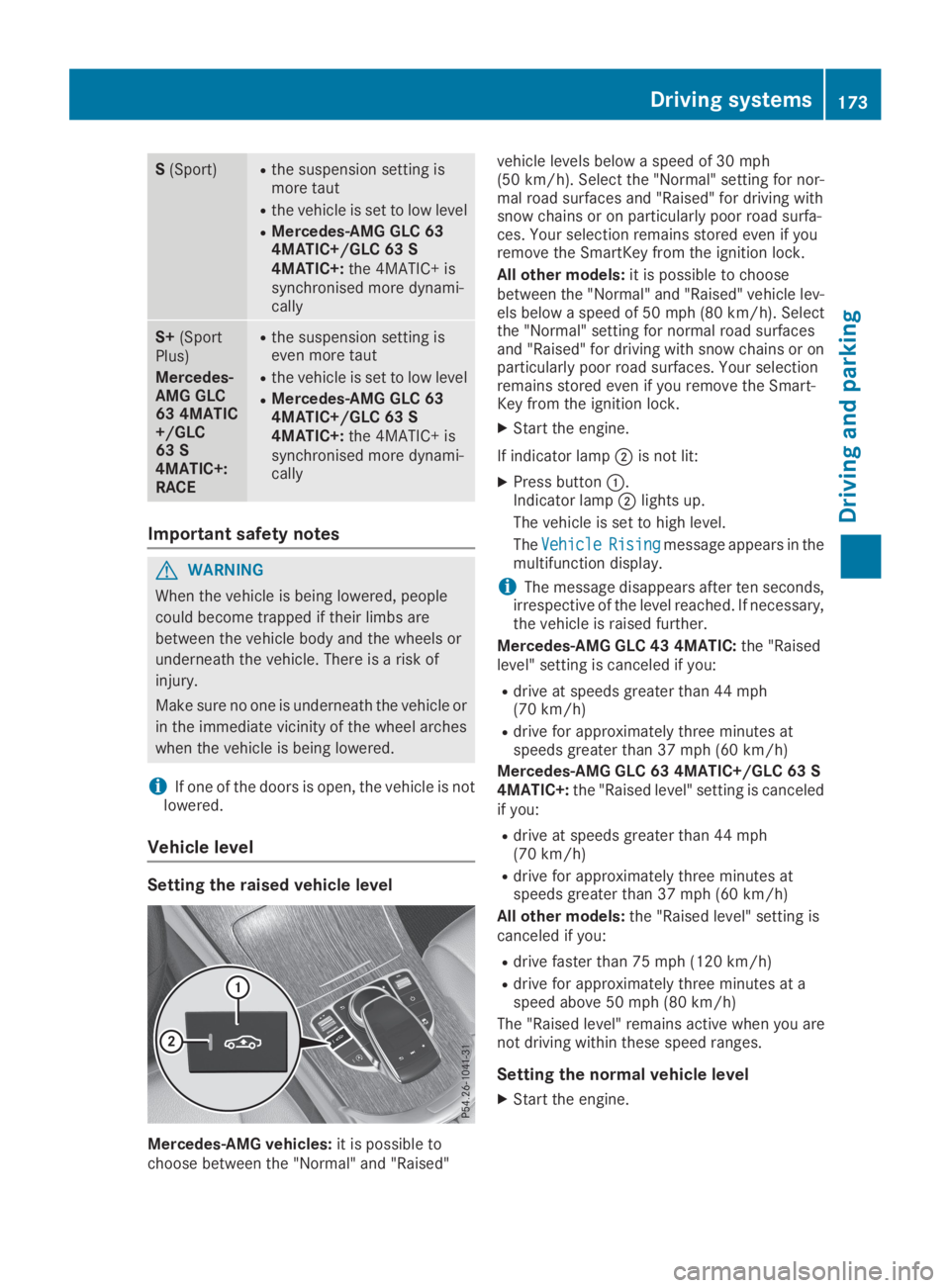
S(Sport)Rthe suspension setting ismore taut
Rthe vehicle is set to low level
RMercedes-AMG GLC 634MATIC+/GLC 63 S4MATIC+:the 4MATIC+ issynchronised more dynami-cally
S+(SportPlus)
Mercedes-AMG GLC63 4MATIC+/GLC63 S4MATIC+:RACE
Rthe suspension setting iseven more taut
Rthe vehicle is set to low level
RMercedes-AMG GLC 634MATIC+/GLC 63 S4MATIC+:the 4MATIC+ issynchronised more dynami-cally
Important safety notes
GWARNING
When the vehicle is being lowered, people
could become trapped if their limbs are
between the vehicle body and the wheels or
underneath the vehicle. There is a risk of
injury.
Make sure no one is underneath the vehicle or
in the immediate vicinity of the wheel arches
when the vehicle is being lowered.
iIf one of the doors is open, the vehicle is notlowered.
Vehicle level
Setting the raised vehicle level
Mercedes-AMG vehicles:it is possible tochoose between the "Normal" and "Raised"
vehicle levels below a speed of 30 mph(50 km/h). Select the "Normal" setting for nor-mal road surfaces and "Raised" for driving withsnow chains or on particularly poor road surfa-ces. Your selection remains stored even if youremove the SmartKey from the ignition lock.
All other models:it is possible to choosebetween the "Normal" and "Raised" vehicle lev-els below a speed of 50 mph (80 km/h). Selectthe "Normal" setting for normal road surfacesand "Raised" for driving with snow chains or onparticularly poor road surfaces. Your selectionremains stored even if you remove the Smart-Key from the ignition lock.
XStart the engine.
If indicator lampDis not lit:
XPress buttonC.Indicator lampDlights up.
The vehicle is set to high level.
TheVehicleVehicleRisingRisingmessage appears in themultifunction display.
iThe message disappears after ten seconds,irrespective of the level reached. If necessary,the vehicle is raised further.
Mercedes-AMG GLC 43 4MATIC:the "Raisedlevel" setting is canceled if you:
Rdrive at speeds greater than 44 mph(70 km/h)
Rdrive for approximately three minutes atspeeds greater than 37 mph (60 km/h)
Mercedes-AMG GLC 63 4MATIC+/GLC 63 S4MATIC+:the "Raised level" setting is canceledif you:
Rdrive at speeds greater than 44 mph(70 km/h)
Rdrive for approximately three minutes atspeeds greater than 37 mph (60 km/h)
All other models:the "Raised level" setting iscanceled if you:
Rdrive faster than 75 mph (120 km/h)
Rdrive for approximately three minutes at aspeed above 50 mph (80 km/h)
The "Raised level" remains active when you arenot driving within these speed ranges.
Setting the normal vehicle level
XStart the engine.
Driving systems173
Driving and parking
Z
Page 178 of 370
for safe maneuvering, parking and exiting aparking space. Make sure that no persons, ani-mals or objects are in the path of your vehicle.
When Parking Assist PARKTRONIC is deactiva-ted, Active Parking Assist is also unavailable.
For vehicles with a trailer tow hitch installed, theminimum length for parking spaces is slightlylonger.
If you have attached a trailer to your vehicle, youshould not use Active Parking Assist. Once theelectrical connection is established betweenyour vehicle and the trailer, Active ParkingAssist is no longer available. Parking AssistPARKTRONIC is deactivated for the rear area.
GWARNING
While parking or pulling out of a parking
space, the vehicle swings out and can drive
onto areas of the oncoming lane. This could
result in a collision with another road user.
There is a risk of an accident.
Pay attention to other road users. Stop the
vehicle if necessary or cancel the Active Park-
ing Assist parking procedure.
!If they cannot be avoided, drive over obsta-cles such as curbs slowly and at an obtuseangle. Otherwise, you may damage thewheels or tires.
Active Parking Assist may possibly indicateparking spaces which are not suitable for park-ing, for example:
Rwhere parking or stopping is prohibited
Rin front of driveways or entrances and exits
Ron unsuitable surfaces
Parking tips:
ROn narrow roads, drive as close to the parkingspace as possible
RParking spaces that are littered or overgrownmight be identified or measured incorrectly
RParking spaces that are partially occupied bytrailer drawbars might not be identified assuch or be measured incorrectly
RSnowfall or heavy rain may lead to a parkingspace being measured inaccurately
RPay attention to the warning messages ofParking Assist PARKTRONIC during the park-ing procedure (Ypage 181).
RYou can intervene in the steering procedureto correct it at any time. Active Parking Assistis then deactivated
RWhen transporting a load which protrudesfrom your vehicle, you should not use ActiveParking Assist
Rnever use Active Parking Assist when snowchains are installed
RAlways pay attention to the specified tirepressure for your vehicle. This has a directinfluence on the parking characteristics of thevehicle.
Use Active Parking Assist for parking spaces:
Rparallel or at right angles to the direction oftravel
Ron straight roads, not bends
Ron the same level as the road, e.g. not on thepavement
Detecting parking spaces
Objects located above the detection range ofActive Parking Assist will not be detected whenthe parking space is measured. These are nottaken into account when the parking procedureis calculated, e.g. overhanging loads, tail sec-tions or loading ramps of trucks. Active ParkingAssist may therefore guide you into the parkingspace too early.
GWARNING
If there are objects above the detection range:
RActive Parking Assist may steer too early
Rthe vehicle may not stop in front of these
objects
This could cause a collision. There is a risk of
an accident.
If objects are located above the detection
range, stop and deactivate Active Parking
Assist.
Further information about the detection range(Ypage 180).
176Driving systems
Driving and parking
Page 180 of 370
iIf Parking Assist PARKTRONIC detectsobstacles, Active Parking Assist will brakeautomatically whilst the vehicle is parking.You are responsible for braking in good time.
XStop the vehicle when the parking space sym-bol shows the desired parking space in theinstrument cluster.
XShift the transmission to position^.TheStart Parking Assist?Start Parking Assist?Yes: OKYes: OKNo:No:8message appears in the multifunctiondisplay.
XTo cancel the procedure:press the8button on the multifunction steering wheel orpull away.
or
XTo park using Active Parking Assist:pressthevbutton on the multifunction steeringwheel.TheParkingParkingAssistAssistActiveActiveAccelerateAccelerateand Brakeand BrakeObserve SurroundingsObserve Surroundingsmes-sage appears in the multifunction display.
XLet go of the multifunction steering wheel.
XBack up the vehicle, being ready to brake at alltimes. When backing up, drive at a speedbelow approximately 6 mph (10 km/h). Oth-erwise, Active Parking Assist will be canceled.Active Parking Assist brakes the vehicle to astandstill when the vehicle approaches therear border of the parking space.
Maneuvering may be required in tight parkingspaces.
TheParking Assist Active Select DParking Assist Active Select DObserve SurroundingsObserve Surroundingsmessage appears inthe multifunction display.
XShift the transmission to position[whenthe vehicle is stationary.Active Parking Assist immediately steers inthe other direction.
TheParkingParkingAssistAssistActiveActiveAccelerateAccelerateand Brakeand BrakeObserve SurroundingsObserve Surroundingsmes-sage appears in the multifunction display.
iYou will achieve the best results by waitingfor the steering procedure to complete beforepulling away.
XDrive forwards and be ready to brake at alltimes.Active Parking Assist brakes the vehicle to astandstill when the vehicle approaches therear border of the parking space.
Maneuvering may be required in tight parkingspaces.
TheParking Assist Active Select RParking Assist Active Select RObserve SurroundingsObserve Surroundingsmessage appears inthe multifunction display.
As soon as the parking procedure is complete,theActive Parking Assist FinishedActive Parking Assist Finishedmes-sage appears and a warning tone sounds. Thevehicle is now parked.
The vehicle is kept stationary without the driverhaving to depress the brake pedal. The brakingeffect is canceled when you depress the accel-erator pedal.
Active Parking Assist no longer supports youwith steering interventions and brake applica-tions. When Active Parking Assist is finished,you must steer and brake again yourself. Park-ing Assist PARKTRONIC is still available.
Parking tips:
RThe way your vehicle is positioned in the park-ing space after parking is dependent on vari-ous factors. These include the position andshape of the vehicles parked in front andbehind it and the conditions of the location. Itmay be the case that Active Parking Assistguides you too far into a parking space, or notfar enough into it. In some cases, it may alsolead you across or onto the curb. If necessary,cancel the parking procedure with ActiveParking Assist.
RYou can also prematurely select transmissionposition[. The vehicle redirects and doesnot drive as far into the parking space. Shouldthe transmission change take place too early,the parking procedure is canceled. A sensibleparking position can no longer be achievedfrom this position.
Exiting a parking space
In order that Active Parking Assist can supportyou when exiting the parking space:
Rthe border of the parking space must be highenough at the front and the rear. A curb stoneis too small, for example.
Rthe border of the parking space must not betoo wide. Your vehicle can be maneuveredinto the parking space at a maximum angle of45° to the starting position.
Ra maneuvering distance of at least 3.3 ft(1.0 m) must be available.
Active Parking Assist can only assist you withexiting a parking space if you have parked thevehicle parallel to the direction of travel usingActive Parking Assist.
178Driving systems
Driving and parking
Page 181 of 370
iIf Parking Assist PARKTRONIC detectsobstacles, Active Parking Assist brakes auto-matically whilst the vehicle is exiting the park-ing space. You are responsible for braking ingood time.
XStart the engine.
XRelease the electric parking brake.
XSwitch on the turn signal in the direction youare pulling away.
XShift the transmission to position[or^.TheStart Parking Assist?Start Parking Assist?Yes: OKYes: OKNo:No:8message appears in the multifunctiondisplay.
XTo cancel the procedure:press the8button on the multifunction steering wheel orpull away.
or
XTo exit a parking space using Active Park-ing Assist:press thevbutton on the mul-tifunction steering wheel.TheParkingParkingAssistAssistActiveActiveAccelerateAccelerateand Brakeand BrakeObserve SurroundingsObserve Surroundingsmes-sage appears in the multifunction display.
XLet go of the multifunction steering wheel.
XPull away, being ready to brake at all times. Donot exceed a maximum speed of approx-imately 6 mph (10 km/h) when exiting a park-ing space. Otherwise, Active Parking Assistwill be canceled.
XDepending on the message or as required,shift the transmission to position[or^.Active Parking Assist immediately steers inthe other direction. TheParking AssistParking AssistActive Accelerate and BrakeActive Accelerate and BrakeObserveObserveSurroundingsSurroundingsmessage appears in the mul-tifunction display.
iYou will achieve the best results by waitingfor the steering procedure to complete beforepulling away.
If you back up after activation, the steeringwheel is moved to the straight-ahead posi-tion.
XDrive forwards and reverse as prompted byParking Assist PARKTRONIC warning dis-plays, several times if necessary.
Once you have exited the parking space com-pletely, the steering wheel is moved to thestraight-ahead position. You hear a tone and theActive Parking Assist FinishedActive Parking Assist Finishedmessageappears in the multifunction display. You willthen have to steer and merge into traffic on your
own. Parking Assist PARKTRONIC is still availa-ble. You can take over the steering before thevehicle has exited the parking space com-pletely. This is useful if you recognize that it isalready possible to pull out of the parking space.
Canceling Active Parking Assist
XStop the movement of the multifunctionsteering wheel or steer yourself.Active Parking Assist will be canceled at once.TheActive Parking Assist CanceledActive Parking Assist Canceledmessage appears in the multifunction display.
or
XPress the Parking Assist PARKTRONIC button(Ypage 181).Parking Assist PARKTRONIC is switched offand Active Parking Assist is immediately can-celed. TheActive Parking Assist Can‐Active Parking Assist Can‐celedceledmessage appears on the multifunctiondisplay.
Active Parking Assist is canceled automaticallyif:
Rthe electric parking brake is applied
Rtransmission position]is selected
Rparking using Active Parking Assist is no lon-ger possible
Ryou are driving faster than 6 mph (10 km/h)
Ra wheel spins, ESP®intervenes or fails. Insuch cases the