door lock MERCEDES-BENZ GLC 2019 User Guide
[x] Cancel search | Manufacturer: MERCEDES-BENZ, Model Year: 2019, Model line: GLC, Model: MERCEDES-BENZ GLC 2019Pages: 370, PDF Size: 19.55 MB
Page 80 of 370
multimedia system; see the Digital Operator'sManual.
You will receive visual and acoustic locking con-firmation if all components were able to belocked.
When the locator lighting is activated via themultimedia system, it lights up when it is darkafter the vehicle is unlocked with the SmartKey;see the Digital Operator's Manual.
XTo open the tailgate automatically fromoutside the vehicle:press and hold theTbutton until the tailgate opens.
XTo close the tailgate automatically fromoutside the vehicle:if the SmartKey is loca-ted in the immediate vicinity of the vehicle,press theTbutton on the SmartKey.When the tailgate closes you can then releasethe button.
KEYLESS-GO
General notes
Bear in mind that the engine can be started byany of the vehicle occupants if there is a Smart-Key in the vehicle (Ypage 133).
Locking/unlocking centrally
You can start, lock or unlock the vehicle usingKEYLESS-GO. To do this, you only need carry theSmartKey with you. You can combine the func-tions of KEYLESS-GO with those of a conven-tional SmartKey. Unlock the vehicle by usingKEYLESS-GO, for instance, and lock it using the7button on the SmartKey.
The driver's door and the door at which the han-dle is used, must both be closed. The SmartKeymust be outside the vehicle. When locking orunlocking with KEYLESS-GO, the distancebetween the SmartKey and the correspondingdoor handle must not be greater than 3 ft (1 m).
A brief radio connection between the vehicleand the SmartKey determines whether a validSmartKey is in, or in the direct vicinity of, thevehicle. This occurs, for example:
Rwhen starting the engine
Rwhile driving
Rwhen using HANDS-FREE ACCESS
Rwhen the external door handles are touched
Rduring convenience closing
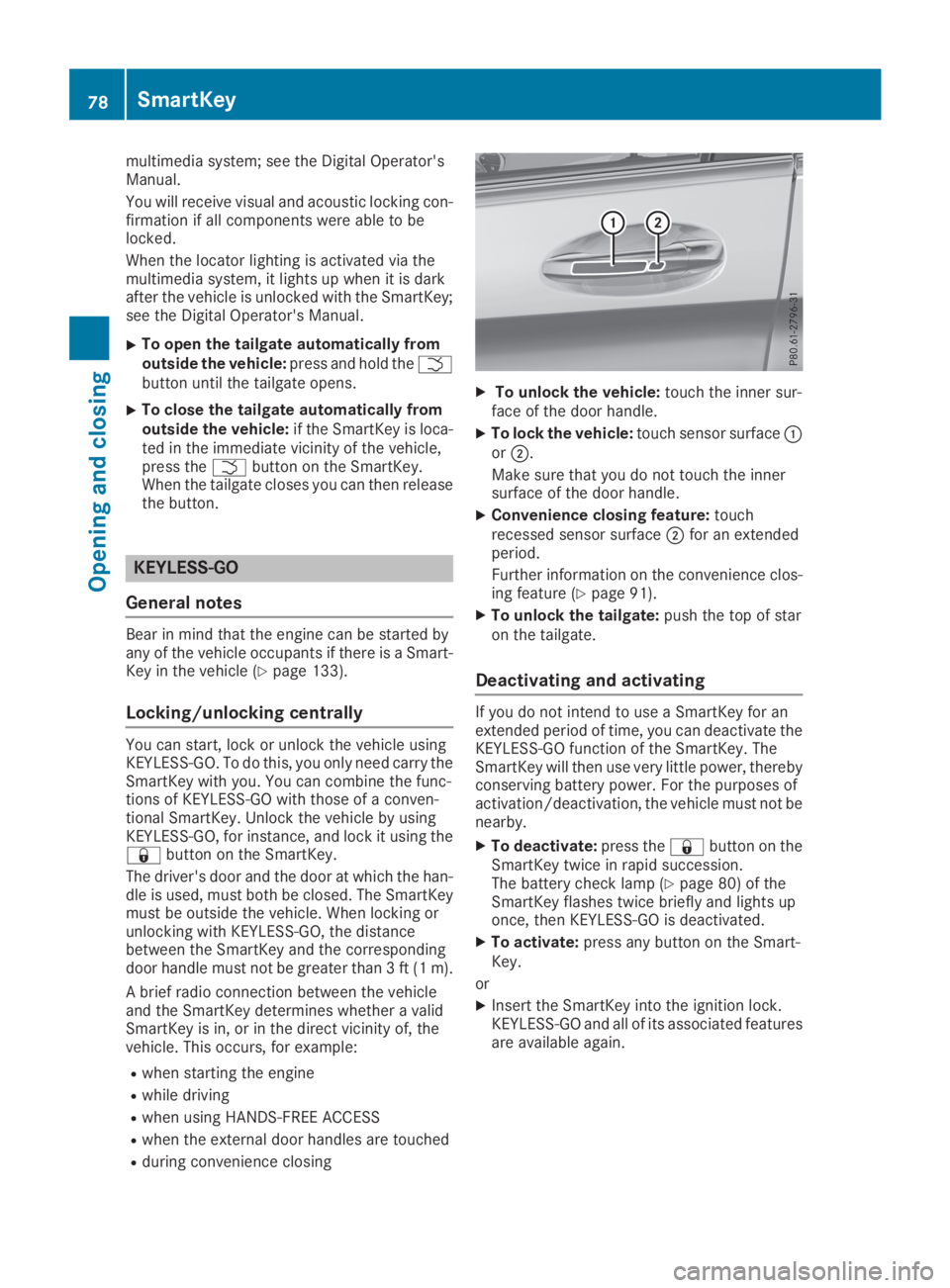
XTo unlock the vehicle:touch the inner sur-face of the door handle.
XTo lock the vehicle:touch sensor surfaceCorD.
Make sure that you do not touch the innersurface of the door handle.
XConvenience closing feature:touchrecessed sensor surfaceDfor an extendedperiod.
Further information on the convenience clos-ing feature (Ypage 91).
XTo unlock the tailgate:push the top of staron the tailgate.
Deactivating and activating
If you do not intend to use a SmartKey for anextended period of time, you can deactivate theKEYLESS-GO function of the SmartKey. TheSmartKey will then use very little power, therebyconserving battery power. For the purposes ofactivation/deactivation, the vehicle must not benearby.
XTo deactivate:press the7button on theSmartKey twice in rapid succession.The battery check lamp (Ypage 80) of theSmartKey flashes twice briefly and lights uponce, then KEYLESS-GO is deactivated.
XTo activate:press any button on the Smart-Key.
or
XInsert the SmartKey into the ignition lock.KEYLESS-GO and all of its associated featuresare available again.
78SmartKey
Opening and closing
Page 81 of 370
KEYLESS-GO start function
General notes
Bear in mind that the engine can be started byany of the vehicle occupants if there is a Smart-Key in the vehicle (Ypage 133).
Changing the settings of the locking
system
You can change the settings of the locking sys-tem. This means that only the driver's door andthe fuel filler flap are unlocked when the vehicleis unlocked. This is useful if you frequently travelalone.
XTo change the setting:press and hold downthe6and7buttons simultaneouslyfor approximately six seconds until the bat-tery check lamp (Ypage 80) flashes twice.
If the setting of the locking system is changedwithin the signal range of the vehicle, pressingthe7or6button:
Rlocks or
Runlocks the vehicle
The SmartKey now functions as follows:
XTo unlock:press the6button once.
XTo unlock centrally:press the6buttontwice.
XTo lock:press the7button.
XTo restore the factory settings:press andhold the6and7buttons simultane-ously for approximately six seconds until thebattery check lamp (Ypage 80) flashestwice.
The KEYLESS-GO functions can be changed asfollows:
XTo unlock the driver's door:touch the innersurface of the door handle on the driver'sdoor.
XTo unlock centrally:touch the inner surfaceof the door handle on the front-passengerdoor or the rear door.
XTo lock centrally:touch the outer sensorsurface on one of the door handles.
Mechanical key
General notes
If the vehicle can no longer be locked orunlocked with the SmartKey or KEYLESS-GO,use the mechanical key.
If you use the mechanical key to unlock andopen the driver's door, the anti-theft alarm sys-tem will be triggered. Switch off the alarm(Ypage 75).
If you unlock the vehicle using the mechanicalkey, the fuel filler flap will not be unlocked auto-matically.
XTo unlock the fuel filler flap:insert theSmartKey into the ignition lock.
Removing the mechanical key
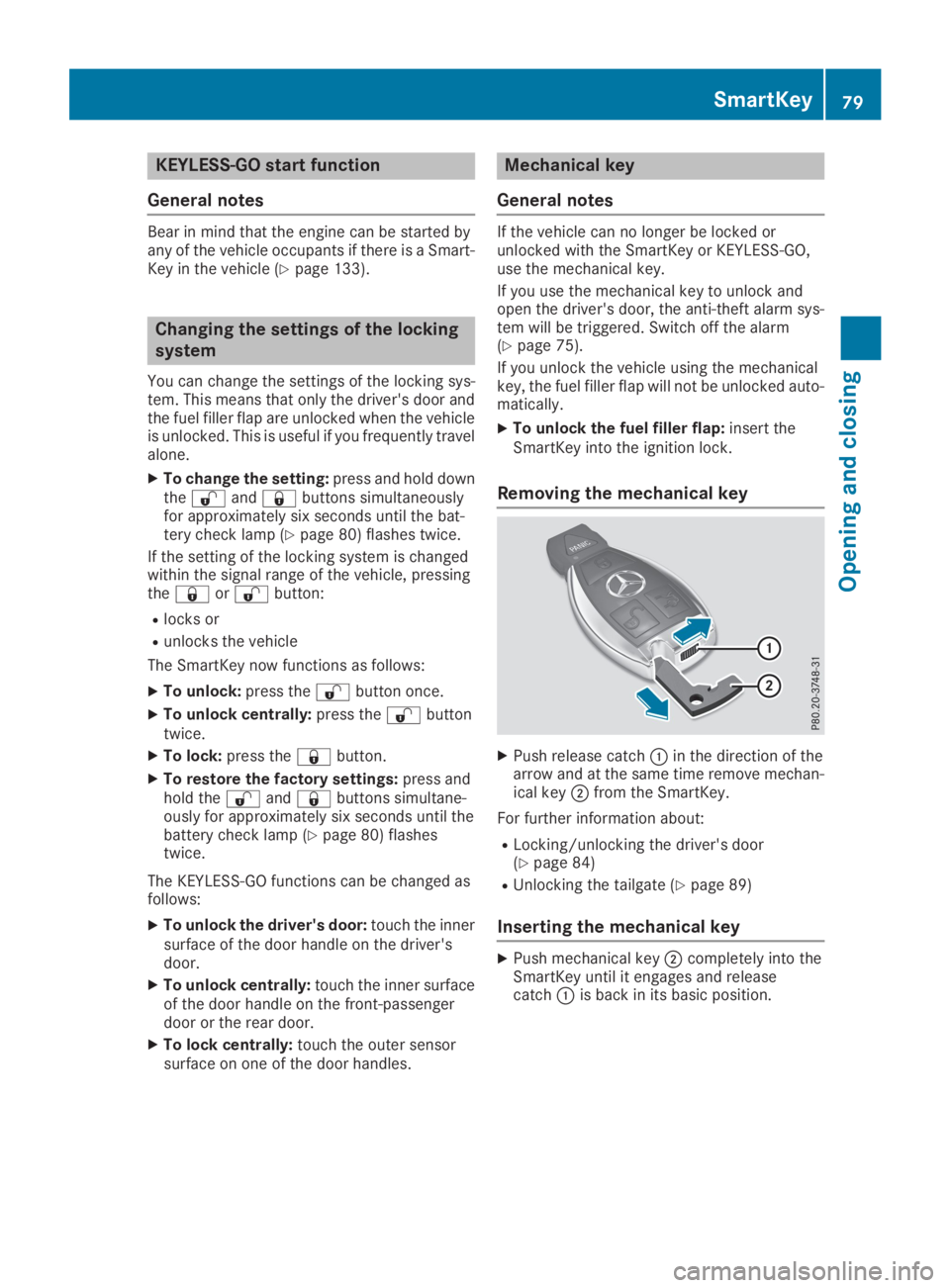
XPush release catchCin the direction of thearrow and at the same time remove mechan-ical keyDfrom the SmartKey.
For further information about:
RLocking/unlocking the driver's door(Ypage 84)
RUnlocking the tailgate (Ypage 89)
Inserting the mechanical key
XPush mechanical keyDcompletely into theSmartKey until it engages and releasecatchCis back in its basic position.
SmartKey79
Opening and closing
Z
Page 85 of 370

Doors
Important safety notes
GWARNING
If children are left unsupervised in the vehicle,
they could:
Ropen the doors, thus endangering other
people or road users.
Rget out and disrupt traffic.
Roperate the vehicle's equipment.
Additionally, children could set the vehicle in
motion if, for example, they:
Rrelease the parking brake.
Rshifting the automatic transmission out of
park positionP
RStart the engine.
There is a risk of an accident and injury.
When leaving the vehicle, always take the
SmartKey with you and lock the vehicle. Never
leave children or animals unattended in the
vehicle. Always keep the SmartKey out of
reach of children.
Unlocking and opening doors from
the inside
You can open a door from inside the vehicleeven if it has been locked. You can only open therear doors from inside the vehicle if they are notsecured by the child-proof locks (Ypage 64). Ifthe vehicle has been locked with the SmartKeyor with KEYLESS-GO, opening a door from theinside will trigger the anti-theft alarm system.Switch off the alarm (Ypage 75).
XTo unlock and open a front door:pull doorhandleD.If the door is locked, locking knobCpops up.The door is unlocked and opens.
XTo unlock a rear door:pull the rear doorhandle.The locking knob on the rear door pops up andthe rear door unlocks.
XTo open a rear door:pull the rear door han-dle again.The rear door opens.
Centrally locking and unlocking the
vehicle from the inside
You can centrally lock and unlock the vehiclefrom the inside. The buttons are on the driver’sdoor.
XTo unlock:press buttonC.
XTo lock:press buttonD.When the front-passenger door is closed, thevehicle is locked.
Meanwhile, the fuel filler flap will not be lockedor unlocked.
You cannot unlock the vehicle centrally from theinside if the vehicle has been locked with theSmartKey or KEYLESS-GO.
If the vehicle has been locked with the SmartKeyor with KEYLESS-GO, opening a door from theinside will trigger the anti-theft alarm system.Switch off the alarm (Ypage 75).
If a locked door is opened from the inside, theprevious unlock status of the vehicle will betaken into consideration if:
Rthe vehicle was locked using the locking but-ton for the central locking, or
Rlocked automatically
Doors83
Opening and closing
Z
Page 86 of 370
The vehicle will be fully unlocked if it had previ-ously been fully unlocked. If only the driver'sdoor had been previously unlocked, only thedoor which has been opened from the inside isunlocked.
Automatic locking feature
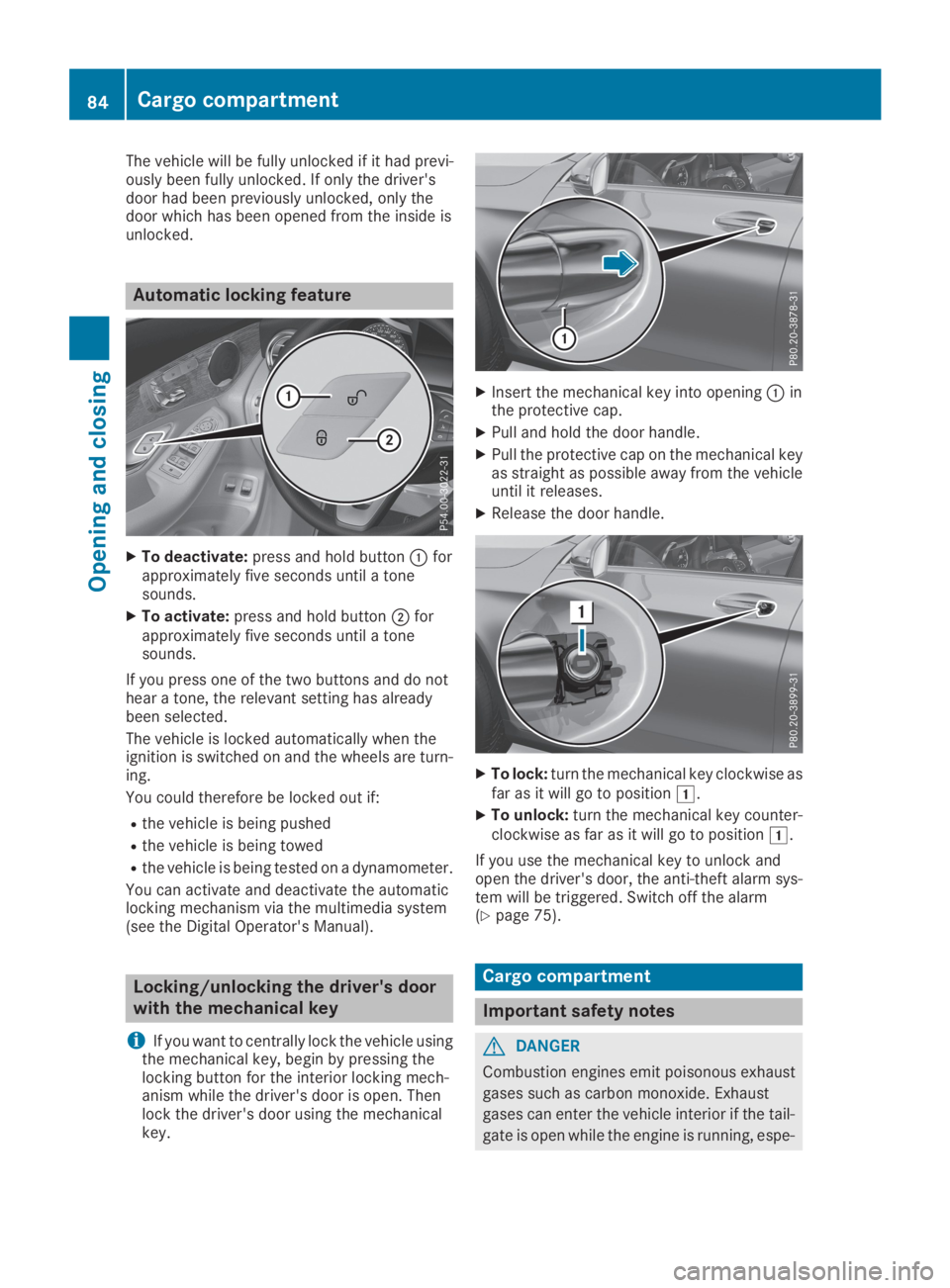
XTo deactivate:press and hold buttonCforapproximately five seconds until a tonesounds.
XTo activate:press and hold buttonDforapproximately five seconds until a tonesounds.
If you press one of the two buttons and do nothear a tone, the relevant setting has alreadybeen selected.
The vehicle is locked automatically when theignition is switched on and the wheels are turn-ing.
You could therefore be locked out if:
Rthe vehicle is being pushed
Rthe vehicle is being towed
Rthe vehicle is being tested on a dynamometer.
You can activate and deactivate the automaticlocking mechanism via the multimedia system(see the Digital Operator's Manual).
Locking/unlocking the driver's door
with the mechanical key
iIf you want to centrally lock the vehicle usingthe mechanical key, begin by pressing thelocking button for the interior locking mech-anism while the driver's door is open. Thenlock the driver's door using the mechanicalkey.
XInsert the mechanical key into openingCinthe protective cap.
XPull and hold the door handle.
XPull the protective cap on the mechanical keyas straight as possible away from the vehicleuntil it releases.
XRelease the door handle.
XTo lock:turn the mechanical key clockwise asfar as it will go to positionG.
XTo unlock:turn the mechanical key counter-clockwise as far as it will go to positionG.
If you use the mechanical key to unlock andopen the driver's door, the anti-theft alarm sys-tem will be triggered. Switch off the alarm(Ypage 75).
Cargo compartment
Important safety notes
GDANGER
Combustion engines emit poisonous exhaust
gases such as carbon monoxide. Exhaust
gases can enter the vehicle interior if the tail-
gate is open while the engine is running, espe-
84Cargo compartment
Opening and closing
Page 88 of 370
during the closing process. There is a risk of
injury.
Make sure that nobody is in the vicinity of the
closing area during the closing process.
Use one of the following options to stop the
closing process:
Rpress theTbutton on the SmartKey.
Rpull or press the remote operating switch
on the driver's door.
Rpress the closing or locking button on the
tailgate.
Rpress the top of the star on the tailgate.
Vehicles with HANDS-FREE ACCESS:
You can also stop the closing process by per-forming a kicking movement under the rearbumper.
!The tailgate swings upwards and to the rearwhen opened. Therefore, make sure thatthere is sufficient clearance above and behindthe tailgate.
Two warning tones sound while the tailgate isopening or closing.
The opening dimensions of the tailgate can befound in the "Vehicle data" section(Ypage 363).
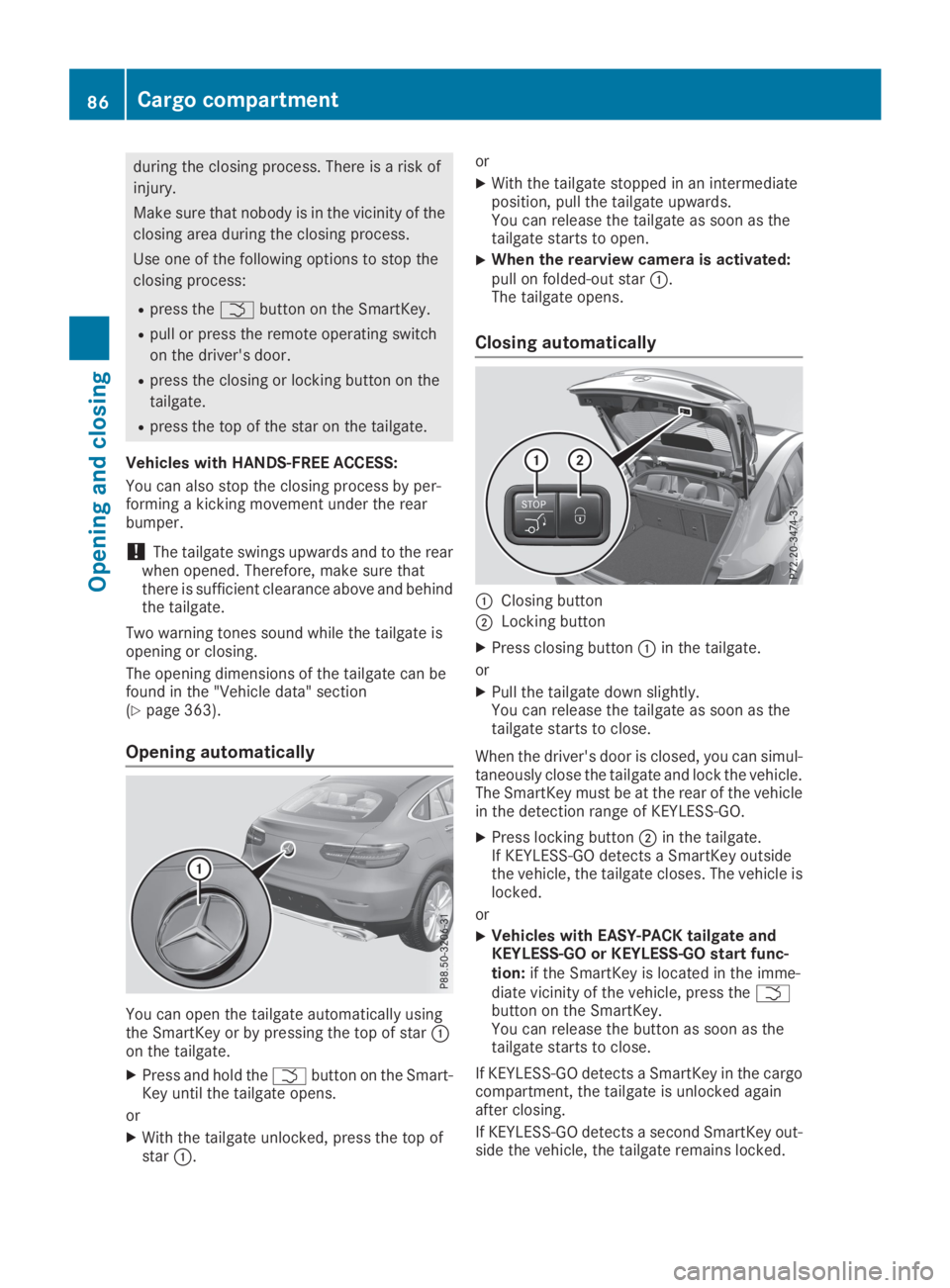
Opening automatically
You can open the tailgate automatically usingthe SmartKey or by pressing the top of starCon the tailgate.
XPress and hold theTbutton on the Smart-Key until the tailgate opens.
or
XWith the tailgate unlocked, press the top ofstarC.
or
XWith the tailgate stopped in an intermediateposition, pull the tailgate upwards.You can release the tailgate as soon as thetailgate starts to open.
XWhen the rearview camera is activated:pull on folded-out starC.The tailgate opens.
Closing automatically
CClosing button
DLocking button
XPress closing buttonCin the tailgate.
or
XPull the tailgate down slightly.You can release the tailgate as soon as thetailgate starts to close.
When the driver's door is closed, you can simul-taneously close the tailgate and lock the vehicle.The SmartKey must be at the rear of the vehiclein the detection range of KEYLESS-GO.
XPress locking buttonDin the tailgate.If KEYLESS-GO detects a SmartKey outsidethe vehicle, the tailgate closes. The vehicle islocked.
or
XVehicles with EASY-PACK tailgate andKEYLESS-GO or KEYLESS-GO start func-tion:if the SmartKey is located in the imme-diate vicinity of the vehicle, press theTbutton on the SmartKey.You can release the button as soon as thetailgate starts to close.
If KEYLESS-GO detects a SmartKey in the cargocompartment, the tailgate is unlocked againafter closing.
If KEYLESS-GO detects a second SmartKey out-side the vehicle, the tailgate remains locked.
86Cargo compartment
Opening and closing
Page 91 of 370
XTo open:pull remote operating switchCforthe tailgate until the tailgate opens.
XTo close:turn the SmartKey to positionGorHin the ignition lock.
XPress and hold remote operating switch fortailgateCuntil the tailgate is completelyclosed.
When the vehicle is stationary, you can close thetailgate from the driver's seat. When the vehicleis also unlocked, you can also open the tailgatefrom inside.
Limiting the opening angle of the tail-
gate
General notes
!Make sure there is sufficient clearance toopen the tailgate fully when setting the open-ing angle. The tailgate could otherwise bedamaged. Ideally, set the opening angle out-side.
You can limit the opening angle of the tailgate.This is possible in the top half of its openingrange, up to approximately 8 in (20 cm) beforethe stop.
To open the tailgate fully, push the top of the staron the tailgate again after it has stopped auto-matically. This does not delete the stored posi-tion.
Activating
XTo open the tailgate:push the top of the staron the tailgate.
XTo stop the opening process at thedesired position:press the closing button onthe tailgate or push the top of the star on thetailgate again.
XTo store the position:press and hold theclosing button in the tailgate until you hear ashort tone.The opening angle limiter is activated. Thetailgate will now stop in the stored positionwhen opening.
Deactivating
XPress and hold the closing button on the tail-gate until two short tones sound.
Unlocking the tailgate using the
mechanical key
General notes
Use the mechanical key if the tailgate can nolonger be unlocked:
Rusing the SmartKey
Rusing HANDS-FREE ACCESS
Rusing the remote operating switch on the doorcontrol panel
!The tailgate swings upwards and to the rearwhen opened. Therefore, make sure thatthere is sufficient clearance above and behindthe tailgate.
Unlocking
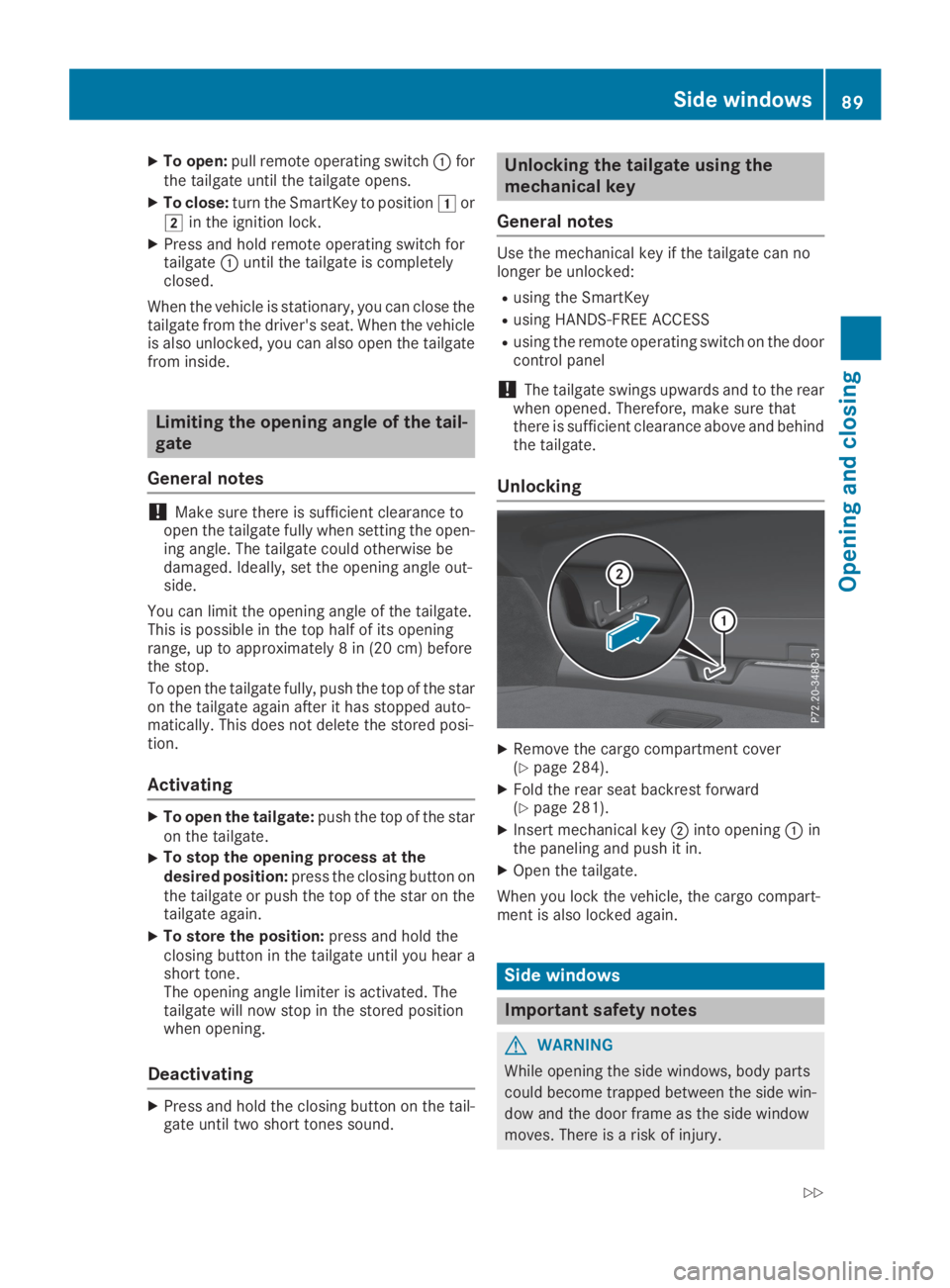
XRemove the cargo compartment cover(Ypage 284).
XFold the rear seat backrest forward(Ypage 281).
XInsert mechanical keyDinto openingCinthe paneling and push it in.
XOpen the tailgate.
When you lock the vehicle, the cargo compart-ment is also locked again.
Side windows
Important safety notes
GWARNING
While opening the side windows, body parts
could become trapped between the side win-
dow and the door frame as the side window
moves. There is a risk of injury.
Side windows89
Opening and closing
Z
Page 92 of 370
Make sure that nobody touches the side win-
dow during the opening procedure. If some-
body becomes trapped, release the switch or
pull the switch to close the side window again.
GWARNING
While closing the side windows, body parts in
the closing area could become trapped. There
is a risk of injury.
When closing make sure that no parts of the
body are in the closing area. If somebody
becomes trapped, release the switch or press
the switch to open the side window again.
GWARNING
If children operate the side windows they
could become trapped, particularly if they are
left unsupervised. There is a risk of injury.
Activate the override feature for the rear side
windows. When leaving the vehicle, always
take the SmartKey with you and lock the vehi-
cle. Never leave children unsupervised in the
vehicle.
Side window reversing feature
The side windows are equipped with an auto-matic reversing feature. If a solid object blocksor restricts a side window from travelingupwards during the automatic closing process,the side window opens again automatically. Dur-ing the manual closing process, the side windowonly opens again automatically after the corre-sponding switch is released. The automaticreversing feature is only an aid and does notrelieve you of the responsibility of paying atten-tion when closing a side window.
GWARNING
The reversing feature does not react:
Rto soft, light and thin objects, e.g. small fin-
gers
Rwhile adjusting
This means that the reversing feature cannot
prevent someone being trapped in these sit-
uations. There is a risk of injury.
Make sure that no body parts are in close
proximity during the closing procedure. If
someone becomes trapped, press theb
button to open the side window again.
Opening and closing the side win-
dows
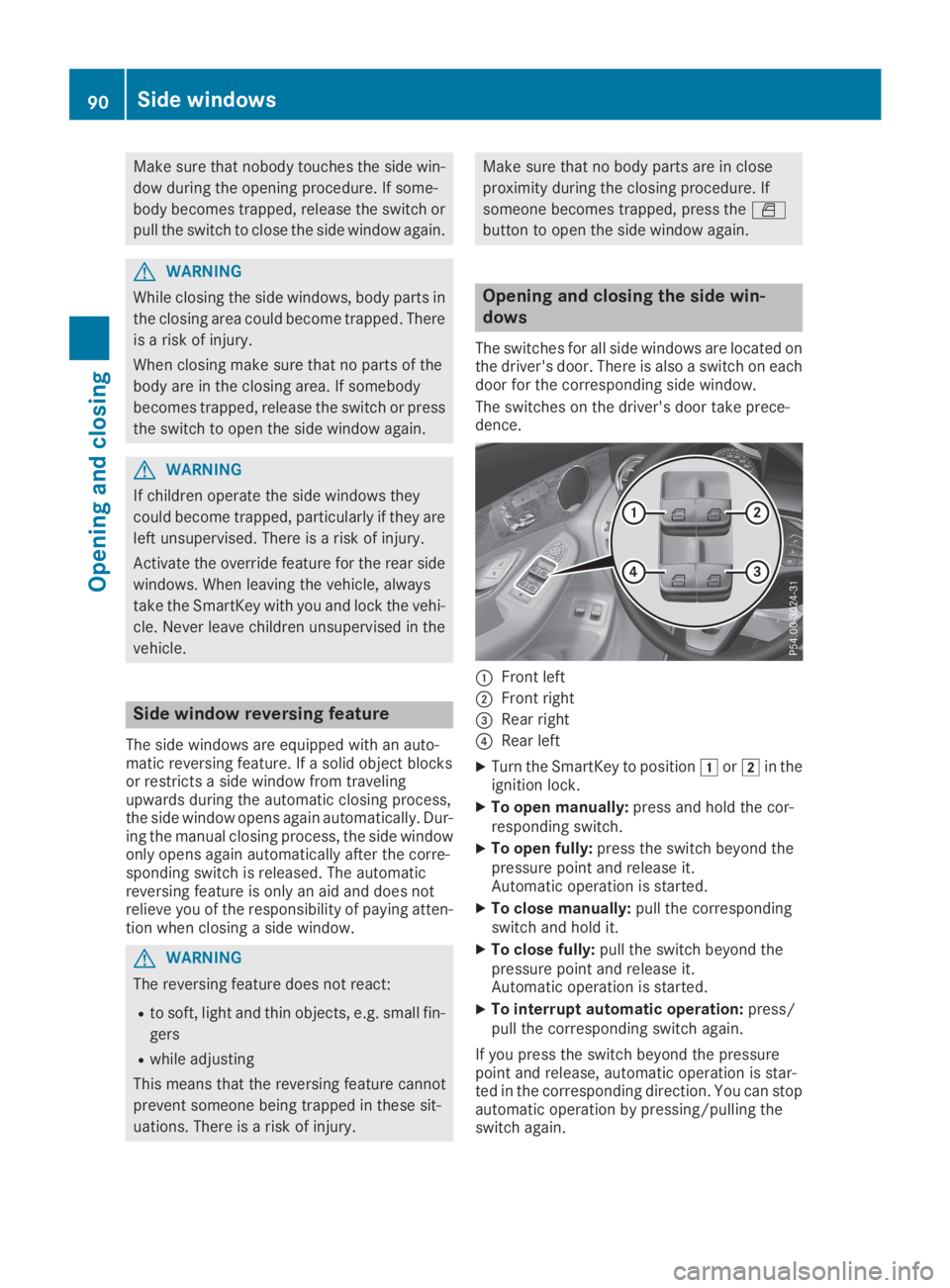
The switches for all side windows are located onthe driver's door. There is also a switch on eachdoor for the corresponding side window.
The switches on the driver's door take prece-dence.
CFront left
DFront right
Page 93 of 370
You can continue to operate the side windowsafter you switch off the engine or remove theSmartKey. This function remains active for fiveminutes or until you open a front door.
When the override feature for the side windowsis activated, the side windows cannot be oper-ated from the rear (Ypage 64).
Information on opening and closing the rollersunblinds on the rear side windows(Ypage 290).
Convenience opening
General notes
If the SmartKey is in close proximity to the vehi-cle, the convenience opening function is availa-ble.
Vehicles with KEYLESS-GO or KEYLESS-GOstart function:you can ventilate the vehiclebefore you start driving.
To do this, the SmartKey is used to carry out thefollowing functions simultaneously:
Runlock the vehicle
Ropen the side windows
Ropen the sliding sunroof
Rswitch on the seat ventilation for the driver'sseat
The "convenience opening" feature is also avail-able when the vehicle is unlocked.
Convenience opening
XPress and hold the6button on the Smart-Key until the sliding sunroof is in the desiredposition.
XTo interrupt convenience opening:releasethe6button.
Convenience closing feature
Important safety notes
GWARNING
When the convenience closing feature is oper-
ating, parts of the body could become trapped
in the closing area of the side window and the
sliding sunroof. There is a risk of injury.
Observe the complete closing procedure
when the convenience closing feature is oper-
ating. Make sure that no body parts are in
close proximity during the closing procedure.
Vehicles with KEYLESS-GO or KEYLESS-GOstart function:if the SmartKey is in close prox-imity to the vehicle, the convenience closingfunction is available.
When you lock the vehicle, you can simultane-ously:
Rclose the side windows
Rclose the sliding sunroof
Notes on the automatic reversing feature for:
Rthe side windows (Ypage 90)
Rthe sliding sunroof (Ypage 93)
Using the SmartKey
XPress and hold the7button until the sidewindows and the sliding sunroof are fullyclosed.
XMake sure that all the side windows and thesliding sunroof are closed.
XTo interrupt convenience closing:releasethe7button.
Using KEYLESS-GO
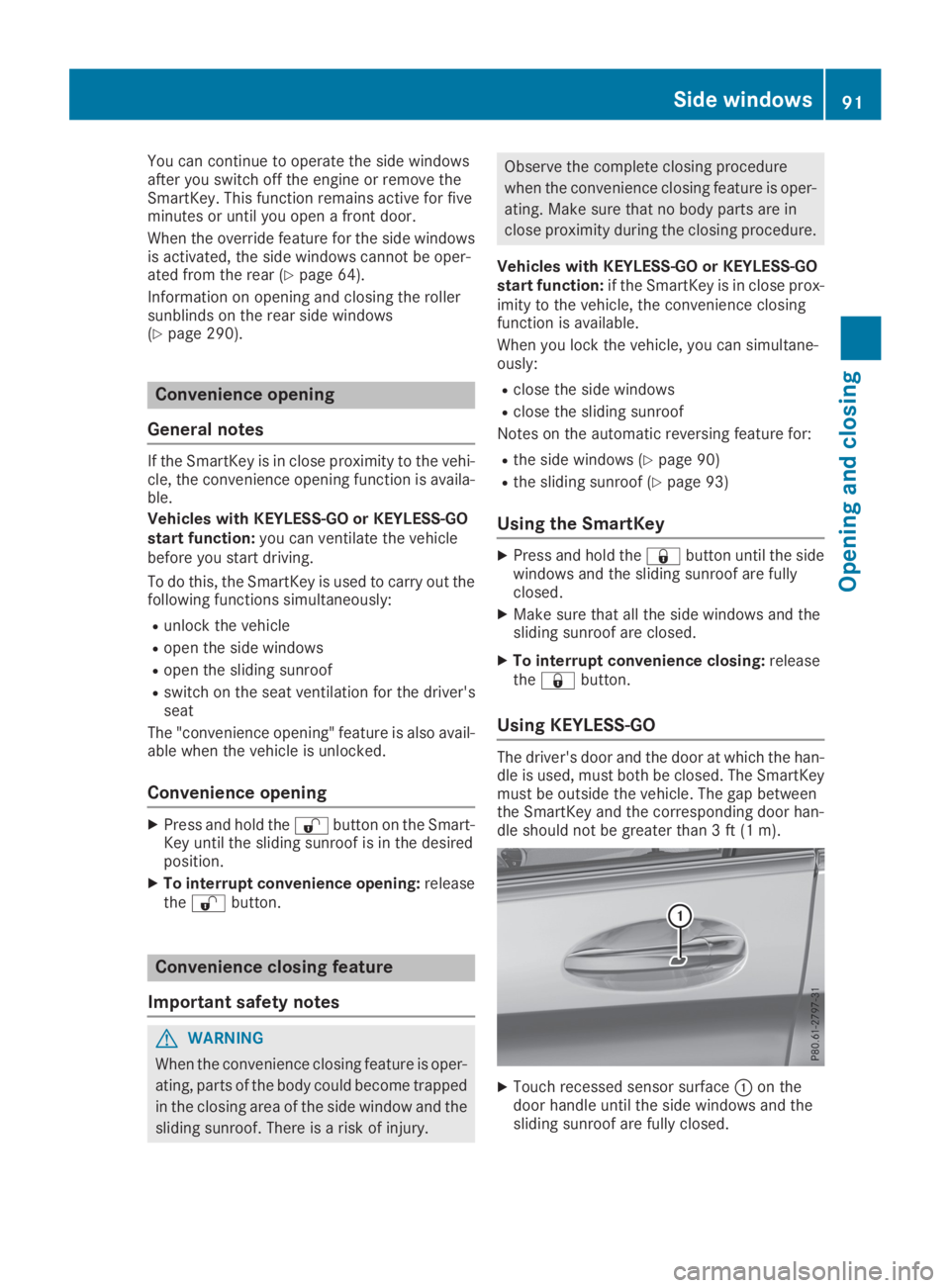
The driver's door and the door at which the han-dle is used, must both be closed. The SmartKeymust be outside the vehicle. The gap betweenthe SmartKey and the corresponding door han-dle should not be greater than 3 ft (1 m).
XTouch recessed sensor surfaceCon thedoor handle until the side windows and thesliding sunroof are fully closed.
Side windows91
Opening and closing
Z
Page 94 of 370
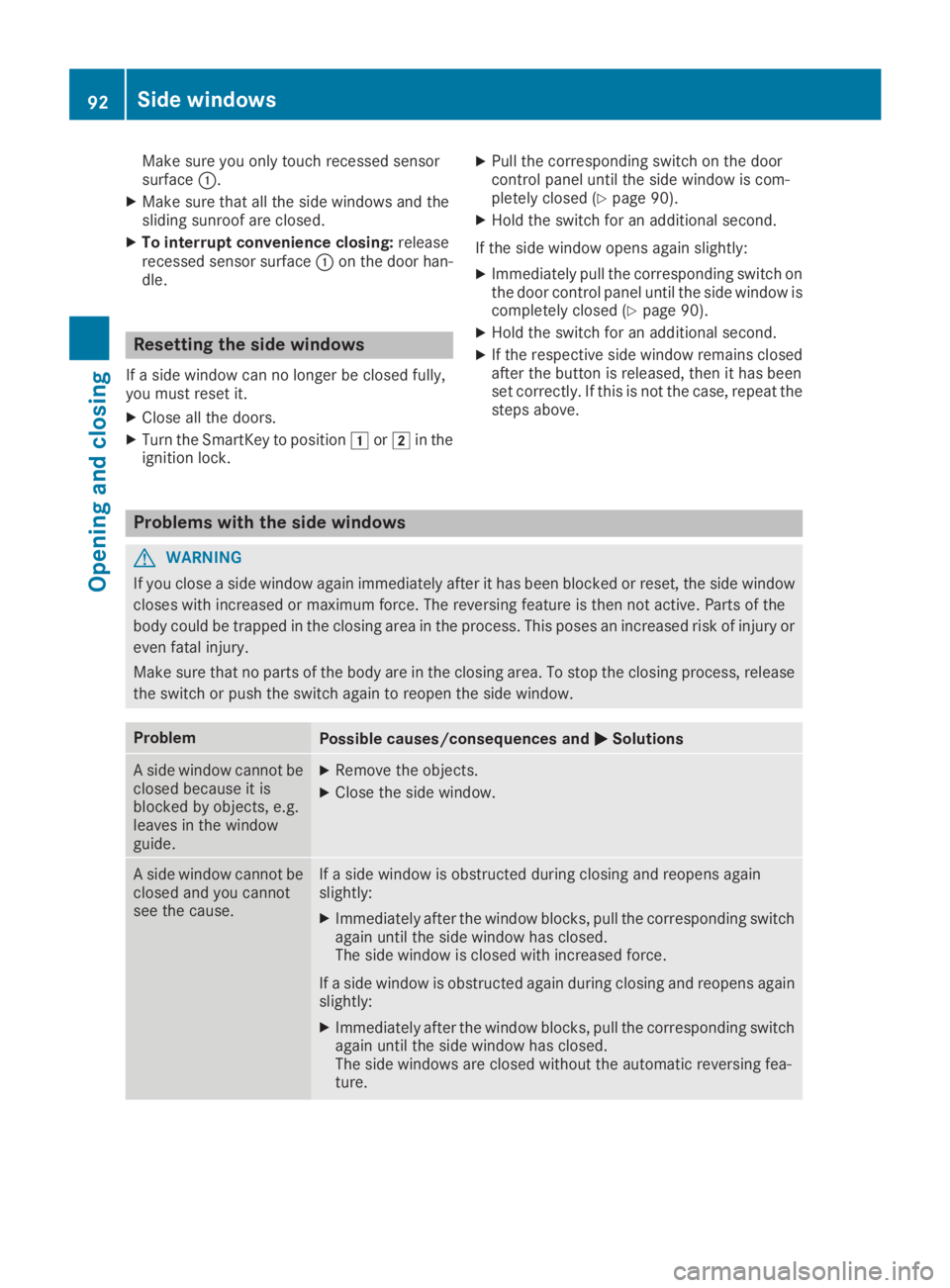
Make sure you only touch recessed sensorsurfaceC.
XMake sure that all the side windows and thesliding sunroof are closed.
XTo interrupt convenience closing:releaserecessed sensor surfaceCon the door han-dle.
Resetting the side windows
If a side window can no longer be closed fully,you must reset it.
XClose all the doors.
XTurn the SmartKey to positionGorHin theignition lock.
XPull the corresponding switch on the doorcontrol panel until the side window is com-pletely closed (Ypage 90).
XHold the switch for an additional second.
If the side window opens again slightly:
XImmediately pull the corresponding switch onthe door control panel until the side window iscompletely closed (Ypage 90).
XHold the switch for an additional second.
XIf the respective side window remains closedafter the button is released, then it has beenset correctly. If this is not the case, repeat thesteps above.
Problems with the side windows
GWARNING
If you close a side window again immediately after it has been blocked or reset, the side window
closes with increased or maximum force. The reversing feature is then not active. Parts of the
body could be trapped in the closing area in the process. This poses an increased risk of injury or
even fatal injury.
Make sure that no parts of the body are in the closing area. To stop the closing process, release
the switch or push the switch again to reopen the side window.
ProblemPossible causes/consequences andPPSolutions
A side window cannot beclosed because it isblocked by objects, e.g.leaves in the windowguide.
XRemove the objects.
XClose the side window.
A side window cannot beclosed and you cannotsee the cause.
If a side window is obstructed during closing and reopens againslightly:
XImmediately after the window blocks, pull the corresponding switchagain until the side window has closed.The side window is closed with increased force.
If a side window is obstructed again during closing and reopens againslightly:
XImmediately after the window blocks, pull the corresponding switchagain until the side window has closed.The side windows are closed without the automatic reversing fea-ture.
92Side windows
Opening and closing
Page 96 of 370
XTurn the SmartKey to positionGorHin theignition lock.
XPress or pull theWswitch in the corre-sponding direction.
If you press/pull theWswitch beyond thepressure point, automatic operation is started inthe corresponding direction. When being raisedor opened, the sliding sunroof first automaticallymoves to the comfort setting. If you activateraise or open again, the sliding sunroof is raisedor opened completely. You can stop automaticoperation by pressing/pulling the switch again.
When opening and raising the roof, automaticoperation is only available if the sliding sunroofis in the closed position.
The sun protection cover automatically opensalong with the sliding sunroof. You can open orclose the sun protection cover manually whenthe sliding sunroof is raised or closed.
You can continue to operate the sliding sunroofafter switching off the engine or removing the
SmartKey from the ignition lock. This function isavailable for up to five minutes or until the driv-er's or front-passenger door is opened.
Resetting
!If the sliding sunroof still cannot be openedor closed fully after resetting, contact a quali-fied specialist workshop.
Reset the sliding sunroof if it does not movesmoothly.
XTurn the SmartKey to positionGorHin theignition lock.
XRaise the sliding sunroof fully at the rear(Ypage 93).
XKeep theWswitch pressed for anothersecond.
XMake sure that the sliding sunroof can be fullyopened and closed again (Ypage 93).
XIf this is not the case, repeat the steps above.
Problems with the sliding sunroof
GWARNING
If you close the sliding sunroof again immediately after it has been blocked or reset, the sliding
sunroof closes with increased or maximum force. The reversing feature is then not active. Parts
of the body could be trapped in the closing area in the process. This poses an increased risk of
injury or even fatal injury.
Make sure that no parts of the body are in the closing area.
If somebody becomes trapped:
Rrelease the switch immediately, or
Rpress the switch in any direction during the automatic closing process
The closing process is stopped.
!If the sliding sunroof still cannot be opened or closed as a result of a malfunction, contact aqualified specialist workshop.
94Sliding sunroof
Opening and closing