ignition MERCEDES-BENZ GLC 2019 User Guide
[x] Cancel search | Manufacturer: MERCEDES-BENZ, Model Year: 2019, Model line: GLC, Model: MERCEDES-BENZ GLC 2019Pages: 370, PDF Size: 19.55 MB
Page 80 of 370
multimedia system; see the Digital Operator'sManual.
You will receive visual and acoustic locking con-firmation if all components were able to belocked.
When the locator lighting is activated via themultimedia system, it lights up when it is darkafter the vehicle is unlocked with the SmartKey;see the Digital Operator's Manual.
XTo open the tailgate automatically fromoutside the vehicle:press and hold theTbutton until the tailgate opens.
XTo close the tailgate automatically fromoutside the vehicle:if the SmartKey is loca-ted in the immediate vicinity of the vehicle,press theTbutton on the SmartKey.When the tailgate closes you can then releasethe button.
KEYLESS-GO
General notes
Bear in mind that the engine can be started byany of the vehicle occupants if there is a Smart-Key in the vehicle (Ypage 133).
Locking/unlocking centrally
You can start, lock or unlock the vehicle usingKEYLESS-GO. To do this, you only need carry theSmartKey with you. You can combine the func-tions of KEYLESS-GO with those of a conven-tional SmartKey. Unlock the vehicle by usingKEYLESS-GO, for instance, and lock it using the7button on the SmartKey.
The driver's door and the door at which the han-dle is used, must both be closed. The SmartKeymust be outside the vehicle. When locking orunlocking with KEYLESS-GO, the distancebetween the SmartKey and the correspondingdoor handle must not be greater than 3 ft (1 m).
A brief radio connection between the vehicleand the SmartKey determines whether a validSmartKey is in, or in the direct vicinity of, thevehicle. This occurs, for example:
Rwhen starting the engine
Rwhile driving
Rwhen using HANDS-FREE ACCESS
Rwhen the external door handles are touched
Rduring convenience closing
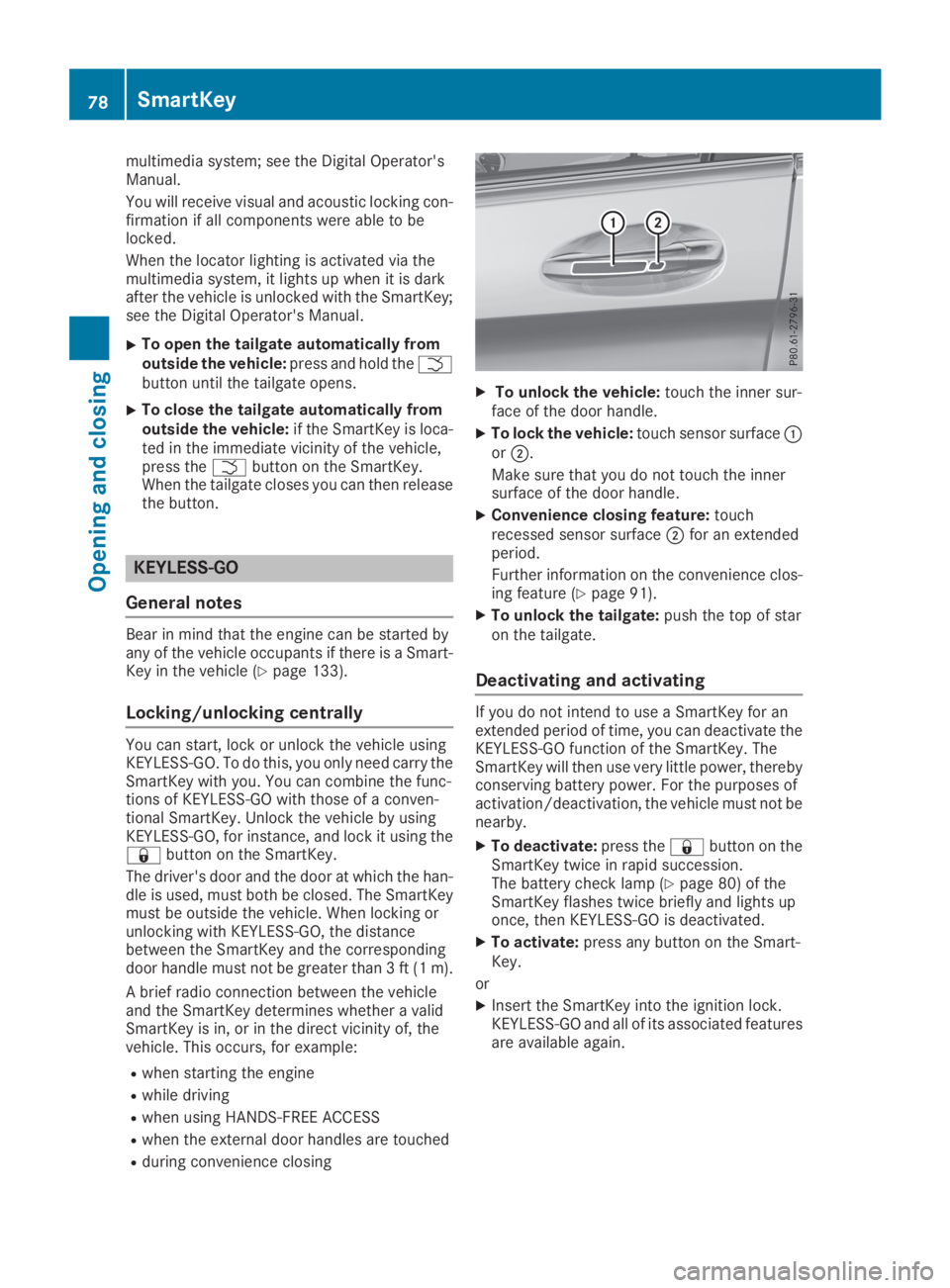
XTo unlock the vehicle:touch the inner sur-face of the door handle.
XTo lock the vehicle:touch sensor surfaceCorD.
Make sure that you do not touch the innersurface of the door handle.
XConvenience closing feature:touchrecessed sensor surfaceDfor an extendedperiod.
Further information on the convenience clos-ing feature (Ypage 91).
XTo unlock the tailgate:push the top of staron the tailgate.
Deactivating and activating
If you do not intend to use a SmartKey for anextended period of time, you can deactivate theKEYLESS-GO function of the SmartKey. TheSmartKey will then use very little power, therebyconserving battery power. For the purposes ofactivation/deactivation, the vehicle must not benearby.
XTo deactivate:press the7button on theSmartKey twice in rapid succession.The battery check lamp (Ypage 80) of theSmartKey flashes twice briefly and lights uponce, then KEYLESS-GO is deactivated.
XTo activate:press any button on the Smart-Key.
or
XInsert the SmartKey into the ignition lock.KEYLESS-GO and all of its associated featuresare available again.
78SmartKey
Opening and closing
Page 81 of 370
KEYLESS-GO start function
General notes
Bear in mind that the engine can be started byany of the vehicle occupants if there is a Smart-Key in the vehicle (Ypage 133).
Changing the settings of the locking
system
You can change the settings of the locking sys-tem. This means that only the driver's door andthe fuel filler flap are unlocked when the vehicleis unlocked. This is useful if you frequently travelalone.
XTo change the setting:press and hold downthe6and7buttons simultaneouslyfor approximately six seconds until the bat-tery check lamp (Ypage 80) flashes twice.
If the setting of the locking system is changedwithin the signal range of the vehicle, pressingthe7or6button:
Rlocks or
Runlocks the vehicle
The SmartKey now functions as follows:
XTo unlock:press the6button once.
XTo unlock centrally:press the6buttontwice.
XTo lock:press the7button.
XTo restore the factory settings:press andhold the6and7buttons simultane-ously for approximately six seconds until thebattery check lamp (Ypage 80) flashestwice.
The KEYLESS-GO functions can be changed asfollows:
XTo unlock the driver's door:touch the innersurface of the door handle on the driver'sdoor.
XTo unlock centrally:touch the inner surfaceof the door handle on the front-passengerdoor or the rear door.
XTo lock centrally:touch the outer sensorsurface on one of the door handles.
Mechanical key
General notes
If the vehicle can no longer be locked orunlocked with the SmartKey or KEYLESS-GO,use the mechanical key.
If you use the mechanical key to unlock andopen the driver's door, the anti-theft alarm sys-tem will be triggered. Switch off the alarm(Ypage 75).
If you unlock the vehicle using the mechanicalkey, the fuel filler flap will not be unlocked auto-matically.
XTo unlock the fuel filler flap:insert theSmartKey into the ignition lock.
Removing the mechanical key
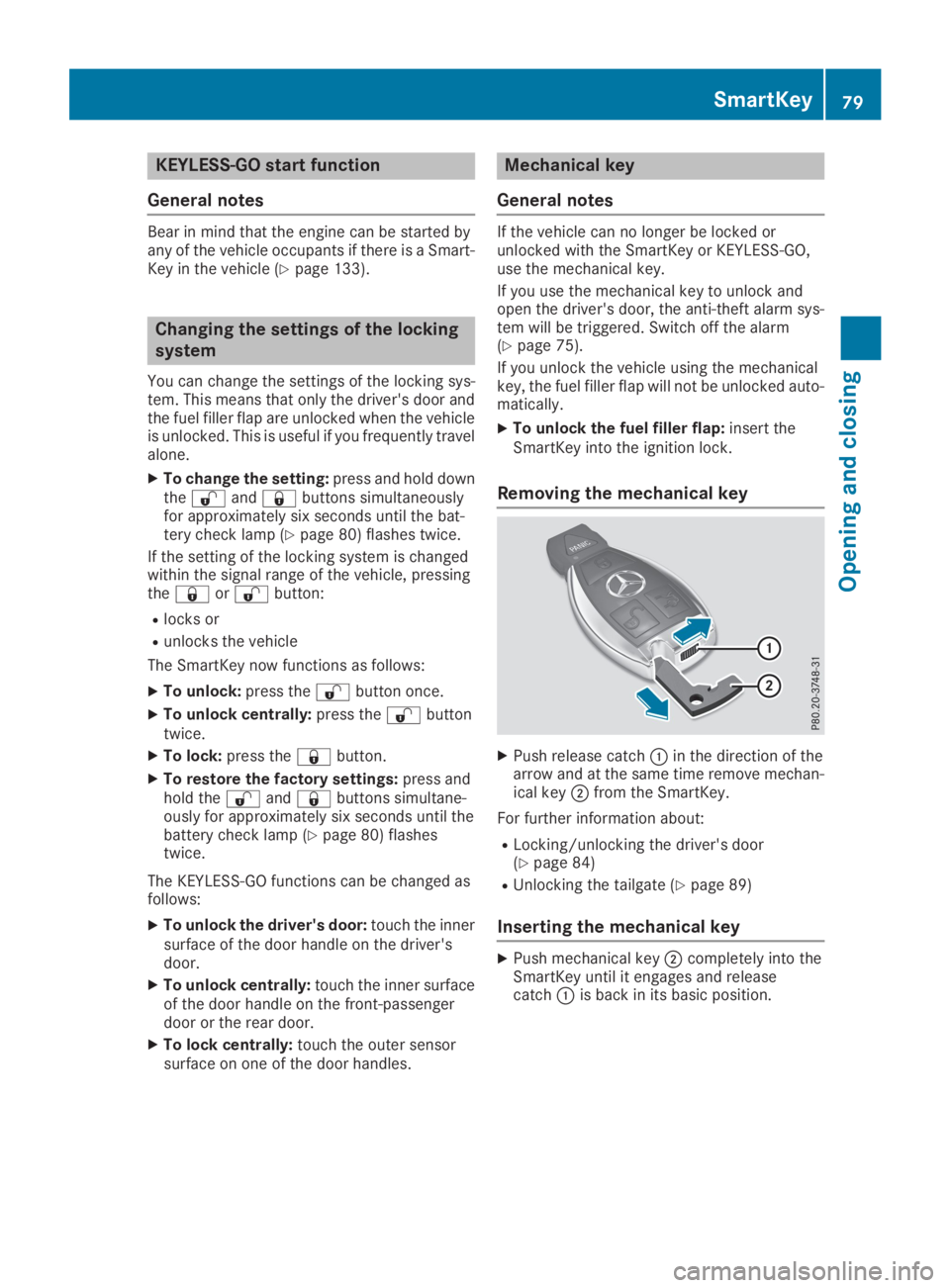
XPush release catchCin the direction of thearrow and at the same time remove mechan-ical keyDfrom the SmartKey.
For further information about:
RLocking/unlocking the driver's door(Ypage 84)
RUnlocking the tailgate (Ypage 89)
Inserting the mechanical key
XPush mechanical keyDcompletely into theSmartKey until it engages and releasecatchCis back in its basic position.
SmartKey79
Opening and closing
Z
Page 84 of 370
ProblemPossible causes/consequences andPPSolutions
KEYLESS-GO is malfunctioning.
XLock/unlock the vehicle using the remote control function of theSmartKey.
XHave the vehicle and SmartKey checked at a qualified specialistworkshop.
If the vehicle can also not be locked/unlocked using the remote con-trol function:
XLock or unlock the vehicle using the mechanical key (Ypage 84).
XHave the vehicle and SmartKey checked at a qualified specialistworkshop.
The engine cannot bestarted using the Smart-Key.
The on-board voltage is too low.
XSwitch off non-essential consumers, e.g. seat heating or interiorlighting, and try to start the engine again.
If this does not work:
XCheck the starter battery and charge it if necessary (Ypage 321).
or
XJump-start the vehicle (Ypage 322).
or
XConsult a qualified specialist workshop.
The engine cannot bestarted using the Start/Stop button. The Smart-Key is in the vehicle.
The vehicle is locked.
XUnlock the vehicle and try to start the vehicle again.
The SmartKey battery is discharged or nearly discharged.
XCheck the SmartKey battery (Ypage 80) and replace it if necessary(Ypage 80).
If this does not work:
XStart your vehicle with the SmartKey in the ignition lock.
There is interference from a powerful source of radio waves.
XStart your vehicle with the SmartKey in the ignition lock.
You have lost a Smart-Key.XHave the SmartKey deactivated at a qualified specialist workshop.
XReport the loss immediately to the vehicle insurers.
XIf necessary, have the locks changed as well.
You have lost themechanical key.XReport the loss immediately to the vehicle insurers.
XIf necessary, have the locks changed as well.
82SmartKey
Opening and closing
Page 86 of 370
The vehicle will be fully unlocked if it had previ-ously been fully unlocked. If only the driver'sdoor had been previously unlocked, only thedoor which has been opened from the inside isunlocked.
Automatic locking feature
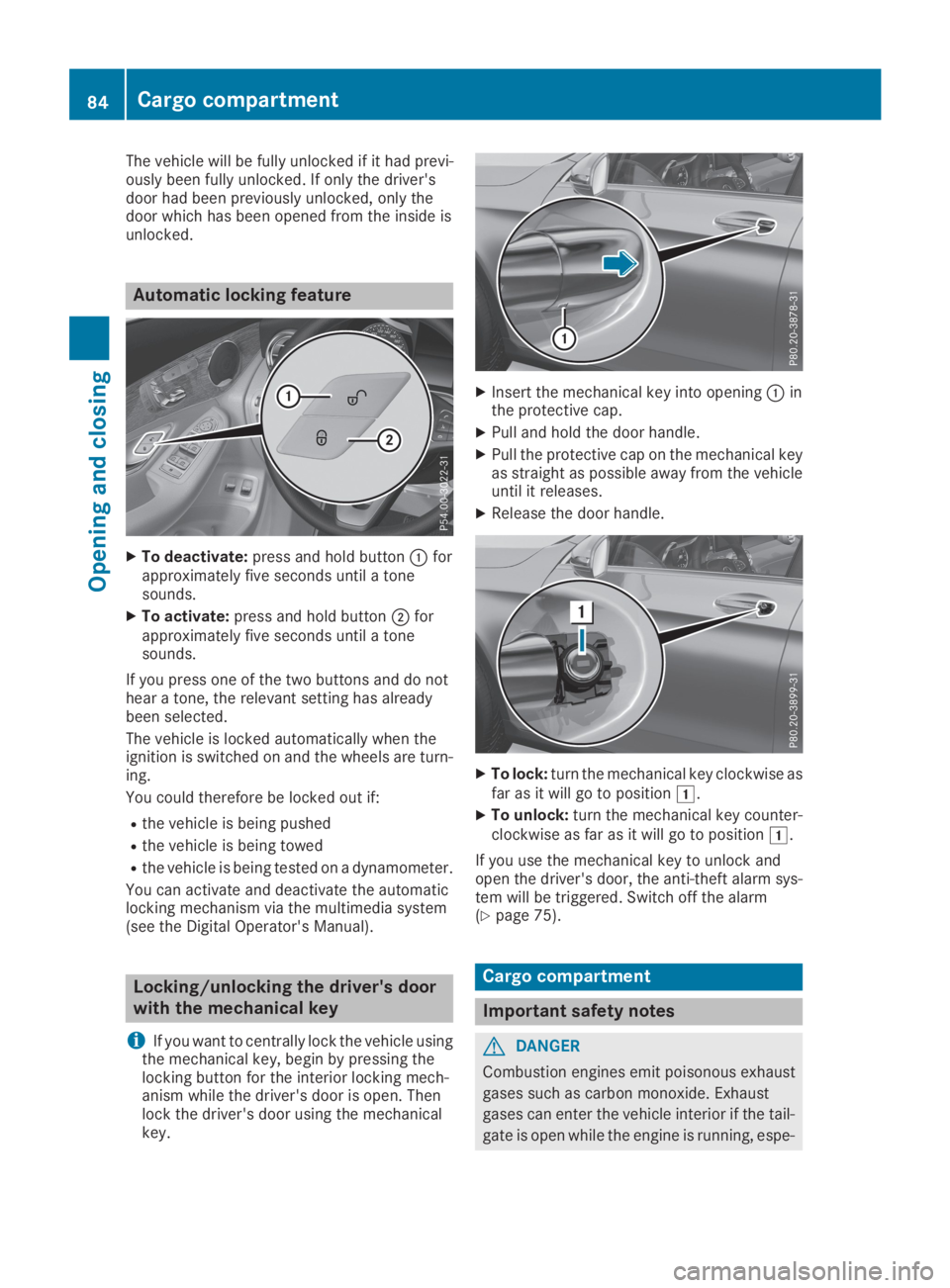
XTo deactivate:press and hold buttonCforapproximately five seconds until a tonesounds.
XTo activate:press and hold buttonDforapproximately five seconds until a tonesounds.
If you press one of the two buttons and do nothear a tone, the relevant setting has alreadybeen selected.
The vehicle is locked automatically when theignition is switched on and the wheels are turn-ing.
You could therefore be locked out if:
Rthe vehicle is being pushed
Rthe vehicle is being towed
Rthe vehicle is being tested on a dynamometer.
You can activate and deactivate the automaticlocking mechanism via the multimedia system(see the Digital Operator's Manual).
Locking/unlocking the driver's door
with the mechanical key
iIf you want to centrally lock the vehicle usingthe mechanical key, begin by pressing thelocking button for the interior locking mech-anism while the driver's door is open. Thenlock the driver's door using the mechanicalkey.
XInsert the mechanical key into openingCinthe protective cap.
XPull and hold the door handle.
XPull the protective cap on the mechanical keyas straight as possible away from the vehicleuntil it releases.
XRelease the door handle.
XTo lock:turn the mechanical key clockwise asfar as it will go to positionG.
XTo unlock:turn the mechanical key counter-clockwise as far as it will go to positionG.
If you use the mechanical key to unlock andopen the driver's door, the anti-theft alarm sys-tem will be triggered. Switch off the alarm(Ypage 75).
Cargo compartment
Important safety notes
GDANGER
Combustion engines emit poisonous exhaust
gases such as carbon monoxide. Exhaust
gases can enter the vehicle interior if the tail-
gate is open while the engine is running, espe-
84Cargo compartment
Opening and closing
Page 91 of 370
XTo open:pull remote operating switchCforthe tailgate until the tailgate opens.
XTo close:turn the SmartKey to positionGorHin the ignition lock.
XPress and hold remote operating switch fortailgateCuntil the tailgate is completelyclosed.
When the vehicle is stationary, you can close thetailgate from the driver's seat. When the vehicleis also unlocked, you can also open the tailgatefrom inside.
Limiting the opening angle of the tail-
gate
General notes
!Make sure there is sufficient clearance toopen the tailgate fully when setting the open-ing angle. The tailgate could otherwise bedamaged. Ideally, set the opening angle out-side.
You can limit the opening angle of the tailgate.This is possible in the top half of its openingrange, up to approximately 8 in (20 cm) beforethe stop.
To open the tailgate fully, push the top of the staron the tailgate again after it has stopped auto-matically. This does not delete the stored posi-tion.
Activating
XTo open the tailgate:push the top of the staron the tailgate.
XTo stop the opening process at thedesired position:press the closing button onthe tailgate or push the top of the star on thetailgate again.
XTo store the position:press and hold theclosing button in the tailgate until you hear ashort tone.The opening angle limiter is activated. Thetailgate will now stop in the stored positionwhen opening.
Deactivating
XPress and hold the closing button on the tail-gate until two short tones sound.
Unlocking the tailgate using the
mechanical key
General notes
Use the mechanical key if the tailgate can nolonger be unlocked:
Rusing the SmartKey
Rusing HANDS-FREE ACCESS
Rusing the remote operating switch on the doorcontrol panel
!The tailgate swings upwards and to the rearwhen opened. Therefore, make sure thatthere is sufficient clearance above and behindthe tailgate.
Unlocking
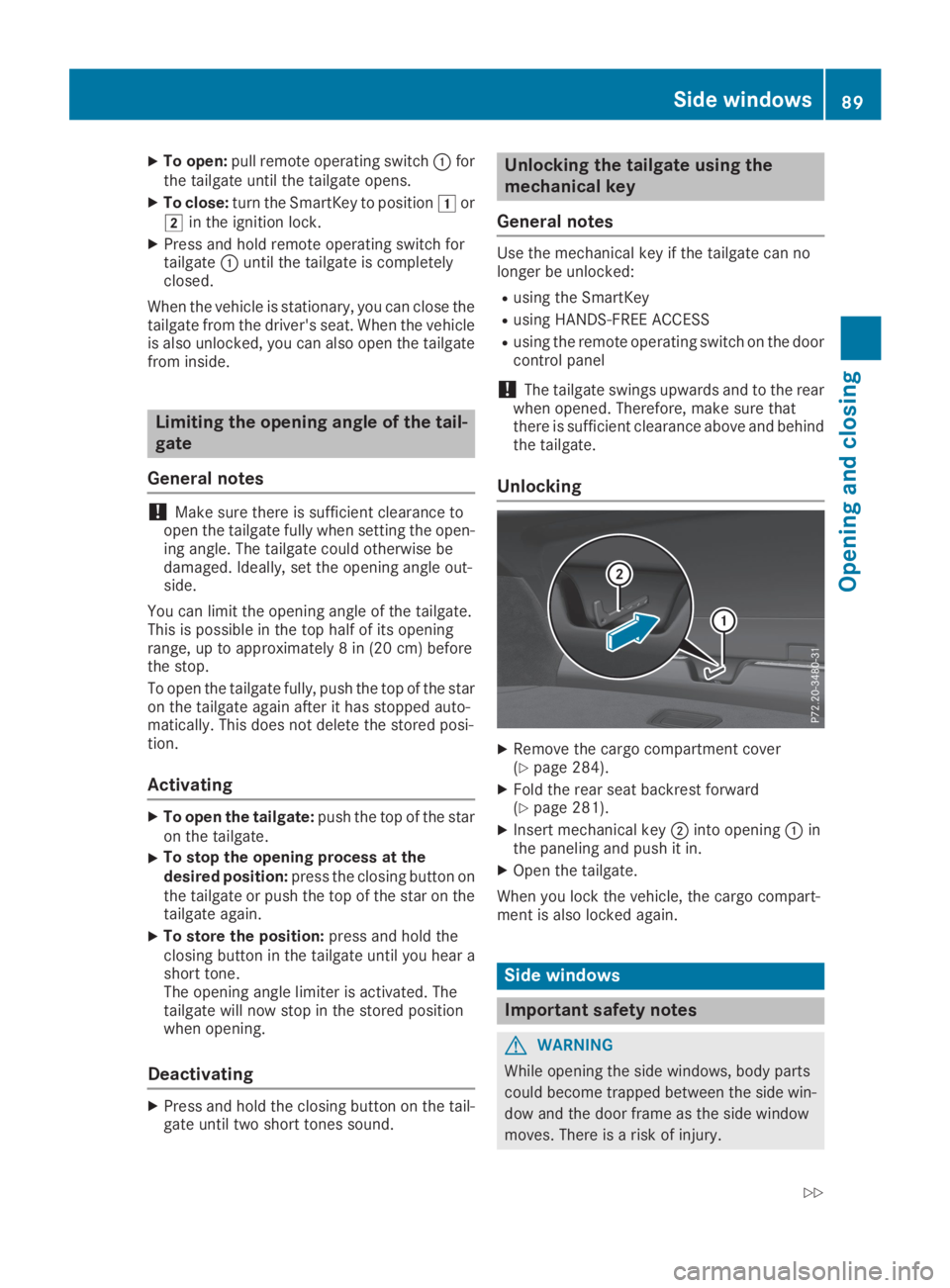
XRemove the cargo compartment cover(Ypage 284).
XFold the rear seat backrest forward(Ypage 281).
XInsert mechanical keyDinto openingCinthe paneling and push it in.
XOpen the tailgate.
When you lock the vehicle, the cargo compart-ment is also locked again.
Side windows
Important safety notes
GWARNING
While opening the side windows, body parts
could become trapped between the side win-
dow and the door frame as the side window
moves. There is a risk of injury.
Side windows89
Opening and closing
Z
Page 94 of 370
Make sure you only touch recessed sensorsurfaceC.
XMake sure that all the side windows and thesliding sunroof are closed.
XTo interrupt convenience closing:releaserecessed sensor surfaceCon the door han-dle.
Resetting the side windows
If a side window can no longer be closed fully,you must reset it.
XClose all the doors.
XTurn the SmartKey to positionGorHin theignition lock.
XPull the corresponding switch on the doorcontrol panel until the side window is com-pletely closed (Ypage 90).
XHold the switch for an additional second.
If the side window opens again slightly:
XImmediately pull the corresponding switch onthe door control panel until the side window iscompletely closed (Ypage 90).
XHold the switch for an additional second.
XIf the respective side window remains closedafter the button is released, then it has beenset correctly. If this is not the case, repeat thesteps above.
Problems with the side windows
GWARNING
If you close a side window again immediately after it has been blocked or reset, the side window
closes with increased or maximum force. The reversing feature is then not active. Parts of the
body could be trapped in the closing area in the process. This poses an increased risk of injury or
even fatal injury.
Make sure that no parts of the body are in the closing area. To stop the closing process, release
the switch or push the switch again to reopen the side window.
ProblemPossible causes/consequences andPPSolutions
A side window cannot beclosed because it isblocked by objects, e.g.leaves in the windowguide.
XRemove the objects.
XClose the side window.
A side window cannot beclosed and you cannotsee the cause.
If a side window is obstructed during closing and reopens againslightly:
XImmediately after the window blocks, pull the corresponding switchagain until the side window has closed.The side window is closed with increased force.
If a side window is obstructed again during closing and reopens againslightly:
XImmediately after the window blocks, pull the corresponding switchagain until the side window has closed.The side windows are closed without the automatic reversing fea-ture.
92Side windows
Opening and closing
Page 96 of 370
XTurn the SmartKey to positionGorHin theignition lock.
XPress or pull theWswitch in the corre-sponding direction.
If you press/pull theWswitch beyond thepressure point, automatic operation is started inthe corresponding direction. When being raisedor opened, the sliding sunroof first automaticallymoves to the comfort setting. If you activateraise or open again, the sliding sunroof is raisedor opened completely. You can stop automaticoperation by pressing/pulling the switch again.
When opening and raising the roof, automaticoperation is only available if the sliding sunroofis in the closed position.
The sun protection cover automatically opensalong with the sliding sunroof. You can open orclose the sun protection cover manually whenthe sliding sunroof is raised or closed.
You can continue to operate the sliding sunroofafter switching off the engine or removing the
SmartKey from the ignition lock. This function isavailable for up to five minutes or until the driv-er's or front-passenger door is opened.
Resetting
!If the sliding sunroof still cannot be openedor closed fully after resetting, contact a quali-fied specialist workshop.
Reset the sliding sunroof if it does not movesmoothly.
XTurn the SmartKey to positionGorHin theignition lock.
XRaise the sliding sunroof fully at the rear(Ypage 93).
XKeep theWswitch pressed for anothersecond.
XMake sure that the sliding sunroof can be fullyopened and closed again (Ypage 93).
XIf this is not the case, repeat the steps above.
Problems with the sliding sunroof
GWARNING
If you close the sliding sunroof again immediately after it has been blocked or reset, the sliding
sunroof closes with increased or maximum force. The reversing feature is then not active. Parts
of the body could be trapped in the closing area in the process. This poses an increased risk of
injury or even fatal injury.
Make sure that no parts of the body are in the closing area.
If somebody becomes trapped:
Rrelease the switch immediately, or
Rpress the switch in any direction during the automatic closing process
The closing process is stopped.
!If the sliding sunroof still cannot be opened or closed as a result of a malfunction, contact aqualified specialist workshop.
94Sliding sunroof
Opening and closing
Page 103 of 370
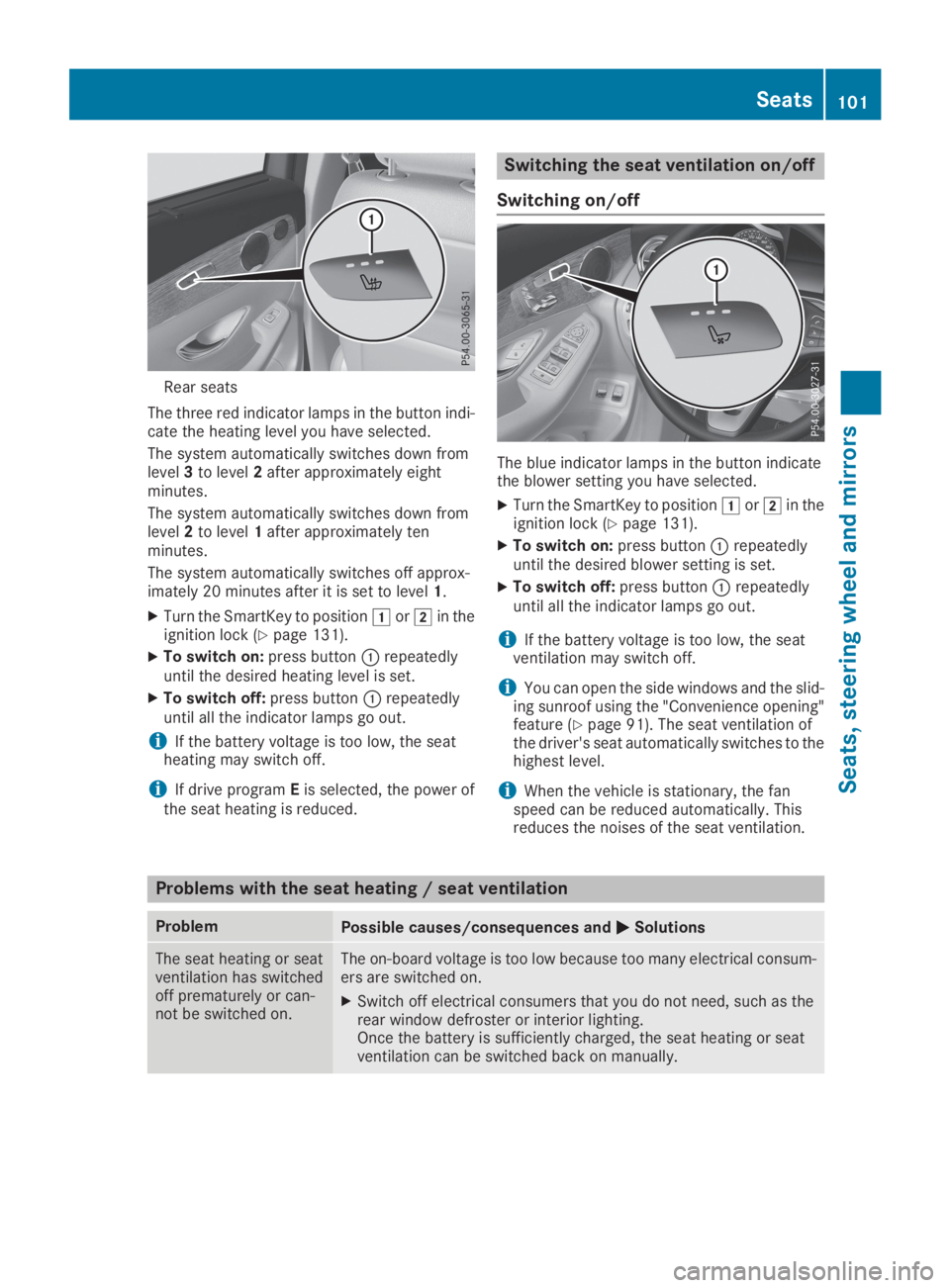
Rear seats
The three red indicator lamps in the button indi-cate the heating level you have selected.
The system automatically switches down fromlevel3to level2after approximately eightminutes.
The system automatically switches down fromlevel2to level1after approximately tenminutes.
The system automatically switches off approx-imately 20 minutes after it is set to level1.
XTurn the SmartKey to positionGorHin theignition lock (Ypage 131).
XTo switch on:press buttonCrepeatedlyuntil the desired heating level is set.
XTo switch off:press buttonCrepeatedlyuntil all the indicator lamps go out.
iIf the battery voltage is too low, the seatheating may switch off.
iIf drive programEis selected, the power ofthe seat heating is reduced.
Switching the seat ventilation on/off
Switching on/off
The blue indicator lamps in the button indicatethe blower setting you have selected.
XTurn the SmartKey to positionGorHin theignition lock (Ypage 131).
XTo switch on:press buttonCrepeatedlyuntil the desired blower setting is set.
XTo switch off:press buttonCrepeatedlyuntil all the indicator lamps go out.
iIf the battery voltage is too low, the seatventilation may switch off.
iYou can open the side windows and the slid-ing sunroof using the "Convenience opening"feature (Ypage 91). The seat ventilation ofthe driver's seat automatically switches to thehighest level.
iWhen the vehicle is stationary, the fanspeed can be reduced automatically. Thisreduces the noises of the seat ventilation.
Problems with the seat heating / seat ventilation
ProblemPossible causes/consequences andPPSolutions
The seat heating or seatventilation has switchedoff prematurely or can-not be switched on.
The on-board voltage is too low because too many electrical consum-ers are switched on.
XSwitch off electrical consumers that you do not need, such as therear window defroster or interior lighting.Once the battery is sufficiently charged, the seat heating or seatventilation can be switched back on manually.
Seats101
Seats , ste ering wheel and mirrors
Z
Page 106 of 370
iThe steering wheel only moves up if it hasnot already reached the upper steering lim-iter.
Position of the steering wheel for driv-
ing
The steering wheel is moved to the last selectedposition when:
Rthe driver's door is closed and you insert theSmartKey into the ignition lock
Ryou close the driver's door when the ignitionis switched on
Ryou press the Start/Stop button once in vehi-cles with KEYLESS-GO or the KEYLESS-GOstart function
iThe steering wheel only returns to the lastset position if the driving position is storedafter the seat or steering column has beenadjusted (Ypage 107).
The most recent driving position of the steeringwheel is stored if:
Rthe ignition is switched off
Rthe setting is stored using the memory func-tion (Ypage 107)
Crash-responsive EASY-EXIT feature
If the crash-responsive EASY-EXIT feature is trig-gered in an accident, the steering column willmove up when the driver's door is opened or theSmartKey is removed from the ignition lock. Thismakes it easier to exit the vehicle and rescue theoccupants.
The crash-responsive EASY-EXIT feature isoperational only if the EASY-EXIT/ENTRY fea-ture is activated in the multimedia system (seeDigital Operator's Manual).
Mirrors
Exterior mirrors
Important safety notes
GWARNING
You could lose control of your vehicle if you do
the following while driving:
Radjust the driver's seat, head restraint,
steering wheel or mirrors
Rfasten the seat belt
There is a risk of an accident.
Adjust the driver's seat, head restraint, steer-
ing wheel and mirror and fasten your seat belt
before starting the engine.
GWARNING
The exterior mirror on the front-passenger
side reduces the size of the image. Visible
objects are actually closer than they appear.
This means that you could misjudge the dis-
tance from road users traveling behind, e.g.
when changing lane. There is a risk of an acci-
dent.
For this reason, always make sure of the
actual distance from the road users traveling
behind by glancing over your shoulder.
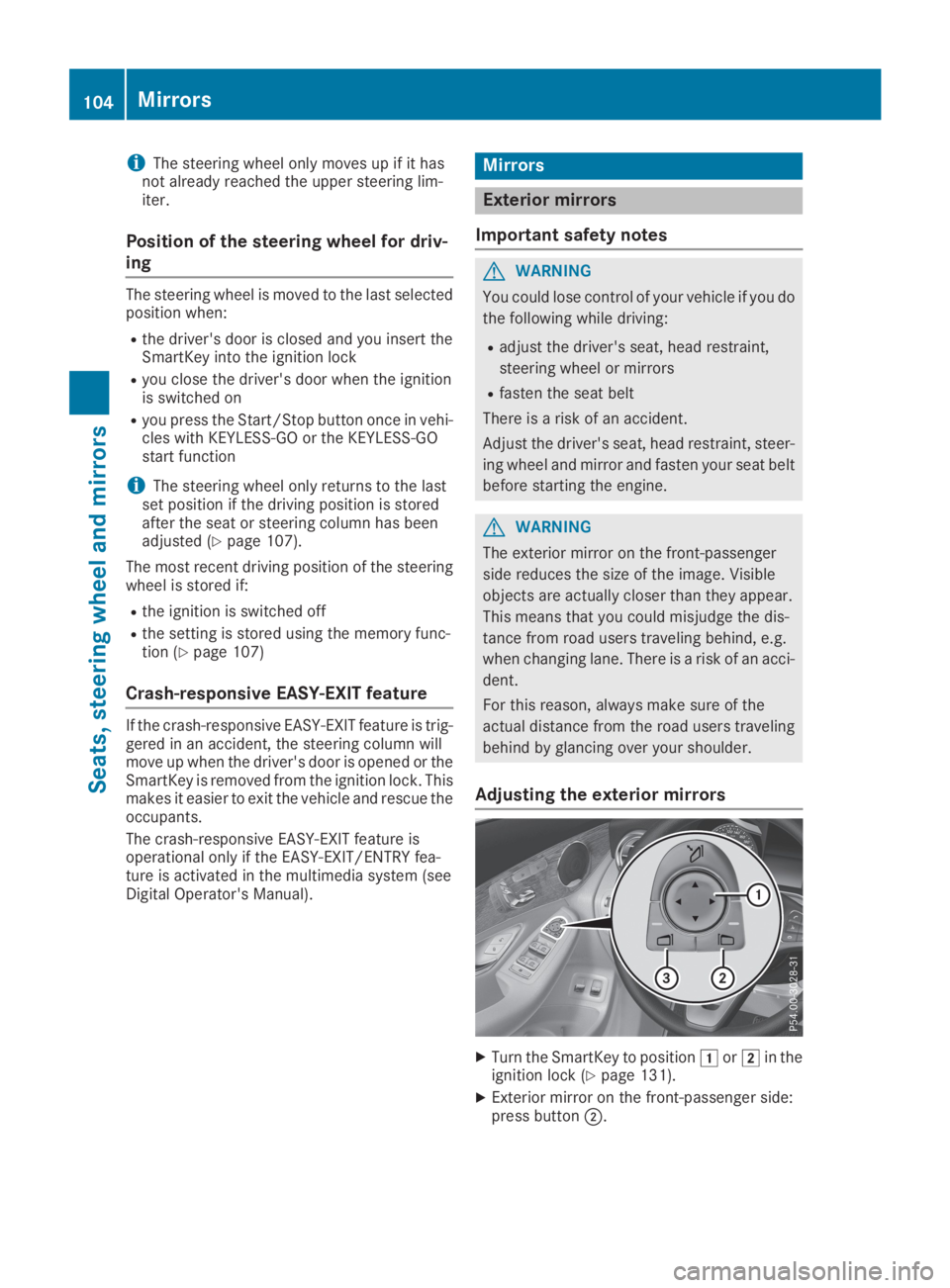
Adjusting the exterior mirrors
XTurn the SmartKey to positionGorHin theignition lock (Ypage 131).
XExterior mirror on the front-passenger side:press buttonD.
104Mirrors
Seats, steering wheel and mirrors
Page 108 of 370
piratory organs or clothing or be swallowed.
There is a risk of injury.
If you come into contact with the electrolyte,
observe the following:
RRinse off the electrolyte from your skin
immediately with water.
RImmediately rinse the electrolyte out of
your eyes thoroughly with clean water.
RIf the electrolyte is swallowed, immediately
rinse your mouth out thoroughly. Do not
induce vomiting.
RIf electrolyte comes into contact with your
skin or hair or is swallowed, seek medical
attention immediately.
RImmediately change out of clothing which
has come into contact with electrolyte.
RIf an allergic reaction occurs, seek medical
attention immediately.
The exterior mirror on the driver's side and therear-view mirror automatically go into anti-glaremode if:
Rthe ignition is switched on
Rincident light from headlamps strikes the sen-sor in the rear-view mirror
The mirrors do not go into anti-glare mode ifreverse gear is engaged or if the interior lightingis switched on.
Parking position for the exterior mir-
ror on the front passenger side
Storing the parking position
You can set the front-passenger side exteriormirror such that you can see the rear wheel onthat side as soon as you engage reverse gear.You can store this position.
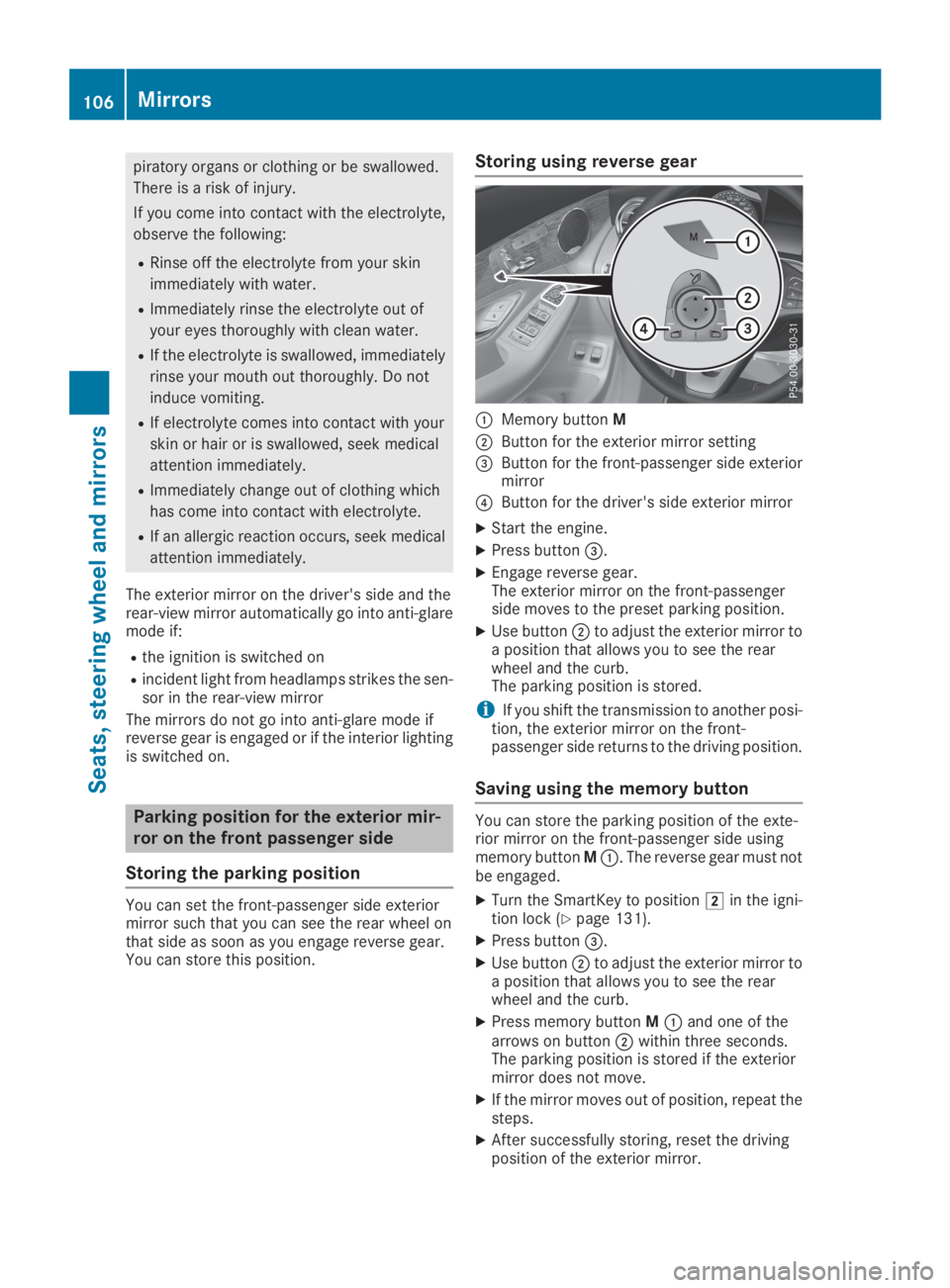
Storing using reverse gear
CMemory buttonM
DButton for the exterior mirror setting