mirror MERCEDES-BENZ GLC 2019 Owner's Manual
[x] Cancel search | Manufacturer: MERCEDES-BENZ, Model Year: 2019, Model line: GLC, Model: MERCEDES-BENZ GLC 2019Pages: 370, PDF Size: 19.55 MB
Page 189 of 370
Object detection only works in wide-angle view.
To ensure that you can use the function, it mustbe switched on in the multimedia system (seethe Digital Operator's Manual).
360° Camera
General notes
The 360° camera is a system consisting of fourcameras.
The system processes images from the follow-ing cameras:
RRear view camera
RFront camera
RTwo side cameras in the exterior mirrors
The cameras cover the immediate surroundingsof the vehicle. The system supports you, forexample when parking or if vision is restricted atan exit.
You can show images from the 360° camera infull-screen mode or in seven different split-screen views on the multimedia system. A split-screen view also includes a top view of the vehi-cle. This view is calculated from the data sup-plied by the installed cameras (virtual camera).
The seven split-screen views are:
RTop view and picture from the rear view cam-era (130° viewing angle)
RTop view and image from the front camera(130° viewing angle without displaying themaximum steering wheel angle)
RTop view and enlarged rear view
RTop view and enlarged front view
RTop view and trailer view (vehicles with trailertow hitch)
RTop view and images from the rear-facing sidecameras (rear wheel view)
RTop view and images from the forward-facingside cameras (front wheel view)
When the function is active and you shift thetransmission from[or^to\\, the guidelines on the multimedia system are hidden.
When you shift between transmission positions[and^, you see the previously selected frontor rear view.
Distances measured by Parking AssistPARKTRONIC will also be optically displayed:
Rin split screen view as red or yellow bracketsaround the vehicle icon in the top view, or
Rat the bottom right as red or yellow bracketsaround the vehicle symbol in full-screen mode
The line thickness and color of the bracketsshow how far the vehicle is from an object.
Ryellow brackets with thin lines: Parking AssistPARKTRONIC is active
Ryellow brackets with normal lines: an object ispresent in close range of the vehicle
Rred line: an object is present in the immediateclose range of the vehicle
Important safety notes
The 360°camera is only an aid and may show adistorted view of obstacles, show them incor-rectly or not at all. The 360°camera is not asubstitute for attentive driving.
You are always responsible for safe maneuver-ing and parking. Make sure that there are nopersons, animals or objects in the maneuveringarea while maneuvering and parking in parkingspaces.
You are always responsible for safety, and mustalways pay attention to your surroundings whenparking and maneuvering. This applies to theareas behind, in front of and beside the vehicle.You could otherwise endanger yourself and oth-ers.
The 360° camera will not function or will func-tion in a limited manner:
Rif the doors are open
Rif the exterior mirrors are folded in
Rif the tailgate is open
Rin heavy rain, snow or fog
Rat night or in very dark places
Rif the cameras are exposed to very bright light
Rif the area is lit by fluorescent bulbs or LEDlighting (the display may flicker)
Rif the camera lenses fog up, e.g. when drivinginto a heated garage in winter, causing a rapidchange in temperature
Rif the camera lenses are dirty or covered
Rif the vehicle components in which the cam-eras are installed are damaged. In this case,have the camera position and setting checkedat a qualified specialist workshop
Driving systems187
Driving and parking
Z
Page 191 of 370
The full screen option is only available in the fol-lowing views:
RTop view with picture from the rear view cam-era
RTop view with picture from the front camera
Multimedia display
Important safety notes
The camera system may show a distorted viewof obstacles, show them incorrectly or not at all.Obstacles are not shown by the system in thefollowing locations:
Runder the front and rear bumpers
Rvery close to the front and rear bumpers
Rin the area immediately above the tailgatehandle
Rvery close to the exterior mirrors
Rin the transitional areas between the variouscameras in the virtual top view
!Objects not at ground level may appear tobe further away than they actually are, e.g.:
Rthe bumper of a parked vehicle
Rthe drawbar of a trailer
Rthe ball coupling of a trailer tow hitch
Rthe rear section of an HGV
Ra slanted post
Use the guidelines only for orientation.Approach objects no further than the bottom-most guideline.
Top view with picture from the rear view
camera
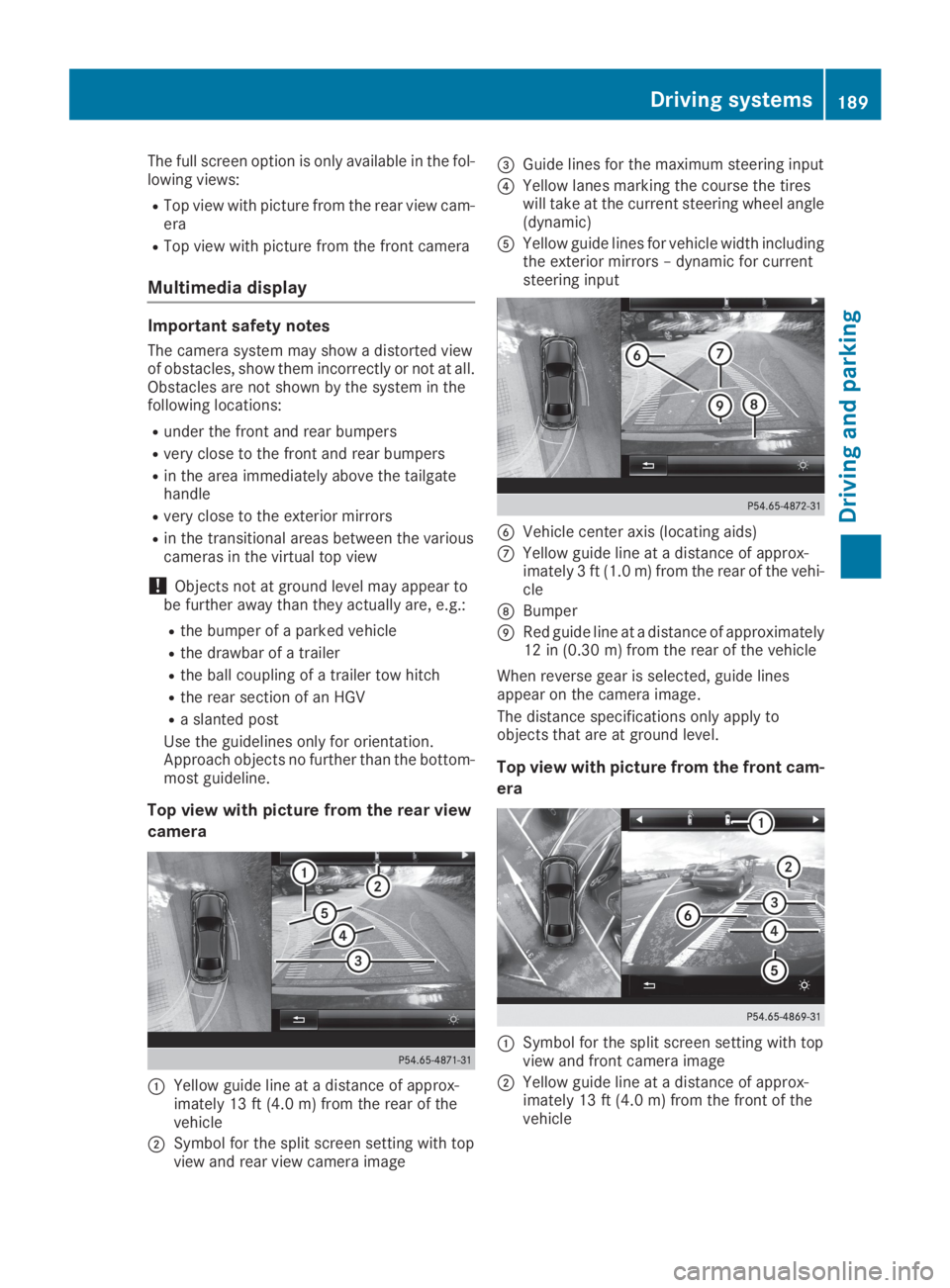
CYellow guide line at a distance of approx-imately 13 ft (4.0 m) from the rear of thevehicle
DSymbol for the split screen setting with topview and rear view camera image
Page 196 of 370
sors. A warning lamp lights up in the exteriormirrors and draws your attention to vehiclesdetected in the monitored area. If you thenswitch on the corresponding turn signal tochange lanes, you will also receive a visual warn-ing and a warning tone.
Blind Spot Assist supports you from a speed ofapproximately 20 mph (30 km/h).
Important safety notes
GWARNING
Blind Spot Assist does not react to:
Rvehicles overtaken too closely on the side,
placing them in the blind spot area
Rvehicles which approach with a large speed
differential and overtake your vehicle
As a result, Blind Spot Assist may not give
warnings in such situations. There is a risk of
an accident.
Always observe the traffic conditions care-
fully, and maintain a safe lateral distance.
Blind Spot Assist is only an aid. It may fail todetect some vehicles and is no substitute forattentive driving. Always ensure that there issufficient distance to the side for other roadusers and obstacles.
iUSA only:
This device has been approved by the FCC asa "Vehicular Radar System". The radar sensoris intended for use in an automotive radarsystem only. Removing, tampering with, oraltering the device will void any warranties,and is not permitted by the FCC. Do not tam-per with, alter, or use in any non-approvedway.
Any unauthorized modification to this devicecould void the user's authority to operate theequipment.
Radar sensors
The radar sensors for Blind Spot Assist are inte-grated into the rear bumper. Make sure that thebumpers are free from dirt, ice or slush. Thesensors must not be covered, for example bycycle racks or overhanging loads. Following asevere impact or in the event of damage to thebumpers, have the function of the radar sensorschecked at a qualified specialist workshop.Blind Spot Assist may no longer work properly.
Monitoring area
In particular, the detection of obstacles can beimpaired if:
RThere is dirt on the sensors or anything elsecovering the sensors
Rthere is poor visibility, e.g. due to fog, heavyrain, snow or spray
Rthere are narrow vehicles, e.g. motorcycles orbicycles
Rthe road has very wide lanes
Rthe road has narrow lanes
Ryou are not driving in the middle of the lane
Rthere are barriers or other road boundaries
Vehicles in the monitoring range are then notindicated.
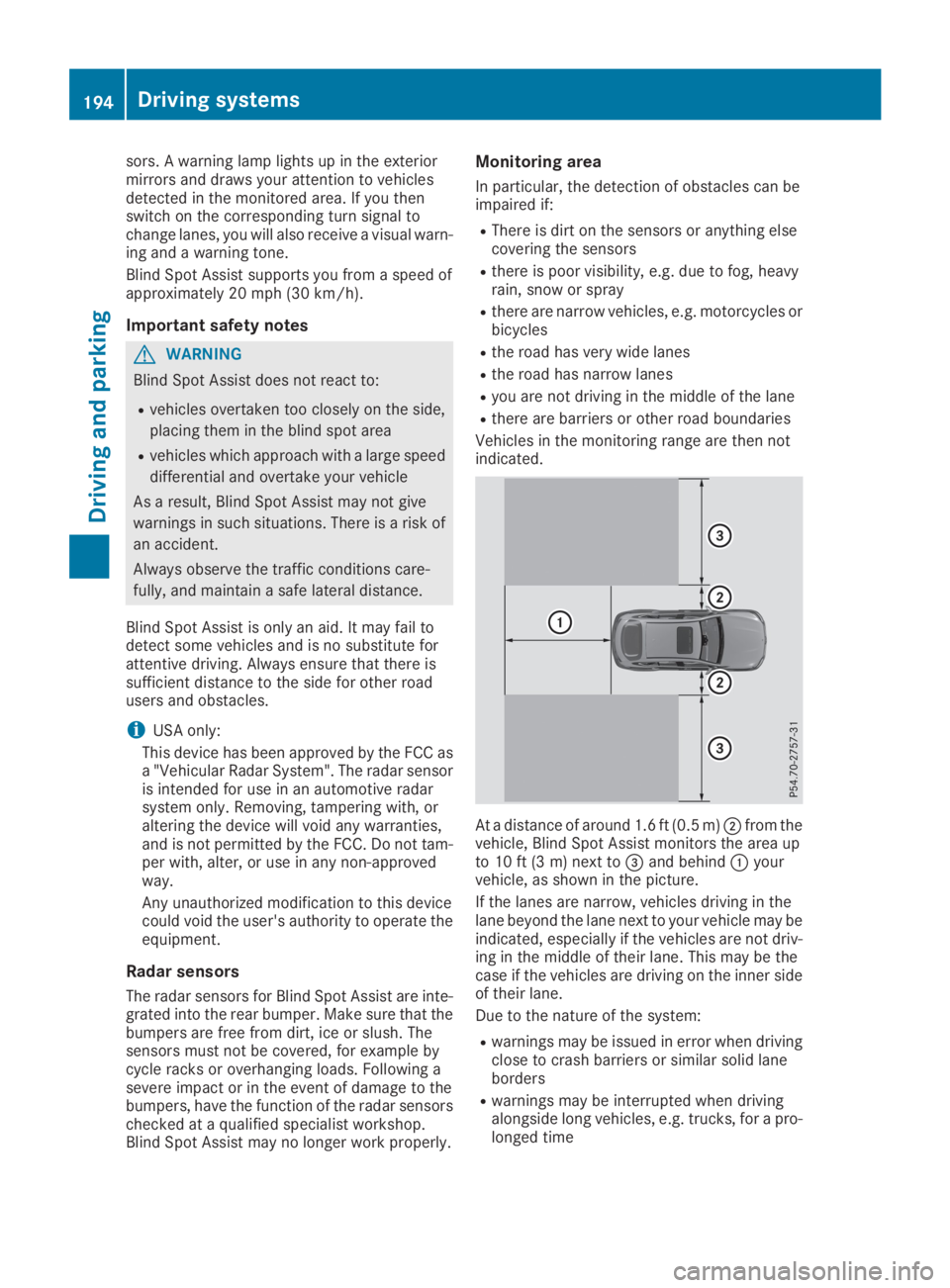
At a distance of around 1.6 ft (0.5 m)Dfrom thevehicle, Blind Spot Assist monitors the area upto 10 ft (3 m) next to
Page 197 of 370
Warning lamp
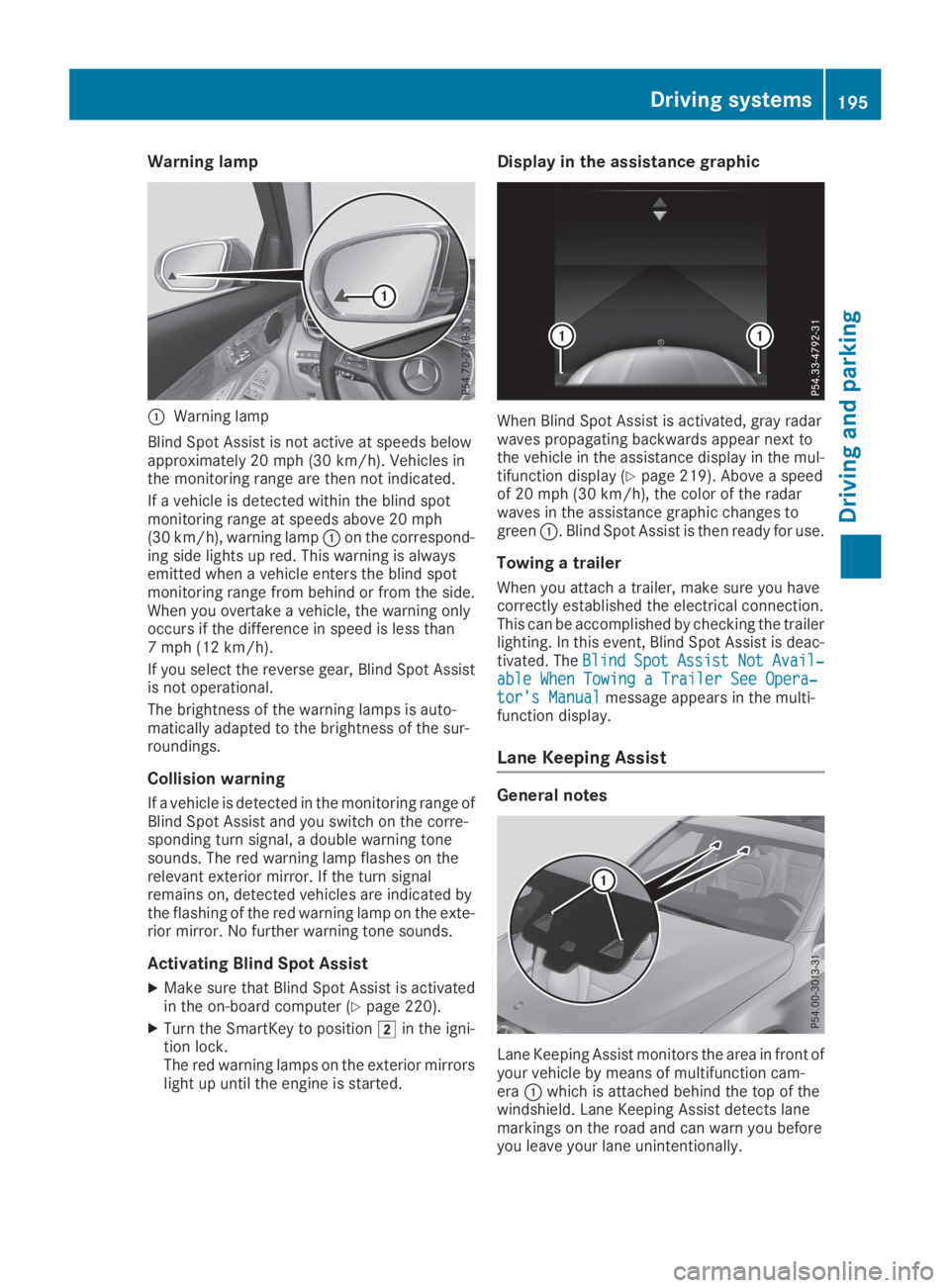
CWarning lamp
Blind Spot Assist is not active at speeds belowapproximately 20 mph (30 km/h). Vehicles inthe monitoring range are then not indicated.
If a vehicle is detected within the blind spotmonitoring range at speeds above 20 mph(30 km/h), warning lampCon the correspond-ing side lights up red. This warning is alwaysemitted when a vehicle enters the blind spotmonitoring range from behind or from the side.When you overtake a vehicle, the warning onlyoccurs if the difference in speed is less than7 mph (12 km/h).
If you select the reverse gear, Blind Spot Assistis not operational.
The brightness of the warning lamps is auto-matically adapted to the brightness of the sur-roundings.
Collision warning
If a vehicle is detected in the monitoring range ofBlind Spot Assist and you switch on the corre-sponding turn signal, a double warning tonesounds. The red warning lamp flashes on therelevant exterior mirror. If the turn signalremains on, detected vehicles are indicated bythe flashing of the red warning lamp on the exte-rior mirror. No further warning tone sounds.
Activating Blind Spot Assist
XMake sure that Blind Spot Assist is activatedin the on-board computer (Ypage 220).
XTurn the SmartKey to positionHin the igni-tion lock.The red warning lamps on the exterior mirrorslight up until the engine is started.
Display in the assistance graphic
When Blind Spot Assist is activated, gray radarwaves propagating backwards appear next tothe vehicle in the assistance display in the mul-tifunction display (Ypage 219). Above a speedof 20 mph (30 km/h), the color of the radarwaves in the assistance graphic changes togreenC. Blind Spot Assist is then ready for use.
Towing a trailer
When you attach a trailer, make sure you havecorrectly established the electrical connection.This can be accomplished by checking the trailerlighting. In this event, Blind Spot Assist is deac-tivated. TheBlindBlindSpotSpotAssistAssistNotNotAvail‐Avail‐able When Towing a Trailer See Opera‐able When Towing a Trailer See Opera‐tor's Manualtor's Manualmessage appears in the multi-function display.
Lane Keeping Assist
General notes
Lane Keeping Assist monitors the area in front ofyour vehicle by means of multifunction cam-eraCwhich is attached behind the top of thewindshield. Lane Keeping Assist detects lanemarkings on the road and can warn you beforeyou leave your lane unintentionally.
Driving systems195
Driving and parking
Z
Page 199 of 370
Ryou switch on the turn signals. In this event,the warnings are suppressed for a certainperiod of time.
Ra driving safety system intervenes, e.g. ABS,
BAS or ESP®.
Adaptive
WhenAdaptiveAdaptiveis selected, no warning vibra-tion occurs if:
Ryou switch on the turn signals. In this event,the warnings are suppressed for a certainperiod of time.
Ra driving safety system intervenes, e.g. ABS,
BAS or ESP®.
Ryou accelerate hard, e.g. kickdown.
Ryou brake hard.
Ryou steer actively, e.g. swerve to avoid anobstacle or change lanes quickly.
Ryou cut the corner on a sharp bend.
In order that you are warned only when neces-sary and in good time if you cross the lane mark-ing, the system detects certain conditions andwarns you accordingly.
The warning vibration occurs earlier if:
Ryou approach the outer lane marking on abend
Rthe road has very wide lanes, e.g. a freeway
Rthe system detects solid lane markings
The warning vibration occurs later if:
Rthe road has narrow lanes
Ryou cut the corner on a bend
Driving Assistance Plus package
General notes
The Driving Assistance Plus Package consists ofActive Distance Assist DISTRONIC(Ypage 162), Active Blind Spot Assist(Ypage 197) and Active Lane Keeping Assist(Ypage 200).
Active Blind Spot Assist
General notes
Active Blind Spot Assist monitors the areas oneither side of the vehicle that are not visible tothe driver with two lateral, rear-facing radar sen-sors. A warning lamp lights up in the exteriormirrors and draws your attention to vehicles
detected in the monitored area. If you thenswitch on the corresponding turn signal tochange lanes, you will also receive a visual warn-ing and hear a warning tone. If a risk of lateralcollision is detected, corrective braking mayhelp you avoid a collision. Before a course-cor-recting brake application, Active Blind SpotAssist evaluates the space in the direction oftravel and at the sides of the vehicle. For this,Active Blind Spot Assist uses the forward-facingradar sensors.
Active Blind Spot Assist supports you from aspeed of approximately 20 mph(30 km/h).
Important safety notes
Active Blind Spot Assist is only an aid and is nota substitute for attentive driving.
GWARNING
Active Blind Spot Assist does not react to:
Rvehicles overtaken too closely on the side,
placing them in the blind spot area
Rvehicles which approach with a large speed
differential and overtake your vehicle
As a result, Active Blind Spot Assist may nei-
ther give warnings nor intervene in such sit-
uations. There is a risk of an accident.
Always observe the traffic conditions care-
fully, and maintain a safe lateral distance.
iUSA only: This device has been approved bythe FCC as a "Vehicular Radar System". Theradar sensor is intended for use in an auto-motive radar system only. Removal, tamper-ing, or altering of the device will void any war-ranties, and is not permitted by the FCC. Donot tamper with, alter, or use in any non-approved way.
Any unauthorized modification to this devicecould void the user's authority to operate theequipment.
iCanada only: This device complies withRSS-210 of Industry Canada. Operation issubject to the following two conditions:
1. This device may not cause interference,and
2. This device must accept any interferencereceived, including interference that maycause undesired operation of the device.
Removal, tampering, or altering of the devicewill void any warranties, and is not permitted.
Driving systems197
Driving and pa rking
Z
Page 201 of 370
If you select the reverse gear, Active Blind SpotAssist is not operational.
The brightness of the warning lamps is auto-matically adapted to the brightness of the sur-roundings.
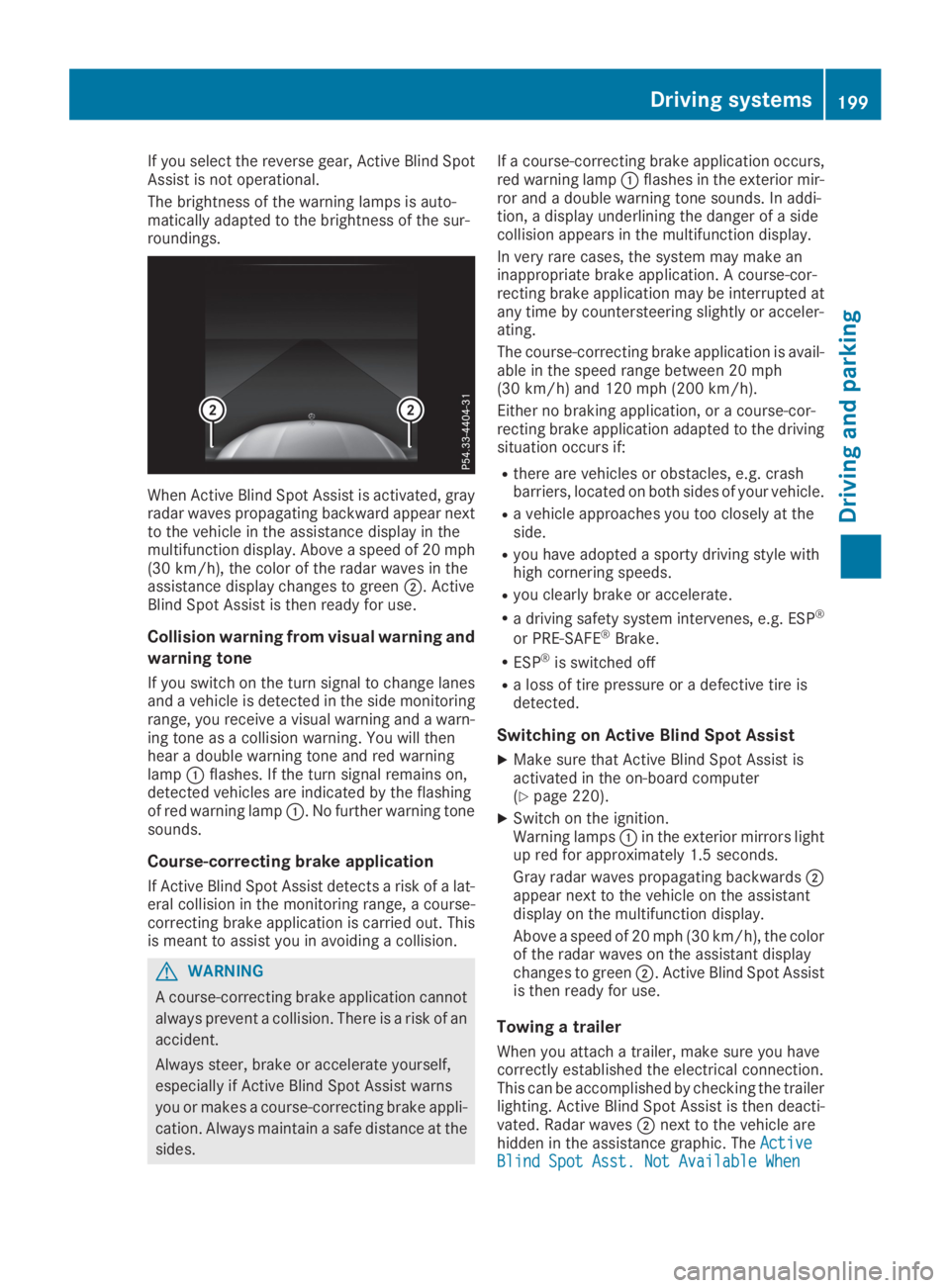
When Active Blind Spot Assist is activated, grayradar waves propagating backward appear nextto the vehicle in the assistance display in themultifunction display. Above a speed of 20 mph(30 km/h), the color of the radar waves in theassistance display changes to greenD. ActiveBlind Spot Assist is then ready for use.
Collision warning from visual warning and
warning tone
If you switch on the turn signal to change lanesand a vehicle is detected in the side monitoringrange, you receive a visual warning and a warn-ing tone as a collision warning. You will thenhear a double warning tone and red warninglampCflashes. If the turn signal remains on,detected vehicles are indicated by the flashingof red warning lampC. No further warning tonesounds.
Course-correcting brake application
If Active Blind Spot Assist detects a risk of a lat-eral collision in the monitoring range, a course-correcting brake application is carried out. Thisis meant to assist you in avoiding a collision.
GWARNING
A course-correcting brake application cannot
always prevent a collision. There is a risk of an
accident.
Always steer, brake or accelerate yourself,
especially if Active Blind Spot Assist warns
you or makes a course-correcting brake appli-
cation. Always maintain a safe distance at the
sides.
If a course-correcting brake application occurs,red warning lampCflashes in the exterior mir-ror and a double warning tone sounds. In addi-tion, a display underlining the danger of a sidecollision appears in the multifunction display.
In very rare cases, the system may make aninappropriate brake application. A course-cor-recting brake application may be interrupted atany time by countersteering slightly or acceler-ating.
The course-correcting brake application is avail-able in the speed range between 20 mph(30 km/h) and 120 mph (200 km/h).
Either no braking application, or a course-cor-recting brake application adapted to the drivingsituation occurs if:
Rthere are vehicles or obstacles, e.g. crashbarriers, located on both sides of your vehicle.
Ra vehicle approaches you too closely at theside.
Ryou have adopted a sporty driving style withhigh cornering speeds.
Ryou clearly brake or accelerate.
Ra driving safety system intervenes, e.g. ESP®
or PRE-SAFE®Brake.
RESP®is switched off
Ra loss of tire pressure or a defective tire isdetected.
Switching on Active Blind Spot Assist
XMake sure that Active Blind Spot Assist isactivated in the on-board computer(Ypage 220).
XSwitch on the ignition.Warning lampsCin the exterior mirrors lightup red for approximately 1.5 seconds.
Gray radar waves propagating backwardsDappear next to the vehicle on the assistantdisplay on the multifunction display.
Above a speed of 20 mph (30 km/h), the colorof the radar waves on the assistant displaychanges to greenD. Active Blind Spot Assistis then ready for use.
Towing a trailer
When you attach a trailer, make sure you havecorrectly established the electrical connection.This can be accomplished by checking the trailerlighting. Active Blind Spot Assist is then deacti-vated. Radar wavesDnext to the vehicle arehidden in the assistance graphic. TheActiveActiveBlind Spot Asst. Not Available WhenBlind Spot Asst. Not Available When
Driving systems199
Driving and parking
Z
Page 207 of 370
XSwitch off the engine.
XClose the doors and tailgate.
XCouple up the trailer.
XEstablish the electrical connection betweenthe vehicle and the trailer.
XCheck that the trailer lighting system is work-ing.
XPush the combination switch upwards/down-wards and check whether the correspondingturn signal on the trailer flashes.
A trailer that is connected is recognized onlywhen the electrical connection is establishedcorrectly and when the lighting system is work-ing properly. The function of other systems alsodepends on this, for example:
RESP®
RPARKTRONIC
RActive Parking Assist
RActive Blind Spot Assist
RActive Lane Keeping Assist
Vehicles with AIR BODY CONTROL: if you coupleup a trailer, the vehicle always remains at high-way level. Observe the following note when cou-pling up a trailer:
RUnless highway level has been set manually,the vehicle is automatically lowered to high-way level. If a speed of 5 mph (8 km/h) hasbeen reached, this may be the case.
These restrictions apply to accessories that aresupplied with power via the trailer socket in yourvehicle, e.g. a rear bicycle rack.
Observe the maximum permissible trailerdimensions (width and length).
Most U.S. states and all Canadian provincesrequire by law:
RSafety chains between the towing vehicle andthe trailer. The chains should be cross-woundunder the trailer drawbar. They must be fas-tened to the vehicle's trailer coupling, not tothe bumper or the axle.
Leave enough play in the chains to make tightcornering possible.
RA separate brake system for certain types oftrailer.
RSafety switch for braked trailers. Check thespecific legal requirements applicable to yourstate.
If the trailer becomes detached from the tow-ing vehicle, the safety feature applies thetrailer brakes.
Towing a trailer
There are several legal requirements for towinga trailer, e.g. the maximum permissible speed.Make sure that your car/trailer combinationcomplies with the local regulations:
Rin your place of residence
Rat your destination
The police and local authorities can provide reli-able information.
To accumulate driving experience and accustomyourself to the new handling characteristics,practice the following at a location where thereis no traffic:
RCornering
RStopping
RBacking up
Check the following before the journey:
RTrailer tow hitch
RSafety switch for braked trailers
RSafety chains
RElectrical connections
RLighting system
RWheels and tires
RLoad securing
Adjust the exterior mirrors so that you have aclear view of the rear section of the trailer.
If the trailer is equipped with electronically con-trolled brakes, pull away carefully in the car/trailer combination. Brake manually using thebrake controller and check whether the brakesfunction correctly.
Regularly check that the load is secure.
When towing a trailer, your vehicle's handlingcharacteristics will be different in comparisonwith when driving without a trailer.
The vehicle/trailer combination:
Ris heavier
Ris restricted in its acceleration and gradient-climbing capability
Rhas an increased braking distance
Ris affected more by strong crosswinds
Rdemands more sensitive steering
Rhas a larger turning circle
Avoid sudden steering movements.
Avoid braking abruptly. If possible, brake gentlyat first to allow the trailer to run on. Then,increase the braking force rapidly.
Towing a trailer205
Driving and parking
Z
Page 292 of 370
XTo fold out:place a container in the cupholder.The cup holderCorDfolds down automat-ically.
XTo fold in:remove the container.The cup holderCorDfolds in automati-cally.
XTo close:slide cup holderCorDback untilit engages.
Sun visors
Overview
GWARNING
If the mirror cover of the vanity mirror is folded
up when the vehicle is in motion, you could be
blinded by incident light. There is a risk of an
accident.
Always keep the mirror cover folded down
while driving.
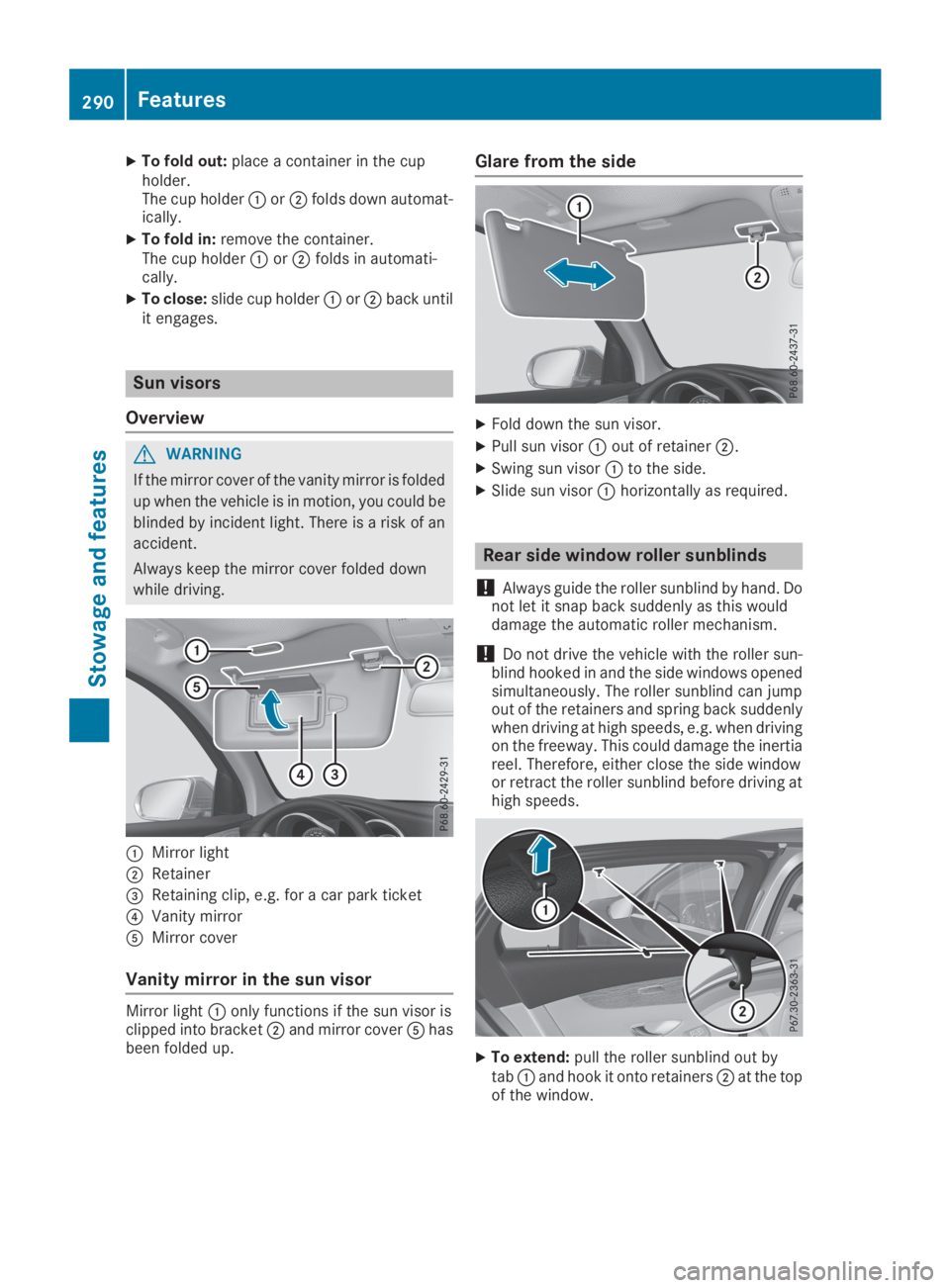
CMirror light
DRetainer
Page 297 of 370
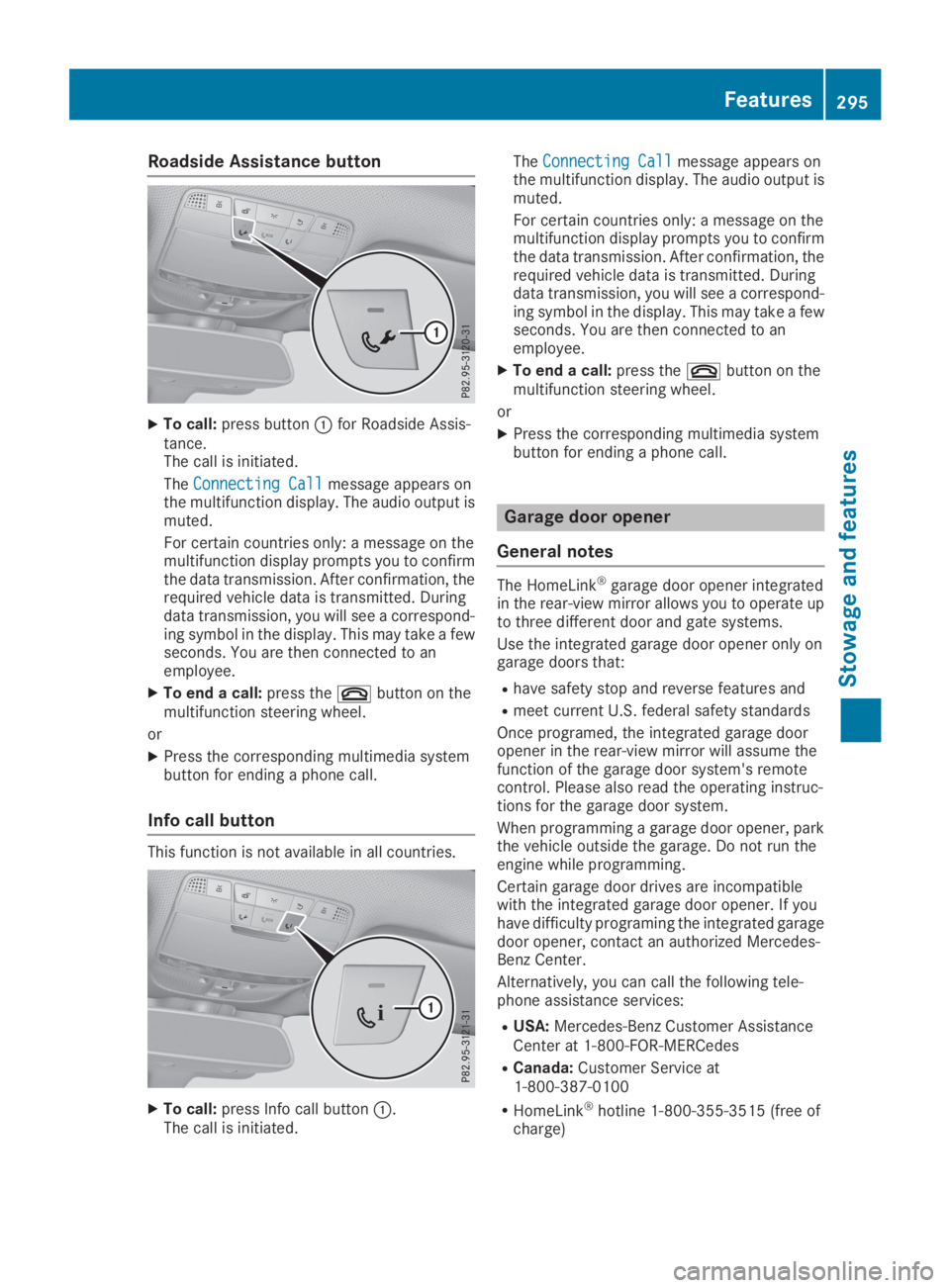
Roadside Assistance button
XTo call:press buttonCfor Roadside Assis-tance.The call is initiated.
TheConnecting CallConnecting Callmessage appears onthe multifunction display. The audio output ismuted.
For certain countries only: a message on themultifunction display prompts you to confirmthe data transmission. After confirmation, therequired vehicle data is transmitted. Duringdata transmission, you will see a correspond-ing symbol in the display. This may take a fewseconds. You are then connected to anemployee.
XTo end a call:press thevbutton on themultifunction steering wheel.
or
XPress the corresponding multimedia systembutton for ending a phone call.
Info call button
This function is not available in all countries.
XTo call:press Info call buttonC.The call is initiated.
TheConnecting CallConnecting Callmessage appears onthe multifunction display. The audio output ismuted.
For certain countries only: a message on themultifunction display prompts you to confirmthe data transmission. After confirmation, therequired vehicle data is transmitted. Duringdata transmission, you will see a correspond-ing symbol in the display. This may take a fewseconds. You are then connected to anemployee.
XTo end a call:press thevbutton on themultifunction steering wheel.
or
XPress the corresponding multimedia systembutton for ending a phone call.
Garage door opener
General notes
The HomeLink®garage door opener integratedin the rear-view mirror allows you to operate upto three different door and gate systems.
Use the integrated garage door opener only ongarage doors that:
Rhave safety stop and reverse features and
Rmeet current U.S. federal safety standards
Once programed, the integrated garage dooropener in the rear-view mirror will assume thefunction of the garage door system's remotecontrol. Please also read the operating instruc-tions for the garage door system.
When programming a garage door opener, parkthe vehicle outside the garage. Do not run theengine while programming.
Certain garage door drives are incompatiblewith the integrated garage door opener. If youhave difficulty programing the integrated garagedoor opener, contact an authorized Mercedes-Benz Center.
Alternatively, you can call the following tele-phone assistance services:
RUSA:Mercedes-Benz Customer AssistanceCenter at 1-800-FOR-MERCedes
RCanada:Customer Service at1-800-387-0100
RHomeLink®hotline 1-800-355-3515 (free ofcharge)
Features295
Stowage and features
Z
Page 311 of 370
Cleaning the mirror turn signals
!Only use cleaning agents or cleaning clothsthat are suitable for plastic lenses. Unsuitablecleaning agents or cleaning cloths couldscratch or damage the plastic lenses of themirror turn signals.
XClean the plastic lenses of the mirror turn sig-nals in the exterior mirror housing using a wetsponge and mild cleaning agent, e.g.Mercedes-Benz car shampoo or cleaningcloths.
Cleaning the side running board
!Do not clean the aluminum insert of the siderunning board with alkaline or acid-basedcleaning agents, such as wheel cleaner. Donot use acidic wheel cleaners to removebrake dust. The aluminum inserts could oth-erwise be damaged.
Cleaning the sensors
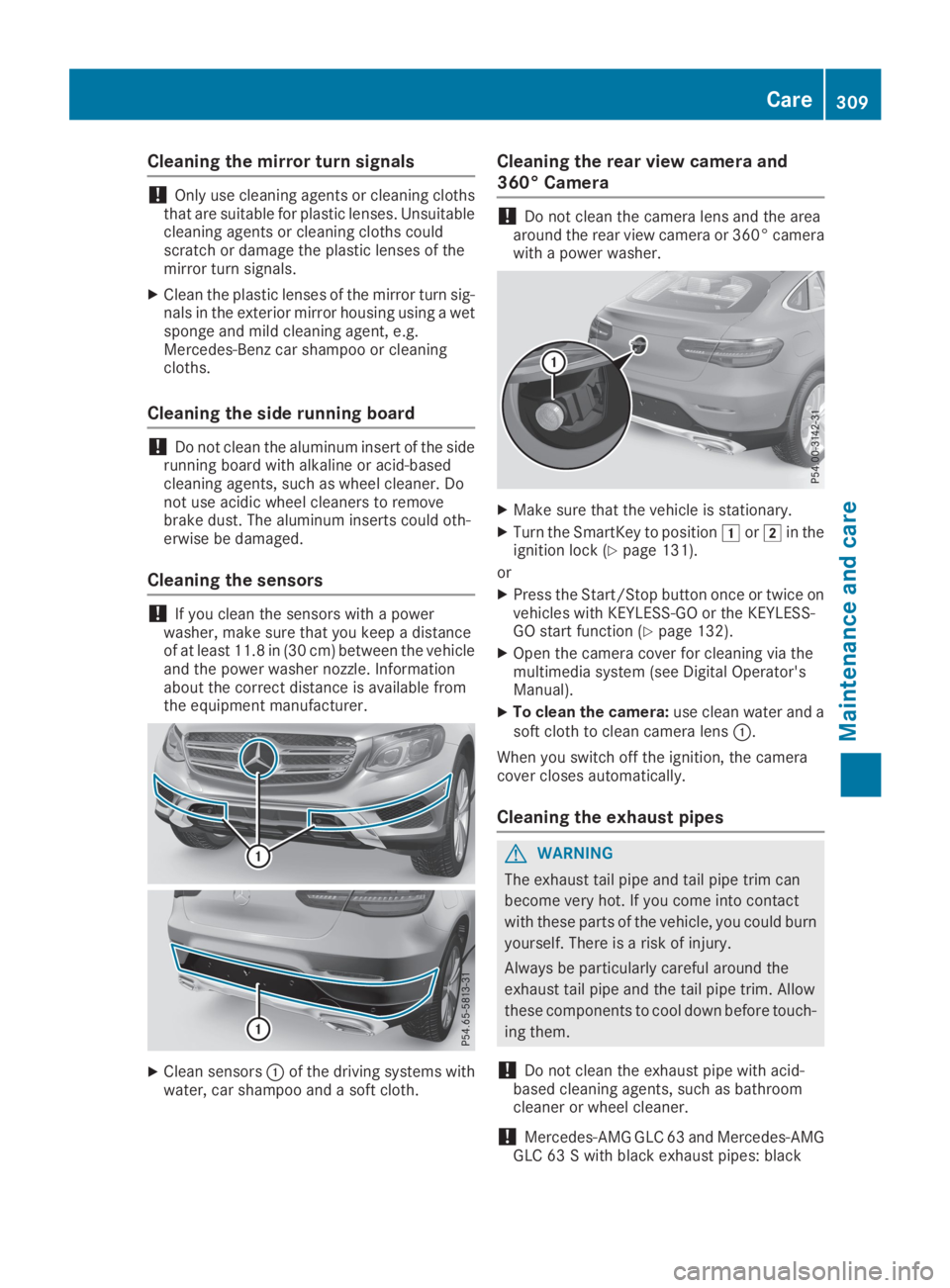
!If you clean the sensors with a powerwasher, make sure that you keep a distanceof at least 11.8 in(30 cm) between the vehicleand the power washer nozzle. Informationabout the correct distance is available fromthe equipment manufacturer.
XClean sensorsCof the driving systems withwater, car shampoo and a soft cloth.
Cleaning the rear view camera and
360° Camera
!Do not clean the camera lens and the areaaround the rear view camera or 360° camerawith a power washer.
XMake sure that the vehicle is stationary.
XTurn the SmartKey to positionGorHin theignition lock (Ypage 131).
or
XPress the Start/Stop button once or twice onvehicles with KEYLESS-GO or the KEYLESS-GO start function (Ypage 132).
XOpen the camera cover for cleaning via themultimedia system (see Digital Operator'sManual).
XTo clean the camera:use clean water and asoft cloth to clean camera lensC.
When you switch off the ignition, the cameracover closes automatically.
Cleaning the exhaust pipes
GWARNING
The exhaust tail pipe and tail pipe trim can
become very hot. If you come into contact
with these parts of the vehicle, you could burn
yourself. There is a risk of injury.
Always be particularly careful around the
exhaust tail pipe and the tail pipe trim. Allow
these components to cool down before touch-
ing them.
!Do not clean the exhaust pipe with acid-based cleaning agents, such as bathroomcleaner or wheel cleaner.
!Mercedes‑AMG GLC 63 and Mercedes‑AMGGLC 63 S with black exhaust pipes: black
Care309
Maintenance and care
Z