warning light MERCEDES-BENZ GLC 2019 Owner's Manual
[x] Cancel search | Manufacturer: MERCEDES-BENZ, Model Year: 2019, Model line: GLC, Model: MERCEDES-BENZ GLC 2019Pages: 370, PDF Size: 19.55 MB
Page 82 of 370
SmartKey battery
Important safety notes
GWARNING
Batteries contain toxic and corrosive substan-
ces. If batteries are swallowed, it can result in
severe health problems. There is a risk of fatal
injury.
Keep batteries out of the reach of children. If
a battery is swallowed, seek medical attention
immediately.
HEnvironmental note
Batteries contain dangerous
substances. It is against the
law to dispose of them with
the household rubbish. They
must be collected separately
and recycled to protect the
environment.
Dispose of batteries in an
environmentally friendly
manner. Take discharged
batteries to a qualified spe-
cialist workshop or a special
collection point for used bat-
teries.
The SmartKey batteries contain perchloratematerial, which may require special handlingand regard for the environment. National guide-lines must be observed during disposal. In Cal-ifornia, seewww.dtsc.ca.gov/HazardousWaste/Perchlorate/index.cfm.
Mercedes-Benz recommends that you have thebatteries replaced at a qualified specialist work-shop.
Checking the battery
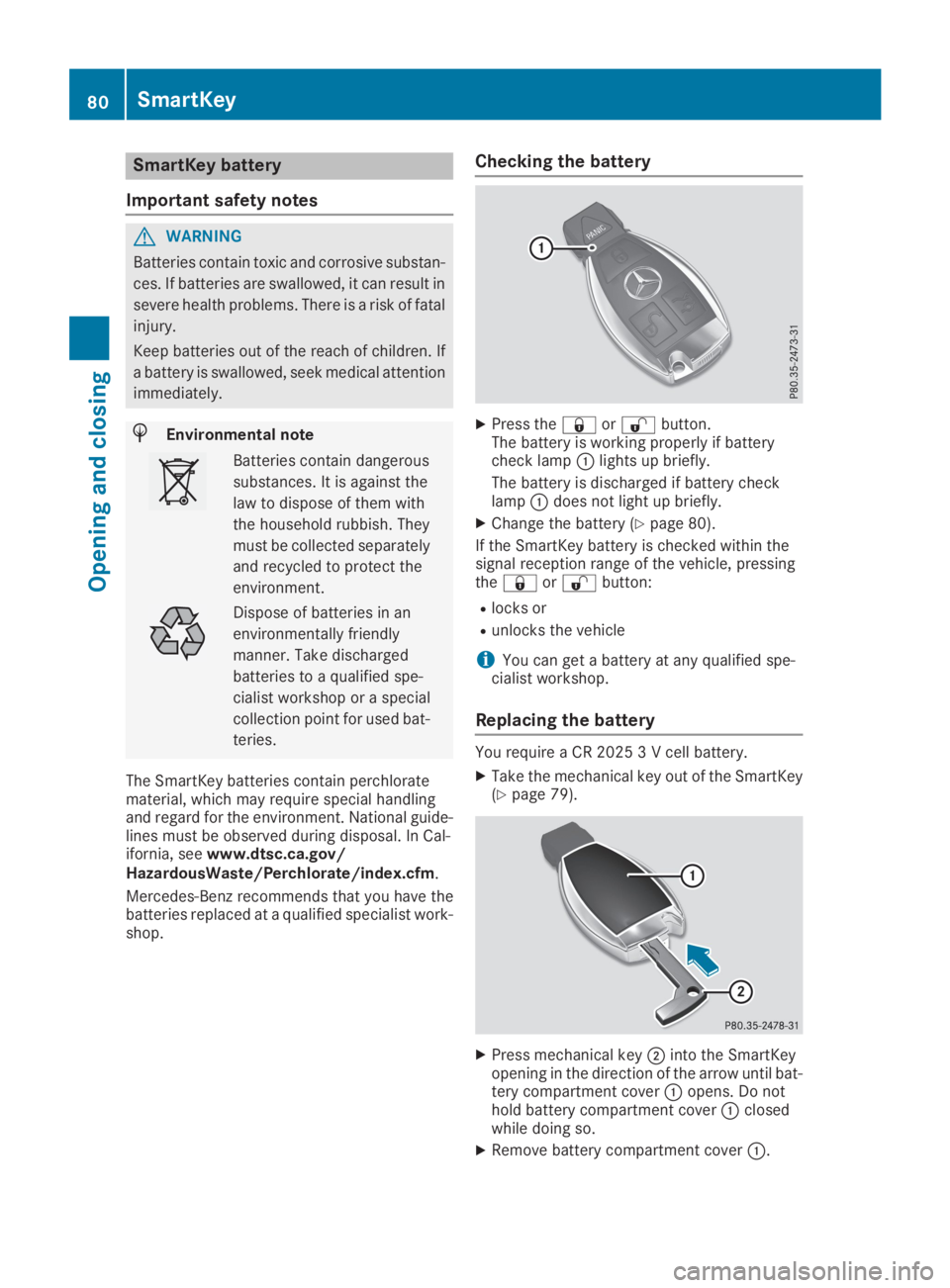
XPress the7or6button.The battery is working properly if batterycheck lampClights up briefly.
The battery is discharged if battery checklampCdoes not light up briefly.
XChange the battery (Ypage 80).
If the SmartKey battery is checked within thesignal reception range of the vehicle, pressingthe7or6button:
Rlocks or
Runlocks the vehicle
iYou can get a battery at any qualified spe-cialist workshop.
Replacing the battery
You require a CR 2025 3 V cell battery.
XTake the mechanical key out of the SmartKey(Ypage 79).
XPress mechanical keyDinto the SmartKeyopening in the direction of the arrow until bat-tery compartment coverCopens. Do nothold battery compartment coverCclosedwhile doing so.
XRemove battery compartment coverC.
80SmartKey
Opening and closing
Page 87 of 370
cially if the vehicle is in motion. There is a risk
of poisoning.
Always switch off the engine before opening
the tailgate. Never drive with the tailgate
open.
GWARNING
If objects, luggage or loads are not secured or
not secured sufficiently, they could slip, tip
over or be flung around and thereby hit vehicle
occupants. There is a risk of injury, particu-
larly in the event of sudden braking or a sud-
den change in direction.
Always store objects so that they cannot be
flung around. Secure objects, luggage or
loads against slipping or tipping before the
journey.
!The tailgate swings upwards and to the rearwhen opened. Therefore, make sure thatthere is sufficient clearance above and behindthe tailgate.
The opening dimensions of the tailgate can befound in the "Vehicle data" section(Ypage 363).
You can limit the opening angle of the tailgate(Ypage 89).
Do not leave the SmartKey in the cargo com-partment. You could otherwise lock yourselfout.
You should preferably place luggage or loads inthe cargo compartment. Observe the loadingguidelines (Ypage 278).
Tailgate object detection with revers-
ing feature
Vehicles with remote tailgate closing:
The tailgate is equipped with automatic objectdetection with reversing function. If a solidobject blocks or restricts the tailgate when auto-matically opening, this procedure is stopped. If asolid object blocks or restricts the tailgate whenautomatically closing, the tailgate automaticallyopens again slightly. Automatic object detectionwith reversing function is only an aid. It is not asubstitute for your attentiveness when openingand closing the tailgate.
GWARNING
The reversing feature does not respond:
Rto soft, light and thin objects, e.g. fingers
Rover the last
Page 88 of 370
during the closing process. There is a risk of
injury.
Make sure that nobody is in the vicinity of the
closing area during the closing process.
Use one of the following options to stop the
closing process:
Rpress theTbutton on the SmartKey.
Rpull or press the remote operating switch
on the driver's door.
Rpress the closing or locking button on the
tailgate.
Rpress the top of the star on the tailgate.
Vehicles with HANDS-FREE ACCESS:
You can also stop the closing process by per-forming a kicking movement under the rearbumper.
!The tailgate swings upwards and to the rearwhen opened. Therefore, make sure thatthere is sufficient clearance above and behindthe tailgate.
Two warning tones sound while the tailgate isopening or closing.
The opening dimensions of the tailgate can befound in the "Vehicle data" section(Ypage 363).
Opening automatically
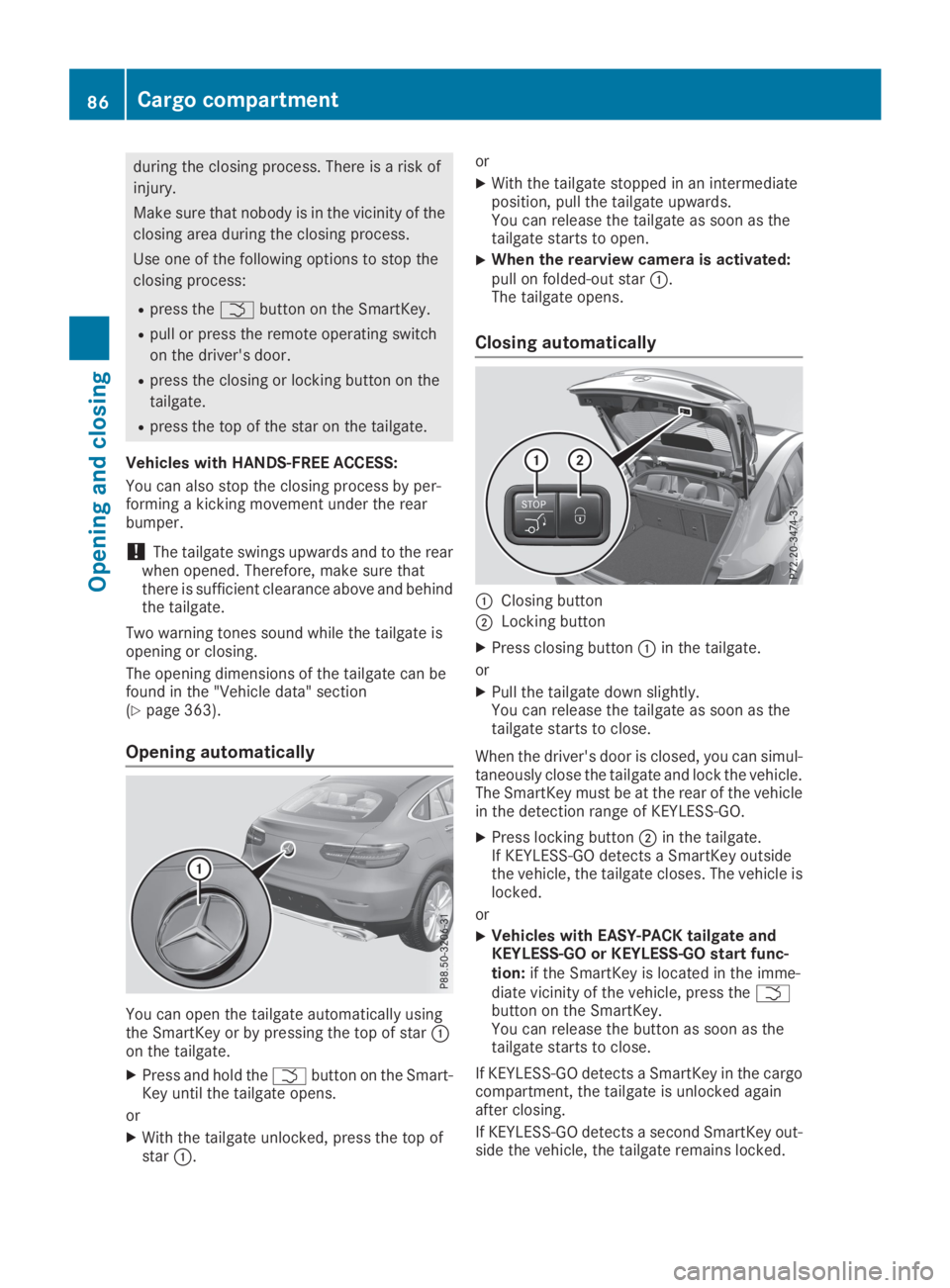
You can open the tailgate automatically usingthe SmartKey or by pressing the top of starCon the tailgate.
XPress and hold theTbutton on the Smart-Key until the tailgate opens.
or
XWith the tailgate unlocked, press the top ofstarC.
or
XWith the tailgate stopped in an intermediateposition, pull the tailgate upwards.You can release the tailgate as soon as thetailgate starts to open.
XWhen the rearview camera is activated:pull on folded-out starC.The tailgate opens.
Closing automatically
CClosing button
DLocking button
XPress closing buttonCin the tailgate.
or
XPull the tailgate down slightly.You can release the tailgate as soon as thetailgate starts to close.
When the driver's door is closed, you can simul-taneously close the tailgate and lock the vehicle.The SmartKey must be at the rear of the vehiclein the detection range of KEYLESS-GO.
XPress locking buttonDin the tailgate.If KEYLESS-GO detects a SmartKey outsidethe vehicle, the tailgate closes. The vehicle islocked.
or
XVehicles with EASY-PACK tailgate andKEYLESS-GO or KEYLESS-GO start func-tion:if the SmartKey is located in the imme-diate vicinity of the vehicle, press theTbutton on the SmartKey.You can release the button as soon as thetailgate starts to close.
If KEYLESS-GO detects a SmartKey in the cargocompartment, the tailgate is unlocked againafter closing.
If KEYLESS-GO detects a second SmartKey out-side the vehicle, the tailgate remains locked.
86Cargo compartment
Opening and closing
Page 92 of 370
Make sure that nobody touches the side win-
dow during the opening procedure. If some-
body becomes trapped, release the switch or
pull the switch to close the side window again.
GWARNING
While closing the side windows, body parts in
the closing area could become trapped. There
is a risk of injury.
When closing make sure that no parts of the
body are in the closing area. If somebody
becomes trapped, release the switch or press
the switch to open the side window again.
GWARNING
If children operate the side windows they
could become trapped, particularly if they are
left unsupervised. There is a risk of injury.
Activate the override feature for the rear side
windows. When leaving the vehicle, always
take the SmartKey with you and lock the vehi-
cle. Never leave children unsupervised in the
vehicle.
Side window reversing feature
The side windows are equipped with an auto-matic reversing feature. If a solid object blocksor restricts a side window from travelingupwards during the automatic closing process,the side window opens again automatically. Dur-ing the manual closing process, the side windowonly opens again automatically after the corre-sponding switch is released. The automaticreversing feature is only an aid and does notrelieve you of the responsibility of paying atten-tion when closing a side window.
GWARNING
The reversing feature does not react:
Rto soft, light and thin objects, e.g. small fin-
gers
Rwhile adjusting
This means that the reversing feature cannot
prevent someone being trapped in these sit-
uations. There is a risk of injury.
Make sure that no body parts are in close
proximity during the closing procedure. If
someone becomes trapped, press theb
button to open the side window again.
Opening and closing the side win-
dows
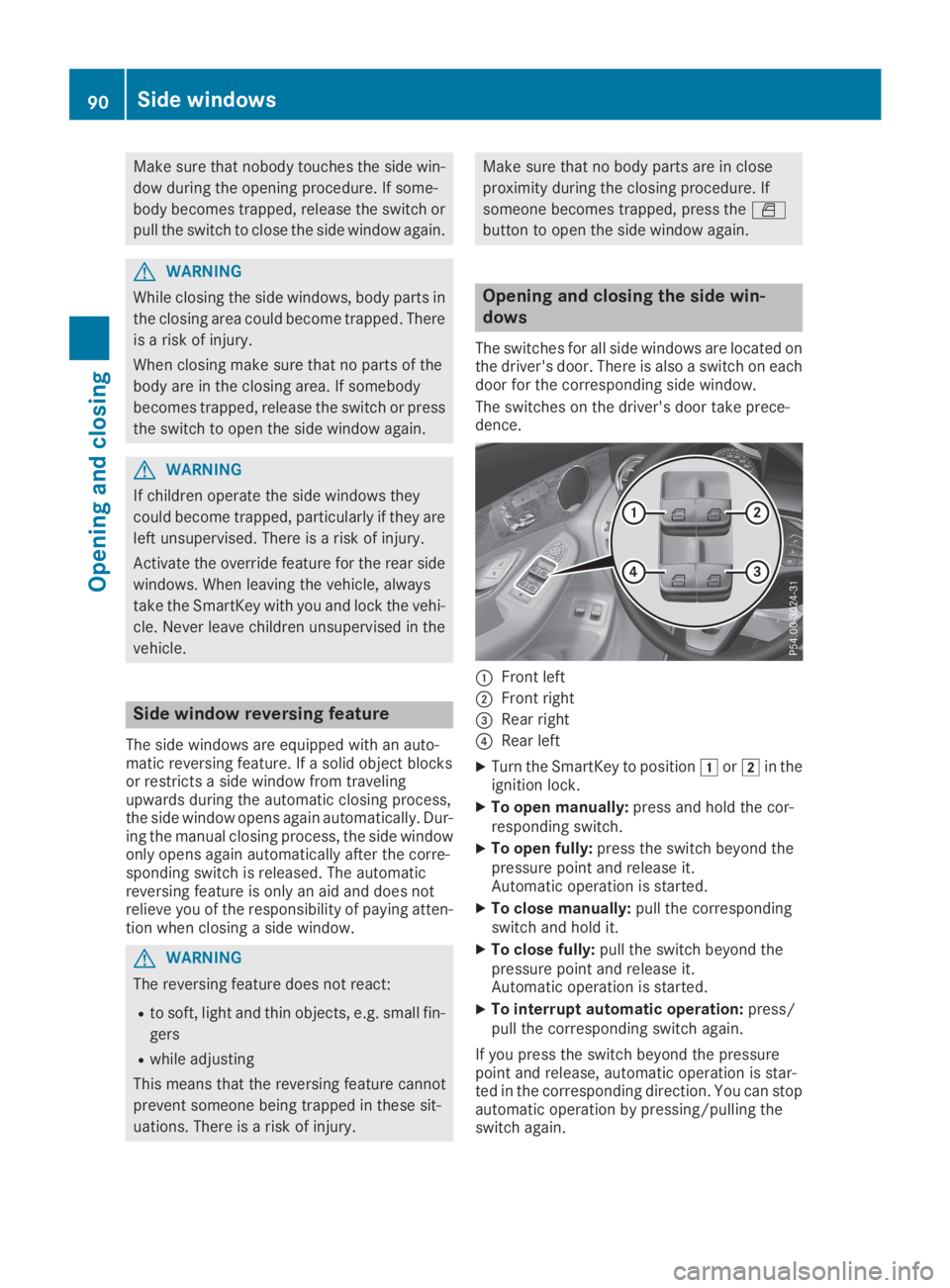
The switches for all side windows are located onthe driver's door. There is also a switch on eachdoor for the corresponding side window.
The switches on the driver's door take prece-dence.
CFront left
DFront right
Page 94 of 370
Make sure you only touch recessed sensorsurfaceC.
XMake sure that all the side windows and thesliding sunroof are closed.
XTo interrupt convenience closing:releaserecessed sensor surfaceCon the door han-dle.
Resetting the side windows
If a side window can no longer be closed fully,you must reset it.
XClose all the doors.
XTurn the SmartKey to positionGorHin theignition lock.
XPull the corresponding switch on the doorcontrol panel until the side window is com-pletely closed (Ypage 90).
XHold the switch for an additional second.
If the side window opens again slightly:
XImmediately pull the corresponding switch onthe door control panel until the side window iscompletely closed (Ypage 90).
XHold the switch for an additional second.
XIf the respective side window remains closedafter the button is released, then it has beenset correctly. If this is not the case, repeat thesteps above.
Problems with the side windows
GWARNING
If you close a side window again immediately after it has been blocked or reset, the side window
closes with increased or maximum force. The reversing feature is then not active. Parts of the
body could be trapped in the closing area in the process. This poses an increased risk of injury or
even fatal injury.
Make sure that no parts of the body are in the closing area. To stop the closing process, release
the switch or push the switch again to reopen the side window.
ProblemPossible causes/consequences andPPSolutions
A side window cannot beclosed because it isblocked by objects, e.g.leaves in the windowguide.
XRemove the objects.
XClose the side window.
A side window cannot beclosed and you cannotsee the cause.
If a side window is obstructed during closing and reopens againslightly:
XImmediately after the window blocks, pull the corresponding switchagain until the side window has closed.The side window is closed with increased force.
If a side window is obstructed again during closing and reopens againslightly:
XImmediately after the window blocks, pull the corresponding switchagain until the side window has closed.The side windows are closed without the automatic reversing fea-ture.
92Side windows
Opening and closing
Page 95 of 370

Sliding sunroof
Important safety notes
GWARNING
While opening and closing the sliding sunroof,
body parts in close proximity could become
trapped. There is a risk of injury.
Make sure that no body parts are in close
proximity during the opening and closing pro-
cedures.
If somebody becomes trapped:
Rrelease the switch immediately, or
Rduring automatic operation, push the
switch briefly in any direction
The opening or closing procedure will be stop-
ped.
GWARNING
If children operate the sliding sunroof they
could become trapped, particularly if they are
left unsupervised. There is a risk of injury.
When leaving the vehicle, always take the
SmartKey with you and lock the vehicle. Never
leave children unsupervised in the vehicle.
!Only open the sliding sunroof if it is free ofsnow and ice. Otherwise, malfunctions mayoccur.
Do not allow anything to protrude from thesliding sunroof. Otherwise, the seals could bedamaged.
!The weather can change abruptly. It couldstart to rain or snow. Make sure that the slid-ing sunroof is closed when you leave the vehi-cle. The vehicle electronics can be damaged ifwater enters the vehicle interior.
Resonance noises can occur in addition to theusual airflow noises when the sliding sunroof isopen. They are caused by minor pressure fluc-tuations in the vehicle interior. Change the posi-tion of the sliding sunroof or open a side windowslightly to reduce or eliminate these noises.
Sliding sunroof reversing feature
The sliding sunroof is equipped with an auto-matic reversing feature. If a solid object blocks
or restricts the sliding sunroof during the closingprocess, the sliding sunroof opens again auto-matically. The automatic reversing feature isonly an aid and is no substitute for your attentionwhen closing the sliding roof.
GWARNING
The reversing feature does not react:
Rto soft, light and thin objects, e.g. small fin-
gers
Rover the last 1/6 in (4 mm) of the closing
movement
Rduring resetting
Rwhen closing the sliding sunroof again man-
ually immediately after automatic reversing
This means that the reversing feature cannot
prevent someone being trapped in these sit-
uations. There is a risk of injury.
Make sure that no body parts are in close
proximity during the closing procedure.
If somebody becomes trapped:
Rrelease the switch immediately, or
Rpress the switch in any direction during the
automatic closing process
The closing process is stopped.
Operating the sliding sunroof
Opening and closing
CTo raise
DTo open
Page 112 of 370
![MERCEDES-BENZ GLC 2019 Owners Manual When the engine is running and the vehicle isstationary: if you move the selector lever from adriving position to], the daytime driving lightsand low-beam headlamps go out after threeminutes.
When th](/img/4/59088/w960_59088-111.png "MERCEDES-BENZ GLC 2019 Owners Manual When the engine is running and the vehicle isstationary: if you move the selector lever from adriving position to], the daytime driving lightsand low-beam headlamps go out after threeminutes.
When th")
When the engine is running and the vehicle isstationary: if you move the selector lever from adriving position to], the daytime driving lightsand low-beam headlamps go out after threeminutes.
When the engine is running, the vehicle is sta-tionary and in bright ambient light: if you turn thelight switch to the`position, the daytimerunning lamps and parking lamps switch on.
If the engine is running and you turn the lightswitch to theXposition, the manual settingstake precedence over the daytime runninglamps.
Low-beam headlamps
GWARNING
When the light switch is set toX, the low-
beam headlamps may not be switched on
automatically if there is fog, snow or other
causes of poor visibility due to the weather
conditions such as spray. There is a risk of an
accident.
In such situations, turn the light switch to
X.
Even if the light sensor does not detect that it isdark, the parking lamps and low-beam head-lamps switch on when the ignition is switched onand the light switch is set to theXposition.This is a particularly useful function in the eventof rain and fog.
XTo switch on the low-beam headlamps:turn the SmartKey to positionHin the igni-tion lock or start the engine.
XTurn the light switch to theXposition.The greenXindicator lamp in the instru-ment cluster lights up.
Rear fog lamp
The rear fog lamp improves visibility of yourvehicle for the traffic behind in the event of thickfog. You must observe the legal requirementsfor the country in which you are currently drivingwhen operating the rear fog lamp.
XTo switch on the rear fog lamp:turn theSmartKey in the ignition lock to positionHorstart the engine.
XTurn the light switch to theXorXposition.
XPress the^button.The yellow^indicator lamp on the instru-ment cluster lights up.
Parking lamps
!If the battery charge is very low, the parkinglamps or standing lamps are automaticallyswitched off to enable the next engine start.Always park your vehicle safely and in a well litarea, in accordance with the relevant legalstipulations. Avoid using the`parkinglamps over a period of several hours. If pos-sible, switch on the right-handdor left-handcstanding lamps.
XTo switch on the parking lamps:turn thelight switch to the`position.The green`indicator lamp on the instru-ment cluster lights up.
Standing lamps
Switching on the standing lamps ensures thecorresponding side of the vehicle is illuminated.
XTo switch on the parking lamp:turn theSmartKey to positionZin the ignition lock orremove the SmartKey.
XTurn the light switch to thec(left-handside of the vehicle) ord(right-hand side ofthe vehicle) position.
Combination switch
CHigh-beam headlamps
DTurn signal, right
110Exterior lighting
Lights and windshield wipers
Page 114 of 370
The system automatically adapts the low-beamheadlamp range depending on the distance tothe other vehicle. Once the system no longerdetects any other vehicles, it reactivates thehigh-beam headlamps.
The system's optical sensor is located behindthe windshield near the overhead control panel.
Important safety notes
GWARNING
Adaptive Highbeam Assist does not recognize
road users:
Rwho have no lights, e.g. pedestrians
Rwho have poor lighting, e.g. cyclists
Rwhose lighting is blocked, e.g. by a barrier
On very rare occasions, Adaptive Highbeam
Assist may fail to recognize other road users
that have lights, or may recognize them too
late. In this, or in similar situations, the auto-
matic high-beam headlamps will not be deac-
tivated or will be activated regardless. There is
a risk of an accident.
Always carefully observe the traffic conditions
and switch off the high-beam headlamps in
good time.
Adaptive Highbeam Assist cannot take intoaccount road, weather or traffic conditions.Adaptive Highbeam Assist is only an aid. You areresponsible for adjusting the vehicle's lightingto the prevailing light, visibility and traffic con-ditions.
In particular, the detection of obstacles can beimpaired if:
Rthere is poor visibility, e.g. due to fog, heavyrain or snow
Rthere is dirt on the sensors or anything elsecovering the sensors
Switching Adaptive Highbeam Assist
on/off
XTo switch on:turn the light switch to theXposition.
XPress the combination switch forwardsbeyond the pressure point (Ypage 110).The
Page 134 of 370
To start the vehicle without actively using theSmartKey:
Rthe Start/Stop button must be inserted in theignition lock.
Rthe SmartKey must be in the vehicle.
Rthe vehicle must not be locked with theSmartKey or KEYLESS-GO. (Ypage 78)
Do not keep the SmartKey:
Rwith electronic devices, e.g. a mobile phoneor another SmartKey.
Rwith metallic objects, e.g. coins or metal foil.
Rinside metallic objects, e.g. a metal case.
This can affect the functionality of the Smart-Key.
If you lock the vehicle with the SmartKey remotecontrol or with KEYLESS-GO, after a short time:
Ryou will not be able to switch on the ignitionwith the Start/Stop button.
Ryou will no longer be able to start the enginewith the Start/Stop button until the vehicle isunlocked again.
If you lock the vehicle centrally using the buttonon the front door (Ypage 83), you can continueto start the engine with the Start/Stop button.
The engine can be switched off while the vehicleis in motion by pressing and holding the Start/Stop button for three seconds. This functionoperates independently of the ECO start/stopautomatic engine switch-off function.
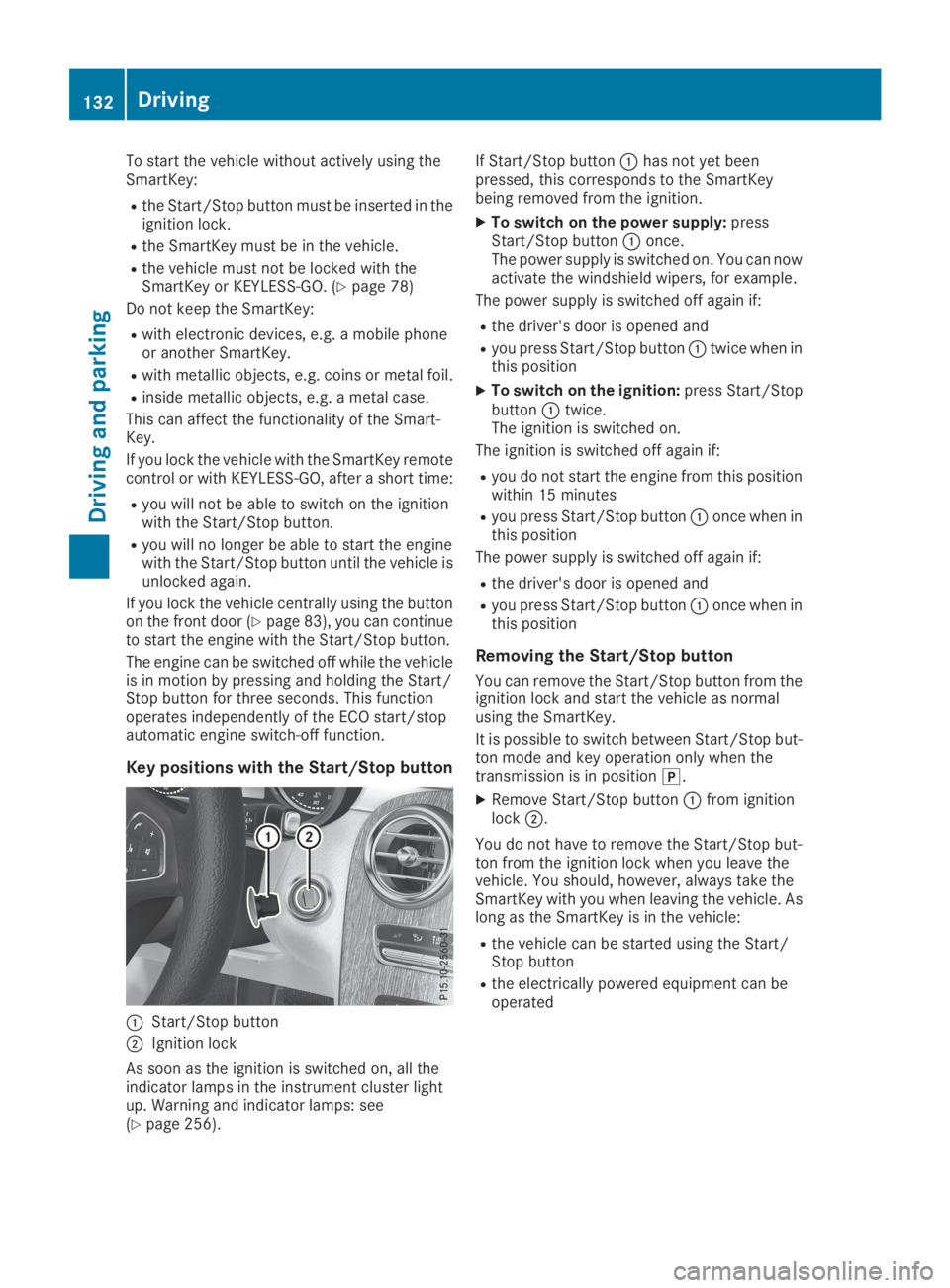
Key positions with the Start/Stop button
CStart/Stop button
DIgnition lock
As soon as the ignition is switched on, all theindicator lamps in the instrument cluster lightup. Warning and indicator lamps: see(Ypage 256).
If Start/Stop buttonChas not yet beenpressed, this corresponds to the SmartKeybeing removed from the ignition.
XTo switch on the power supply:pressStart/Stop buttonConce.The power supply is switched on. You can nowactivate the windshield wipers, for example.
The power supply is switched off again if:
Rthe driver's door is opened and
Ryou press Start/Stop buttonCtwice when inthis position
XTo switch on the ignition:press Start/StopbuttonCtwice.The ignition is switched on.
The ignition is switched off again if:
Ryou do not start the engine from this positionwithin 15 minutes
Ryou press Start/Stop buttonConce when inthis position
The power supply is switched off again if:
Rthe driver's door is opened and
Ryou press Start/Stop buttonConce when inthis position
Removing the Start/Stop button
You can remove the Start/Stop button from theignition lock and start the vehicle as normalusing the SmartKey.
It is possible to switch between Start/Stop but-ton mode and key operation only when thetransmission is in position].
XRemove Start/Stop buttonCfrom ignitionlockD.
You do not have to remove the Start/Stop but-ton from the ignition lock when you leave thevehicle. You should, however, always take theSmartKey with you when leaving the vehicle. Aslong as the SmartKey is in the vehicle:
Rthe vehicle can be started using the Start/Stop button
Rthe electrically powered equipment can beoperated
132Driving
Driving and parking
Page 135 of 370
Starting the engine
Important safety notes
GWARNING
If children are left unsupervised in the vehicle,
they could:
Ropen the doors, thus endangering other
people or road users.
Rget out and disrupt traffic.
Roperate the vehicle's equipment.
Additionally, children could set the vehicle in
motion if, for example, they:
Rrelease the parking brake.
Rshifting the automatic transmission out of
park positionP
RStart the engine.
There is a risk of an accident and injury.
When leaving the vehicle, always take the
SmartKey with you and lock the vehicle. Never
leave children or animals unattended in the
vehicle. Always keep the SmartKey out of
reach of children.
GDANGER
Combustion engines emit poisonous exhaust
gases such as carbon monoxide. Inhaling
these exhaust gases is hazardous to health
and can result in poisoning. There is a risk of
fatal injury. Therefore, never leave the engine
running an enclosed space without adequate
ventilation.
GWARNING
Flammable materials introduced through
environmental influence or by animals can
ignite if in contact with the exhaust system or
parts of the engine that heat up. There is a risk
of fire.
Carry out regular checks to make sure that
there are no flammable foreign materials in
the engine compartment or in the exhaust
system.
General notes
The catalytic converter is preheated for up to30 seconds after a cold start. The sound of theengine may change during this time.
Automatic transmission
XShift the transmission to position](Ypage 141).The transmission position indicator on themultifunction display shows](Ypage 142).
iYou can start the engine in transmissionposition]and\\.
Starting procedure with the SmartKey
To start the engine using the SmartKey insteadof the Start/Stop button, pull the Start/Stopbutton out of the ignition lock.
XTurn the SmartKey to positionIin the igni-tion lock and release it as soon as the engineis running.
If the engine will not start:
XRemove the SmartKey from the ignition lock.
XReinsert the SmartKey into the ignition lockafter a short waiting period.
XTurn the SmartKey to positionHin the igni-tion lock (Ypage 131).The indicator lamps in the instrument clusterlight up (Ypage 256).
XTurn the SmartKey to positionIin the igni-tion lock (Ypage 131) and release it as soonas the engine is running.
Starting procedure with the Start/Stop
button
The Start/Stop button is only available on vehi-cles with KEYLESS-GO or the KEYLESS-GO startfunction.
The Start/Stop button can be used to start thevehicle manually without inserting the SmartKeyinto the ignition lock. The Start/Stop buttonmust be inserted in the ignition lock and theSmartKey must be in the vehicle. This mode forstarting the engine operates independently ofthe ECO start/stop automatic engine start func-tion.
You can start the engine if a valid SmartKey is inthe vehicle. Switch off the engine and always
Driving133
Driving and parking
Z